Shopify offers online sellers a practical starting point for sales tax calculation across the United States. Its built-in tools apply correct tax rates at checkout, surface threshold exposure, and support automated filing for eligible Shopify Tax users. For a single-channel store, this can meaningfully reduce daily compliance work.
Yet Shopify automated filing is not available for all merchants or order types. It works only for eligible US stores that use Shopify tax, and the eligibility window narrows further once you sell through external channels, run multiple stores, or operate outside the United States.
Shopify automated sales tax can support calculation and eligible filings, yet the seller still owns overall tax compliance. This blog explains how the system works, where it falls short, and why many growing Shopify merchants still rely on Galvix for registrations, multi-channel filings, and state correspondence.

What Does Shopify Tax Actually Cover?
Shopify Sales Tax handles real-time tax calculations at checkout for Shopify orders, surfaces nexus thresholds through its insights dashboard, and supports automated filing for eligible US stores. Coverage has clear limits around store eligibility, order types, sales channels, and filing scenarios such as Streamlined Sales Tax and amended returns.
What Shopify Tax Includes for US Sales Tax
Shopify Tax covers the calculation layer well for stores selling exclusively through the Shopify platform with the right configuration.
- Real-time calculation of sales tax rates at checkout based on the buyer's shipping address and the assigned product category for each item.
- A Nexus insights dashboard showing states where Shopify-processed revenue approaches or has crossed economic nexus thresholds for that state.
- Automated filing support for eligible US stores using Shopify Tax, subject to store, order, channel, and configuration requirements.
- Return preview inside Shopify Admin for eligible automated filings before submission through Shopify Tax to the relevant state authority.
- The Shop sales channel, treated as a marketplace facilitator, automatically collects and remits collected tax separately from your storefront.
What Shopify Tax Does Not Include
The platform leaves several compliance areas to the merchant, which become harder to manage as annual sales grow across channels.
- State registration support is unavailable; merchants must apply for a sales tax permit through each state revenue portal before they collect sales tax.
- Automated filing does not run across multiple Shopify stores simultaneously, which creates issues when several storefronts sit under one legal entity.
- The system does not consolidate orders from multiple Shopify stores into a single state return for the same legal entity.
- Non-US legal entities selling into the US through Shopify usually fall outside the eligibility scope for automated filing.
- Automated filing does not support streamlined sales tax filings, past returns, amended filings, or state prepayments.
- Orders calculated through Basic Tax, Manual Tax, or third-party tax apps during a period are excluded from automated filing reports.
- Cross-channel nexus tracking is absent; sales data from Amazon, wholesale, or social media storefronts stays invisible to the dashboard.
- Audit defense is not included at any Shopify Tax tier; notice response and state audit handling remain the merchant's responsibility.
Also Read: 12 Best Sales Tax Software for US Businesses
How Do You Set Up Shopify Automated Sales Tax?
Setup begins inside Shopify Admin under Taxes and Duties, yet correct configuration depends on completed state registrations, accurate product categorization, and active review of nexus thresholds. The Shopify automated sales tax workflow only works as well as the underlying tax settings the merchant configures and maintains over time.
Enabling Tax Collection in Shopify Settings
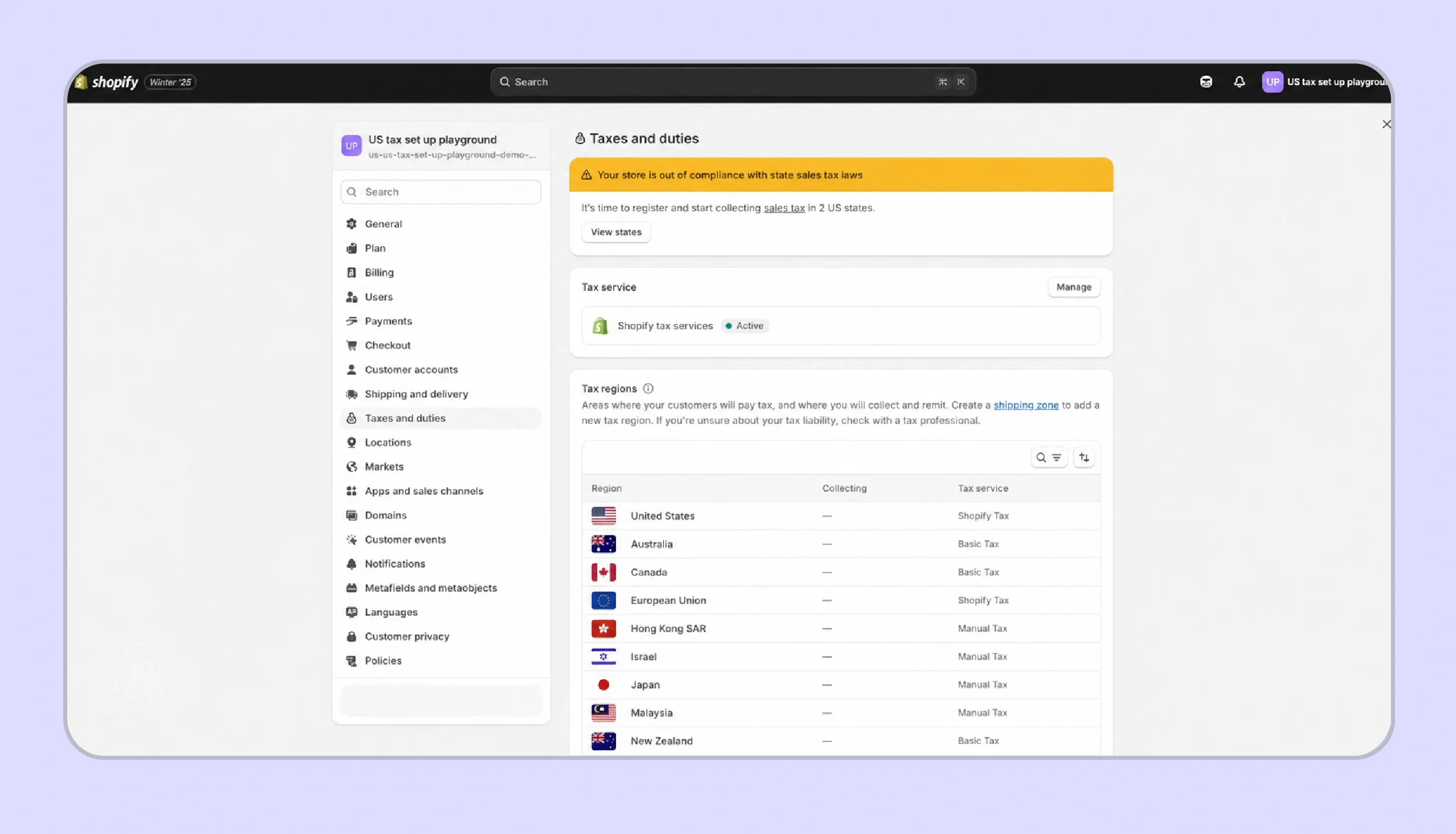
- Log into Shopify Admin, navigate to Settings and then Taxes and Duties, and confirm the United States section appears as your primary tax region.
- Add each state where you hold a valid sales tax ID to activate threshold monitoring and checkout calculation for that jurisdiction.
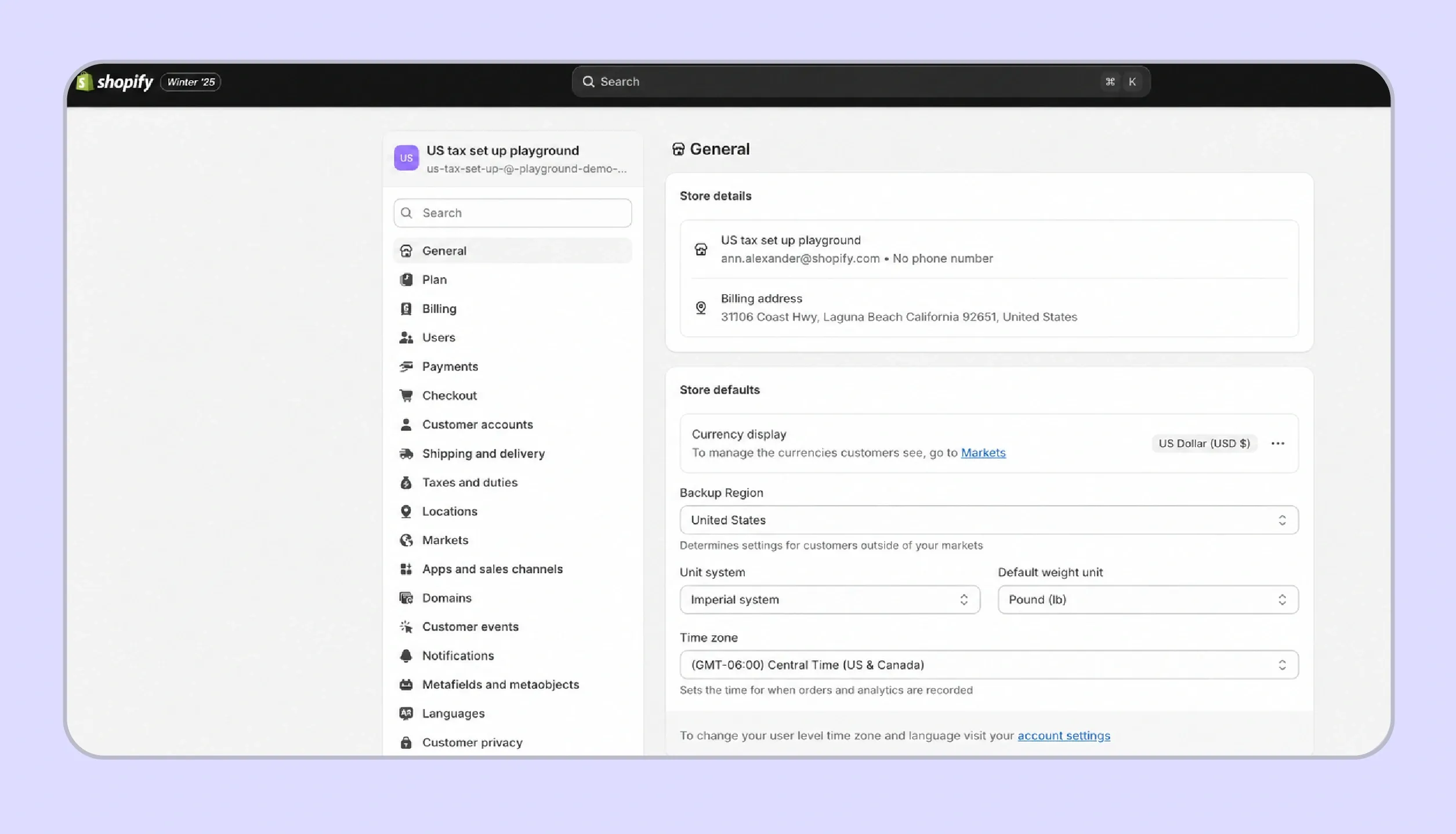
Confirm your Shopify store owner address is accurate, because this determines your home physical nexus state and influences outbound rate logic.
Configuring Product Tax Categories and Exemptions

- Assign the correct product tax category to every SKU in your catalog, because categories drive taxability rules that vary significantly across different states.
- Mark individual products as tax-exempt where applicable, using Shopify's product-level overrides for categories such as groceries, clothing, or digital goods.
- Configure customer-level tax exemptions for B2B buyers and resellers, though Shopify does not collect, store, or validate the underlying exemption certificates itself.
Reviewing the Nexus Insights Dashboard
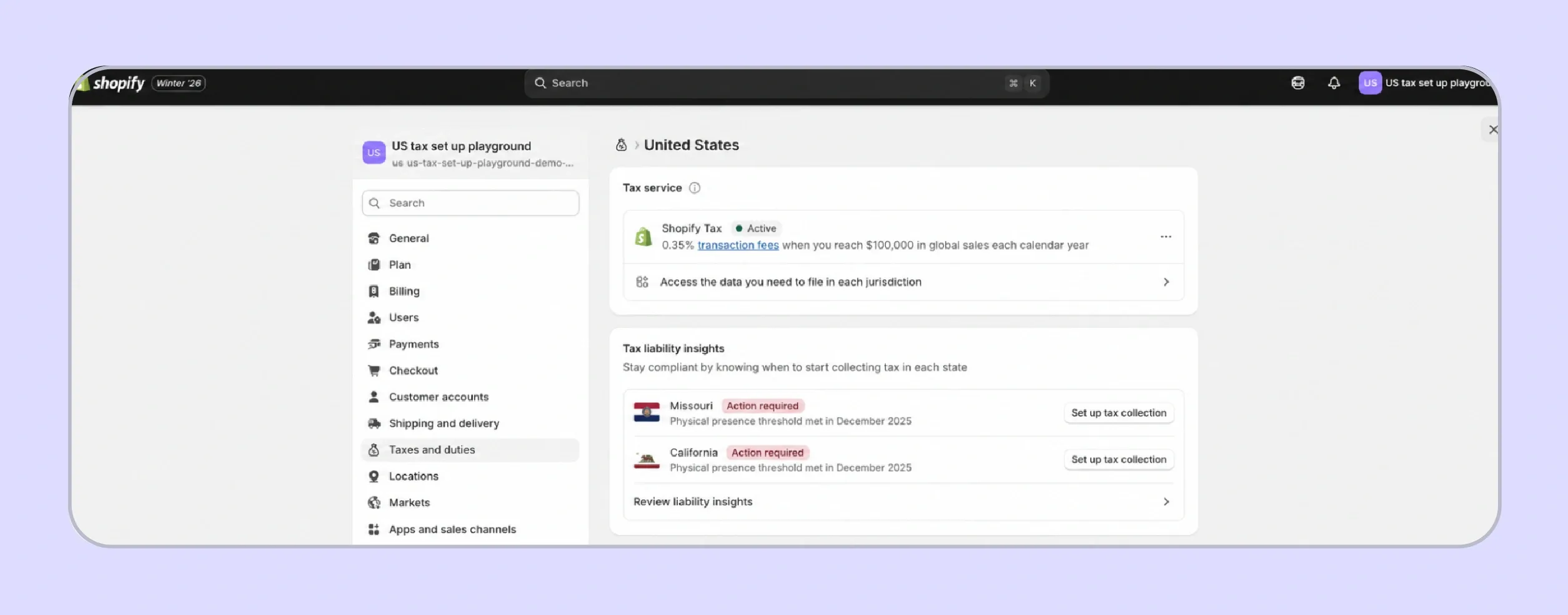
- Open the Taxes and Duties section in Shopify Admin and review the nexus insights panel for states flagged as approaching or having crossed thresholds.
- Illinois removed its 200-transaction threshold effective January 1, 2026; cumulative revenue from all channels now determines sales tax nexus there.
- Shopify's threshold alerts reflect Shopify-processed revenue only; Amazon, wholesale, and other channel revenue must be tracked manually alongside the dashboard.
Who Qualifies for Shopify Automated Filing?
Shopify automated sales tax filing supports eligible US stores that use Shopify Tax, though eligibility depends on store setup and filing requirements. Many growing sellers still need a separate compliance review when they operate multiple stores, sell outside Shopify, or need prior-period filing support.
Single Shopify Store Requirement
Shopify automated filing operates on a per-store basis, which means each Shopify storefront generates and files its own returns. This creates friction for organizations running multiple Shopify stores under a single legal entity, because state returns require a consolidated view of revenue tied to that entity's sales tax ID.
When a brand operates two or three Shopify storefronts for different product lines or regions under one tax registration, automated filing cannot combine them into a single return. The merchant must reconcile transactions across stores manually, which can create reporting mismatches that the state may flag during a routine review.
US Store and Shopify Tax Requirement
Shopify automated sales tax filing is available only for eligible US stores that use Shopify Tax as the active tax service for the full filing period. If a store switches between Shopify Tax, Basic Tax, Manual Tax, or a third-party app mid-period, some later orders may be excluded from Shopify automated filing reports.
Non-US legal entities selling into the US through Shopify generally do not qualify for the automated filing workflow. Merchants moving from another tax setup should plan the transition carefully so that calculations, sales tax collection, and filing data remain consistent throughout the reporting window and support every return for state review.
Order and Channel Restrictions
Automated filing covers eligible Shopify platform sales where the merchant is the merchant of record for each transaction. Imported orders, unsupported channels, and marketplace facilitator sales filed by another platform may be excluded from the merchant's automated returns, so channel source review matters before every filing period in Shopify Admin.
Marketplace rules deserve careful attention because Amazon, Etsy, TikTok, and similar platforms may collect and remit US sales tax on behalf of sellers under marketplace facilitator laws. Some states still require marketplace first sale activity in gross totals, which Shopify automated sales tax filing cannot fully reconcile without manual review during filing.
Filing Scenario Restrictions
Shopify automated filing supports current and upcoming returns, rather than past filings, amended returns, or state-specific prepayment workflows. The system also does not support Streamlined Sales Tax (SST) filing, which several SST member states use to remit sales tax through state-approved filing processes outside the standard automated Shopify filing workflow.
Refunds can be tied back to original line items when Shopify calculates return values, although complex retroactive adjustments often require manual handling. Merchants with SST exposure, prior-period gaps, or amended return needs often engage Galvix, because their filing requirements extend beyond Shopify's eligible automated filing scope once channels or stores expand.
When Do Shopify Merchants Need to Think About Sales Tax?
Shopify merchants should review sales tax obligations whenever they create physical presence in a state or cross economic nexus thresholds based on combined sales volume across all channels. Following South Dakota v. Wayfair, every state with a sales tax has enforced its own rules, and registration requirements take effect the moment economic activity exceeds defined thresholds.
Physical Nexus Triggers for Shopify Merchants
A small footprint in any state can trigger sales tax obligations immediately, well before revenue thresholds matter.
- Maintaining an office, warehouse, retail location, or employee in a state creates physical presence and an instant registration requirement.
- Inventory stored in a third-party fulfillment center or Amazon FBA facility in any state triggers physical nexus regardless of order volume.
- Remote employees working from home in a state create nexus for the employer no matter where the storefront ships from.
Economic Nexus Thresholds Across US States in 2026
- Economic thresholds vary by state, and the transaction-count component has been disappearing in several jurisdictions over the past two years.
- Most states require registration once cumulative revenue from all channels exceeds $100,000 over a rolling 12-month period or calendar year.
- Illinois removed its 200-transaction threshold effective January 1, 2026; only the $100,000 sales threshold now applies for remote retailers.
- California and New York both apply a $500,000 revenue threshold, making them later triggers for most growing Shopify stores.
- Shopify's nexus dashboard reflects Shopify channel revenue only; combined multi-channel revenue stays invisible, and thresholds can be missed silently.
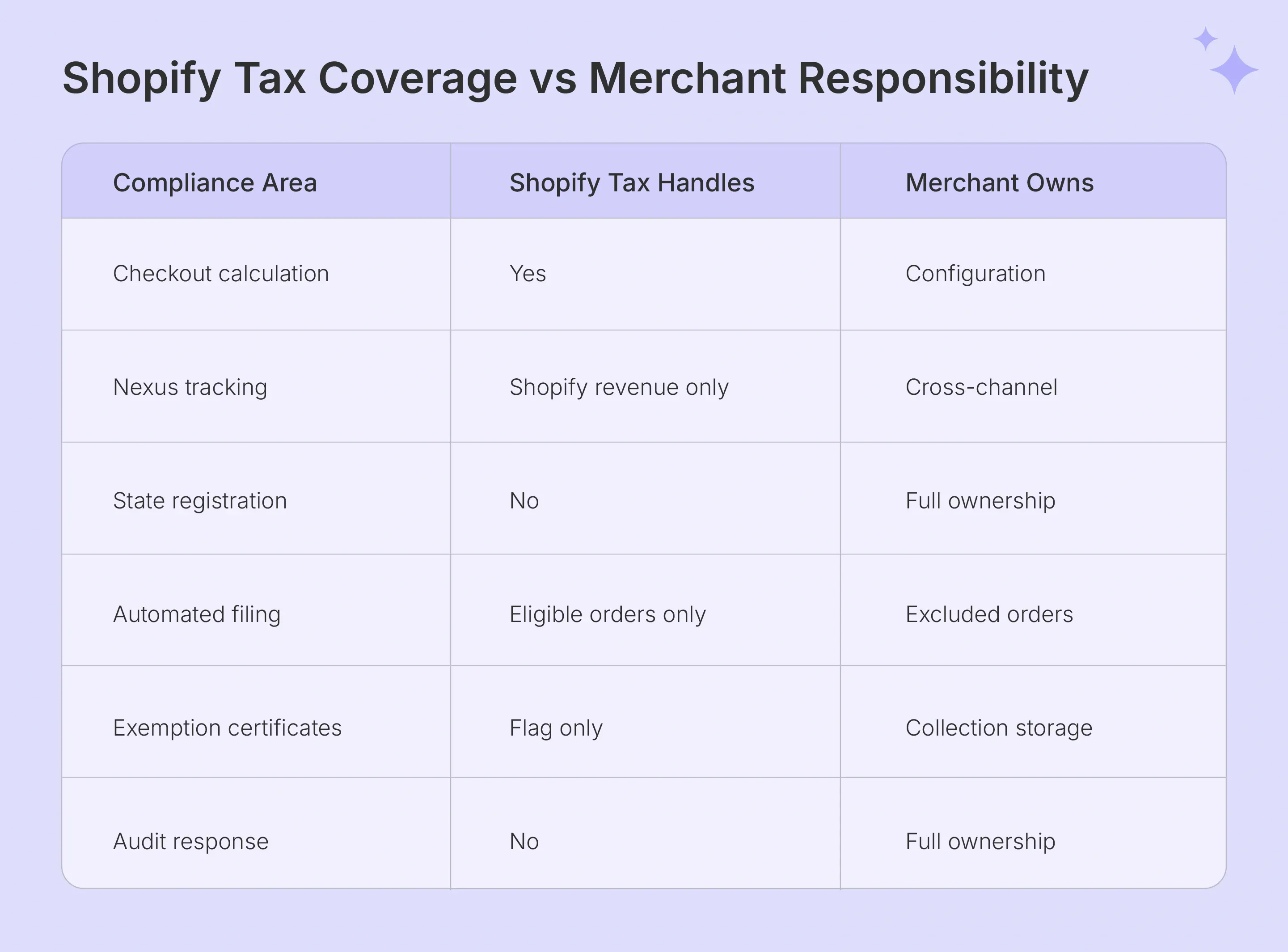
Where Does Shopify Tax Fall Short for Growing Businesses?
Shopify Tax performs well inside the Shopify storefront, yet growing merchants usually need broader compliance coverage. Multi-channel revenue, multi-store entities, exemption certificate handling, and SST returns extend beyond what Shopify automated sales tax filing addresses. The platform strongly supports calculations, while the surrounding compliance work falls back on the merchant or an external partner.
Nexus Tracking Only Covers Shopify Revenue
Shopify Tax monitors threshold exposure for transactions processed through the Shopify storefront, not for those processed through Amazon, Etsy, wholesale invoicing, or B2B portals outside Shopify.
Consider a merchant with $60,000 in Shopify sales and $50,000 in Amazon sales into the same state during a 12-month period. Combined revenue has crossed the $100,000 threshold, yet the Shopify dashboard displays only $60,000 and shows the state as below the threshold.
Missing a threshold because of incomplete cross-channel visibility creates retroactive back-tax liability from the date the obligation first applied. State revenue departments treat the underlying nexus event as triggered regardless of where the merchant tracked sales data.
Also Read: WooCommerce Sales Tax: All You Need to Know in 2026
Automated Filing Has Eligibility Limits
Shopify automated filing works only for eligible US stores that use Shopify Tax, so many merchants cannot rely on it as their full-year filing workflow.
Multiple Shopify stores under the same legal entity cannot be consolidated into one automated filing return through Shopify Tax. Each storefront generates its own returns, which complicates state filings that expect entity-level revenue figures.
Orders calculated through Basic Tax, Manual Tax, or third-party apps during the period are excluded from automated filing reports. Switching tax services mid-period creates reconciliation gaps that require manual handling before the return deadline.
Automated filing does not support Streamlined Sales Tax, past returns, amended filings, prepayments, or any unsupported sales channel where the merchant is not the merchant of record. Non-US legal entities selling into the US typically need a managed compliance partner for these scenarios.
Also Read: How Stripe Sales Tax Automation Works in 2026
No State Registration or Compliance Workflow
Shopify does not handle state registration at any plan level, so merchants must apply for registration independently through each state's revenue portal before collecting tax in that jurisdiction.
Collecting sales tax without a valid state registration exposes the merchant to penalties under most tax regulations, regardless of whether the sales tax calculations were accurate at checkout.
Once registered, filing frequency, due dates, and return formats vary by state tax law. Ongoing management of these workflows happens entirely outside the Shopify platform and requires sustained operational attention.
Exemption Certificate Management Is Entirely Manual
Shopify allows customer-level tax exemption flags, yet it provides no certificate collection portal, document storage, or expiration tracking for the underlying resale or exemption certificates.
B2B sellers serving resellers, nonprofits, or government buyers face full audit exposure if certificates are missing or expired when a state auditor requests them during a routine review.
No native Shopify Tax feature closes this gap; external certificate management becomes necessary for any merchant with meaningful exempt sales volume across international sales or domestic B2B channels.

How Does Galvix Fill Every Gap That Shopify Tax Leaves Open?
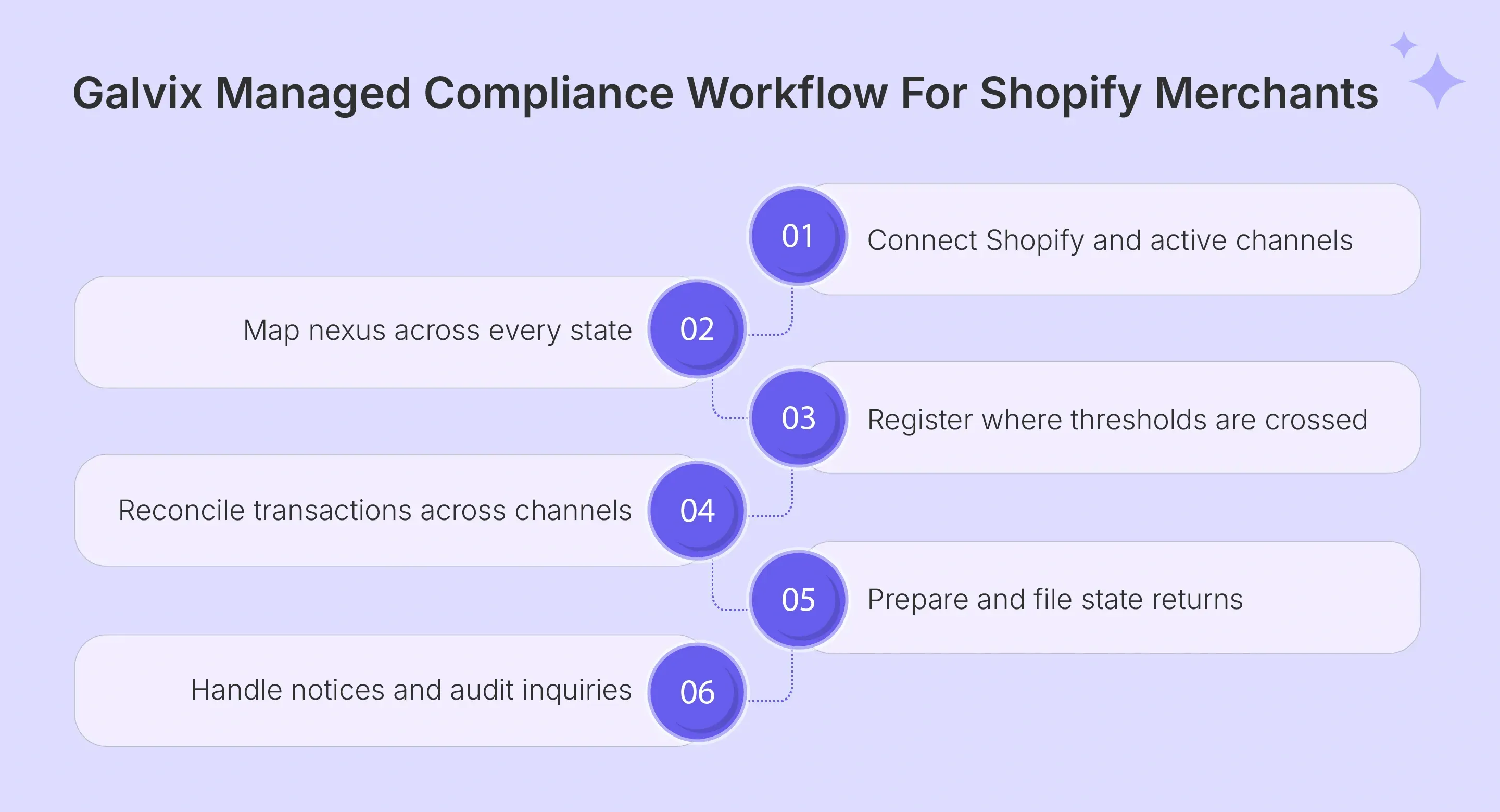
Galvix operates as a managed sales tax compliance layer that works alongside your Shopify setup. It does not currently perform real-time tax determination on Shopify checkout. Instead, the team manages registrations, multi-channel nexus monitoring, expert-prepared returns, exemption certificate handling, and state correspondence around your storefront.
Shopify automated filing supports eligible US merchants, although many businesses fall outside its constraints. These include multi-store entities, non-US legal entities, SST filing needs, and marketplace or wholesale revenue outside Shopify. Galvix connects channels and assigns a named specialist for nexus monitoring through audit response.
Here is what Galvix handles that Shopify Tax does not:
- Multi-channel nexus monitoring across Shopify, Amazon, wholesale, and active storefronts, with proactive alerts at 75%, 85%, and 95% of each state threshold.
- Done-for-you state registrations when nexus is triggered, covering portal work, credentials handoff, and follow-up communication under modular pricing tied to actual work.
- Expert-prepared returns for registered states, reviewed by a named specialist before filing, with reconciliation across Shopify and non-Shopify transaction data.
- Filing support for merchants outside Shopify automated filing eligibility, including multi-store organizations, non-US entities, and businesses with significant external channels.
- Exemption certificate handling for B2B, reseller, nonprofit, and government buyers, where missing documentation during audits creates real exposure.
- Full state correspondence handling, covering notices, filing frequency changes, and audit inquiries, managed directly by the assigned Galvix specialist.
- Galvix pricing is modular, meaning customers pay only for the services they use, rather than the all-inclusive package model used by many larger enterprise tax compliance solution vendors. The exact price depends on the volume of work around each service.
To see how this works against your current setup, here is a quick capability comparison.
| Feature | Shopify Tax | Galvix |
|---|---|---|
| Checkout Tax Determination | Supported for eligible orders | Works alongside Shopify setup |
| Nexus Monitoring | Shopify-visible data | All active sales channels |
| State Registrations | Seller-managed | Done-for-you support |
| Return Filing | Automated for eligible stores | Expert-prepared managed filing |
| Multi-Store Filing | One store at a time | Entity-level compliance review |
| Non-US Legal Entities | Limited support | Managed support available |
| SST Filing | Not supported | Managed support where applicable |
Schedule a Galvix demo to see how managed sales tax compliance works alongside your Shopify store.
Frequently Asked Questions
How much does Shopify Tax cost?
Shopify Tax pricing depends on the plan, store location, annual sales, the current Shopify model for checkout tax calculations, and any automated filing calculation fee. For merchants comparing Shopify's automated sales tax costs, Galvix offers modular, managed compliance pricing for filings, registrations, nexus monitoring, and notices, based on service scope and work volume.
Does Shopify track my sales tax nexus?
Shopify tracks sales tax nexus exposure based solely on Shopify-processed revenue, excluding Amazon, Etsy, wholesale, and other channel activity from the calculation. Galvix layers multi-channel nexus monitoring on top, so combined revenue across Shopify sellers and external channels gets evaluated against state thresholds before exposure becomes a back-tax problem.
Can Shopify handle product-specific tax rates?
Shopify can assign product categories and support product-level overrides, helping stores manage simple catalog taxability within Shopify Tax. Galvix becomes useful when product-specific tax rates involve different states, digital goods, mixed bundles, or exemption rules, because teams need to review taxability logic before filing returns across active jurisdictions each period.
Does Shopify calculate international duties and VAT?
Yes, Shopify can calculate sales tax at checkout when Shopify Tax is active, and the merchant has configured states, products, and exemptions correctly. Shopify automated sales tax still requires filing readiness, as accurate collection remains separate from return filing, payment, and reconciliation by a specialist or partner for each state.
Does Shopify auto-calculate sales tax?
Yes, Shopify collects sales tax automatically at checkout once Shopify Tax is active and the merchant has configured the correct states, products, and exemptions in the tax settings. Calculation does not equal filing; however, even with accurate tax collection, the merchant or a partner still handles state remittance unless the merchant is eligible for automated filing.
Do I need to pay taxes if I sell on Shopify?
Shopify may support automated filing for eligible Shopify Tax merchants, while the Shop channel can act as a marketplace facilitator for supported orders. Many sellers still need Galvix when Shopify automated sales tax gaps involve SST states, multi-store entities, registrations, notices, or channels outside Shopify's filing scope in active periods.
Does Shopify pay your sales tax?
Shopify supports automated filing for eligible merchants on Shopify Tax, and the Shop channel acts as a marketplace facilitator for orders placed there. Many sellers still need external filing support for automated sales tax in Shopify gaps, SST states, multi-store entities, and any channels outside Shopify's eligible automated filing scope.