If your business is registered to collect tax in New Jersey, you must file New Jersey sales tax online through the state Tax Portal. Most registered sellers submit Form ST-50 every quarter, while businesses meeting specific collection thresholds also make payments during the first two months.
The form itself is manageable once the underlying numbers are ready. Your NJ sales tax filing starts with reconciled gross receipts, non-taxable receipts, taxable amounts, marketplace activity, amounts collected from customers, and purchases that may create a use-tax obligation.
This blog explains how to file New Jersey sales tax returns online, prepare Form ST-50, navigate the portal, and avoid filing mistakes. We will also cover exemptions, marketplace transactions, payment requirements, and how Galvix manages recurring filing work for businesses operating across several states.

Who Needs to File New Jersey Sales Tax Online?
Businesses registered to collect New Jersey Sales Tax must submit returns for their assigned periods, including quarters with no sales. Filing obligations can also apply to remote businesses that meet economic nexus thresholds, while marketplace arrangements determine who collects and remits tax on each transaction.
Businesses Registered to Collect New Jersey Sales Tax
A registered business that has authority to collect Sales Tax must continue filing in accordance with its assigned obligations. Registration connects the business to quarterly filing requirements until the account is properly closed.
- Taxable sellers: Retailers that sell taxable goods or services to customers within the state must collect and remit the applicable tax.
- Physical nexus: Inventory, employees, offices, or another physical presence can create collection responsibilities for ecommerce and other sellers.
- Seasonal sellers: Vendors operating at craft fairs, trade shows, flea markets, or temporary locations can still require registration and filing.
- Certificate holders: Businesses receiving a Certificate of Authority must follow the filing requirements attached to that Sales Tax account.
These obligations matter even when a business owner records no activity during a quarter because registered filers must still submit zero returns.
Remote Sellers and Marketplace Sellers
A remote seller without physical operations in the state can still develop sales tax nexus when its New Jersey activity crosses statutory thresholds.
- Remote threshold: Registration applies when qualifying gross revenue exceeds $100,000 or when there are 200 or more separate transactions during the current or prior calendar year.
- Marketplace facilitator: The platform collects and remits tax on qualifying marketplace sales, regardless of the marketplace seller's own economic threshold.
- Direct sales: Sellers should separately track website, invoice, wholesale, and other sales where they remain responsible for tax collection.
Remote sellers should also review how physical presence and economic activity create obligations under the New Jersey sales tax nexus rules before deciding whether registration and filing are required.
What Are New Jersey Sales Tax Filing Requirements?
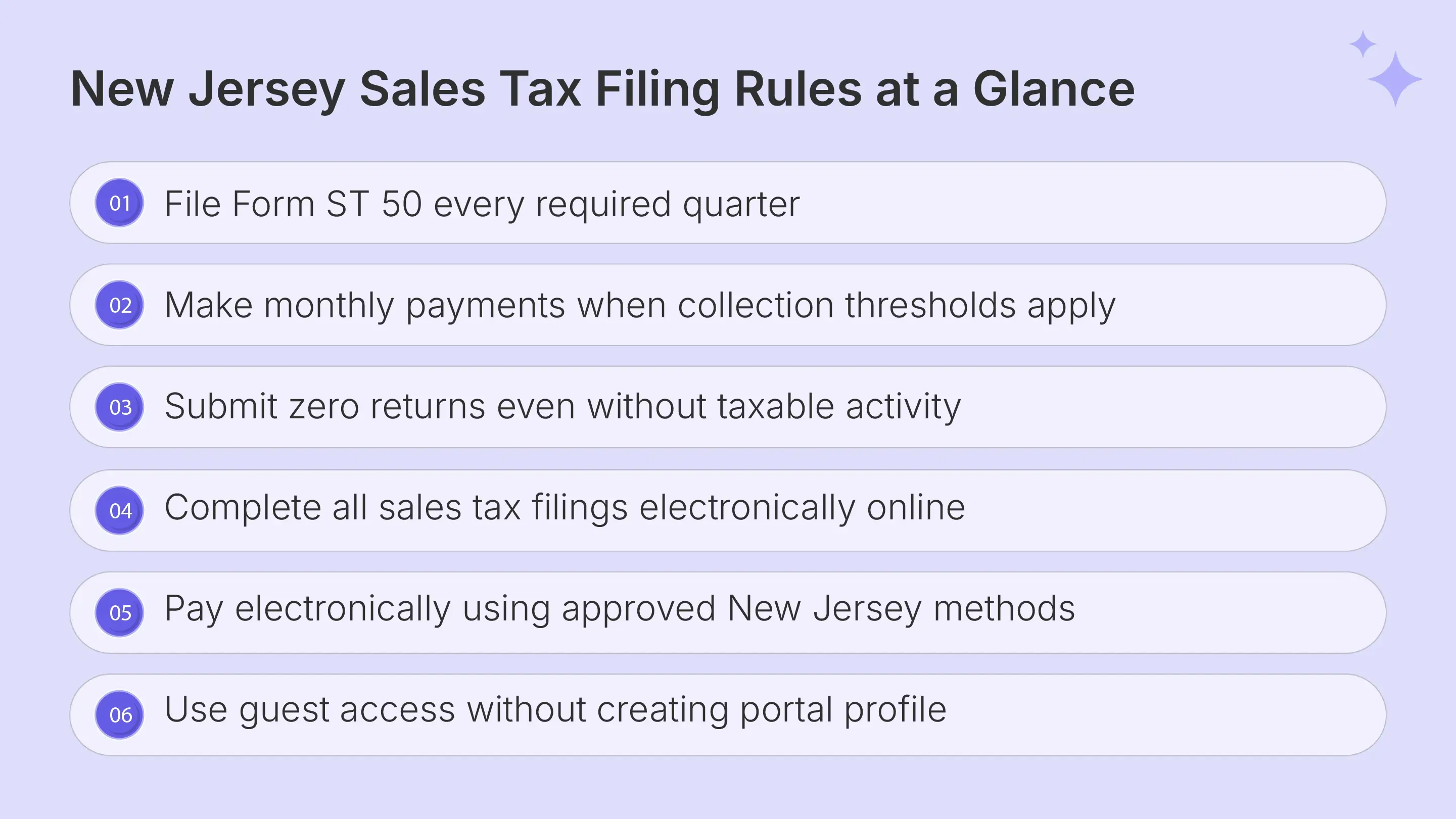
The main New Jersey sales tax filing requirements center on quarterly ST-50 returns, electronic filing, and additional monthly payments for certain higher-volume businesses. Every registered filer submits a quarterly return, including a period with no sales or tax owed.
| Topic | New Jersey Rule |
|---|---|
| Main return | ST-50 Sales and Use Tax Quarterly Return |
| Statewide rate | 6.625% |
| Ordinary local surtax | None |
| Reduced rate | 3.3125% on qualifying UEZ and Salem County sales |
| Filing frequency | Quarterly for registered ST-50 filers |
| Quarterly due date | 20th day after quarter-end |
| Monthly payments | Apply when both statutory collection thresholds are met |
| Payment route | Monthly Voucher through the Tax Portal |
| Zero returns | Required |
| Filing method | Electronic |
The standard sales tax rate is 6.625%. New Jersey does not layer ordinary local sales tax rates onto that statewide rate, although special programs and transaction types can use separate filing forms.
Qualifying sellers in Urban Enterprise Zones can charge the reduced rate of 3.3125% on eligible transactions. Certain Salem County transactions also qualify for that reduced treatment under specific conditions.
Businesses that need a wider view of rates, taxable products, exemptions, nexus, and filing obligations can use the New Jersey sales tax guide for businesses alongside the ST-50 instructions.
Form ST-50 for Quarterly Filing
Form ST-50 is the standard New Jersey sales tax return filed every quarter by businesses assigned to regular Sales and Use Tax reporting. The return reports gross receipts, deductions, taxable receipts, collected tax, and applicable use tax for the three-month period.
The quarterly return remains required when no sales occurred, or no amount is payable. Businesses enter zero figures rather than skipping the filing period altogether.
Monthly Payment Rules for Higher-Volume Sellers
A monthly payment applies when the business collected more than $30,000 in state Sales and Use Tax during the preceding calendar year and owes more than $500 during the first or second month of a quarter.
The current Tax Portal uses the Monthly Voucher option for these payments. A monthly voucher does not replace ST-50, so the business still completes its quarterly filing afterward.
New Jersey Sales Tax Filing Due Dates
Quarterly returns and required monthly payments are due by 11:59 p.m. on the twentieth day following the filing period. When that due date falls on a weekend or legal holiday, the obligation moves to the next business day.
Electronic payments initiated by 11:59 p.m. can still be treated as timely if an electronic check settles on the following business day.
Do not assume a timely filing discount applies simply because another state offers one. Use the amounts calculated by the portal and applicable state instructions.
What Should You Prepare Before Filing New Jersey Sales Tax Online?
Before you file New Jersey sales tax online, reconcile the figures that will feed Form ST-50 instead of calculating them inside the portal. New Jersey sales tax return online filing process starts with reliable sales records and clearly supported deductions.
Businesses selling across several states can also use the sales tax resources hub to check state rules, nexus requirements, rates, and filing guidance before reconciling multi-state transaction data.
Work Out Gross Receipts
Gross receipts should be reconciled across invoicing systems, wholesale records, ecommerce channels, and each relevant point of sale. Shopify businesses that manage transactions across multiple channels can also review how Shopify sales tax automation interacts with managed compliance before preparing return data.
Older ST-50 instructions state that gross receipts include exempt transactions and exclude Sales Tax itself. Marketplace activity should be separated during reconciliation because collection responsibility may belong to the facilitator.
Marketplace-facilitated transactions still count when testing the remote-seller economic threshold, even where the facilitator handles tax collection and remittance.
Keeping direct and marketplace activity separate also makes it easier to reconcile total taxable sales before entering the portal.
Work Out Non-Taxable Receipts
Non-taxable receipts represent transactions included in the business records that do not form part of taxable receipts under New Jersey law. Common examples include:
- Resale transactions: Sales supported by a properly completed resale certificate.
- Exempt purchasers: Transactions supported by an appropriate sales tax exemption document.
- Exempt products: Certain clothing, unprepared foods, and other specifically exempt items.
- Out-of-state activity: Sales that qualify for exclusion under applicable sourcing rules.
Supporting records should connect each deduction with its customer and transaction. That process creates a clearer audit trail when the Division of Taxation reviews a return.
When exempt transactions make up a meaningful share of sales, the sales tax exemption certificate guide explains certificate types, validation limits, lifecycle controls, and documentation requirements across states.
Check Sales Tax Collected and Use Tax
- Sales Tax Collected: Reconcile the amount charged to customers against your sales records before entering the return. This figure may differ from the calculated amount due to prior billing or rounding issues.
- Use Tax: Review taxable business purchases on which the seller did not charge tax. Equipment or supplies purchased from an out-of-state vendor may create a use tax liability when used in New Jersey.
Checking both amounts before tax filing prevents the portal from becoming the first place discrepancies appear. It also gives finance teams time to investigate unusual figures before submission.
Finance teams managing sales tax across several systems can also review how sales tax compliance automation connects transaction data, tax calculation, filing records, and changing state requirements.
How Do You File New Jersey Sales Tax Online?
To file New Jersey sales tax online, use the current Tax Portal and follow the filing path for Sales and Use Tax. The process moves from account selection through return entry, calculation, review, submission, and payment, with a confirmation number marking successful filing.
The steps below provide a practical how to file NJ sales tax walkthrough for regular ST-50 filers.
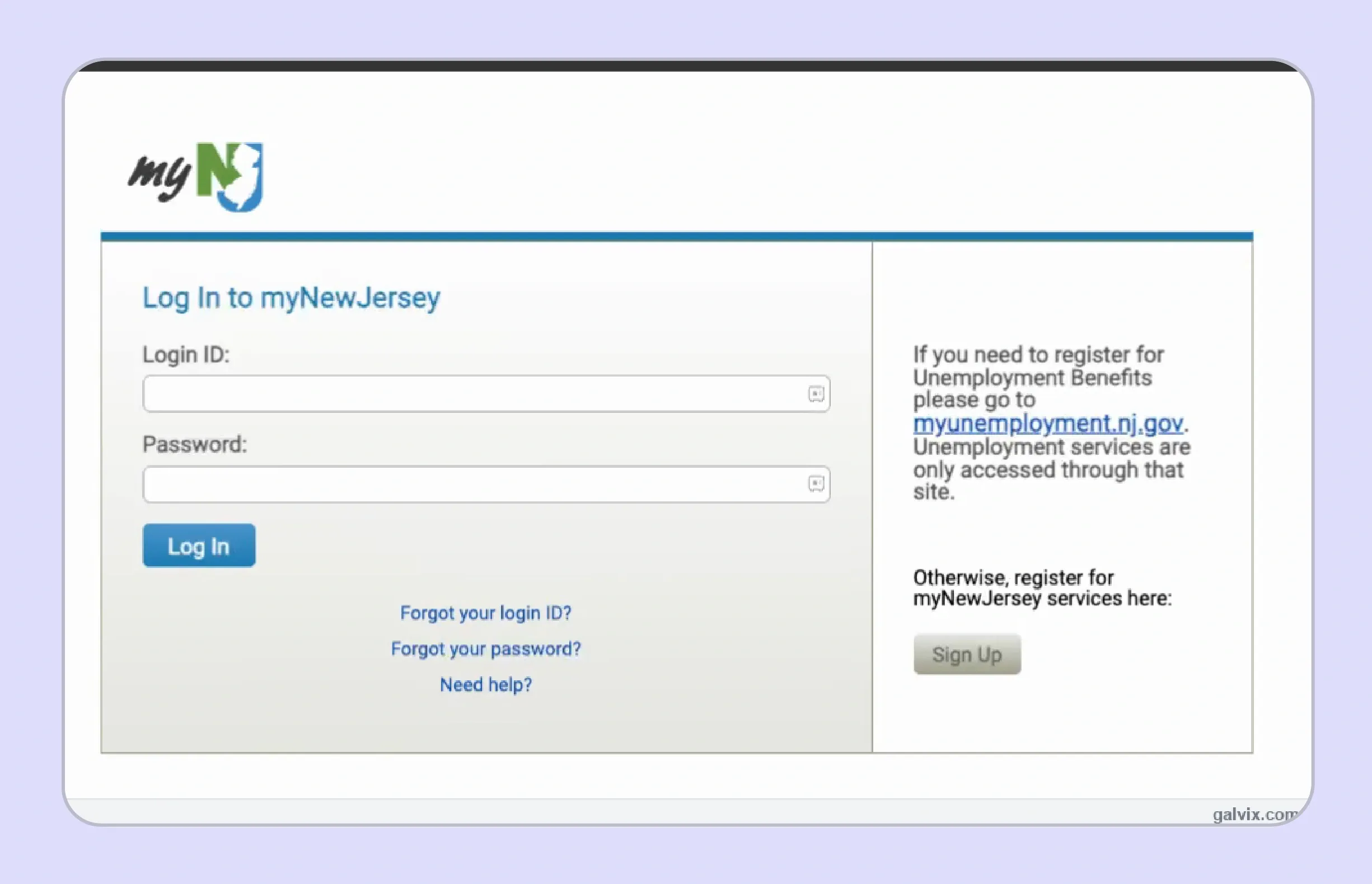
Step 1: Sign In to myNewJersey
If your existing access route connects through myNewJersey, start by signing in with the credentials linked to your tax services. Current portal users can also access the New Jersey Tax Portal directly.
- Open the state login or Tax Portal.
- Enter the correct Login ID and password.
- Confirm the credentials belong to the business being filed.
Your login credentials are separate from the tax ID number used to identify the business within the filing system.
Use the account-recovery option when credentials are lost rather than creating another profile that may not connect with existing records.
Step 2: Open the Tax Portal and Confirm Your Account
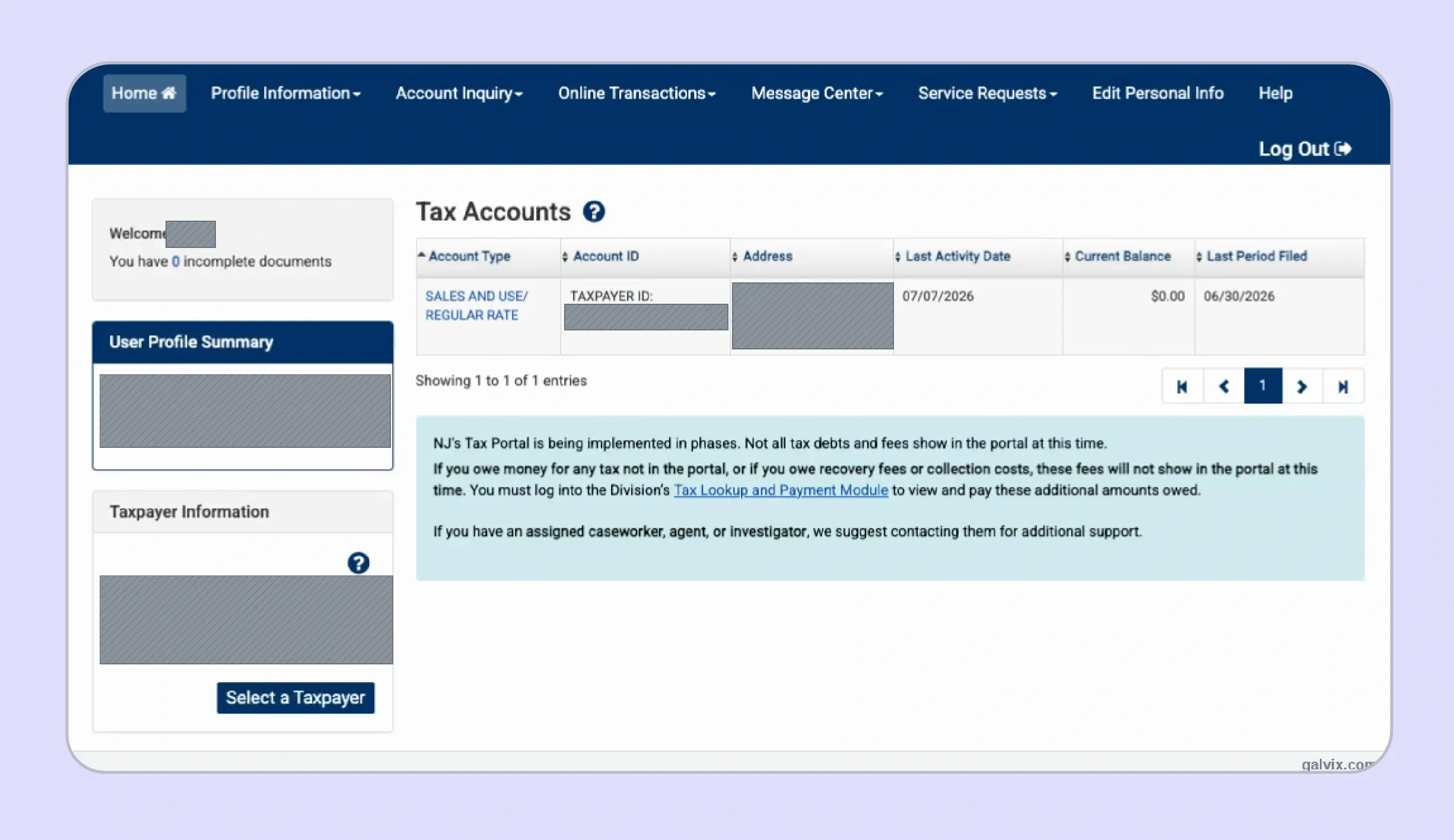
Open the Tax Portal from the available tax services and confirm the account before starting the return. Check the Account Type, account identifier, balance, and last filing period shown.
The business name and Sales and Use Tax account should match the entity you intend to file. This check is important when a preparer handles returns for multiple entities in a single workflow.
Creating a full portal account is optional under the current system because New Jersey also supports guest filing and payment.
Step 3: Start the Return
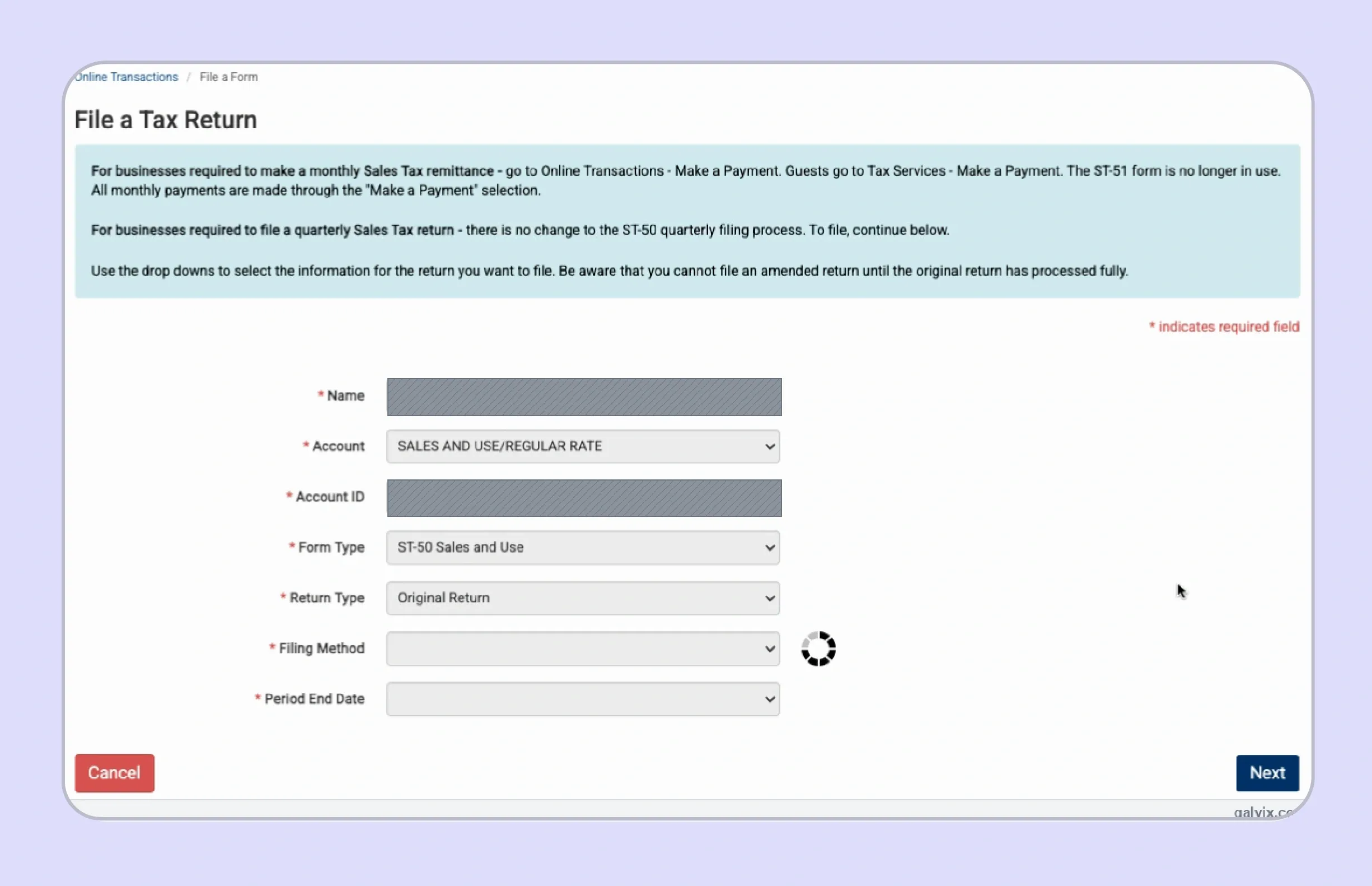
From Online Transactions, select the option to file a form and choose the correct account information. Confirm every selection before opening the filing screen.
| Field | What to Select |
|---|---|
| Name | Pre-filled or selected filer |
| Account | SALES AND USE REGULAR RATE |
| Account ID | Correct taxpayer identification |
| Form Type | ST-50 Sales and Use |
| Return Type | Original Return |
| Filing Method | FILE ONLINE |
| Period End Date | Correct quarter ending date |
The portal uses your selected account and particular quarter to determine which return opens next. A wrong period can create a filing problem even when every sales figure is accurate.
Current New Jersey guidance uses a Monthly Voucher through Make a Payment for required monthly remittances. Do not search for an ST-51 return inside the new portal.
Step 4: Check the Return Header
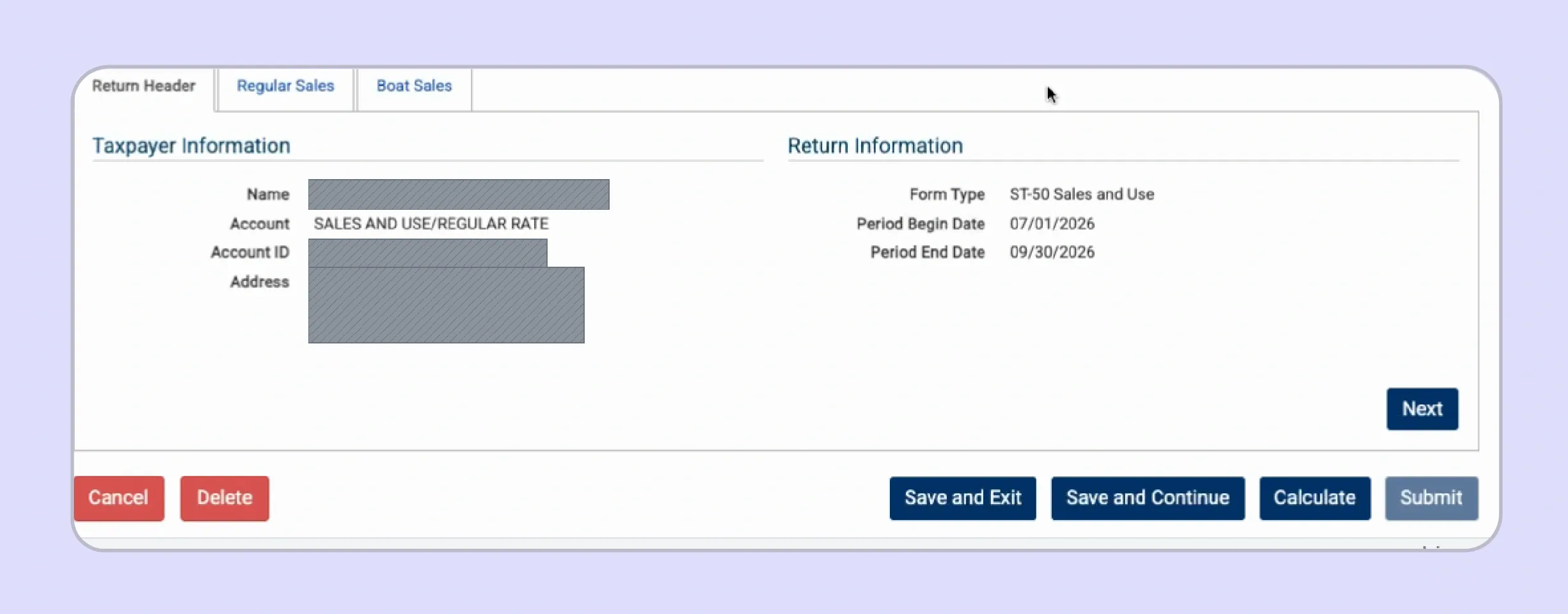
The ST-50 screen identifies the form and reporting period before any sales data is entered. Review these details before moving into Regular Sales.
- Confirm Form Type.
- Review Period Begin Date.
- Review Period End Date.
- Check the selected Sales and Use Tax account.
The header is designed for verification rather than editing. If the dates are incorrect, return to the selection screen rather than entering figures for the wrong quarter.
Step 5: Enter Figures on the Regular Sales Tab
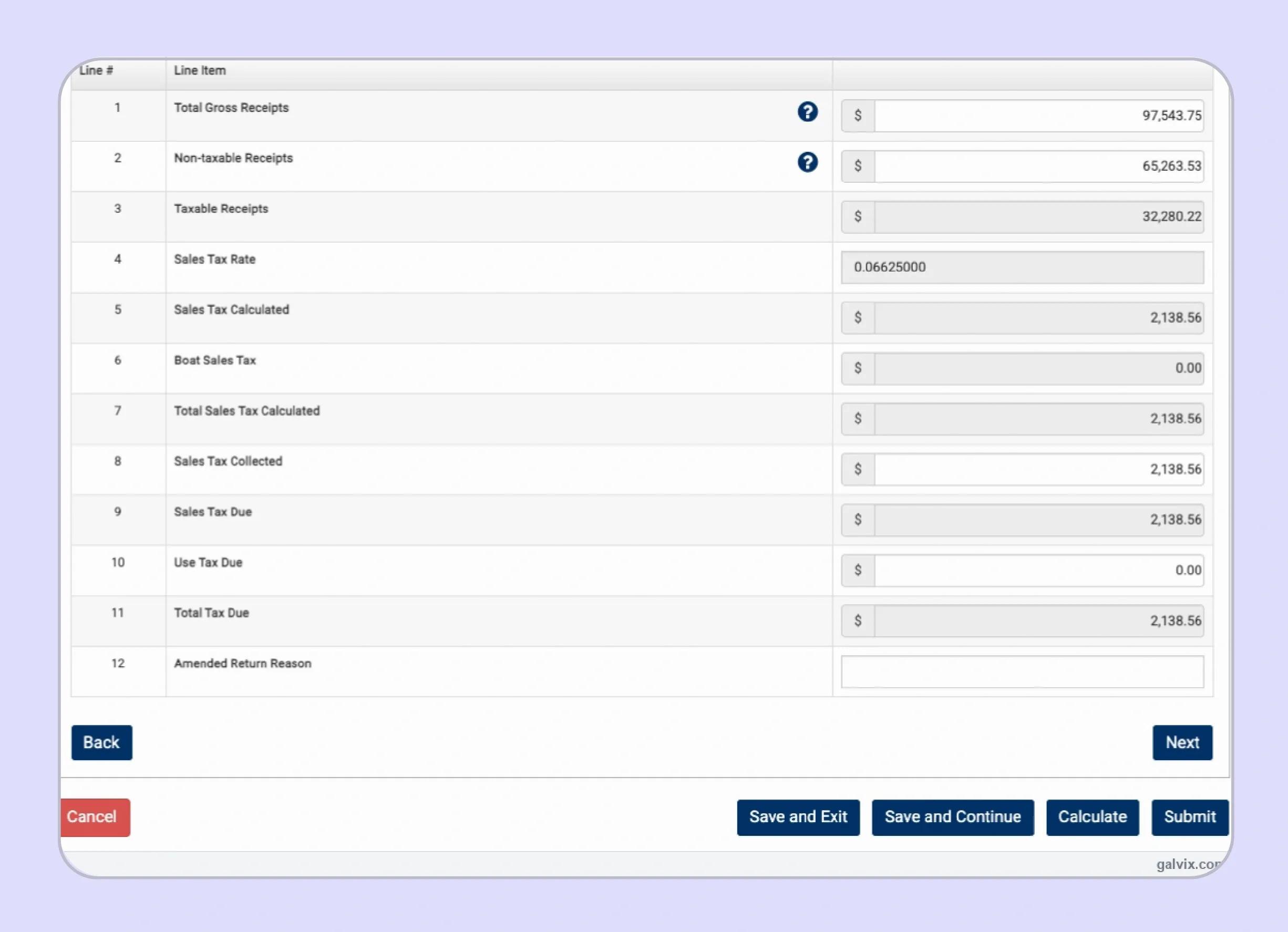
The Regular Sales tab contains the figures that drive the standard ST-50 calculation. This is where accurate preparation matters most when businesses file New Jersey sales tax online.
| Line | Field | What to Enter |
|---|---|---|
| 1 | Total Gross Receipts | Reportable receipts for the quarter |
| 2 | Non-taxable Receipts | Qualifying deductions from gross receipts |
| 3 | Taxable Receipts | Line 1 minus Line 2 |
| 4 | Sales Tax Rate | Portal-populated rate |
| 5 | Sales Tax Calculated | Calculated tax on Line 3 |
| 6 | Boat Sales Tax | Amount carried from Boat Sales where applicable |
| 7 | Total Sales Tax Calculated | Calculated sales tax total |
| 8 | Sales Tax Collected | Amount actually collected from customers |
| 9 | Sales Tax Due | Amount payable under the return |
| 10 | Use Tax Due | Tax on qualifying untaxed purchases |
| 11 | Total Tax Due | Sales and use tax payable |
| 12 | Amended Return Reason | Leave blank for an original return |
Line 3 records taxable sales, while later fields compare the calculated tax to customer collections. Your internal reconciliation should therefore support both the sales base and the resulting tax due.
For anyone researching how to fill out sales and use tax return in New Jersey requirements, Lines 8 and 9 deserve particular attention because they answer different questions.
Line 8 records what customers were charged, while Line 9 reflects what the state expects the filer to remit.
New Jersey assesses its standard rate on most tangible personal property, specified digital products, and certain services unless a specific exemption applies.
Step 6: Check the Boat Sales Tab
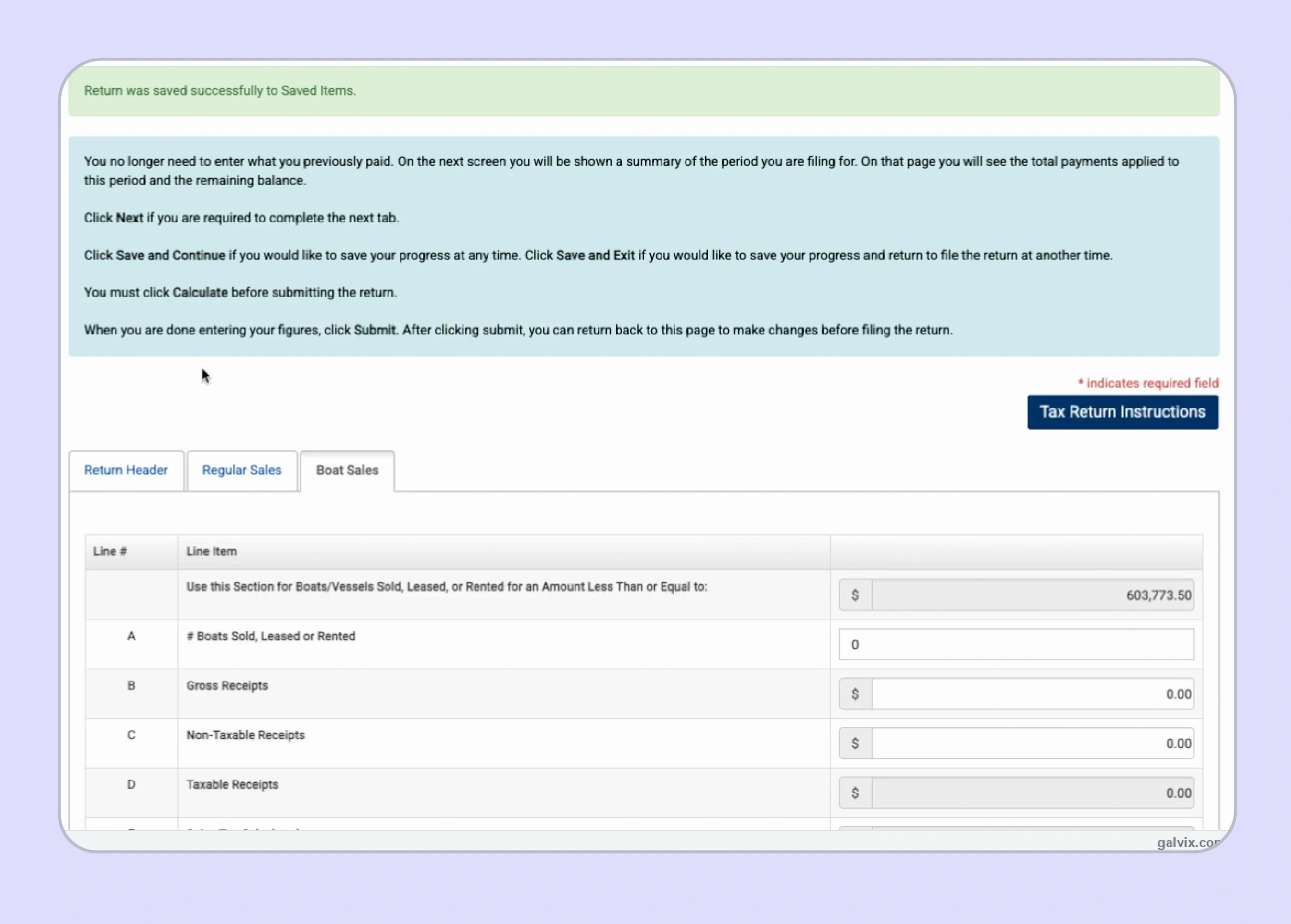
Boat and vessel transactions receive separate treatment, so the portal provides a dedicated tab for businesses with those sales. New Jersey applies a partial exemption and tax cap to qualifying boat transactions. If your business does not sell boats or vessels, confirm that the relevant figures remain at zero before continuing.
Step 7: Click Calculate
After entering the required figures, select Calculate so the portal can populate the computed fields. The system then calculates taxable receipts, applicable tax, and the resulting balance from the information entered.
Review each populated amount instead of moving directly to submission. The calculation can expose differences between internal totals and the figures entered into the form.
Step 8: Review the Summary
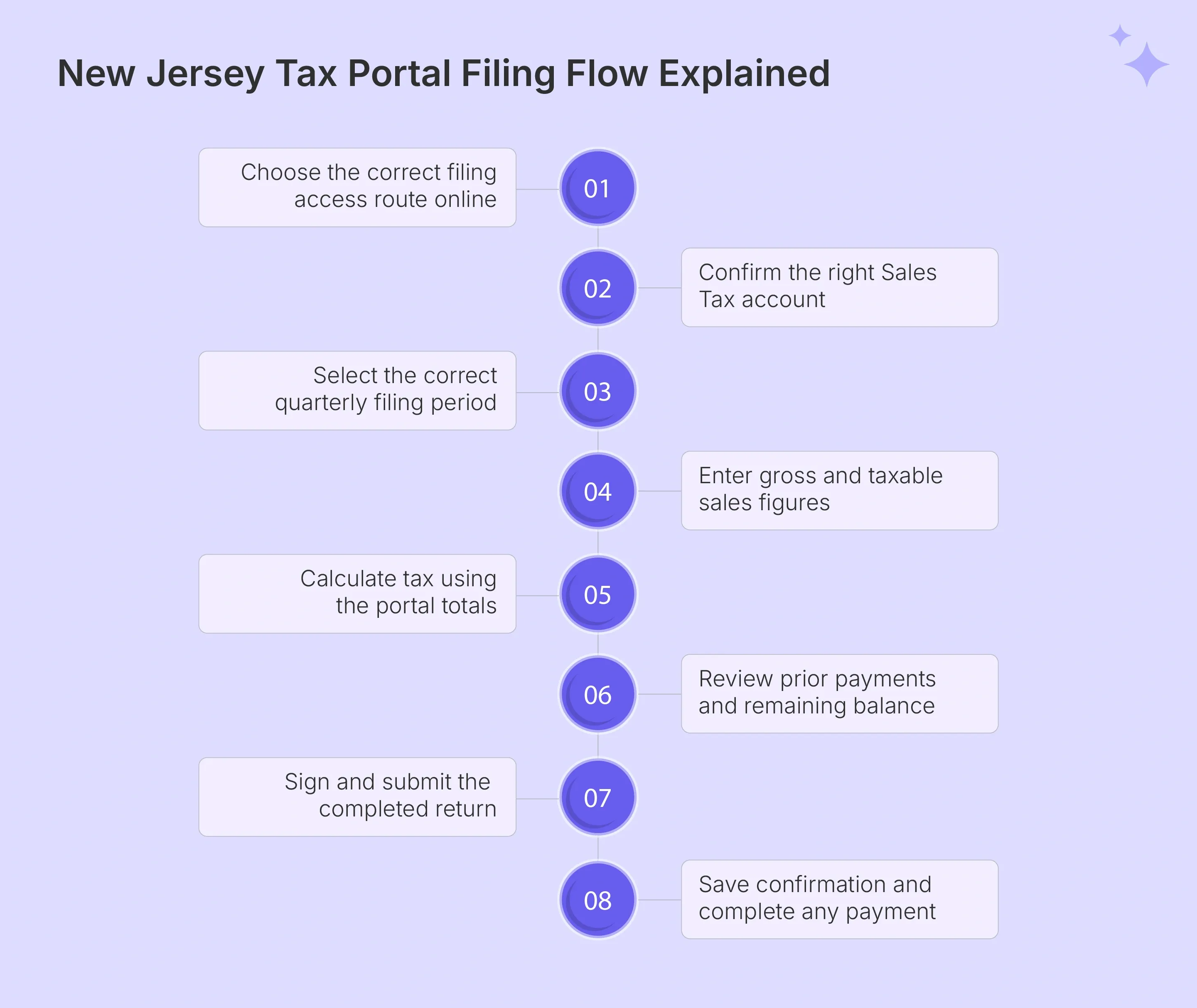
The summary consolidates Total Tax, Payments and Credits, and Total Amount Due before the return moves to the signature step. Payments made earlier in the quarter should be applied against the amount owed.
Reconcile the summary against your internal records before submission, particularly when prior remittances have reduced the remaining tax liability. This is also where differences in separate transactions or prior adjustments become easier to identify before the return becomes final.
Step 9: Sign and Submit
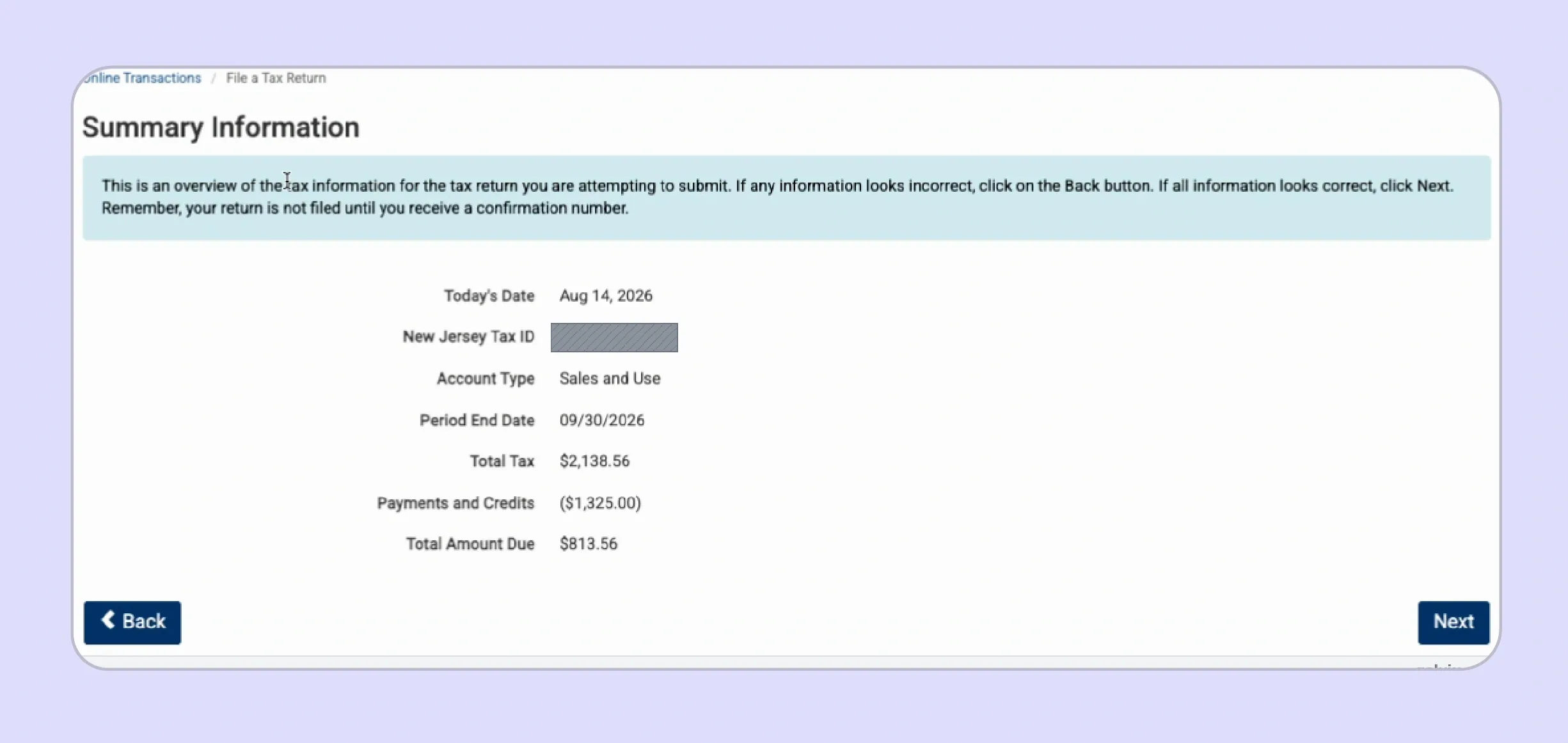
The signature step confirms that the filer is authorized to submit the return and that the filer believes the information is accurate. Read the certification before transmitting the form.
Submission is complete only when the portal issues a confirmation number. Reaching the signature screen does not establish that the sales tax return has been filed successfully.
Step 10: Save Confirmation and Pay
Save the confirmation number immediately after submission because it provides evidence that the return reached the system. Keep the record with the supporting reconciliation for that filing period.
Filing and payment remain distinct actions. The state accepts electronic funds transfer, e-check, or credit card, with fees applying to card payments.
Your selected payment method should use the correct liability and settlement details. If paying electronically from a bank account, confirm the account information before authorizing the transaction.
When a payment is initiated by the deadline, an e-check can settle later without automatically becoming late. The official guidance explains that the timing of electronic payments depends on when the transaction is initiated.
If an error appears after submission, wait until the original filing processes before attempting the amendment route shown by the portal.
Preserve both the filing confirmation and payment confirmation because they document different parts of the process.
Can You File NJ Sales Tax as a Guest?
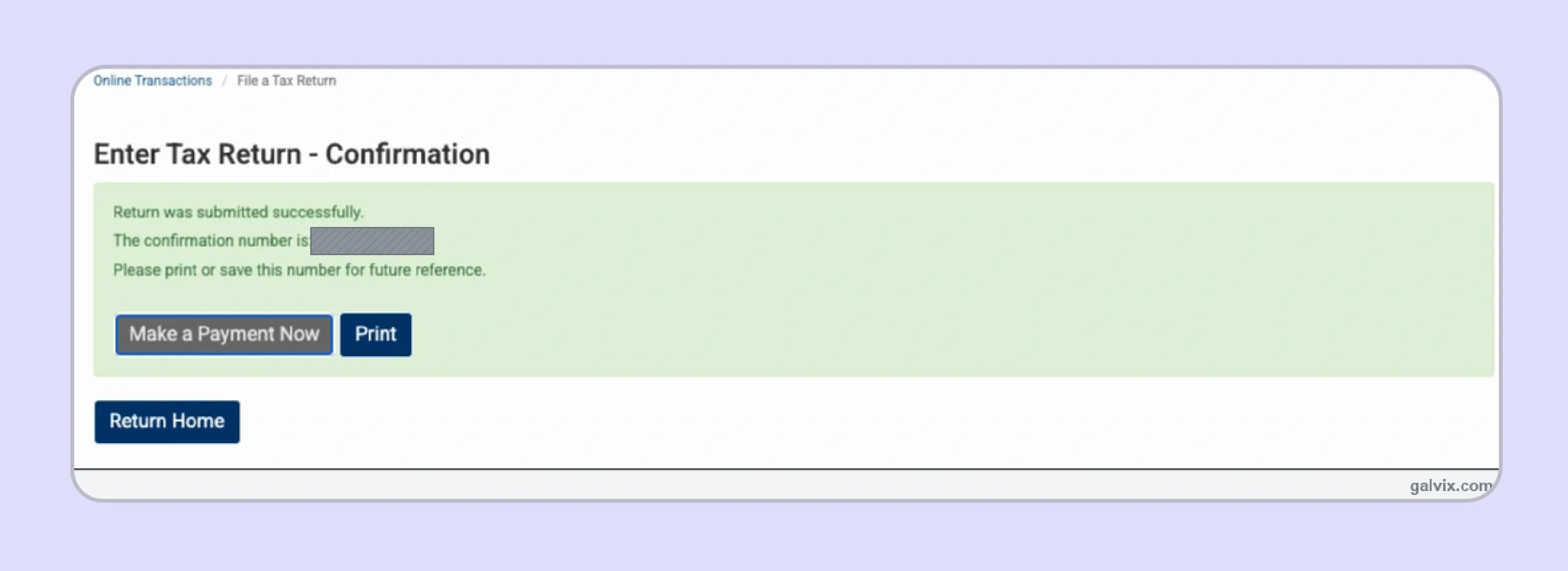
Yes. The current NJ Tax Portal allows taxpayers and preparers to file returns and make payments without creating a profile. A profile remains useful for faster access to records and account information, although it is not required for filing.
Guest access asks for contact details, taxpayer identification, the entity name, and the relevant tax account. After selecting the return information, the filer follows the same general prompts until the portal produces a confirmation number.
For businesses researching how to file sales tax in New Jersey without maintaining another login, guest filing can therefore provide a direct route. A full NJ Tax Portal account becomes more useful when teams need ongoing access to prior filings and payments.
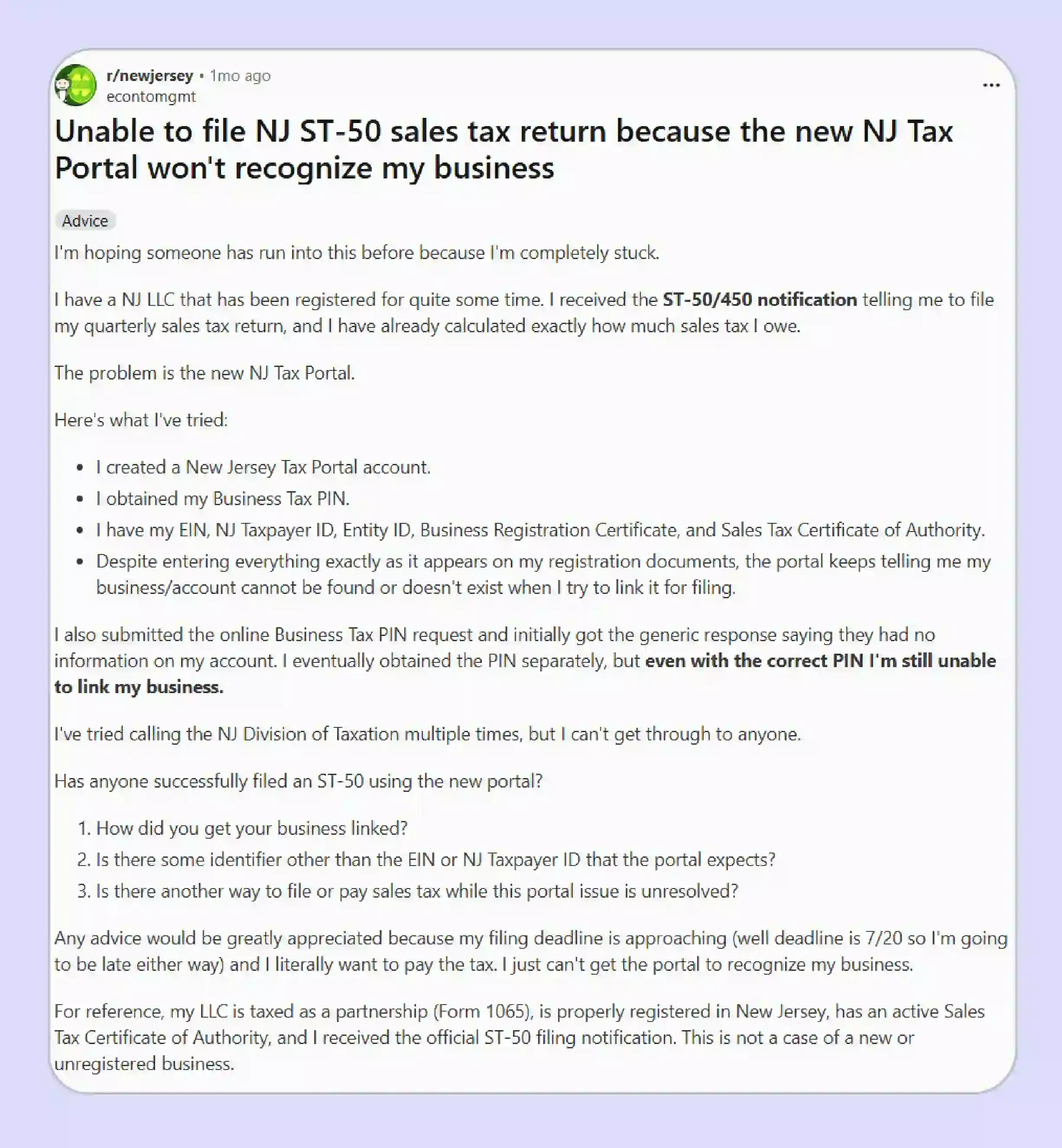
Recent Reddit discussions provide anecdotal evidence that some users have experienced trouble linking existing businesses, recognizing account identifiers, and accessing ST-50. These are individual experiences rather than official guidance, although they illustrate why businesses should test portal access before the deadline.
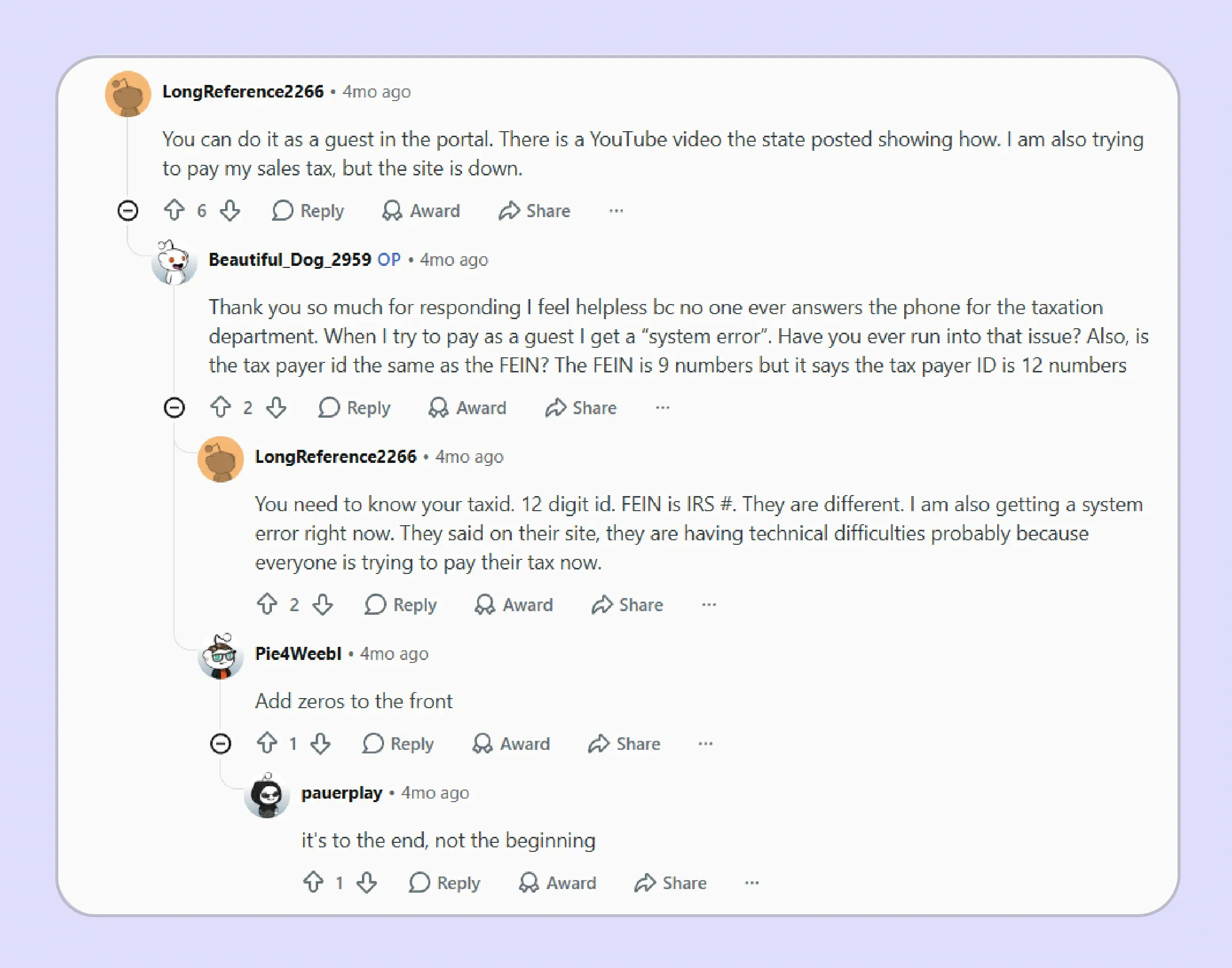
The State of New Jersey also provides Tax Portal guidance for guest filing, which should remain the primary reference when interface behavior changes.
How Do Exempt Sales Affect NJ Sales Tax Filing?
Exempt transactions affect the amount reported as non-taxable receipts, so businesses need documentation before they file New Jersey sales tax online. An exemption claim should connect the customer, transaction, applicable form, and stated reason rather than relying on account status alone.
New Jersey provides different forms for resale, exempt use, farming, contractor purchases, and other qualifying transactions. The New Jersey Division of Taxation publishes those forms and their intended purposes, making the certificate type an important part of return preparation.
Galvix’s exemption-certificate research highlights another distinction. A permit or registration lookup can confirm account information without proving that a particular purchase qualifies for an exemption, whereas document review addresses a different compliance question.
For sellers, this means a certificate should support the customer and transaction before exempt receipts reduce the taxable base. A tax ID number by itself should not replace the certificate required for the claimed treatment.
Common New Jersey exemption documents include:
- ST-3: Resale Certificate for qualifying resale purchases.
- ST-3NR: Resale Certificate for qualifying non-New Jersey sellers.
- ST-4: Exempt Use Certificate for specified exempt purchases.
- ST-7: Farmer's Exemption Certificate for qualifying agricultural purchases.
- ST-13: Contractor's Exempt Purchase Certificate.
- ST-SST: Streamlined Sales Tax exemption certificate used under the Streamlined framework.
New Jersey is a full member of the streamlined sales program. Remote sellers may also register across member states through the Streamlined Sales Tax Registration System rather than completing separate registration routes for each participating state.
The New Jersey Division of Revenue and Enterprise Services handles business registration, while the state tax agency administers filing and related tax requirements. Businesses should keep those roles separate when resolving registration or return issues.
Use the Galvix Sales Tax Exemption Certificate Tool to review the appropriate certificate route, available verification method, and seller action points before exempt transactions reach the return.

How Does Galvix Help Businesses File New Jersey Sales Tax Online?
Galvix helps businesses file New Jersey sales tax online as part of an ongoing managed compliance workflow. Instead of separating registration, return preparation, exemption records, and state correspondence among different owners, businesses can manage these obligations through a single accountable process.
For New Jersey, Galvix can prepare return data from connected systems, reconcile the underlying transactions, review filing obligations, and prepare returns for customer approval. Its returns service includes reconciliation before filing, reducing the amount of manual rebuilding required each quarter.
This becomes useful when a business operates through ecommerce platforms, accounting systems, and direct billing channels simultaneously. Galvix connects with existing business systems so transaction data can feed the compliance process without repeated spreadsheet transfers.
Businesses selling through ecommerce platforms, accounting software, or direct billing can bring transaction data into the same compliance process via supported sales tax integrations, rather than rebuilding quarterly totals from separate exports.
Galvix also connects filing with nexus tracking, registrations, tax determination, exemption certificate management, and notice handling. A named compliance manager provides the business with a consistent point of contact who understands the account and its ongoing obligations.
What Does Galvix Manage for New Jersey Sellers?
Return preparation: Galvix prepares returns based on reconciled transaction information, obtains customer approval, and files them according to the required schedule.
- Filing calendar support: Quarterly deadlines and qualifying monthly remittance obligations remain part of the managed compliance workflow.
- Exemption records: Galvix collects, reviews, stores, and follows up on certificates, while maintaining supporting documentation for state review.
- Registration support: New state accounts can be established when business activity creates a registration obligation in New Jersey or elsewhere.
- Notice management: Galvix monitors state correspondence and helps coordinate responses after confirming the proposed approach with the customer.
This approach is useful for teams deciding how to file sales tax return in New Jersey while also managing obligations in several other jurisdictions.
How Is Galvix Different From Filing Manually?
| Area | Manual NJ Filing | Galvix |
|---|---|---|
| Data preparation | Internal team exports and reconciles data | Specialist-reviewed return preparation |
| Filing obligations | Team tracks deadlines internally | Filing calendar support across states |
| Exempt sales | Certificates may sit outside return workflow | Exemption records support compliance process |
| Notices | Finance team manages correspondence | Galvix helps coordinate state responses |
| Multi-state growth | Separate state-by-state processes | Nexus, registrations, returns, and notices connect |
Manual filing can work when transaction volume remains low and the business operates in few jurisdictions. The workload grows as more states, sales channels, exemption records, and filing deadlines are added to the same financial calendar.
Galvix pricing is modular, so businesses pay only for the compliance services they actually use. Exact pricing reflects the volume of work associated with each module, and the pricing page explains the relevant factors for returns, registrations, exemption management, and other services.
For example, return preparation scales with the number of returns filed, while exemption management depends on exempt-customer volume. This model lets growing teams add services as their compliance footprint expands, without paying for an all-inclusive package they may not need.
Book a Galvix demo to review your filing workflow and determine which compliance modules match your current sales-tax workload.
Frequently Asked Questions
How Do I File NJ Sales Tax Online?
To file New Jersey sales tax online, access the New Jersey Tax Portal, select the correct Sales and Use Tax account, and complete Form ST-50. Review the calculated amounts before signing, then save the confirmation number after submission.
What Is the Form for Sales Tax in New Jersey?
The regular quarterly form is ST-50, which registered Sales and Use Tax filers submit for every assigned quarter. Special businesses, including certain UEZ or Salem County sellers, may use different forms based on their filing classification.
What Happens if You Made No Sales in the Period?
If you made no sales during the period, you still file the required ST-50 with zero activity. Registration creates an ongoing filing requirement, so an inactive quarter should not simply be skipped.
Can I File NJ Sales Tax as a Guest?
Yes, taxpayers and preparers can use guest access without creating an NJ Tax Portal account. Guest users provide contact and business information, select the relevant account, complete the filing, and receive a confirmation number.
Do I Have to File New Jersey Sales Tax if I Made No Sales?
Yes, registered ST-50 filers must submit a return for each quarter even when no sales occurred or no amount is payable. This zero-return rule continues until the filing obligation is properly ended.
How Do I Pay Sales Tax in New Jersey?
New Jersey requires electronic payment for Sales and Use Tax obligations. Available methods include e-check, electronic funds transfer, and card payments, though fees may apply to card transactions.
What Is the Website for New Jersey Taxes?
The official tax website is maintained by the Treasury's tax agency, while the NJ Tax Portal handles current filing and payment functions. Businesses can access portal tools, user guides, guest filing, and account services there.
What Happens if I File a New Jersey Sales Tax Return Late?
A late return can trigger penalties and interest. New Jersey may assess a 5% monthly late-filing penalty up to 25%, an additional monthly charge, and a late-payment penalty where applicable.
How Does Galvix Help With New Jersey Sales Tax Filing?
Galvix supports New Jersey sales tax filing through reconciled return preparation, filing-calendar management, exemption records, registrations, and notice support. Its modular model allows businesses to select the services they require and scale them according to actual workload.