Businesses registered for Florida sales and use tax can file Florida sales tax online through the Florida Department of Revenue eFile and Pay system. Most businesses use Form DR-15, while some accounts may be assigned DR-15EZ depending on how they are set up.
Before opening the portal, it helps to get the numbers in order. You will need figures for gross sales, exempt sales, taxable sales, and tax due. Marketplace activity, county surtax, exempt customers, and sales from different channels can all affect these amounts. Connecting your sales and accounting platforms can also make it easier to bring transaction data together before preparing the return.
This guide walks you through how to file sales tax in Florida, complete a Florida sales tax return, report county surtax, and keep the right filing records. If exempt transactions form part of your sales, understanding exemption certificate requirements can also help you maintain the documentation supporting those amounts.

Why Must You Handle Florida Sales Tax Filing Carefully?
You should prepare carefully before you file Florida sales tax online as the state Department of Revenue relies heavily on figures supplied by the filer. Form DR-15 requires businesses to report sales and exemptions alongside tax amounts, while county surtax creates another reporting layer that must agree with underlying transaction records.
Florida Uses Form DR-15 for Most Sales Tax Returns
The correct form depends on the account established with the Department of Revenue, so confirm the available return before preparing figures.
- DR-15: The standard Sales and Use Tax Return for reporting Florida activity.
- DR-15EZ: A shorter return available for accounts assigned to use that form.
- DR-15N: Instructions covering DR-15 calculations, reporting fields, surtax, and filing requirements.
- DR-15DSS: The current county reference for discretionary surtax rates throughout Florida.
The Department currently lists both DR-15 and DR-15EZ among its sales and use tax forms.
The Portal Does Not Fully Validate the Tax Math
On DR-15, businesses report gross sales in Column 1, exempt sales in Column 2, taxable amount in Column 3, and tax due in Column 4. The instructions specifically require taxpayers to calculate the taxable amount by subtracting exempt sales from gross sales.
Teams should therefore calculate the amount of sales tax outside the portal and review the relationships between these values before submission.
Florida also requires a rounding algorithm when calculating transaction tax. The calculation reaches the third decimal place, with amounts rounded upward when that digit exceeds four.
Surtax Reporting Is Easy to Miss
Many Florida counties impose a discretionary sales surtax in addition to state tax. Dealers report the related taxable amounts through Lines 15(a) to 15(c), while Line 15(d) reports the total discretionary surtax due.
Line 15(d) covers discretionary surtax rather than state sales tax. Review these disclosure lines; even if you complete them, the amount shown on Line 14 does not change.
This local component is sometimes described as a ‘local option sales tax’, although Florida administers it as a county discretionary surtax.
Who Must File a Florida Sales Tax Return?
Businesses registered as Florida sales and use tax dealers must file according to their assigned reporting period, including periods with no tax due. Filing obligations can affect Florida-based dealers and qualifying remote sellers.
Marketplace activity requires separate review because marketplace providers may collect tax on facilitated transactions.
Florida Registered Dealers
A business owner conducting activities subject to Florida sales and use tax must determine whether registration is required before beginning taxable business activities.
Here are some common examples:
- Taxable sellers: Businesses selling taxable goods or taxable services from a Florida place of business.
- Registered dealers: Businesses holding a Florida certificate of registration for sales and use tax.
- Surtax sellers: Dealers delivering taxable items into counties where county surtax applies.
- Exempt-sale sellers: Businesses making resale transactions or qualifying exempt sales requiring supporting records.
Florida uses the online Florida Business Tax Application to determine tax registration requirements. Businesses can also submit Form DR-1 as a paper business tax application, after which registered dealers receive Form DR-11 and related account documents.
Remote Sellers and Marketplace Sales
Florida economic nexus applies when an out-of-state seller has more than $100,000 in taxable sales to Florida customers during the previous calendar year. The rule has been in effect since July 1, 2021, and sellers may also need to collect the applicable discretionary sales surtax.
Remote sellers should review the specific Florida economic nexus rules, since they may have a filing obligation even without a physical location in the state. Florida looks at the value of sales, not the number of transactions. There is no separate transaction-count threshold for remote sellers under the current rule.
Marketplace providers generally collect and remit tax on taxable sales made through their platforms. Sellers should still separate marketplace sales from direct online sales, invoiced sales, wholesale transactions, and other channels when reconciling their own sales tax records.
What Numbers Should Be Ready Before You Open eFile and Pay?
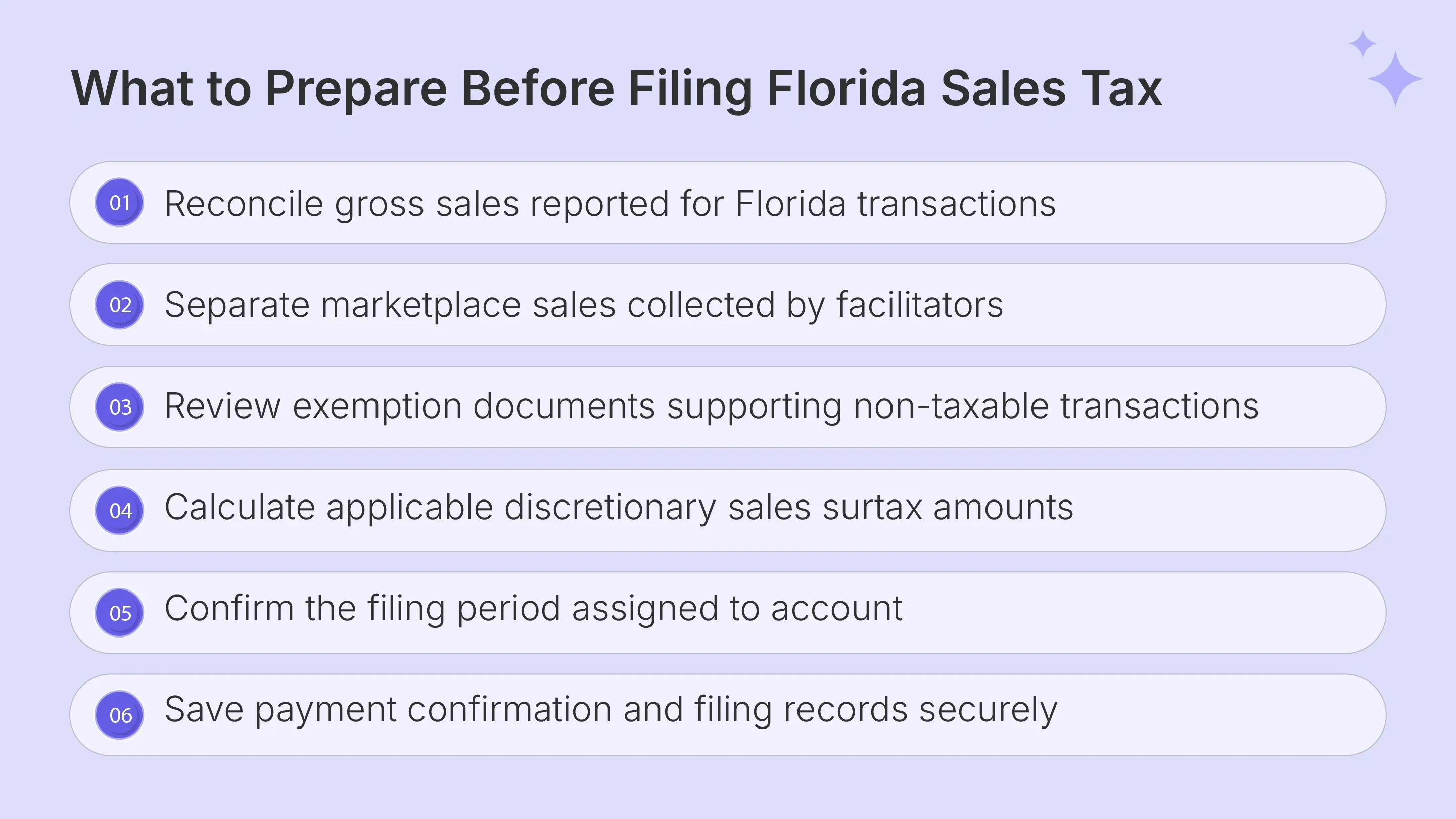
Before you file Florida sales tax online, prepare the figures that feed DR-15 and the records supporting them. Reconcile gross sales against exemptions, determine taxable sales, calculate state and county tax, and confirm your payment information before opening the filing workflow.
If your team is managing several systems, using supported sales tax integrations can help bring transaction data into a consistent compliance workflow.
| What You Need | Why It Matters |
|---|---|
| User ID and password | Provides enrolled eFile and Pay access |
| Gross sales | Reports total sales before exempt-sales deductions |
| Exempt sales | Supports the reduction from gross sales |
| Taxable amount | Shows sales remaining subject to tax |
| Tax due | Includes state tax and qualifying county surtax |
| Surtax by county | Supports Lines 15(a) through 15(d) |
| Exemption records | Supports resale and other exempt transactions |
| Bank details | Supports payment authorization and reconciliation |
Gross Sales and Marketplace Sales
DR-15 instructions require gross sales to include the total gross sales amount, excluding tax collected. Teams should reconcile this figure against billing systems, ecommerce channels, invoices, and other transaction records before preparing the return.
Ecommerce businesses may also need to reconcile Florida transactions across their own storefront and marketplace channels before completing the return. A Shopify sales tax integration can bring Shopify transaction data into the wider compliance process while keeping marketplace activity visible for nexus monitoring and reconciliation.
Marketplace sales deserve separate reconciliation because the marketplace provider may already have collected and remitted the tax. Maintaining this separation helps teams understand which Florida sales are attributable to marketplace activity and which transactions remain subject to direct seller compliance.
Build a channel-level reconciliation before filing rather than trying to classify transactions while entering the Florida sales tax return online.
Exempt Sales and Taxable Amount
Exempt sales reported in Column 2 may include resale transactions, specifically exempt items, or sales to qualifying organizations that hold appropriate exemption documentation. DR-15 then uses gross sales and exempt sales to establish the taxable amount.
Other Florida sales tax exemptions can require different supporting records. Examples can include qualifying nonprofit organizations, documented exports through approved forwarding agents, or transactions supported by a valid Florida Annual Resale Certificate.
An exempt sale should have documentation that supports why tax was not collected. This sales tax exemption certificate guide explains the types of certificates, documentation requirements, review limits, and lifecycle controls that businesses can use to maintain records for exempt transactions.
Do not classify a transaction as exempt because a certificate exists somewhere in the customer account. The certificate and the specific purchase still require appropriate review.
Tax Due and County Surtax
Florida's general state sales tax rate is 6%, with specific exceptions for certain categories. Many counties also impose surtax ranging from 0.5% to 2%, while some counties impose none.
That means sales tax rates can vary by taxable transaction and county. For ordinary DR-15 reporting, Florida cities are not the unit used to set the discretionary county surtax.
Calculate sales tax due from the reconciled taxable amount and applicable tax rate before portal entry. The state provides an Address/Jurisdiction Database for identifying the county and applicable rate for Florida addresses.
How Do You File Florida Sales Tax Online Through eFile and Pay?
To file Florida sales tax online, access the current eFile and Pay system, confirm the correct account, select the assigned return, enter reconciled figures, review surtax disclosure, and save the filing confirmation. Florida moved sales and use tax filing to its current eServices system in December 2025.
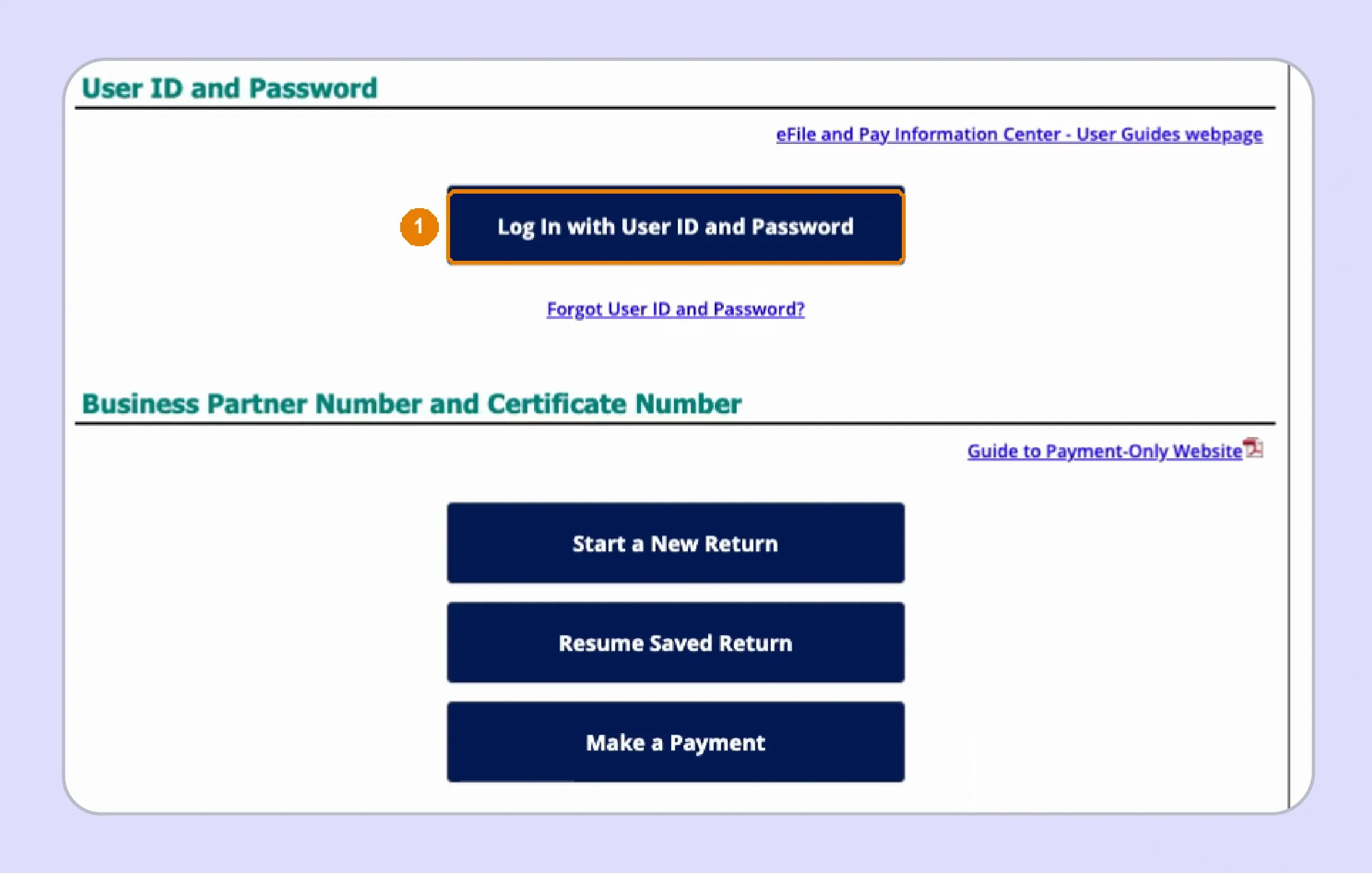
Step 1: Enter the Portal Through the Right Access Route
The Florida Department of Revenue currently provides several access routes for taxpayers filing sales and use tax returns.
- User ID and Password: Enrolled taxpayers can log in using their established eServices credentials.
- Business Partner and Certificate Numbers: Registered taxpayers can begin a return through the alternate access route.
- Direct File: This route supports taxpayers using the Department's file transmission process.
Enrolled users receive features such as filing history, saved bank and contact information, and the ability to reprint returns. That makes enrolled access useful when internal teams need stronger filing records.
Teams that need to print returns for their archives should retain electronic copies and confirmation information after filing.
Step 2: Confirm the Account Before Starting the Return
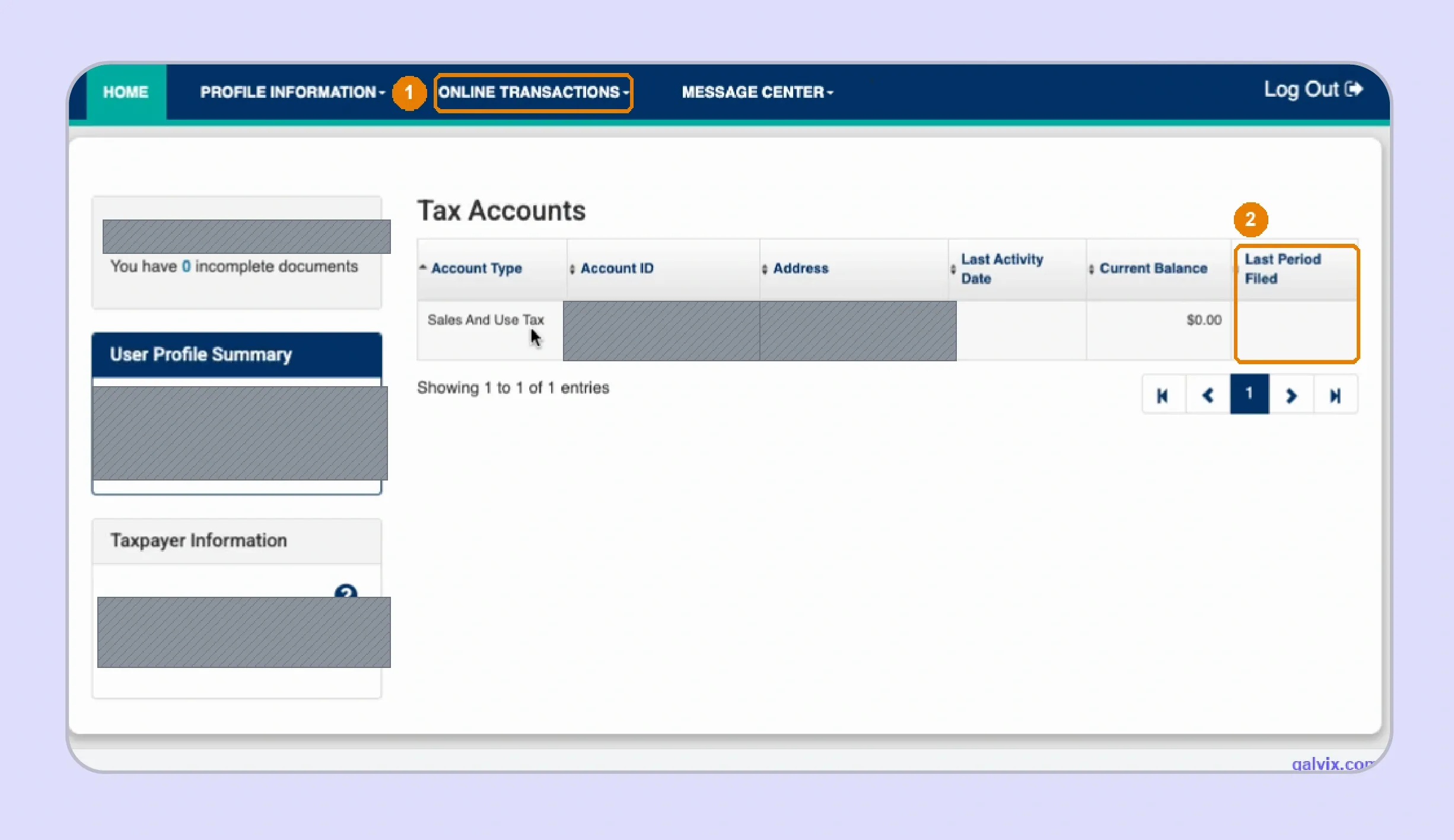
After login, confirm that the portal displays the correct legal entity and sales tax account before beginning data entry.
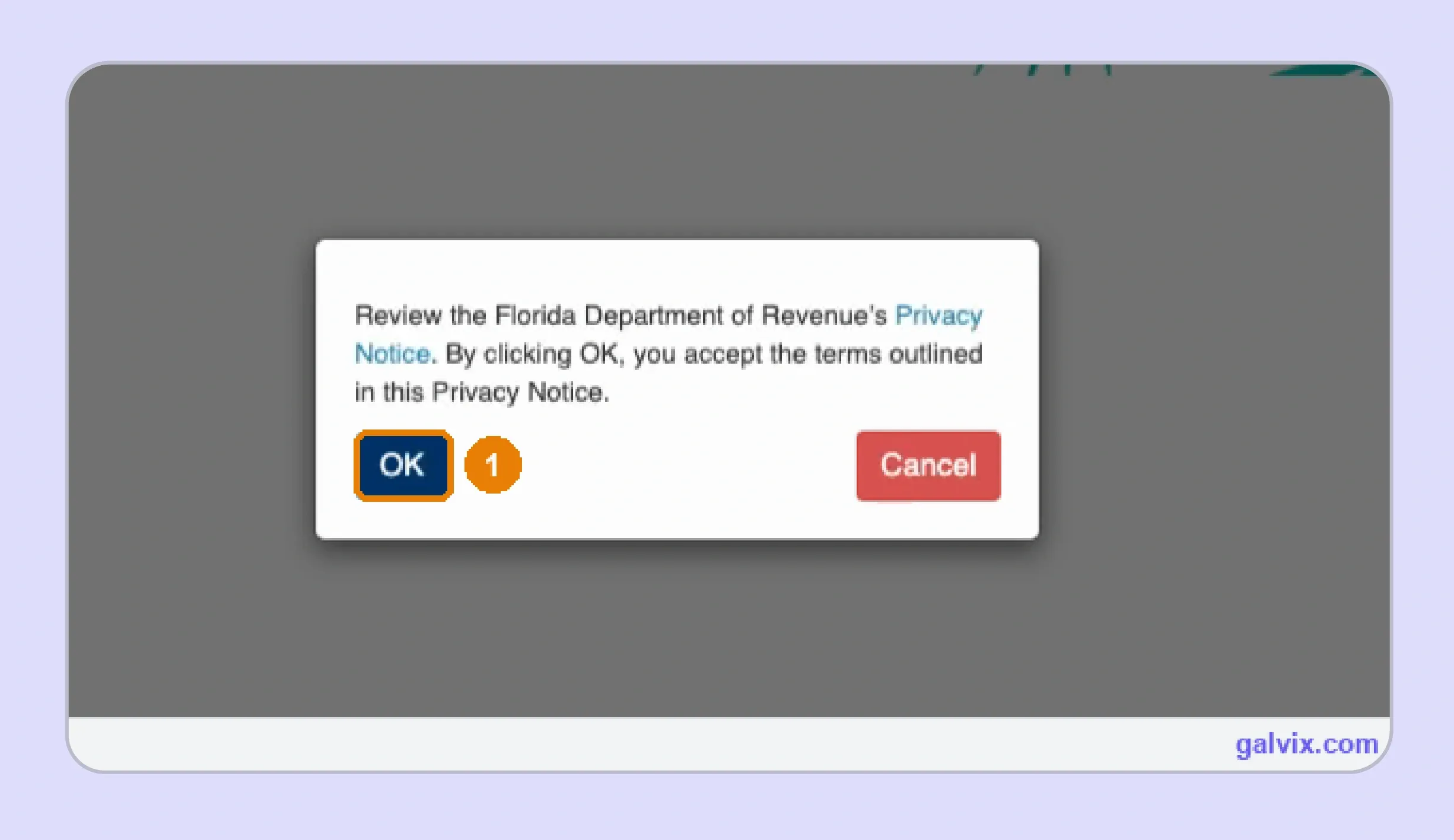
- Accept the Privacy Notice when displayed
- Confirm the correct business and registered account
- Review the Last Period Filed information
- Open Online Transactions and select File a Tax Return
The live filing walkthrough for this structure found that the privacy notice could prevent interaction with the controls behind it until it is dismissed. Treat this as a portal observation rather than a universal technical issue.
Account confirmation is especially important when a single finance user manages multiple legal entities or locations within the same login environment.
Step 3: Select DR-15 and the Correct Filing Period
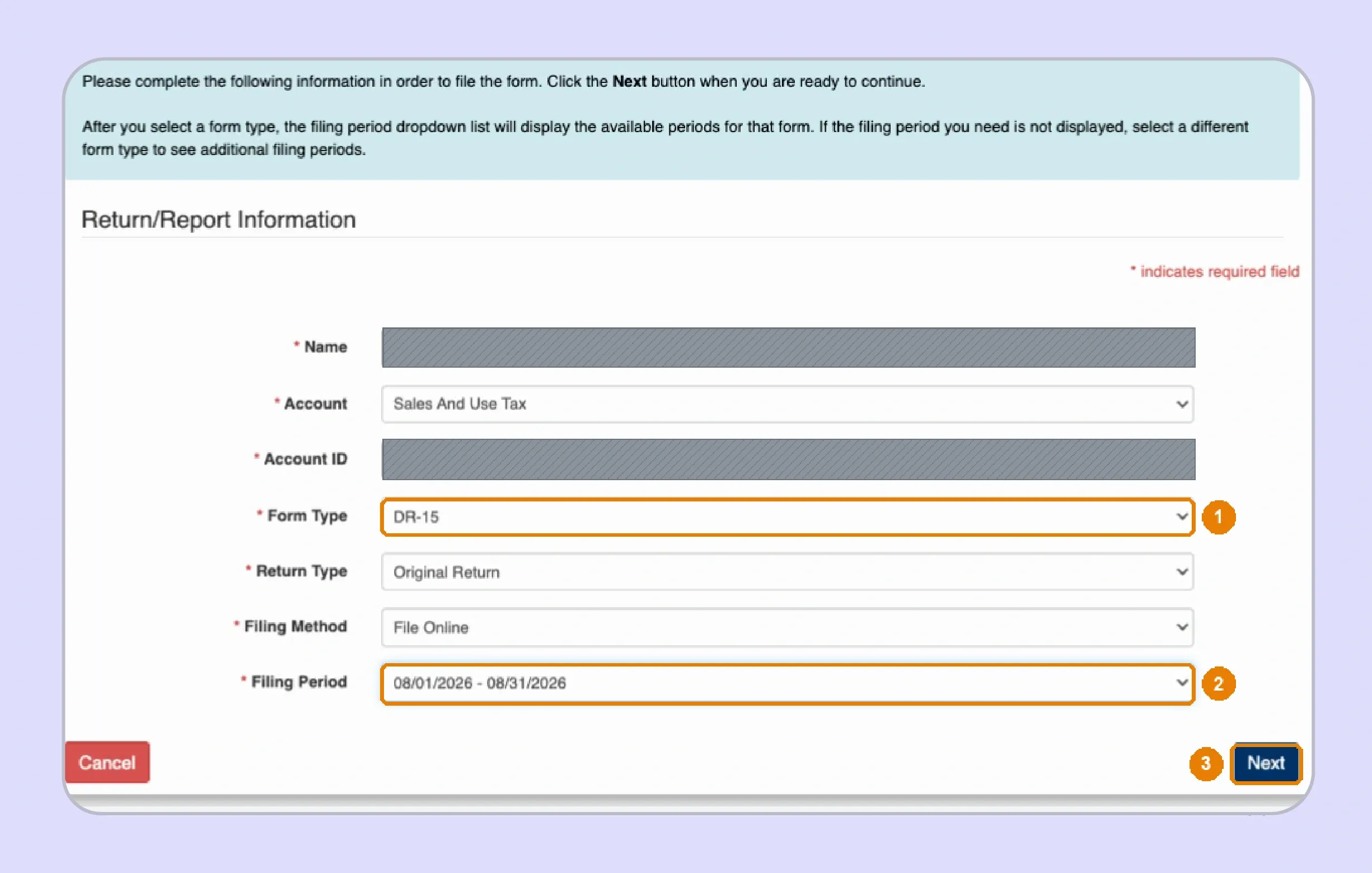
Select the return assigned to the account, then match it to the reported period.
- Select Sales and Use Tax
- Choose DR-15 or DR-15EZ when available
- Select Original Return for a new filing
- Confirm the correct period before continuing
Most new businesses initially receive quarterly filing, although the Department can assign monthly, semiannual, or annual filing frequency based on annual tax collections.
The client walkthrough found that available filing periods can depend on the form selected. Check the account's available form before assuming a missing period has already been filed.
This step is central to how to file FL sales tax correctly because a well-prepared return still creates problems when entered against the wrong period.
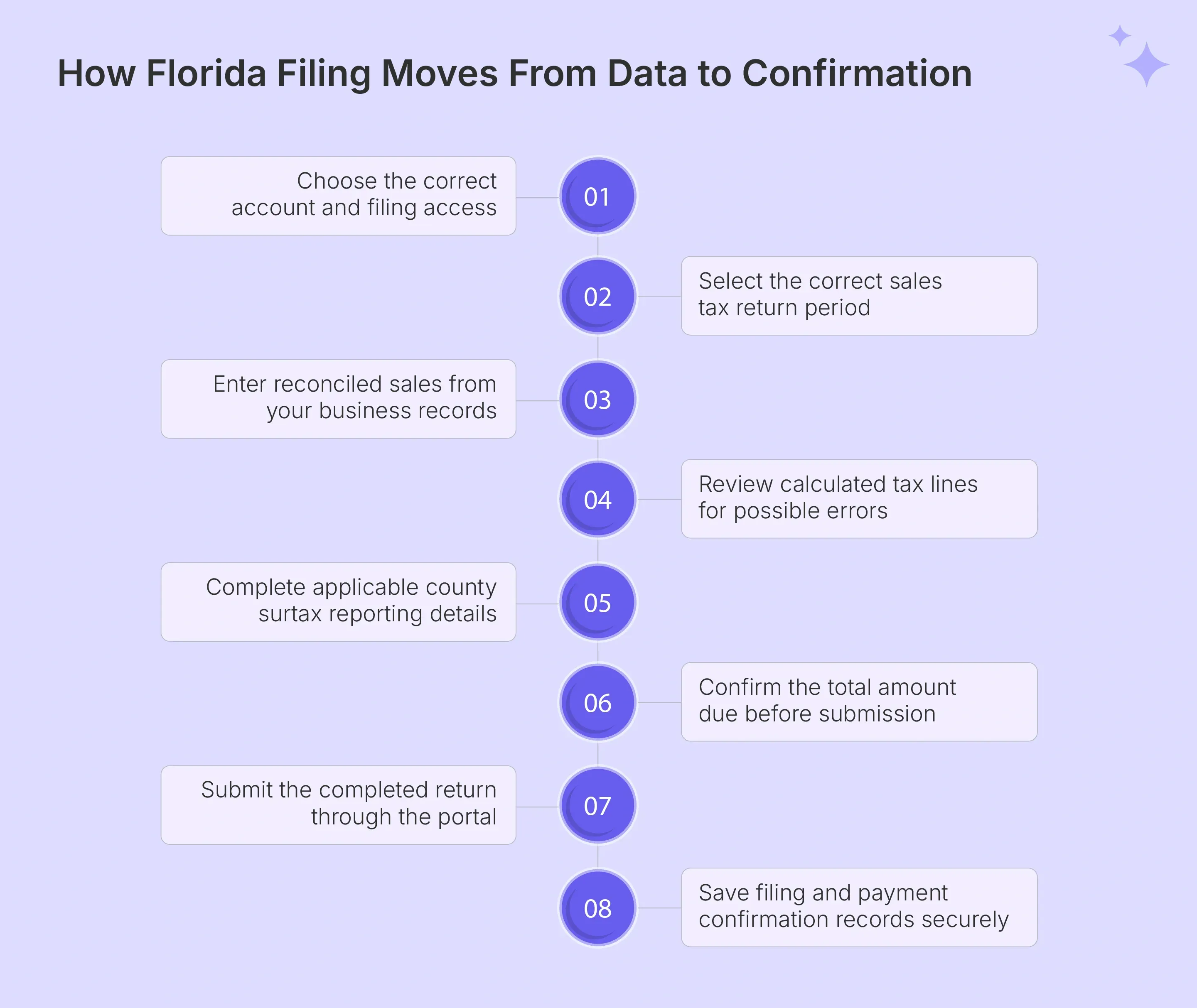
Step 4: Complete the DR-15 Sales Details Tab
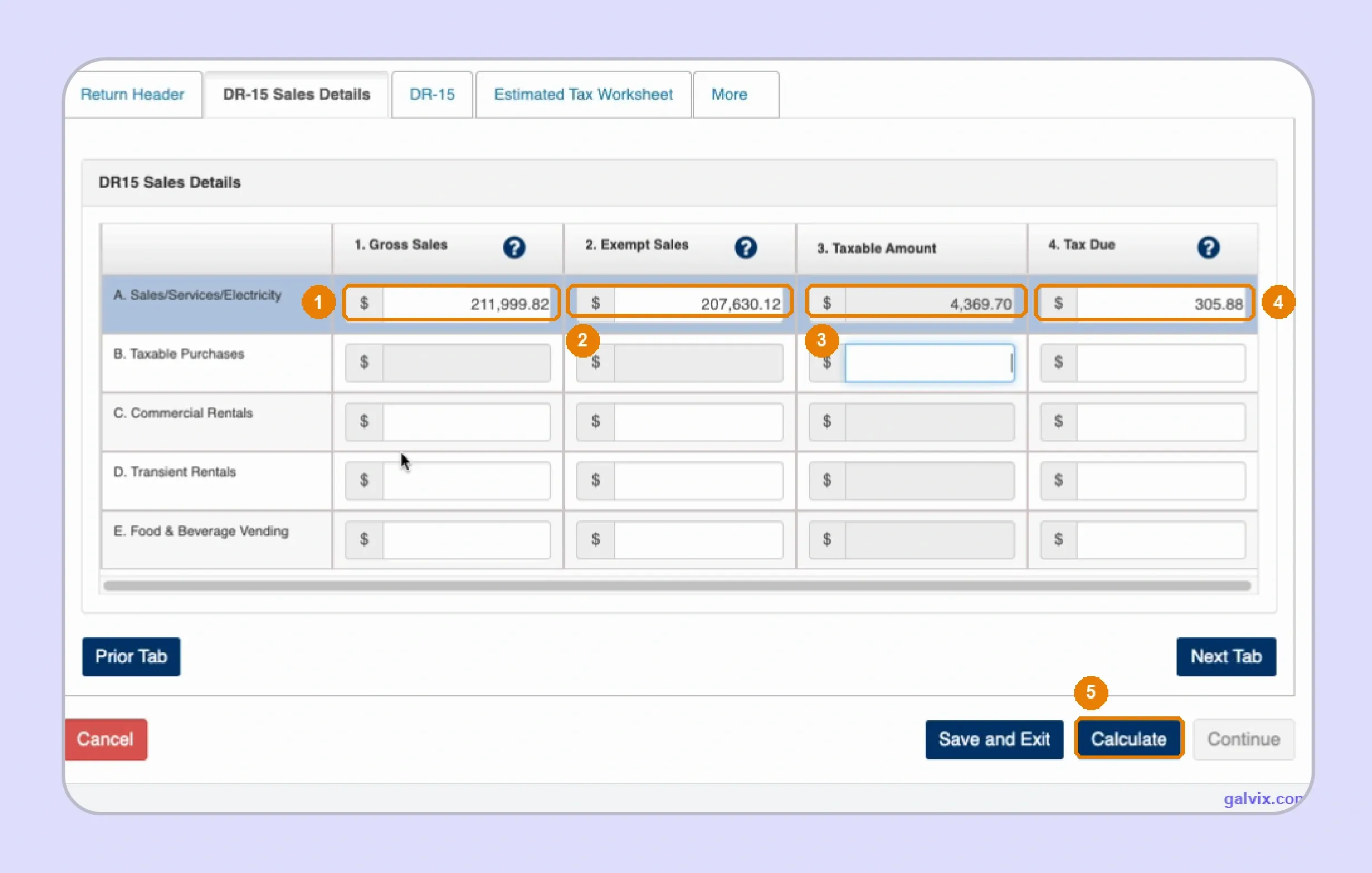
The Sales Details area is where your reconciled transaction data is returned. Businesses asking how to fill out a sales and use tax return in Florida should begin with four core DR-15 amounts.
- Gross sales: Enter total gross sales without including tax collected.
- Exempt sales: Enter qualifying tax-exempt sales already included in gross sales.
- Taxable amount: Subtract exempt sales and account for taxable purchases where required.
- Tax due: Enter total tax due, including qualifying county surtax.
The current DR-15N instructions identify these as Columns 1 through 4 and explain how they relate to one another.
Before transmission, compare gross sales against exempt sales and the resulting taxable amount. This reconciliation becomes especially important when you file Florida sales tax online across multiple sales channels.
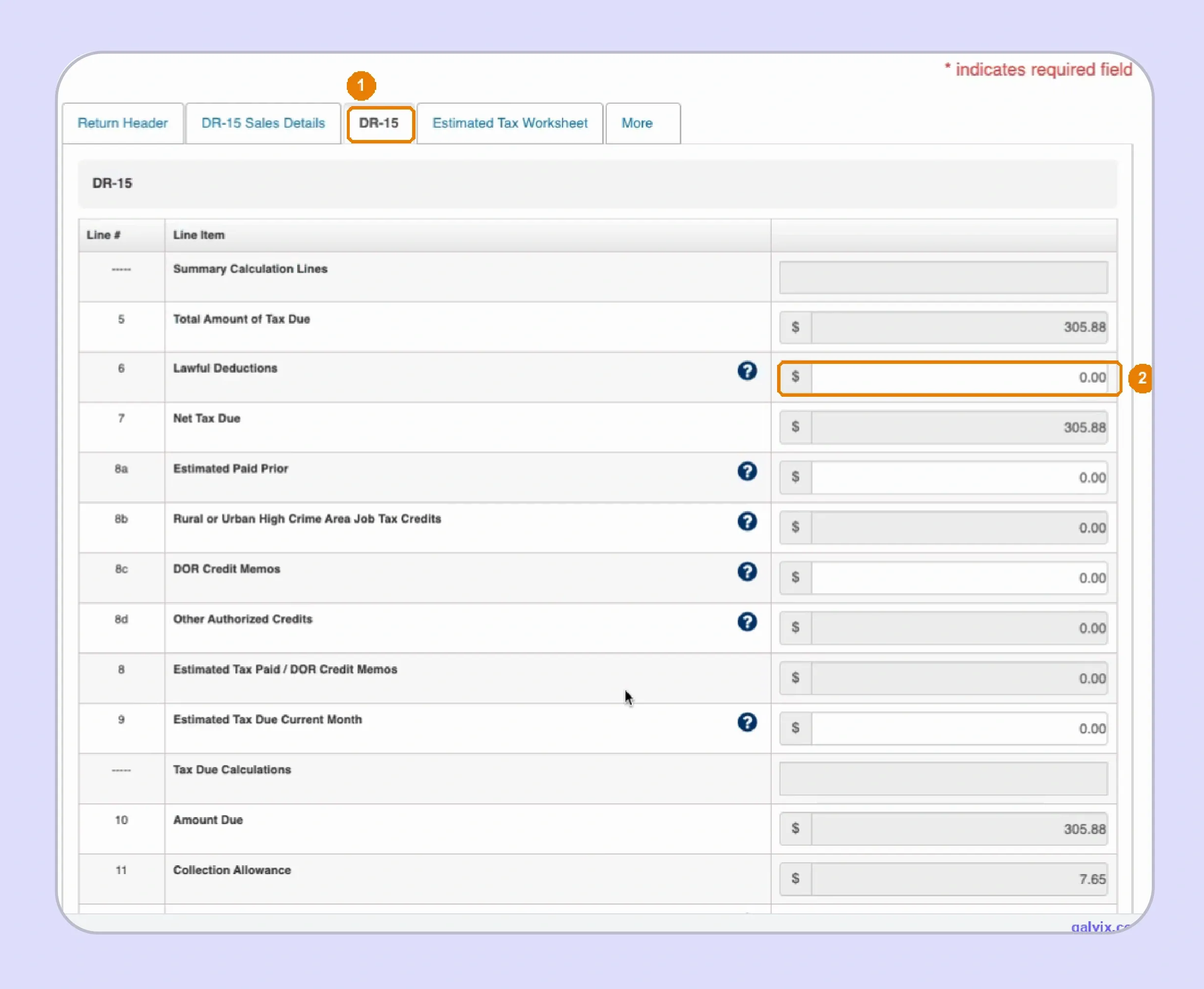
Step 5: Review Computed Lines and Surtax Disclosure
After selecting Calculate, review the resulting return summary before submitting.
- Review the total tax shown.
- Check any Lawful Deductions claimed.
- Confirm the available collection allowance.
- Complete surtax disclosure Lines 15(a) through 15(d).
- Compare Line 15(d) against your county-level tax records.
Florida allows eligible taxpayers who electronically file and pay timely to claim a 2.5% collection allowance on the first $1,200 of tax due, capped at $30.
Line 15(d) reports discretionary surtax due. State tax should remain outside that amount, even when both components appear together in Column 4. This review is an important part of FL sales tax filing because county allocation can be wrong even when the overall payment appears reasonable.
Step 6: Review, Sign, and Save Confirmation
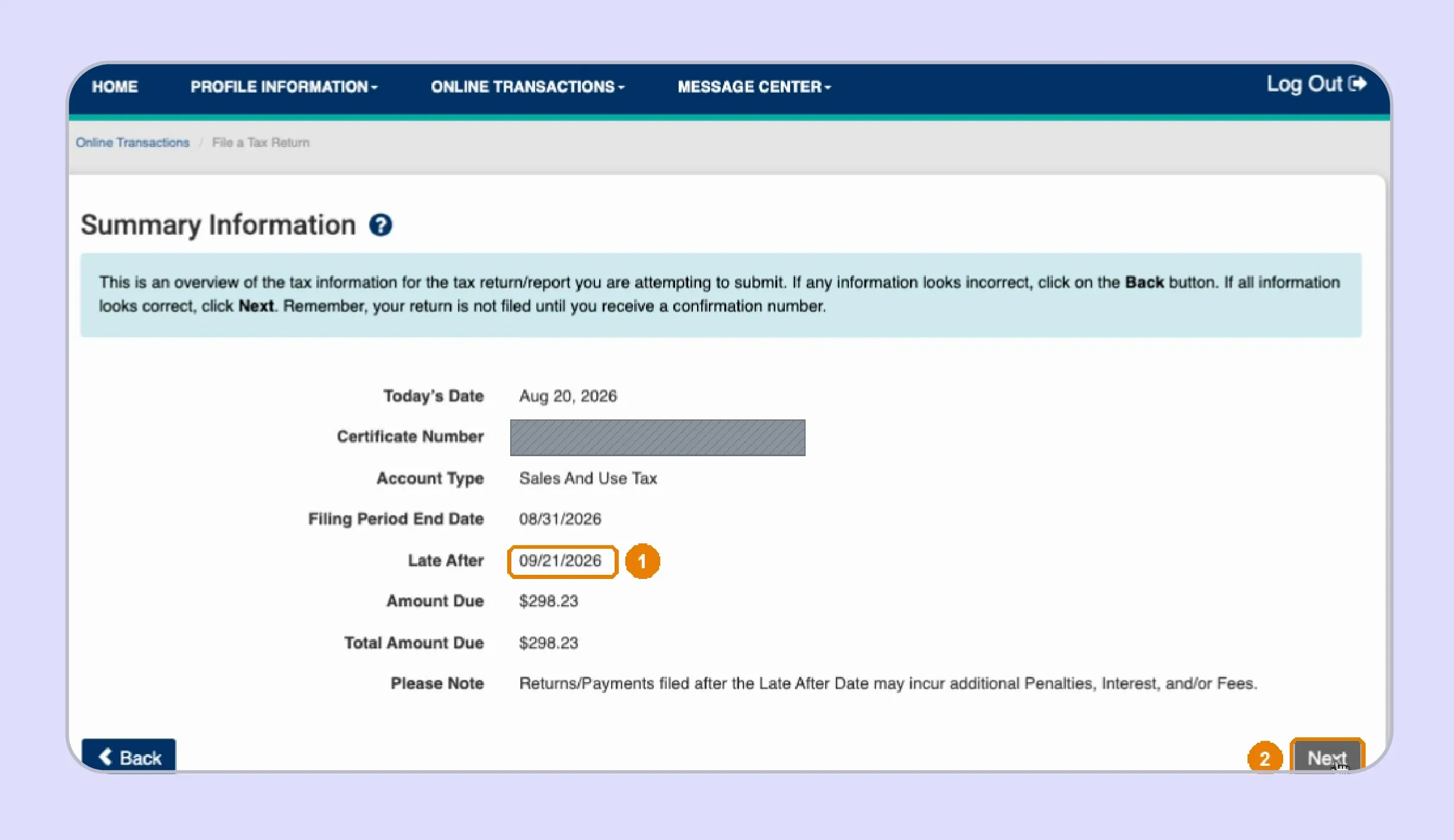
Complete one final review before transmitting the return and authorizing any related payment.
- Review the Late After date.
- Confirm the total balance shown.
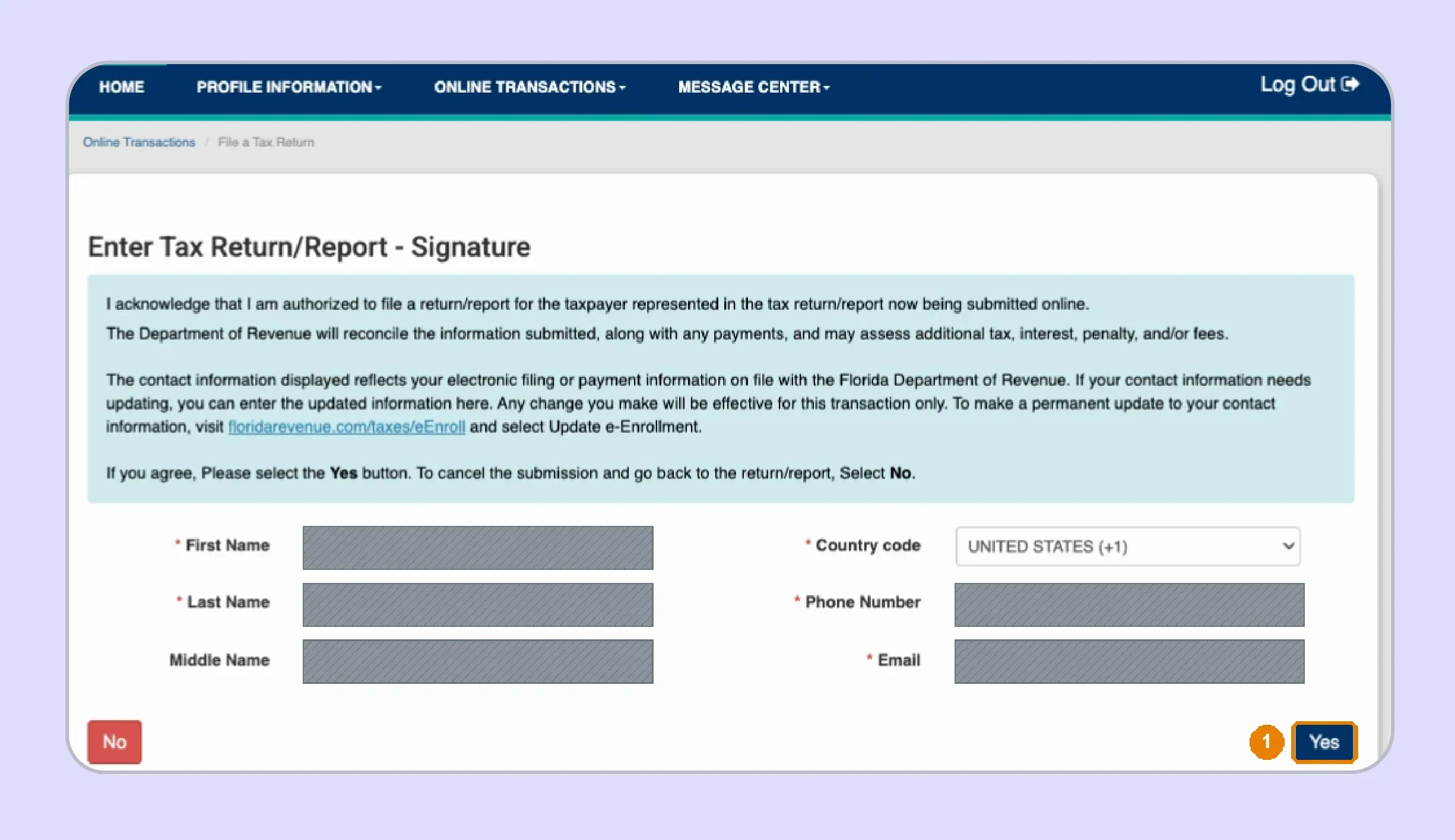
- Sign only after completing the review.
- Save the filing confirmation number.
- Retain payment evidence with the return.
Florida requires electronic payments initiated with the filing to receive confirmation by 5 p.m. ET on the business day before the twentieth. Filing and payment timing should therefore be reviewed separately.
Teams using EFT payment withdrawals should also confirm bank information and payment initiation dates. Enrolled taxpayers can save banking information within eServices, subject to their account setup.
Keeping both records gives your finance team evidence of what was filed and how the related payment was handled.
What Florida Sales Tax Facts Should Sellers Know Before Filing?
Before you file Florida sales tax online, confirm the current return, state rate, county surtax, deadline, collection allowance, and penalty rules. This reference table summarizes common DR-15 requirements from current Department guidance and should be checked again whenever your filing setup changes.
| Fact | Florida Rule |
|---|---|
| Main return | DR-15 Sales and Use Tax Return |
| Short form | DR-15EZ when assigned |
| State rate | 6% for most taxable transactions |
| Discretionary surtax | Currently 0.5% to 2% where imposed |
| Surtax cap | Generally first $5,000 for qualifying tangible personal property |
| Collection allowance | 2.5% of first $1,200, capped at $30 |
| Due date | Due on the 1st and late after the 20th |
| Electronic payment | Initiate by 5 p.m. ET on prior business day |
| Late penalty | 10% of tax owed, with a $50 minimum |
| Zero returns | Required for every assigned period |
The 6% rate has exceptions. Retail sales of new mobile homes are taxed at 3%, amusement machine receipts at 4%, and electricity at 6.95%. Florida applies a floating interest rate to underpayments and late tax payments. Interest charges can therefore continue separately from the late filing penalty.
How Do Exempt Sales Affect Florida Sales Tax Filing?
Exempt sales can reduce the taxable amount on a Florida DR-15 when the transaction qualifies, and proper records are available. Before filing Florida sales tax online, you must connect each exemption to the customer, certificate, transaction, and delivery details.
The following checks can make the process easier to manage:
- Use a current Florida Annual Resale Certificate when qualifying goods or services will be resold.
- Remember that Florida resale certificates expire each December and registered dealers receive new certificates annually.
- Keep separate documentation for exempt organizations, since their exemption requirements differ from resale transactions.
- Follow Florida's specific rules when documenting qualifying sales made through registered forwarding agents in Florida.
- Check both certificate status and transaction eligibility before treating customer purchases as exempt sales.
Sales tax exemption certificate collection and state lookup answer different questions from transaction eligibility. Galvix follows this layered approach by reviewing certificate requirements and verification options before exempt sales are reported as non-taxable.
Galvix's exemption certificate workflow can help teams collect and review certificates, track renewals, and organize support records. State verification should still be understood in accordance with what the official lookup confirms.
Why Does Manual Florida Filing Get Harder as Sales Grow?
Manual filing becomes harder as sales spread across more channels and Florida counties. Marketplace orders, wholesale invoices, direct billing, exempt customers, and different tax rates can all affect the return in different ways.
Your team still must reconcile taxable sales, review exempt transactions, prepare surtax details, track the due date, and save filing records. The process becomes even harder when data is spread across several systems, and each filing period requires the same checks to be rerun.
This is where sales tax complexity starts to build. A missing exemption certificate or incorrect county surtax can create extra work after filing. The same applies when a business follows the wrong filing frequency or misses a required return.
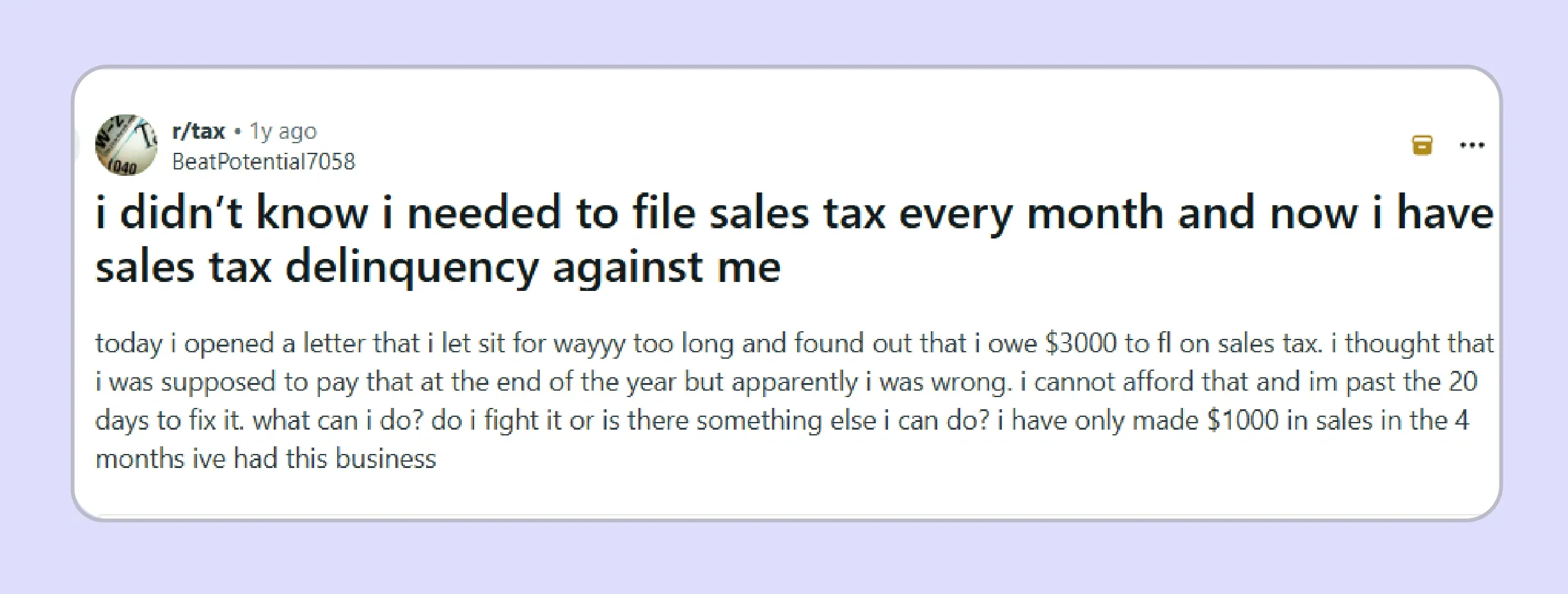
Reddit discussions show how these issues can affect smaller businesses as well. In one example, a business owner believed Florida sales tax was due annually, while the account required monthly returns.
The problem was not unusually high sales tax liability. It started because the expected filing schedule did not match the account requirement, leaving several returns outstanding.
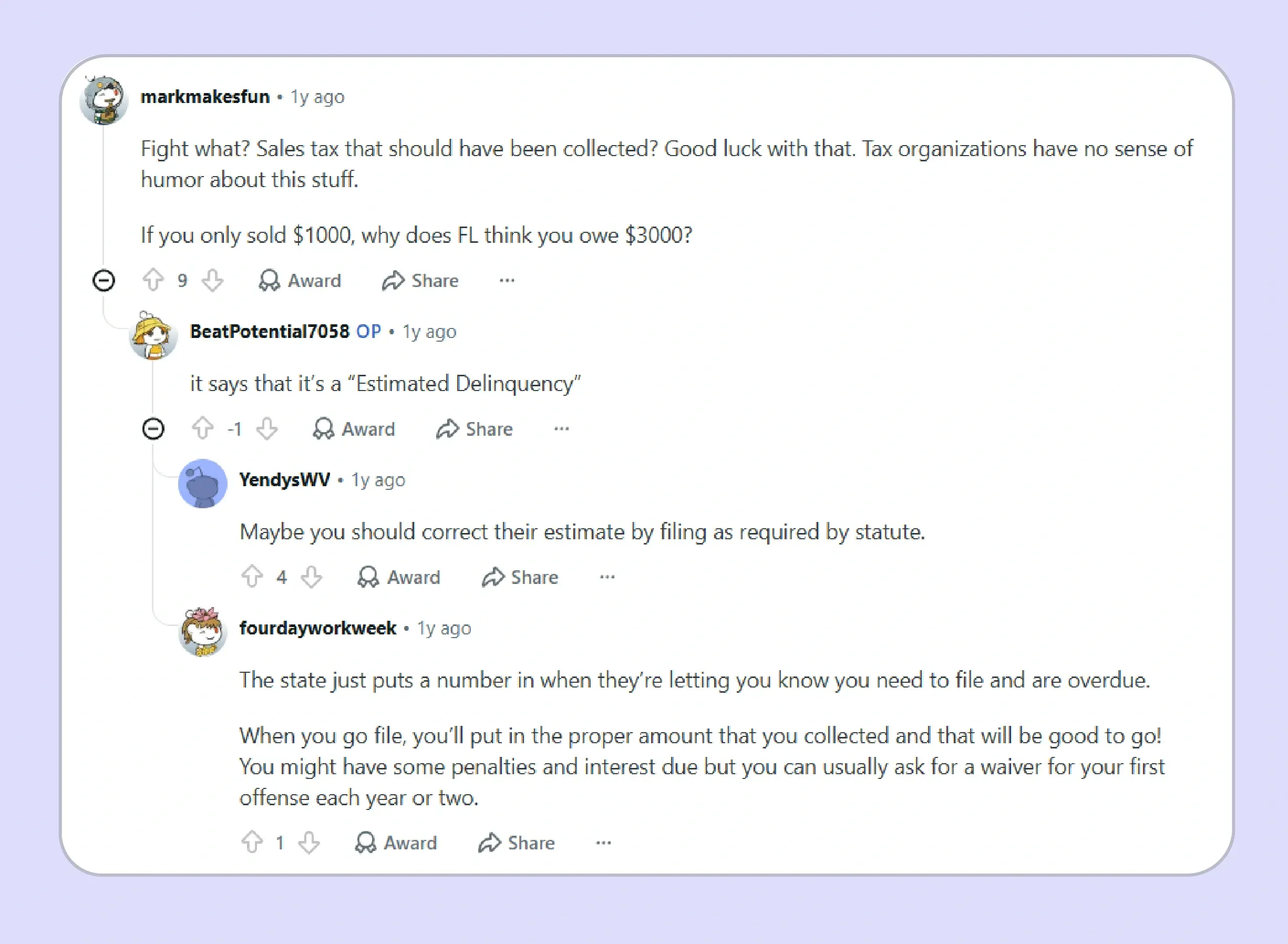
The discussion also shows why missed filings require prompt attention. When returns remain outstanding, the state may estimate the amounts due and apply a late-filing penalty. Filing the missing returns with accurate sales records is usually the sensible starting point before discussing penalties or other account issues.

How Does Galvix Help Businesses File Florida Sales Tax Online?
Galvix helps businesses manage FL sales tax filing through a structured compliance workflow. Instead of handling DR-15 calculations, surtax review, certificates, returns, and notices separately, teams can manage these tasks through a single coordinated process.
For Florida sellers, Galvix can prepare return data, reconcile gross sales, review exempt sales, check marketplace transactions, and organize certificate support before the Florida sales tax return is submitted. A named compliance specialist helps reduce the manual effort that builds up around filing deadlines.
Galvix also supports exemption certificate review, helping businesses separate certificate collection from registration checks and transaction eligibility. This gives teams a clearer way to support exempt sales before they affect the taxable amount reported on DR-15.
For businesses operating across several states, Galvix connects Florida filing with nexus monitoring, tax registration, notice management, and exemption certificate management. Its combination of intelligent automation and specialist review can also support a smooth onboarding process as compliance needs grow.
What Does Galvix Manage for Florida Sellers?
- Return preparation using reconciled sales and tax data from connected systems.
- Review of gross sales, exempt sales, taxable amount, and tax due before filing.
- County surtax review using filing records and delivery data.
- Exemption certificate collection, review, renewal tracking, and supporting records.
- Filing calendar support for monthly, quarterly, semiannual, or annual obligations.
- Notice management when Florida sends filing or payment correspondence.
Why Is Galvix Different From Manual Florida Filing?
| Area | Manual Florida Filing | Galvix |
|---|---|---|
| DR-15 inputs | Team calculates and types figures | Specialist-reviewed return preparation |
| Exempt sales | Certificates may sit outside filing records | Exemption support tied to return workflow |
| Surtax | County surtax checked manually | Surtax review included in filing workflow |
| Payment timing | Team tracks cutoffs internally | Filing calendar supports deadline management |
| Notices | Finance team responds directly | Galvix helps manage state correspondence |
| Multi-state sales | Separate processes by state | Compliance workflows connect across states |
For businesses looking for a Florida sales tax partner, Galvix offers managed support from Florida compliance experts as their sales tax liability and filing workload grow. The modular pricing ensures you can choose the required services based on the volume of work.
Book a Galvix demo to simplify Florida sales tax filing with specialist review, managed workflows, and support as your business grows.
Frequently Asked Questions
How do I file my Florida sales tax online?
To file Florida sales tax online, use the Florida Department of Revenue eFile and Pay system and select the return assigned to your account. Prepare gross sales, exempt sales, taxable amount, and tax due before entering the portal. Review county surtax and retain your submission confirmation afterward.
What is the form for a Florida sales tax return?
The standard form for a Florida sales tax return is Form DR-15, Sales and Use Tax Return. Some accounts may instead be assigned DR-15EZ. The Department also publishes DR-15N instructions and DR-15DSS information to support return preparation and county surtax calculations.
What is Form DR-15 in Florida?
Form DR-15 is Florida's main sales and use tax return for registered dealers. It reports gross sales, exempt sales, taxable amounts, and tax due across applicable transaction categories. The form also contains separate lines for deductions, collection allowance, penalties, interest, and discretionary surtax reporting.
Do I still have to file Florida sales tax if I made zero sales?
Yes. Florida requires registered dealers to file for every assigned reporting period even when no tax is due. A zero-activity period does not remove the filing obligation while the account remains active, so confirm your assigned frequency rather than waiting until business activity resumes.
When are Florida sales tax returns and payments due?
Florida sales and use tax returns and payments are due on the first day of each reporting period and become late after the twentieth day. Electronic payments made with the return must be initiated by 5 p.m. ET on the preceding business day to avoid penalty and interest.
How do I pay my Florida sales tax online?
To pay Florida sales tax online, use the state's eFile and Pay service after completing or alongside the applicable return. The Department provides electronic payment options within its eServices environment. Confirm banking details and save the payment confirmation separately from the return confirmation for internal records.
What is the penalty for filing Florida sales tax late?
Florida may charge a late-filing penalty equal to 10% of the tax owed, with a minimum penalty of $50. The $50 minimum can apply even when no tax is due. A floating interest rate also applies to underpayments and late payments, creating a separate cost.
Does Florida have online sales tax?
Florida applies sales and use tax rules to qualifying online sales in the same way its law applies to other taxable transactions. Out-of-state sellers can also create economic nexus when taxable remote Florida sales exceed $100,000 during the preceding calendar year, even without physical presence.
How do I complete a Florida sales tax return?
For businesses asking how to file sales tax return in Florida, start by reconciling gross sales and exemptions before calculating taxable amounts and tax due. Enter those figures on DR-15, complete applicable surtax disclosures, review the calculated return, and save filing and payment confirmations after submission.
How does Galvix help with Florida sales tax filing?
Galvix supports Florida filing through managed return preparation, data reconciliation, specialist review, exemption certificate management, and notice support. Businesses can choose only the modules they need because pricing is modular and linked to workload. This can reduce recurring internal effort as state filing obligations expand.