If your business is registered for sales and use tax in the state, you can complete your Georgia sales tax return through the Georgia Tax Center using Form ST-3. The state applies a 4% sales tax rate, while local taxes vary by jurisdiction when sales reach multiple counties.
The state calculation itself is simple. The harder part is matching taxable sales to the right county and local tax combination. During the filing process, GTC can route you to either the ST-3 Short Form or Long Form, depending on how you answer the Determine Form questions.
This blog explains how to file sales tax in Georgia, choose the right ST-3 route, report sales figures, complete county-level reporting, reconcile totals, and save proof of filing. We’ll also discuss how Galvix can help you file Georgia sales tax online while managing exemptions, registrations, nexus, and wider sales tax compliance across states.

What Georgia Sales Tax Filing Rules Apply Before You Start?
Georgia businesses usually file sales and use tax monthly by the 20th day following the reporting period. A registered tax account must continue filing until its status changes, whereas remote businesses may become subject to tax once they cross the state's economic nexus threshold.
Registered and Remote Sellers
The Georgia sales tax filing requirements depend on registration status, physical presence, remote sales volume, marketplace activity, and the filing schedule assigned to the account.
- Registered sellers: A business with an active sales tax permit must file for every assigned period until the account is properly closed.
- Physical presence: Inventory, employees, offices, or other qualifying activity inside the State of Georgia can create a collection and filing obligation.
- Remote seller: An out-of-state seller crosses Georgia's threshold after exceeding $100,000 in qualifying revenue or reaching 200 retail transactions during the current or previous calendar year.
- Marketplace sales: A remote marketplace seller may exclude qualifying facilitator-handled sales when testing its own threshold because the facilitator handles those transactions separately.
Direct sales remain the seller's responsibility when a marketplace facilitator does not hold the tax collection obligation for that transaction.
Filing Frequency and Zero Returns
Most businesses in Georgia file monthly returns, although you may receive approval from the Department of Revenue for a different filing frequency. Depending on your account, you could file your Georgia sales tax return quarterly or annually rather than the standard monthly schedule.
The return is usually due on the 20th day after the reporting period ends. If that date falls on a weekend or holiday, the deadline moves to the next business day. You still need to file a zero return when your account remains active, and you have no sales or tax due. That means the filing deadline still applies even during periods of inactivity.
Electronic filing is required when the amount due exceeds $500 on a covered sales or use tax return. Once electronic payment rules apply, the related return must also be filed electronically.
Why Can a Georgia Sales Tax Return Be Harder Than It Looks?
A Georgia sales tax return process becomes complex when taxable activity spans several counties, because each jurisdiction may impose different local taxes. GTC also changes the filing route depending on whether the seller reports a single jurisdiction or multiple jurisdictions during the period.
GTC Can Route You to Two Different ST-3 Forms
The Georgia sales tax return filing process begins with GTC's Determine Form questions. A simpler route can be used for single-county reporting, while multi-jurisdiction activity moves the filer into the ST-3 Long Form workflow.
- ST-3 Short Form: This route supports simpler reporting where taxable activity belongs to a single county during the filing period.
- ST-3 Long Form: This option supports multiple Georgia jurisdictions and provides the county-level reporting needed for local tax calculations.
On the Georgia tax portal, choosing the multi-jurisdiction option takes you to the ST-3 Long Form. This is the form you need when reporting sales across several counties.
GTC guidance also directs multi-jurisdiction filers to use the ST-3 Long Form before calculating sales and use tax.
Local Rates Are More Than Percentages
Georgia has a 4% state tax, while counties and other local areas can add their own local taxes. The rate you use usually depends on the county where the customer receives the property. Businesses operating across several locations can review the broader Georgia sales tax rules when checking rates, nexus, and filing requirements.
To keep those local rates current, the Georgia Department of Revenue updates its sales tax rates each quarter and uses jurisdiction codes to match taxable sales with the right location. Atlanta sales need extra care because Fulton and DeKalb counties use different codes.
These codes are not limited to showing a percentage. They help determine how tax dollars are split among different local tax authorities, even when two rate combinations look similar.
What Should You Prepare Before Opening Georgia Tax Center?
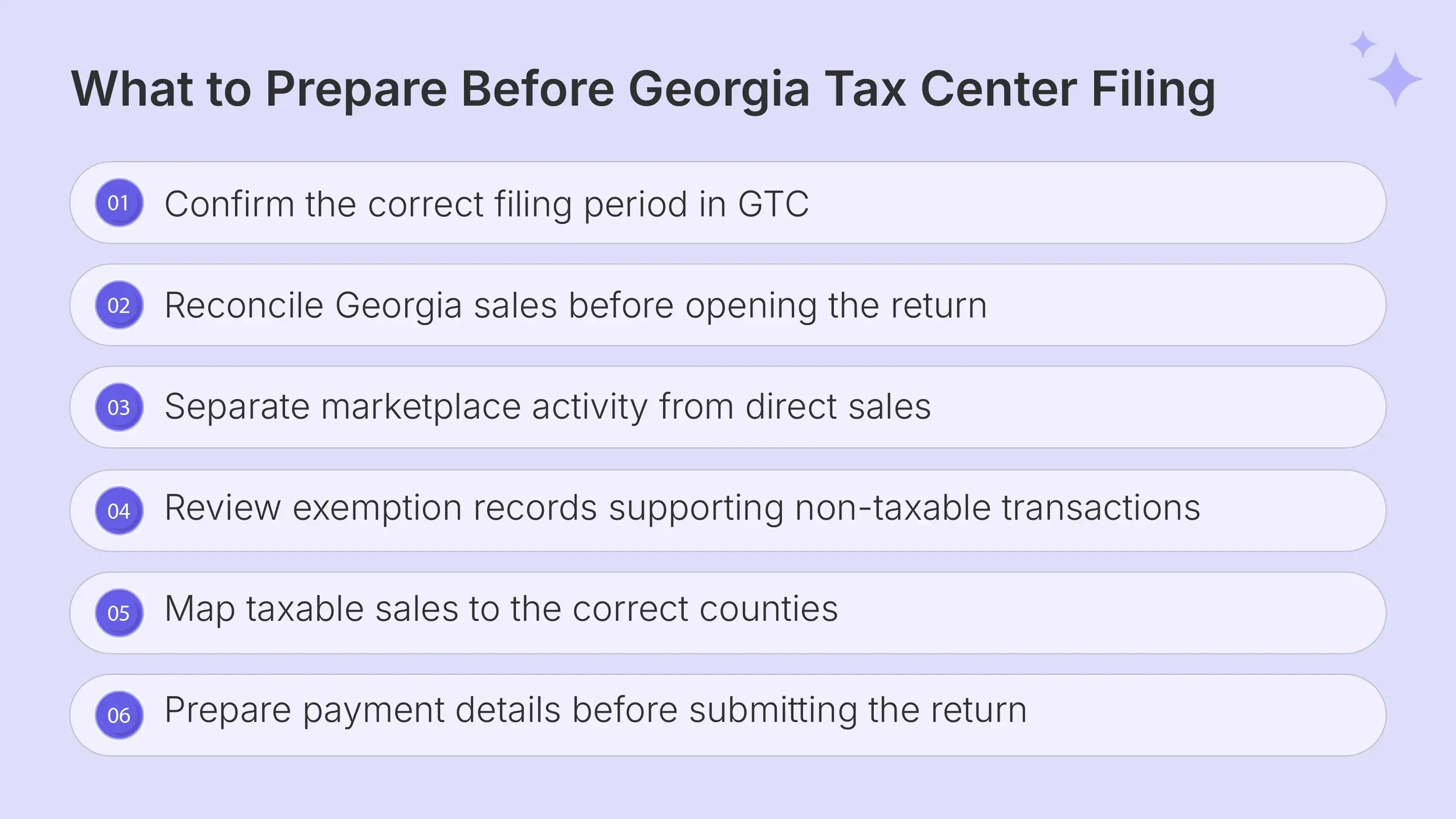
A clean GA sales tax filing starts with reconciled numbers before you open GTC. Prepare statewide sales information, county-level amounts, exemption support, and any use tax activity from the same underlying sales data.
| What You Need | Why It is Crucial |
|---|---|
| GTC username and password | Access the correct Sales and Use Tax account |
| Total State Sales | Report all Georgia-sourced sales for the period |
| Total Exempt State Sales | Calculate taxable state sales correctly |
| Total Tax Collected | Compare collections with calculated tax |
| Taxable sales by county | Complete local jurisdiction reporting |
| Current local rate combinations | Apply the right jurisdiction treatment |
| ST-5 and other records | Support qualifying exempt sales |
| Payment details | Complete payment after return submission |
The official ST-3 instructions define Total State Sales as all sales sourced to Georgia, including leases and rentals. Do not replace that figure with company-wide gross sales from every state. Taxpayers with bad debts or certain motor fuel activity may also need additional information before filing. So, it is vital to review the different types of transactions in the account first.
Marketplace and Direct Sales
Marketplace facilitators collect and remit Georgia tax on qualifying sales when they meet the state’s threshold. Those facilitated retail sales are reported through the marketplace provider’s own account.
If you also sell through your website, wholesale invoices, or other direct channels, keep those transactions separate from marketplace activity. This makes tax collection easier to track and helps you reconcile the return before filing.
When preparing the Georgia sales tax return, confirm which sales still belong to your business. Do not assume marketplace transactions can be removed from your sales data without checking who held the collection responsibility.
Exempt Sales and Use Tax
Georgia requires Total Exempt State Sales to be separated from total sales before GTC derives taxable state sales. Sellers should keep exemption evidence related to the customer and transaction that supports the treatment.
You should also review use tax when Georgia sales tax was not paid on property later used in the state. ST-3 uses different reason codes depending on how the use tax liability arose.
For a registered dealer, this use tax activity can usually be reported on ST-3. If you also hold a separate use tax account, confirm which account applies before reporting the purchase.
How Do You File a Georgia Sales Tax Return Through GTC?
To file Georgia sales tax online, open the Sales and Use Tax account, select the correct period, complete Determine Form, enter sales information, report county activity, review totals, and submit. The official GTC workflow follows this sequence for simple and multi-jurisdiction returns Teams researching how to fill out sales and use tax return in Georgia should follow these steps:
Step 1: Sign In to Georgia Tax Center
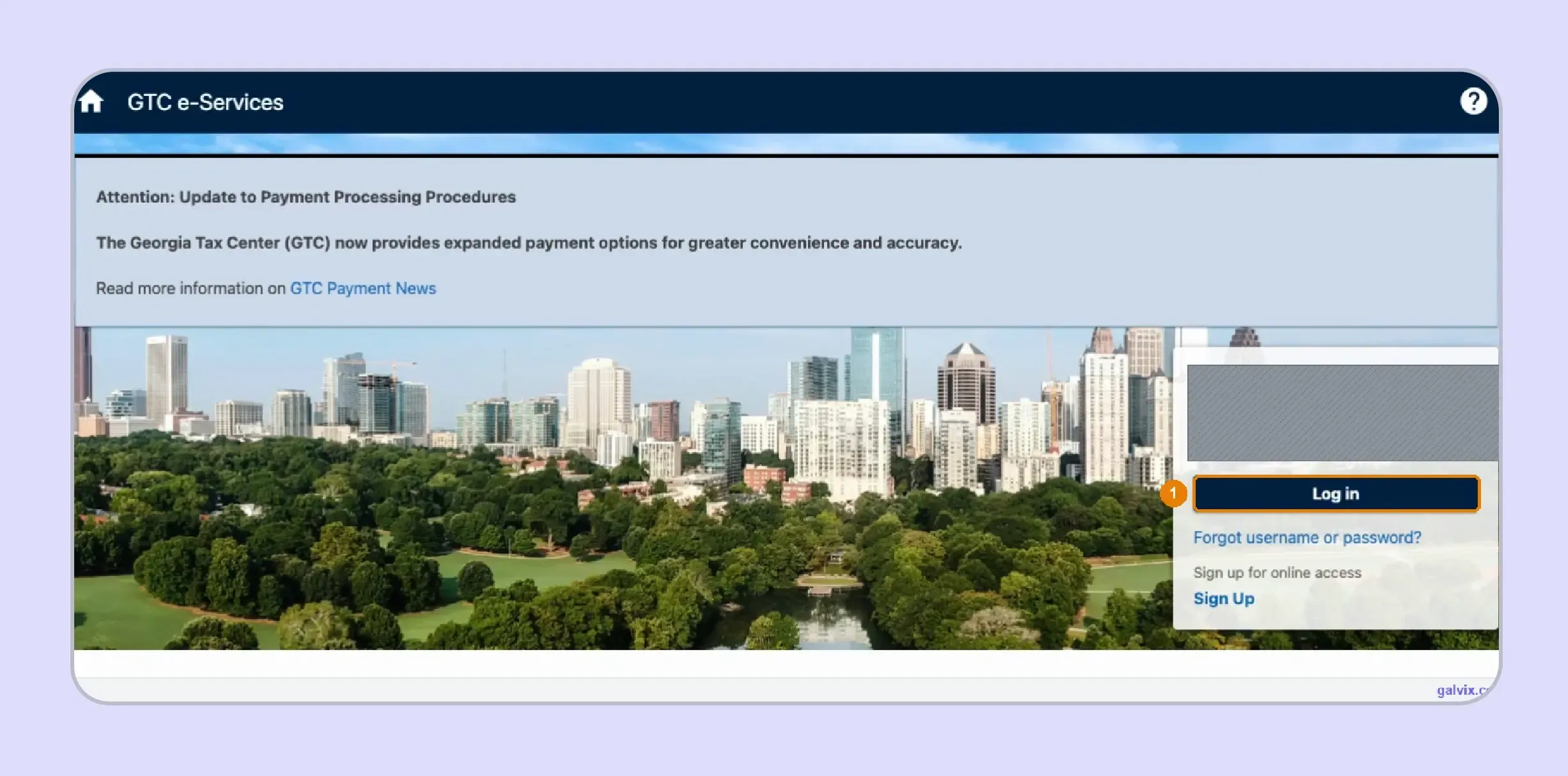
Open the Georgia Tax Center and enter the username and password associated with your business. After login, confirm the business name so you do not prepare a return under another connected entity. GTC is the state's tax center for filing, payment, registration, correspondence, and other account services.
Step 2: Open the Correct Filing Period
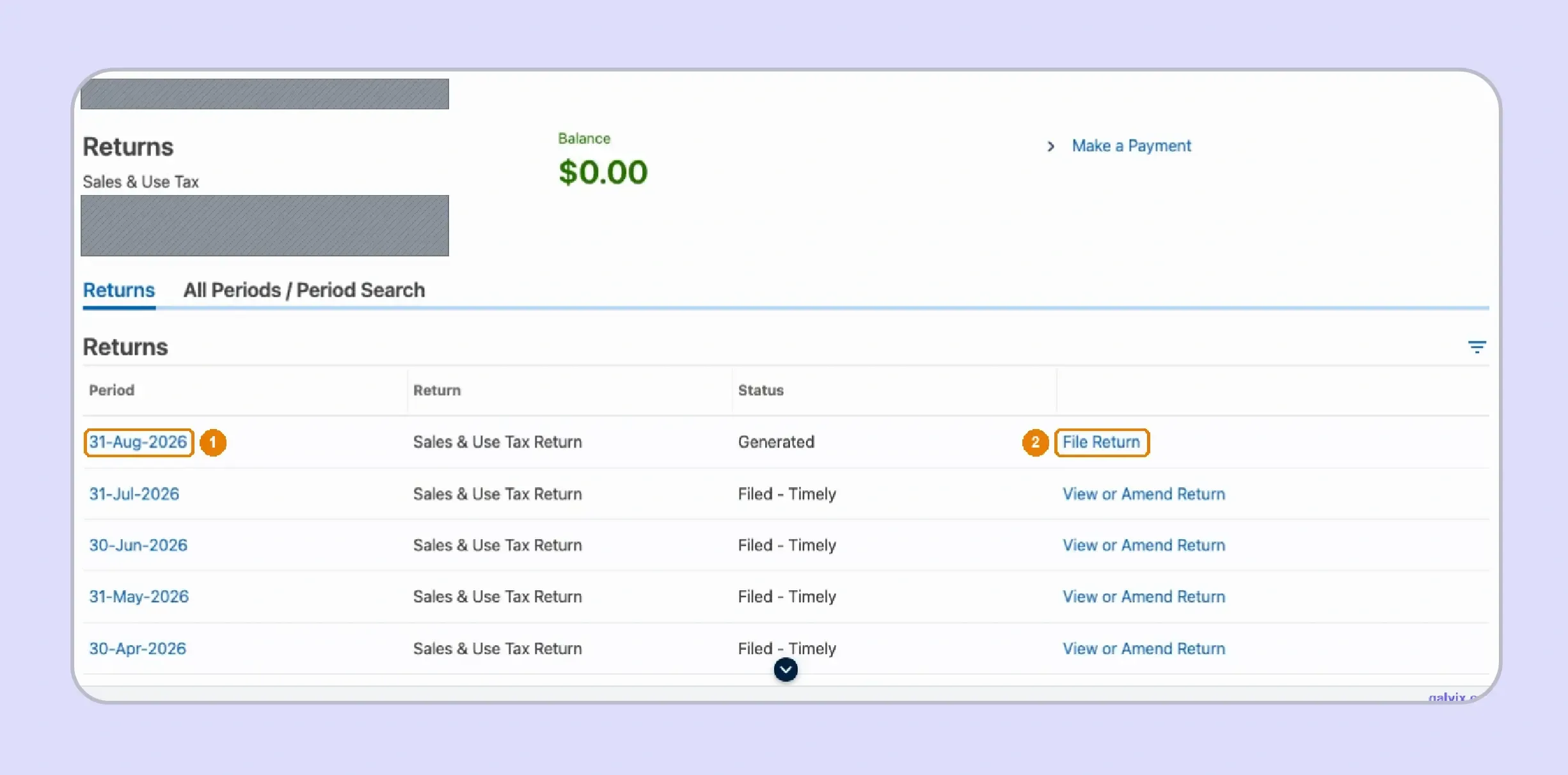
Locate the Sales and Use Tax account and select View Returns. Find the reporting period you need, confirm the account number, and choose File Return for that period. Completed and outstanding periods may appear together, so compare the period-ending date with your reconciled accounting records before continuing.
Step 3: Confirm Your Sales and Use Tax Activity
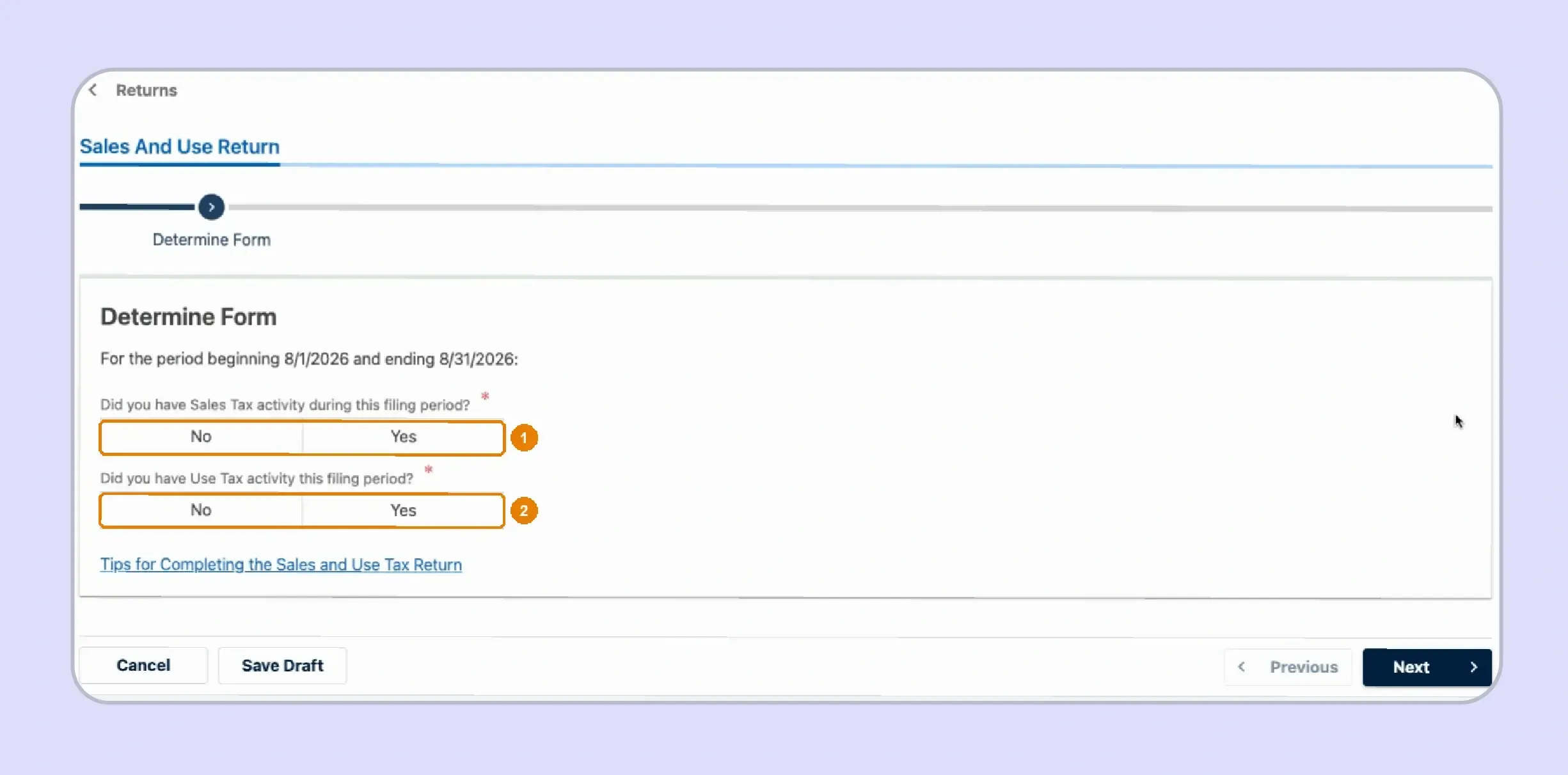
GTC asks whether the business had sales tax activity or use tax activity during the selected period. Answer according to the records prepared for that month or quarter.
If no sales or uses occurred, selecting No for both questions opens the zero-return route described by the Department.
Watch out: A Generated return still requires action. Its presence in the account does not prove that the return has already been submitted.
Step 4: Select the Activities That Apply
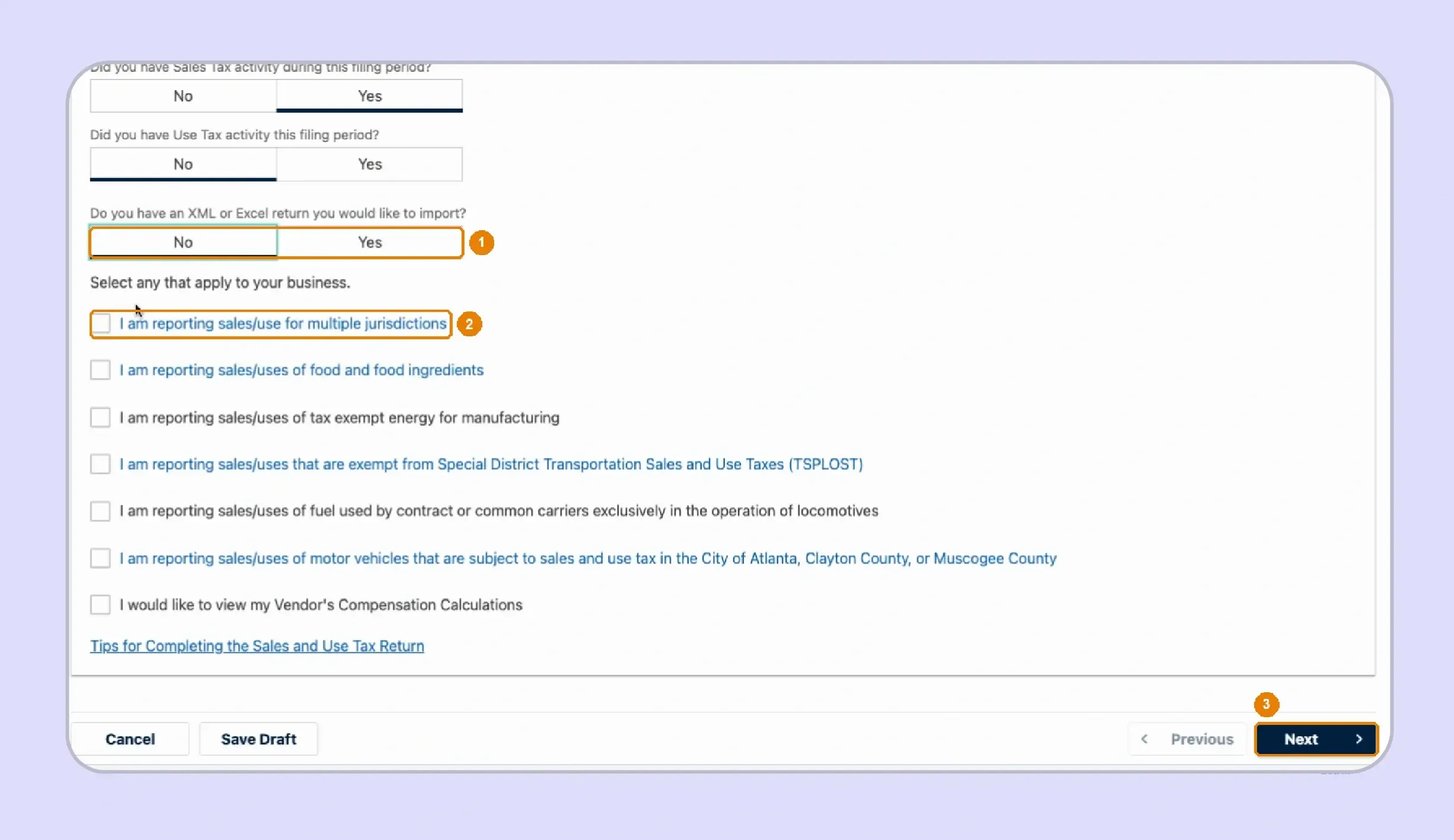
Next, indicate whether you plan to import an XML or Excel return and select the activities that match your filing situation. Multi-county sellers should choose the option for reporting sales or use across multiple jurisdictions because that selection moves the workflow toward the Long Form.
Watch out: Missing the multi-jurisdiction selection can send a multi-county filer into the simpler return path and create extra correction work.
Step 5: Confirm the Correct ST-3 Form
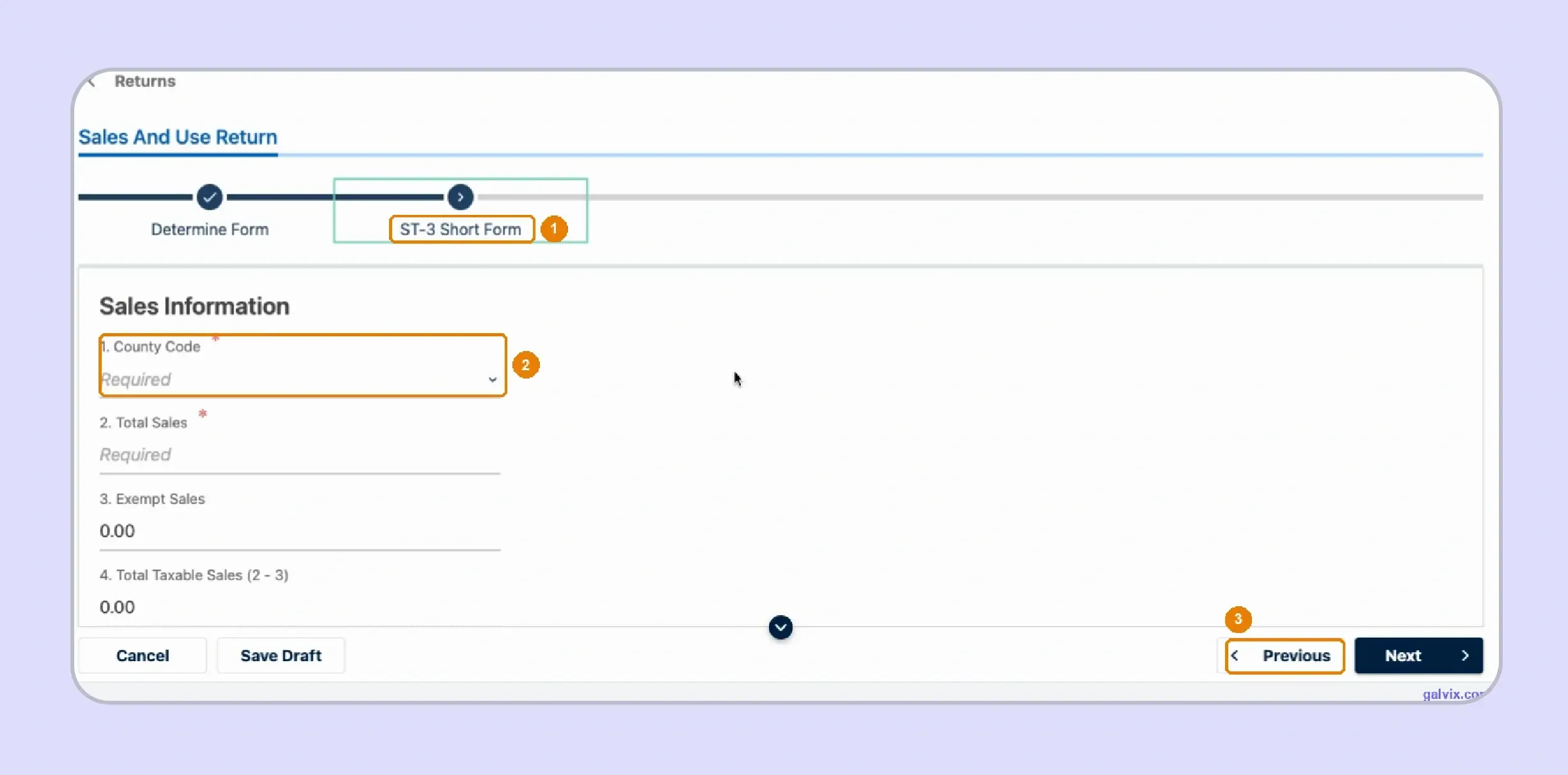
Before entering figures, review the form shown in GTC. The Long Form supports county-level reporting, while the simpler route contains fewer local reporting fields. If the wrong form opens, return to Determine Form and correct the selection before entering sales data into the wrong workflow.
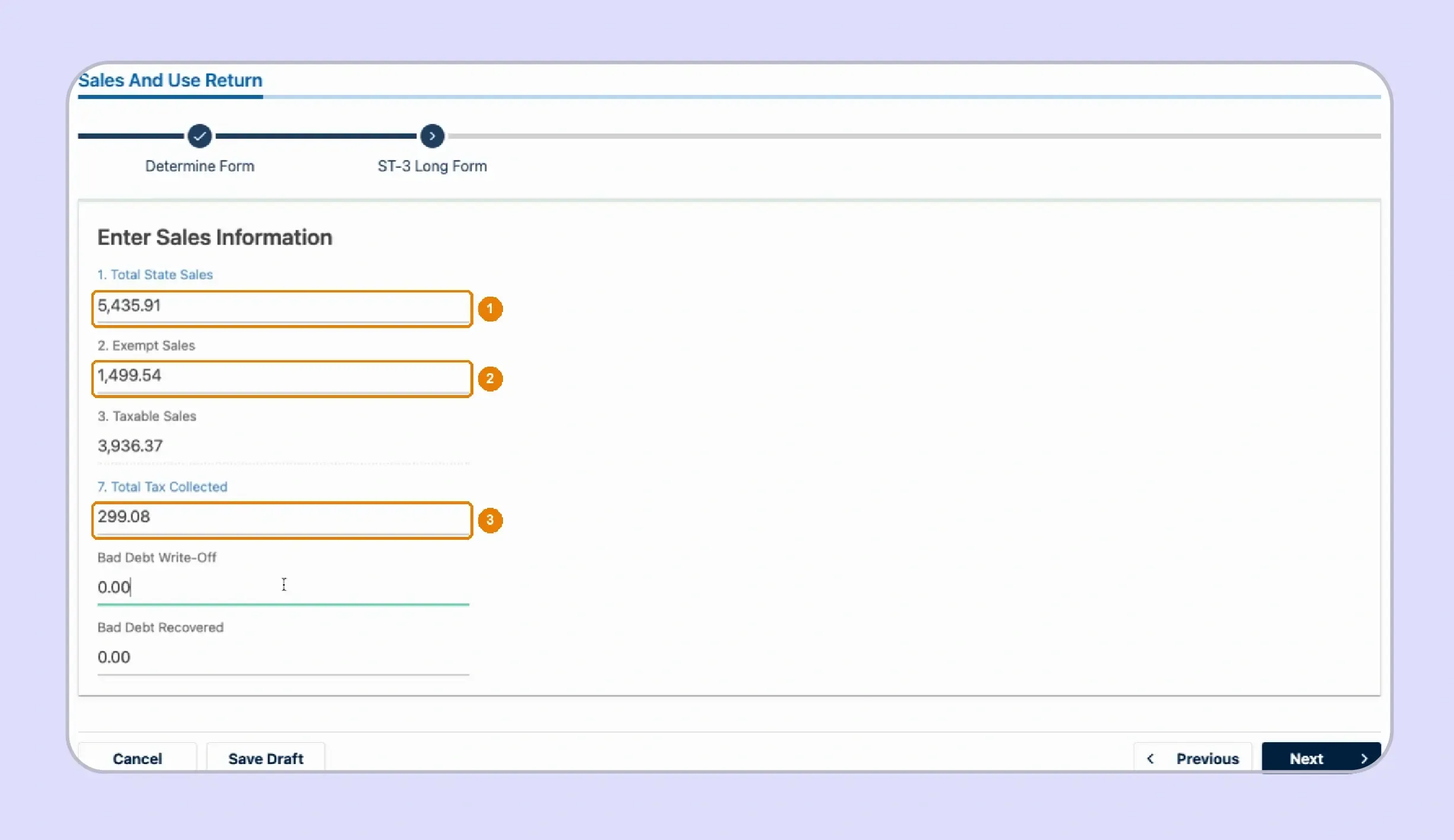
Step 6: Enter State Sales and Tax Figures
On the Long Form, enter Total State Sales, Total Exempt State Sales, Total Tax Collected, and any applicable bad-debt information. GTC calculates Taxable State Sales from the sales figures entered.
Total Tax Collected should match the amount of sales tax your records show customers were charged during the reporting period.
Watch out: When collected tax exceeds calculated total tax, ST-3 treats the difference as Excess Tax rather than silently removing the overcollection.
Step 7: Review State Tax and Local Tax Codes
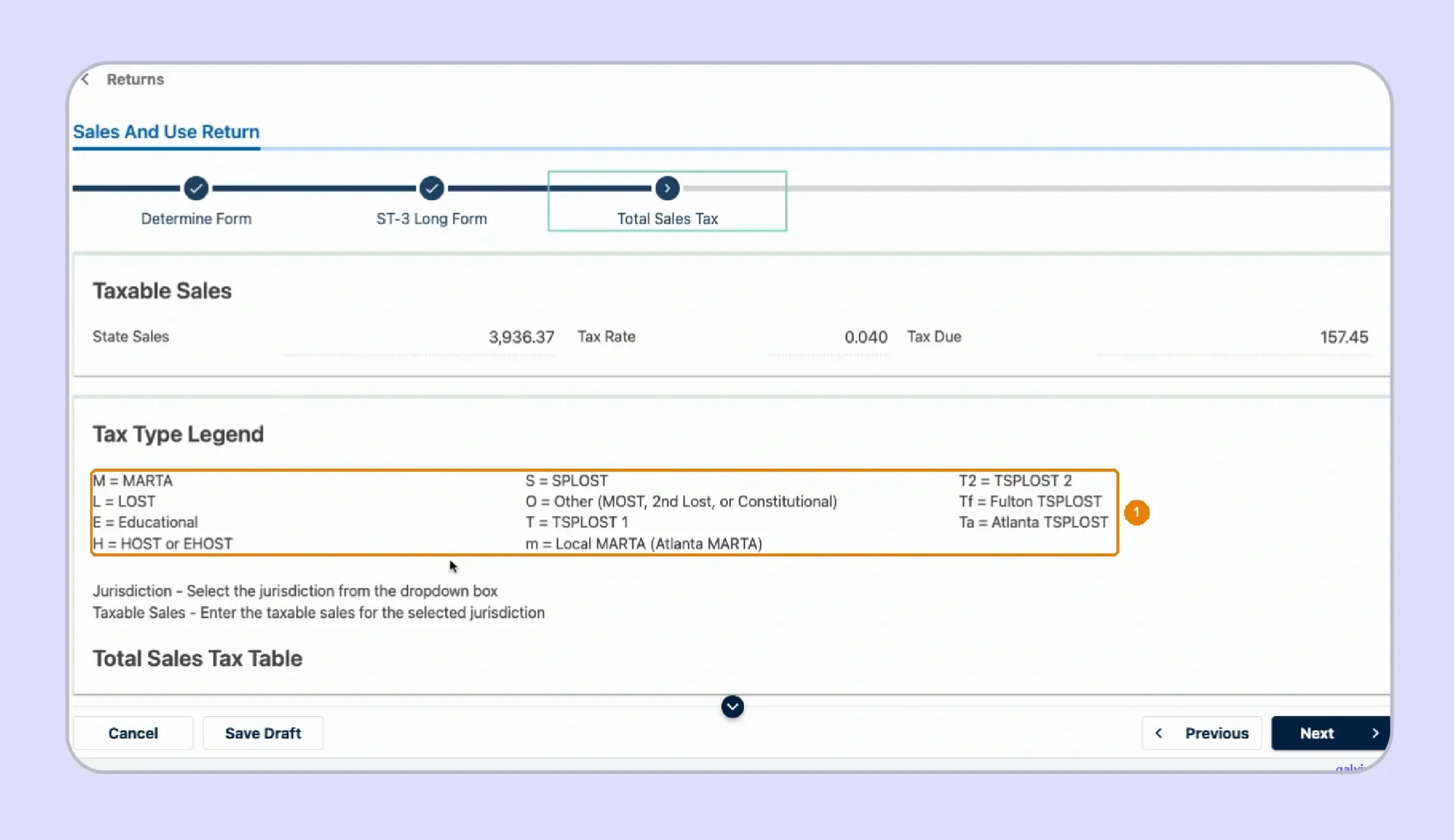
GTC applies the 4% state sales tax and then uses jurisdiction codes for local reporting. Review the Tax Type Legend before entering taxable sales by county. Georgia's published rate charts identify standard rates and special reporting codes for transactions that receive different local treatment.
Watch out: Similar-looking letter combinations can represent different local taxes, so match the code against the current Department rate chart.
Step 8: Check the Pre-Populated County Table
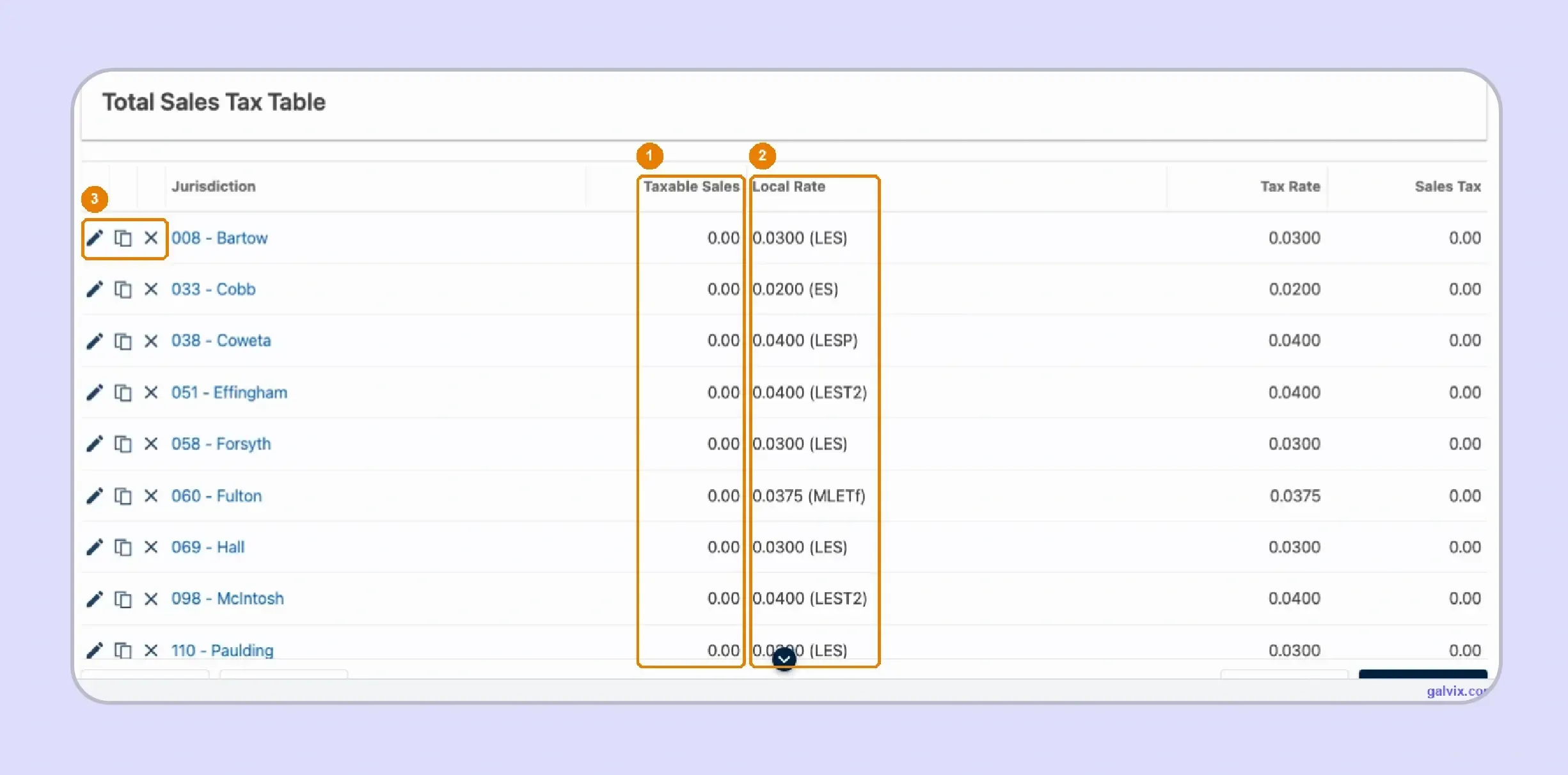
The live GTC workflow can display county rows carried over from earlier filing activity, with current taxable amounts initially set to zero. Review every row against the current period rather than assuming historical Georgia jurisdictions still represent this month's transactions. Add a new jurisdiction when current sales require one.
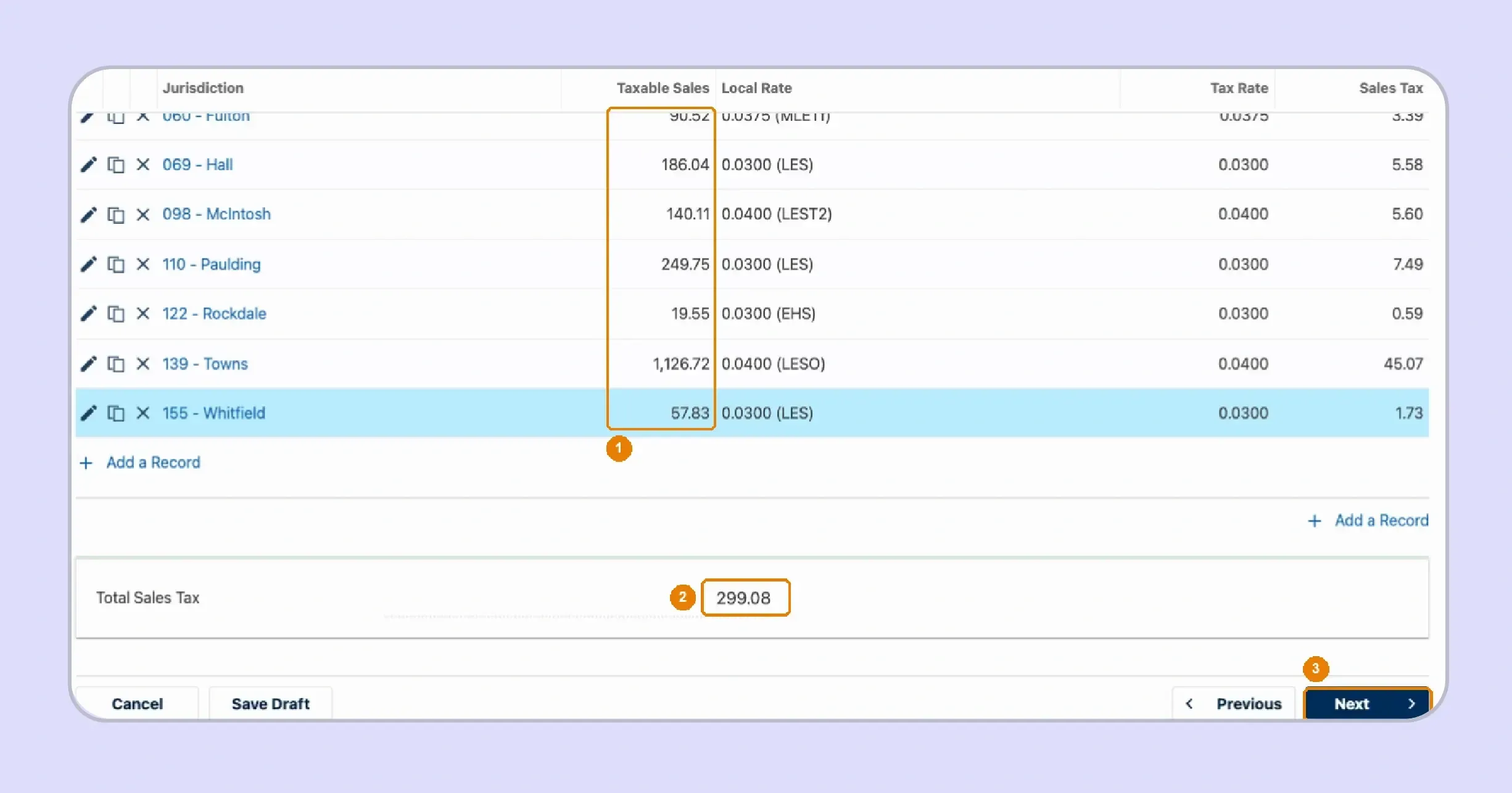
Step 9: Enter Taxable Sales for Each County
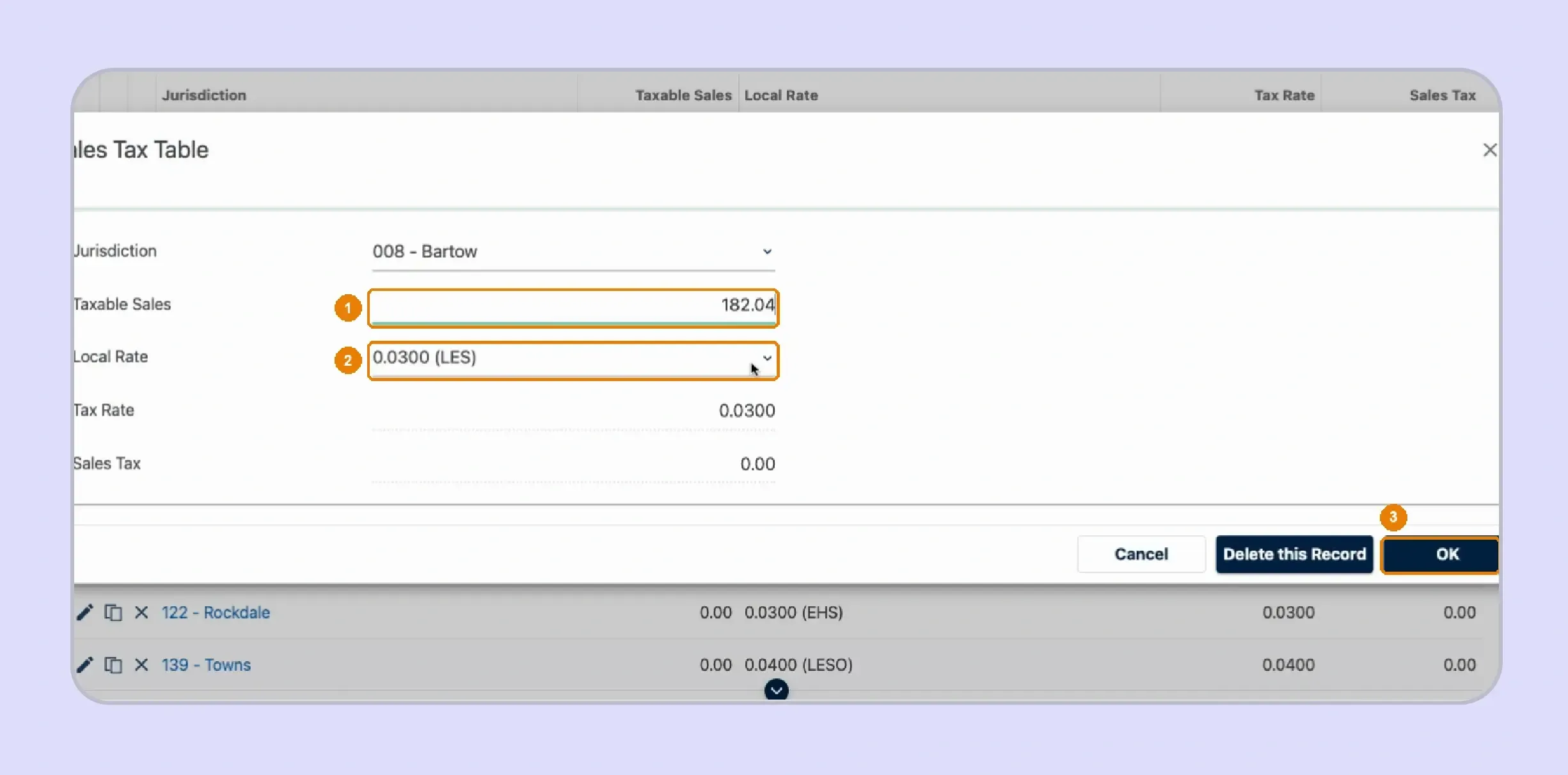
Open each applicable county row and enter the taxable sales sourced there. Select the correct local-rate combination, then confirm the row so GTC can calculate the related local amount. Georgia sourcing normally follows the location where the customer takes delivery of tangible personal property.
Watch out: Two code combinations can display similar percentages while representing different local components, so verify the letters rather than relying on percentage alone.
Step 10: Reconcile County Sales Before Continuing
Add the county taxable amounts and compare the result with statewide Taxable State Sales from the earlier screen. Then compare Total Sales Tax with Total Tax Collected before moving forward.
This reconciliation can expose missing counties, incorrect local codes, or discrepancies in collections before the Georgia sales tax return reaches final review. In the live GTC workflow, a county row can accept a negative taxable amount when refunds exceed the county's current-period sales.
Watch out: If refunds make the overall return negative, review whether the correction belongs on an amended return for the period containing the original transaction.
Step 11: Review the Complete ST-3 Return
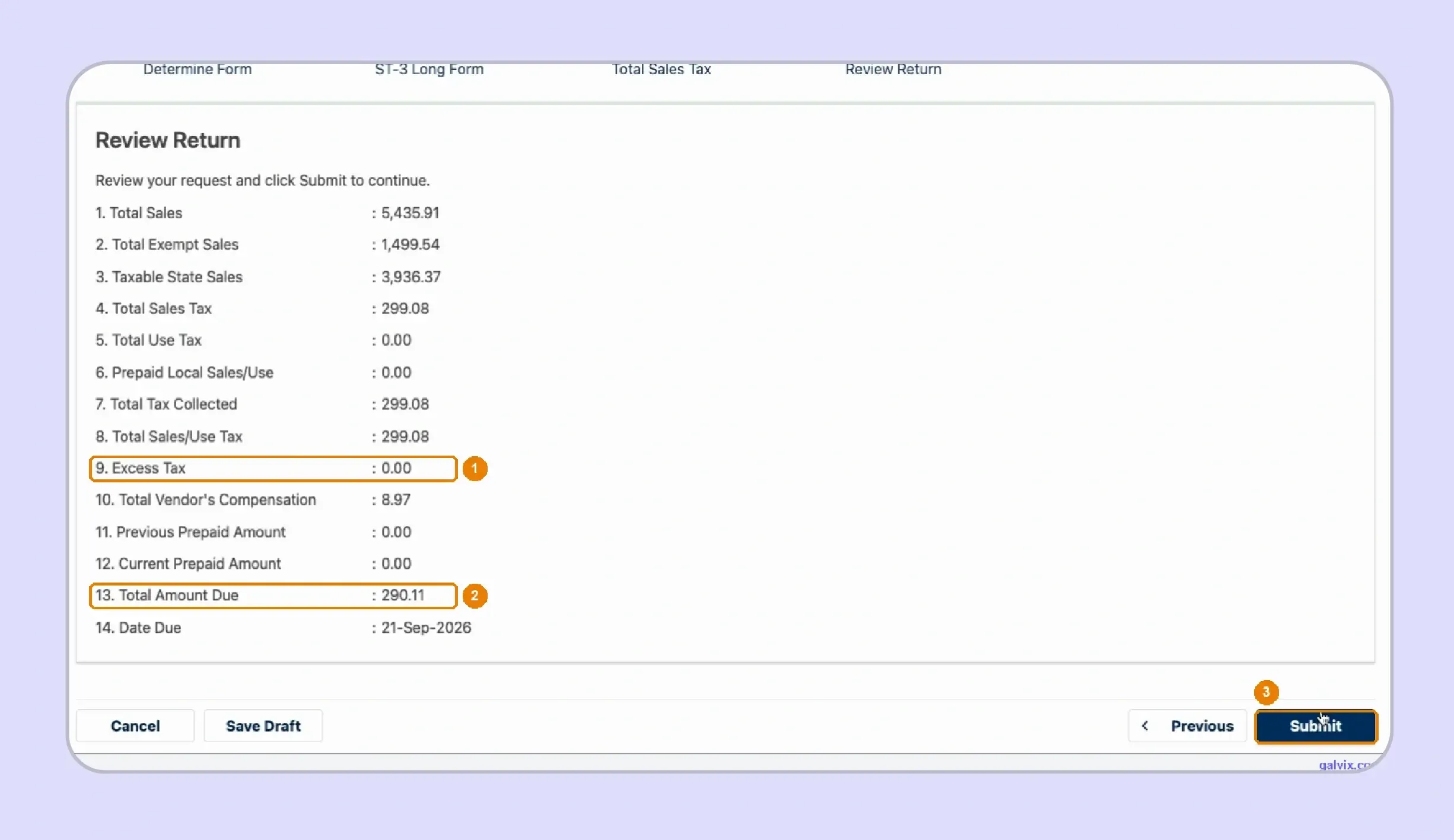
Review Total State Sales, Taxable State Sales, Total Sales Tax, Total Use Tax, Excess Tax, vendor compensation, and Total Amount Due before submission.
Georgia provides vendor compensation for timely filed and paid returns. Current ST-3 instructions apply 3% to the first $3,000 of qualifying tax and 0.5% to the amount above that.
Some higher-liability dealers also have prepaid estimated tax obligations when prior calendar-year state tax liability exceeds the statutory threshold excluding local sales taxes.
Step 12: Submit and Save Your Confirmation
Select Submit after reviewing the return. GTC requires confirmation before submission and then provides a confirmation number that should be written down or printed for your records.
If you are checking how to pay sales tax in Georgia, GTC also supports electronic payment after filing, while payment evidence should remain separate from return confirmation.
A later correction should use the amendment process instead of another original return. Official instructions require the amended ST-3 to include changed information alongside unchanged return data.
What Do Georgia Sellers Get Confused About During Sales Tax Filing?
Real questions from sellers on Reddit show where Georgia sales tax can become confusing in day-to-day transactions. The issues often start before you prepare the Georgia sales tax return, especially when products, services, or out-of-state deliveries are involved.

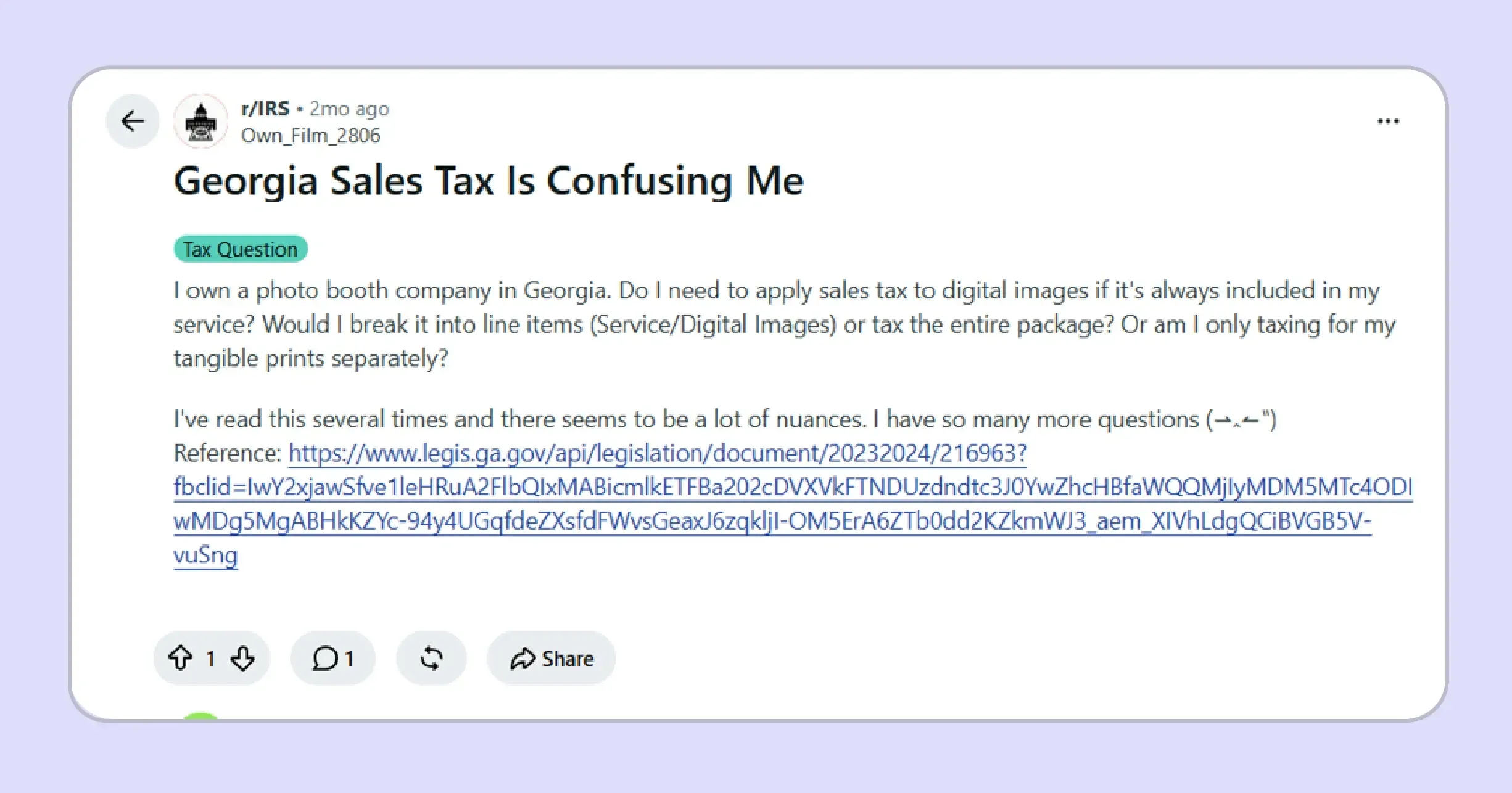
Bundled billing is one example. A photo booth owner was unsure whether digital images sold with printed photos should be taxed together or listed separately. Questions like this affect taxable sales because the treatment depends on what you sell and how the transaction is structured.
Repair businesses can face similar questions when parts and labor are combined on a single invoice. You may need to determine whether sales tax applies to the customer charge or whether tax was already paid when purchasing the tangible personal property used in the repair.
Out-of-state shipments create another layer of confusion. Georgia generally follows destination sourcing, so tax collection can depend on where the customer receives the goods. This can also change the applicable local taxes, making delivery information important before the transaction is recorded in your filing records.
How Do Exempt Sales Affect a Georgia Sales Tax Return?
Exempt sales reduce taxable state sales when the underlying transaction qualifies and the seller has appropriate supporting documentation. Georgia commonly uses Form ST-5, while the state verification tool confirms registration numbers without deciding whether every individual transaction qualifies for exemption.
- Certificate review: The seller should confirm that the exemption form contains the purchaser details, registration information, signature, and exemption reason required for the claim.
- Registration status: Georgia's verification tool can confirm a Georgia sales tax number, although it does not verify federal or out-of-state identification numbers.
- Transaction eligibility: A certificate should describe an exemption that existed when the sale occurred and reasonably applies to the tangible personal property being purchased.
- Record connection: Keep the certificate with customer records and exempt invoices so the supporting evidence can be retrieved when tax authorities review the transaction.
Some nonprofit organizations qualify for specific Georgia exemptions, while others do not receive automatic state-level treatment based solely on federal nonprofit status. The document and tangible goods involved should therefore be reviewed together.
For a wider explanation of certificate collection, verification, and transaction-level review, the sales tax exemption certificate guide explains how these controls fit together.

How Does Galvix Help Businesses Manage Georgia Sales Tax Filing?
Galvix manages each Georgia sales tax return as part of a wider sales tax compliance workflow. Its team reconciles transaction information, prepares the return for approval, files it on schedule, and connects the filing to related state obligations.
For multi-county Georgia sellers, this model reduces the work of rebuilding return figures from separate systems each filing period. Supported integrations bring sales information from ecommerce, billing, accounting, and ERP systems into the compliance workflow.
Businesses should review available sales tax integrations when transaction data spans platforms such as Shopify, QuickBooks, NetSuite, Stripe, BigCommerce, WooCommerce, or Zoho Books.
What Galvix Manages for Georgia Sellers
Galvix combines specialist ownership with a managed process, so internal finance teams do not need to assemble every state submission independently.
- Return preparation: Transaction data is reconciled before each return is prepared, then the customer reviews and approves the return before filing.
- Local reporting review: Georgia county-level information can be reviewed against underlying activity before those figures move into the state's filing process.
- Exemption management: Certificates can be collected, reviewed, stored, followed through renewal, and organized with supporting records for exempt customer relationships.
- Nexus and registration: Nexus exposure can be monitored across states, while new registrations are handled when the business decides another obligation requires action.
- Notice management: State correspondence can remain linked to the relevant tax account and filing history, rather than becoming a separate finance-team workflow.
If you are preparing your first return, start by reviewing the Georgia sales tax registration requirements, so your account setup and filing obligations are clear before the due date.
Once filing begins, the cost of compliance should also match the work your business needs. Galvix uses modular pricing, so you pay only for the services you select rather than a single all-inclusive package.
This Galvix sales tax pricing structure explains the workload factors behind returns, registrations, nexus monitoring, notice management, exemption management, and other modules.
For teams filing across several states, this approach can save time and improve confidence in the process. Experts prepare the returns, deadlines stay organized, and internal teams spend less time moving between separate state portals.
Book a demo today to learn how you can simplify Georgia and multi-state filing with expert preparation and on-time submission.
Frequently Asked Questions
Can I save a Georgia sales tax return and finish it later in GTC?
Yes. GTC lets you start a Georgia sales tax return and save it when more information is still needed. The saved return is not submitted, so you must reopen it, complete the remaining fields, review the tax return, and submit it before the filing deadline. Save Draft keeps your work available in GTC.
What happens if I choose the wrong ST-3 form in GTC?
If you open the wrong ST-3 form, go back to Determine Form and change your activity selections before continuing. Multi-jurisdiction filers should use the ST-3 Long Form for county-level reporting. If the Georgia sales tax return has already been filed, any correction should follow the amended-return process rather than filing another original return.
Can taxable sales for a Georgia county be reported as a negative amount?
Yes. In the live GTC workflow, taxable sales for a single Georgia county can be entered as a negative amount when refunds exceed sales for that jurisdiction. Review the full Georgia sales tax return carefully, as an overall negative result may require an amended return for the reporting period that includes the original sale.
What happens if tax collected is higher than the tax GTC calculates?
If Total Tax Collected is higher than the sales and use tax GTC calculates, the difference is reported as Excess Tax. That amount stays on the Georgia sales tax return and forms part of the total tax due. GTC does not simply remove the extra amount collected from customers during the reporting period.
Does GTC automatically add every Georgia county where I made sales?
No. Do not assume GTC will automatically include every county where you made taxable sales. Some rows may come from earlier filing activity, while new Georgia jurisdictions may need to be added. Compare the county table with current sales data and the Department of Revenue rate chart before submitting the tax return.
Can I correct a Georgia sales tax return before submitting it?
Yes. Before submission, you can move back through the GTC filing process and correct the Georgia sales tax return. If a saved request remains unprocessed, GTC may also allow you to change or withdraw it. Once the return is processed, later corrections should use the amended-return workflow for that reporting period.
Do Georgia filing and payment confirmations need to be saved separately?
Yes. Save the filing confirmation and payment confirmation separately because they prove different actions. GTC provides a confirmation number showing that the Georgia sales tax return was submitted, while payment history shows whether the related tax due was paid. Keeping both records makes later account review and sales tax compliance easier.