
If you run a Shopify store, sales tax filing may have been one less thing to worry about. Shopify used your store's sales data to prepare returns, file them with states, and pay the tax owed. That left you with more time to run the business.
Now, Shopify is ending its automated filing service. For most stores, its last returns will cover sales through December 31, 2026. Shopify Tax will still calculate tax at checkout, but you or another provider will need to handle future returns.
For a store filing in three states, taking over the work may be manageable. If you file in 15 states, sell through other channels, or make advance tax payments, there is more to plan. You need to know which returns Shopify will complete, which will come next, and who will be responsible for filing them.

What Is Ending with Shopify Filing?
Say someone in California places an order through your Shopify store in February 2027. Shopify Tax can still calculate the sales tax at checkout. However, when the next California return is due, Shopify will no longer prepare or file it. You will need to handle that return yourself or choose someone to do it.
Shopify Tax will also continue to provide sales tax reports, so the sales figures will remain available. What changes is the work that follows: preparing the return, submitting it to the state, and paying the tax owed.
Here is what will continue and what will stop after Shopify's final automated filing:
| Shopify Function | What Happens After Automated Filing Ends? |
|---|---|
| Sales tax calculation at checkout | Continues |
| Shopify Tax reports | Continues |
| Automated return preparation and filing | Ends after your final eligible return |
| Automated sales tax payments | Ends with the final return |
For example, Shopify Tax will keep collecting tax on orders shipped to California after the automated filing service ends. When your next California return is due, you or your filing provider must report those sales and make the required payment.
If you want to understand the difference between tax calculations and return filing, our Shopify automated sales tax guide explains what each feature handles.
When Will Shopify File Your Last Sales Tax Return?
With Shopify automated filing ending in 2026, most stores will have their final returns filed in January for periods ending December 31, 2026. The exact dates depend on how often you file in each state, with New York and Pennsylvania as the main exceptions.
Here’s the final covered periods for different filing schedules:
| Filing Frequency | Last Shopify-Covered Period | Filing Month |
|---|---|---|
| Monthly | December 2026 | January 2027 |
| Quarterly | October–December 2026 | January 2027 |
| Quarterly in New York | December 2026–February 2027 | March 2027 |
| Semi-annual | July–December 2026 | January 2027 |
| Semi-annual in Pennsylvania | July–December 2026 | February 2027 |
| Annual | Calendar year 2026 | January 2027 |
Suppose you file monthly in California and quarterly in New York. Shopify will handle the December California return in January 2027. For New York, it will file the December 2026–February 2027 quarter in March.
The new provider must start with the following reporting period in each state. If both services file the same period, you could end up with a duplicate return. If neither files it, the return could be late.
Pennsylvania also follows a different schedule for semiannual returns. Our Pennsylvania sales tax filing guide explains how returns and payments work through the state's myPATH portal.
What Did Shopify Automated Filing Not Cover?
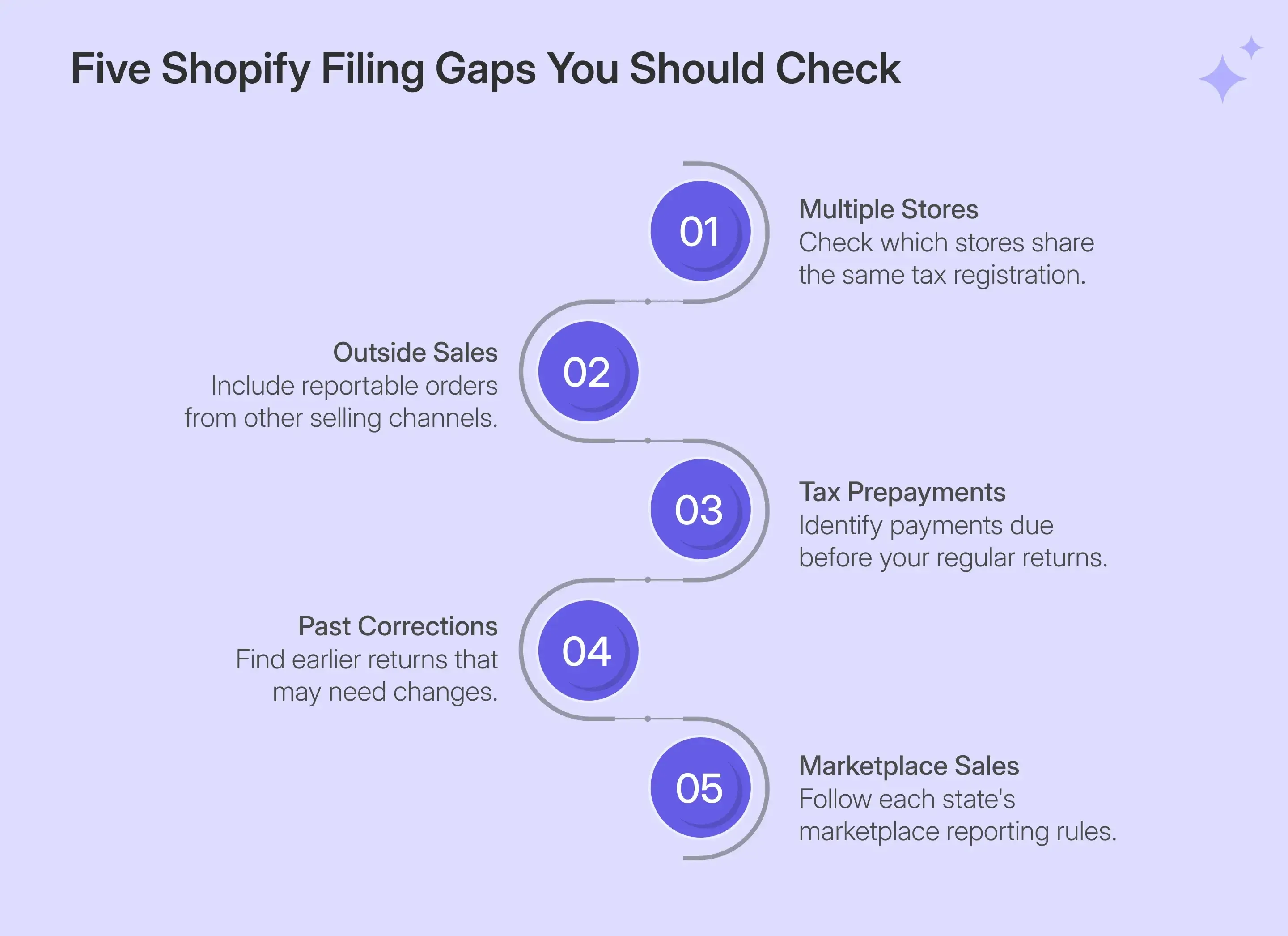
Shopify's filing service worked well for certain Shopify sales. However, some transactions and filing tasks were outside its scope.
You may have handled these separately without thinking much about them. When the filing service changes, it is worth checking whether the next provider can take responsibility for them.
| Area | Shopify Automated Filing Limitation | What It Means for Your Business |
|---|---|---|
| Multiple Shopify stores | Handled one store at a time rather than combined filings | Sales from another store may need to be added to the same state return. |
| Sales outside Shopify | Did not support imported orders or disconnected sales channels | Orders from other systems may be missing from reported sales. |
| Tax prepayments | Did not handle payments required before regular filing dates | Missing an advance payment can lead to penalties. |
| Streamlined Sales Tax | Did not support SST filing requirements | Businesses using SST may need a separate filing arrangement. |
| Historical corrections | Did not handle past or amended returns | Mistakes in earlier returns must be corrected separately. |
| Marketplace reporting | Supported certain channels, with reporting rules varying by state | Some marketplace sales may still need to appear on state returns. |
| Third-party refund apps | Did not support Loop Returns & Exchanges | Refunds may need additional checks before the return is prepared. |
Consider a business that files quarterly returns in New Jersey but must also make monthly tax payments. Shopify did not handle those advance payments. If the owner misses one, the state may still impose a penalty, even if the quarterly return is eventually filed on time.
Our New Jersey sales tax filing guide explains how these payments work and when they may apply.
There can be similar problems with other sales. If two stores share one tax registration, their reportable sales may need to be combined. If a marketplace collects tax on some orders, those sales may still need to appear on the return, depending on the state.
The next filing provider should know how to handle these cases. Otherwise, you could still end up preparing part of the return yourself.
How Should You Close Out Your Shopify Automated Filing?
When Shopify stops filing sales tax returns, check which returns were completed and which filing periods need a new provider. You also need copies of your past filings and a clear start date for the new provider. A missed return can lead to penalties, while an incomplete handoff can leave you unsure who is filing for a particular period.
The following three checks will help you transition smoothly after Shopify automated filing ends:
Confirm Your Final Returns Were Filed
After Shopify's final filing month, check the status of each return in the Shopify admin.
A return marked ‘Filed’ has been submitted. If the status shows ‘Action required’, an issue needs attention before Shopify can file it.
If Shopify has not filed a return, the service may have skipped it or been unable to complete the filing. Download the return report and arrange for the outstanding return to be filed separately.
Download Your Filing History Before April 30, 2027
Shopify will let you download past filing records until April 30, 2027. Save these records before the deadline so your new provider can review earlier returns if needed.
Go to Finance > Tax filing in your Shopify admin, open each return, and download its Return report. Keep copies of the filing details, payment records, and return status for each state.
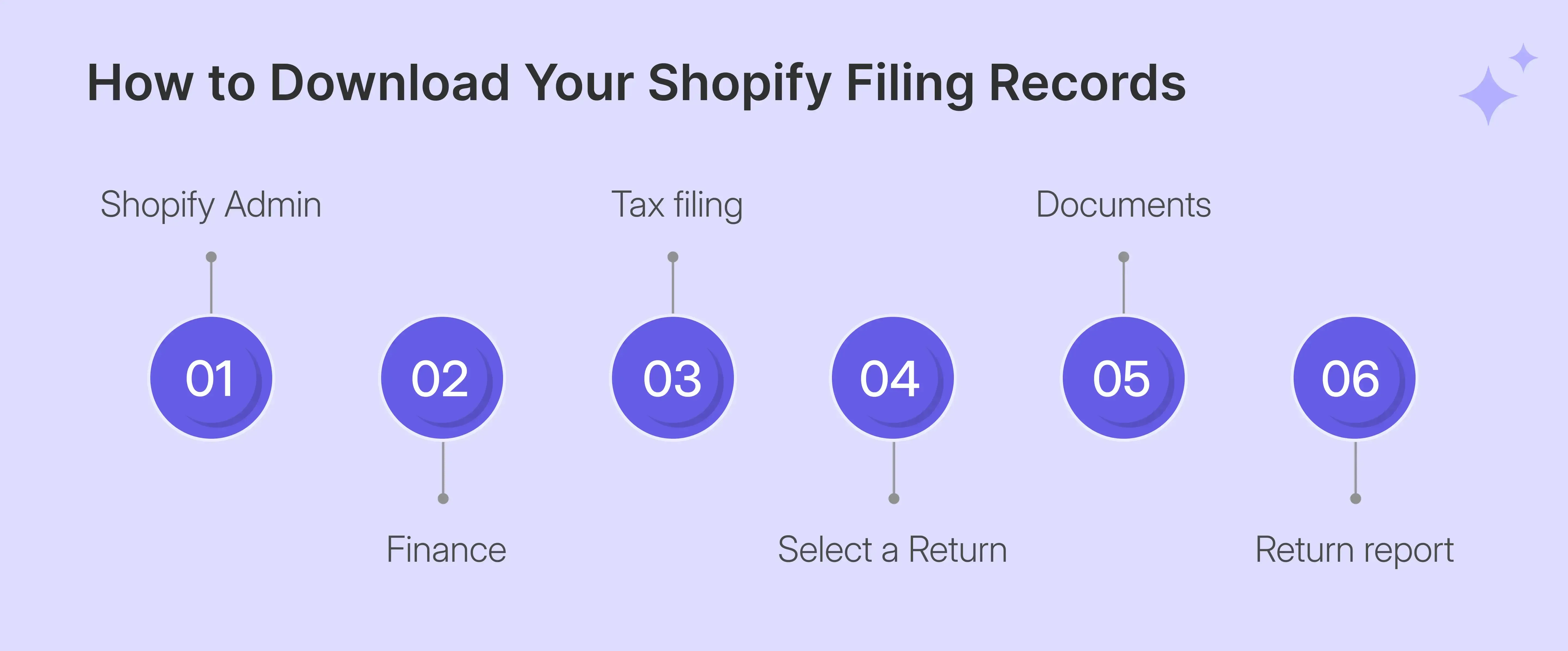
These records can also help if a state questions an earlier filing. Having the original reports makes it easier to check what was submitted and identify any differences.
Assign Responsibility for Your Next Return
When Shopify stops filing sales tax returns, the new provider should take over the next reporting period in each state. Confirm the filing dates, state account access, and records needed before that return becomes due.
The provider will also need access to the relevant Shopify transactions. Our Shopify integration guide explains how we connect stores and import sales records for tax reporting and filing.
You do not need to turn off Shopify automated filing for the standard transition. The service ends after its final scheduled return.
What Should You Look for in Your Next Filing Provider?
If you filed sales tax in three states, checking the returns yourself might have been manageable. You could look at each report, confirm the amounts, and keep track of the deadlines.
At 10 or 15 states, that becomes harder. Each state may have different filing dates, payment rules, and forms. Add sales from other channels, and there is more to check before a return goes out.
What you need is someone who will review every return and take responsibility for getting it filed correctly. The service should do more than submit figures from a report. Here are four questions worth asking before choosing a provider:
Can the Provider Account for All Your Sales?
Suppose you sell furniture through Shopify but also take bulk orders by email and send invoices through an accounting system. These sales may not appear in Shopify's reports, even though they need to be included in your sales tax returns.
If the filing provider uses only Shopify data, wholesale orders may be omitted. That may result in a return that does not show all the reportable sales. Ask how the provider combines sales from different sources. Check how refunds, cancellations, and tax-free orders are handled before the figures go into the return.
Can They Handle Different State Requirements?
Sales tax filing rules vary across states. You may need a separate local return, an advance tax payment, or an amended return to correct an earlier filing. Even a month with no sales can require a zero return if an active filing obligation remains.
For example, some Colorado home-rule cities administer their own sales taxes. A state filing may therefore leave separate local requirements to handle. Our Colorado sales tax guide explains how these state and local obligations differ.
If a provider handles the Colorado state return but leaves a required local return to your business, that work has not gone away. You still need to know when and where to file it. Check whether local returns, prepayments, amended returns, and filing discounts are included in the service
What Other Sales Tax Work Will You Still Manage?
Filing returns may be your main concern today, although selling in new states can create additional duties. For example, your sales may reach a state's sales-tax nexus threshold, which may require registration and ongoing filings.
If you are a wholesaler, some customers may also provide sales tax exemption certificates to support tax-free purchases. You need to collect the correct documents and keep them with your records.
These tasks can add up. A store may need a new state registration one month, an exemption certificate check the next, and help with a state notice later. Find out whether the provider handles these jobs or if you will need to manage them separately.
Who Reviews Your Return and Takes Responsibility?
Before choosing a provider, ask who will be checking every return before filing. Will a tax expert review the figures? Can you approve the return before submission?
You should know who takes responsibility if a return is filed late or contains an error. Also, check what each service covers, including amended returns, sales outside Shopify, and state notices.
Compare the support included, any additional charges, and what happens after promotional pricing ends. These details help show which responsibilities may still remain with the business.

How Galvix Takes Sales Tax Filing Off Your Plate
When a sales tax return is due, someone needs to check the figures before they go to the state. If there is a mistake or the return is late, someone also needs to take responsibility for fixing the problem.
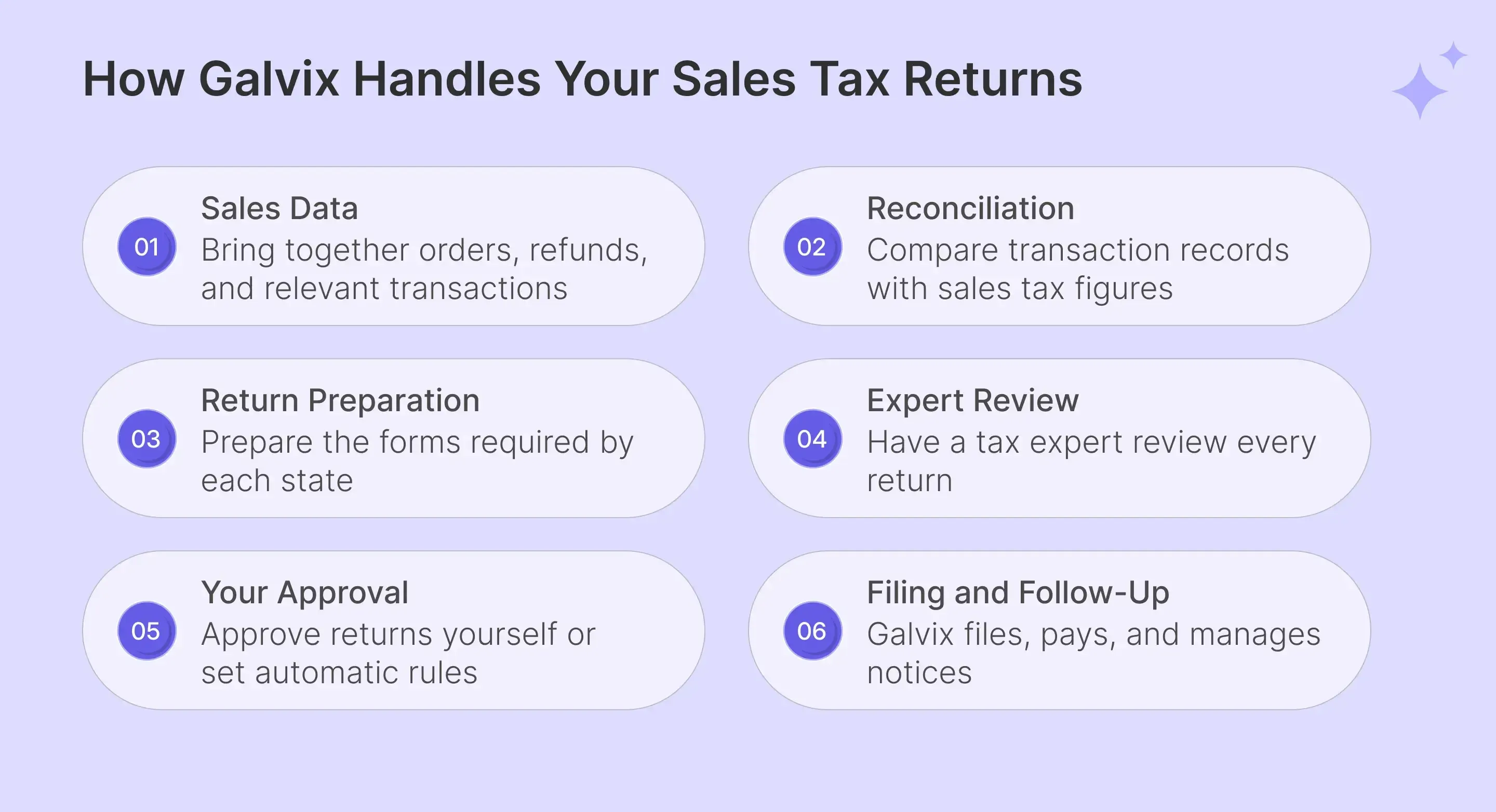
At Galvix, that responsibility sits with us. A real tax expert reviews every return before we file it. We prepare the figures, get your approval, submit the return, and pay the state. If there is a problem with a return we filed, our team handles the follow-up.
You still know what is being reported, without having to do the filing work yourself.
State-by-State Shopify Transition Handling
We start by checking every state where Shopify currently files. Our team identifies the final Shopify-covered return and agrees on the first period we will handle. We then connect your store, import available filing records, and arrange access to state accounts. That way, both sides know who is responsible for each return during the switch.
Returns Preparation Based on Complete Sales Data
Say an order was placed in December, but the customer returned it in January through Loop Returns. The refund may affect how the sale is reported, depending on the state's rules. We check adjustments like these when preparing returns. Our team also brings together relevant Shopify orders, marketplace sales, exemptions, and other connected records.
We handle state and local returns, prepayments, and amendments where required. Additional work involving disconnected sales systems or multiple stores can be included in the agreed service scope.
Every Return Gets Expert Review and Your Approval
Before filing, a member of our tax team checks each prepared return. We review the sales figures, tax amounts, and relevant adjustments rather than sending the return straight from an automated report.
You can approve each return or set rules for automatic approval. Once that step is complete, we handle the submission and payment. If something needs explaining, you can speak with the people handling the filing.
Handling Filing, Payment, and the Follow-Up
After approval, we file the return and pay the state. We also claim available filing discounts, so you receive the benefit when a state offers one for timely filing.
Our work does not stop when the return is submitted. If a state sends a notice about a return we filed, we handle it without charging an additional notice-resolution fee.
If we file a return late, we cover the resulting penalties and interest, provided approval was given or auto-approval was enabled and the required funds were available on time.
Switch From Shopify for $39 per Return Through 2027
If you're switching from Shopify's automated filing service, we offer $39 per state or local return, with pricing locked through 2027 and no contract required. You also receive free setup and handoff, Shopify filing history import, and a health check covering 12 months of Shopify automated returns in your top three states.
Our regular modular pricing also lets you choose the services your business needs.
Galvix is designed for stores filing in 10 or more states, although businesses with fewer states and more involved filing requirements can also benefit. If you’d like a set of expert eyes on your upcoming returns filing, our team can review your current Shopify setup and give you a tailored plan for a seamless handoff.
Consult with our tax experts for 30 mins
FAQs
Can a New Provider Amend a Return Previously Filed by Shopify?
Yes. A new provider can generally help you amend a Shopify-filed return, depending on the state's rules and the services offered. You will need your original filing and supporting sales records. Your provider can review the figures, identify the error, and arrange the required correction.
What Happens When Multiple Shopify Stores Share One Tax Registration?
If your Shopify stores operate under one company and share a state tax registration, their reportable sales may need to be combined. Your filing provider should check the registration details and reconcile transactions from each store before preparing the return required by that state.
How Should Refunds From Loop Returns or Other Apps Be Reported?
Refunds from Loop Returns and other apps need to be matched with your original sales records. Your provider should check the refunded amount, tax collected, and reporting period. The correct adjustment depends on the state's rules and whether the original transaction qualifies for a tax refund.
Do You Need to Report Marketplace Sales if Amazon Collected the Tax?
In some states, yes. Amazon may collect and pay sales tax on your behalf, while the state still requires those sales to appear in your return totals. Your filing provider should separate marketplace-collected tax from amounts you owe and follow each state's reporting instructions.
Who Handles Notices for Returns Shopify Filed Previously?
You remain responsible for notices about returns Shopify filed before the transition. Your new provider may help investigate these issues, depending on its service terms. Galvix resolves notices relating to returns it filed without an additional resolution fee. Earlier Shopify filing issues may require separate assistance.
What if Shopify's Filing Frequency Differs From the State Portal?
Check the filing frequency recorded by the state tax authority. Your new provider should compare the state account details with Shopify's filing history and confirm which schedule applies. Any difference should be resolved before the next return becomes due to avoid a missed or incorrect filing.
Can You Include Wholesale and Other Non-Shopify Orders in Future Returns?
Yes. Your filing process can include reportable wholesale orders, subscription sales, and transactions from accounting or other business systems. These records must be combined and classified under the relevant state rules. Tax-free wholesale sales may also need valid resale certificates to support their treatment.
What Happens if Historical Shopify Returns Do Not Match State Records?
Compare the Shopify return reports with the filings and payments shown in the state's tax account. Differences may involve missing transactions, adjustments, or payment timing. A tax professional can help identify the cause and determine whether you need an amended return, payment correction, or further action.