Pennsylvania businesses must complete the PA sales tax filing process through myPATH, the platform that replaced the older e-TIDES system. The online portal is managed by the Pennsylvania Department of Revenue. The return is commonly known as the Sales, Use, and Hotel Occupancy Tax Return or PA-3 in the state.
Pennsylvania applies a 6% state sales tax to most taxable sales. Philadelphia adds another 2%, while Allegheny County adds 1%, bringing the combined rates to 8% and 7% respectively. Most other Pennsylvania locations remain at the 6% statewide rate.
This local tax setup means jurisdiction selection matters during PA sales tax filing. Before you enter any sales figures, myPATH asks whether Philadelphia or Allegheny should appear on the return. If the wrong option is selected, the required local column may be missing from the filing.
This guide explains how to file sales tax in Pennsylvania, prepare state and local sales figures, handle exemptions, make payments, and save proof of filing. It also covers key Pennsylvania sales tax filing requirements that become more important as a business adds sales channels or expands into more states.

Why Does Pennsylvania Sales Tax Filing Need Jurisdiction Review First?
PA sales tax filing starts with one important question: where did the sale take place? Pennsylvania applies a 6% statewide rate, while Philadelphia and Allegheny add their own local sales tax. myPATH only shows these local columns when you select the relevant jurisdictions at the start.
This became even more important in 2026. Under Act 21, sellers already collecting Pennsylvania’s 6% tax must also collect Philadelphia’s 2% or Allegheny County’s 1% based on where taxable products or services are delivered. Enforcement of this destination-based rule began on October 1, 2026.
Philadelphia and Allegheny Add Local Tax
Philadelphia adds a 2% local tax to Pennsylvania’s 6% sales tax rate, bringing the combined rate to 8%. Allegheny County adds 1%, bringing the combined rate to 7% for qualifying transactions.
The local tax sits on top of the state tax rather than replacing it. For example, if $1,000 of taxable sales is delivered into Philadelphia, that sale remains part of the statewide taxable amount and appears in the Philadelphia calculation.
For current PA sales tax filing, this means destination data should be ready before you open the return. If a business ships taxable goods into Philadelphia or Allegheny, those transactions need to be identified separately so the correct local tax can be reported.
The Jurisdiction Questions Build the Return
Before any sales figures are entered, the myPATH portal asks whether Philadelphia or Allegheny should be included. Your answers determine which local columns appear on the return.
If you select No for a jurisdiction that should have been included, its column disappears. The remaining return can still calculate correctly, so the missing local sales tax may not be obvious during review.
That is why jurisdiction checking should come before data entry. Businesses selling across the Commonwealth of Pennsylvania should first confirm where taxable transactions were delivered, then select the matching jurisdictions in myPATH.
Who Needs to File a Pennsylvania Sales Tax Return?
Businesses with an active sales tax account must file returns based on the schedule assigned by Pennsylvania. A filing obligation can also begin for remote sellers once they cross the state’s economic nexus threshold, even without a physical location in Pennsylvania.
Registered Sellers and Remote Sellers
Registered businesses must file for every assigned filing period, including periods with no tax due. Pennsylvania may place a business on a monthly, quarterly, or semiannual schedule based on tax liability. Larger businesses can also face accelerated prepayment requirements.
For remote sellers, Pennsylvania currently uses a $100,000 gross-sales threshold with no transaction-count test. The state looks at the previous calendar year when deciding whether the threshold has been crossed and collection responsibilities apply.
Physical presence can create an obligation sooner. Inventory, employees, offices, or other business activity in Pennsylvania may require registration even when sales stay below the remote-seller threshold.
If your business sells into several states, tracking sales tax nexus by jurisdiction makes it easier to see where a new registration may be needed next.
Pennsylvania registration is completed through the Pennsylvania Online Business Tax Registration process in myPATH. Businesses required to collect tax receive a Sales, Use, and Hotel Occupancy Tax License, which acts as the state’s sales tax permit.
Pennsylvania is not a Streamlined Sales Tax member, so the Streamlined Sales Tax Registration System cannot replace direct registration with the state.
Marketplace Sales Need Separate Treatment
Marketplace facilitators generally collect and remit Pennsylvania tax on the transactions they handle. If a seller also makes direct sales, those orders should be kept separate from marketplace activity when preparing the seller’s own return.
The same separation also helps with nexus monitoring. Pennsylvania tells marketplace sellers without physical presence to count direct sales and any marketplace transactions where the facilitator does not collect tax when testing the threshold.
Keeping both channels separate before sales tax filing makes reconciliation easier and reduces the risk of including tax already handled by another party. This becomes especially useful when ecommerce platforms, invoices, and other sales systems all feed the same return.
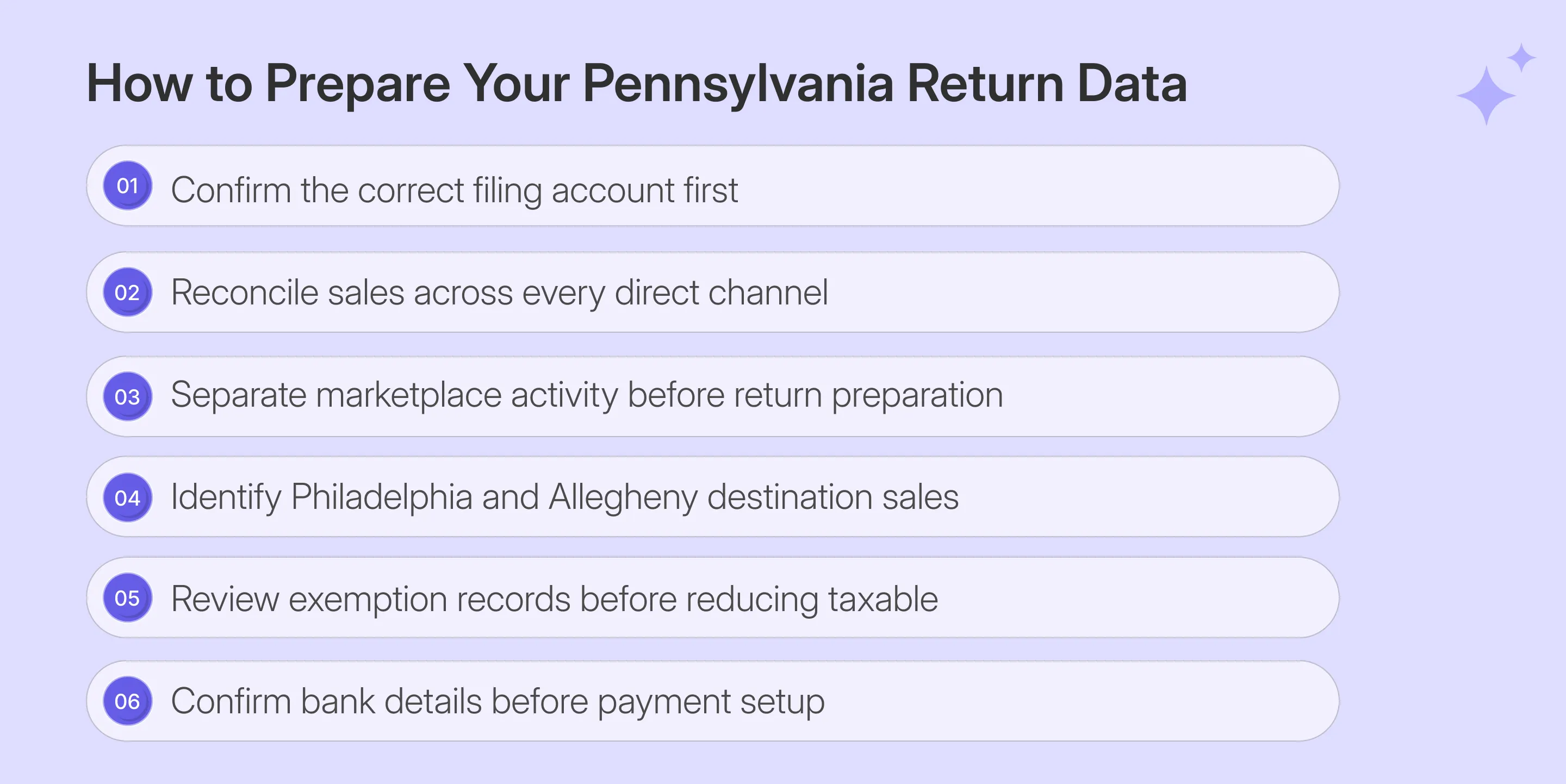
What Should You Prepare Before Opening myPATH?
Before starting PA sales tax filing, reconcile the numbers that you will type into myPATH. The portal calculates several downstream amounts, although your team still supplies the gross and taxable sales bases for Pennsylvania and every selected local jurisdiction.
Having those figures ready keeps return preparation focused. It also prevents you from switching between accounting systems while trying to understand how to fill out sales and use tax return in Pennsylvania fields.
| What You Need | Why It Matters |
|---|---|
| myPATH login | Opens the correct tax account |
| Email or phone access | Supports security verification |
| Total gross sales | Starts the statewide return |
| Net taxable sales | Drives Pennsylvania tax calculation |
| Philadelphia taxable sales | Supports the additional 2% tax |
| Allegheny taxable sales | Supports the additional 1% tax |
| Exemption records | Supports excluded transactions |
| Bank details | Supports ACH payment during filing |
Gross Sales and Net Taxable Sales Need Separate Preparation
Pennsylvania asks you to enter gross sales and net taxable sales rather than provide a separate exempt sales figure. The difference between those numbers, therefore, represents activity removed from the tax base, which should already be reflected in your transaction records.
Pull activity across the full reporting period before calculating that difference. Ecommerce orders, invoices, wholesale activity, exempt customers, and other channels should reconcile before portal entry.
Your source data may also contain taxable transactions mixed with non-taxable items or handling charges. Classify those records before filing rather than using the return to resolve product-level taxability.
When a rate or destination needs another check, a sales tax calculator can support the review alongside official Pennsylvania tax rates.
Exempt Sales Need Supporting Records
Resale transactions can be supported with Form REV-1220, while qualifying organizations and specific non-taxable products may also reduce the taxable base. Pennsylvania identifies sales for resale, many groceries, most clothing, and pharmaceutical drugs among major exclusions from tax.
The important point is documentation. Resale certificates and other exemption records should remain connected with the customer and specific transaction before that activity reduces your net taxable amount.
A consistent sales tax exemption certificate process can help keep documents tied to the transactions they support. Certificate collection remains separate from the decision on whether a particular sale qualifies.
That distinction matters for PA sales tax filing because myPATH does not ask you to list exempt transactions individually. The return reflects the resulting taxable figure, so the underlying documentation must explain how your business arrived at it.
How Do You File Pennsylvania Sales Tax Online Through myPATH?
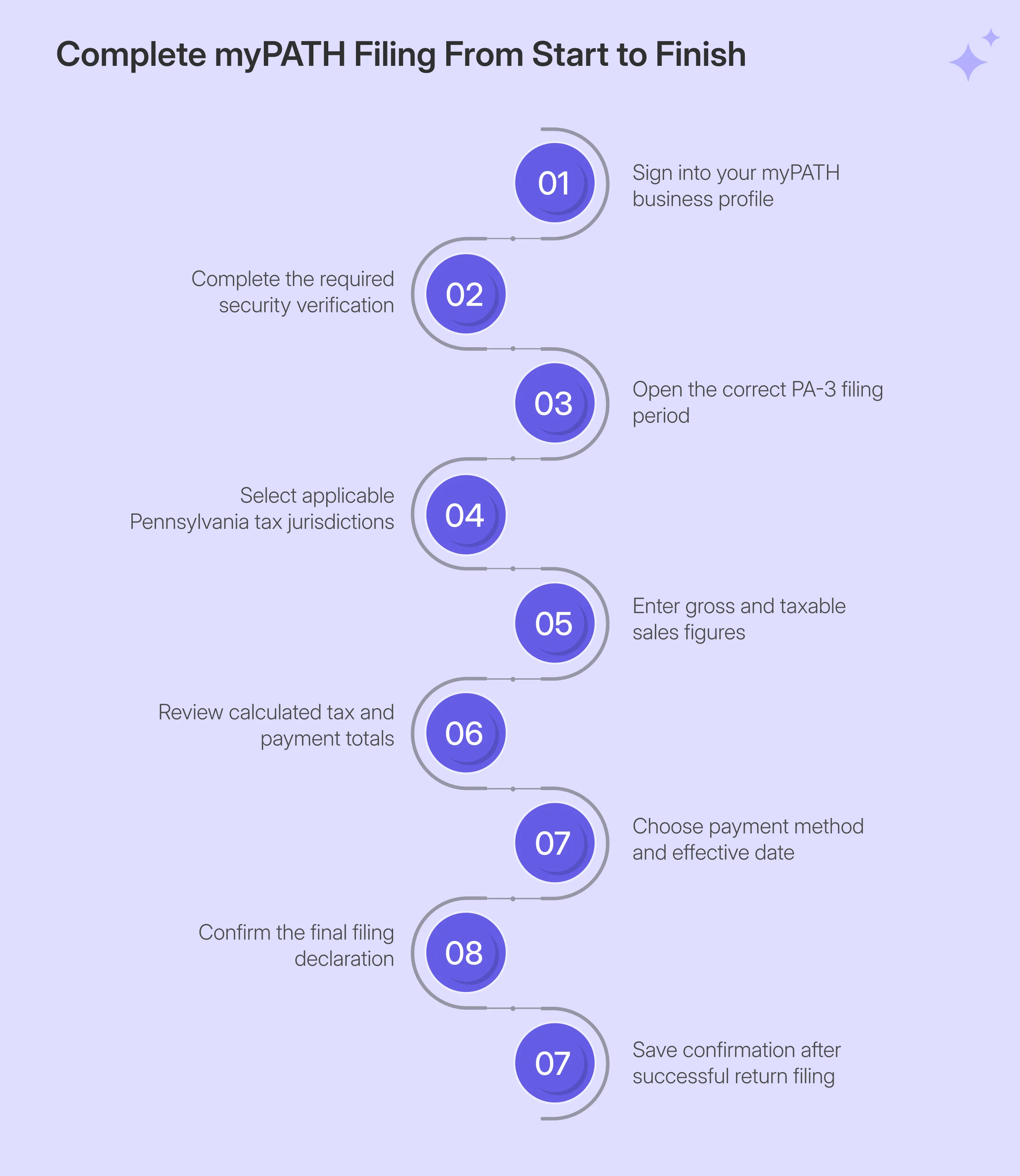
To file Pennsylvania sales tax online, sign into myPATH, verify access, open PA-3, select the applicable jurisdictions, enter sales figures, review the calculation, choose payment, accept the declaration, and save the final confirmation number.
Step 1: Sign In to myPATH
Open myPATH and enter the username and password linked to your portal profile. Your username is different from your license or account number, so use the recovery option if access details are missing rather than creating another profile.

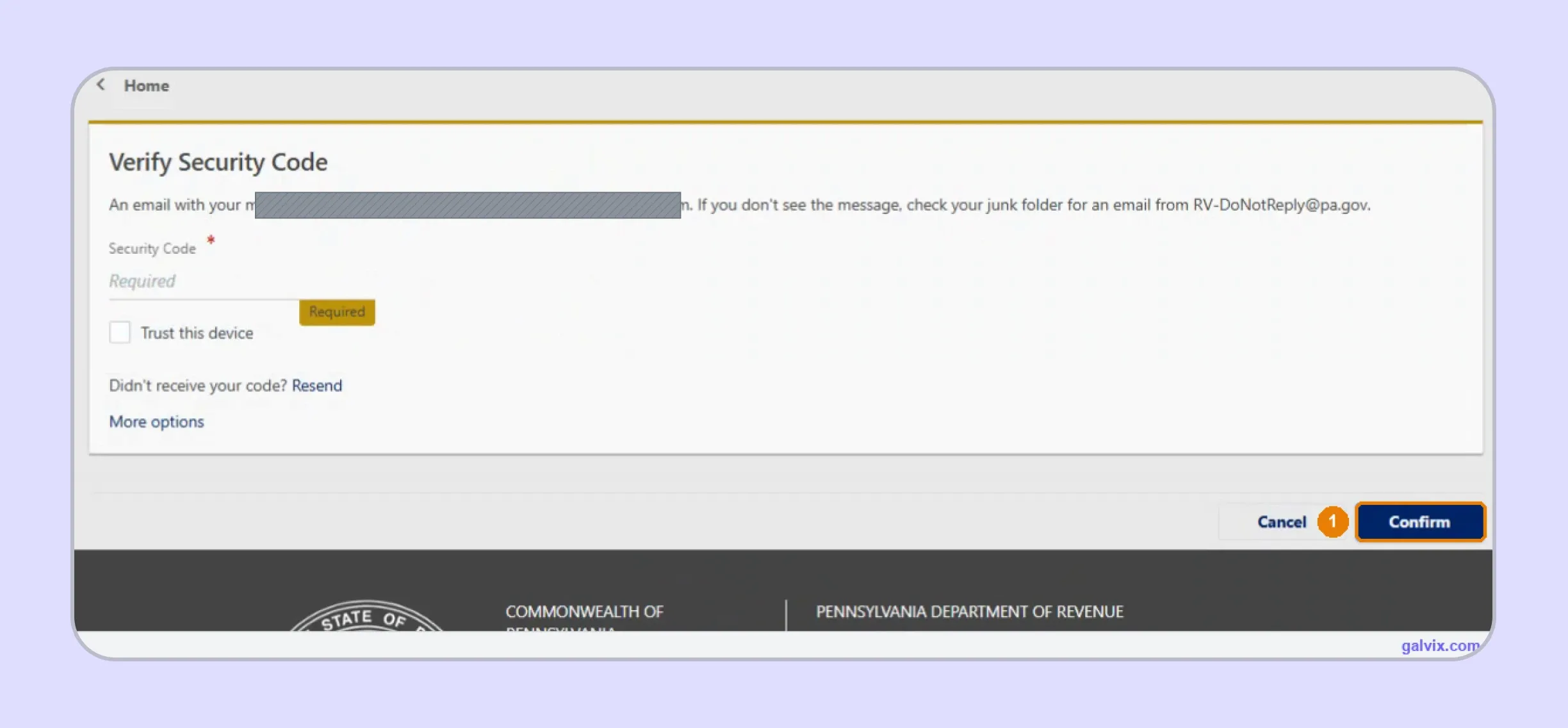
Step 2: Complete Security Verification
myPATH sends a one-time security code by email or text after login. Enter that code and select Confirm before opening your tax accounts. Use Trust this device only on a computer that your business controls.
Step 3: Open the Correct Sales Tax Return
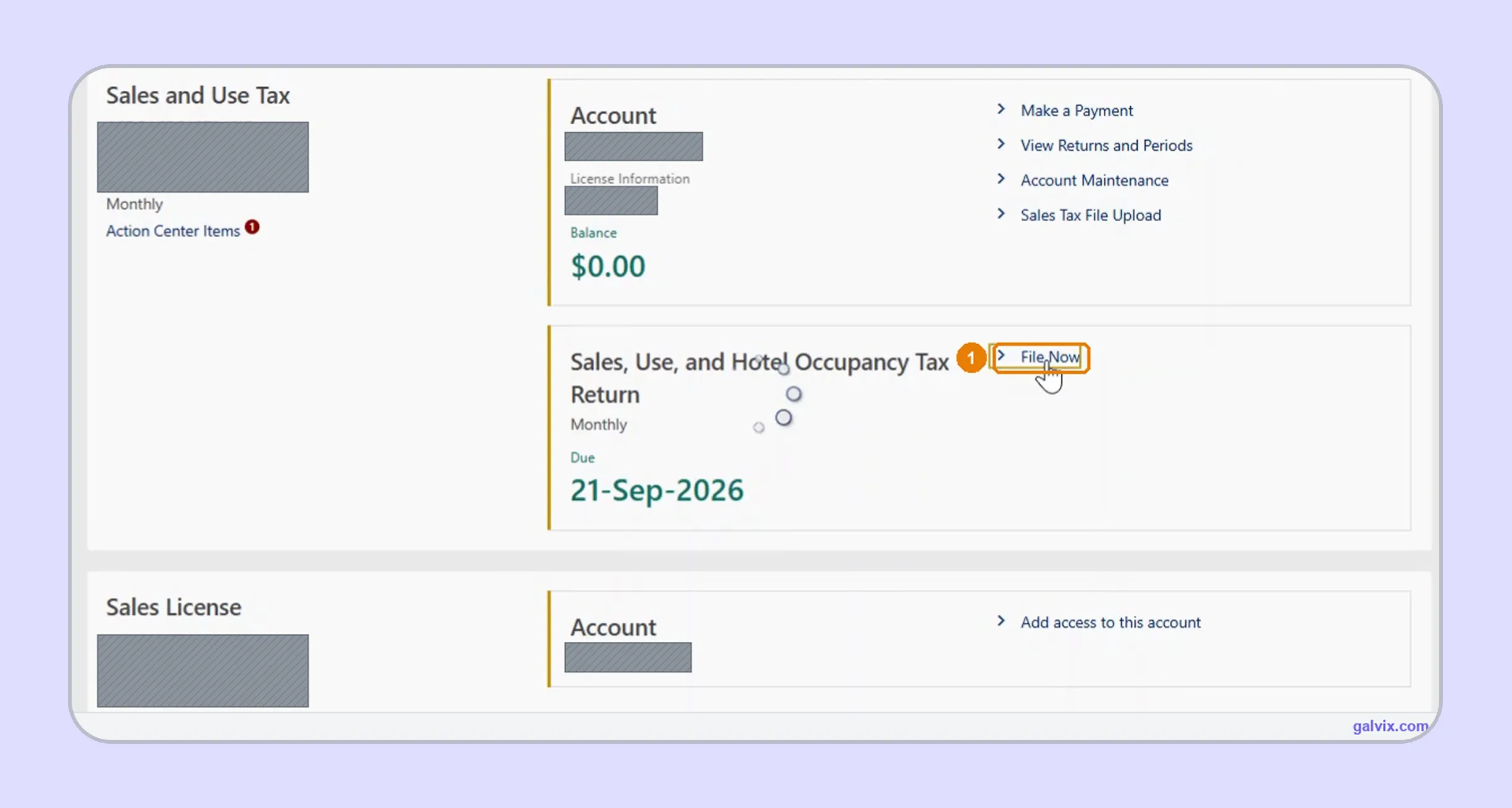
Find the Sales and Use Tax account and choose File Now beside the open Sales, Use, and Hotel Occupancy Tax Return. Confirm the business, filing frequency, and displayed deadline before starting the return.
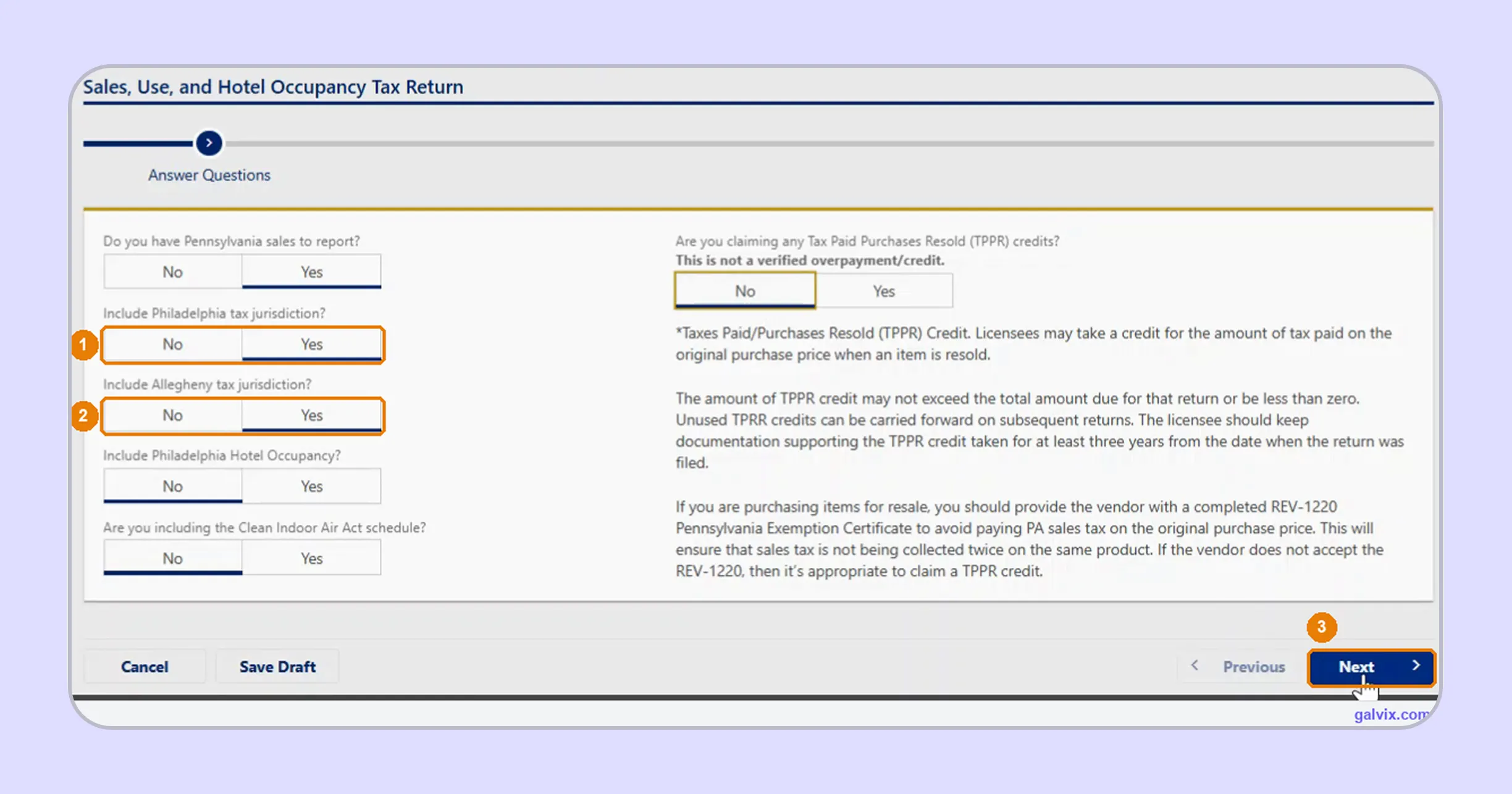
Step 4: Answer the Jurisdiction Questions
Confirm whether you have Pennsylvania sales to report, then enable Philadelphia or Allegheny only when activity belongs in those jurisdictions. The screen also asks about hotel occupancy, Clean Indoor Air Act reporting, and TPPR credits.
A business that handles short-term lodging may also have separate hotel occupancy tax considerations or a hotel occupancy tax license, depending on its role and activities.
Leaving Philadelphia or Allegheny at No removes that local column completely. The remaining return can still balance while understating tax.
Step 5: Enter Gross and Net Taxable Sales
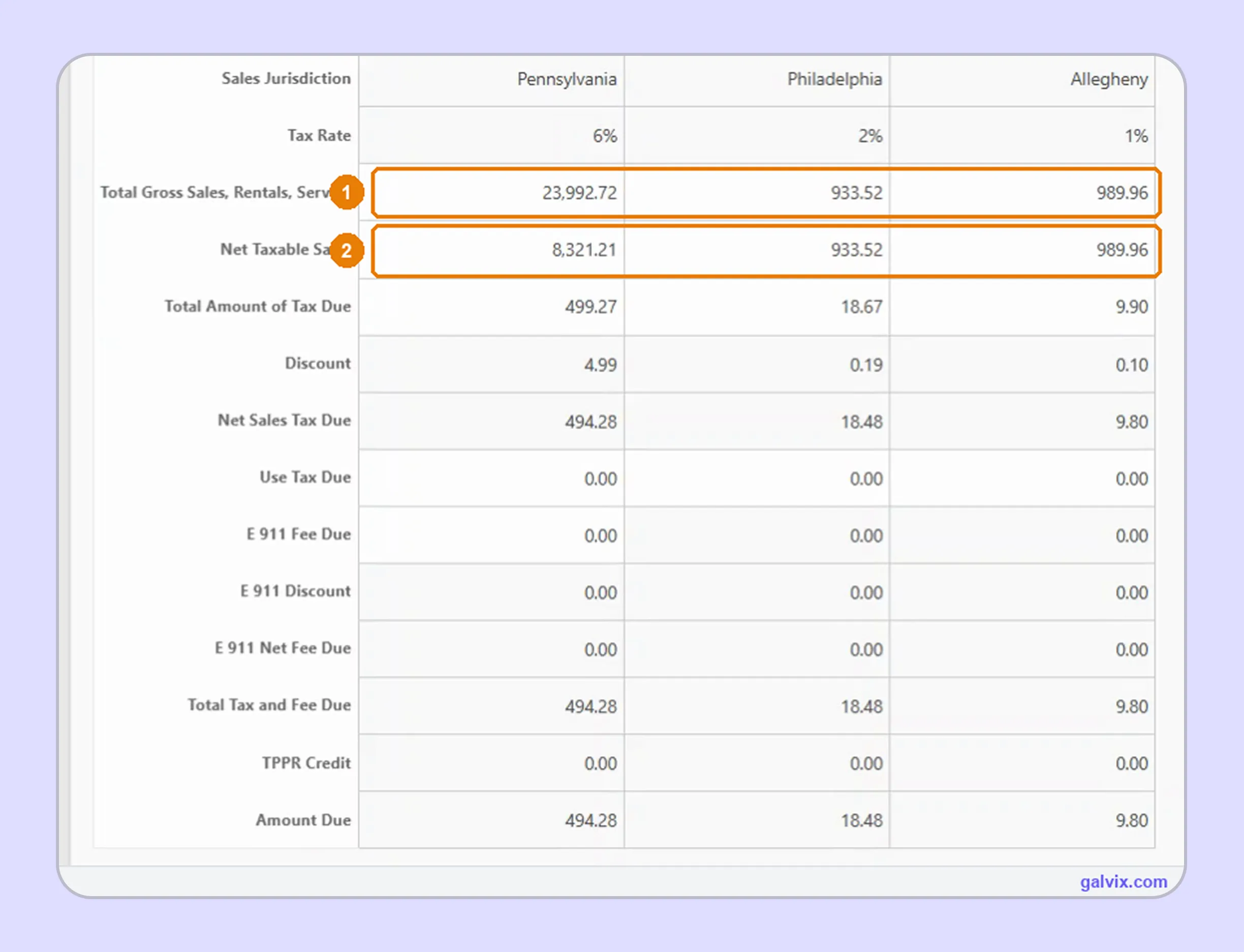
PA-3 displays a Pennsylvania column plus each local jurisdiction selected earlier. Enter Total Gross Sales, Rentals, Services and Net Taxable Sales for every active column, then let myPATH calculate the remaining tax and discount lines.
Philadelphia and Allegheny columns contain only the local add-on. Their sales remain inside the Pennsylvania column for the 6% statewide calculation.
Step 6: Review the Return
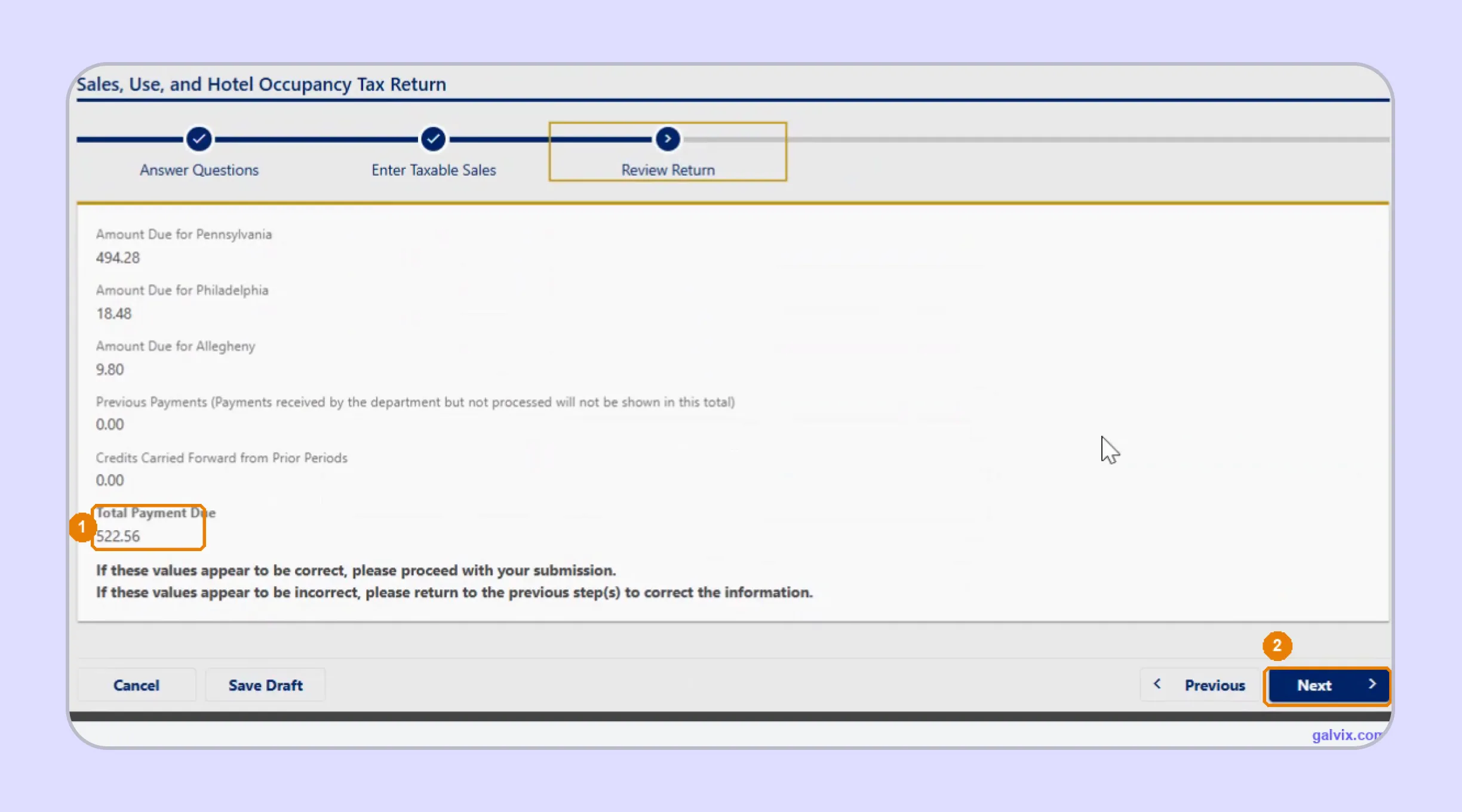
The Review Return screen combines Pennsylvania, Philadelphia, and Allegheny amounts into Total Payment Due. Check previous payments and carried-forward credits before moving forward, then return to the earlier screens if a jurisdiction or amount looks incorrect.
Step 7: Choose How to Pay
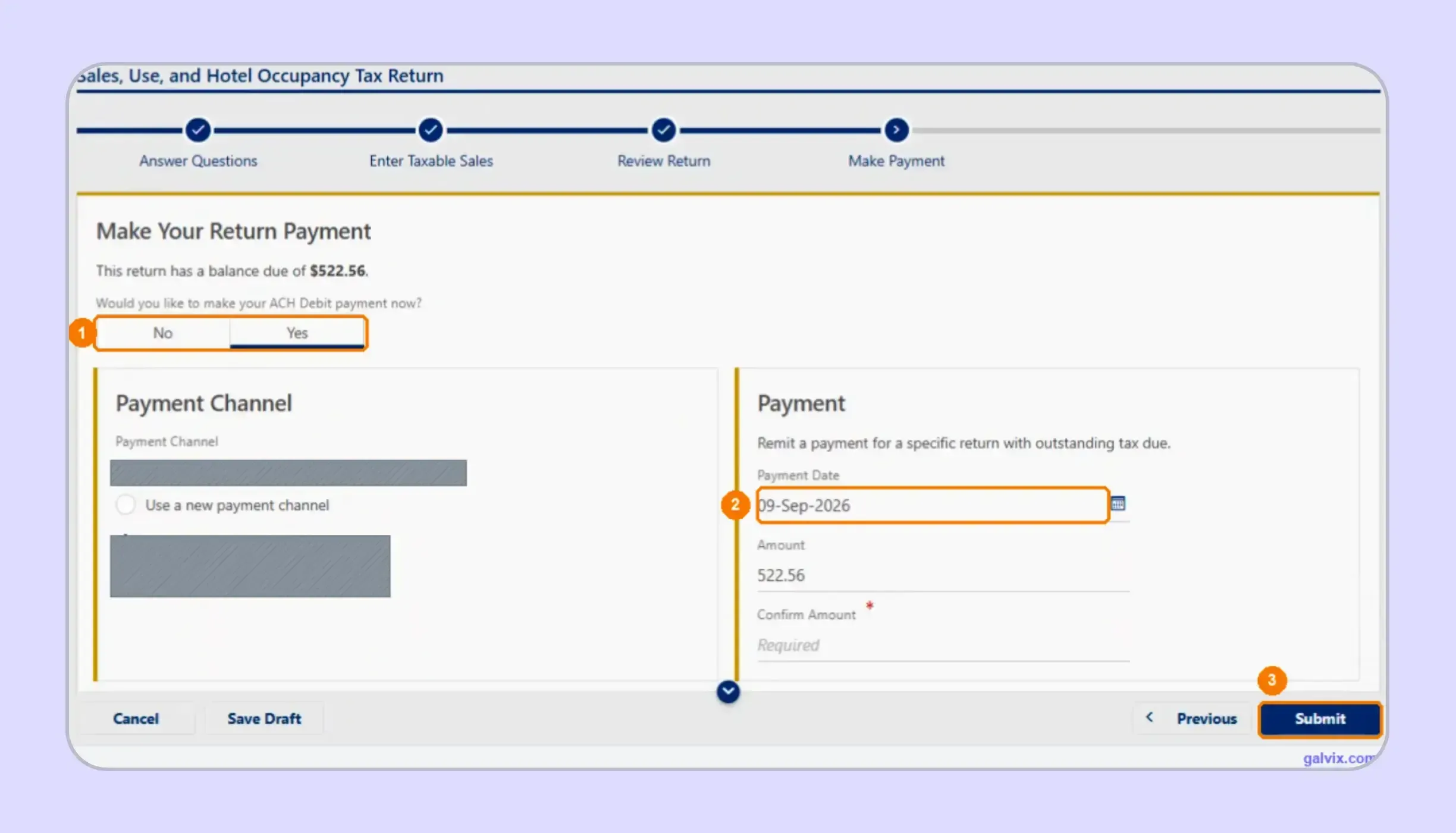
For businesses researching how to pay sales tax in Pennsylvania, myPATH lets you make an ACH debit when filing or make a separate payment. Select the saved or new bank account, confirm the amount, and review the Payment Date carefully.
The Payment Date can default to the submission date rather than the due date. Change it before submission when you want the debit scheduled later.
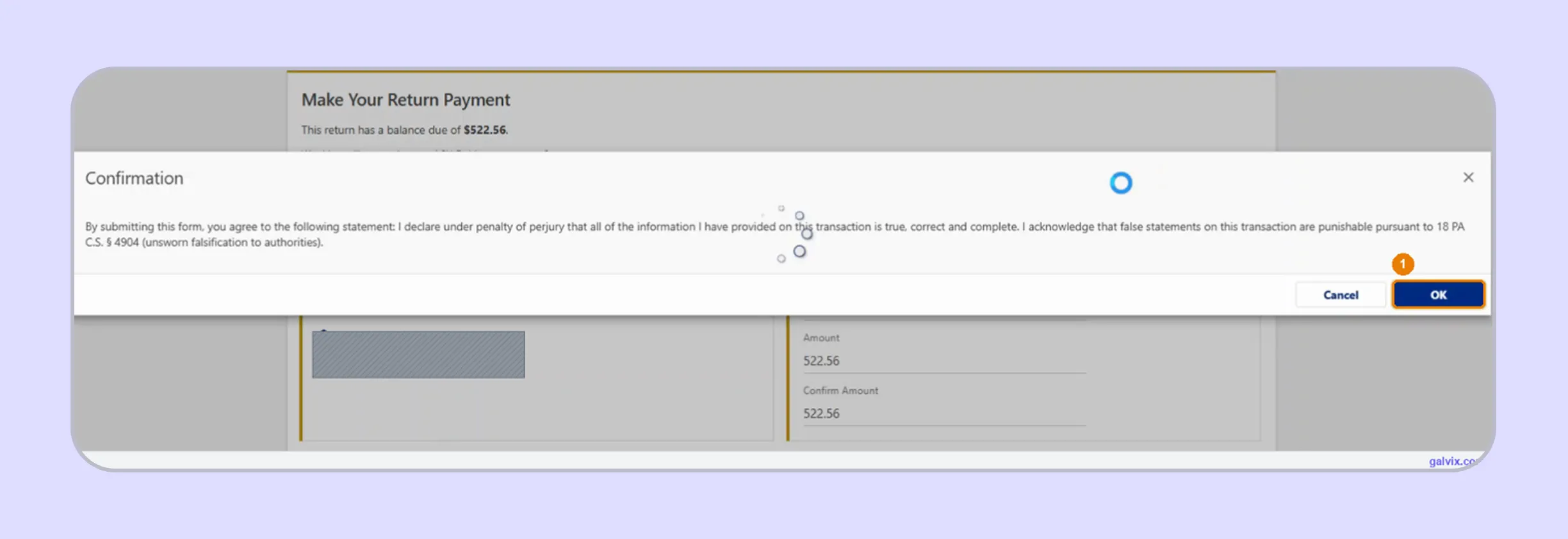
Step 8: Confirm the Declaration
Selecting Submit opens a declaration stating that the information is true, correct, and complete under penalty of perjury. Read the balance and payment timing once more, then select OK to transmit the return and authorize selected tax payments.
Step 9: Save the Confirmation Number
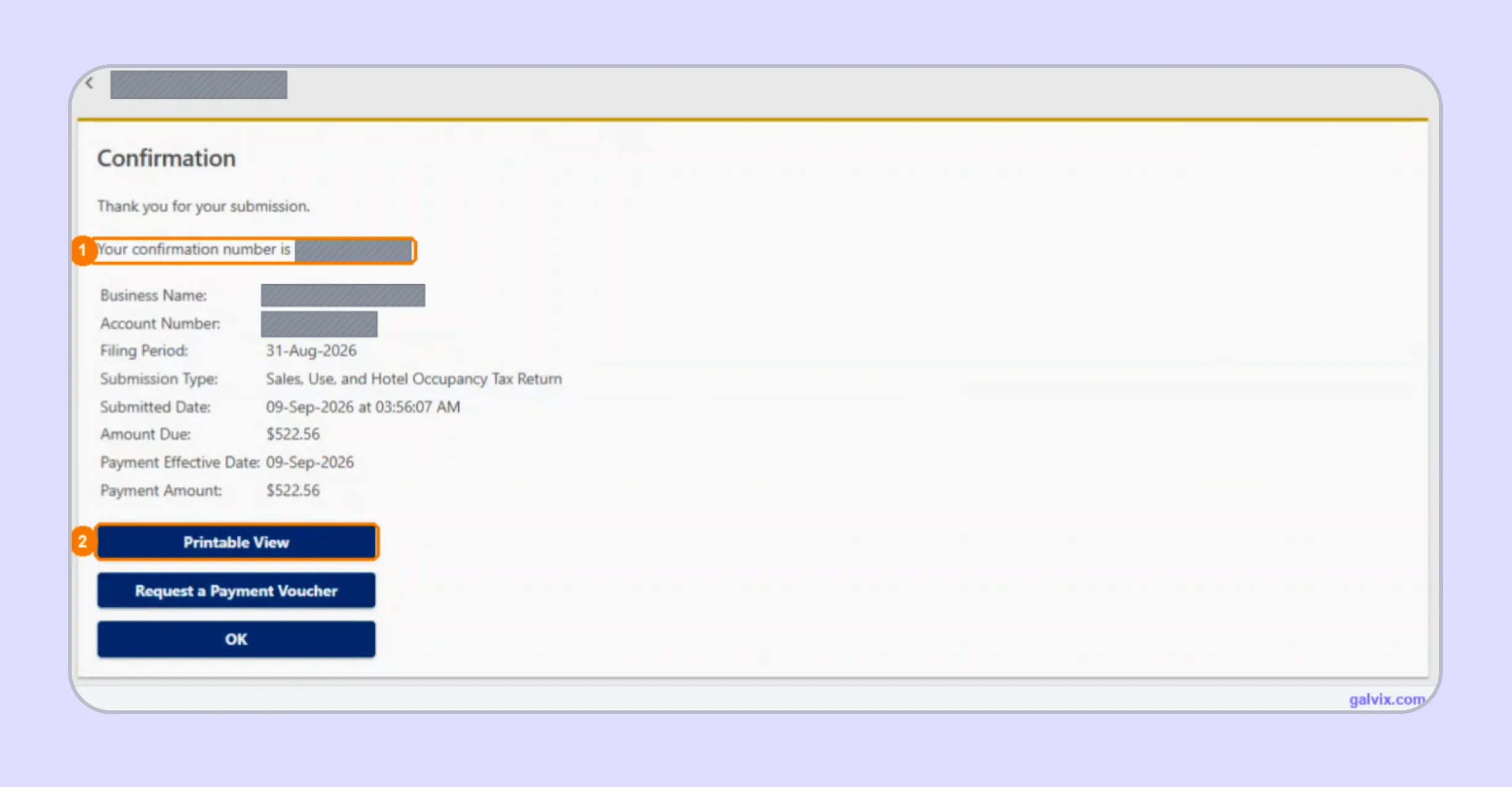
A successful Pennsylvania sales tax return online ends on the Confirmation screen. Save the confirmation number, filing period, amount due, payment amount, and payment effective date, then use Printable View to retain a complete copy.
Watch out: The return is filed only after the confirmation number appears. Reaching the payment or declaration screen does not provide proof of submission.
If you discover an error afterward, submit an amended return for the same period using the corrected full-period figures. A formal dispute over an assessment follows a separate appeals process through the Board of Appeals.
What Does myPATH Calculate for You?
myPATH handles much of the arithmetic after you supply the core filing inputs. Your responsibility is getting the jurisdiction choices and sales bases right before the portal calculates tax, discounts, credits, and final amounts.
| PA-3 Field | Who Handles It |
|---|---|
| Total Gross Sales | Filer |
| Net Taxable Sales | Filer |
| Total Amount of Tax Due | myPATH |
| Vendor Discount | myPATH |
| Net Sales Tax Due | myPATH |
| Use Tax Due | Filer when applicable |
| TPPR Credit | Filer when claimed |
| Total Payment Due | myPATH |
| Confirmation Number | myPATH |
That split makes PA sales tax filing easier once your data has been reconciled. The portal multiplies taxable amounts by the applicable rates and automatically calculates the vendor discount, while you remain responsible for the figures that drive those calculations.
The same principle applies to use tax. Pennsylvania businesses must report taxable purchases where the seller did not collect the equivalent sales tax, using the applicable state and local rates.
TPPR credit also remains a filer decision rather than an automatic calculation. Use it only when the underlying purchase and resale facts support the credit shown on the return.
When Is a Pennsylvania Sales Tax Return Due?
Pennsylvania returns are commonly due on the 20th day of the month following the applicable period. When that date falls on a weekend or holiday, the deadline shifts to the next business day according to the published state calendar.
Filing Frequency Depends on Tax Liability
Pennsylvania assigns monthly, quarterly, or semiannual schedules based on the amount of tax reported. Monthly filers with higher liabilities file more often, while quarterly filers and lower-liability accounts receive longer reporting periods.
Active accounts must still file when no tax is due. A zero-sales period does not close the account or remove its return obligation.
Large filers can also be subject to accelerated prepayment rules. Historically, those requirements consider tax liability from the third calendar quarter of the preceding year when determining whether monthly prepayments apply.
This is one reason PA sales tax filing calendars should come from the active state account rather than a generic monthly checklist.
Pennsylvania also retains TeleFile for approved taxpayers who cannot use online filing. A TeleFile Request Form must be requested and submitted in advance, while myPATH remains the standard online route.
Timely Filing Can Earn a Vendor Discount
Pennsylvania allows an eligible vendor discount when the return and full payment arrive on time. The discount is the lesser of 1% of tax collected or the applicable cap for the filer’s assigned schedule.
The current caps are $25 for a monthly return, $75 for a quarterly return, and $150 for a semi-annual return. myPATH calculates the discount when the return qualifies.
Late filing removes the discount and can trigger interest plus additions based on the unpaid amount and delay. The state’s Retailer’s Information guide describes a late-filing penalty of 5% for each month or part of a month, subject to statutory limits.
For that reason, treat filing and payment as related controls. Submitting a return before the deadline does not resolve an unpaid balance that remains outstanding afterward.
How Do Exempt Sales Affect Pennsylvania Sales Tax Filing?
Exempt activity reduces the net taxable amount rather than appearing in a separate exempt-sales field. During PA sales tax filing, the difference between total gross sales and the taxable amount should therefore be supported by transaction-level records prepared prior to portal entry.
Pennsylvania Form REV-1220 can support qualifying resale situations, while other exclusions depend on the purchaser or transaction. The state also exempts categories such as many groceries, most clothing, prescription drugs, and qualifying sales involving tangible personal property under specific statutory rules.
A document alone does not decide whether every future transaction qualifies. Certificate collection, document review, and transaction eligibility should remain separate controls, particularly when one customer makes both exempt and taxable purchases.
A consistent sales tax exemption certificate process can link supporting documents to customer records and invoices, ultimately reducing taxable amounts.
The Galvix Sales Tax Exemption Certificate Tool helps identify the appropriate certificate route and seller checks before exempt transactions reach the return. It supports document review while keeping certificate verification separate from the final decision about whether the underlying transaction qualifies.
Why Does Pennsylvania Filing Get Harder as Sales Grow?
Pennsylvania has fewer local sales-tax jurisdictions than many states, yet PA sales tax filing becomes harder as transaction volume increases. Teams must reconcile marketplace and direct activity, classify exemptions, identify Philadelphia- or Allegheny-destination sales, and control payment timing before each return.
The workload expands again when the same finance team handles Pennsylvania sales tax returns alongside states using different portals or local reporting models. Each state can assign another filing calendar, exemption process, registration path, and payment workflow.
Over time, the work shifts from entering figures into a portal to maintaining reliable data before filing begins. That is where sales tax automation, combined with human review, can reduce the need for repeated spreadsheet reconciliation across a growing footprint.

How Does Galvix Manage Pennsylvania and Multistate Sales Tax Filing?
Galvix manages recurring compliance as a service, so internal teams do not have to prepare every return or operate each state portal themselves. Transaction data is reconciled first, returns receive specialist review, and your team approves the prepared figures before filing.
For Pennsylvania, that workflow can separate marketplace activity from direct transactions, review gross and taxable figures, identify Philadelphia and Allegheny sales, and prepare the inputs needed for PA-3. Exemption records can remain connected with transactions that reduce the taxable base.
Supported sales tax integrations can bring data from Shopify, QuickBooks, NetSuite, Stripe, BigCommerce, WooCommerce, Zoho Books, and Microsoft Dynamics Business Central into the compliance workflow. API connections and spreadsheet uploads are also supported.
As your footprint expands, nexus tracking can stay connected with state registrations, exemption management, return preparation, and notices. This gives finance teams a single operating model across several state tax accounts, rather than separate processes for each jurisdiction.
Galvix uses modular pricing, so customers can select only the services they need. Exact pricing depends on the workload driver for each module, including return volume, registered states, transaction volume, or exempt customers.
What Can Galvix Manage for Pennsylvania Sellers?
The value comes from connecting return preparation with the records supporting each figure. That approach gives your team one place to manage PA sales tax filing alongside the broader compliance work that arises as the business expands.
- Reconcile direct sales before PA-3 preparation across connected accounting and commerce systems each filing period.
- Separate facilitator-collected marketplace transactions from direct activity before calculating the seller’s Pennsylvania filing responsibility.
- Review Philadelphia and Allegheny taxable activity before local amounts reach the final return for specialist approval.
- Connect exempt transactions with supporting customer documentation before those amounts reduce net taxable sales on PA-3.
- Prepare returns using reconciled transaction data before sending them to your finance team for final approval.
- Track nexus, registrations, filing deadlines, state notices, and recurring returns across a broader multistate compliance calendar.
Businesses using Shopify sales tax integration or QuickBooks sales tax integration can keep transaction data connected with return preparation rather than rebuilding figures from separate exports.
The same model works for ERP-led teams using NetSuite sales tax integration. That becomes useful when PA sales tax filing is one part of a wider multistate process involving registrations, certificates, filings, and state correspondence.
For businesses working out how to file sales tax return in Pennsylvania while managing several other jurisdictions, Galvix reduces the need for separate portal workflows and manual filing calendars.
Book a Galvix demo to review your Pennsylvania and multistate filing process before recurring compliance work becomes harder for your finance team to coordinate.
Frequently Asked Questions
How do I file my Pennsylvania sales tax online?
You can file Pennsylvania sales tax online through myPATH using your registered portal profile. Open the Sales and Use Tax account, select the available PA-3 return, choose the required local jurisdictions, enter gross and taxable figures, review payment, and save the confirmation number after submission.
Can I file a zero Pennsylvania sales tax return?
Yes. Registered Pennsylvania accounts must continue filing for assigned periods even when no taxable activity occurred. In myPATH, the opening return questions allow you to indicate that no Pennsylvania sales need to be reported. Keep filing until the state closes or changes the account.
How do I amend a Pennsylvania sales tax return?
Use myPATH to submit an amended PA-3 for the same reporting period when previously filed figures need correction. Enter the corrected figures for the complete period rather than reporting only the difference. A dispute involving an assessment follows a different process from an amended tax return.
How is Philadelphia sales tax reported on PA-3?
Philadelphia activity remains inside the statewide taxable base for Pennsylvania’s 6% tax and appears in the Philadelphia column for the additional 2%. Current local sourcing follows the customer's destination under Act 21, with enforcement of the updated rule beginning on October 1, 2026.
How is Allegheny County sales tax reported?
Taxable activity sourced to Allegheny remains inside Pennsylvania’s statewide taxable amount and appears in the Allegheny column for its additional 1% tax. This produces a 7% combined rate for applicable transactions, while myPATH calculates the local amount separately.
Can I file now and pay Pennsylvania sales tax later?
Yes. myPATH allows you to file without making an ACH debit during the same session, although payment still needs to meet the applicable deadline. If you pay during filing, review the debit date carefully because the portal can default to the submission date.
What proof should I save after filing through myPATH?
Save the confirmation number and Printable View immediately after submission. The final screen also shows the filing period, amount due, payment amount, and effective date when payment was included. These records help support timely PA sales tax filing if your records are later questioned.