
| Key Pointers |
|---|
| • Florida sales tax registration is free through the FDOR portal |
| • Economic nexus threshold is $100,000 in annual Florida sales |
| • Physical presence triggers immediate registration from day one |
| • Online applications are approved within 3 to 5 business days |
| • The base state sales tax rate in Florida is 6% |
| • Florida's 67 counties each add a discretionary surtax of 0.5% to 2% |
| • Florida is destination-based; rates depend on where products are delivered |
| • New businesses are typically assigned quarterly filing frequency at registration |
| • E-filing is required for most businesses through the FDOR eFile and Pay system |
| • Galvix handles Florida registration for a flat fee and manages all ongoing compliance |
If your business sells taxable goods or services to Florida customers, you are required to complete Florida sales tax registration before you begin collecting and remitting sales tax to the state of Florida. This applies to businesses operating physically within Florida and to out-of-state sellers who have crossed the state's economic nexus threshold.
Failing to register before collecting creates sales tax compliance exposure that compounds quickly with penalties and back taxes. The registration process runs through the Florida Department of Revenue eServices portal, where businesses submit a Florida Business Tax Application (Form DR-1) to receive a certificate of registration. The process is free, and approvals arrive within 3 to 5 business days for complete online applications.
This blog is your complete Florida sales tax registration guide to understand who must register, what triggers a Florida sales tax obligation, what information you need to prepare, and how the registration process works step by step.

Who Needs to Register for Florida Sales Tax?
Any business making taxable sales tax transactions with Florida customers must register with the Florida Department of Revenue before collecting. This covers businesses with physical presence in Florida and remote sellers exceeding the state's $100,000 economic nexus threshold during the previous calendar year.
Physical Nexus Triggers Immediate Registration Obligation
Physical presence in Florida creates an immediate registration obligation from the first day of operations, regardless of revenue volume, making it essential to identify all types of presence before starting sales tax collection.
- Having an office, warehouse, or any business location in Florida creates nexus from day one of operations, with no revenue threshold required to trigger the Florida sales tax registration obligation at any point.
- Employing workers in Florida, including remote employees who work from home within the state, establishes physical presence immediately, regardless of where the company itself is incorporated or headquartered.
- Storing inventory in Florida through a third-party fulfillment center, including Amazon FBA warehouses, creates a nexus obligation because the inventory constitutes a tangible connection to the state.
- Attending Florida trade shows more than twice per year also creates a physical presence obligation requiring Florida sales tax registration before making any sales at those events.
Economic Nexus Applies to Remote Sellers Above $100,000
Economic nexus rules extend Florida's sales tax collection requirements to out-of-state businesses based solely on revenue activity, with no requirement for any physical presence in the state.
- Out-of-state sellers exceeding $100,000 in Florida sales during the previous calendar year must complete sales tax registration in Florida before January 1 of the following year to avoid penalties.
- Florida uses a revenue-only threshold with no transaction count requirement, effective July 1, 2021, making this one of the simpler nexus calculations among all US states for sellers to track.
- Marketplace sellers whose sales are collected and remitted directly by a registered marketplace facilitator do not count those facilitated sales toward their own individual $100,000 threshold calculation.
- Registration must be complete and your permit active before you begin collecting; the obligation begins on January 1 of the year following the year in which your sales to Florida customers first exceeded the threshold.
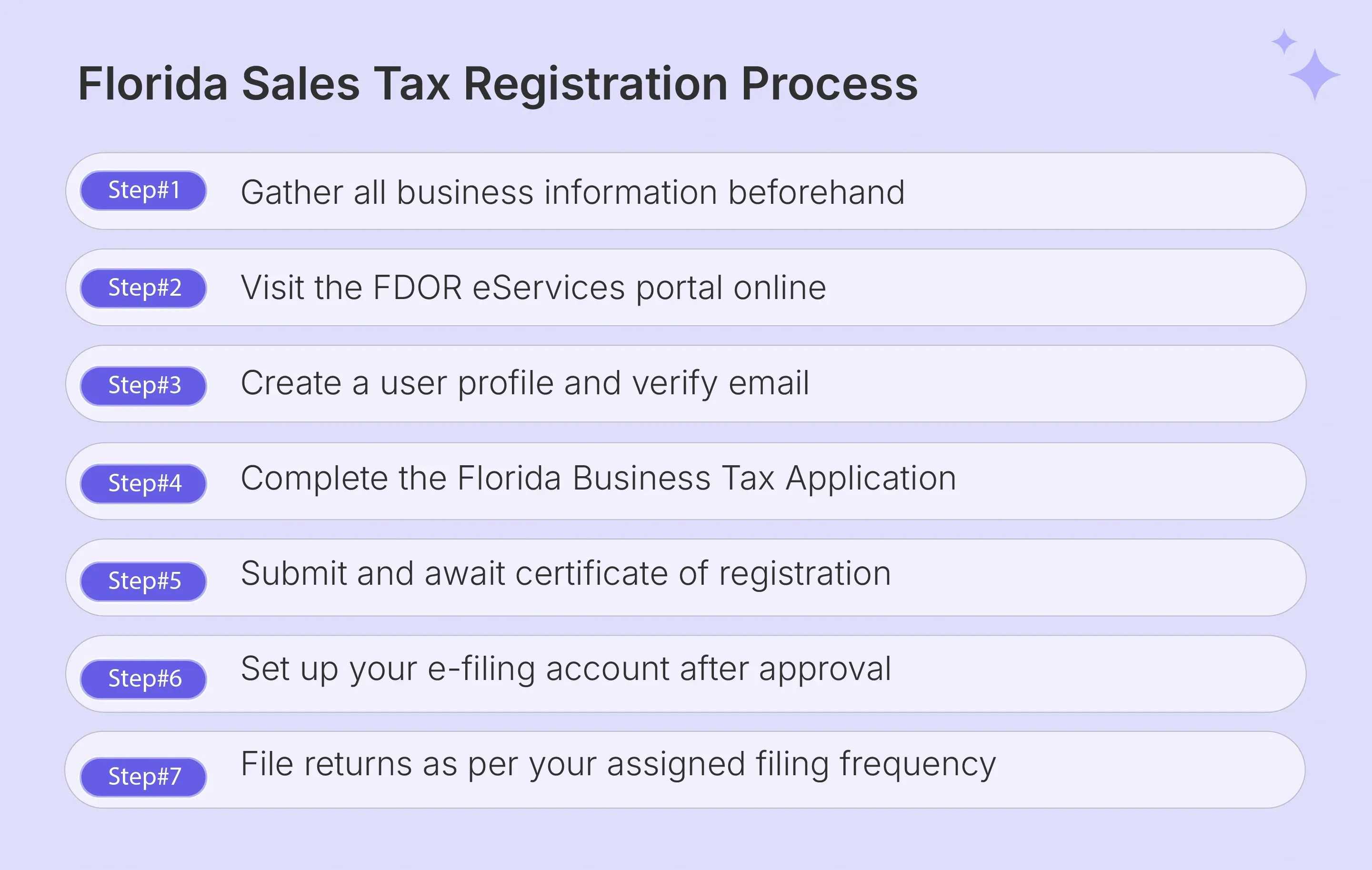
How Do I Register for Florida Sales Tax Step by Step?
Florida sales tax registration is completed online through the FDOR Business Tax Application portal or by mailing a completed Form DR-1 to the Department of Revenue. The online method is faster, free, and recommended for most businesses seeking a faster approval timeline.
Check out our comprehensive Florida Sales Tax Registration tutorial to understand the complete process: checkout this detailed video from Galvix.
Accessing the Portal and Creating a Login Account
Before starting the business tax application, create a user account on the FDOR eServices portal, which requires a valid email address, a secure password, and a verified username before the dashboard becomes accessible.
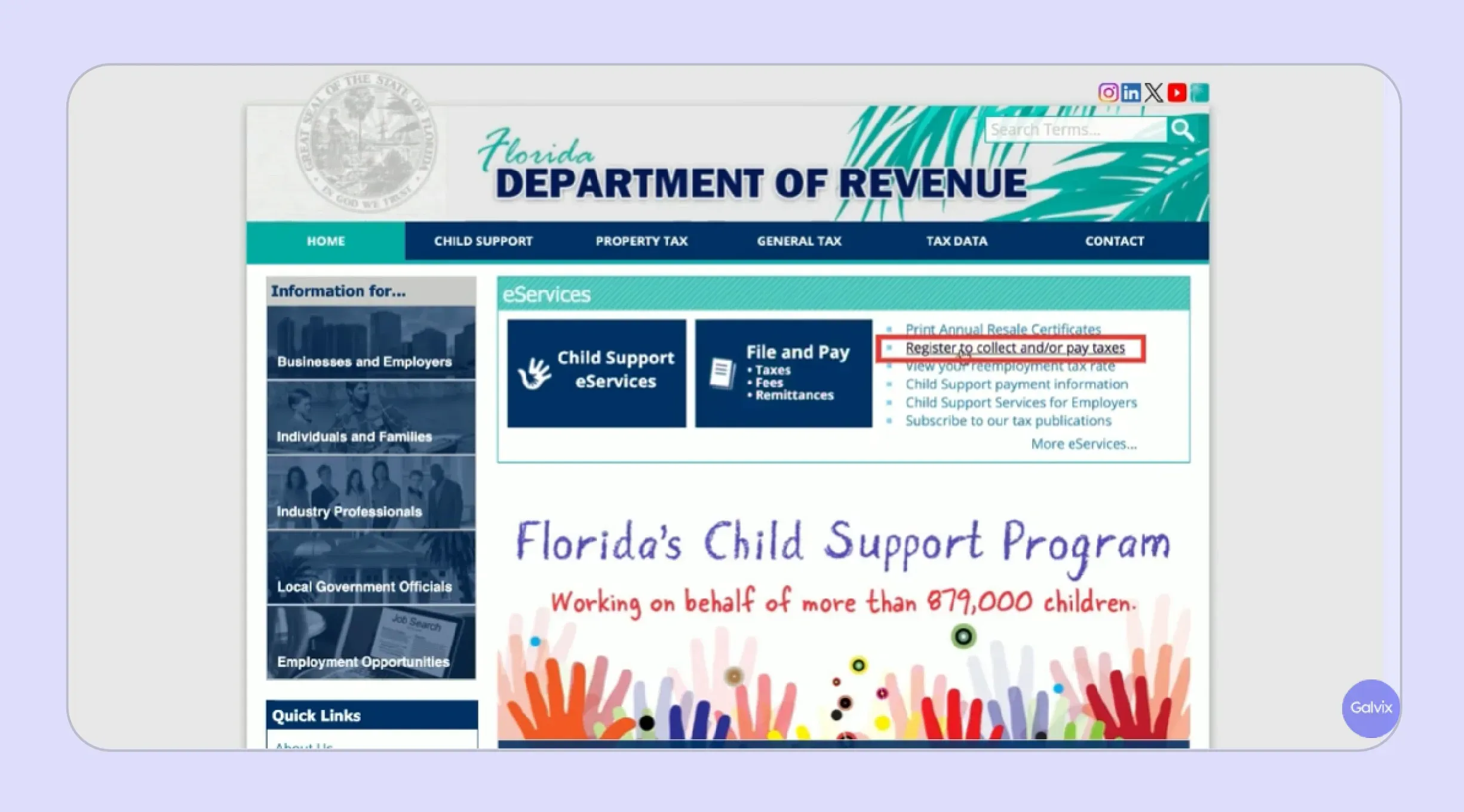
- Visit the Florida Department of Revenue eServices portal and select the option to create a new user profile using your business email address and a secure password of your choosing.
- Confirm your email address immediately after account creation, as the confirmation link sent to your inbox is required before the system grants you access to the Florida Business Tax Application itself.
- Save your username and password immediately after setup, as these credentials are required for all future filing, account management, and submission activities tied to your Florida sales tax account.
Completing the Florida Business Tax Application
The Florida Business Tax Application, Form DR-1, collects all information the Department of Revenue needs to assign your certificate of registration, determine your filing frequency, and set up your ongoing account management profile.
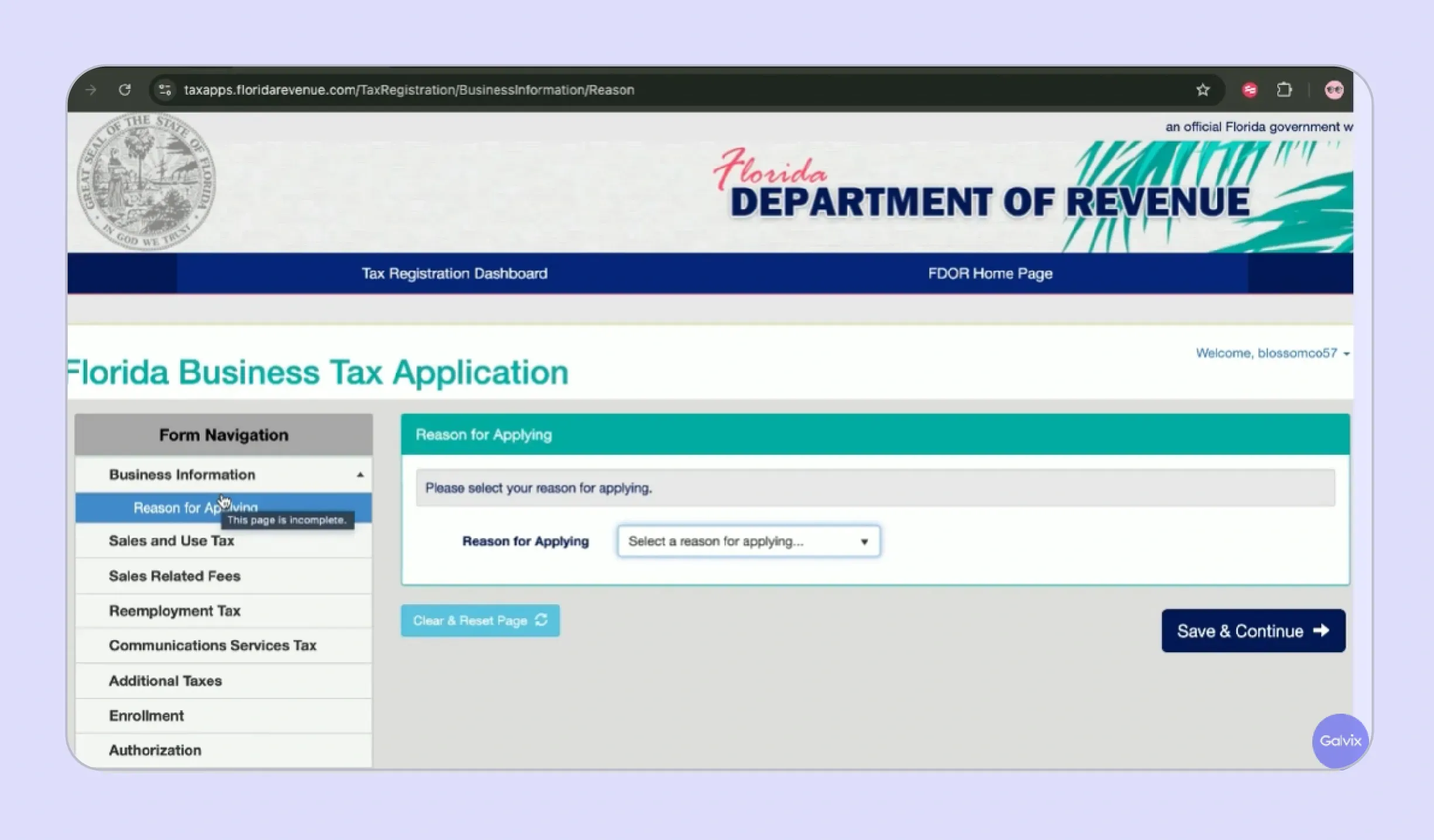
Section 1: Business Details
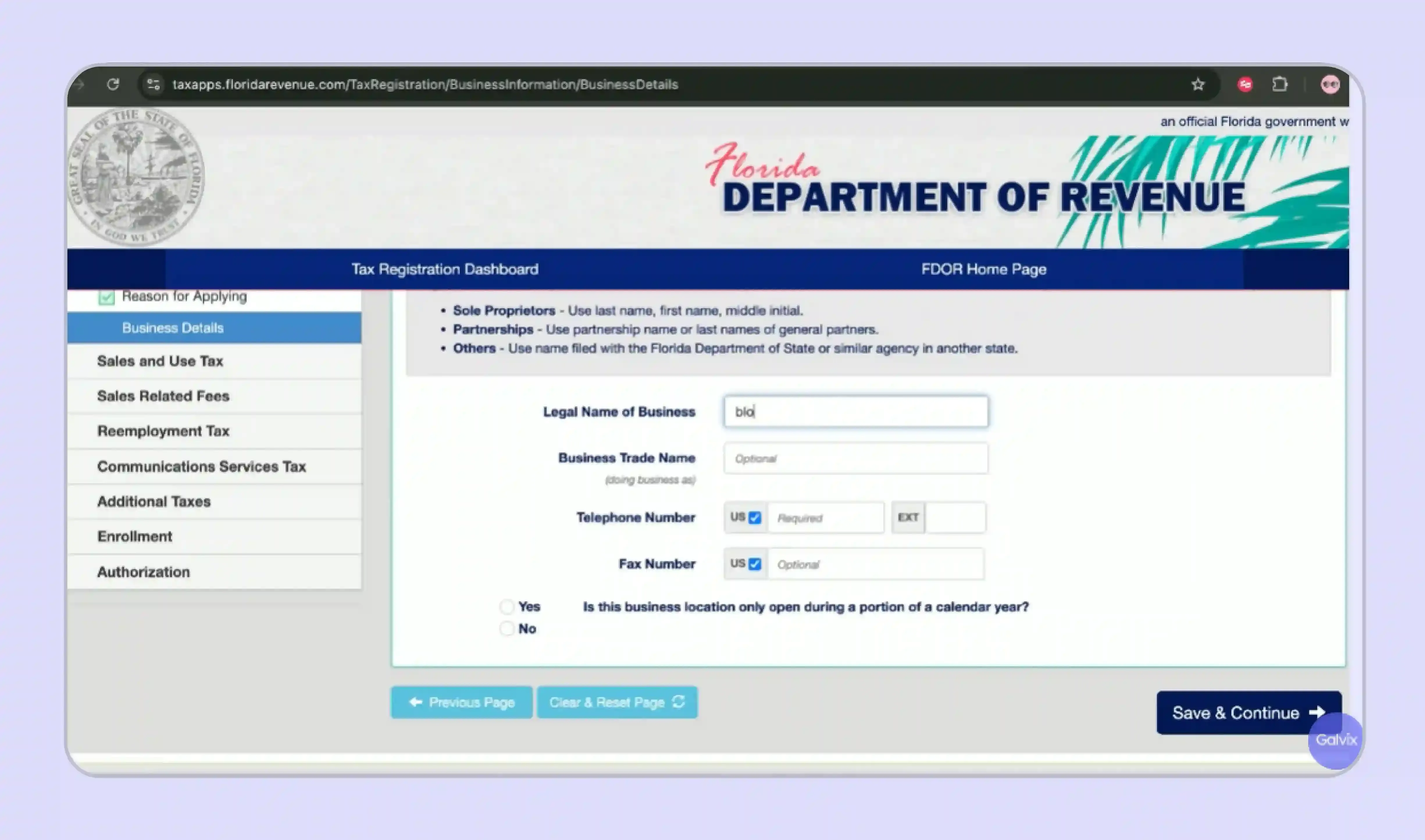
- Business Name: Enter exact legal business name matching IRS or formation records; mismatches commonly delay processing and create unnecessary verification issues.
- FEIN / SSN: Provide correct 9-digit FEIN or SSN; FDOR uses this to cross-check IRS records during application validation and approval.
- Entity Type: Select accurate entity type: sole proprietorship, partnership, LLC, or corporation, as it determines additional required sections and compliance obligations.
- Registration Start Date: Enter first taxable sale or nexus date in Florida; this defines when tax liability begins and impacts possible back taxes.
Section 2: Remote Sales, Remote Sellers, and Marketplace Providers
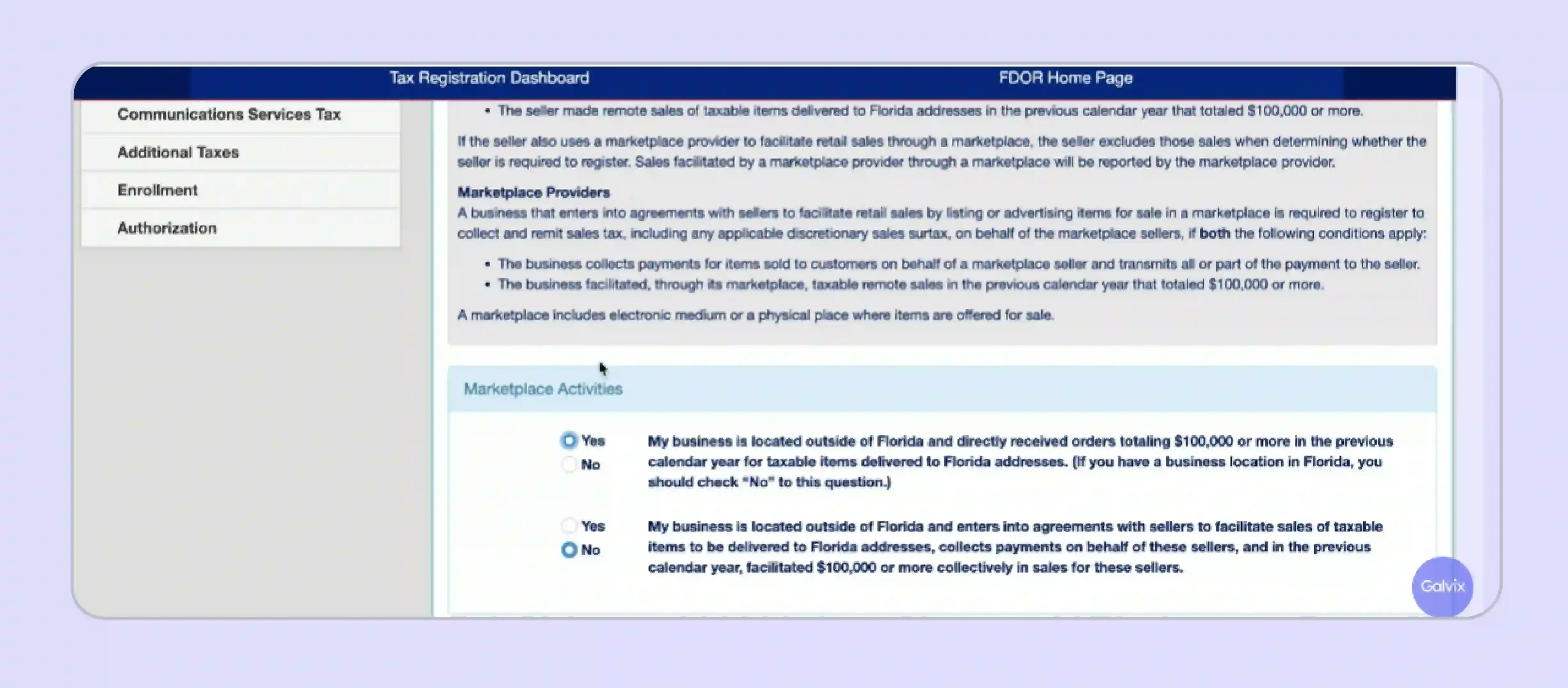
- Remote Seller Status: Select “Yes” only if no physical presence in Florida; incorrect selection leads to wrong nexus classification and filing requirements.
- $100,000 Threshold: Confirm if Florida sales exceeded $100,000 annually; threshold is revenue-based, not transaction-based, and determines mandatory registration requirements.
- Marketplace Sales: Indicate if platforms like Amazon or Etsy collect tax; such sales often don’t count toward your independent registration threshold.
- Marketplace Provider Role: If acting as facilitator, confirm tax collection responsibilities for third-party sellers and complete additional required declaration fields accurately.
Section 3: Business Location
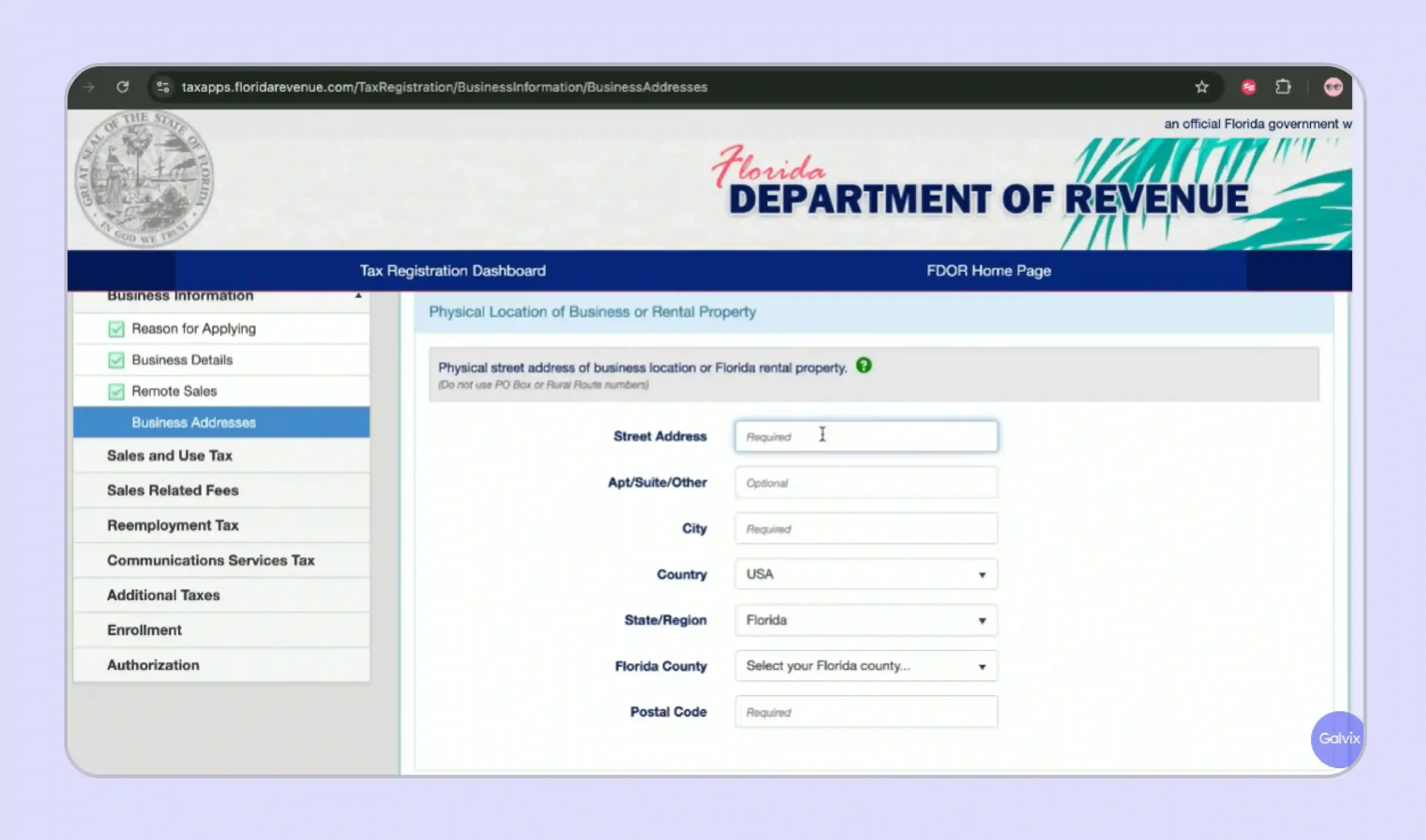
- Primary Address: Enter main business mailing address; this appears on registration certificate and is used for all official FDOR communications and notices.
- Florida Location: Provide Florida address if applicable; this determines local tax applicability and ensures proper classification of in-state business operations.
- County Selection: Select correct Florida county; surtax rates vary across counties, and incorrect selection leads to inaccurate tax calculations and compliance issues.
Section 4: NAICS Code
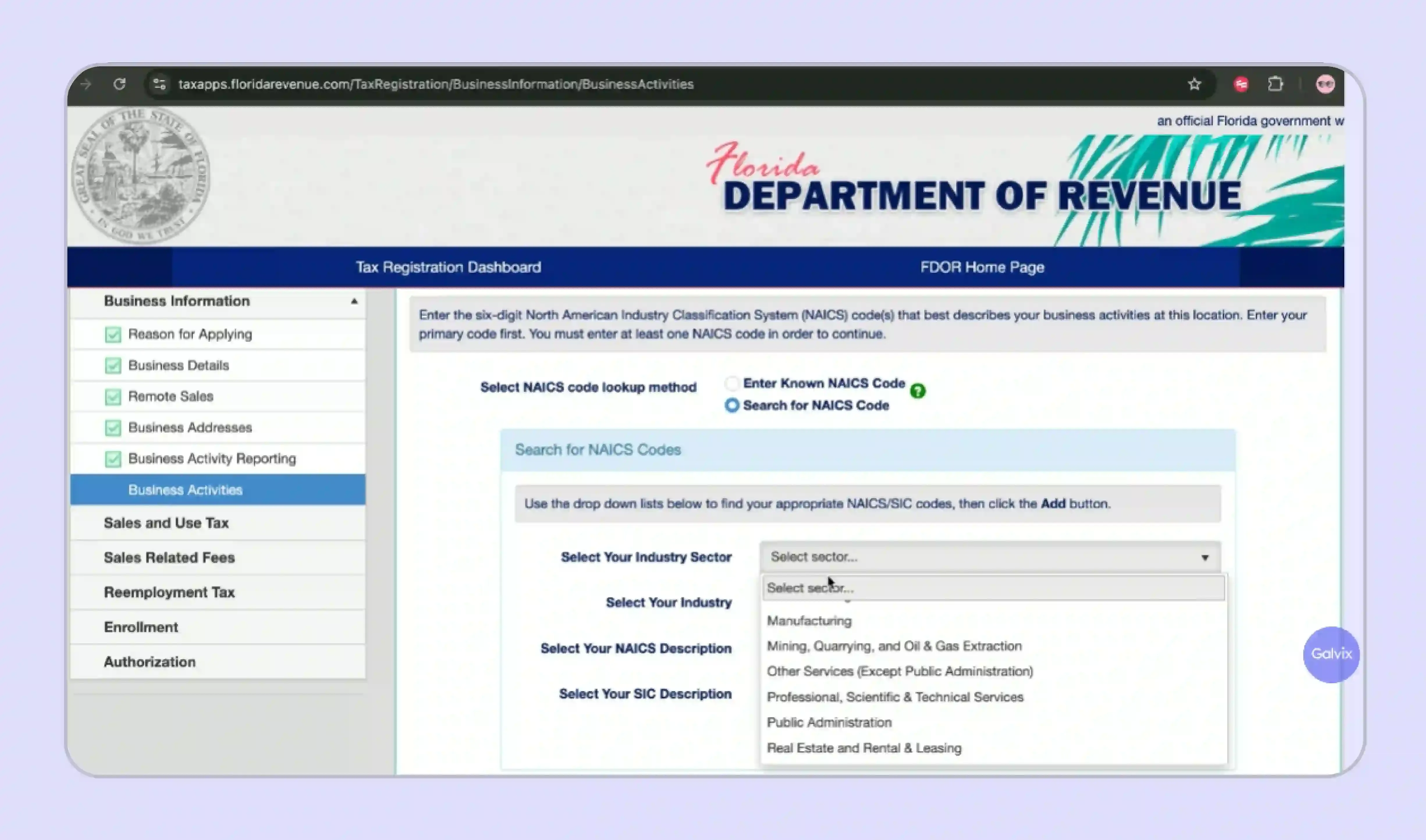
- Finding NAICS Code: Use specific business keywords to identify accurate NAICS code; precise selection improves classification and avoids irrelevant or incorrect code mapping.
- Importance of NAICS: Correct NAICS code determines tax treatment, regulatory classification, and may trigger additional compliance checks or exemption evaluations during review.
Section 5: Corporation Details
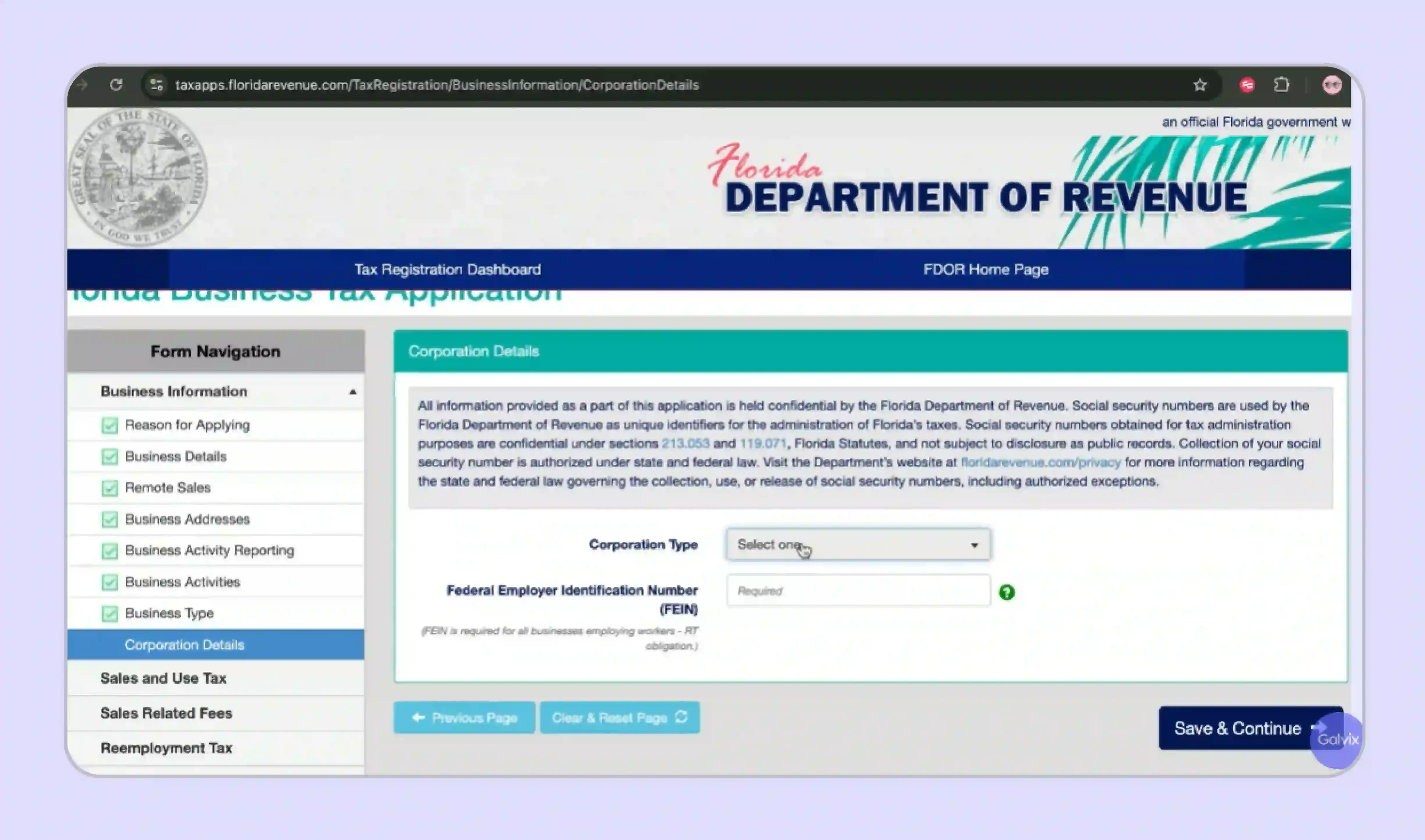
- State of Formation: Enter original incorporation state, even if different from Florida; this ensures alignment with legal entity registration records and compliance checks.
- Florida Document Number: Provide Florida registration number if available; leave blank if unregistered, but ensure accuracy to avoid unnecessary verification delays.
- Incorporation Date: Enter exact incorporation date matching official documents; discrepancies may trigger additional scrutiny or delay approval of your application
Section 6: Adding the Business Officer
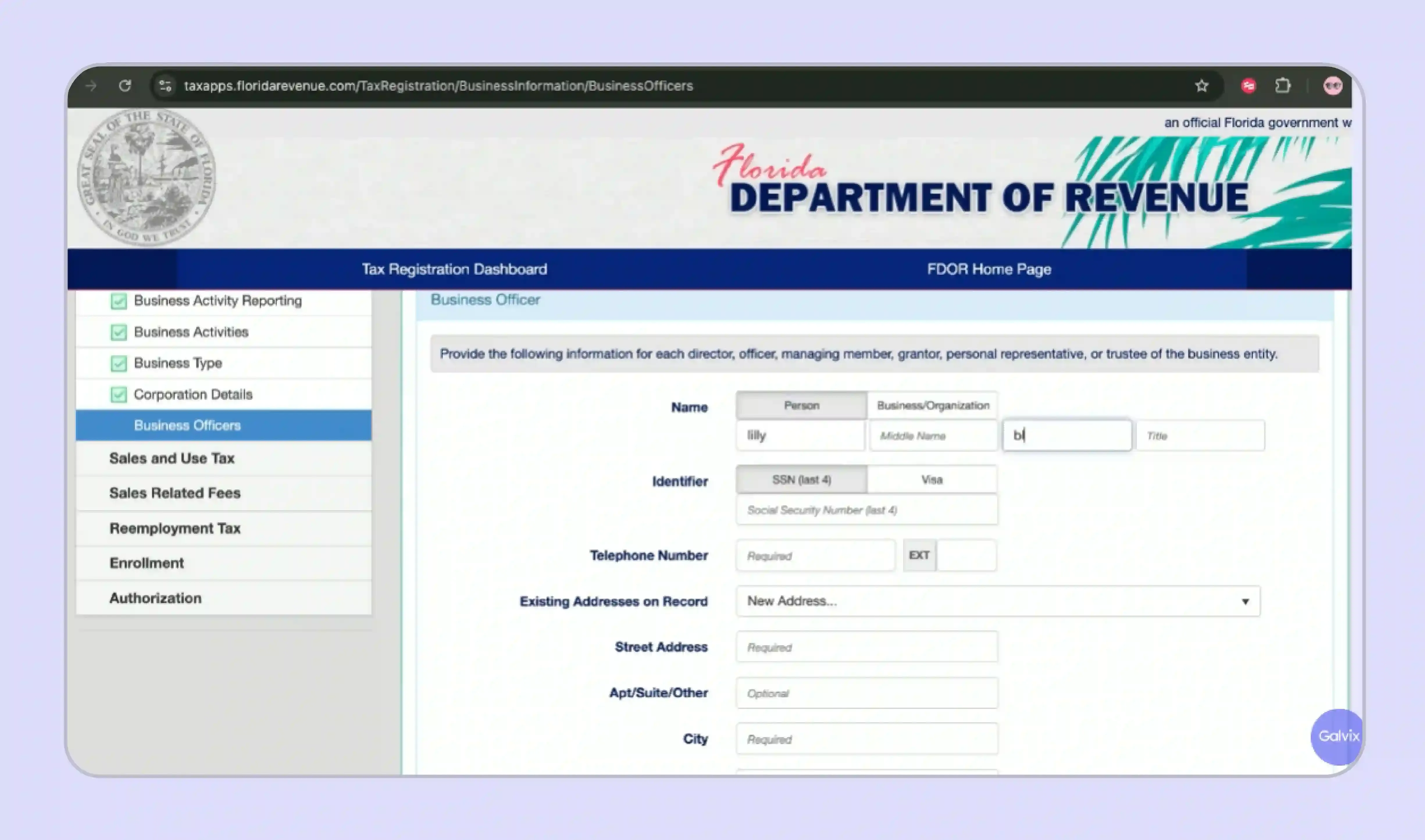
- Officer Details: Add full legal name and title of the responsible individual. The data must align with official documents and be validated by authorized business representatives.
- SSN / ITIN: Provide a valid SSN or ITIN for identity verification; the application cannot proceed without accurate personal identification details for each officer.
- Contact Information: Enter active phone and email; FDOR uses these for approvals, filing updates, and important account-related communication notifications regularly.
- Multiple Officers: Add all individuals with financial authority or signing rights; ensure complete authorization and prevent operational or compliance-related access issues later
Section 7: Business Dates and Background
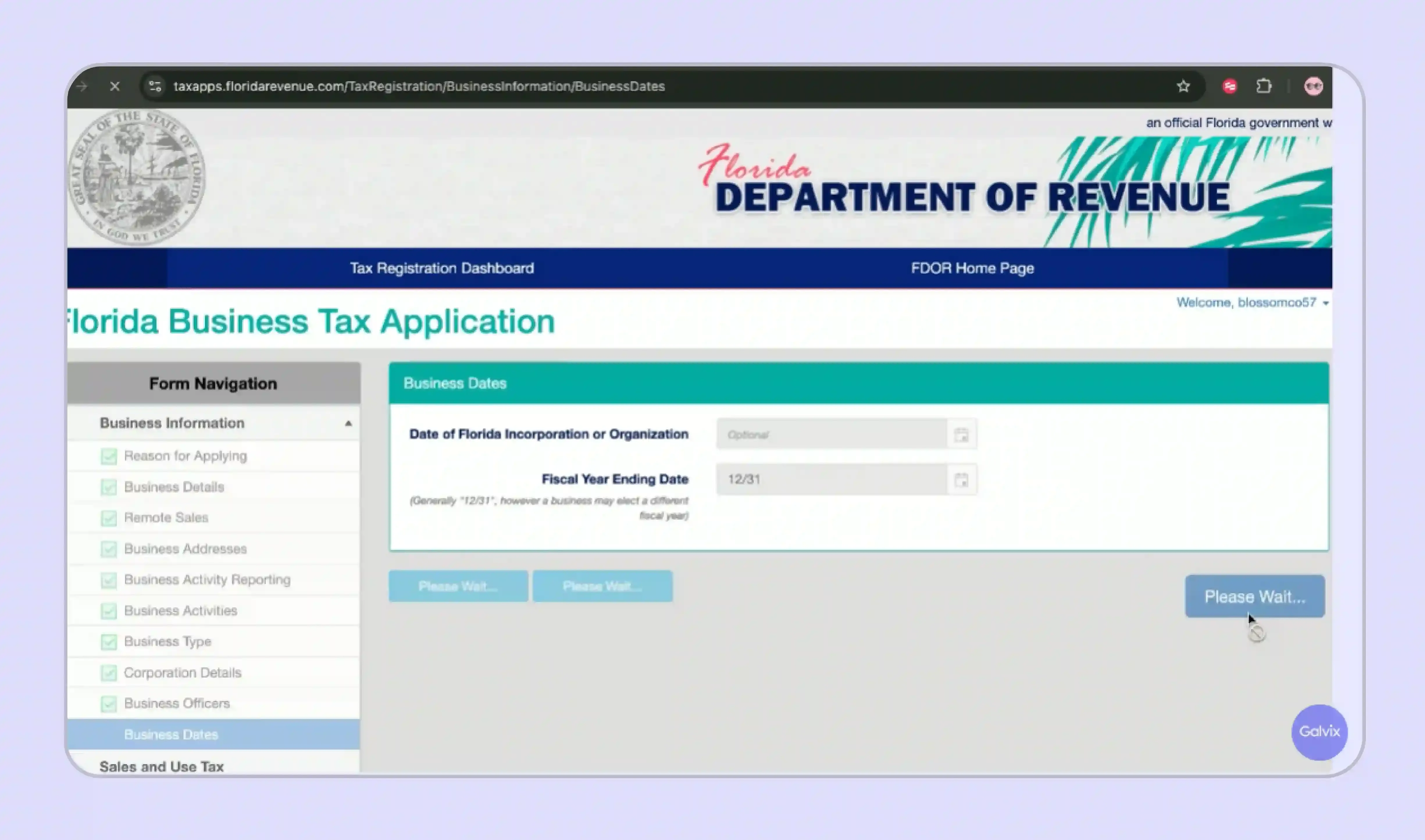
- Florida Start Date: Enter when business activity began in Florida, including inventory, employees, or operations; determines official state presence and nexus timing.
- First Sale Date: Provide first Florida sale date; important for identifying tax collection start and assessing any retroactive liability if unregistered earlier.
- Purchased Business: Indicate if business was acquired; FDOR reviews prior owner liabilities, which may transfer and affect your new registration status.
Section 8: Sales-Related Activities
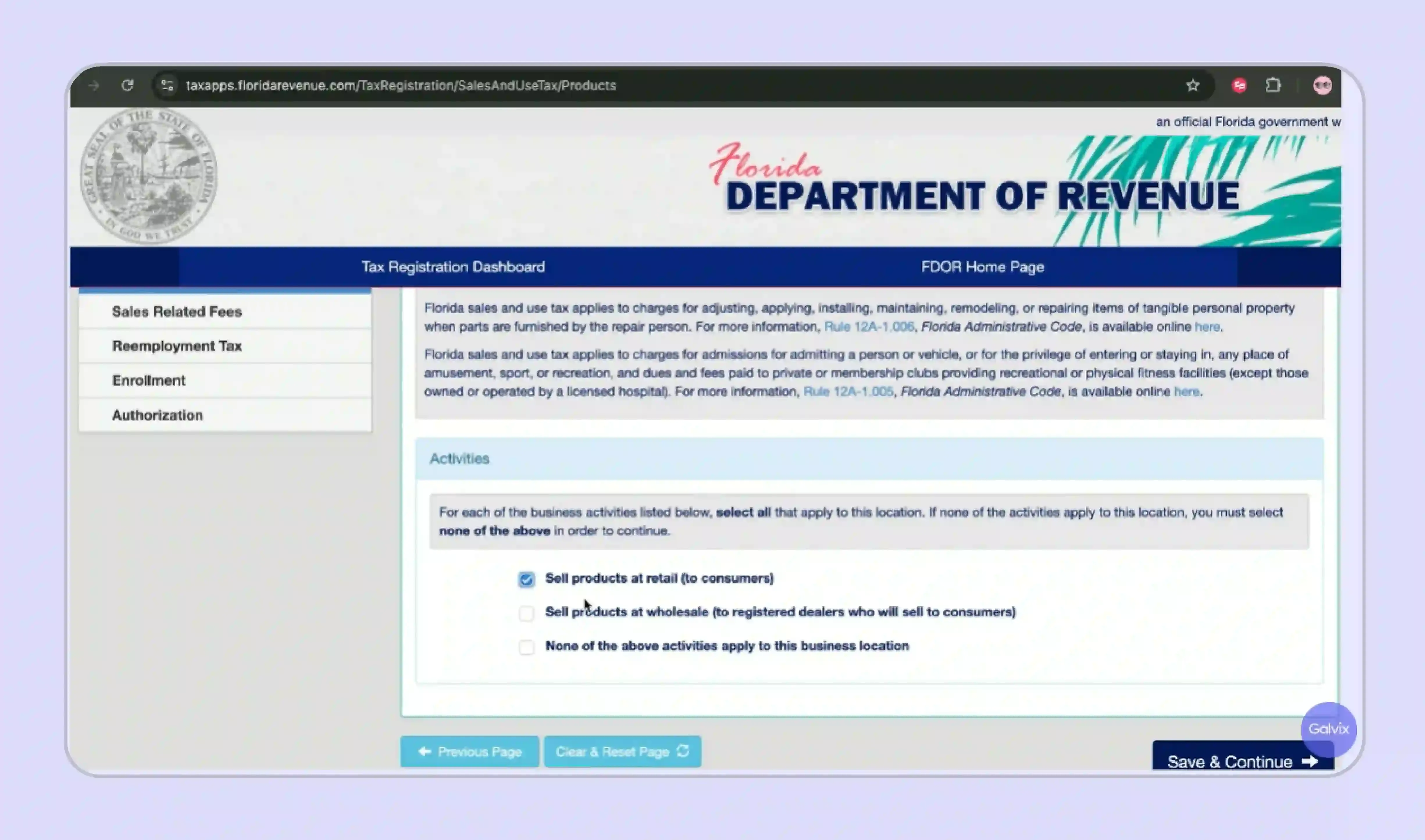
- Goods Sold: Select all applicable product categories individually; accurate selection ensures correct tax application and avoids misclassification under generic or incomplete entries.
- Taxable Services: Identify all taxable services offered; some services are exempt, and incorrect selection may trigger additional FDOR review or compliance checks.
- Sales to Resellers: Indicate reseller transactions; ensures proper exemption tracking and compliance with resale certificate documentation requirements from initial reporting period.
- Special Property Types: Declare involvement in mobile homes or real property; these have distinct tax treatments and must be disclosed for accurate registration setup
Section 9: Enrollment Method, Bank Details, and Authorization
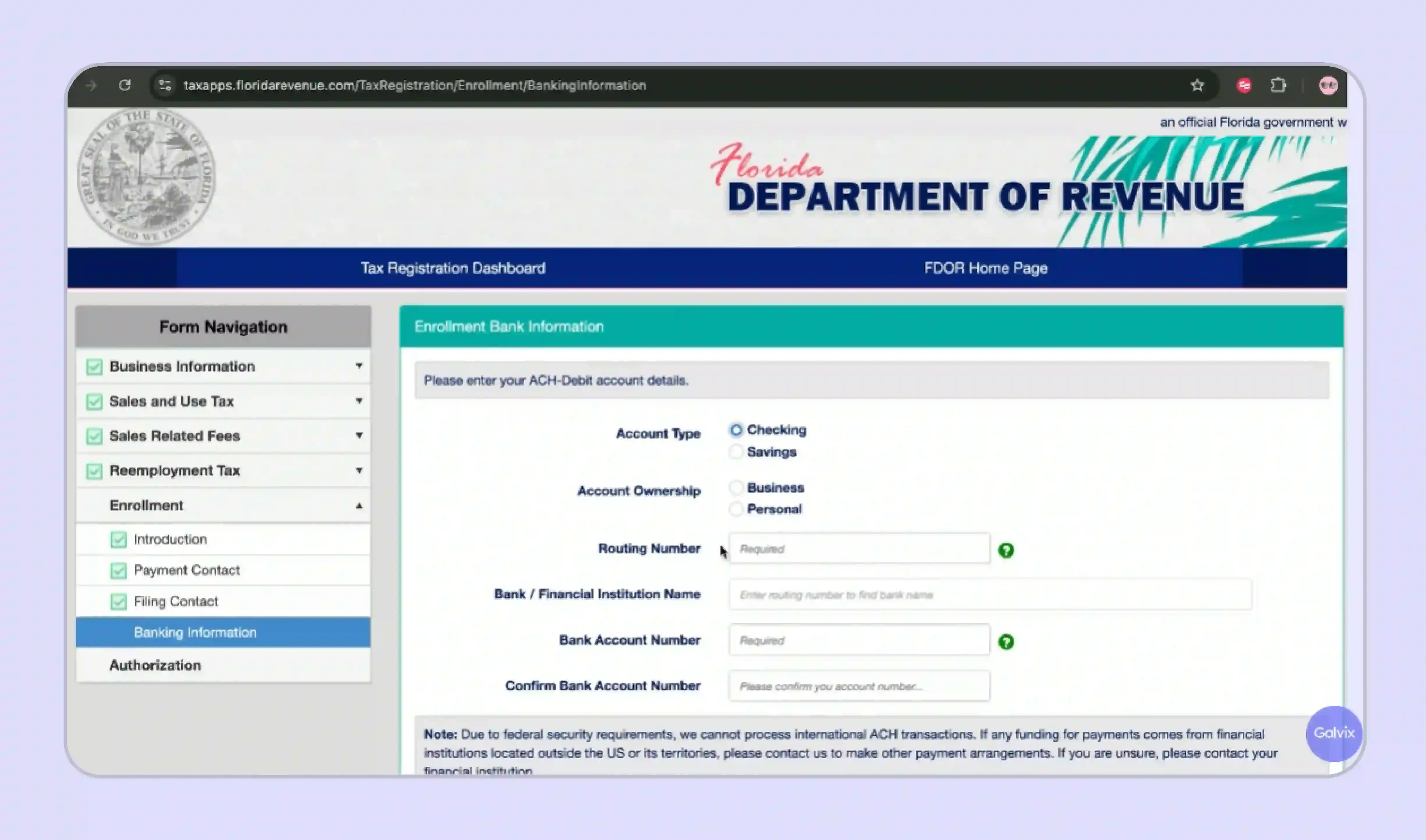
- E-Filing Enrollment: Opt for e-filing to submit returns online; required for most businesses and simplifies compliance with FDOR filing obligations and deadlines.
- Bank Details: Enter correct account and routing numbers for ACH payments; incorrect details can cause payment failures and potential penalties or delays.
- Authorization: Review and confirm all information accuracy before authorization; this is a legally binding declaration used in case of discrepancies or audits.
- Final Submission: Double-check all entries, submit application, and save confirmation number to track registration status until certificate issuance is completed
What Happens After Submission
After you submit the Florida Business Tax Application, the FDOR processes your application and issues your official credentials, which you then use to set up your ongoing filing account for all future reporting periods.
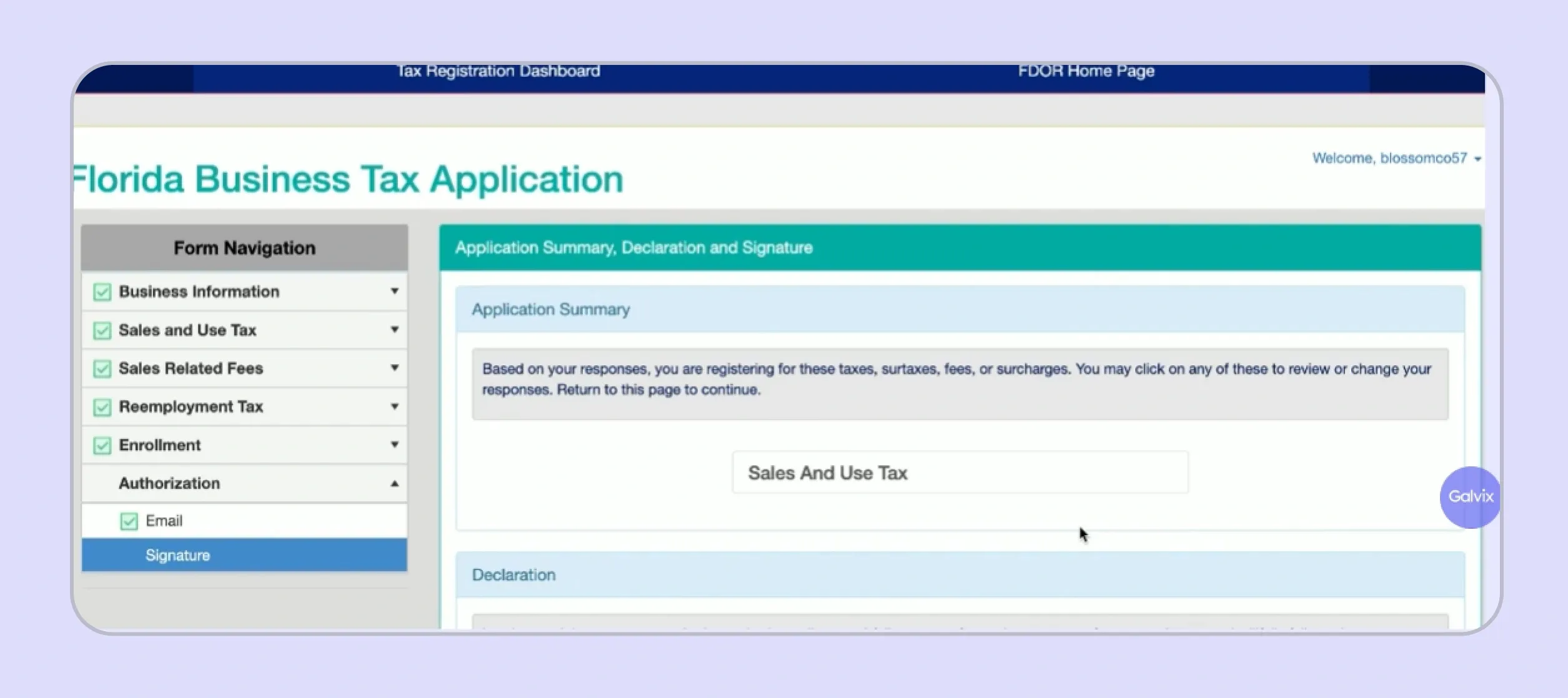
- Approved applicants receive a certificate of registration (Form DR-11) along with a Florida Certificate of Registration number, which serves as your official sales tax permit identifier for all state reporting and tax collection activity.
- Along with the certificate, some businesses receive a welcome package from the FDOR containing initial filing instructions and guidance on setting up their e-filing account for their first return period.
- The FDOR assigns a filing frequency based on your estimated monthly tax liability: monthly, quarterly, semi-annual, or annual schedules apply depending on your projected Florida tax volume.
What Are Florida's Sales Tax Rates and Filing Deadlines?
Florida imposes a 6% base sales tax rate on most tangible personal property and taxable services, with each of the 67 Florida counties adding a discretionary sales surtax ranging from 0.5% to 2% on top of that base rate.
State Rate Plus County Discretionary Surtax
Florida's combined rate structure pairs a fixed statewide base with a variable county tax layer that differs across all 67 Florida counties, requiring destination-based rate calculation at the point of every sale.
- Florida imposes a base 6% sales tax rate on most tangible personal property, taxable services, and selected transaction types. This includes specified retail sale categories and short-term rentals of property within the state.
- Each of Florida's 67 counties adds a discretionary sales surtax ranging from 0.5% to 2%, with the applicable county tax rate determined by the customer's county at the time of purchase.
- Combined rates range from 6% to 8%, depending on the customer's county.
- Florida is destination-based for all sales tax registration purposes. This means the rate you apply is determined by where the product is delivered to your Florida customers, not where your business operates.
| Disclaimer: |
|---|
| Always verify current rates through the official FDOR rate lookup tool before calculating tax on any specific transaction. |
Return Due Dates and Filing Frequency
The FDOR assigns a filing frequency at registration based on your estimated monthly tax liability, and that schedule governs when your returns and payments are due throughout the year.
- Returns are due on the first of the month following each reporting period, giving businesses a fixed calendar anchor for filing preparation and account management planning across their registered states.
- Returns filed after the 20th of that month are considered late and subject to penalty and interest, with the Department of Revenue enforcing this deadline consistently across all filing frequency categories.
- Florida offers a 2.5% collection allowance on the first $1,200 of sales tax due per return for businesses that file and pay on time. This reduces the effective Florida taxes owed for compliant accounts that file regularly.
- Electronic filing and payment are required for most businesses through the FDOR eFile and Pay system, which replaced the previous portal on December 1, 2025, making immediate e-filing enrollment during registration essential for all new business accounts.
| Rate Type | Who It Applies To | Rate Range |
|---|---|---|
| State Base Rate | All Florida sales | 6% |
| County Discretionary Surtax | Varies by Florida county | 0% to 2.5% |
| Combined Maximum Rate | Based on delivery location | Up to 8.5% |
Table Caption: Florida sales tax rate breakdown showing state and county discretionary surtax ranges
What Are the Common Mistakes to Avoid During Florida Sales Tax Registration?
These four errors appear consistently during the Florida sales tax registration process, and each carries a cost that compounds if left uncorrected after submission.
- Wrong NAICS Code: Selecting the wrong NAICS code for your business activities affects how the FDOR categorizes your Florida tax obligations. Correcting it after submission requires direct contact with the Department of Revenue to update your certificate record.
- Incorrect Nexus Date: Entering an incorrect effective date for when nexus was established creates back-tax exposure for the period between your actual and declared start dates, which the Florida Department of Revenue can assess with penalties and interest during an audit review.
- Late Registration Before Collecting: Missing the registration deadline before collecting sales tax results in uncollected tax liability. The Department of Revenue holds businesses responsible for tax that should have been collected from Florida customers, even when the seller failed to register in time.
- Skipping E-Filing Enrollment: Not enrolling in e-filing during the business tax registration process delays your ability to file returns on time. The FDOR requires electronic submission for most accounts and will not process paper returns without prior written approval.

What Happens If Your Business Needs to Register in Multiple States?
Florida sales tax registration is a single step in a broader multi-state compliance picture for businesses that sell nationally. Many businesses that cross Florida's $100,000 nexus threshold have already crossed or are approaching thresholds in other states simultaneously. This creates a growing registration workload that compounds with every new market the business enters.
Galvix removes that workload entirely. Rather than managing state registrations individually, tracking nexus exposure across 50 states, and staying current with county tax changes across 67 Florida counties, your team transfers the compliance function to a dedicated specialist who handles it on your behalf.
Here is what our sales tax software manages after your Florida sales tax registration is complete:
- Done-for-You State Registration: Galvix handles Florida sales tax registration and registration in every other state where you cross a threshold. We manage all portal work, FEIN submissions, and credential setup for a flat per-state fee.
- Proactive Nexus Monitoring: Galvix monitors your nexus exposure across all 50 states with proactive alerts at 75%, 85%, and 95% of each threshold. This gives your team time to act before a new sales tax obligation is formally triggered in any state.
- Human Review Before Every Filing: Every return is independently reconciled against your billing data by a named tax specialist before submission, catching discrepancies that automated platforms pass through without flagging to your internal team.
- Full State Correspondence Management: Galvix manages all state correspondence on your behalf, including discrepancy notices, audit inquiries, and filing frequency change notifications. So, your finance team receives dashboard updates rather than state letters, which require internal drafting and response.
For businesses already filing in multiple states, Galvix serves as a dedicated sales tax compliance team, with a named account manager who has full context on your business activities, integration setup, and filing history from day one. Most Galvix customers spend under 20 minutes per month on sales tax after onboarding. Schedule a personalized Galvix demo and see what fully managed Florida and multi-state compliance looks like for your business.
Frequently Asked Questions
How Do I Register for Sales Tax in Florida?
How to register for sales tax in Florida starts at the FDOR eServices portal, where you create a user profile and submit the Florida Business Tax Application online. The registration process is free, and your certificate of registration arrives within 3 to 5 business days for complete online applications. Galvix handles the full process for a flat $150 fee.
How Much Does It Cost to Get a Sales Tax Permit in Florida?
Sales tax permit registration in Florida carries no state application fee through the FDOR portal. Some business types may be required to post a security bond depending on their industry and risk profile. Galvix manages the complete registration process, including all portal work and submission, for a flat fee per state with no hidden costs.
Do You Need a Sales Tax Permit in Florida?
Sales tax registration in Florida is required if your business has physical presence in Florida or exceeded $100,000 in sales to Florida customers during the previous calendar year. Marketplace sellers whose transactions are fully collected and remitted by a registered facilitator may be exempt from individual registration for those specific facilitated sales only.
Is a Sales Tax Registration Number the Same as EIN?
A Florida sales tax registration number is not the same as a FEIN. Your FEIN is issued by the IRS and is required as part of the Florida Business Tax Application, while your certificate of registration number is issued separately by the Florida Department of Revenue after your application is approved and processed.
Who Is Exempt From Sales Tax in Florida?
Florida exempts groceries intended for home consumption, prescription drugs, certain agricultural products, and sales of tangible personal property to qualified resellers holding a valid annual resale certificate. Certain nonprofit organizations, government entities, and sales of mobile homes used as permanent residences may also qualify for exemption with proper documentation on file.