

| Key Pointers |
|---|
| • Texas sales tax registration is free with no application fee. |
| • Economic Nexus threshold is $500,000 in rolling 12-month gross revenue. |
| • Physical presence creates immediate registration obligation from day one. |
| • Registration is completed through the Texas Comptroller eSystems portal. |
| • Texas has a 6.25% base state sales tax rate. |
| • Local jurisdictions can add up to 2%, capping combined rates at 8.25%. |
| • Permits typically arrive by mail within 2 to 3 weeks after approval. |
| • Remote sellers may elect the Single Local Use Tax Rate during registration. |
| • Obtaining a sales tax permit also triggers a Texas franchise tax obligation. |
| • Galvix handles Texas registration for a flat fee and manages all ongoing compliance. |
If your business sells taxable goods or taxable services to Texas customers, you are required to complete Texas sales tax registration with the Texas Comptroller of Public Accounts before you begin collecting and remitting sales tax. This applies to businesses with a place of business in Texas and to remote sellers who have crossed the state's economic Nexus threshold.
Texas uses a $500,000 revenue threshold to determine when remote sellers must register, one of the highest in the country. The measurement period is a rolling 12 months rather than a calendar year, which means Nexus exposure is continuously recalculated regardless of where you are in the year.
This Texas sales tax registration guide covers who must register, what triggers a registration obligation, what information you need to prepare, and how to complete the application process step by step. We will also cover how Galvix removes the entire process from your team's workload.

Who Needs to Register for Texas Sales Tax?
Any business making taxable sales of tangible personal property or taxable services in Texas must register with the Texas Comptroller and obtain a sales tax permit before beginning to collect and remit sales tax to the state.
Physical Presence in Texas Creates an Immediate Registration Obligation
Physical Nexus in Texas creates an immediate Texas sales tax registration obligation with no revenue threshold required, making it essential to identify all presence types before your first Texas transaction.
- Having an office, retail location, warehouse, or any place of business in Texas creates a physical Nexus immediately. This happens regardless of revenue volume or the business's legal entity structure.
- Employing workers or contractors in Texas, including remote employees working from home within state lines, triggers registration. Texas law treats in-state employees as creating a physical Nexus for the employer.
- Storing inventory in Texas through a third-party fulfillment center, including Amazon FBA warehouses, creates Sales Tax Nexus. Tangible personal property held in the state represents a qualifying physical connection under Texas law.
- Regularly sending employees or a payroll representative to Texas for business activities on behalf of the company also establishes physical Nexus. It triggers the Texas sales tax permit obligation.
Texas Sales Tax Nexus Triggers at a Glance
| Nexus Type | What Triggers It | Registration Timeline |
|---|---|---|
| Physical Presence | Office, warehouse, employees, inventory | Immediate before the first sale |
| Economic Nexus | $500,000 gross revenue in rolling 12 months | First day of next calendar quarter |
| Amazon FBA | Inventory stored in the Texas fulfillment center | Immediate upon storage |
| Sales Representatives | Regular Texas business visits | Immediate upon activity |
Caption: Texas sales tax Nexus triggers with physical and economic registration timelines
Remote Sellers Must Register Once the $500,000 Threshold Is Crossed
Economic Nexus rules in Texas require remote sellers without a place of business in the state to register once their revenue from Texas sales exceeds the qualifying threshold during any rolling measurement period.
- Texas requires remote sellers to register for sales tax registration in Texas once total revenue in the state exceeds $500,000 in any rolling 12-month period. The obligation begins on the first day of the next calendar quarter.
- The threshold applies to gross revenue from all taxable sales into Texas, including exempt transactions. So, even businesses selling primarily exempt taxable items may cross the threshold based on total volume.
- Texas uses no transaction count threshold under the Texas administrative code. Revenue from taxable goods and taxable services alone determines when the obligation to apply for a sales tax permit arises for out-of-state sellers.
- Marketplace facilitator sales may count toward the threshold depending on how your seller agreement is structured. Review your platform terms carefully before concluding that facilitated revenue is excluded from your calculation.
Still have some questions about the Texas Sales Tax registration process? Check out this detailed video from Galvix that covers every step in detail.
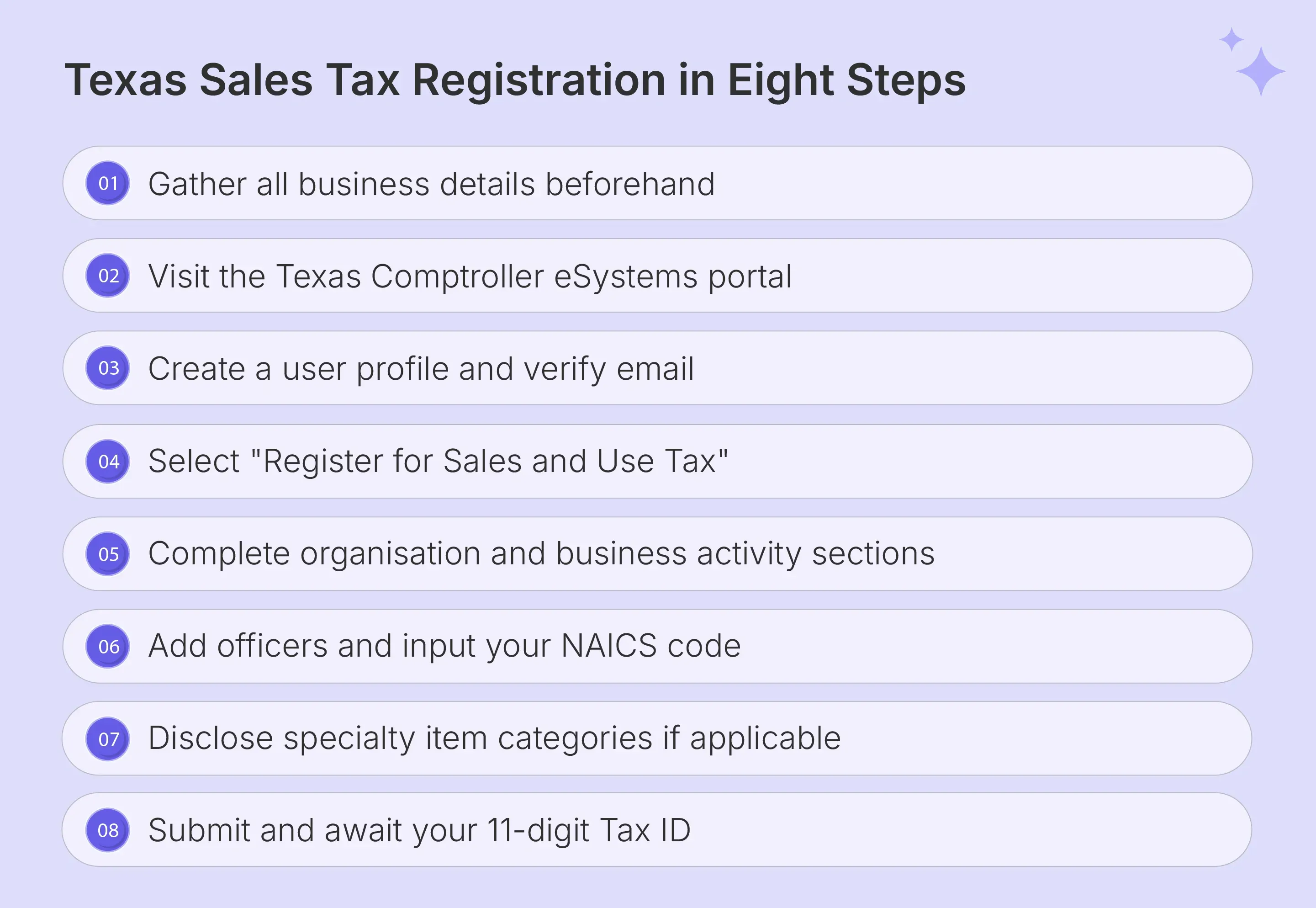
How to Register for Texas Sales Tax: Step by Step Guide
Texas sales tax registration is completed online through the Texas Comptroller eSystems portal using Form AP-201. The entire process typically takes 20 to 40 minutes to complete online. There is no registration fee, though the Comptroller's office may require a security bond for some business types.
Preparing Your Information Before You Start
Gathering your business details before opening the portal prevents session timeouts that force you to restart the application process from the beginning, as the Texas Comptroller's eSystems portal will expire an inactive session without saving any progress.
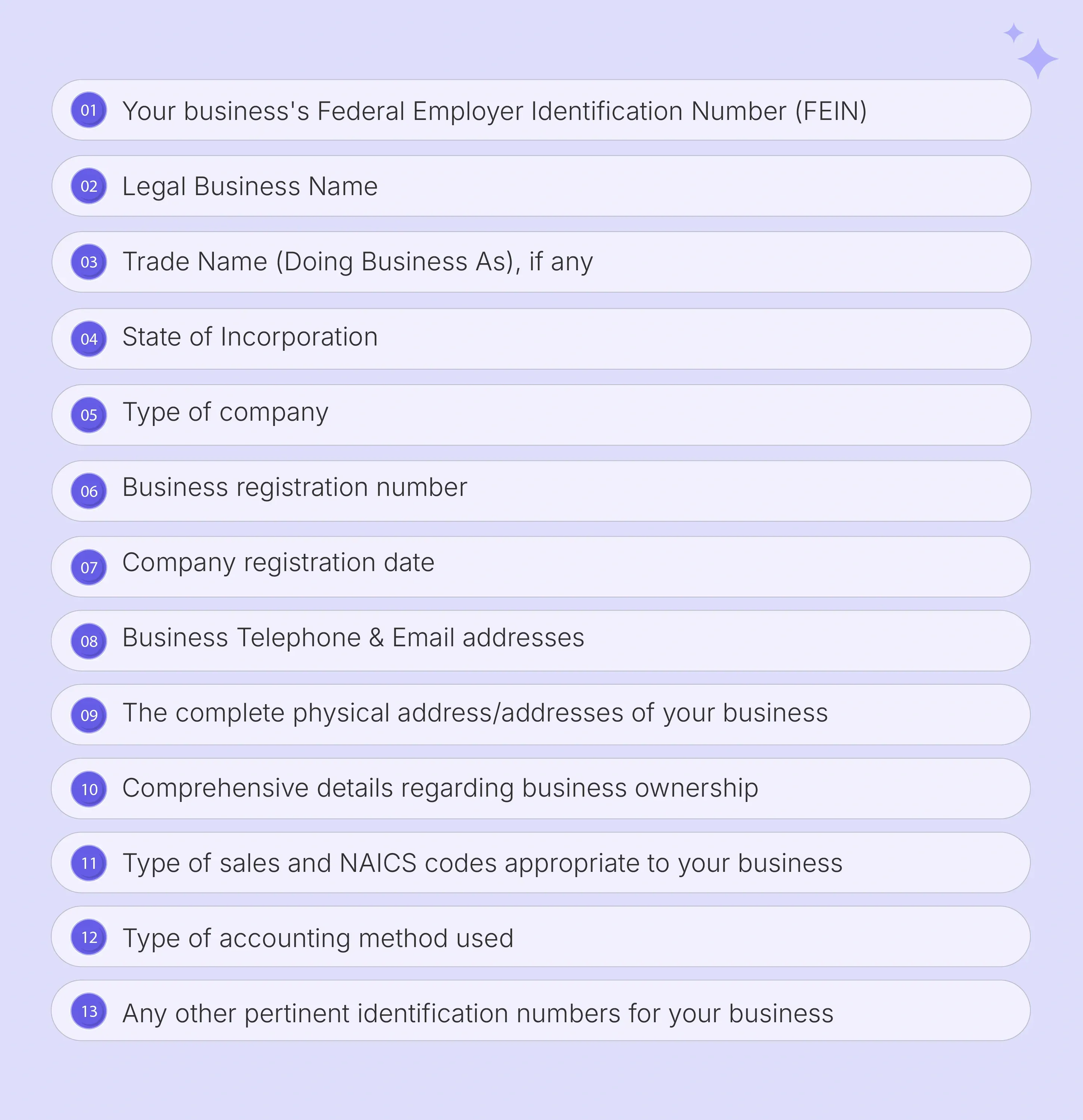
- Prepare your legal business name, any DBA names, FEIN, state of formation, and business address before opening the Texas application. This is crucial to avoid interruptions that trigger a session timeout mid-completion.
- Confirm your primary mailing address, legal entity type, and the exact date Texas Nexus was first established. This effective date determines the starting point for any back-tax assessment if registration was delayed.
- Gather owner, officer, and responsible party details, including Social Security Numbers or Taxpayer Identification Numbers. The portal requires these details for every individual listed as having authority over the business.
- Look up your 6-digit NAICS code using the American Industrial Classification System directory before starting. You will need this code to categorize your primary business activities accurately within the form.
- Prepare an estimate of your monthly Texas taxable sales volume and your bank details if you plan to enroll in electronic payment during the registration process to complete all sections without pausing.
- Your security bond amount, if applicable, is determined during the application review and is based on your estimated monthly tax liability.
- Have your Texas Secretary of State file number ready if your entity is already registered with the state of Texas.
Accessing the Portal and Creating a User Profile
Navigate to the Texas Comptroller eSystems portal and locate the Sales Tax Permit Application section. Select the eSystems option to begin the process of registering for sales tax in Texas online using your verified user ID and credentials.
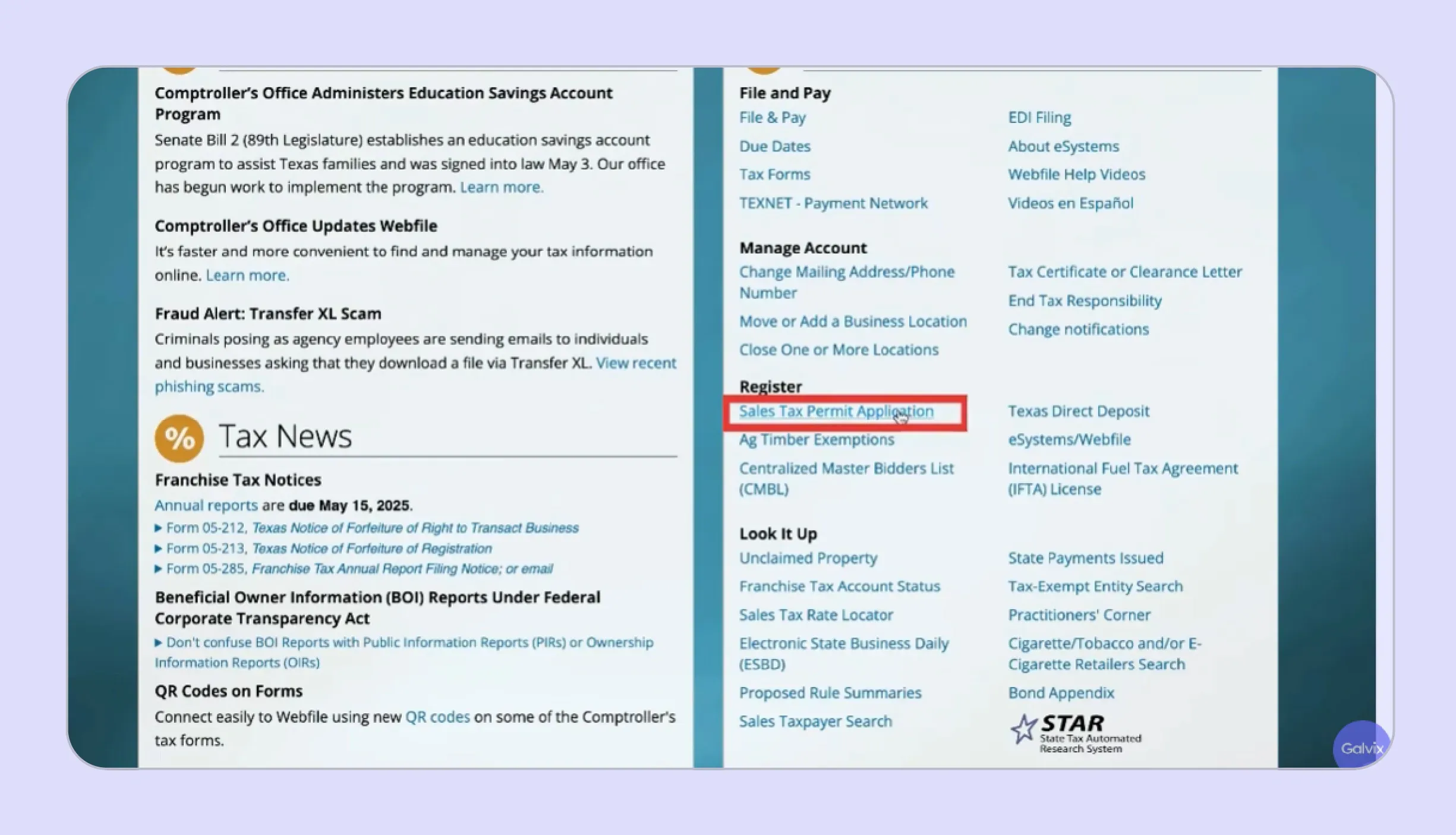
- Complete email verification before your first login. The portal requires a confirmed user ID and verified email address before granting access to any part of the Texas application dashboard.
- Log into your eSystems dashboard and select ‘Register for Texas Sales and Use Tax’ to begin the formal sales tax permit application. The portal walks you through each section with prompts and field-level guidance.
- Remote sellers with no Texas place of business should select the ‘Remote Seller’ designation early in the process, as this affects which sections of the Texas application are displayed and required.
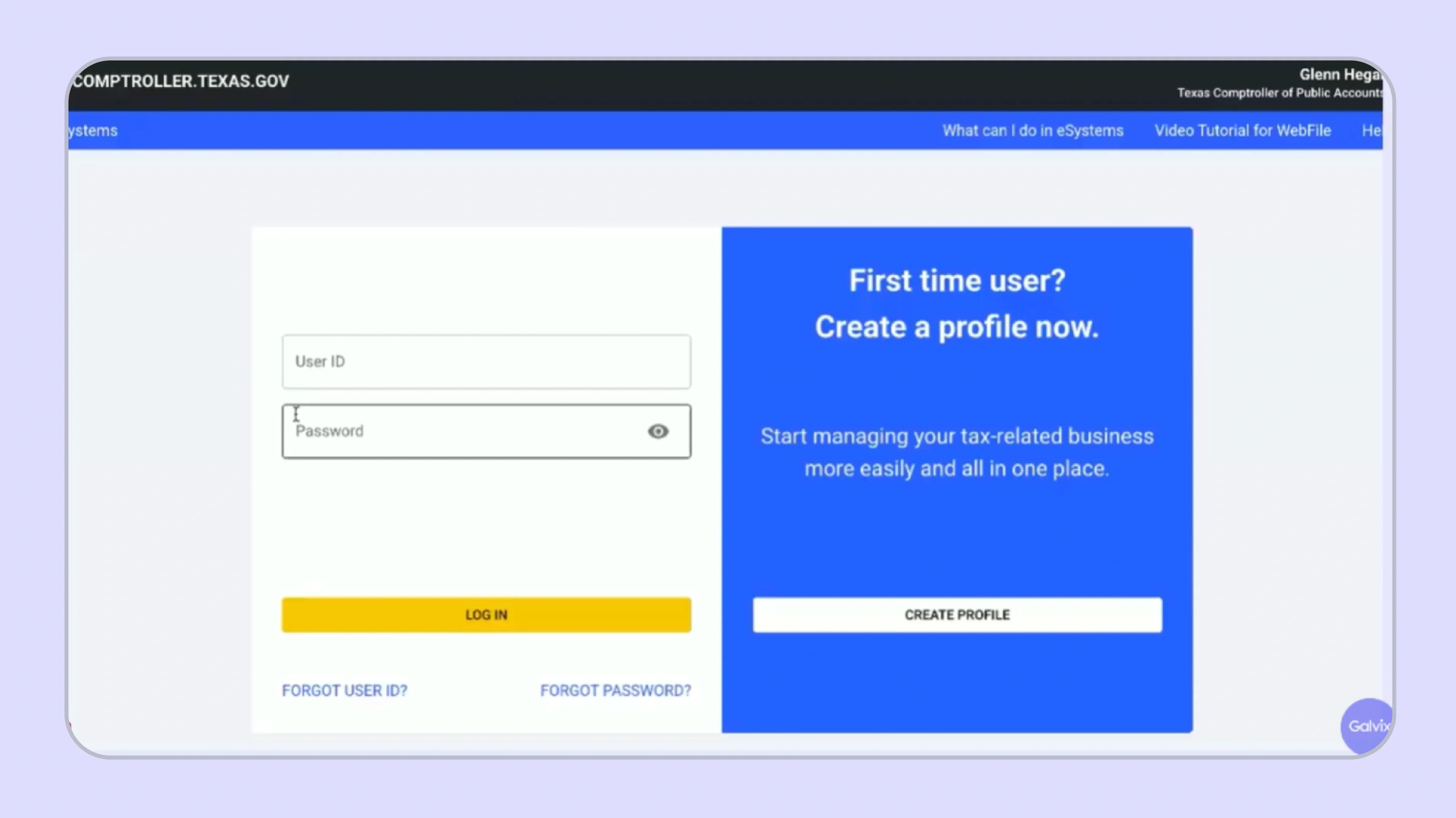
Your user ID must be between 8 and 25 characters and cannot be changed after the profile is created, so choose it carefully. If you already have an eSystems account for another Texas tax type, log in with those existing credentials rather than creating a duplicate profile
Completing the Organization Details and Business Activity Sections
The Texas application opens with your organizational structure declaration. It asks whether you are a Texas or non-Texas business and confirms your FEIN and state of formation before any activity-related questions appear.
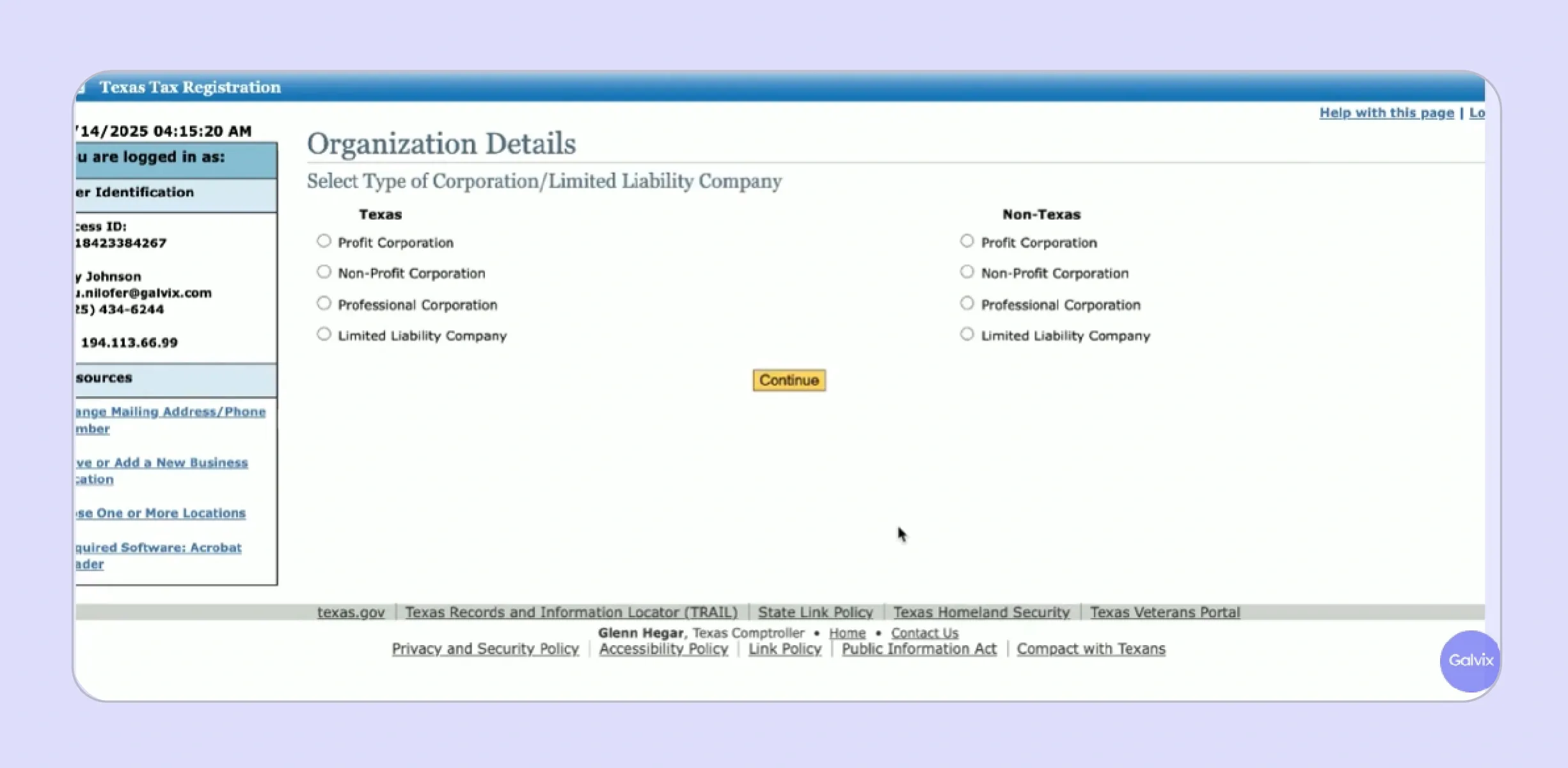
- Select "Texas Business" if your entity is formed in Texas, or "Non-Texas Business" if incorporated or organized in another state.
- The Organization Type dropdown includes sole proprietor, partnership, corporation, LLC, and other; select the one that matches your formation documents exactly.
- If your business has a Texas charter number from the Secretary of State, enter it in the designated field to expedite the review process.
The Business Activity Questionnaire is the most consequential section of the sales tax permit registration in Texas process. It determines your tax obligations and physical Nexus status by asking about physical locations, point-of-sale activity, inventory storage, temporary sales activity, and marketplace operations.
- Answer each business activity question accurately. Your responses directly determine whether a Physical Nexus is assigned and what use tax obligations apply to your account under the Texas administrative code.
- Declare all inventory locations, including third-party fulfillment warehouses and Amazon FBA facilities in Texas. The Comptroller's office treats stored inventory as a qualifying Nexus trigger regardless of who owns the warehouse.
- Remote sellers may elect the Single Local Use Tax Rate at this stage. This simplifies tax rate tracking by applying a single composite rate across all local jurisdictions, including cities, counties, special districts, and transit authorities in Texas.
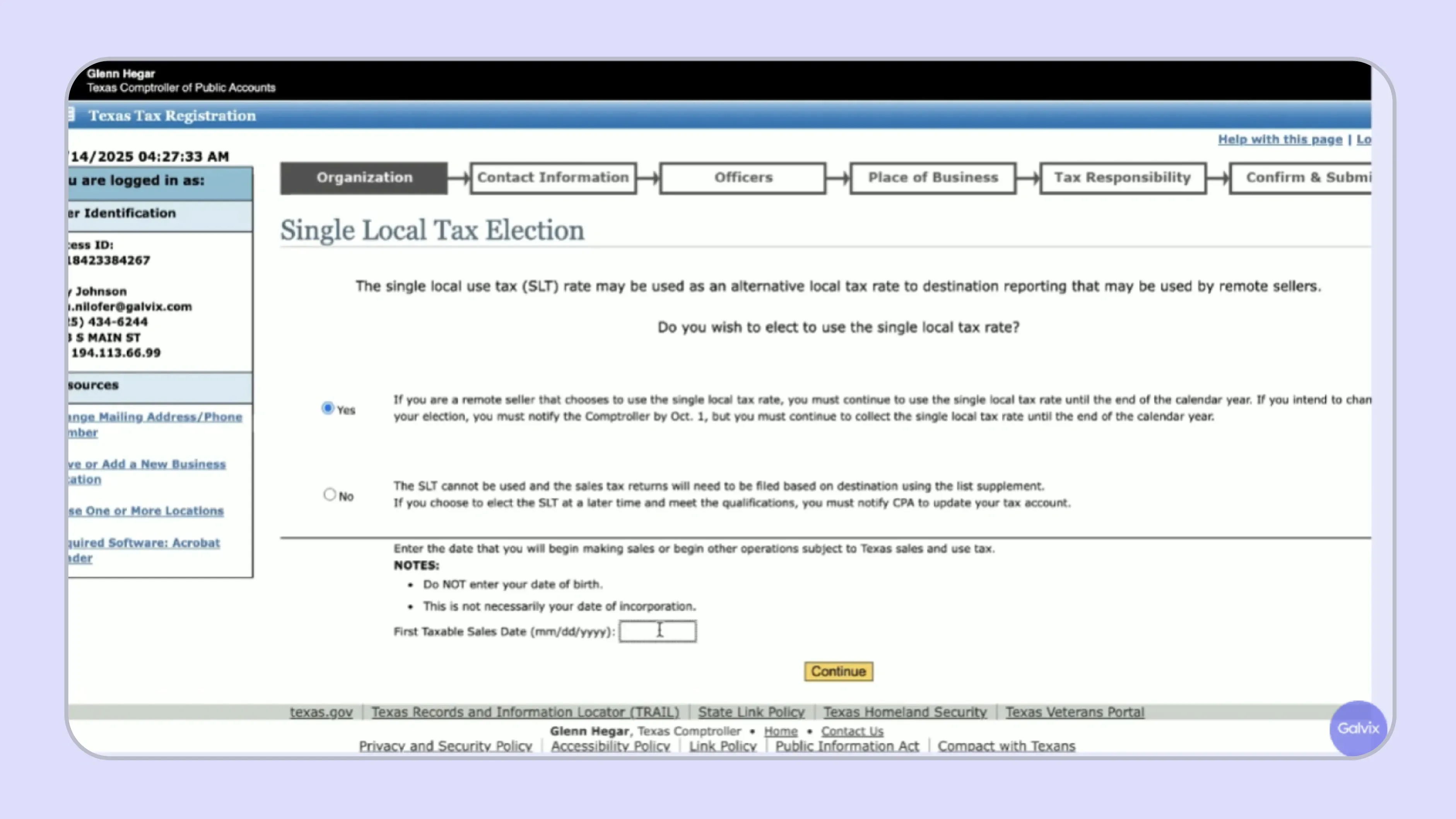
- The Single Local Use Tax Rate for 2025 is 1.75%; verify the current rate at the Comptroller's website before electing this option.
- If you make sales through a marketplace facilitator that collects and remits tax on your behalf, disclose this in the marketplace operations field.
- Temporary sales activity, such as attending Texas trade shows or craft fairs, must be disclosed even if it occurred only once during the measurement period
Adding Officers, NAICS Code, and Specialty Item Disclosures
After completing business activity questions, the application requests full contact and identification details for all owners, officers, and responsible parties listed as acting on behalf of a business or, where applicable, on behalf of a minor who holds an ownership interest.
- Enter the full legal name, title, home address, date of birth, and Social Security Number for each officer or responsible party listed.
- At least one responsible party must be listed; businesses with multiple owners should list all individuals with signing authority or financial control.
- The NAICS code field accepts either a direct 6-digit entry or a keyword search; use specific industry terms for more accurate results.
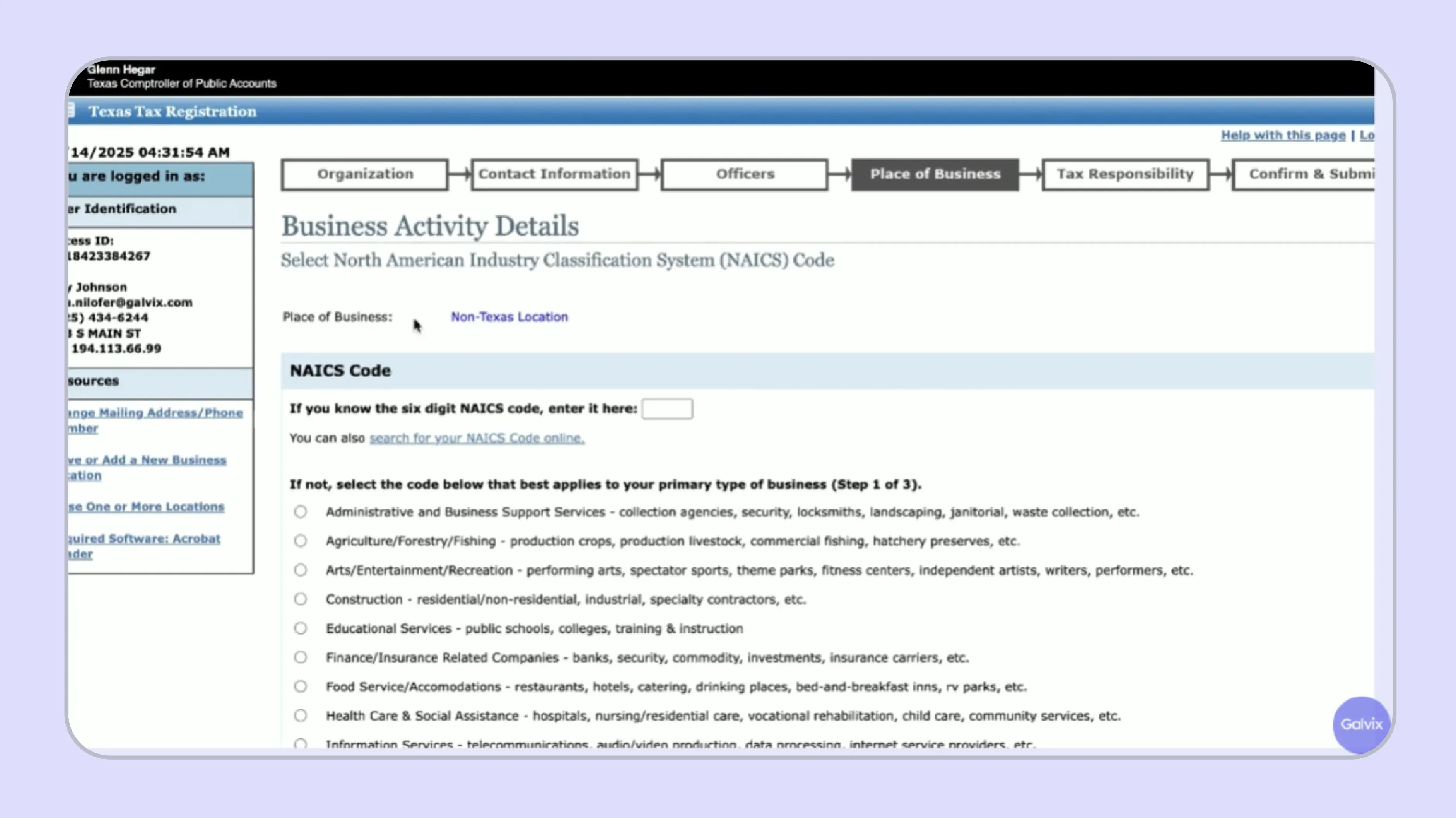
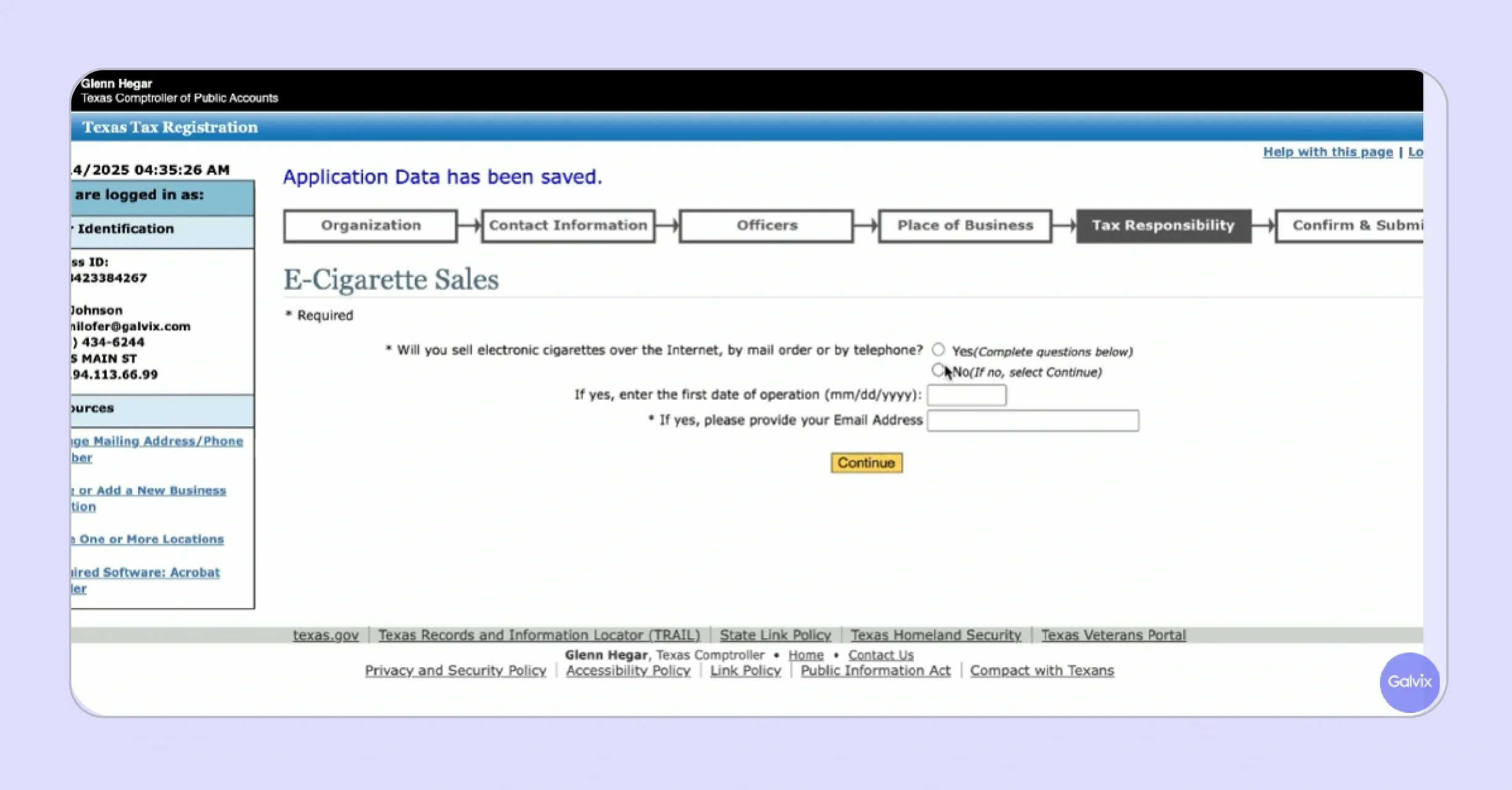
The application then presents specialty item disclosures. These categories carry different tax obligations and separate compliance requirements that the standard sales tax permit does not automatically address without additional disclosure during the registration process.
- Prepaid wireless services, electronic cigarette sales, and off-road heavy-duty diesel equipment each require separate disclosure and may trigger additional registration requirements with the Texas Comptroller of Public Accounts beyond the standard permit.
- Declare whether the application covers an existing business name or recently purchased business assets from a prior permit holder, as purchasing an existing business transfers some filing history obligations under Texas law.
- Review the summary page carefully before final submission to confirm that your business address, NAICS code, and Nexus effective date are all accurate before the form is sent to the Comptroller's office for review.
- The summary page allows you to navigate back to any section to correct errors before the application is formally submitted.
- If you sell e-cigarettes, you will be prompted to provide additional details about your supplier and estimated monthly sales volume of those products
Submission and What Happens After Approval
After submission, the Texas Comptroller reviews your Texas application and issues your state Sales Tax Permit, also called your 11-digit Texas Taxpayer Number, which serves as your official identifier for all future sales tax returns and filings under your account.
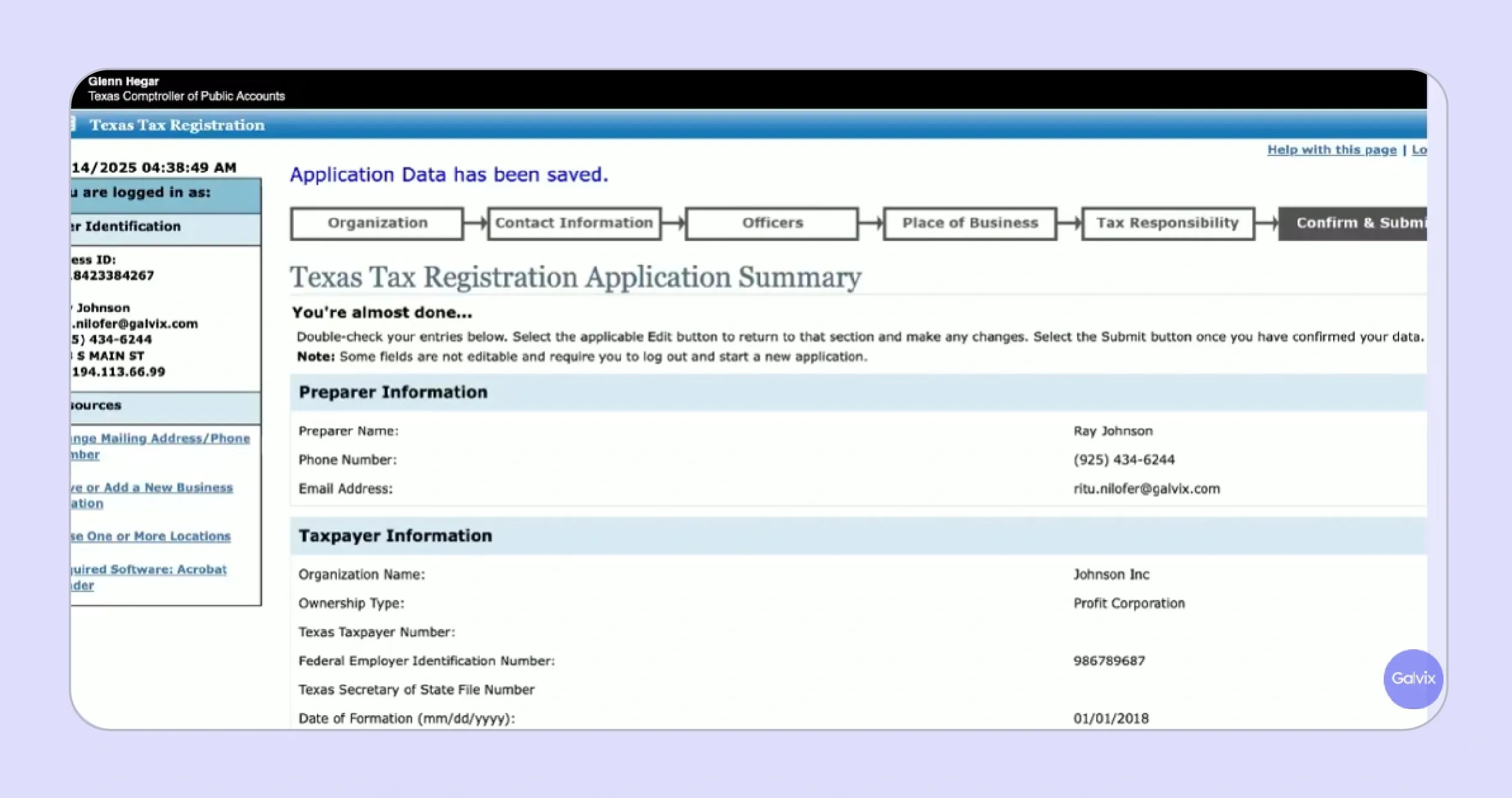
- Permits typically arrive by mail within 2 to 3 weeks after application approval; the next business day after approval you can log in to confirm your taxpayer number and begin setting up your Webfile account.
- The Sales Tax Permit number received by mail is your Texas sales tax permit identifier; Webfile e-filing account setup is a separate subsequent step required before you can submit your first sales tax returns.
- Filing schedule and due dates are assigned at registration based on estimated tax liability; returns are due by the 20th day of the month following each reporting period under standard Texas filing rules.
- Your permit must be displayed at your place of business if you have a physical Texas location open to customers.
- If you do not receive your permit within 4 weeks of approval, contact the Comptroller's office directly at 1-800-252-5555 to request a status update.
- Once your Webfile account is active, set up automatic payment reminders aligned to your assigned filing frequency to avoid late filing penalties.

What Are the Common Mistakes to Avoid During Texas Sales Tax Registration?
These four errors appear consistently during Texas sales tax registration and each carries a compliance cost that compounds if not corrected before your first filing schedule deadline arrives.
- Wrong Registration Type: Selecting ‘physical presence’ as your registration type when you are a remote seller with no Texas place of business creates incorrect Nexus records. This affects your tax obligations and the sales tax rate applied to your account, requiring a correction with the Comptroller's office.
- Incorrect Nexus Start Date: Entering the wrong date for when Texas Nexus was first established can trigger back-tax assessments. They will cover the gap between your actual Nexus date and the date declared in the Texas application, with interest accruing from the point the obligation began under Texas law.
- Missing the Franchise Tax Obligation: Overlooking the franchise tax obligation that is triggered when a sales tax permit is obtained in Texas is a common error among new registrants. The Texas Secretary of State and Texas Comptroller treat permit issuance as establishing Nexus for franchise tax purposes simultaneously.
- Failing to Track the Rolling Threshold: Failing to track the rolling 12-month threshold continuously, rather than reviewing only at the calendar year end, is a common error. It can result in late filings and penalties when a business crosses $500,000 mid-year without recognizing the obligation in the correct quarter.
What to Do If Your Business Files Sales Tax in Multiple States?
Texas is one of the states in a growing multi-state sales tax compliance landscape for most businesses that sell nationally. Businesses crossing the Texas $500,000 threshold frequently have existing or approaching Nexus obligations in other states simultaneously. This creates a registration and filing workload that multiplies with every new market entered.
Each new state registration introduces its own portal, credentials, filing schedule, and notice management requirements. For lean finance teams, this multiplies sales tax compliance work with every new state added to the footprint.
Galvix takes a different approach entirely, acting as a dedicated compliance team that removes the operational burden from your finance function rather than adding another platform for your team to manage.
Here is what our sales tax software manages after your Texas sales tax registration is complete:
- Done-for-You State Registration: Galvix handles sales tax permit registration in Texas and registration in every other state where you cross a threshold. Our team manages all portal work, FEIN submissions, and credential setup for a flat per state fee on your behalf.
- Proactive Nexus Monitoring: Nexus thresholds across all 50 states are monitored continuously with proactive alerts at 75%, 85%, and 95%. Your team is never caught off-guard by a sales tax obligation that has already triggered before your team noticed.
- Human Review Before Every Filing: Every sales tax return is prepared by a named compliance specialist and independently reconciled against billing data. It is filed on your behalf before the 20th day of the month deadline across every state in your portfolio.
- Full State Correspondence Management: All Texas Comptroller correspondence, including notices, audit inquiries, use tax resale certificate requests, and rate change communications, is managed directly by the Galvix team. So, your finance function receives dashboard updates rather than state letters. For businesses already filing in multiple states, Galvix serves as a dedicated sales tax compliance team, with a named account manager who has full context about your business from day one.
Schedule a demo to see how fully managed Texas sales tax registration and multi-state compliance works for your business.
Frequently Asked Questions
Do I Have to Register for Sales Tax in Texas?
Yes. Any business with taxable sales of tangible personal property or taxable services in Texas must register once it establishes physical Nexus or crosses $500,000 in rolling 12-month Texas revenue. Both retailers and wholesalers need a Texas sales tax permit, even if wholesalers do not collect sales tax from their buyers.
How Do You Get a Texas Sales Tax Number?
The process to register for sales tax in Texas starts at comptroller.texas.gov, where you complete Form AP-201 through the eSystems portal. Your 11-digit Texas Taxpayer Number is issued after the Comptroller's office approves your application, arriving by mail within 2 to 3 weeks. Galvix handles the entire process for a flat fee.
How Much Does It Cost to Get a Sales Tax License in Texas?
Sales tax permit registration in Texas carries no state application fee through the Texas Comptroller's eSystems portal. The Comptroller's office may require a security bond for certain high-risk business types during the registration process. Galvix manages the complete Texas application, portal work, and credential setup for a flat per state fee with no hidden costs.
How Do I Know If I Need to Pay Sales Tax in Texas?
The process to get a seller permit in Texas begins with confirming whether your business has physical Nexus or has exceeded $500,000 in Texas taxable sales during any rolling 12-month period. If either condition applies, registration and tax collection are mandatory. Use the Galvix free Nexus study to confirm your current exposure across all states before registering.
What Taxes Does a Small Business Have to Pay in Texas?
A small business in Texas with taxable sales must collect and remit sales tax at the applicable sales tax rate across state and local jurisdictions. Obtaining a sales tax permit also triggers a franchise tax obligation with the Texas Comptroller of Public Accounts. Texas has no state personal income tax, though federal employment taxes apply for businesses with employees in the state.