
Switching filing providers sounds simple at first. You sign up with another service and connect your Shopify store. However, the real problem is knowing who will file each return during the change. You need to ensure there is no gap between Shopify's last return and your new provider's first return.
That gap varies by state. If you file monthly in California, Shopify's final return covers sales for December 2026. Your new provider must then file the January return in February. However, if you file quarterly in New York, Shopify will continue filing through March, and the new provider takes over with the return due in June.
When you file in several states, it becomes easy to miss a return or to file the same period twice. This Shopify filing migration checklist shows you how to plan the handoff for each state. You will learn which records to save and how to make sure someone handles every return when it is due.

Who Files Each Return When Shopify's Service Ends?
The date of your first return after Shopify depends on how often each state requires you to file. Some states require monthly returns, while others follow quarterly, semiannual, or annual schedules. You need to check these dates separately to know when your new filing arrangement should begin.
Here is Shopify's final filing schedule to help you understand when your new filing arrangement should begin:
| Filing Frequency | Last Return Covered by Shopify | Shopify's Final Filing Month | First New Filing Month |
|---|---|---|---|
| Monthly (most states) | December 2026 | January 2027 | February 2027 |
| Quarterly (except New York) | October–December 2026 | January 2027 | April 2027 |
| New York quarterly | December 2026–February 2027 | March 2027 | June 2027 |
| Semiannual, except Pennsylvania | July–December 2026 | January 2027 | Varies by state |
| Pennsylvania semiannual | July–December 2026 | February 2027 | August 2027 |
| Annual, calendar-year filers | January–December 2026 | January 2027 | 2028, if the schedule remains unchanged |
For example, Shopify will file your December 2026 California return in January 2027. Your new provider will then need to file the January 2027 return in February. However, New York follows a different schedule because Shopify will continue filing quarterly returns covering sales through February 2027.
This means your new provider's first quarterly return for New York will cover March to May 2027, with filing due in June. You can read our New York sales tax filing guide to understand the state's filing requirements.
Since the dates differ, you need to confirm the last return Shopify will file in each state. Your new provider can then take over the next reporting period without missing a deadline or filing the same return twice.
Can You Switch Before Shopify Files Its Last Return?
Yes, you can switch from Shopify automated filing before Shopify completes its last scheduled return. While Shopify handles the remaining filings, your new provider can connect your store, review previous records, and arrange access to state accounts.
Your checkout tax calculations will continue during this period because Shopify Tax is not being discontinued. You can read our take on the end of Shopify automated filing to understand which Shopify services will continue and which ones will stop.
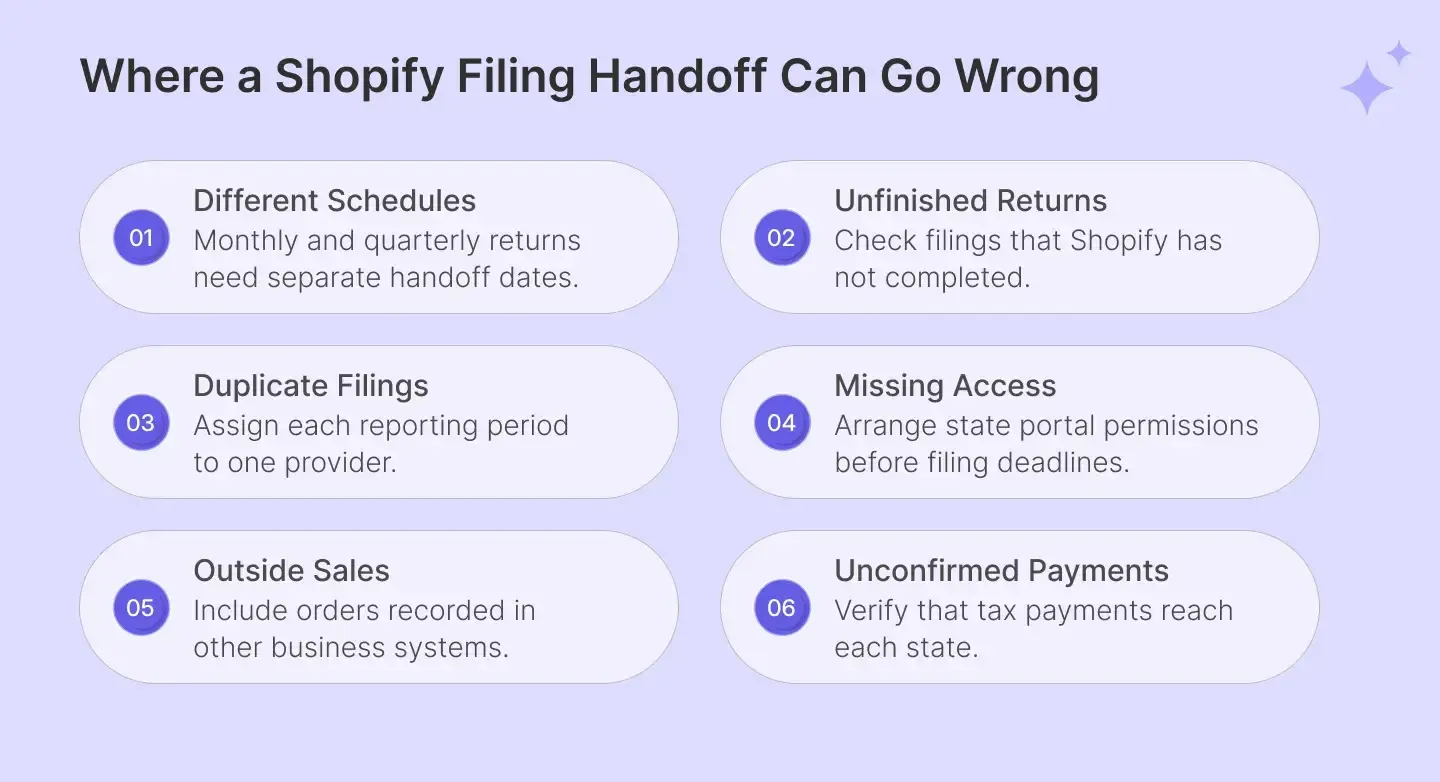
However, be careful if you want the new provider to handle an already planned return. Shopify allows you to skip eligible returns through the eighth day of their filing month. You can check the status in your Shopify admin, but returns marked Scheduled cannot be skipped.
Since skipping cannot be undone, first confirm who will file that tax return and make the payment. Otherwise, you could miss the deadline and face penalties for filing late.
Your 7-Step Shopify Filing Migration Checklist
Once you have agreed on the filing dates, gather the records and account details your new provider will need. Follow the Shopify filing migration checklist below to avoid missing anything important during the switch.
Step 1. List Every State Where You File Sales Tax
Start by listing all the states where your business is registered to collect and pay sales tax. Include states where you have not made any recent sales, as some still require zero returns. This will help the new provider understand your existing filing responsibilities.
For each state, record your sales tax account number and any separate local filing requirements. If you participate in Streamlined Sales Tax, include those registrations as well. You should also identify returns that must be submitted directly to local tax authorities.
While checking your state registrations, you may also find that your business needs to register in additional states. For example, keeping inventory in another state can create a physical presence and new sales tax obligations. Use nexus monitoring to identify these states, but keep them separate from existing registrations.
Step 2. Confirm Your Filing Frequency in Each State
Once the state list is ready, check how often you need to file returns in each one. Depending on the state's rules, you may need to file monthly, quarterly, semi-annually, or annually. You can find the assigned filing frequencies in your state tax accounts.
Next, compare these schedules with the information available in your Shopify admin. Sometimes a state change affects your filing frequency, but Shopify may still show the earlier schedule. If you notice any difference, ask your new provider to confirm the correct dates before filing.
You should also check whether a state requires tax payments between your regular filing dates. For example, some New Jersey businesses file quarterly returns but must also make monthly payments. Our New Jersey sales tax filing guide explains when these additional payments are required.
Step 3. Download Shopify's Filing History Before April 30, 2027
Now that you have confirmed your filing schedules, save copies of the returns Shopify has already handled. Shopify will let you download past filing records until April 30, 2027. These documents will help your new provider check what was previously filed and paid.
You can download your filing history directly from Shopify by following these steps:
- Sign in to your Shopify admin and open Finance > Tax filing.
- Select the tax return you want to download.
- Under Documents, choose Return report to download the file.
- Repeat these steps for the other returns you need to save.
Along with these reports, save payment confirmations, details of earlier corrections, and any unresolved state notices. Your provider can use these documents to investigate past filing issues without having to request the same information again.
Step 4. Check Whether Shopify Filed Every Final Return
Downloading the reports is useful, but you must also verify that Shopify completed all scheduled returns. Sometimes, a filing may remain unfinished because Shopify needs additional information or encounters an account issue. You can identify these problems by checking each return's status in Shopify.
Here is what the different statuses mean and what you should do next:
| Return Status | What It Means | What You Should Do |
|---|---|---|
| Filed | Shopify submitted the return. | Save the report and confirm the filing period. |
| Action required | An issue is preventing Shopify from filing. | Resolve the issue before the filing deadline. |
| Not filed | The return was skipped or remained unfinished. | Arrange to submit the outstanding return separately. |
If your last automated return shows Not filed, check why Shopify did not complete it. You should then confirm who will submit that return and pay the amount owed. Do not assume your new provider will automatically handle unfinished filings from earlier periods.
You can also compare Shopify's records with the returns shown in your state tax account. If they do not match, investigate the difference before closing the old filing process. This helps you identify missing filings and resolve questions from tax authorities before they become bigger problems.
Step 5. Check Sales That May Be Missing From Shopify Reports
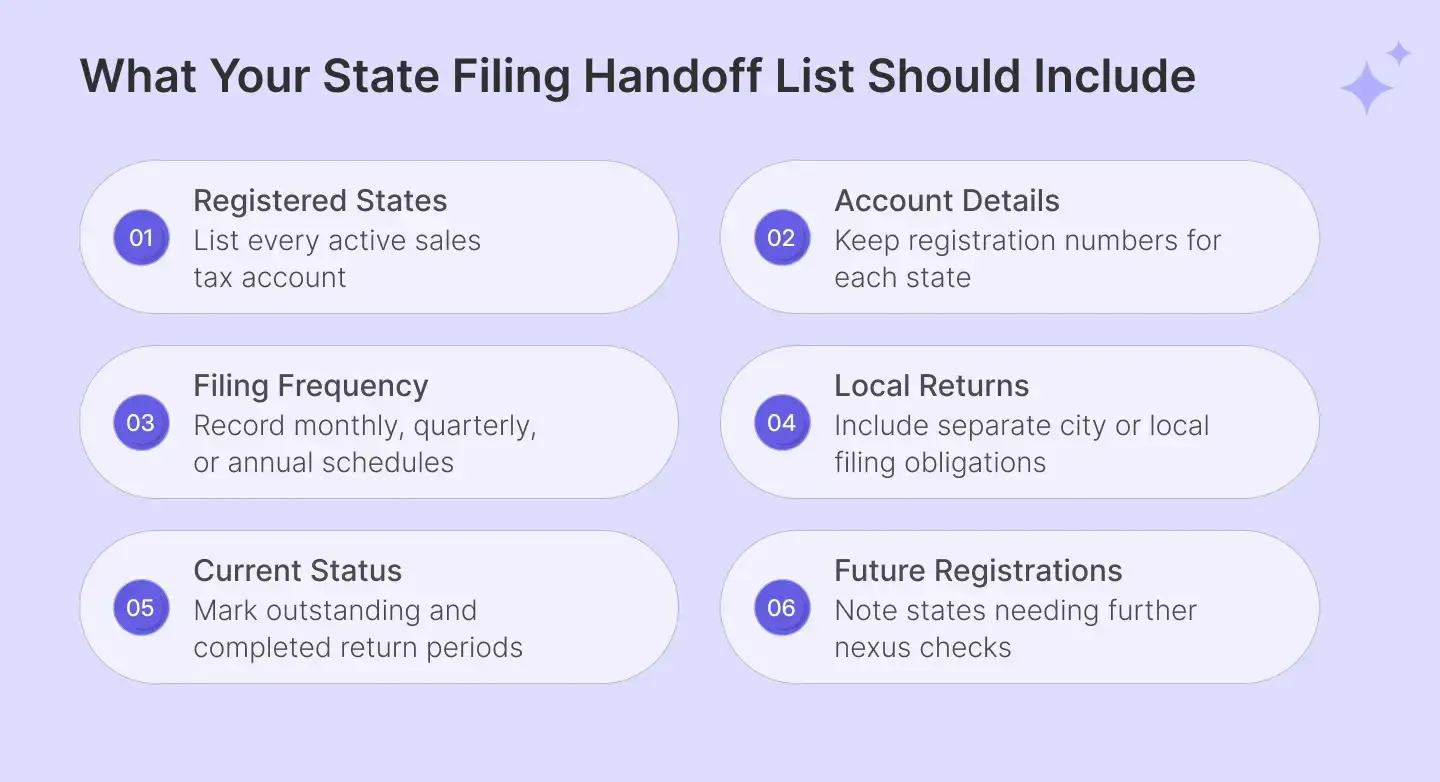
Your new provider needs complete sales data before preparing returns, especially if you sell through multiple platforms. Shopify's reports may not include transactions recorded in your accounting software or other business systems. These sales could still need to appear on the same state return.
For example, you may receive customer orders through Shopify and send wholesale invoices using QuickBooks Online. Both types of sales may need to be included when preparing your returns. If your provider only checks Shopify reports, some transactions could be left out.
You should also share information about refunds, marketplace orders, and tax-free sales from other sales channels. These transactions can affect the amounts reported to states, depending on the applicable rules. Your provider should also check product taxability and customer exemptions when reviewing the records.
Since different systems may record the same transaction differently, your provider must compare the reports before filing. For example, a refund may appear in a different month from the original sale. Checking these differences early can reduce manual work and help prevent incorrect returns.
Step 6. Give Your New Provider Access to State Tax Accounts
When you switch from Shopify Tax automated filing, your new provider needs permission to submit returns through state portals. Depending on the state, you may need to add the provider as an authorized user or share account details securely. These permissions must be ready before the first filing deadline.
Some states require a power of attorney before another company can manage your filings. Others may allow you to add an authorized user or require separate login credentials. Your provider should explain the process and help you arrange the necessary permissions.
Remember that connecting your Shopify store does not automatically provide access to your state tax accounts. Even if you install software through the Shopify App Store, you may still need separate state authorizations. These permissions must be ready before your provider can submit its first return.
If you file in several states, completing these requirements may take longer than expected. Each state can have a different process for granting access to your account. Starting early gives you enough time to resolve any problems before the next filing deadline.
Step 7. Confirm When You Move From Shopify Automated Filing
With your records and account access ready, you can finalize the start date for the new provider's filing. Confirm the first reporting period it will handle in each state, rather than agreeing only on a month. This helps avoid missed filings and duplicate returns.
You should also agree on who will prepare, review, approve, and submit each return. Make sure the provider knows your current filing volume, including any separate local returns or advance payments. These details help establish a clear process for future filings and payments.
For example, your provider may first report January 2027 sales in California but start later in New York. Record these dates and responsibilities in writing so both sides know what to expect. This completes the planning needed for your Shopify sales tax filing transition.
What Should You Check After Your First Return Is Filed?
After you switch from Shopify filing, check whether your new provider has successfully submitted its first return. Connecting your store and granting account access does not mean the return has reached the state. Confirm that the return was filed and the payment was completed before considering the switch finished.
Here are three things you should check after the first filing:
- Filing confirmation: Make sure your tax return was submitted to the correct state for the right reporting period.
- Tax payment: Check whether the payment matches your approved return and appears in the state's account records.
- Future filings: Confirm who will manage upcoming deadlines, corrections, local returns, and any notices from the state.
Once you have checked these details, find out how your provider will keep you informed about future filings. Agree on when you will receive returns for approval and how payment confirmations will be shared. This will help you monitor the work without having to check every state portal yourself.

How Galvix Takes Responsibility for Your Shopify Automated Filing Transition
Completing the checklist helps you prepare for the switch, but the filing work does not end there. Every month or quarter, someone still needs to check your sales figures, prepare returns, and make payments. This can take considerable time when you file in several states.
At Galvix, we handle these responsibilities end-to-end for you. Our sales tax experts prepare and review every return before filing, so the hassle of filling state forms yourself is taken off your plate. We also handle payments and follow up when states question returns we filed.
We Manage the Handoff Separately for Every State
Before we start filing, we check your state registrations and confirm which returns Shopify will complete. We then agree on the first reporting period Galvix will handle in each state. This helps prevent missed deadlines or duplicate returns.
Once those dates are clear, we connect your Shopify store and import the available filing history. We also help arrange access to your state tax accounts so everything is ready for filing. Our Shopify integration guide explains how we bring your store's transaction records into Galvix.
Our Tax Experts Review Every Return Before Filing
After taking over, we use your sales data to prepare the returns required by each state. Our dedicated tax team checks the sales figures, accounts for relevant refunds, and reviews every return for accuracy. You can then approve the return yourself or choose automatic approval.
Once approved, we file the return and complete payment to the state on your behalf. We’re also experts at handling separate local returns, advance tax payments, and corrections to earlier filings.
Our job doesn’t simply end when a return is filed. If a state comes back with a question about a return we filed, we handle it, at no extra cost. And if a return is ever late because of us, the penalty and interest are on us too.
Switching From Shopify? Here’s Our Offer
Every state or local return costs $39, with the rate locked through 2027. This is part of our managed filing service, so our tax team prepares and reviews the return before filing. We also handle applicable prepayments and local filing requirements as part of the agreed work.
Switching does not involve an additional setup charge. We connect your Shopify store and import your available filing history. Our team also completes a free health check covering 12 months of Shopify's past returns in your top three states.
If your filing requirements are more involved, we review them with you before taking over. For example, you may have several Shopify stores or receive orders through systems outside Shopify.
There is no contract requirement, and taxes owed or government fees are separate from the filing charge. The offer is available to Shopify stores moving from automated filing, with the $39 return rate locked through 2027.
Book a free call, and we’ll map out your switch, state by state.
FAQs
Will Shopify Automatically Apply Sales Tax After Automated Filing Ends?
Yes. Shopify Tax will continue handling sales tax calculations at checkout, even after its automated filing service ends. You can keep using your existing tax settings without changing how customers are charged. However, you will need another arrangement to prepare returns and pay the tax collected.
Does Shopify File Sales Tax Returns for You?
Shopify will complete its final eligible returns, but you must arrange future filings yourself or through another provider. The Shopify Help Center explains which reporting periods the service will cover. You should compare those dates with your current obligations to confirm which returns remain your responsibility.
How Can You Switch From Shopify Automated Filing Without a Gap?
Start by checking the last return Shopify will handle and confirming who will file your next return. Remember that some states follow a different timeline, particularly New York for quarterly filers. Your new provider should also understand your current process for approving returns and making payments.
Do You Need to Turn Off Shopify Automated Filing Before Switching?
No. You can arrange another provider while Shopify continues filing its remaining scheduled returns. If you want to skip an eligible Shopify filing, first confirm who will submit that return to the appropriate state. Returns already marked Scheduled cannot be skipped, so check their status before making changes.
Can Small Businesses Handle Sales Tax Filing Themselves?
For small businesses, filing sales tax themselves may be manageable when they have only a few state registrations. However, as the number of states increases, tracking deadlines and preparing different returns creates a greater administrative burden. You should compare that workload with the cost of using a filing provider.