Businesses registered as New York vendors can file New York sales tax online through the state’s Sales Tax Web File. Quarterly sellers usually file Form ST-100, while part-quarterly and annual sellers use forms matched to their assigned filing frequency.
The statewide sales tax rate is 4%, although local jurisdictions can increase the combined rate applied to a transaction. New York City and seven downstate counties also fall within the Metropolitan Commuter Transportation District, where an additional 0.375% applies to taxable transactions.
That structure makes destination reporting one of the most important parts of a New York sales tax return. Web File supplies the combined rate for each jurisdiction, while your business remains responsible for assigning taxable transactions to the correct destination.
This blog focuses on how to file sales tax returns in New York, reconcile returns, make payments, and retain filing evidence. But if you need an in-depth analysis of the current rules applicable in the state, refer to this New York sales tax guide.

Which New York Sales Tax Return Should You File?
Your New York sales tax return depends on the filing frequency assigned to your account. Quarterly filers generally use ST-100; annual filers use ST-101; and part-quarterly and monthly filers use ST-809 and ST-810. The correct form normally becomes available through your Online Services account for the relevant filing period.
Match the Form to Your Filing Frequency
New York uses several sales tax forms because businesses can have different reporting schedules. Here is an overview of the primary tax forms associated with each filing status.
| Filing Status | Main Form | Reporting Pattern |
|---|---|---|
| Quarterly | ST-100 | March to May, June to August, September to November, December to February |
| Part-quarterly | ST-809 and ST-810 | Monthly filing within each quarter |
| Annual | ST-101 | March through February |
Most newly registered vendors begin as quarterly filers unless the Tax Department assigns another schedule. Quarterly sales tax returns are normally due within 20 days after each reporting period ends.
The quarterly due date therefore falls around June 20, September 20, December 20, or March 20. When that date falls on a weekend or legal holiday, the filing moves to the next business day.
Know When Your Filing Frequency Can Change
A business moves toward monthly filing when its combined taxable receipts, purchases subject to tax, rents, and amusement charges reach $300,000 during a quarter. The change begins with the first month of the following sales tax quarter.
New York also has a special rule for Article 12-A distributors. Selling at least 100,000 gallons of motor fuel or diesel motor fuel during a quarter can trigger monthly filing even when the standard transaction threshold does not apply.
Annual filers usually owe $3,000 or less for the year. If the annual sales tax liability rises above that level, the department may move the account to quarterly or monthly filing. Annual sales volume itself does not determine this classification.
Keep Filing When Activity Is Zero
Registered vendors must file returns for every assigned period while their registration remains active, including periods with no taxable activity. A zero tax return is still required even when the business reports no purchases subject to tax and no payment due.
This obligation remains tied to the Certificate of Authority rather than to the amount sold during a given period. If the business permanently ceases operations, it should complete the proper final return process rather than simply stop filing its sales tax returns.
What Should You Reconcile Before Opening Sales Tax Web File?
Before you file New York sales tax online, keep your transaction figures ready, as Web File calculates them based on the information your business provides. Reconcile gross sales, nontaxable activity, taxable destinations, purchases subject to use tax, exemption documentation, and payment information before beginning the return.
Teams managing several systems can use Galvix integrations to connect transaction data from platforms such as Shopify, QuickBooks, NetSuite, and Stripe with the wider compliance workflow. Galvix also supports CSV and XLSX uploads when a native connection is unavailable.
| Prepare Before Filing | Where It Appears | Main Check |
|---|---|---|
| Gross New York sales | Questionnaire | Include required marketplace activity |
| Nontaxable sales | Questionnaire | Support exclusions correctly |
| Taxable sales by destination | Jurisdiction schedule | Match delivery location |
| Purchases subject to use tax | Jurisdiction schedule | Identify untaxed business purchases |
| Exemption records | Supporting records | Connect certificate to transaction |
| Bank information | Payment stage | Confirm payment account and date |
Report Marketplace Sales the New York Way
Registered marketplace sellers should include facilitated sales of tangible personal property in total sales reported on the return. Those transactions are also reported as nontaxable when the registered marketplace provider handled tax collection for them.
This treatment is crucial because the marketplace provider’s collection responsibility does not erase the transaction from a registered seller’s periodic return. Sellers should also retain the marketplace provider’s Certificate of Collection or qualifying public agreement as supporting documentation.
Marketplace transactions remain relevant for economic nexus in New York as well. New York counts marketplace activity when determining whether an out-of-state seller exceeded $500,000 in receipts and more than 100 transactions during the immediately preceding four sales tax quarters.
For online sellers, this means marketplace reporting and nexus measurement use the same transactions differently. The return can treat facilitator-handled transactions as nontaxable, while the nexus calculation still includes those receipts.
Separate Exempt Sales From Business Use Tax
Nontaxable New York sales can include qualifying resale transactions, exempt products, eligible customers, and other sales that meet applicable state requirements. Businesses should keep the reason for each exclusion linked to the underlying invoice and supporting documents.
Purchases made for the business can create another obligation. When taxable goods are used in New York without the proper tax being paid to the supplier, the purchaser may need to report the amount through the applicable use tax returns or return lines.
This sales tax exemption certificate guide explains why certificate collection, registration lookup, and transaction eligibility should remain separate compliance checks.
How Do You File New York Sales Tax Online?
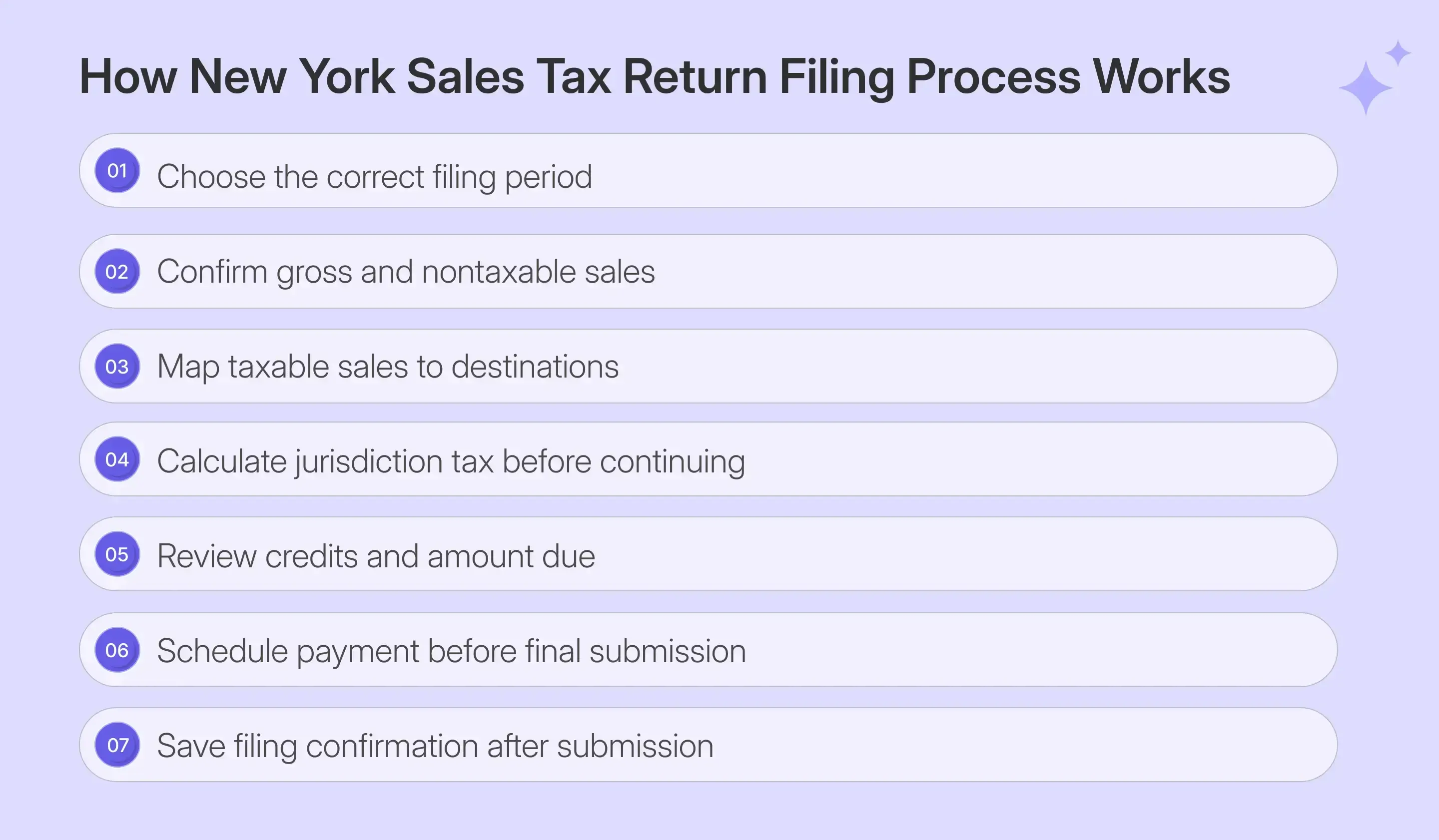
To file New York sales tax online, enter Sales Tax Web File through your business profile, select the correct period, complete the questionnaire, report taxable amounts by jurisdiction, calculate the return, review available credits, schedule payment, and submit. The screenshots below follow a live quarterly ST-100 manual-entry workflow.
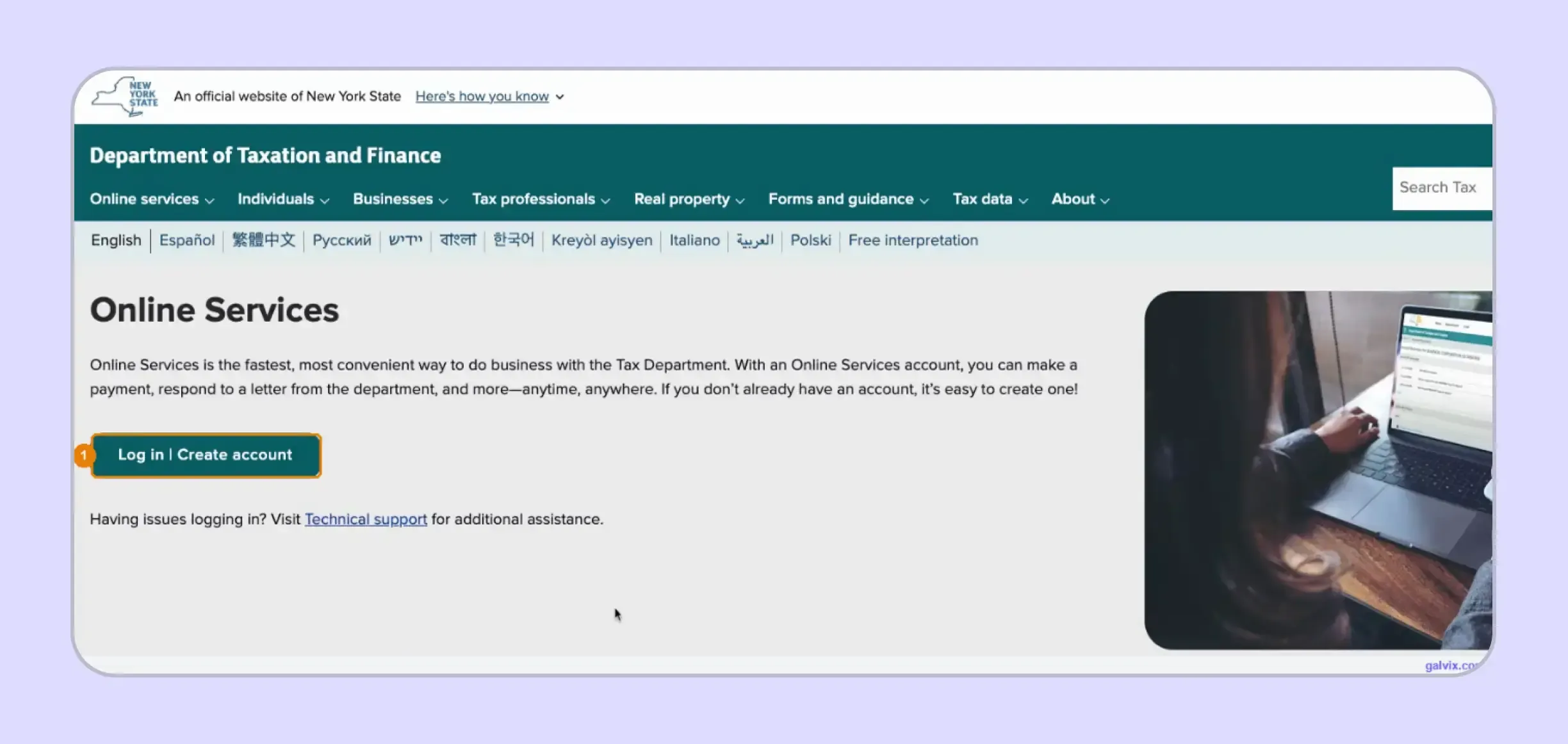
Step 1: Sign In to Online Services
Open the New York State Online Services page and select Log in or Create account. Sign in through the business profile using the username and password connected with your account.
The New York State Department of Taxation and Finance identifies Sales Tax Web File as the online route for eligible businesses that prepare their own filings using a computer and broadband internet access.
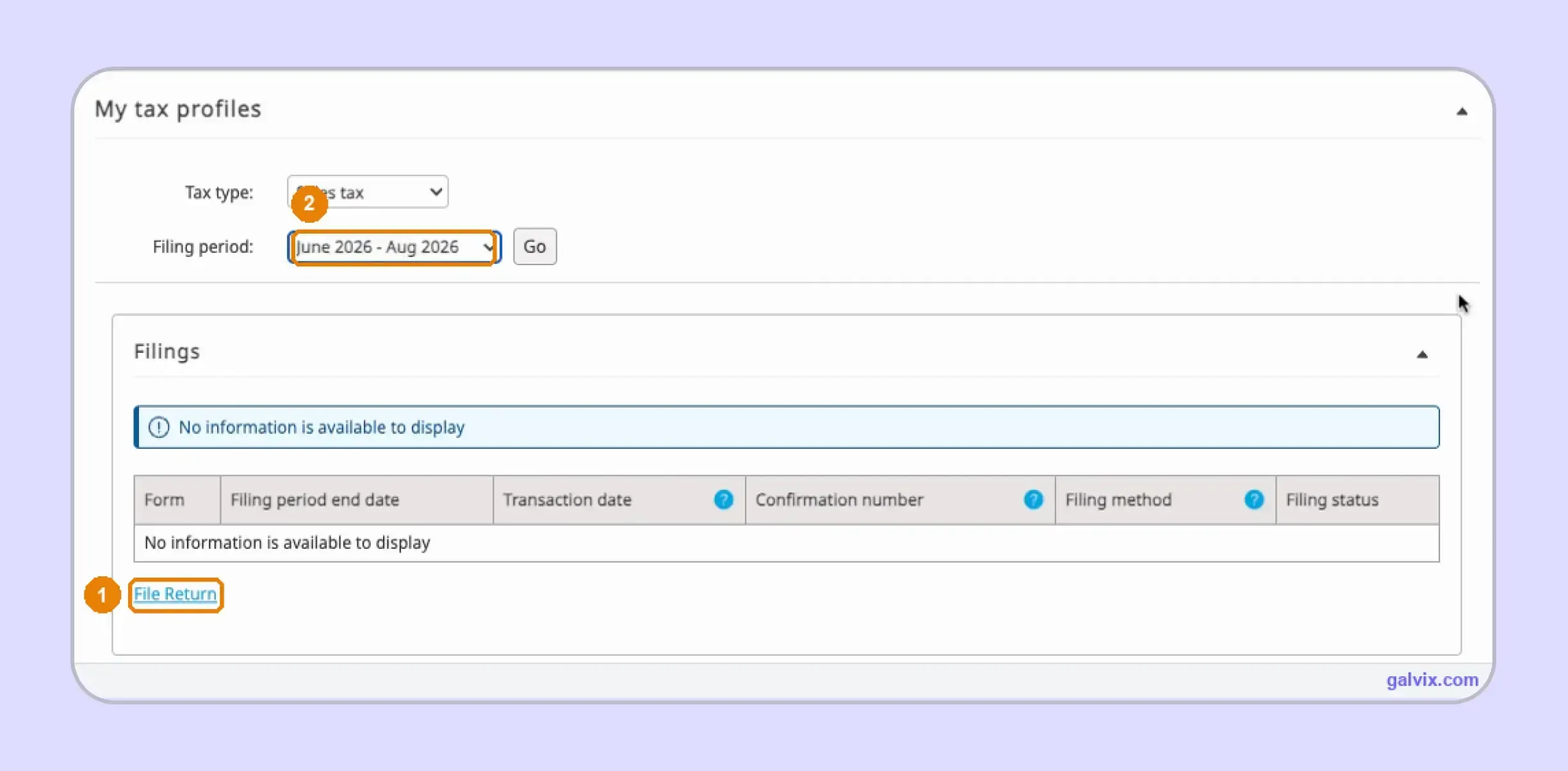
Step 2: Select the Filing Period and File Return
Inside My tax profiles, choose Sales tax as the tax type and select the correct period. Select Go, review the Filings area, then choose File Return to start an original filing.
To file New York sales tax online accurately, confirm the quarter before proceeding, as the dropdown may already display a different available tax period.
The live walkthrough shows that the filing-period dropdown can default to another period. Web File does not necessarily warn the filer before the wrong quarter is opened.
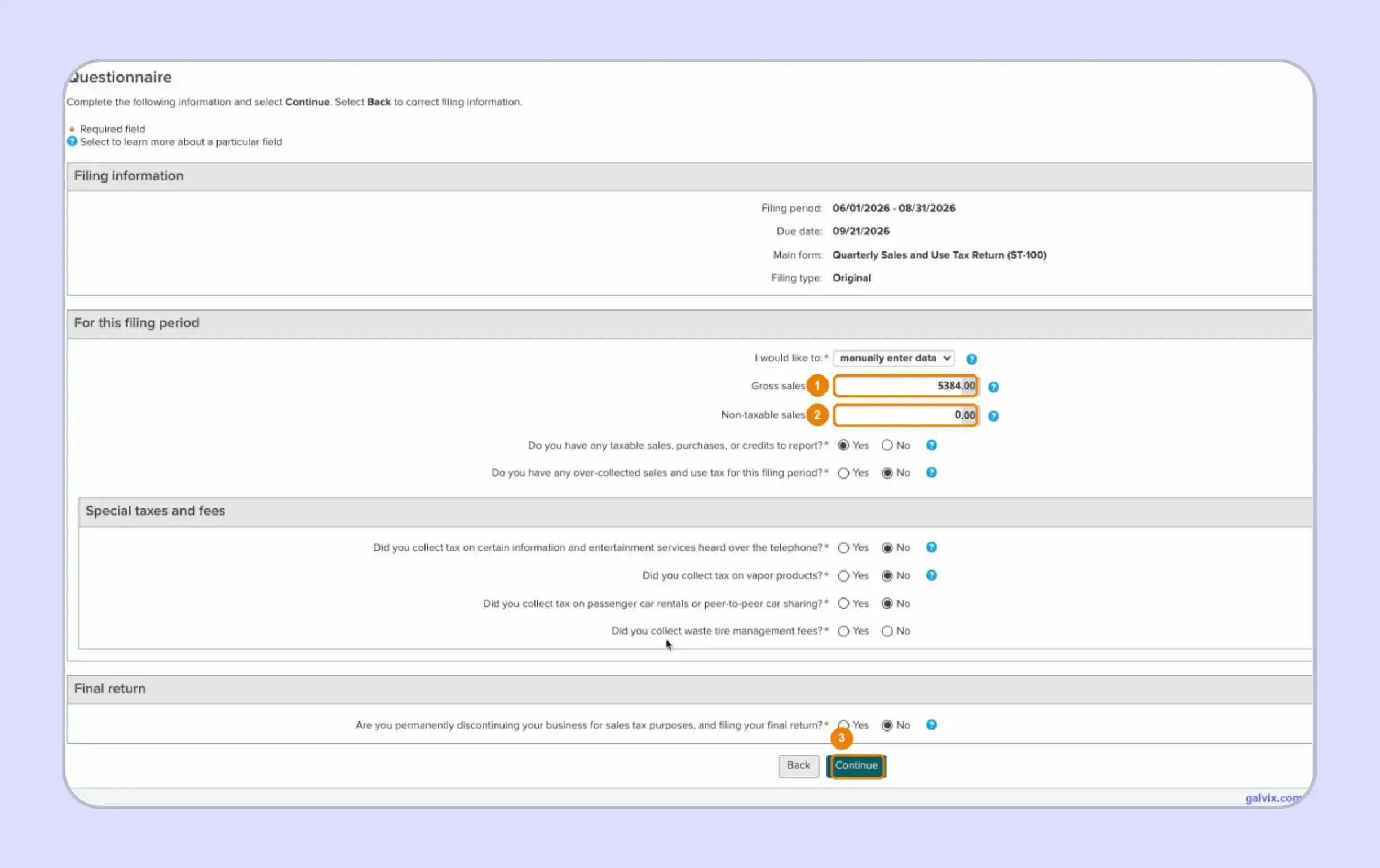
Step 3: Complete the ST 100 Questionnaire
Choose manual entry, then enter the requested gross receipts and nontaxable activity for the period. Answer the questions covering taxable activity, over-collected tax, special charges, and whether this is the business’s final filing.
Businesses researching how to fill out sales and use tax return in New York should treat these answers carefully because they determine which schedules appear next.
The Yes or No responses control later schedules. Incorrect answers can add unnecessary schedules or remove a jurisdiction section that the business actually needs.
Step 4: Review the Jurisdiction Schedule
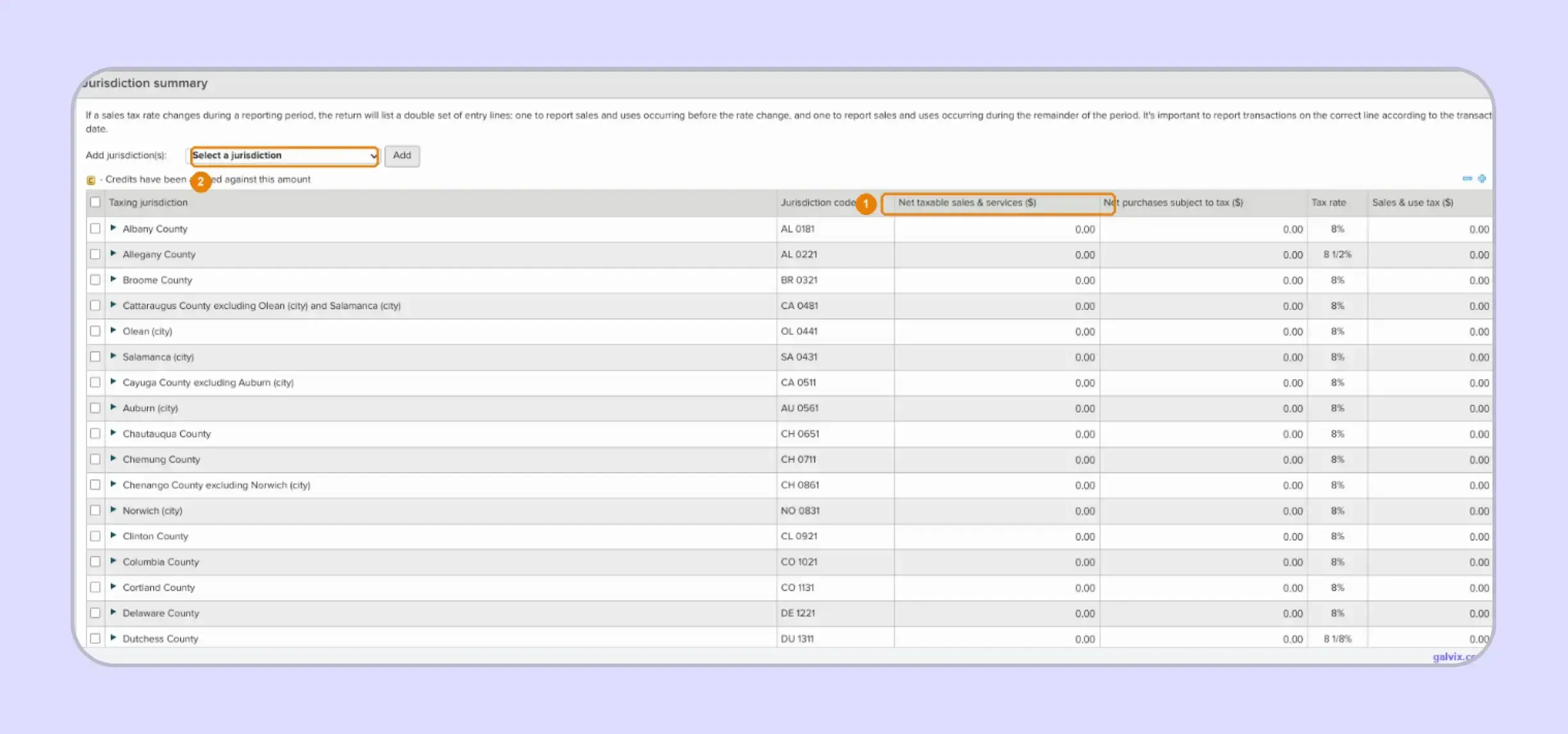
The jurisdiction summary lists locality names, reporting codes, combined sales tax rates, taxable-sales fields, and purchases subject to tax. Add a destination from the Select a jurisdiction menu when it does not already appear.
The tax rate shown for each row incorporates the applicable state and local components. For qualifying MCTD transactions, the district component is also incorporated into the relevant combined-jurisdiction rate.
Watch out: The prepopulated schedule reflects account and filing history rather than current-period activity. A new selling destination may need to be added manually before entering the amount of taxable sales.
Step 5: Enter Taxable Sales by Jurisdiction
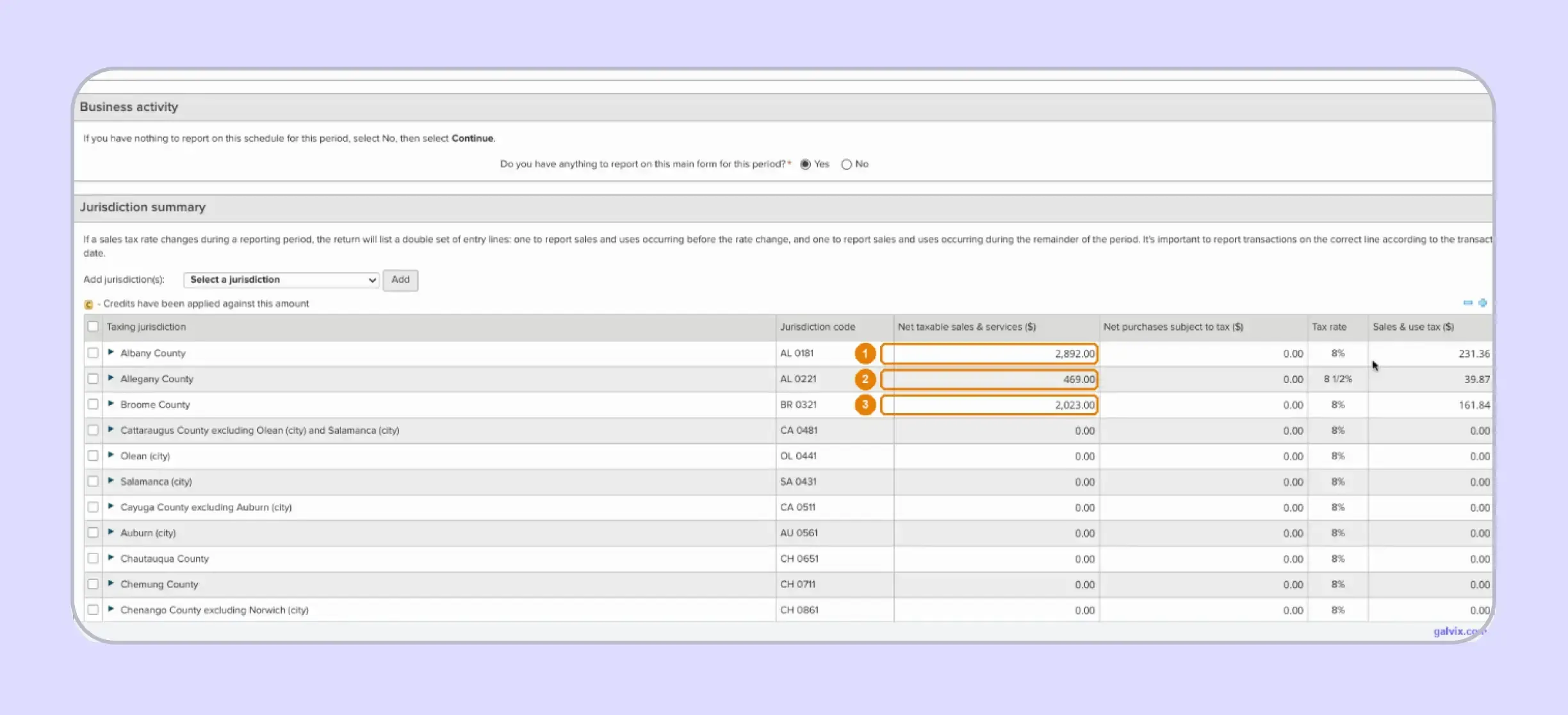
Enter taxable sales against the jurisdiction where each transaction belongs. In the supplied example, Albany, Allegany, and Broome carry taxable amounts, while Web File calculates the related tax using each row’s combined rate.
Businesses that file New York sales tax online therefore need reliable destination data before opening this section. The portal performs the arithmetic after the business chooses where each taxable transaction belongs.
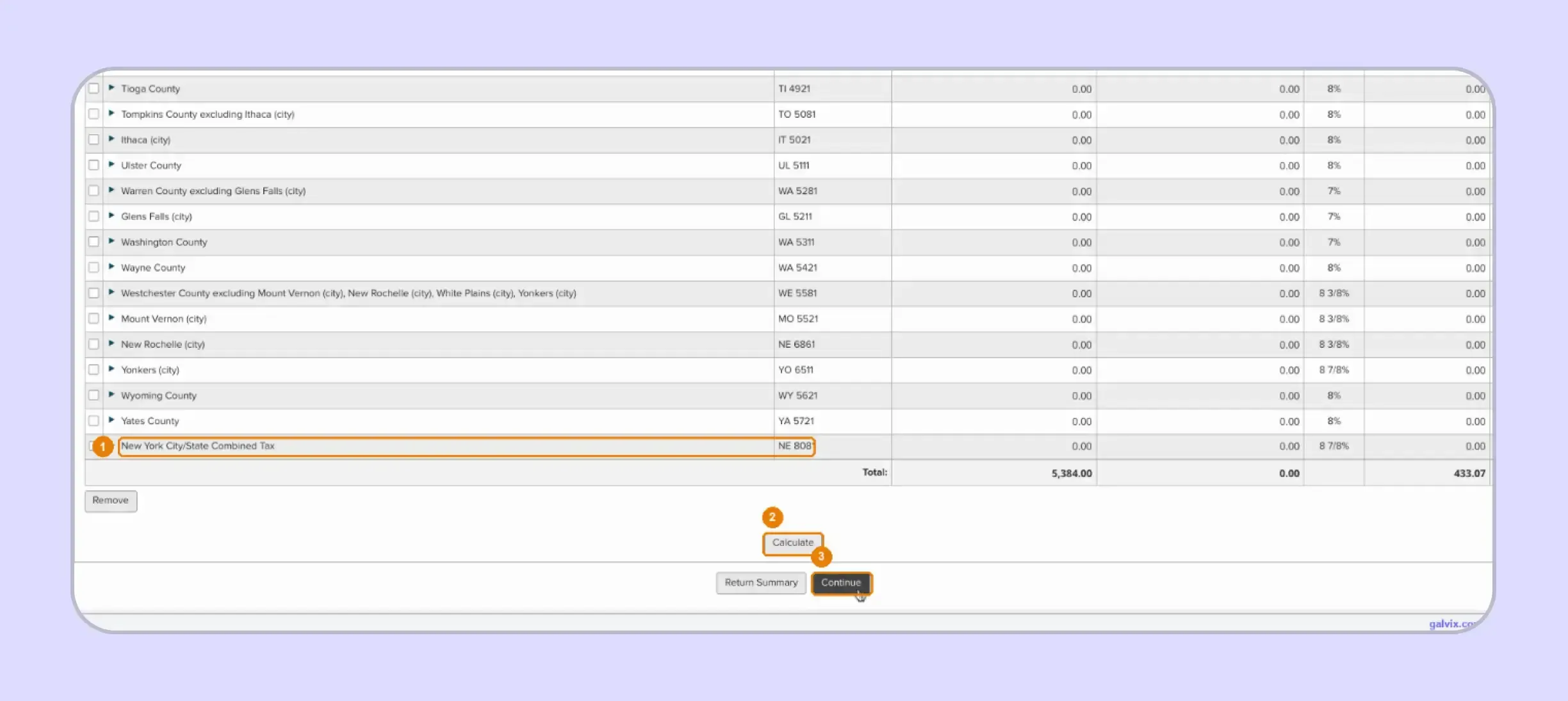
New York City and MCTD localities use combined jurisdiction lines in the captured workflow. Do not separately stack the transportation-district component onto the combined rate already displayed.
Step 6: Calculate and Check Jurisdiction Totals
Scroll to the bottom of the schedule after entering each destination. Select Calculate, then compare the resulting taxable base and total sales tax against the amounts prepared from your underlying records.
The supplied walkthrough shows Calculate as an important refresh action. Confirm the updated totals after selecting it rather than relying on values displayed while data entry is still underway.
Step 7: Review the Return Summary
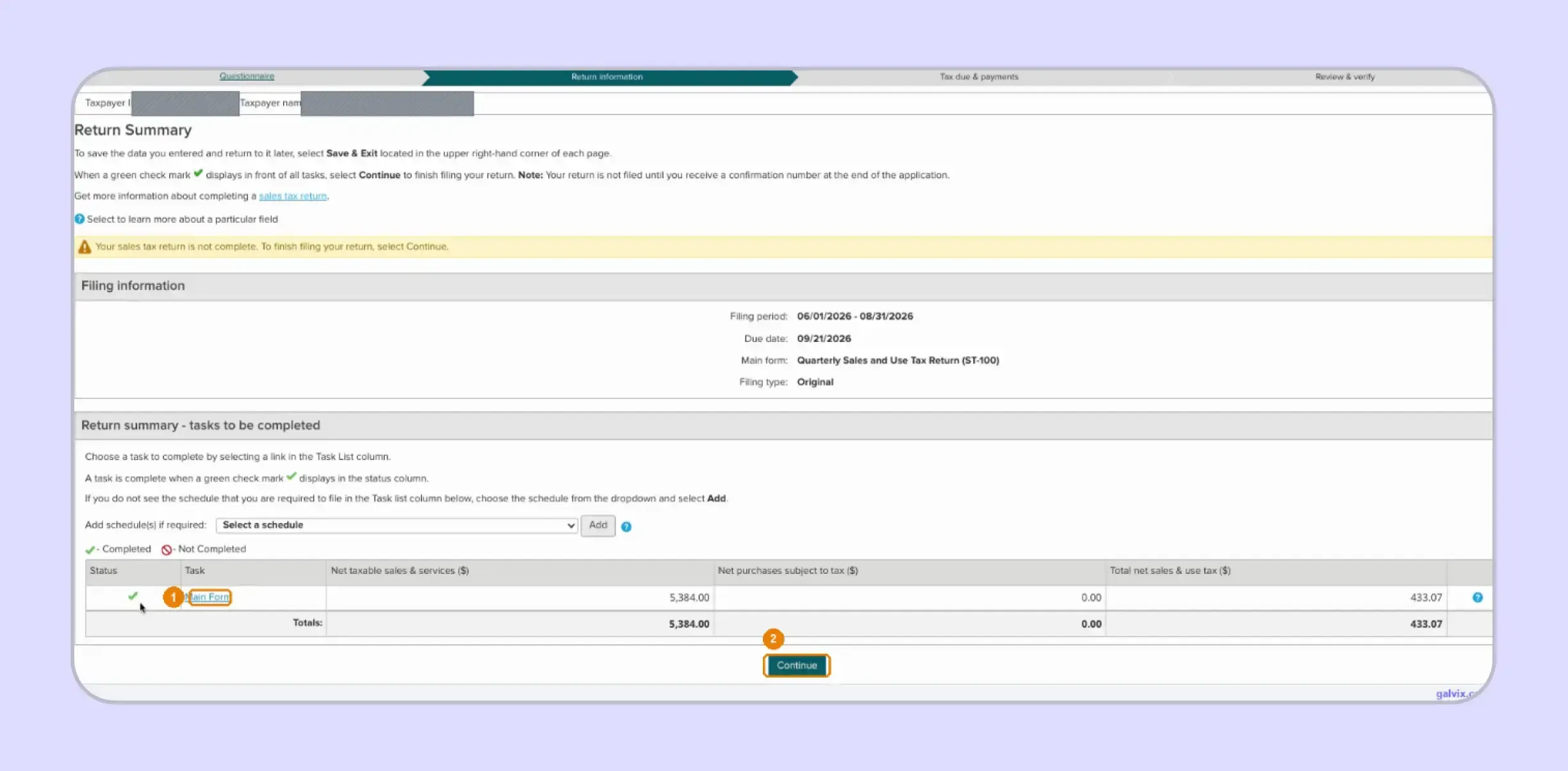
The Return Summary shows the selected reporting period, form, filing type, completed tasks, taxable totals, and calculated tax. A green check beside Main Form indicates that the required task has been completed.
Additional schedules can be added from this page when the business’s activity requires them. Current ST-100 instructions may also include special guidance on rate changes or transactions that require separate schedules.
A green completion mark does not mean the return has been transmitted. The captured portal states that filing is complete only after a confirmation number is issued.
Step 8: Review Credits and Amount Due
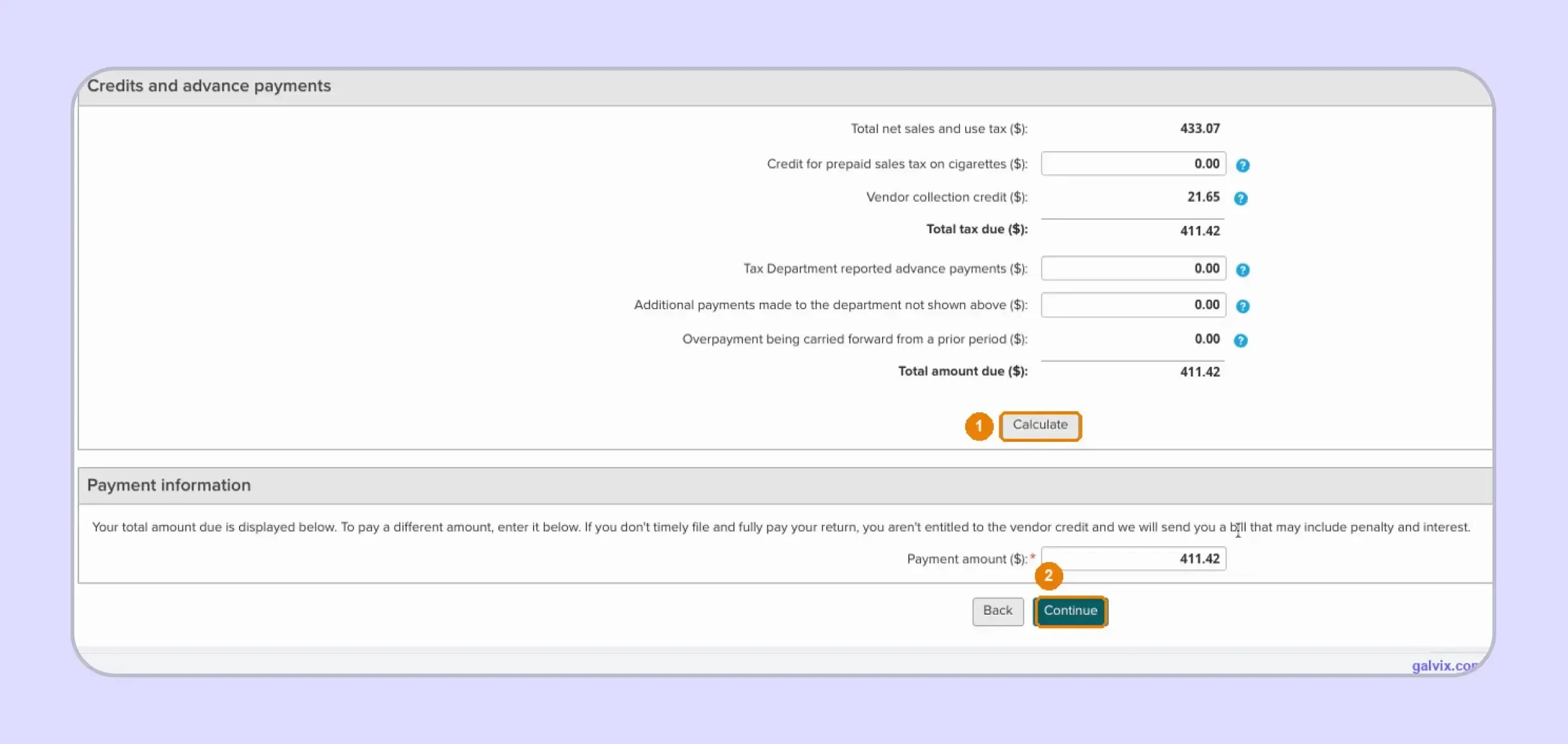
The next screen brings forward calculated tax and applies eligible credits or advance payments before showing the final tax due. In the example, Web File automatically calculates a vendor collection credit before arriving at the amount payable.
Eligible quarterly and annual filers receive a credit equal to 5% of qualifying taxes and fees, capped at $200 per period. Timely filing and full payment are required, while monthly and PrompTax program filers cannot claim it.
The credit appears before payment has cleared. Filing late or failing to pay the full balance results in ineligibility for the credit.
Step 9: Schedule the Bank Payment
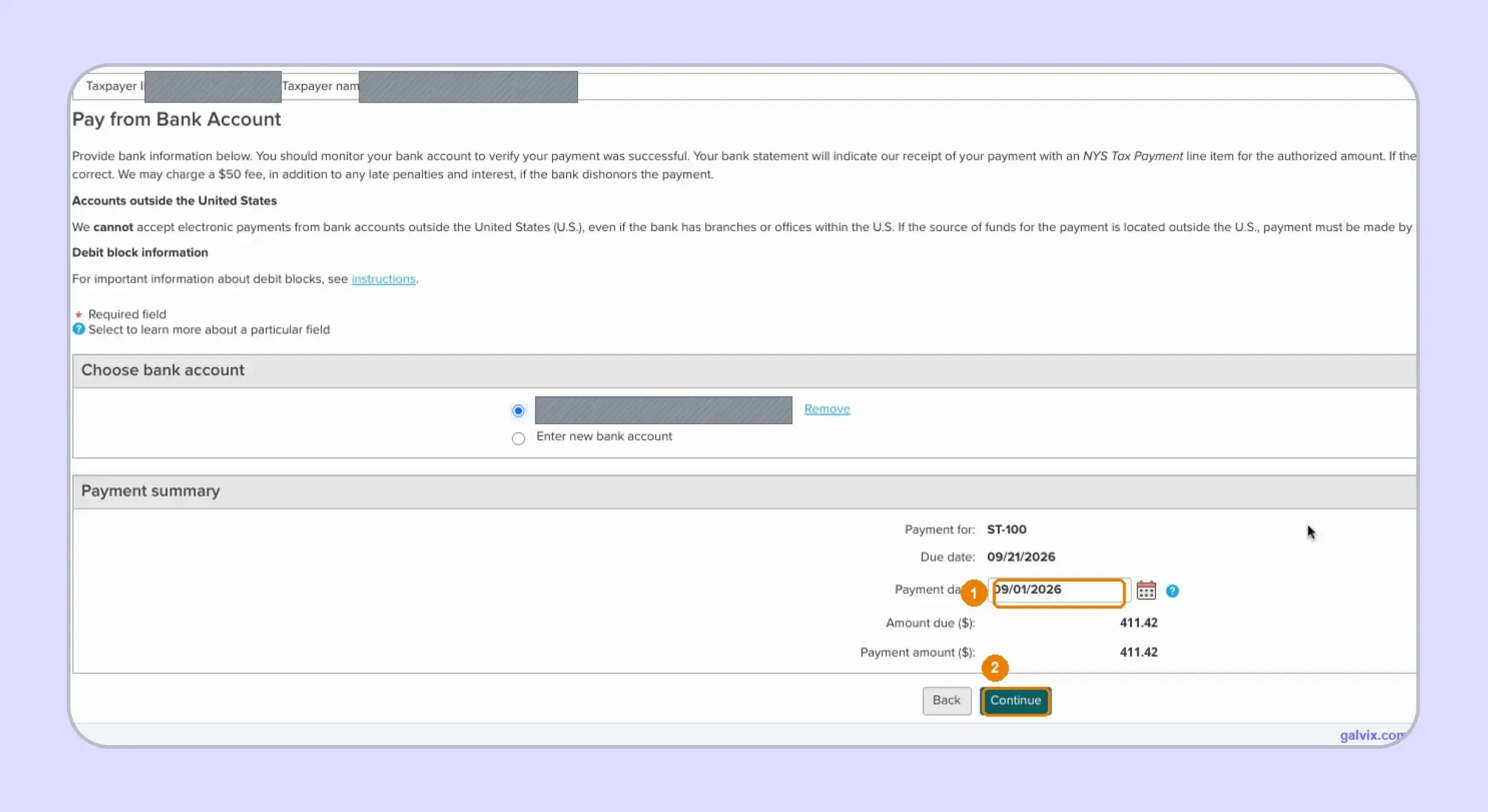
The Pay from Bank Account screen displays the form, payment amount, filing deadline, and selected account. Choose the appropriate bank account, set the payment date, verify the amount, then continue.
For businesses researching how to pay sales tax in New York, the key control is ensuring the payment instruction can clear through the chosen financial institution.
Accounts with debit blocks may reject the state payment unless New York’s ACH company ID is authorized first. The Tax Department warns that rejected payments can result in bills with penalties and interest.
Step 10: Review, Sign, and Submit
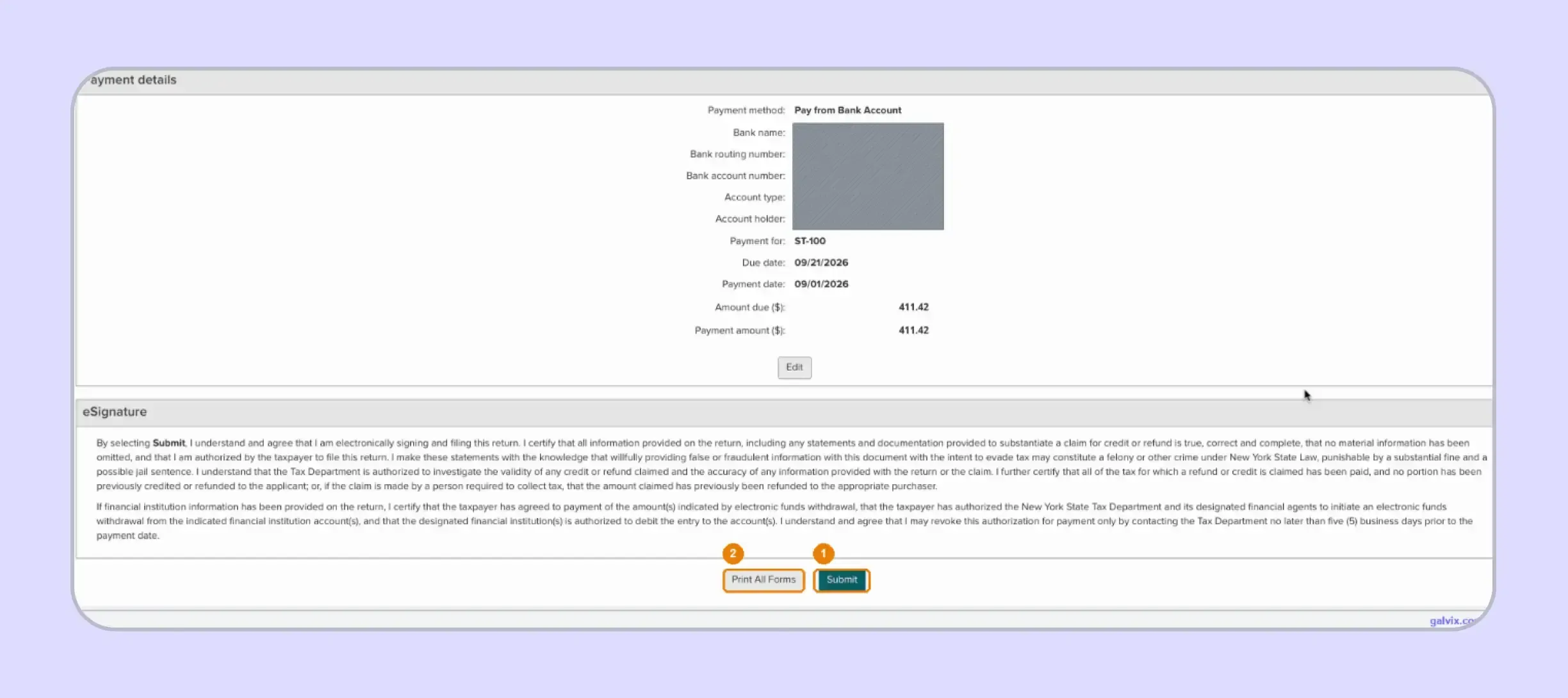
Review payment information and the eSignature certification before choosing Submit. Use Print All Forms if you want a retained copy before transmitting the return through the portal.
At this point, businesses can review the entered state tax, jurisdiction totals, payment date, and final amount before authorizing submission.
Reaching the eSignature page does not constitute filing. The walkthrough confirms that the return remains unfiled until Submit is selected and a confirmation number appears.
Step 11: Save the Filing Confirmation
After submission, Web File issues a confirmation number that establishes the filing was received. Save that number with the return copy and your payment evidence for the same period.
Businesses that regularly file sales tax returns should treat filing confirmation and successful payment as separate records. A scheduled debit can still encounter a banking issue even after the return has been transmitted.
The filing confirmation indicates submission of the return, not successful bank settlement. Check the account around the scheduled payment date and retain evidence that the funds cleared.
What Can Web File Calculate and What Must You Still Check?
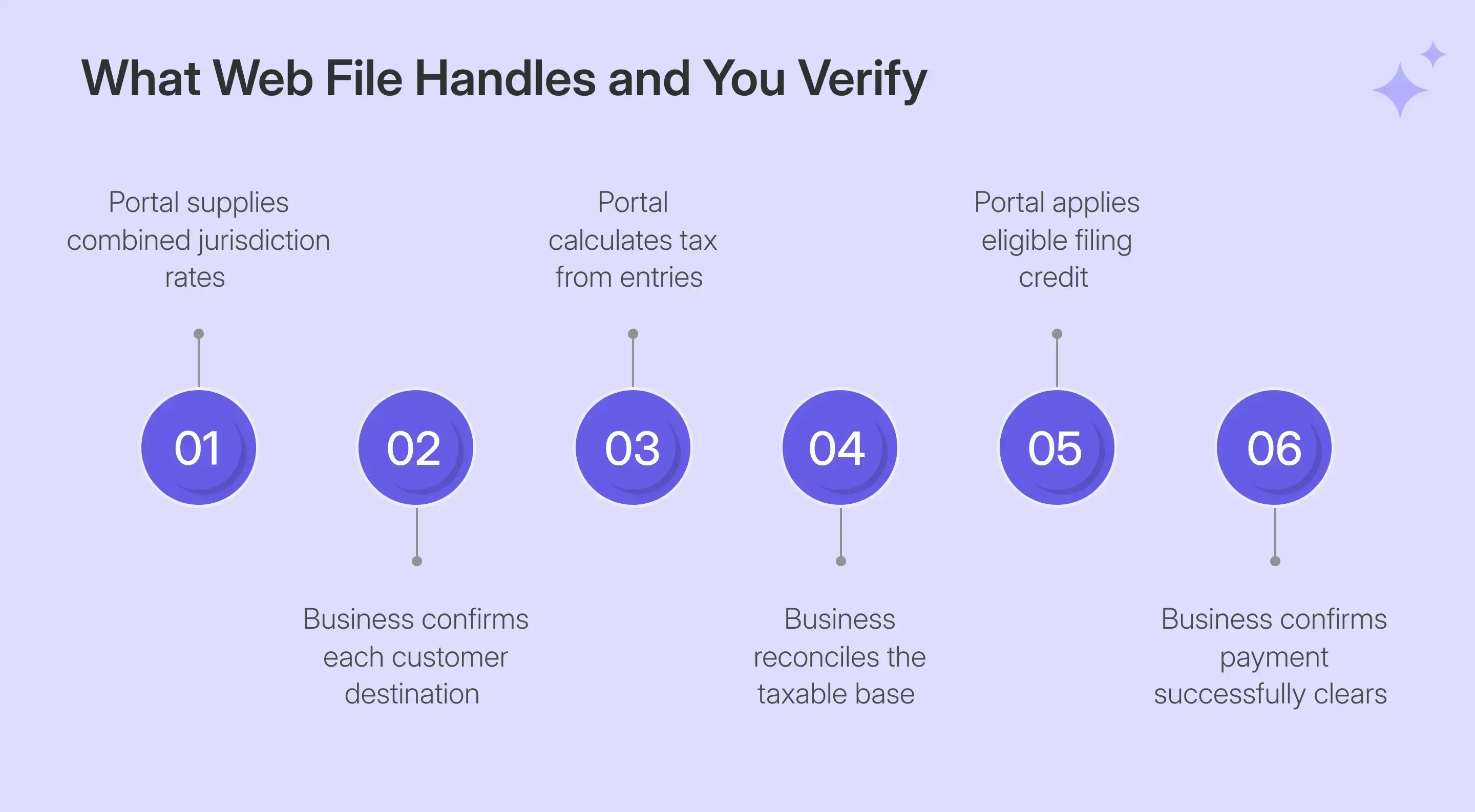
When you file New York sales tax online, Web File performs much of the calculation work after you provide the inputs. Your business still controls the taxable base, destination assignment, exemption treatment, use-tax amounts, and final review, so portal arithmetic cannot replace transaction reconciliation.
| Web File Handles | Your Business Must Check |
|---|---|
| Combined jurisdiction rate | Correct customer destination |
| Tax on entered sales | Correct taxable base |
| Schedule totals after Calculate | Missing or unused jurisdictions |
| Vendor collection credit | Timely eligibility and full payment |
| Workflow completion status | Final confirmation and settlement |
The Tax Department explains that transactions should be reported in the jurisdiction where the property or services are delivered, subject to rules specific to particular types of transactions. That sourcing determines which local rate applies.
This distinction becomes especially important when a business serves many local jurisdictions. Web File can calculate the correct tax amount for the selected jurisdiction, but it cannot determine whether your source data has assigned the sale to the correct destination.
The same principle applies when sales tax rates change. Your records need to support the transaction date and applicable jurisdiction before the portal can calculate a reliable result.
How Do Exemption Certificates Affect New York Sales Tax Filing?
Exemption certificates allow New York sales to be reported without tax when the legal requirements are met. Sellers should connect each certificate to the covered transaction and retain supporting records. Form ST-120 applies to qualifying resale purchases, subject to its purchaser and transaction requirements.
That documentation must remain traceable to the relevant sale, either through the certificate itself or through another recordkeeping method. New York generally requires sellers to retain exemption records for at least three years from the return due date covering the last supported transaction.
This differs from confirming whether a customer holds a Certificate of Authority, which verifies registration rather than transaction-level exemption eligibility. Galvix’s exemption certificate guide helps businesses understand these distinctions across all 50 states and DC, including varying forms, renewal practices, and documentation requirements.
Galvix can collect, review, store, and track exemption certificates while maintaining supporting records for exempt customers. Certificate review, registration lookup, and transaction eligibility remain distinct controls within the compliance process.
What Do New York Sellers Commonly Get Confused About?
Seller questions often center on marketplace reporting and destination-based rates. These issues arise because another party can collect tax on marketplace transactions, while the registered seller still has reporting responsibilities and must understand where direct taxable transactions should be sourced.
Marketplace Sales Can Look Like a Zero Return
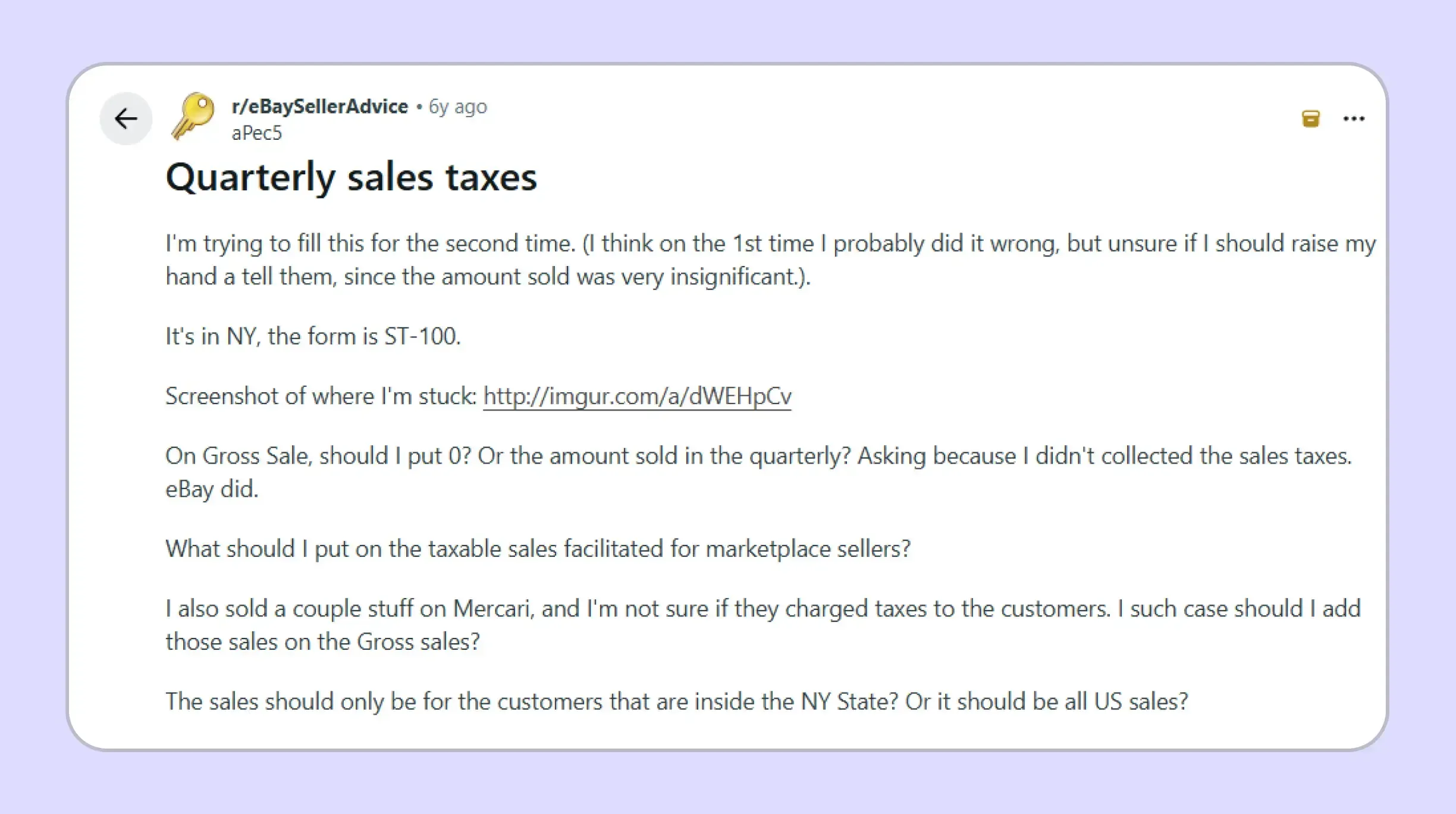
A marketplace seller may see Amazon, Etsy, or eBay collecting the tax and assume those transactions disappear from its return. New York’s current guidance says registered sellers should instead report facilitated tangible-property sales in gross and nontaxable sales.
That rule also explains why a business can show substantial total sales while reporting a much smaller taxable base. Marketplace activity can remain visible at the top of the return even though the provider remits the related tax.
Destination Rates Can Be Misunderstood
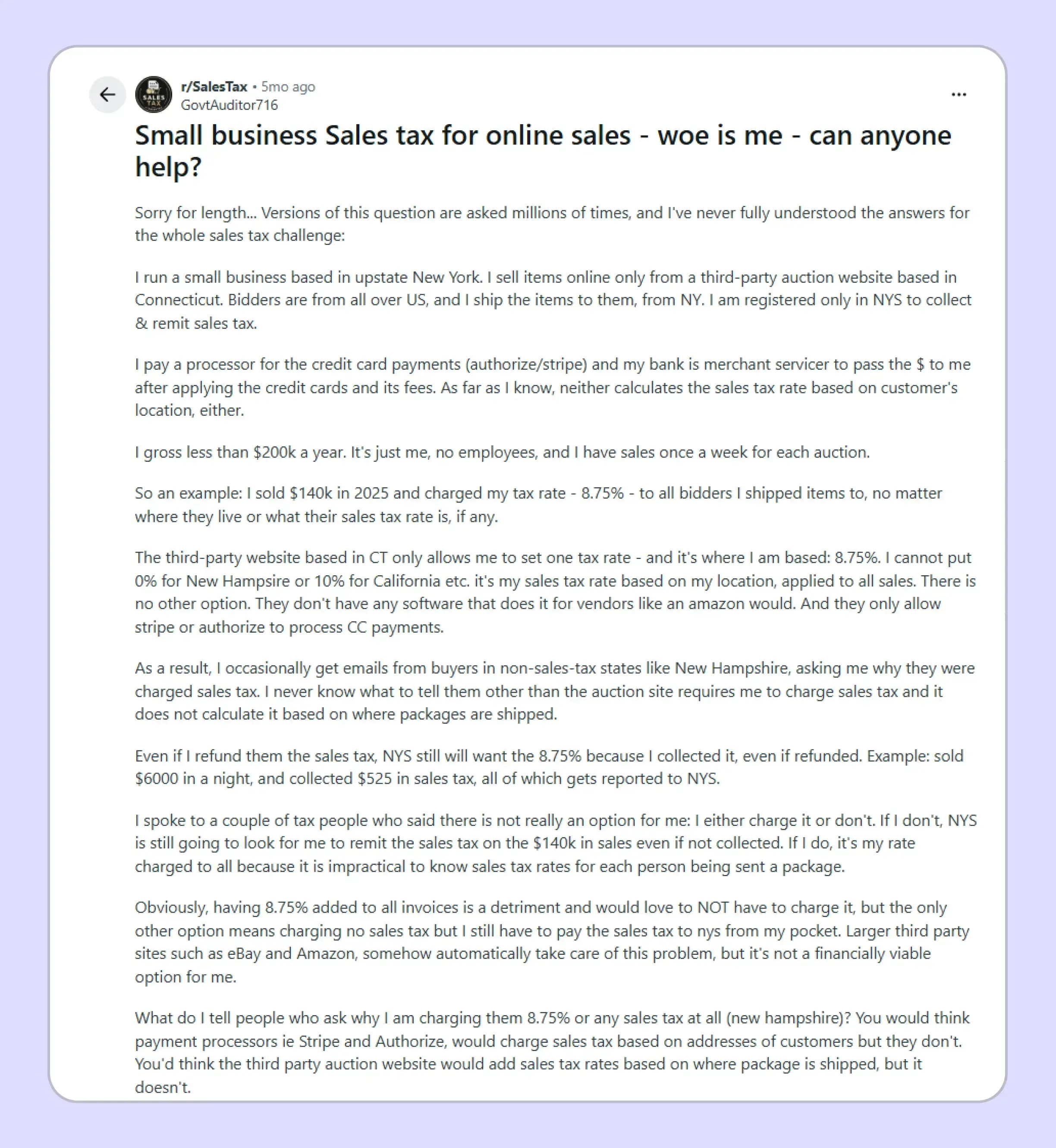
A second point of confusion arises when sellers apply a single familiar New York rate to customers across several locations. New York sources many sales based on where delivery occurs, so the applicable combined rate can vary by locality.
For New York State sales, this means the customer’s delivery destination can matter more than the seller’s office location. The selected jurisdiction must reflect the destination before Web File calculates the amount owed.

How Does Galvix Help Businesses File New York Sales Tax Online?
Galvix helps businesses file New York sales tax returns online through managed compliance, reducing the amount of filing work handled internally. Transaction data feeds into return preparation, specialist review, customer approval, filing, exemption management, nexus monitoring, registrations, and state-notice follow-up.
This support becomes useful in New York, where a filing period may include direct sales, marketplace activity, exempt customers, use-tax purchases, and multiple destination lines. Businesses using ecommerce platforms can bring relevant transaction records into the process through the Shopify integration.
Accurate filing still depends on reconciling each reported figure with the system where the underlying transaction originated. Galvix supports more than ten platform connections, allowing finance teams using accounting software to connect relevant source data through the QuickBooks integration.
The same approach extends to larger ERP environments through the NetSuite integration. Galvix also connects with Stripe, BigCommerce, WooCommerce, Zoho Books, and Microsoft Dynamics Business Central, while API and file-upload options support other transaction workflows.
What Does Galvix Manage for New York Sellers?
- Return preparation: Galvix prepares each filing from reconciled transaction data, obtains customer approval, and files according to the assigned schedule. Every return receives human review rather than relying exclusively on automated portal calculations.
- Jurisdiction review: New York reporting depends on destination-level entries, so the source data must support the locality used on the return. Galvix can keep that filing work connected with transaction records rather than rebuilding the jurisdiction schedule manually.
- Nexus monitoring: Businesses can review their New York exposure alongside their exposure in every other state through Galvix. The New York nexus guide explains the state’s current threshold and which transaction categories count toward it.
- Exemption management: Galvix can collect and review certificates, retain them with customer records, track renewals where relevant, and prepare supporting documentation. This keeps exemption records closer to the transactions affecting each return.
- Notice management: When a tax authority questions a filing, registration, or payment, Galvix can manage the correspondence after confirming the customer's preferred response approach. This keeps state follow-up connected with the underlying account history.
This managed approach is extremely useful when NY sales tax filing is one obligation among many. Instead of repeating separate portal workflows, your team can keep source data and specialist-reviewed return preparation in a single, ongoing process.
Galvix pricing is modular, so businesses pay for the services they use rather than purchasing one all-inclusive package. Exact pricing depends on each module’s workload driver, such as returns filed, transaction volume, exempt customers, registrations, or registered states.
Businesses can file New York sales tax online with their own state account and still use Galvix to manage the recurring work around that filing. The model is designed for teams that want expert preparation and accountability across several state obligations.
Book a Galvix demo to review your New York workflow and identify where recurring multistate filing work can move out of your internal process.
Frequently Asked Questions
Can You File New York Sales Tax Online?
Yes. Registered vendors can file New York sales tax online through Sales Tax Web File when they meet New York’s electronic-filing requirements. You access it through a business Online Services profile, select the required period, complete the appropriate return, and receive an electronic confirmation after successful submission.
When Should You File New York State Sales Tax?
The deadline depends on your assigned schedule. Quarterly returns are normally due within 20 days after the quarter closes, while monthly filers report each month. Annual returns cover March through February and are generally due March 20. The New York sales tax filing requirements can change as activity changes.
What Form Is Used for a New York Sales Tax Return?
Quarterly vendors usually file ST-100. Part-quarterly monthly filers use ST-809 and ST-810, while annual vendors use ST-101. The Tax Department assigns the filing frequency and makes the appropriate return available. This distinction is central when researching how to file NY sales tax correctly.
Do I File if I Had No New York Sales?
Yes. Registered vendors must continue filing for each assigned period while their registration remains active, even if they have no taxable activity. A late no-tax-due ST-100 can still create a penalty, so a zero period should not be treated as a skipped filing.
How Do Marketplace Sales Appear on ST 100?
Registered marketplace sellers should include qualifying marketplace-facilitated tangible-property sales in gross sales and nontaxable sales when the provider handles the tax. Sellers should also retain the provider’s collection documentation. Those marketplace transactions can still count when evaluating New York economic nexus.
How Do I Pay New York State Sales Tax?
When you file New York sales tax online, Web File can schedule an electronic payment through the filing workflow. Review the account, amount, and payment date carefully. Businesses asking how to pay sales tax in New York should also confirm that any bank debit block permits the Tax Department’s ACH transaction.
How Do New York Jurisdiction Reporting Codes Work?
Each jurisdiction line identifies the taxing locality and provides its applicable combined rate. Enter the taxable base against the location where the transaction should be reported, and Web File computes the related tax. The codes help the New York State Department allocate receipts correctly across state and local jurisdictions.
What Is the Vendor Collection Credit in New York?
Eligible quarterly and annual vendors can receive 5% of qualifying taxes and fees, capped at $200 for each period. Sales Tax Web File calculates the credit automatically. The filer must submit on time and pay in full, while monthly filers and businesses in the PrompTax program are excluded.
How Do I File a New York Sales Tax Return Online?
Businesses researching how to file a sales tax return in New York should begin with the correct form and period, then reconcile their source data before entering Web File. The New York sales tax return online process moves through questionnaire responses, jurisdiction reporting, calculations, payment information, final submission, and confirmation.
How Does Galvix Help With New York Sales Tax Filing?
Galvix can manage return preparation, reconciliations, filings, exemption records, nexus monitoring, state registrations, and notice support through a managed compliance workflow. Businesses still retain visibility and approval while Galvix manages recurring work. Its modular pricing lets companies select the services that match their actual compliance requirements.