
If your business needs to file Texas sales tax online, start with the Texas Comptroller of Public Accounts WebFile system. Businesses use their Sales and Use Tax account to complete the applicable return, including information from Form 01-114 and local reporting where required.
The statewide rate makes one part of the process predictable, although local sales reporting can require considerably more preparation. Cities, counties, transit authorities, and special-purpose districts can impose local taxes, creating different reporting requirements across jurisdictions.
This blog explains how to file sales tax in Texas, prepare marketplace and exempt transactions, complete local reporting, and handle payment. It also explains how Galvix supports the broader sales tax compliance process for businesses operating across multiple states.

Who Needs to File a Texas Sales Tax Return?
Businesses with an active Texas permit must usually submit a Texas sales tax return for every assigned reporting period. The obligation continues even when no taxable activity occurred, until the account is properly closed or its filing status changes.
Texas Registered Sellers
Permitted sales taxpayers must collect applicable tax, report activity, make required sales tax payments, and maintain adequate records. The Texas Comptroller assigns the filing frequency, so businesses should follow the monthly, quarterly, or yearly schedule shown for their account.
Returns are normally due on the twentieth day following the applicable filing period. When that date falls on a weekend or legal holiday, the next working day becomes the deadline.
Remote Sellers
Businesses without a physical presence can establish economic nexus after reaching $500,000 in Texas revenue during the preceding 12 calendar months. These remote sellers may then need to register, collect applicable use tax, and begin filing.
For online sellers, marketplace revenue can also affect the safe harbor threshold, even when a facilitator handles tax collection. Understanding how Texas nexus rules apply helps businesses determine when registration and filing obligations may begin.
Zero Activity Sellers
A permitted business must still submit a return when it has no taxable sales or purchases for that period. WebFile supports zero reporting, while TeleFile is available in certain zero-tax situations.
These Texas sales tax filing requirements remain in effect until the account status changes. Businesses that are still assessing their obligation can review the Texas sales tax registration requirements before opening an account and starting regular filings.
What Should You Prepare Before Opening Texas WebFile?
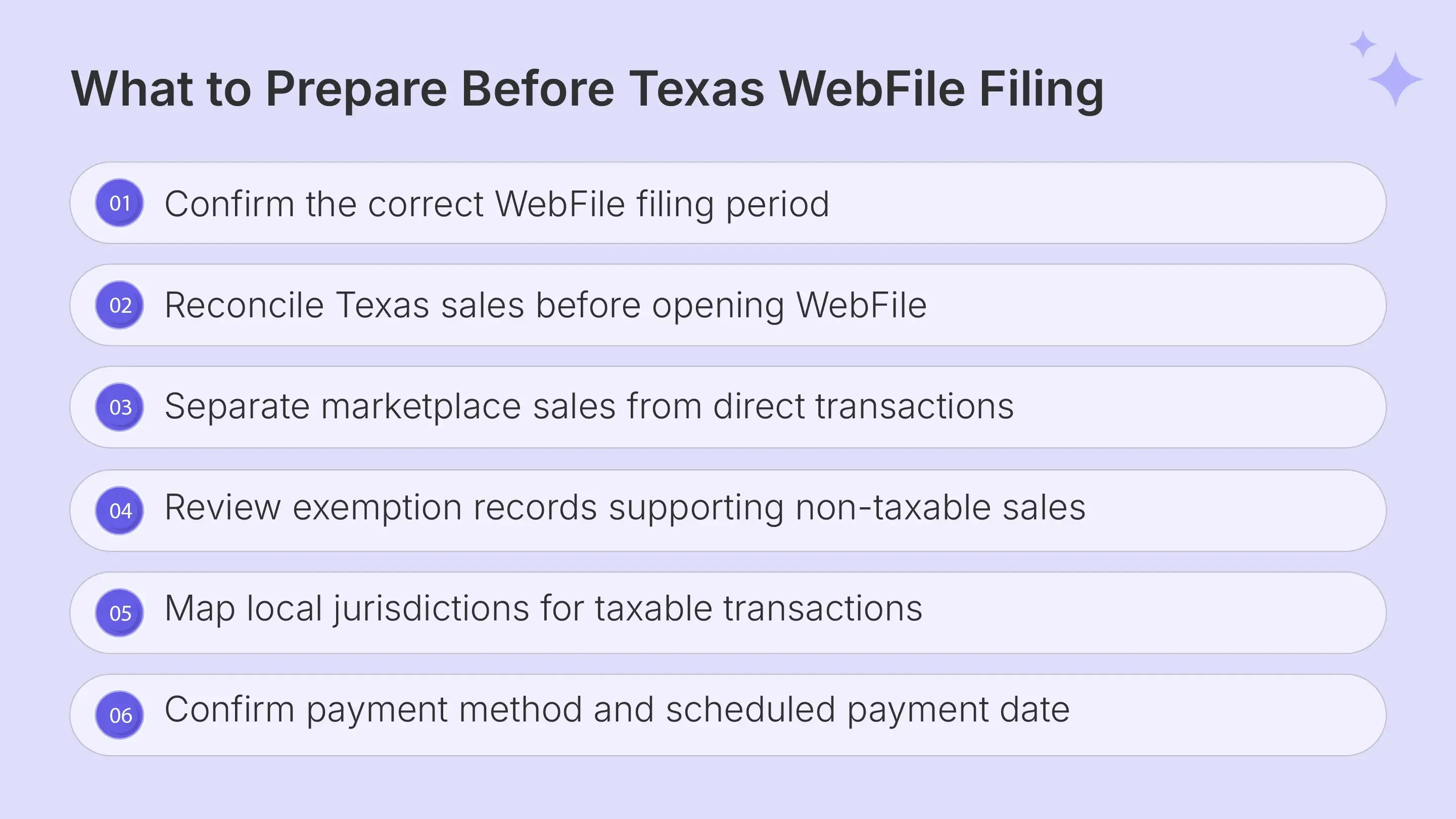
Before you file Texas sales tax online, reconcile the figures that WebFile expects rather than working directly from unreviewed exports. Prepare sales totals, local amounts, exemption support, marketplace activity, and payment information before opening the return.
| What to Prepare | Why You Need It |
|---|---|
| eSystems User ID and password | Access the correct taxpayer account |
| Total Texas Sales | Complete Item 1 |
| Taxable Sales | Complete Item 2 |
| Taxable Purchases | Complete Item 3 |
| Local taxable amounts | Complete local jurisdiction reporting |
| Exemption and resale records | Support qualifying non-taxable treatment |
| Payment details | Complete or schedule payment |
The main form asks for total sales, taxable sales, and taxable purchases in whole dollars. Round the amounts to the nearest dollar before entering them in WebFile. You should also check how Texas treats the products or services you sell. Some goods, rentals, and services are taxable, while exemptions and sourcing rules can change the final amount reported.
How Marketplace Sales Affect Your Numbers
Marketplace sales require separate treatment when you file Texas sales tax online. If a marketplace provider has certified that it collects and remits Texas tax, those transactions remain in Item 1, Total Texas Sales, while qualifying marketplace amounts are excluded from Item 2.
Direct website orders remain the seller's responsibility when the business has a collection obligation. Separating marketplace activity from direct taxable transactions before filing helps prevent the same revenue from being treated as seller-collected twice.
Do not remove marketplace revenue from Item 1 solely because the marketplace provider handled the amount of sales tax collected from customers.
How Exempt Sales Affect Taxable Sales
Resale and other qualifying exemptions can reduce taxable sales, provided the seller has the appropriate supporting documentation for each transaction. Texas commonly uses Form 01-339 for resale and exemption documentation, while detailed records should connect the customer, exemption reason, and underlying sale.
That documentation becomes more important when tax treatment varies by transaction type. Telecommunications services may be subject to different state and local rules, especially when sourcing depends on where the service is provided or received.
Utility transactions also need separate attention. The residential use of gas and electricity can receive different local tax treatment across jurisdictions, so businesses should confirm which rule applies before excluding those amounts from taxable sales or reporting them as exempt.
The same caution applies to older exemption assumptions. Texas ended the qualified research exemption for report periods after December 31, 2025, and replaced it with a franchise tax credit structure. For broader documentation guidance, the exemption certificate guide explains how certificate collection, account lookup, and transaction eligibility should be reviewed separately.
The Galvix Sales Tax Exemption Certificate Tool helps businesses review state certificate requirements and verification options before exempt transactions reach the return preparation stage.
How Do You File Texas Sales Tax Online Through WebFile?
To file Texas sales tax online, sign into eSystems, select the correct Sales and Use Tax account, choose the period, enter return figures, complete local reporting, review payment, and submit. WebFile then provides confirmation that should be retained with the filing records.
Open the Correct Sales and Use Tax Filing
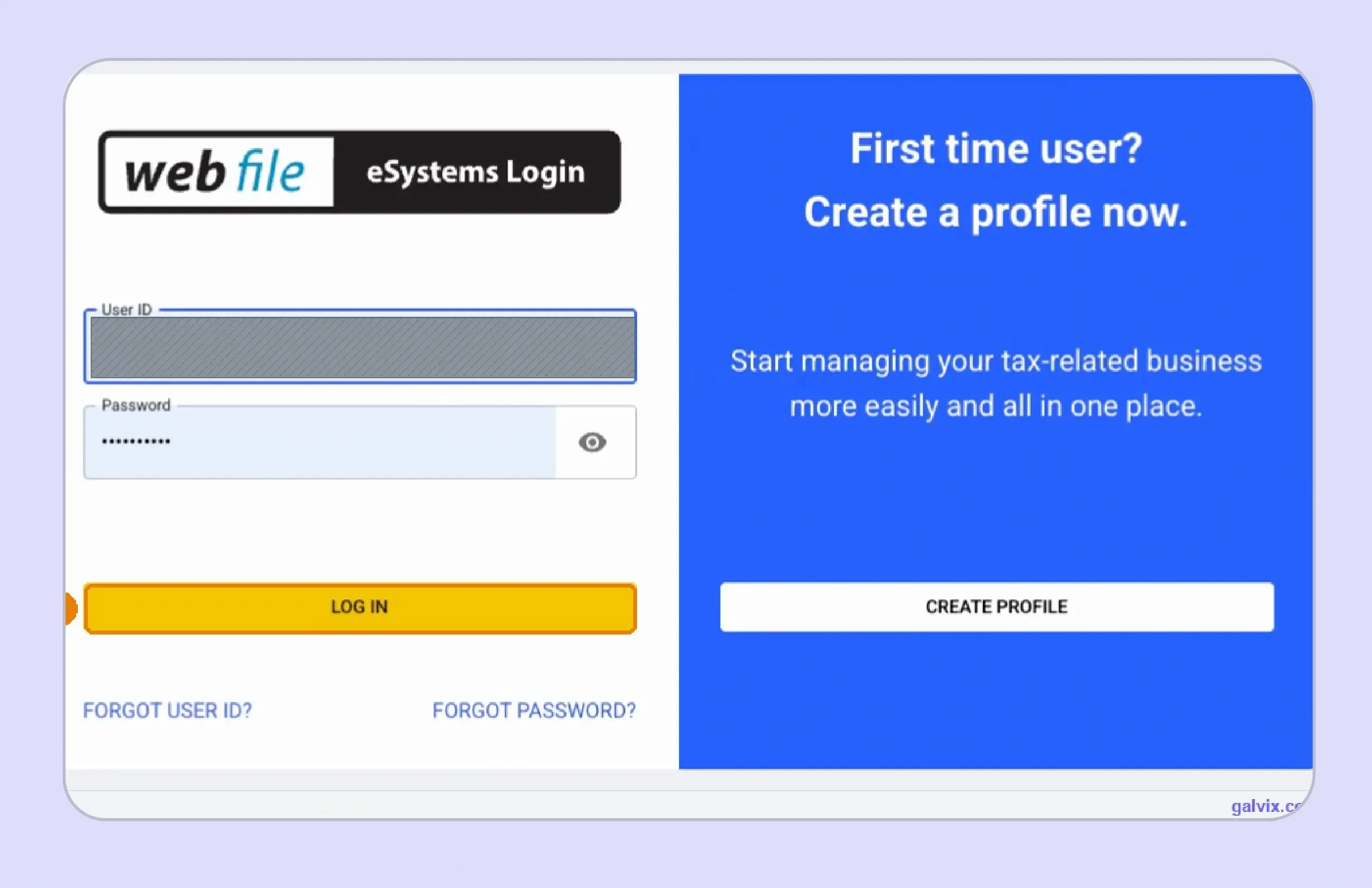
Step 1: Sign in to eSystems
Enter your eSystems User ID and password to access WebFile through the Texas Comptroller portal. The login is separate from the taxpayer number and WebFile number used to authenticate individual tax accounts.
A first-time profile requires creating a new User ID that complies with the Comptroller's current character requirements. After the profile exists, the taxpayer account still needs to be added and authenticated before filing.
Organizations may use separate credentials for a payroll representative, employee information system administrator, or agency human resource functions. Those organizational credentials should not be assumed to provide access to the tax portal.
Check saved browser credentials before signing in when one finance team manages several businesses through the same WebFile system.
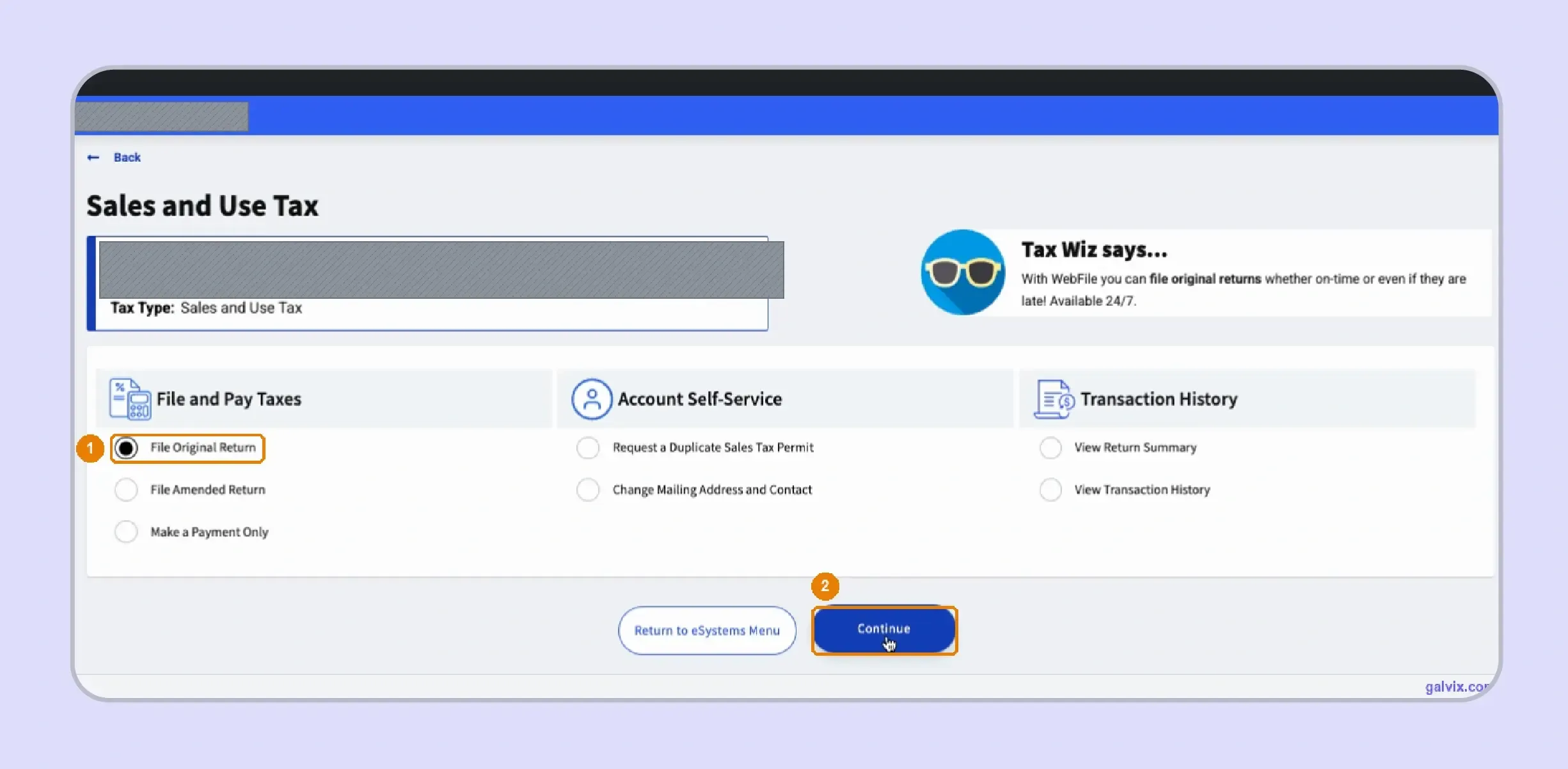
Step 2: Choose the Sales and Use Tax Account
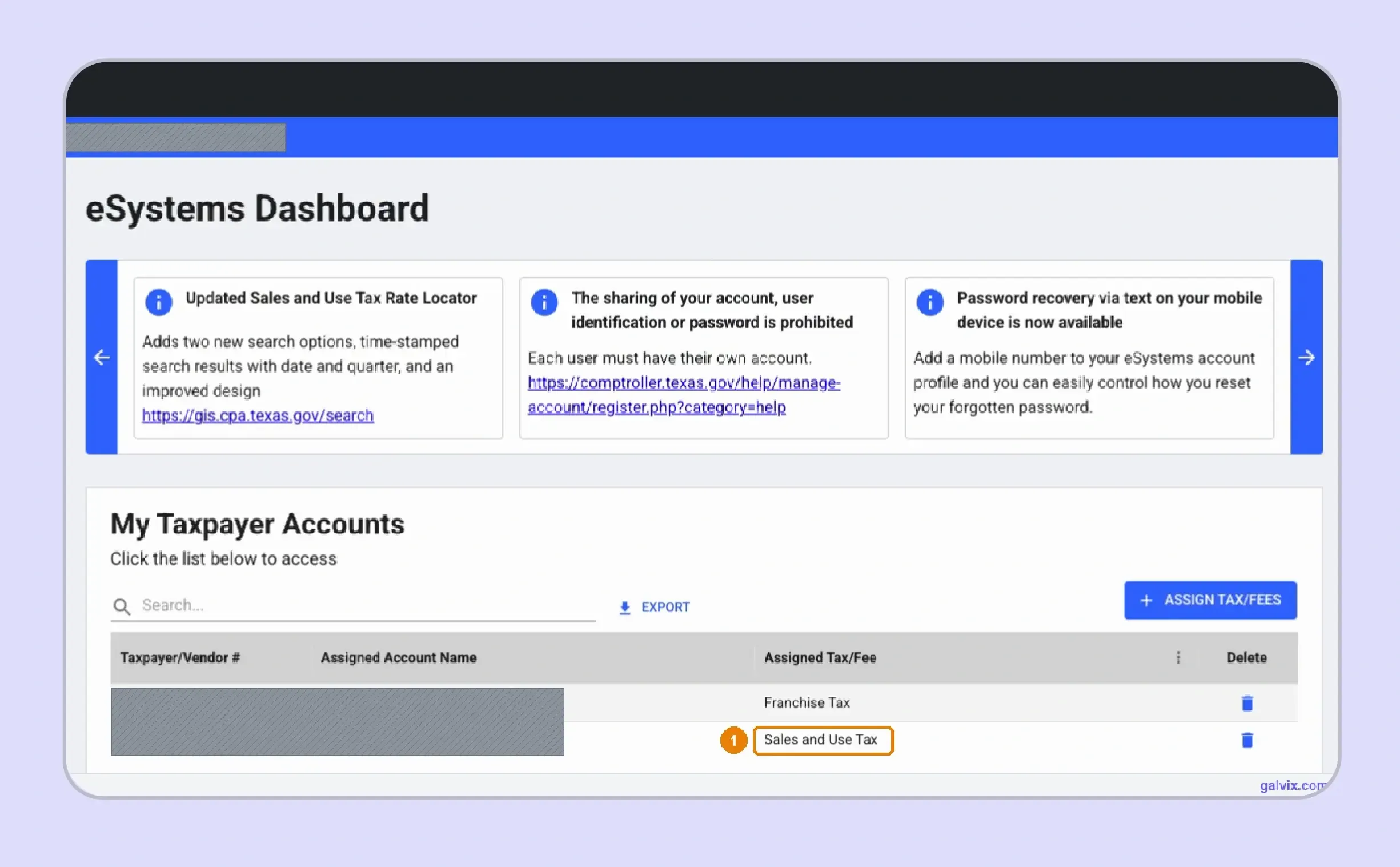
The eSystems dashboard can contain multiple tax accounts within a single taxpayer profile. Select Sales and Use Tax rather than franchise tax or another tax type before starting the filing workflow.
Businesses operating in regulated industries may also interact with separate agencies such as the Texas Alcoholic Beverage Commission. Those obligations remain separate from the sales-tax account administered by the Comptroller.
Step 3: Select File Original Return
Choose Original Return when submitting the period for the first time. WebFile also provides separate routes for amendments and payment-only activity when those actions apply to the account.
Select the Filing Period and Setup Questions
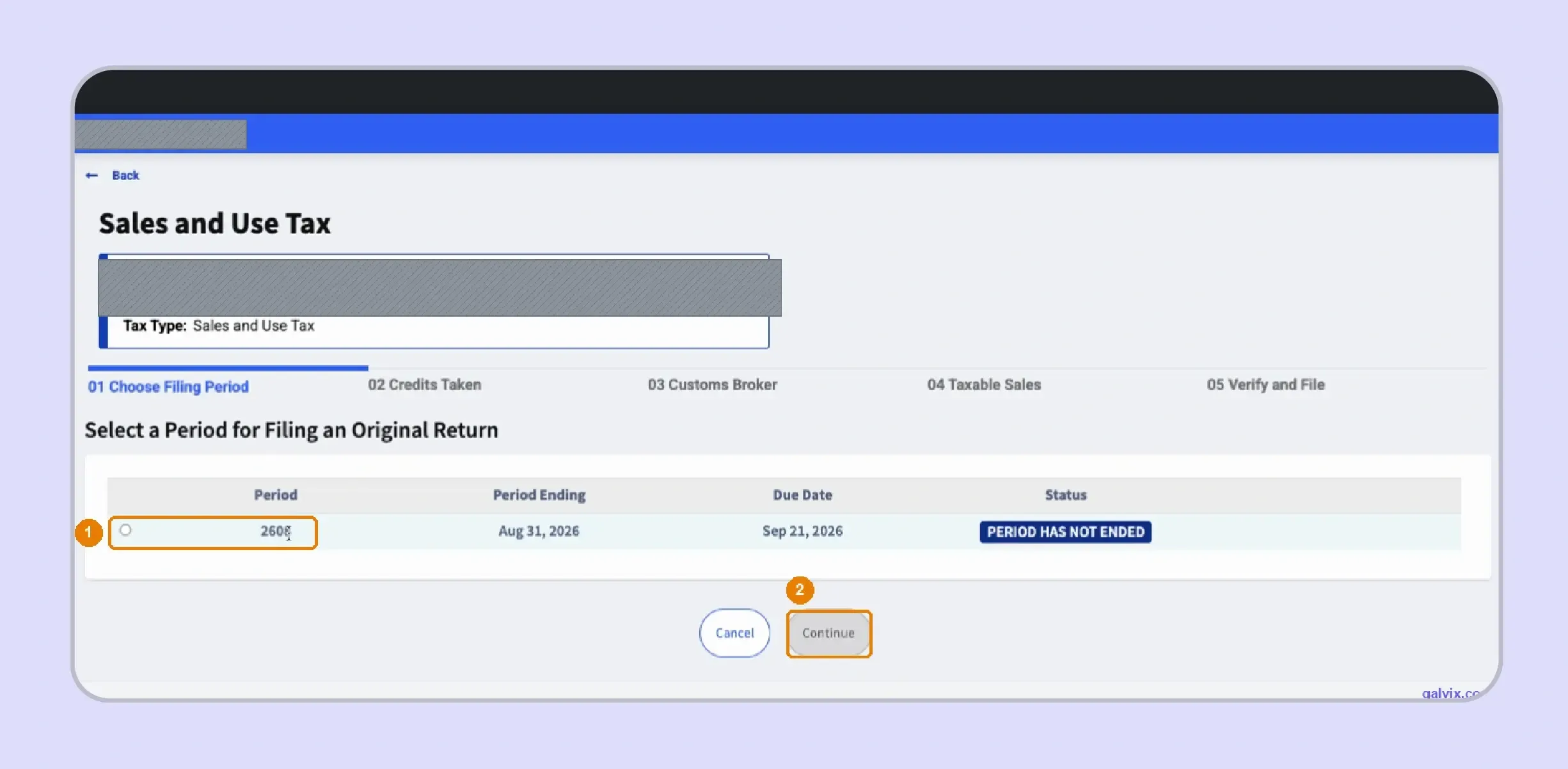
Step 4: Choose the Correct Filing Period
WebFile displays available periods with their end dates, status, and relevant due dates. Match the selected period to your books before entering figures, especially when multiple periods appear on screen.
For monthly filers, reports are due on the twentieth of the month following the month reported. Quarterly filers use April, July, October, and January deadlines for the preceding quarter.
When a deadline falls on Saturday, Sunday, or a federal legal holiday, the deadline moves to the next business day.
Do not assume every visible period is ready to file. Confirm its ending date against the accounting period you reconciled.
Step 5: Complete the Setup Questions
WebFile can ask whether the filer is taking credits or reporting specific export-related activity before displaying the main return. Answer each setup question based on the transactions for that period, rather than automatically following previous answers.
The partially completed report can then be saved for later, which is useful when local data still requires reconciliation.
Complete the Three Form 01 114 Sales Fields
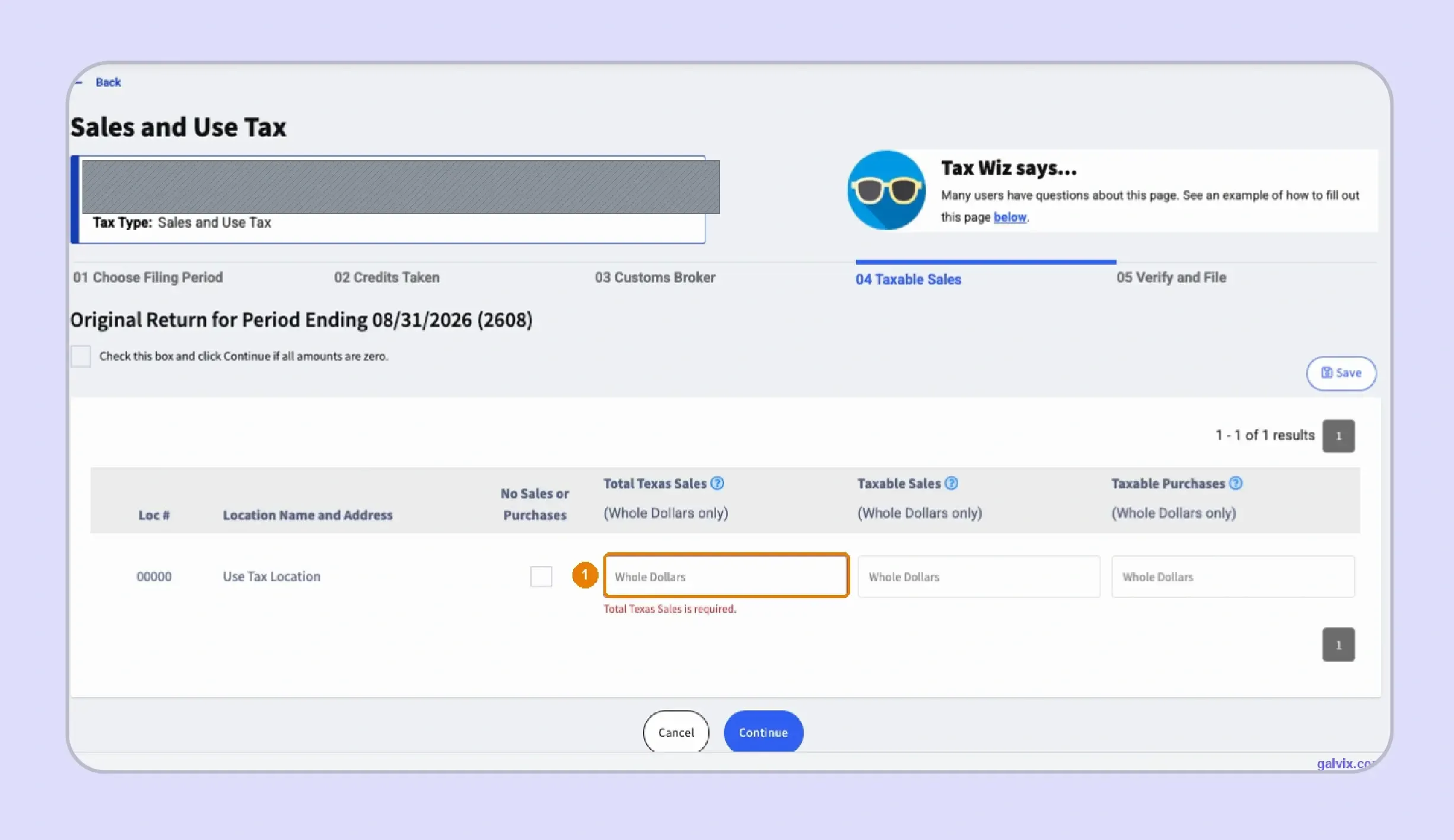
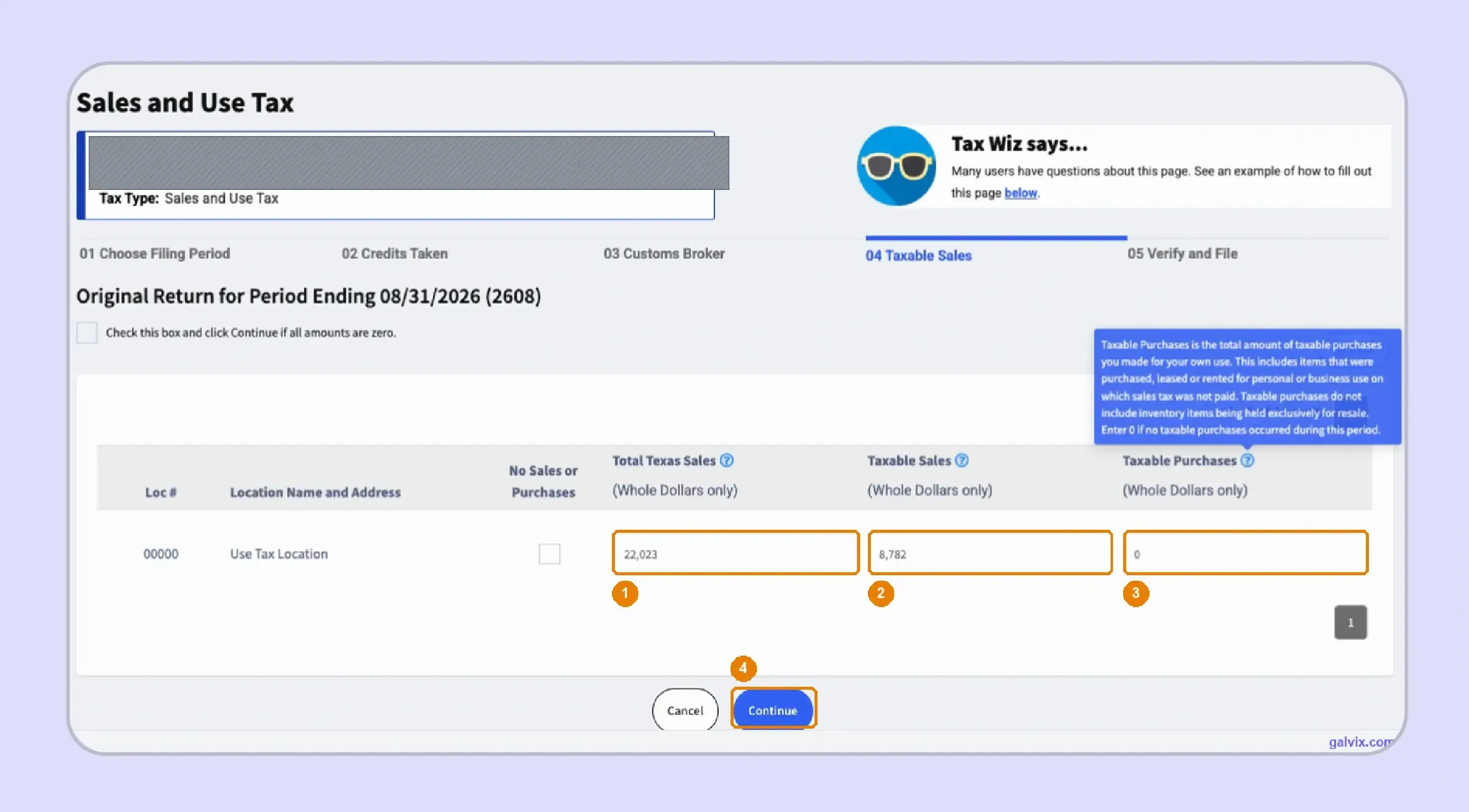
Step 6: Enter the Sales Figures
When you file Texas sales tax online, WebFile asks for three core values that feed later tax calculations. The return instructions identify Total Texas Sales as Item 1, Taxable Sales as Item 2, and Taxable Purchases as Item 3.
| WebFile Field | What Goes Here |
|---|---|
| Total Texas Sales | Texas sales reported in Item 1 |
| Taxable Sales | Sales subject to Texas tax |
| Taxable Purchases | Applicable untaxed business purchases |
For Item 3, include applicable purchases, leases, or rentals where sales or use tax was not paid. The Comptroller also includes items withdrawn from inventory for taxable business use.
The return then uses these figures, along with local information, to determine the applicable tax due. Reconcile the numbers before continuing, because an accurate calculation still depends on accurate inputs.
Complete the Texas List Supplement
Step 7: Report Local Tax by Jurisdiction
List filers use information from Form 01-116 to report amounts subject to local tax. Each jurisdiction row carries the applicable code, name, rate, and amount subject to tax for the current period.
Texas can layer city, county, transit, and district taxes in a single transaction. The combined sales tax rate cannot exceed 8.25 percent, consisting of 6.25 percent state tax and up to 2 percent local tax.
A blank required jurisdiction can produce incomplete local sales reporting even when the state portion of the return appears correct.
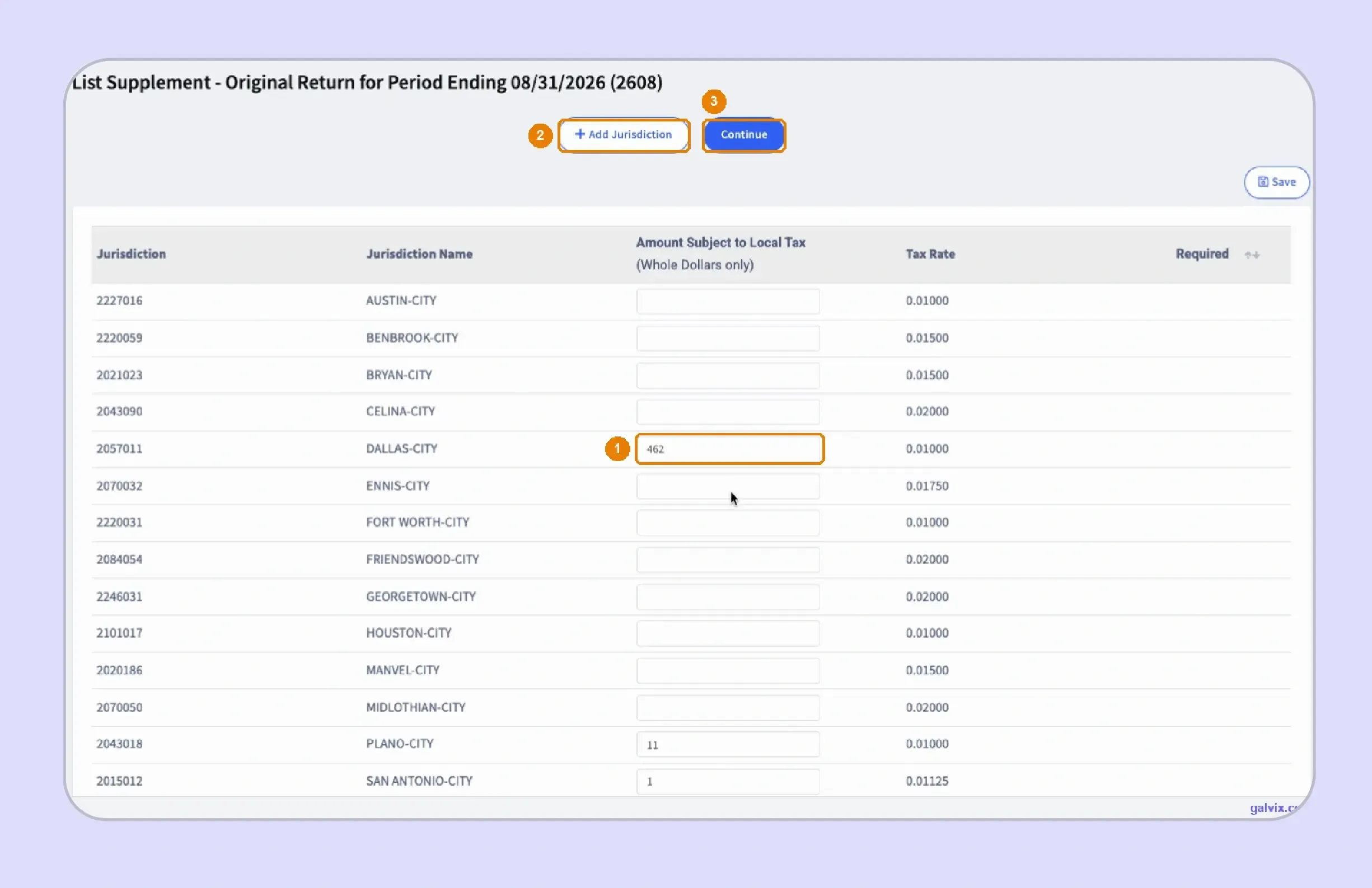
Step 8: Add Any Missing Jurisdiction
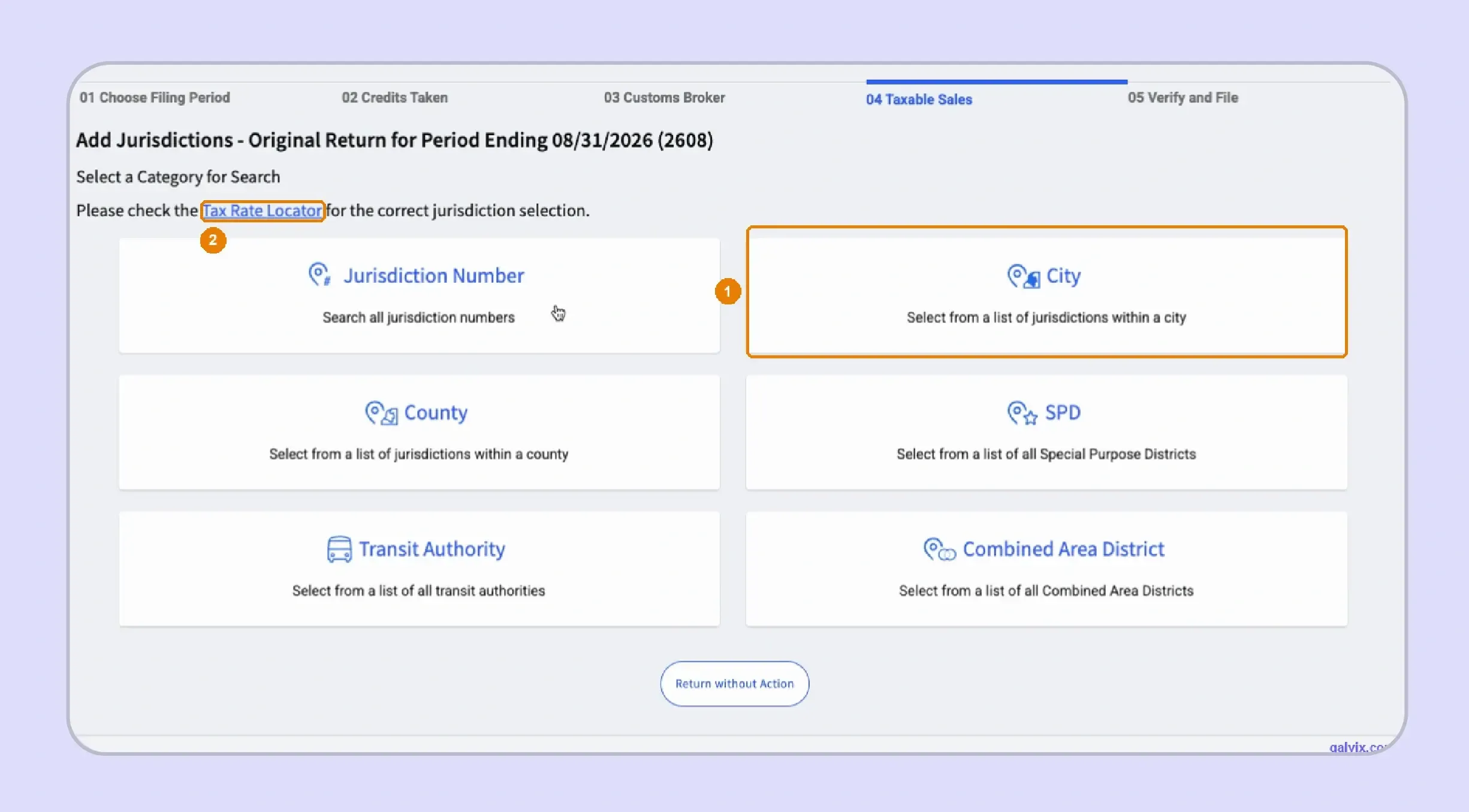
WebFile can pre-populate existing jurisdictions, though current activity may require adding another location. Use the Comptroller's Sales Tax Rate Locator when an address needs current jurisdiction and rate research.
Local tax rates can change as cities or districts adopt, abolish, or modify their taxes. A local notice showing a change effective May, for example, should be applied only from the stated effective date.
Eligible remote businesses can elect the 1.75 percent Single Local Use Tax Rate instead of destination-specific local use rates. That election is unavailable to Texas-based sellers and marketplace providers collecting for third parties.
Review the Return Then File and Pay
Step 9: Review State and Local Totals
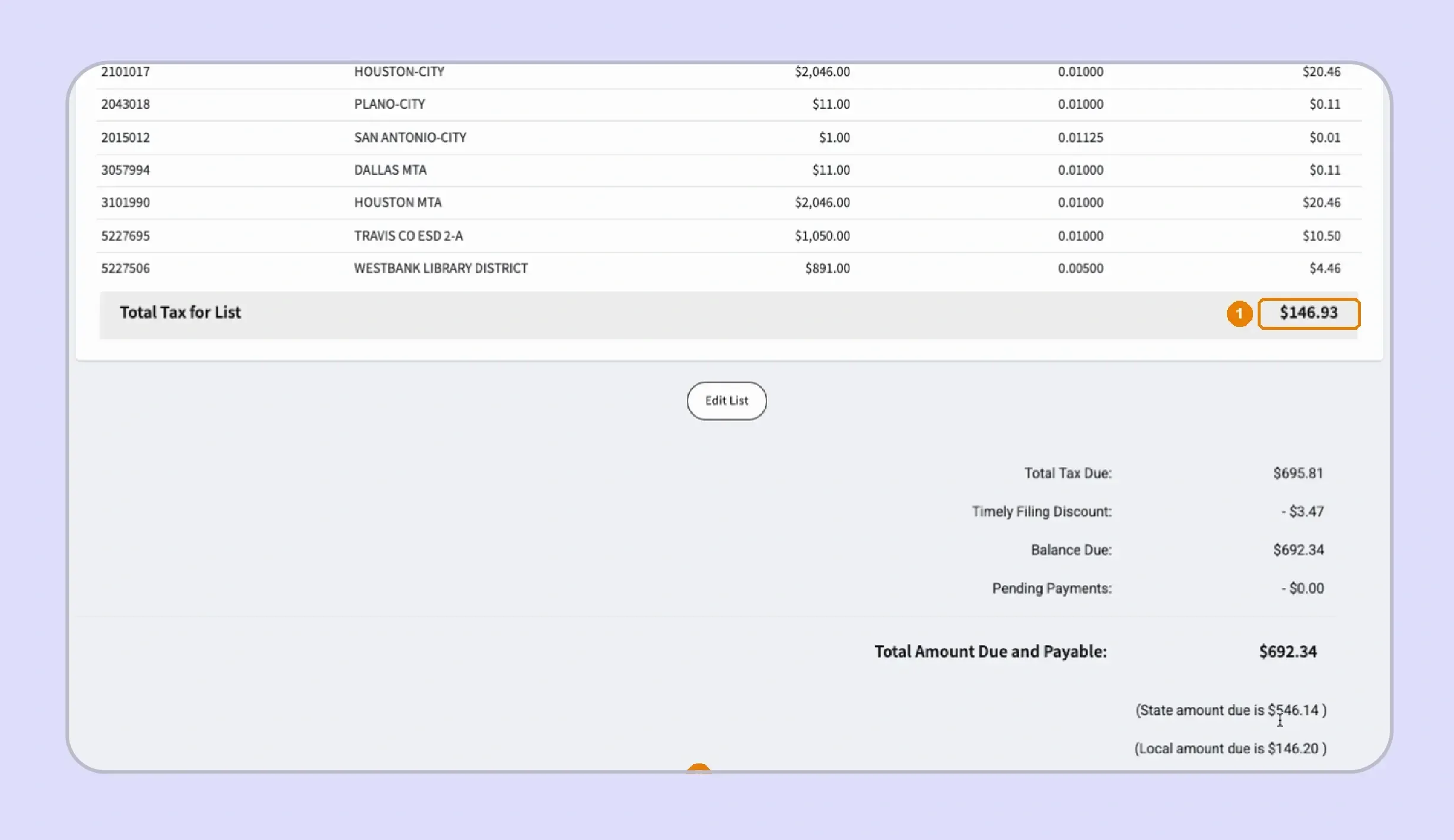
Before you file Texas sales tax online, review the Location Summary and any List Supplement totals together. A list-filer screen can show zero local tax at the outlet level while detailed local amounts appear separately below.
The List Summary should reconcile each jurisdiction's taxable amount with its rate and resulting tax. Compare those figures with your source data before relying on the final sales tax liability calculated by WebFile.
Texas permits a 0.5 percent sales tax discount when permitted taxpayers report and pay on time. Prepayment rules can provide an additional discount when the specific requirements are met.
A $0.00 local amount in the Location Summary does not mean no local tax is due when you are filing through the List Supplement.
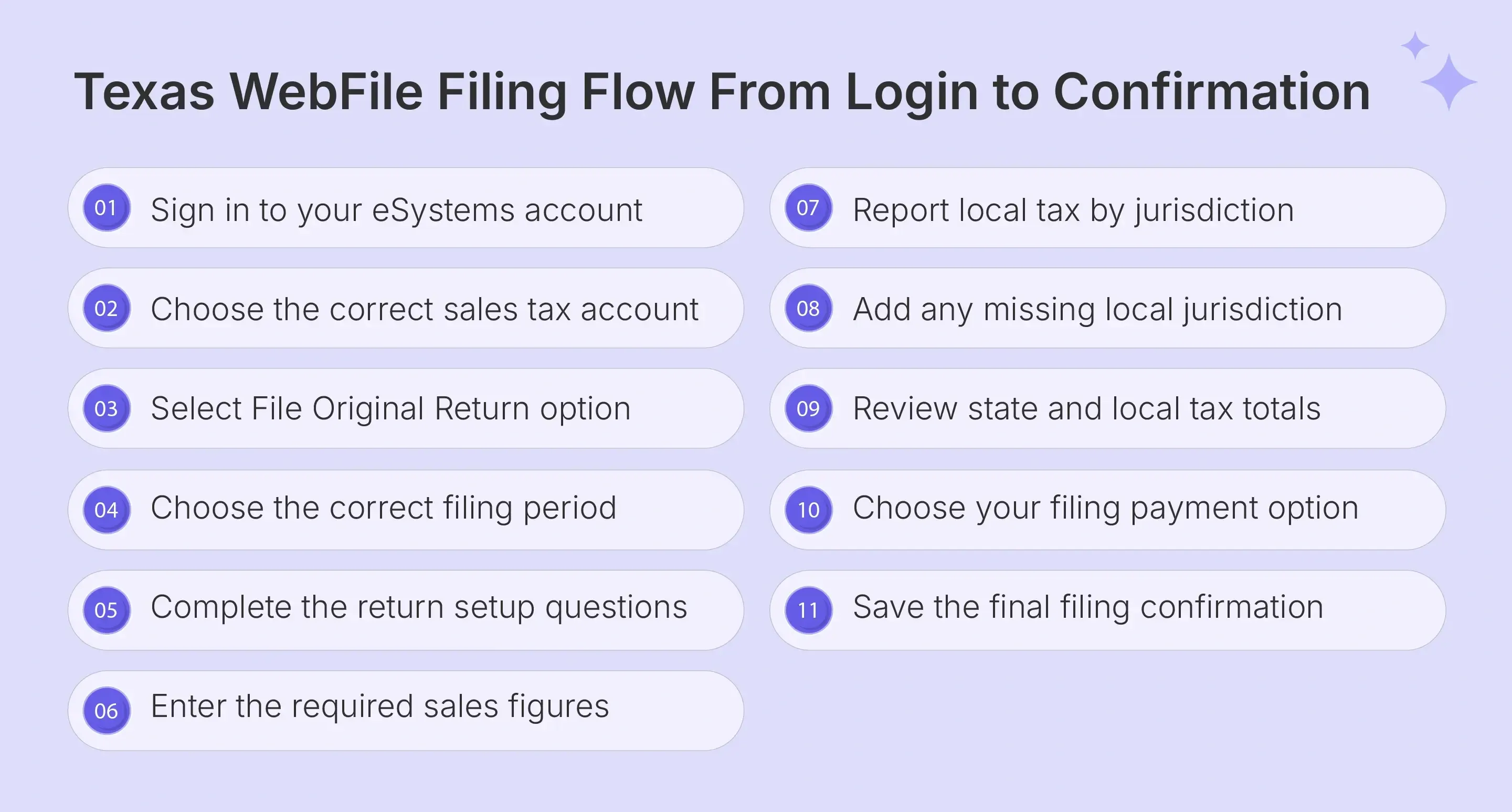
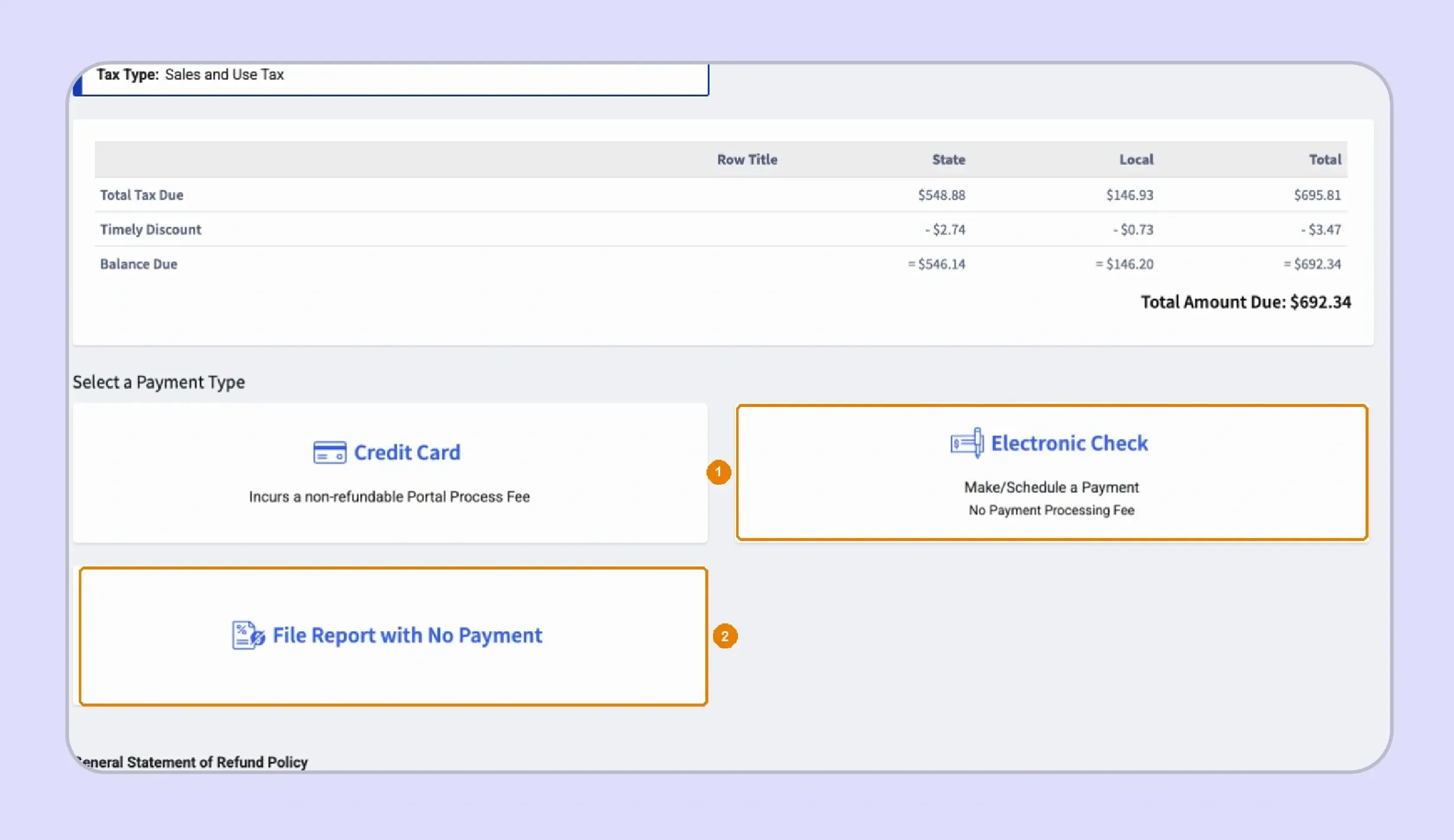
Step 10: Choose How to File and Pay
WebFile supports electronic check and credit-card payment options, while qualifying or required businesses can use TEXNET. Electronic checks have no convenience fee, whereas credit card transactions include the processor's non-refundable charge.
- Electronic Check: Enter bank information and choose an effective payment date through the return's deadline.
- Credit Card: Review the processor charge before completing payment because the fee is added to the tax payment.
- Separate Payment: Where the workflow permits filing without immediate payment, keep the outstanding balance and payment deadline tracked separately.
Businesses that meet mandatory electronic payment thresholds must use the payment method specified by the Comptroller. Larger payment volumes can also trigger TEXNET requirements.
Step 11: Save the Confirmation Number
After submission, save the confirmation number with your tax return records. Keep separate proof for payment where filing and settlement occur through different transactions or systems.
Confirmation is especially important when several people share responsibility for Texas sales tax filing. It gives the finance team a clear record that WebFile received the submission.
Why Does Local Tax Make Texas Sales Tax Filing Harder?
Texas applies a 6.25 percent state sales and use tax, while local authorities can add up to another two percent. The harder part is identifying which jurisdictions apply and reporting the correct local amounts for each transaction.
- Overlapping jurisdictions: One sale can involve a city, county, transit authority, and district simultaneously. The seller remains responsible for collecting and remitting the correct combined amount when it holds the collection obligation.
- New destinations: Selling into a new address can introduce a jurisdiction not present in previous filing data. The Texas Comptroller provides address-level research through its rate locator for this reason.
- Changing boundaries: Local rates and jurisdiction boundaries can change during the year. The Comptroller's website publishes quarterly updates so businesses can identify changes before preparing later returns.
- Transaction-specific treatment: Local rules may differ for utilities, real property services, or other transactions. For example, certain telecommunications services and residential utility charges require more specific sourcing or exemption review.
Texas has hundreds of local taxing districts, so address-level research becomes important as businesses expand into new locations. The sales tax rate locator is more reliable than assuming that customers in the same city are subject to the same jurisdictional coverage.
For broader context on these local rules, the Texas sales tax guide explains how rates, nexus, filing requirements, and common taxability questions fit into the wider compliance process.

How Does Galvix Help Businesses File Texas Sales Tax Online?
Galvix helps businesses file Texas sales tax online as part of a managed, multi-state workflow. Its team reconciles transaction data, prepares returns for approval, files them on schedule, and manages related compliance work across registered states.
That approach is useful when a single finance team handles multiple states with different portals and rules. Instead of operating another software tool, customers have a named compliance manager who understands their account and filing setup.
Galvix also connects filing with nexus monitoring, registrations, tax determination, exemption management, and state notices. These modules can support a business as its tax obligations expand into additional states.
What Galvix Manages Before a Texas Return Is Filed
Before a Texas return is filed, Galvix reviews the underlying data so the figures are ready for submission. This gives finance teams a prepared return to review, rather than rebuilding the filing from separate records each period.
- Transaction reconciliation: Connected sales and tax data are reviewed against the figures needed for return preparation before the customer approves filing.
- Exempt sale support: Exemption records can be collected, reviewed, stored, and tracked for renewal through Galvix’s exemption management service.
- Local tax review: Texas jurisdiction-level information is checked against transaction data before local tax figures are included in the return.
- Return preparation: A compliance specialist prepares the return, sends it for approval, and files it according to the registered filing schedule.
- State correspondence: Galvix can help manage notices and responses, keeping filing history and related account issues connected within the same compliance process.
Teams managing obligations across multiple states can also use these sales tax resources to understand filing rules, nexus requirements, calculators, and other compliance topics.
How Galvix Supports Multi-Channel Texas Sellers
Businesses often need to file Texas sales tax online using data spread across ecommerce platforms, billing tools, and accounting systems. Supported integration options include direct connections and CSV or XLSX uploads when a native connection is unavailable.
For ecommerce teams, data from platforms such as Shopify, QuickBooks, Stripe, and WooCommerce can feed into the same compliance workflow. ERP-led businesses can also use the NetSuite integration to support transaction synchronization before return review and filing.
The workflow combines data reconciliation with specialist review before customer approval. This helps reduce the manual effort of rebuilding return figures from separate systems each filing period, especially when the business is managing obligations across several states.
Pricing follows the same modular approach. Businesses select only the services they use, and the exact cost depends on each module's workload. The pricing structure explains the relevant drivers, such as return volume or exempt-customer volume, rather than relying on a single all-inclusive package.
For multi-state businesses, this creates a simpler operating model. Experts handle filing, deadlines stay organized, and internal teams spend less time switching between systems and state portals.
Book a Galvix demo to see how managed filing can reduce multi-state sales tax work for your finance team.
Frequently Asked Questions
How to apply for a sales tax permit in Texas online?
You can apply for a Texas sales tax permit through the state’s online Sales Tax Registration Application System. Texas does not charge a permit fee, although a security bond may apply in certain cases. Before starting the application, review the Texas sales tax registration steps, so you have the required business details and understand what happens after registration.
Does Texas have online sales tax?
Texas requires applicable internet transactions to follow the same sales and use tax rules as other taxable transactions. A seller's collection responsibility depends on physical presence, marketplace treatment, and revenue thresholds. Marketplace providers usually collect for qualifying facilitated sales, while direct remote sales can remain the seller's responsibility.
How to do sales tax in Texas?
To handle sales tax filing in Texas, determine whether registration applies, collect the correct rate, maintain supporting records, and submit returns by the assigned schedule. The Comptroller's office publishes call tips and a peak schedule, recommending earlier morning calls for potentially shorter wait times during busy periods.
Do you have to file sales tax in Texas?
Yes, permitted businesses must submit required returns even when they report no taxable activity for the period. The filing process continues until the permit account is properly closed or its status changes. Late reports can trigger a fixed filing penalty even when no tax was payable.
Is Texas sales tax free?
Texas is not sales-tax free. The statewide rate is 6.25 percent, while applicable local taxes can raise the combined rate to 8.25 percent. A 5 percent penalty applies when tax remains unpaid after the deadline, with another 5 percent after 30 days.
How to get a permit online in Texas?
Businesses can apply through the Texas Online Sales Tax Registration Application System available through the Comptroller. After approval, permit holders must collect applicable tax, file required reports, make payments, and retain records supporting their activity. Businesses should use the Texas Comptroller's website rather than third-party forms for the state application.
Is it mandatory to file taxes in Texas?
Texas filing requirements depend on the type of tax and the business's activities, so there is no single filing rule that applies to every company. For permitted sellers, a sales and use report remains mandatory for assigned periods. Separate obligations, including franchise tax, may be subject to different rules and schedules.
Do I need a Texas sales tax permit?
You need a Texas permit when your business engages in taxable activity that requires registration under state law. Physical presence can create an obligation, while qualifying remote activity may trigger registration once the $500,000 safe-harbor threshold is exceeded. Alcohol-related businesses can also have separate Texas Alcoholic Beverage Commission licensing requirements. Businesses with a permit must then file Texas sales tax online or use another approved reporting method according to their assigned schedule.