If your business is registered for West Virginia sales tax, you file Form CST-200CU through the Tax Division’s MyTaxes portal. The Combined Sales and Use Tax Return covers state sales, deductions, municipal reporting, and purchases subject to use tax.
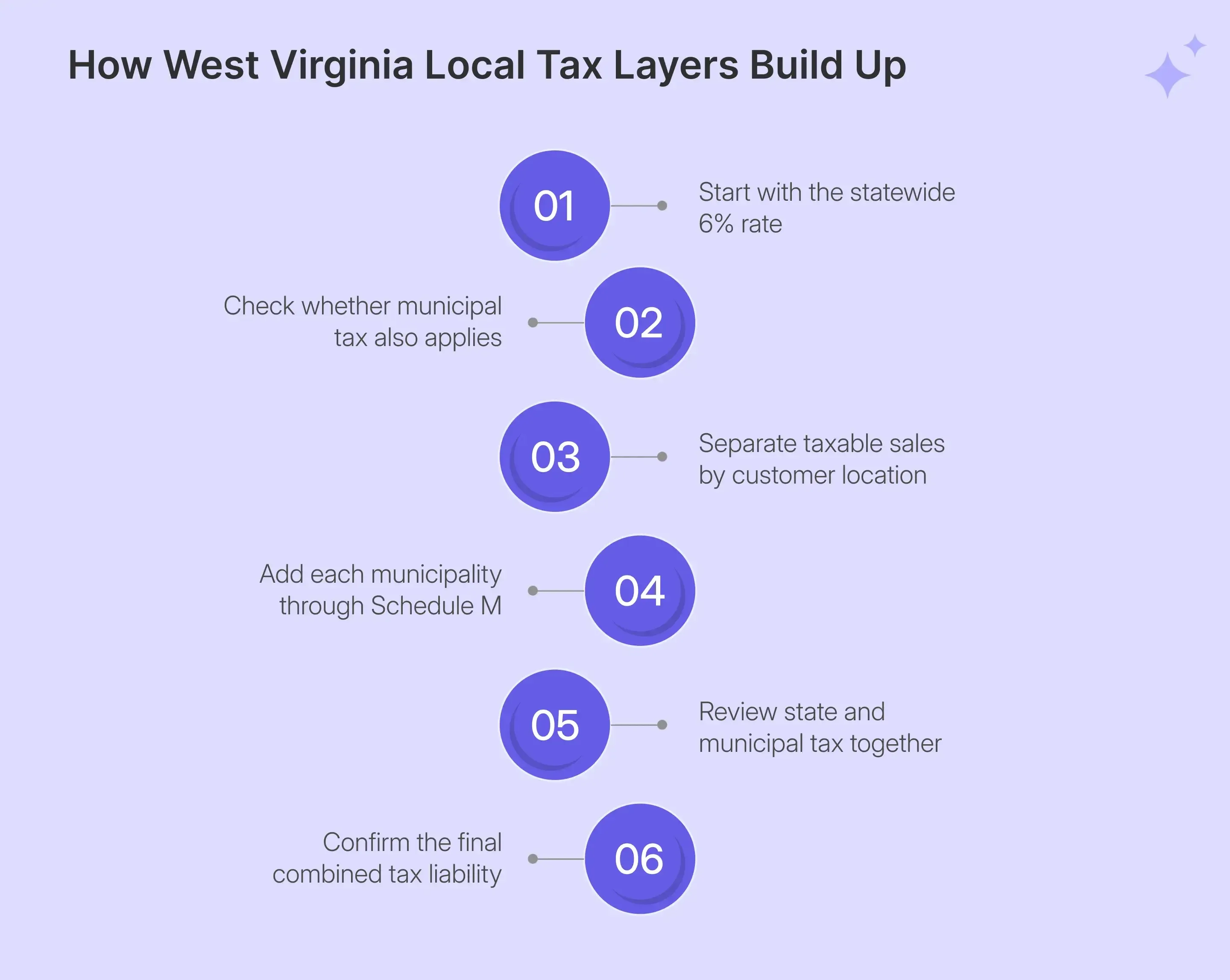
The statewide sales tax rate is 6%. Many municipalities add another 1%, resulting in a 7% combined rate for transactions sourced to those locations. That makes location reporting an important part of every West Virginia sales tax return involving municipal activity.
The portal adds another layer. MyTaxes works as a question-led wizard, where your answers determine which later sections become available. Schedule M appears only when you confirm municipal activity, so an incorrect answer can remove an important part of the return.
This guide explains how to file sales tax in West Virginia, prepare the correct figures, complete Schedule M, report deductions, submit the return, and retain proof of filing. It also shows how managed sales tax compliance can reduce recurring work as you expand across states.

Why Does West Virginia Sales Tax Filing Need More Location Detail?
A West Virginia sales tax return combines the 6% state rate with municipal taxes imposed in participating locations. Your state calculation may remain simple, while municipal reporting requires you to identify where taxable transactions occurred and place those amounts on Schedule M.
Schedule M Reports Municipal Sales Separately
West Virginia municipalities that impose a local sales tax generally use a 1% rate on transactions sourced inside their boundaries. A sale subject to both taxes can therefore carry 6% state tax plus 1% municipal tax.
Suppose you have $1,000 of taxable sales, with $300 delivered inside a participating municipality. The full $1,000 remains part of the state calculation, while only the $300 municipal portion belongs on Schedule M.
You report every applicable municipality separately. Once you choose the location, MyTaxes supplies its codes and 1% local rate, then calculates the municipal amount from the taxable figure entered.
That distinction makes a location-level check useful before invoicing or filing. A sales tax calculator can help confirm the appropriate tax by ZIP code when you need another rate reference.
The Return Changes Based on Your Answers
MyTaxes does not show every part of Form CST-200CU at once. Instead, it asks whether you have activity, deductions, municipal tax, prior payments, or other reportable items before opening the related sections.
This approach keeps irrelevant sections out of the way, while also making every Yes or No response important. If municipal activity exists and you answer No to Report Muni Tax?, Schedule M never appears.
The same logic applies when you choose between manual entry and schedule import. Your tax filing path changes based on that response, even though both routes ultimately produce the same return.
That is why WV sales tax filing should begin with reconciled records rather than decisions made inside MyTaxes. Once your figures are ready, the wizard becomes much easier to complete accurately.
What Should You Reconcile Before Opening MyTaxes?
Before opening the MyTaxes portal, prepare the figures that the system cannot determine from your account alone. Your records should already separate gross activity, deductions, municipality-level taxable amounts, exempt transactions, and purchases that may create use tax.
| Prepare | Why It Matters |
|---|---|
| West Virginia gross sales | Feeds CST-200CU gross amount |
| Sales tax deductions | Reduces the taxable state amount |
| Municipal taxable sales | Feeds Schedule M |
| Purchases for business use | Supports use tax reporting |
| Exemption certificates | Supports deductible transactions |
| Portal credentials | Required to sign and submit |
Your gross sales form the starting point because Line 1, Column A includes both taxable and exempt West Virginia activity. CST-200CU then subtracts supported deductions before calculating the taxable amount and tax due.
This makes deductions equally important. Resale transactions, qualifying exempt sales, refunds, bad debts, and other allowed amounts belong in the relevant Schedule D categories rather than being removed informally from total sales.
Municipal allocation needs a separate reconciliation. Your source data should identify which West Virginia sales occurred inside municipalities imposing the additional 1%, because MyTaxes does not decide where a transaction belongs.
You should also identify purchases where West Virginia tax was not paid to the vendor. These items may create use tax when equipment, supplies, or other tangible personal property are used in the state.
This preparation is the practical answer to how to fill out sales and use tax return in West Virginia correctly. The portal handles much of the arithmetic, while you remain responsible for the figures feeding each calculation.
Marketplace Sales Need the Correct Deduction Treatment
Marketplace sales require careful treatment because the CST-200CU instructions still include facilitator activity inside Line 1 gross sales. Marketplace facilitator transactions therefore remain part of Column A even when the facilitator already handled tax collection.
You then remove qualifying facilitator activity through Schedule D, Part 1, Line 14, which covers marketplace facilitator sales and other per se exemptions. The Schedule D total feeds Column B as deductions before taxable sales are calculated.
That distinction matters when marketplace facilitators handle tax while your business also makes direct sales. Combining both channels without the correct Schedule D treatment can overstate the amount remaining in the taxable base.
Channel-level reconciliation also helps with nexus monitoring. Marketplace activity can count toward your West Virginia sales tax nexus position even when the marketplace collects tax on the transaction.
What Other Taxability Details Should You Check?
Some transactions require a closer product-level review before they reach the return. A specific product can receive different treatment depending on West Virginia law, the purchaser, and the purpose of the transaction.
For example, qualifying prescription drugs may receive exempt treatment, while separately stated shipping charges can remain taxable in relevant circumstances. West Virginia also runs an annual sales tax holiday covering qualifying items within stated limits.
If your catalog contains different taxable goods, exempt products, and special transaction types, classification should happen before return preparation. That keeps the amount of sales tax collected during the period aligned with what you later report.
When Does a Business Need to File in West Virginia?
Businesses with a West Virginia sales and use tax obligation file according to the schedule assigned by the Tax Division. A remote seller can also create recurring filing obligations after crossing the state’s economic nexus threshold.
Economic Nexus Can Trigger Registration
West Virginia’s small-seller exception applies when a remote business has annual gross sales of $100,000 or less and fewer than 200 transactions. Crossing either threshold can require the seller to collect sales tax on later qualifying transactions.
The calculation considers taxable and nontaxable activity delivered into the state. West Virginia reviews the previous calendar year, while a threshold reached during the current calendar year can also trigger collection after the crossing date.
Businesses with physical presence do not rely on the same small-seller exception. An office, employees, inventory, or similar activity can create physical nexus and related registration responsibilities independently of sales volume.
Once an obligation begins, complete West Virginia registration before managing recurring returns. Business owners should keep their legal business details and Federal EIN ready when completing registration or updating state records.
You can monitor broader economic and physical exposure through sales tax nexus rules by state as your business starts selling into additional jurisdictions.
Filing Frequency Is Assigned by the Tax Division
The filing frequency for a West Virginia account can be monthly, quarterly, or annual depending on the amount reported and state assignment. Your active MyTaxes account remains the practical place to confirm the schedule you should follow.
| Requirement | West Virginia Treatment |
|---|---|
| Filing frequency | Monthly, quarterly, or annual |
| Standard due date | 20th after the reporting period |
| Annual return | Follow assigned annual schedule |
| Weekend or holiday | Next business day |
| Zero return | Still required |
| Timely filing discount | None |
For monthly and quarterly filers, the standard due date is the 20th day of the month following the applicable reporting period. If that date falls on a weekend or holiday, follow the published next business day deadline.
The Tax Division may also change an account’s schedule as filing history changes. That makes upcoming filing deadlines worth checking whenever your activity or tax liability shifts materially.
Even when there is nothing to report, an active account still needs a zero return. The West Virginia sales tax filing requirements do not disappear merely because one period produced no taxable activity.
How Do You File West Virginia Sales Tax Online Through MyTaxes?
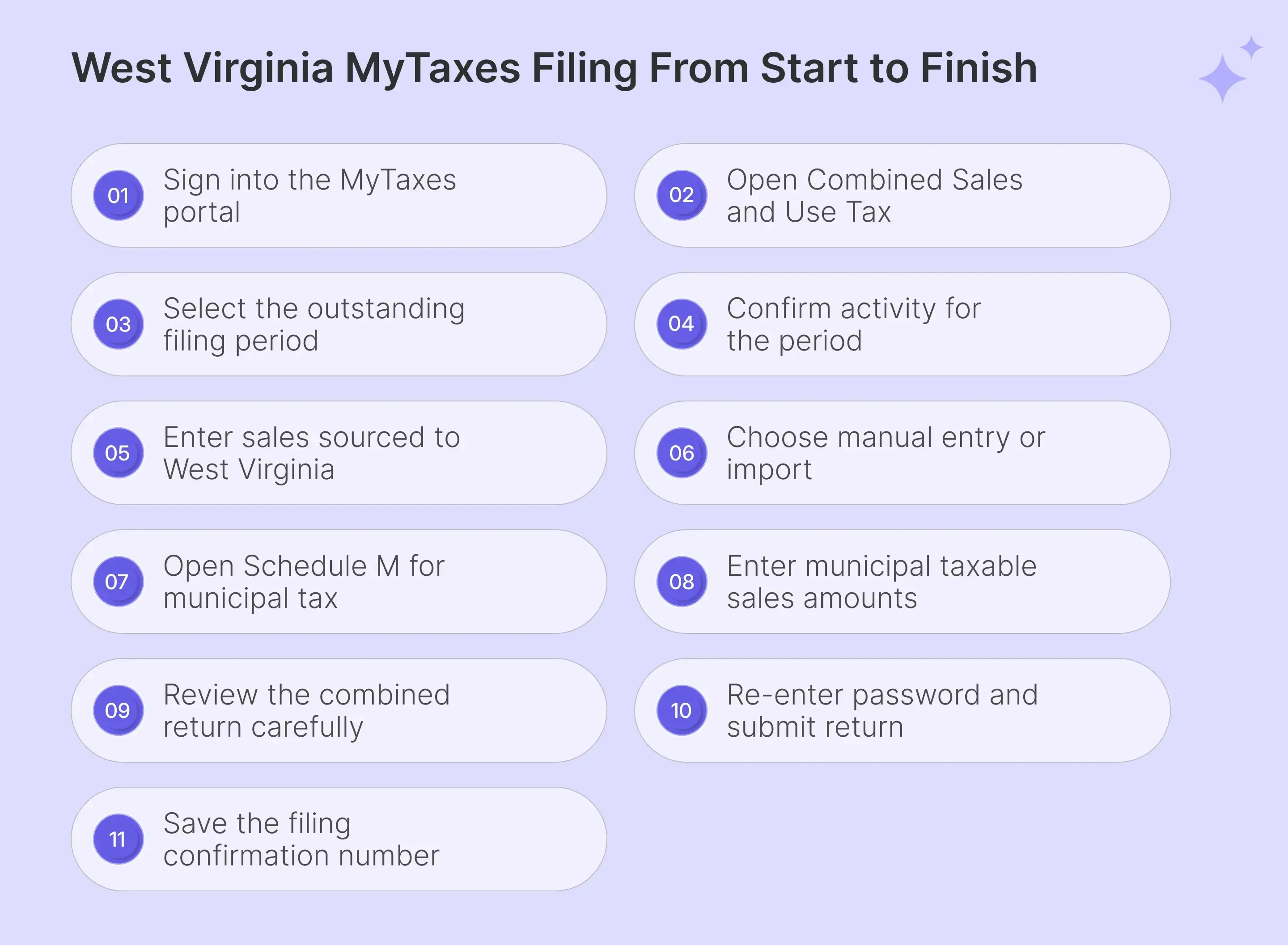
To file West Virginia sales tax online, sign into MyTaxes, open Combined Sales and Use Tax, choose the correct period, enter state activity, complete applicable schedules, review the calculated liability, sign the return, and save the confirmation after submission.
Step 1: Sign In to MyTaxes
Open the West Virginia Tax Division MyTaxes page and enter your username before selecting Log in. MyTaxes then requests your password and may require a security code, so confirm access before starting electronic filing for the current period.

Step 2: Open the Combined Sales and Use Tax Account
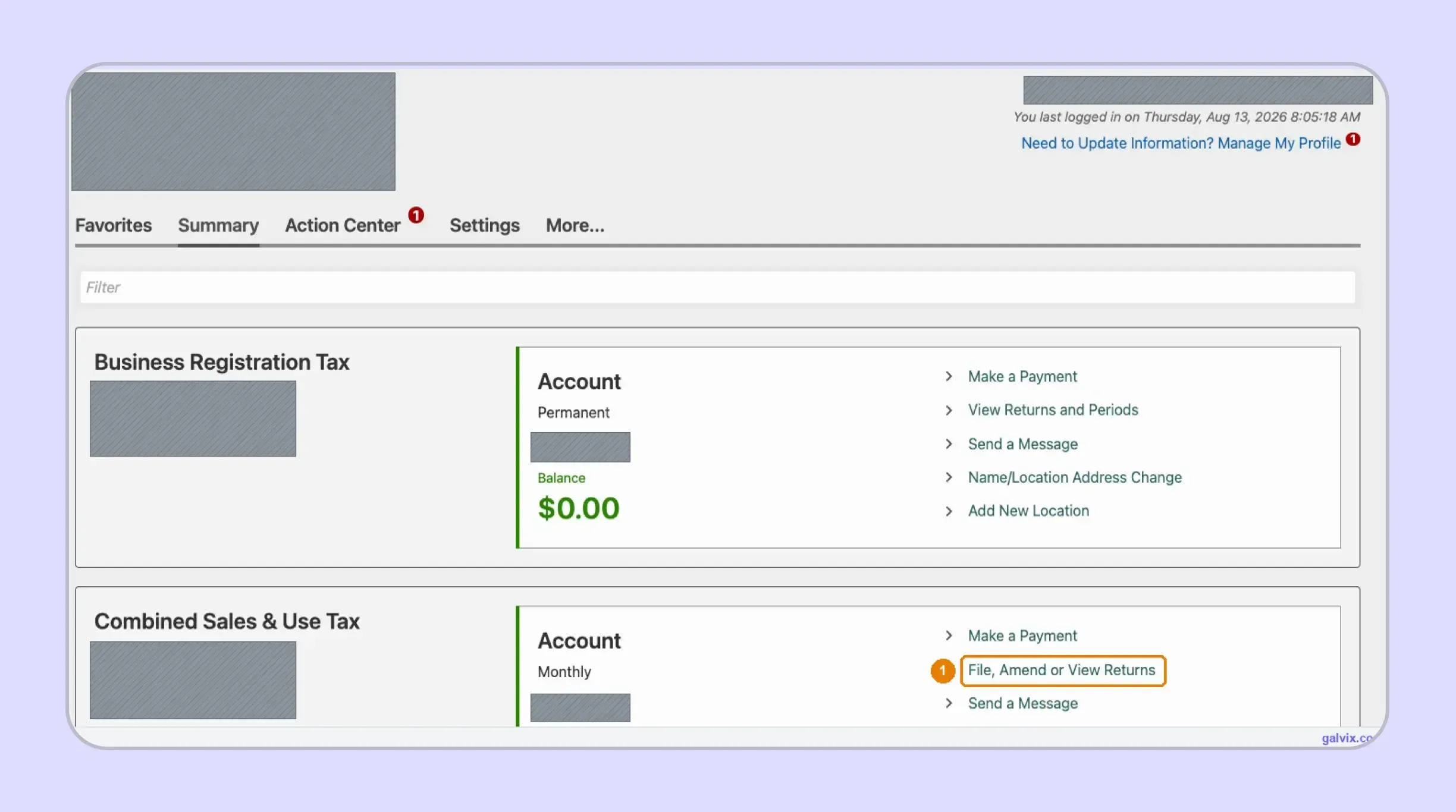
After signing in, find the Combined Sales & Use Tax account and select File, Amend or View Returns. MyTaxes can show several state accounts together, so confirm both the business and account type before opening your West Virginia sales tax return.
Business Registration Tax and Combined Sales & Use Tax are separate accounts. Opening the wrong account can send you into an unrelated filing workflow.
Step 3: Select the Outstanding Filing Period
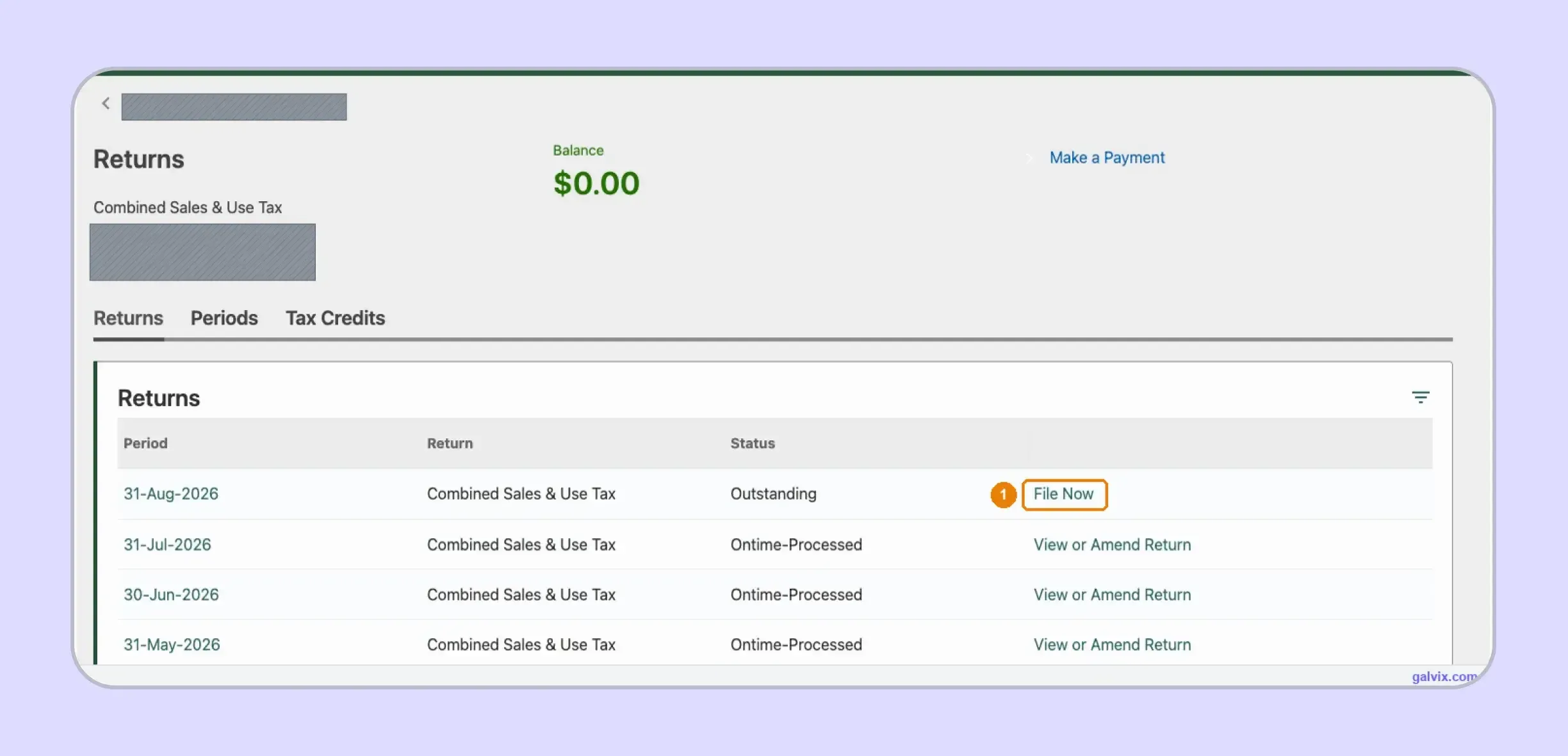
Open the Returns list and find the required period marked Outstanding, then select File Now for that row. Previously processed periods show View or Amend Return, which also provides the route for correcting previously submitted tax returns.
Step 4: Confirm Whether You Have Activity
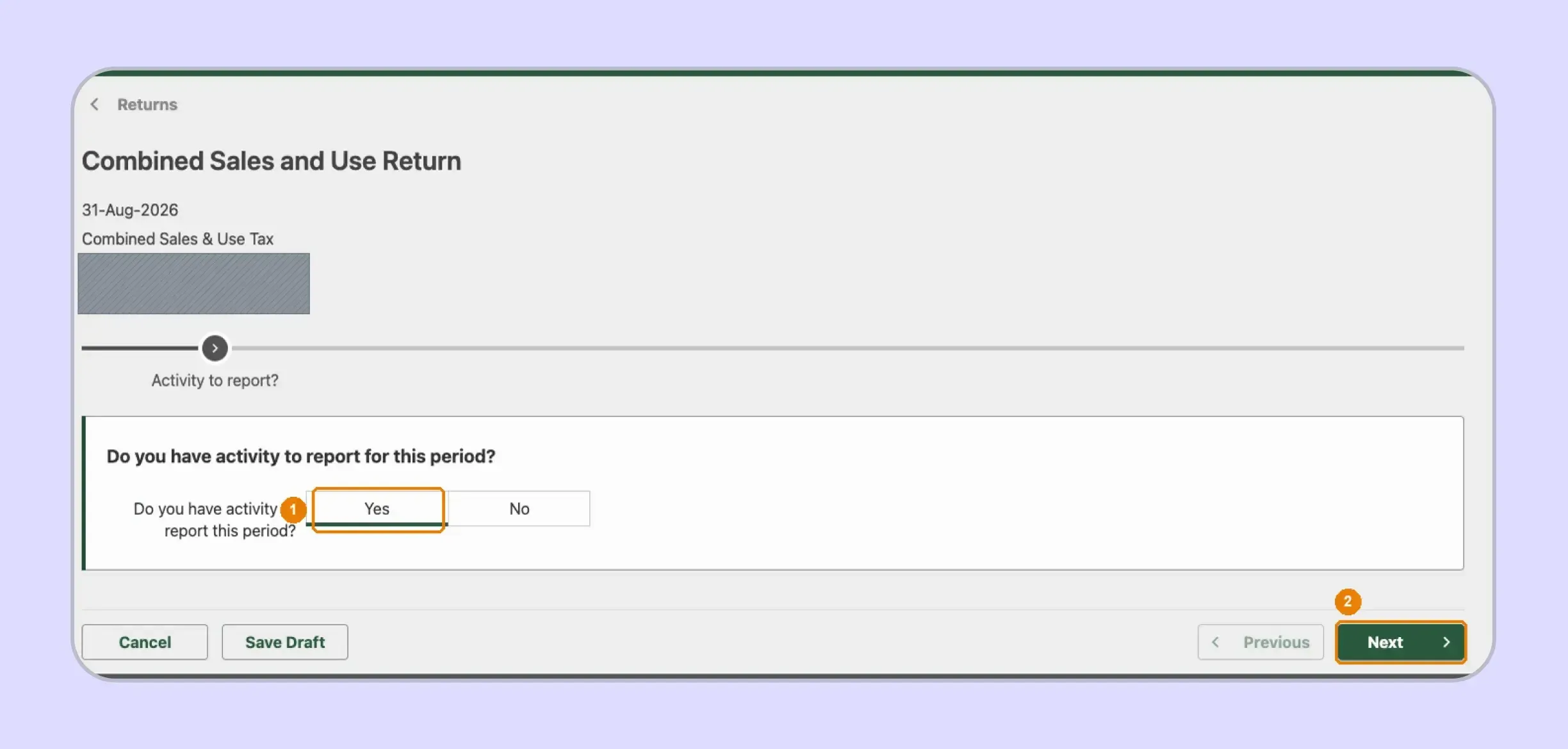
MyTaxes first asks whether you have activity to report for the period. Select Yes when reportable transactions exist, while selecting No follows the zero-return route and still completes the required sales tax filing for an inactive period.
Step 5: Enter Sales Sourced to West Virginia
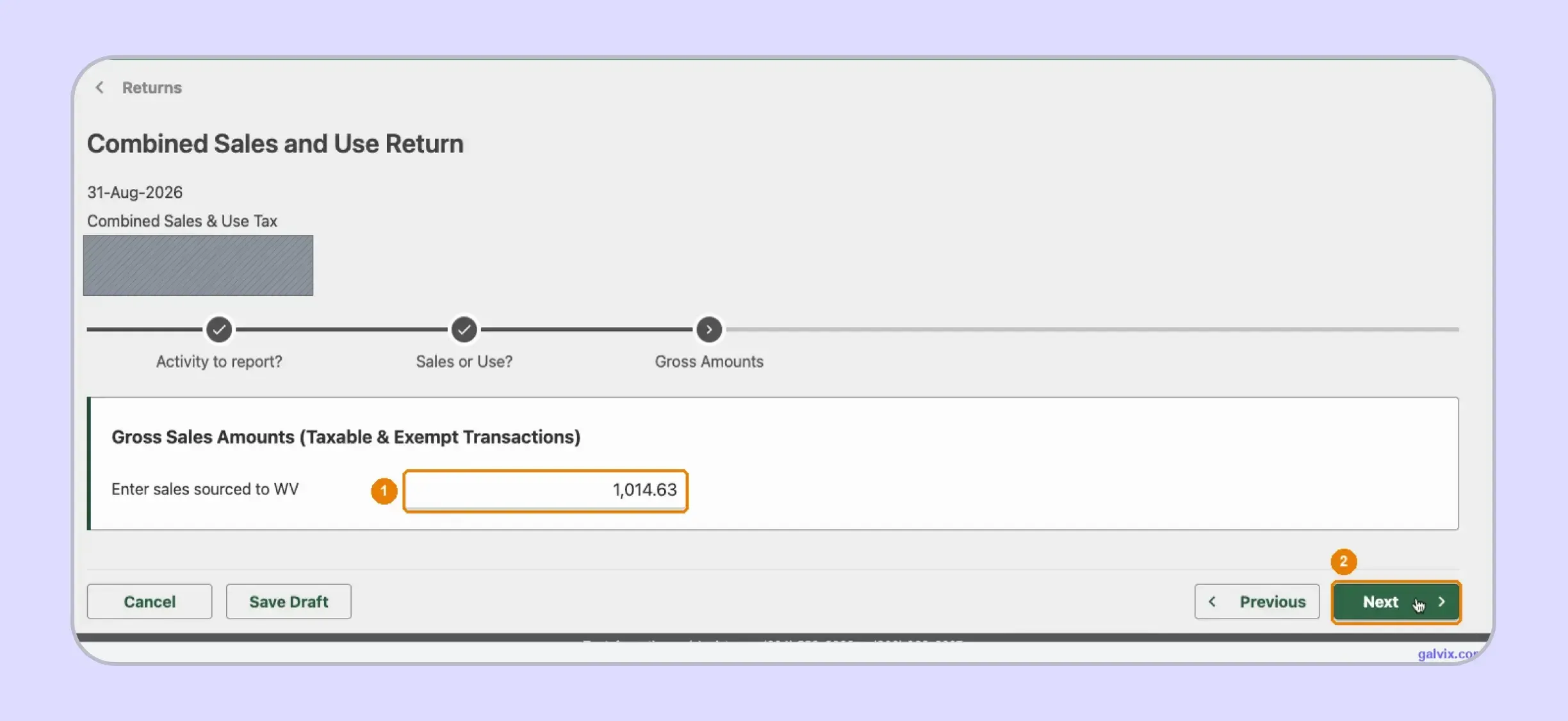
Enter gross sales sourced to West Virginia before deductions, including taxable and exempt transactions that belong in Line 1. The later Schedule D step removes qualifying deductions, while MyTaxes uses the remaining taxable amount to calculate the 6% West Virginia state tax.
Step 6: Choose Manual Entry or Schedule Import
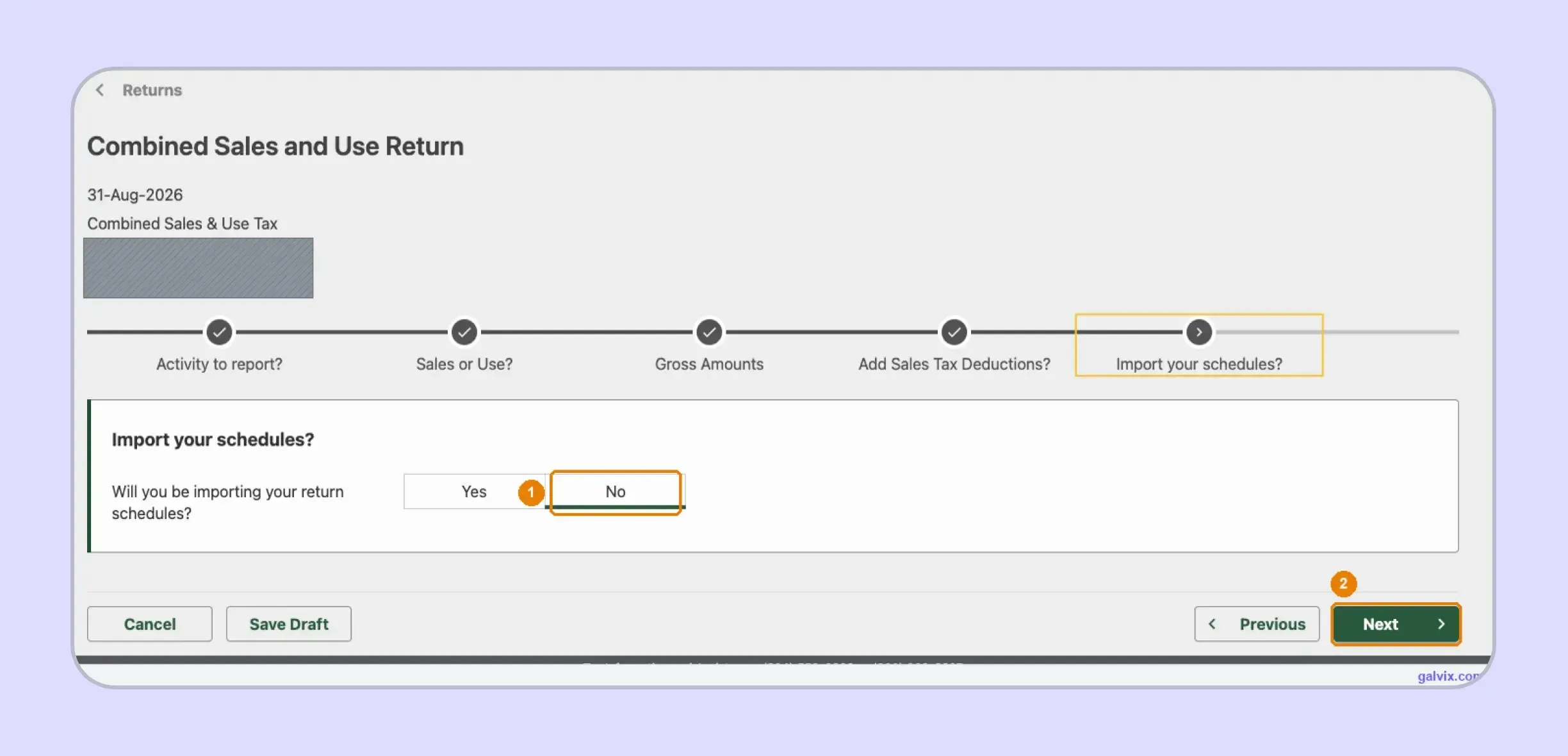
MyTaxes next asks whether you want to import return schedules. Select No when entering CST-200CU and Schedule M manually, while selecting Yes opens the file-import path for businesses moving schedule data from another system.
Step 7: Open Schedule M for Municipal Tax
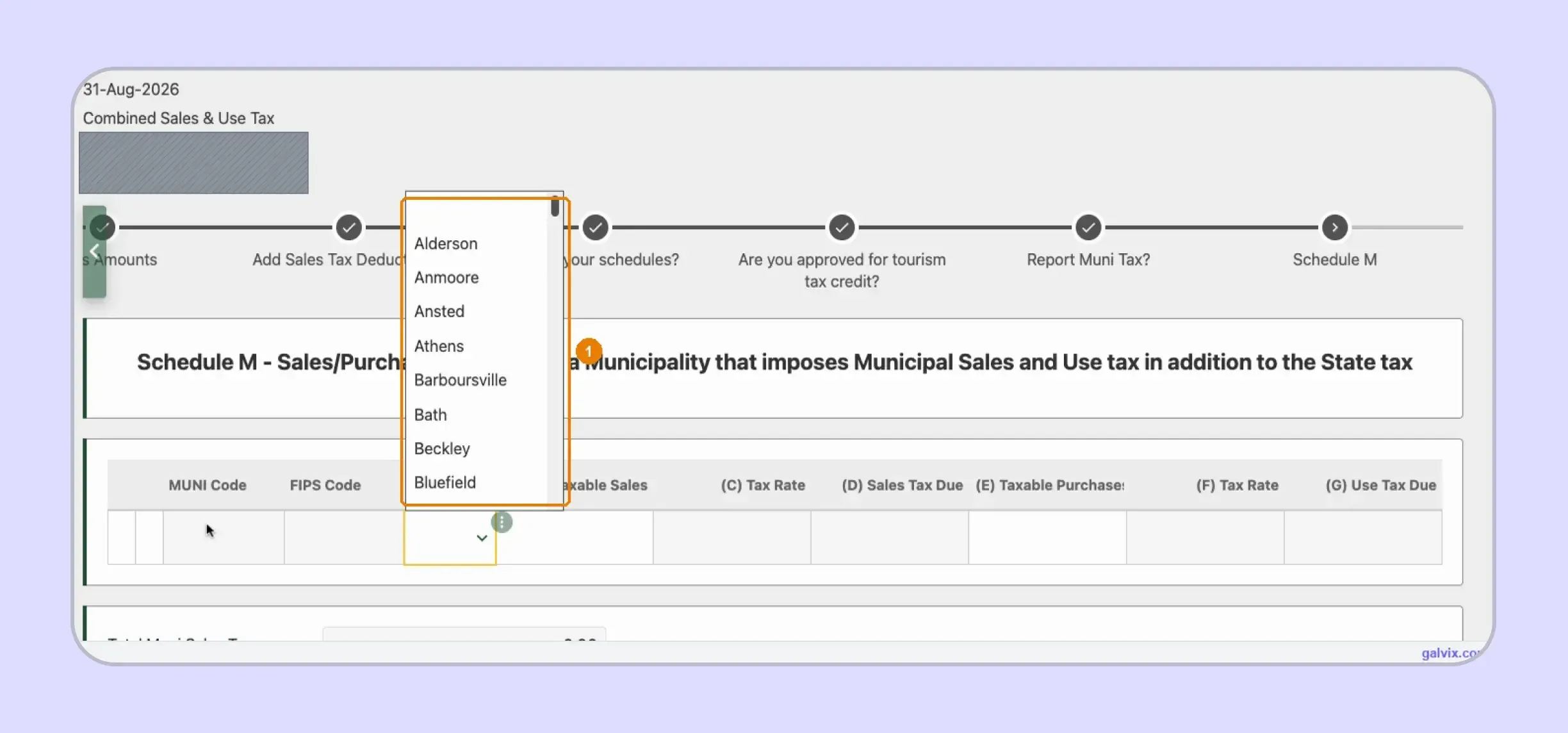
Answer Yes to Report Muni Tax? when your municipal sales include transactions sourced into participating locations. Choose the municipality from the dropdown, and MyTaxes automatically supplies its MUNI Code, FIPS Code, and 1% tax rate.
Step 8: Enter Municipal Taxable Sales
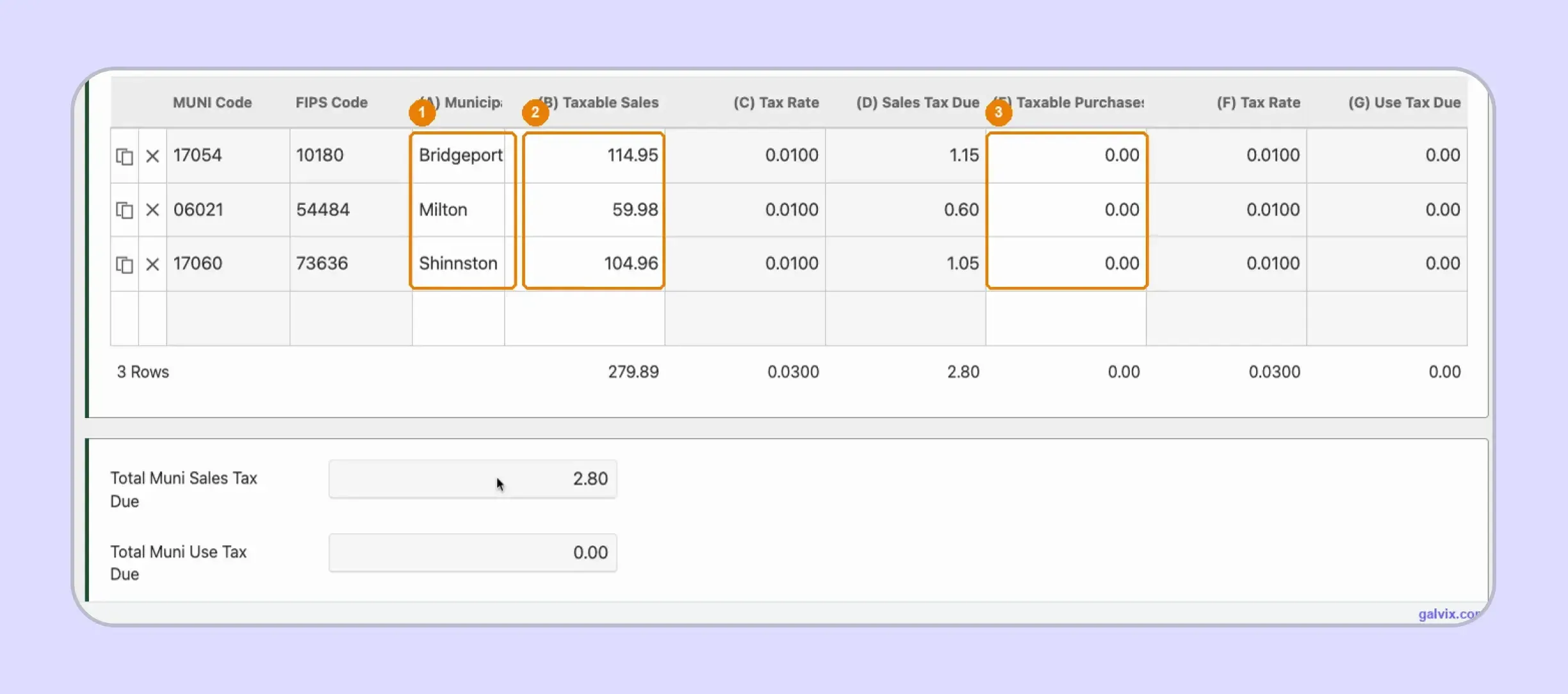
For each municipality, enter its taxable sales and any taxable purchases subject to municipal use tax. MyTaxes calculates the 1% sales or use amount automatically, then carries the Schedule M total into the Combined Sales and Use Tax Return.
Schedule M does not reconcile municipal activity against gross sales. Missing a municipality can understate tax while the 6% state calculation still appears correct.
Step 9: Review the Combined Return
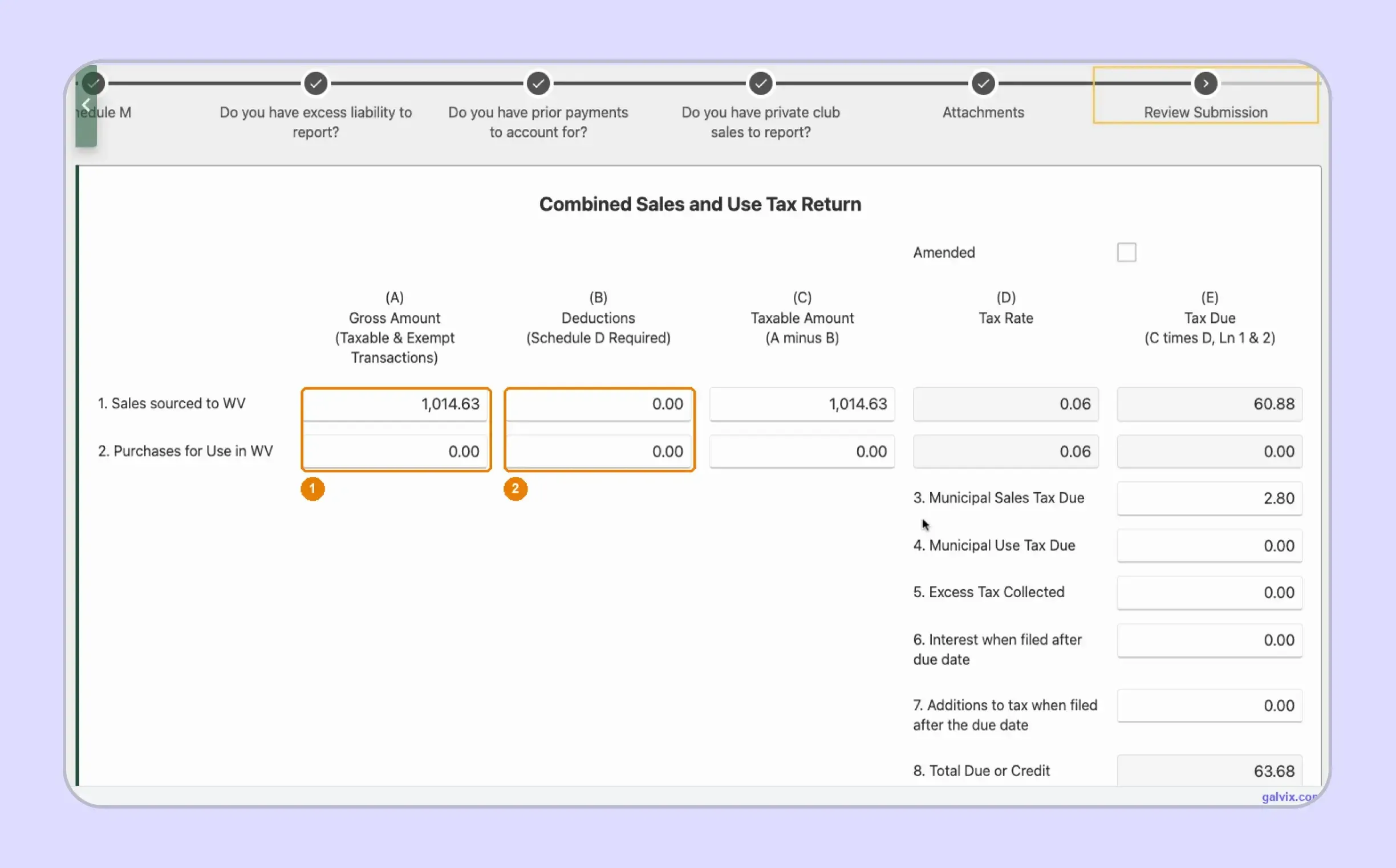
Review Submission brings your gross amount and deductions together with state tax, municipal tax, prior payments, credits, and other applicable figures. Compare the taxable sales and final amount with your records before moving toward final submission.
Step 10: Sign and Submit the Return
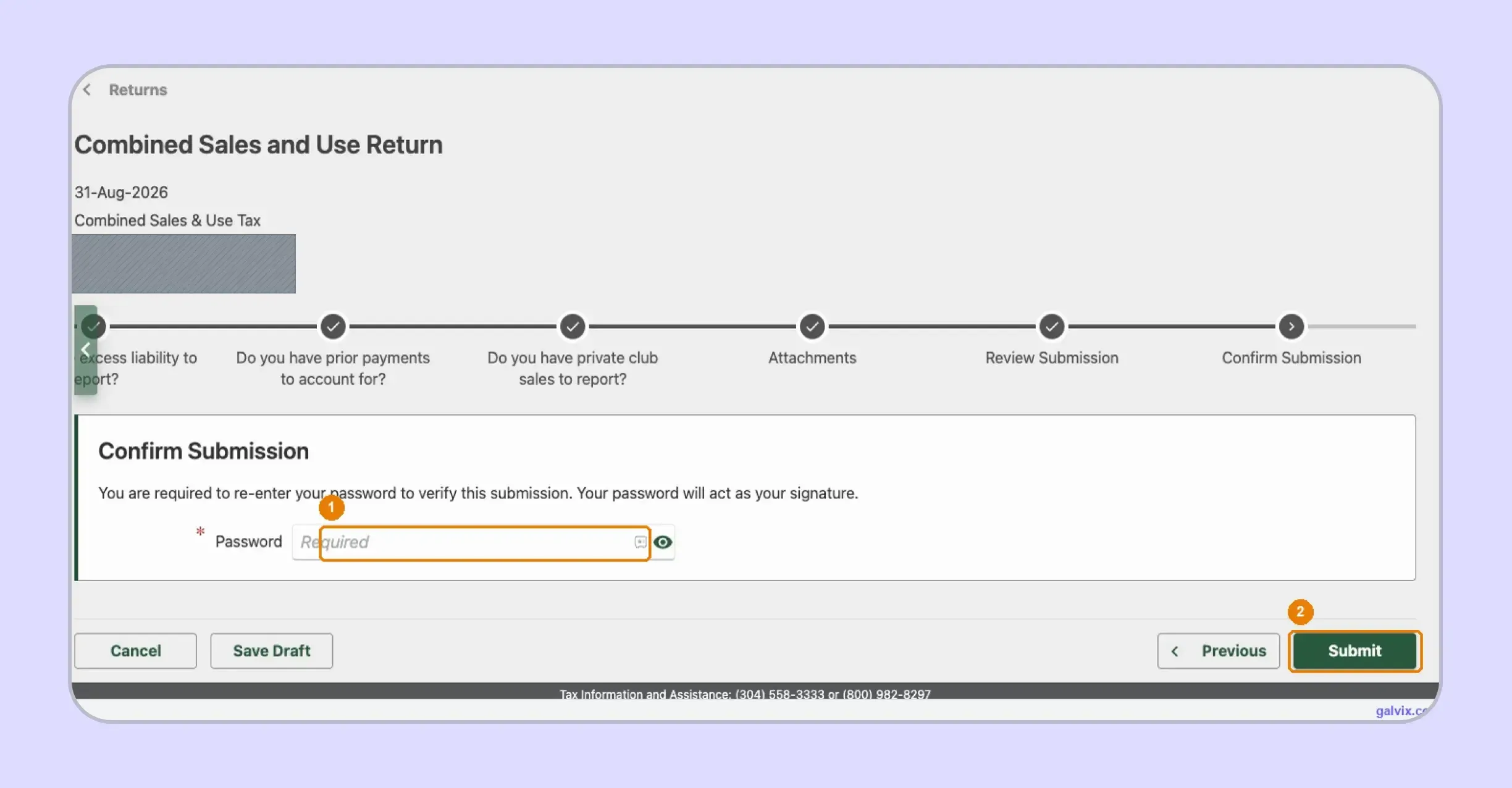
On Confirm Submission, re-enter your password because MyTaxes uses that password as your electronic signature. Selecting Submit transmits the return, so review every figure before using the final button to complete how to file WV sales tax online.
Reaching Confirm Submission does not complete filing. Closing the page before selecting Submit leaves the return unfiled, even after entering your password.
Step 11: Save the Filing Confirmation
After submission, MyTaxes issues a confirmation number that serves as your filing proof. Save that number with the return and any payment evidence, because how to file sales tax return in West Virginia correctly includes keeping records after transmission.
Save the confirmation when it appears. If state records later differ from yours, this number provides clear evidence of successful submission.
Which Figures Do You Enter and Which Does MyTaxes Calculate?
MyTaxes performs several calculations after you provide the underlying return data. You still determine the gross amounts, deductions, municipal allocation, and use-tax purchases, so a mathematically correct result can remain inaccurate when the source figures are incomplete.
Here is how responsibility is divided when completing Form WV/CST-200CU: You Enter
| You Enter | MyTaxes Calculates |
|---|---|
| Gross West Virginia sales | Taxable amount |
| Schedule D deductions | 6% state tax |
| Purchases subject to use tax | Municipal tax |
| Municipality and taxable sales | MUNI and FIPS codes |
| Applicable prior payments or credits | Total amount due |
The important point is where the calculation starts. MyTaxes can subtract deductions and apply the sales tax rate, but it cannot verify whether you included all municipalities or classified each transaction correctly.
This means your control sits upstream. Reconcile gross figures, exempt amounts, municipality-level sales, and purchase-side use tax before the portal converts those inputs into the final liability.
This distinction also matters when reviewing late filing. MyTaxes can include interest or additions to tax where applicable, while the filer remains responsible for confirming whether those amounts and prior credits belong on the return.
How Do Exemptions Affect the West Virginia Sales Tax Return?
West Virginia presumes sales of goods and services taxable unless an exemption applies. Exempt activity still needs the correct Schedule D classification, while supporting documents should remain connected with the purchaser and transaction before reducing taxable sales.
West Virginia Uses the SST Certificate of Exemption
West Virginia accepts the Streamlined Sales Tax Certificate of Exemption for qualifying transactions. The document can support a single purchase or qualifying recurring activity when the purchaser properly identifies the exemption reason.
A complete sales tax exemption certificate should identify the purchaser, seller, exemption basis, and covered purchase. That documentation can support resale, qualifying purchases by nonprofit organizations, or eligible transactions involving government agencies where state rules permit the exemption.
Municipal treatment follows the same underlying principle. A properly completed state exemption can also support qualifying municipal purchases, although you should still confirm that the purchaser and transaction satisfy the specific exemption claimed.
A valid exemption therefore supports the decision rather than replacing it. You still need to check whether the buyer, the purchased property, and the stated use meet the exemption criteria before removing that sale from the taxable base.
Certificate Collection Does Not Replace Transaction Review
Think of certificate handling and transaction eligibility as separate controls. Collecting the form documents the customer’s claim, while transaction review determines whether the document applies to the item and the sourcing facts involved.
For example, tax treatment can differ by specific product, purchaser type, or use. A broad exemption status should never automatically result in removing every future transaction from sales tax returns.
This separation also helps if your business operates across states. One certificate may support purchases in several SST jurisdictions, while individual states can still require different identification details or exemption reasons.
The Galvix Sales Tax Exemption Certificate Tool helps businesses identify required certificate routes and seller checks before exempt activity reaches return preparation. It supports documentation review while keeping certificate verification separate from the final transaction-level exemption decision.

How Does Galvix Help With West Virginia Sales Tax Filing?
Galvix manages recurring sales tax compliance as a service, so your team does not need to operate every portal independently. Transaction data is reconciled before each return, specialist review happens before filing, and your team approves the prepared figures before submission.
For a West Virginia sales tax return, that process can connect gross sales with Schedule D deductions, marketplace activity, use-tax purchases, and municipal allocation. This matters because Schedule M depends on correctly identifying every municipality that needs to receive taxable activity.
Transaction records can move through supported sales tax integrations covering ecommerce, accounting, payment, and ERP systems. Galvix supports Shopify, QuickBooks, NetSuite, Stripe, BigCommerce, WooCommerce, Zoho Books, Microsoft Dynamics Business Central, API connections, and CSV or XLSX uploads.
That flexibility lets different source systems feed the same filing process. A Shopify seller can use a Shopify integration, while accounting teams can connect QuickBooks or NetSuite without rebuilding return data manually each period.
As operations expand, filing can connect with nexus monitoring and state registrations, exemption management, notice handling, and return preparation. That creates one workflow when sales tax registration in another jurisdiction adds another recurring obligation.
Galvix uses modular pricing rather than forcing every customer into the same bundle. You can add filing, nexus tracking, registrations, exemption management, tax determination, or notice support based on the workload your business generates.
That approach can be particularly useful for lean teams handling growing sales volume. It keeps return preparation connected to the underlying transaction records rather than treating each state portal as a separate month-end project.
What Can Galvix Manage for West Virginia Sellers?
As filing volume grows, the value lies in reducing the manual checks your finance team must repeat in every reporting cycle.
- Reconcile direct transactions before CST-200CU preparation while checking source data against the amounts expected on the return.
- Separate marketplace deductions from direct activity before Schedule D reduces gross figures to the final taxable amount.
- Prepare Schedule M inputs by connecting municipal activity with the correct locations before the return reaches MyTaxes.
- Connect exempt activity with supporting customer records so deductible transactions remain easier to review during state questions.
- Track nexus, registrations, filing deadlines, state notices, and recurring returns as new jurisdictions enter your compliance calendar.
The same workflow also helps if new physical nexus or economic nexus obligations appear elsewhere. Instead of rebuilding a separate process for each state, your finance team retains one managed filing framework across its registered footprint.
Book a demo to review your West Virginia and multistate filing process before municipal reporting, exemption records, and expanding registrations make recurring work harder to coordinate.
Frequently Asked Questions
Can I amend a West Virginia sales tax return after submission?
Yes. Return to the Combined Sales & Use Tax account in MyTaxes and choose View or Amend Return for the period you need to change. Amended returns can require supporting schedules when credits, refunds, or earlier liabilities are being adjusted, so review the CST-200CU instructions before submitting the correction.
Can I change my West Virginia sales tax filing frequency?
The West Virginia Tax Division assigns monthly, quarterly, or annual filing according to the account’s activity and applicable rules. You should continue following the frequency shown in MyTaxes until the state changes it. Remote and marketplace sellers can also have their schedules reviewed as filing history changes.
Can West Virginia penalties be waived for a late return?
Relief can depend on the facts behind the late filing, so do not assume a penalty will disappear automatically. If your return shows additions to tax or interest, confirm the amount with the Tax Division and follow the applicable process for requesting any available relief or correction.
How do I close a West Virginia sales and use tax account?
Closing an account requires a formal state update rather than stopping returns on your own. Keep filing the assigned periods until the account status changes, since zero returns can remain due while registration is active. The State of West Virginia also maintains separate business registration requirements.
Can remote sellers register through Streamlined Sales Tax?
Yes. A qualifying remote seller can register directly with West Virginia or use the Streamlined Sales Tax Registration System for multistate registration. The state confirms that SSTRS can register sellers across participating member states, which can simplify onboarding when several obligations arise together.
How long should West Virginia exemption records be retained?
Keep exemption records long enough to support the untaxed transactions reported on your returns and any later state review. CST-200CU instructions require supporting documentation for deduction claims, and your records should connect the certificate with the purchaser, transaction, period, and exemption reason.
When does a special district tax require a separate return?
Form CST-200CU does not report West Virginia Special District Excise Tax. Businesses operating in a special district should confirm whether another return applies, rather than adding the amount to Schedule M. This distinction matters because municipal and special district taxes follow separate reporting routes.