
Businesses file a Rhode Island sales tax return through the Rhode Island Taxpayer Portal using Form RI-STR, the Sales and Use Tax Return. Most registered retailers file monthly, while the state applies a 7% general sales tax rate without county or city sales taxes.
That flat tax rate makes the calculation easier than returns in states with several local sales tax rates. Rhode Island has no general local sales tax, so you do not need to divide ordinary taxable activity across cities or counties. The real work happens before the calculation begins.
You enter gross sales, applicable deductions, use tax, and credits into the portal. The system then calculates taxable sales and the amount owed from those figures. An incorrect source number can therefore produce an incorrect return even when every portal calculation works exactly as designed.
This guide explains how to file sales tax in Rhode Island, prepare the correct figures, complete the portal workflow, support exempt transactions, and retain proof of filing. You can also use this Rhode Island sales tax guide for detailed rules covering rates, taxability, registration, and nexus.

Why Can Rhode Island Sales Tax Filing Still Go Wrong?
A Rhode Island sales tax return looks simple because one statewide rate applies to most taxable transactions. The portal still depends on the figures you provide, so classification and reconciliation mistakes can move directly into the filed return.
Rhode Island Uses One Statewide Sales Tax Rate
The general Rhode Island sales tax rate is 7%, with no county or city sales tax added to ordinary transactions. That means a taxable sale in Providence follows the same general state rate as one elsewhere in the State of Rhode Island.
The simpler structure removes one common source of filing work. You do not need to match ordinary sales with changing local jurisdictions before calculating the return. That differs from states where several city, county, or district rates can apply to one business.
Separate Rhode Island taxes still need independent treatment. The 1% meals and beverage tax and the 6% hotel tax use their own filing routes rather than being added as extra lines on RI-STR.
If you need to confirm a location-level rate before invoicing, the Galvix sales tax calculator provides a ZIP-level rate lookup for businesses operating across states.
The Portal Depends on Your Source Figures
RI-STR starts with the numbers your business provides rather than independently checking your transactions. Line 1 begins with sales for the reporting period, while Lines 2a through 2e reduce that amount through different deduction categories.
The portal adds the deductions and derives taxable sales from them. It later calculates the tax after you select Calculate. This means the mathematics can still balance when a transaction has been placed into the wrong deduction category.
For example, assume you enter $15,000 of total activity and classify $4,000 as non-taxable. The portal works with the resulting $11,000 taxable base. It does not independently decide whether those $4,000 of transactions genuinely qualified.
This is why accurate Rhode Island sales tax filing starts with your sales records. You need to know what was sold, where the buyer received it, why any transaction was exempt, and whether a marketplace handled collection before opening the return.
What Should You Prepare Before RI Sales Tax Filing?
Before RI sales tax filing, reconcile the information that feeds Form RI-STR. Preparing these figures first keeps you from moving between accounting systems, marketplace reports, customer records, and the portal while completing the return.
| What to Prepare | Why It Matters |
|---|---|
| Portal User ID and password | Gives you access to the registered account |
| Registered email access | Receives the one-time authentication passcode |
| Gross sales | Feeds Line 1 of RI-STR |
| Deduction breakdown | Supports Lines 2a through 2e |
| Marketplace activity | Keeps facilitator-remitted sales separate |
| Use tax amount | Feeds Line 6 when applicable |
| Exemption certificates | Support qualifying untaxed transactions |
| Credits | Support Lines 8a and 8b where relevant |
The portal separates deductions into Resale, Interstate Sales, Non-Taxable Sales and Services, Exempt Organizations, and Other Deductions. Those entries ultimately reduce the taxable base, so each amount should already have a clear reason and supporting record.
This preparation becomes vital when you sell different taxable goods, digital products, services, or tangible personal property. Rhode Island taxability can vary by transaction type, so classification should happen before you start typing return figures.
Products such as prescription drugs can also receive specific exempt treatment under applicable rules. For broader product and state comparisons, Galvix's sales tax resources can help you review current state rules before return preparation.
Marketplace Sales Need Separate Treatment
Marketplace activity deserves its own reconciliation because the marketplace facilitator may already collect and remit tax on qualifying transactions.
Suppose your business makes $20,000 through its website and another $7,000 through a marketplace that remits Rhode Island tax. Combining both channels before filing can create an incorrect starting figure, even though the portal gives you no obvious warning.
You therefore need separate source totals for direct retail sales and facilitator-collected transactions. This same distinction also matters when monitoring sales tax nexus, because marketplace activity can still affect threshold analysis even when the marketplace handles collection.

Who Must File a Rhode Island Sales Tax Return?
Businesses registered to collect Rhode Island tax normally need to file returns for each assigned period. Filing obligations can arise from local operations, sufficient economic activity, or an active sales tax permit.
Registered Rhode Island Retailers
A business making taxable retail sales in Rhode Island must register before starting taxable activity. Each location needs its own seller's permit, while a store, office, inventory, employees, or another physical presence can create obligations even when annual sales stay below the remote-seller threshold.
That makes registration an ongoing account responsibility, not a one-time task. Rhode Island accepts its Business Application and Registration form, while remote businesses may use Streamlined Sales Tax. Keeping permits current also supports good standing, especially when unpaid tax or other account issues remain unresolved.
Remote Sellers
Rhode Island applies economic nexus to sellers without in-state operations. The economic nexus threshold is $100,000 in gross Rhode Island sales or 200 separate transactions during the previous calendar year.
If you are among affected remote sellers, track Rhode Island activity separately from companywide totals. A Rhode Island sales tax nexus guide can help you review the threshold, physical nexus triggers, and marketplace treatment. Once nexus creates an obligation, Rhode Island law requires registration before collection and filing begin.
Quarterly Filing Requires Approval
Most sellers file monthly, with returns generally due by the 20th day after the reporting month. A business whose average monthly sales and use tax liability stays below $200 for six consecutive months can request quarterly filing, reducing the number of returns prepared during the year.
The change does not begin automatically when liability falls. The Tax Administrator must approve quarterly filing in writing, so follow the schedule shown on your account until approval arrives. Active accounts must also keep zero-return periods current, even when no taxable sales occurred.
How Do You File Rhode Island Sales Tax Online?
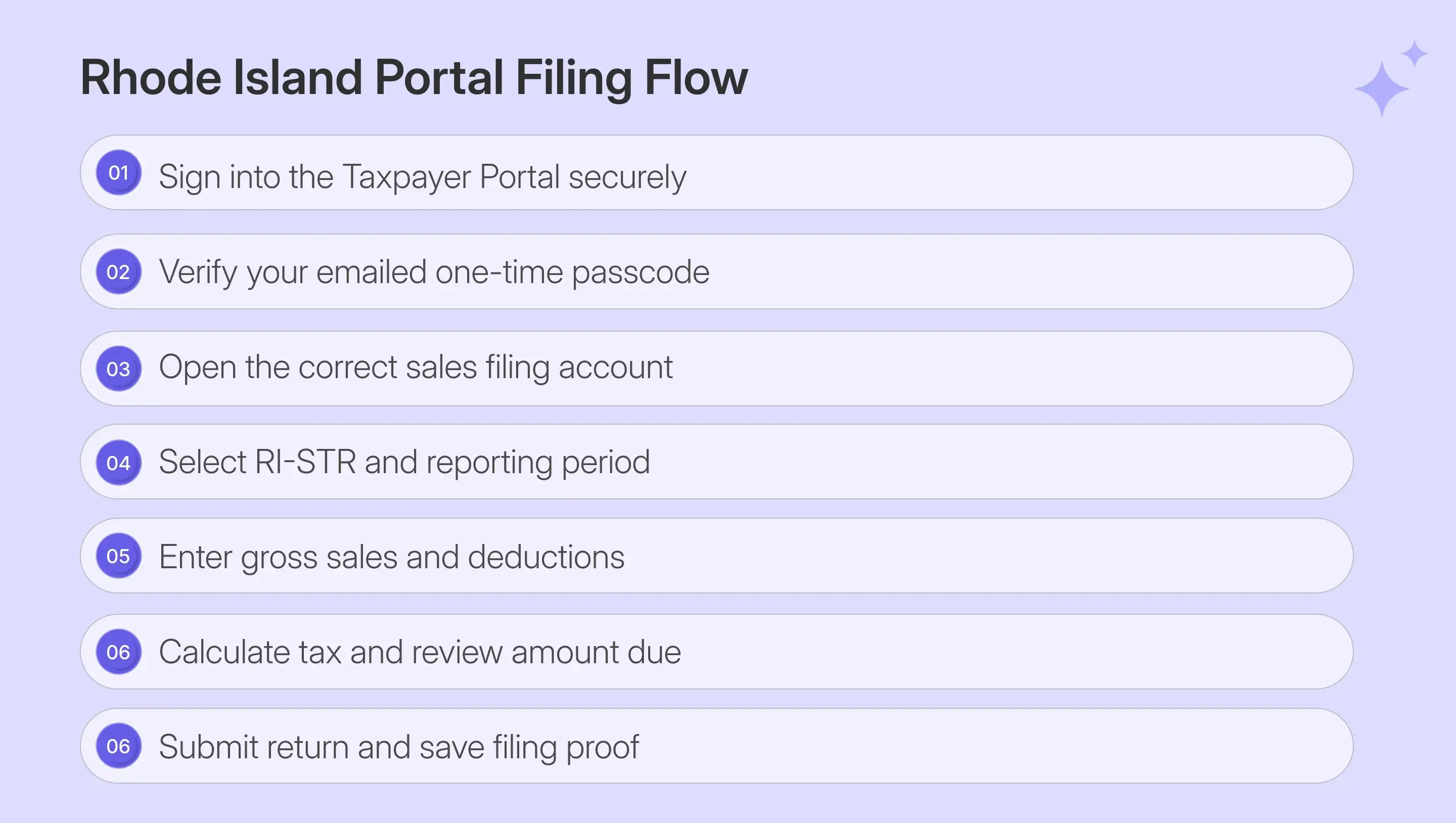
Here are the steps you must follow to file Rhode Island sales tax online:
Step 1: Sign In to the Taxpayer Portal
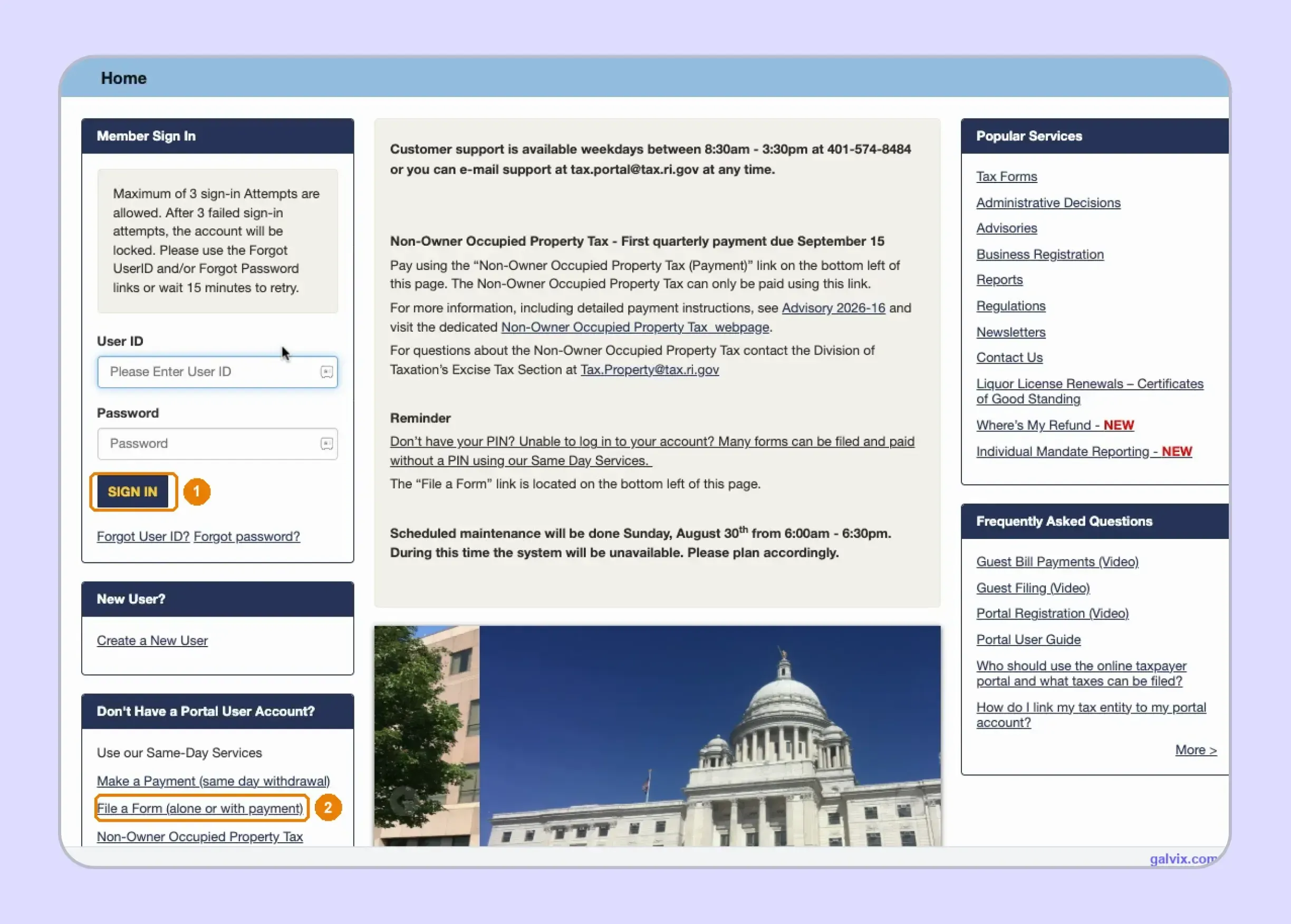
Open the Rhode Island Taxpayer Portal and enter your User ID and password under Member Sign In. A Same Day Services option also supports guest filing, although a registered account is more practical when recurring tax filings require saved records, filing history, account messages, and easier access to earlier submissions.
Step 2: Enter the Emailed Passcode
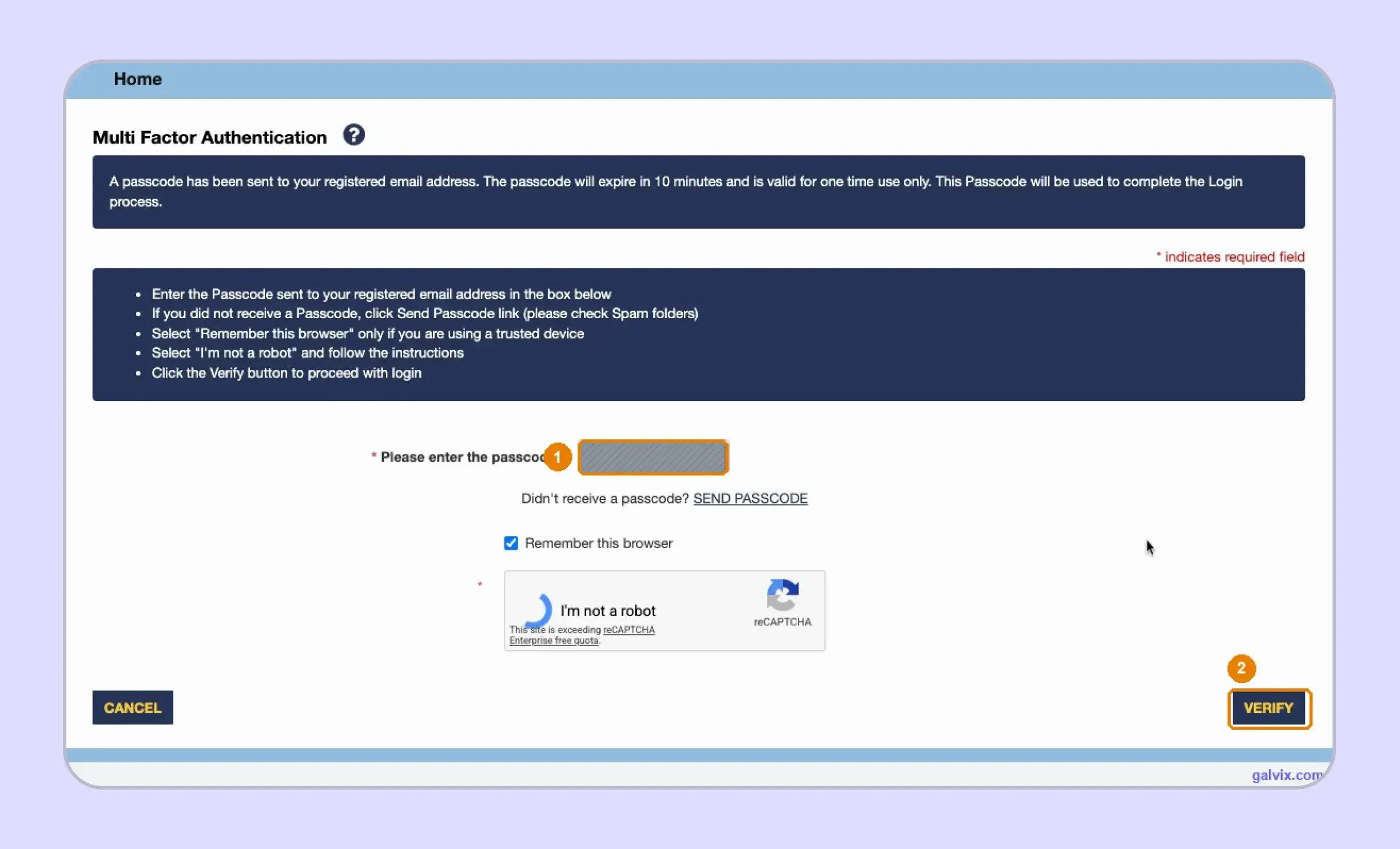
After signing in, the portal sends a one-time passcode to the email registered with your account. Enter the code, complete the reCAPTCHA check, and select Verify. The passcode expires after ten minutes, so confirm your registered contact information and inbox access before starting the filing process.
If another employee or adviser now handles filing, check access to the registered email before the deadline. Without the passcode, you cannot complete portal authentication.
Step 3: Open the Sales Account
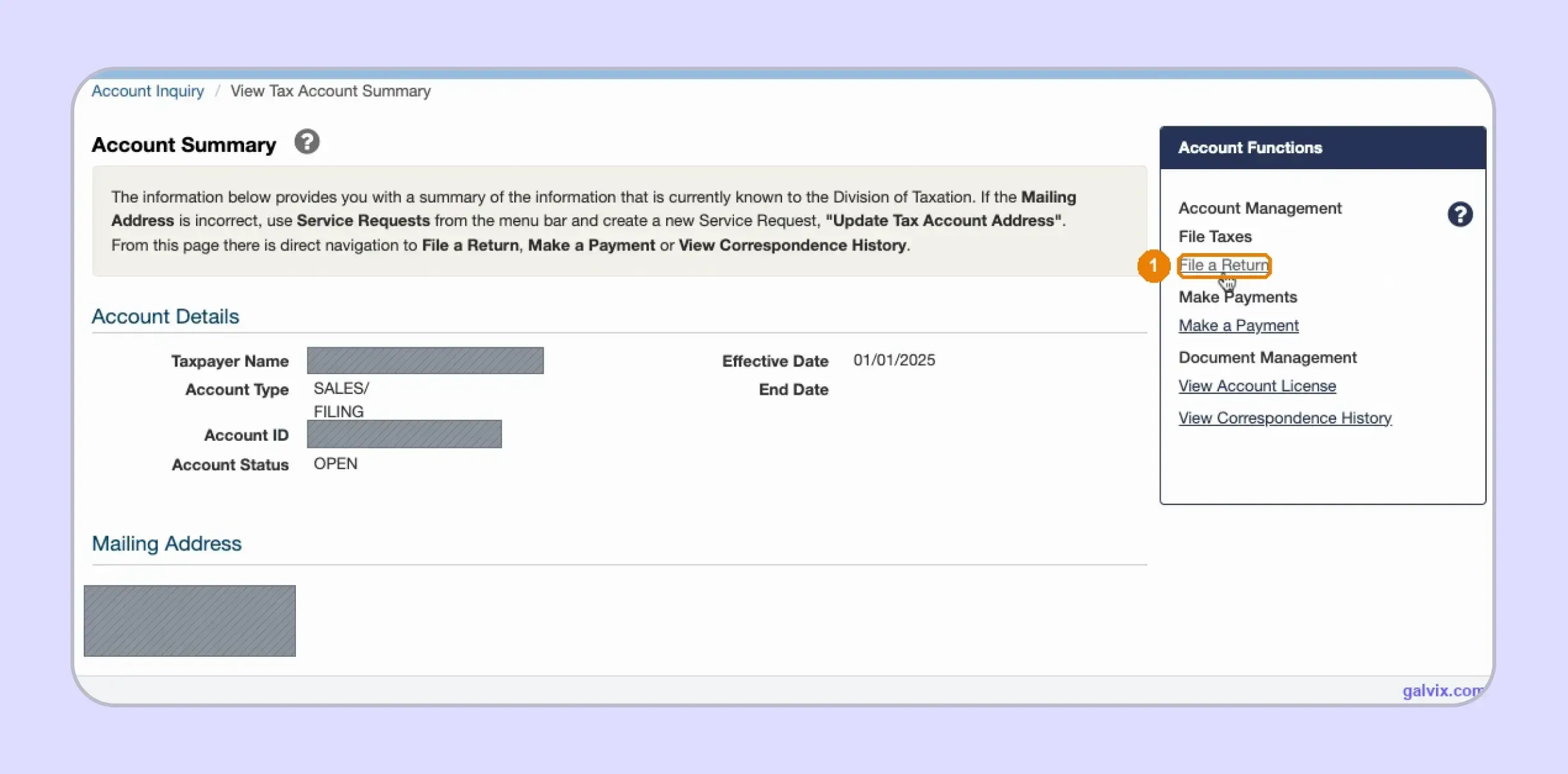
Once access is verified, review the taxpayer name, Account ID, account status, and SALES/FILING account type. Confirm the business details before continuing, especially when a single login covers multiple entities or tax accounts. Then select File a Return from Account Functions to begin the correct Rhode Island sales tax return.
Step 4: Select RI-STR and the Filing Period
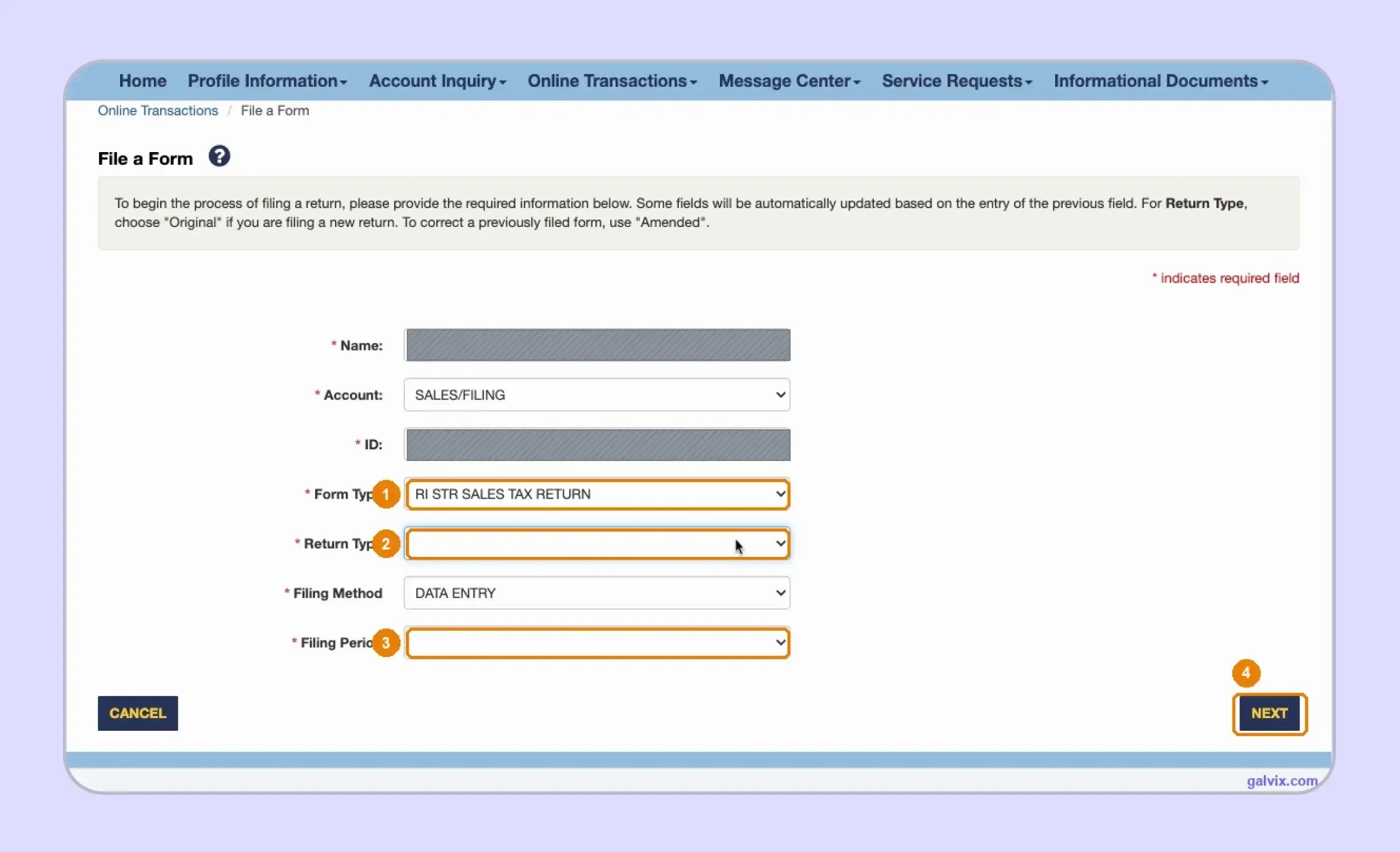
Choose RI STR SALES TAX RETURN as the tax form, then select Original for a new filing or Amended for a correction. Keep DATA ENTRY as the filing method, choose the correct reporting period, and select Next. This sequence is central to understanding how to file RI sales tax correctly.
Check the filing period carefully before continuing. Selecting the wrong open period can place otherwise correct figures into the wrong return.
Step 5: Open Computation of Tax
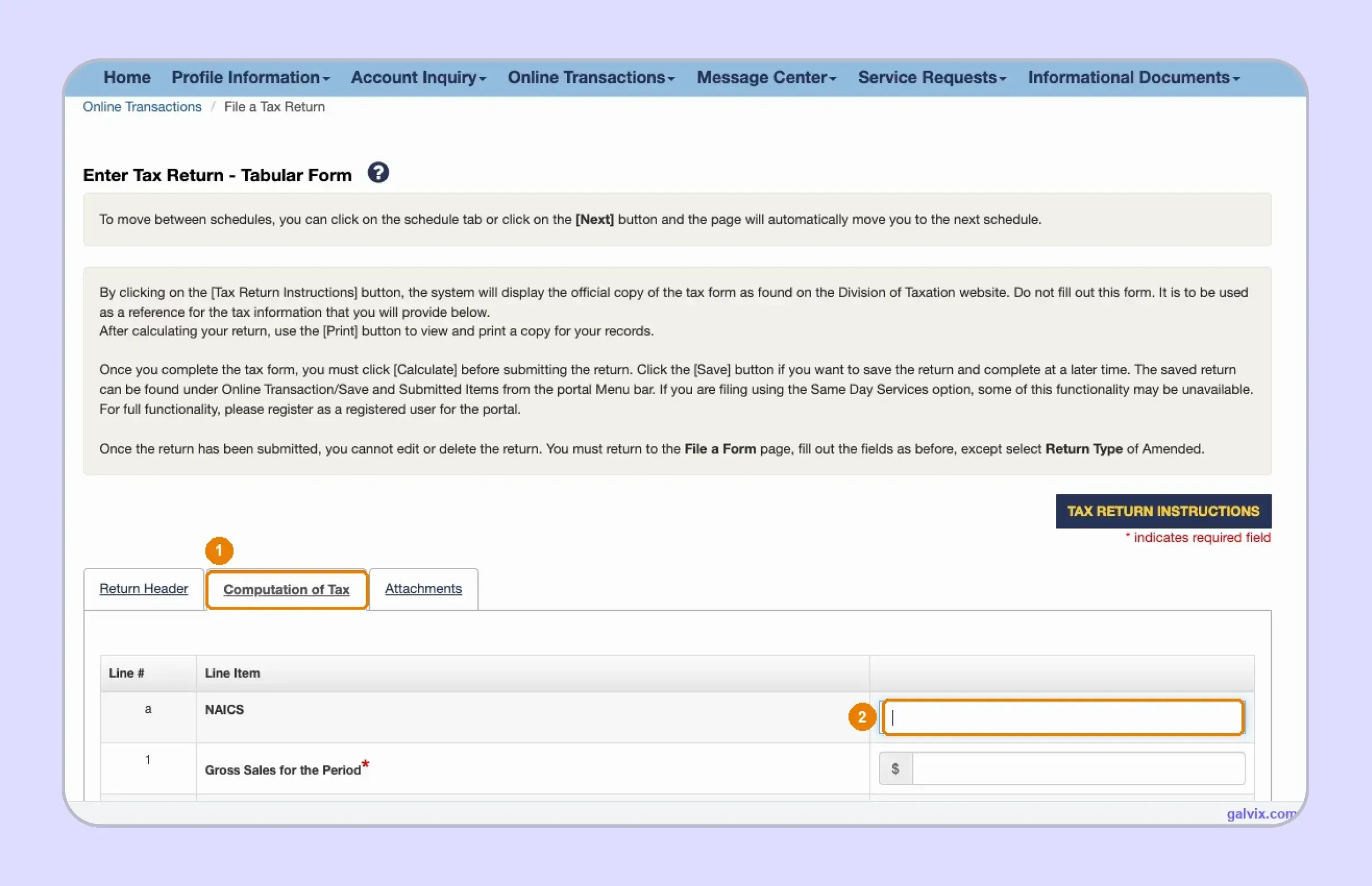
The return contains Return Header, Computation of Tax, and Attachments tabs. Most filing work takes place under Computation of Tax, where you enter the NAICS code before reaching sales, deductions, use tax, and credits. Review the tax return instructions first because they explain how calculation and submission work.
Step 6: Enter Gross Sales and Deductions
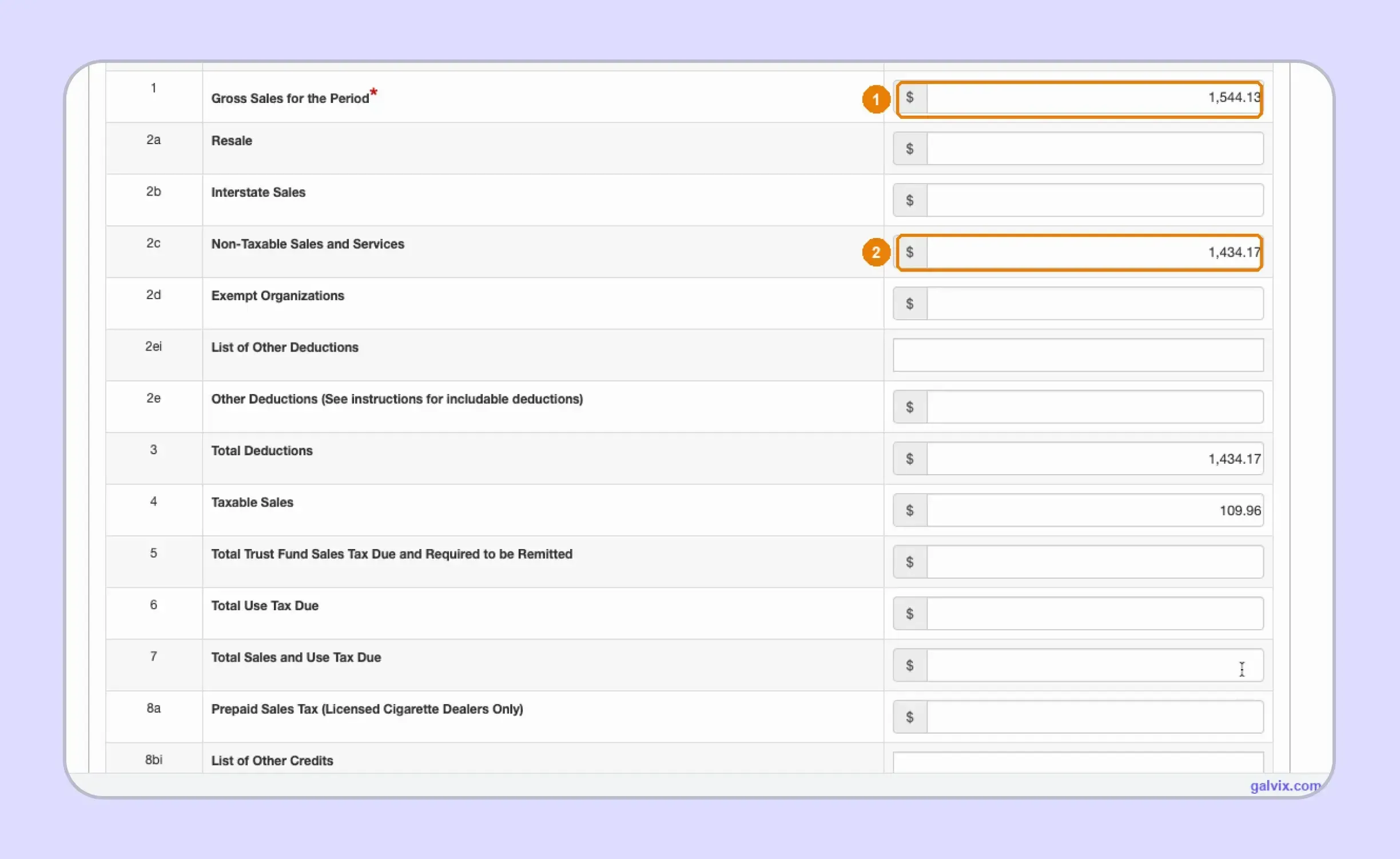
Enter Gross Sales on Line 1, then complete the applicable deduction lines from 2a through 2e for resale, interstate sales, non-taxable activity, exempt organizations, or other qualifying deductions. The portal updates Total Deductions and Taxable Sales automatically, which is central to how to fill out sales and use tax return in Rhode Island correctly.
Computed fields can look similar to editable fields. If a total appears incorrect, change the underlying sales or deduction input instead of overwriting a calculated amount.
Step 7: Calculate and Check Line 10
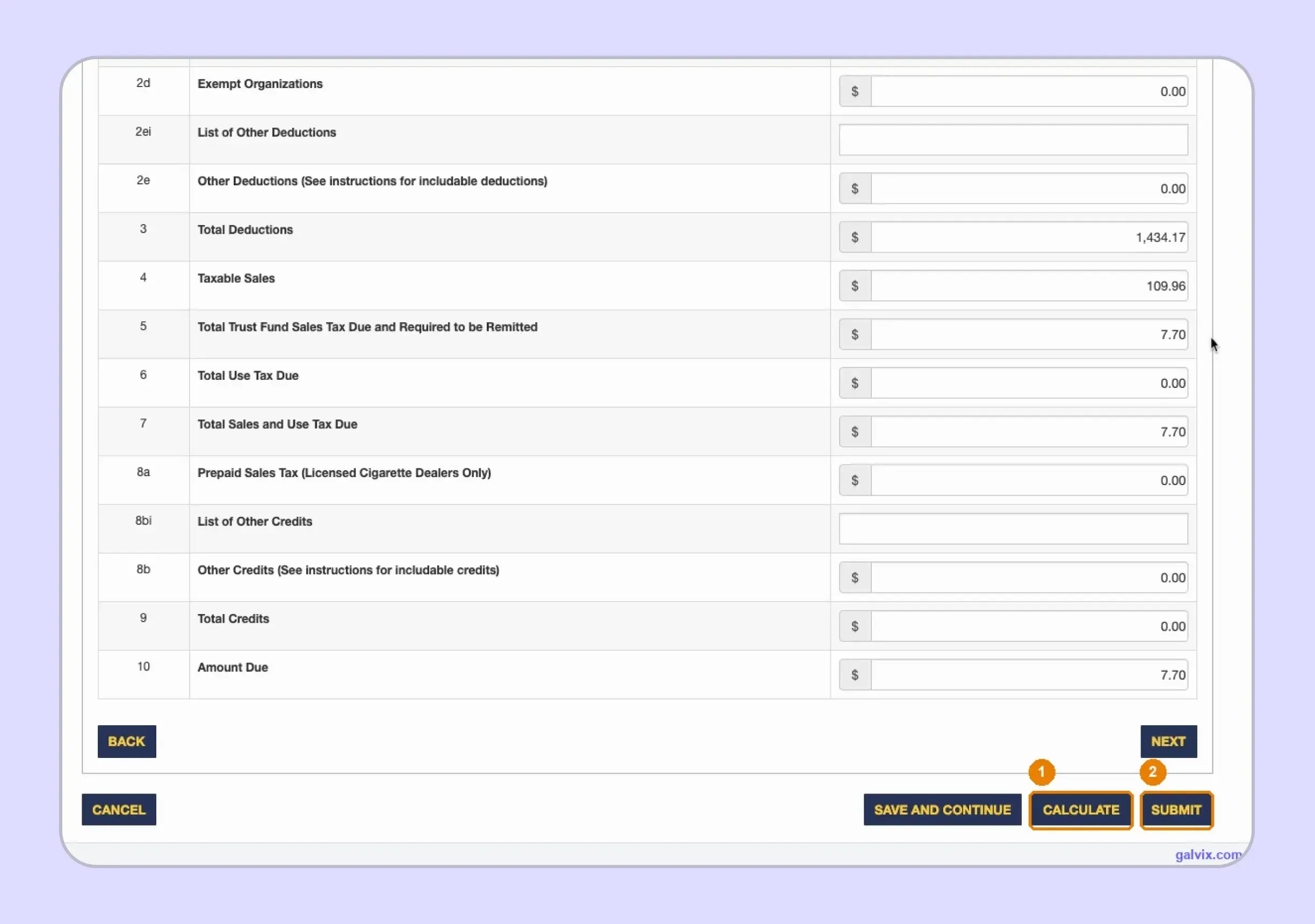
After completing all applicable inputs, select Calculate and review the tax lines before submitting. Check Line 5 sales tax, Line 7 total sales and use tax, any credits, and Line 10 Amount Due. This final review helps confirm the tax due and the correct amount of sales tax before transmission.
Submit can remain available before calculation is complete. Use the same order every time: calculate the return, review Line 10, then proceed to submission.
Step 8: Review Attachments and Submit
Open the Attachments tab if supporting documents need to accompany the return. A routine RI-STR can usually proceed without attachments. Save and Continue stores a draft, while Submit actually transmits the filing. This distinction is crucial when you are trying to figure out how to file sales tax return in Rhode Island through the portal.
Saving a return does not file it. Make sure you select Submit once the figures are complete and reviewed.

Step 9: Save the Confirmation Number
After submission, the portal provides a confirmation number showing that your Rhode Island sales tax return was received. Save it with the return records and any supporting documentation. If payment is completed separately, retain that proof as well, especially when documenting how to pay sales tax in Rhode Island for the period.
What Rhode Island Sales Tax Filing Requirements Should You Know?
Your Rhode Island sales tax return follows the filing frequency assigned to the account. Most retailers file monthly, zero returns remain required, and quarterly filing needs approval rather than an internal decision by the business.
| Requirement | Rhode Island Rule |
|---|---|
| Main return | Form RI-STR |
| General state rate | 7% |
| General local rate | None |
| Normal filing frequency | Monthly |
| Monthly due date | 20th following the period |
| Quarterly eligibility | Average monthly liability below $200 for six months, with approval |
| Quarterly due dates | Last day of July, October, January, and April |
| Zero returns | Required for active filing periods |
| Timely filing discount | None |
| Retail permit | Renewed annually |
| Remote threshold | $100,000 or 200 transactions |
| Filing portal | Rhode Island Taxpayer Portal |
The Rhode Island sales tax filing requirements also use accrual reporting for retailers, so sales are recognised in the month they occur rather than when payment is received. Your records should therefore match the correct calendar year, month, and filing period.
The following account and filing details are also worth checking before you submit the return:
- Retail permits expire on June 30 and require annual renewal, separate from the income tax year and return schedule.
- Businesses should follow the RI Division of Taxation account rather than mix business use tax with personal income tax.
- The Division of Taxation website publishes current forms, due dates, permit renewals, and frequently asked questions for active filers.
- Rhode Island posts a scam notice about a bogus mailing whose 800 number is not a Division of Taxation number.
- Because such messages can affect data security and the identities of victims, verify unusual state correspondence before sharing information.
How Do Exempt Sales Affect the Rhode Island Sales Tax Return?
Exempt activity reduces taxable sales on Lines 2a through 2e of the Rhode Island sales tax return, so each deduction should be supported by documentation. Rhode Island uses different exemption certificates for resale, exempt organizations, manufacturing, farming, and other qualifying transactions.
Resale and Exemption Certificates Serve Different Purposes
Resale transactions use Rhode Island’s resale certificate, while charitable or religious organizations, manufacturers, and farmers need the documentation that applies to their exemption. Rhode Island retailers should also confirm that the certificate fits the buyer and transaction before removing the sale from sales tax.
For businesses operating across states, a consistent sales tax exemption certificate process helps keep the correct documentation tied to each exempt transaction.
Certificate Collection Does Not Replace Transaction Review
Collecting a certificate is only one part of the process. You still need to verify the document and confirm that the actual transaction qualifies for exempt treatment under Rhode Island rules.
This becomes more important when the same customer buys across several states, since Rhode Island sales tax rules may differ from those applied elsewhere. Keeping certificate collection, verification, and transaction eligibility separate reduces the risk of unsupported deductions.
The Galvix Sales Tax Exemption Certificate Tool helps identify certificate requirements and seller checks before exempt transactions reach the return. It can support documentation review, while the final exemption decision should still depend on the buyer, transaction, and applicable state rules.

What Problems Do Rhode Island Sellers Face When Filing Sales Tax?
A flat 7% rate removes local allocation work, yet filing a Rhode Island sales tax return can still become confusing when source records, marketplace transactions, filing frequency, or exemptions are unclear.
Filing Frequency and Marketplace Sales Cause Confusion
A 2026 small-business discussion involved a Rhode Island seller who had missed monthly filings and was unsure how to handle marketplace sales where tax had already been collected. The situation shows why marketplace collection should be kept separate from the seller’s own return obligation.
This distinction is crucial when monitoring sales tax nexus, since marketplace activity can affect compliance calculations even when the marketplace handles collection and remittance.

Exempt Sales Can Be Hard to Classify Correctly
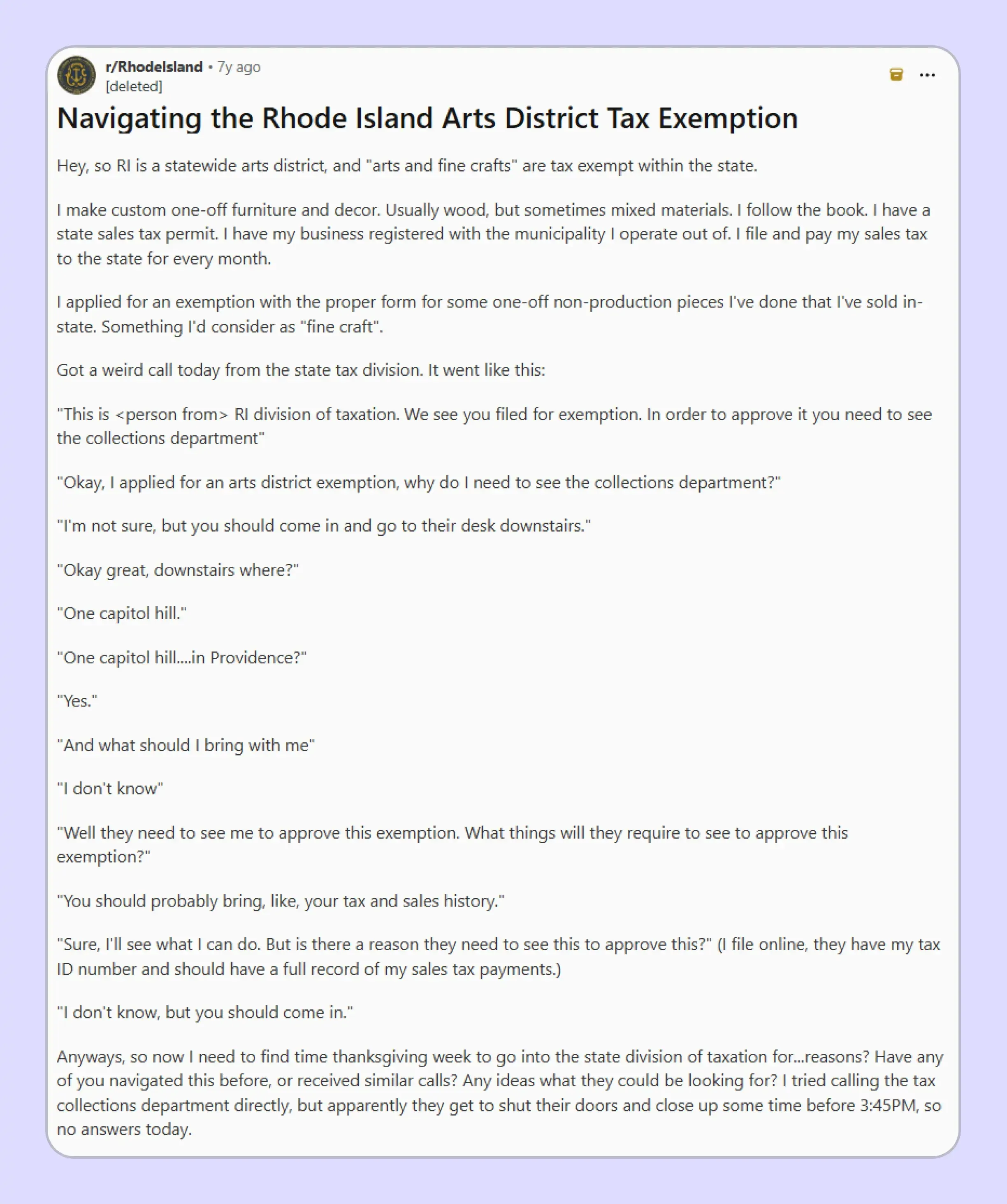
One Rhode Island business owner described uncertainty around an arts-related sales tax exemption despite holding a sales tax permit and filing regularly. Another Rhode Island accounting discussion questioned whether a rented casket received the same exemption treatment as one sold outright.
How Does Galvix Help With Rhode Island Sales Tax Filing?
Galvix manages recurring sales tax compliance as a service, so your finance team does not need to prepare every return or work through each state portal. The process starts with reconciled transaction data, moves through return preparation and specialist review, then reaches your team for approval before filing.
For a Rhode Island sales tax return, that workflow can organize direct sales, separate marketplace activity, review deductions, account for use tax, and prepare RI-STR figures before submission. The return data also stays visible, including taxable sales, expected tax, amount due, filing status, and transaction detail.
This visibility becomes more useful when a single finance team manages multiple tax returns across states with different rules. Transaction data can flow through sales tax integrations for Shopify, QuickBooks, Stripe, BigCommerce, WooCommerce, and Microsoft Dynamics Business Central, with API or file uploads available.
From there, the same model can support sales tax filings without having to rebuild each return from separate exports. Filing can connect with sales tax nexus monitoring, registrations, tax determination, exemption management, and state notice work as transaction volume and state registrations increase.
Pricing follows a modular model, so you select only the services your business needs instead of paying for a broad package. Exact pricing depends on the workload for each module, including returns, transactions, states, and exempt customers.
What Can Galvix Manage for Rhode Island Sellers?
When Rhode Island sales is part of a broader filing footprint, Galvix can take over recurring operational work while your team retains visibility and approval.
- Sales reconciliation: Galvix organizes source-system transactions before return preparation, helping gross and taxable amounts match the activity included in the filing.
- Marketplace separation: Facilitator activity can be kept distinct from direct-channel activity, reducing the risk of duplicate reporting across different sales channels.
- Deduction review: Exempt and non-taxable transactions remain connected with the records supporting the deduction before the RI-STR figures are finalized.
- Return preparation: Galvix prepares recurring returns, routes them for review, files approved returns, and retains available filing records for later reference.
- Nexus monitoring: Businesses selling across states can track new obligations before thresholds create additional registration and filing work.
- Notice management: State correspondence can remain connected with the wider compliance process instead of becoming an isolated task for an already busy finance team.
This approach becomes useful as your business expands outside Rhode Island. Different states use different forms, deadlines, sourcing rules, deduction structures, and portal workflows, so the operational burden rises long before the underlying calculation becomes difficult.
Book a Galvix demo to review your Rhode Island and multistate filing workflow before recurring compliance work begins consuming more internal finance time.
Frequently Asked Questions
Can I change my Rhode Island sales tax filing frequency?
Yes, although quarterly filing requires state approval. If your average monthly sales and use tax liability stays below $200 for six consecutive months, you may request quarterly filing. Continue using the current schedule until the Tax Administrator authorizes the change in writing.
Can I file RI-STR without creating a Taxpayer Portal account?
Yes. The portal provides a Same Day Services option called File a Form, which can be used without a registered login. Guest filing does not provide the same saved drafts, filing history, or message center, so a normal registered account is more useful for recurring Rhode Island sales tax return online work.
How do I close a Rhode Island sales tax account?
You should formally update or close the state registration when business activity ends rather than stopping returns on your own. Until the account is properly closed, assigned periods can remain due, including periods showing zero sales. Use official registration contact information when changing account status.
Does Rhode Island require annual renewal of a retail sales permit?
Yes. A Rhode Island retail sales tax permit expires on June 30 and must be renewed annually. Current renewals carry no fee. Each new business location also needs its own permit, so expansion can create an additional registration requirement before sales begin.
Can I register for Rhode Island through Streamlined Sales Tax?
Yes. A qualifying seller can register directly with the Rhode Island Division of Taxation or through the Streamlined Sales Tax Registration System. The registration route should be completed before collection starts once nexus creates the obligation.
How long should I keep Rhode Island sales tax records?
Keep records long enough to support the transactions, deductions, certificates, payments, and filed returns if the state later reviews them. Exemption documentation deserves particular attention because the business may need to show why specific transactions were treated as untaxed.
What happens if my Taxpayer Portal security code expires?
The emailed code expires after ten minutes and works only once. Request another passcode through the portal if the original code expires, then complete reCAPTCHA and Verify. Whoever handles the Rhode Island sales tax return should have access to the registered email before starting.