
Mississippi businesses file sales tax through the Mississippi Department of Revenue using its Taxpayer Access Point, or TAP. The main filing is Form 72-010, the Sales and Special Tax Return. The general state sales tax rate is 7%, although different treatments apply to some transactions.
The Mississippi sales tax return filing process becomes more involved when a business operates from several locations. TAP organizes returns by permit, meaning each registered location has its own filing information. Every permit must be completed before the overall return can be submitted.
This Mississippi sales tax return guide explains how to prepare figures, complete each location, enter deductions, review the tax due, pay the balance, and keep filing proof. It also covers how Galvix can streamline the entire MS sales tax filing process for your business. For in-depth rate and taxability context for the state, you can also refer to this Mississippi sales tax guide that covers nexus, exemptions, rates, registration, and other key details.

Why Does Mississippi Sales Tax Filing Need Permit Level Review?
Mississippi sales tax returns are organized around each registered business location. TAP follows the same structure, so a company with several locations must complete the information for each sales tax permit. Location-level reconciliation therefore matters even when most activity uses the same general sales tax rate.
Each Location Has Its Own Sales Tax Permit
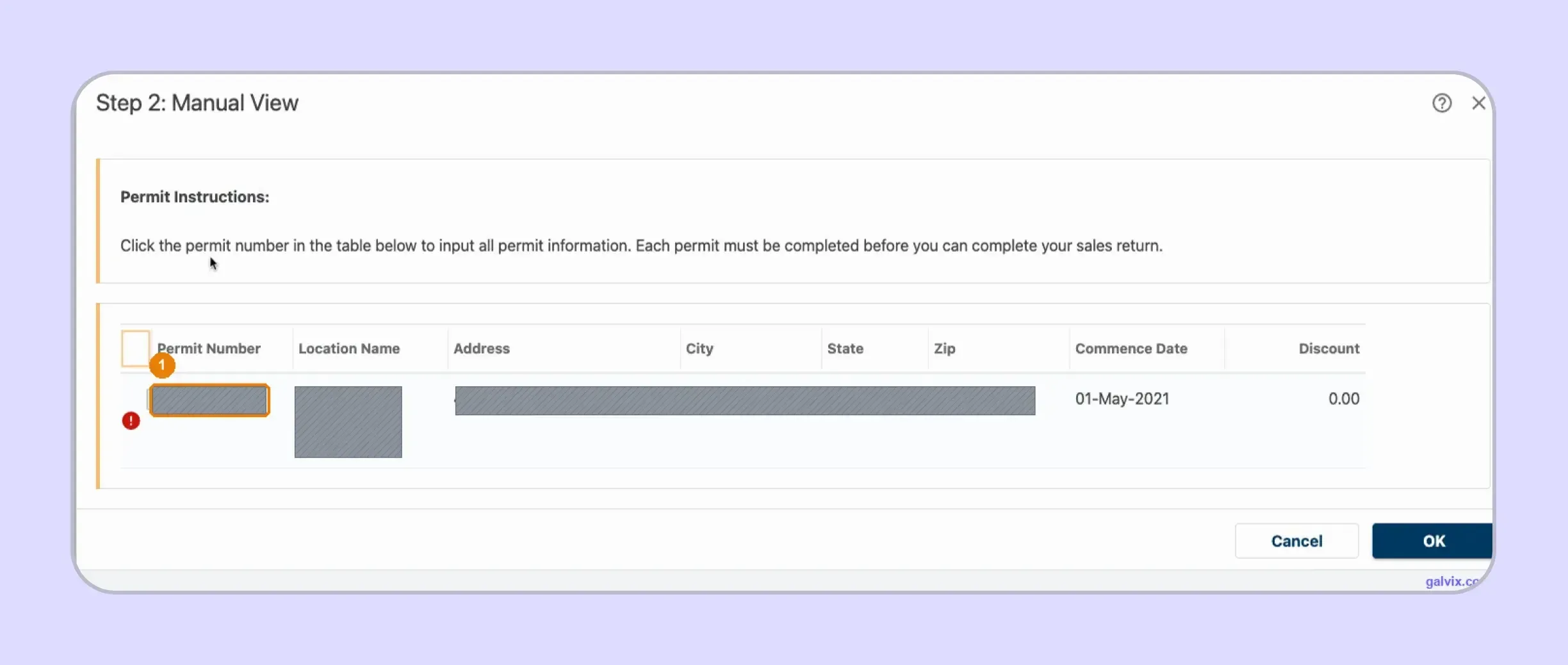
The Manual View lists every permit connected with the sales tax account. Each row identifies a location and opens a separate part of the return. A company with several stores cannot combine all locations into a single TAP entry. Each Mississippi sales tax permit must be opened and completed separately. Keeping total sales, deductions, and supporting records identifiable by location makes this stage considerably easier.
An Incomplete Permit Can Stop Submission
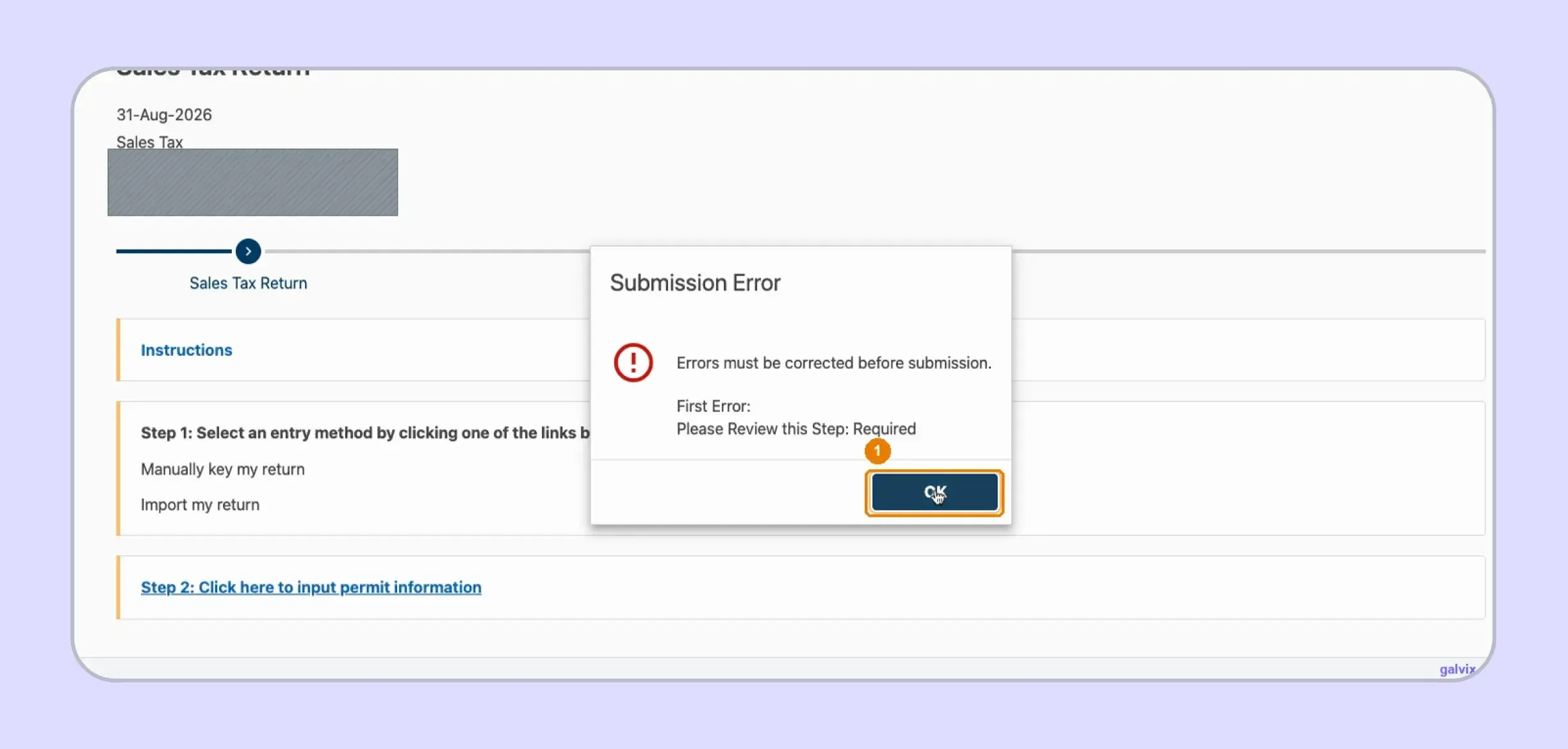
TAP stops the filing process when one location remains unfinished. The portal can display “Please Review this Step: Required” without telling you which permit caused the problem. For a multi-location business owner, that can mean reopening permits individually until the location in question is found. Correct the missing information before moving forward. Reaching this error screen does not file anything.
What Should You Prepare Before Opening Mississippi TAP?
Before starting the Mississippi sales tax return online filing process, reconcile the return by permit. Keep gross income, deductions, exemption records, special-tax activity, the correct reporting period, and payment information ready before opening the return.
| What to Prepare | What You Will Use It For |
|---|---|
| TAP credentials | Access the correct tax account |
| Gross income by permit | Report sales before deductions |
| Deductions by category | Reduce taxable gross income |
| Exemption documentation | Support exempt and resale activity |
| Special-tax activity | Complete applicable special-tax lines |
| Correct tax period | File the right outstanding return |
| Payment details | Pay the final liability |
Sales data may come from ecommerce orders, invoices, wholesale records, or a point-of-sale system. Reconcile those sources before entering TAP rather than correcting totals during submission.
Gross Income Comes Before Deductions
Gross income represents the permit's sales before deductions. It is not the same number as taxable sales.
TAP begins with gross income, subtracts the deductions entered separately, and calculates taxable gross income. Entering only taxable sales into the Gross Income field can understate both the sales reported and the deductions that should appear on the return.
Check Tax Treatment Before Building the Return
Most retail tangible personal property is taxable in Mississippi, while certain products and transactions receive different treatment. Prescription drugs are among the exemptions identified in Galvix’s current state research.
You should classify transactions involving digital goods, software, shipping charges, nonprofit organizations, or government agencies before return preparation rather than during portal entry. The underlying taxability determines which amount belongs in gross income, deductions, or another category.
Where a location-specific check is needed, the Galvix sales tax calculator provides ZIP-level rate information. The broader sales tax by state reference can help teams compare tax rates across jurisdictions.
Special Taxes Need Their Own Review
Mississippi does not stack general local sales taxes onto every retail transaction. However, certain special city levies can apply separately from the 7% state rate.
TAP places these amounts in Section B rather than inside the main general-sales calculation. A seller with applicable local tax activity should identify it before filing, as the general line will not automatically disclose an omitted special tax.
For example, Galvix’s Jackson sales tax guide shows why location can matter, even though Mississippi generally relies on a single statewide base rate.
Who Needs to File Sales Tax in Mississippi?
A business can create a sales tax nexus through physical presence or sufficient sales in Mississippi. Once the connection creates a collection obligation, sales tax registration typically precedes collection and filing.
Physical Presence Can Create a Filing Obligation
An office, store, warehouse, inventory, employees, or similar in-state activity can create a physical connection with Mississippi. Businesses should therefore consider both operational presence and revenue when determining where filing obligations apply.
Remote Sellers Should Monitor Economic Nexus
For remote sellers, Mississippi’s economic nexus threshold is $250,000 in sales into the state during the preceding 12 calendar months. Galvix’s current Mississippi research also notes that marketplace sales are excluded from that threshold, while resale and other nontaxable sales are included.
Businesses can monitor their Mississippi sales tax nexus position before crossing the threshold creates a new registration and recurring return obligation.
Once registration is required, the business obtains the relevant permit and begins collecting and remitting sales tax in accordance with the rules established by the Mississippi DOR. The same logic applies when a new physical connection creates nexus before the sales threshold is reached.
How Do You File Mississippi Sales Tax Online Through TAP?
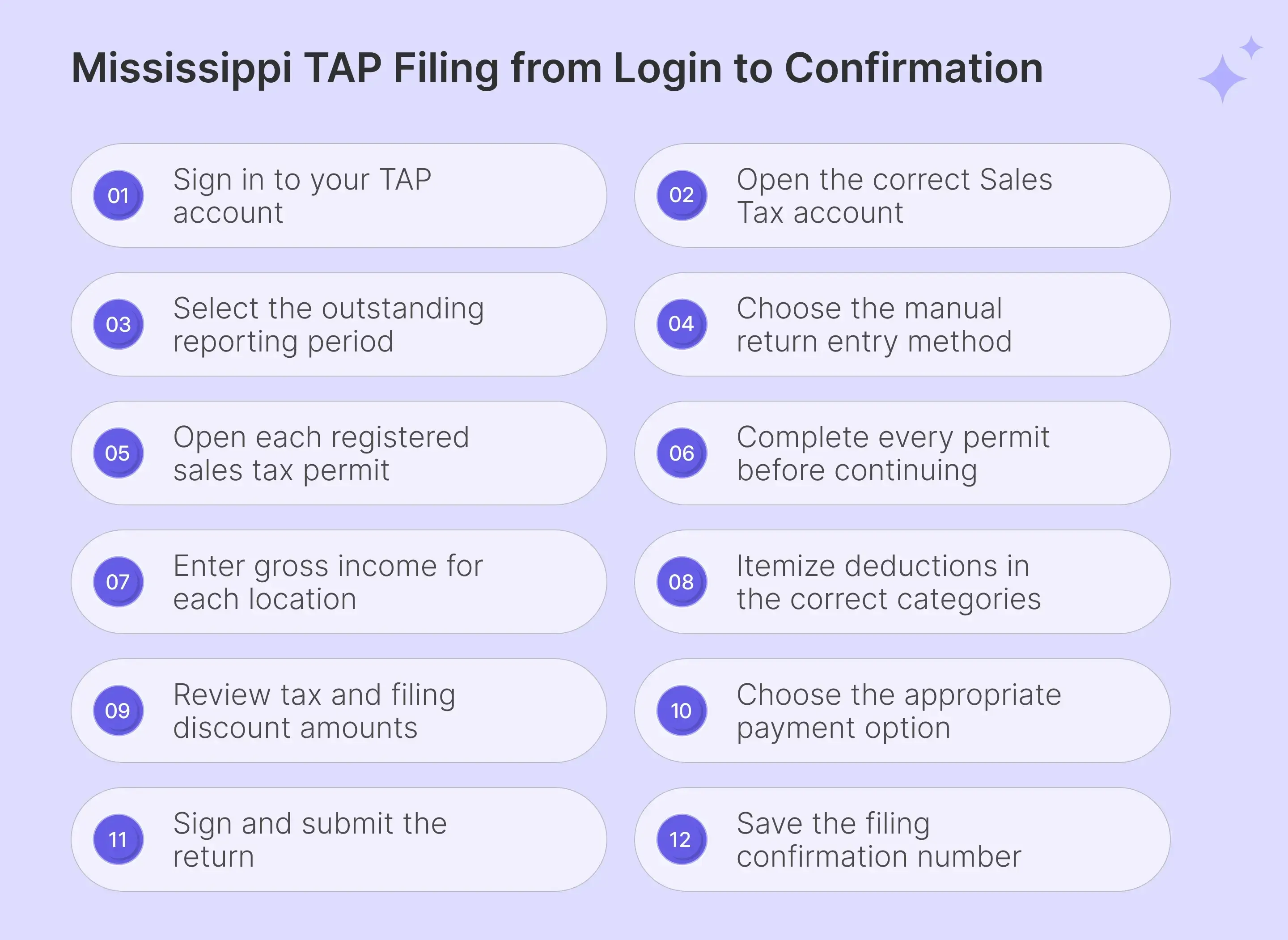
Here are the steps you need to follow to file Mississippi sales tax return online:
Step 1: Sign In to Mississippi TAP
Open TAP, enter your username and password, then select Log in. Your username belongs to the TAP profile rather than the permit itself. If the login details are unavailable, use the recovery option instead of creating another profile, which may not connect to the existing business tax accounts.

Step 2: Open the Sales Tax Account
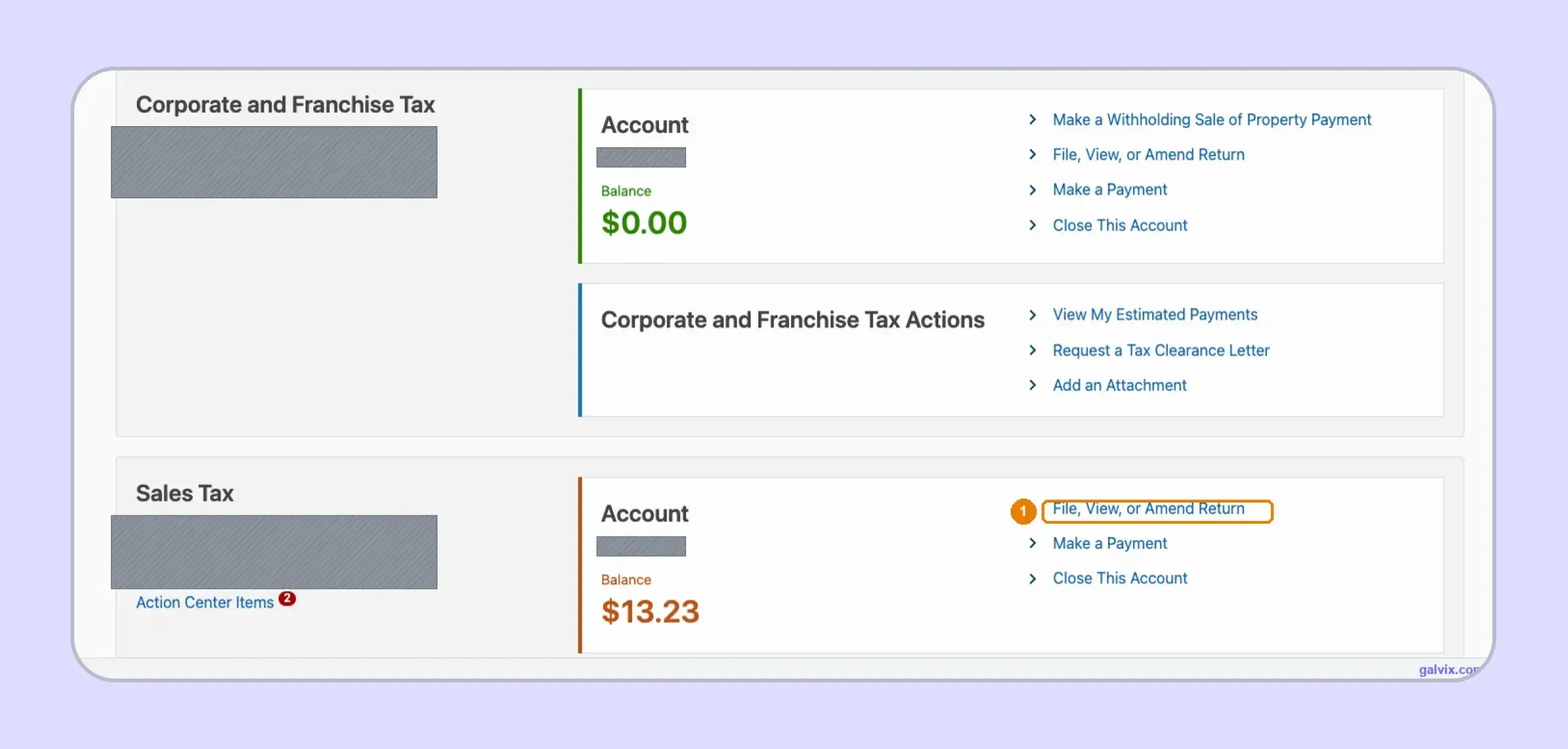
The account summary can display several tax types under one profile. Find the Sales Tax panel and select File, View, or Amend Return. Similar links appear under other accounts, so confirm the panel heading before opening the return.
The balance shown on the account is not necessarily the amount of sales tax that the new return will calculate.
Step 3: Choose the Correct Filing Period
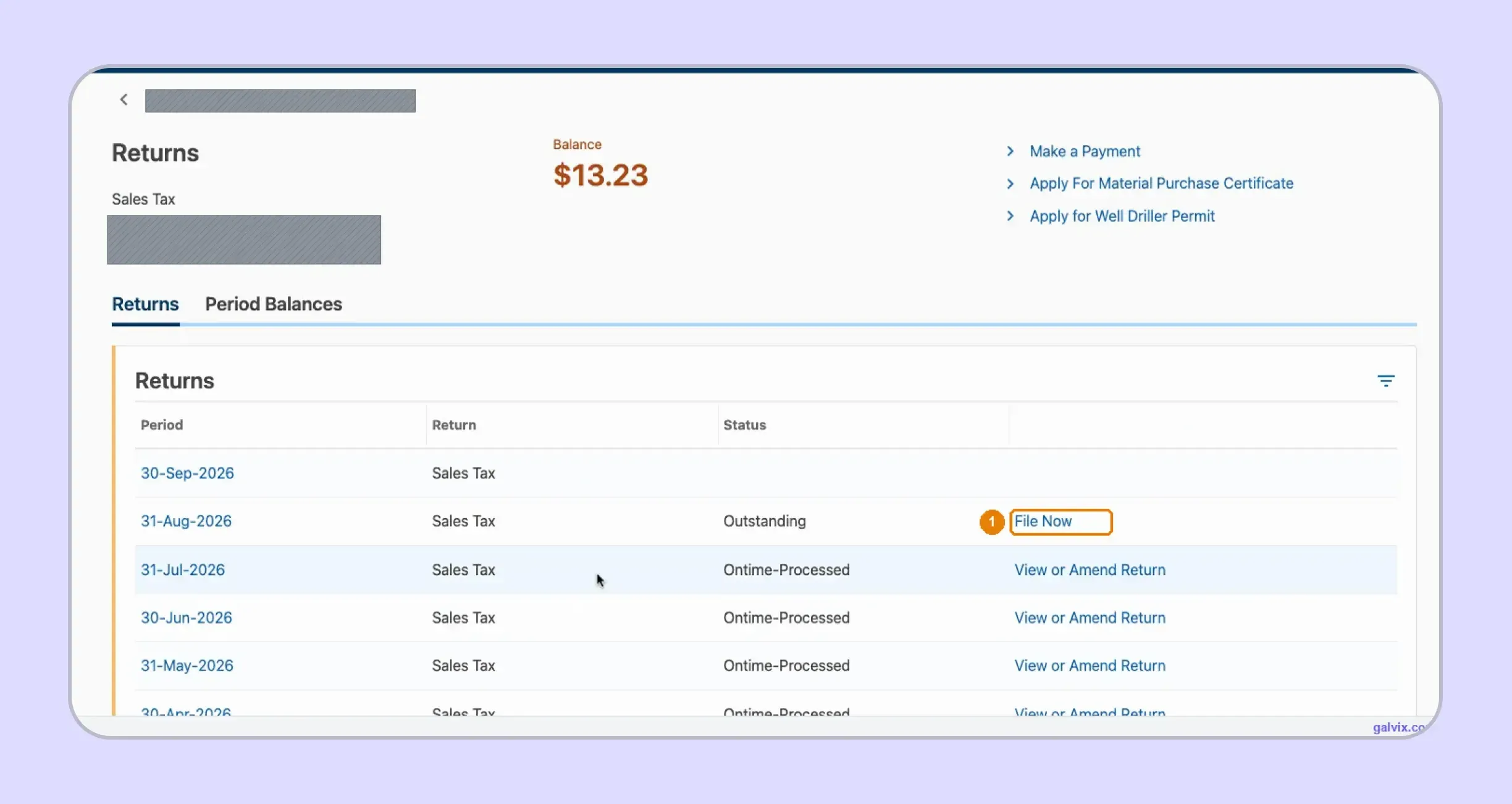
The Returns tab lists available sales tax returns by period-ending date. An unfiled period appears as Outstanding and includes a File Now option. Previously submitted tax returns display Ontime-Processed and provide a View or Amend Return link. Select the period you intend to file, especially when several outstanding periods appear together.
Step 4: Choose the Return Entry Method
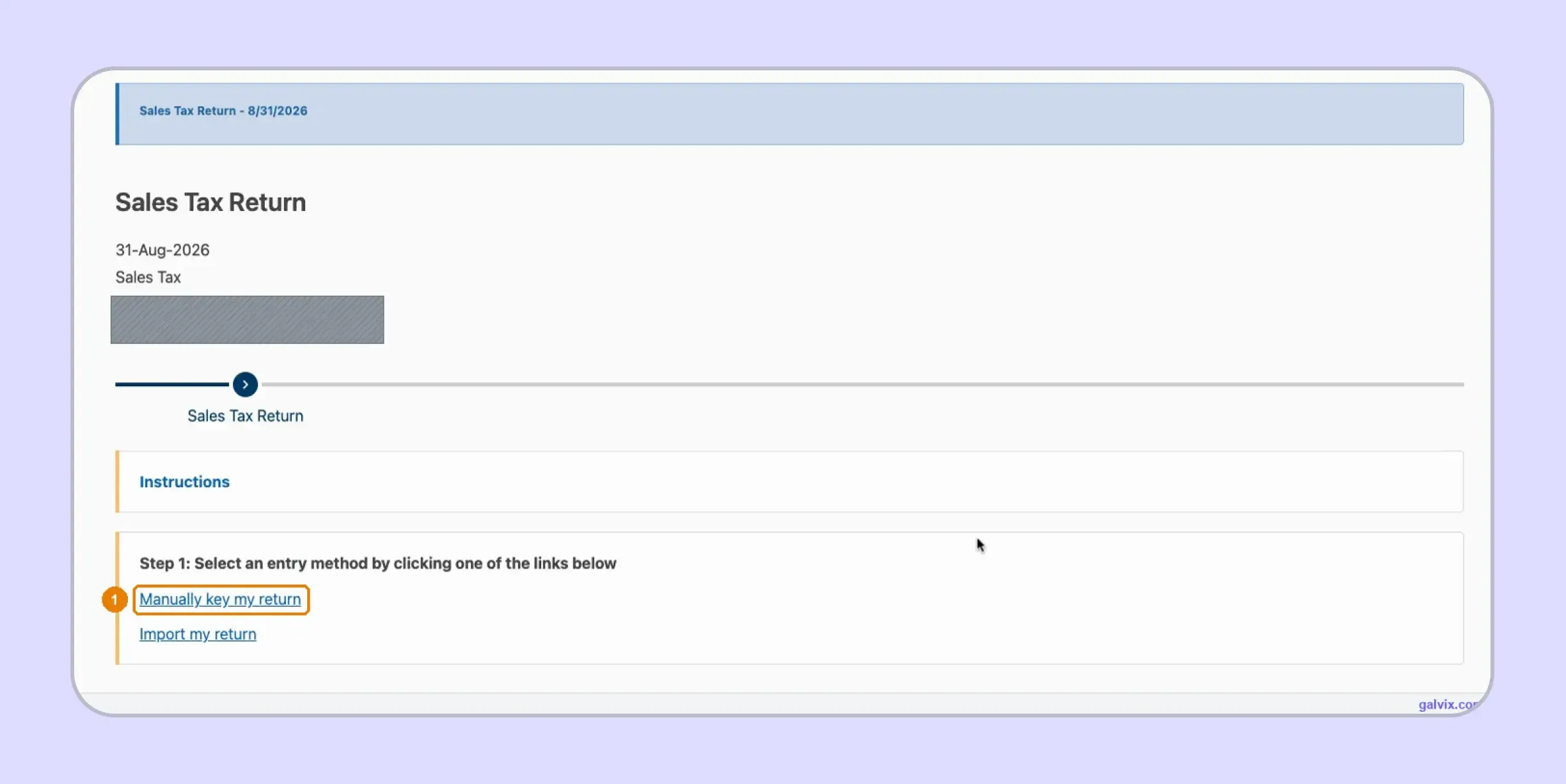
TAP provides two entry routes. Manually key my return opens the online form, while Import my return accepts a spreadsheet prepared in the Department’s required format.
Step 5: Open Each Permit
The Manual View displays every permit connected with the account. Select the permit number to open that location’s information. A multi-location seller receives one row for each permit. Complete every row before moving into the later tax filing stages, since TAP treats each permit as a separate part of the overall return.
Step 6: Resolve Permit Completion Errors
TAP can block progress on Mississippi sales tax return filing when a permit remains incomplete. The error may state “Please Review this Step: Required” without identifying the location responsible. Select OK, return to the permit list, and review the incomplete locations. The red required marker can help identify unfinished rows.
A submission error does not mean the return has been transmitted. The final Submit action comes later.
Step 7: Enter Gross Income for the Location
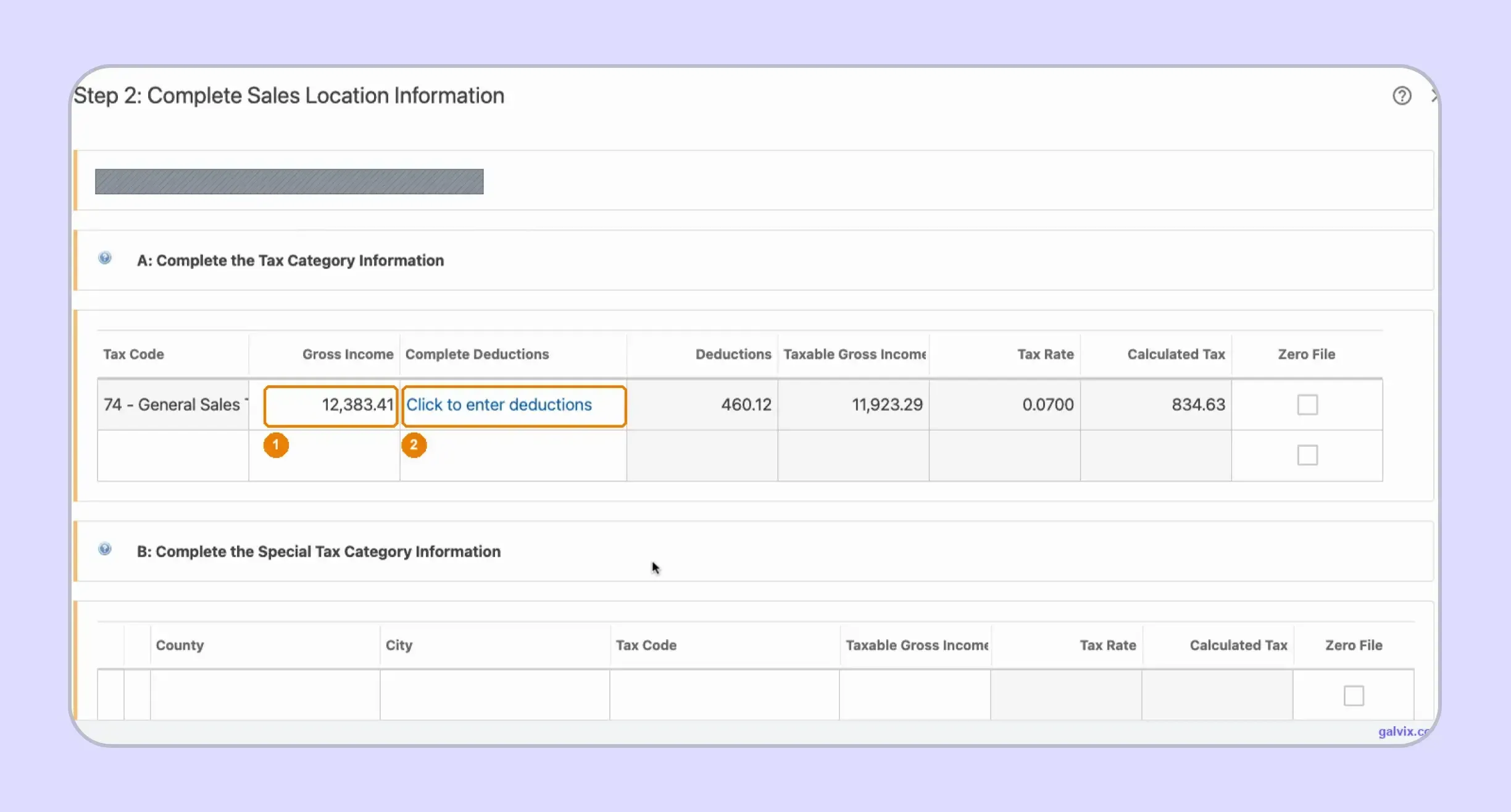
Section A contains the general sales row for Tax Code 74. Enter Gross Income, then open Click to enter deductions for qualifying exempt or nontaxable amounts.
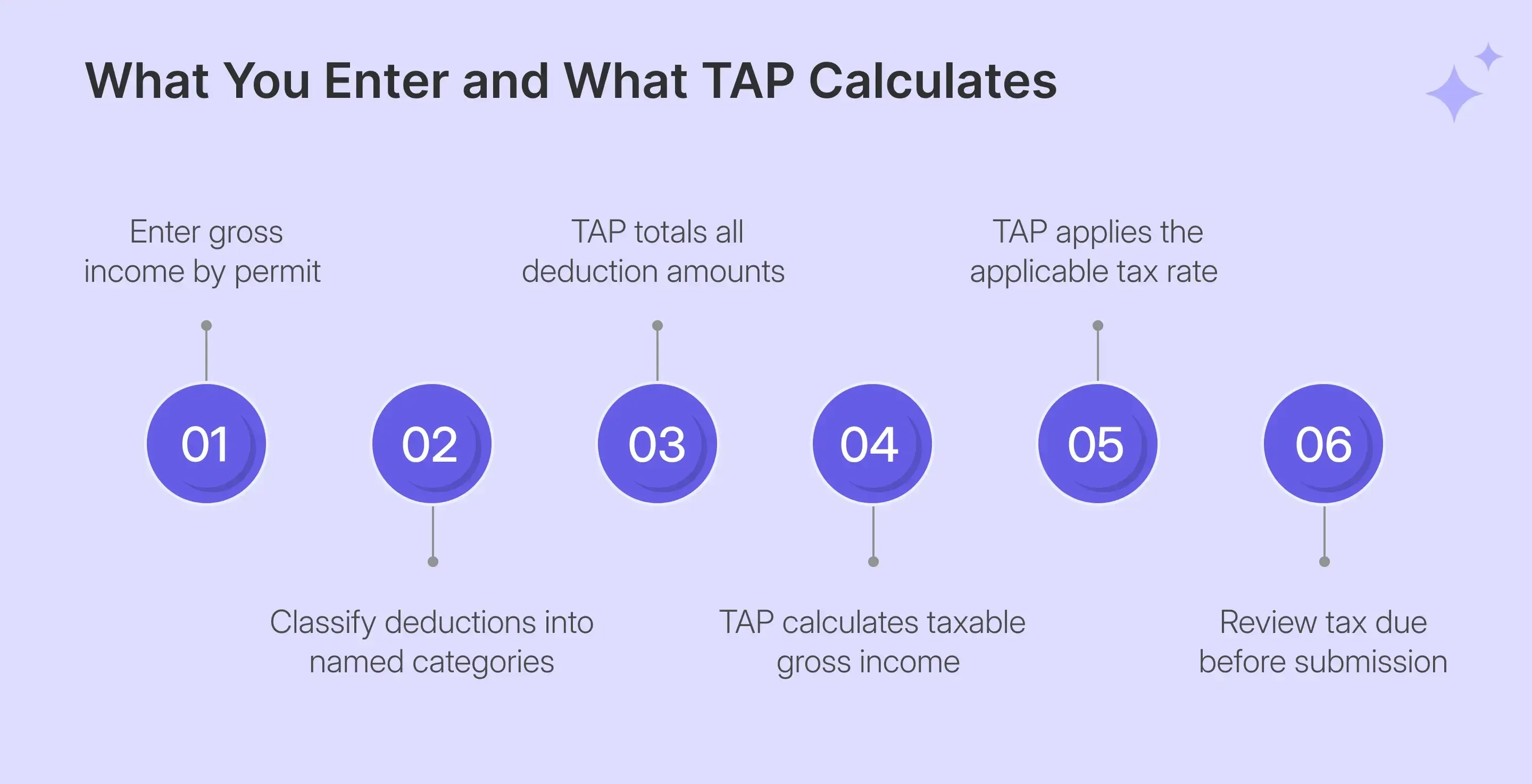
TAP calculates the rest. It totals deductions, determines taxable gross income, displays the 0.0700 rate, and calculates the tax automatically.
| Field | Who Completes It |
|---|---|
| Gross Income | You enter it |
| Deduction categories | You enter them |
| Total Deductions | TAP calculates |
| Taxable Gross Income | TAP calculates |
| Tax Rate | TAP fills |
| Calculated Tax | TAP calculates |
| Special Tax | You enter it when applicable |
Step 8: Itemize Your Deductions
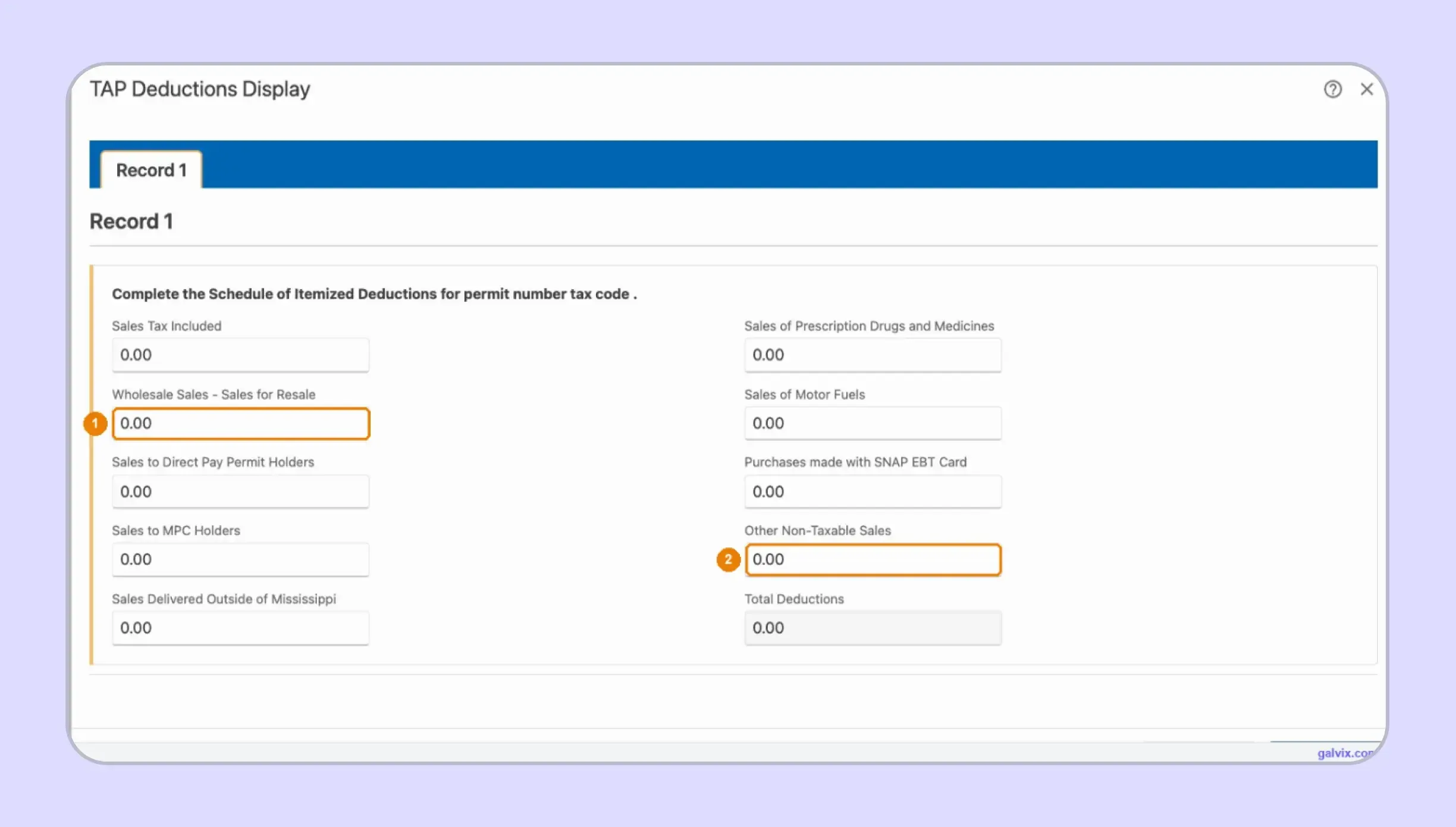
The deductions screen provides named categories for resale activity, Direct Pay Permit sales, Material Purchase Certificate activity, out-of-state deliveries, prescription drugs, motor fuels, SNAP purchases, and other non-taxable sales. Enter each qualifying amount under the correct category. TAP totals the entries and carries that amount back to the location screen.
There is no universal exempt-sales checkbox. If a qualifying amount is not placed in the appropriate category, it remains in the taxable base.
Step 9: Review Tax and the Filing Discount
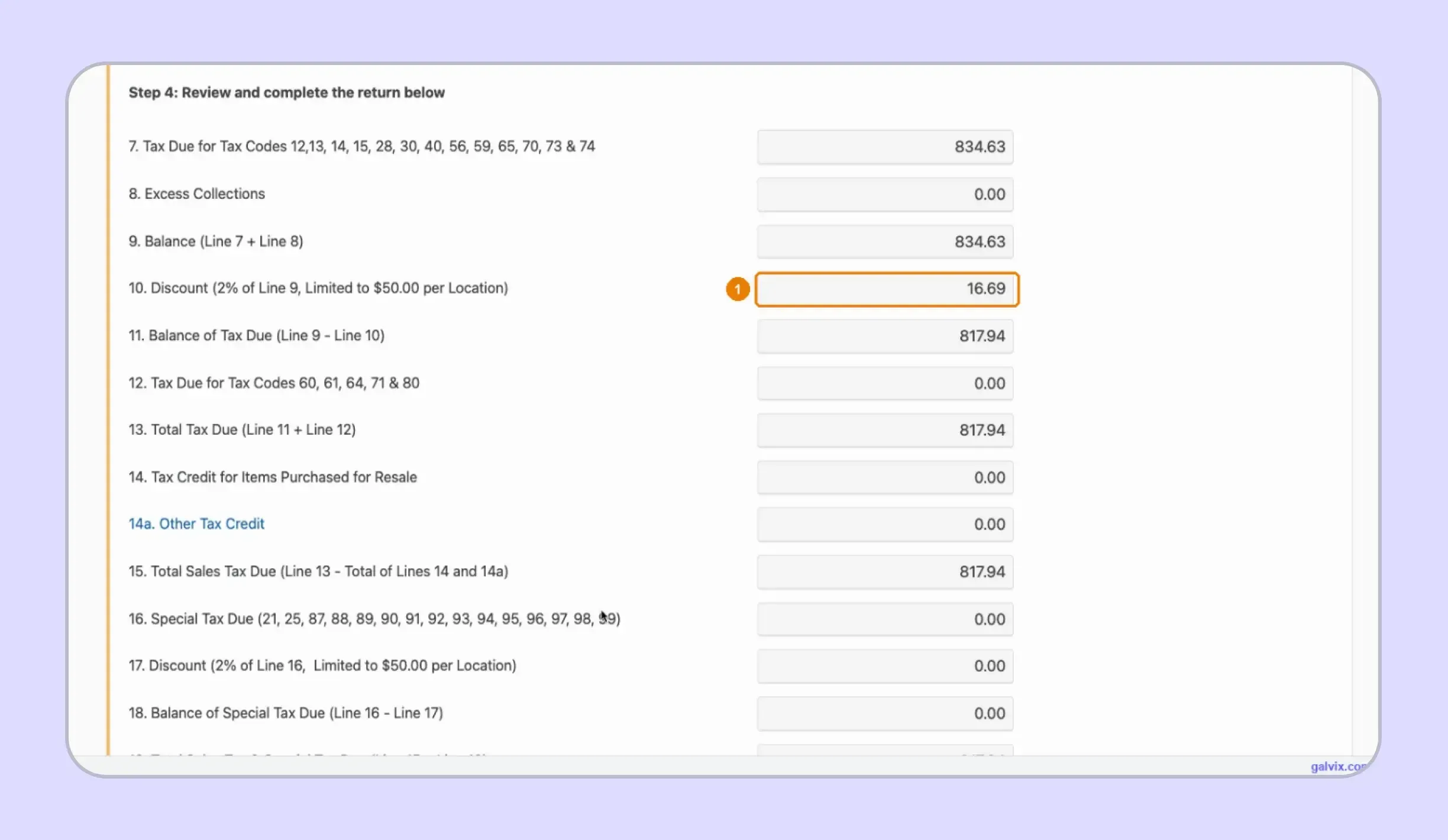
The review screen converts the earlier inputs into the numbered lines of Form 72-010. It shows tax, credits, special tax, discounts, and the final balance. Use this screen to compare TAP’s calculations with your reconciled records before continuing.
Step 10: Choose How to Pay
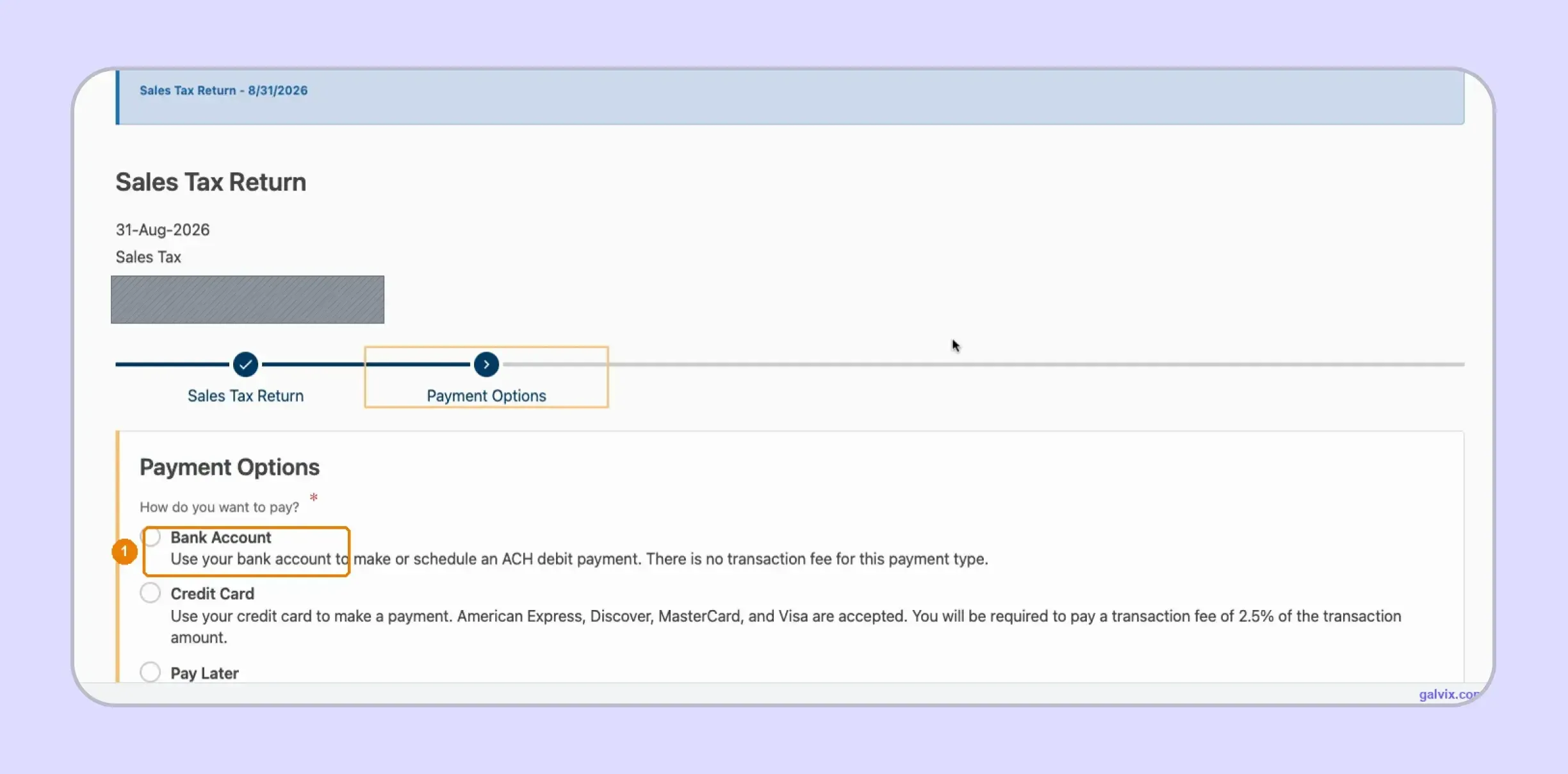
TAP offers three payment choices:
- Bank Account: ACH debit with no transaction fee.
- Credit Card: Payment with a displayed 2.5% transaction fee.
- Pay Later: File now and pay separately.
The payment screen separates Mississippi sales tax return filing from settlement of the tax liability, so selecting Pay Later does not clear the balance.
Filing and payment are separate. A return can be filed on time while the related payment remains outstanding.
Step 11: Sign and Submit the Return
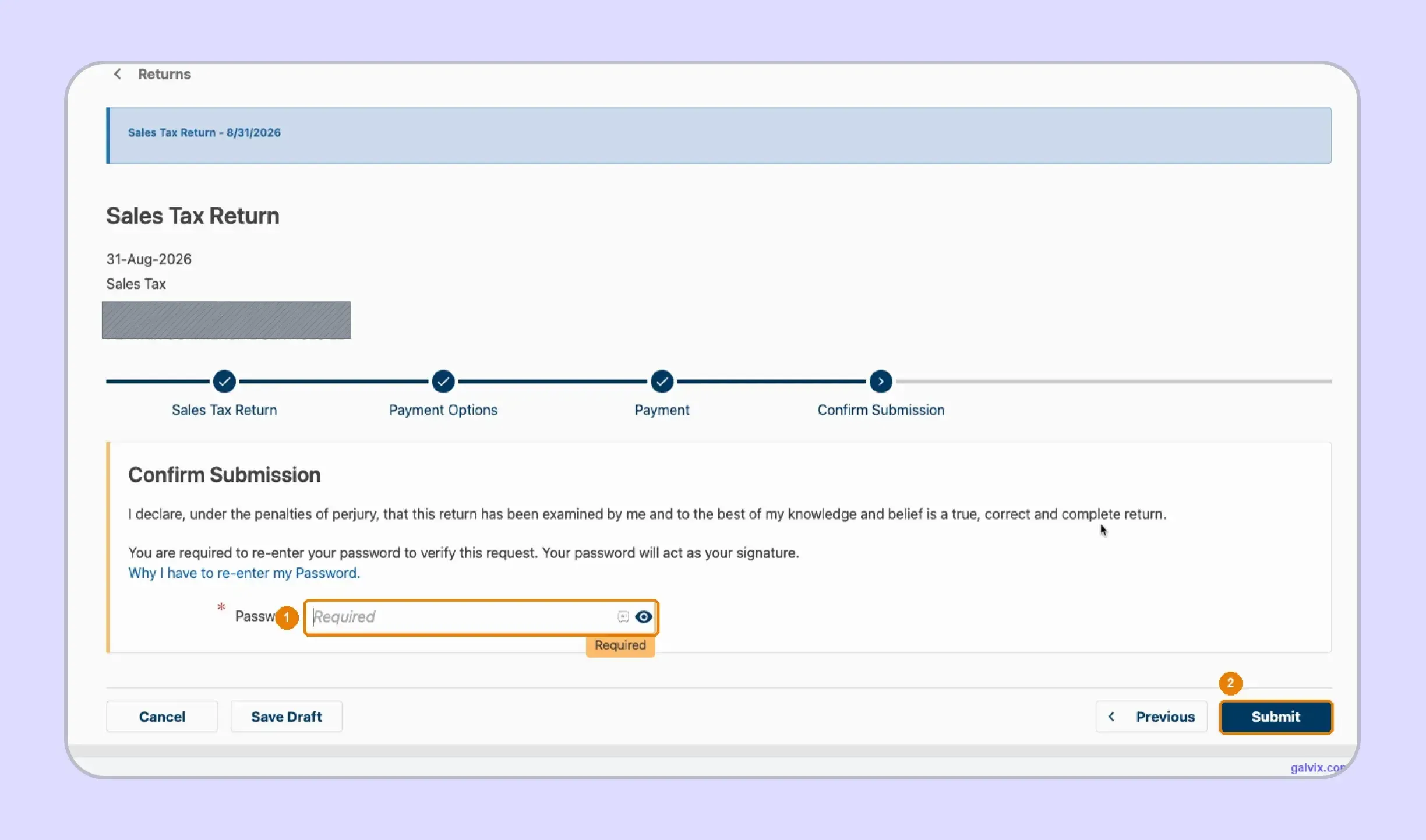
The Confirm Submission screen asks you to re-enter your password. TAP uses that password as the electronic signature.
Select Submit only after checking the return and payment choice. Reaching this page does not complete the sales tax filing. Transmission happens only after the password is entered and Submit is selected.
Step 12: Save the Confirmation Number
After Mississippi sales tax return submission, TAP issues a confirmation number. Keep that number with the return because it provides evidence that submission was completed.
If payment was made at the same time, retain the separate payment confirmation as well. If you later identify an error, reopen the period through View or Amend Return instead of starting an unrelated filing.
Closing TAP at the password screen leaves the return unfiled. Save the confirmation as soon as it appears.
How Do Deductions Affect a Mississippi Sales Tax Return?
Deductions reduce the gross income that remains taxable. Each deducted amount should therefore match the correct TAP category and supporting documentation. The portal totals the amounts entered, although the seller remains responsible for determining whether the transaction qualifies.
Resale Sales Need Supporting Records
Wholesale sales for resale have their own deduction category. Keep the buyer’s resale certificate, permit information, or other required documentation with the related transaction records.
A Mississippi sales tax exemption should never be assumed based on the customer's name alone. The supporting record needs to fit the reason the transaction was excluded from the taxable base.
For broader multistate processes, a consistent sales tax exemption certificate workflow can keep customer documentation linked with the sales ultimately reported as exempt.
Different Exemptions Need Different Support
Mississippi’s deduction screen separates several types of sales tax exemptions because different transactions require different support. Resale sales, Direct Pay activity, MPC transactions, out-of-state deliveries, and exempt products should not be lumped into a single generic bucket.
The same caution applies when customers include nonprofit organizations or government agencies. Determine the applicable exemption basis before removing the sale from taxable income.
For Mississippi use tax or other purchase-side obligations, follow the account and filing route assigned by the Department rather than mixing those amounts into unrelated gross-sales entries.
The Galvix exemption certificate workflow can help businesses identify appropriate documentation, collect certificates, review records, and track renewals. This keeps exemption support connected with the transactions that eventually reach the return.
When Is Mississippi Sales Tax Due?
The Mississippi sales tax return due date generally falls on the 20th day of the month following the reporting period. Your filing frequency depends on the annual amount of sales and use tax remitted, so the account’s assigned schedule controls when each return is expected.
Filing Frequency Depends on Tax Remitted
| Annual Tax Remitted | Filing Frequency |
|---|---|
| Less than $600 | Annual |
| $600 to $3,599 | Quarterly |
| More than $3,599 | Monthly |
The sales tax filing deadline therefore depends partly on the filing schedule assigned to the account. For monthly filers, the Mississippi sales tax filing deadline is generally the 20th following the reporting month.
Your filing requirements should follow the active account rather than an older internal calendar, especially if liability has changed enough to affect frequency.
Timely Filing Can Reduce Mississippi Sales Tax Due
Mississippi provides qualifying filers with a 2% timely filing benefit, subject to the applicable limits. TAP calculates this discount automatically on the review screen.
The benefit depends on meeting the applicable filing and payment requirements. Choosing Pay Later should therefore be followed by a separate payment control, rather than treating the submission of a return as proof that the Mississippi sales tax due has been settled.

How Does Galvix Manage Mississippi and Multistate Sales Tax Filing?
Galvix manages recurring sales tax compliance as a service, so your team does not need to prepare every return or work through each state portal separately. The process starts with reconciled transaction data, moves through return preparation and specialist review, and reaches your team for approval before filing.
For Mississippi, this workflow keeps gross income, deductions, exempt activity, and special-tax transactions organized by permit before the return reaches TAP. For teams searching how to file sales tax return in Mississippi, supported sales tax integrations can also keep source-system data connected with the figures used for filing.
As sales expand, Galvix can monitor economic nexus, support registrations, and keep exemption management and state notices connected with recurring filing. This becomes useful for teams struggling to figure out how to pay sales tax in Mississippi alongside obligations elsewhere, while broader sales tax nexus monitoring can identify new state responsibilities.
Galvix can also support tax determination for businesses that require accurate tax rates in return preparation. This reduces the need for separate handoffs across collection, filing, and follow-up work. Modular pricing lets customers select only the services they need, with exact pricing based on the workload required for each module.
What Can Galvix Manage for Mississippi Sellers?
As the filing footprint grows, Galvix can take over recurring work while keeping your team involved in the review and approval process. This is especially useful for businesses working out how to fill out sales and use tax return in Mississippi requirements across several permits or locations.
- Permit reconciliation: Organize transaction data by registered Mississippi location.
- Deduction support: Connect exemptions with the records behind each amount.
- Return preparation: Prepare figures before specialist review and customer approval.
- Nexus monitoring: Track when new state obligations may require registration.
- Filing coordination: Manage recurring returns, deadlines, and state correspondence.
This approach is crucial when one finance team manages different local tax, registration, and filing rules across several states.
Book a Galvix demo to review your Mississippi and multistate filing process before recurring sales tax work becomes harder to coordinate.
Frequently Asked Questions
Do I still file if my Mississippi sales tax return has zero sales?
A registered account can still have a filing obligation even when no tax is due. Mississippi requires zero returns for active filing periods. If you are learning how to file sales tax in Mississippi, check the outstanding period in TAP and submit the required zero figures rather than leaving the return open.
Can I amend a Mississippi sales tax return after filing?
Yes. Open the Sales Tax account in TAP, locate the period you need to correct, and select View or Amend Return. This keeps the correction tied to the original reporting period. It also avoids creating a duplicate filing while following the same process used to manage previously submitted Mississippi returns.
What is the economic nexus threshold for Mississippi?
Mississippi uses a $250,000 sales threshold measured over the preceding 12 calendar months for remote sellers. Businesses should also review their physical presence, as it can create an obligation earlier. Understanding how to file MS sales tax correctly includes knowing when registration and recurring filing requirements begin after nexus is established.
When should I complete sales tax registration in Mississippi?
Registration becomes relevant when your business establishes nexus and must begin collecting tax. Businesses that cross the economic threshold should register and obtain the applicable permit before handling ongoing collection and filing. These Mississippi sales tax filing requirements should be reviewed alongside physical presence, reporting frequency, and the account’s assigned return schedule.
How do I know the correct Mississippi sales tax rate?
The general Mississippi state sales tax rate is 7%, although certain products and special locations can receive different treatment. Check the transaction type and location before collection. A ZIP-level rate lookup can also help confirm the applicable rate when local treatment, special taxes, or product-specific rules affect the amount charged.
What happens if one permit stays incomplete in TAP?
TAP can block the return and display “Please Review this Step: Required.” The message may identify the filing step without naming the unfinished permit. Return to Manual View and check each required location until you find the incomplete entry. Once all permits are complete, you can proceed with the remaining filing steps.
Can I pay Mississippi sales tax after filing?
Yes. TAP provides a Pay Later option, so filing and payment can occur separately. However, submitting the return does not remove the unpaid balance. Keep the payment deadline and filing confirmation under separate controls, especially when timely payment affects discounts, penalties, or interest that may apply to the outstanding amount.