Businesses file a Vermont sales tax return using Form SUT-451 through myVTax, the online portal of the Vermont Department of Taxes. The state sales tax rate is 6%, while municipalities that have adopted Local Option Sales Tax add another 1% to qualifying transactions.
The state portion is fairly direct because you enter total and non-taxable sales, while myVTax calculates taxable sales and state tax. The local portion needs closer attention because businesses calculate the 1% tax for each participating municipality and enter those amounts separately.
This blog explains how to file sales tax in Vermont, prepare Form SUT-451, handle exemptions, pay online, and retain filing proof. It also covers Vermont sales tax filing requirements that become relevant when businesses expand across locations, marketplaces, or other states.
Before preparing the return, businesses should also review current Vermont sales tax rules for rates, taxability, nexus thresholds, and registration requirements that can affect the figures reported on Form SUT-451.

Why Can Vermont Local Option Tax Make Filing Harder?
The Vermont sales tax return combines an automated state calculation with a manual local calculation. myVTax determines the state amount from your figures, while each applicable local option tax amount must be calculated separately and entered against the correct municipality.
myVTax Calculates the State Tax Automatically
Start with Total Sales for the reporting period, followed by Non-taxable Sales and any Vermont use tax your business owes. myVTax subtracts the non-taxable amount from total sales and calculates the 6% state tax from the resulting taxable figure.
The split is crucial as the portal handles the arithmetic, while your team remains responsible for the underlying classification. If a sale has been placed in the wrong category before filing, an accurate portal calculation can still produce an inaccurate return.
Local Option Tax Is Entered Town by Town
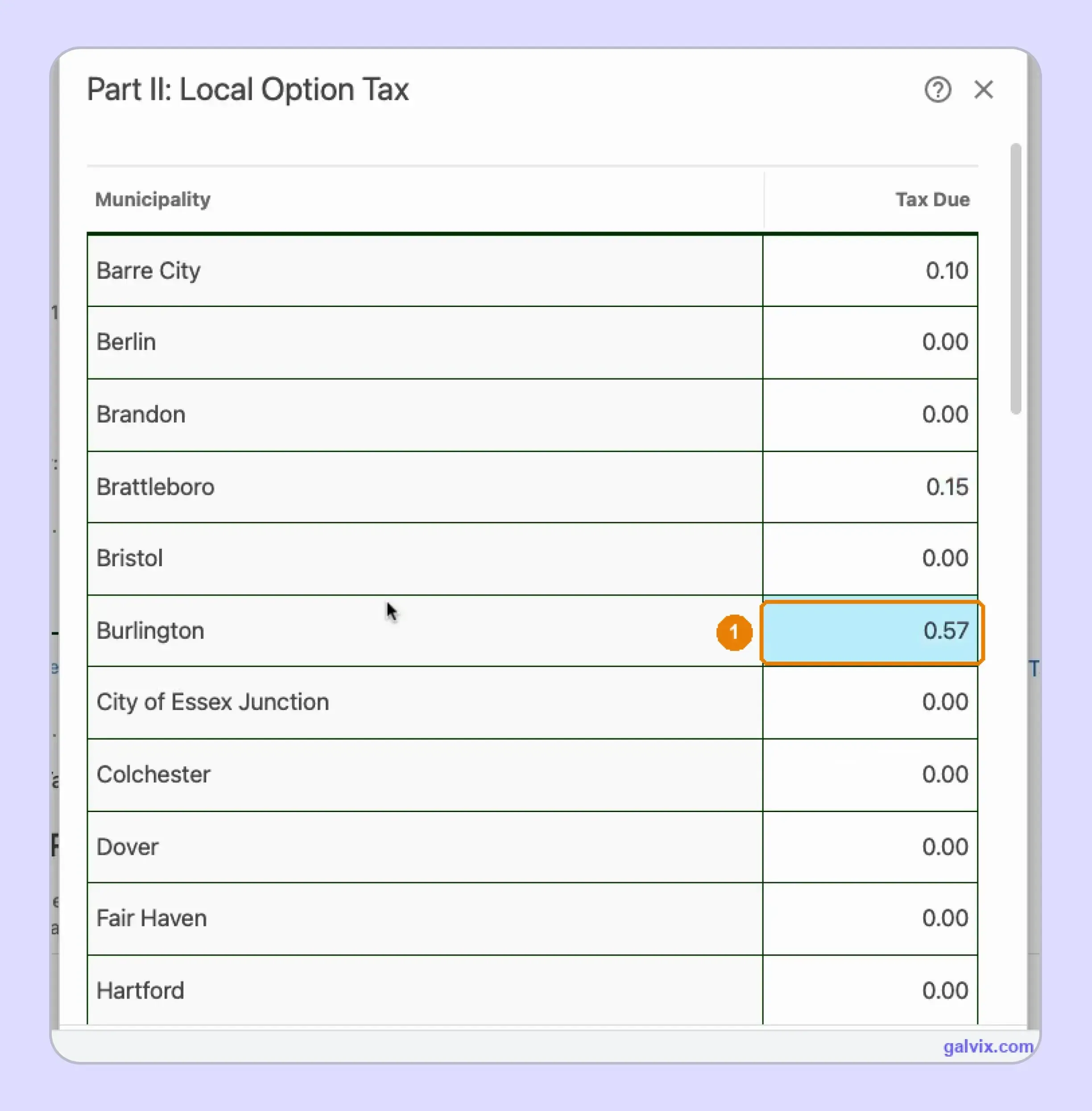
Part II works differently. Each participating municipality appears with a Tax Due field, and the filer enters the 1% result rather than the underlying taxable base.
For example, $57 of taxable sales delivered into Burlington produces $0.57 of local tax. The screenshot shows that exact Burlington entry, while other municipalities remain at zero when no applicable sales occurred there.
The location matters because Vermont applies Local Option Tax based on where the purchaser receives the item or where delivery occurs. This destination rule also means local taxes should be reconciled from transaction-level location data before opening Part II.
The Municipality List Can Change Between Filing Periods
The municipality list is period-sensitive. Bristol, Fair Haven, Mendon, Morristown, Pomfret, Swanton, Vergennes, and Waitsfield added the 1% sales tax from July 1, 2026. Peru becomes subject to it from October 1, 2026.
The timing changes the work behind each Vermont sales tax return. A town with no local sales tax in one period can require a separate amount in the next period. The safest approach is to reconcile against the municipality list for the current filing period instead of copying the allocation from the previous return.
Who Needs to File a Vermont Sales Tax Return?
Businesses with taxable activity and an active Vermont account must follow the filing frequency assigned by the Department of Taxes. Out-of-state sellers can also create economic nexus after reaching $100,000 in Vermont sales or 200 transactions during a preceding 12-month period.
Remote Sellers and Physical Presence
A remote seller can create Vermont tax obligations without an office in the state of Vermont. The economic nexus threshold is $100,000 in sales or 200 transactions during the preceding 12 months. Businesses should track Vermont-destination activity instead of relying on companywide gross revenue or total annual sales.
Physical activity creates a separate path. Inventory, employees, an office, or another physical presence can establish physical nexus before the economic test is met. Temporary activity at fairs or trade shows may also matter. Broader sales tax nexus monitoring can keep these triggers connected with registration planning across states.
Marketplace Sellers Need Separate Treatment
Marketplace facilitators have collected and remitted tax on qualifying marketplace sales sourced to Vermont since June 2019. Once the facilitator confirms that it handles collection, the seller should keep those transactions separate from direct sales so the same tax is not reported again on Form SUT-451.
This separation does not remove marketplace activity from every compliance calculation. Marketplace sales can still count when measuring Vermont's sales tax nexus threshold, so nexus analysis and return preparation should remain separate. Keeping facilitator-collected sales separate from direct-channel activity also makes the filing data easier to reconcile before preparing the return.
Multiple Locations Use One Account With Separate Licenses
A business can operate under a single Vermont business tax account, while each location requires its own sales tax license. Vermont requires a separate location schedule for businesses operating from more than one address, so sales records should remain identifiable by location before return preparation begins.
Teams may call the authorization a Vermont sales tax permit or sales tax permit, although Vermont uses the term license. Multiple-location businesses must file and pay electronically. When a new location or nexus event creates an obligation, complete sales tax registration first. A Vermont sales tax nexus review can connect those triggers with registration planning.
What Data Should You Reconcile Before Opening myVTax?
Before VT sales tax filing begins, reconcile the sales data that drives Form SUT-451 and the municipal allocation. myVTax calculates several fields automatically, although it cannot determine whether your classifications, exemption decisions, destination records, or town-level tax amounts are correct.
| Prepare | Why It Matters |
|---|---|
| Total Sales | Starts the state calculation |
| Non-taxable Sales | Reduces the taxable base |
| Use tax | Covers qualifying untaxed business purchases |
| Local taxable sales | Supports town-level 1% calculations |
| Exemption records | Supports non-taxable treatment |
| Payment information | Supports E-Check or ACH payment |
Before preparing Form SUT-451, classify the sales included in the reporting period carefully because Vermont applies tax treatment across products and charges. The review keeps the return cleaner and makes the following checks easier to complete before you enter the figures.
- Your total sales should include taxable and non-taxable activity required by Form SUT-451 for the reporting period.
- Vermont can tax tangible personal property, rentals, digital downloads, fabrication charges, printing charges, and similar activity differently.
- Many retail sales of tangible personal property are taxable unless a specific exemption changes the transaction’s treatment.
- Use the sales tax calculator for location-level rate checks while confirming taxability for taxable goods and taxable services.
- Delivery charges and handling charges can follow the underlying sale’s tax treatment, so review sales tax holiday carefully.
Non-taxable Sales Need Supporting Records
Line 2 includes amounts already reported in Line 1 that qualify as non-taxable. These can include eligible resale transactions, exempt organizations, certain clothing, prescription drugs, and sales delivered outside Vermont. Some qualifying medical supplies may also receive exempt treatment under Vermont rules.
Before removing any amount from the taxable base, connect the transaction with the exemption reason and supporting records. A sales tax exemption should match the buyer, product, and transaction involved. myVTax subtracts the amount you report, although the portal does not confirm whether the exemption itself is valid.
Local Sales Need a Town Level Reconciliation
Local Option Tax follows the municipality where the purchaser takes possession or receives delivery. Preparing sales by town before opening myVTax keeps destination data ready when completing the Vermont sales tax return and reduces the need to reconstruct customer addresses during filing.
Transaction-level detail matters because several towns can appear in a single statewide sales total. Each participating municipality needs its own taxable amount before the 1% local sales tax is calculated. Delivery fees, package charges, and similar amounts can also follow the underlying transaction’s tax treatment when they form part of the taxable sale.
How Do You File Vermont Sales Tax Online Through myVTax?
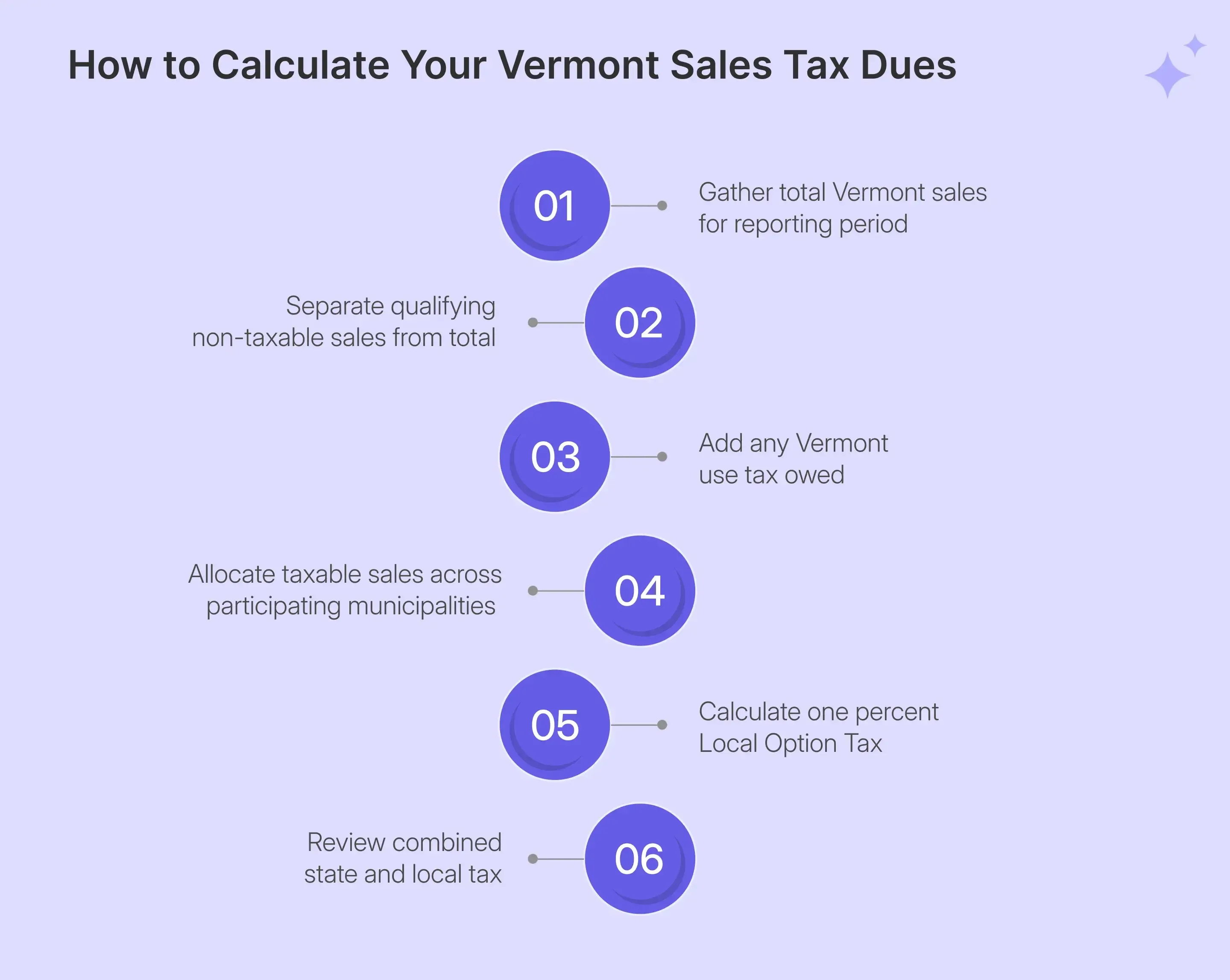
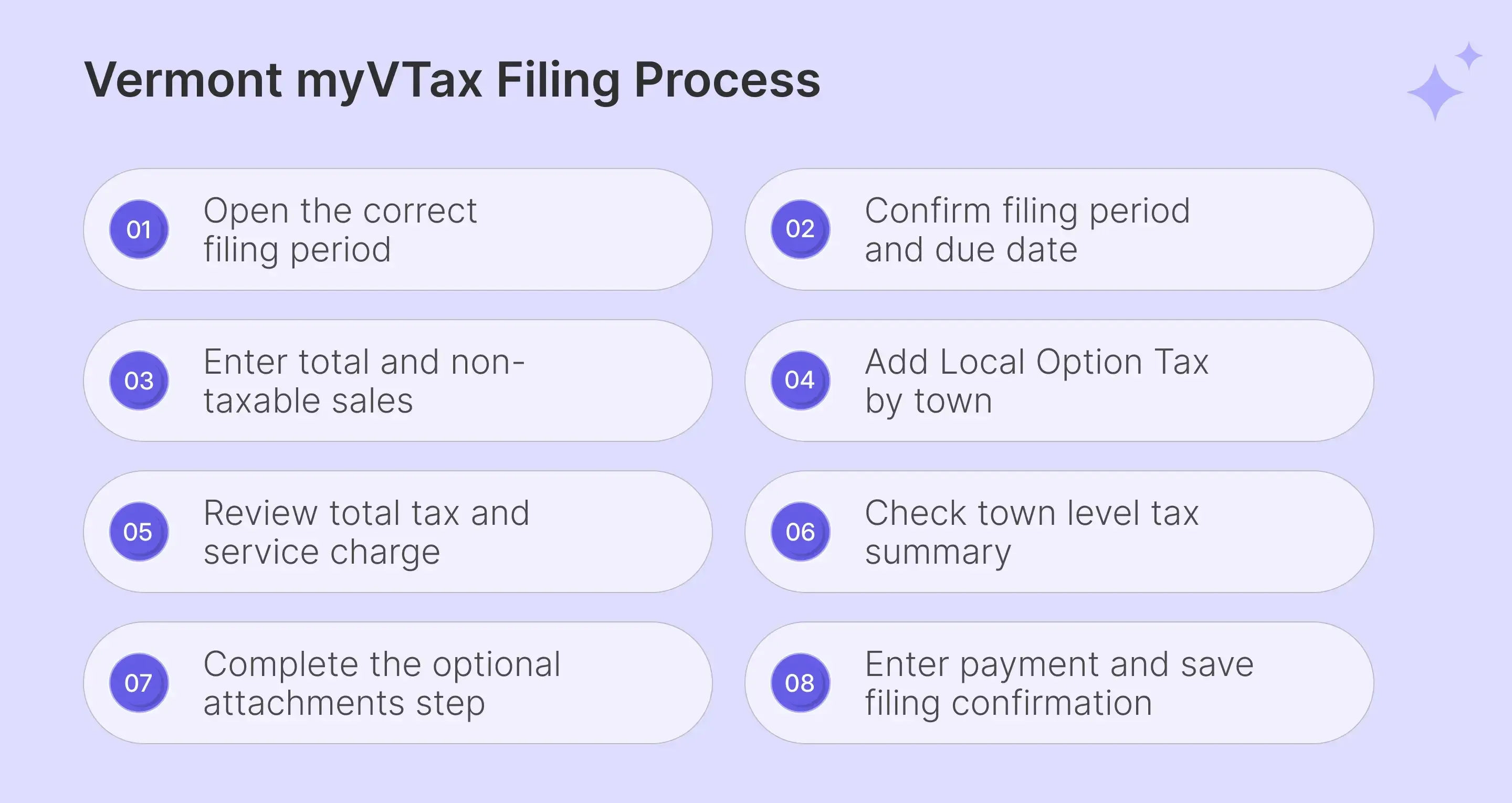
To file Vermont sales tax online, open the correct period in myVTax, complete Form SUT-451, enter town-level Local Option Tax, review the calculated return, handle attachments, enter payment information, and continue until the portal provides a confirmation number.
Step 1: Open the Correct Filing Period
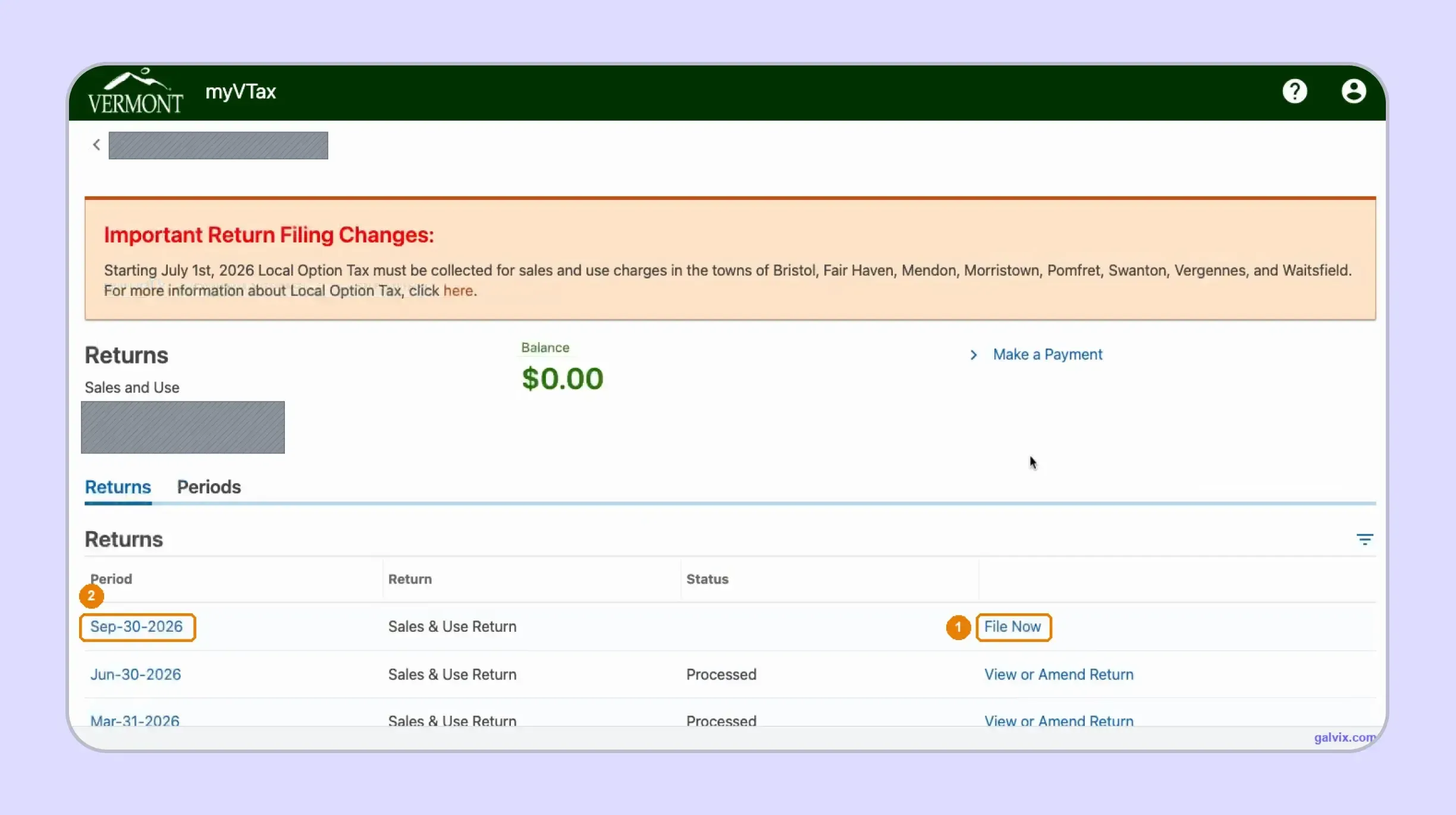
Sign in to myVTax and open the Sales and Use account, then locate the period you intend to submit. Select File Now beside that filing period or use the period-ending date shown in the same row.
Before opening the return, read the Important Return Filing Changes banner for newly added Local Option Tax municipalities. Checking this notice first helps you identify town-level changes before entering figures, especially when several tax returns or filing periods remain open.
Open periods display File Now, while completed periods display View or Amend Return. Match the period-ending date before starting, especially when several tax returns remain open.
Step 2: Confirm the Period and Due Date
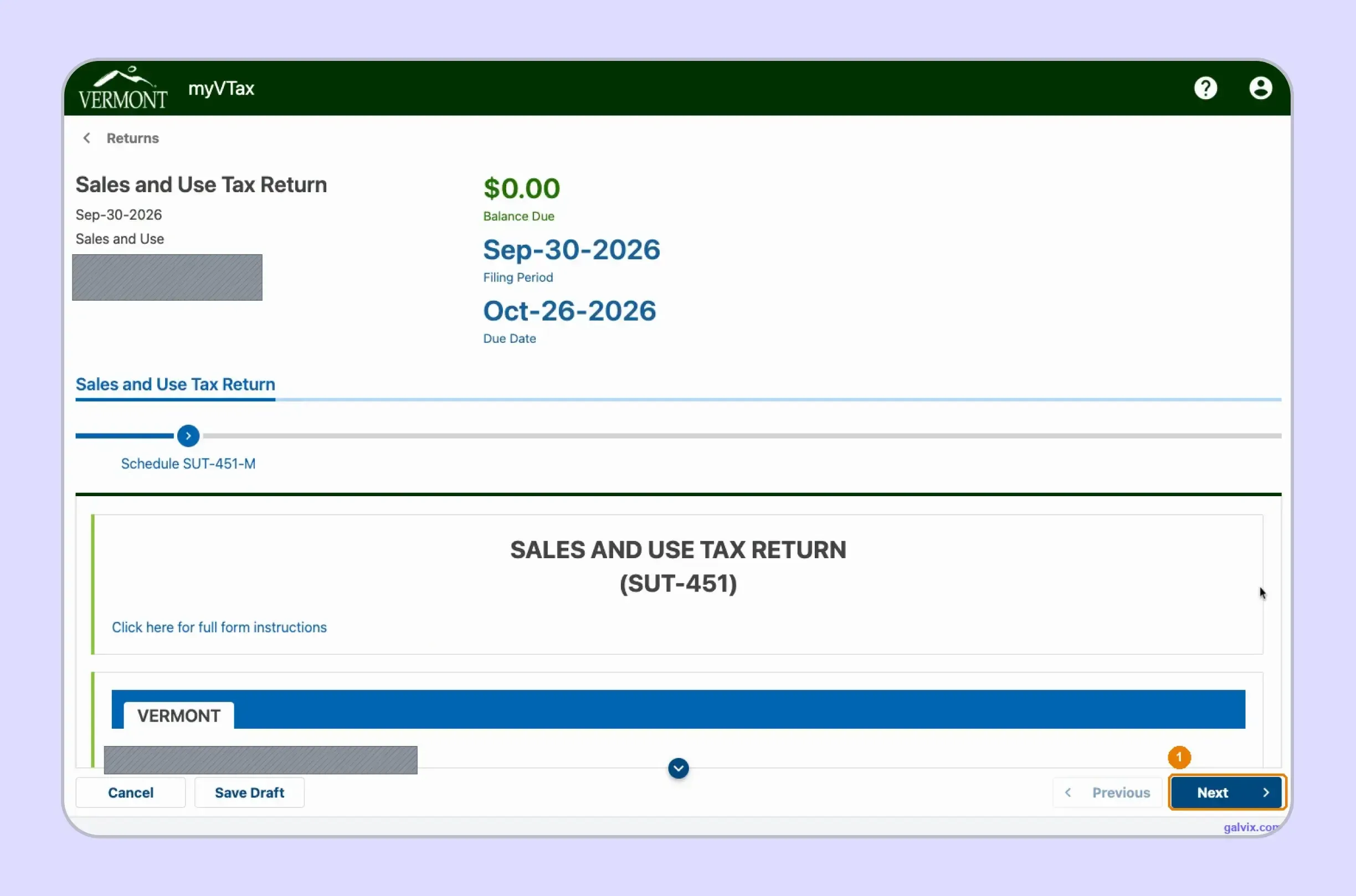
The return header shows the filing period, due date, and current balance before Form SUT-451 opens. Confirm these details carefully before selecting Next, since the initial $0.00 balance only reflects an uncompleted return in myVTax before filing continues.
The starting balance does not represent the final tax liability or confirm that no payment is required. Vermont moves the deadline to the next business day when the normal due date falls on a weekend or recognized holiday.
Step 3: Enter Total and Non-taxable Sales
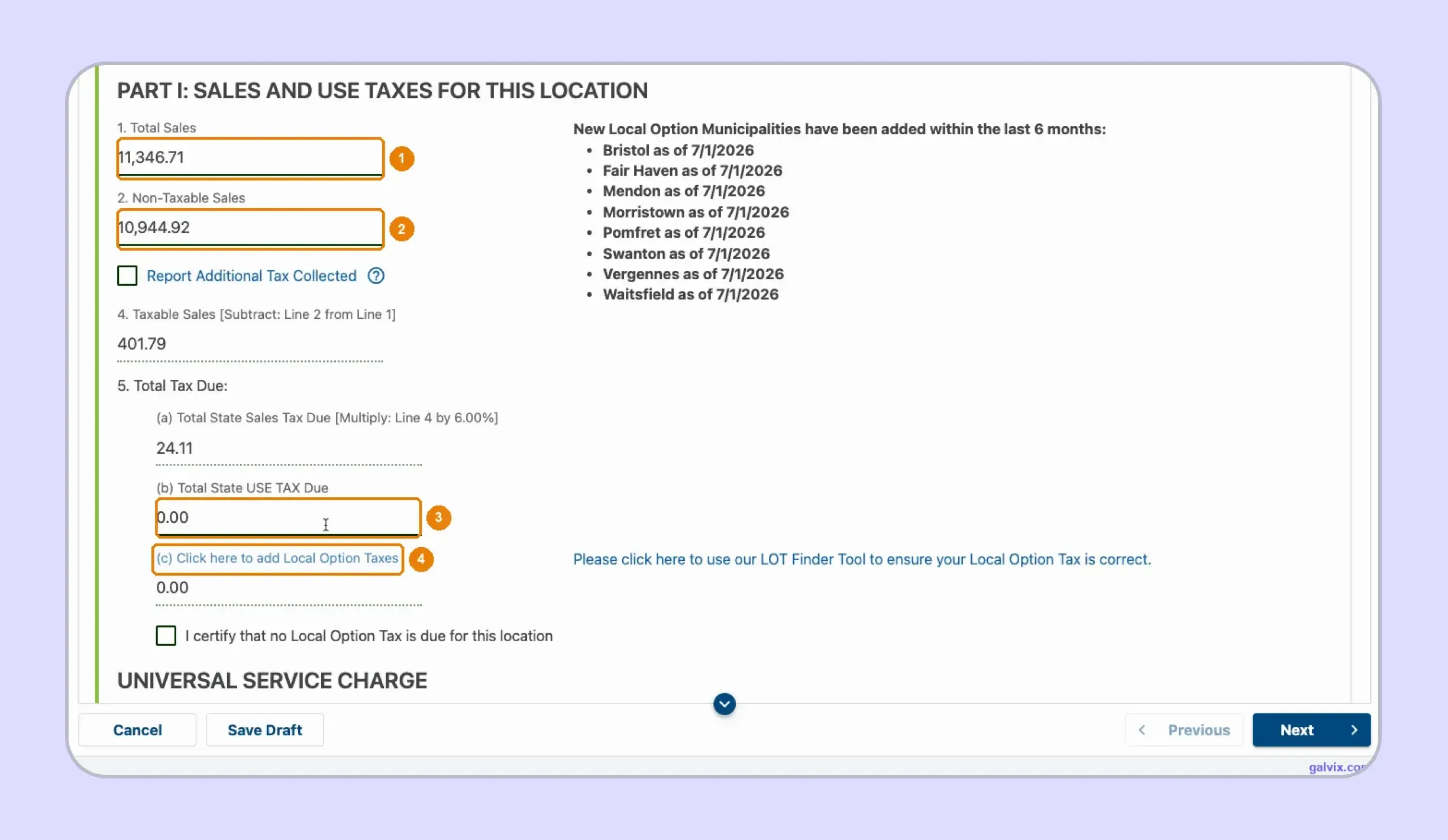
Part I starts the state calculation. Enter Total Sales on Line 1, Non-taxable Sales on Line 2, and any state use tax owed. myVTax then subtracts Line 2 from Line 1 automatically for the filing period.
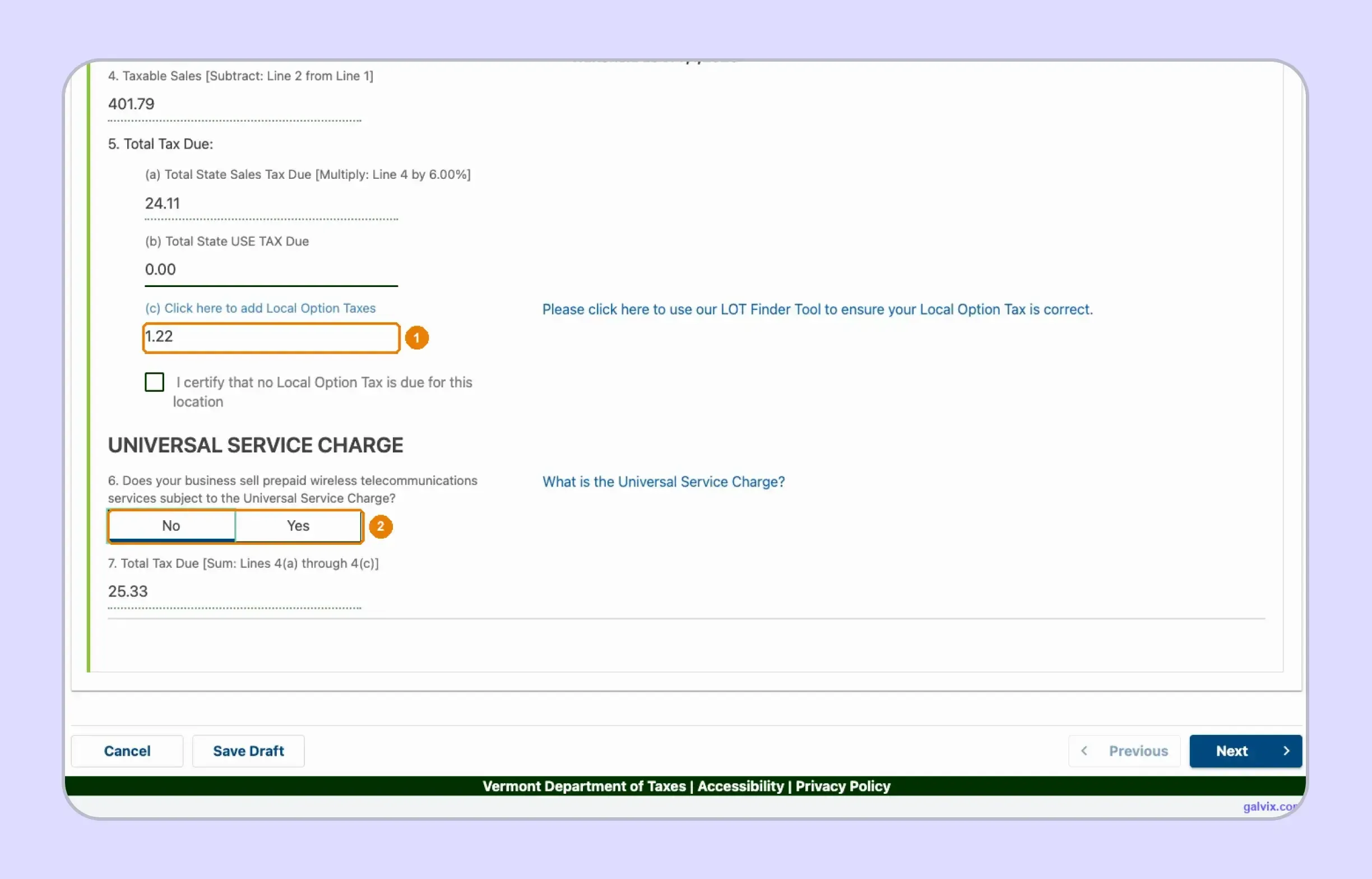
For example, $11,346.71 in total sales minus $10,944.92 in non-taxable sales produces $401.79 in taxable sales. The portal then applies the 6% sales tax rate, calculating $24.11 for the Vermont sales tax return without manual arithmetic.
The checkbox certifying that no Local Option Tax is due should only be used when no applicable town activity exists.
Step 4: Add Local Option Tax by Town
Select Local Option Taxes to open Part II, where each participating municipality appears with a Tax Due field starting at zero. Enter 1% of each town's applicable taxable sales as the tax amount.
For example, $57 of taxable Burlington sales produces a $0.57 entry. myVTax totals the town amounts and carries them back to Line 5(c). For anyone researching how to fill out sales and use tax return Vermont requirements, enter tax due rather than the taxable base.
myVTax does not calculate the town amounts or reconcile them against statewide taxable sales. A municipality left at zero stays at zero without producing an obvious error.
Step 5: Check Total Tax and Service Charge
After Part II closes, Line 5(c) shows the combined Local Option Tax amount entered across participating municipalities. Line 7 then combines state sales tax, use tax, and local tax into the final tax due.
For example, $24.11 in state tax plus $1.22 in Local Option Tax totals $25.33 for the return. Before continuing, answer the Universal Service Charge question based on whether the business sells prepaid wireless telecommunications services, then select Next.
Step 6: Review the Town Level Summary
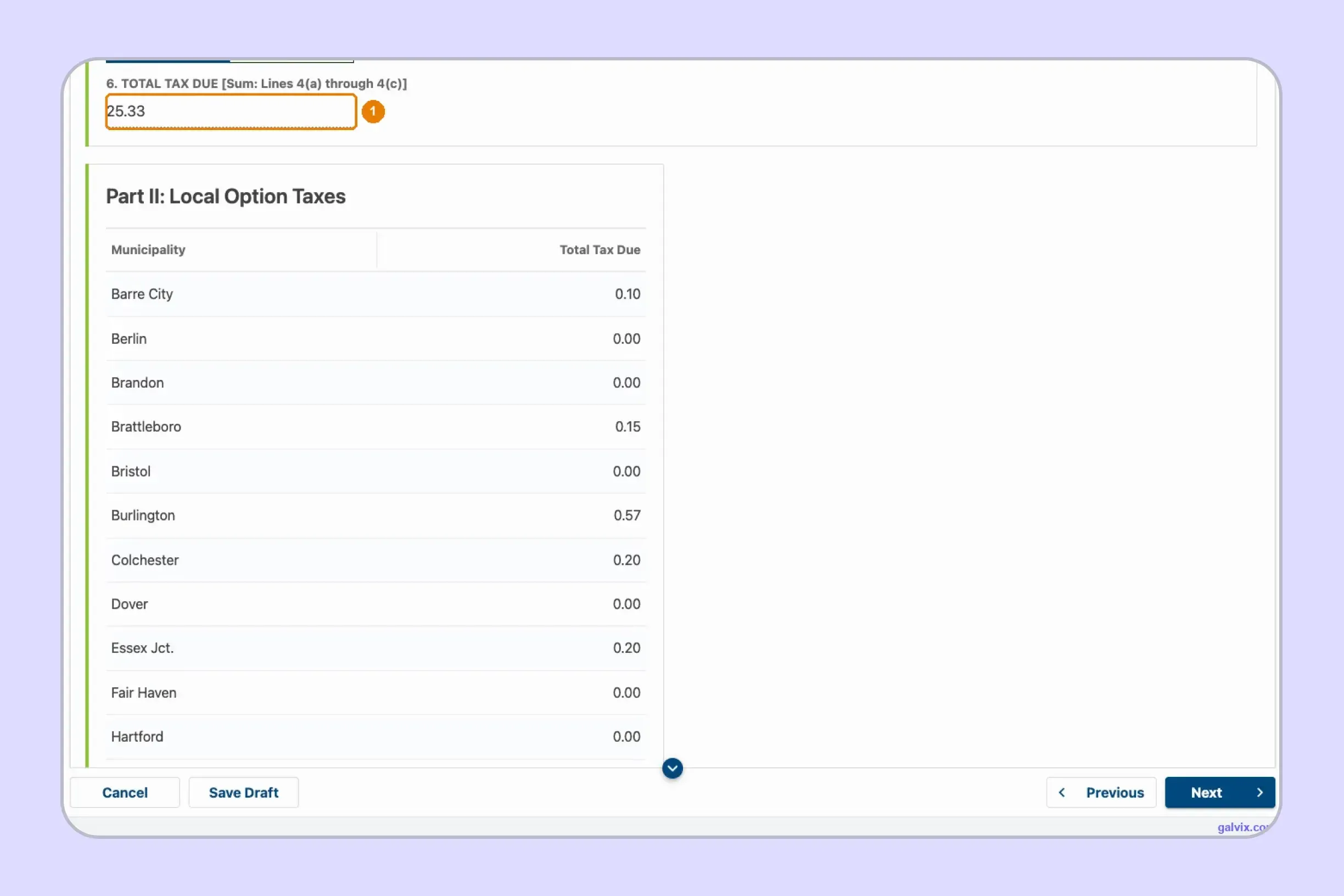
myVTax next presents the Vermont sales tax return as a read-only summary. Compare the total tax with your own calculation, then review every municipality showing a nonzero Local Option Tax amount before moving forward.
This review helps catch a missed destination or an amount entered against the wrong town. Each nonzero local amount should equal 1% of that municipality's applicable taxable sales, and the combined total should match the amount carried to Line 5(c).
Step 7: Complete the Attachments Step
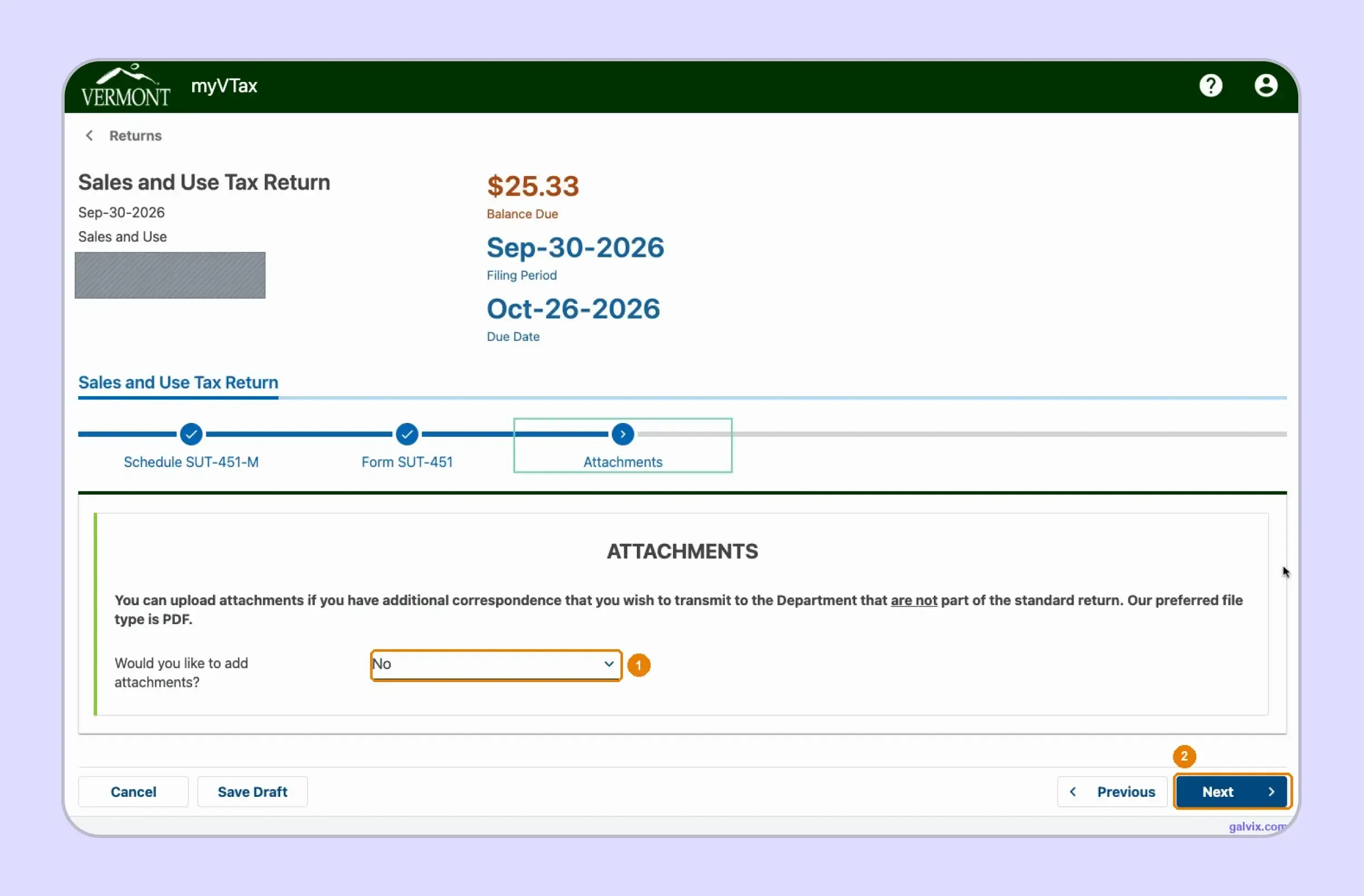
The Attachments step is intended for additional information or correspondence that needs to accompany the return. A routine sales and use tax filing usually does not require supporting documents at this stage.
If nothing needs to be included, leave the attachment question set to No and select Next. When supporting correspondence is required, upload the appropriate file before continuing. Keeping this step simple helps avoid adding documents unrelated to the return being filed in myVTax.
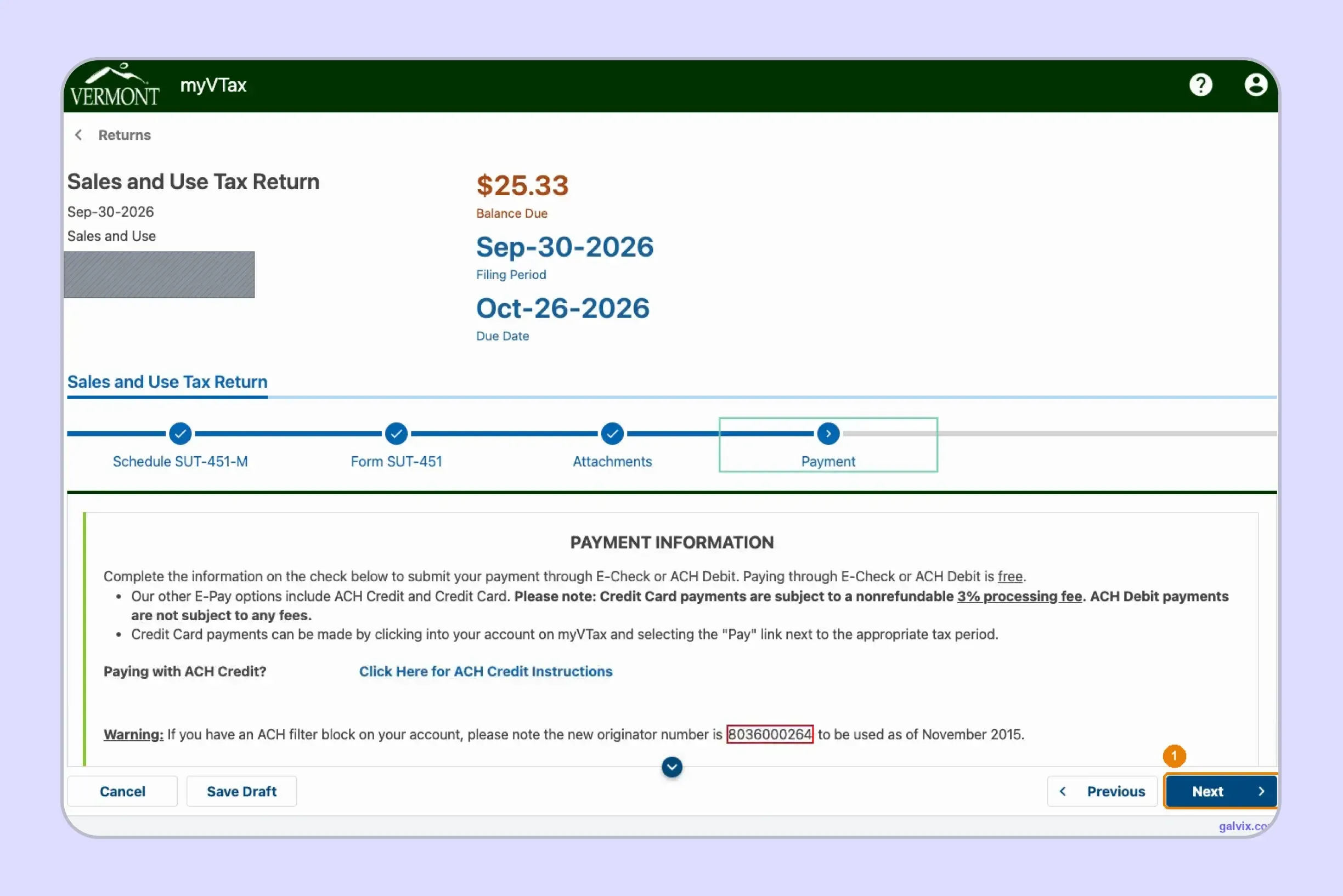
Step 8: Enter Payment Information
For businesses researching how to pay sales tax in Vermont, myVTax supports E-Check and ACH Debit without processing fees. Credit card payments carry a nonrefundable 3% processing fee, so confirm the preferred method before proceeding.
The payment screen shows the balance and lets you enter bank details with the amount of sales tax being paid. Continue after entering payment information because another submission stage follows before the Vermont sales tax return online is officially filed.
Reaching Payment does not mean the Vermont sales tax return online has been filed. Closing the session here leaves a prepared return without a final submission or confirmation number.
Step 9: Submit and Save the Confirmation
Continue from Payment and complete the final submission. myVTax issues a confirmation number only after the Vermont sales tax return has been transmitted, making that number the clearest proof that filing is complete.
Save the confirmation immediately with the related return records. If you discover an error later, use View or Amend Return for that period instead of starting another original filing. For teams learning how to file VT sales tax, the confirmation is the practical stopping point.
When Is a Vermont Sales Tax Return Due?
Form SUT-451 and the related payment are generally due on the 25th day of the month after the reporting period. Vermont assigns a monthly, quarterly, or annual frequency to each taxpayer, while weekend or holiday deadlines are moved to the following business day.
Filing Frequency Depends on the Taxpayer Account
The Department determines whether a business follows monthly filing, quarterly filing, or annual filing. Your assigned frequency controls which periods appear in myVTax and when each Vermont sales tax return becomes due.
Monthly filers report each month, while quarterly filers report at quarter-end. For 2026, the quarterly due dates are January 26, April 27, July 27, and October 26. Annual returns covering 2026 are due January 25, 2027.
Do not infer the current schedule from annual tax liability alone. Follow the frequency assigned to the account and the open periods shown in myVTax.
A separate e-file rule applies when sales and use tax remitted during the preceding calendar year exceeded $100,000. Multiple-location businesses and businesses collecting Local Option Tax must also file electronically.
Active Accounts Must File Zero Returns
An active account must keep assigned periods current even when no tax is due. Form SUT-451 expressly states that returns must be filed when the amount due is zero.
This distinction prevents a common misunderstanding. No taxable activity does not automatically remove the filing obligation for an account that remains open.
The same rule matters when most sales are exempt or marketplace-facilitated. A zero Vermont sales tax return may still be required until the account is properly closed or the Department changes the filing obligation.
Vermont Does Not Offer a Vendor Discount
Vermont does not provide a general timely filing discount or vendor collection allowance for Form SUT-451. Filing on time therefore protects the account from late-payment consequences rather than reducing the amount owed.
For finance teams, the practical focus should stay on the deadline and the payment status. Any unpaid tax can create additional exposure after the due date, even when the underlying return itself was prepared correctly.
This becomes especially important for businesses managing multiple state calendars, where a Vermont sales tax return may sit alongside monthly or quarterly obligations in other states.
How Do Exempt Sales Affect Form SUT 451?
Exempt transactions included in Total Sales move into Non-taxable Sales before the taxable amount is calculated. The seller should retain documentation supporting each sales tax exemption because myVTax subtracts the amount without determining whether the individual transaction qualified.
Form S-3 Supports Several Common Exemptions
Vermont Form S-3 supports purchases for resale, qualifying exempt organizations, government purchases, and Direct Pay Permit transactions. Buyers should provide a properly completed certificate, while sellers must accept it in good faith. A valid document supports the claimed sales tax exemption, although it does not automatically exempt every future purchase.
Sellers should connect each certificate to the buyer, the purchased property, and the stated exempt use, and retain records for at least 3 years. Clothing, qualifying food, certain over-the-counter drugs, and medical equipment can receive exempt treatment. A consistent sales tax exemption certificate process helps multistate teams keep documentation tied to exempt transactions.
The Galvix Sales Tax Exemption Certificate Tool can help identify the certificate route and seller checks relevant to an exempt transaction. Certificate collection and verification should remain separate from deciding whether the individual sale qualifies for exempt treatment.

What Problems Do Vermont Sellers Face With Sales Tax Filing?
Vermont sales tax problems can start even when a business believes little or no tax is due. Sellers still need to keep assigned returns current, correctly separate marketplace activity, support non-taxable sales, and calculate Local Option Tax for the correct municipalities.
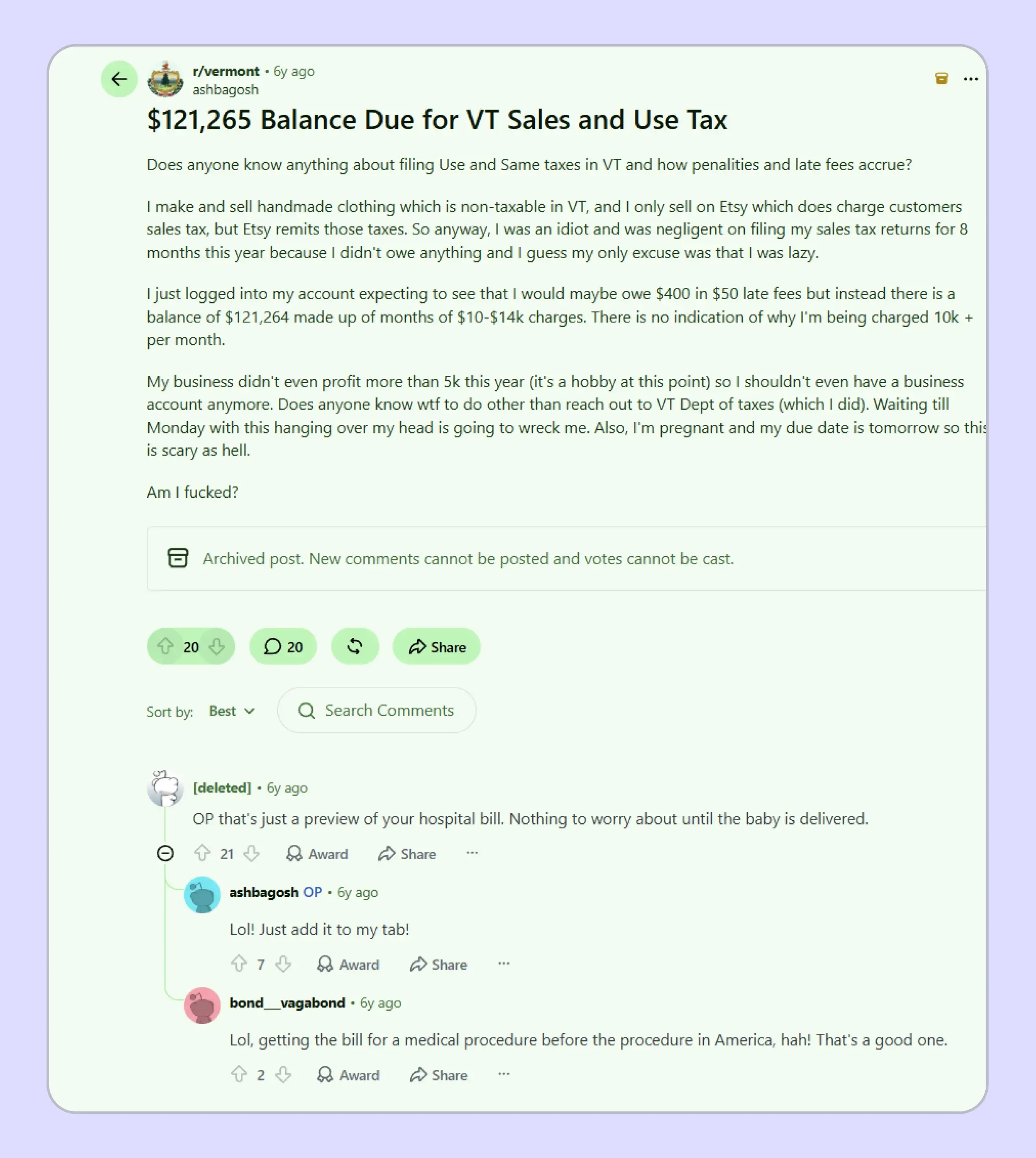
One Vermont seller described missing several Sales and Use Tax returns because their clothing sales were non-taxable and Etsy collected and remitted marketplace tax. When they later checked the account, they reported seeing a very large balance they did not understand. The post shows how missed filing periods can create confusing account issues even when the seller expects no tax liability.
These issues become harder to manage when Vermont is one of several states on your filing calendar. That is where a managed process can reduce the need to track portal rules, local tax changes, exemption records, and filing status separately. Galvix's sales tax by state reference can help teams compare how rates, nexus thresholds, and filing rules change across jurisdictions.
How Does Galvix Manage Vermont and Multistate Sales Tax Filing?
Galvix manages recurring sales tax compliance as a service, so your team does not need to prepare every return or operate every state portal independently. Transaction data is reconciled first, followed by return preparation, specialist review, customer approval, and filing in accordance with each registered state's schedule.
For a Vermont sales tax return, this workflow can separate direct and marketplace activity, review non-taxable transactions, and organize municipality-level destination data before Form SUT-451 is prepared. This gives the state calculation and Local Option Tax the different levels of detail each one needs.
Transaction records can flow through supported sales tax integrations for ecommerce, accounting, payment, and ERP systems. Businesses using Shopify can connect store data without having to rebuild every filing period manually.
Accounting teams can similarly connect QuickBooks data with return preparation. Galvix also supports API access and CSV or XLSX uploads when a direct connection is unavailable.
As the business expands, Galvix can connect filing with nexus monitoring, registrations, exemption management, and state notices. Its modular pricing means customers select the services they need, while exact pricing depends on the workload associated with each module.
What Can Galvix Manage for Vermont Sellers?
For teams working out how to file sales tax return in Vermont alongside several other states, Galvix can take over recurring operational work while keeping the finance team involved in review and approval.
- Sales reconciliation: Prepare direct-channel data before return preparation.
- Marketplace separation: Keep facilitator-collected activity outside duplicate remittance.
- Exemption review: Connect non-taxable transactions with supporting customer records.
- Local allocation: Prepare town-level figures for Local Option Tax.
- Nexus monitoring: Track new registration and filing obligations.
- Return management: Coordinate preparation, approval, filing, and notices.
Businesses using ERP systems can also connect NetSuite sales tax data with the wider managed filing workflow. This becomes useful when Vermont is one part of a larger compliance calendar, because each state can use different return structures and filing rules.
Book a Galvix demo to review your Vermont and multistate filing workflow and reduce recurring manual filing work.
Frequently Asked Questions
Can I amend a Vermont sales tax return after filing?
You can amend a filed Vermont sales tax return through myVTax by opening the Sales and Use account and selecting View or Amend Return for the relevant period. Vermont also permits paper amendments where paper filing is allowed. Keep the correction tied to the original period rather than creating another original return.
Can I file Form SUT-451 on paper?
Paper filing remains available in limited situations. A single-location business without Local Option Tax may use paper when it cannot file through myVTax. Multiple locations, Local Option Tax, or more than $100,000 of prior-year remitted tax trigger electronic filing requirements. This distinction matters when reviewing Vermont sales tax filing requirements.
Do I need a separate Vermont sales tax license for each location?
Each Vermont business location requires its own license, although the business can operate through one tax account. Businesses with several locations must file electronically. For teams researching how to file VT sales tax across several stores, keep sales records identifiable by location before preparing the combined filing workflow.
How long should Vermont exemption certificates be retained?
Vermont sellers should keep exemption certificates for at least three years from the last sale covered by the certificate. The seller must also accept the form in good faith. This retention period supports the non-taxable amount reported on the Vermont sales tax return if the Department later reviews the underlying transaction.
Can I register for Vermont through Streamlined Sales Tax?
Remote sellers can use Streamlined Sales Tax to register across participating states, including Vermont. Businesses can also register directly through myVTax. The correct registration route should be completed before collection begins once nexus creates an obligation, so the account and license are active before the first required filing.
What happens if I report Local Option Tax for the wrong town?
A wrong municipality can distort the Vermont sales tax return because myVTax does not validate town allocations against statewide sales. Review destination records and amend the return when necessary. For businesses asking how to file sales tax in Vermont, town-level sourcing deserves the same attention as the statewide tax calculation.
Can I change my Vermont sales tax filing frequency?
The Vermont Department of Taxes assigns the filing frequency, so businesses should follow the schedule shown for their account. Monthly filers, quarterly filers, and annual filers use different reporting periods, all based on Department assignment. If your activity changes materially, confirm the current frequency before assuming the previous schedule still applies.