To file Virginia sales tax online, you must submit your return electronically through an approved Virginia Tax filing route. Your return works on a locality-by-locality basis, so the figures you prepare for each county or independent city directly affect the final calculation.
That locality split makes VA sales tax filing different from many states. Virginia applies several rates based on location, while qualifying food and personal hygiene products receive separate treatment. The portal calculates tax after you enter the sales assigned to each locality.
This blog explains how to file sales tax in Virginia, prepare locality-level figures, handle exemptions, review the dealer discount, complete payment, and save filing proof. It also covers the 2026 portal transition and how Galvix supports Virginia alongside your other state obligations.

Which Virginia Sales Tax Filing Portal Should You Use in 2026?
As of October 2026, you can already use Virginia’s new online services platform for Sales and Use Tax. The older Business iFile route remains available during the transition, while Sales and Use Tax fully moves to the new platform on November 9, 2026.
Sales Tax Moves Fully on November 9
Virginia began allowing businesses to transition their existing accounts during September 2026. From November 9, businesses using an online business account must use the modernized platform to file and pay covered taxes.
That change matters if you file Virginia sales tax online near the cutover. A process started through the older services account may look different after migration, so confirm the current route before entering return data.
The Virginia Department of Taxation website currently directs businesses toward the new experience while keeping the older route available during the transition. Your existing tax obligations remain unchanged because the migration changes the filing system rather than the underlying tax rules.
eForms and Web Upload Remain Available
Virginia is keeping eForms and Web Upload available after the November migration. eForms can also handle amended returns, while Web Upload suits businesses submitting larger batches of documents or spreadsheet-based filings.
Sales tax requires electronic filing unless Virginia approves an electronic filing waiver request. Businesses paying outside the account can also use ACH Credit, with payment specifications available through Virginia’s electronic payment guide.
If you are setting up a new online services account, keep the login route separate from your underlying tax account. The portal credentials identify the user accessing the system, while state registration details identify the business and its filing obligations.
Why Does a Virginia Sales Tax Return Depend on the Right Locality?
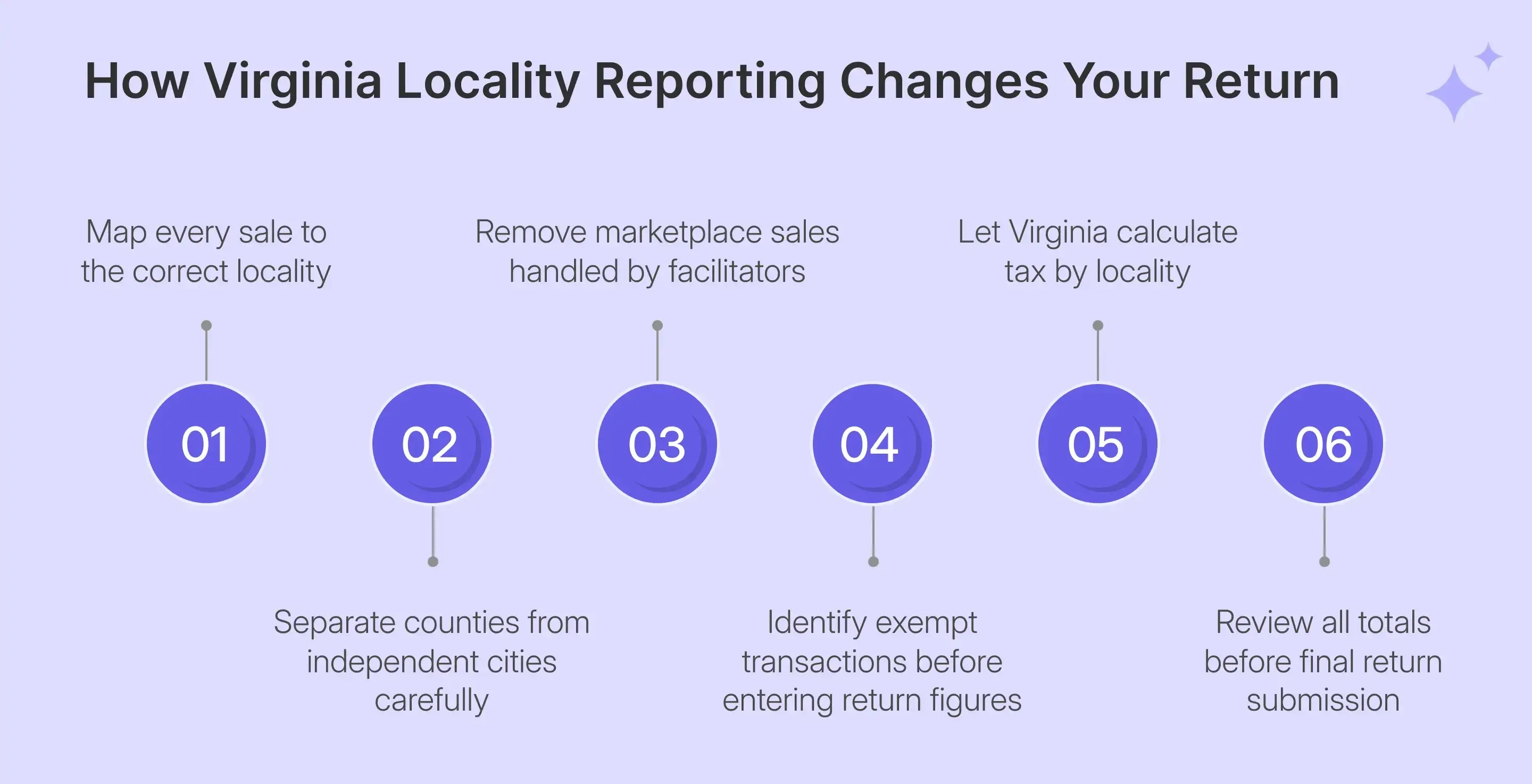
Virginia calculates liability using the locality assigned to each transaction. When you file Virginia sales tax online, the portal can calculate perfectly from incorrect locality data, leaving you with a mathematically valid return that applies the wrong rate.
Virginia Uses Several General Sales Tax Rates
The general sales tax rate changes depending on where the sale occurs or where the customer receives the merchandise. The statewide baseline is 5.3%, while several regional and individual locality rates are higher.
| General Rate | Where It Applies |
|---|---|
| 5.3% | Most Virginia localities |
| 6% | Central Virginia, northern Virginia, and Hampton roads |
| 6.3% | Charlotte, Danville, Gloucester, Halifax, Henry, Northampton, Patrick, Pittsylvania |
| 7% | James City County, Williamsburg, York County |
| 1% | Qualifying food and personal hygiene products statewide |
The combined rate includes the state portion plus applicable regional or local tax. You do not normally type these percentages when completing the standard locality worksheet because the filing system applies the rate linked to your selected location.
A sales tax calculator can help you check a destination before filing. The return itself should still follow the current state locality assignments and sourcing rules.
Counties and Independent Cities Must Be Kept Separate
Virginia has roughly 130 reportable counties and independent cities. Several names can cause confusion because Fairfax, Franklin, Richmond, and Roanoke each have distinct city and county entries.
That distinction can change your total sales tax even when the product and invoice amount stay identical. Build the locality mapping from your transaction records rather than selecting locations from memory when preparing the Virginia sales tax return.
For remote transactions, destination sourcing can apply when you cannot associate an order with a Virginia business location. This makes delivery information especially important for ecommerce sellers and other online sellers shipping directly to customers.
The Portal Calculates Tax After You Allocate Sales
For a standard transaction, you enter your gross sales and exempt amount for each locality. The portal then derives taxable sales, applies the locality rate, and carries the result into the return totals.
You therefore do less tax arithmetic than in some states. The harder part is ensuring each transaction reaches the correct locality before the calculation begins.
What Are the Virginia Sales Tax Filing Requirements?
Registered dealers must file returns according to the filing frequency assigned by Virginia Tax. Most accounts file monthly or quarterly, and active accounts must submit required returns even when a period contains no taxable activity.
Remote Sellers Can Trigger Economic Nexus
Virginia economic nexus applies when remote sellers exceed $100,000 in annual Virginia gross retail sales or reach 200 transactions during the current calendar year or previous calendar year. Either threshold can create a registration obligation.
A seller can also create nexus through physical presence, including activity such as employees, inventory, or other business operations within Virginia. A Virginia sales tax nexus review can help separate these triggers from revenue-based exposure.
If you cross the remote-seller threshold, Virginia requires sales tax registration and collection on qualifying direct transactions. Registration gives you a 15-digit account number and a Sales Tax Certificate of Registration, Form ST-4.
That registration operates as your sales tax permit for Virginia purposes. Keep the resulting sales tax certificate with your account records because it confirms that your business has registered to collect and remit the state’s retail sales tax.
Marketplace activity needs separate treatment. A seller using only qualifying marketplace facilitators usually does not register solely for those facilitated transactions because the facilitator handles collection and remittance.
If you also sell directly, test those direct transactions against Virginia’s nexus thresholds. You can track broader state exposure through sales tax nexus monitoring as your direct channels expand.
Returns Are Usually Due on the 20th
Your filing period may be monthly or quarterly depending on the account’s tax liability. Virginia assigns the frequency and can change it as the business’s remittance pattern changes.
Monthly returns are due on the 20th day of the month following the reporting period. Quarterly returns are due April 20, July 20, October 20, and January 20.
When the due date falls on a weekend or state holiday, the deadline moves to the next business day. That adjustment matters when scheduling a debit rather than waiting until the last business day to submit payment.
A sales tax filing deadline applies even when no tax is owed. Missing a required zero return can still create late filing penalties, while unpaid balances can also accrue interest. Virginia states that the minimum penalty can apply even when no tax is due.
If unusual circumstances create a compliance problem, any request for penalty relief should follow Virginia’s established process rather than assuming a late return will automatically receive an exception.
What Should You Prepare Before Filing Virginia Sales Tax Online?
Before you file Virginia sales tax online, prepare the transaction data by locality rather than rebuilding it inside the portal. The filing system can calculate the tax, although it cannot decide whether your sales were assigned to the correct county or city.
| What You Need | Why It Matters |
|---|---|
| Login credentials | Opens the correct business profile |
| Federal EIN | Helps identify the business account |
| Tax Account Number | Confirms the return belongs to the correct registration |
| Sales by locality | Creates each locality worksheet |
| Exempt amounts | Reduces the taxable base |
| Exemption records | Supports untaxed transactions |
| Bank details | Supports payment with the return |
With these basics in place, you can organize the few transaction-level checks that most often affect how the return is reported:
- Separate marketplace activity first: If a facilitator collects and remits Virginia tax on an order, leave that facilitated transaction outside your own filing data. Including it can duplicate the transaction and overstate your total sales.
- Prepare exempt transactions by locality: Resale purchases and other qualifying exemptions should already have supporting records. A valid resale certificate must connect with the purchaser and the transaction receiving exempt treatment.
- Check special customer types: Some nonprofit organizations qualify for exemption after completing Virginia’s application process and receiving state approval. A customer’s nonprofit status alone should not automatically remove the transaction from the taxable base.
- Build locality allocation before portal entry: The system subtracts eligible exemptions from locality sales and calculates the resulting tax. Your source data should therefore already distinguish direct transactions by destination before you start the Virginia sales tax return online.
- Confirm the relevant rate separately: The Virginia sales tax guide can support broader state-rule checks. You can also review destination rates before filing when an address sits near a city or county boundary.
- Keep payment records ready: If you intend to pay when filing, have the bank details available before starting. Businesses paying by another method should confirm the timing using Virginia’s electronic payment guide so the return and payment do not become disconnected.
How Do You File Virginia Sales Tax Online?
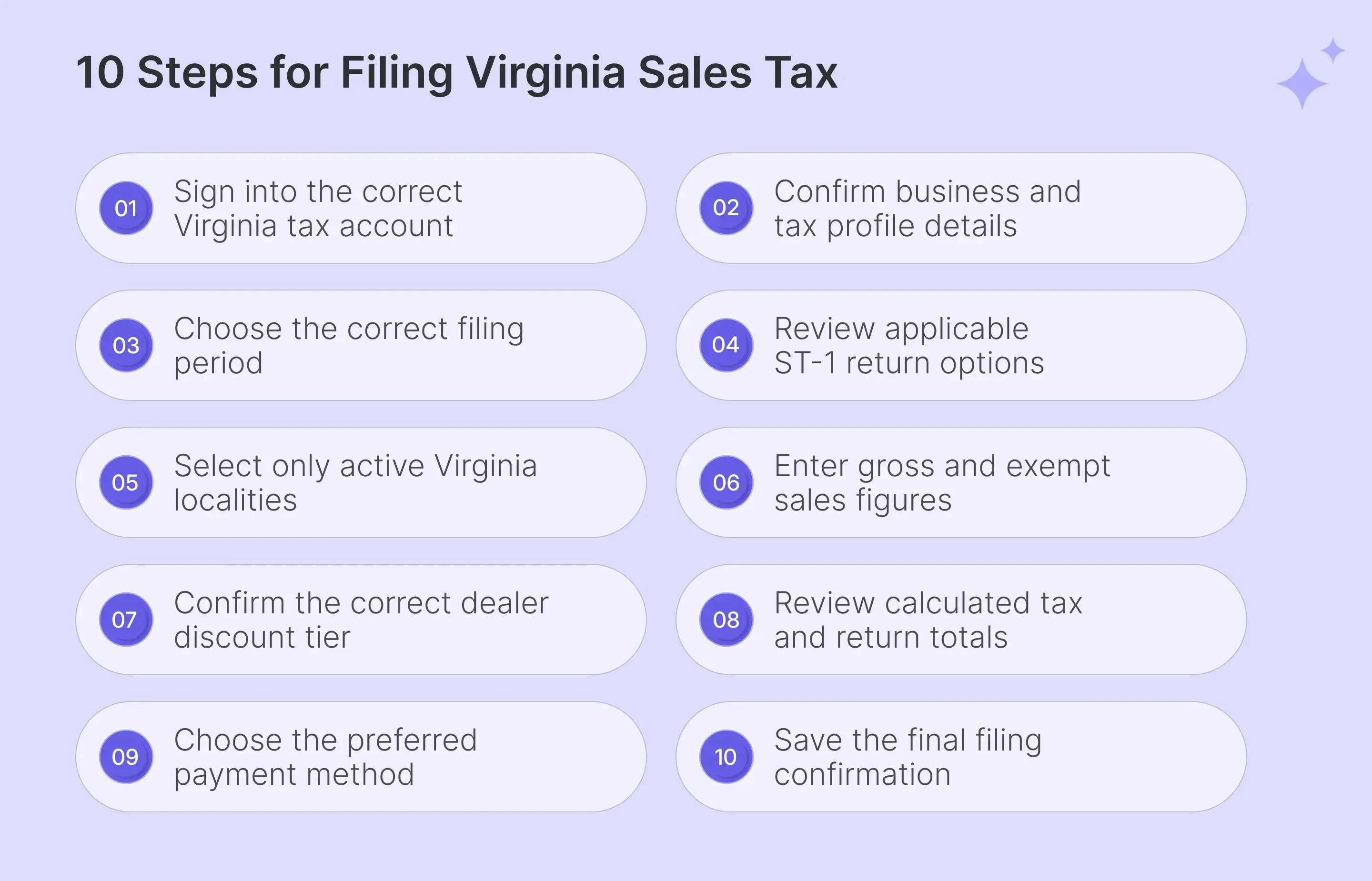
To file Virginia sales tax online, follow the steps discussed below:
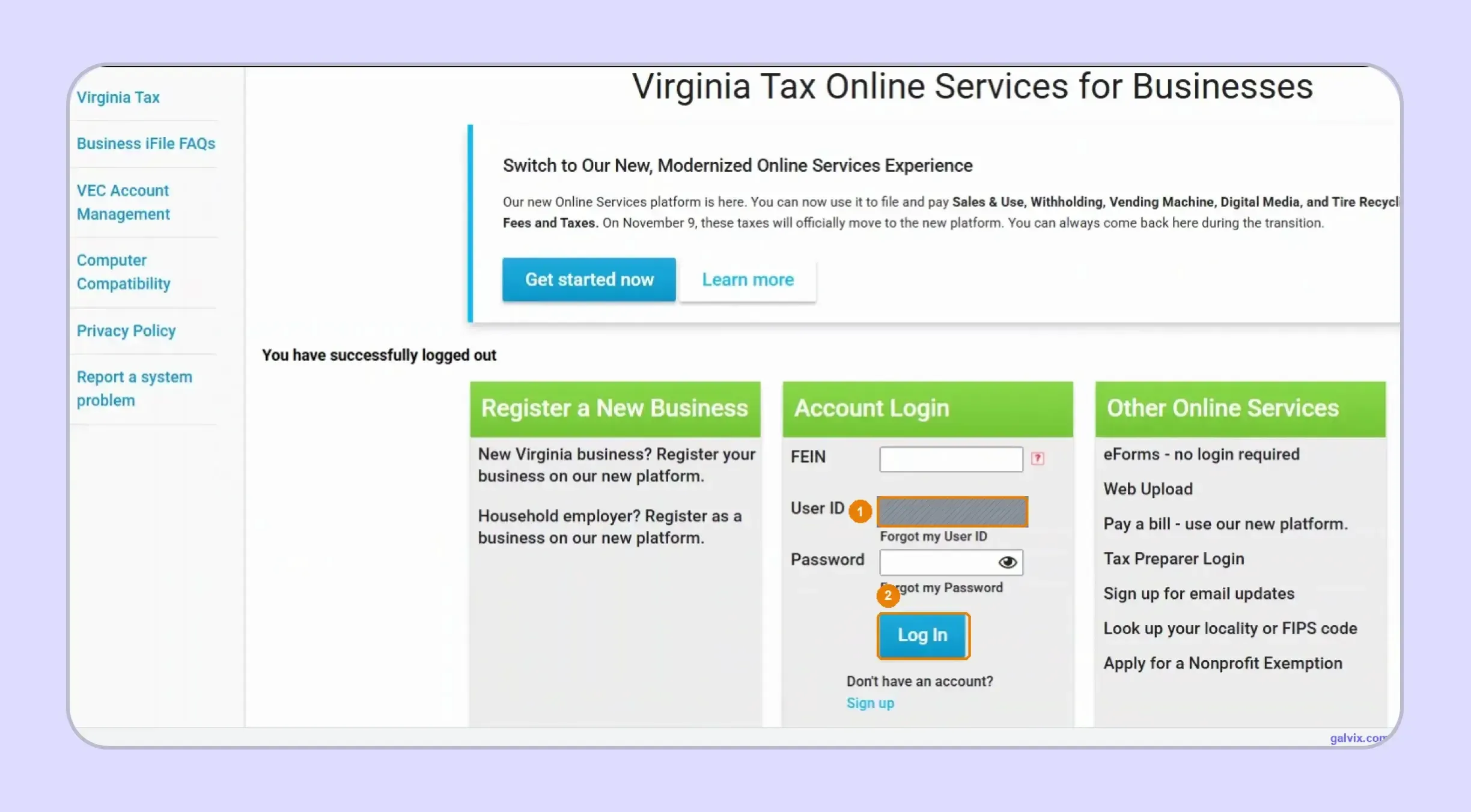
Step 1: Sign In to Virginia Tax Online Services
Enter the FEIN, User ID, and password linked to the correct business profile, then select Log In. During the migration period, confirm whether your account already uses the new filing environment.
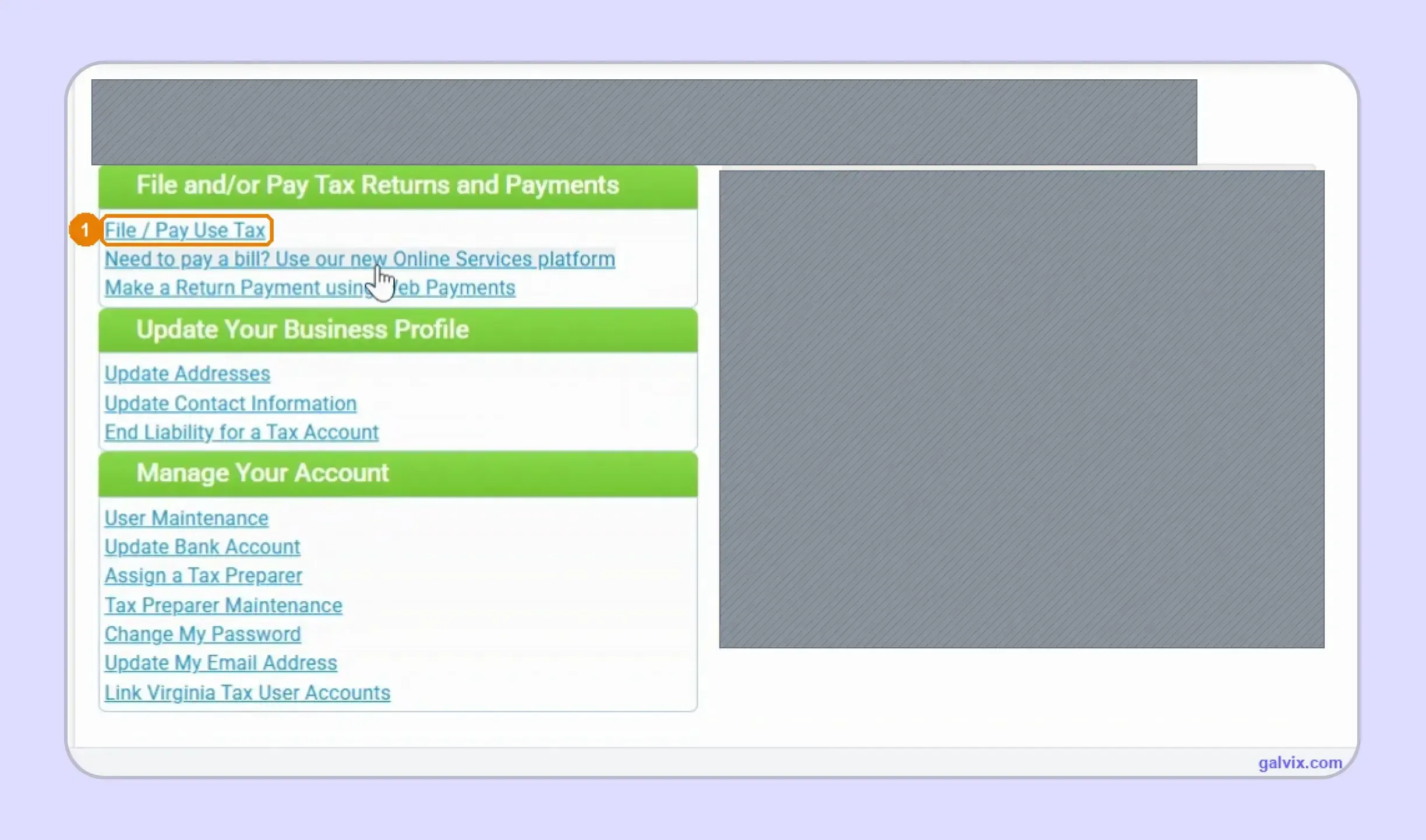
Step 2: Confirm the Business and Open the Return
Check the business name and account details before choosing the Sales and Use Tax filing option. This prevents activity from being entered under another company when you manage several profiles.
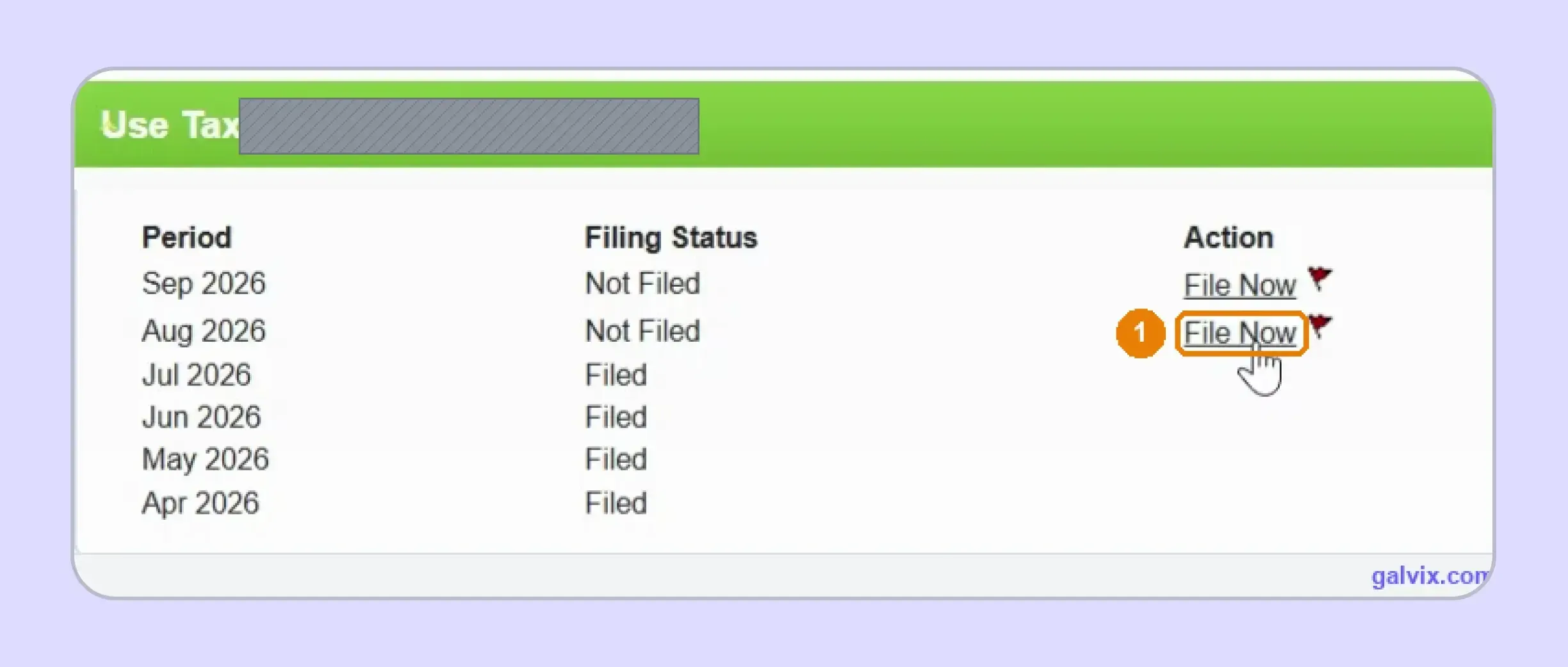
Step 3: Choose the Correct Filing Period
Review the filing status beside each available period and select the return you need. Current periods can appear before an earlier outstanding month, so match the date carefully.
The portal can offer a current period before that month has ended. Match the period name with the return you intend to file instead of selecting the first available filing option.
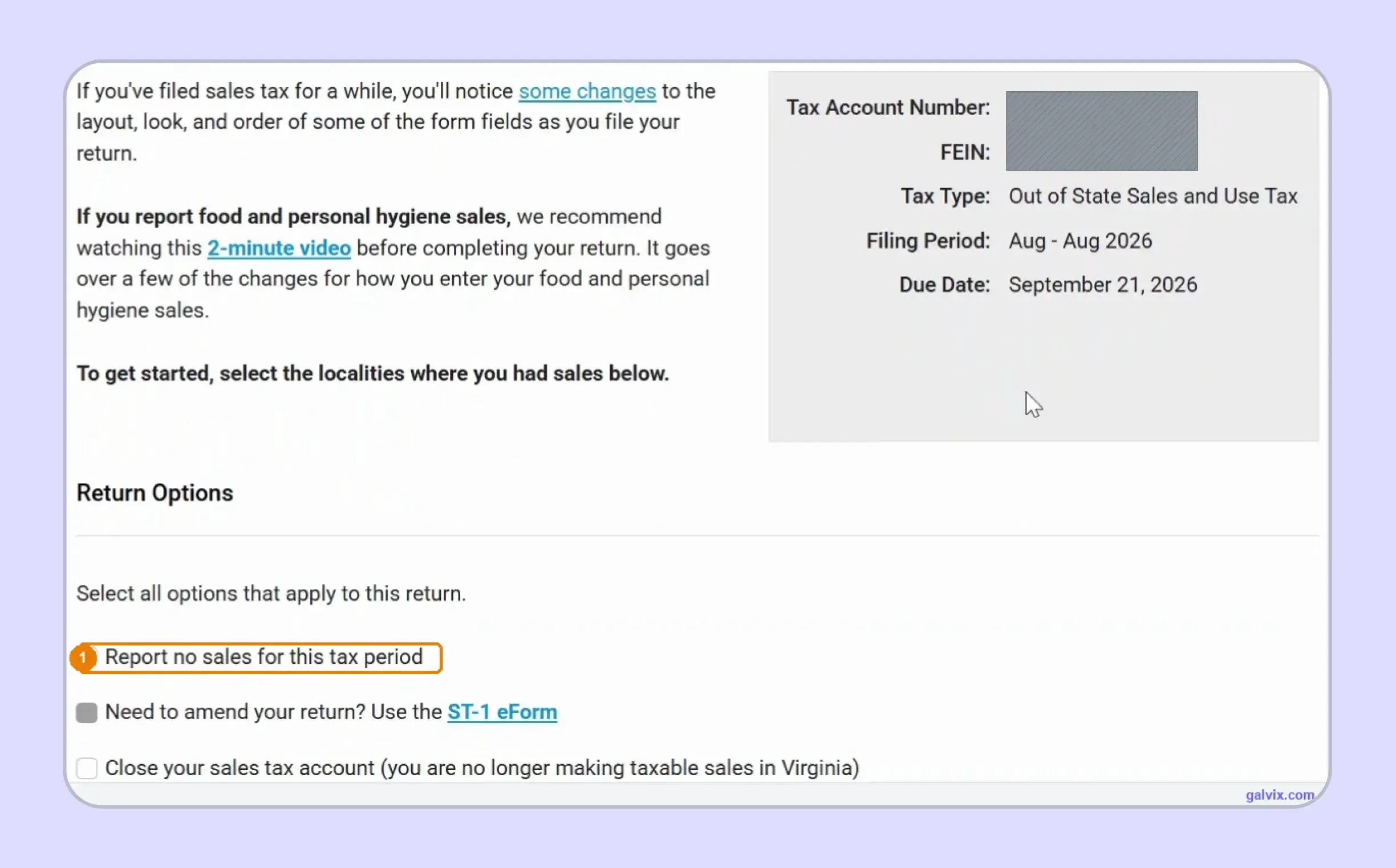
Step 4: Review the ST-1 Return Options
Confirm the tax type, period, and return details before entering figures. Use the no-sales option only when the entire period has no Virginia activity requiring the normal locality worksheets.
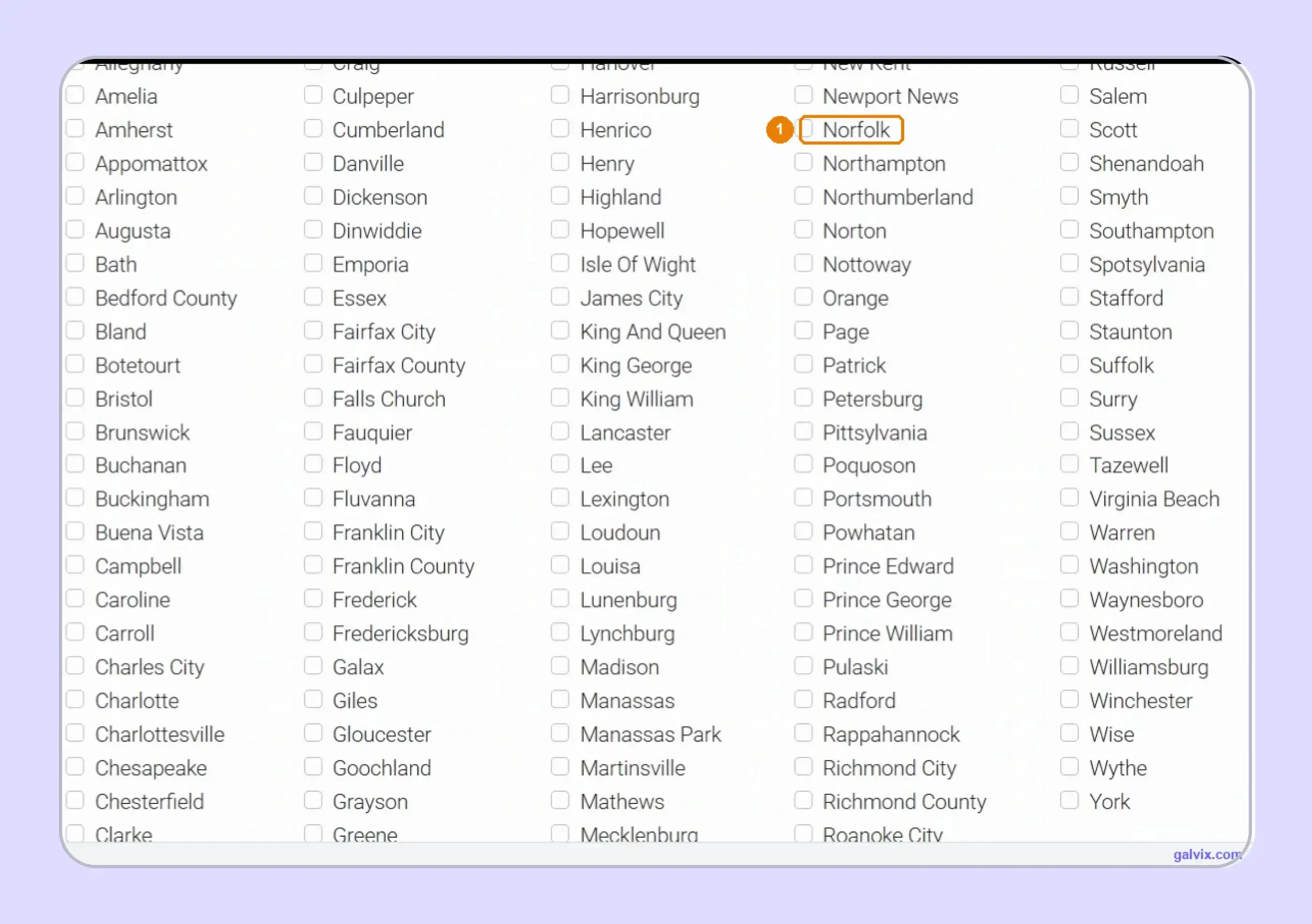
Step 5: Select Only Localities With Sales
Choose each Virginia county or independent city where you have reportable activity. Each selected locality creates a worksheet, so adding locations with no activity can prevent the return from being calculated.
Do not select every locality to save time later. Virginia expects activity for each locality you select, and an empty selected location can halt the calculation until corrected.
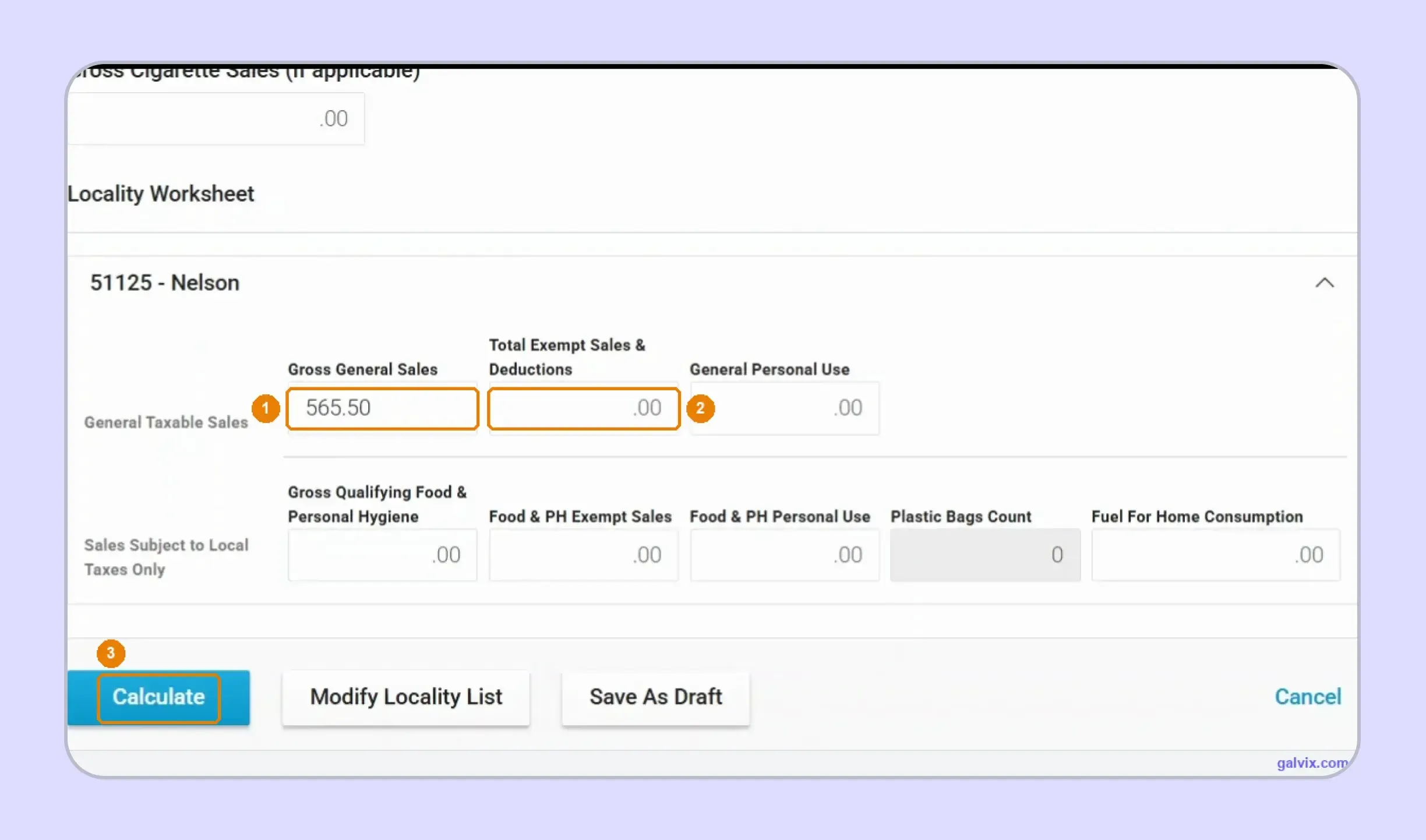
Step 6: Enter Gross and Exempt Sales
Enter Gross General Sales and Total Exempt Sales and Deductions for every selected locality. Complete personal-use, food, fuel, or bag-tax fields only when they apply, then calculate.
When you file Virginia sales tax online, you do not enter the normal tax amount yourself. Incorrect locality assignment can therefore produce a clean calculation using the wrong rate without an obvious error.
Step 7: Confirm the Dealer Discount
Review the taxable-sales tier selected for the dealer discount before calculating tax. The discount applies to eligible timely filers and affects only the state portion rather than every component collected.
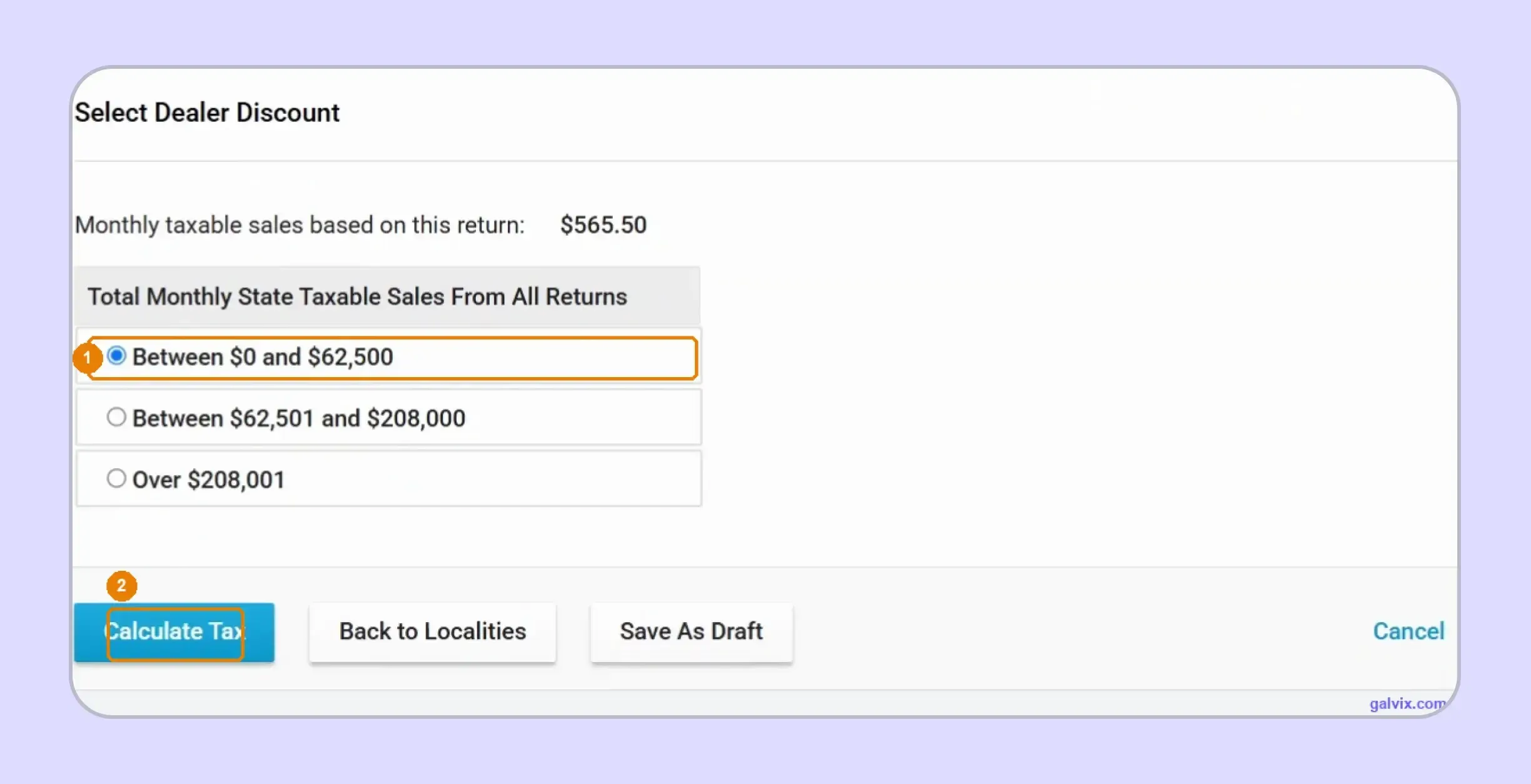
Step 8: Review the Calculated Amount
Compare state and locality taxes with your prepared figures, then review the dealer discount, penalty, interest, and final tax due. Use the modification option before moving forward if anything differs.
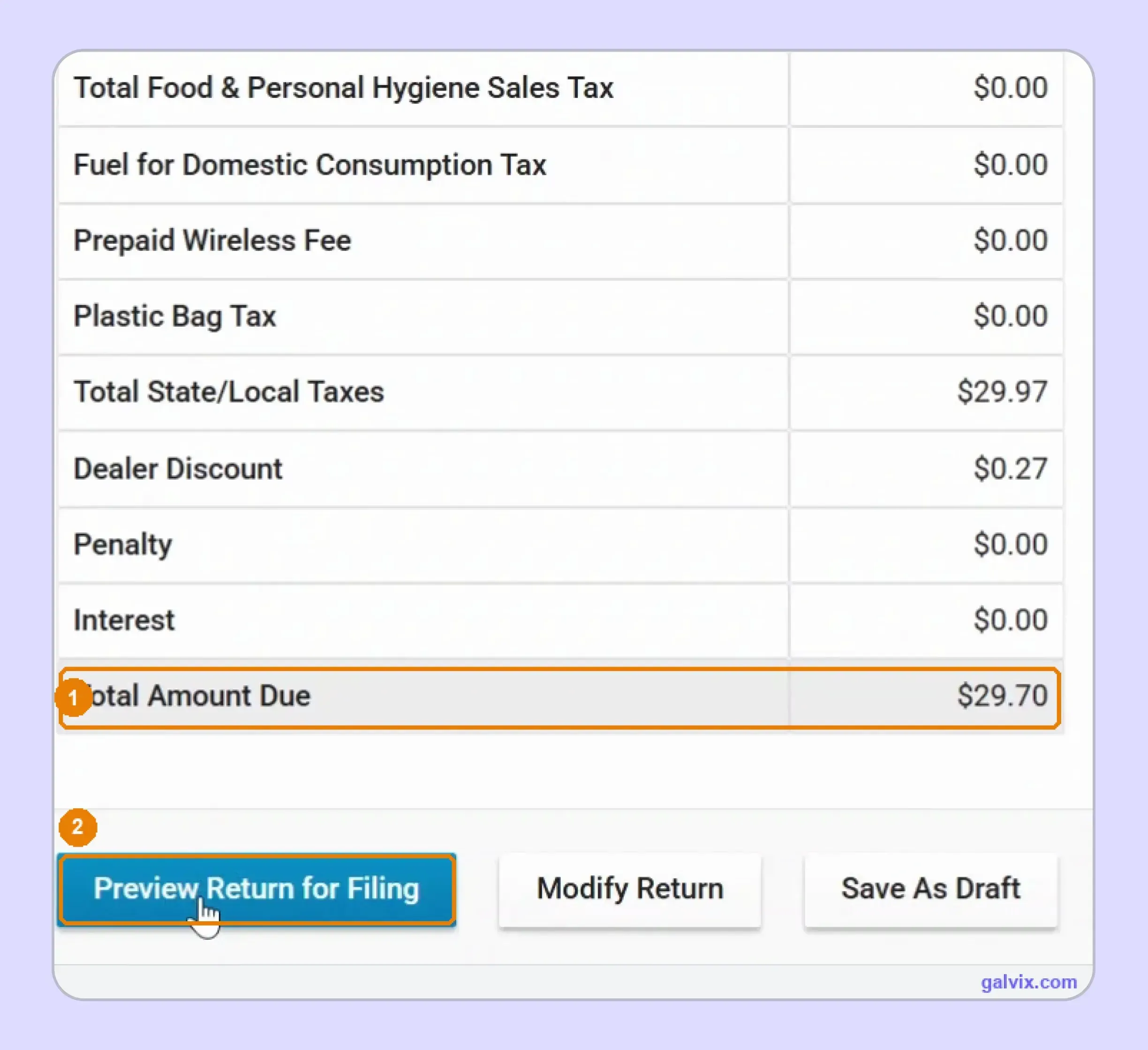
Step 9: Choose How to Pay Sales Tax in Virginia
Select the full balance, another amount, or file without payment. For businesses researching how to pay sales tax in Virginia, bank debit can be completed within the filing flow.
Choosing to file without payment does not remove the balance. You remain responsible for completing payment by the deadline and ensuring any bank debit block accepts Virginia’s approved company information.
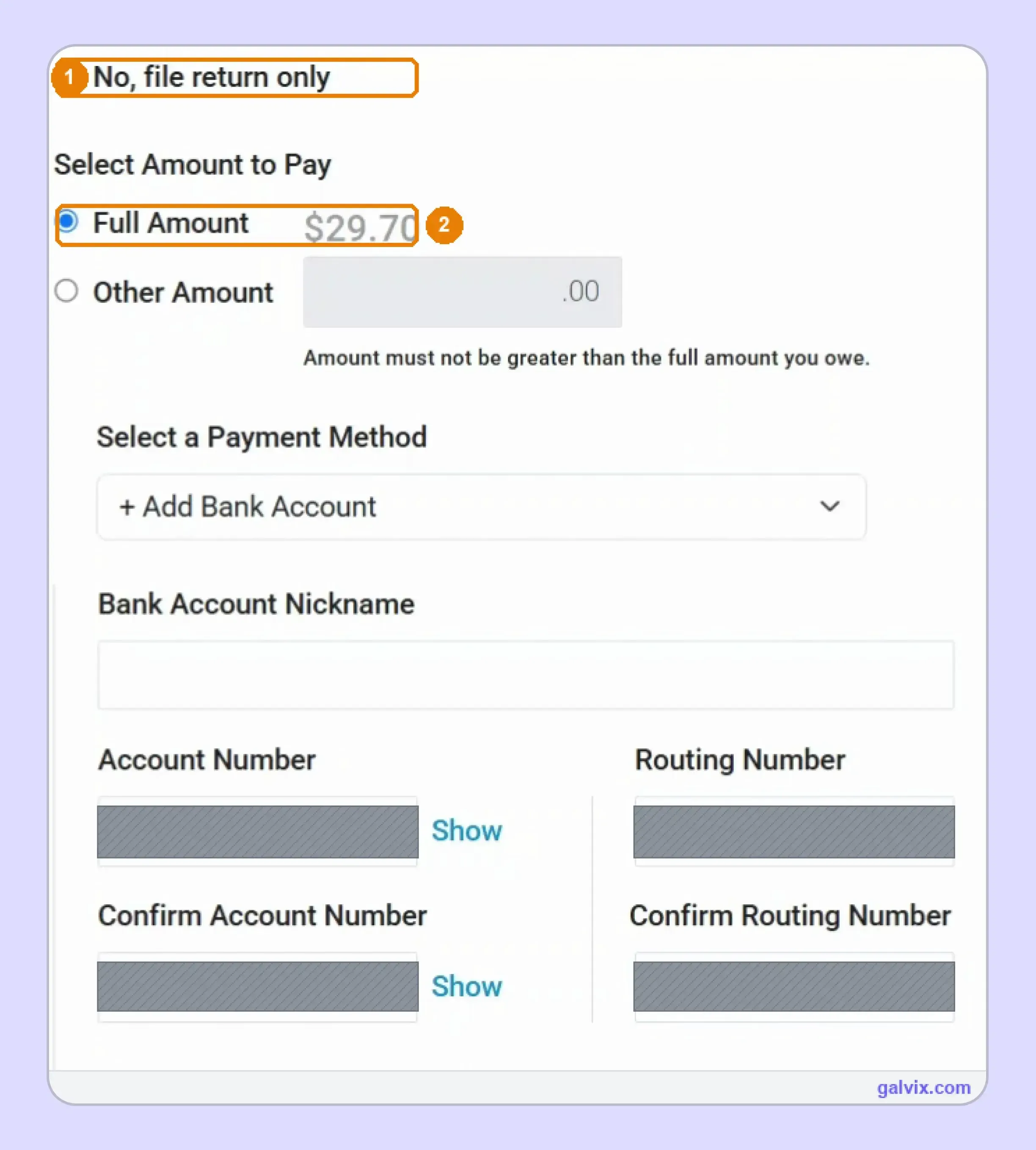
Step 10: Submit and Save Filing Proof
Submit only after the final preview, then save the confirmation number immediately. Keep the printer-friendly record because later account access may provide a summary instead of the complete filing details.
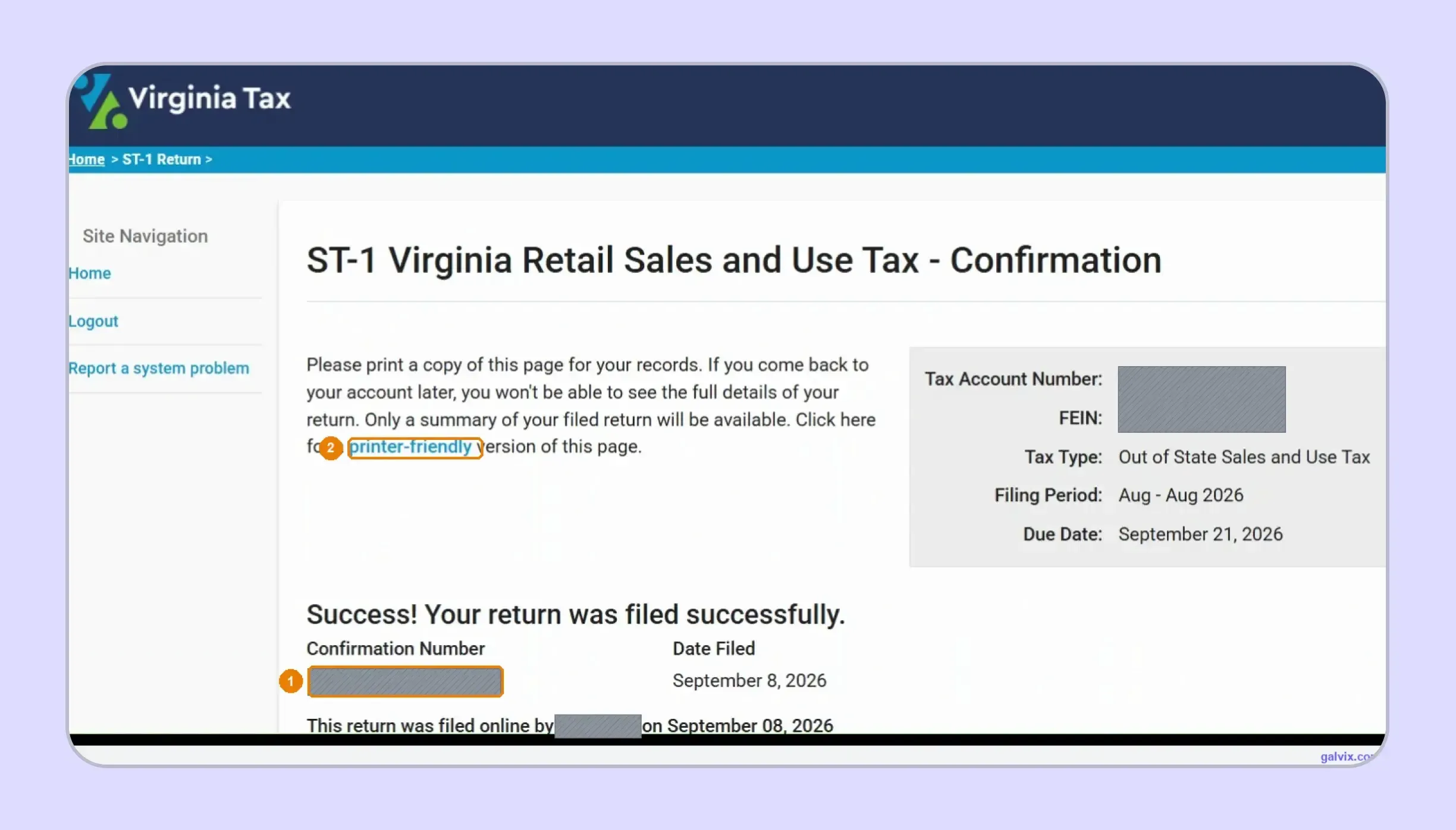
How Does the Virginia Dealer Discount Affect Your Return?
Virginia allows eligible dealers to retain a small portion of the state tax when they file and pay on time. Your monthly taxable sales level determines the applicable tier, and dealers with an average monthly liability above $20,000 do not qualify.
- Your sales tier matters: Virginia uses separate monthly-sales brackets beginning at $0 to $62,500, followed by $62,501 to $208,000 and amounts above $208,001. The applicable tier should reflect activity across the business rather than a single location.
- The discount covers the state portion: The dealer discount reduces the state component of the return. It does not change the underlying locality allocation or correct an inaccurate sales classification.
- Timely payment remains essential: Eligibility depends on timely filing and payment. A return filed by the deadline with an unpaid balance can lose the discount, making the payment date part of the filing control.
- The discount is different from tax credits: Do not treat this calculation as one of Virginia’s broader tax credits. It is a return-level allowance specifically linked to timely collection, reporting, and remittance.
When you file Virginia sales tax online, review the selected tier before continuing. The portal can calculate the allowance, while your team still needs to confirm that the sales volume feeding that selection is complete.
How Do Exempt Sales Affect a Virginia Sales Tax Return?
Exempt transactions reduce the taxable base inside each locality. Before you file Virginia sales tax online, link every untaxed transaction to the documentation supporting its treatment and confirm that the customer and purchase qualify.
Virginia Uses Different Certificates for Different Exemptions
Virginia does not rely on a single certificate for every exemption. Form ST-10 covers qualifying resale purchases, while manufacturing, government, medical-related purchases, churches, and other situations use different forms.
For example, ST-10 covers certain purchases for resale or future taxable lease activity. Other exemptions may use ST-11, ST-12, ST-13, ST-13A, or a state-issued nonprofit certificate.
A consistent sales tax exemption certificate process helps keep the correct document linked to the customer account and the underlying purchase.
Certificate Collection Does Not Decide Eligibility
Having documentation on file supports the claimed exemption. You should still verify that the purchaser and transaction meet the rule before reducing the locality’s taxable amount.
That separation matters when the same buyer makes both taxable and exempt purchases. A certificate can support qualifying transactions without automatically making every future order exempt.
The same principle applies when tax authorities provide registration or certificate lookups. A successful account check confirms one piece of information, while the transaction still needs to qualify under the applicable exemption.
The Galvix Sales Tax Exemption Certificate Tool can help identify the correct certificate route and seller checks before exempt transactions reach return preparation.
This becomes especially useful when one customer purchases across several states. Different forms, renewal rules, verification routes, and purchaser requirements can create separate documentation obligations within the same account.

How Does Galvix Help Businesses File Virginia Sales Tax Online?
Galvix manages recurring sales tax compliance as a service, so your finance team does not need to operate every state portal itself. For Virginia, return preparation starts with reconciled transaction data and locality-level review before figures reach the filing process
That approach is useful when you file Virginia sales tax online because correct destination mapping drives the calculation. Galvix can organize direct activity, exempt transactions, marketplace treatment, payment schedules, and supporting records before the return reaches approval.
Your transaction data can flow through Galvix integrations covering platforms such as Shopify, QuickBooks, NetSuite, Stripe, BigCommerce, WooCommerce, Zoho Books, and Microsoft Dynamics Business Central. CSV/XLSX uploads and API connections can support other data sources.
For ecommerce teams, Shopify integration can bring store data into the wider compliance workflow. Businesses using accounting systems can connect QuickBooks instead of rebuilding transaction files manually before each return.
Larger finance teams can also connect NetSuite or Microsoft Dynamics Business Central. The goal is to keep filing data connected with the systems already recording invoices and customer activity.
That same workflow can extend into nexus monitoring, state registrations, tax determination, exemption management, and notice handling. Your Virginia sales tax filing then operates as one part of a wider managed process rather than an isolated monthly task.
Galvix uses modular pricing, meaning you pay only for the services your business selects. Exact pricing depends on the workload driver for each module, such as return volume, transactions, registrations, registered states, or exempt customers.
What Can Galvix Manage for Virginia Sellers?
- Return preparation: Galvix reconciles transaction data and prepares locality-level figures before sending the completed return for your approval and filing.
- Nexus monitoring: State exposure can be tracked as direct sales grow, helping you identify new obligations before another sales tax filing process begins.
- Registration support: When a new obligation arises, Galvix can handle the registration work and organize the resulting state credentials for ongoing filing.
- Exemption management: Certificate collection, review, renewal follow-up, customer mapping, and audit-ready records can operate within the same managed compliance workflow.
- Notice handling: State correspondence can be reviewed within the same relationship, reducing the need to manage separate processes for filing questions and account notices.
For teams operating across the Commonwealth of Virginia and other states, this creates one operating model for returns rather than a growing collection of separate state processes.
The comprehensive Galvix resources can also support research on rate, nexus, registration, and exemption when internal teams need to check an unfamiliar state requirement.
If you are comparing Virginia sales tax filing requirements with those elsewhere, this managed model helps keep the filing calendar aligned with nexus exposure and transaction data, rather than treating each return as a separate compliance project.
Book a demo to review your Virginia and multistate sales tax filing requirements.
Frequently Asked Questions
How to register for sales tax in Virginia?
Register through Virginia Tax when your business has a collection obligation from Virginia activity, physical presence, or qualifying remote sales. After registration, you receive a 15-digit account number and Form ST-4. The state then assigns your filing frequency, allowing you to file Virginia sales tax online through the available electronic routes.
How do I calculate my sales tax in Virginia?
Start with the location where the transaction is sourced because the general rate varies across Virginia. Most areas use 5.3%, while specified regions use higher rates. When completing the Virginia sales tax return, enter locality sales tax correctly and let the filing system calculate the applicable tax from those figures.
What are the due dates for Virginia sales and use tax?
Monthly returns are due on the 20th following the reporting month. Quarterly filers use April 20, July 20, October 20, and January 20. When a deadline falls on a weekend or state holiday, it moves to the next business day. Required zero returns follow the same schedule.
Do I need to file a state tax return in Virginia?
If your active Virginia sales-tax account has an assigned period, you must submit the required return even when no sales occurred. This requirement applies separately from income-tax obligations. Select the no-sales option when appropriate rather than leaving the period unfiled and allowing the account to show an outstanding return.
How often do I need to file sales tax in Virginia?
Virginia assigns monthly or quarterly filing based on your liability. Monthly returns are due on the 20th after each month, while quarterly periods end in March, June, September, and December. Check your assigned schedule before you file Virginia sales tax online, because businesses should not choose their own reporting frequency.
How do I file sales tax in Virginia?
To File Virginia sales tax online, open the correct business account, choose the required period, select your active localities, enter gross and exempt sales, review the calculated tax, select payment treatment, and submit. Save the confirmation immediately, as it provides the strongest evidence that the return reached Virginia successfully.
What form do non-residents need to file for Virginia taxes?
For retail sales and use tax, out-of-state dealers historically used Form ST-8 as the paper equivalent, while the online workflow presents the ST-1 return. The exact filing route depends on your account setup, so confirm the available electronic forms before preparing your VA sales tax filing.
Where do I mail my Virginia state tax return?
Virginia requires sales-tax returns to be filed electronically, so a standard paper mailing is not the normal route. Businesses unable to comply electronically must request a waiver. If you are researching how to fill out sales and use tax return in Virginia, start with the electronic options