If your business is registered for Missouri sales tax, you can file Missouri sales tax online through MyTax Missouri. In-state sellers generally use Form 53-1, while qualifying out-of-state sellers use Form 53-V for vendor’s use tax. Both follow a similar online filing process.
The return becomes more detailed when sales reach several cities, counties, or special districts. Missouri has a 4.225% state sales tax rate, while local rates vary by jurisdiction. MyTax therefore uses a location grid instead of asking for one statewide sales figure.
The filing process has another important feature. Submitting the return and paying the balance are separate transactions, each with its own confirmation record. Missouri’s 2% timely payment allowance also depends on filing and paying by the applicable deadline.
This guide explains how to file sales tax in Missouri, prepare location-level data, make payment, and retain proof of filing. It also covers Missouri sales tax filing requirements for remote sellers, marketplace activity, exempt transactions, and growing multistate businesses.

What Should You Know About Missouri Sales Tax Filing?
Missouri combines a statewide rate with city, county, and district-level taxes. Before you file Missouri sales tax online, confirm which return applies, your assigned filing frequency, and the locations that need reporting.
These details help determine how the Missouri sales tax return should be prepared before you open MyTax.
| Missouri Filing Detail | Rule |
|---|---|
| Online portal | MyTax Missouri |
| In-state sales tax return | Form 53-1 |
| Out-of-state vendor’s use tax return | Form 53-V |
| State rate | 4.225% |
| Local taxes | Added by cities, counties, and special districts |
| Filing frequency | Monthly, quarterly, or annual |
| Monthly filing | $500 or more in state tax per month |
| Quarterly filing | $500 or less in state tax per month |
| Annual filing | Less than $200 in state tax per quarter |
| Monthly due date | Last day of the following month |
| Quarterly due date | Last day after the quarter ends |
| Annual due date | January 31 |
| Timely payment allowance | 2% when filed and paid on time |
| Zero return | Required while registration remains active |
| Electronic filing | Required for three or more locations |
The Missouri Department of Revenue reviews filing frequency annually and can adjust the schedule when the state tax amount changes. Local tax does not determine that schedule, since the Department bases the review on state tax due across the return.
Registered businesses must also keep filing when a period has no activity. Sellers reporting sales or use tax from three or more locations must use electronic filing, although the state provides a waiver process in limited circumstances.
These rules make the filing calendar as important as the return itself. A business should know its tax period and applicable due dates before preparing location-level figures.
Who Must File a Missouri Sales Tax Return?
Businesses with an active Missouri registration usually need to file for every assigned reporting period. Remote sellers can also create economic nexus after crossing the state’s sales threshold, even without a traditional physical presence.
Businesses Registered for Missouri Sales Tax
Businesses that commonly have a filing obligation include:
- Missouri retailers making taxable retail sales to customers.
- Businesses holding an active Missouri sales tax license.
- Sellers reporting activity across several registered Missouri locations.
- Registered businesses with no activity during a period.
An active sales tax account creates recurring filing obligations until the state changes or closes that registration. This means a zero-sales period can still require a tax return, while the assigned schedule may be monthly, quarterly, or annual depending on the state tax liability.
Businesses making sales of tangible personal property from a Missouri business location generally collect sales tax. Out-of-state vendors shipping taxable goods into Missouri can instead have vendor’s use tax obligations, depending on nexus and transaction circumstances.
Remote Sellers and Marketplace Sellers
Missouri applies a $100,000 threshold to qualifying remote sellers. The Department instructs sellers to review taxable Missouri sales for the preceding 12 months at the end of each quarter and begin collection within the required period after crossing the threshold.
A separate Missouri sales tax nexus review is useful when a business has employees, inventory, or another physical presence in the state. Physical activity can create an obligation independently of the remote-seller threshold.
Marketplace activity needs a different review. A seller operating only through a marketplace facilitator usually does not register or remit separately when the facilitator handles the tax. Sellers making direct sales alongside marketplace transactions may need their own registration once the applicable threshold is reached.
Missouri includes marketplace sales when testing the threshold, even when the facilitator collects tax. Tracking sales tax nexus across all channels can therefore help identify where a new sales tax permit or state registration may be needed next.
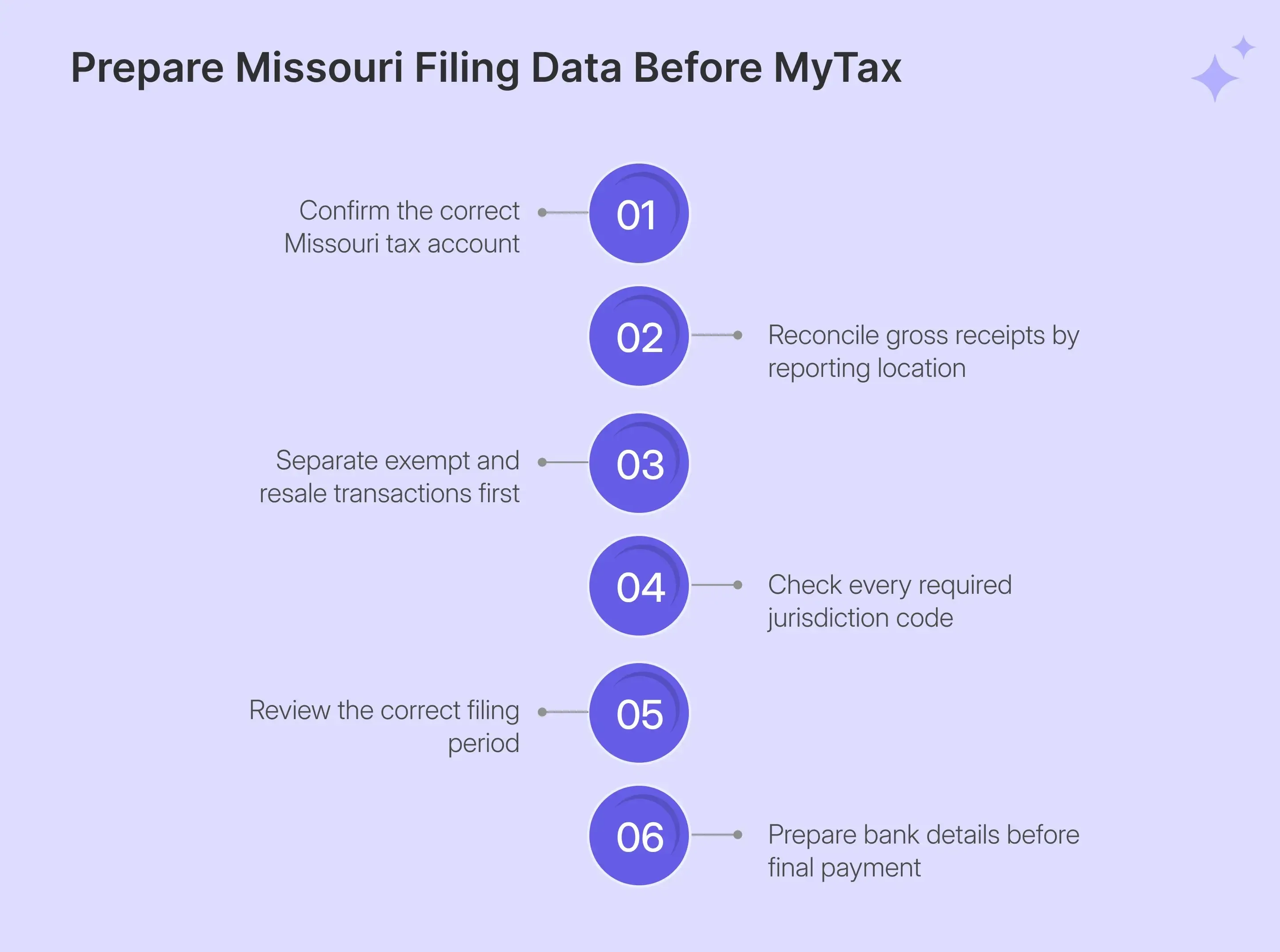
What Data Should You Prepare Before MO Sales Tax Filing?
MO sales tax filing process starts before you enter MyTax. Missouri expects sales and adjustments to be assigned to the correct location, so clean location data reduces the need for corrections after the return has already been opened.
Businesses trying to understand how to file MO sales tax return should gather the following information to streamline the process:
| What You Need | Why You Need It |
|---|---|
| MyTax Missouri login | Access the registered business |
| Correct Sales or Vendors Use account | Avoid filing under another tax account |
| Gross receipts by jurisdiction | Report sales in the correct rows |
| Adjustments by jurisdiction | Remove qualifying nontaxable activity |
| 15-digit jurisdiction codes | Add missing locations |
| Exemption documentation | Support deductions from taxable sales |
| Correct filing period | Open the right return |
| Bank details | Complete payment after filing |
Reconcile Gross Receipts by Location
Missouri does not take total sales and distribute them automatically among jurisdictions. Each active location must receive the correct gross receipts because the portal applies the preloaded rate to that specific row before calculating the sales tax amount.
That location list also deserves attention. MyTax can retain jurisdictions used on previous returns, so seeing a row does not mean the current reporting period has activity there. The live filing walkthrough shows a grid populated from earlier reporting history, with the filer adding values only where current sales occurred.
If a new location is missing, use Missouri’s lookup to obtain the 15-digit jurisdiction code before filing. The applicable tax rate is then tied to the location rather than entered manually.
Review Adjustments Before Filing
MyTax calls deductions from gross receipts “Adjustments.” These can include qualifying resale activity, exempt-customer transactions, or other sales that should not remain in taxable sales for that location. The portal then calculates taxable sales by subtracting adjustments from gross receipts.
Supporting documents should be ready before those adjustments are included in the return. A consistent sales tax exemption certificate process helps connect the customer, the claimed exemption, and the underlying transaction, rather than treating certificate collection as a separate filing exercise.
The state also restricts negative taxable sales at an individual location. Refund or credit situations can require an amended return rather than entering a negative figure into the normal location grid.
How Do You File Missouri Sales Tax Online Using MyTax?
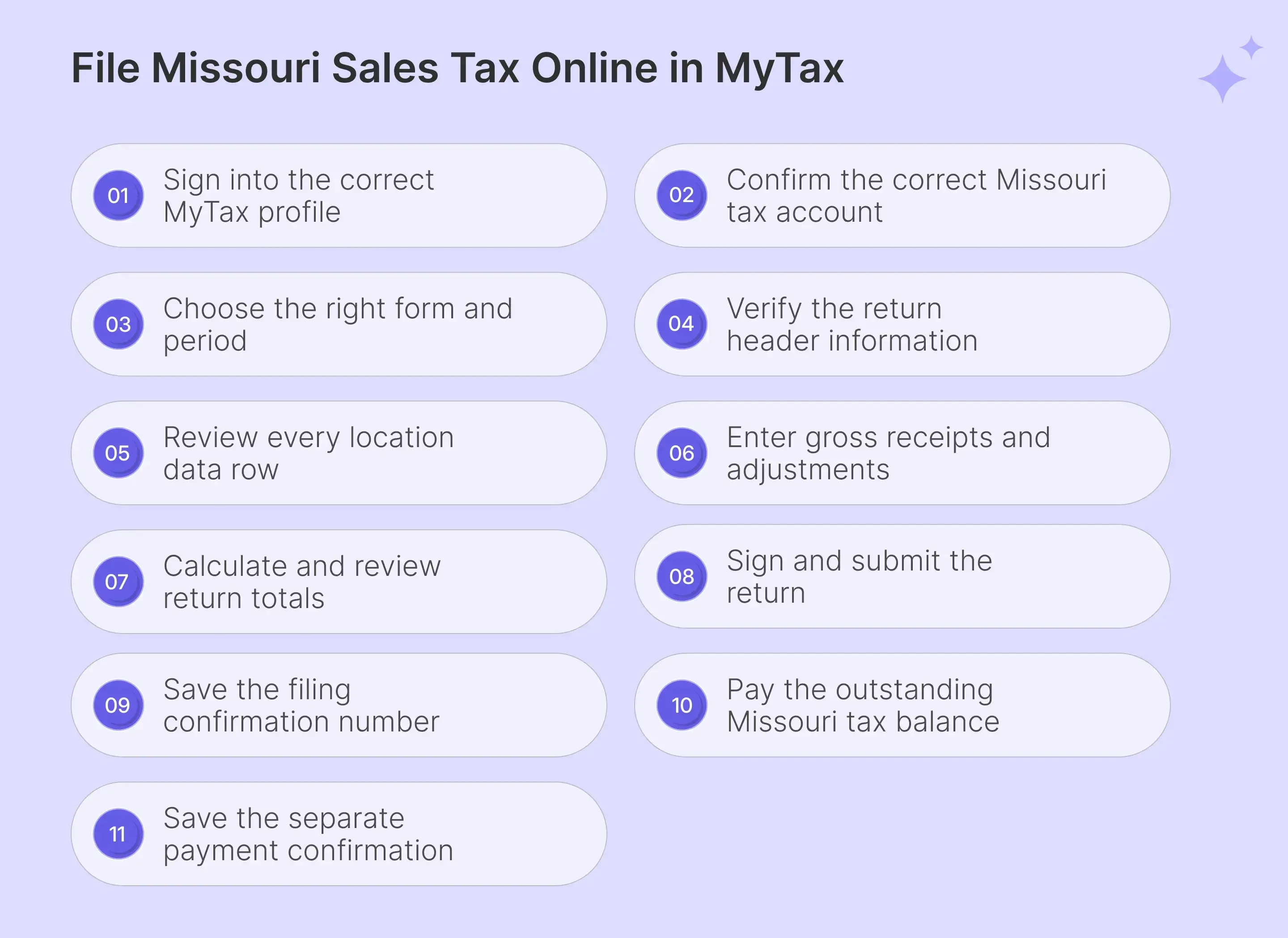
To file Missouri sales tax online, you must follow the steps mentioned here:
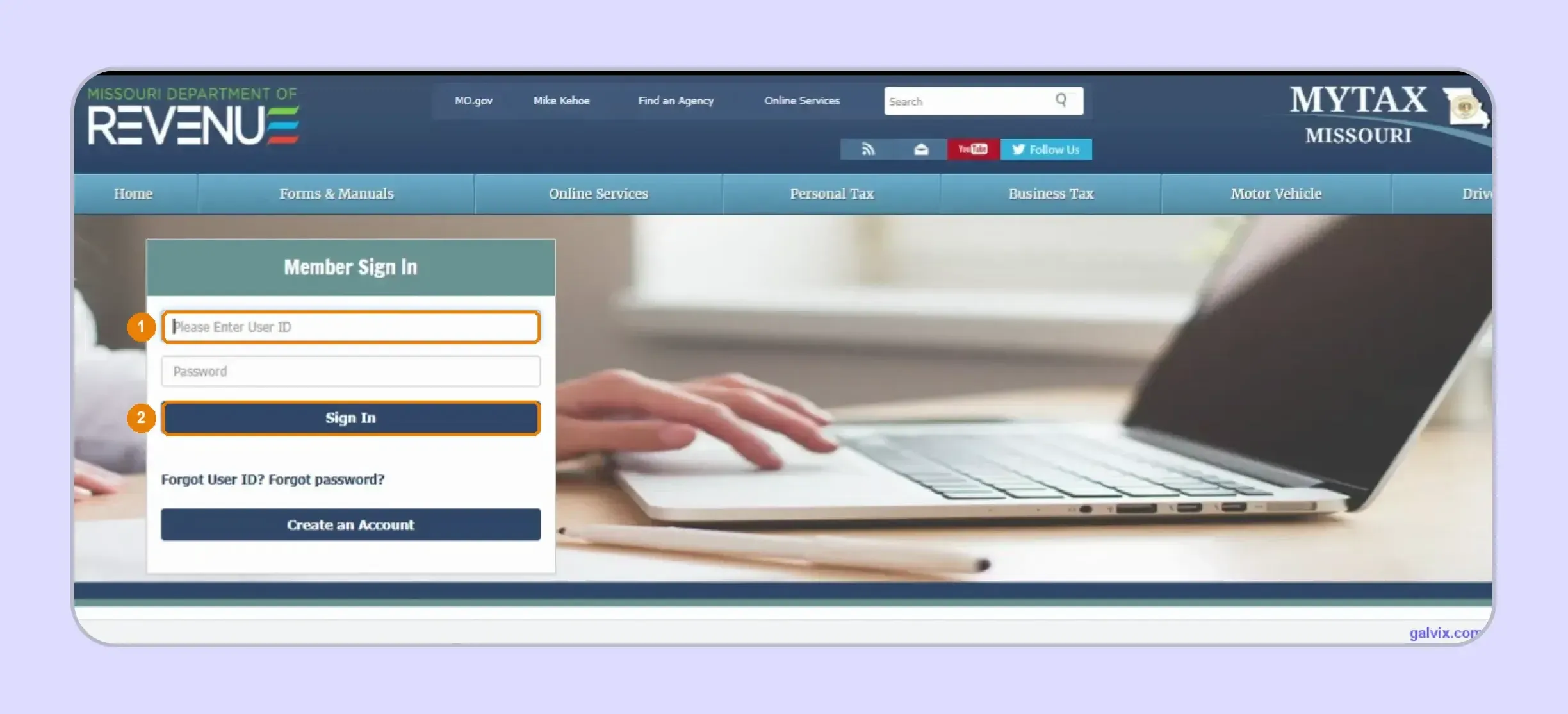
Step 1: Sign In to MyTax Missouri
Open MyTax Missouri and enter your User ID and password. Your User ID identifies your portal profile, while your Missouri Tax ID or MOID identifies the business. Check autofilled credentials carefully when you manage more than one company.
Check what the browser autofilled. If you file for more than one business, the sign-in page will happily pre-fill the User ID from the last company you filed for. Read the box before you sign in. This is the cheapest place to catch a wrong-account filing and the most expensive one to miss.
Step 2: Confirm the Correct Tax Account
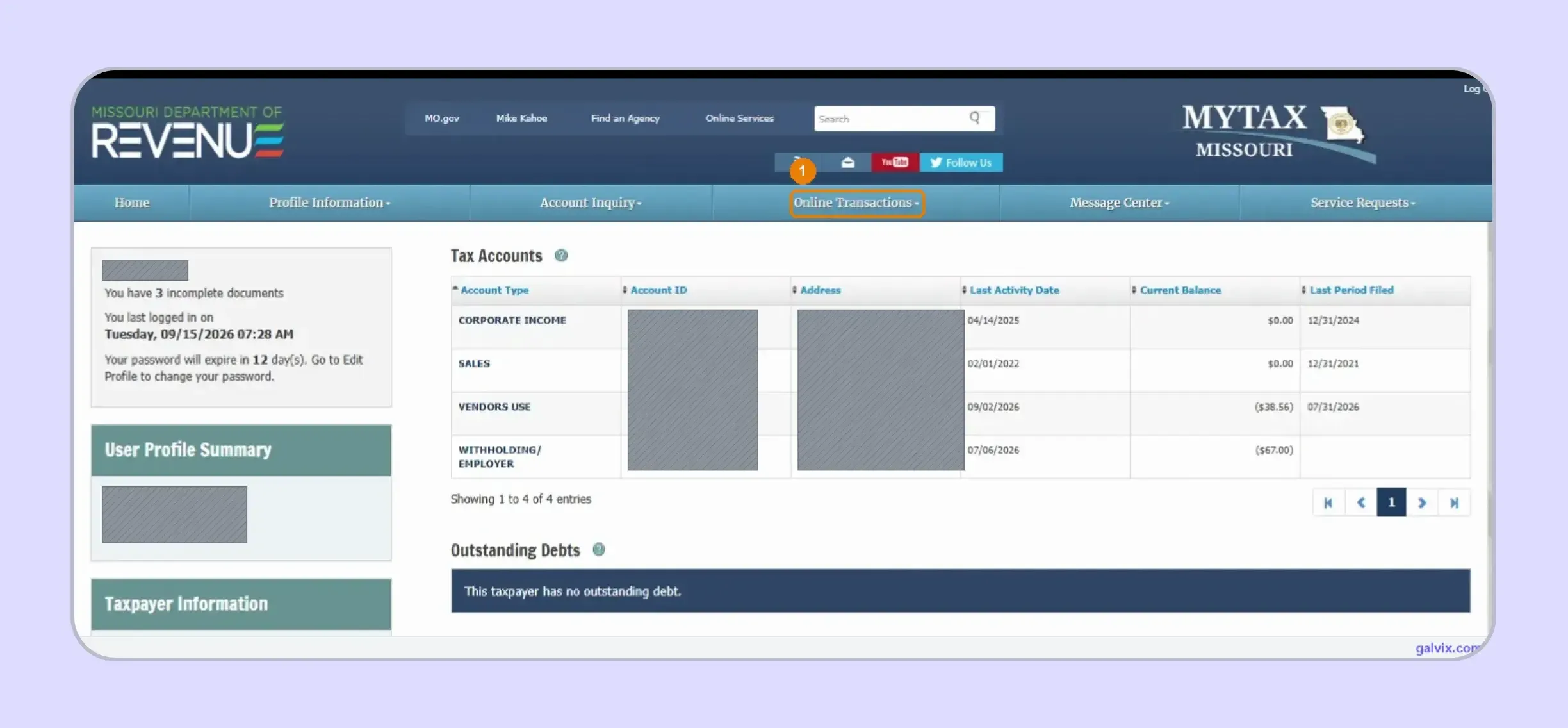
Review the Tax Accounts table before starting the return. Confirm the business, account ID, and account type shown. Missouri retailers generally use Sales, while qualifying out-of-state sellers collecting vendor’s use tax use Vendors Use.
Step 3: Choose the Form and Filing Period
Open Online Transactions and select the filing option. Choose Form 53-1 for an in-state sales tax return or Form 53-V for a vendor’s use tax return, then confirm Original Return and the correct filing period.
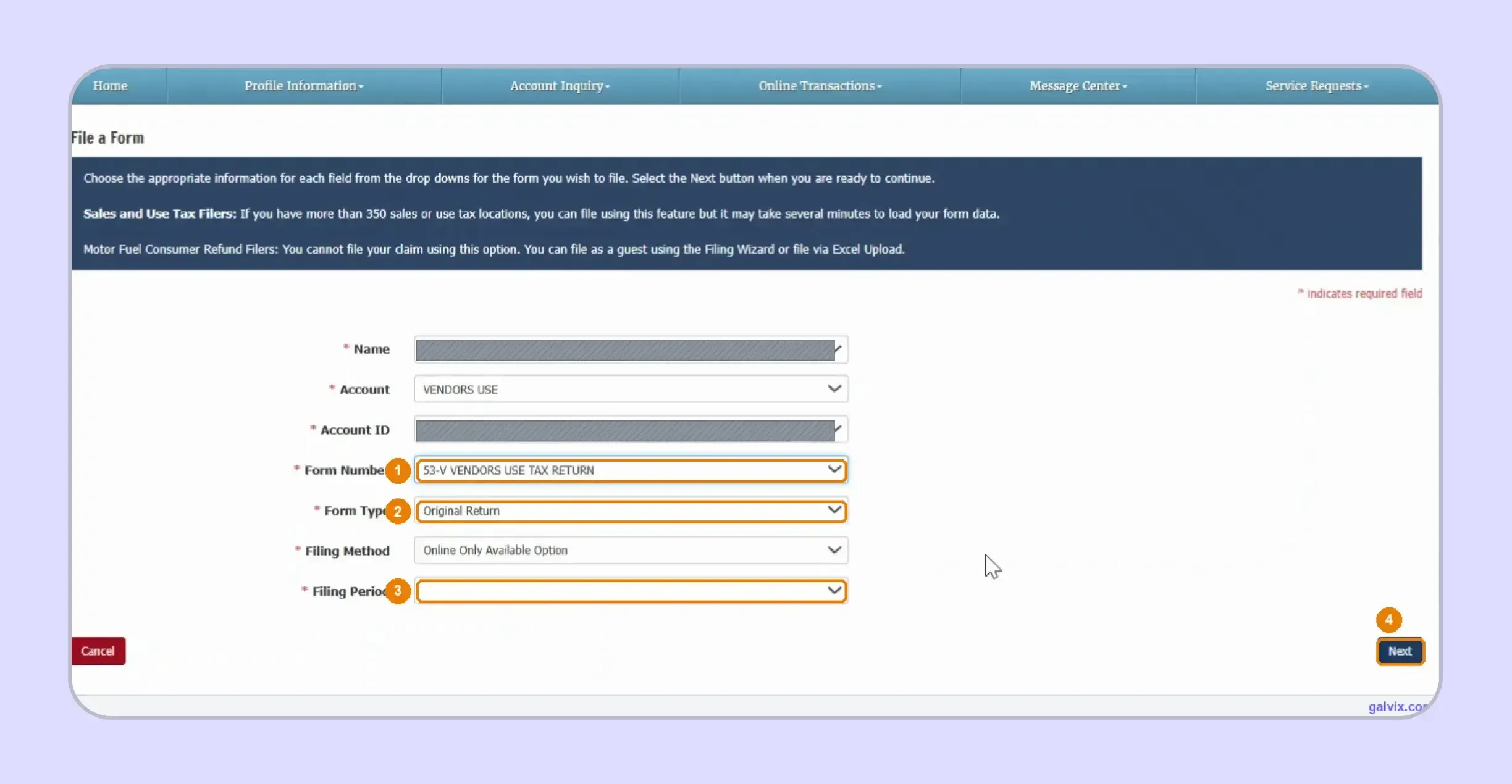
Step 4: Verify the Return Header
Check the Return Header before entering figures. Confirm the form type, return type, and period dates, then open Location Data. MyTax also provides the Missouri Sales and Use Tax Lookup for any new jurisdiction that needs to be added.
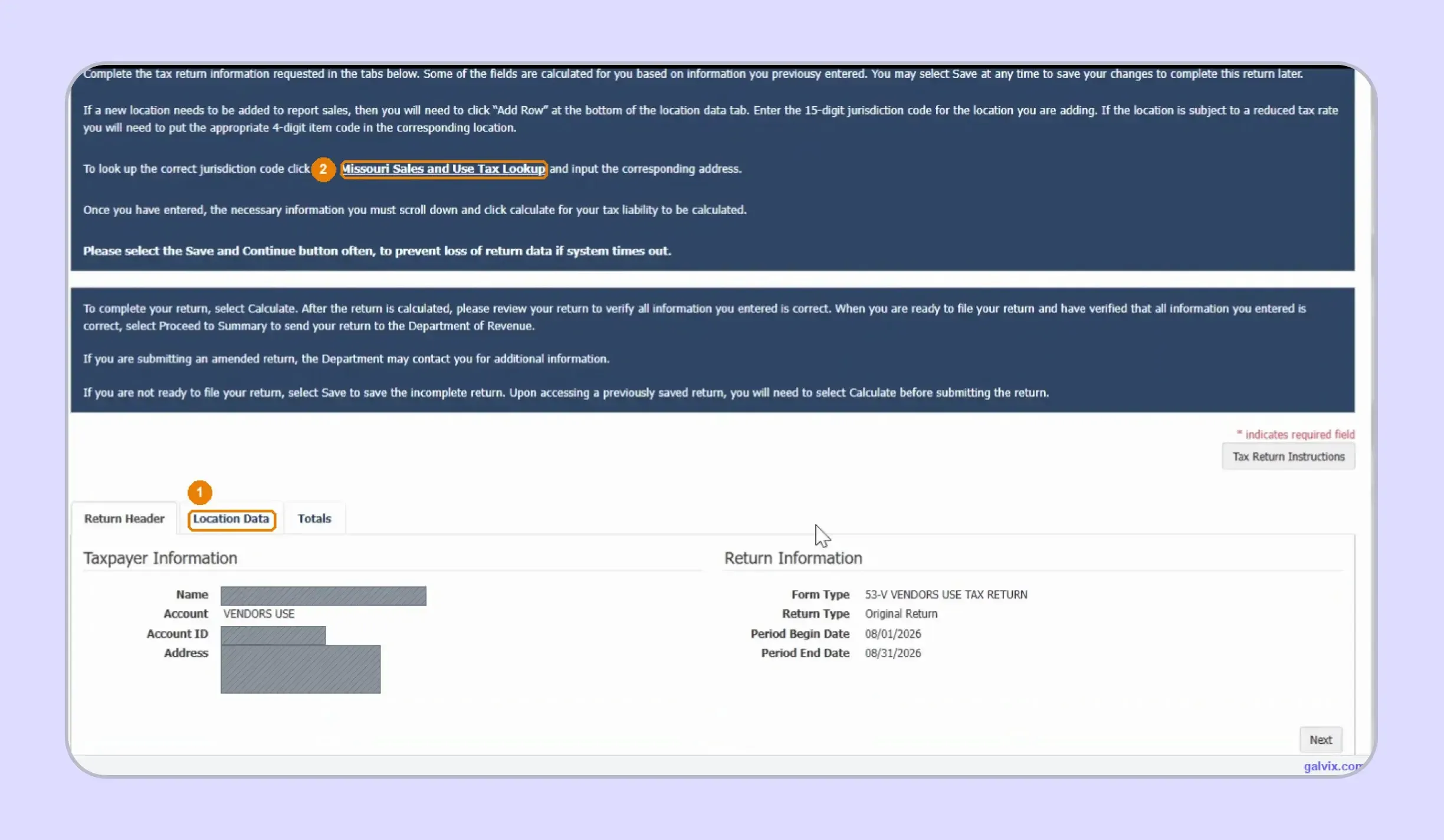
Step 5: Review the Location Data Grid
The Location Data tab contains each registered business location with its jurisdiction code and prefilled sales tax rate. MyTax may show locations from earlier returns, so focus on rows that have activity during the current period.
This list is your registration history, not this month's sales. MyTax pre-loads every jurisdiction you have ever reported; this return arrived with well over 200 rows, and every one of them starts at $0.00. Rows you leave at zero report zero tax for that jurisdiction, silently, and nothing on the screen reconciles the grid against a total. Fill in only the locations with activity, and if you sold into a jurisdiction not on the list, add it using Add Row and its 15-digit code; otherwise, that sale is never reported.
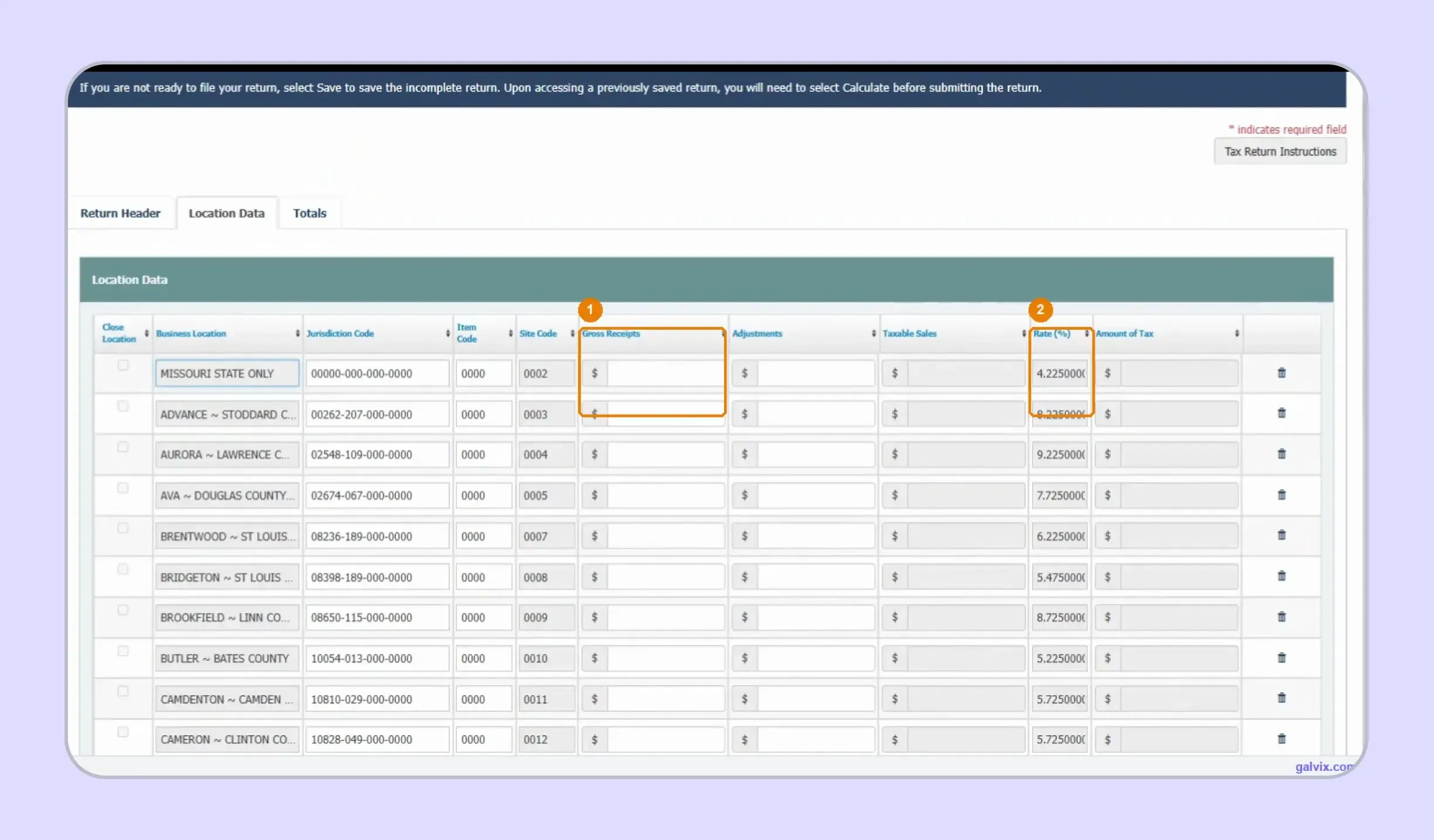
Step 6: Enter Gross Receipts and Adjustments
Enter gross receipts for each active location and add adjustments for qualifying exempt or resale activity. If a location is missing, use Add Row with the correct 15-digit code. MyTax calculates taxable sales after you complete the necessary entries.
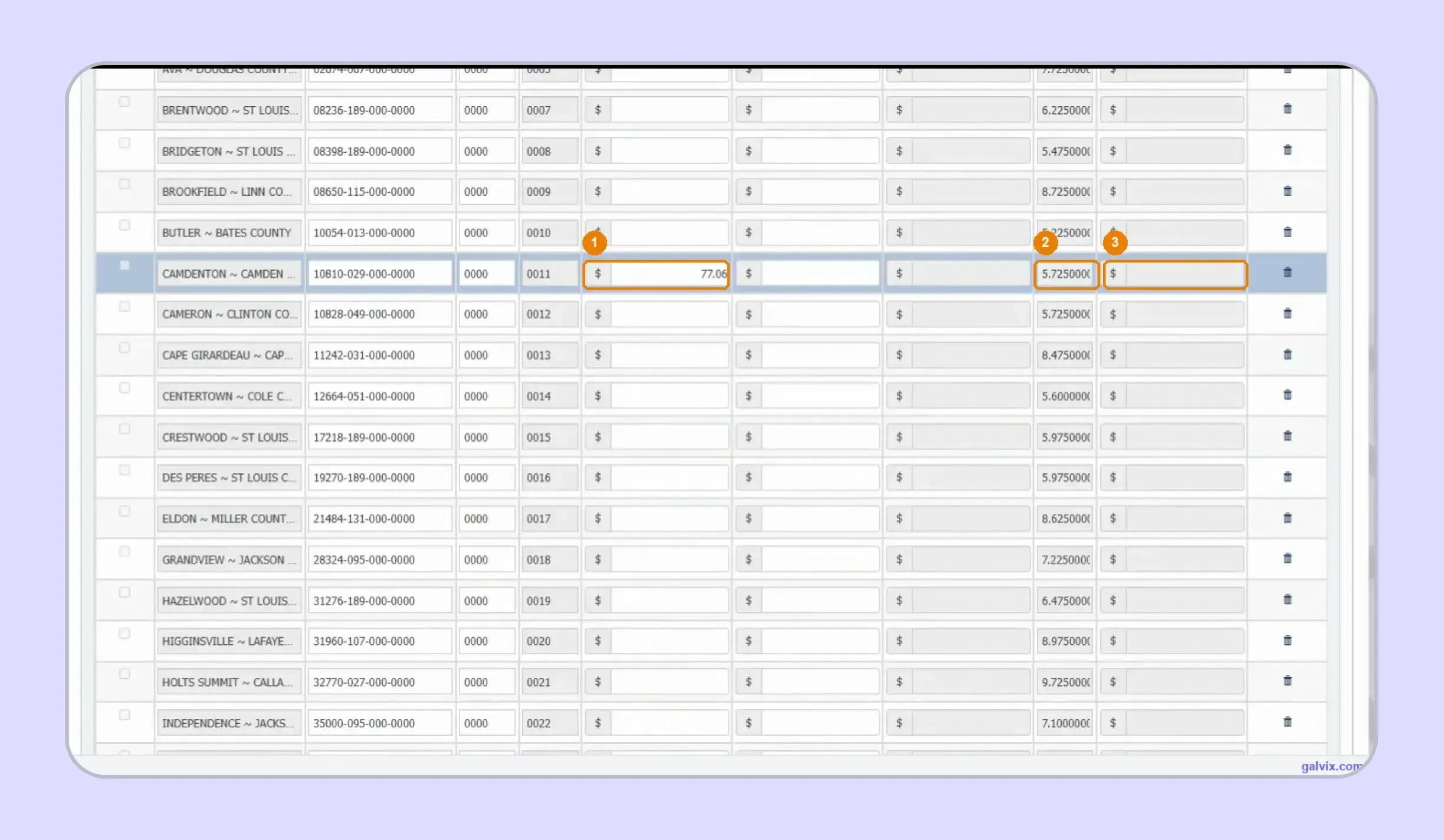
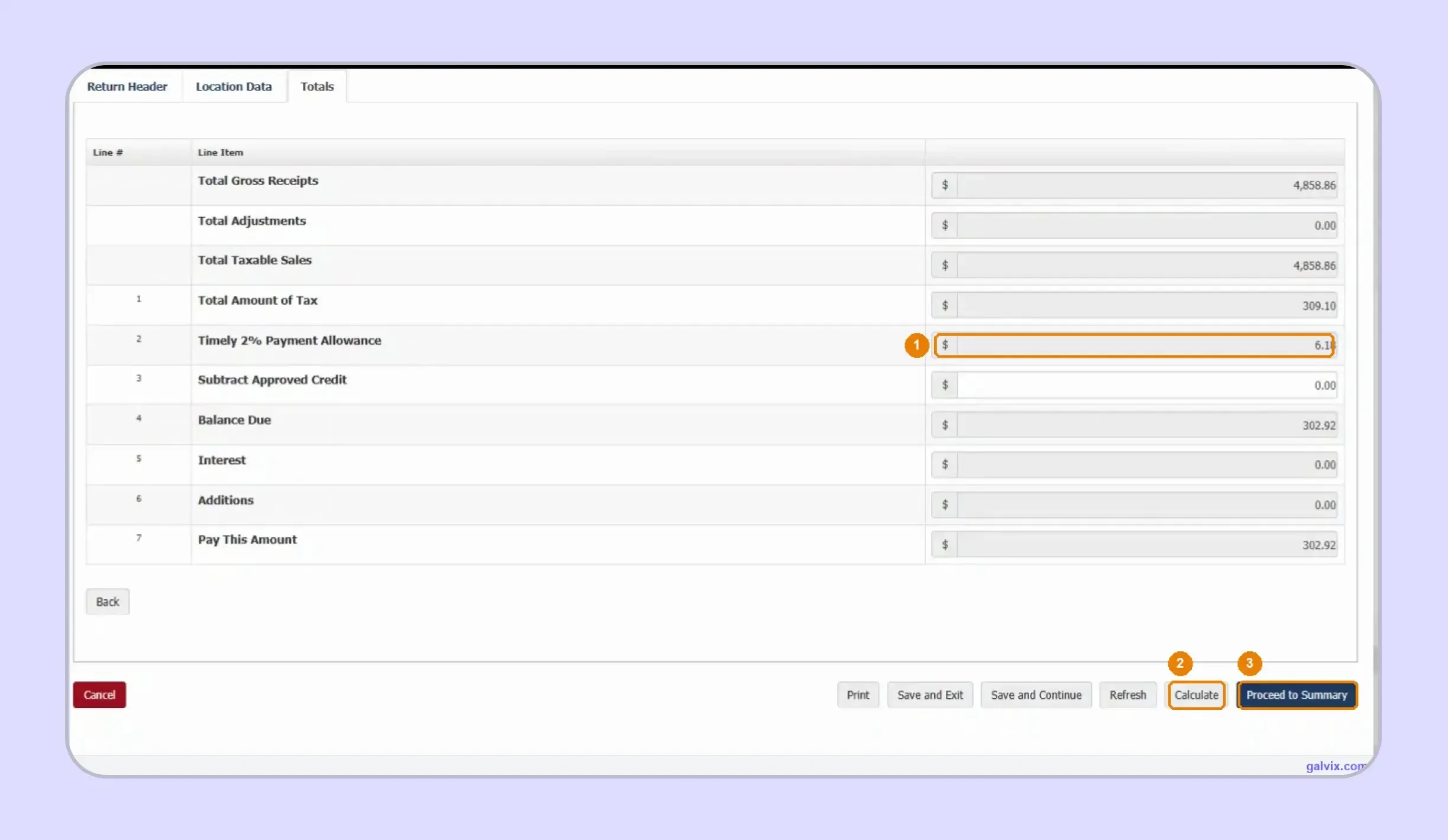
Step 7: Calculate and Check the Totals
Select Calculate after completing every active location. MyTax works out taxable sales, jurisdiction tax, Total Amount of Tax, the 2% timely allowance, and the final balance. Recalculate whenever you return to change earlier data.
A saved return must be recalculated before it will submit. If you saved a part-finished return and came back to it, MyTax tells you outright that you must click Calculate (2) again before submitting. The totals you see on a reopened return are not trusted until you recalculate them. Skipping it is how a return gets submitted with stale or zero totals
Step 8: Review and Submit the Return
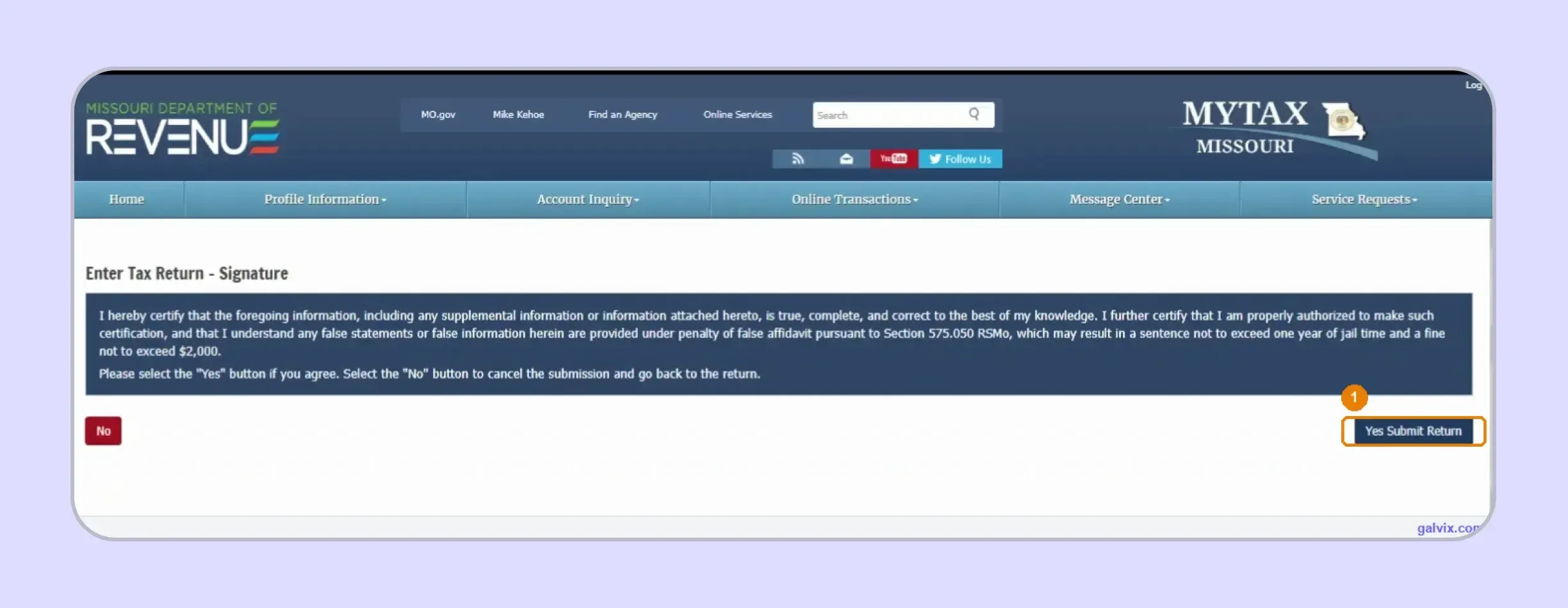
Proceed to the summary and review the completed figures before signing. The Signature screen asks you to certify that the information is true and complete. Select Yes Submit Return only when you are ready to file.
"Yes, Submit Return" is the point of no return. This is the click that files the return with the Department. Everything before it is editable; nothing after it is. Read the totals one more time before you press it, if you are not sure, choose No, not Yes.
Step 9: Save the Filing Confirmation
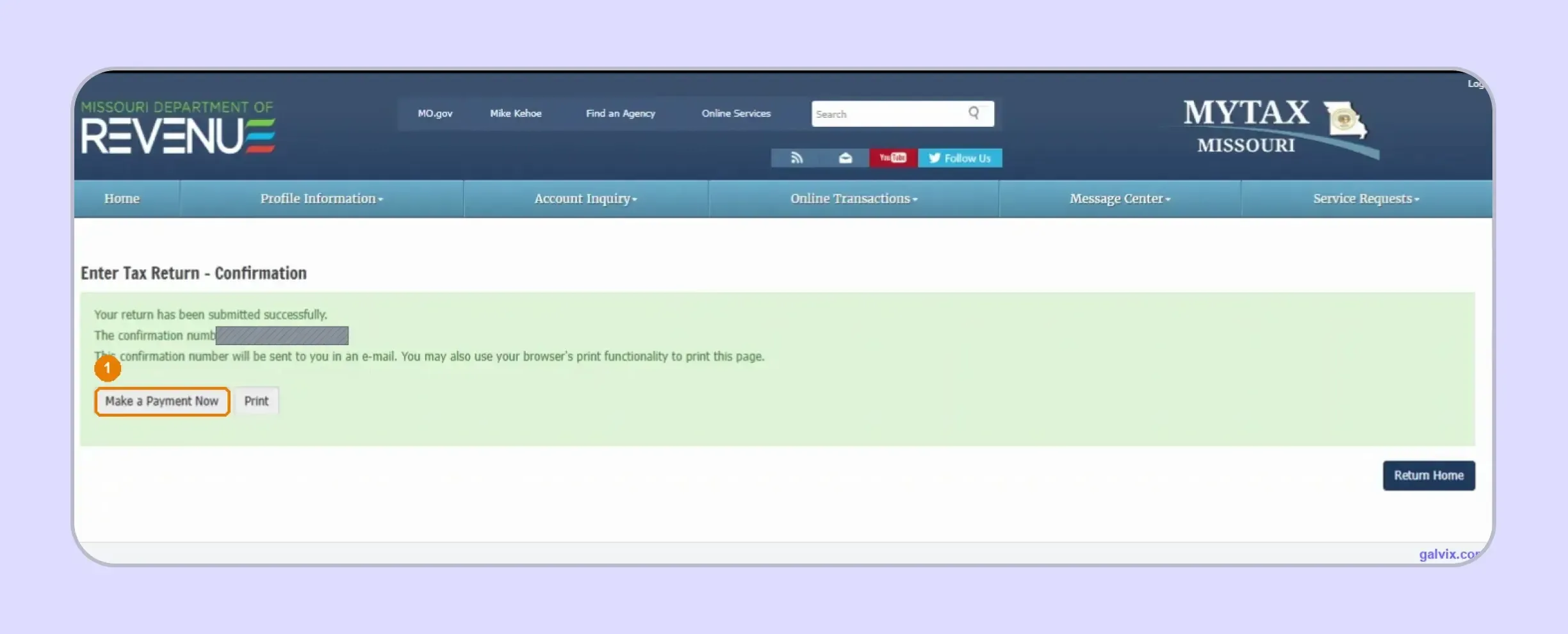
After submission, MyTax displays a confirmation number showing that the return was filed. Save or print this record immediately. Filing does not complete payment, so continue to Make a Payment Now when a balance remains due.
Filing and paying are separate, and the 2% discount rides on the payment. Submitting the return earns nothing on its own. Missouri's Timely 2% Payment Allowance is retained only if the balance is paid on time; filing on time and paying late forfeits it. If you close the tab here without paying, put the payment on your own calendar; the portal will not chase you.
Step 10: Pay the Missouri Sales Tax Balance
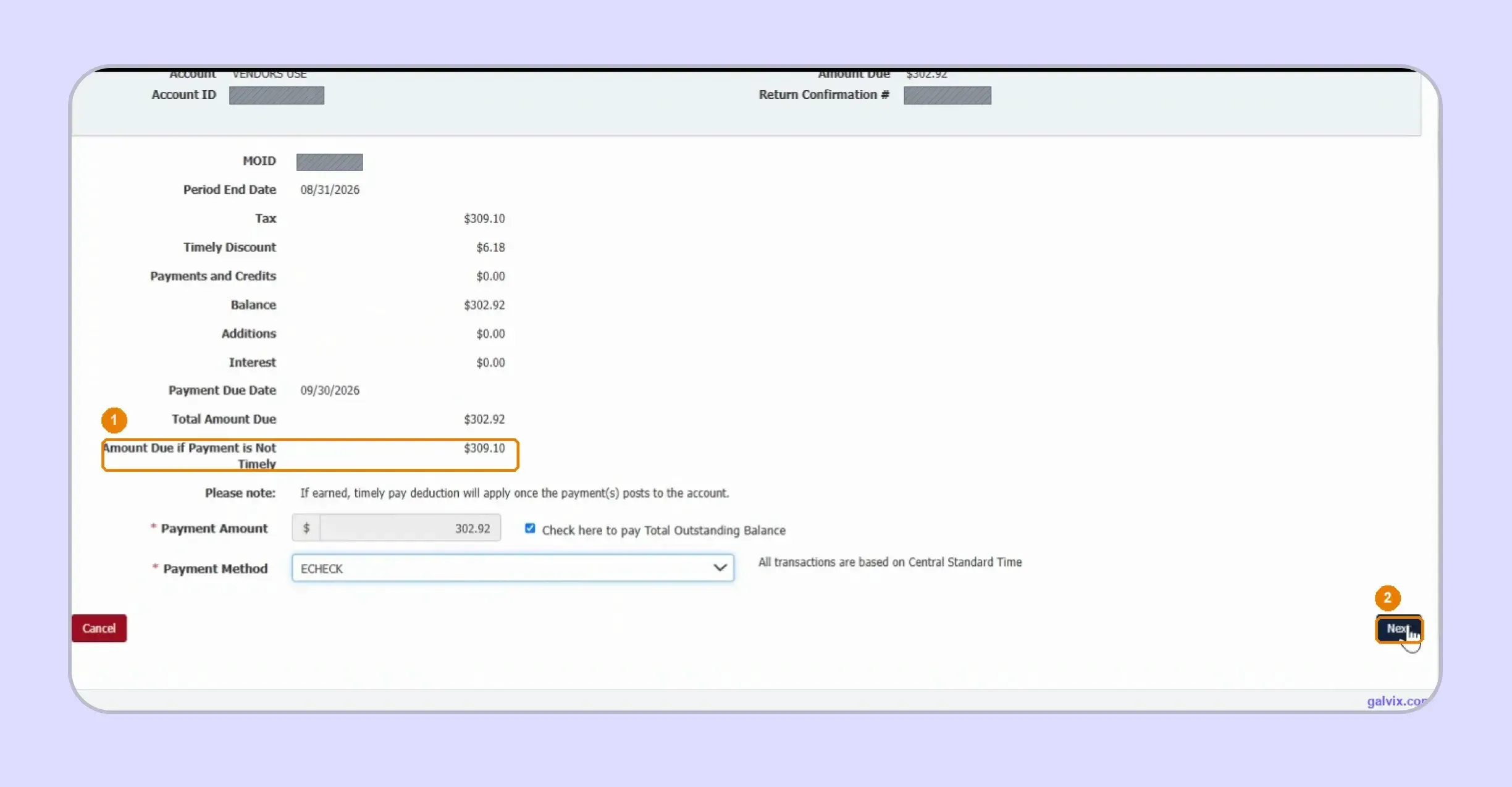
If you are researching how to pay sales tax in Missouri, review the balance shown after filing and choose the payment amount and method. The screen can show a higher amount when payment misses the deadline because the 2% allowance is lost.
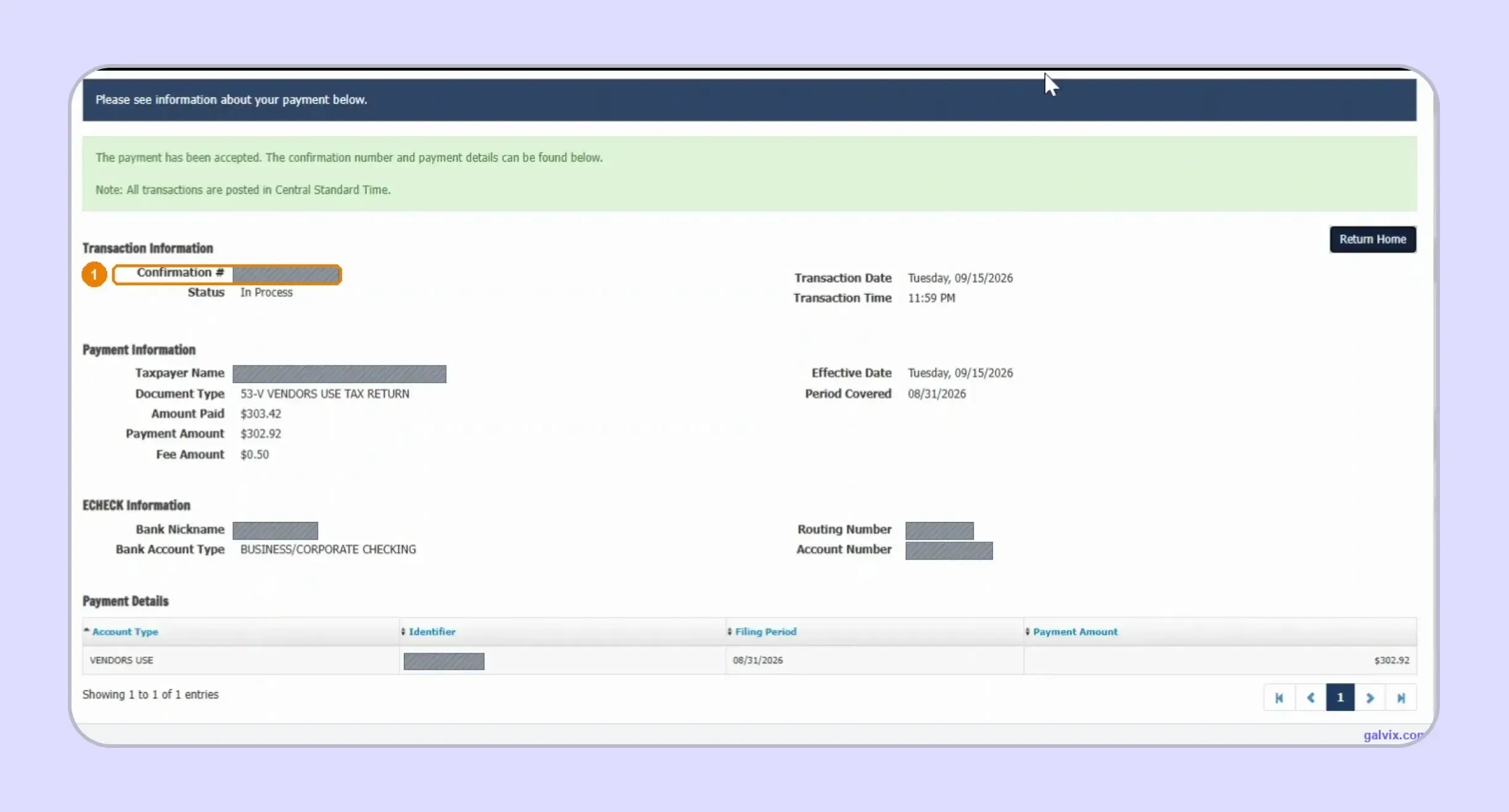
Step 11: Save the Payment Confirmation
Once payment is accepted, save the separate payment confirmation and transaction details. MyTax creates distinct filing and payment records, so both should remain with your return documentation to support timely filing and payment.
How Do Exempt and Marketplace Sales Affect a Missouri Sales Tax Return?
Exempt and marketplace activity should be separated before return preparation because each affects reporting differently. Exempt sales can reduce taxable amounts, whereas facilitator-collected marketplace sales may remain off the seller’s return yet still affect nexus calculations.
Exempt Sales Need Supporting Documentation
Missouri can require supporting documentation when tax exemptions affect a deduction, refund, or credit position. That support may include a valid exemption certificate tied to the purchaser and the underlying transaction rather than a general assumption about the customer.
Certificate collection and transaction eligibility should remain separate. Holding a certificate supports the treatment claimed, while the seller still needs to confirm that the purchaser and transaction qualify. This distinction becomes more important when a customer buys both taxable and exempt personal property.
The Galvix Sales Tax Exemption Certificate Tool can help businesses identify the certificate route, available verification method, and seller requirements before exempt activity reaches return preparation. A completed document supports the review process while the transaction still needs to meet the exemption conditions.
Marketplace Sales Should Be Separated From Direct Sales
A marketplace facilitator generally collects and remits Missouri tax for transactions handled through its platform. A marketplace seller should therefore keep those transactions separate from independent sales when preparing its own Missouri sales tax return. Missouri’s rules also require records of facilitated transactions.
Marketplace sales still matter for nexus. Missouri includes marketplace transactions in the $100,000 threshold calculation, even when the facilitator collects tax. Sellers operating their own website alongside marketplace channels should therefore monitor both sales streams before determining their own registration and filing responsibility.
What Happens if You File or Pay Missouri Sales Tax Late?
Missouri treats late filing and late payment as separate compliance failures. A missed filing deadline can create monthly penalties, while an unpaid balance can trigger a payment penalty, interest charges, and loss of the 2% timely payment allowance.
Late Payment Can Add a 5% Penalty
When a return is filed on time and the tax due remains unpaid, Missouri can assess a 5% addition to tax on the unpaid amount. Interest can also continue until the outstanding balance is paid.
Late payment also affects the timely payment allowance. The portal itself shows a lower timely amount and a higher amount due after the deadline, reinforcing that the allowance depends on timely posting of payments.
Late Filing Can Become More Expensive Each Month
A return filed after the sales tax filing deadline can face a penalty equal to 5% of the tax due for each month or part of a month it remains late. Missouri caps that filing penalty at 25%, with interest applying separately where required.
The simplest control is to separate the filing deadline from the payment process in your calendar. Missouri’s 2026 calendar places many monthly returns on the last day of the month following the period, while weekend or holiday deadlines move to the next business day.

Why Does Manual Missouri Filing Get Harder as Your Business Grows?
Manual sales tax filing becomes more complex when Missouri sales span multiple locations or channels. Your team must reconcile each jurisdiction, support exempt transactions, identify new location codes, and ensure the correct sales are assigned to the correct rows before MyTax calculates the liability.
That workload expands again when the business enters additional states. Each jurisdiction can introduce a different portal, filing schedule, return format, exemption process, or payment workflow, so the team begins managing several compliance processes rather than repeating a single standard return.
The hard part of filing sales tax is therefore rarely clicking Submit. It is about keeping source data complete, correctly classified, supported, and ready before every filing deadline, especially when monthly payments and annual returns fall within the same broader compliance calendar.
How Does Galvix Help Businesses File Missouri Sales Tax Online?
Galvix manages sales tax compliance as an ongoing service rather than asking finance teams to operate each state portal themselves. Transaction data is first brought together, then returns are prepared, reconciled, reviewed, and filed under human specialist oversight.
For Missouri, that workflow can organize jurisdiction-level sales, gross receipts, adjustments, exemptions, filing confirmations, and payment records before the return reaches MyTax. This helps the business file Missouri sales tax online using data that has already been reconciled and reviewed.
Supported sales tax integrations can connect ecommerce, accounting, ERP, and billing systems with the compliance workflow. Galvix supports platforms such as Shopify, QuickBooks, NetSuite, and Stripe, while file-based imports can support other data sources.
For example, Shopify sales tax integration can keep ecommerce transaction data connected with filing work, while QuickBooks integration can import invoice and customer records for return preparation.
The same operating model can connect Missouri with nexus monitoring, state registrations, exemption certificate management, and notice handling. This matters when one finance team is monitoring the State of Missouri alongside several other jurisdictions with different requirements.
Galvix uses modular pricing, so businesses select the services they need rather than buying one fixed package. Exact pricing depends on the workload driver for each module, such as transactions, returns filed, registered states, or exempt customers.
What Galvix Can Manage for Missouri Sellers
The value comes from connecting the work around the return instead of treating preparation, filing, and follow-up as separate internal tasks.
- Reconcile transaction data by Missouri location before figures move into the return preparation workflow for specialist review.
- Prepare Missouri returns using reconciled sales information before sending completed figures for customer approval and state filing.
- Track filing calendars and deadlines so monthly, quarterly, or annual obligations remain visible across the business.
- Manage exemption certificate collection, review, storage, and renewal follow-up alongside the transactions those certificates support.
- Monitor multistate nexus and coordinate state registrations when a business creates new collection obligations across its footprint.
- Help manage state notices when correspondence arrives, keeping filing history and supporting information connected to the response.
A business using Stripe can also bring finalized invoices and credit notes into the same workflow. This reduces the need to rebuild Missouri figures from disconnected source systems before each return.
Manual Missouri Filing vs Galvix
Let’s analyze how working with Galvix to file Missouri sales tax online compare to completing the process manually:
| Area | Manual Filing | Galvix |
|---|---|---|
| Sales data | Team prepares location data | Data reconciled before filing |
| Return preparation | Team completes MyTax manually | Return receives specialist oversight |
| Exempt sales | Certificates tracked separately | Certificate management connects with compliance |
| Deadlines | Internal calendar required | Filing obligations tracked across states |
| Confirmations | Team stores records manually | Filing workflow remains centrally visible |
| State notices | Finance team investigates | Galvix helps manage correspondence |
| Multistate filing | Separate process by state | One managed compliance workflow |
Portal-by-portal filing can work when a company has a small footprint. As registrations increase, the recurring work shifts toward reconciliation, deadline tracking, certificate support, and notice handling across different state systems.
Galvix brings those activities into a single managed process while keeping specialist review for each return. Businesses can also use the sales tax calculator for rate checks and the detailed Missouri sales tax guide for state-specific rules.
For teams trying to file Missouri sales tax online while managing other states, this replaces multiple manual workflows with one accountable compliance process.
Book a Galvix demo to review your Missouri filing setup and identify where recurring multistate work can be consolidated.
Frequently Asked Questions
Can I file my Missouri sales tax online as a guest?
Yes. Missouri allows eligible taxpayers to file electronically without a registered portal profile through its available guest filing options. A registered MyTax account provides easier access to account status and previously filed returns, while guest filing can still be used to file a Missouri sales tax return online when the required account information is available.
Can I pay Missouri sales tax by credit or debit card?
Missouri supports electronic payment options, including electronic checks and credit card payments, for supported business taxes. When learning how to pay sales tax in Missouri, review the method shown in MyTax and any transaction fee before authorizing payment, since payment remains separate from filing.
How do I amend a Missouri sales tax return after submission?
To amend a return, select the same tax period and choose Amended as the form type rather than Original Return. Enter the corrected information for the period and complete the filing process again. The live MyTax workflow also uses an amended return when a location cannot accept a net-negative amount.
What should I do if a Missouri location is missing from my return?
Use Add Row in the Location Data tab and enter the correct 15-digit jurisdiction code from Missouri’s Sales and Use Tax Lookup. This is an important part of how to fill out sales and use tax return in Missouri forms when a new location does not appear from earlier filing history.
How do I claim a Missouri sales tax refund or credit?
Missouri says approved credits should be entered only when the Director of Revenue has issued the credit. Refund situations can also require supporting documentation and an amended filing rather than reducing another location below zero. Businesses should keep the relevant return records and contact information available when following up with the Department.
How should qualifying food sales be reported in Missouri?
Qualifying food sales should not be combined with sales reported at the full rate. Missouri instructs sellers to report food activity on the appropriate food line, which can carry a different use tax rate or state component. If that location is missing, contact the Taxation Division before completing the return.
What happens when a Missouri sales tax due date falls on a weekend or holiday?
When a due date falls on Saturday, Sunday, or a Missouri holiday, the return is due on the next business day. This applies to the applicable monthly, quarterly, or annual schedule, so businesses should check the current state calendar rather than assuming every deadline falls on the same numerical date.