Businesses in the state must file their Minnesota sales tax return through e-Services, the online portal managed by the Minnesota Department of Revenue. Once the Sales and Use Tax account is active, the portal creates the return for each filing period, so there is no separate numbered form to download.
The filing process can become a bit complex for your business when local taxes are also applicable. Minnesota has a 6.875% statewide sales tax rate, while city, county, transit, metro-area, and special taxes can also apply depending on where the customer receives the sale.
Since each applicable tax has its own line, preparing the Minnesota sales tax return requires accurate destination data. You need to know which sales are taxable, where those sales were sourced, and which local tax lines apply before entering figures into e-Services.
This blog explains how to file sales tax in Minnesota, prepare state and local figures, report exempt transactions, make payment, and save proof of filing. It also covers key Minnesota sales tax filing requirements that become more important as sales expand across channels and additional states.

Why Does Minnesota Sales Tax Filing Need Careful Local Tax Review?
A Minnesota sales tax return does not use one combined figure for every local obligation. The same transaction can feed several tax lines when city, county, transit, or metro-area taxes apply at the customer’s destination.
Minnesota Uses Separate State and Local Tax Lines
Minnesota applies a standard 6.875% state-wide sales tax rate, then adds applicable local layers based on sourcing. In the seven-county metro area, taxable transactions may also incur the 0.25% Metro Area Housing tax and the 0.75% Metro Area Transportation tax.
Those amounts are not combined into one local figure during filing. The same taxable amount may appear on the state line and several local sales lines, with e-Services calculating each layer separately.
A destination can also have county, transit, city, or special rate taxes. The practical risk is therefore missing a required line rather than calculating the rate incorrectly yourself. Minnesota maintains its current local-rate guidance, while a sales tax rate calculator can help confirm which layers apply at a particular destination.
Sales and Use Lines Need Separate Treatment
The return can display a Sales line and a corresponding use tax line for the same jurisdiction. Both can carry identical rates, which makes the distinction easy to overlook during data entry.
Customer transactions belong on the applicable Sales line. Use lines instead to support use tax purchases, such as taxable business purchases where the required tax was not collected by the seller.
The portal calculates the resulting tax due, although it relies on the filer to place the taxable amount on the correct line. A correct calculation can therefore still produce the wrong return when the underlying classification is wrong.
Who Needs to File a Minnesota Sales Tax Return?
If you are registered for Minnesota Sales and Use Tax, you must file according to the schedule assigned to your account. Your filing obligation can come from a physical presence in Minnesota or from economic nexus created by sales into the state.
Registered and Remote Sellers
You can create Minnesota nexus through an office, inventory, employees, or other business activity in the state. Once registered, you must follow the assigned filing frequency and keep filing while the account remains active.
If you are a remote seller, the threshold is more specific. Minnesota requires collection when your retail sales exceed $100,000 or reach at least 200 transactions during the previous 12 months. After crossing the threshold, you must register and begin collection within the required timeframe. If you sell into several states, review sales tax nexus thresholds regularly so you can identify when another sales tax permit or registration may be needed. Registration also gives you a Minnesota Tax ID Number for your e-Services account.
Marketplace Sales Need Separate Treatment
If you sell through a marketplace, the marketplace provider generally collects and remits Minnesota tax on the transactions it facilitates. You should therefore keep those orders separate from direct retail sales made through your own website or other channels.
Marketplace activity still counts when you review Minnesota’s remote-seller threshold, so you need visibility across both marketplace and direct sales. Once nexus applies, you collect tax on direct transactions that another party is not already handling. Minnesota is also a full member of the Streamlined Sales Tax Agreement, so you can use the Streamlined Sales Tax Registration System when registering across participating states.
What Should You Prepare Before MN Sales Tax Filing?
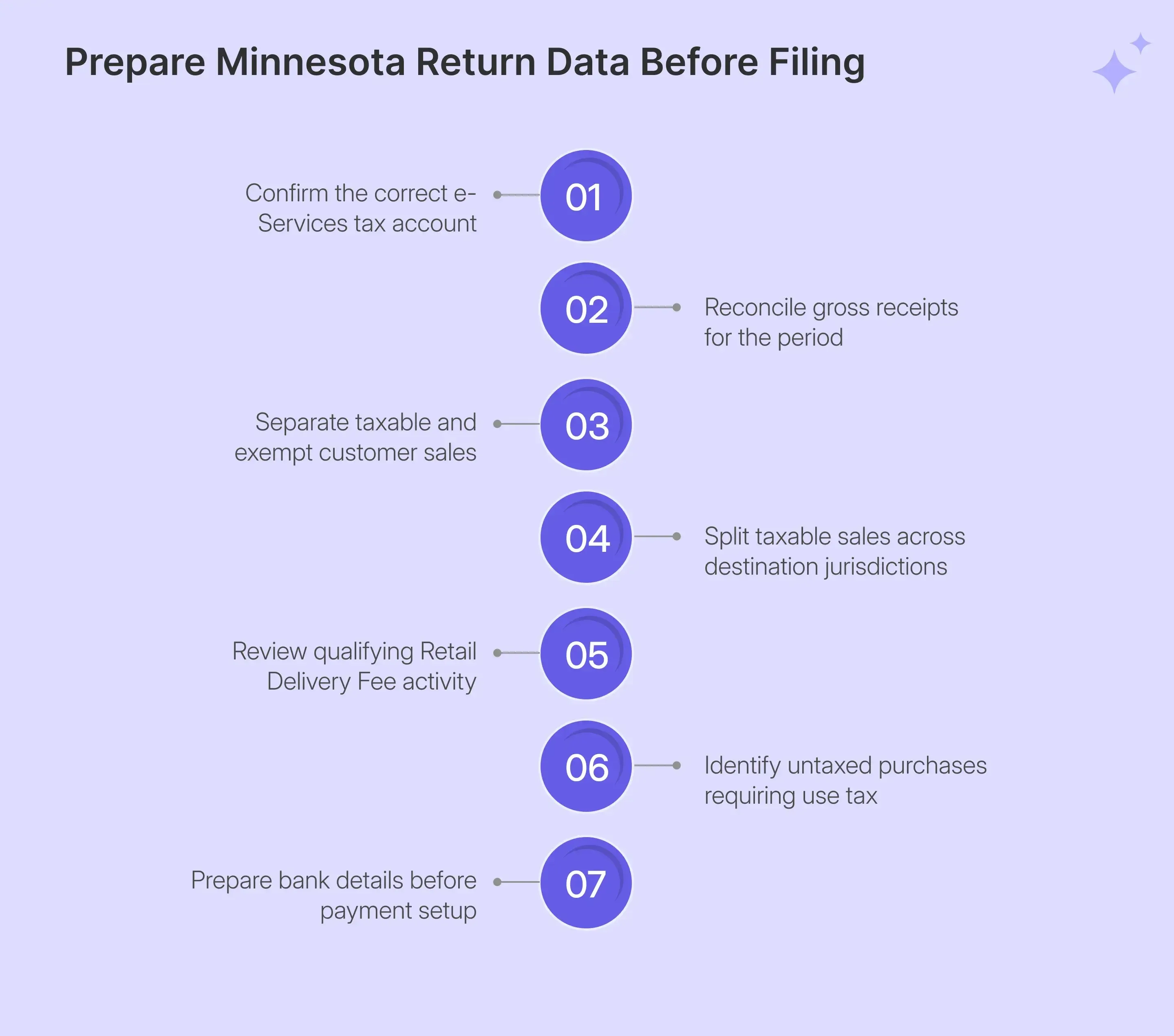
Before beginning MN sales tax filing, reconcile the numbers that will feed the return. e-Services calculates liability from the amounts entered, so gross activity, taxable amounts, local allocation, and supporting records should already agree before portal entry.
The preparation work becomes easier when each figure has a clear source:
| What You Need | Why It Matters |
|---|---|
| e-Services login credentials | Access the correct tax account |
| Gross receipts | Report total Minnesota activity |
| Taxable sales | Feed the general state line |
| Sales by jurisdiction | Complete applicable local lines |
| Taxable purchases | Report use tax where required |
| Marketplace activity | Avoid duplicate reporting |
| Form ST3 records | Support qualifying exemptions |
| Delivery-fee data | Report qualifying retail deliveries |
| Bank account details | Schedule payment during filing |
Gross Receipts and Taxable Sales Are Different
Start with your gross receipts, which cover Minnesota sales before exempt or non-taxable activity is removed. Sales tax collected should be separated from the receipts before you complete the return, so your source records need to clearly show sales and tax.
Your taxable sales figure comes after removing qualifying resale transactions, exempt sales, and sales delivered outside Minnesota. Keep invoices, shipping records, exemption certificates, and filing worksheets ready to support the difference.
Timing also depends on your accounting method. Under the cash method, you report liability when payment is received. With accrual accounting, the sale drives the timing, while business-use purchases follow the invoice date. You normally use the same method used for income tax reporting.
Taxable Sales Must Be Split by Jurisdiction
Once you know your taxable sales, the next step is deciding where those sales belong. Minnesota generally sources a transaction to where the customer receives the taxable product or service, and that destination determines which local sales tax lines apply.
This means the same taxable amount can appear on several lines. A sale into the seven-county metro may need the 6.875% state line, metro housing tax, metro transportation tax, and any applicable county or city taxes.
Using a detailed Minnesota sales tax guide can help you better understand the state rules. You can also use the sales tax rate calculator when you need to check the rate for a specific destination before filing.
Retail Delivery Fee Activity Needs a Separate Check
Minnesota also has a Retail Delivery Fee that should be reviewed separately from regular sales tax. The 50-cent fee can apply to qualifying deliveries when charges for covered items reach at least $100, subject to the state’s exclusions and retailer thresholds.
Because the fee is reported separately, you cannot work it out from gross sales alone. Before opening e-Services, identify which deliveries qualify, and keep those transactions separate from your normal taxable sales calculations.
You should also keep records showing which orders were charged the fee and how any refunds were handled. Treating the fee as part of return preparation makes the filing process easier and reduces the risk of trying to reconstruct delivery activity after the period has ended.
How Do You File Minnesota Sales Tax Online Through e-Services?
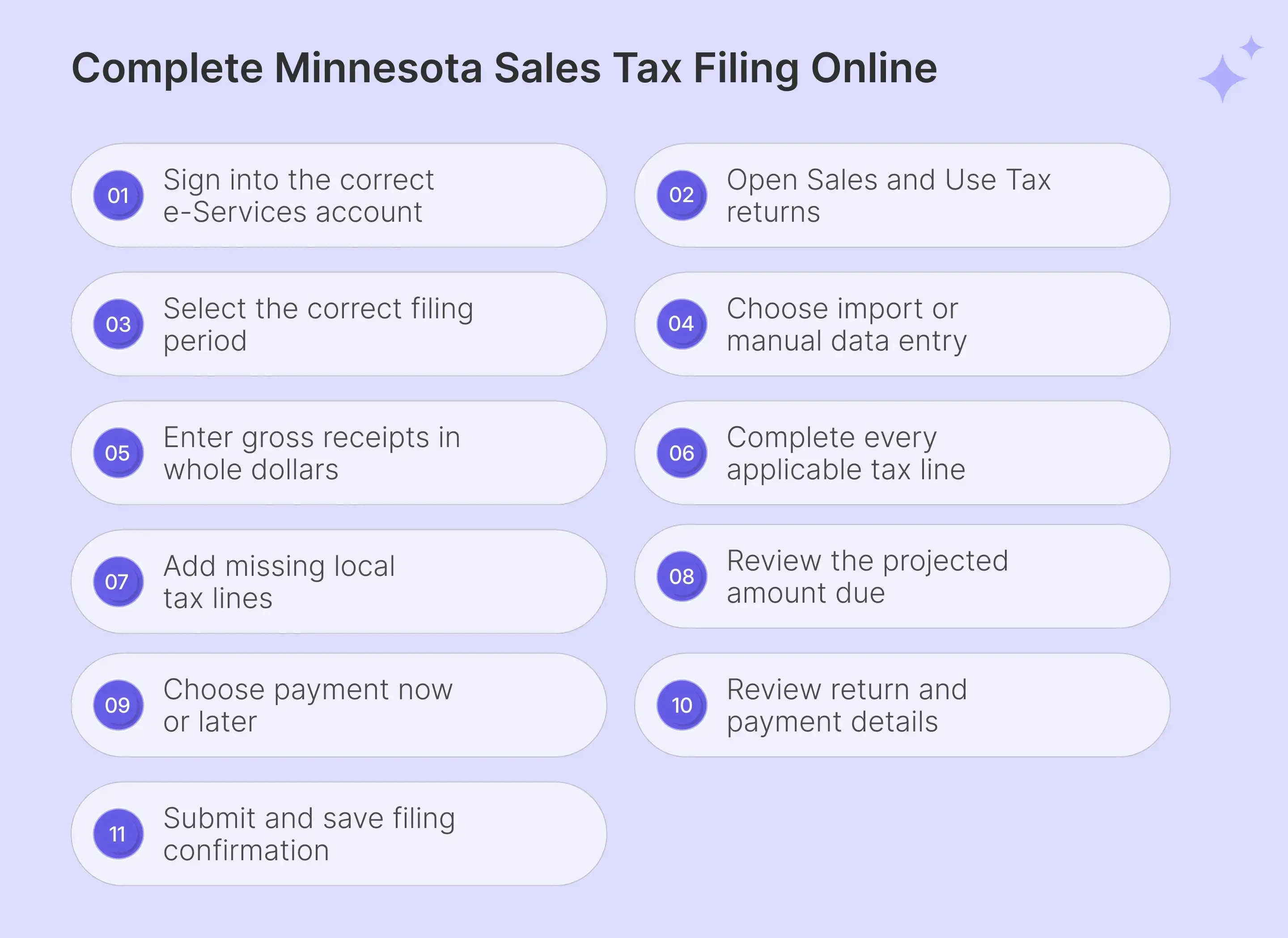
To file Minnesota sales tax online follow the below mentioned steps:
Step 1: Sign In to e-Services
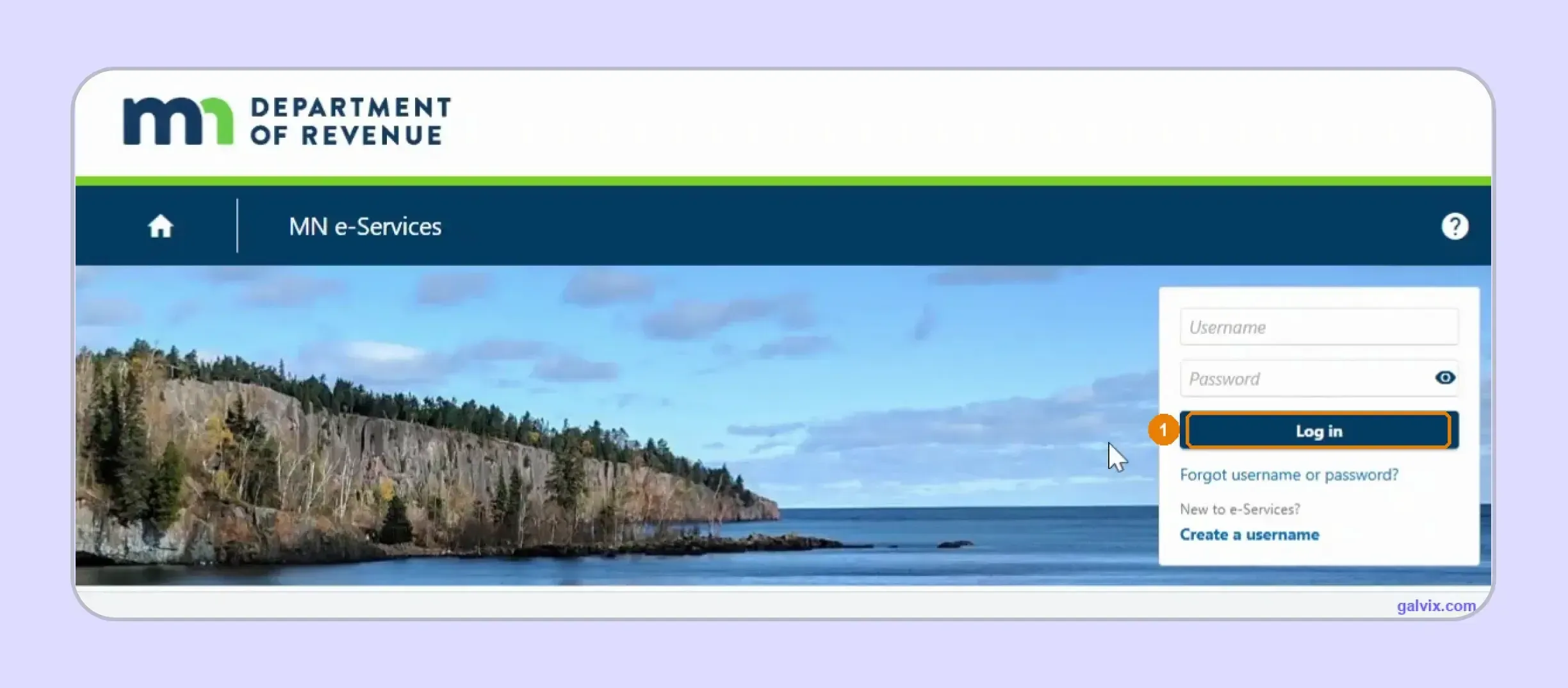
Open Minnesota e-Services and enter your username and password before selecting Log in. The portal also uses two-step verification, so keep access to the registered email address or mobile device available.
Step 2: Open Returns and Periods
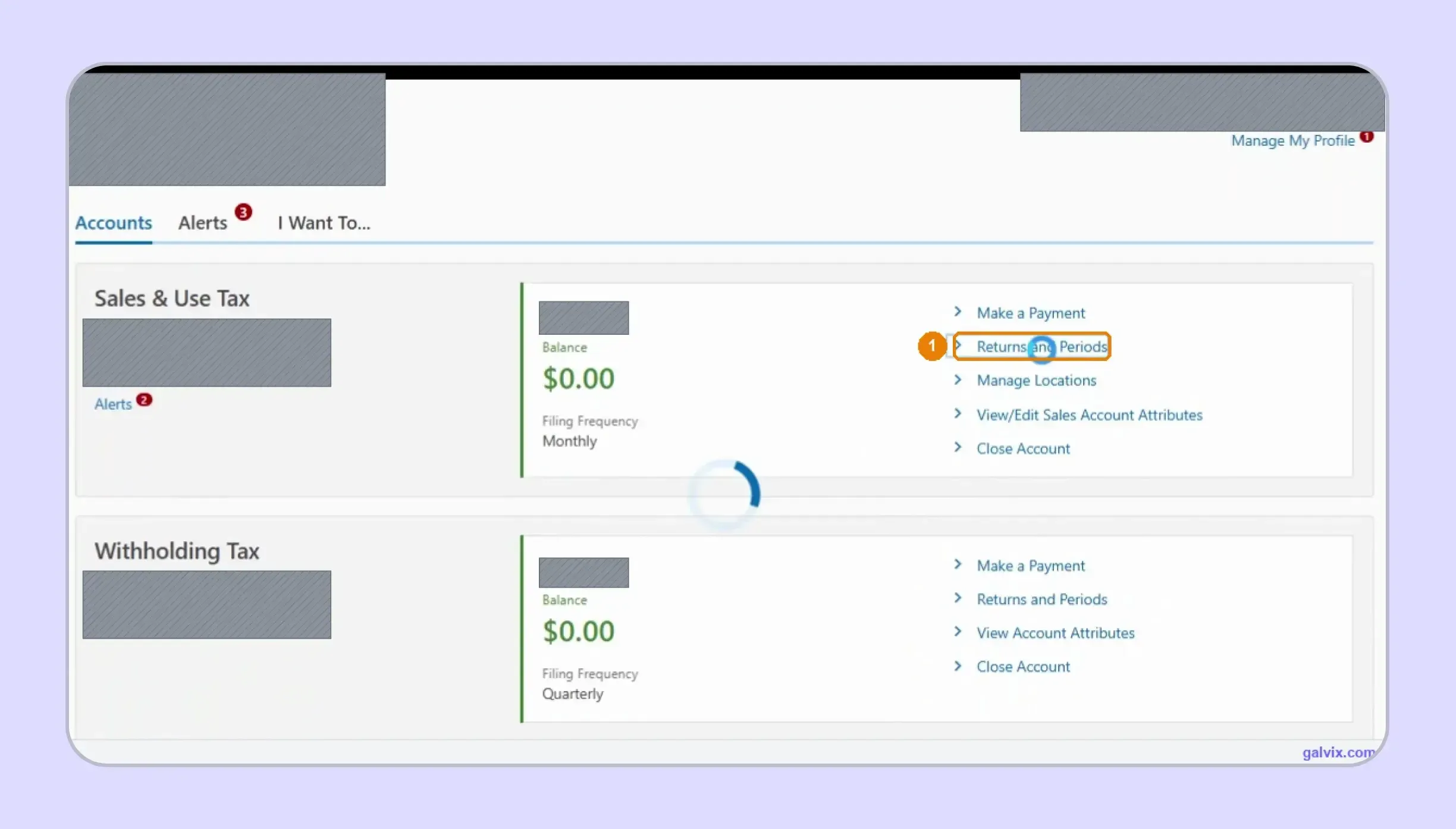
The account home can contain several business taxes, so locate the Sales and Use Tax card first. Check its Minnesota Tax ID, balance, and filing schedule, then select Returns and Periods.
Check you are on the Sales & Use Tax card, not another account. A single business often has more than one card. Here Sales & Use Tax and Withholding Tax sit one above the other, each with its own "Returns and Periods" link. They are different returns entirely. Filing frequency also lives on the card (this account is Monthly), which is worth a glance before you start.
Step 3: Select the Filing Period
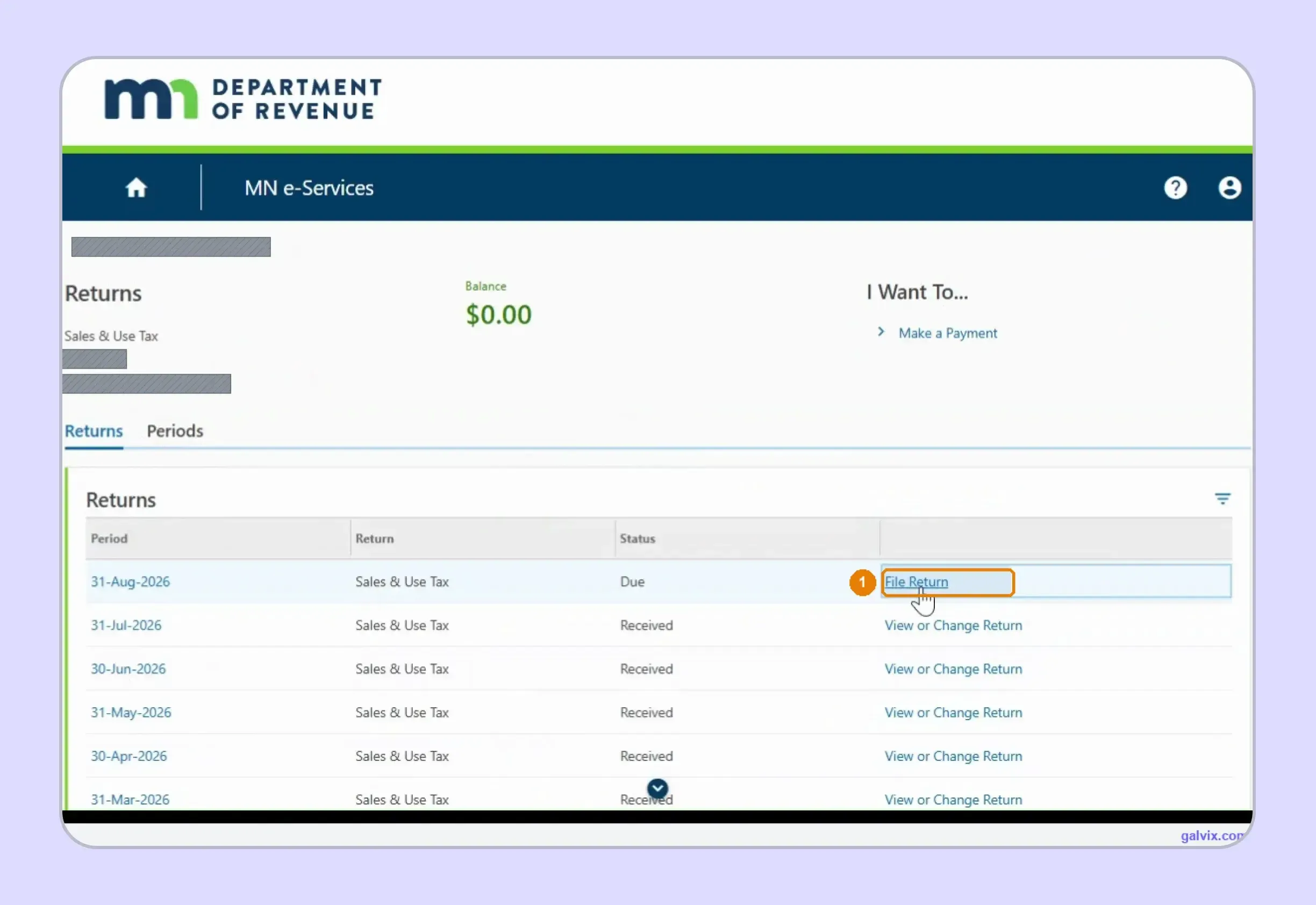
The Returns tab lists each filing period with its status and available action. Choose File Return beside the Due period you need, while previously completed periods display Received with View or Change Return.
Step 4: Choose Import or Manual Entry
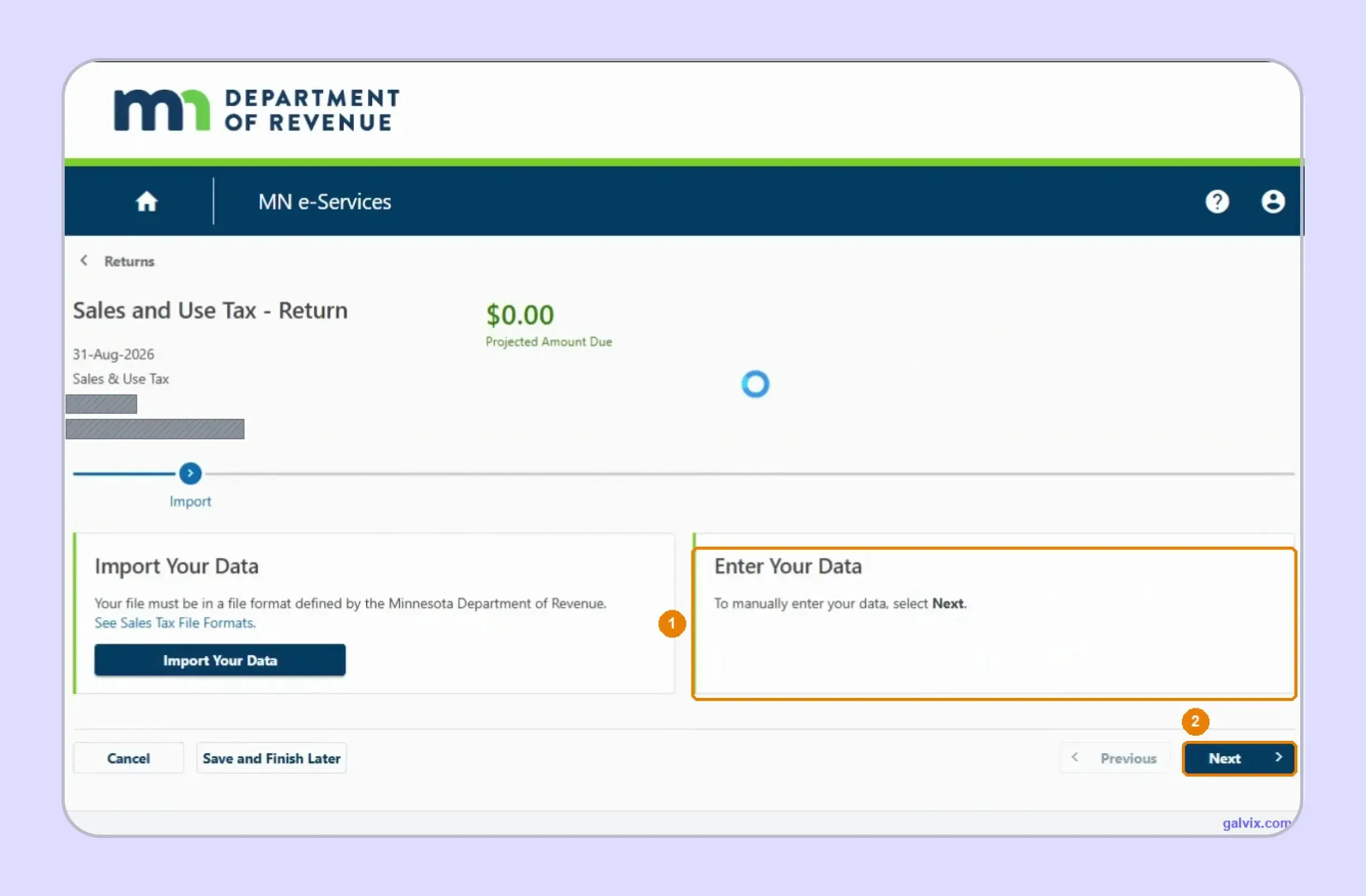
The wizard lets businesses import an approved file or enter figures manually. Select Enter Your Data when completing the Minnesota sales tax return online directly, then continue into the sales-entry portion of the return.
Step 5: Enter Gross Receipts
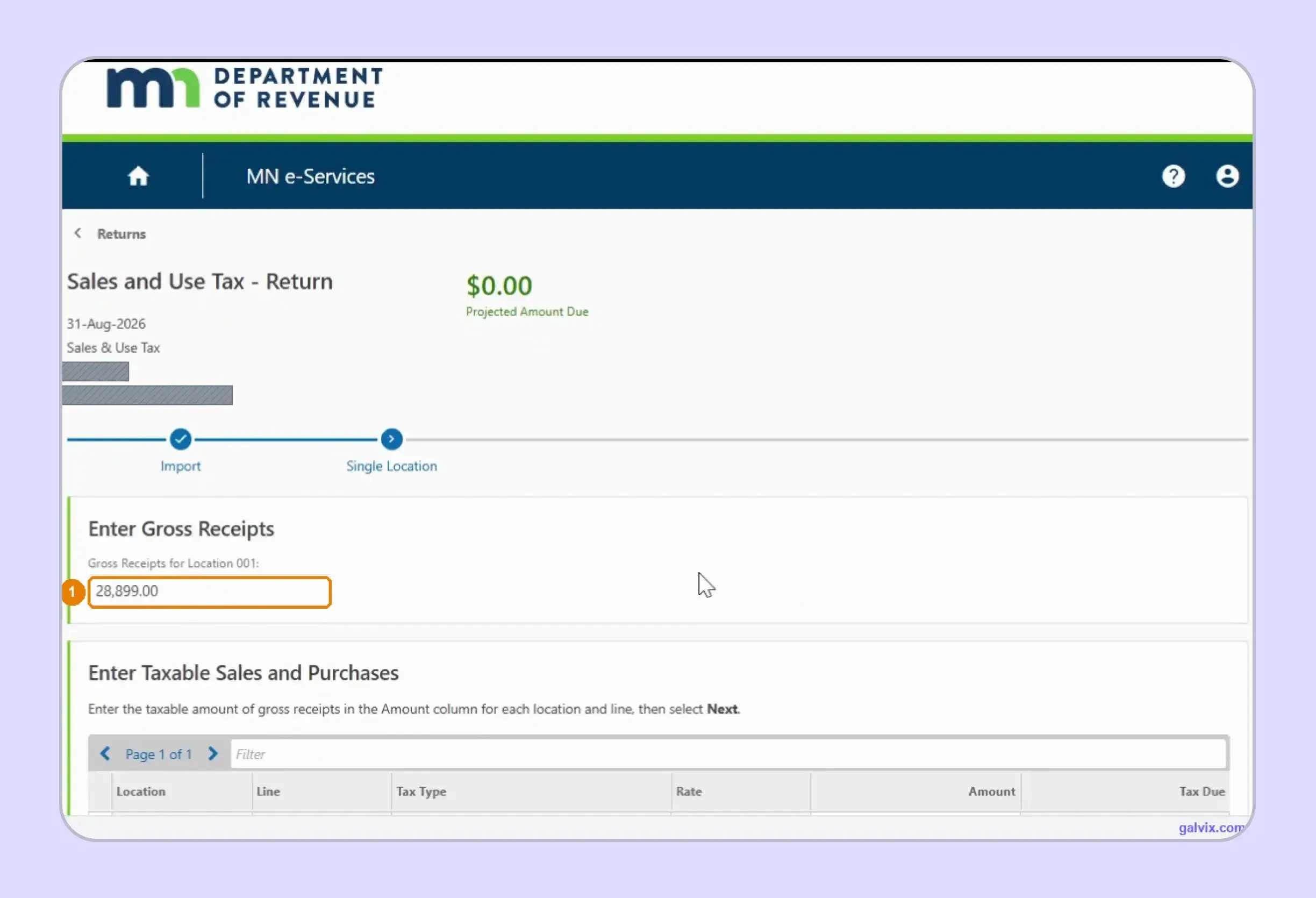
Enter the period’s Minnesota gross receipts in whole dollars for the consolidated location. This opening amount is the return’s sales base before the portal moves into separate state, local, Sales, and Use lines.
Step 6: Complete the Applicable Tax Lines
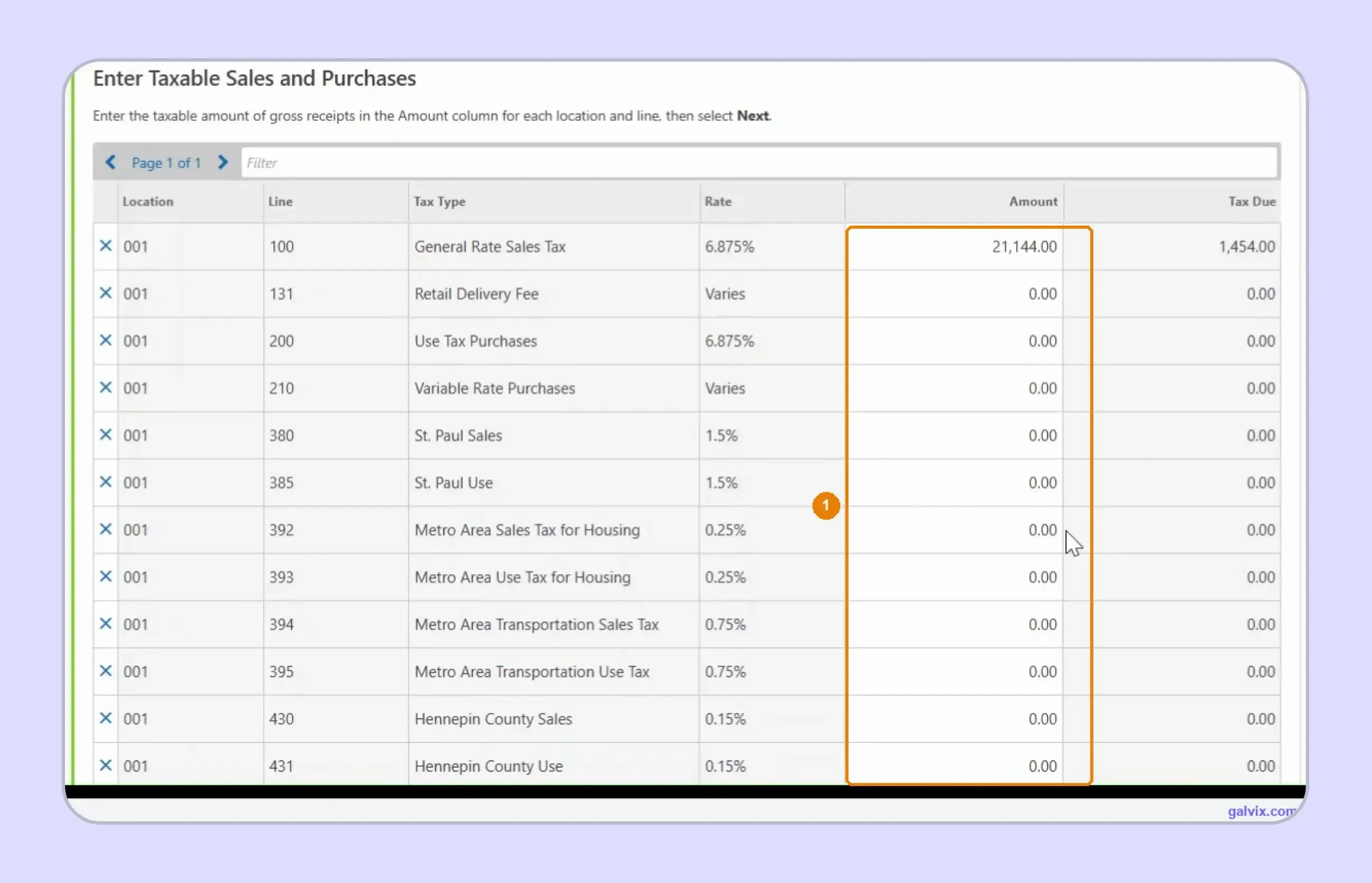
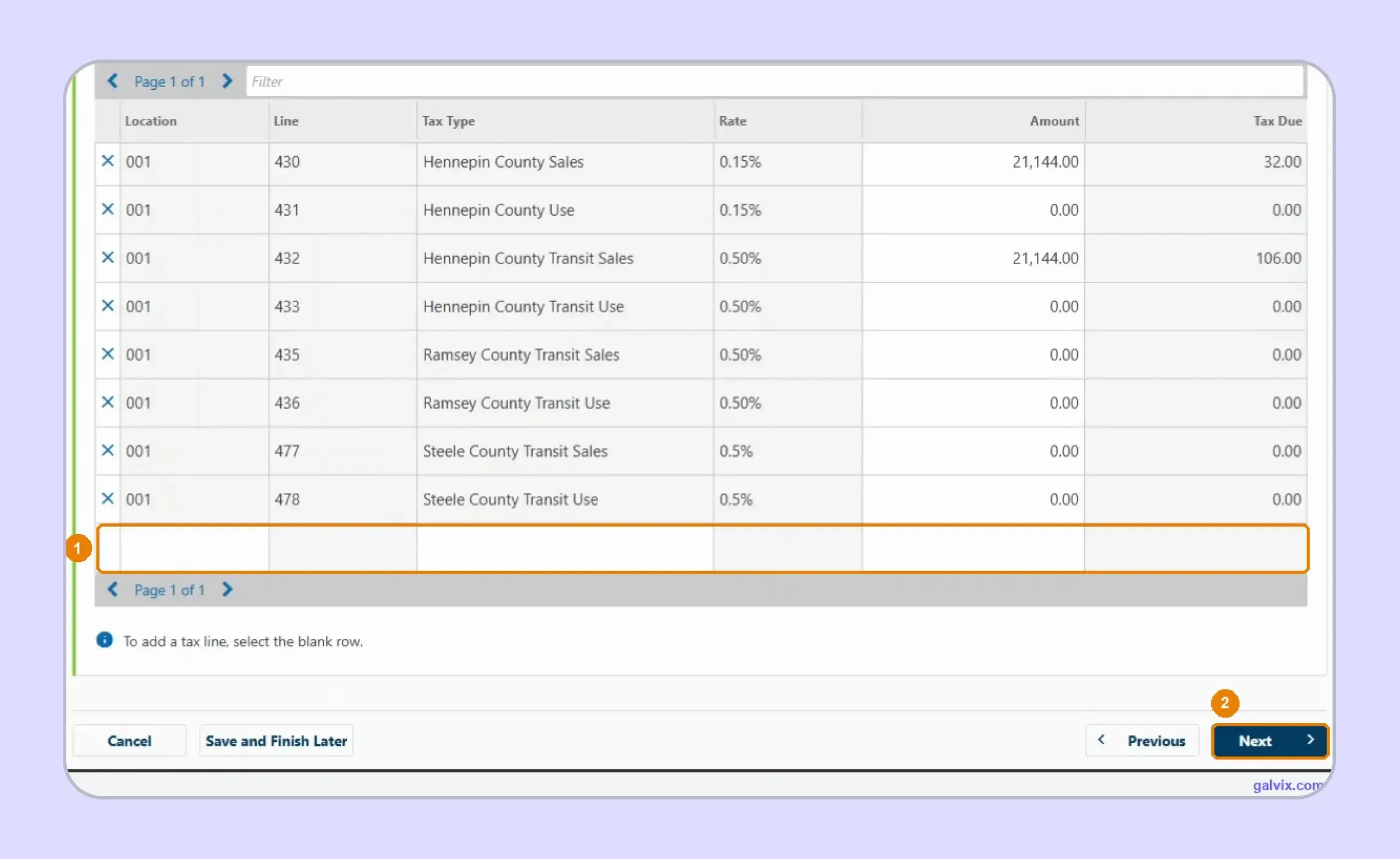
For anyone researching how to fill out the sales and use tax return in Minnesota, this grid is the central step. Enter each taxable amount in the Amount column; e-Services supplies the rate and calculates the liability. The general rate sales tax line uses 6.875%, while destination-based local lines carry their own rates. You enter the taxable base, not the resulting tax figure.
Each jurisdiction has a "Sales" line and a "Use" line, and they sit next to each other. "Hennepin County Transit Sales" and "Hennepin County Transit Use" are adjacent rows with the same 0.50% rate. As a seller, you fill the Sales line and leave the Use line at 0.00. Entering your figure on the Use line files the wrong line, and nothing on screen flags it.
Step 7: Add Any Missing Tax Lines
The grid reflects registration and earlier filing history rather than current-period destinations. If a required jurisdiction is missing, select the blank row and add the appropriate line before continuing with the return.
A blank or zero line reports no tax for that jurisdiction, silently. Nothing on this screen reconciles the grid against the taxable-sales figure you entered a moment ago, and nothing warns you that a jurisdiction is missing an amount or missing from the list entirely.
Step 8: Review the Projected Amount Due
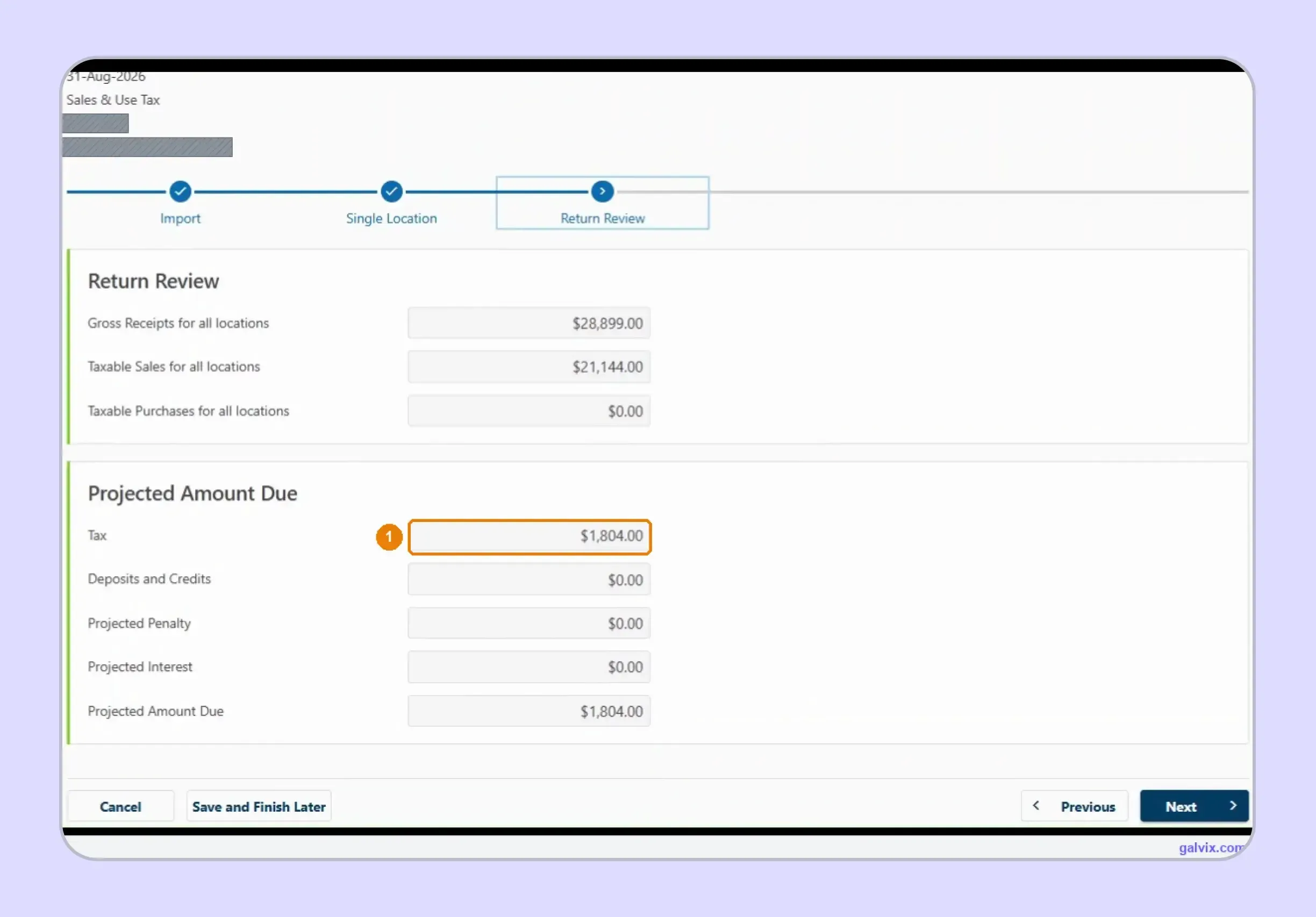
Return Review summarizes gross receipts, taxable sales, taxable purchases, and the projected total amount due. Compare the calculated liability with reconciled records before continuing, especially when several local tax lines feed the total.
Step 9: Choose Whether to Pay Now
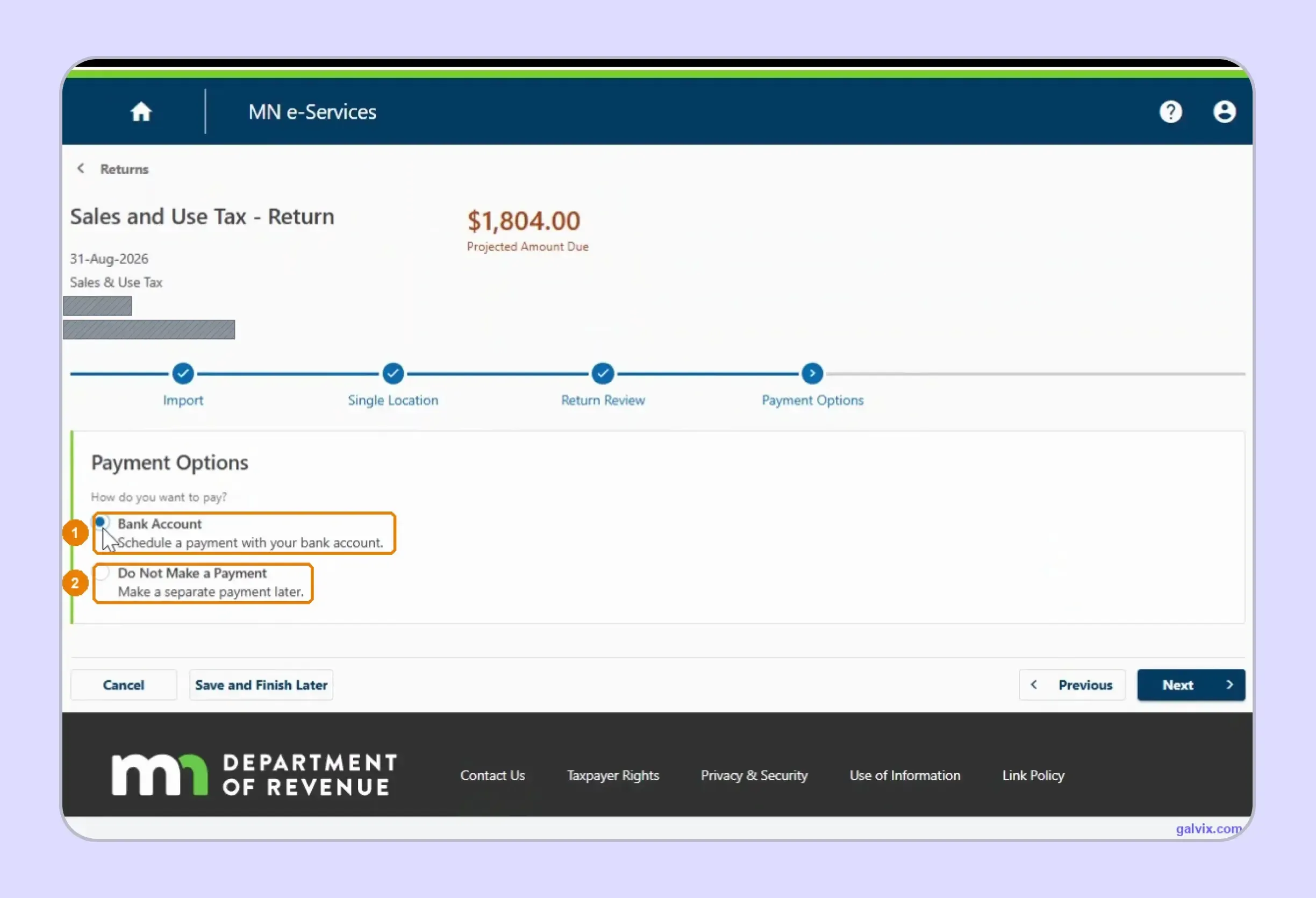
For businesses researching how to pay sales tax in Minnesota, e-Services allows payment from a bank account during filing. You can also choose Do Not Make a Payment and submit the return without remitting funds immediately.
Filing and paying are one wizard, but they are separable. "Do Not Make a Payment" files a valid return and defers the money, the right choice if you pay through another channel, and exactly how a return gets filed on time and paid late. If you choose it, put the payment in your own calendar; the portal will not chase you.
Step 10: Review and Submit
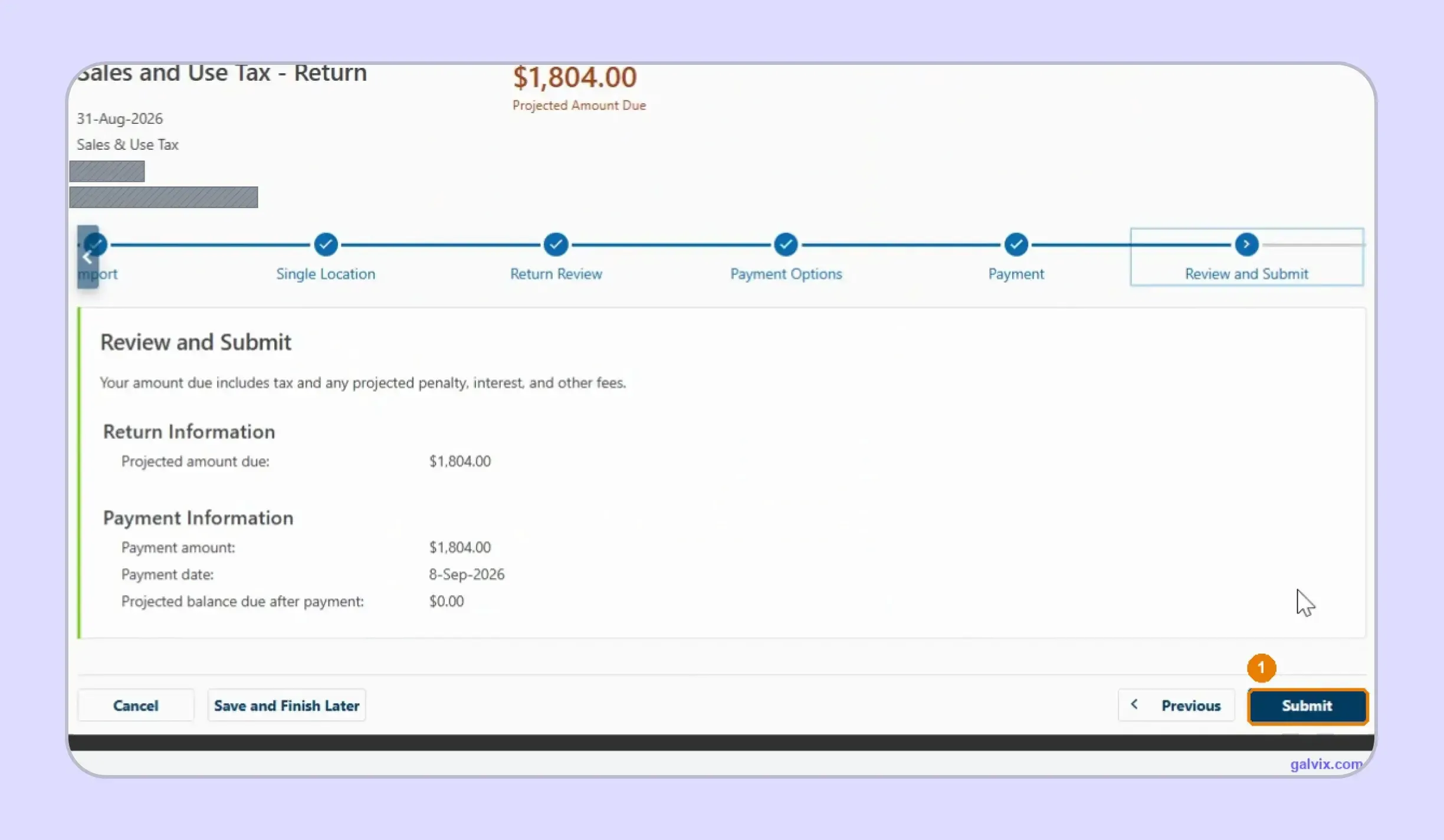
The final review combines Return Information with payment information, including the amount, payment date, and projected remaining balance. Check both blocks carefully before selecting Submit because this action sends the prepared return to Minnesota.
This is also where how to file MN sales tax moves from preparation into actual submission. Leaving the wizard before submitting does not complete filing.
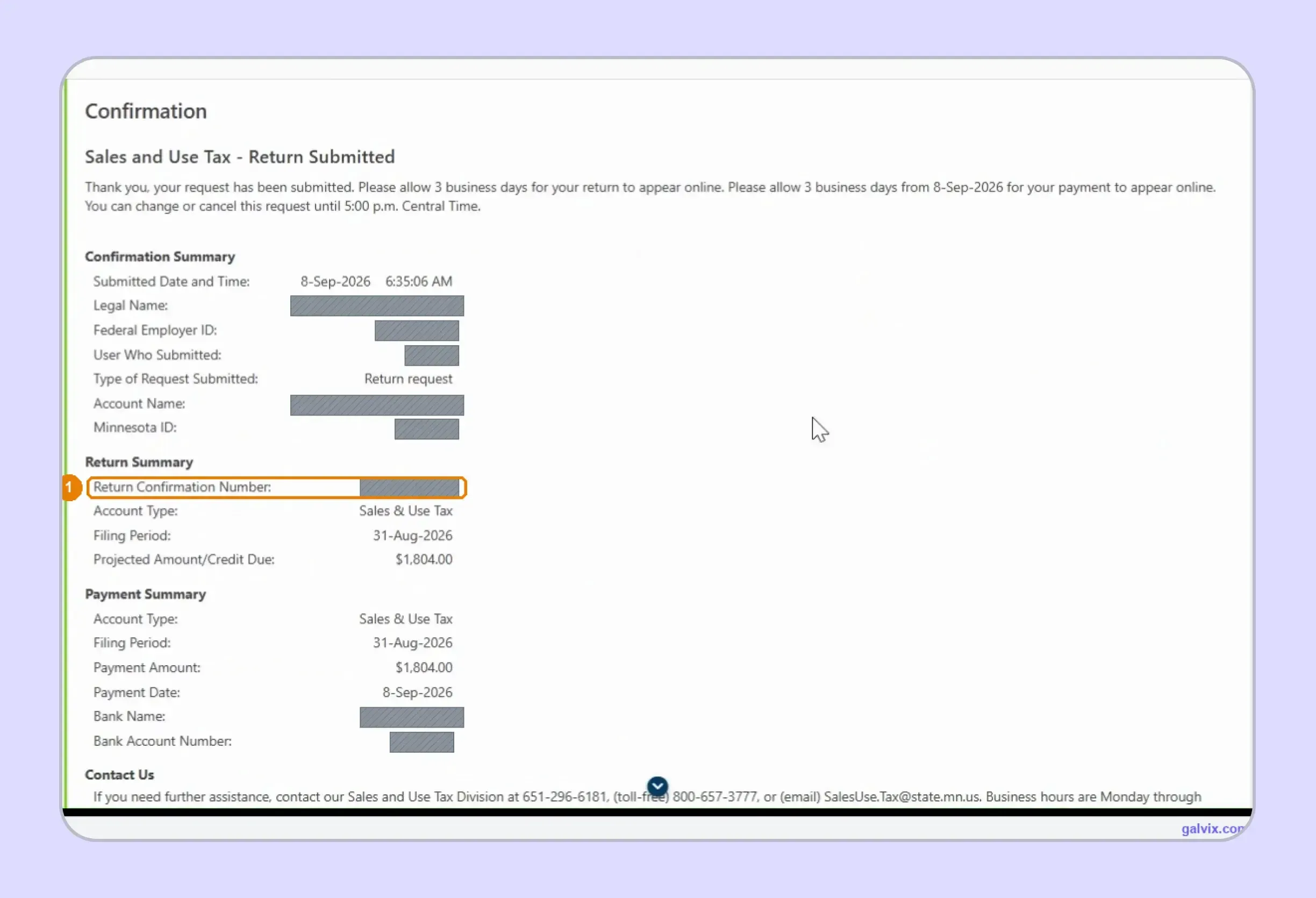
Step 11: Save the Confirmation
Successful submission creates a Return Confirmation Number and repeats the return and payment details. Keep the full confirmation with your records because it is the clearest proof that the return was transmitted successfully.
If an error appears afterward, open Returns and Periods and use View or Change Return for that period. This creates the path to an amended return instead of starting an unrelated filing.
When Is a Minnesota Sales Tax Return Due?
Minnesota assigns annual, quarterly, or monthly schedules based on average monthly tax liability, including state-administered local sales and use taxes. Your Minnesota sales tax return follows the frequency shown on the active account.
| Average Monthly Tax | Filing Frequency | Normal Due Date |
|---|---|---|
| Less than $100 | Annual | February 5 |
| $100 to $500 | Quarterly | April 20, July 20, October 20, January 20 |
| More than $500 | Monthly | 20th of following month |
Annual filers are due February 5 for the previous calendar year, while monthly returns normally fall on the twentieth of the following month. The Department publishes exact due dates each year when weekends or holidays shift the calendar.
For example, Minnesota moved the May 2026 return to June 22 and the August 2026 return to September 21 because the normal date did not fall on a standard business day. The published calendar therefore provides the correct next business day deadline.
A zero return may still be required while the registration remains active, so having no taxable activity does not automatically remove the filing obligation.
Language access note: The Department website includes a translation disclaimer for Google Translate. Its automatic translation is an approximation, whereas the English-language version is treated as authoritative. In the event of a disagreement with the original English version of this website, the original version will prevail.
How Do Exempt Sales Affect a Minnesota Sales Tax Return?
Exempt transactions reduce the taxable base, although the seller should retain records showing why tax was not collected. Minnesota commonly uses Form ST3, Certificate of Exemption, for resale purchases and other qualifying exemption situations.
Form ST3 Supports Qualifying Exempt Transactions
A completed Form ST3 can support resale treatment or another recognized exemption. The certificate should remain connected to the purchaser and the transaction before that activity is excluded from a Minnesota sales tax return.
Minnesota requires sellers to maintain supporting records, including exemption certificates and shipping documentation. A consistent sales tax exemption certificate process can keep those records connected across customers and jurisdictions.
This becomes useful when the same buyer purchases in several states, since certificate formats and seller responsibilities can differ even when the commercial relationship remains unchanged.
Certificate Collection Does Not Replace Transaction Review
Having Form ST3 on file does not make every future purchase exempt. The seller still needs to confirm that the buyer and claimed exemption fit the specific transaction before reducing sales tax liability.
That separation matters because certificate validity and transaction eligibility answer different questions. A valid form supports the buyer’s claim, while the transaction review determines whether that document applies to the purchase being reported.
The Galvix Sales Tax Exemption Certificate Tool can help identify certificate requirements, verification options, and seller checks before exempt activity reaches return preparation. It supports documentation review while leaving the final taxability decision tied to the actual transaction.

Why Does Manual Minnesota Filing Get Harder as Sales Grow?
Minnesota sales tax return filing becomes more demanding as sales spread across additional destinations. One new city can introduce city, county, transit, or metro-area lines that must receive the correct taxable amount before e-Services calculates the related tax liability.
The same team may also need to separate marketplace activity from direct transactions, maintain exemption support, review use tax liability, and identify Retail Delivery Fee transactions. Each task depends on data prepared before the filing portal is opened.
Accounting adds another layer. Businesses need their reporting period to align with the accounting method, especially when refunds or adjustments change previously reported figures. Records should also support a filed return if Minnesota later asks how the amounts were derived.
The workload grows again as the business expands into more states. At that point, sales tax filing becomes a recurring reconciliation process across different rates, portals, and calendars rather than a simple data-entry exercise.
That is where sales tax automation can remove repeated data movement while specialist review keeps the underlying filing decisions visible. The goal is not to automate judgment away, but to reduce the manual preparation around it.
How Does Galvix Manage Minnesota Sales Tax Filing?
Galvix operates as a managed sales tax compliance service, rather than as software that leaves return preparation to the finance team. Transaction data is reconciled, return figures are prepared, specialist review takes place, and the business approves the return before filing.
For a Minnesota sales tax return, that workflow can include reviewing gross receipts, separating marketplace activity, allocating taxable amounts across jurisdictions, and organizing exemption support. This matters because Minnesota’s portal performs the arithmetic while the accuracy of each line still depends on prepared transaction data.
Connected systems can feed that workflow through Galvix integrations. Supported platforms include Shopify, QuickBooks, NetSuite, Stripe, BigCommerce, WooCommerce, Zoho Books, and Microsoft Dynamics 365 Business Central. File-based imports can support businesses using other systems.
For ecommerce teams, a Shopify integration can connect orders and refunds with return preparation. QuickBooks and Stripe connections can similarly bring invoice or transaction information into the broader compliance workflow.
The same operating model can connect Minnesota returns with nexus monitoring, state registrations, exemption management, and notice handling. That makes one state filing part of a wider compliance process rather than an isolated monthly task.
Pricing is modular, so businesses select the services they need. Exact pricing depends on the workload driver for each chosen service, such as transaction volume, returns filed, registered states, or exempt customers.
What Can Galvix Manage for Minnesota Sellers?
For businesses comparing how to file sales tax return in Minnesota with a managed approach, the difference is the preparation work surrounding the portal submission.
- Reconcile transaction data before Minnesota return preparation begins each filing period.
- Separate direct and marketplace activity before calculating seller-managed reporting obligations.
- Review taxable sales across applicable Minnesota state and local jurisdictions.
- Connect exempt transactions with supporting certificates before reducing taxable amounts.
- Prepare returns for specialist review before customer approval and scheduled filing.
- Track nexus, registrations, filing deadlines, and state notices across registered jurisdictions.
A comprehensive multistate process can also connect Minnesota filing with sales tax nexus monitoring, integrations, and exemption management without rebuilding the same source data for each state.
Book a Galvix demo to review your Minnesota filing workflow and identify where recurring multistate compliance work can be consolidated.
Frequently Asked Questions
How to file a MN sales tax return?
You can file a Minnesota sales tax return through Minnesota Department of Revenue e-Services. Open your Sales and Use Tax account, choose the correct filing period, enter gross receipts and taxable amounts, complete applicable local lines, review tax due, submit the return, and save the confirmation number as filing proof.
What is the due date for sales tax in Minnesota?
A Minnesota sales tax return is generally due on the 20th day after the reporting period for monthly filers. Quarterly returns are due April 20, July 20, October 20, and January 20, while annual returns are due February 5. Weekend or holiday deadlines move to the next business day instead.
How to pay sales tax in Minnesota?
To pay sales tax in Minnesota, use e-Services and choose Bank Account during the filing workflow. You can schedule payment while submitting the return or select Do Not Make a Payment and pay separately. Keep the payment confirmation with the filed return so your records show when the tax due was remitted.
How do I calculate Minnesota sales tax?
To calculate Minnesota sales tax, start with the 6.875% state rate and add every applicable local sales tax for the customer’s destination. Apply the combined rate to taxable sales. For accurate destination rates, use the Minnesota Department of Revenue sales tax rate calculator because city, county, transit, and special taxes can differ.
What is the highest sales tax in Minnesota?
Minnesota does not have one combined sales tax rate that applies everywhere. For general sales and use tax, the current fourth-quarter 2026 rate guide shows St. Paul at 9.875%, including the 6.875% state rate and applicable local taxes. Special local taxes on lodging, liquor, restaurants, or admissions can create different effective rates.
How do I register for a sales tax permit in Minnesota?
To register for a sales tax permit in Minnesota, apply for a Minnesota Tax ID Number through Business Tax Registration and add a Sales and Use Tax account. You can also register through Streamlined Sales Tax for participating states. Once active, e-Services becomes the online system for filing tax returns and making payments.
What is not taxed in Minnesota?
Minnesota does not tax every sale. Common non-taxable items include qualifying clothing, grocery food, prescription and over-the-counter drugs, and products delivered outside Minnesota. Some services are also exempt. A completed Form ST3 can support certain exempt purchases, although each transaction still needs to meet the applicable Minnesota sales tax exemption rules.
How do I amend a Minnesota sales tax return?
To amend a Minnesota sales tax return, sign in to e-Services, open Returns and Periods, and select View or Change Return for the affected filing period. Update the incorrect figures and submit the amended return. Keep the new confirmation with your records so the change remains connected to the original filed return.
How long should Minnesota sales tax records be retained?
Keep records supporting a Minnesota sales tax return for at least three and one-half years, unless a longer period applies. Records should include invoices, receipts, exemption certificates, shipping documents, and worksheets used to prepare tax returns. Longer retention may be required when an audit, amendment, or extended assessment period affects the account.