Businesses file a Utah sales tax return electronically through the Utah State Tax Commission’s Taxpayer Access Point, or TAP. TC-62S applies to one fixed Utah business location, while TC-62M covers multiple locations, sellers without a fixed Utah location, and transactions requiring location schedules.
For TC-62M filers, the difficult part is usually location allocation rather than tax calculation. Schedule A handles sales from registered fixed locations, while Schedule J handles other destination-sourced sales. TAP supplies the applicable combined tax rates once you report net taxable sales to the correct jurisdiction.
Utah also separates grocery food from non-food and prepared food. Grocery food is subject to a statewide 3% sales tax rate, while other taxable activities are subject to the applicable combined jurisdiction rate. Utah’s July 2026 rate chart shows a 4.85% state component before local additions.
This blog explains how to file sales tax in Utah, prepare sales data, complete TC-62M schedules, review exemptions, submit through TAP, and retain proof of filing. It also shows how Galvix can support a Utah sales tax obligation within a broader multistate filing process.

Which Utah Sales Tax Return Should You File?
The correct Utah sales tax return depends on where your business operates and how its transactions are sourced. TC-62S covers one fixed place of business, while TC-62M supports sellers that need location-level reporting through one or more Utah schedules.
TC-62S Covers One Fixed Utah Location
TC-62S usually applies when you conduct retail sales from one fixed Utah business location and do not need separate location schedules. The form still goes through TAP because Utah requires electronic filing for sales and use tax returns. Once an existing business adds locations or needs destination-based reporting, TC-62M becomes relevant because Utah must allocate the collected tax among the appropriate jurisdictions.
TC-62M Covers Multiple or Destination-Based Sales
TC-62M applies when you operate multiple fixed Utah locations, have no fixed Utah location, or make sales that are sourced elsewhere. The return can include different schedules depending on where the activity belongs.
Schedule A covers fixed-location non-food sales, while Schedule J covers other destination-sourced non-food sales. Grocery food can require Schedule AG or Schedule JG. Keeping grocery activity separate matters because its 3% treatment differs from the full combined rate.
Remote Sellers Should Confirm Nexus First
A remote seller creates economic nexus when covered gross revenue into Utah exceeds $100,000 during the previous or current calendar year. Utah removed the former 200-transaction test effective July 1, 2025. Physical presence can trigger nexus without waiting for that economic threshold.
Covered revenue may include tangible personal property, electronically transferred products, taxable services, and other transactions subject to Utah law. Businesses approaching these Utah sales tax nexus thresholds should review their position before registering for sales tax and incurring another recurring filing obligation.
Remote sellers can register through TAP or the Streamlined Sales Tax Registration System. Utah participates in Streamlined Sales Tax, which can reduce the need for separate registration when a business needs streamlined sales registration across participating states.
What Should You Prepare Before UT Sales Tax Filing?
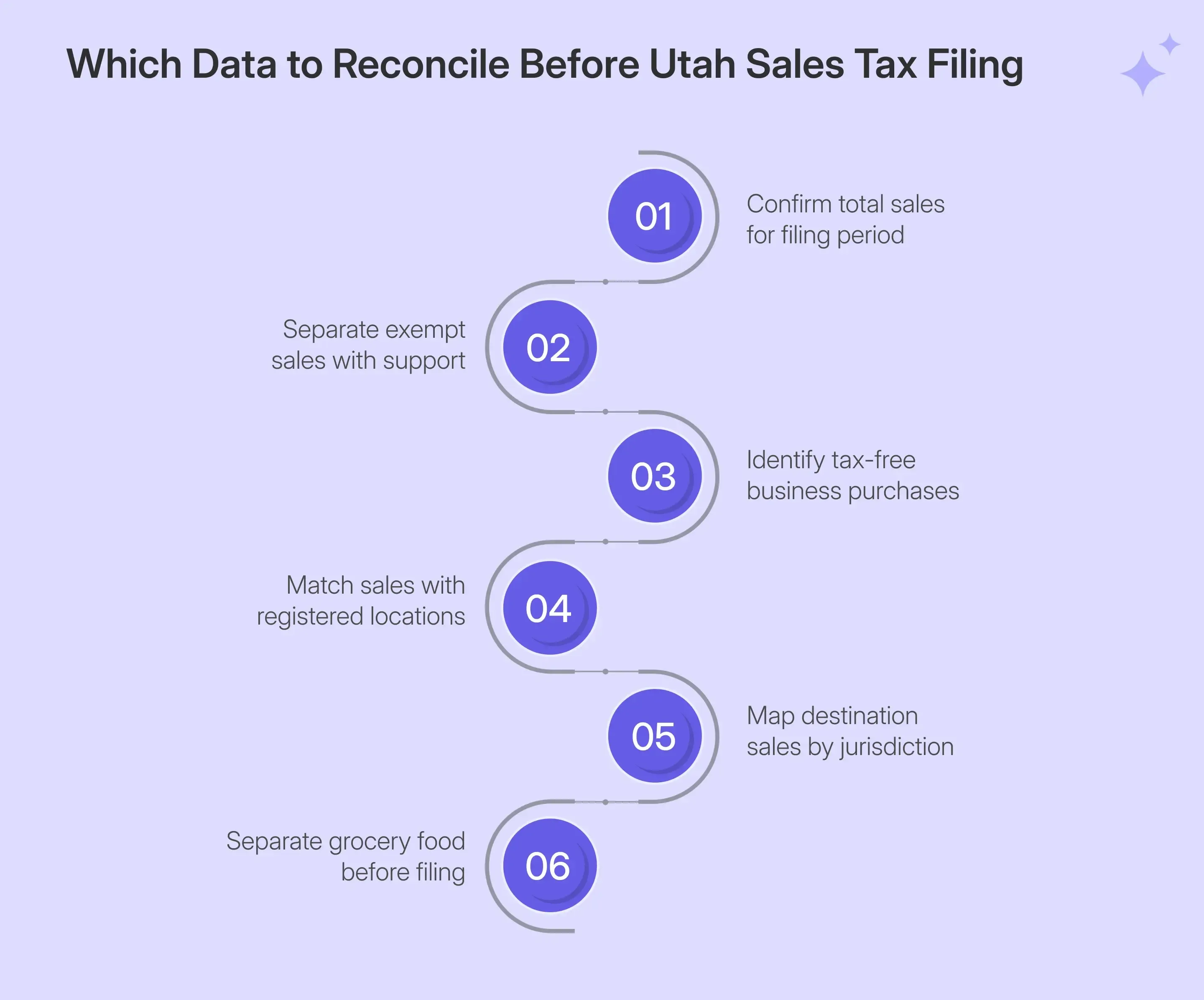
Prepare your figures before UT sales tax filing begins. TAP calculates several return lines automatically, although it depends on the sales data you provide. Reconcile gross sales, exemptions, business-use purchases, grocery activity, fixed locations, and destination sales before opening the return.
| Prepare | Why It Matters |
|---|---|
| Maine Tax Portal login | Opens the correct account |
| Gross sales | Creates the starting return amount |
| Exempt sales | Reduces the taxable base |
| Sales by rate | Separates special-rate activity |
| Cannabis activity | Supports cannabis rate reporting |
| Rental activity | Separates lodging and vehicle rentals |
| Tax-free purchases | Captures qualifying use tax |
| Credits | Adjusts final amount where allowed |
| Bank details | Supports ACH payment |
Marketplace activity needs its own review before filing. Utah states that a marketplace seller with a sales tax license still files returns when required, although marketplace sales handled by a facilitator are not reported again by that seller.
That distinction prevents facilitated transactions from being mixed with direct Utah sales. When records come from several ecommerce, accounting, payment, or ERP systems, supported sales tax integrations can keep source transactions connected with the filing workflow.
Why Are Schedule A and Schedule J Crucial for Utah Sales Tax Return?
TC-62M separates taxable activity according to where each transaction belongs. Schedule A reports sales from registered fixed Utah locations, while Schedule J handles other sales sourced to the customer’s delivery jurisdiction. Correct sourcing therefore matters more than manually calculating local sales tax.
Schedule A Uses Registered Utah Locations
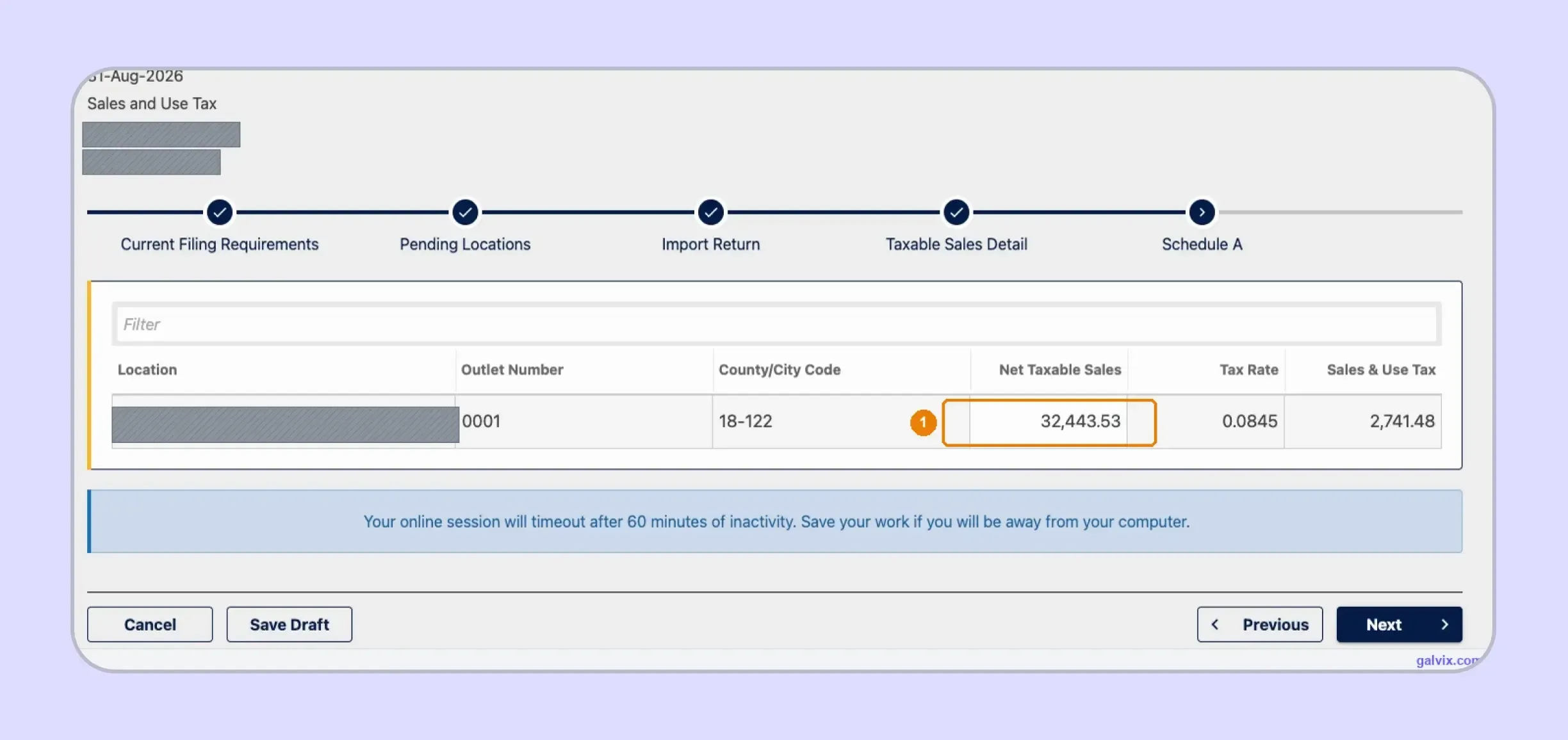
TAP pre-populates Schedule A with each registered location, outlet number, County/City Code, and applicable rate. You enter only the Net Taxable Sales amount. TAP then calculates the corresponding Sales and Use Tax for that row.
You should confirm that every active location matches your records before entering the amount of sales. In the captured return, the Salt Lake City location uses code 18-122 and an 8.45% combined rate. The tax due is calculated automatically from the taxable amount entered.
Schedule J Uses Delivery Jurisdictions
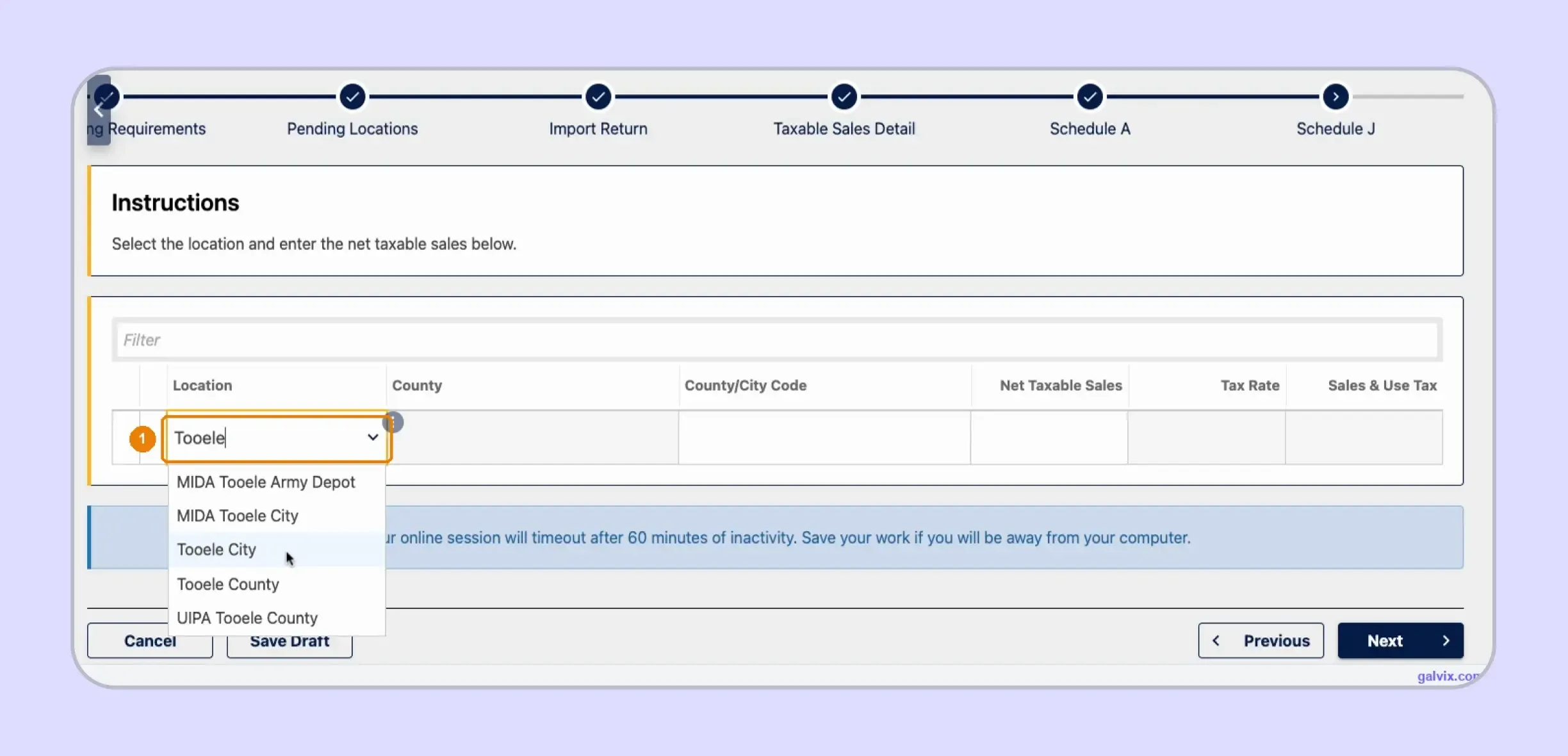
Schedule J starts without your destination rows. You select the delivery jurisdiction, enter net taxable sales, and let TAP populate the county, jurisdiction code, rate, and calculated tax. A ZIP code can help with an initial rate check, although final reporting still needs the exact jurisdiction.
For a separate rate check before filing, the sales tax calculator can show the combined rate for a location. The TAP selection still controls where your return allocates the transaction.
Similar names can represent different jurisdictions. TAP can show Tooele City, Tooele County, MIDA locations, and UIPA Tooele County as separate choices. Choosing the wrong option can lead to a calculation error or to allocating tax to the wrong jurisdiction.
How Do You File Utah Sales Tax Online Through TAP?
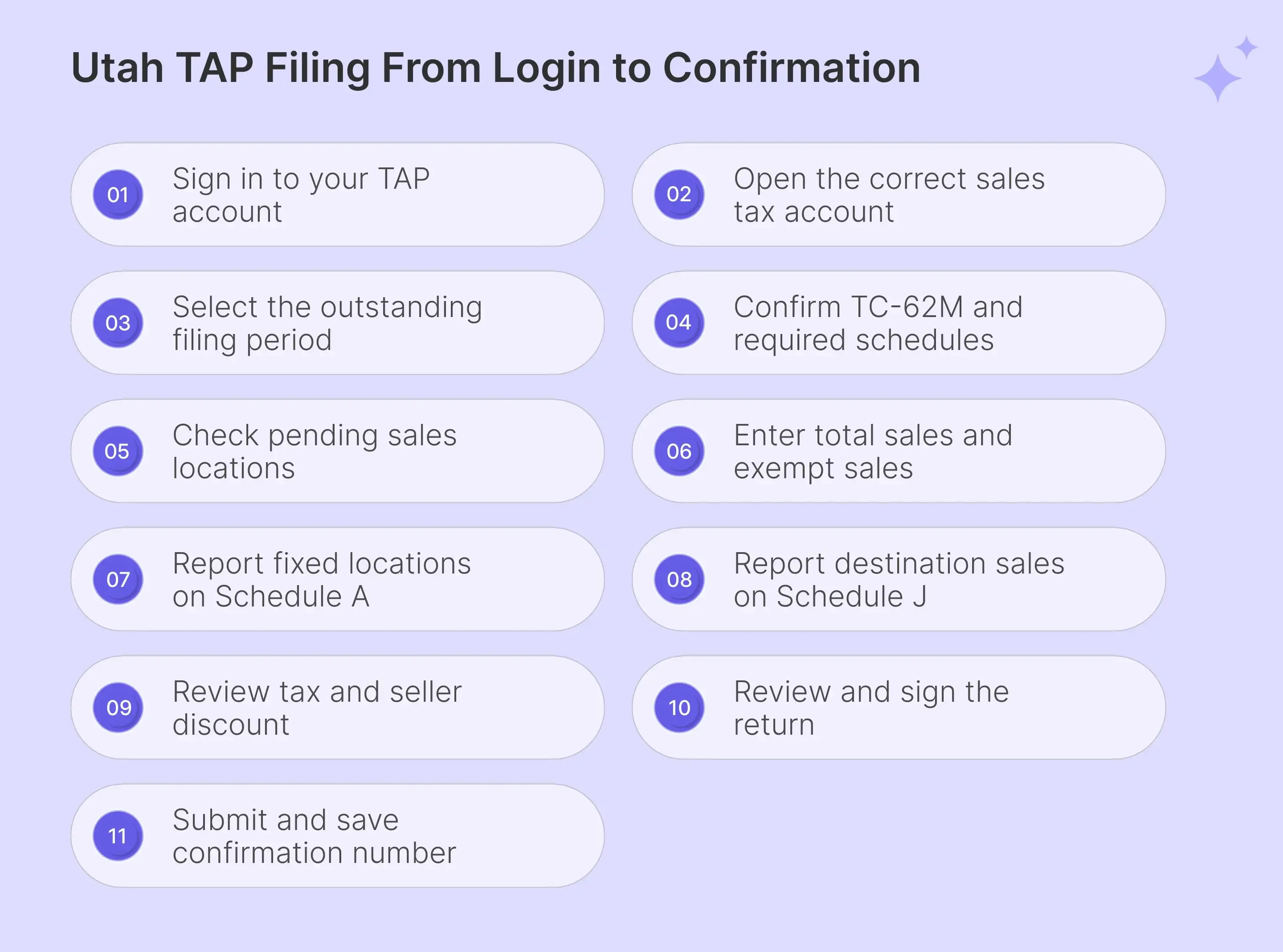
To file Utah sales tax online, sign in to TAP, open the correct filing period, confirm the TC-62M and its schedules, enter return totals, complete location reporting, review the calculated tax, sign the return, and complete the final submission.
Step 1: Sign In to Utah Taxpayer Access Point
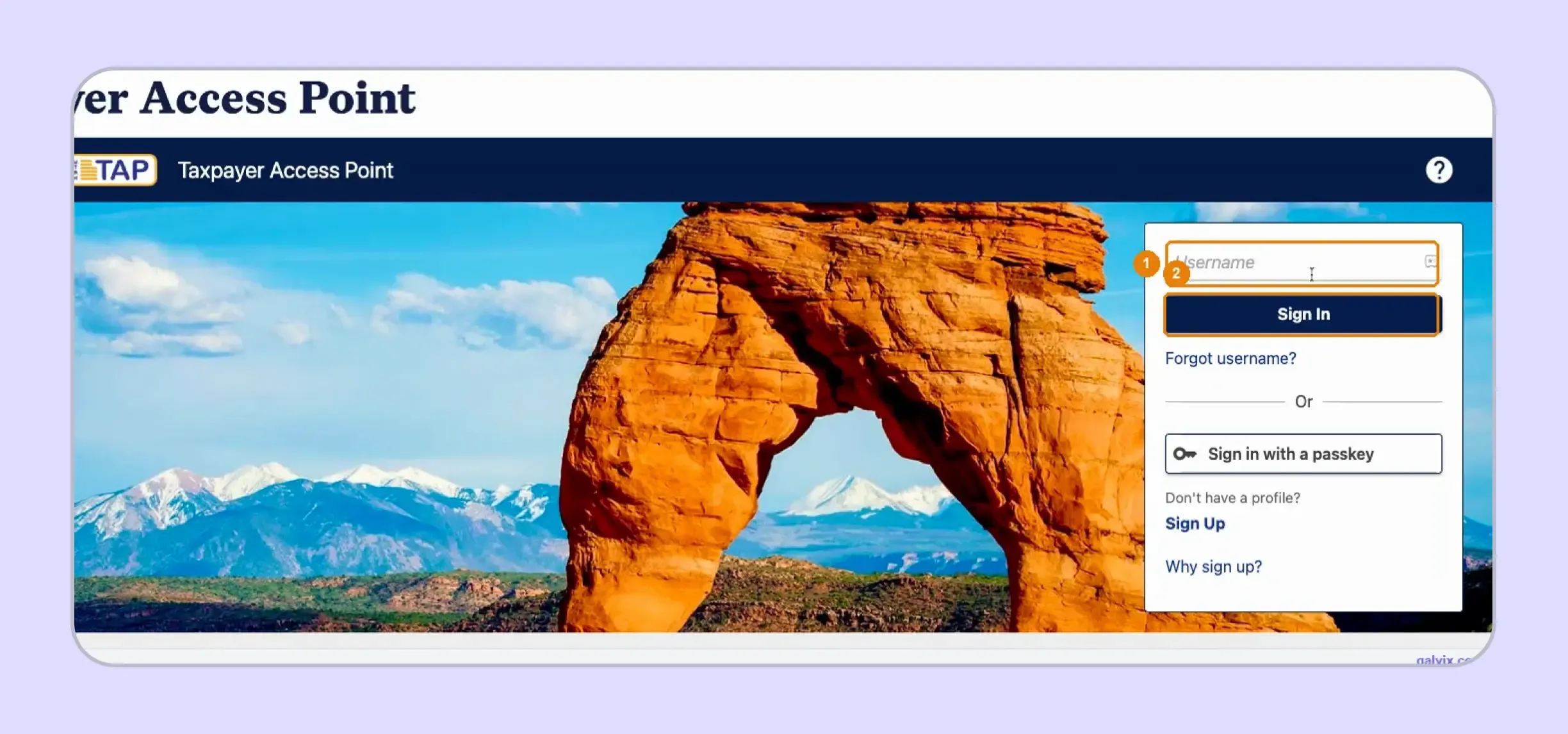
Open the Utah Taxpayer Access Point and enter your username before selecting Sign In. Your TAP username is your personal portal credential, not your EIN or sales tax account number. TAP can also support passkey access. Open any supporting instructions in a new tab if you need to keep the filing screen available.
Step 2: Open the Correct Sales and Use Tax Account
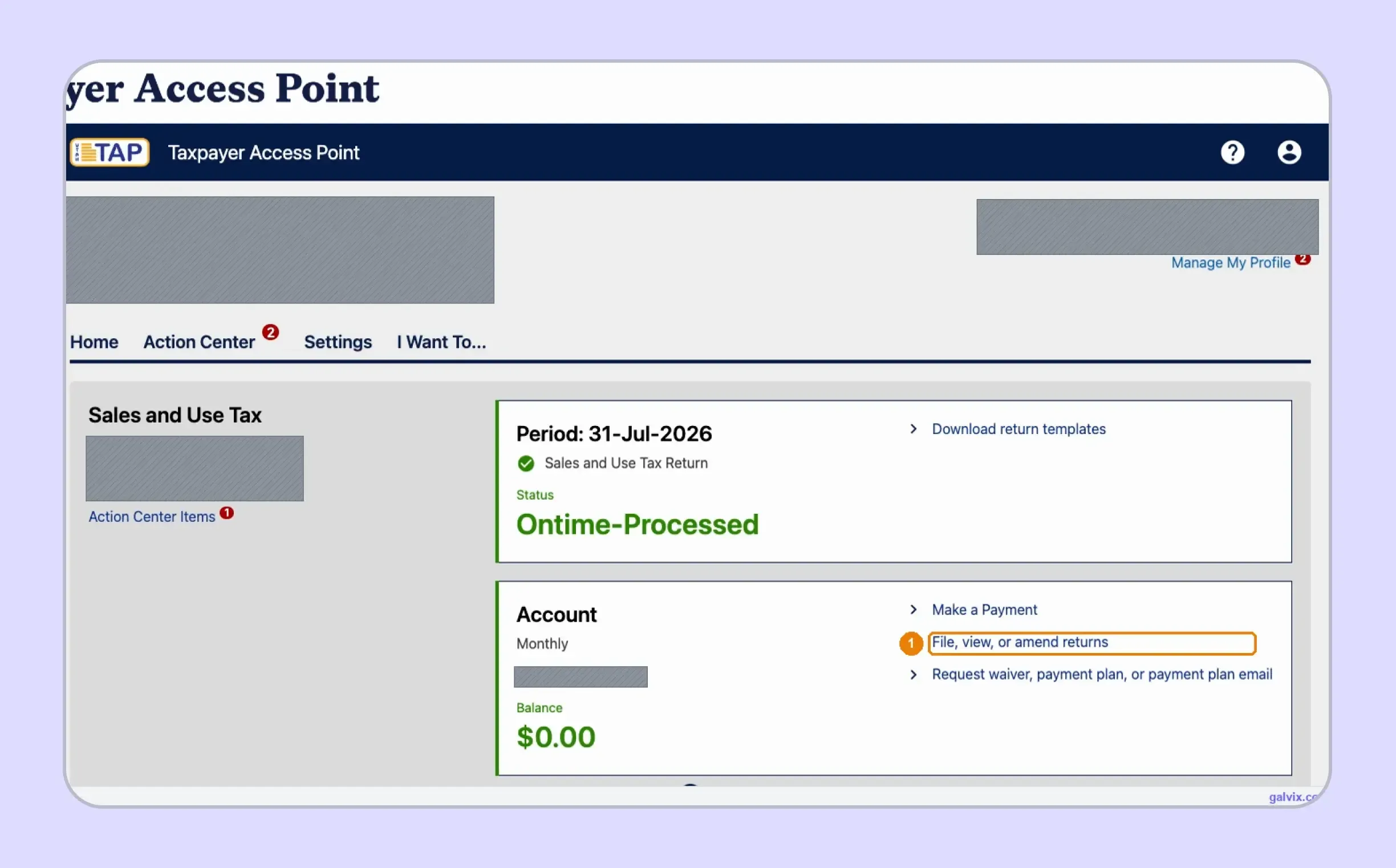
The account home shows each tax account connected with your login. Under Sales and Use Tax, review the filing frequency, current balance, and latest processed period before selecting File, View, or Amend returns. The Ontime-Processed panel shows the previous filed return, so confirm the business and account before continuing.
Step 3: Choose the Outstanding Reporting Period
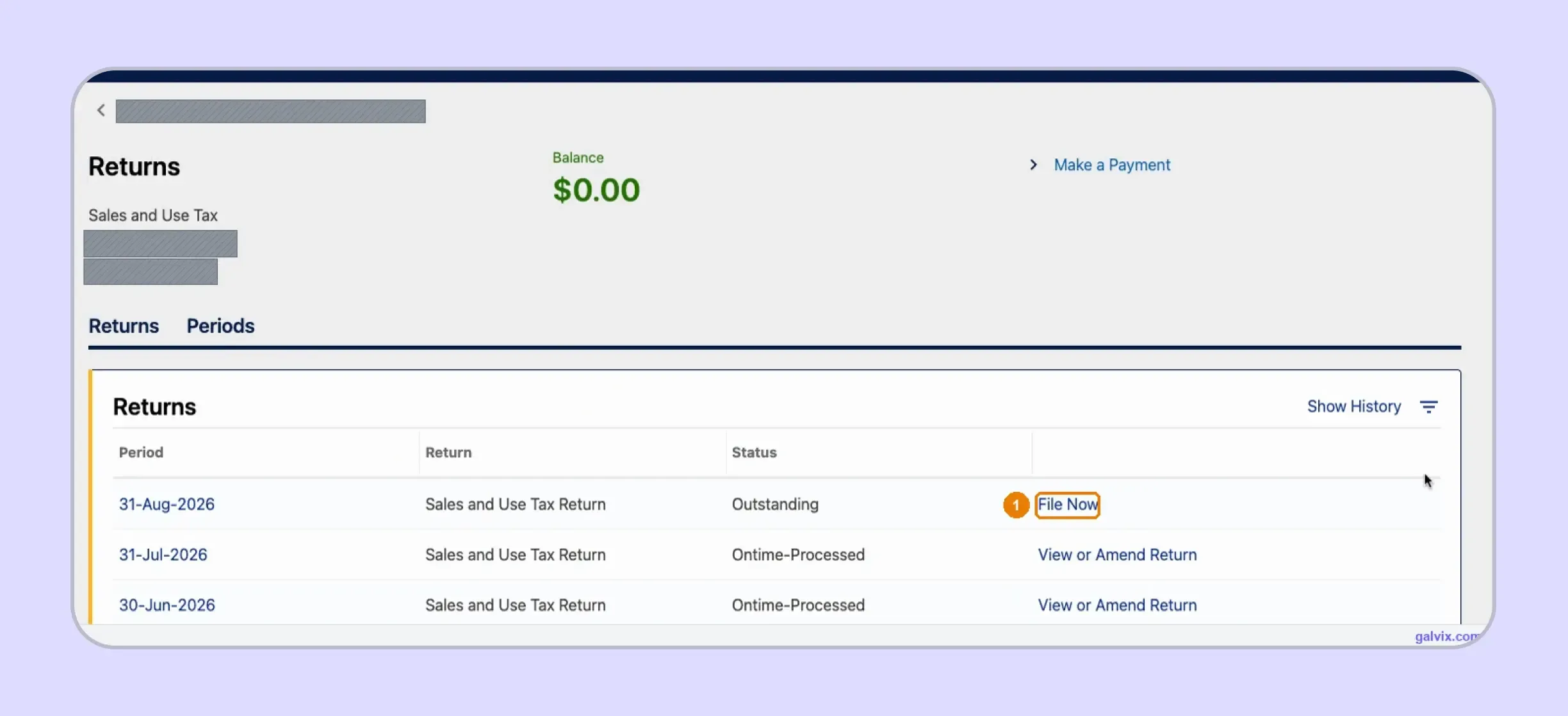
The Returns page lists each reporting period with its status and available action. Select File Now for the period marked Outstanding, while processed periods show View or Amend Return. Match the period-ending date carefully because the same list handles original filings and amendments for an earlier tax return.
Step 4: Confirm TC-62M and Its Required Schedules
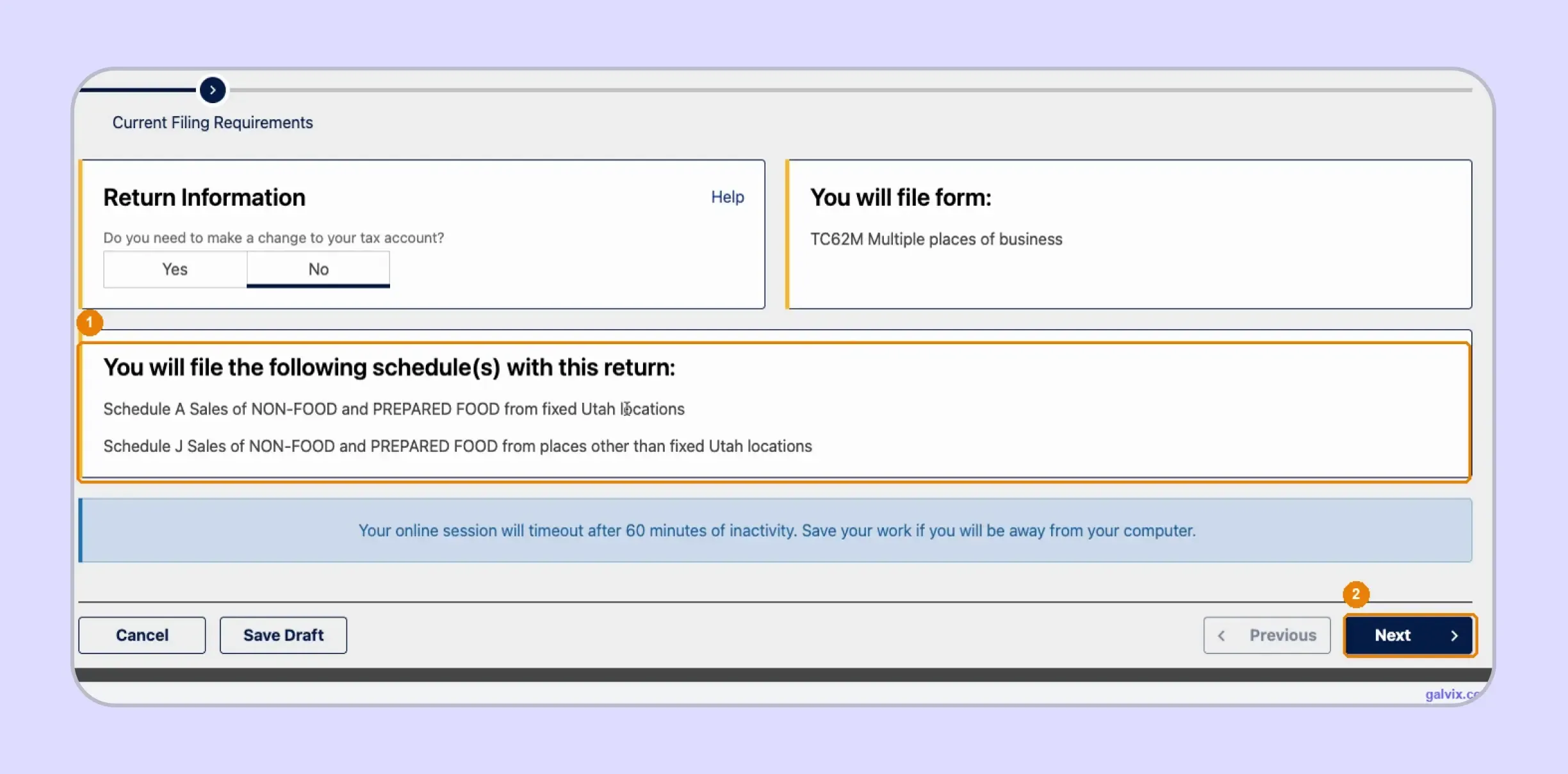
Current Filing Requirements shows the form assigned to your account. In the captured filing process, TAP identifies TC-62M for multiple places of business and lists Schedule A and Schedule J. Review the schedules before continuing because they show how the tax commission expects your Utah activity to be reported.
Step 5: Check Pending Locations Before Entering Sales
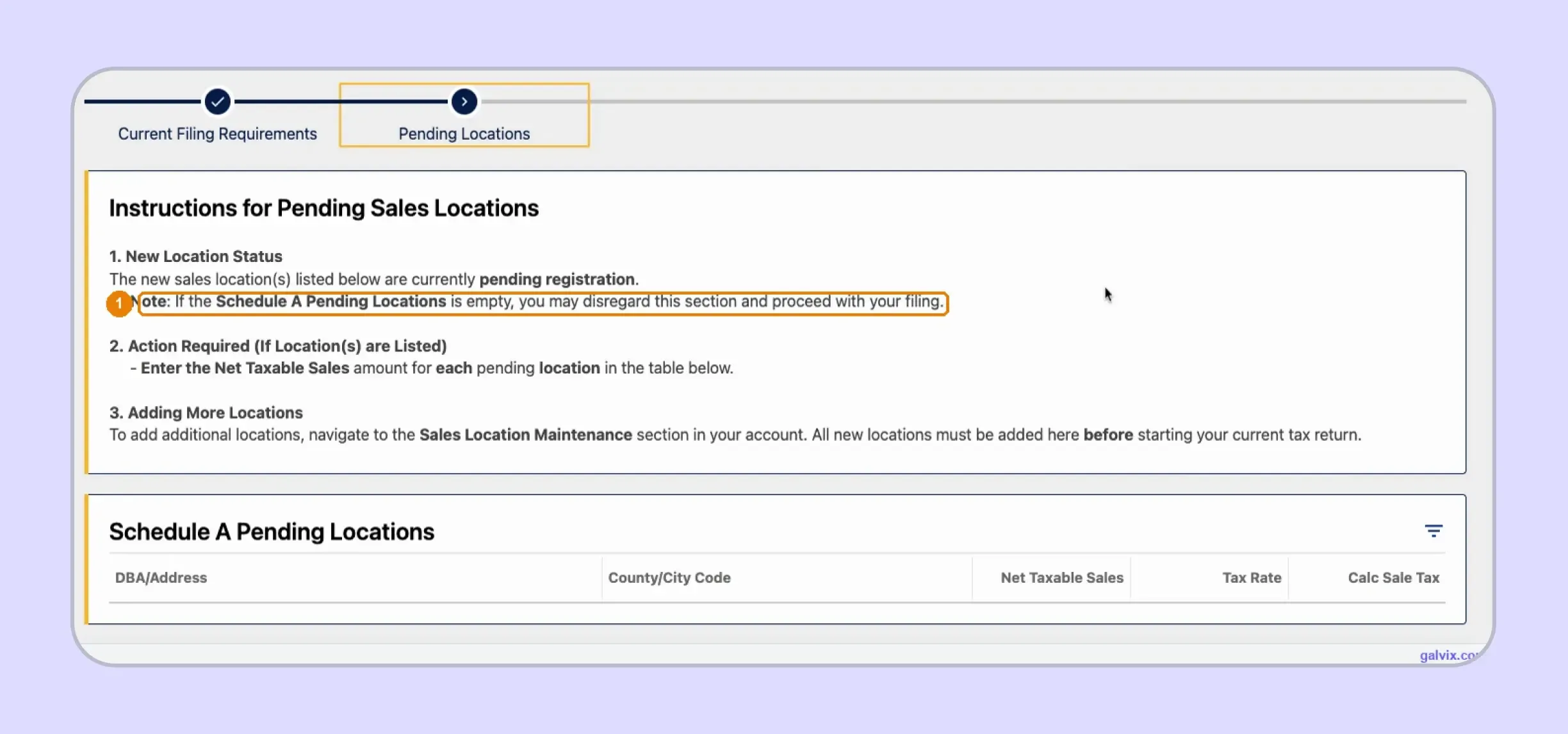
The Pending Locations screen shows Utah sales locations still awaiting registration. If the table is empty, continue. If a location appears, enter its net taxable sales as directed. An existing business opening another Utah site must add that location through Sales Location Maintenance before starting the return.
TAP does not let you create a new sales location from inside the return. Add any missing location through Sales Location Maintenance before restarting the filing.
Step 6: Enter Total Sales and Exempt Sales
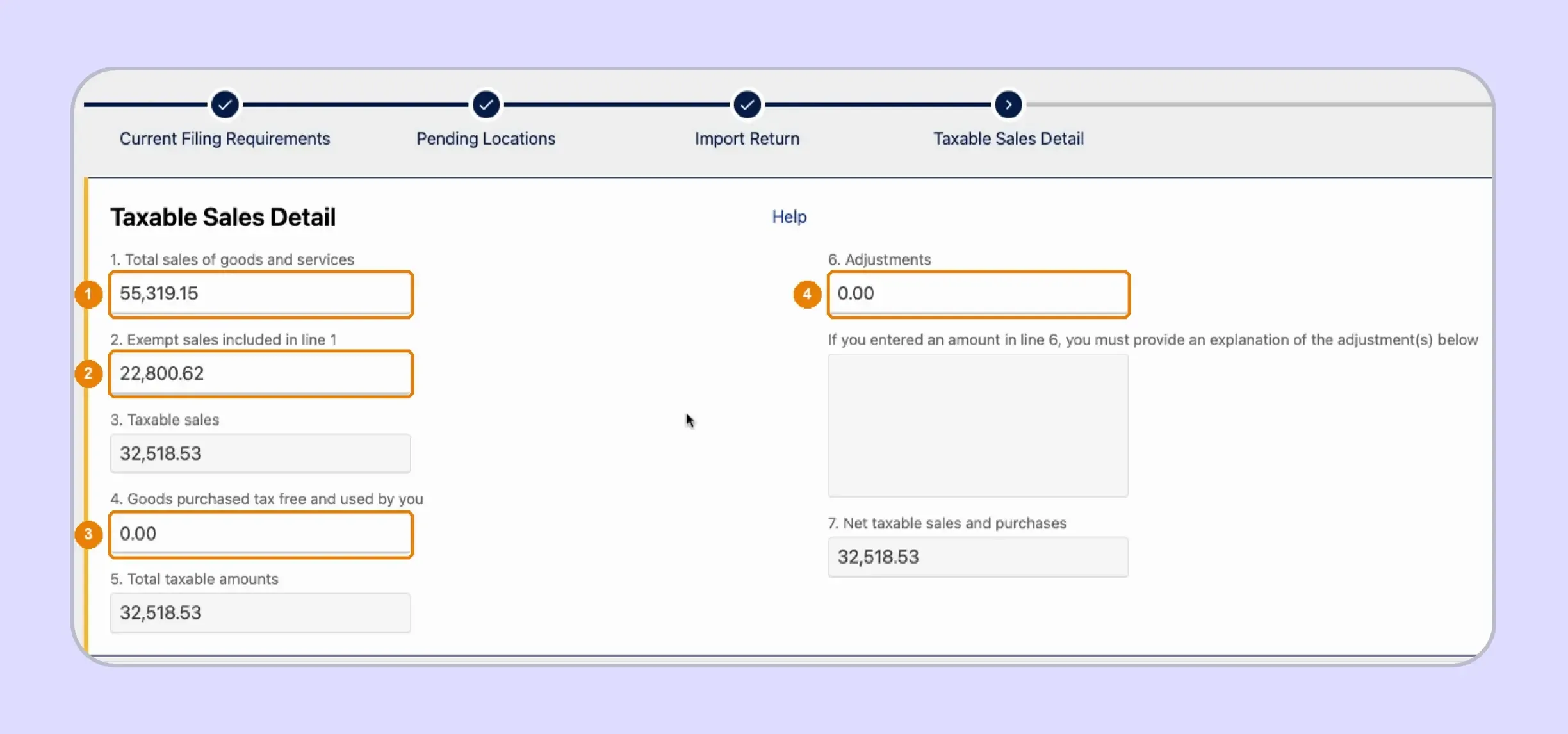
Taxable Sales Detail asks for total sales, exempt sales, tax-free purchases used by the business, and adjustments. TAP calculates taxable sales from these inputs. Line 4 captures consumer use tax on purchases used internally. Utah bases it on cost rather than sales price. This TC-62M workflow does not create a separate use tax license step.
TAP subtracts exempt sales from total sales without checking whether the exemption is valid. Reconcile the supporting records before Line 2 reduces the taxable base.
Step 7: Report Fixed Locations on Schedule A
Schedule A already contains your registered fixed locations, outlet numbers, County/City Codes, and combined rates. You enter only Net Taxable Sales for each location. In the captured filing, the Salt Lake City row reports $32,443.53, while TAP supplies the correct rate and calculates the related tax automatically.
Step 8: Report Destination Sales on Schedule J
Schedule J covers sales that do not belong to a fixed Utah location. Select the delivery jurisdiction, enter net taxable sales, and let TAP populate the county, code, rate, and tax. Add one row for each delivery jurisdiction represented in your direct sales during the filing period.
The location dropdown can show similar jurisdiction names with different codes. Match the selection to the actual delivery location because TAP can still calculate the return after a wrong choice.
Step 9: Review Tax and the Seller Discount
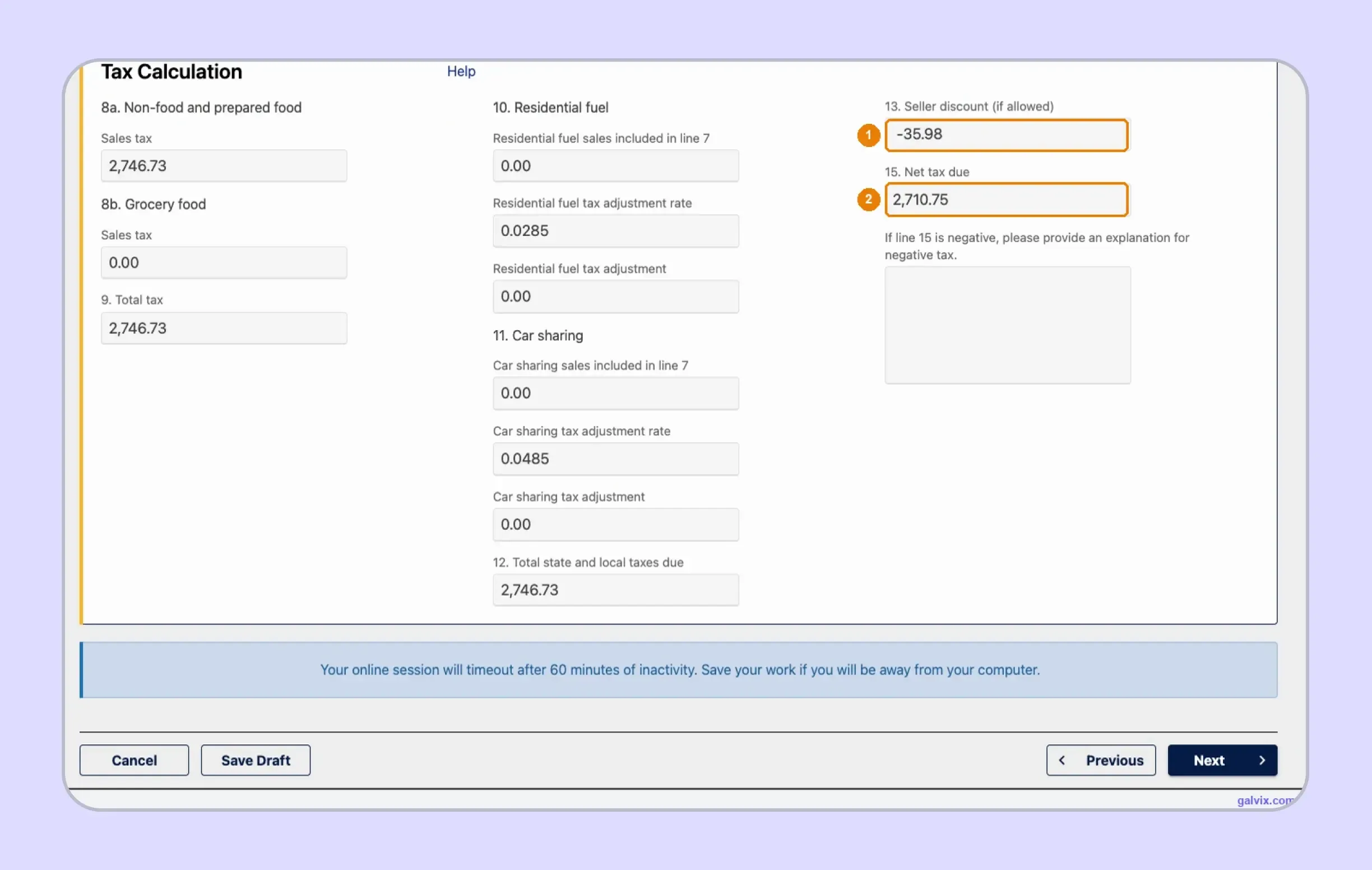
The Schedule Summary should reconcile Schedule A and Schedule J with net taxable sales reported earlier. The Tax Calculation screen then separates non-food and prepared food from grocery food.
TAP also applies the 1.31% seller discount automatically when an eligible monthly filer files and pays on time.
The 1.31% seller discount applies only to eligible monthly filers. Quarterly filers do not receive it, so do not expect Line 13 to show a discount on every account.
Step 10: Review and Sign the Return
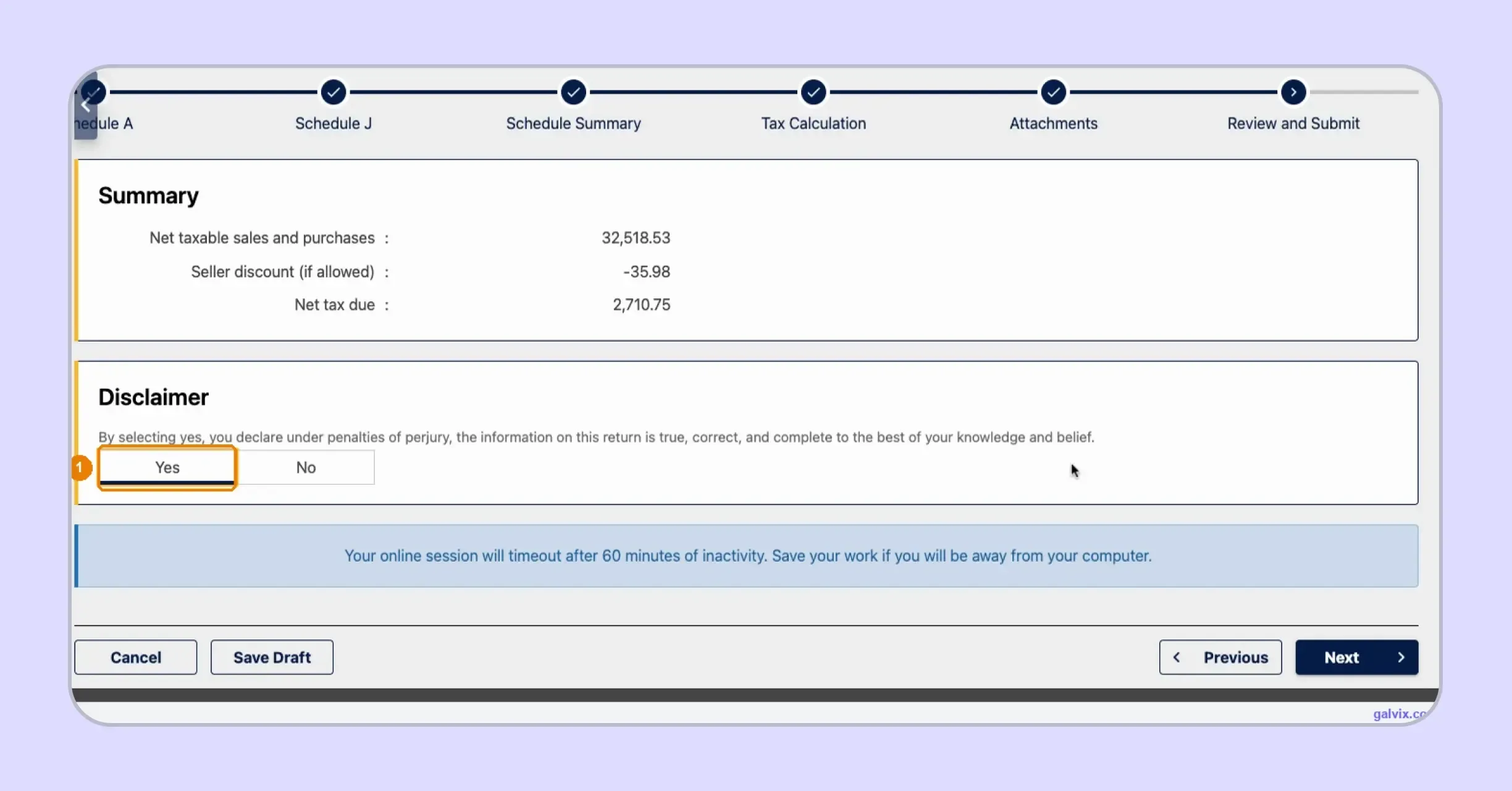
The Review and Submit screen restates net taxable sales, seller discount, and net tax due. Check those figures before selecting Yes on the disclaimer. Selecting Yes confirms the return is true and complete. Save Draft stores your work, although it does not transmit the sales tax return to Utah.
Step 11: Submit and Save the Confirmation
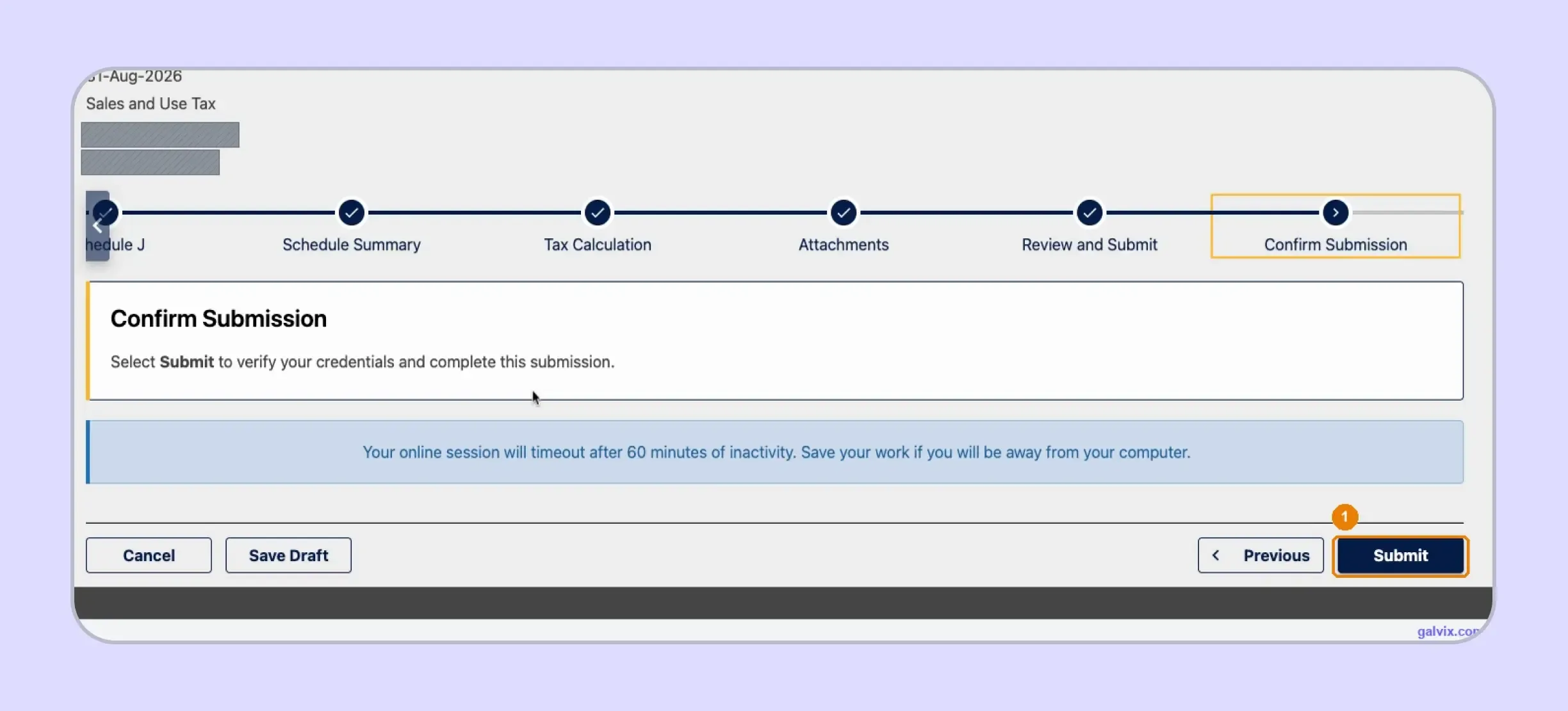
After signing, TAP moves to Confirm Submission. Select Submit to verify your credentials and transmit the Utah sales tax return. Reaching this screen alone does not complete filing. Once TAP issues a confirmation number, save it in your records because it serves as proof that the return was submitted.
Reaching Confirm Submission is not filing. The return is transmitted only after you select Submit and TAP issues a confirmation number, so do not close the screen early.
What Utah Sales Tax Filing Requirements Should You Know?
Key Utah sales tax filing requirements include electronic filing through TAP, deadlines based on the assigned period, and filing frequency based on annual liability. A registered seller must also file a return for every assigned period, even when no tax is due.
| Requirement | Utah Rule |
|---|---|
| Electronic filing | Required through TAP |
| TC-62S | One fixed Utah location |
| TC-62M | Multiple or nonfixed locations |
| Standard due date | Last day of following month |
| Quarterly filing | $50,000 or less annual liability |
| Monthly filing | $50,001 to $96,000 annual liability |
| Mandatory EFT | $96,001 or more annual liability |
| Remote seller threshold | More than $100,000 |
| Grocery food rate | 3% statewide |
| Seller discount | 1.31% when eligible |
The annual sales tax liability determines how often you file in Utah. New businesses estimate expected liability when registering, while the Utah State Tax Commission reviews established accounts and can change the assigned filing frequency. Once the schedule is set, you also need to track return deadlines, payment rules, and penalties.
- Filing frequency: Your account may be assigned monthly, quarterly, or another approved schedule based on annual sales tax liability. New businesses use an estimate when applying for a tax license, while established businesses can have the assigned frequency changed when their reported liability changes.
- Return due dates: Utah returns are due on the last day of the month following the filing period. If that date falls on a weekend or legal holiday, the due date moves to the next business day. You must still file returns for zero-tax periods.
- How to pay sales tax in Utah: You can pay through TAP. Businesses with combined sales and use tax liability of $96,000 or more during the preceding calendar year must use EFT. Businesses below that threshold can also voluntarily choose electronic payment.
- Late filing: Missing the filing or payment deadline can create penalties, while unpaid tax can generate interest charges from the original due date. The 2026 Utah interest rate is 6%. Eligible monthly filers can also lose the seller discount when filing or payment is late.
If you search for a Utah seller’s permit, the state generally calls it a sales tax license. That tax license sets up your filing account. Sales tax rules by state can differ in frequency, nexus requirements, local reporting requirements, and deadlines.
How Do Exempt Sales Affect a Utah Sales Tax Return?
Exempt sales reduce the taxable amount on a Utah sales tax return, but the seller must have records to support that treatment. Utah commonly uses Form TC-721, and sellers retain the certificate rather than sending it with the return. Records supporting exemptions should generally be kept for three years.
Utah Uses Different Certificates for Different Exemptions
TC-721 covers several exemption categories, including purchases for resale. A qualifying purchaser can provide a resale certificate so the seller has documentation supporting why tax was not collected on that transaction. The form remains with the seller for audit support.
Other exemptions can require different documents. Government and school purchases can use TC-721G, religious or charitable purchases can use TC-721RC, and qualifying non-Utah retailers accepting delivery in Utah can use TC-721NR. Identifying the exemption first helps you collect the appropriate documentation.
Certificate Collection Does Not Decide Eligibility
Having a certificate on file supports the record, although the document still needs to match the purchaser and the claimed exemption. Utah says a seller may accept an exemption certificate at face value and should retain it with the records supporting nontaxable sales.
For multistate teams, a consistent sales tax exemption certificate process can keep collection, verification, customer records, and transaction review connected without treating them as the same control.
The Galvix Sales Tax Exemption Certificate Tool can help teams identify the documentation route and seller checks that apply before an untaxed transaction reaches the return. Certificate verification can support the review process, while the business still needs to confirm whether the specific purchase qualifies for the claimed exemption.

How Does Galvix Help With Utah Sales Tax Filing?
Galvix manages recurring filing as a service, so your team does not need to prepare every return or operate each state portal separately. Galvix reconciles transaction data, prepares returns, completes specialist review, sends figures for approval, and files approved returns in accordance with each state’s schedule and filing requirements.
For Utah, that workflow connects gross sales and exemptions with fixed-location activity, destination transactions, grocery treatment, and consumer use tax before TC-62M schedules are completed. This keeps Utah sales tax returns tied to underlying records, rather than forcing your team to rebuild jurisdiction-level details in TAP each filing period.
When transaction records span multiple systems, supported sales tax integrations can consolidate ecommerce, accounting, payment, and ERP data into a single filing workflow. A QuickBooks sales tax integration or NetSuite sales tax integration can keep source transactions connected with return preparation and review.
As your sales footprint grows, sales tax nexus monitoring can track economic and physical presence across all 50 states and connect new registrations with future filings. Galvix also supports exemption management, notices, and broader sales tax compliance through modular pricing, so you choose only the services you need.
What Tasks Can Galvix Manage for Utah Sellers?
As your Utah footprint grows, Galvix can manage recurring operational work while your team remains involved in return review and approval.
- Reconcile sales: Prepare records before return creation
- Prepare schedules: Build Schedule A and Schedule J
- Review exemptions: Connect certificates with untaxed sales
- Monitor nexus: Track thresholds before registration
- Manage filings: Handle returns notices and confirmations
For finance teams working out how to file sales tax return in Utah alongside several other jurisdictions, one managed process reduces separate reconciliation files and repeated portal handoffs.
Book a Galvix demo to review your Utah and multistate filing process and reduce recurring manual sales tax work.
Frequently Asked Questions
Can I amend a Utah sales tax return in TAP?
Yes. After a Utah sales tax return has been filed, open the Returns list in TAP and select View or Amend Return for the relevant period. Do not create another original filing for the same period. Keep the amended figures tied to the records explaining why the original return changed.
Can I save an unfinished Utah return and continue later?
Yes. TAP provides a Save Draft option throughout the manual filing workflow. Saving a draft stores your work so you can return later, although it does not submit the return. The portal also warns that an online session can time out after 60 minutes of inactivity, so save before leaving the screen.
How do I add a new Utah sales location?
Add a new sales location through Sales Location Maintenance before beginning the return. TAP’s Pending Locations screen states that new locations must already be added to the account before the current filing begins. This matters when an existing business opens another location during the period.
What happens if Schedule A and Schedule J do not reconcile?
The schedule totals should reconcile with the net taxable sales reported earlier on TC-62M. Schedule A holds fixed-location sales, while Schedule J contains other destination-sourced transactions. A difference should be traced back to missing, duplicated, or incorrectly sourced transactions before you continue to the Tax Calculation screen.
Can I upload TC-62M data instead of entering it manually?
TAP includes an Import Return step for businesses using an approved data-upload process. The walkthrough above follows manual data entry instead. Businesses considering an upload should follow the current Utah State Tax Commission specifications, as the required file format and validation process differ from the screen-by-screen route.
How long should Utah exemption certificates be retained?
Utah requires sellers to keep records supporting sales and use tax returns for three years from the filing date. That includes exemption certificates supporting resale and other qualifying non-taxable transactions. Keeping the certificate linked with the customer and transaction makes retrieval easier if the Utah State Tax Commission later reviews the exemption.
What happens when Utah changes my filing frequency?
Utah bases filing frequency on annual sales tax liability and reviews accounts periodically. Businesses with $50,000 or less generally file quarterly, while higher liability requires monthly filing. The Tax Commission notifies businesses when the assigned frequency changes, so update your calendar before the next return becomes due.