
Businesses looking to file New Mexico sales tax online first need to understand one important difference. New Mexico does not impose a traditional sales tax on retail transactions. Instead, the state uses the Gross Receipts Tax (GRT), which businesses report on Form TRD-41413 through the Taxpayer Access Point.
This distinction changes how the return is prepared. GRT is imposed on the business that receives the gross receipts, although the amount can be passed on to customers when separately stated. The applicable combined rate also depends on the reporting location, as state and local components may apply.
This blog explains how to file sales tax in New Mexico, determine reporting locations, support deductions, handle marketplace activity, and make payment through TAP. It also shows how you can file New Mexico sales tax return online while managing recurring tax returns in other states through a single compliance process.

Why Is New Mexico Sales Tax Filing Different?
New Mexico uses gross receipts tax instead of a conventional retail sales tax. GRT applies broadly to receipts from selling property, providing services, leasing property, licensing rights, and other covered business activities. Businesses report these amounts through Form TRD-41413 rather than a standard sales and use tax return.
Gross Receipts Tax Is Paid by the Seller
The legal GRT liability rests with the seller or lessor receiving taxable gross receipts. Passing that cost to a customer does not transfer the underlying filing responsibility.
- Seller liability: The business remains responsible for reporting and paying GRT.
- Customer billing: GRT may be passed through when separately stated.
- State component: The state GRT component is currently 4.875%.
- Local components: Counties and municipalities can increase the applicable rate.
- Location matters: Each reporting location can carry a different combined rate.
This means you should not apply one statewide sales tax rate across all New Mexico sales. Location codes determine the applicable GRT rate, while the current rate schedule reflects state and local taxes imposed by relevant local jurisdictions.
For businesses operating across several jurisdictions, sales tax rules by state can differ substantially in tax type, rates, sourcing, return format, and filing requirements.
Compensating Tax Uses a Different Return
New Mexico compensating tax works more like a use tax. It applies when a business or individual uses qualifying tangible goods, services, licenses, or franchises acquired from an out-of-state seller, and the transaction would otherwise be subject to GRT.
Compensating tax belongs on Form TRD-41412 rather than Form TRD-41413. You should therefore separate those purchases before beginning NM sales tax filing, rather than mixing buyer-side compensating tax with seller-side gross receipts.
Who Needs to File a New Mexico Gross Receipts Tax Return?
Companies engaged in covered activity in the state need to register with the New Mexico Taxation and Revenue Department and file GRT returns. An obligation can arise through physical presence in the state or economic nexus for remote sellers without that physical presence.
Businesses Operating in New Mexico
New Mexico businesses can have GRT obligations when they sell property, provide services, lease or license property, grant franchise rights, or perform other covered business activities. The rules extend beyond retail stores selling taxable goods, as services and several other receipts also fall within the GRT framework.
Registration gives the business a New Mexico Business Tax Identification Number, or NMBTIN. You might be searching for a New Mexico sales tax permit, but it is crucial to remember that New Mexico instead uses the NMBTIN and applicable GRT tax ID accounts for business taxes.
This distinction is crucial for New Mexico sales tax registration because a business owner should not wait for a document literally called a sales tax permit before recognizing a filing obligation.
Remote Sellers Above the Economic Nexus Threshold
Remote sellers without physical presence generally establish economic nexus when their taxable gross receipts sourced to New Mexico reach at least $100,000 during the previous calendar year. The threshold measures taxable New Mexico receipts rather than the seller’s total company gross revenue.
A business can therefore have sales tax nexus without a store, warehouse, or employee in the state. Enterprises that track both economic exposure and physical nexus can keep their New Mexico sales tax nexus position aligned with registration planning.
Marketplace Sellers and Providers
A marketplace provider may be responsible for collecting and paying GRT on sales made through its platform. The seller can usually deduct those marketplace sales when New Mexico’s requirements are met.
To support the deduction, the seller should keep records showing that the marketplace provider is registered and has paid, or will pay, the related GRT.
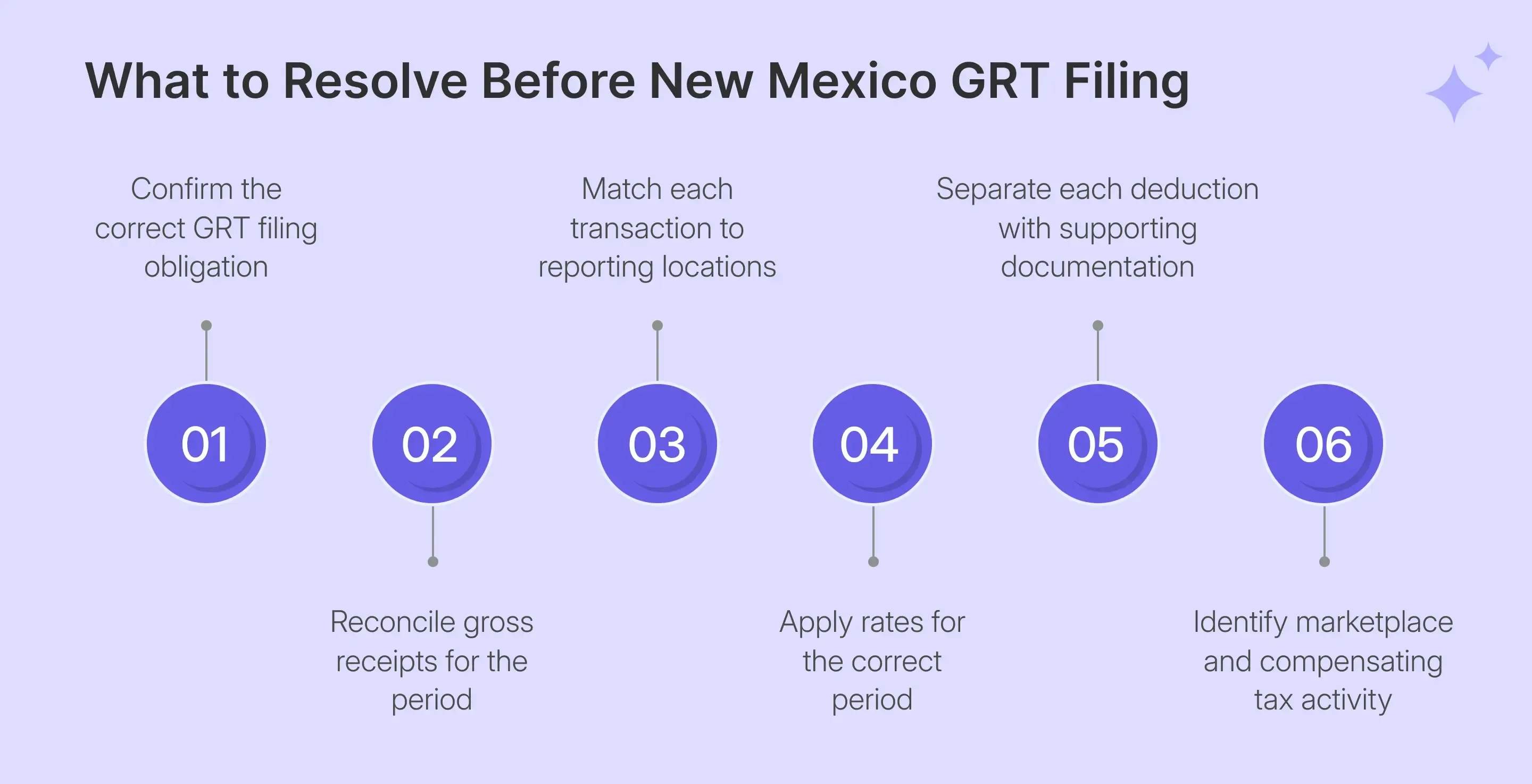
Which Issues Should You Resolve Before Opening TAP?
The main work happens before you file New Mexico sales tax online. Businesses need to resolve where receipts belong, which tax rates apply, what deductions are supported, and whether marketplace or compensating-tax transactions require separate treatment. These decisions determine what eventually enters the TAP account.
| Filing Decision | Why It Matters | New Mexico Issue |
|---|---|---|
| Reporting location | Determines location code | Often follows delivery or benefit location |
| GRT rate | Determines tax due | Includes state and local components |
| Gross receipts | Establishes reporting base | Covers taxable and deductible receipts |
| Deductions | Reduce taxable receipts | May require NTTC or other evidence |
| Marketplace activity | Prevents duplicate liability | Facilitated receipts may qualify for deduction |
| Compensating tax | Uses separate return | Reported on Form TRD-41412 |
Sourcing deserves attention first because the location code influences both the rate and how activity appears on the return. Reconciled transaction data should therefore retain delivery and customer-location information before aggregation begins.
Match Receipts to the Correct Location Code
New Mexico uses destination-based sourcing for many transactions, so the reporting location often depends on where goods are delivered or where the customer receives the benefit. Professional services, construction, real estate, transportation, and some other activities follow different sourcing rules, making accurate customer and delivery data important before filing.
The Revenue Department provides a GRT Location Code and Rate Finder, along with an address-matching API, to connect addresses with location codes and current tax rates. Enterprises using ecommerce, accounting, or ERP systems can use supported sales tax integrations to keep this location data connected with transaction records before return preparation.
Use the Rate for the Correct Filing Period
New Mexico’s state GRT component is 4.875%, while county and municipal components can change the final gross receipts tax rate by location. You should therefore use the rate schedule that applies to the relevant reporting period and confirm the current combined rate for each location before filing with local governments.
Rate changes usually take effect in July, although certain circumstances may prompt additional changes. Deductions can also affect taxable receipts. Qualifying grocery items, certain purchases during a tax holiday, and some tangible personal property may receive different treatment, while shipping charges can also affect gross receipts depending on the transaction.
Separate Marketplace Receipts Before Filing
Marketplace receipts should be separated from direct taxable sales before filing. A qualifying marketplace seller deduction can apply where the provider has paid or will pay the related GRT and the seller retains the required documentation.
This separation prevents the same activity from producing duplicate tax liability while keeping the gross receipts trail intact. Businesses using Shopify alongside marketplaces can also connect direct-store activity through a Shopify sales tax integration when preparing multichannel records.
Keep Compensating Tax Outside the GRT Return
Transactions subject to compensating tax belong on Form TRD-41412. Mixing them into Form TRD-41413 can combine the business’s seller-side gross receipts with purchases in which the buyer or user bears the compensating tax obligation.
Keeping the two datasets separate before opening TAP ensures each liability receives the correct return and reporting treatment. This is crucial for operating in natural resources or other industries that may have separate New Mexico taxes outside ordinary GRT.
How Do You File New Mexico Sales Tax Online?
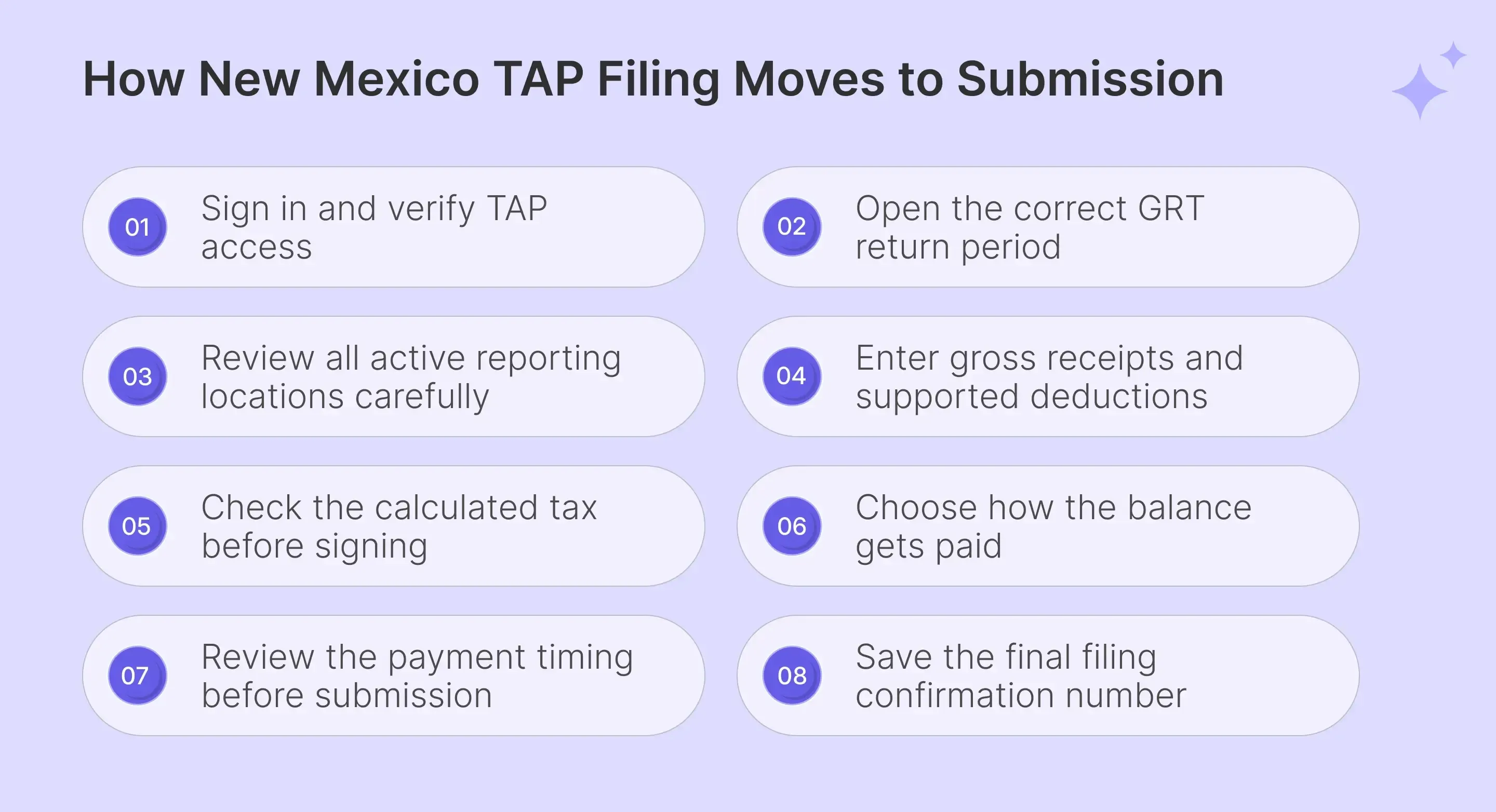
To file New Mexico sales tax online, sign in to the Taxpayer Access Point, open the correct GRT account, confirm the reporting period, review locations, enter gross receipts and deductions, check calculated tax, complete the electronic signature, select payment handling, and submit the return.
Step 1: Sign In to Taxpayer Access Point
Open New Mexico’s Taxpayer Access Point and enter the Logon associated with the business profile. Complete the password and two-step verification process so the correct business entity and GRT account are available before filing begins. Pasted text
Third-party preparers should not rely on shared taxpayer credentials. TAP supports third-party access, and TRD’s online services allow businesses to grant account access to tax professionals or employees instead.

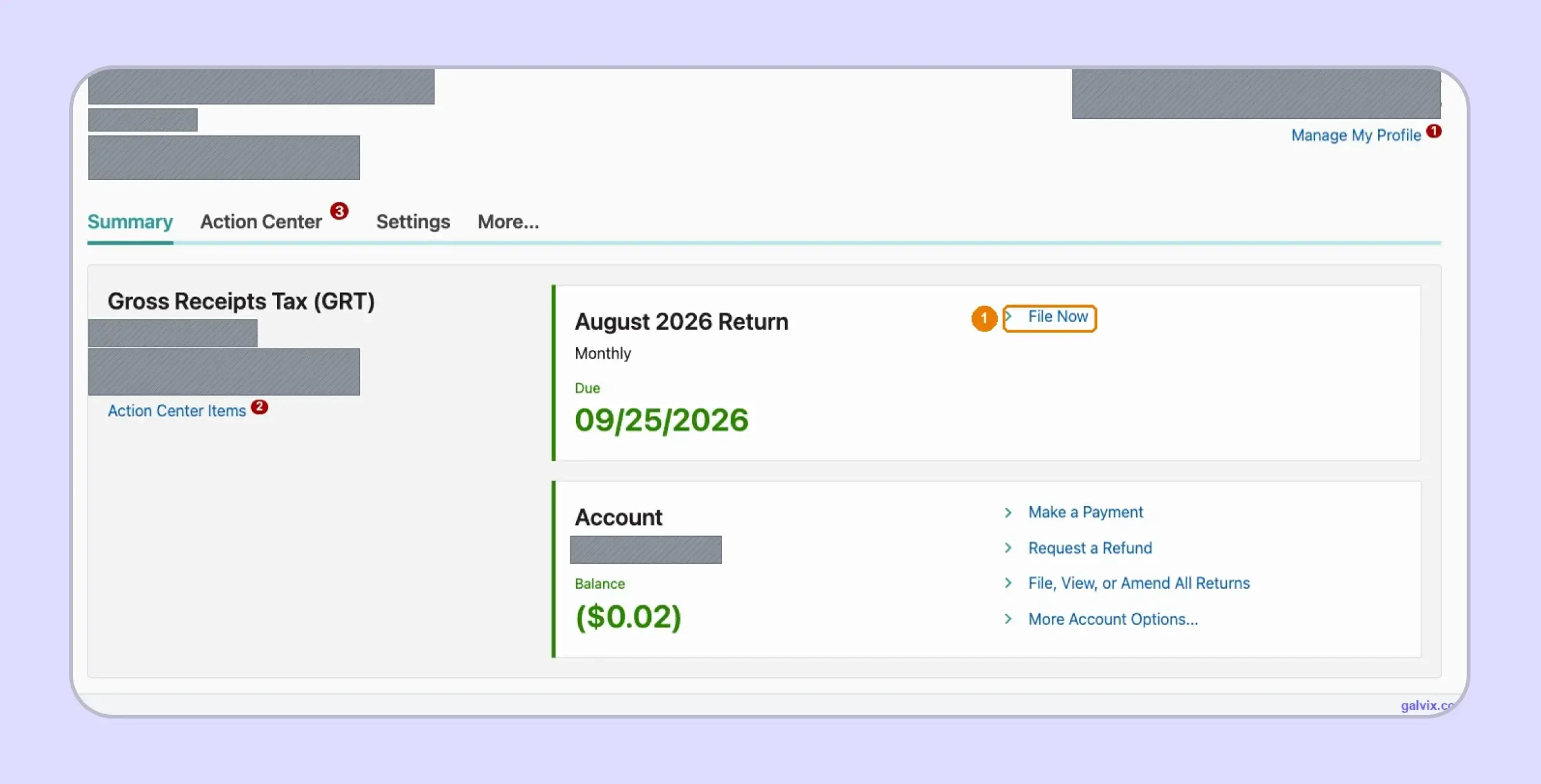
Step 2: Open the Gross Receipts Tax Account
From the account home, open the Gross Receipts Tax account and select File Now for the correct period. Check the business name, New Mexico business tax ID, account information, and displayed due date before moving forward. Pasted text
When you file New Mexico sales tax online, choosing the correct account matters because TAP also supports compensating tax and several other business tax programs.
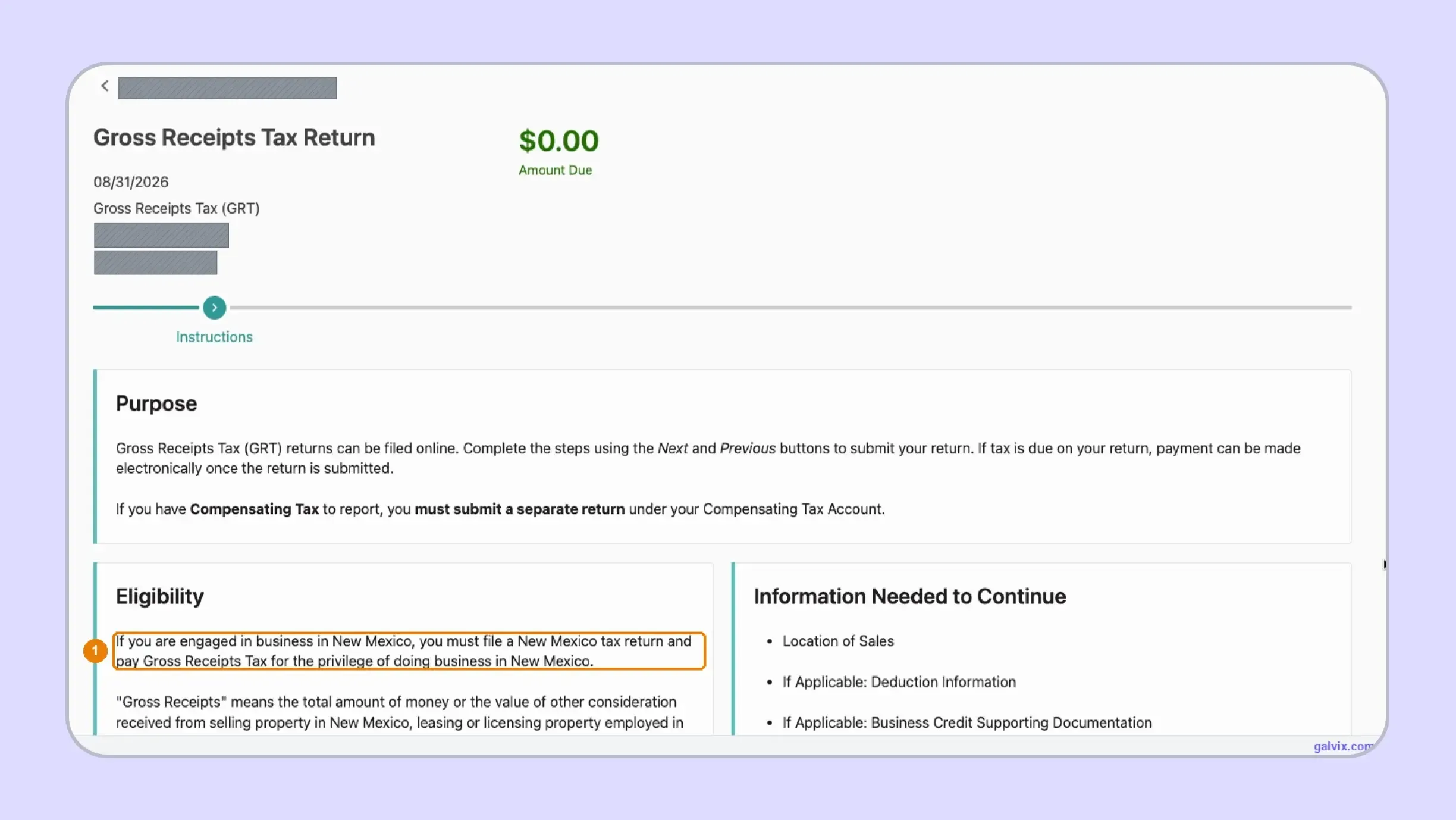
Step 3: Review the Filing Instructions
Read the filing instructions before continuing into the return. The instructions reinforce that GRT and compensating tax use separate returns while identifying the location, deduction, credit, and other information needed for Form TRD-41413. Pasted text
This step is useful when internal source data combines several tax types within a single accounting system.
Step 4: Confirm the Active Filing Period
Review the Active Filing Period and confirm that it matches the intended reporting period. TAP permits early filing on the first day of a period, provided the filer acknowledges that the period has not yet ended.
Filing before the period closes can leave later activity outside the submitted return. If additional receipts arise after the early submission, the business may need to correct the period by filing an amended return.

Step 5: Review Gross Receipts Locations
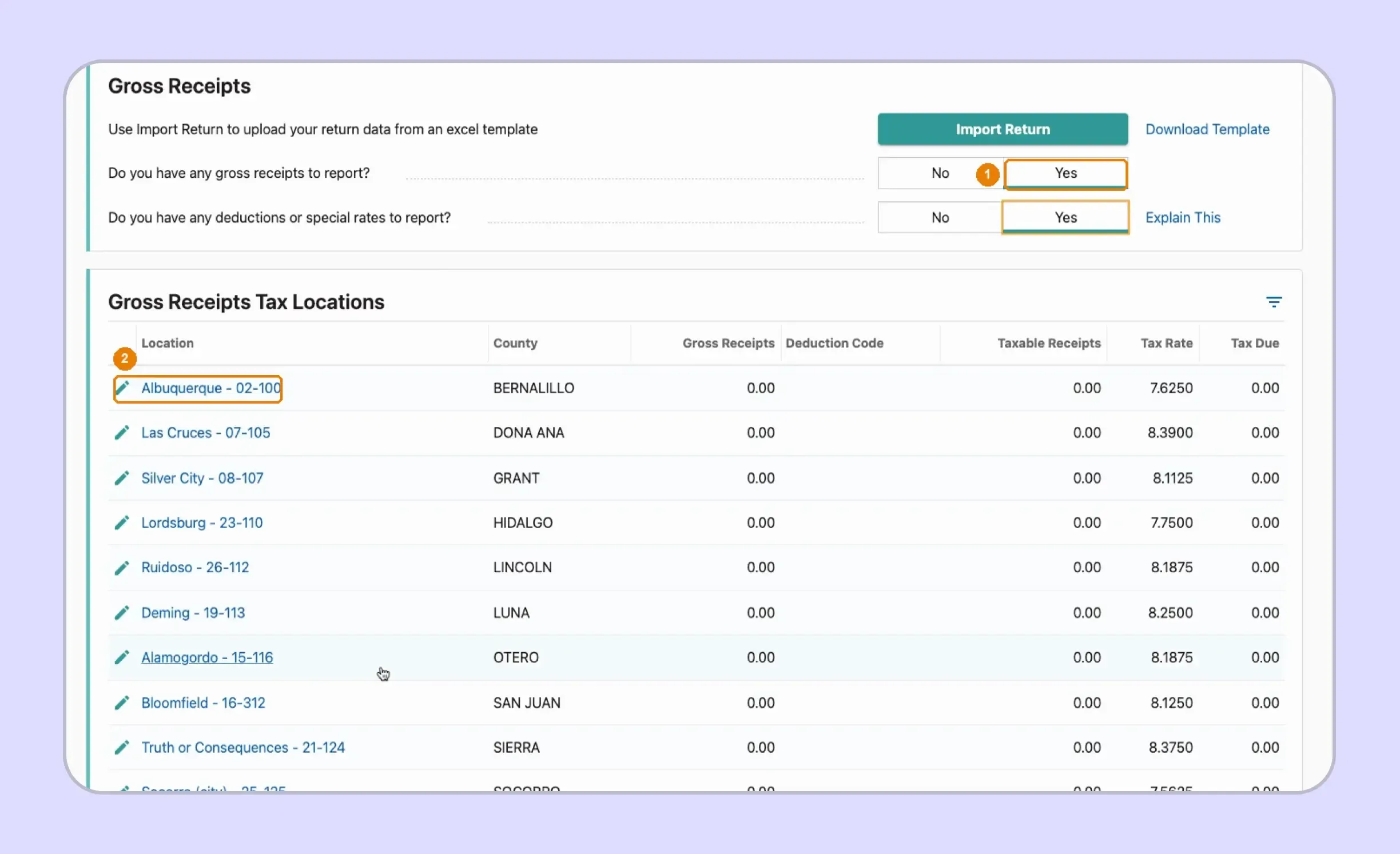
Indicate whether the return includes gross receipts, deductions, or special rates, then review the locations displayed in TAP. Select the locations that contain reportable current-period activity rather than assuming every registered location had receipts. Pasted text
A registered location appearing in TAP does not prove that the current-period allocation is complete. Reconcile transaction-level sourcing with the location table before leaving inactive locations at zero.
Step 6: Enter Receipts and Deductions by Location
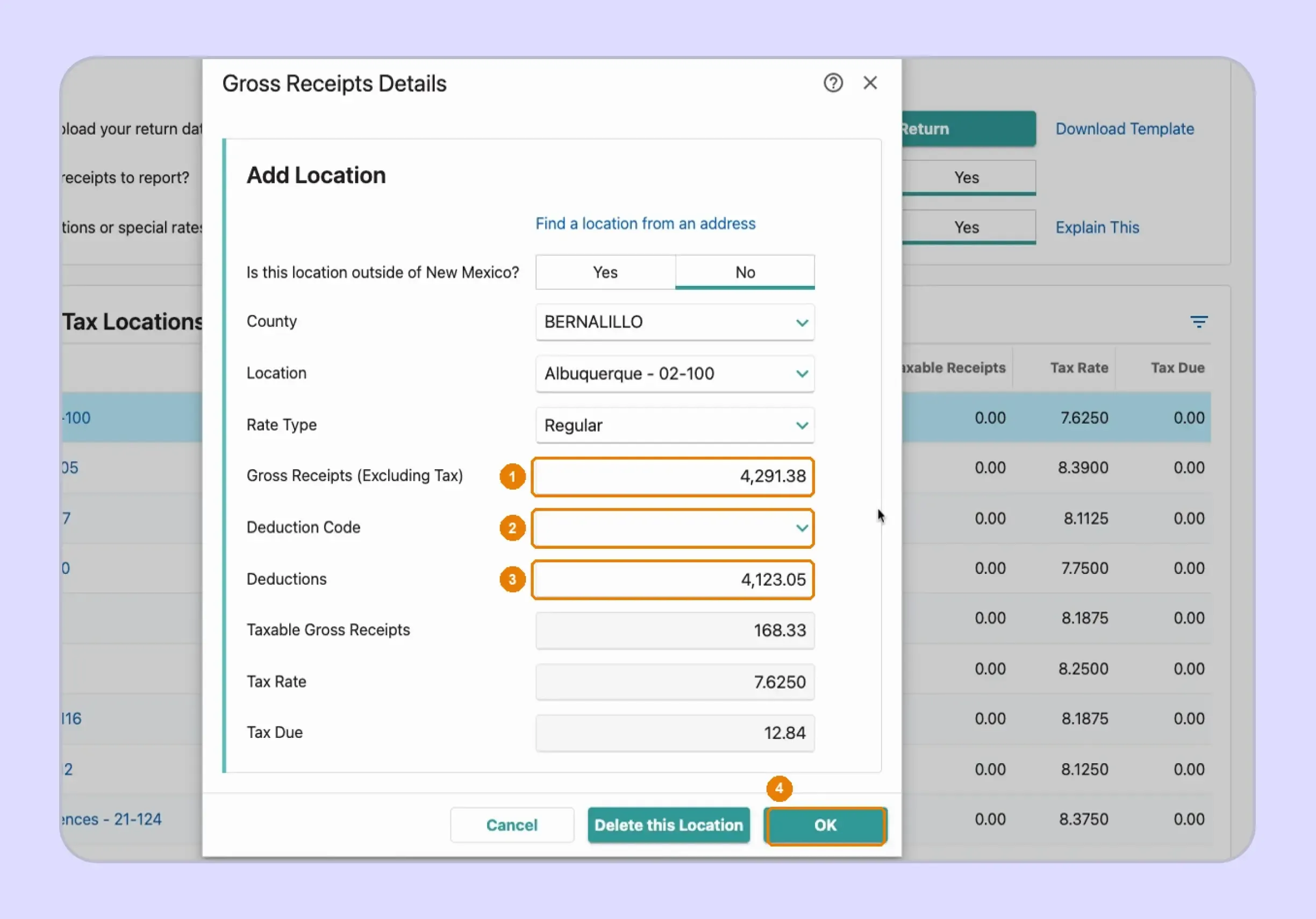
For each applicable location, enter gross receipts excluding GRT and record supported deductions using the appropriate deduction treatment. TAP then calculates taxable receipts and applies the location rate to determine the GRT due.
This step is crucial to understanding how to file NM sales tax accurately. TRD requires gross receipts to be entered before deductions, while deductible amounts must be supported by an NTTC, alternative evidence, statute, or regulation.
Do not enter a net taxable figure as gross receipts. Form TRD-41413 separates gross receipts from deduction amounts, allowing the taxable base to be calculated from the underlying reporting lines.
Step 7: Review the Summary and Sign
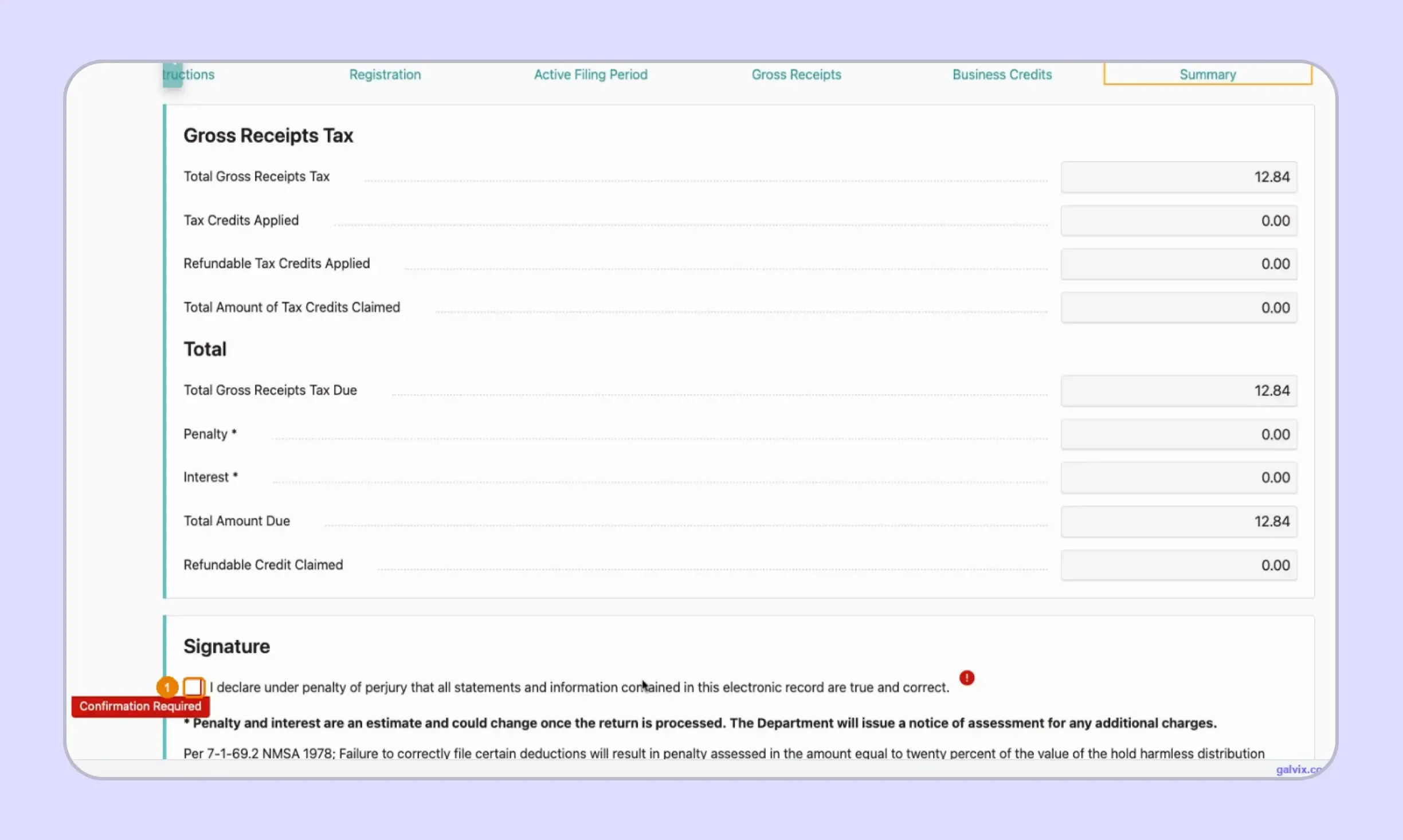
Review total GRT, business-related credits, penalties, interest, and the resulting amount due against your reconciled records. A mathematically correct summary does not establish that every location assignment or deduction is supported under state law.
Complete the required electronic declaration only after the return matches the approved filing data.
Step 8: Choose the Payment Method
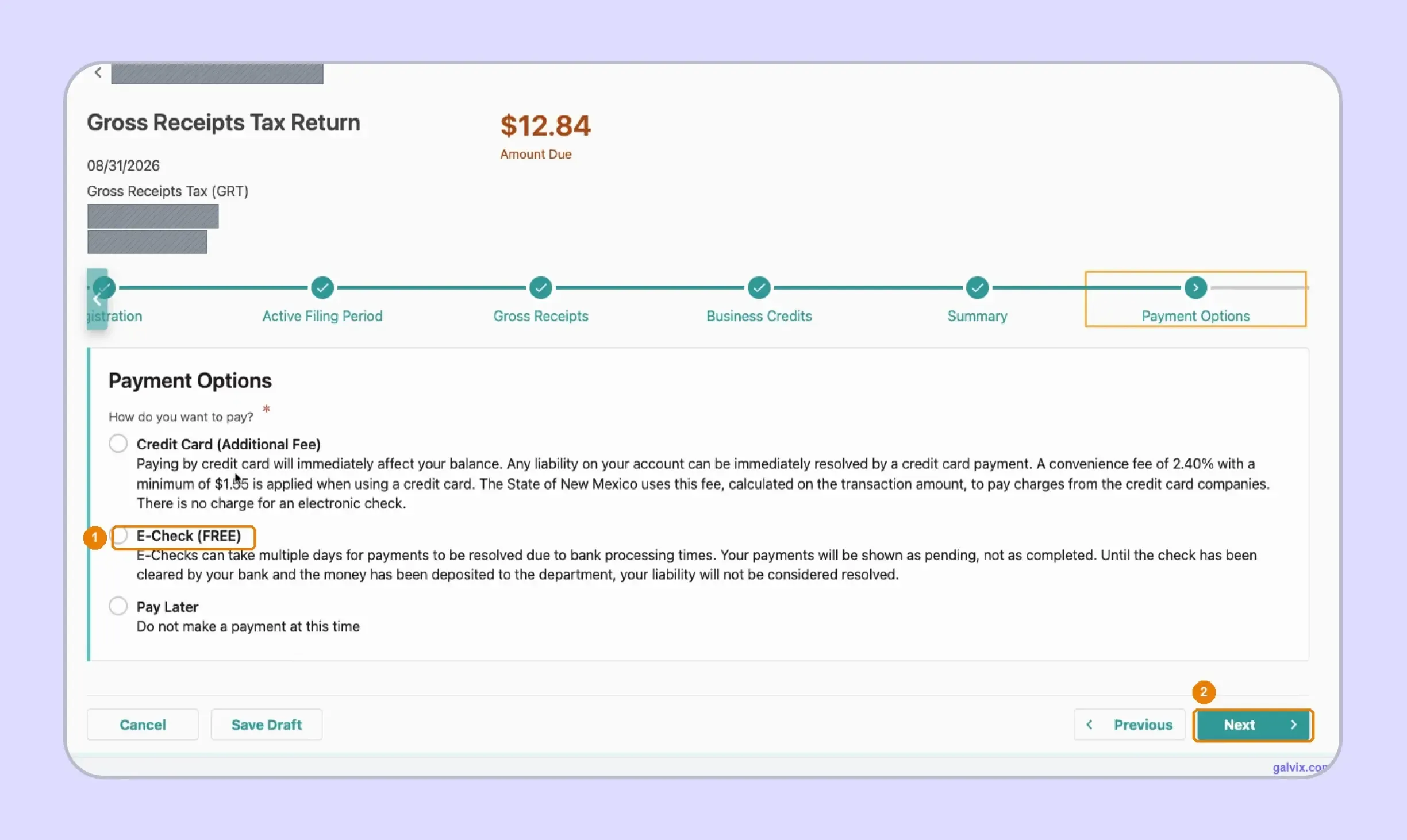
Enterprises asking how to pay sales tax in New Mexico can use TAP after preparing the return. Online options include electronic check and credit card payment, while the portal workflow can also allow payment to be handled separately.
Electronic check payments have no added portal charge. Credit card payments carry a convenience fee, so the payment method should be reviewed separately from the filing decision.
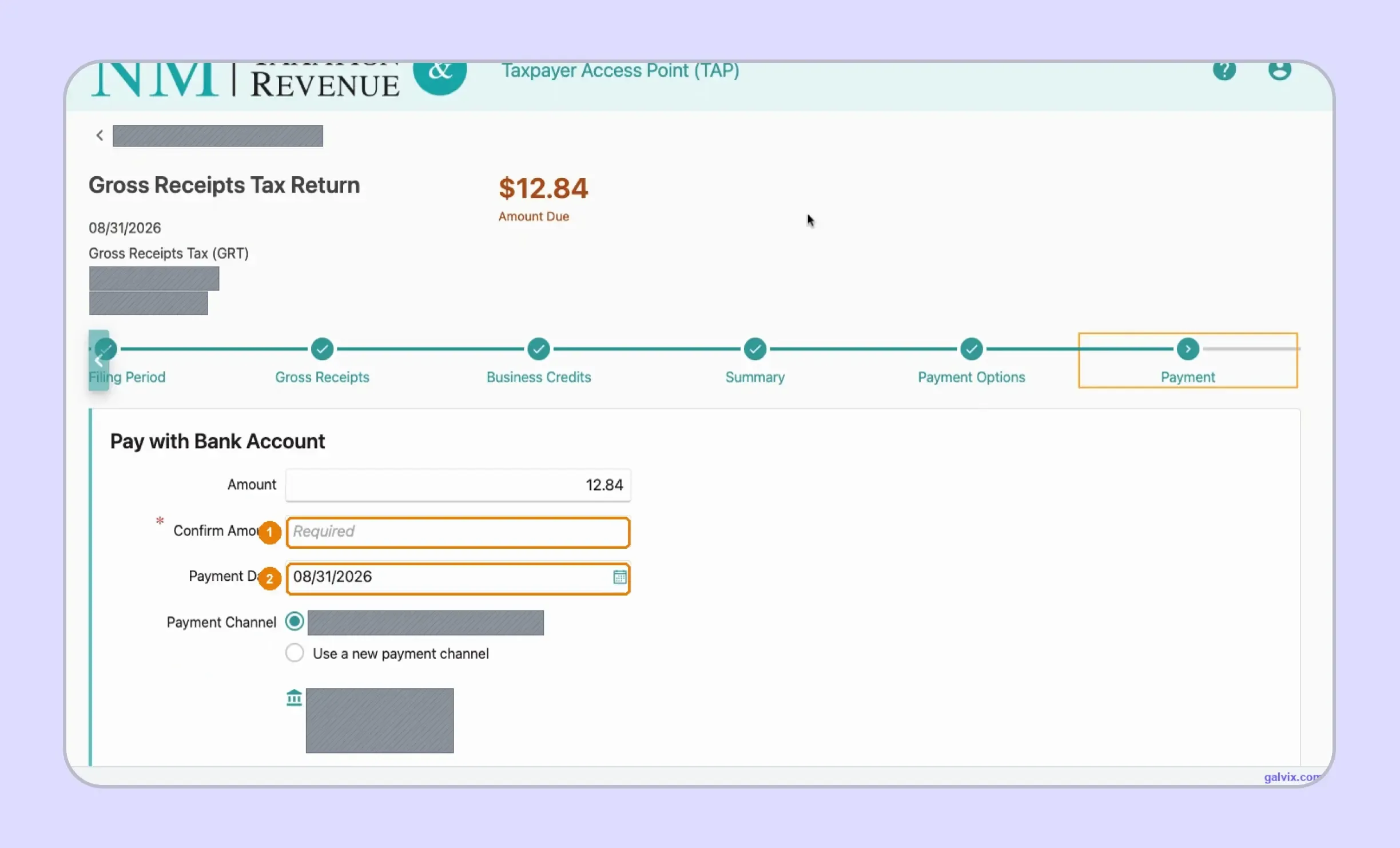
Step 9: Enter Payment Details and Submit
For an E-Check payment, confirm the amount, payment date, and selected bank information before continuing. The captured TAP workflow shows that payment timing needs an explicit review before the final submission step. Pasted tex
Reaching payment details does not prove that the return has been transmitted. Complete the submission and retain the confirmation number. Keep payment confirmation separately when filing and payment occur through different actions.
Businesses learning how to fill out a sales and use tax return in New Mexico should therefore avoid applying another state’s workflow to Form TRD-41413. The important sequence is to source receipts, support deductions, review TAP calculations, and retain evidence of submission.
When Is a New Mexico Sales Tax Return Due?
Form TRD-41413 is due on or before the 25th day of the month following the end of the reporting period. If that date falls on a weekend or recognized state or national holiday, the deadline moves to the next business day.
Monthly Filing Is the Default Starting Point
The registration certificate shows the filing frequency assigned to the account. Current TRD-41413 instructions recognize monthly, quarterly, and semi-annual filing schedules, so you should follow the status assigned by the Department rather than selecting a schedule themselves.
| Filing Position | New Mexico Rule |
|---|---|
| Monthly | Each calendar month reported separately |
| Quarterly | Calendar quarters where approved |
| Semiannual | January to June and July to December |
| Due date | 25th after period ends |
| Electronic filing | Required for qualifying liability levels |
Taxpayers with average monthly gross receipts tax liability of $1,000 or more during the preceding calendar year must file and remit electronically. You should continue using the assigned frequency until the Revenue Department approves an account change.
If you file New Mexico sales tax online, monitor the actual account schedule rather than building a calendar based solely on estimated liability.
Zero Returns Still Need Attention
An active Business Tax Identification Number requires filing periods to remain current even when no gross receipts are reported, and no tax is due. Before an account can be closed, TRD requires firms to file all outstanding periods through the closing date.
This is part of the New Mexico sales tax filing requirements that can be overlooked when a company stops selling in the state. Closing a business or ending activity does not automatically close the GRT account or remove outstanding tax returns.
How Do NTTCs Affect a New Mexico Sales Tax Return?
New Mexico uses Non-Taxable Transaction Certificates, or NTTCs, to support specific GRT deductions. Each certificate type corresponds with deductions, so an NTTC should be matched with the transaction being claimed rather than treated as a universal exemption certificate.
NTTCs Support Specific Gross Receipts Deductions
A properly completed NTTC can support a GRT deduction when you accept it in good faith and the transaction matches the certificate. You remain responsible for applying the deduction correctly, so the certificate should clearly relate to the customer, the transaction type, and the reason for the deduction.
One NTTC can cover repeat transactions of the same type with the same customer. It does not automatically cover every future purchase. During a sales tax audit, your records should still show why each deducted receipt qualified.
Not Every Deduction Requires an NTTC
Some New Mexico GRT deductions can be supported with invoices, purchase orders, contracts, or similar records. Other deductions require a specific NTTC type, so you should first identify the deduction and then confirm the required evidence.
This helps keep certificate collection, registration verification, and transaction eligibility separate. For multistate sellers, a consistent sales tax exemption certificate process can help you keep customer documentation connected with transactions later reported as exempt or deductible.
The Galvix Sales Tax Exemption Certificate Tool can help teams identify the documentation route and available verification steps before deductible or exempt treatment is applied to a return. Certificate collection and status checks remain separate from the decision of whether a specific transaction qualifies under New Mexico tax rules.
What Happens When a New Mexico Return Is Filed Late?
New Mexico can charge penalty and interest when Form TRD-41413 is filed or paid after the deadline. The negligence penalty is 2% of unpaid principal for each month or partial month, up to 20%. Interest also accrues daily at a rate that changes periodically.
Late Filing and Payment Can Increase the Balance
How much you owe after a missed deadline depends on how long the return or payment remains outstanding and whether tax was due for that period.
- Monthly penalty: 2% for each month or partial month.
- Maximum penalty: The negligence penalty can reach 20%.
- Daily interest: Interest continues to accrue on unpaid principal tax.
- Changing rate: New Mexico periodically updates the applicable interest rate.
You should track filing and payment dates separately because they can occur at different times. New Mexico does not provide a general timely filing discount, so meeting each due date helps you avoid additional penalty and interest rather than earning a filing credit.
Missing Returns Can Lead to Notices
If a reporting period remains unresolved, you may receive follow-up from the Taxation and Revenue Department. You may need to file a missing return or amend an incorrect GRT return before the account can be brought up to date.
When a notice arrives, match it with the related return, payment record, filing confirmation, and supporting data. This helps you identify whether the issue involves a missing return, unpaid tax due, incorrect account information, or another filing discrepancy.

How Does Galvix Manage New Mexico and Multistate Tax Filing?
With Galvix, you can manage return filing without having to navigate every state portal yourself. Galvix reconciles your transaction records, prepares each return, completes specialist review, and sends the figures for your approval before filing according to the schedule assigned by each state.
For New Mexico, the workflow separates direct receipts from marketplace activity, organizes location reporting, and reviews deduction support before GRT data reaches TAP. This gives you a clear connection between your source transactions and the figures reported on Form TRD-41413.
If your records are spread across different systems, a QuickBooks sales tax integration or a NetSuite sales tax integration can keep accounting and ERP data connected to the filing workflow. Galvix also supports API connections and file uploads for other source systems.
As you register in more states, the same managed process can support additional filing obligations. Galvix uses modular pricing, so you select only the compliance services you need. Your exact pricing depends on the workload for each selected service, rather than on an all-inclusive package.
What Can Galvix Manage for New Mexico Sellers?
As your transaction volume and registered-state footprint grow, recurring compliance involves more than completing a GRT return. Galvix can manage the operational filing work while your team stays involved in reviewing and approving each prepared return.
- Reconcile transactions: Prepare clean data before GRT filing.
- Review reporting: Check location and deduction inputs.
- Prepare returns: Complete specialist review before your approval.
- Manage certificates: Maintain exemption documentation and supporting records.
- Track obligations: Monitor nexus, registrations, filings, and notices.
This approach helps when you manage New Mexico alongside states that use conventional sales tax returns. You can maintain a single compliance workflow while adapting to different terminology, sourcing rules, filing frequencies, and portal requirements across jurisdictions.
As your sales expand, economic and physical sales tax nexus monitoring can remain connected to future registrations. This helps you identify new obligations before another state return becomes part of your recurring filing calendar.
When you need to file New Mexico sales tax online alongside returns for several other states, Galvix can replace separate portal handoffs and reconciliation files with a single managed filing process.
Book a Galvix demo to review your New Mexico and multistate filing process and reduce recurring manual filing coordination.
Frequently Asked Questions
Does New Mexico require a zero-gross-receipts tax return?
Yes. A business with an active New Mexico Business Tax Identification Number should keep all assigned reporting periods current, including those with no gross receipts or tax due. TRD also requires that outstanding periods be filed before the account closes, so inactivity alone should not be treated as a cancellation.
Can I amend a New Mexico GRT return after filing?
Yes. If a filed GRT return contains incorrect information, you can submit an amended return for that period through TAP. The amended return should reflect the return as it should have been originally filed rather than reporting only the difference. Refund claims may require additional documentation.
Does New Mexico offer a timely filing discount?
No general timely filing discount or vendor compensation credit applies to New Mexico GRT returns. Businesses therefore do not reduce the amount due simply because the return was filed on time. Filing by the deadline instead avoids potential penalties and helps keep the GRT account current.
Can I change my New Mexico GRT filing frequency?
A change in filing frequency depends on TRD approval and the account’s circumstances. The current Form TRD-41413 instructions recognize monthly, quarterly, and semiannual statuses. Until the Department approves a change, businesses should continue to follow the filing schedule shown in their registration records or TAP account.
What happens if I use the wrong GRT location code?
Using the wrong location code can result in an incorrect rate or the allocation of receipts to the wrong jurisdiction. Check the GRT Location Code and Rate Finder against the transaction’s sourcing rules. If an already filed return is incorrect, TRD instructs taxpayers to amend the affected return.
Can I pay New Mexico GRT separately after filing the return?
Yes. TRD states that electronic returns and payments can be completed at different times, although both remain subject to their respective deadline requirements. TAP also supports online payment by electronic check or credit card. Keep the filing confirmation and payment confirmation as separate records.
How do I close a New Mexico GRT account in TAP?
To close a GRT account, first file all required reports through the closing date, including zero periods. In the administrator TAP profile, select More Account Options, choose Close Account, enter the effective date, submit the request, and re-enter the logon password when prompted.