Businesses file a South Dakota sales tax return through EPath, the South Dakota Department of Revenue's online filing system. The same return covers state sales tax and applicable municipal taxes, so you do not need to prepare a separate return for each city where taxable activity occurs.
The current state sales tax rate is 4.2%, while municipalities can impose a general rate of up to 2%. Some municipalities can also impose a separate 1% Municipal Gross Receipts Tax on lodging, prepared food, alcohol, admissions, or qualifying combinations of these activities.
This guide explains how to file sales tax in South Dakota, prepare the figures EPath expects, allocate taxable activity by city, and handle payment. You will also see how Galvix can manage a South Dakota sales tax return online alongside recurring returns across other states.

Which Factors Determine Your South Dakota Sales Tax Due?
Your final South Dakota tax due starts with the state taxable amount and then adds applicable municipal taxes. EPath performs several calculations automatically, but the results still depend on the gross sales, non-taxable sales, use-taxable purchases, and city amounts you enter correctly.
EPath Builds the State Taxable Amount
The state section begins with figures drawn from your records rather than from calculations performed in EPath. You should reconcile these amounts before starting the return.
- Gross Sales: Enter total South Dakota sales before applicable deductions.
- Use Taxable: Include qualifying purchases where the required tax was not paid.
- Non-Taxable Sales: Enter the supported untaxed portion included within gross sales.
- Special Jurisdictions: Identify qualifying activity within Indian Country when applicable.
After you select Calculate, EPath derives State Sales and Use Taxable from the figures entered and applies the 4.2% rate. The live workflow does not ask you to explain resale activity or other components inside Non-Taxable Sales on this screen.
City Tax Is Reported Separately
South Dakota administers municipal sales and use taxes through the same return used for state tax. Municipalities can impose general tax rates of up to 2%, with the applicable rate based on where the taxable product or service is delivered.
You therefore need the correct city allocation before filing. EPath applies the displayed municipal tax rates after you enter taxable sales for the relevant city, rather than automatically allocating them from your statewide total.
For businesses operating across several jurisdictions, sales tax rules by state can differ in how local taxes appear on the return.
Municipal Gross Receipts Tax Has a Narrower Scope
Municipal Gross Receipts Tax is different from the general city tax. A municipality can impose the additional 1% gross receipts tax on lodging, eating establishments, alcoholic beverages, admissions, or other qualifying activities as defined under South Dakota law.
An ordinary retailer should therefore avoid treating the 1% line as another general municipal sales tax rate. The EPath summary can display both city tax codes, even when the MGRT line correctly remains at zero for the reporting period.
Who Needs to File a South Dakota Sales Tax Return?
Businesses with physical presence in South Dakota must hold a sales tax license regardless of sales volume. A remote seller without physical presence must register when gross sales into the state exceed $100,000 during the previous or current calendar year.
Physical Presence and Economic Nexus
South Dakota uses different triggers for businesses operating inside the state and sellers reaching customers remotely. These rules determine when sales tax collection and recurring filing begin.
- Physical presence creates an obligation without applying the $100,000 remote threshold.
- Remote sellers use gross South Dakota sales when testing the economic nexus threshold.
- The measurement period covers the previous or current calendar year.
- Products, electronically delivered products, leases, and services contribute toward gross sales.
The former 200-transaction test was removed effective July 1, 2023. South Dakota v. Wayfair remains central to modern sales tax nexus, although the current state threshold now depends on sales volume rather than a separate transaction count.
If your sales are approaching the threshold, monitoring South Dakota sales tax nexus before registration can prevent a new obligation from entering your filing calendar unexpectedly.
Once the threshold applies, you can use the state’s online tax license application or register through the Streamlined Sales Tax Registration System. South Dakota participates in streamlined sales tax registration for businesses seeking licenses across multiple member states.
Marketplace Sellers
Marketplace providers are responsible for collecting and remitting South Dakota tax on facilitated sales when the applicable requirements are met. A marketplace seller can still cross the $100,000 registration threshold through marketplace sales, even when the provider handles the tax.
If all your South Dakota activity is conducted through a registered marketplace that remits the applicable tax, you may qualify for non-filing status after the Department's review. The state’s Remote Seller Bulletin confirms that registration can still be required before that status is determined.
That distinction matters because marketplace collection, seller registration, and return filing are separate obligations. A marketplace provider's payment of the tax does not automatically remove all requirements imposed on the seller.
What Data Should You Reconcile Before Filing a South Dakota Sales Tax Return?
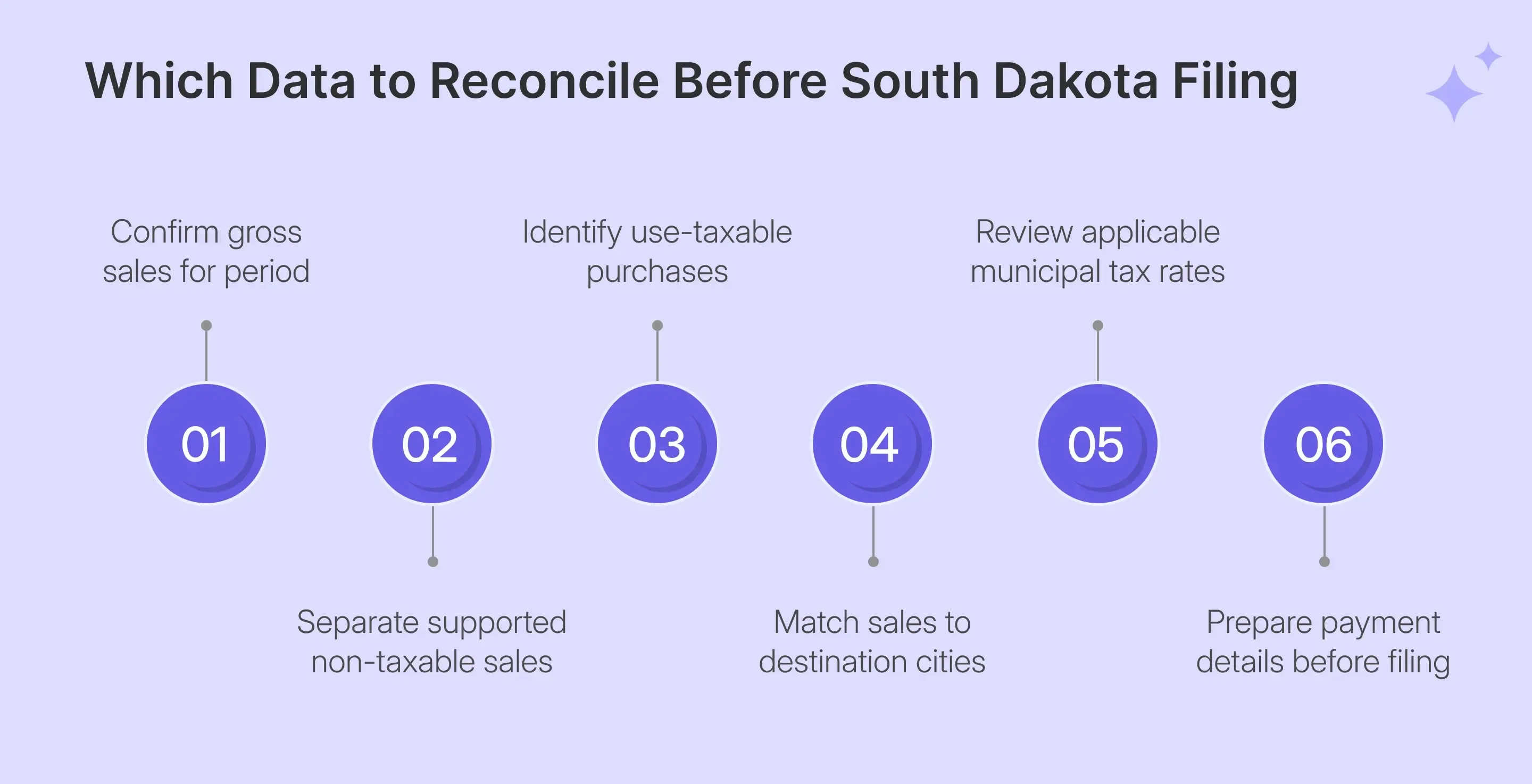
Prepare the state figures and municipal allocations before SD sales tax filing begins. EPath calculates the tax from the data you enter, so correcting source records before opening the portal reduces the chance of carrying a classification or allocation error through the entire return.
| Prepare | Check Before Filing |
|---|---|
| Gross Sales | Complete South Dakota activity for the period |
| Non-Taxable Sales | Supported untaxed portion included in gross sales |
| Use Taxable | Untaxed purchases used by the business |
| City taxable sales | Correct taxable amount by destination municipality |
| Exemption records | Documentation supporting non-taxable treatment |
| Payment details | ACH or another intended payment route |
The same preparation should also distinguish marketplace activity from direct sales. If your source data comes from several systems, supported sales tax integrations can keep ecommerce, accounting, payment, and ERP records connected before return preparation.
Reconcile Non-Taxable Sales Carefully
EPath subtracts Non-Taxable Sales from Gross Sales to calculate the remaining state-taxable amount. The screen does not ask you to separate resale sales, qualifying exempt customers, or other untaxed transactions into individual deduction categories.
Your supporting records therefore need to explain the single number entered. This can include qualifying resale activity, exempt entities, products delivered outside the State of South Dakota, or specifically exempt taxable goods. Prescription drugs can also receive exempt treatment when the statutory requirements are satisfied.
Delivery treatment deserves its own review. Shipping charges connected with taxable products are generally included in taxable receipts when delivery occurs in South Dakota, while charges related to nontaxable products follow the underlying transaction.
Match Taxable Sales to the Correct Cities
The live City Tax screen loads municipalities associated with the account rather than rebuilding the list from your current-period transactions. If you sell into a new municipality, you may need to use Add a City before entering the taxable amount.
This makes destination data important for how to file SD sales tax accurately. Your total sales records should identify where each applicable transaction was delivered so municipal tax can be allocated rather than estimated after the state total has already been prepared.
A rate lookup can also help confirm the combined treatment when destination information changes.
How Do You File South Dakota Sales Tax Online?
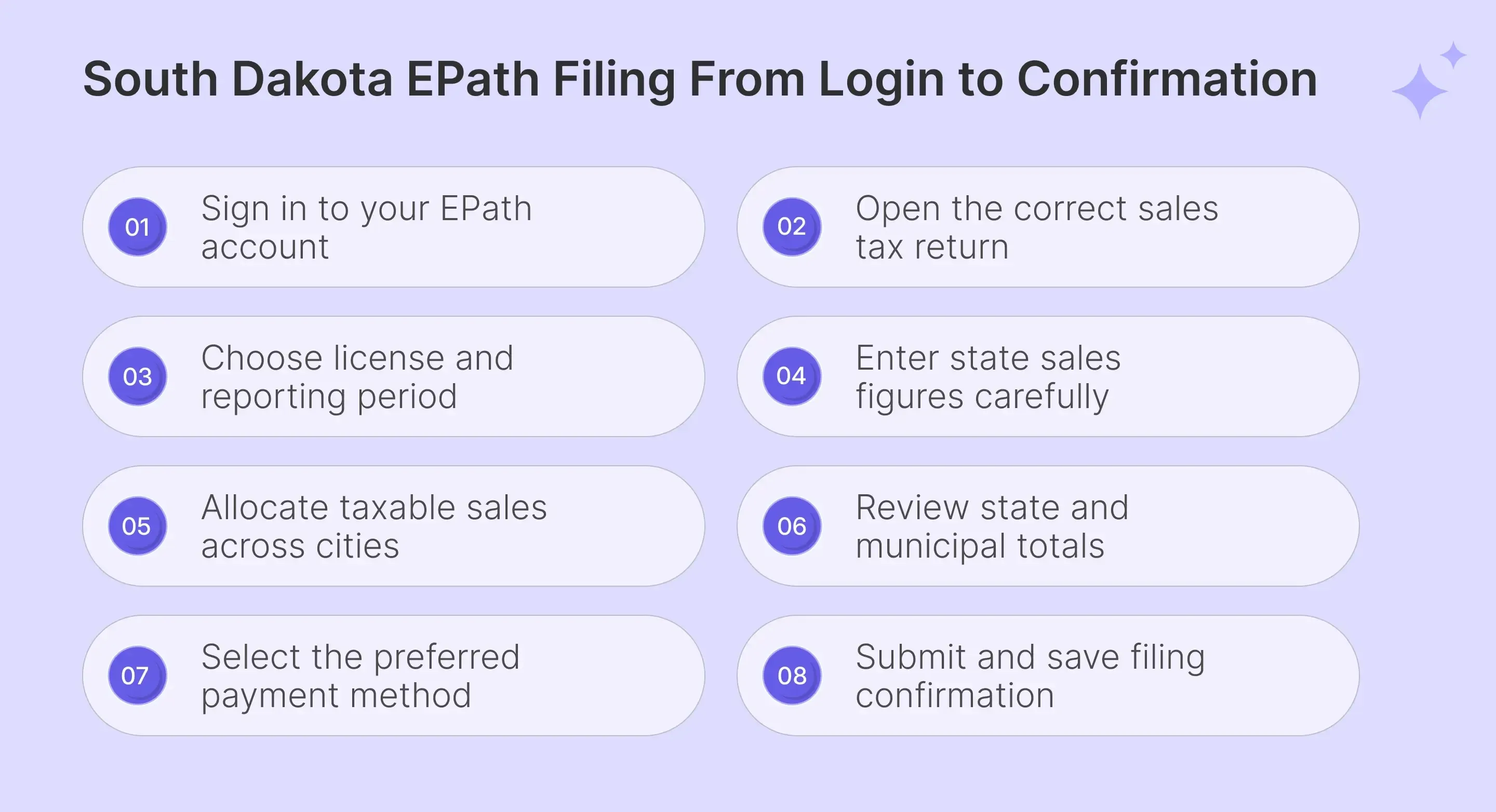
To file South Dakota sales tax online, sign in to EPath, start the correct return, select the reporting period, enter state figures, allocate city sales, review the calculated totals, choose payment handling, verify the return, and retain confirmation after submission.
Step 1: Sign in to EPath
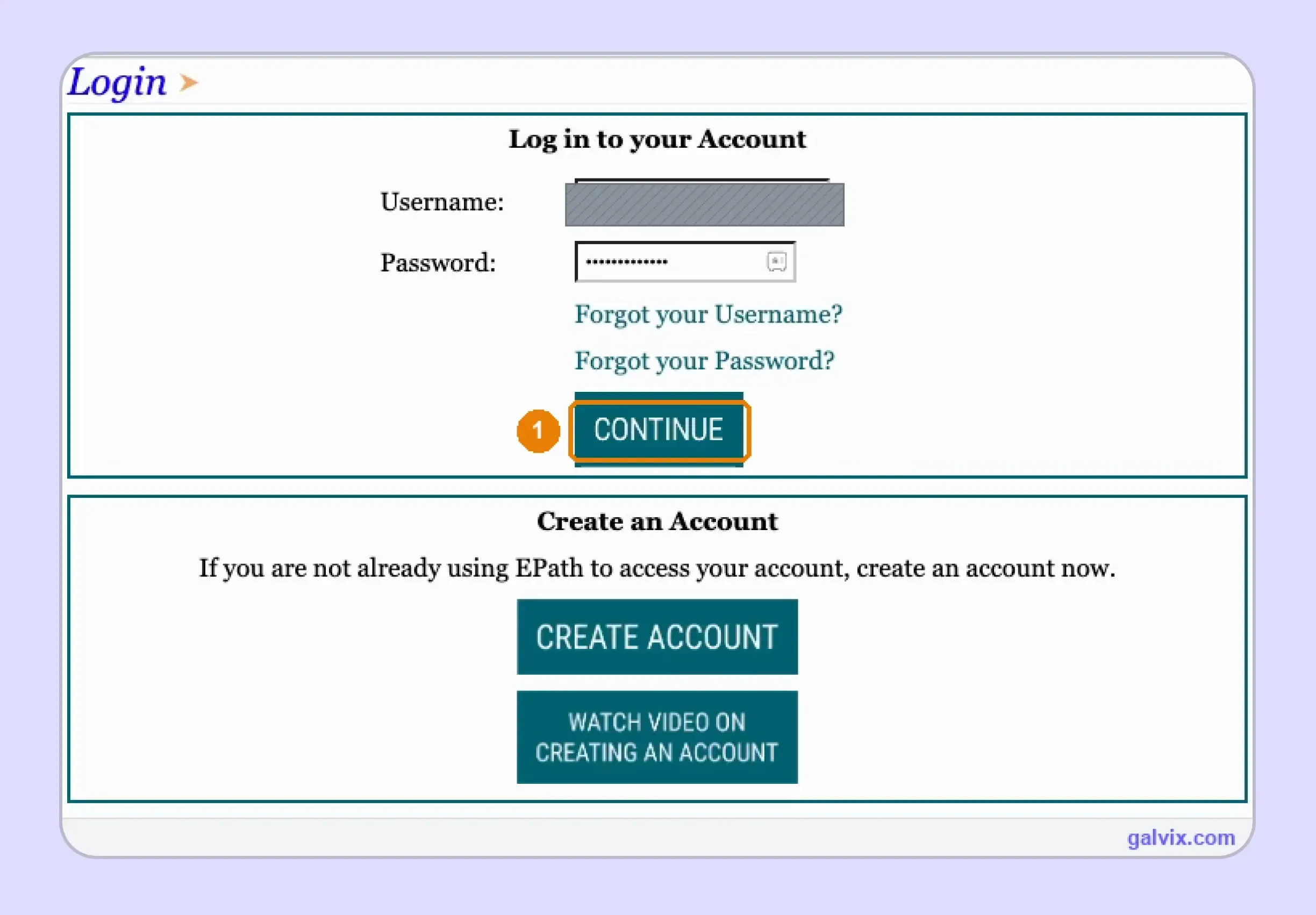
Open EPath and enter the username and password connected with your account, then select CONTINUE. Your username is a personal online filing credential and should not be confused with the South Dakota sales tax license number.
The login page also provides a payment option, but that option does not initiate the return itself.
Step 2: Start the Return From the Main Menu
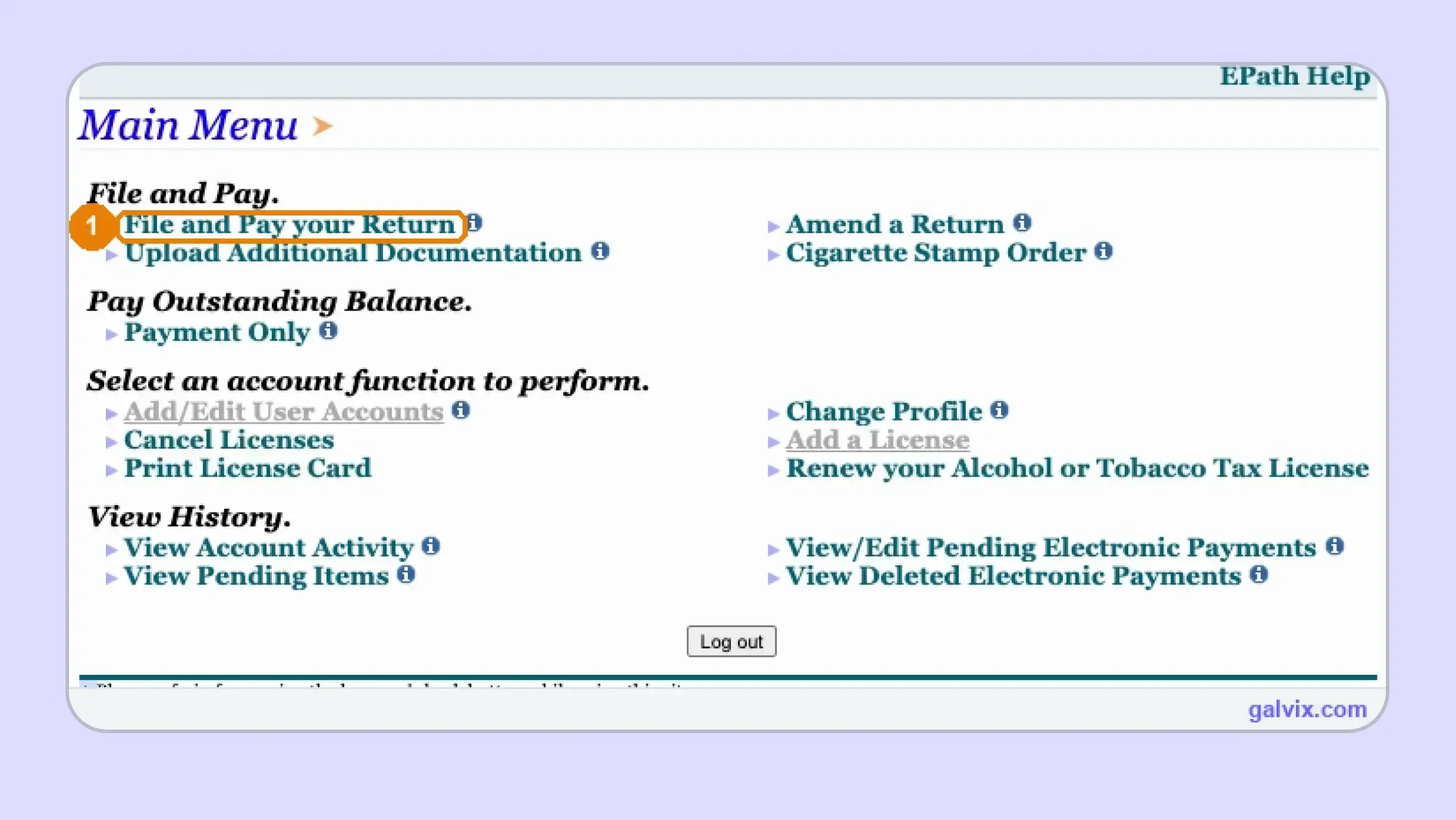
From the Main Menu, choose File and Pay your Return. Payment Only handles an existing balance, while Amend a Return corrects a filing that has already been submitted.
If the profile contains multiple accounts, confirm that the correct license and business name are associated with the return before continuing. EPath can also support other obligations, including contractor’s excise tax, so account selection matters.
Step 3: Select the License and Filing Period
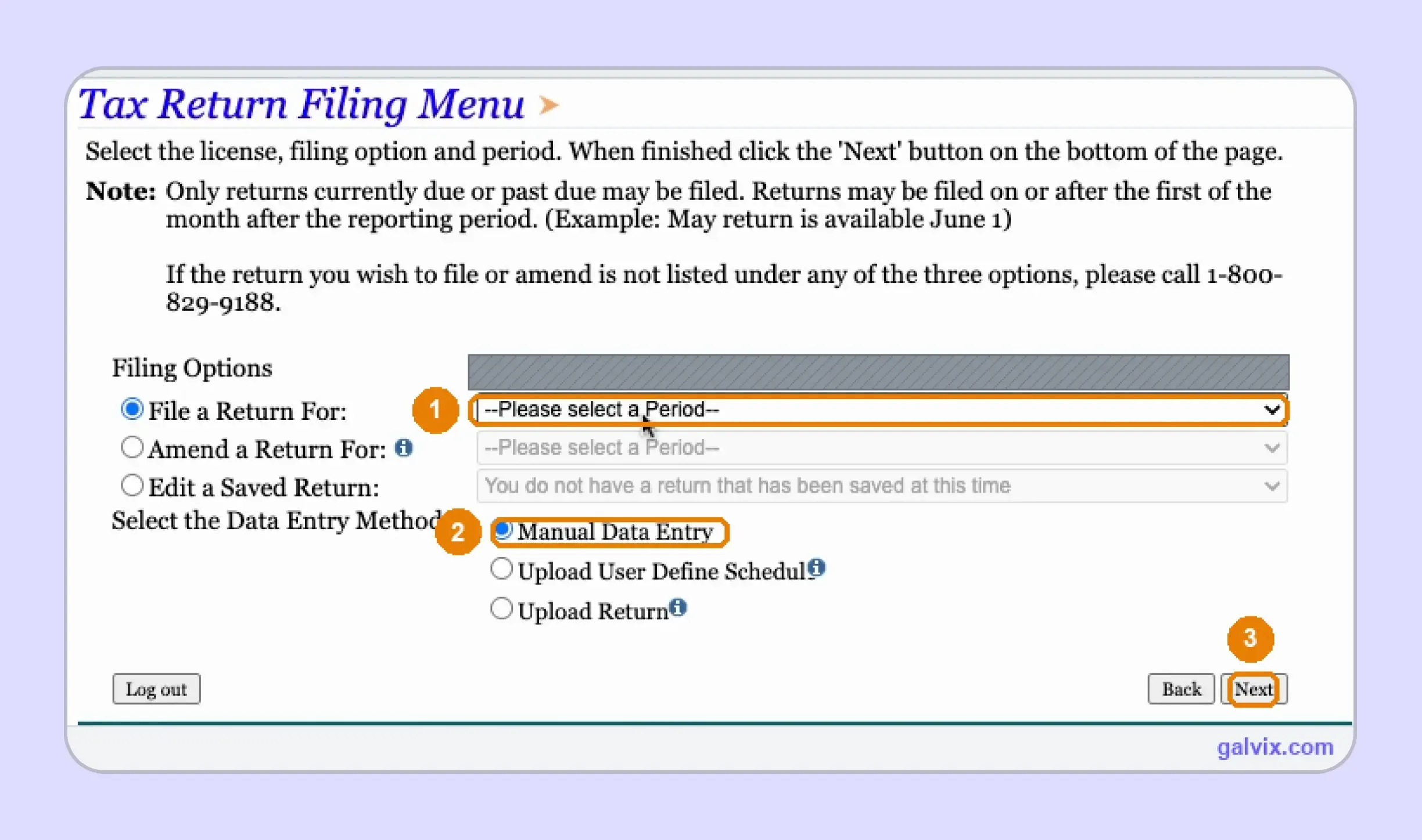
Choose the correct license and period from the Tax Return Filing Menu, then select Manual Data Entry for this walkthrough. Current returns become available around the first day after the prior reporting period closes.
The upload options expect a prepared filing file rather than individual entries typed into EPath. Choose Manual Data Entry when you intend to follow the screen-by-screen return process shown here.
Step 4: Enter the State Sales Figures
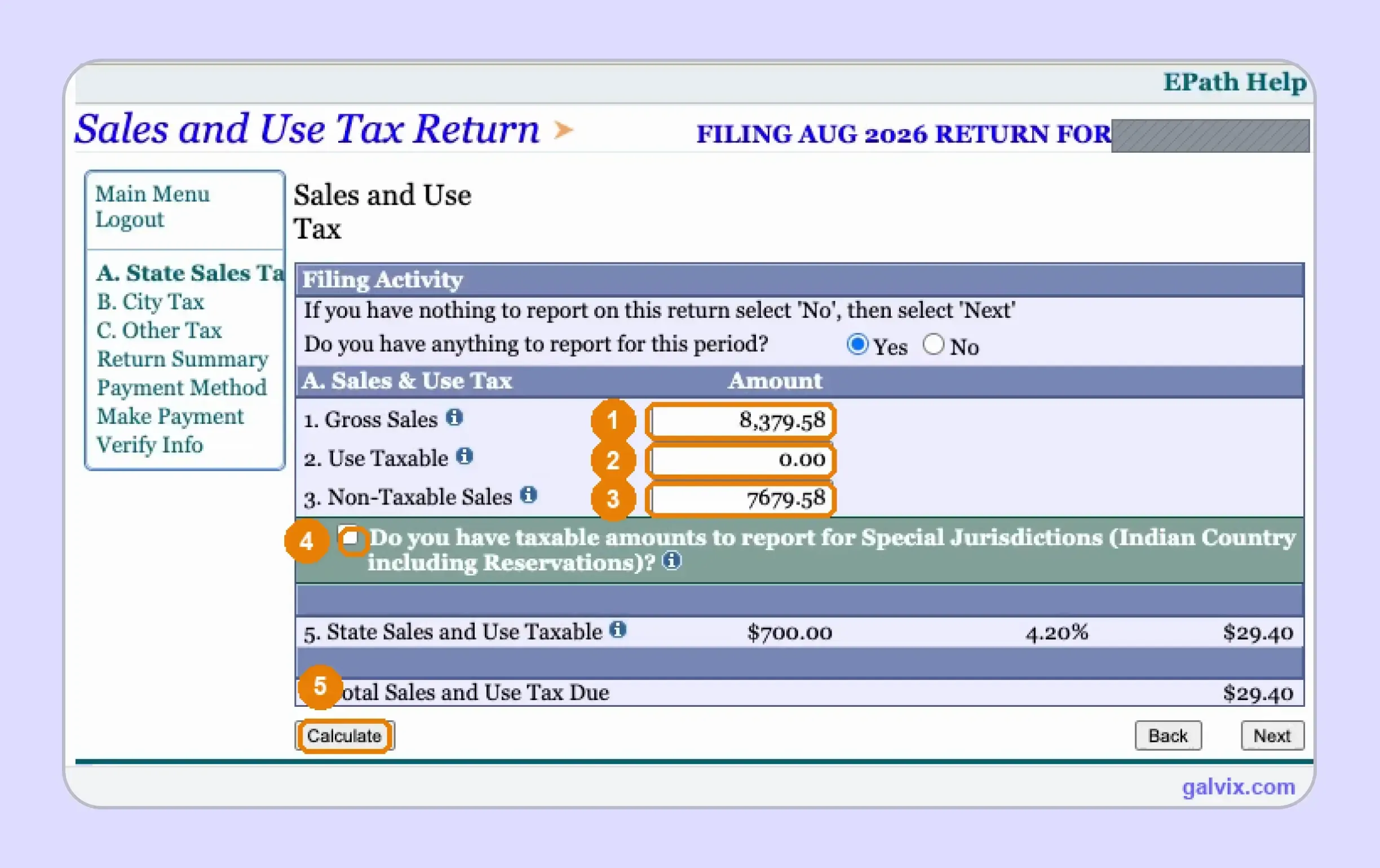
The State Sales Tax tab asks whether you have activity to report before showing the main fields. Enter Gross Sales, Use Taxable, and Non-Taxable Sales, then add Special Jurisdiction information when applicable. If you owe use tax on untaxed business purchases, include that amount here rather than preparing a separate use tax return.
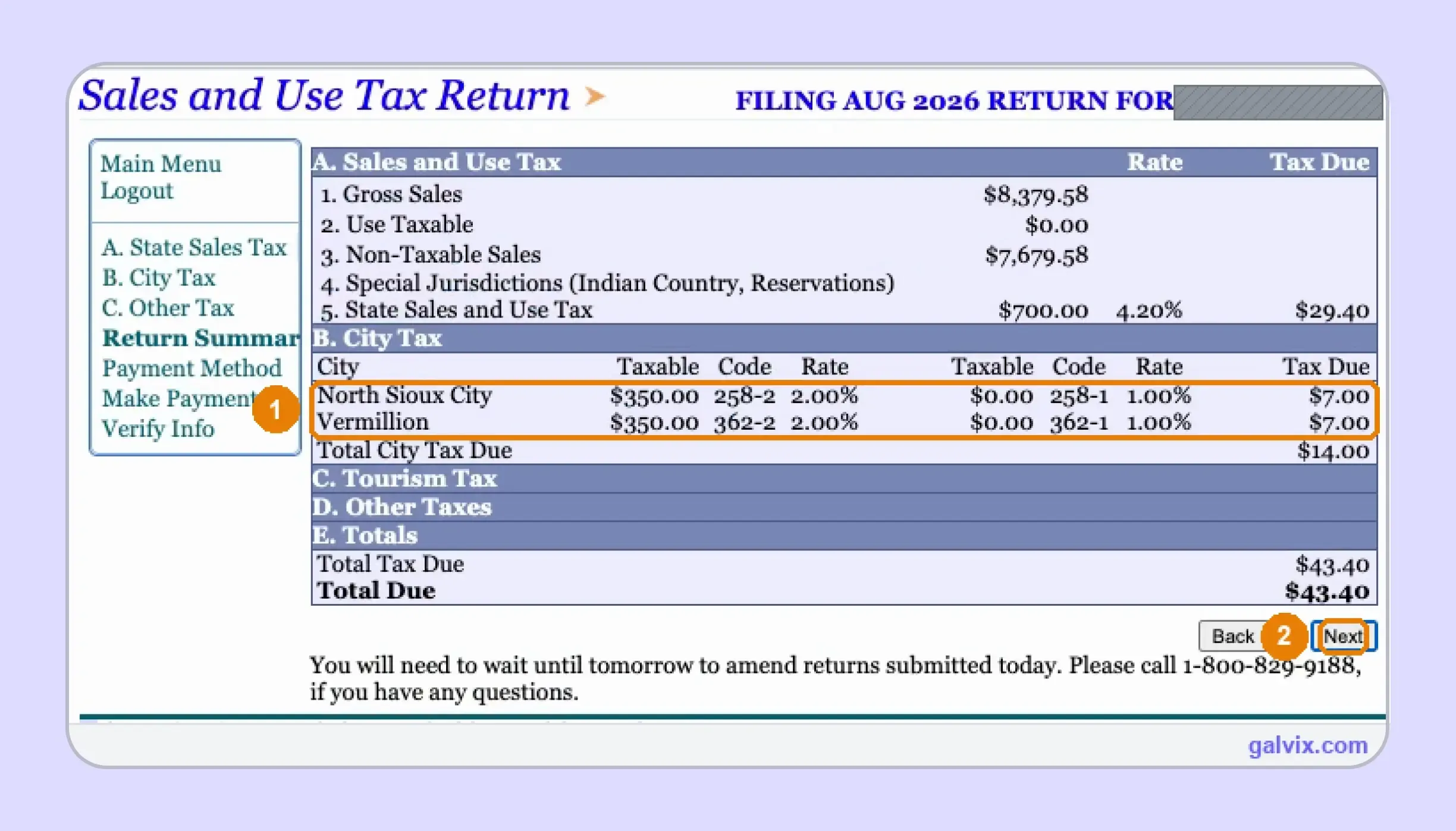
Select Calculate after entering the figures. EPath subtracts Non-Taxable Sales from gross sales to determine taxable sales and the amount of sales tax due. In the captured return, $8,379.58 minus $7,679.58 produces $700 in taxable sales and $29.40 in state tax.
EPath calculates taxable sales from the Gross Sales and Non-Taxable Sales amounts without requesting the deduction breakdown. Reconcile the supporting transactions before entering that single deduction figure.
Step 5: Review and Add Municipalities
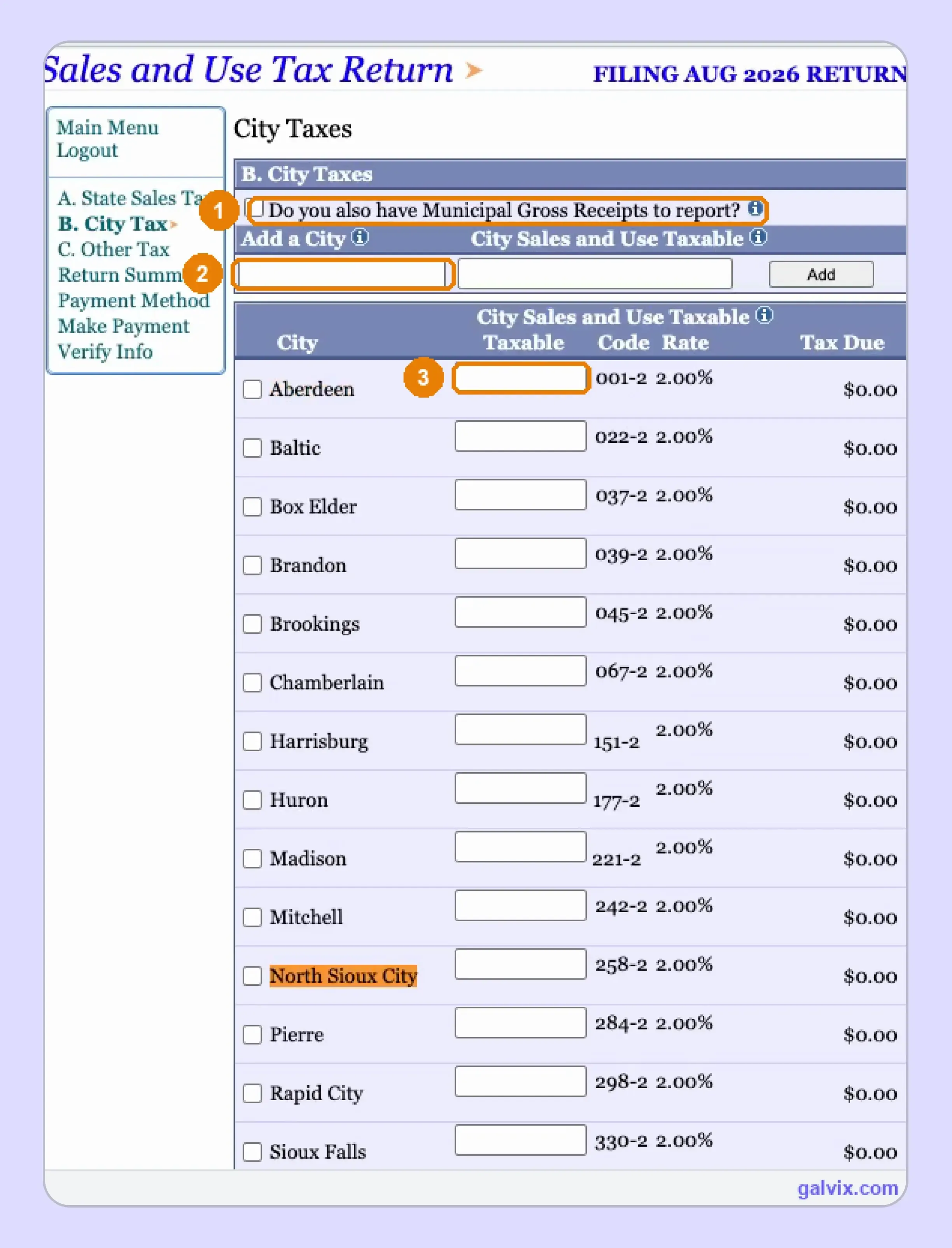
Open the City Tax tab and review every municipality already listed for the reporting period. Each row shows the city name, municipal code, tax rate, taxable field, and tax due. If a destination city is missing, use Add a City before entering the allocation.
The screen also asks whether you have Municipal Gross Receipts Tax to report. That separate 1% tax applies only to qualifying activities, so do not treat it as another general city rate. Review the list against current sales records because EPath does not build it automatically from this period’s activity.
EPath does not reconcile your city entries against the state taxable figure. A missing destination can therefore leave municipal tax unreported without producing an obvious balancing error.
Step 6: Enter City Sales and Calculate Tax
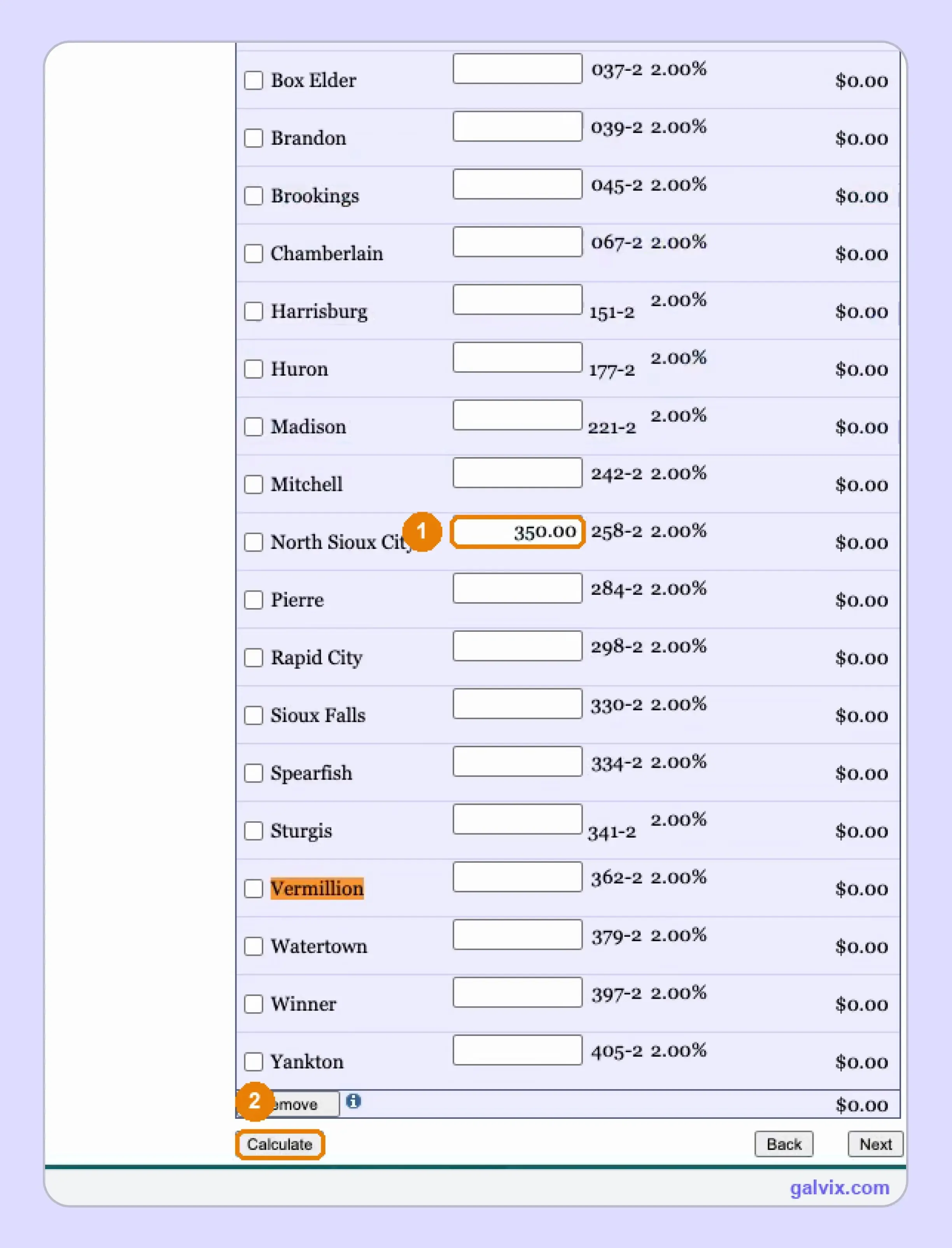
Enter the taxable sales amount for each applicable municipality, then select Calculate after completing the city allocation. EPath applies the displayed municipal tax rates and updates tax due for every city where you reported activity during the filing period.
The captured return shows North Sioux City with $350 of taxable sales and Vermillion added as a new destination. That example shows why current destination records matter. If a correction relates to an earlier transaction, amend the original filing period instead of forcing a negative city amount into the current return.
Step 7: Review the Return Summary
The Return Summary brings together the state calculation and every reported municipality before you move to payment. Compare the taxable base, municipal lines, special tax entries, and Total Due against the records you reconciled earlier.
The screenshot shows general city tax under the -2 codes and a separate 1% MGRT line under -1. For an ordinary retailer without qualifying MGRT activity, that second line correctly remains zero.
EPath states that a return submitted today cannot be amended until the following day. Review every city and state figure carefully because this is the final easy correction point before transmission.
Step 8: Choose How to Pay
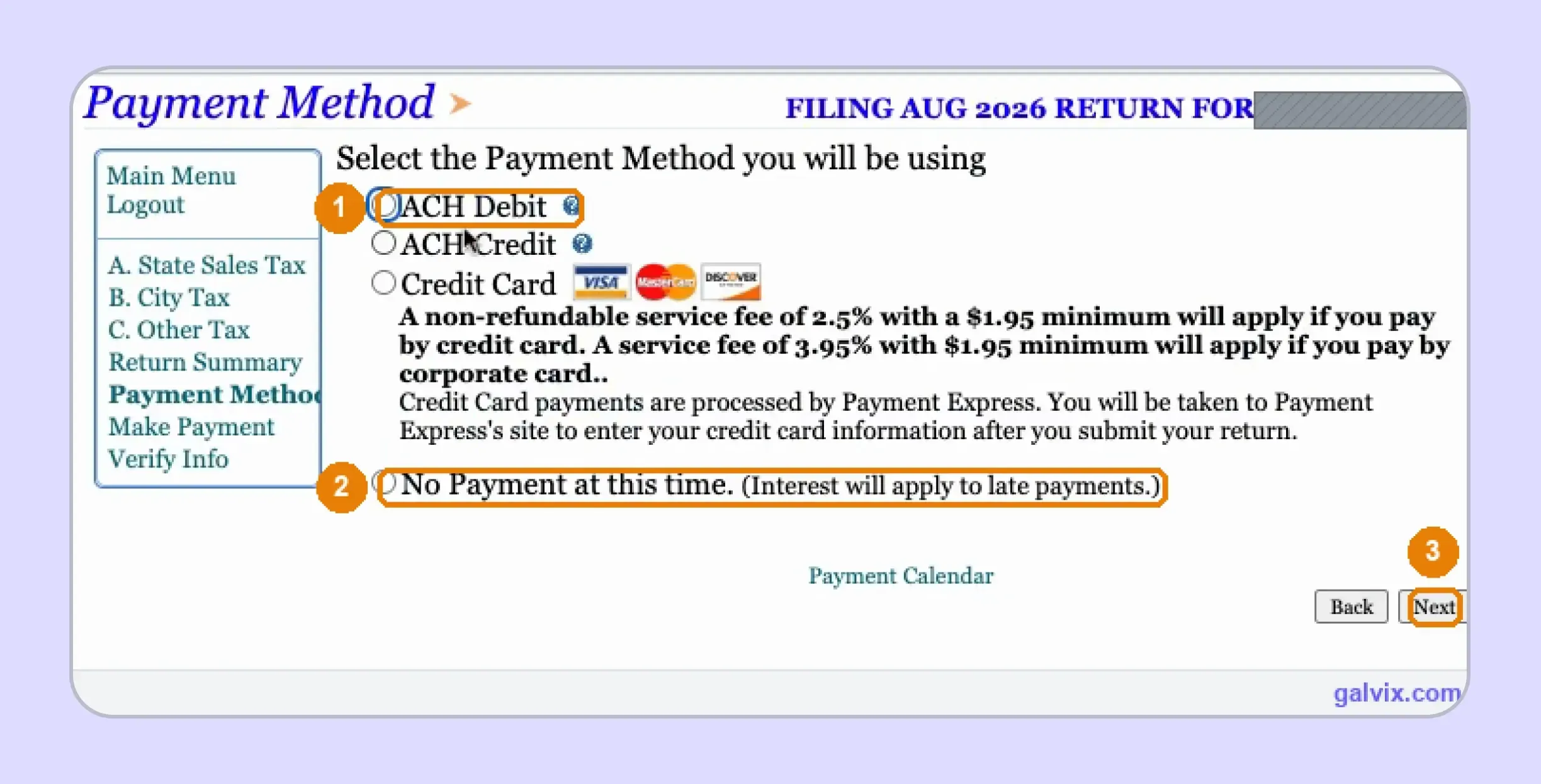
Businesses researching how to pay sales tax in South Dakota reach the Payment Method screen after completing the return. EPath offers ACH Debit, ACH Credit, Credit Card, and No Payment at this time. ACH Debit lets the Department pull funds, while ACH Credit requires you to initiate the transfer.
Choosing No Payment currently separates filing from payment. That can work when electronic payments are handled through another process, although the outstanding tax still needs to reach the Department by the applicable due date. Review any card-processing charge before selecting that payment route.
Selecting No Payment at this time can complete the tax return without paying the balance. Track payment separately because interest applies when tax remains unpaid after the applicable due date.
Step 9:Verify Submit and Save Confirmation
After you choose a payment method, EPath proceeds with payment details when needed, then moves to Verify Info. Review the final information carefully because reaching this screen does not mean the South Dakota sales tax return has been transmitted to the Department.
Once submission succeeds, save the confirmation number as filing proof. If payment is scheduled or processed separately, retain that confirmation too. If you later find an error, return it via Amend a Return the next day and correct the affected filing period, since EPath does not allow same-day amendments.
How Do Exempt Sales Affect the South Dakota Sales Tax Return?
Exempt activity feeds into the Non-Taxable Sales figure, which directly reduces the state taxable base calculated by EPath. You therefore need records showing why each untaxed transaction qualifies before those amounts are combined into the single deduction entered on the return.
South Dakota Exemption Certificates
South Dakota accepts single-purchase certificates and blanket certificates for future qualifying purchases. A certificate does not expire unless its information changes, although the Department recommends updating it every three to four years. You should still match the certificate with the specific sale before treating that transaction as exempt.
This matters for resale activity because eligibility depends on the purchaser, product, and intended use. If resale inventory is later used internally, use tax may apply. For multistate teams, a consistent sales tax exemption certificate process helps keep supporting records linked with transactions reported as exempt.
Galvix Exemption Certificate Support
When exempt customers operate across several states, certificate collection, registration checks, and transaction eligibility should remain separate controls. Galvix can manage certificate collection, verification, storage, renewal follow-up, and audit-ready records within the same broader sales tax compliance workflow.
That structure helps you support the Non-Taxable Sales figure before return preparation rather than searching for missing documentation after a state question arrives.
The Galvix Sales Tax Exemption Certificate Tool can help identify the documentation route and seller checks that apply to exempt transactions. It can support your review of certificate requirements, while the separate transaction-level decision still determines whether the sale qualifies for exemption.
When Are South Dakota Returns and Payments Due?
Electronic returns are due by the 20th following the reporting period, while electronic payments are due by the 25th. You must file returns even when no tax is due, and the Department assigns a filing frequency to each licensed account.
Filing and Payment Have Different Deadlines
An electronically filed South Dakota sales tax return is due on the 20th day of the month following the period. If that date falls on a Saturday, Sunday, or legal holiday, the next business day becomes the filing deadline.
Electronic payments follow a different calendar and are due by the 25th. This distinction matters when you currently select No Payment, because the filed return does not automatically satisfy the separate payment obligation.
Your assigned filing frequency can vary, so follow the schedule shown for your account rather than assuming every license follows a monthly cycle. The Department notifies licensed businesses how frequently they need to file returns.
The Collection Allowance Is Currently Suspended
South Dakota previously offered a tax collection allowance for qualifying electronic filings and payments. House Bill 1037 suspended that allowance from July 1, 2025 through June 30, 2028, so there is currently no timely filing discount to earn during the suspension.
Timely filing still matters because late returns and payments can create penalties and interest. Current DOR guidance applies a 10% penalty when a return remains unfiled beyond the stated period, while interest accrues monthly on past-due tax liability.

How Does Galvix Manage South Dakota and Multistate Filing?
With Galvix, you can manage filing without preparing every return or operating each portal yourself. Galvix reconciles transaction data, prepares the return, completes specialist review, sends the figures for your approval, and files according to each state’s schedule.
For South Dakota, the workflow connects the state taxable base with municipal allocation, exemption support, use-tax information, and filing deadlines. Economic and physical nexus monitoring can stay connected with registration requirements as your sales footprint changes.
The QuickBooks sales tax integration connects accounting records to return preparation, while the NetSuite sales tax integration supports ERP-led teams. API connections and file uploads support other systems.
Galvix uses modular pricing, so you select only the services you need. Exact pricing depends on the workload associated with each service.
What Can Galvix Manage for South Dakota Sellers?
As your filing footprint grows, Galvix can manage recurring work while your team reviews and approves returns.
- Reconcile sales: Prepare records before return preparation.
- Prepare inputs: Build state and municipal filing figures.
- Review exemptions: Link untaxed sales with support.
- Monitor nexus: Track thresholds before registration.
- Manage filings: Handle returns, notices, and confirmations.
This approach helps when a South Dakota sales tax return is filed alongside returns from states with different forms and deadlines. Broader sales tax nexus monitoring can remain connected with registration planning across all 50 states.
For teams working out how to file sales tax return in South Dakota across jurisdictions, Galvix replaces separate reconciliation files and portal handoffs with one managed filing process.
Book a Galvix demo to review your South Dakota and multistate filing workflow and reduce recurring manual filing work.
Frequently Asked Questions
Can I change my South Dakota sales tax filing frequency?
Your filing frequency is set by the South Dakota Department of Revenue, so you should follow the schedule on your license. Businesses can have monthly, bi-monthly, semiannual, or other reporting periods. Contact the Department if your business circumstances change and you believe the assigned schedule should be reviewed.
Why is my next South Dakota return not visible in EPath yet?
EPath generally makes a current return available around the first day after the reporting period ends. If you are looking too early, the period may not appear in the filing menu yet. Past-due periods remain available, allowing businesses to complete missed returns through the same online filing system.
Can I file a South Dakota sales tax return on paper?
Yes. South Dakota still supports paper returns supplied or requested from the Department, although electronic filing through EPath is also available. Paper returns and payments are due by the 20th, while electronic filing uses separate return and payment deadlines. The Department can provide the required form when needed.
Do I need separate municipal sales tax licenses in South Dakota?
South Dakota administers state and municipal sales or use taxes through one state system, so businesses report both on the same tax return. The South Dakota Department handles municipal administration and enforcement. You still need to allocate taxable activity to the correct municipality when completing the city section.
How do I close a South Dakota sales tax license?
Closing a license requires updating the account with the Department rather than simply stopping future filings. Before closure, make sure every required South Dakota sales tax return is current, and any outstanding tax due has been addressed. Use EPath account functions or contact the Department when account-specific action is required.
Can I register for South Dakota through Streamlined Sales Tax?
Yes. South Dakota allows businesses to register directly through its Tax License Application or through the Streamlined Sales Tax system for multiple member states. The streamlined sales option can be useful when registration obligations arise in multiple participating states simultaneously.
What happens if an EPath ACH payment is rejected?
A rejected ACH payment can leave the underlying balance unpaid even when the South Dakota sales tax return itself was filed successfully. Review the account after payment processing and address any unpaid balance promptly, as interest can continue to accrue on past-due tax. Contact the Department when additional information is needed.