If you need to file Tennessee sales tax online, you must use TNTAP, the Tennessee Taxpayer Access Point. Your sales and use tax filing is completed using Form SLS-450, which combines your statewide figures and applicable local activity into a single return.
Tennessee starts with a 7% general state rate, although that is only part of the calculation. Local tax can reach 2.75%, qualifying food uses a 4% state rate, and some transactions need special treatment.
The filing becomes more detailed when sales cross several Tennessee locations. You may need county-level allocation, Schedule A exemptions, single-article treatment, or Davidson County transit reporting before TNTAP can calculate the correct tax due.
This blog explains how to file sales tax in Tennessee, prepare your figures, complete the portal steps, make payment, and retain proof. For detailed insights into rates and obligations, the Tennessee sales tax guide can support your filing preparation.

What Makes Tennessee Sales Tax Filing Different?
Tennessee combines its statewide tax with local sourcing, special transaction rules, and separate schedules. When you file Tennessee sales tax online, the accuracy of the SLS-450 depends heavily on how well your transaction data is classified before entering the portal.
- State and local tax work together: The statewide sales tax rate is 7% for most tangible personal property and taxable services. Qualifying food uses a 4% state rate, while local jurisdictions can impose additional local rates up to 2.75%.
- Remote sales need destination data: For a remote seller shipping into Tennessee, local tax is sourced to the delivery destination. In-state sales may follow different sourcing rules depending on the seller's Tennessee place of business, so do not apply a single sourcing method to every transaction.
- Single articles need separate treatment: Tennessee applies the general 7% tax to the full price of a qualifying single article. Local tax normally applies only to the first $1,600, while an additional 2.75% state tax applies to the portion between $1,600 and $3,200.
- Davidson County has another layer: A 0.5% local option transit surcharge applies there. It sits alongside the local option rate and is handled separately when the transaction falls within the surcharge rules.
These differences make the correct sales tax rate depend on the transaction rather than on a single statewide percentage. A sales tax calculator can help you sense-check destination rates before you prepare the return.
Who Needs to File a Tennessee Sales Tax Return?
You need to file Tennessee sales tax online when your business has an active sales and use tax account for the assigned reporting period. Tennessee sales tax filing requirements can arise from in-state activity, economic nexus, or direct sales to Tennessee customers that cross the applicable threshold.
Registered sellers: A business can establish a physical presence through an office, inventory, employees, contractors, or other qualifying activities in Tennessee. Businesses selling taxable products or providing taxable services may also need to register for sales tax, even when some transactions are exempt.
Remote sellers: An out-of-state seller without physical nexus must register after Tennessee sales exceed $100,000 during the preceding 12-month period. The test uses retail sales, including exempt retail activity, while qualifying resale transactions are excluded.
You can review the current Tennessee sales tax nexus rules when direct sales approach the threshold. This helps identify when a sales tax permit and collection responsibility should begin.
Marketplace sellers: Sales handled by a registered marketplace facilitator do not count toward a remote marketplace seller's $100,000 threshold. If you also make your own direct sales in Tennessee, those transactions can create a separate registration obligation.
Tennessee also participates as an associate member of Streamlined Sales Tax. Certain remote sellers that use the Streamlined Central Registration System may use the simplified electronic return when they have no Tennessee business location.
What Data Should You Prepare Before Opening TNTAP?
Before you file Tennessee sales tax return online, reconcile the figures that will feed SLS-450. TNTAP calculates several tax amounts, but it cannot determine whether you correctly classified a sale, exemption, destination, or special-rate transaction.
| What You Need | Why It Matters |
|---|---|
| TNTAP credentials | Opens the correct online account |
| Gross sales | Feeds the sales section |
| Exempt sales by reason | Supports Schedule A |
| Taxable sales by destination | Builds Schedule B reporting |
| Single-article detail | Supports Schedule C |
| Davidson County activity | May require Schedule I |
| Exemption certificates | Supports non-taxable treatment |
| Bank information | Supports electronic payment |
Prepare these figures from your financial records before starting the return. This gives you a clean source for each figure instead of trying to reconstruct the reporting period while moving through TNTAP.
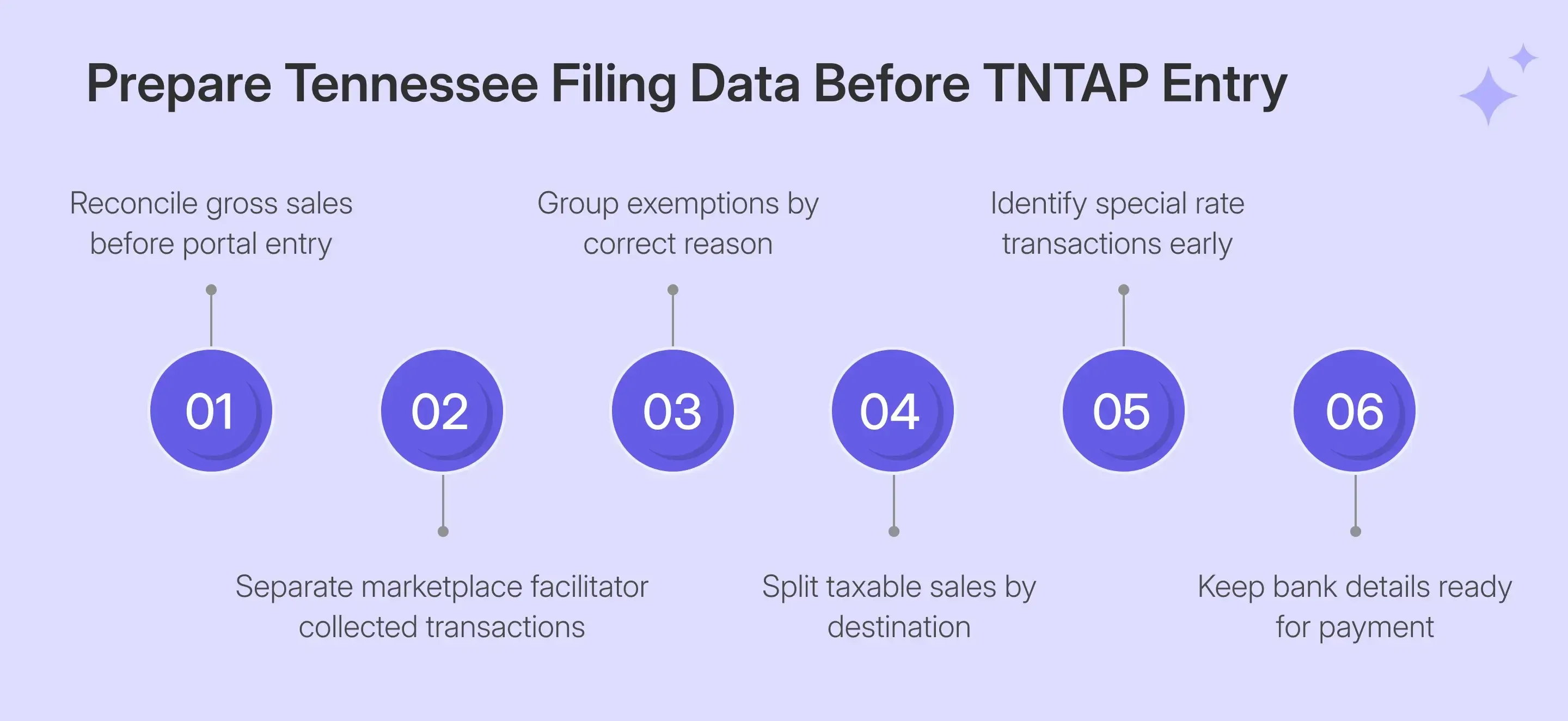
With these source figures ready, the next step is to organize them into the four filing checks that drive SLS-450:
- Separate reportable gross activity first: Your gross sales should reflect activity belonging on your own return before deductions. For marketplace transactions where the facilitator collects and remits Tennessee tax, keep that facilitated activity outside your SLS-450.
- Build exemptions before taxable totals: Separate resale activity, government sales, interstate transactions, returns, and other qualifying deductions before filing. A consistent sales tax exemption certificate process helps keep supporting documents linked to the customer and the transaction.
- Prepare destination information: For the remote-seller workflow, split actual taxable sales across the relevant delivery counties. TNTAP expects the Schedule B destination allocation to reconcile with the taxable amount created after exemptions.
- Identify special transactions: Pull out qualifying single articles before filing. You should also identify activity involving special-rate food, energy, aviation fuel, specified digital products, or other transactions requiring separate treatment.
How Do You File Tennessee Sales Tax Online Through TNTAP?
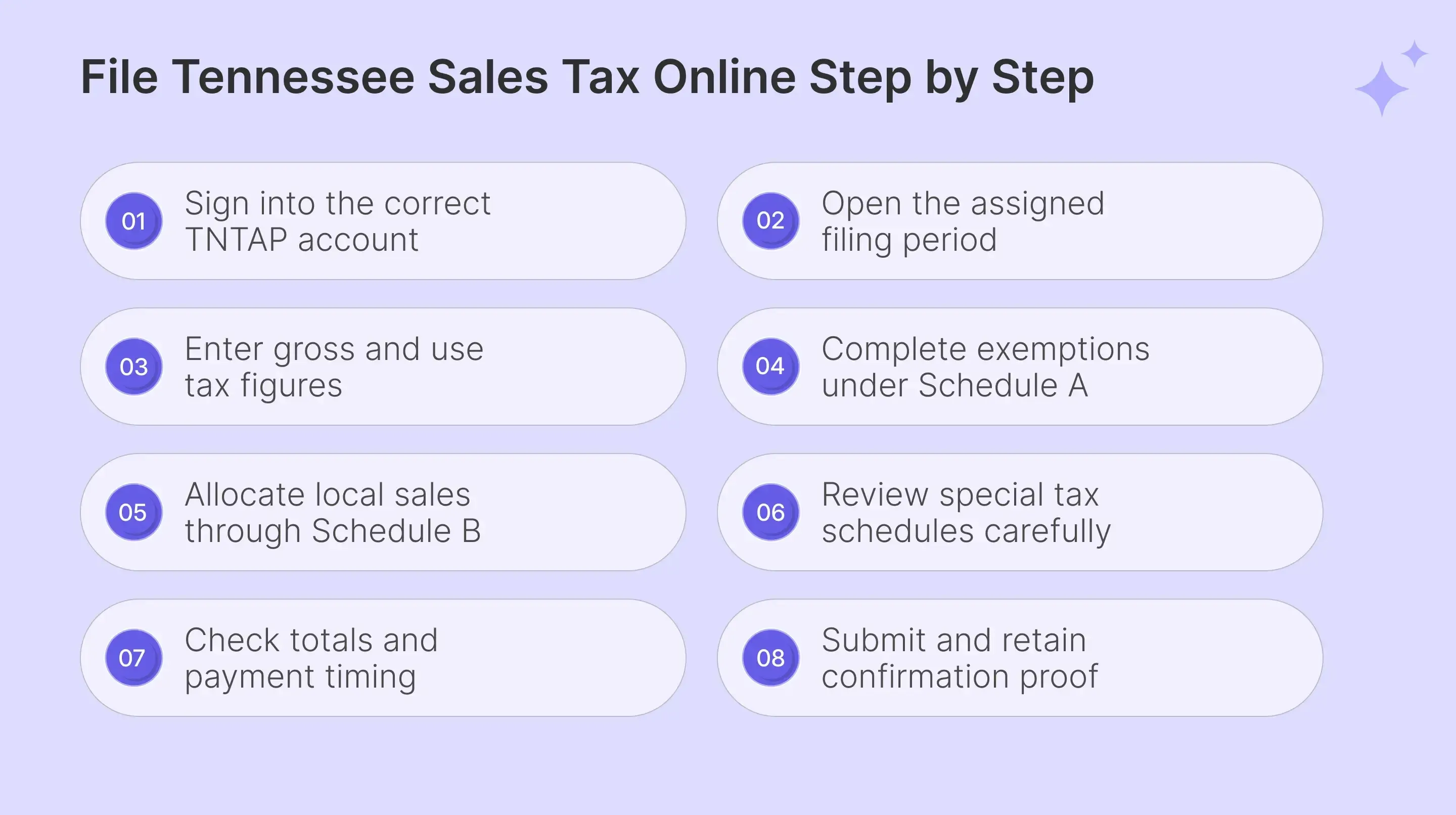
To file Tennessee sales tax online, work through SLS-450 in sequence and review each calculated figure before submission. The most important work involves exemptions, destination allocation, special-rate transactions, and the timing of final payment.
Step 1: Sign In to TNTAP
Open the main TNTAP website and enter your credentials on the login page. Confirm the login page URL before entering sensitive information, then access the correct business through the login portal.

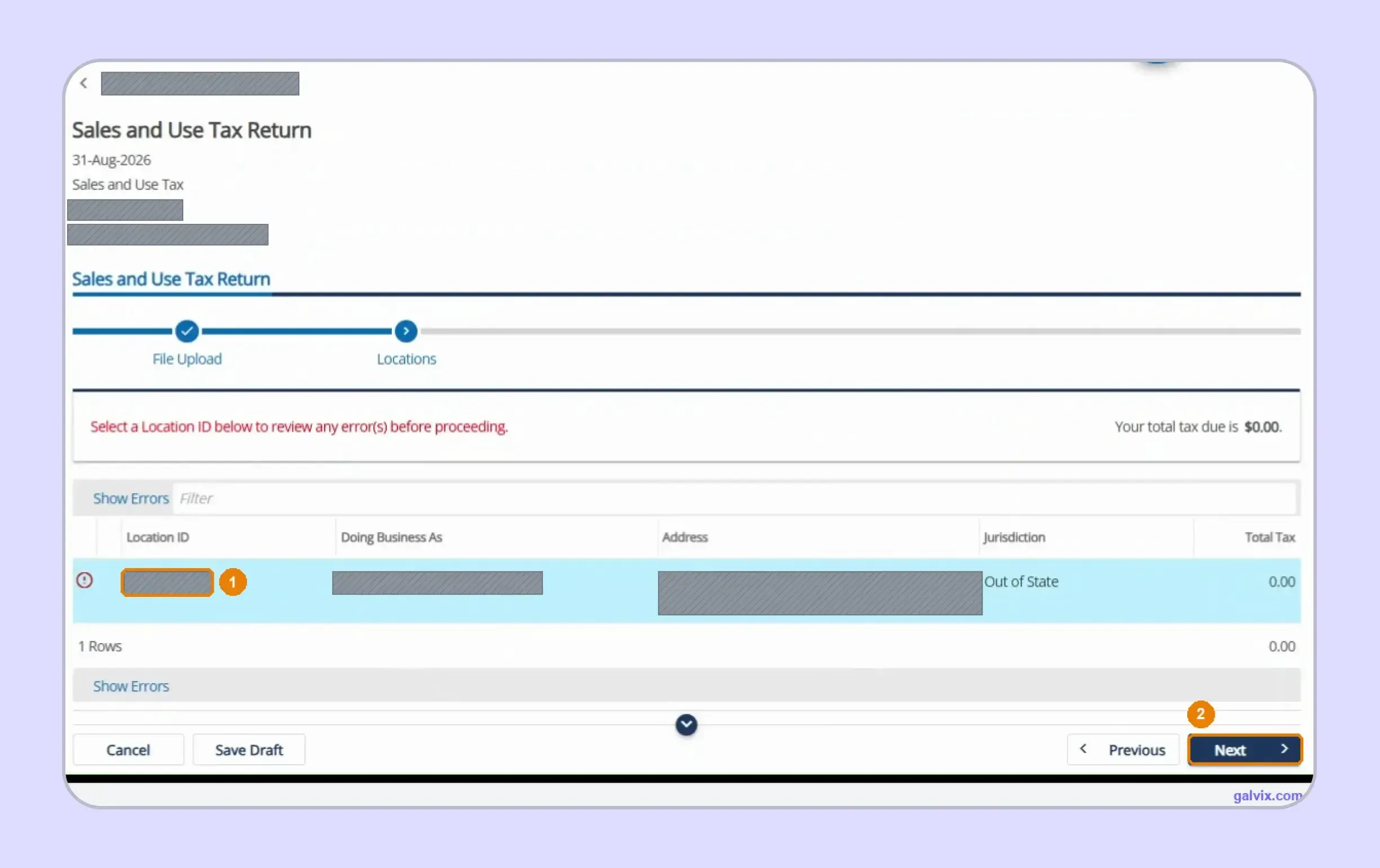
Step 2: Open the Correct Sales and Use Tax Return
From your online account, open the Sales and Use Tax return for the appropriate period. Confirm the correct business and location because each location carries its own sales information into the consolidated return.
Step 3: Enter Your Sales Figures
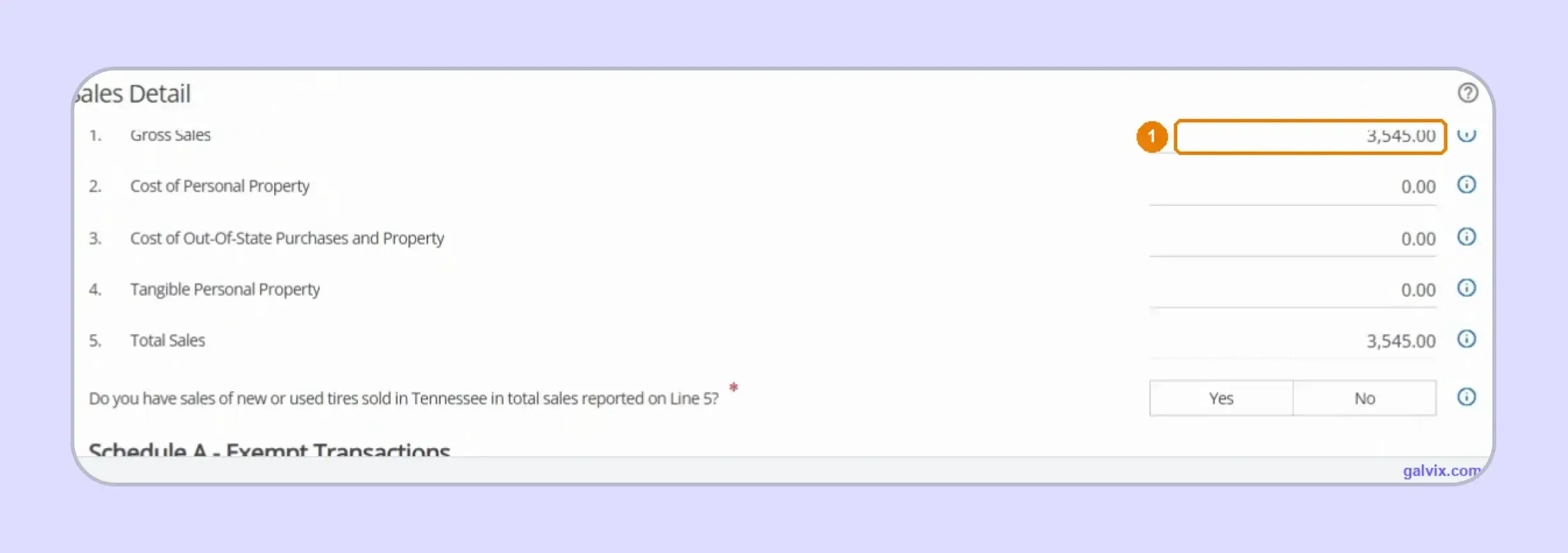
Enter total gross sales for the filing period and complete the purchase lines when consumer use tax applies. TNTAP calculates Total Sales from the figures entered before you move to exemptions and local tax schedules.
Step 4: Complete Schedule A Exemptions
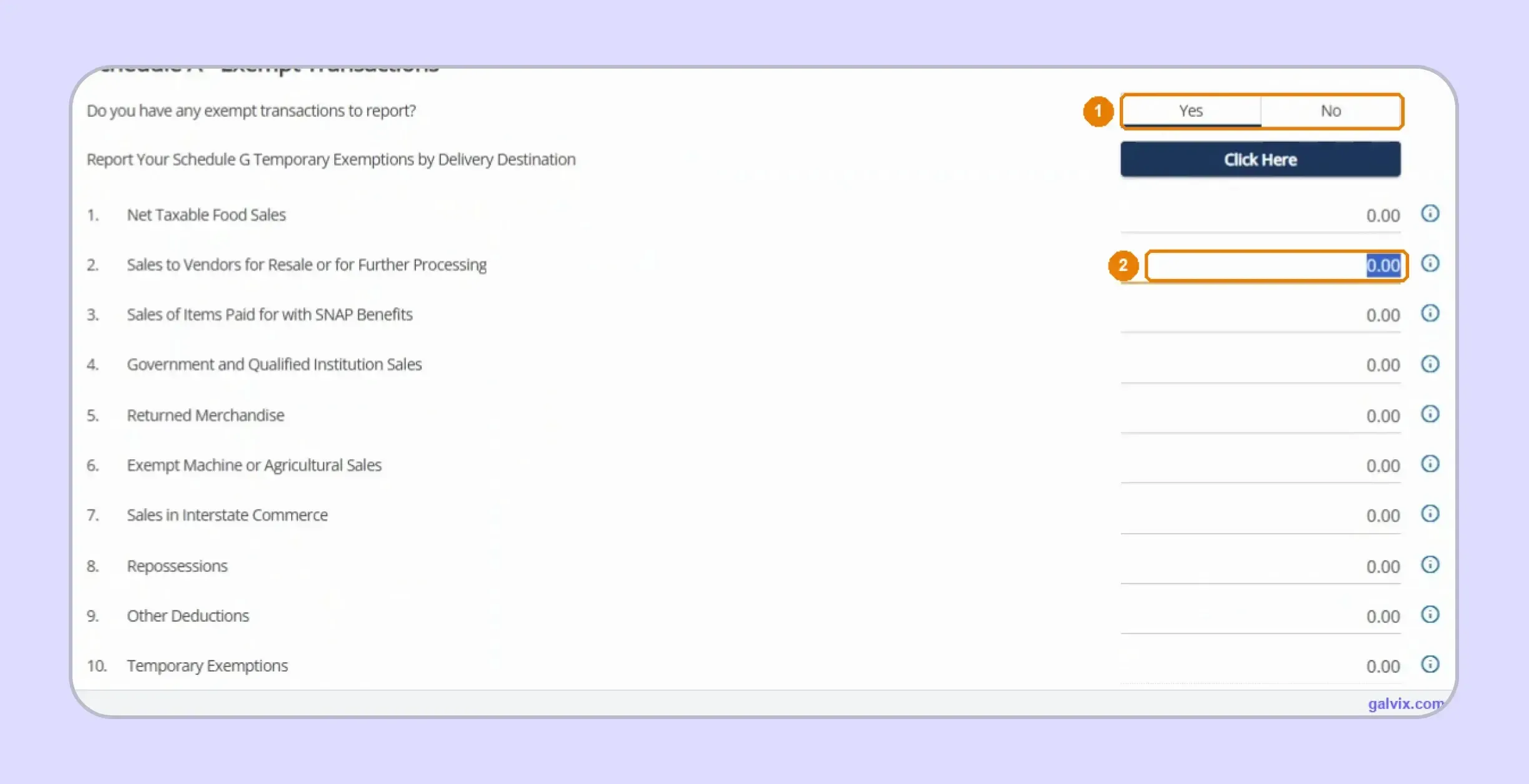
Choose Yes when exempt transactions apply and place each amount under the proper Schedule A reason. TNTAP subtracts those deductions from sales to calculate the State Net Taxable Total.
Leaving a valid exemption off Schedule A increases the taxable base automatically. Reconcile resale and exemption amounts with supporting certificates before continuing because TNTAP can calculate a balanced return from incomplete exemption data.
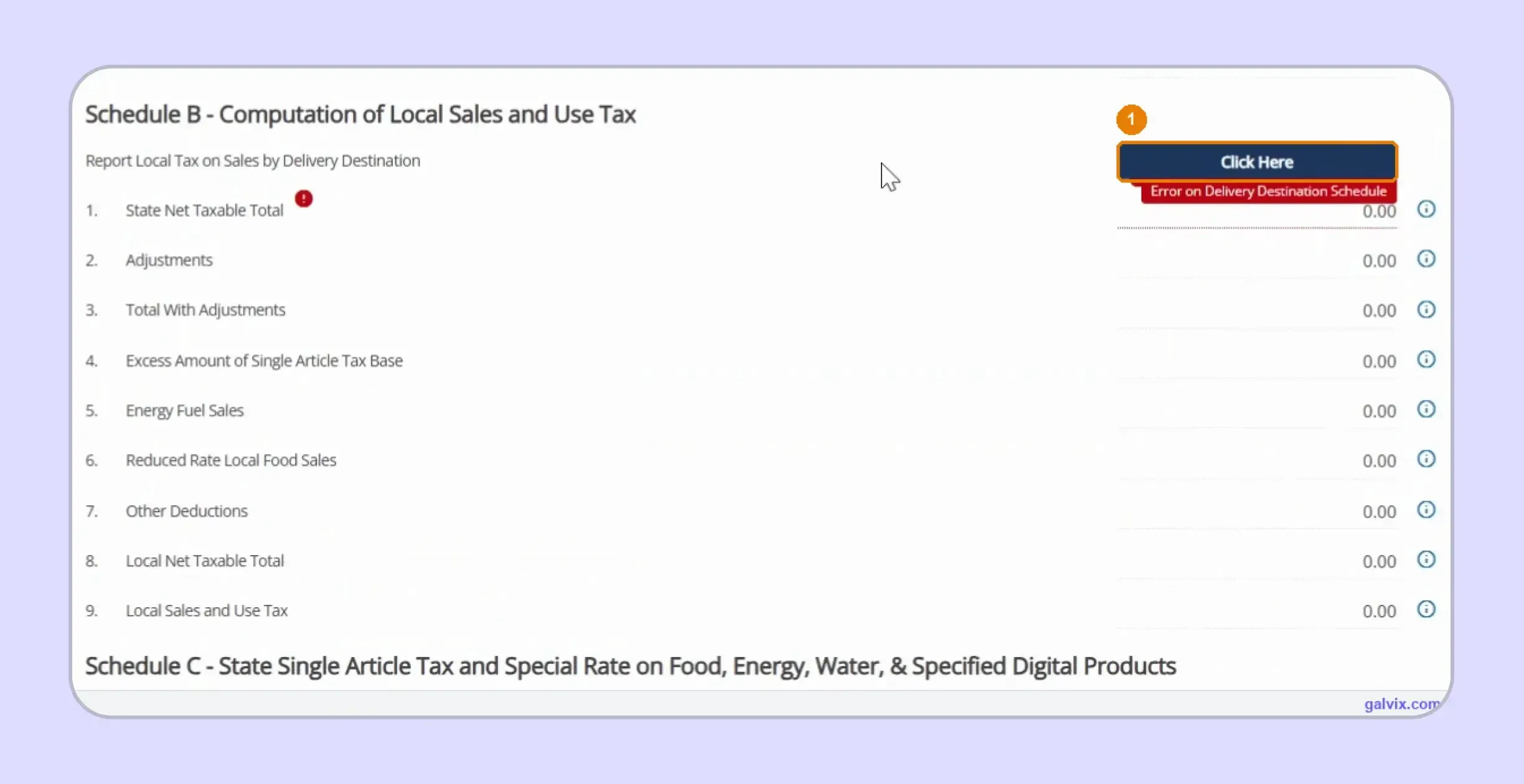
Step 5: Open Schedule B for Local Tax
Open Schedule B and select its delivery-destination schedule to report local sales. You cannot enter one combined local figure because TNTAP builds the calculation from the destination information entered separately.
A Schedule B error can remain until the delivery grid is completed. Entering statewide sales elsewhere does not satisfy this step, so open the separate destination schedule before assuming TNTAP has calculated local liability.
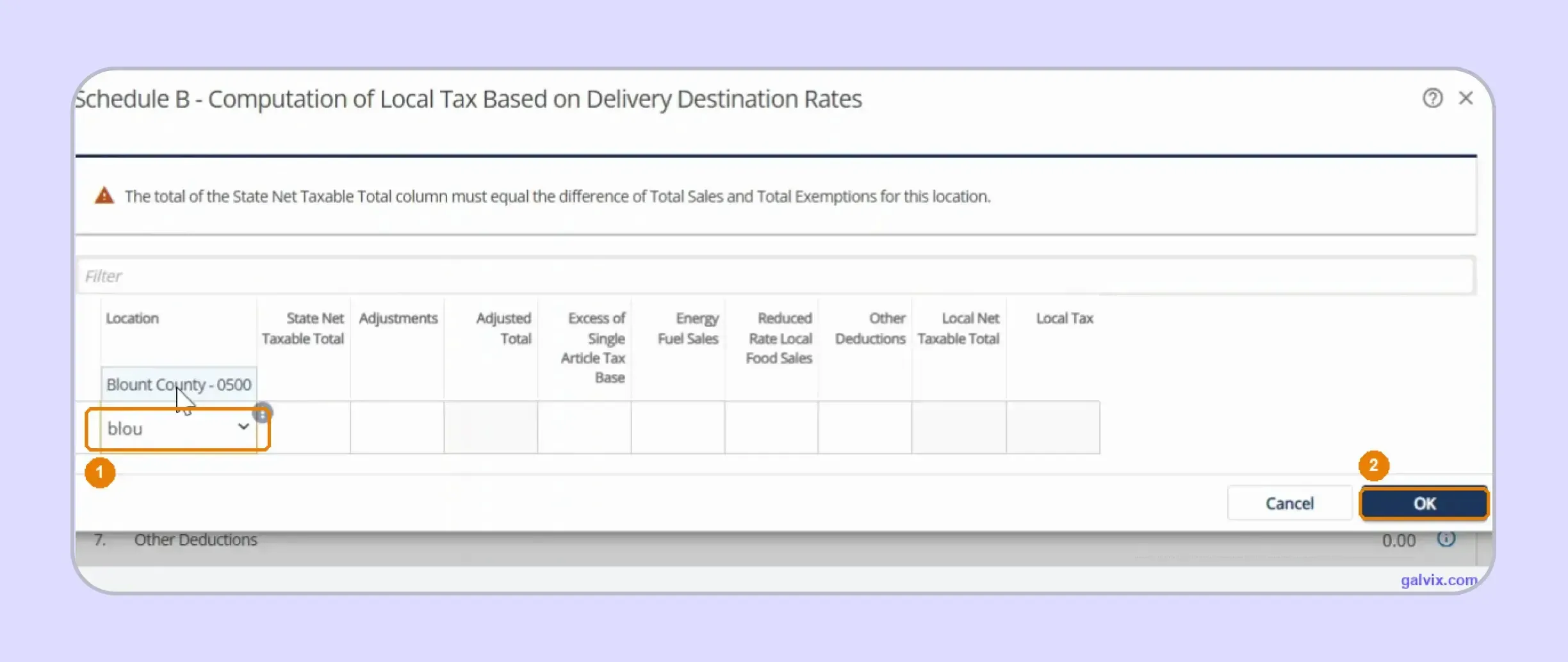
Step 6: Allocate Taxable Sales by Delivery County
Select each applicable Tennessee county and enter its taxable base. TNTAP applies the corresponding local tax rates and calculates local liability after the destination rows reconcile with the location's taxable activity.
The destination amounts must reconcile with sales after exemptions for that location. Missing one county can prevent validation or place too little taxable activity into the jurisdiction where the customer received the order.
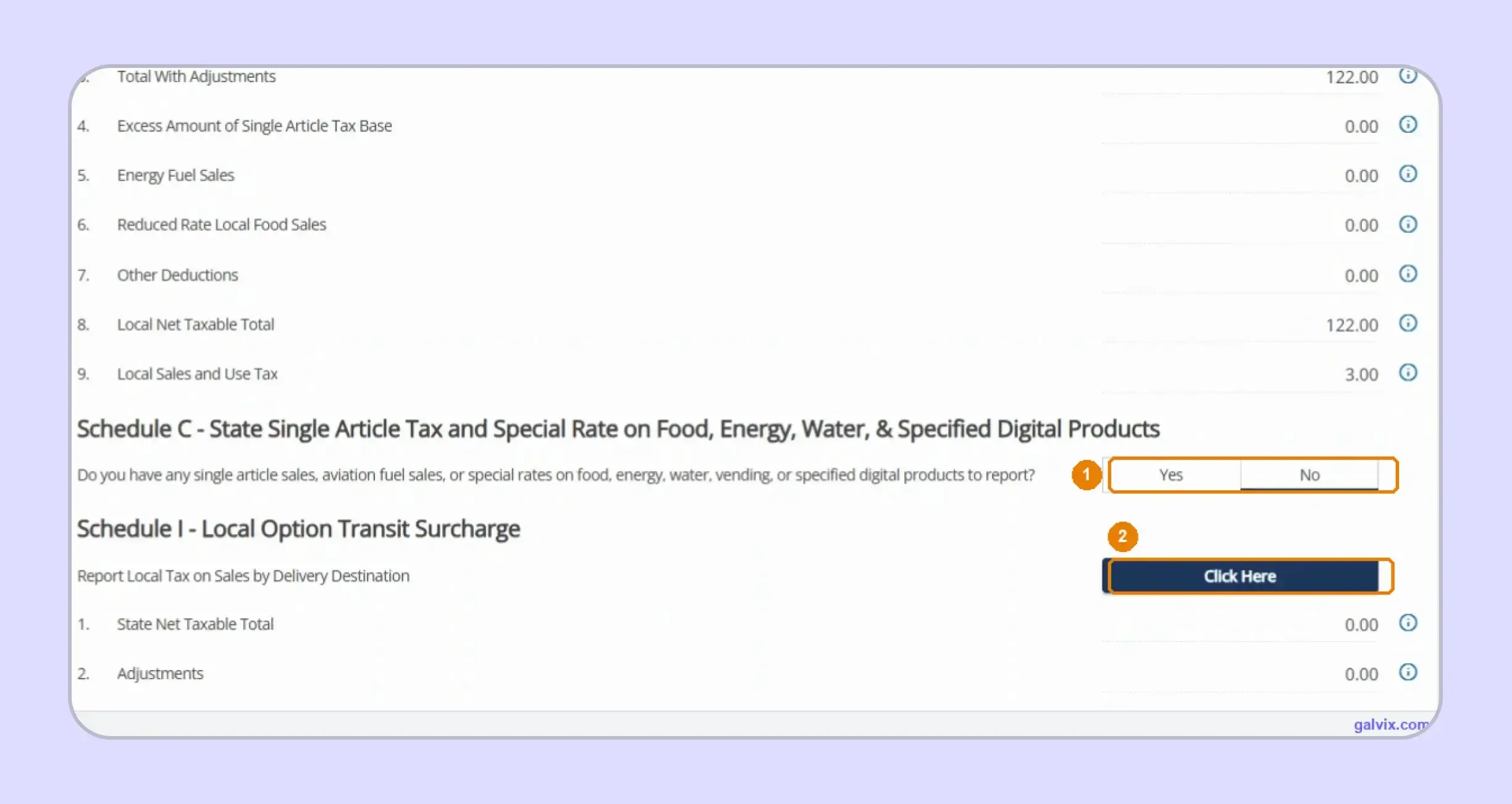
Step 7: Review Schedules C and I
Review Schedule C when single-article or special-rate activity applies, then check Schedule I for Davidson County transit activity. These schedules handle transactions that cannot be treated like ordinary statewide retail sales.
TNTAP does not identify a high-value item and split its tax automatically. Review qualifying single articles before filing so the local cap and additional 2.75% state calculation reach the correct schedules.
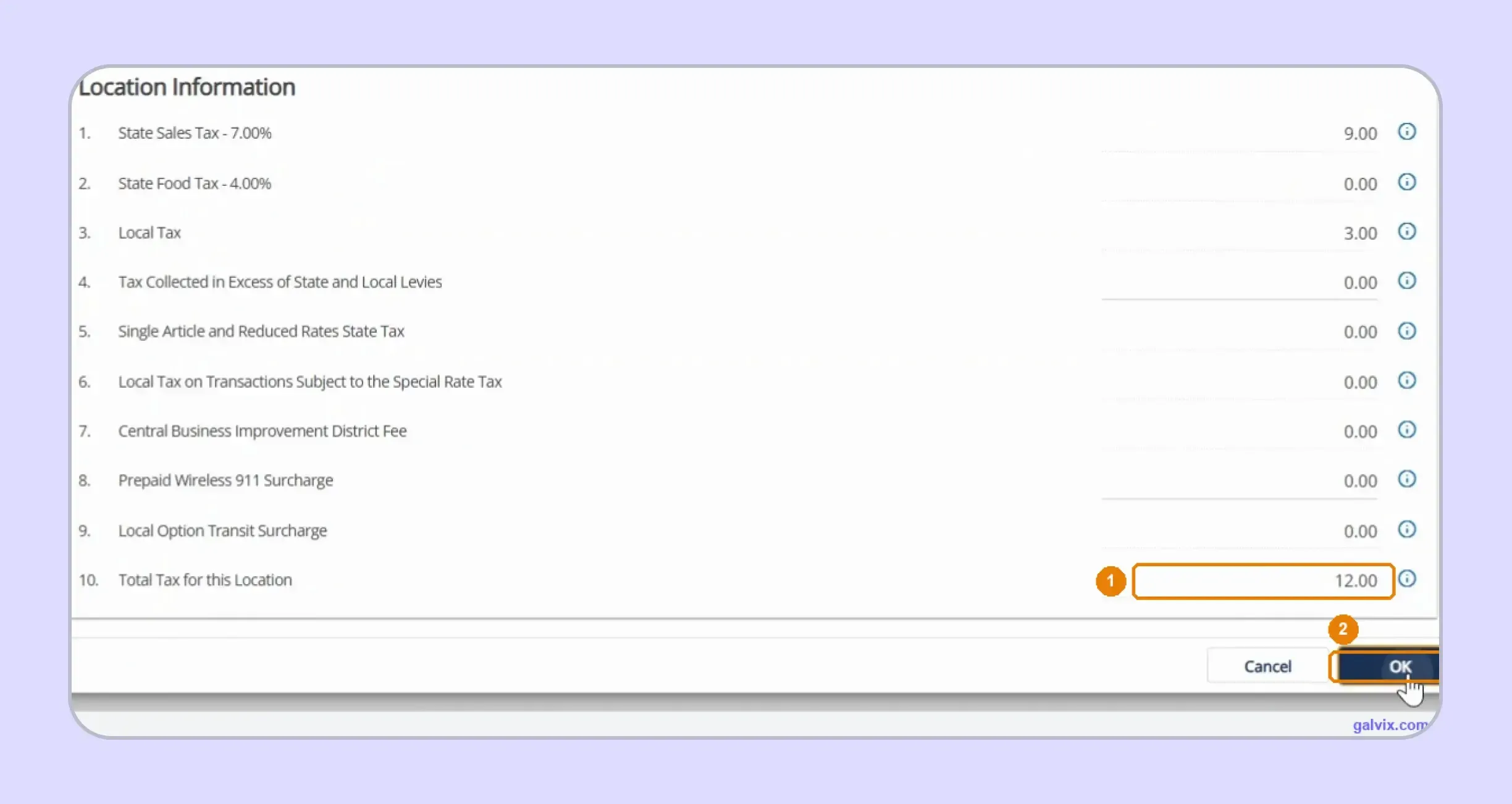
Step 8: Check Tax for Each Location
Review the location totals after completing its schedules. TNTAP displays state sales tax, food tax, local tax, applicable surcharges, and the combined total so you can check the calculation before continuing.
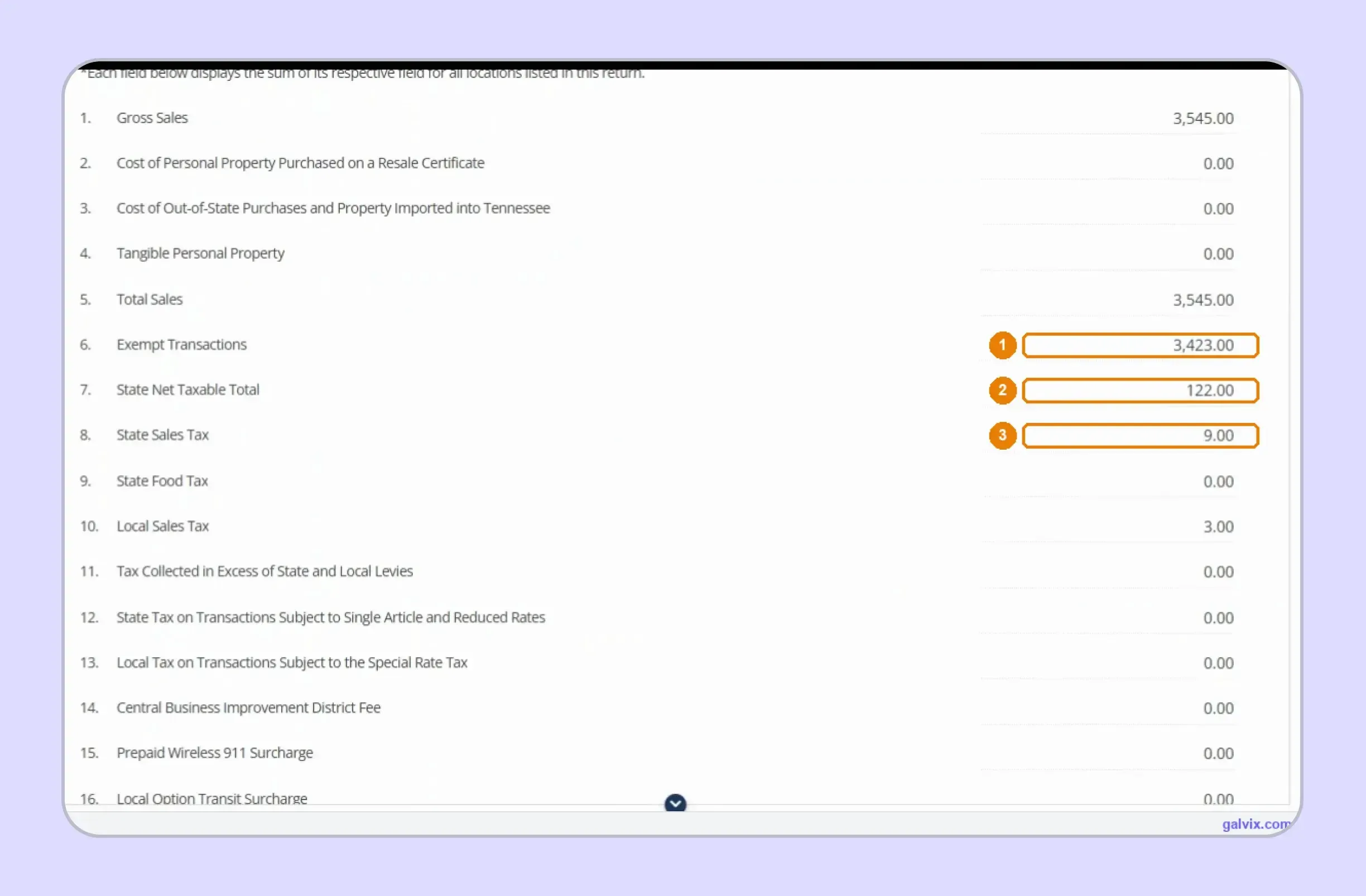
Step 9: Review the SLS-450 Summary
Read the summary from gross sales through Total Due before leaving the return. If an amount looks wrong, return to the location data because the summary is calculated from the figures entered earlier.
Step 10: Choose Payment and Submit
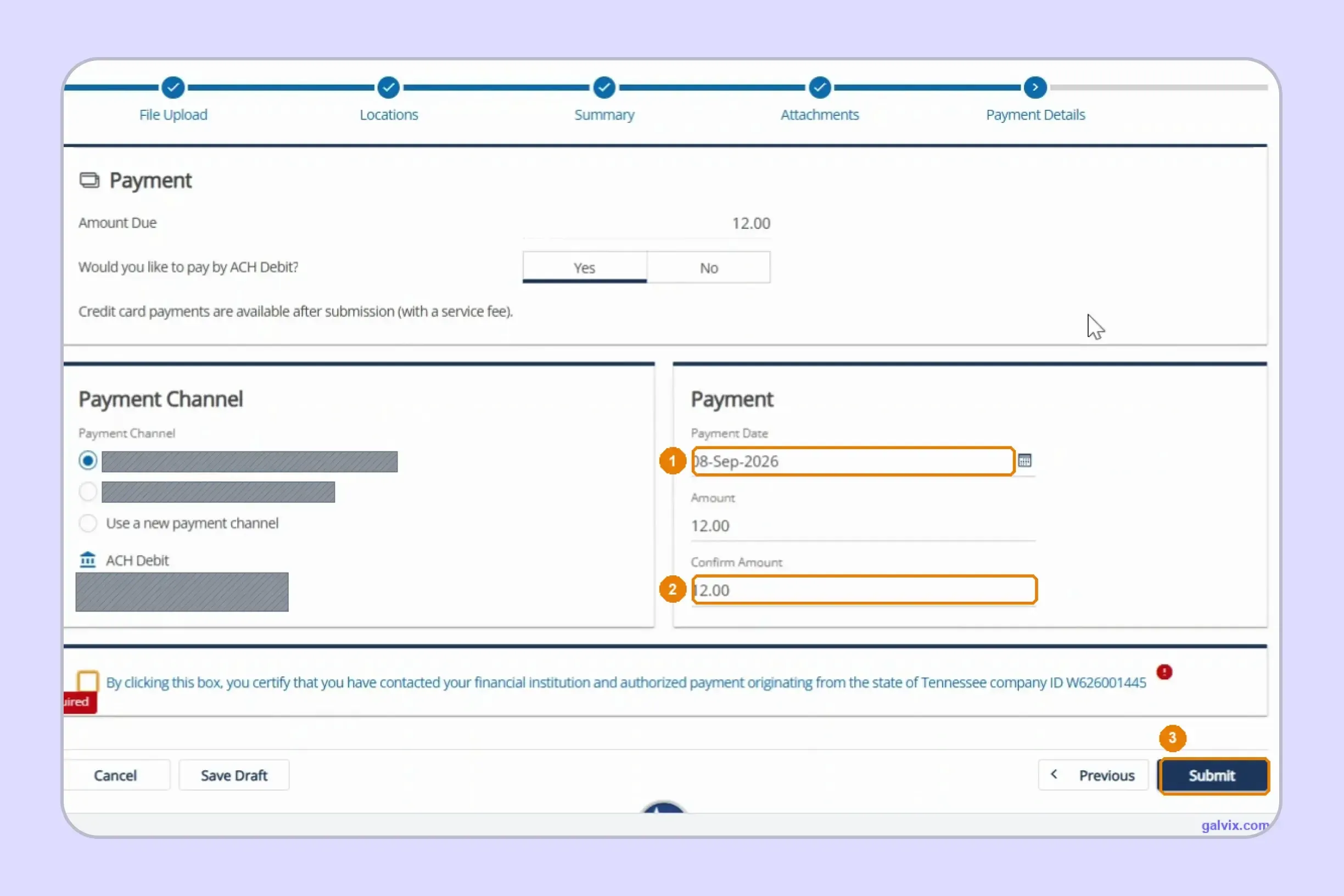
Choose ACH Debit when paying through TNTAP, select your payment channel, confirm the payment amount, and review the scheduled date. Authorize the transaction only after the return and payment details agree.
TNTAP can default the debit date to the day you prepare the return rather than its deadline. Review the date before submission so an early filing does not trigger an unintended early withdrawal.
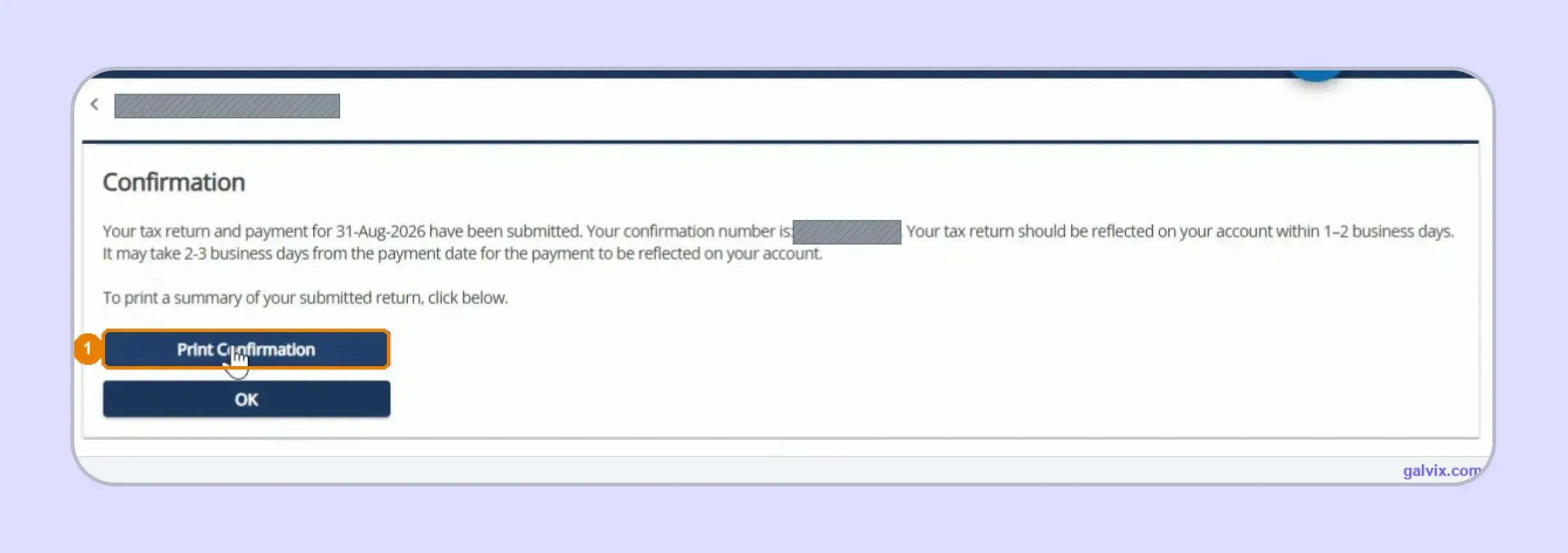
Step 11: Save the Confirmation Number
Complete the password authorization and wait until TNTAP confirms submission. Save the confirmation number immediately because it serves as proof of filing and helps reconcile the return if later processing raises questions.
Reaching Payment Details does not mean you successfully filed. Keep the confirmation after submission and retain separate payment evidence, especially when your accounting records need to prove filing and remittance dates later.
Which SLS-450 Figures Do You Enter and Which Does TNTAP Calculate?
TNTAP performs much of the arithmetic after you supply the underlying transaction information. Understanding that split helps you review the sales tax return efficiently without having to recreate calculations the portal already performs.
| SLS-450 Field | Treatment |
|---|---|
| Gross Sales | You enter |
| Use-tax purchase lines | You enter when applicable |
| Total Sales | TNTAP calculates |
| Schedule A exemptions | You enter |
| State Net Taxable Total | TNTAP calculates |
| Taxable amount by county | You enter |
| Local Sales and Use Tax | TNTAP calculates |
| Schedule C activity | You enter when applicable |
| Schedule I taxable base | You enter when applicable |
| State and local totals | TNTAP calculates |
The distinction is crucial because TNTAP can perform accurate mathematical calculations even when classifications are incorrect. Your team remains responsible for exemption eligibility, sourcing decisions, special-rate activity, and the completeness of the figures feeding each schedule.
Schedule B provides a good example. The portal can calculate local tax after you assign the taxable base, although it cannot determine whether you chose the correct Tennessee destination for every order. The county allocation remains part of your filing responsibility.
The same issue applies to Schedule C. Tennessee's single-article rules depend on the item and its sales price, so the portal cannot automatically identify qualifying transactions from a single aggregate sales figure.
That is why searches for "how to fill out sales and use tax return in Tennessee" often lead back to data preparation. The portal handles calculations after classification, while your source systems determine whether the inputs accurately describe the transactions.
How Do Exempt Sales Affect a Tennessee Sales Tax Return?
Exempt transactions reduce the amount subject to tax, although every deduction should be supported by appropriate documentation. When you file Tennessee sales tax online, Schedule A should agree with customer documentation and the transactions receiving exempt treatment.
Resale and Exempt Sales Need Supporting Certificates
Tennessee issues a resale certificate to qualifying registered retailers upon registration. Other exempt purchasers or transactions may require different documentation, and the seller should retain applicable certificates supporting the tax treatment claimed on the return.
A certificate should connect with the purchaser and the transaction. Keeping a valid document does not mean every later purchase from that customer automatically qualifies for the same exemption.
This distinction becomes important when you sell taxable and exempt products to the same buyer. The document supports the exemption route, while the transaction review determines whether the actual purchase qualifies for that exemption.
Certificate Verification Does Not Replace Transaction Review
Verification can help confirm that certificate information is valid. It does not replace your responsibility to decide whether the underlying transaction qualifies under Tennessee sales tax rules.
The sales tax exemption certificate guide explains how certificate collection, verification, renewal, and transaction eligibility can remain separate controls throughout the exemption lifecycle.
The Galvix Sales Tax Exemption Certificate Tool can help identify the appropriate documentation route and seller checks before an exempt transaction reduces the taxable base.
This is particularly useful when exempt Tennessee buyers purchase through multiple channels. Clean certificate records give the filing team a clear basis for Schedule A, rather than relying on customer account flags alone.
When Is a Tennessee Sales Tax Return Due?
Your deadline depends on the filing frequency assigned by the Tennessee Department of Revenue. Monthly and quarterly returns follow the 20th-day rule, while annual returns are due January 20.
| Filing Frequency | Normal Due Date |
|---|---|
| Monthly | 20th of the following month |
| Quarterly | 20th after quarter end |
| Annual | January 20 |
When the normal due date falls on a weekend or holiday, Tennessee moves the deadline to the next business day. This applies to the return and corresponding payment.
You should still file return activity for each required period while the registration remains active. That includes a zero return when your assigned reporting period contains no taxable activity.
If you are asking how to pay sales tax in Tennessee, TNTAP supports electronic filing and associated payments. Registration, filing, and payment are handled electronically through the Tennessee Taxpayer Access Point.
Choose the appropriate payment method and schedule it carefully. Paying late can create interest or other financial penalties, while paying early offers no filing advantage in the portal workflow.
For businesses operating on an annual basis, verify the filing schedule shown in the account rather than assuming annual filing applies because sales volume is low. The Tennessee Department assigns or authorizes filing periods under its rules.
Why Does Manual TN Sales Tax Filing Become Harder as Sales Grow?
Manual TN sales tax filing becomes more complex as the number of destinations, transaction types, channels, and state obligations increases. The difficulty shifts from entering numbers into TNTAP to keeping reliable filing data ready for every deadline.
- County reporting becomes a larger reconciliation: A remote seller delivering into numerous counties can have many Schedule B allocations. Each destination must still connect with the correct taxable base, so one missing location can affect the local calculation.
- Product treatment becomes less uniform: Standard merchandise can sit beside food, single articles, use-tax purchases, and digital goods. Different tax treatments mean finance teams must classify transactions before preparing the appropriate schedules.
- Sales channels need clear separation: Direct invoices can sit beside marketplace activity where another party remits the tax. Combining these channels before return preparation can inflate reportable sales or create duplicate tax treatment.
- More states create parallel workflows: Expansion introduces separate registrations, filing calendars, portals, exemption rules, and payment processes. As your footprint grows, tracking sales tax requirements by state helps you understand how filing obligations change from one jurisdiction to another.
The operational problem grows even when TNTAP itself remains manageable. Your team still needs source data that connects every filed figure with a transaction, customer record, exemption basis, and destination.
That is also why the question of how to file TN sales tax becomes a different one for a single-state seller and a multistate finance team. The portal steps stay similar, while the volume of preparation and review grows around them.

How Does Galvix Manage Tennessee and Multistate Sales Tax Filing?
Galvix manages each Tennessee sales tax return through a structured workflow, so your team does not need to navigate each state's portal separately. Transaction data is reconciled first, then a compliance specialist reviews the return before submission. This keeps sales tax compliance connected with the records supporting each reported figure.
For Tennessee, the process can separate marketplace activity, organize exemptions, prepare destination-level sales, and review special-rate transactions before SLS-450 reaches TNTAP. Relevant data can flow through sales tax integrations, helping reduce manual preparation before you file Tennessee sales tax online for each reporting period.
The same approach works when transaction data sits across different business systems. Ecommerce teams can connect a Shopify sales tax integration so direct-channel activity remains visible alongside other sales sources. This gives filing specialists cleaner data for exemption review, destination allocation, and return preparation.
Galvix can also connect filing with nexus monitoring, registrations, exemption certificate management, and state notices. When economic nexus creates a new obligation, registration can be coordinated before tax collection begins, then added to the filing calendar.
With modular pricing, you can select the services your business actually needs. The pricing reflects the volume of work associated with each module rather than requiring one all-inclusive package. This structure allows a business to start with returns preparation and add nexus tracking, registrations, exemption management, or other services as its compliance footprint changes.
What Can Galvix Manage for Tennessee Sellers?
Once your Tennessee filing workflow is connected, Galvix can take over the recurring tasks that usually create the most manual work for finance teams.
- Reconcile transaction data before SLS-450 preparation
- Separate marketplace and direct seller activity
- Prepare destination-level local tax filing data
- Organize certificates before exemption reporting begins
- Track recurring filing and payment deadlines
- Coordinate registrations and state notice responses
This model can also support businesses using the Streamlined registration route or a certified service provider within their tax stack. Tennessee allows qualifying remote sellers to use Streamlined registration, while the final filing method still depends on the seller's presence, registration status, and assigned account setup.
When you need to file Tennessee sales tax online alongside returns in several other states, Galvix creates a single managed process for that work.
Book a demo today to see how Galvix can coordinate recurring filings, registrations, exemption support, and related compliance tasks across your expanding state footprint.
Frequently Asked Questions
How Do I Register for a Sales Tax Account in Tennessee?
Register through TNTAP by choosing Register a New Business on the portal. Tennessee does not charge a fee for sales and use tax registration. After approval, the department issues a Certificate of Registration, while qualifying retailers, wholesalers, and manufacturers also receive a resale certificate.
How Do I Get a Copy of My Tennessee Resale Certificate?
Registered retailers normally receive a Tennessee Certificate of Resale after sales and use tax registration. Check your TNTAP account or contact the Tennessee Department of Revenue if you need account-specific assistance. Keep the certificate information aligned with your current Tennessee registration and business details.
Can I Amend a Tennessee Sales Tax Return in TNTAP?
Yes. If you discover an error after filing, use the relevant period in your TNTAP account to submit an amended return rather than replacing the original filing. Review the corrected sales, exemptions, destination amounts, and resulting liability before transmitting the amendment.
Do I Need to File a Tennessee Zero Sales Tax Return?
Yes. An active account can still require a return for a filing period with no taxable activity. Submit the required zero return according to the assigned schedule rather than leaving the period open, which can create follow-up from the department.
What Records Should I Keep for Tennessee Sales Tax?
Keep invoices, exemption certificates, destination information, marketplace records, evidence of payment, and filing confirmations to support the figures reported. These records should explain how sales moved from your source systems into SLS-450 and support exempt treatment if the department later reviews a filed period.
Can I Pay Tennessee Sales Tax Separately From Filing?
Tennessee requires electronic filing and payment, and TNTAP supports both. When you file Tennessee sales tax online, review the selected payment method and scheduled debit date carefully. The final confirmation should remain with your payment records so both actions can be reconciled afterward.
What Happens if I File Tennessee Sales Tax Late?
Late filing or payment can create penalties and interest, so use the deadline tied to your account's filing frequency. Monthly returns are normally due on the 20th following the period, with quarterly and annual returns due on their assigned deadlines. Weekend or holiday deadlines move forward.