Businesses file Ohio sales tax online through OH|TAX eServices, using an OHID account to access the correct business. Ohio vendors commonly file the UST-1 Universal Sales Tax Return, while registered out-of-state sellers use the seller’s use tax flow available within the same portal.
The filing process becomes more detailed once sales reach several counties. Ohio has a 5.75% state rate, while county and transit taxes can increase the combined rate based on where the customer receives the sale. Your taxable sales therefore need to be separated by county before portal entry.
OH|TAX displays the applicable tax rate for each county, yet you still enter the corresponding tax liability yourself. The portal then checks whether county totals agree with your gross sales and exempt sales, making clean source data important before you begin.
This blog explains how to file sales tax in Ohio, prepare county figures, complete payment, handle exemptions, and keep proof of submission. It also covers key Ohio sales tax filing requirements and how Galvix can manage recurring filings across Ohio and other states.

Why Does Ohio Sales Tax Filing Depend So Much on County Data?
Ohio reports taxable activity by county of delivery. The statewide base rate is 5.75%, while county and transit additions can change the final amount. Your county allocation therefore determines both the rate applied and the figures reported on the return.
Taxable Sales Are Reported County by County
Ohio uses destination sourcing for many sales, so you report taxable transactions according to the county where the customer receives the product or service. The UST-1 county schedule then combines those rows into the statewide return.
That means your sales ledger should already show the destination before you start Ohio sales tax filing. A sale delivered into Franklin County, for example, should follow the rate that applies there for that reporting period, rather than a rate based on your own business address.
Rates can also change over time. Ohio publishes quarterly rate updates, so use The Finder or another current source rather than carrying an earlier rate into a later filing period. Referring to this comprehensive Ohio sales tax guide can help you check broader state rules before preparing the return.
OH|TAX Shows the Rate Without Calculating County Tax
OH|TAX pre-fills the county sales tax rate, then leaves two important fields to you: Taxable Sales and Tax Liability. The displayed percentage therefore acts as a reference rather than an automatic calculation. You must calculate the correct amount of tax and enter it manually rather than expecting OH|TAX to multiply the figures.
This creates an unusual control gap. A required field prevents you from leaving the tax blank, but the portal does not verify that the entered amount equals taxable sales multiplied by the displayed rate.
Your County List Can Reflect Earlier Filing Periods
The county grid is built partly from your previous filing history. Counties used earlier can remain visible with zero activity, while a county reached for the first time may need to be added manually.
Use your current sales records as the source of truth rather than treating existing portal rows as a checklist. This matters when your delivery footprint changes over the course of the calendar year, especially after entering new markets.
The portal can therefore appear complete even when a current destination is missing. Reviewing your own county breakdown before you file Ohio sales tax online reduces that risk and gives you a cleaner reconciliation later.
Who Needs to File an Ohio Sales Tax Return?
Businesses registered for Ohio sales or seller’s use tax must file returns for every assigned period. The obligation can arise through physical presence, a vendor location, or economic nexus created by sales into Ohio.
Ohio Vendors and Out-of-State Sellers
An Ohio business that makes taxable retail sales typically needs a vendor’s license. Out-of-state businesses that meet Ohio’s nexus rules instead register for a seller’s use tax account and use the corresponding return available through OH|TAX.
Once registered, your account determines the filing frequency. Vendors and out-of-state sellers can be assigned monthly or semiannual filing, while other use-tax account types can follow different schedules.
You should continue filing while the account remains active, including a required zero return when no reportable activity occurred. Ohio guidance confirms that registered vendors can still have a filing obligation when no sales or tax are due.
Older searches may still surface Ohio Business Gateway language for some state taxes. Current sales and use tax electronic filing is handled through OH|TAX eServices using OHID.
Remote Sellers Can Create Economic Nexus
A remote seller generally establishes Ohio nexus after exceeding $100,000 in gross receipts or reaching at least 200 separate transactions into the state during the current or previous calendar year. Meeting either threshold can create a registration obligation.
Businesses with an Ohio office, inventory, employees, or another qualifying connection can have nexus before reaching those remote-seller thresholds. The minimum thresholds do not protect sellers that already have sufficient physical presence. If you sell nationally, sales tax nexus monitoring will help keep each state threshold separate.
Ohio also participates in Streamlined Sales Tax, which gives multistate businesses another route for qualifying sales tax registration across participating states
What Should You Prepare Before OH Sales Tax Filing?
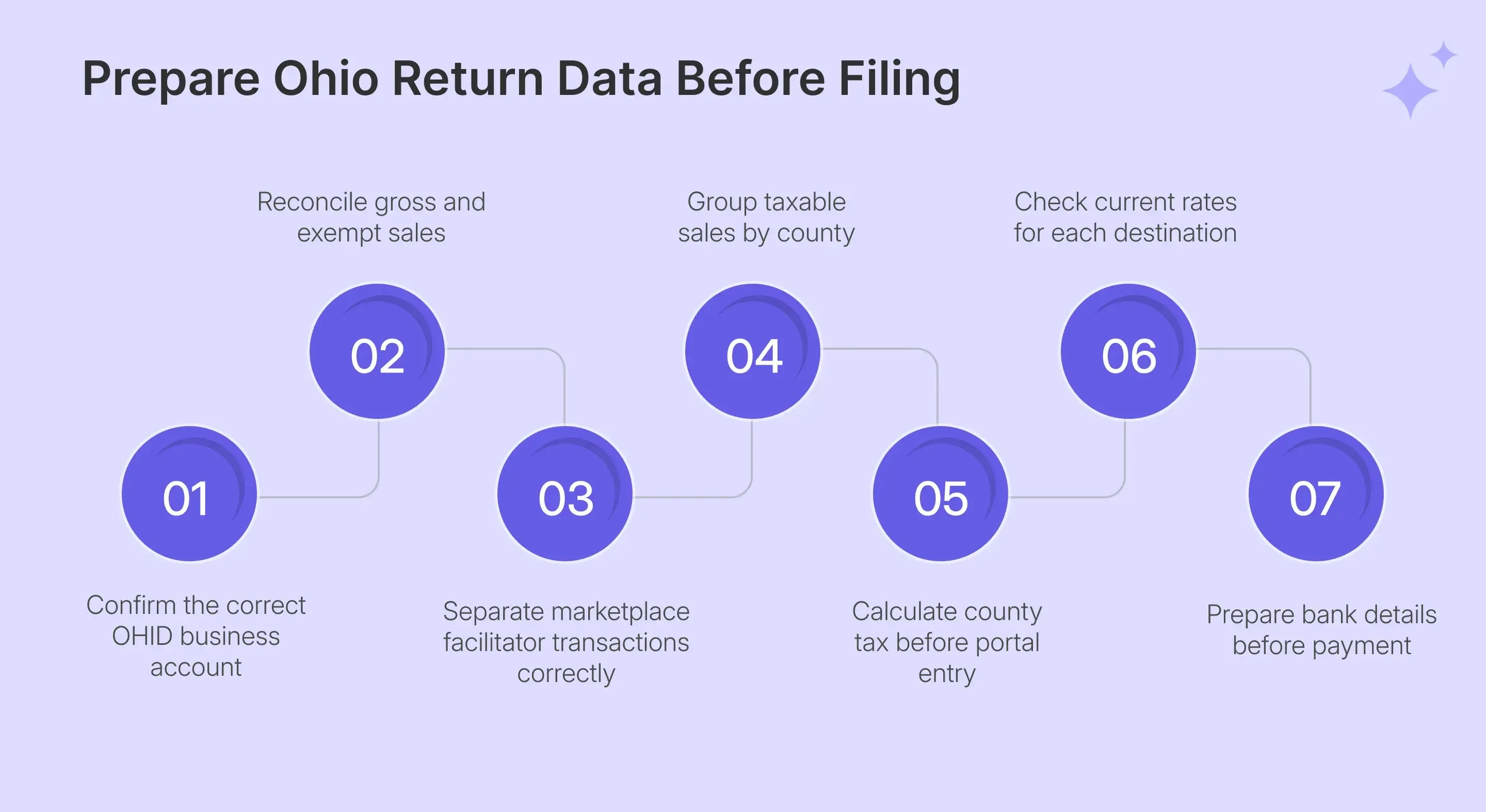
Before OH sales tax filing, prepare the county schedule and statewide totals together. Your county taxable amount eventually needs to reconcile with gross and exempt activity, so building both from the same transaction data reduces the need for corrections in OH|TAX.
| What You Need | Why It Matters |
|---|---|
| OHID credentials | Opens your OH |
| Gross sales | Feeds the statewide total |
| Exempt sales | Reduces net taxable activity |
| Taxable sales by county | Feeds the county schedule |
| County tax liability | You calculate and enter it |
| Exemption documentation | Supports untaxed transactions |
| Marketplace sales data | Needs correct gross and exempt treatment |
| Bank information | Supports scheduled ACH payment |
Gross Sales and Marketplace Sales Need Consistent Treatment
Line 1 includes your total sales before qualifying exemptions are removed. Current UST-1 instructions specifically tell marketplace sellers to include facilitated transactions in Gross Sales rather than exclude them from the return.
When a marketplace facilitator already collected and remitted Ohio sales tax on your behalf, those same transactions are also included on Line 2 as exempt activity. This prevents them from remaining in the reportable taxable base.
That distinction also matters for nexus. Marketplace activity can count toward Ohio’s economic threshold even when the facilitator manages tax collection for the transaction.
Keep marketplace and direct channels separated in your source data, then map them correctly when you file Ohio sales tax online.
Exempt Sales Must Support the Difference
Line 2 includes qualifying transactions where Ohio tax was not due. This can include resale purchases, qualifying exempt customers, marketplace-facilitated activity already taxed by the facilitator, and eligible tax holiday transactions.
Your exemption figure should therefore come from actual transactions rather than being used to make the return balance. Every reduction needs records explaining why the sale was removed from the taxable base.
Ohio’s 2026 back-to-school holiday ran from August 7 through August 9. Qualifying holiday sales still entered Gross Sales, then moved into exempt sales on Line 2. A consistent sales tax exemption certificate process helps connect supporting documents with the buyer and transaction before return preparation.
County Tax Should Be Calculated Before Portal Entry
Prepare the taxable amount and county tax for every destination before opening the county grid. OH|TAX supplies the rate, although it does not perform or validate the multiplication for you.
This preparation becomes more important when you sell taxable goods or taxable services into several jurisdictions. A rate change between periods can affect identical transactions delivered to the same county.
Ohio’s Finder can return date-specific jurisdiction information, while the Galvix sales tax calculator can provide another check before portal entry. Ohio’s official resources remain the final reference for state filing.
How Do You File Ohio Sales Tax Online Through OH|TAX?
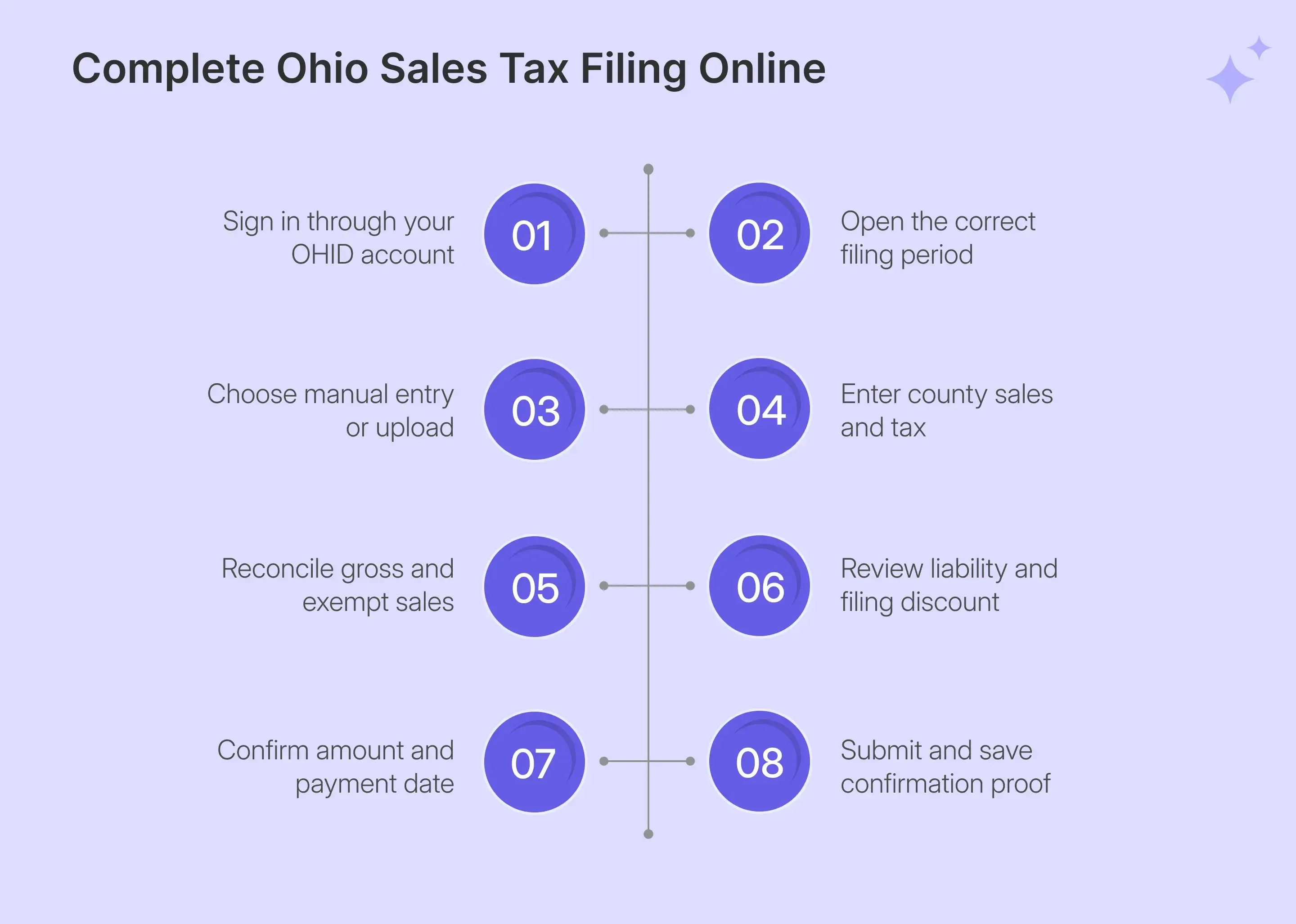
Here are the steps you must follow to file Ohio sales tax online:
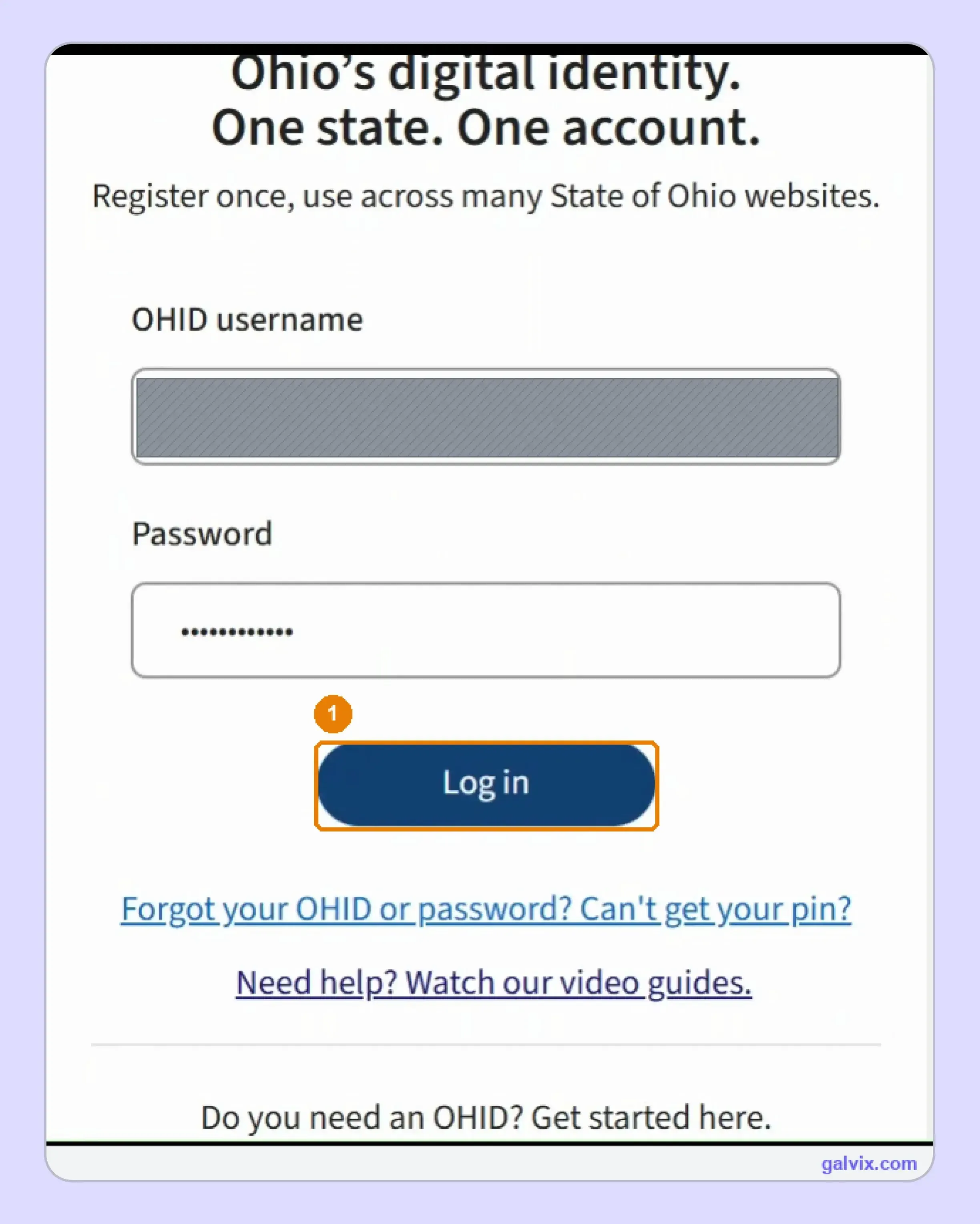
Step 1: Sign In Through OHID
Enter your OHID username and password, then complete the required verification before opening OH|TAX eServices. Your OHID is a personal sign-in, so the actual business account is selected after authentication.
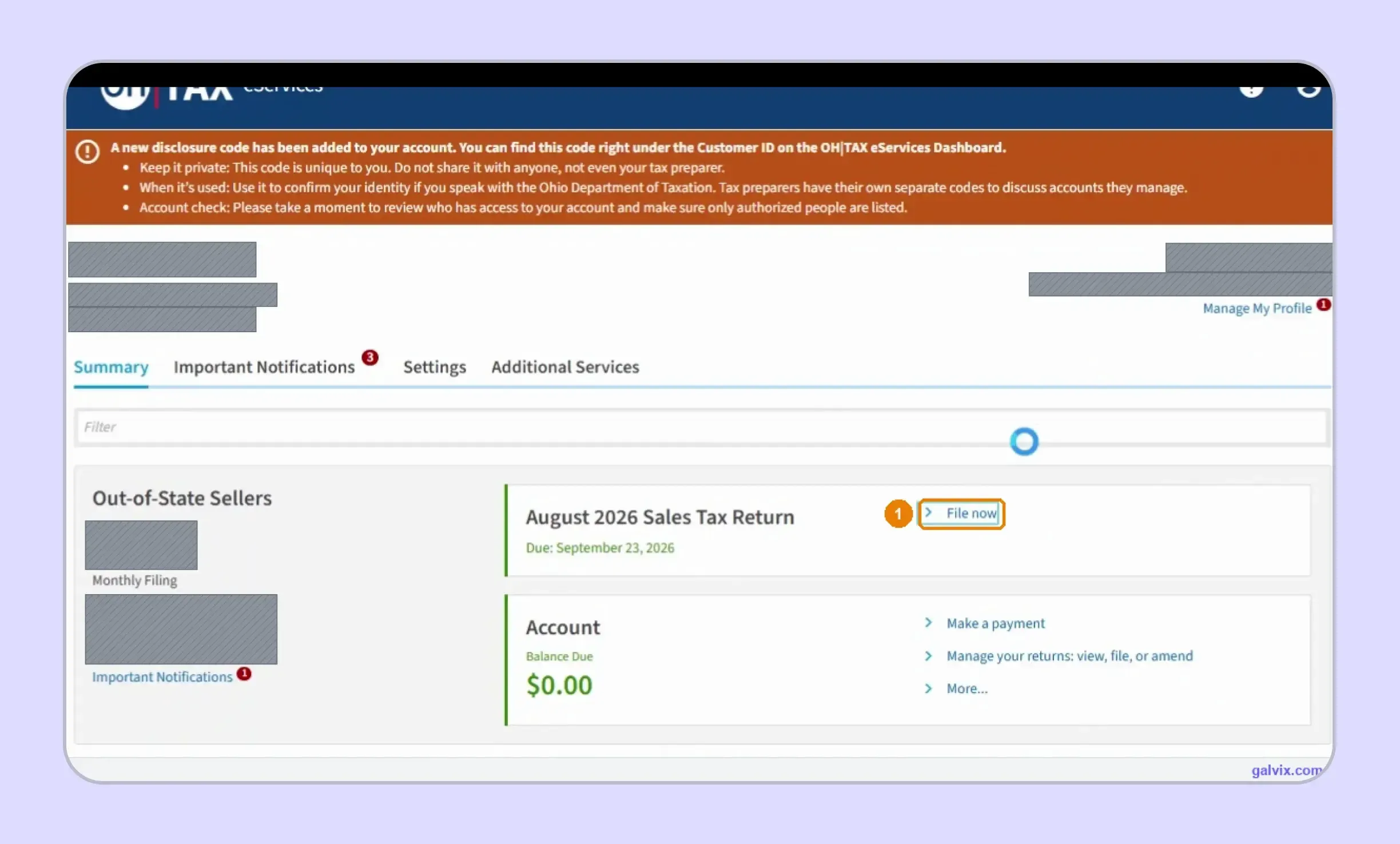
Step 2: Open the Correct Sales Tax Return
Confirm the business name, account type, reporting period, and due date before selecting File now. This is especially important when one OHID profile gives you access to several companies.
An OHID profile can open whichever accessible company loads first. Check the business and period before selecting File now, because correcting a return filed under the wrong account creates far more work afterward.
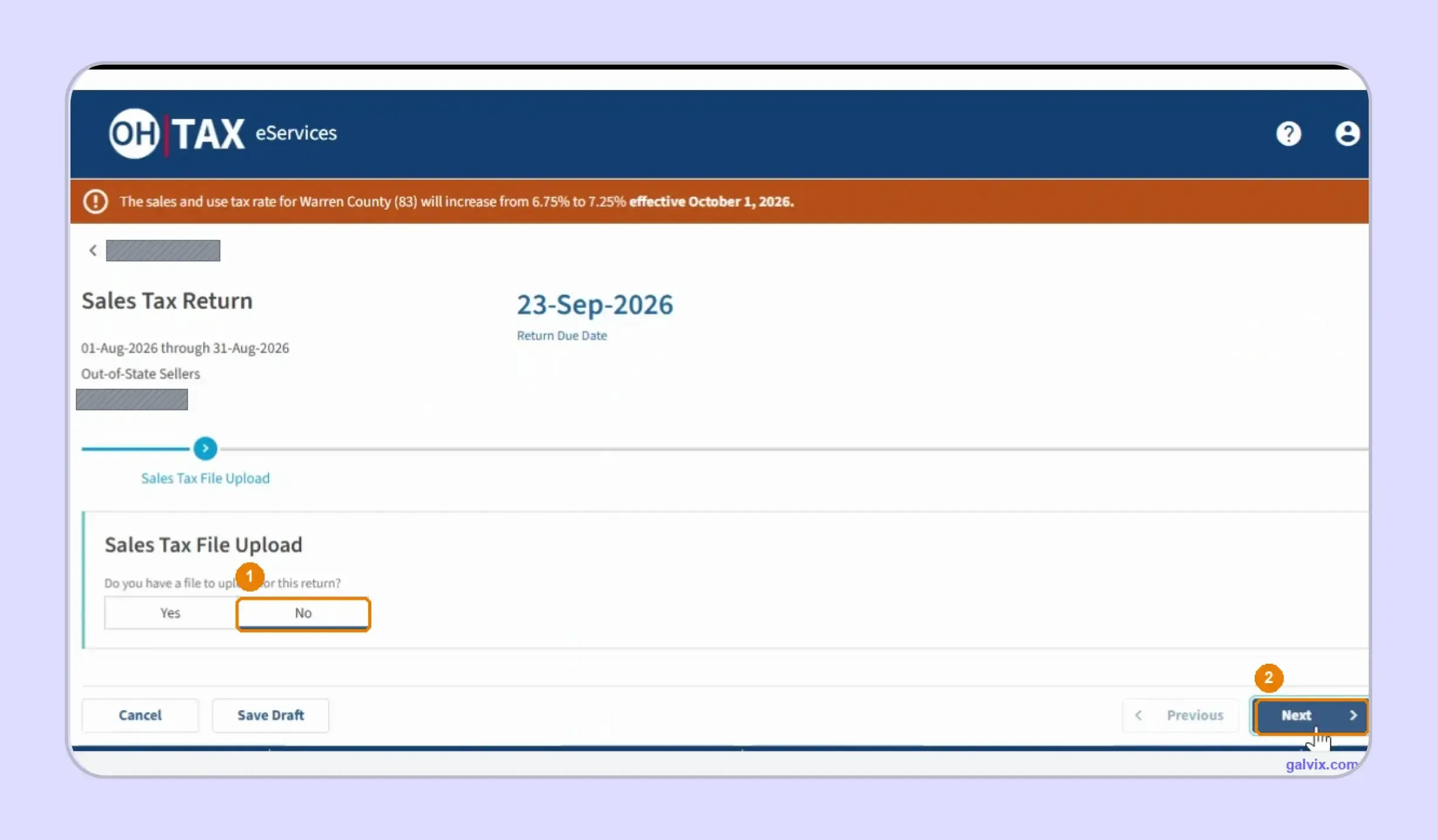
Step 3: Choose Manual Entry or File Upload
OH|TAX asks whether you have a return file ready for upload. Choose No and select Next when entering county figures manually, while businesses maintaining an approved file can use the upload path.
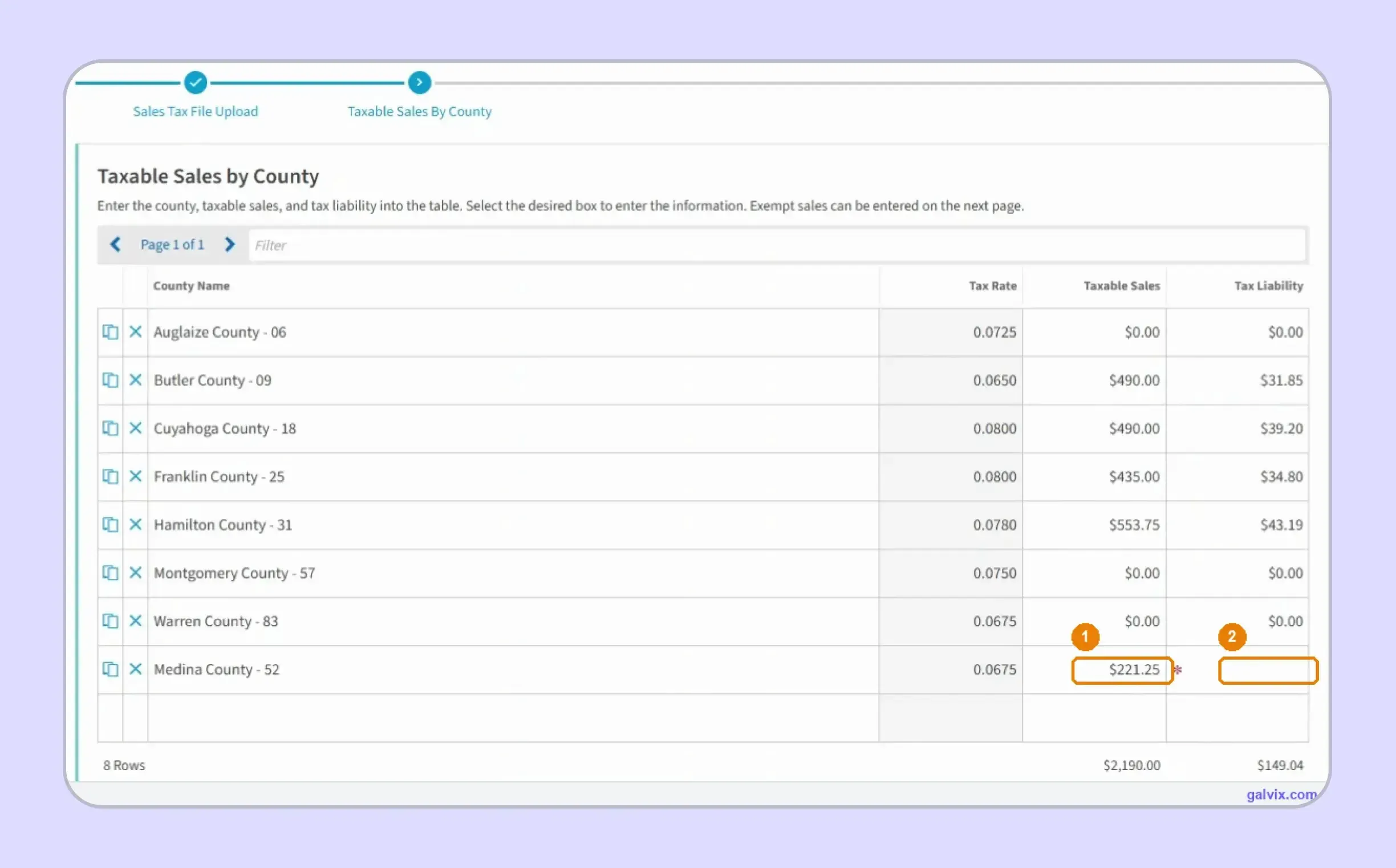
Step 4: Enter Taxable Sales and Tax Liability by County
Enter taxable sales beside every applicable county, then calculate and type its Tax Liability using the displayed percentage. Add newly used counties when they are missing from the existing grid.
OH|TAX shows each county rate without checking your calculation. A required Tax Liability field can contain the wrong number and still appear complete, so verify taxable sales multiplied by the displayed rate independently.
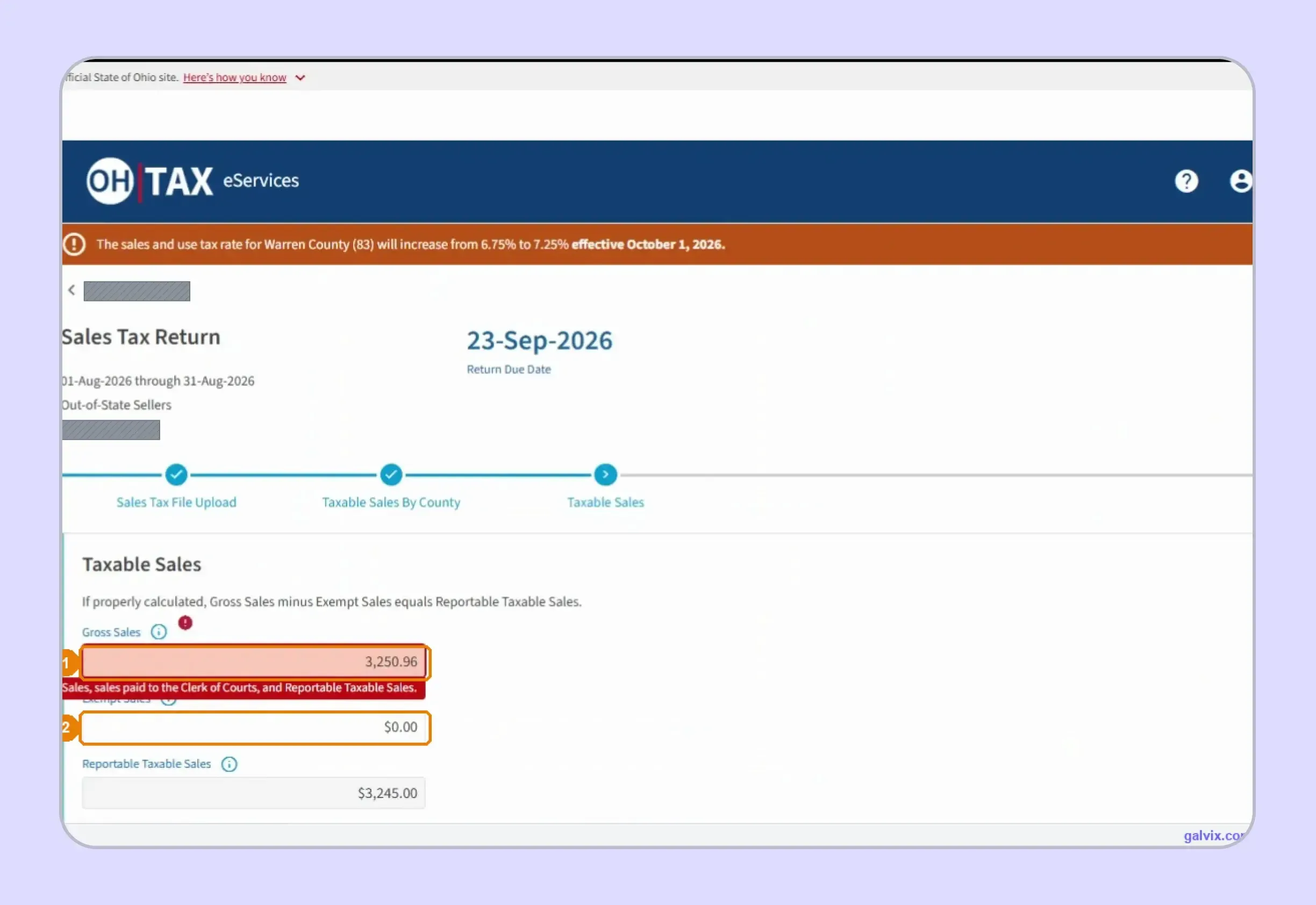
Step 5: Enter Gross Sales and Exempt Sales
Enter Gross Sales and Exempt Sales on the statewide screen. OH|TAX calculates Reportable Taxable Sales and then compares that amount to the county schedule before allowing the filing process to continue.
Your totals must reconcile to the penny. Gross Sales must equal Exempt Sales, applicable Clerk of Courts sales, and Reportable Taxable Sales, so a mismatch turns the field red and blocks progress.
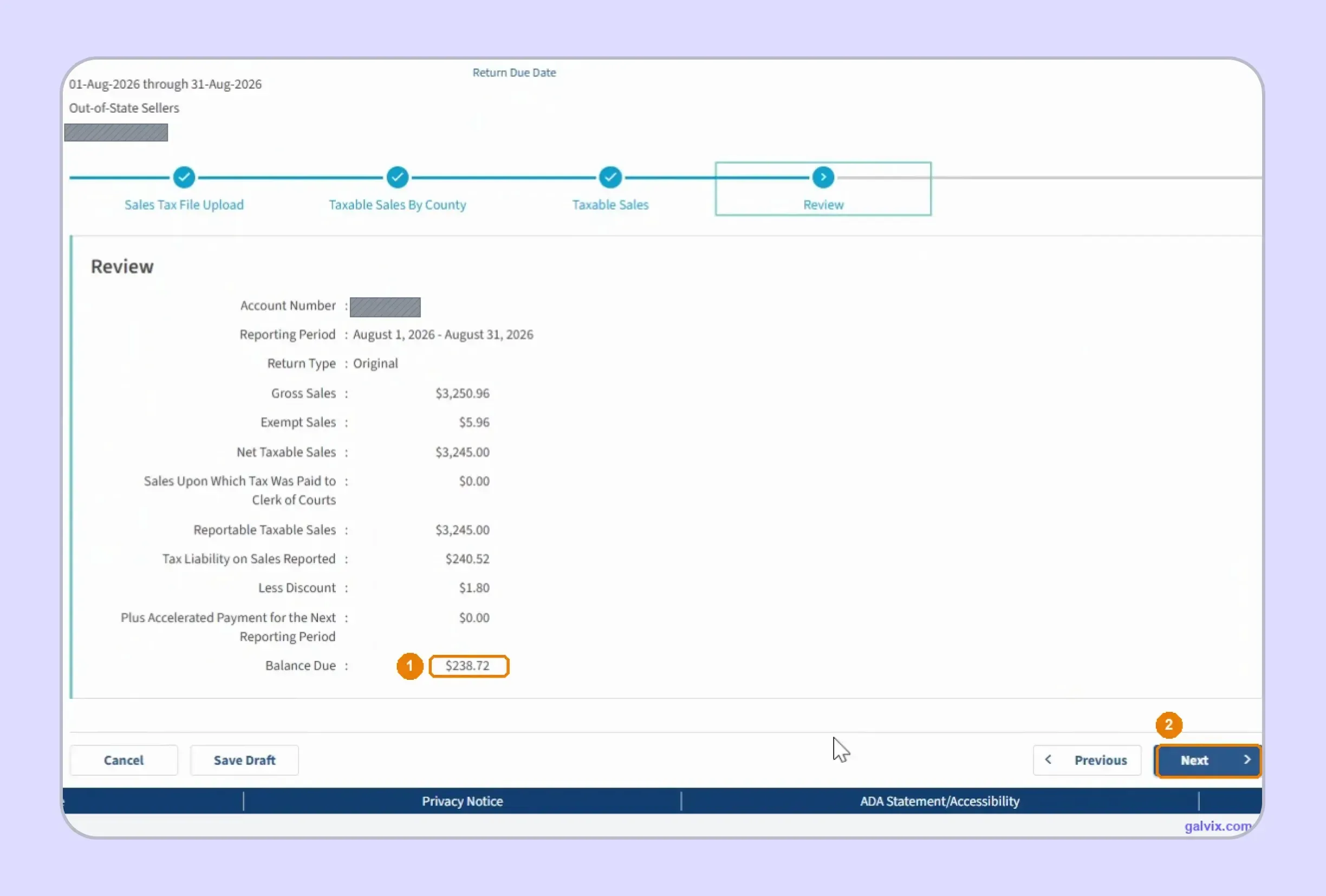
Step 6: Review Tax Liability and the Discount
Review net taxable sales, reported liability, the timely-filing discount, and Balance Due before proceeding. OH|TAX calculates the discount automatically when the return qualifies, so compare the final figures with your records.
Step 7: Confirm the Payment
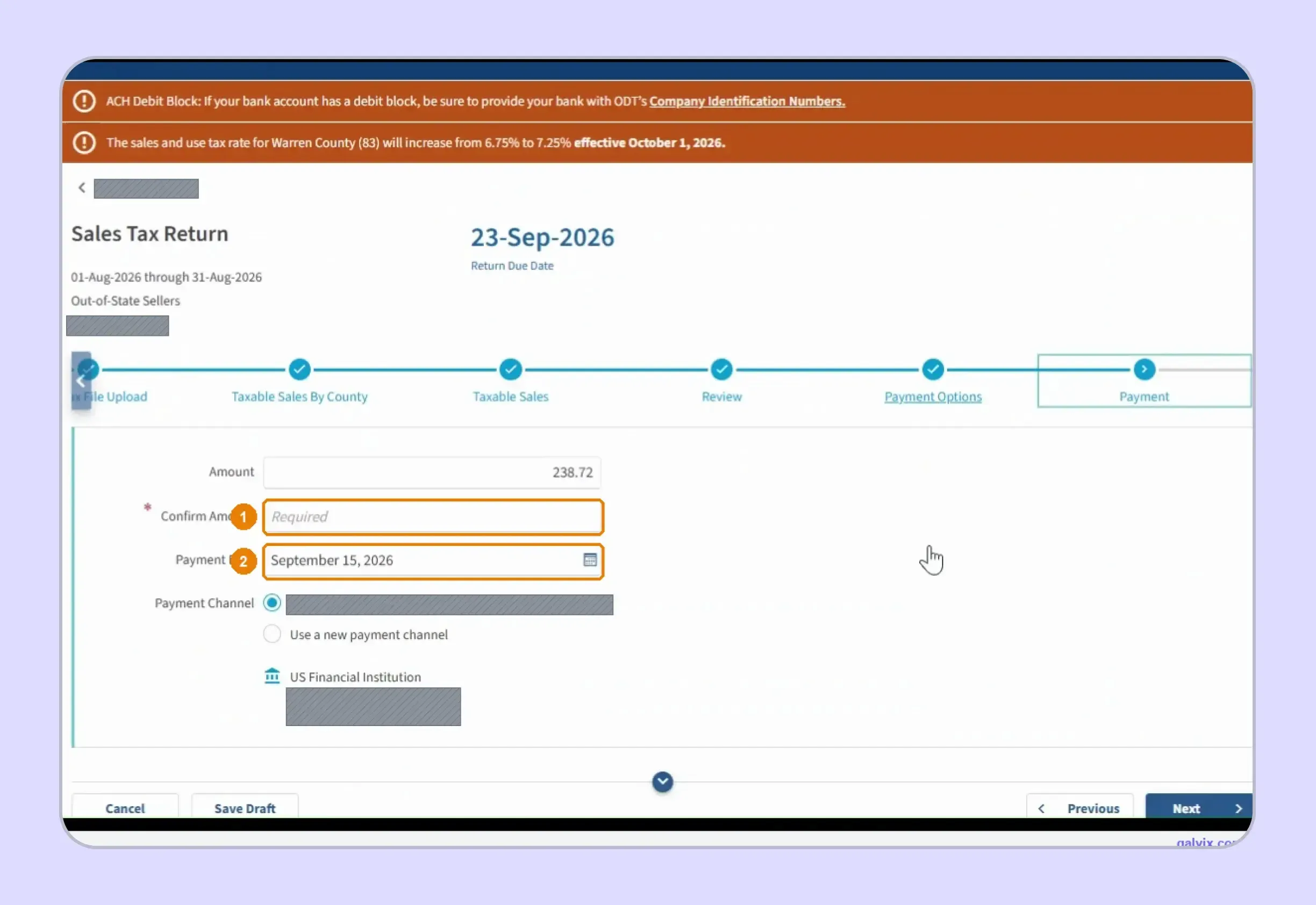
Businesses learning how to pay sales tax in Ohio online must re-enter the payment amount, select the payment date, and confirm the saved bank channel. ACH debit is integrated into this return workflow.
The payment date can default to the day you file rather than the deadline. Change it here if you want the debit scheduled for the due date, since no later screen adjusts it automatically.
Step 8: Submit and Save the Confirmation
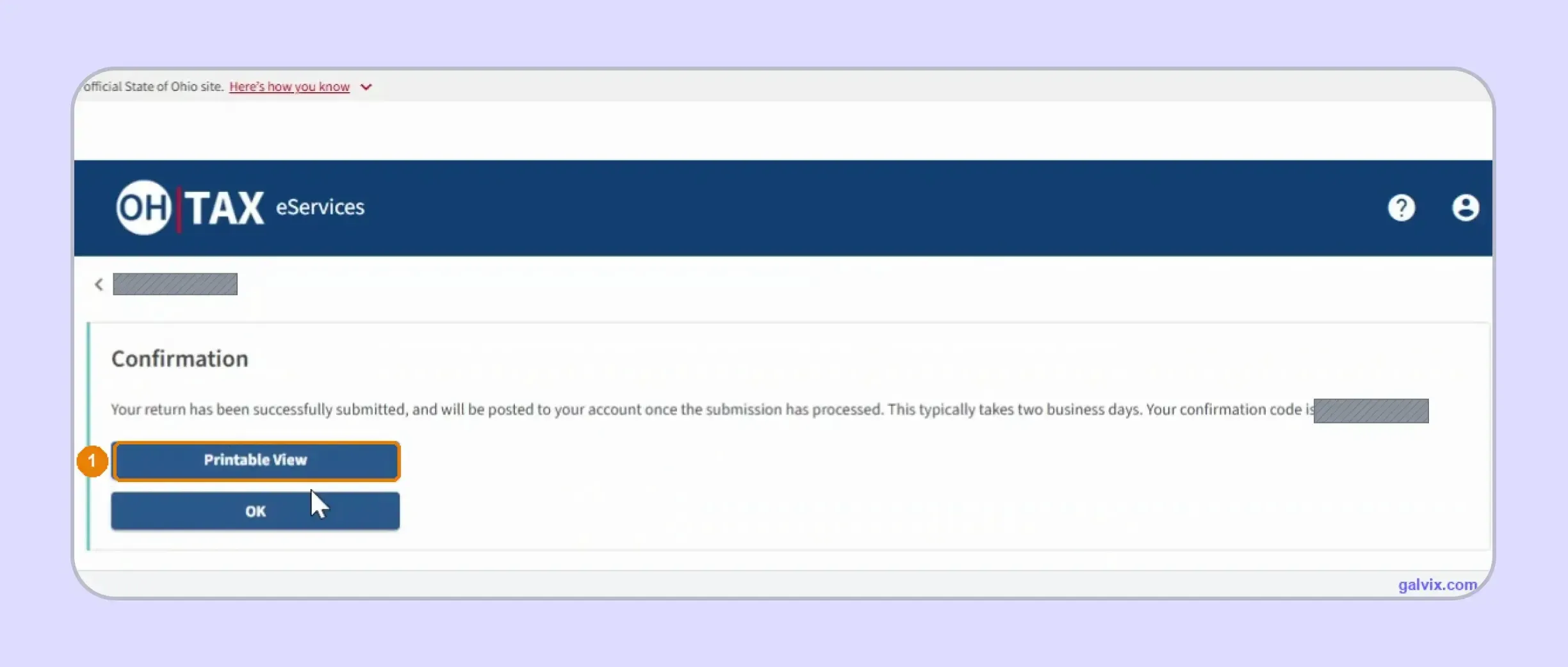
Complete submission and wait for the Confirmation screen before leaving OH|TAX. Save the confirmation code or Printable View because this is your clearest evidence that the sales tax return was transmitted successfully.
Reaching payment does not mean the return was filed. Only the final confirmation proves submission, so save the code immediately and retain it with the return if the state later questions timely filing.
What Does OH|TAX Check and What Does It Leave to You?
OH|TAX strongly validates the relationship between statewide and county sales figures. It does far less validation of county tax math, so successful submission does not automatically mean every county liability was calculated correctly.
| OH|TAX Checks or Calculates | You Still Need to Get Right | | :--- | :--- | | Gross and exempt sales reconciliation | County-level taxable sales | | Reportable taxable sales | County tax liability | | Timely-filing discount | Correct county assignment | | Final Balance Due | Newly used counties | | Payment amount carried forward | Payment date |
Gross Sales Must Reconcile to the County Schedule
OH|TAX checks the relationship between your statewide totals and county data before the return advances. Reportable Taxable Sales comes from the county schedule, while Gross Sales must reconcile with exemptions and applicable Clerk of Courts activity.
This validation helps catch missing differences before submission. It does not explain why a difference exists, so your own records still need to account for marketplace treatment, exemptions, refunds, or other adjustments.
For businesses asking how to fill out sales and use tax return in Ohio fields, this distinction is important. The portal validates the relationship between figures rather than rebuilding them from your underlying transaction data.
County Tax Math Remains Your Responsibility
The county grid handles tax liability differently. OH|TAX displays the rate and requires a tax amount, yet it does not verify whether the amount equals taxable sales multiplied by that rate.
You therefore need an independent calculation before submission. This is especially important when Ohio sales span counties with different percentages, or when a quarterly rate change affects the timing of purchases.
The portal’s live Warren County notice illustrates this risk. It flagged an increase from 6.75% to 7.25% effective October 1, 2026, reminding filers to use the rate associated with the period being reported.
How Does Ohio Reward On-Time Filing and Payment?
Ohio gives qualifying vendors a 0.75% timely-filing discount when the UST-1 return and full payment are received by the state by the deadline. For returns due from January 1, 2026, the standard discount is capped at $750 per vendor’s license for each month covered.
The Discount Is Calculated Automatically
You do not need to calculate the discount yourself. OH|TAX applies it when the return qualifies and reduces the final balance shown before payment.
The important point is that both filing and payment must be on time. Filing the return by the deadline but paying the full tax due later means you lose the discount.
From 2026, the standard cap is $750 per vendor license per month covered by the return. Qualifying sales or leases of motor vehicles are treated separately when Ohio applies this cap.
Payment Timing Still Needs Your Attention
Monthly UST returns are normally due on the 23rd day of the month after the reporting period. Semiannual filers generally use July 23 and January 23. If a deadline falls on a weekend or holiday, it moves to the next business day.
When paying through OH|TAX, check the scheduled debit date before submitting. The portal can show a payment date earlier than the actual deadline. If your bank uses an ACH debit block, make sure Ohio’s required company identification information is approved beforehand.
You can also make a credit card payment, although the payment processor charges a convenience fee. Remember that making a payment does not replace filing the return. Both steps must be completed for the period.
What Are the Main Ohio Sales Tax Filing Requirements?
Your requirements depend on account type and assigned schedule. Most vendors use UST-1, report taxable activity by county, file electronically, and meet the deadline shown in OH|TAX. Remote sellers may instead use the seller’s use tax account flow.
| Requirement | Ohio Rule |
|---|---|
| Main vendor return | UST-1 |
| State rate | 5.75% |
| Reporting basis | Destination and county-level sales |
| Portal | OH|TAX eServices through OHID |
| Standard monthly deadline | 23rd of following month |
| Vendor filing frequency | Monthly or semiannual |
| Economic threshold | Over $100,000 or 200 transactions |
| Timely discount | 0.75% |
| 2026 standard discount cap | $750 per license per month |
| Zero activity | Return still required while active |
The county structure makes destination data central to Ohio sales tax filing requirements. Ohio’s Finder should be checked whenever addresses, jurisdiction boundaries, or rates change, since the applicable county tax can vary even when the product stays the same.
If Ohio is one of several states you manage, comparing these destination-based rules with other jurisdictions through a sales tax by state resource can make multistate filing easier to plan.
How Do Exempt Sales Affect an Ohio Sales Tax Return?
Exempt activity reduces the amount left as reportable taxable sales. Ohio requires supporting documentation for relevant exemptions, so the Line 2 figure should trace back to specific customers and transactions rather than serving as a balancing amount.
Exemption Certificates Need to Match the Transaction
Ohio uses unit exemption certificates for individual purchases and blanket certificates for ongoing exempt purchases from the same seller. Qualifying buyers may also use approved multistate or Streamlined forms.
Keep the certificate tied to the purchaser, exemption reason, and transaction. This is especially important when the same customer buys both taxable and exempt tangible personal property.A practical exemption certificate guide can help you separate certificate collection from the transaction-level review needed before treating a sale as exempt.
Certificate Collection Does Not Replace Eligibility Review
An exemption certificate documents the customer’s claim. You still need to confirm that the buyer, product, stated use, and sourcing facts support the treatment applied under Ohio law.
That distinction helps protect your return when an auditor or other tax authorities review the records later. Unsupported exempt treatment can create additional tax, penalties, and interest charges even when a document exists somewhere in the customer file.
The Galvix Sales Tax Exemption Certificate Tool can help identify the relevant documentation route and seller checks before exempt activity reaches return preparation. It supports certificate review while keeping the final eligibility decision tied to the specific transaction.
Why Does Manual Ohio Filing Get Harder as Your County Footprint Grows?
Manual Ohio filing becomes harder as your sales spread across counties, channels, and additional states. The portal still expects clean county allocations and reconciled statewide totals, so growth increases the preparation work that happens before you ever open the return.
- County Coverage Keeps Expanding: Each new destination adds another rate and county allocation to review. Your team needs current address data and tax calculations before the county schedule can be completed confidently.
- Rate Changes Add Another Check: A county can change its rate between reporting periods. Carrying an old percentage forward can create an incorrect liability even when the taxable amount itself is accurate.
- Marketplace Activity Changes Reconciliation: Direct and facilitated sales can feed the return differently. Your team needs marketplace transactions classified correctly before Gross Sales and Exempt Sales are entered.
- Multistate Growth Multiplies Deadlines: Once you operate across states, separate filing deadlines, portal credentials, notices, exemption rules, and payment schedules compete for the same finance-team attention.
At this stage, the question of how to file OH sales tax becomes less about navigating OH|TAX and more about keeping transaction data ready for reliable sales tax compliance every period.

How Does Galvix Help Businesses File Ohio Sales Tax Online?
Galvix manages recurring sales tax compliance as a service. Transaction data is reconciled before filing, a specialist prepares and reviews the return, and your team approves the figures before Galvix submits the filing on the required schedule.
For businesses that file Ohio sales tax online, this can include organizing taxable sales by county, reviewing marketplace treatment, checking exemptions, and preparing reconciled return totals. That removes much of the repeated county-level work from the internal finance team.
The workflow also helps when sales data sits across several systems. Galvix supports sales tax integrations with Shopify, QuickBooks, NetSuite, Stripe, BigCommerce, WooCommerce, Zoho Books, and Microsoft Dynamics Business Central. API connections and CSV or XLSX uploads are also available.
For ecommerce sellers, the Shopify integration can bring store transactions into the wider compliance workflow while keeping marketplace and other channels visible. Businesses that use accounting data can connect via the QuickBooks integration. Galvix can securely import relevant transaction and customer data, so return preparation does not depend on repeatedly rebuilding spreadsheets.
Ohio filing can also be integrated with nexus monitoring, registrations, tax determination, certificate management, and notice handling. This is useful when one Ohio sales tax return online is part of a broader multistate workload rather than an isolated monthly task.
Galvix uses modular pricing. You select only the services your business needs, and the exact price depends on the workload associated with each module. There is no separate platform fee. The Galvix pricing model shows the workload driver for each service rather than applying one bundled price to every customer.
What Can Galvix Manage for Ohio Sellers?
- Reconcile taxable activity across every relevant Ohio county.
- Review direct and marketplace transaction treatment before filing.
- Check exemption support before reducing the taxable base.
- Prepare returns for specialist review and customer approval.
- Track filing schedules, payments, confirmations, and state notices.
- Manage nexus monitoring, registrations, and exemption certificates.
The value becomes clearer as county coverage and state registrations grow. Instead of rebuilding the same sales tax filing process for each jurisdiction, your finance team works from one managed compliance workflow.
Galvix also retains a named compliance manager who understands the account and filing schedule. That gives your team a consistent point of contact when a return changes, a notice arrives, or another state registration becomes necessary.
If your goal is to file Ohio sales tax returns online without maintaining county-specific calculations and deadlines internally, Galvix can take over the recurring operational work while your team retains visibility into approvals.
Book a demo to review your Ohio filing workflow before transaction volume and county coverage create more recurring work.
Frequently Asked Questions
Can I amend an Ohio sales tax return online?
Yes. You can amend a previously filed return through OH|TAX after the original submission has processed. Open the relevant account and period, choose the option to view or amend the return, correct the affected figures, and resubmit. Keep the new confirmation with the original tax returns and supporting records.
Can I file my Ohio taxes online for free?
Yes. You can file Ohio sales tax online through OH|TAX eServices without a filing charge from the state. ACH electronic check payments also carry no state payment fee. A credit or debit card payment uses a third-party processor and carries a convenience fee, so payment method affects the final cost.
How do I change my Ohio sales tax filing frequency?
Ohio assigns your filing schedule based on the account and filing requirements. Vendors commonly file monthly or semi-annually, while other use-tax accounts can follow different schedules. If your activity changes, contact the Ohio Department of Taxation rather than independently changing the frequency shown in your account.
How do I close an Ohio sales tax account?
Close the account using the available OH|TAX account-management process when your business permanently ends the activity that created the obligation. Continue filing every required period until the account is formally closed. Stopping operations alone does not automatically end your filing responsibility, so confirm the account status before discontinuing returns.
How do I fill out an Ohio blanket exemption certificate?
Use Ohio Form STEC B when a purchaser makes a continuing claim of exemption or exception with the same vendor. Complete the purchaser information, exemption reason, vendor details, and required certification accurately. Keep the certificate with your sales records, and then confirm that each transaction qualifies for the claimed exemption.
What happens if an ACH sales tax payment is rejected?
A rejected payment can leave the underlying liability unpaid even when the return itself was submitted. Review OH|TAX, correct the banking issue, and make the payment promptly to reduce potential penalties or interest. Businesses using ACH debit blocks should provide their bank with Ohio’s company identification information before payment.
Can I register for Ohio sales tax through Streamlined Sales Tax?
Yes. Ohio participates in Streamlined Sales Tax, so qualifying sellers can use the multistate registration system instead of completing a separate state application for each participating jurisdiction. Registration does not replace nexus analysis, so confirm your Ohio obligation before choosing the route and keep the resulting credentials available for future filings.