Businesses file Illinois sales and use tax through MyTax Illinois using Form ST-1, the Sales and Use Tax and E911 Surcharge Return. Destination-based retailers may also complete Form ST-2, which separates taxable activity across individual Illinois locations.
Illinois starts with a 6.25% state rate for general merchandise, although local additions can change the final tax rate. Your Illinois sales tax return therefore depends on where transactions are sourced rather than one statewide sales figure.
This blog explains how to file sales tax in Illinois, prepare ST-1 and ST-2 data, claim deductions, review tax due, make payment, and retain filing proof. It also covers important Illinois sales tax filing requirements that changed in 2026.

What Changed for Illinois Sales Tax Filing in 2026?
Several 2026 changes affect IL sales tax filing, especially for remote retailers, grocery sellers, and destination-based businesses. You should update nexus monitoring, product treatment, and location records before preparing the next Illinois sales tax return.
Economic Nexus: Illinois removed the 200-transaction threshold from January 1, 2026. Remote sellers should now monitor whether cumulative gross receipts reach $100,000 during the preceding 12 months. Reviewing the current Illinois sales tax nexus rules helps businesses track when registration and collection obligations begin.
Because Illinois uses a rolling measurement window, the threshold should be reviewed continuously rather than only at year-end. Understanding how economic nexus reference periods work can help teams avoid missing a threshold created between regular compliance reviews.
Missing Destination Information: Destination-based sellers need enough records to identify the correct location for each sale. If IDOR cannot determine the destination, it can assess gross receipts assigned to undetermined locations at a 15% rate.
This makes destination records especially important for businesses shipping to many Illinois customers. The portal may calculate the mathematics correctly while the underlying tax liability remains wrong because the transaction was assigned to the wrong location.
Grocery Tax: The State of Illinois eliminated its statewide 1% grocery tax on January 1, 2026. Municipalities and counties can impose their own 1% grocery tax, so grocery reporting still depends on location.
School Sales Tax Holiday: Qualifying clothing, footwear, and school supplies sold from August 7 through August 16, 2026 receive reduced state sales tax treatment. The seller must use Schedule K-12 to claim the related credit.
For reporting periods January 2026 onward, revised ST-1 and ST-2 forms apply. These changes affect how retailers prepare receipts, destination data, grocery reporting, and several other return lines.
Which Filing Path Applies to Your Illinois Sales Tax Return?
Your registration controls the filing path shown inside MyTax Illinois. You do not choose between destination-based Retailers' Occupation Tax, origin-based Retailers' Occupation Tax, and use tax while completing the return.
| Filing Path | How It Works |
|---|---|
| Destination-based ROT | Reports receipts by destination through Form ST-2 |
| Origin-based ROT | Uses the applicable rate at the seller's qualifying Illinois location |
| Illinois Use Tax | Uses the applicable use-tax reporting path without destination ST-2 allocation |
Destination-based retailers report local tax based on where the customer receives the property. Form ST-2 supports the Illinois sales tax return by allocating receipts across the relevant city or county. This approach follows Illinois' Leveling the Playing Field rules, which expanded destination-based responsibilities for in-state retailers and remote sellers making taxable sales into Illinois. When customers are spread across several jurisdictions, checking sales tax rates by city can also help identify where combined rates differ before return preparation begins.
Your filing path may differ if you qualify for origin-based sourcing or collect Illinois use tax voluntarily. That is why you should confirm the registration attached to your MyTax Illinois account before preparing return data. Your sales tax registration determines the reporting method and whether ST-2 location reporting applies.
If you are not registered yet, submit Form REG-1, the Illinois Business Registration Application, through MyTax Illinois. Once approved, the registration creates the account needed for your Illinois sales tax permit and future returns. Keep those details updated whenever your locations or tax responsibilities change.
What Data Should You Prepare Before Filing in MyTax Illinois?
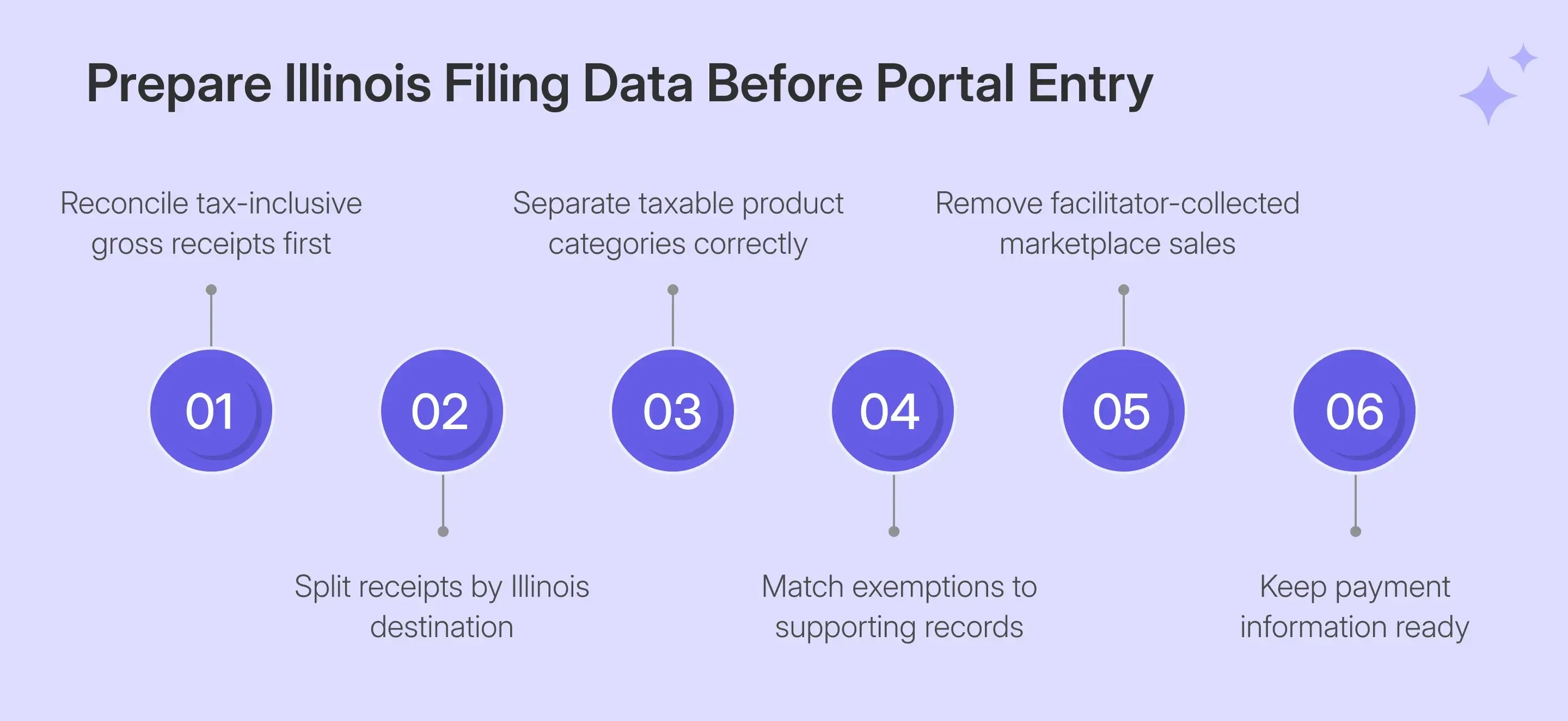
Before starting an Illinois sales tax return online, reconcile the figures that will feed ST-1, Schedule A, and ST-2. The portal performs several calculations, although the quality of the sales tax return still depends on the information you enter.
| What You Need | Why It Matters |
|---|---|
| MyTax Illinois login | Opens the correct ST-1 account |
| Gross receipts | Line 1 requires tax-inclusive receipts |
| Schedule A deductions | Supports deductions carried to Line 2 |
| Receipts by location | Builds destination reporting on ST-2 |
| Product category split | Separates merchandise, drugs, groceries, and other receipts |
| Exemption records | Supports resale and other qualifying deductions |
| Payment information | Supports electronic payment after filing |
These records should be prepared before online filing begins, especially when transactions come from several billing systems. Clean preparation reduces the need to rebuild figures while moving through the return.
- Gross Receipts: Line 1 includes all gross receipts for the reporting period, including state taxes and applicable local taxes collected. Using pre-tax gross sales understates the amount reported on ST-1.
- Location Data: Destination filers should prepare receipts by actual destination before opening ST-2. IDOR expects supporting documents to identify the delivery location used for destination-based transactions.
- Product Categories: Separate general merchandise from qualifying drugs, medical appliances, groceries, and other applicable categories. The portal can apply sales tax rates correctly only after receipts reach the proper reporting bucket. If you need to sense-check a destination rate before filing, the sales tax calculator can show the combined state, county, city, and district components for a ZIP code.
- Exemption Support: Resale and other deductible transactions should already have supporting sales records. A document can support the exemption claim, while the underlying transaction still needs to qualify for that treatment.
- Marketplace Data: Separate facilitator-collected marketplace transactions from your own direct sales before preparing ST-1. Illinois instructs marketplace sellers to leave facilitator-collected marketplace sales off their own return.
How Do You File Illinois Sales Tax Online in MyTax Illinois?
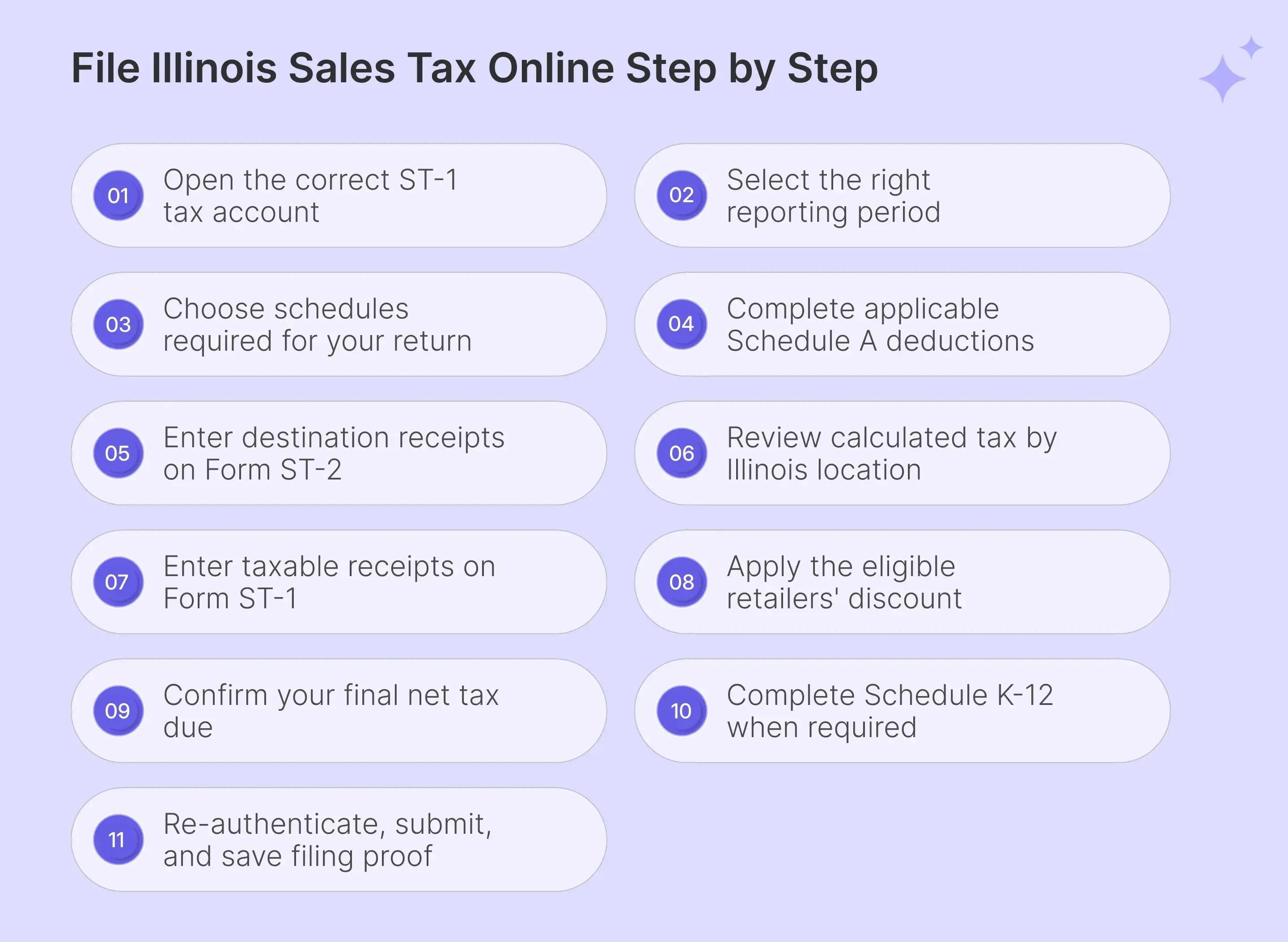
To file Illinois sales tax online, work through the ST-1 flow in order and verify each calculated value before submission. Destination-based filers should pay particular attention to ST-2 because location assignment determines the local tax applied to taxable transactions.
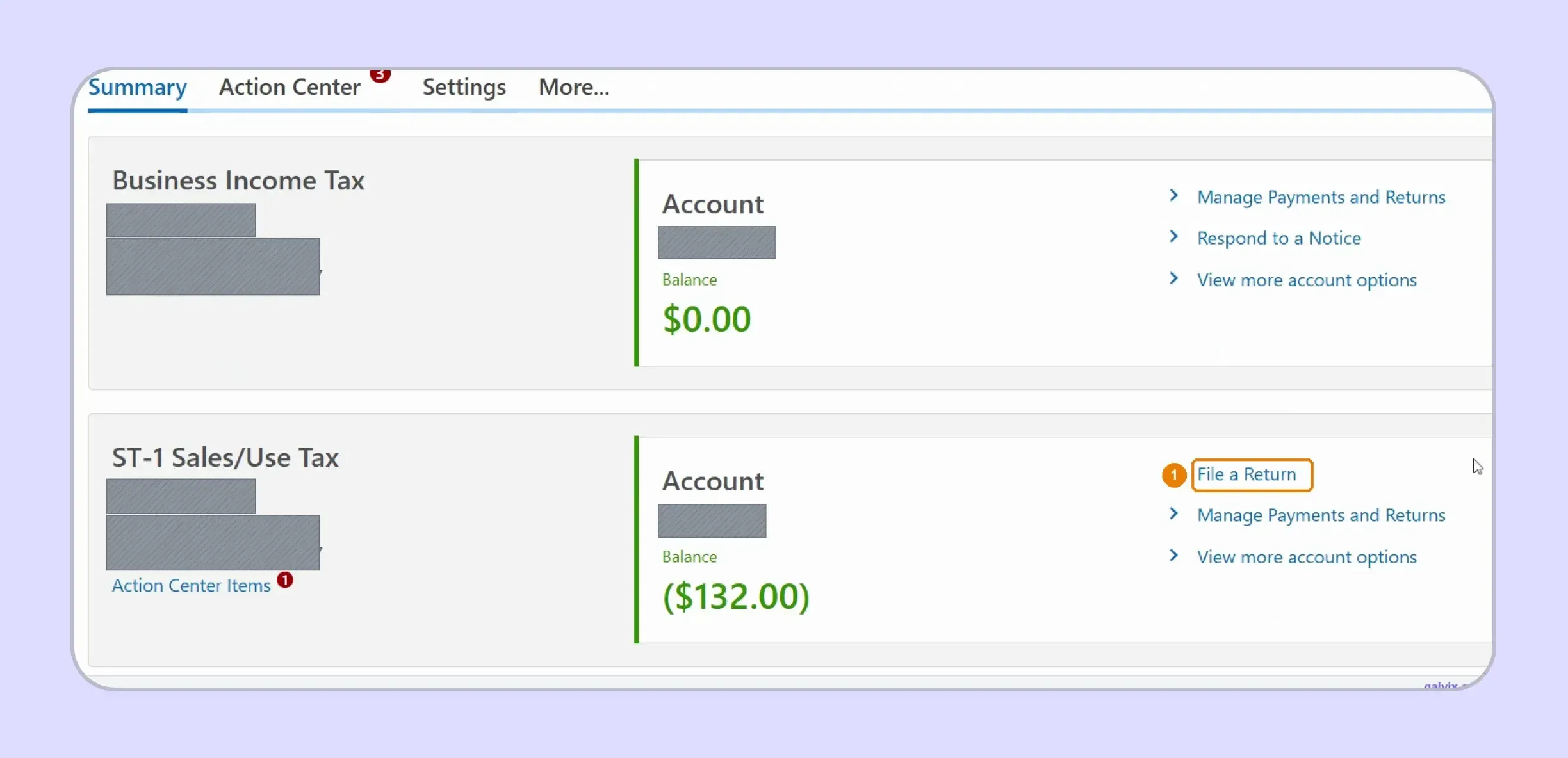
Step 1: Open the ST-1 Account
Sign in and open the ST-1 Sales/Use Tax account from your account summary. Select File a Return, then confirm you are working inside the correct registered business profile.
Step 2: Select the Correct Reporting Period
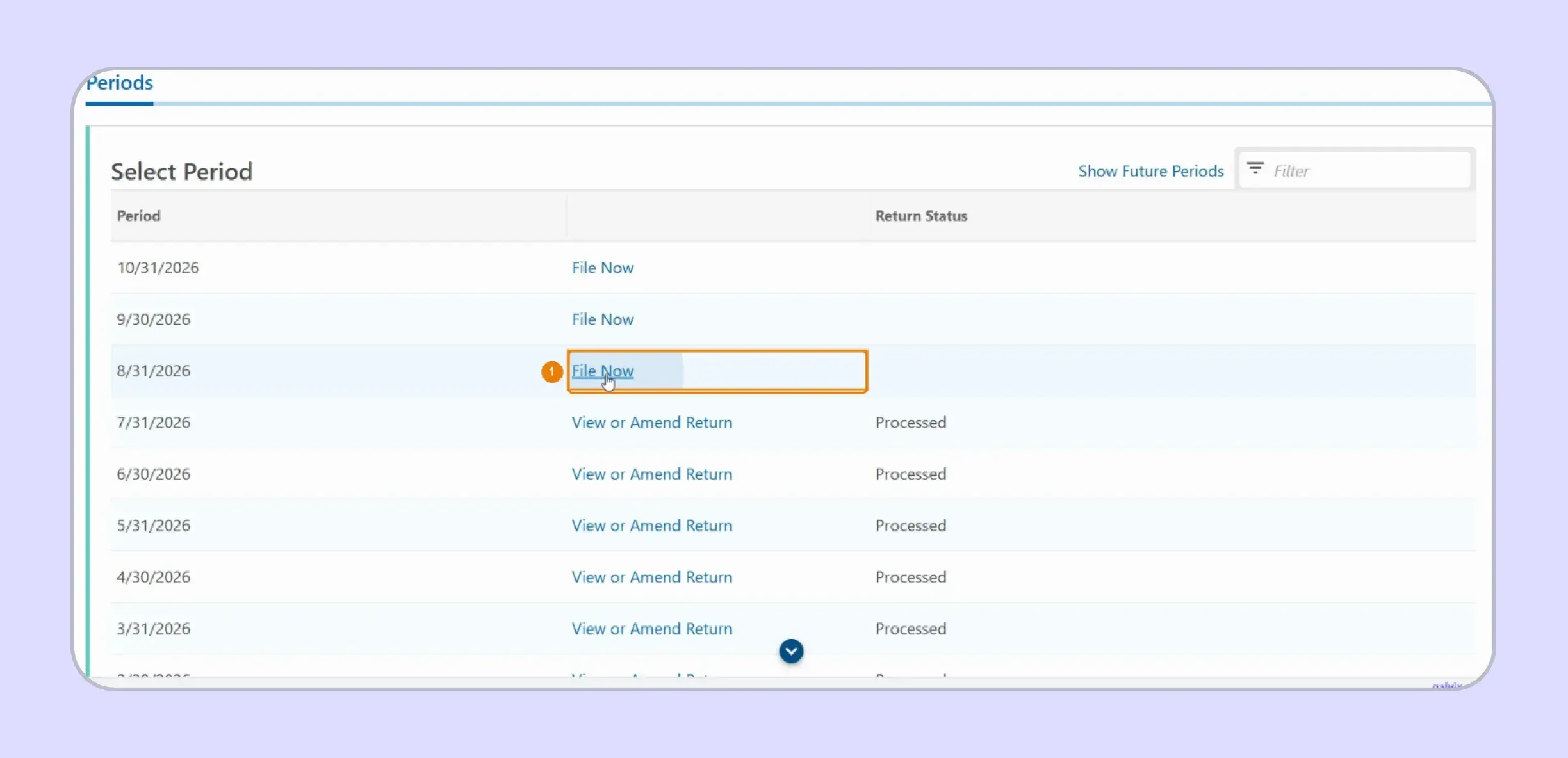
Choose File Now beside the period you need to complete. MyTax lists open and processed periods together, so check the period-end date before starting the Illinois sales tax return.
The portal can display future periods before those months have ended. Match the period-end date carefully rather than selecting the first File Now option appearing at the top.
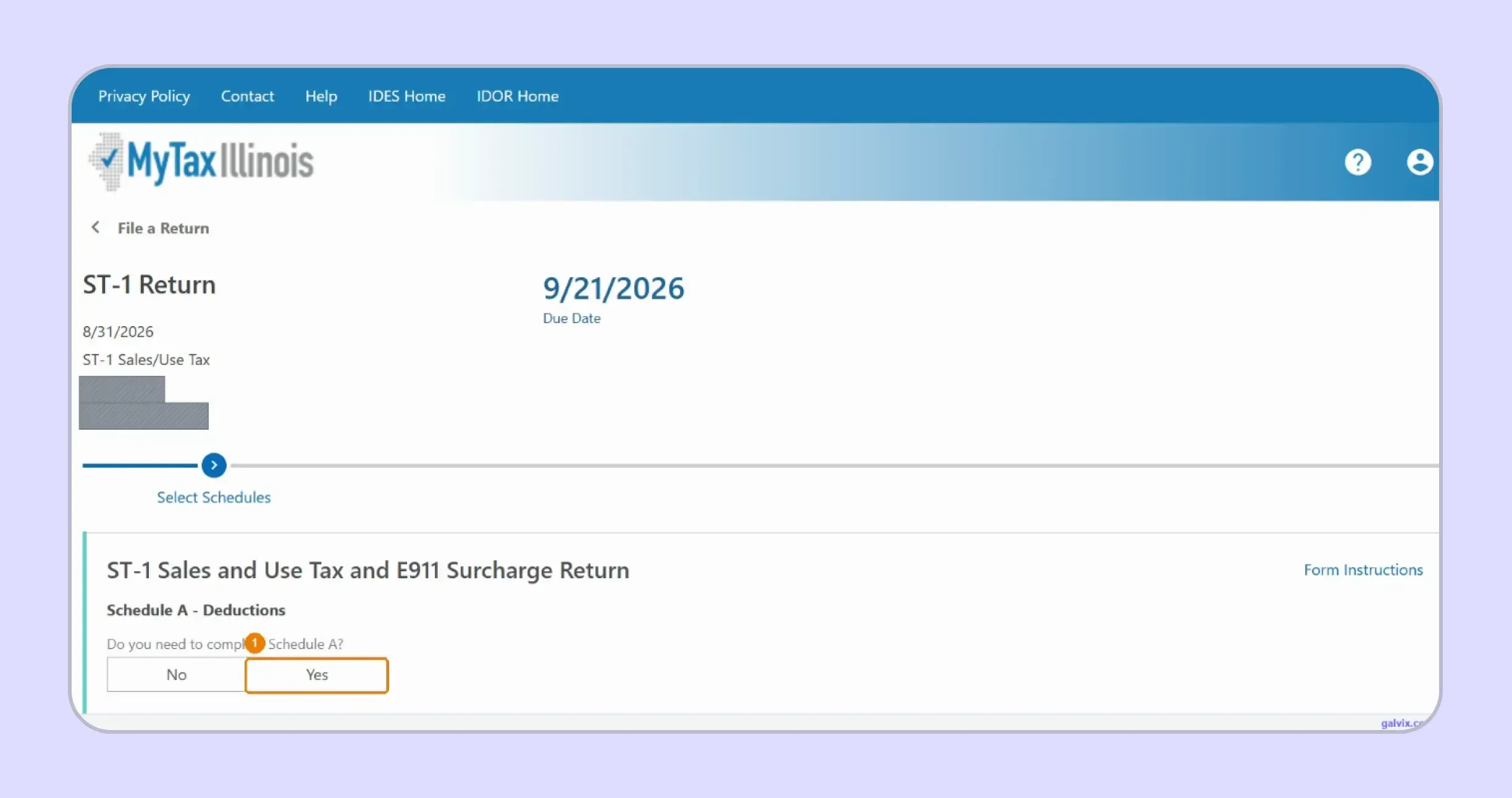
Step 3: Choose the Required Schedules
Select the schedules applying to your return, including Schedule A for deductions and Schedule B where E911 reporting applies. Choosing Schedule A opens its deduction worksheet before receipts reporting begins.
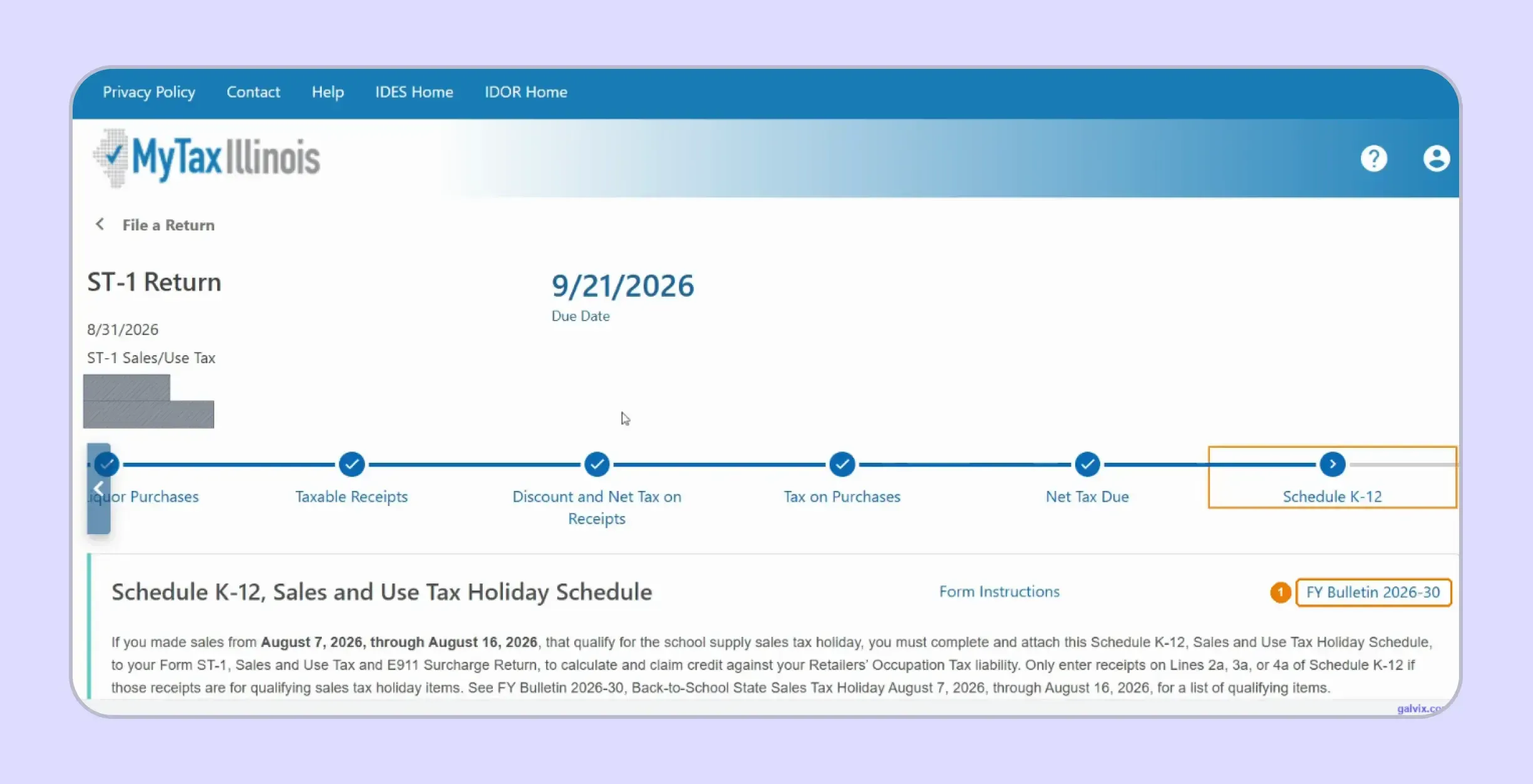
Step 4: Complete Schedule A Deductions
Enter deductions under their proper Schedule A categories, including tax collected, resale, interstate commerce, and qualifying equipment. The completed Schedule A total then carries automatically into Line 2 of ST-1.
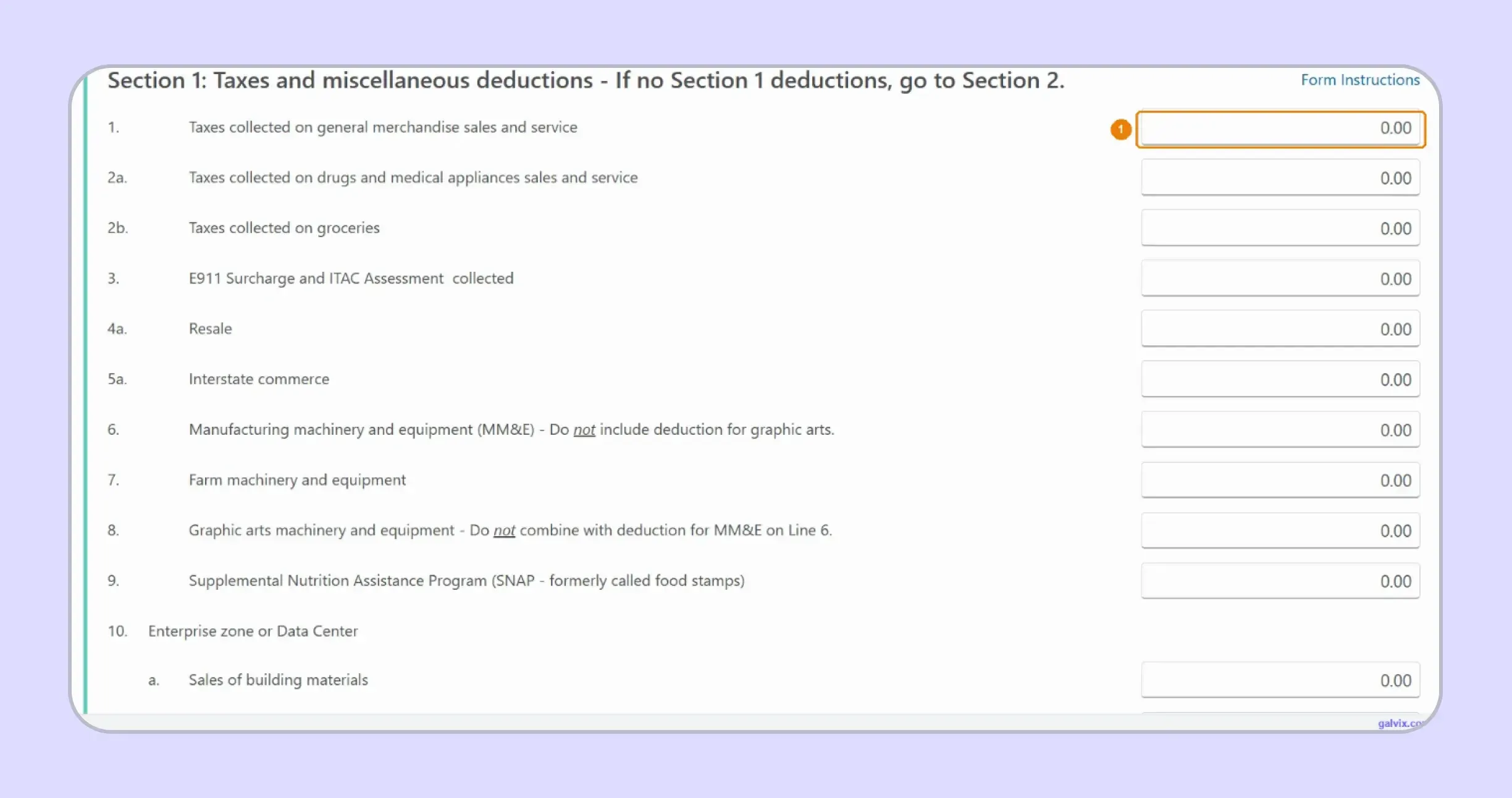
Step 5: Enter Location Receipts on ST-2
Use the ST-2 filter to find Illinois locations with current-period activity, then enter receipts under the correct category. MyTax calculates each location's tax after you provide the receipts.
The location grid reflects registration history rather than current-period activity. A registered location can remain at zero despite having sales, so always work from your destination records.
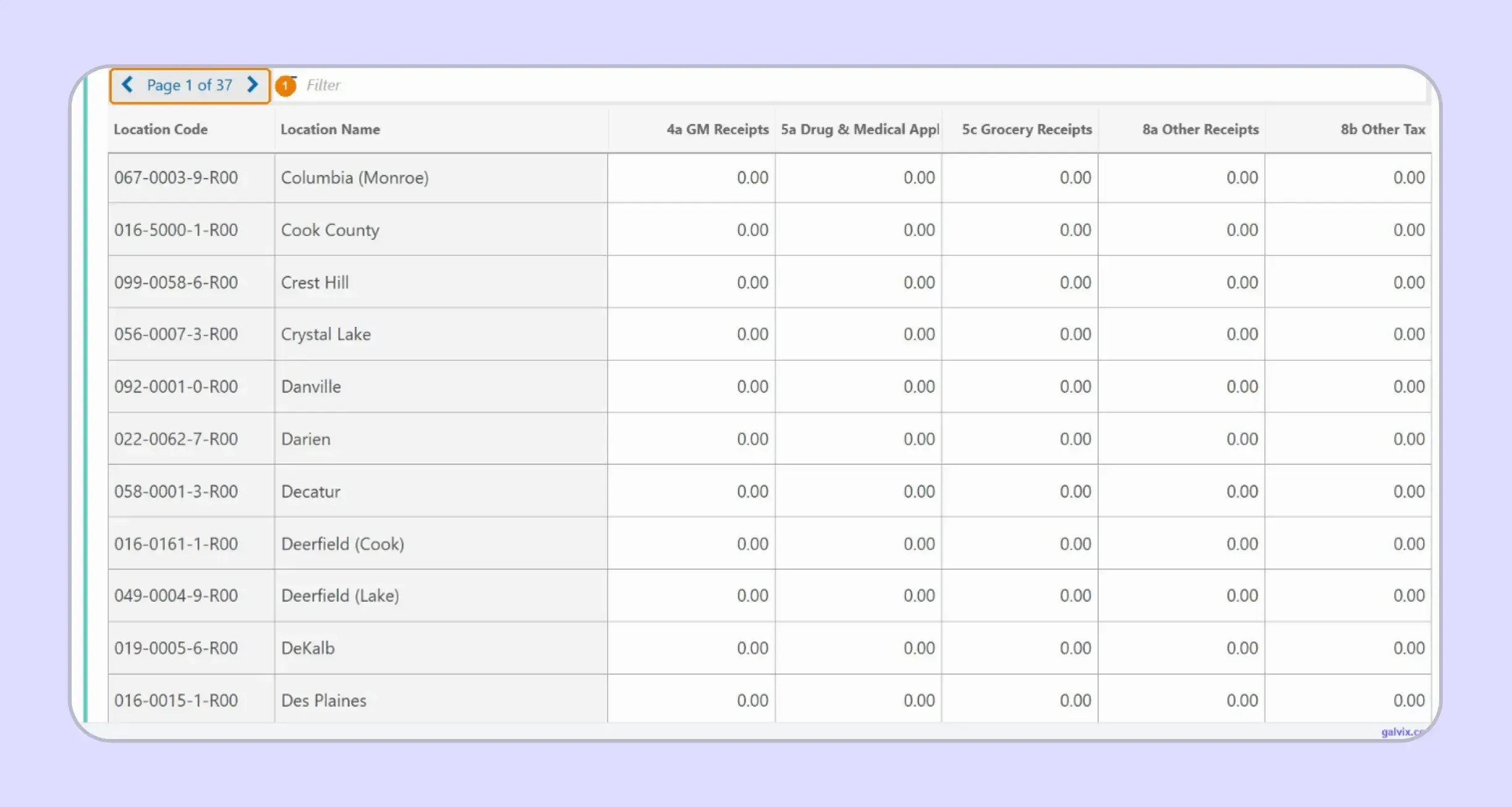
Step 6: Review the Completed ST-2 Grid
Check every populated location for its code, receipts, calculated tax, and Invalid indicator. A valid location code does not prove that you assigned the underlying sale to the correct rate.
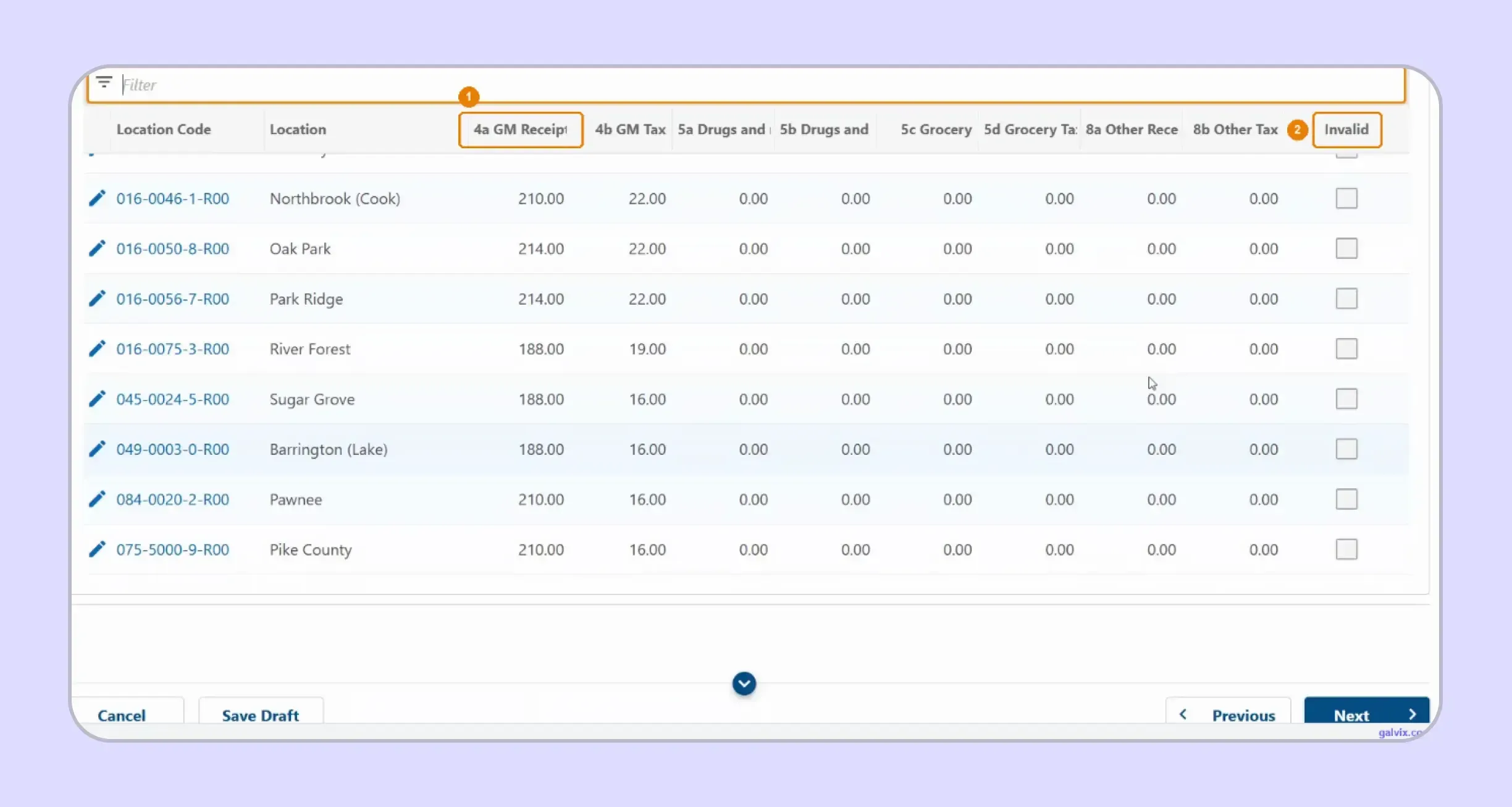
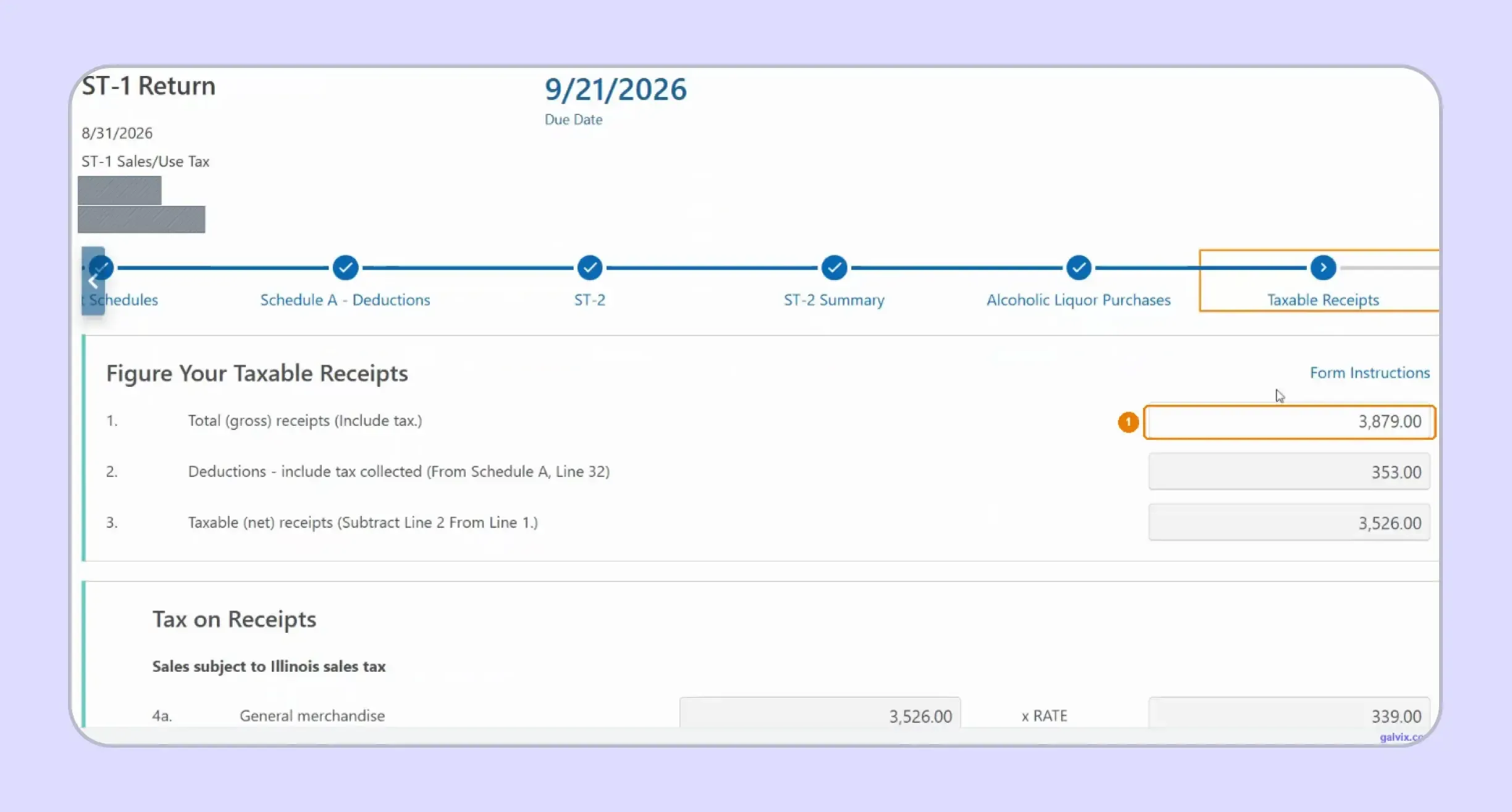
Step 7: Enter Taxable Receipts on ST-1
Enter tax-inclusive receipts on Line 1. Schedule A feeds Line 2, while MyTax calculates Line 3 taxable receipts and the related amount of sales tax from your return data.
Line 1 includes the tax collected from customers. Entering pre-tax revenue understates total sales reported there and affects every downstream line calculated from that figure.
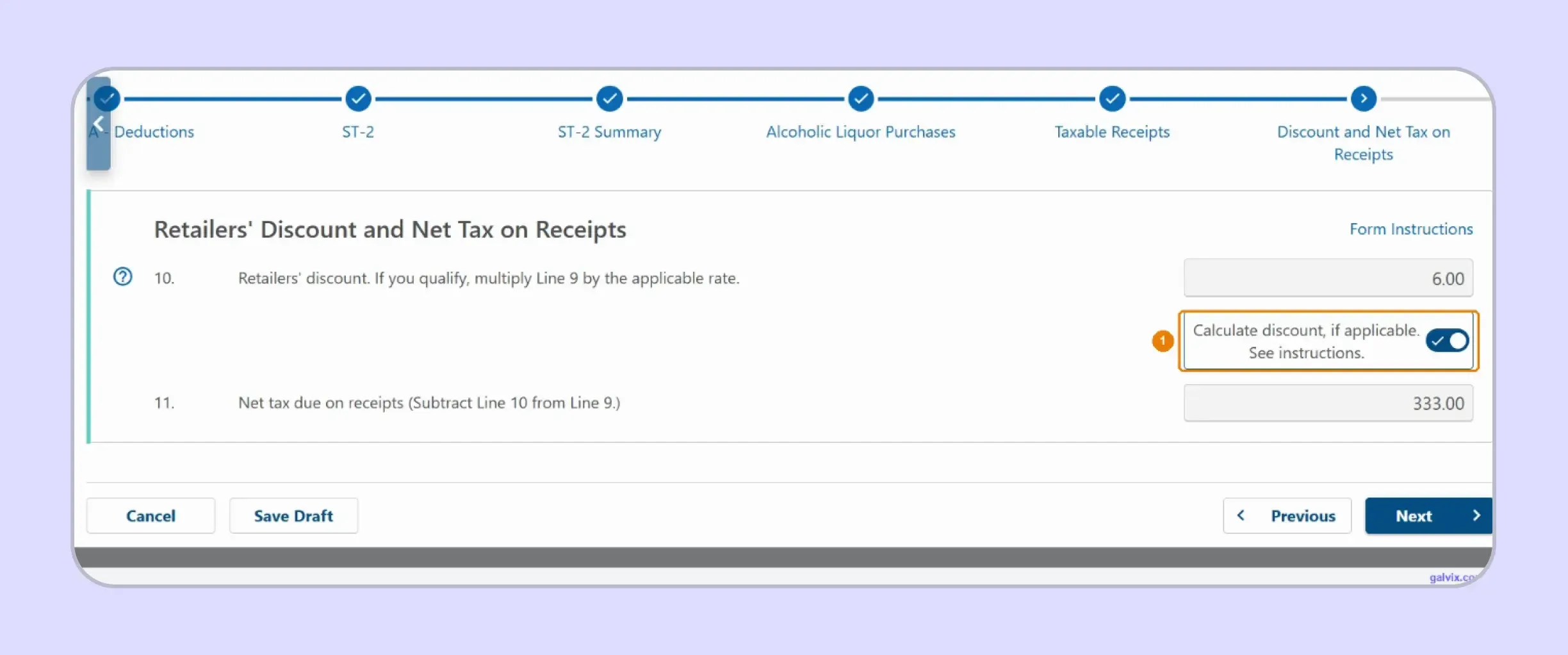
Step 8: Claim the Retailers' Discount
Switch on Calculate discount, if applicable, when you qualify for the retailers' discount. MyTax then calculates Line 10 and reduces the net tax shown on Line 11. Illinois currently calculates the discount at 1.75% of eligible tax due, subject to the monthly cap for timely filing and payment.
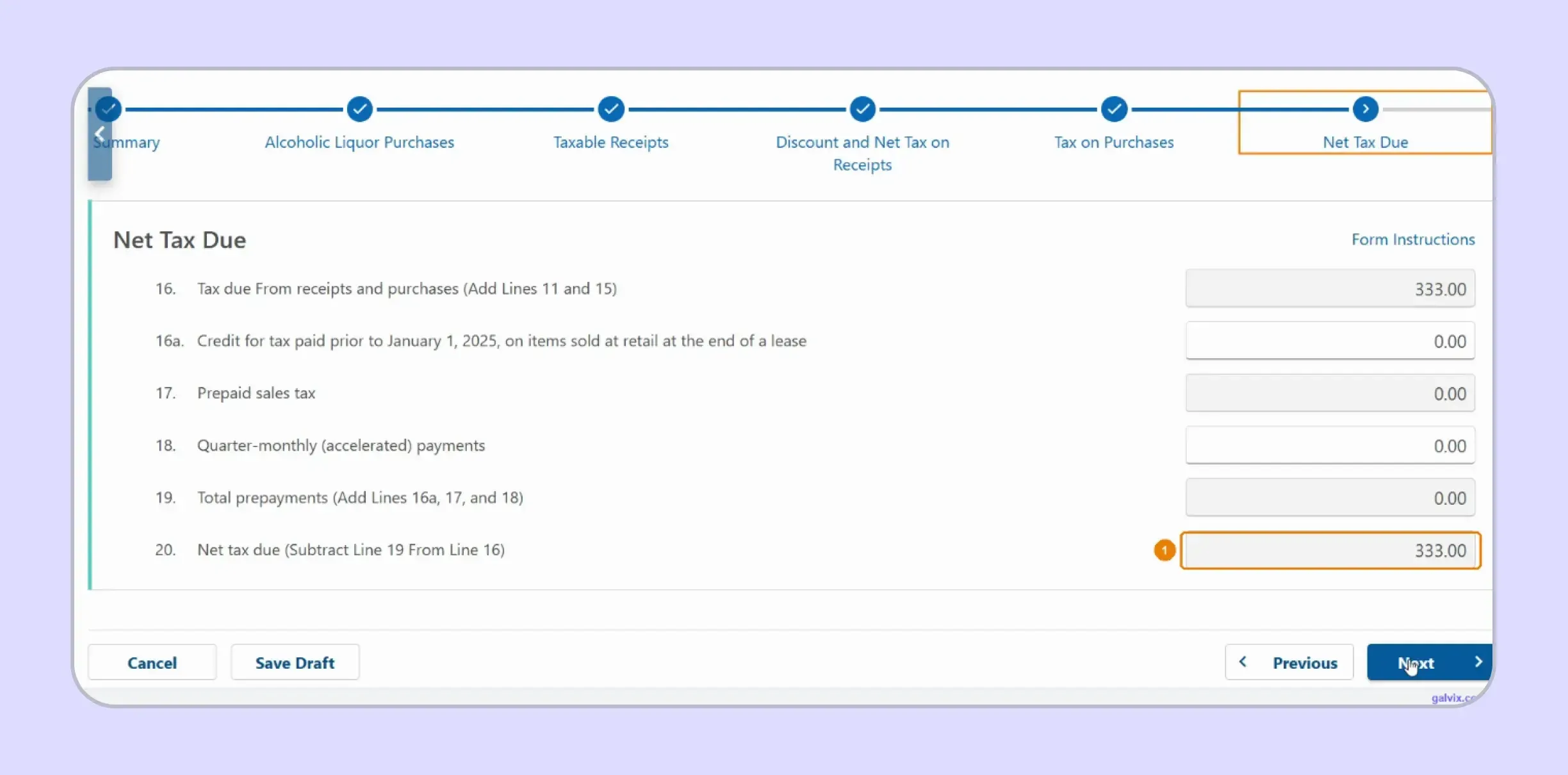
Step 9: Confirm Net Tax Due
Review Line 16 after receipts tax and purchases tax are combined, then check credits and prepayments. Line 20 shows the final net amount before you continue toward submission. This screen helps you confirm how much sales tax remains after applicable credits and prepayments have been applied to the return.
Step 10: Complete Schedule K-12 if Required
For qualifying August transactions, complete the tax holiday schedule for eligible clothing, footwear, and school supplies. Schedule K-12 calculates the credit reflecting the temporary reduction in the State portion.
The school supply sales tax holiday credit requires Schedule K-12. Leaving that schedule incomplete can produce a balanced return that still overstates what you should remit.
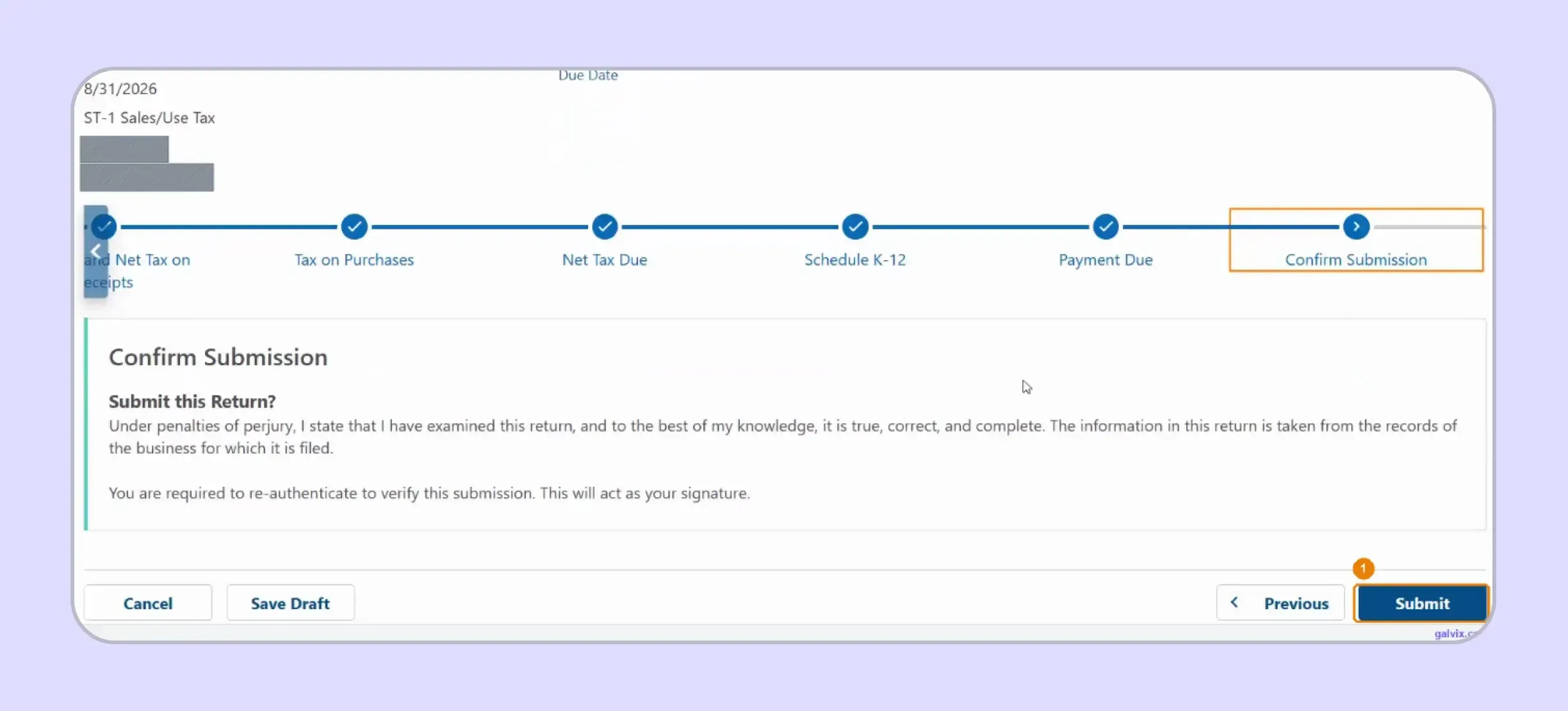
Step 11: Re-Authenticate and Submit
Review the completed Illinois sales tax return before selecting Submit. The portal requires re-authentication, and that verification serves as your electronic signature for the transmitted return.
Step 12: Save Filing and Payment Proof
Save the confirmation number after submission and retain it with your records. If payment occurs separately, keep the payment confirmation because filing and paying can remain separate actions.
Which ST-1 Fields Do You Enter and Which Does MyTax Calculate?
Knowing which values, you enter and which values the portal calculates makes the Illinois sales tax return easier to review. It also prevents your team from duplicating calculations that MyTax already performs.
| ST-1 or ST-2 Field | Treatment |
|---|---|
| Schedule A deductions | You enter each applicable category |
| ST-2 receipts by location | You enter current-period receipts |
| ST-2 location tax | MyTax calculates |
| Line 1 gross receipts | You enter tax-inclusive receipts |
| Line 2 deductions | Carries from Schedule A |
| Line 3 taxable receipts | MyTax calculates |
| Lines 4 through 9 tax | MyTax calculates from applicable rates |
| Line 10 retailers' discount | MyTax calculates after you enable it |
| Line 20 net tax due | MyTax calculates |
The portal can still calculate accurately from incorrectly classified data. You remain responsible for destination sourcing, deduction eligibility, product treatment, and the completeness of taxable sales feeding the return.
The retailers' discount also requires an action from you. For qualifying timely filers, MyTax performs the calculation only after you enable the applicable discount option.
The split also explains why electronic filing does not remove the need for reconciliation. Automation handles calculations, while your source records determine whether the amounts feeding those calculations are reliable.
How Do Exempt and Marketplace Sales Affect an Illinois Sales Tax Return?
Exempt and marketplace transactions can change what reaches your Illinois sales tax return, although they follow different rules. Exempt transactions may support Schedule A deductions, while facilitator-collected marketplace transactions stay outside the seller's own ST-1.
Resale and Exempt Sales Need Supporting Records
Illinois Schedule A includes resale and other qualifying deductions. For resale transactions, the purchaser should provide an Illinois resale certificate or maintain an acceptable blanket certificate before the seller uses that deduction.
The certificate should connect with the purchaser and the transaction receiving exempt treatment. Keeping a document in a customer folder does not establish that every later transaction qualifies.
A consistent sales tax exemption certificate process should therefore separate document collection from registration verification and transaction eligibility. This becomes especially useful when a customer makes both taxable and exempt purchases.
The Galvix Sales Tax Exemption Certificate Tool can help identify applicable documentation requirements and seller checks before exempt transactions reduce the taxable base.
Marketplace and Direct Sales Need Separate Review
Illinois gives specific instructions for marketplace facilitators and sellers using those platforms. Your own non-marketplace sales belong on ST-1, while marketplace sales where the facilitator collected and remitted the tax should remain outside your return.
Do not add those marketplace transactions into Total Receipts and then deduct them through Schedule A. Separating direct activity before return preparation avoids inflating receipts and creating an unnecessary deduction.
Marketplace activity still belongs in your wider sales tax compliance records. Finance teams should reconcile facilitator statements with direct-channel revenue and nexus data rather than treating each filing as an isolated accounting exercise.
When Is an Illinois Sales Tax Return Due?
An Illinois sales tax return is due according to the schedule assigned to your account, with payment generally due alongside it. For ordinary monthly and quarterly returns, the standard deadline is the 20th day of the month following the period.
- Standard Deadline: The due date moves to the next business day when the normal deadline falls on a weekend or qualifying holiday. The August 2026 filing example therefore showed September 21 as its deadline.
- Filing Frequency: IDOR assigns the filing frequency shown on your account and reviews filing status when appropriate. Monthly and quarterly schedules apply to many retailers, while specific taxpayers can have different annual requirements.
- Accelerated Payments: Businesses with an average monthly liability of at least $20,000 can be required to make four payments each month. These payments are due during the month on dates set by IDOR. Electronic payment requirements can also depend on annual liability. Illinois requires electronic payments for Retailers' Occupation and Use Tax when the applicable annual threshold is met.
- Zero Returns: Continue filing required tax returns while the account remains active, even when no sales tax due arises during a period. A registration change or closure requires a separate account update.
- Payment Methods: Businesses can pay online through MyTax Illinois, by eligible ACH methods, or using a credit card for ST-1. Card payments carry a processor convenience fee.
If you need broader general information about rates, deadlines, nexus, and filing, the current Illinois sales tax guide can provide a useful state-level reference.
Why Does Illinois Filing Get Harder as Sales Grow?
Illinois filing becomes harder as transaction volume spreads across additional destinations, product treatments, sales channels, and states. The challenge sits mainly in preparing clean data before filing because MyTax calculates only from the locations and categories you supply.
- More destination rows: Each new Illinois destination can add another ST-2 allocation that must reconcile with your sales ledger. One incorrect jurisdiction can change the tax calculation even when the portal itself works correctly.
- Extra product treatments: General merchandise, groceries, qualifying drugs, exempt transactions, and special holiday products can follow different return treatment. Product classification therefore affects tax collection long before the return reaches final review.
- Multiple sales channels: Direct ecommerce and wholesale invoicing can sit beside facilitator-collected marketplace activity. A third party may remit marketplace tax while your team remains responsible for direct sales reporting.
- Additional registrations: Growing into another jurisdiction can require a new sales tax permit, portal account, filing calendar, and exemption process. These responsibilities also need to remain aligned with your sales systems.
- Multiple states: Expansion creates separate portals, payment processes, notices, sourcing rules, and state-specific deadlines. A sales tax by state comparison helps show where Illinois fits within the wider multistate workload.
This makes Illinois sales tax filing increasingly dependent on transaction quality rather than data entry alone. A dependable source-to-return process gives each filed figure a clear connection to the underlying transaction.

How Does Galvix Manage Illinois and Multistate Sales Tax Filing?
Galvix manages recurring filing as a service rather than giving your finance team another tax tool to operate. Transaction data is reconciled first, and a compliance specialist reviews the prepared return before filing.
For Illinois, that workflow can include reconciling tax-inclusive receipts, preparing Schedule A deductions, organizing ST-2 destination data, and reviewing exemption support. This becomes useful when your business has a large location grid or several transaction sources.
Galvix can connect transaction data through supported sales tax integrations covering ecommerce platforms, billing systems, and accounting tools. APIs and file uploads can also support businesses using other source systems.
For businesses selling through Shopify, the Shopify sales tax integration can bring channel data into the wider compliance workflow. This helps keep marketplace and direct-channel activity visible before return preparation.
Teams using accounting software can connect the same process through the QuickBooks integration. That gives filing specialists access to relevant transaction and customer information without rebuilding the data manually each month.
Larger finance teams can similarly connect ERP activity through the NetSuite integration. That becomes useful when destination information and exemption records sit across several business systems.
The Illinois workflow can also stay connected with economic nexus monitoring, new Illinois registration, exemption certificate management, and notice handling. These functions help maintain continuity from threshold monitoring through registration and eventual filing.
If nexus creates a new obligation, registration should occur before collection and filing begin. The Illinois Department of Revenue allows registration through Form REG-1, which can be completed electronically through its portal.
What Can Galvix Manage for Illinois Sellers?
- Reconcile transaction data before ST-1 preparation
- Prepare ST-2 destination data for review
- Organize deductions and exemption documentation
- Track recurring filing calendars across states
- Monitor nexus and coordinate registrations
- Support payment and notice correspondence
Galvix also keeps the operational work connected after submission. Filing acknowledgments and return records remain part of the managed process, while notice support can address state correspondence related to filed returns.
That approach can reduce the gap between what appears in your Illinois sales tax return and the source information that created it. It also helps prevent state portal work from becoming disconnected from nexus and registration decisions.
Galvix uses modular pricing rather than an all-inclusive platform fee. You select the services needed, while pricing reflects the workload driver for each module, such as returns, transactions, states, or exempt customers.
This structure allows a business to use Galvix for returns preparation without buying every available service. Additional modules can be added when the compliance footprint changes or another state obligation begins.
Book a Galvix demo today to start streamlining your Illinois sales tax return processes.
Frequently Asked Questions
Can I save an Illinois ST-1 return and finish it later?
Yes. MyTax provides a Save Draft option while you work through ST-1, allowing you to leave before final submission. When you return, recheck the period and destination data because transactions or supporting records may have changed since the draft was first prepared.
How do I amend an Illinois sales tax return?
Use Form ST-1-X when you need to correct Form ST-1 for reporting periods beginning January 2026 or later. An amendment can increase tax, request credit for an overpayment, or correct line items even when the final tax amount does not change.
What should I do if MyTax Illinois shows an old location?
Check whether that location still belongs on your registration and update the account when needed. For destination filers, do not use the displayed location list as proof that every listed jurisdiction had activity during the current period.
Can I pay Illinois sales tax after submitting the return?
Yes, filing and payment can be separate actions. If you need to know How to pay sales tax in Illinois, you can make an eligible electronic payment through MyTax or use other IDOR-supported payment methods.
How long should I keep Illinois sales tax and resale records?
Keep records sufficient to support amounts reported to the Department of Revenue, including destination information and exemption evidence. The records should connect the filed figures with invoices, receipts, certificates, payment records, and the filing confirmation if IDOR later reviews the return.
What happens if I collect too much Illinois sales tax?
Review the affected transactions before changing return reporting or refunding customers. The proper treatment can depend on whether the amount was already remitted, the period involved, and whether you have corrected the customer-facing transaction.
How do I update business locations in MyTax Illinois?
Use the account's location-maintenance functions before filing when registration details need changing. The Illinois Department of Revenue website also explains how to add, change, or discontinue locations and why accurate registration data affects returns and payments.