To file a North Carolina sales tax return, you need to complete Form E-500 through the NCDOR Online Filing and Payments system. Form E-536 works alongside it when your return includes county sales and use tax that must be allocated across North Carolina counties.
The general state rate is 4.75%, though your final liability may include additional local components. Most counties add either 2% or 2.25%, while Durham, Orange, Wake, and Mecklenburg impose an additional 0.5% transit rate on qualifying transactions.
Mecklenburg County changed this process again from July 1, 2026, when another 1% county tax became effective. Its overall tax rate is now 8.25%, which requires an additional E-500 line and a separate E-536 entry.
This blog explains how to file sales tax in North Carolina, prepare your figures, complete both forms, make the payment, and retain proof of filing. For detailed insights into taxability and registration questions for the state, you must review current North Carolina sales tax rules before preparing the return.

What Changed for North Carolina Sales Tax Filing in 2026?
North Carolina changed its current E-500 and E-536 layout for periods beginning July 1, 2026. The 7-26 revision adds Mecklenburg County’s new 1% tax and changes where affected sellers report the same taxable receipts across both forms.
Mecklenburg Now Has an Additional 1% Rate
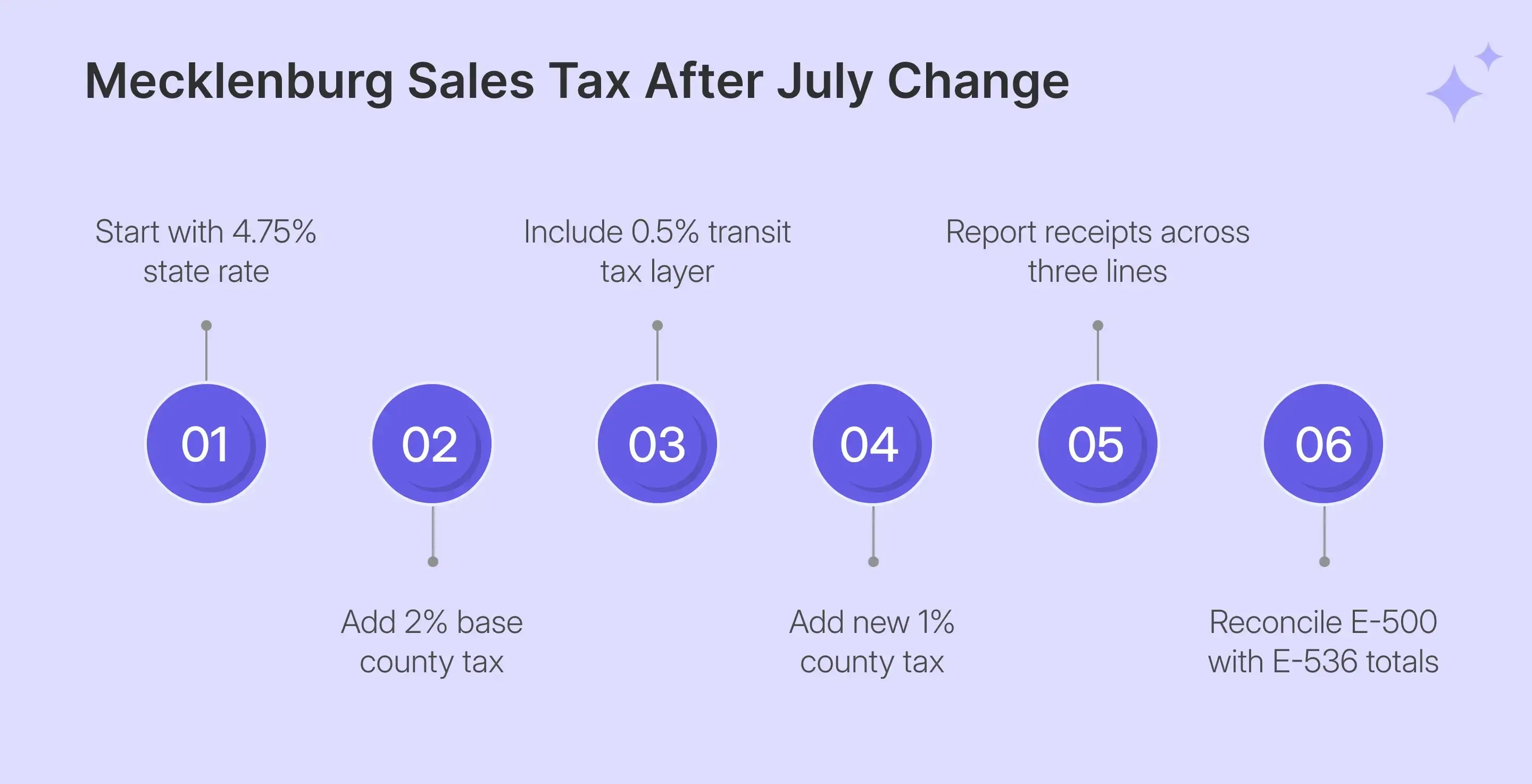
Mecklenburg already carried North Carolina’s general sales tax rate, its county component, and the 0.5% transit tax. From July 1, another 1% applies to most taxable transactions sourced there, increasing the combined general rate from 7.25% to 8.25%.
The current rate now brings four separate components together:
- 4.75% general state tax rate
- 2% Mecklenburg base county tax
- 0.5% transit tax for Mecklenburg
- 1% additional Mecklenburg county tax
This is vital because the return reports the components separately rather than treating 8.25% as one input. If your North Carolina sales tax return includes Mecklenburg activity, your source data should identify those transactions before E-500 preparation begins.
Form E-500 Now Includes Line 12
The 7-26 revision adds Line 12 for the 1% Additional County Rate. A taxable Mecklenburg sale can therefore appear on Line 8 for the 2% county rate, Line 10 for transit, and Line 12 for the additional county component.
These repeated receipts do not indicate that your gross sales have been counted multiple times. Each line applies a different tax component to the same transaction, which is why the Receipts column does not reconcile directly with Line 1.
Older Filing Periods May Use Different Line Numbers
If you amend a North Carolina sales tax return for a period before July 1, 2026, you may see an earlier E-500 layout. The 7-26 revision applies to periods beginning on or after that date, so older returns can use different line numbers.
Follow the return version linked to the original reporting period rather than copying current line numbers into an older amendment. This distinction matters when earlier software exports or worksheets were created before Mecklenburg’s additional 1% took effect.
Who Must File a North Carolina Sales Tax Return?
Businesses registered with the North Carolina Department of Revenue must follow the assigned filing schedule for each active period. Your obligation can come from physical presence, direct sales activity, or economic nexus created by sales sourced into the state.
Remote Sellers Should Monitor the $100,000 Threshold
For remote sellers, the current threshold is more than $100,000 in gross sales sourced to North Carolina during the current or previous calendar year. The former 200-transaction requirement was repealed effective July 1, 2024.
From July 2, 2026, a seller whose only connection is the sales threshold receives additional implementation time. The obligation begins on the first day of the first calendar month occurring at least 60 days after crossing $100,000.
Marketplace-facilitated transactions also count toward that threshold, even when another party handles tax collection. Monitoring your North Carolina sales tax nexus position therefore requires sales from every relevant channel, rather than direct ecommerce revenue alone.
A seller with employees, inventory, offices, or another physical presence can have an immediate obligation without waiting for the revenue threshold. This distinction is important when sales volume remains low even as physical activity expands within the state.
Filing Frequency Depends on Tax Liability
NCDOR assigns frequency based on average tax liability, so you should follow the schedule attached to your active account. Changes may occur after the Department reviews your filing history, so your earlier schedule should not be treated as permanent.
| Filing Status | North Carolina Requirement |
|---|---|
| Quarterly | Consistently under $100 monthly liability |
| Monthly | At least $100 but under $20,000 monthly |
| Monthly with prepayment | $20,000 or more monthly |
| Monthly due date | 20th following the reporting month |
| Quarterly due date | Last day of January, April, July, and October |
Monthly filers submit by the 20th after each period, while quarterly filers submit by the last day of January, April, July, and October. Monthly prepayment accounts must also make the required payment toward the following month.
These North Carolina sales tax filing requirements make your assigned frequency part of the return preparation process. If you recently received a change notice, confirm the return due date before selecting a period online.
What Should You Prepare Before Opening the E-500?
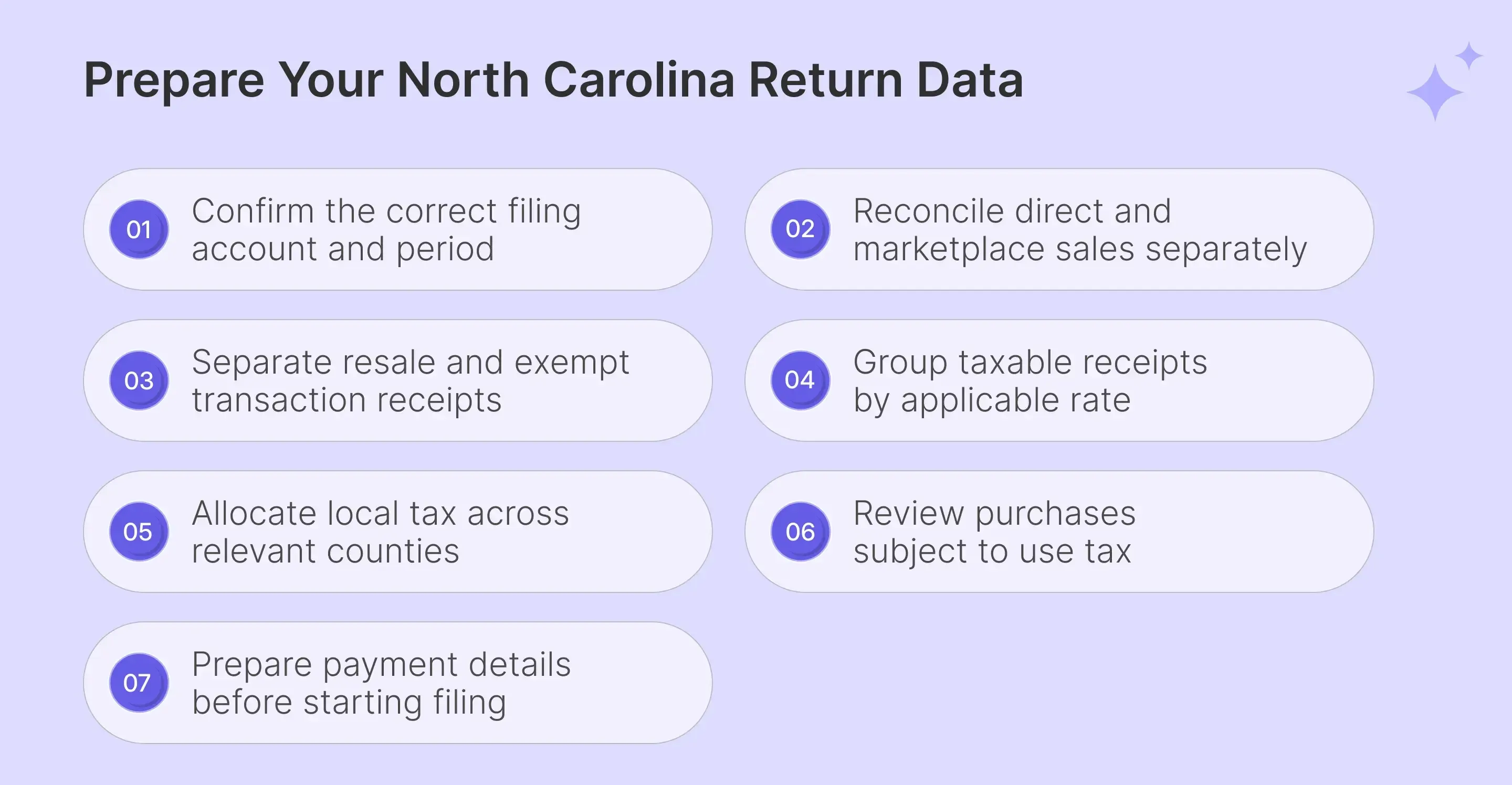
To file North Carolina sales tax online accurately, reconcile the return before opening NCDOR’s portal. The system calculates tax from your inputs, while your business remains responsible for gross receipts, exemptions, rate categories, county allocation, and purchases that create a use tax obligation.
The following required information should be available before you begin:
| What to Prepare | Where It Is Used |
|---|---|
| Account ID or SST ID | Account identification |
| SSN or FEIN | Filing access |
| North Carolina gross receipts | E-500 Line 1 |
| Resale and exempt sales | Lines 2 and 3 |
| Taxable receipts by rate | Lines 4 through 12 |
| Purchases for business use | Purchases for Use column |
| County tax allocation | Form E-536 |
| Bank information | Online payment |
Your account information should match the registered entity, including the correct business name and identification details. Sole proprietors may use a Social Security Number, while corporations, partnerships, and LLCs normally use the Federal Employer Identification Number connected with the account.
Marketplace Sales Need Separate Reporting Treatment
If you make direct and marketplace sales, Line 1 includes all North Carolina gross receipts from both channels. Marketplace-facilitated sales handled by an engaged facilitator then move to Line 2. This keeps facilitator-collected activity visible without counting it as taxable sales for that filing period.
Marketplace revenue still counts toward the $100,000 economic nexus threshold, even when the facilitator handles tax collection. If several channels contribute to your North Carolina sales, sales tax nexus monitoring can help track direct and facilitated activity together before another registration or filing obligation begins.
Resale and Exempt Sales Need Supporting Records
Line 2 also includes qualifying resale transactions, so you should retain records connecting each purchaser with the claimed resale treatment. Other exempt receipts belong on Line 3 when the transaction qualifies under North Carolina rules, and the supporting documentation matches the exemption used.
Those records become important when a tax return shows a large difference between gross activity and taxable receipts. A consistent sales tax exemption certificate process helps keep certificates tied to customer accounts and individual transactions. If your North Carolina sales include exempt buyers across several states, keep certificate validation separate from the accounting classification used on the return.
Taxable Receipts Must Be Split Before Filing
The hardest part of NC sales tax filing is often classifying receipts before entering them into the portal. E-500 does not treat taxable receipts as one figure, so your records should separate each rate category before filing.
The main categories include:
- 4.75% general state rate transactions
- 2% qualifying purchases of food
- 2% county rate taxable receipts
- 2.25% county taxable receipt category
- 0.5% transit rate taxable receipts
- 1% Mecklenburg additional county receipts
NCDOR calculates the tax amount based on the receipt base you enter. A sales tax calculator can help check a destination rate, while the final return should follow official NCDOR tax rates and sourcing rules.
How Do You File North Carolina Sales Tax Online?
Here are the steps you must follow to correctly file North Carolina sales tax online:
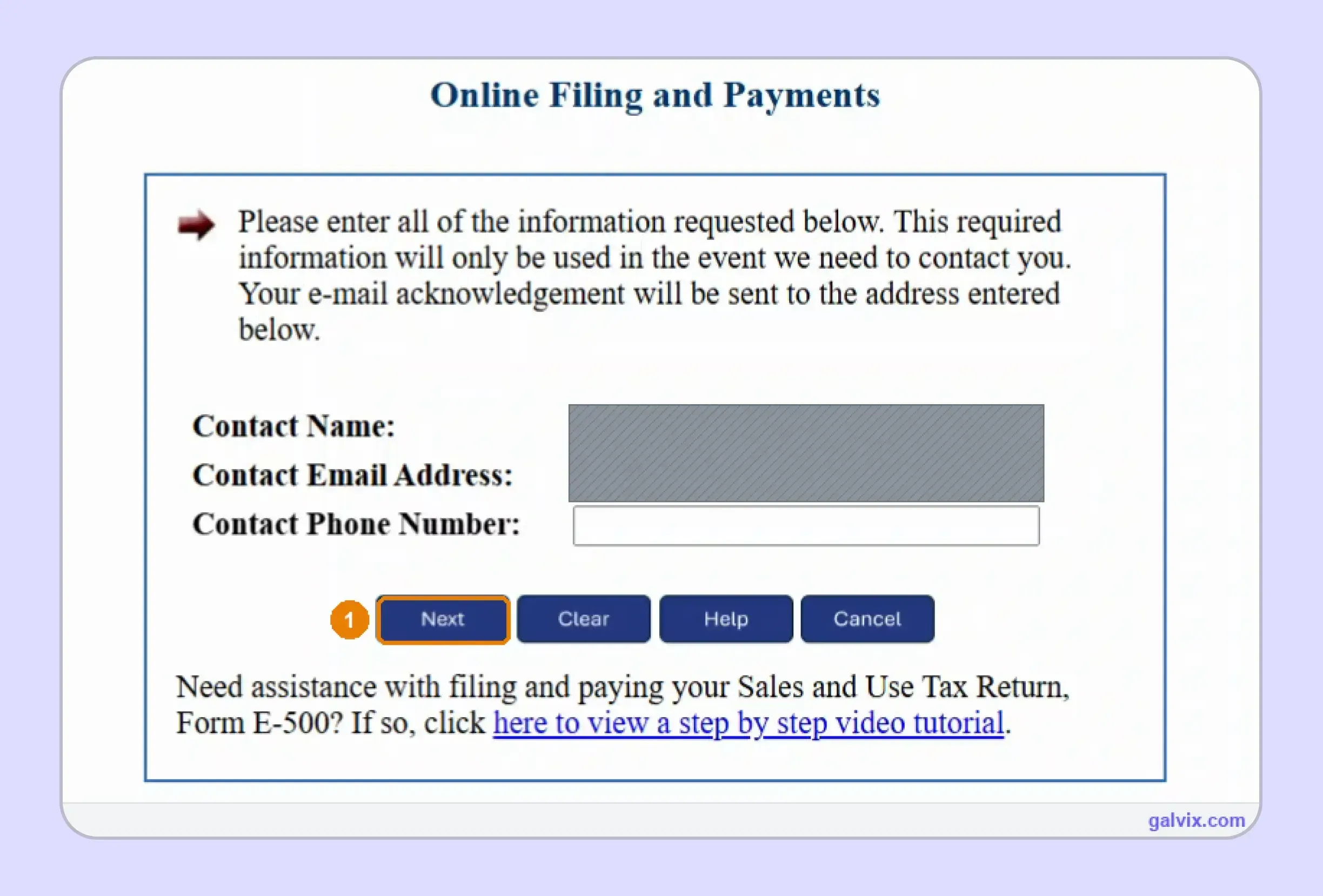
Step 1: Start the Online Filing Process
Open the NCDOR Online Filing and Payments system, then enter your contact name, email address, and phone number. NCDOR uses these details for filing communications, so check them before selecting Next and moving into the actual online filing workflow.
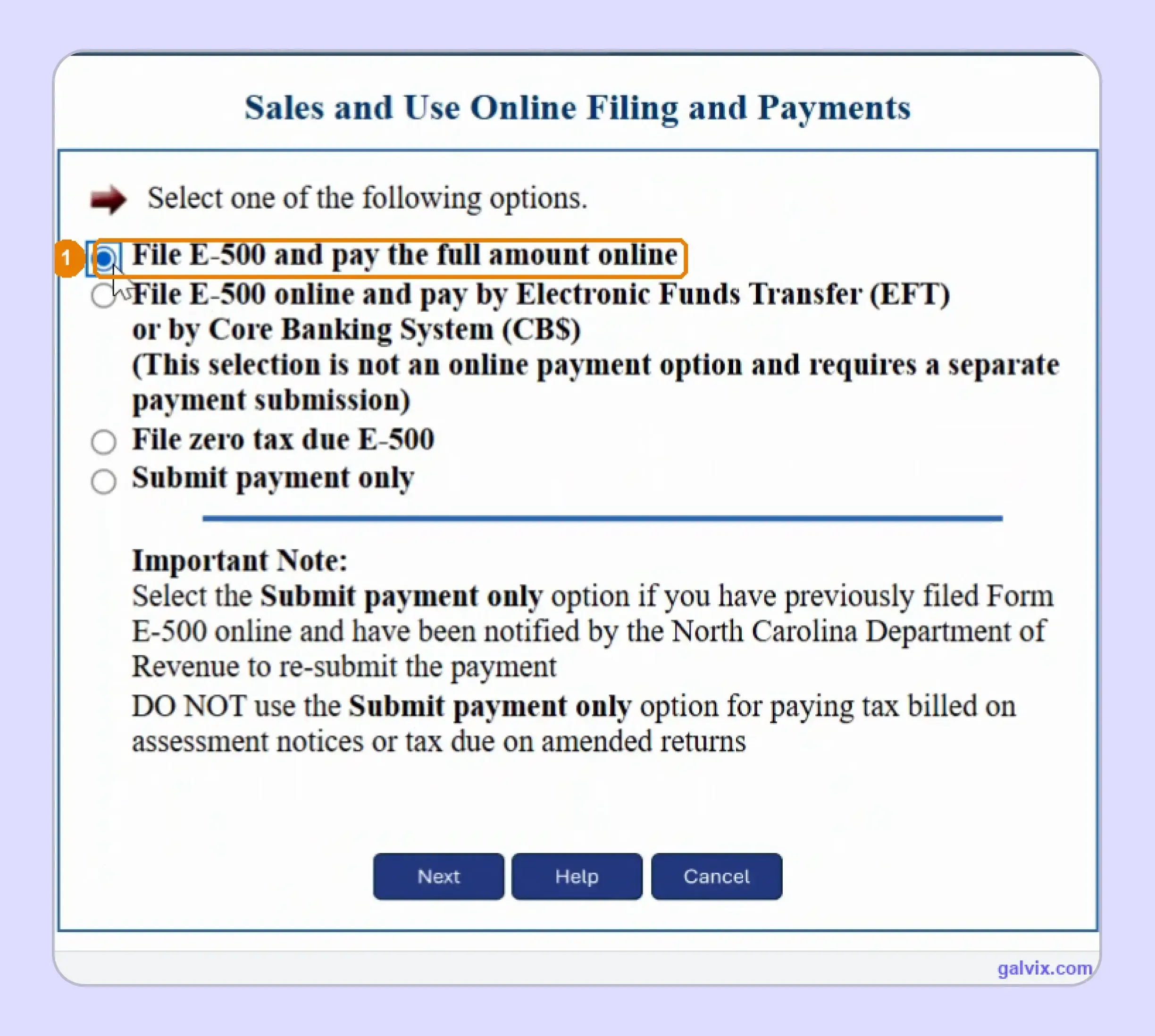
Step 2: Choose the Correct Filing Option
Choose the route that matches what you need to complete. You can file E-500 and pay online, file and pay separately via EFT, submit a zero-return filing, or use the payment-only route when NCDOR specifically requires another payment submission.
The payment-only route does not replace an amended return or assessment payment. Selecting the correct option at this stage keeps the remaining screens aligned with the filing task you need to complete.
Step 3: Select the Period and Identification Number
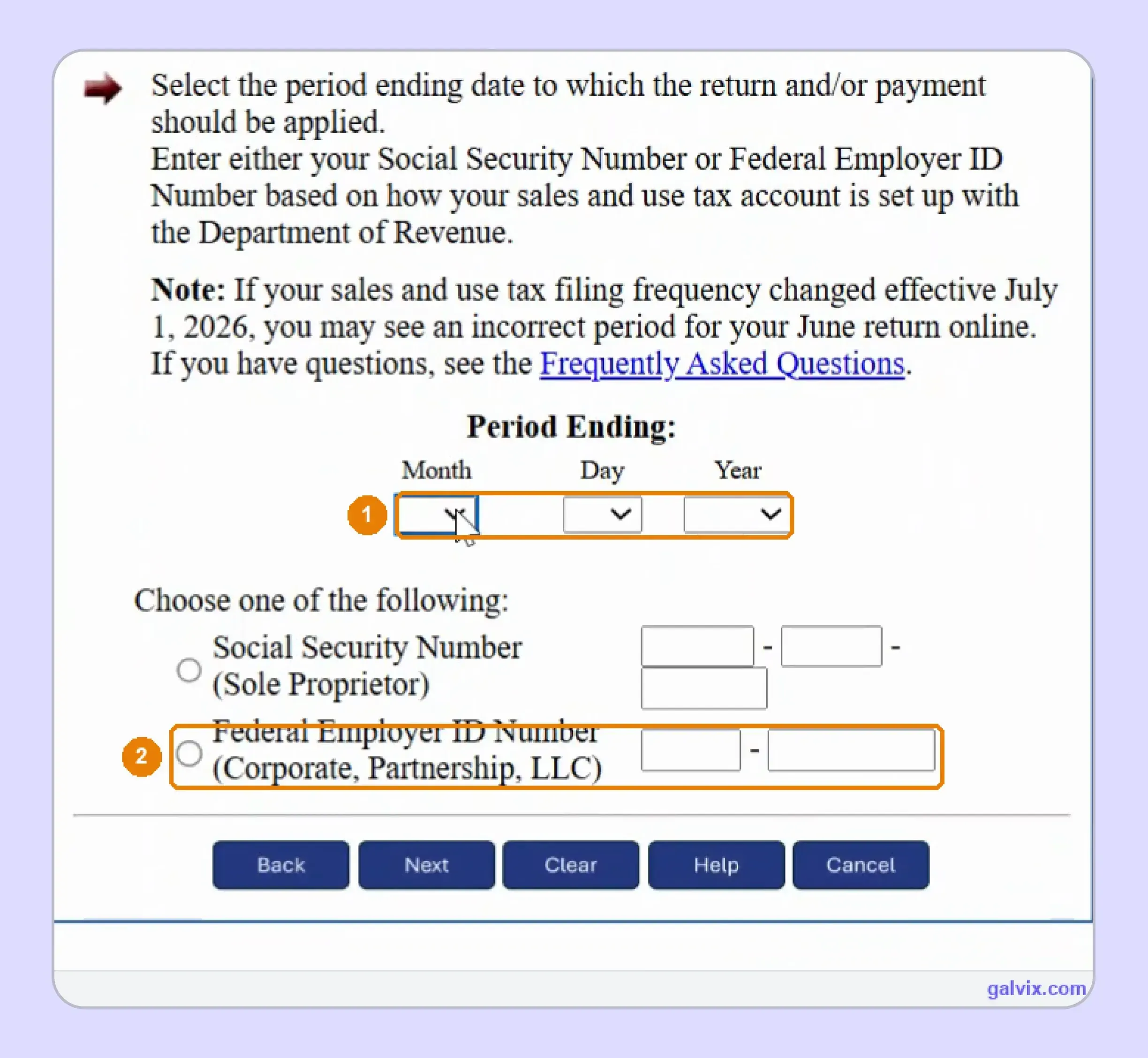
Select the correct period-ending date, then enter the identifier tied to your registered sales account. A sole proprietor may use Social Security, whereas another entity typically enters its Federal Employer Identification Number before proceeding with the North Carolina sales tax return online.
A filing-frequency change effective July 1, 2026, can cause an unexpected June period to appear. Compare the selected period against the return you actually intend to file.
Step 4: Enter the E-500 Sales Figures
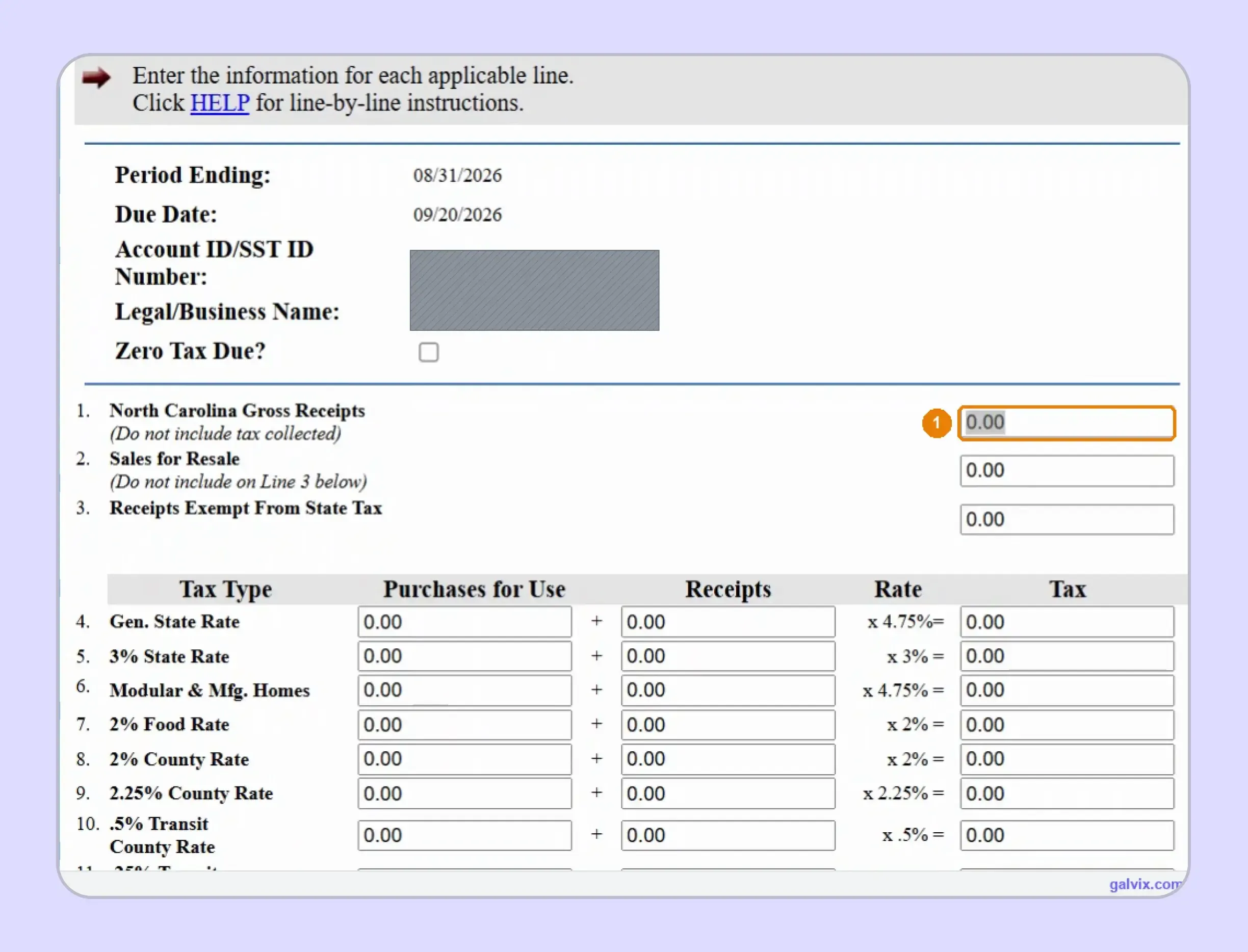
Form E-500 begins with North Carolina Gross Receipts on Line 1, followed by resale and exempt amounts. The rate table then separates Receipts from Purchases for Use, allowing you to report customer sales and any related use tax liability.
The portal calculates the Tax column after you enter receipts against the applicable rate. This split means you control the transaction base, while NCDOR calculates the tax due from those figures.
Step 5: Allocate Receipts Across the Correct Rates
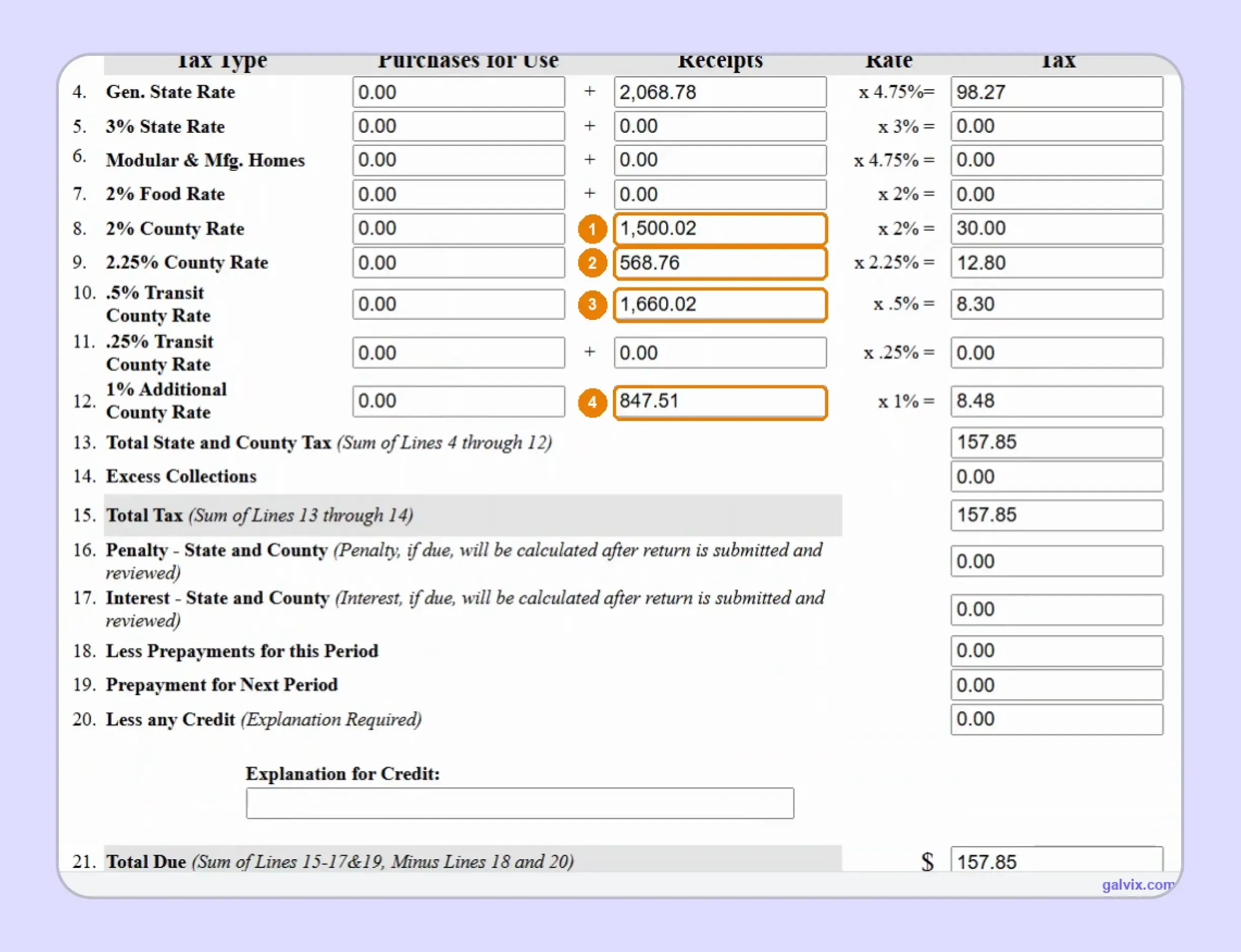
Enter the applicable taxable receipts across Lines 4 through 12, including the general state, food, county, transit, and Mecklenburg categories. The Tax column updates from each receipt amount, so you do not manually enter the resulting amount of sales tax.
Mecklenburg receipts can belong on Lines 8, 10, and 12 simultaneously. Missing Line 12 understates Mecklenburg tax even when the remaining E-500 calculations still appear internally consistent.
Step 6: Complete the E-536 County Schedule
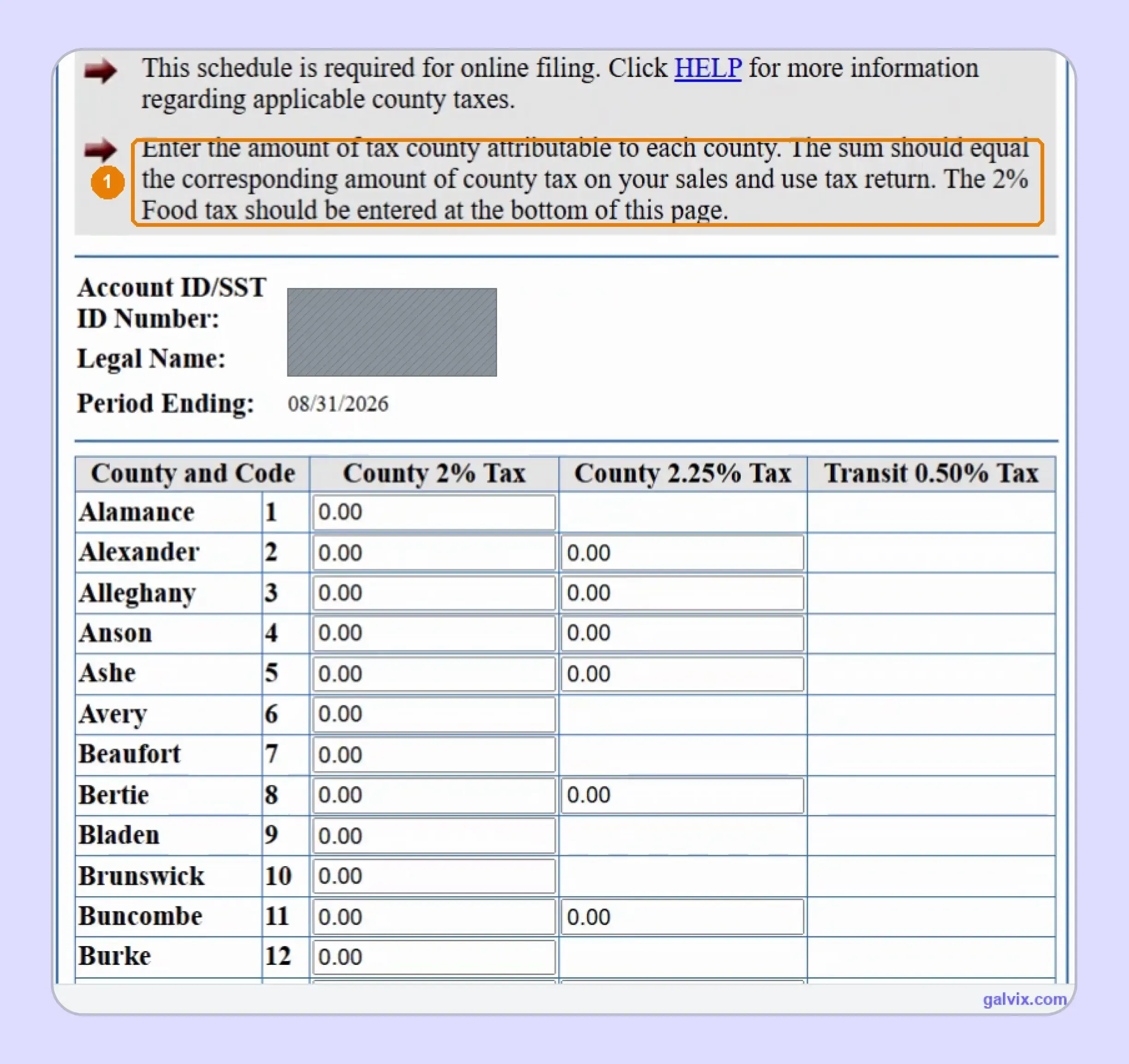
Open Form E-536 and allocate applicable local tax across North Carolina’s counties. The schedule of county sales provides separate columns for 2%, 2.25%, and 0.5% transit tax, with fields available according to each county’s applicable treatment.
E-536 does not populate itself from E-500. Its county totals must equal the corresponding E-500 local-tax lines before NCDOR lets you continue filing.
Step 7: Complete Food and Mecklenburg Tax Totals
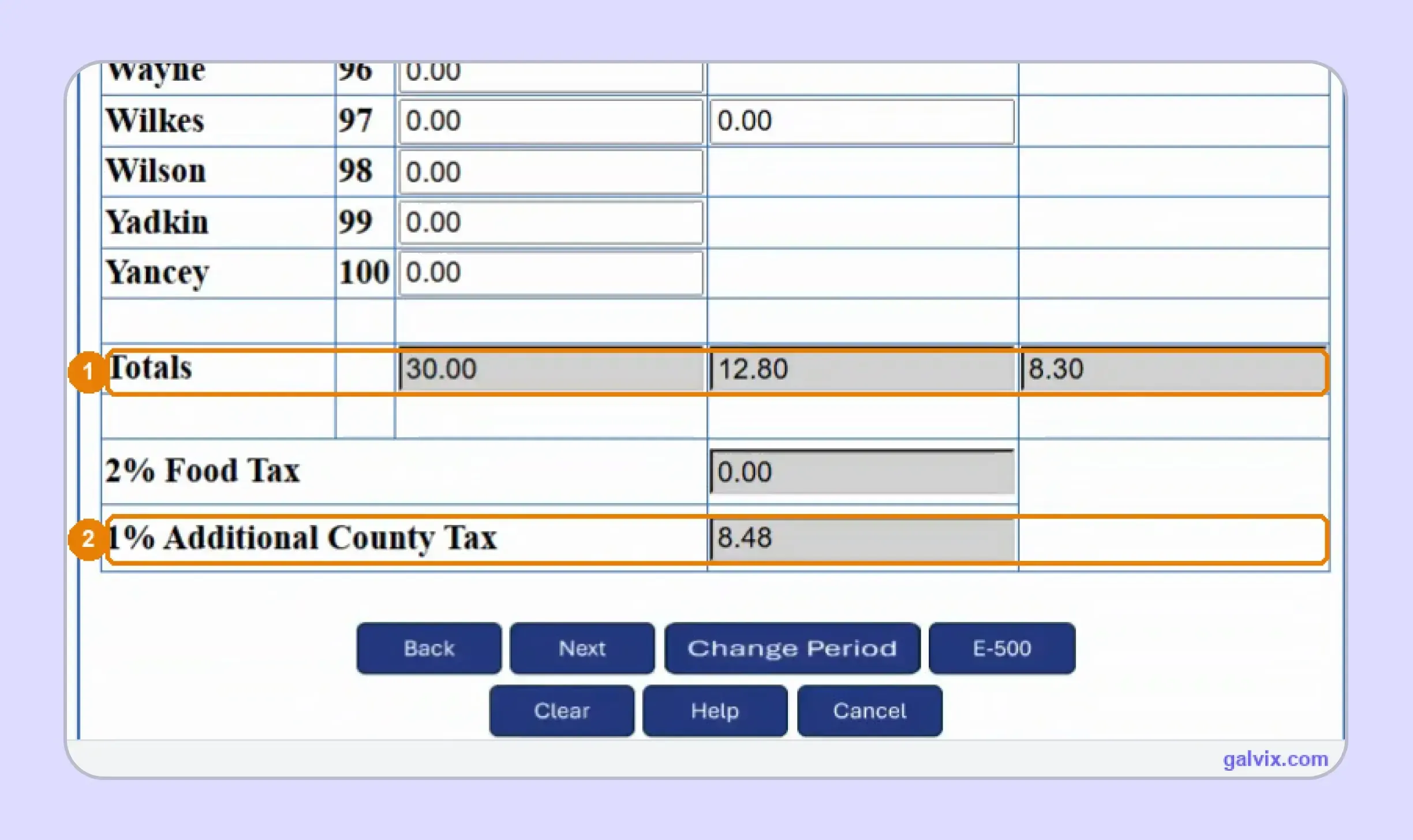
At the bottom of E-536, review the three county-column totals before entering the 2% Food Tax and Mecklenburg 1% Additional County Tax. Those two amounts fall outside the per-county grid and are treated as whole-return figures.
This structure means purchases of food and Mecklenburg’s additional component do not behave like ordinary county-grid entries. Understanding this separation helps keep E-536 aligned with E-500.
Step 8: Select How You Will Pay
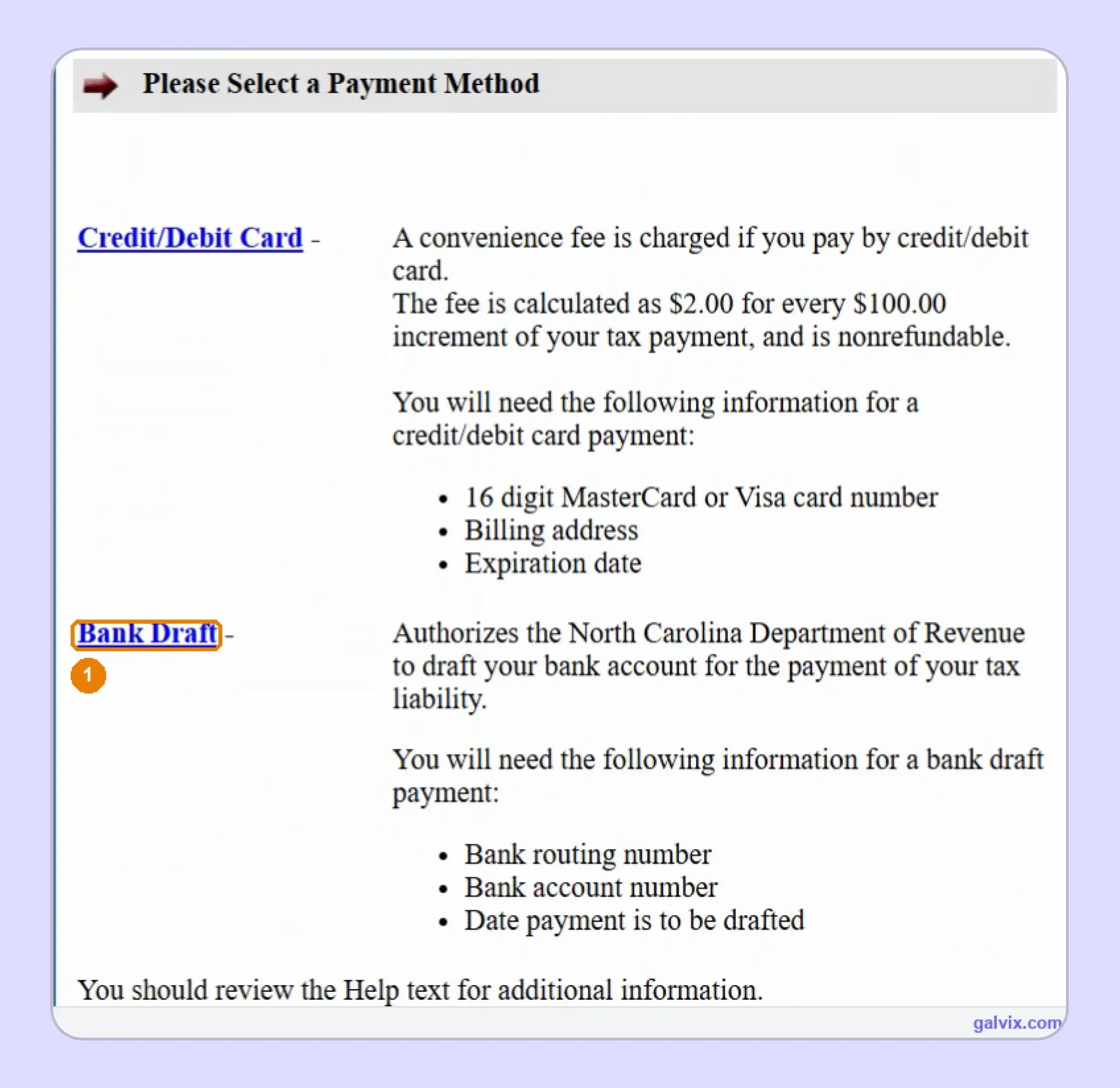
For anyone researching how to pay sales tax in North Carolina, the portal offers Bank Draft and card payment within this filing route. A bank draft requires your bank routing number, account number, account type, and requested draft date.
A credit card or debit card carries the convenience charge displayed by the portal, while Bank Draft uses ACH without that card fee. Review your preferred payment method before moving to the final return summary.
Step 9: Review the Return and Payment
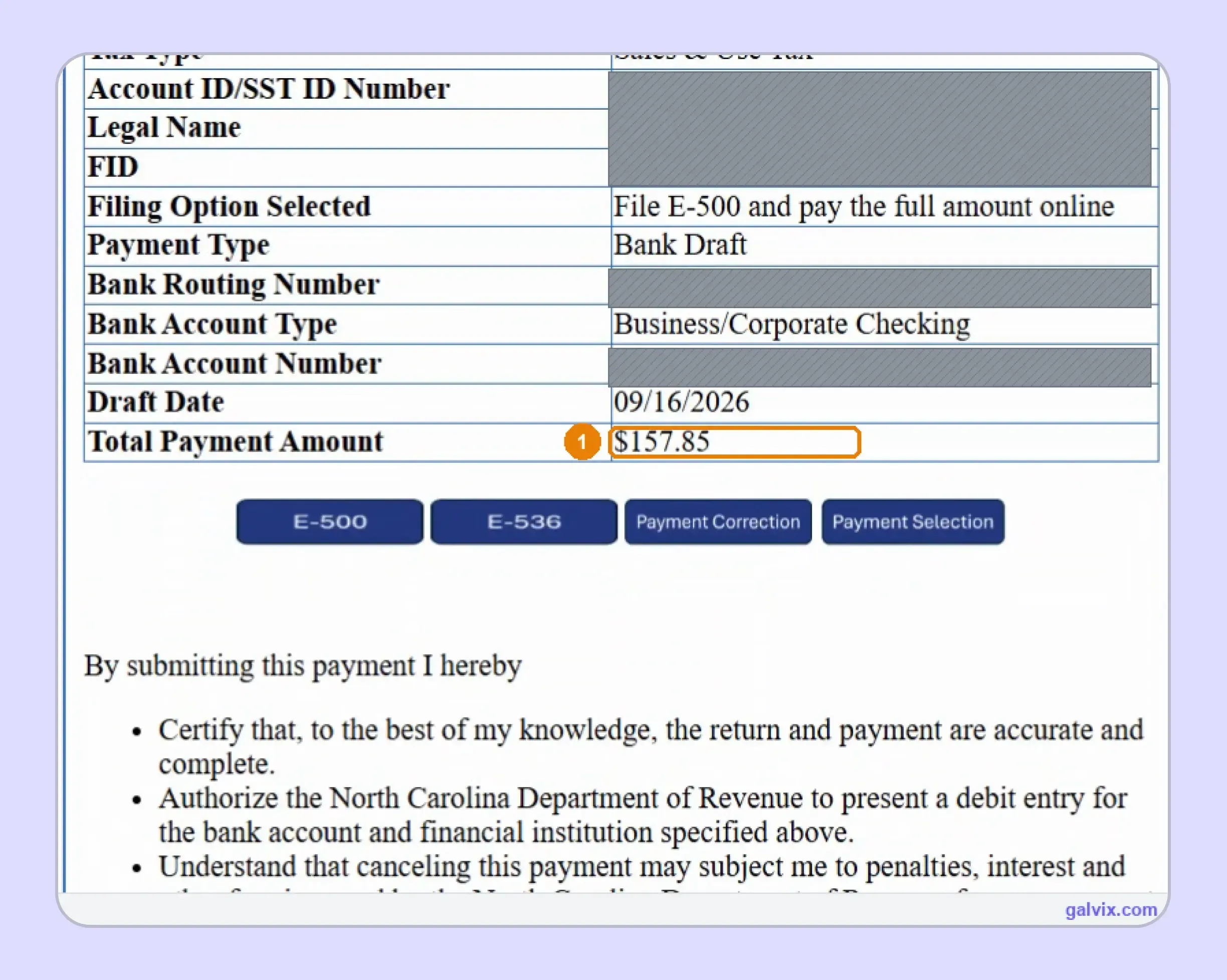
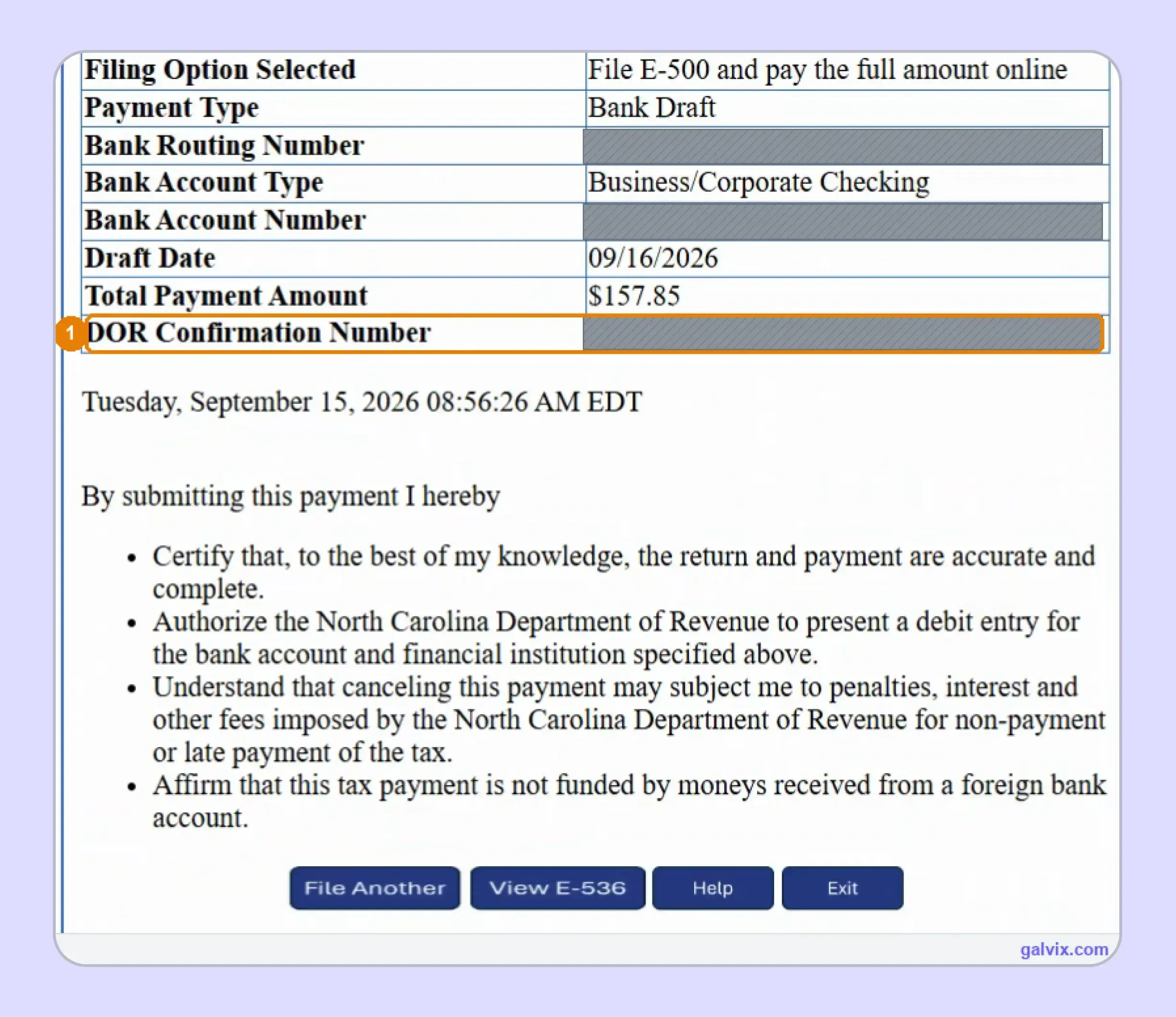
The review screen brings together the filing option, payment information, bank details, draft date, and Total Payment Amount. Check these figures against your own records before submitting, as this is the final stage at which E-500 or E-536 can be reopened easily.
This review should cover the return and payment together. Confirm the account number, tax amount, selected date, and filing option before authorizing the debit through NCDOR’s payment system.
Step 10: Submit and Save the Confirmation Number
Submit the return only after confirming the certification statement and final payment details. Once submission succeeds, NCDOR displays a DOR Confirmation Number and timestamp that provide the clearest proof your North Carolina sales tax return was transmitted.
Reaching the review page does not complete filing. Save or print the final confirmation immediately, because that record supports timely filing if your records later differ from the Department’s.
How Do E-500 and E-536 Work Together?
E-500 reports receipts and tax by rate, while E-536 allocates applicable local tax across counties. Your North Carolina sales tax return therefore needs the same activity expressed in two different ways before NCDOR accepts the filing.
Some Figures Are Entered and Others Are Calculated
You enter the figures describing your business activity, and the filing system calculates several tax totals from those inputs. Understanding that split makes it easier to locate an error when E-500 or E-536 does not reconcile.
| Filing Item | Business Enters | Portal Calculates |
|---|---|---|
| Gross receipts | ✓ | |
| Resale and exempt receipts | ✓ | |
| Receipts by tax rate | ✓ | |
| Purchases for use | ✓ | |
| Tax by rate | ✓ | |
| E-500 total tax | ✓ | |
| E-536 county detail | ✓ | |
| E-536 column totals | ✓ |
The filing system therefore controls arithmetic after you provide the receipt base. Your business still controls product classification, exemption treatment, county sourcing, and each receipt allocation, all of which determine the eventual result.
That distinction also explains why reliable source data matters. A portal calculation can be mathematically correct even when the underlying local sales allocation is wrong, especially when several counties or rate layers are present in a single period.
The Same Sale Can Appear in More Than One Rate Line
A taxable transaction can feed several rate lines when multiple tax components apply. A sale into Wake County, for example, can include the ordinary county component plus its transit rate, so related receipts appear on more than one line.
Mecklenburg goes further because the same taxable transaction can appear on the 2% county line, 0.5% transit line, and 1% additional rate line. Those entries represent separate layers of the same transaction rather than multiple sales.
The same logic explains why your Receipts column does not equal Line 1 when added vertically. Certain receipts are deliberately repeated because different taxes apply to them, while gross receipts still record each underlying transaction once.

How Do Exempt Sales Affect NC Sales Tax Filing?
Exempt and resale activity can reduce the amount remaining taxable, although the seller still needs documents supporting the treatment applied. Certificate collection should match the purchaser and transaction before the exemption changes the figures reported on the North Carolina sales tax return.
North Carolina Uses Form E-595E
North Carolina uses Form E-595E, the Streamlined Sales and Use Tax Certificate of Exemption, for qualifying resale and other exempt transactions. The purchaser supplies the applicable exemption information, while the seller retains the form with supporting sales records.
For multistate businesses, a consistent sales tax exemption certificate process helps keep customer documents linked to transactions that are eventually reported as exempt. This becomes particularly important when an exempt customer buys through several channels or legal entities.
North Carolina also participates in Streamlined Sales Tax. Qualifying businesses can use the Streamlined Sales Tax Registration System when registering across member states aligns with their broader compliance approach.
Certificate Collection Does Not Replace Transaction Review
Collecting a certificate supports the exemption claim, although the document alone does not establish eligibility for every future purchase. You should still confirm the buyer, item, use, and transaction facts before removing the sale from taxable reporting.
That separation protects the return when the same customer makes taxable and exempt purchases. It also prevents a valid certificate from becoming a blanket accounting setting without checking whether each sale qualifies.
If your team handles many exempt buyers, document verification should stay connected with the underlying sales tax registration and filing process. A certificate can support the reason for exemption, while transaction eligibility still determines whether tax should have been charged.
The Galvix Sales Tax Exemption Certificate Tool helps identify the appropriate North Carolina certificate route and seller checks before exempt treatment reaches filing. It supports certificate review and recordkeeping while keeping document verification separate from the final transaction-level exemption decision.
How Does Galvix Manage North Carolina and Multistate Filing?
Galvix manages recurring sales tax filing as a service, so your finance team does not need to prepare every return independently. Transaction records are reconciled first, returns move through specialist review, and your team approves the figures before each scheduled submission.
For a North Carolina sales tax return, that workflow can bring together direct sales, marketplace activity, exemptions, use-tax purchases, rate-level receipts, and county allocation. This reduces the manual work required to rebuild E-500 and E-536 from separate spreadsheets every filing period.
Transaction data can flow through sales tax integrations covering ecommerce, accounting, payment, and ERP systems. Businesses using Shopify, QuickBooks, or NetSuite can keep those source systems connected with the filing workflow.
As sales expand, North Carolina sales tax nexus monitoring can remain connected with business registration, return schedules, exemption records, and state notices. That helps your team respond when a new physical or economic obligation creates another recurring filing requirement.
Galvix uses modular pricing, so businesses select the services they need. Exact pricing depends on work volume for each module, while returns, transactions, registered states, and exempt customers influence the relevant service dimensions.
What Can Galvix Manage for North Carolina Sellers?
As your filing footprint expands, the value lies in keeping transaction data and return preparation within a single controlled process.
- Reconcile source sales before E-500 preparation across connected systems and multiple selling channels each reporting period.
- Prepare state and county reporting figures before the E-536 allocation to reduce repeated spreadsheet work across individual local jurisdictions.
- Review marketplace and exempt activity before filing so facilitator treatment and supported exclusions reach the correct return lines.
- Connect certificates with customer records and transactions before exempt amounts reduce taxable receipts on the prepared return.
- Track nexus, registrations, filing deadlines, and notices as additional state obligations are added to your recurring compliance calendar.
For teams learning how to file sales tax return in North Carolina while managing other states, the challenge quickly extends past portal navigation. Different deadlines, rate structures, forms, and exemption rules can turn each state into another manual month-end process.
The same workflow can also support sellers using WooCommerce or other connected systems as transaction volume increases.
Book a Galvix demo to review your North Carolina and multistate filing workflow before local reporting becomes another recurring manual task.
Frequently Asked Questions
Can I amend a North Carolina E-500 after filing?
Yes. If you discover an error after submitting a North Carolina sales tax return, file an amended E-500 for that same period. NCDOR serves the version applicable to the period being corrected, so an older return may use different line numbers from the current 7-26 form.
How long should I keep North Carolina sales tax records?
Keep records long enough to support your reported receipts, exemptions, county allocation, payment, and filing history if NCDOR reviews the account. Your retained documents should connect each exemption certificate with the customer and transaction, while payment and filing records should include the final DOR Confirmation Number.
Can I change my North Carolina sales tax filing frequency?
NCDOR assigns a filing frequency based on your monthly liability and periodically reviews registered accounts. Continue following the schedule shown for your account until the North Carolina Department changes it. If your frequency changes, check the next available filing period carefully before submitting.
What happens if E-500 and E-536 do not match?
NCDOR checks E-536 totals against the corresponding E-500 local-tax lines before allowing the filing to continue. Review county entries first, then compare the 2%, 2.25%, and transit totals against E-500. A mismatch usually means a county allocation or rate category needs correction.
Can I schedule a North Carolina sales tax payment for a later date?
Yes, a Bank Draft lets you enter the requested draft date together with your banking details. When reviewing how to pay sales tax in North Carolina, make sure that date still satisfies the applicable filing and payment deadline before final submission.
How do I close a North Carolina sales tax account?
Closing a sales tax account requires a formal state update rather than stopping returns without notice. Check your certificate of registration and active filing obligations before closure. The North Carolina Secretary of State handles separate corporate records, so closing those records does not automatically close your NCDOR tax account.
Can I file an older North Carolina return using the current E-500 version?
Usually, you should use the form version applicable to the period being filed or amended. The current 7-26 revision applies to periods beginning on or after July 1, 2026. Older periods can use earlier layouts without Mecklenburg’s current Line 12 structure.