Businesses file Maryland sales tax online through Maryland Tax Connect, the online portal operated by the Comptroller of Maryland. Most registered sellers use Form 202, the Maryland Sales and Use Tax Return, for their recurring filing obligations.
Maryland keeps the basic rate structure simpler than many states because the standard sales tax rate is 6%, with no county or city additions. The filing still requires care because you enter gross sales, taxable sales, and the tax amount for each applicable rate yourself.
The portal totals those figures and calculates the timely discount. It does not verify whether your manually entered tax matches the taxable amount. This blog explains how to file sales tax in Maryland, complete Form 202, handle special-rate activity, make payment, and retain both confirmations. For a detailed overview of taxability, rates, exemptions, and deadlines, the Maryland sales tax guide can help you prepare before you open the portal.

Who Needs to File a Maryland Sales Tax Return?
Businesses registered to collect Maryland sales and use tax must file according to their assigned schedule. This includes Maryland businesses with physical presence and qualifying out-of-state sellers that create nexus through their activity.
Remote Sellers Can Create Maryland Economic Nexus
A remote seller can establish economic nexus when Maryland gross revenue exceeds $100,000 or the business reaches 200 separate transactions during the current or previous calendar year. Maryland still applies both threshold tests in 2026.
This means remote sellers should monitor both revenue and order counts before registration becomes urgent. The current Maryland sales tax nexus rules can help you track the threshold alongside physical presence triggers.
The measurement period also warrants attention, as Maryland considers the current calendar year and the previous year. Understanding economic nexus reference periods helps businesses identify when a threshold creates a new filing obligation.
Once registration is required, businesses can obtain a sales and use tax license through the Combined Registration Application. Online registration is available through Maryland Tax Connect, while Maryland Business Express can also support broader business setup tasks.
Marketplace Sales Follow Different Filing Rules
A marketplace facilitator collects and reports Maryland tax on facilitated transactions through Form 202F. The individual marketplace seller leaves those facilitated orders off its own Form 202 when the facilitator handles collection and reporting.
That distinction matters because marketplace activity can still count toward nexus even when those orders stay outside your own return. An Amazon sale may affect your threshold calculation without belonging in the gross sales reported on Form 202.
Which Sales Belong on Form 202?
Form 202 covers the direct Maryland activity for which your business remains responsible. Marketplace-facilitated activity already reported by the facilitator follows a separate return path and should not be duplicated.
| Activity | Filing Treatment |
|---|---|
| Direct Maryland sales | Report on Form 202 |
| Direct exempt or nontaxable sales | Consider when determining gross and taxable figures |
| Marketplace-facilitated sales | Seller leaves them off Form 202 |
| Marketplace facilitator activity | Facilitator reports through Form 202F |
| Micro-dispensary delivery activity | May require Form 202DLV |
| Taxable business-use purchases | Review applicable use tax |
This distinction separates nexus measurement from return reporting. A transaction can count when determining whether you crossed the Maryland threshold while remaining outside the seller's Form 202.
You should also distinguish sales from purchases creating use tax liability. Maryland provides a separate consumer use tax return for consumers who used taxable property, digital products, or taxable services in Maryland without paying enough tax at the time of purchase.
What Numbers Should Be Ready Before You Open Maryland Tax Connect?
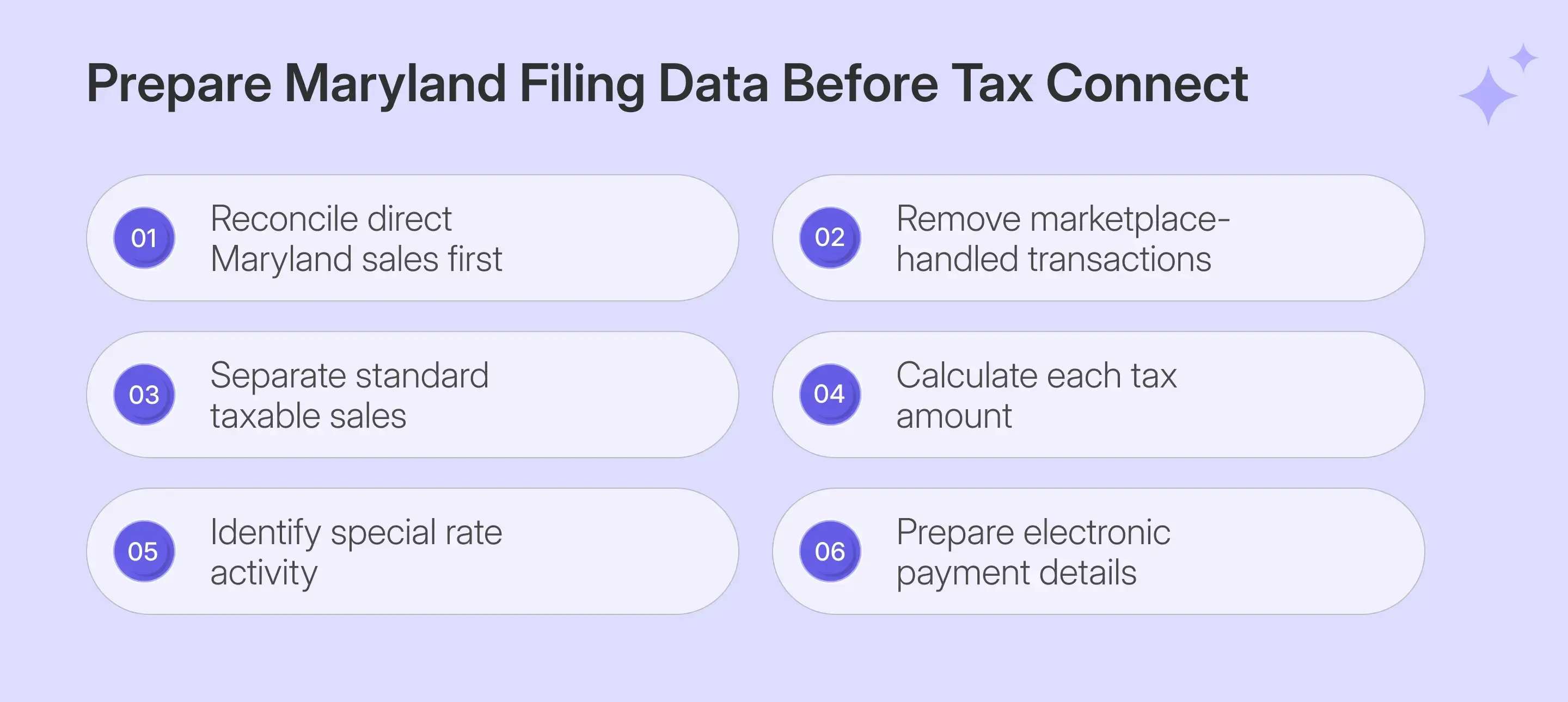
Prepare your figures before you file Maryland sales tax online because the portal accepts the values you enter without validating their mathematical relationship. A clean reconciliation outside the portal reduces the chance of submitting a balanced return with incorrect tax.
| What You Need | Where It Goes |
|---|---|
| Gross Maryland direct sales | Line 3 |
| Standard-rate taxable sales | Line 4A |
| Tax due at 6% | Line 4 |
| Special-rate taxable amounts | Applicable Lines 5A through 16 |
| Special-rate tax amounts | Corresponding tax lines |
| Bank routing and account details | Separate payment flow |
Before moving into Form 202, organize these figures around the source records that support each amount.
- Gross Sales: Start with direct Maryland sales for the reporting period before removing exempt or non-taxable activity. Keep facilitated marketplace sales outside the seller return when another party already reports them.
- Taxable Sales: Separate the portion of gross sales subject to Maryland's standard 6% tax rate. Exempt entities, resale activity, sales tax holidays, and other qualifying exemptions can change the taxable base.
- Tax Due: Calculate 6% of the standard taxable amount before entering Line 4. Maryland Tax Connect does not multiply Line 4A by 6% or check whether your answer is correct.
- Special-Rate Sales: Identify alcoholic beverages, specified rentals, adult-use cannabis, certain vaping products, and qualifying data or information technology services before filing. These transactions belong on separate rate lines rather than the standard 6% line.
- Payment Details: Keep the routing number and bank account information available before submission. Filing and payment are separate transactions, so you will need those details after your return confirmation appears.
If several systems feed your Maryland numbers, use the same reconciliation source every period. Businesses using accounting software can import transaction data via a QuickBooks sales tax integration rather than manually rebuilding monthly sales data.
How Do You File Maryland Sales Tax Online?
To file Maryland sales tax online, complete Form 202 in order and check every filer-entered rate line before submission. The most important difference from many state portals is that Maryland expects you to calculate and enter the tax yourself.
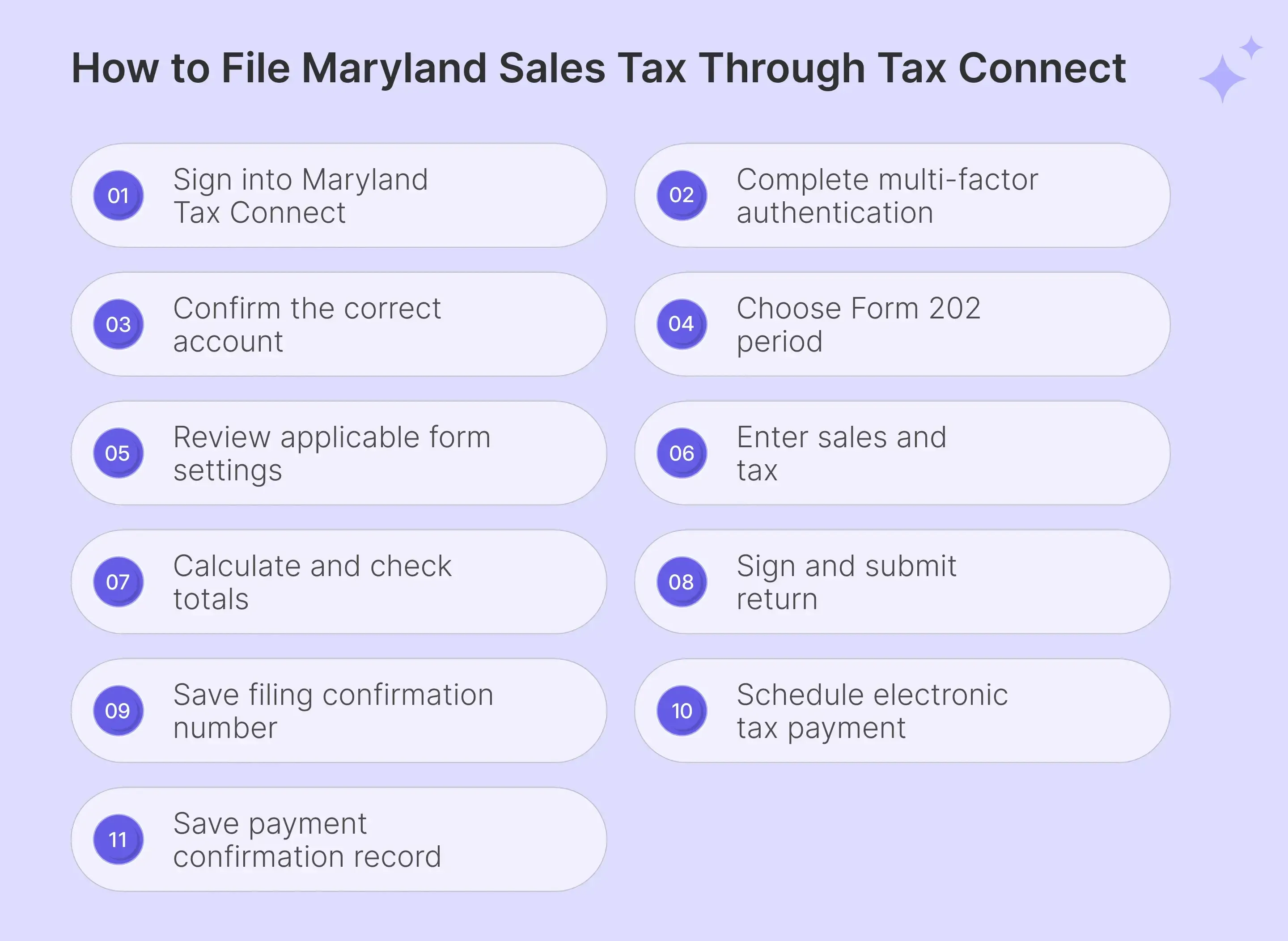
Here are the steps explaining how to file sales tax return in Maryland:
Step 1: Sign In to Maryland Tax Connect
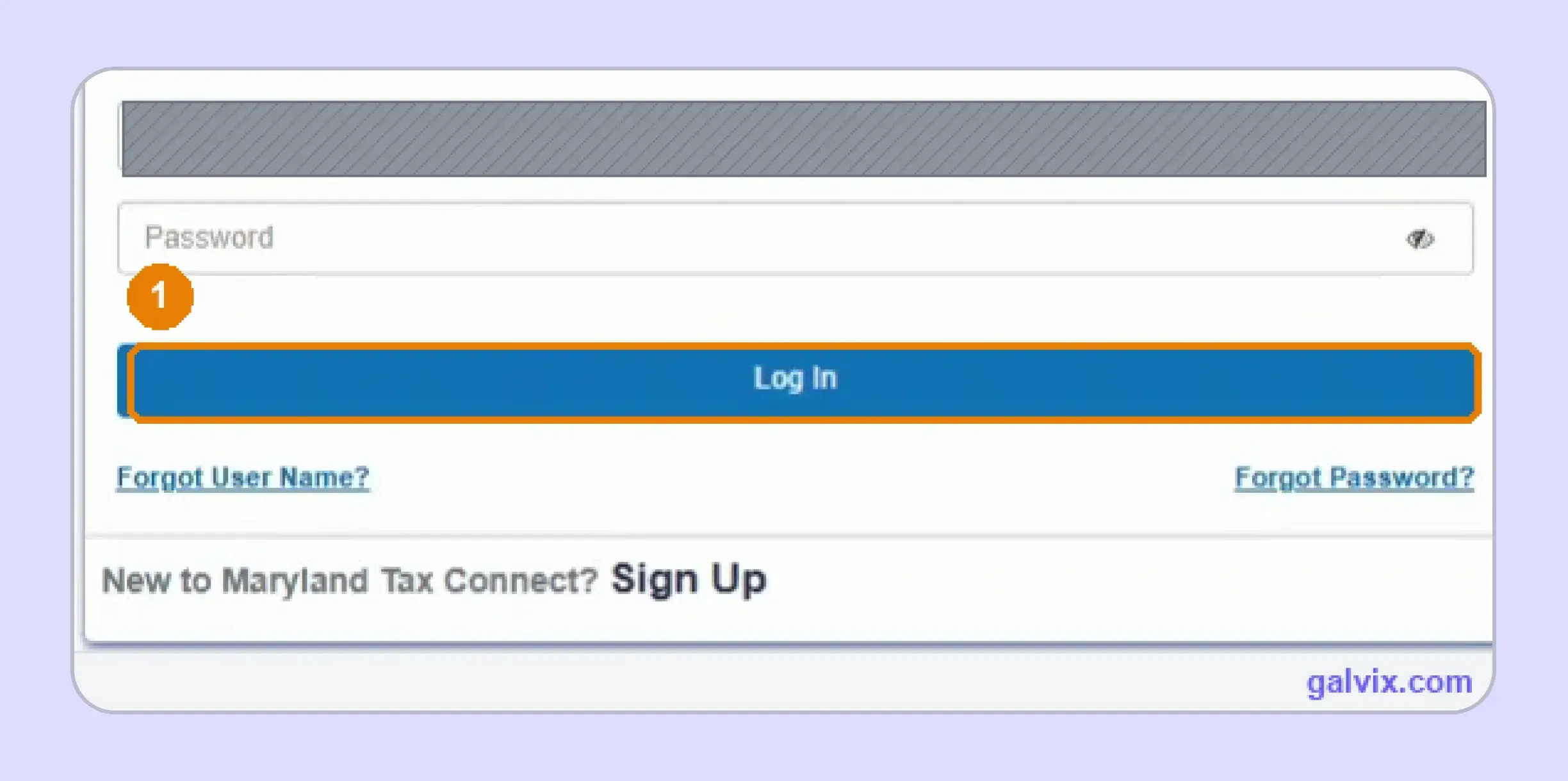
Open Maryland Tax Connect, enter your User ID and password, then select Log In. Your User ID identifies the portal user, while the Central Registration Number identifies the business tax account. If you manage several businesses, confirm the account after signing in. This reduces the risk of starting a correct return under the wrong entity.
Step 2: Complete Multi-Factor Authentication
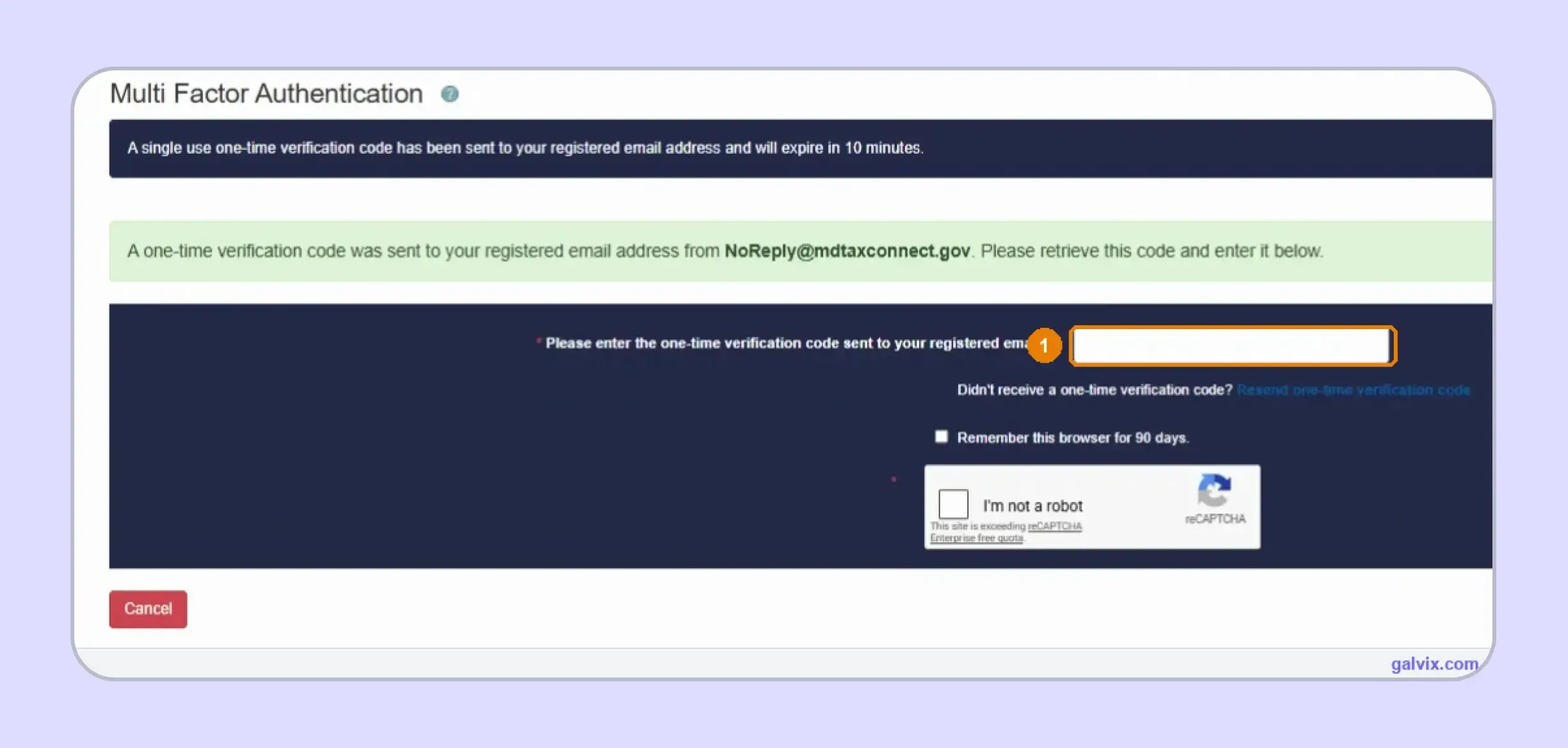
Maryland Tax Connect sends a one-time verification code to the registered email address when you log in. Enter that code, complete the reCAPTCHA, and continue before the ten-minute validity period expires. You can select Remember this browser for 90 days when appropriate. This reduces the need for repeated verification on a trusted computer used for future filing work.
Step 3: Confirm the Correct Tax Account
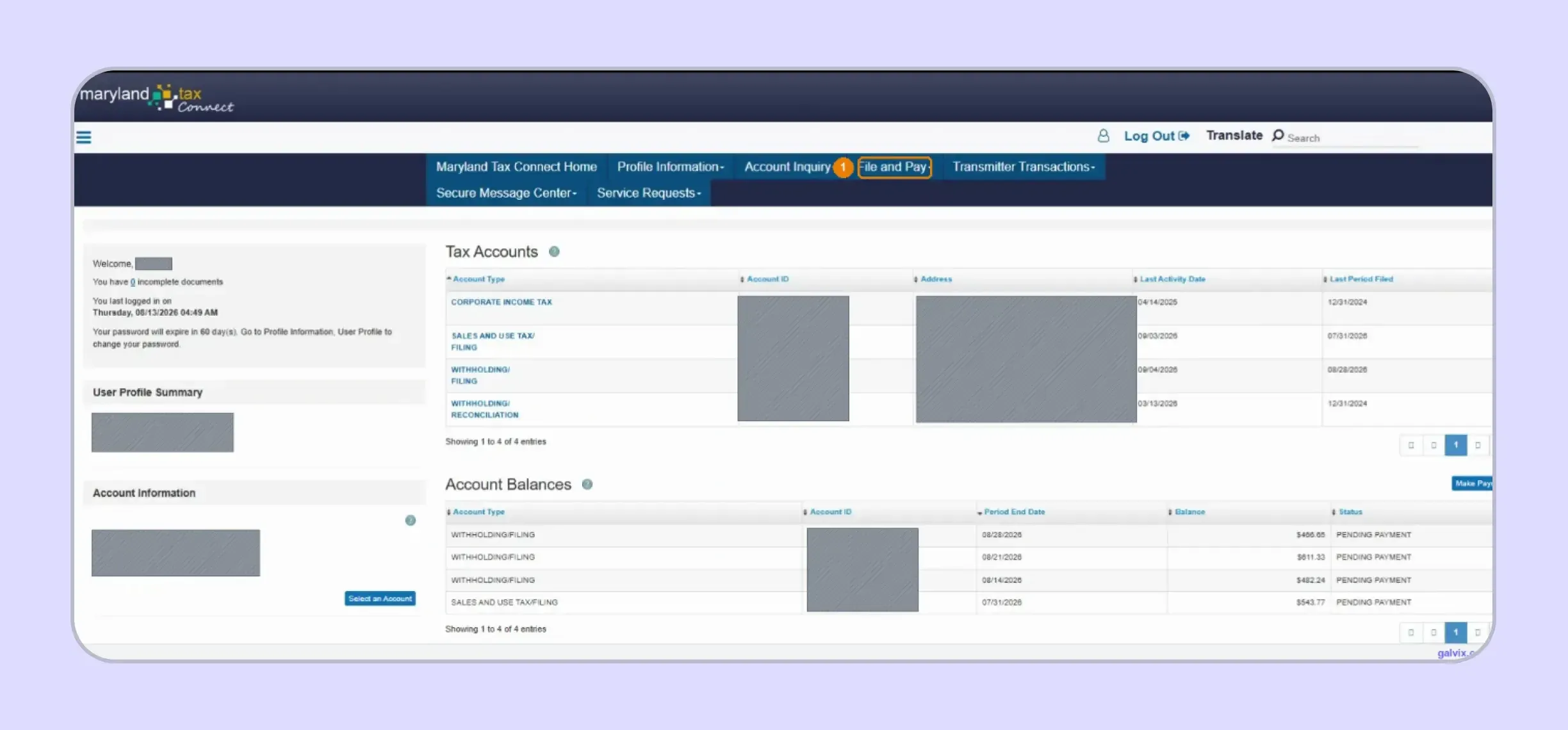
Check the business details and Sales and Use Tax account shown on the home page. Then open File and Pay and choose File a Form to begin the Maryland sales tax return online workflow. This check matters when one user manages multiple tax accounts or several legal entities through the same accountant or finance team.
Step 4: Select Form 202 and Filing Period
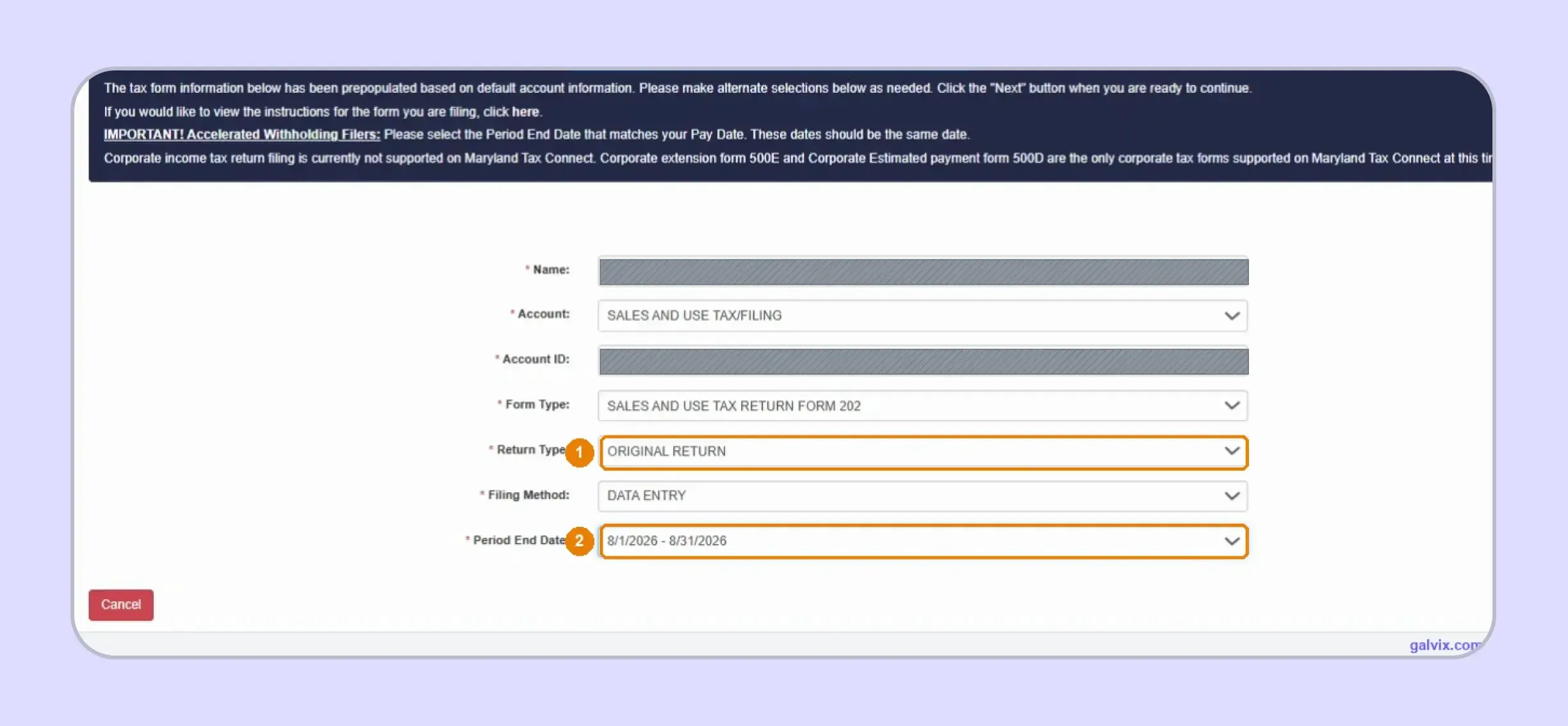
Choose Sales and Use Tax Filing, Form 202, Data Entry, and the appropriate period. Select Original Return for a new filing or Amended Return when correcting an already submitted period. Match the Period End Date carefully rather than selecting the first option shown. The available period list appears after Return Type is selected.
Step 5: Review the Form 202 Setup
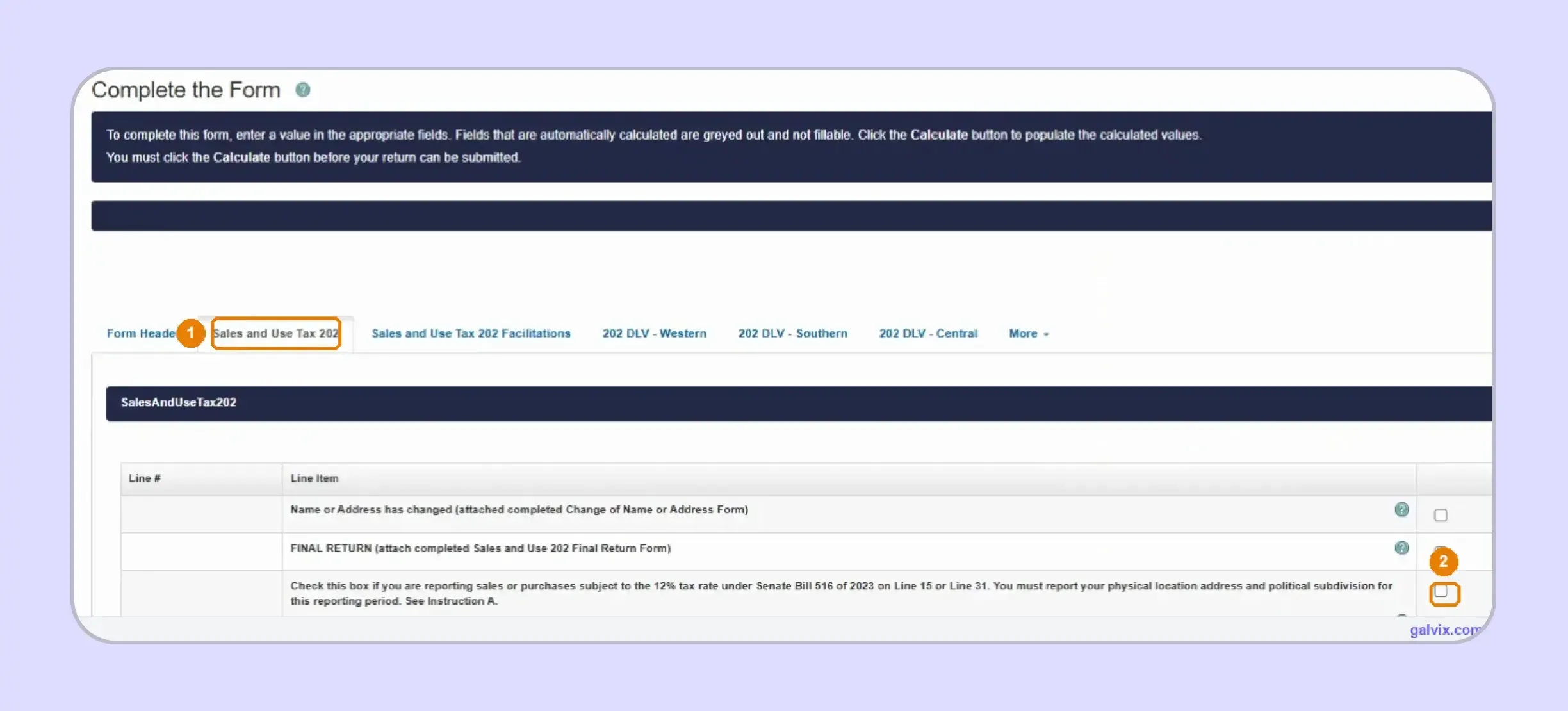
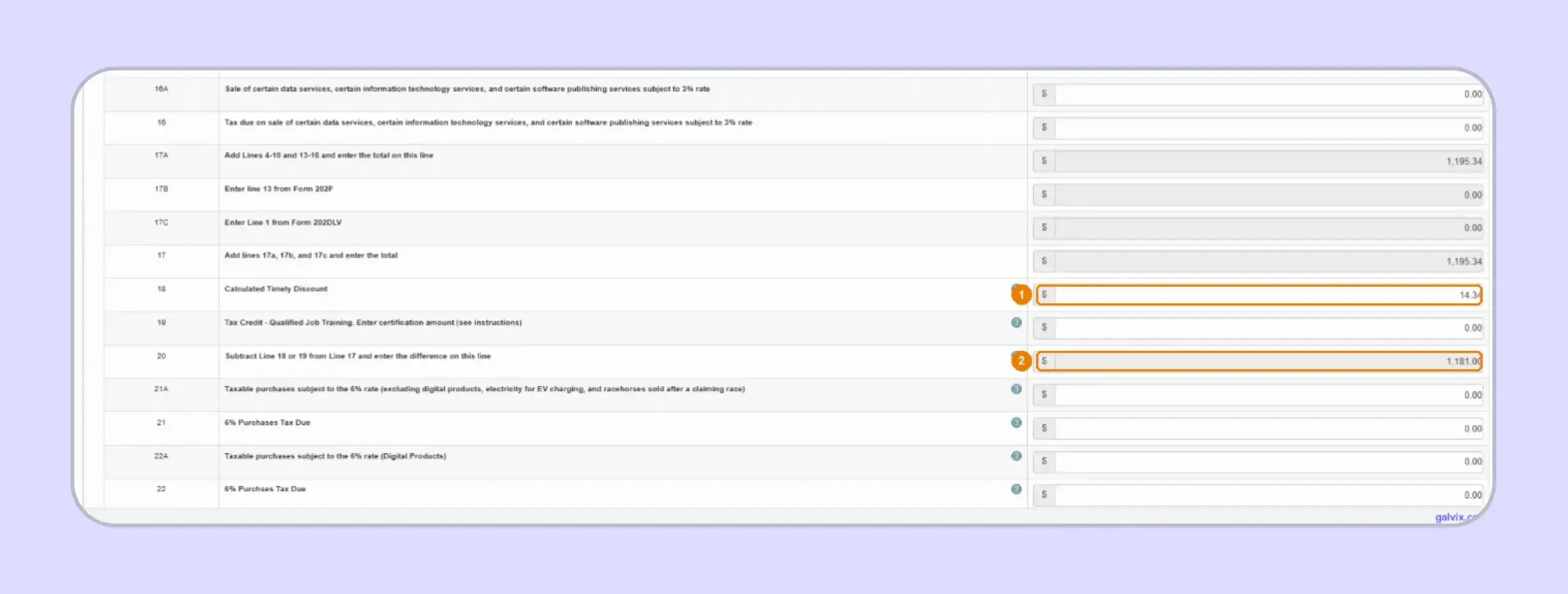
Open the Sales and Use Tax 202 tab and review the account-specific settings before entering figures. Facilitations and 202 DLV tabs apply to specific filing situations rather than every seller. The banner explains that grey fields are calculated by the portal, while white fields require your input. You must select Calculate before the return becomes available for submission.
Step 6: Enter Gross Sales, Taxable Sales, and Tax
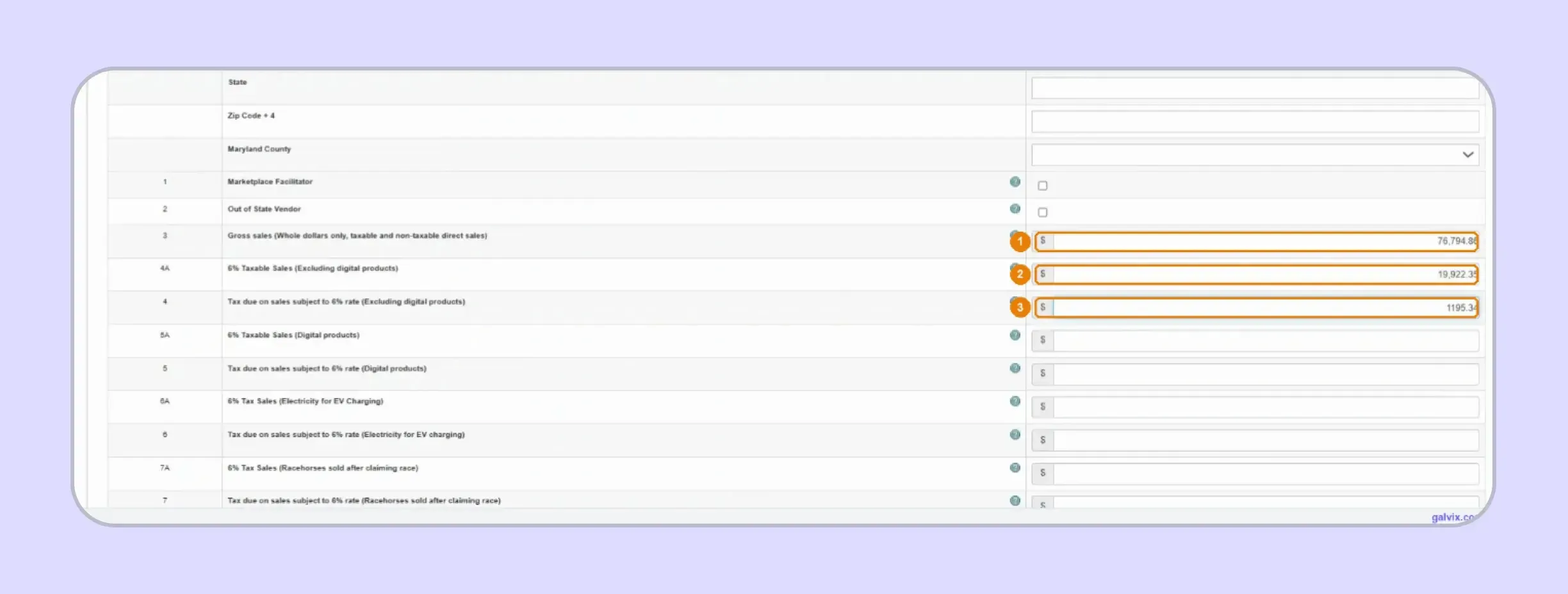
Enter gross sales on Line 3 and standard-rate taxable sales on Line 4A. Calculate 6% of Line 4A yourself, then enter that amount on Line 4. If you have special-rate transactions, enter the taxable amount and corresponding tax on the correct line pair. This is the central step when learning how to fill out sales and use tax return in Maryland.
Maryland Tax Connect does not verify that Line 4 equals 6% of Line 4A. Incorrect taxable sales or incorrect multiplication can still produce a return that balances successfully.
Step 7: Calculate and Review the Computed Lines
Select Calculate after all applicable rate lines are complete. The portal then fills the subtotal, total tax, timely filing discount, and Net Tax Due in the grey calculated fields. The discount applies only when the return and payment meet Maryland's timing rules. If Net Tax Due looks wrong, return to the manually entered sales and tax lines before submission.
Step 8: Sign and Submit Form 202
Review the Summary screen and continue to Signature only when every figure is ready. Selecting Yes confirms authorization and submits Form 202 without another final confirmation prompt.
Selecting Yes transmits the form immediately. Use Save and Exit when more review is needed because correcting a submitted return requires an amended filing.

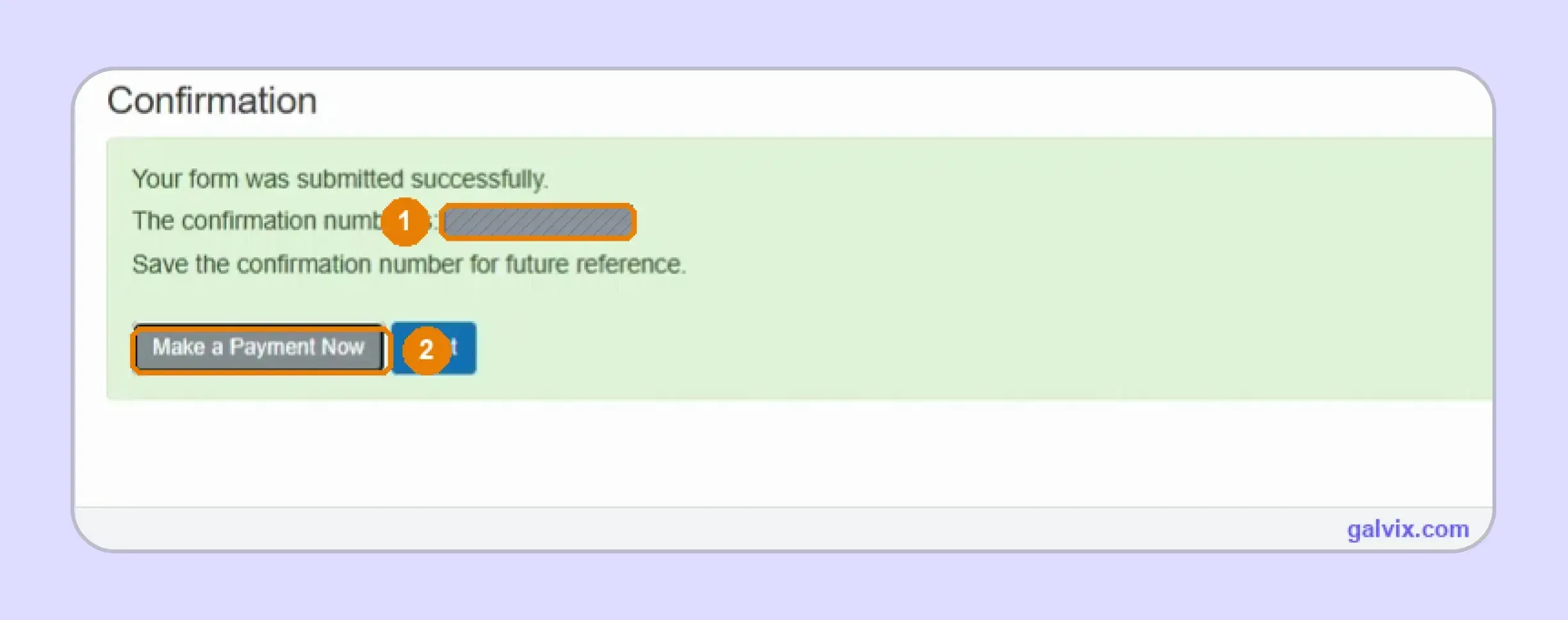
Step 9: Save the Filing Confirmation
After submission, save or print the FR confirmation number displayed on the confirmation screen. This number proves successful filing and should remain with the records for that period. The confirmation does not prove payment. Select Make a Payment Now when you intend to complete both parts of MD sales tax filing in the same session.
Step 10: Schedule the Electronic Payment
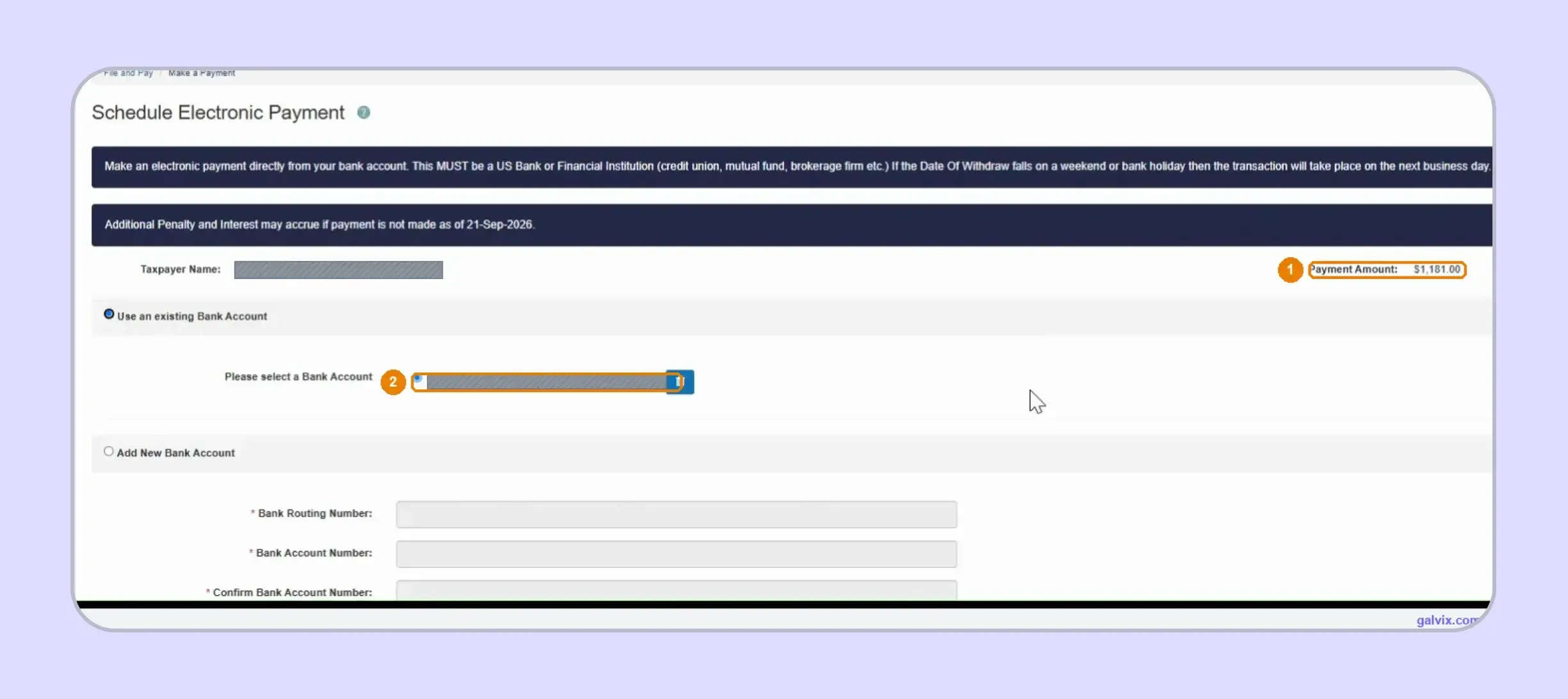
Choose an existing account or add new banking details after selecting Make a Payment Now. Review the payment amount and Effective Date before authorizing the ACH debit.
This separate workflow answers how to pay sales tax in Maryland after filing. Maryland warns that penalty and interest can accrue when payment misses the required due date.
The filing confirmation does not schedule payment. Complete the payment workflow and reach its separate confirmation screen before treating the period as fully handled.
Step 11: Save the Payment Confirmation
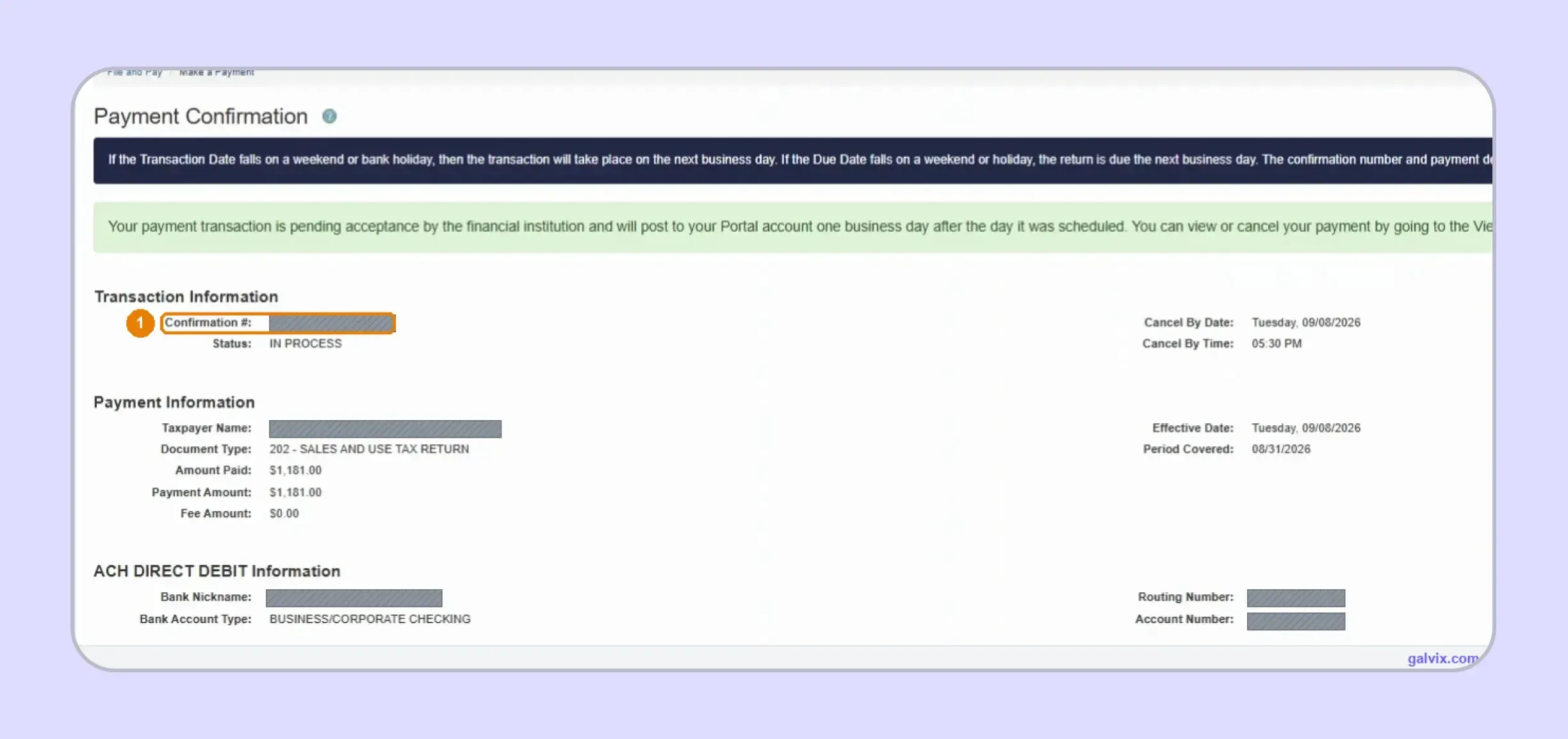
Save the separate payment confirmation after the transaction is accepted for processing. It records the amount, effective date, account information, status, and the deadline for canceling the scheduled debit.
Keep both confirmations together because they document two different actions. The return confirmation proves filing, while the payment confirmation supports payment authorization.
What Does Maryland Tax Connect Calculate and What Must You Check?
Maryland Tax Connect performs the final aggregation rather than the underlying tax calculation. You remain responsible for gross sales, taxable amounts, classifications, exemptions, and the tax entered for each applicable rate.
| Maryland Tax Connect Calculates | You Must Get Right |
|---|---|
| Tax subtotal | Gross sales |
| Total tax | Taxable sales by rate |
| Timely filing discount | Tax due for each rate |
| Net tax | Exempt and non-taxable treatment |
| Balance due | Marketplace exclusions |
| Final computed lines | Product and service classification |
The Calculate button confirms that the return reached the computation stage. It does not validate whether taxable sales equal the correct portion of gross sales or whether your manually entered tax reflects the required rate.
That distinction should shape your entire sales tax filing process. The risk sits in the information prepared before Calculate rather than the portal's addition of the values afterward.
Businesses can use a sales tax calculator to sense-check rates in other states, although Maryland's standard statewide rate removes local-rate calculations from Form 202.
Which Maryland Sales Need a Different Tax Rate?
Maryland's standard rate is 6%, although several transaction categories use separate rates on Form 202. You should identify these sales before filing because each applicable category requires its own taxable amount and tax calculation.
| Transaction | Rate |
|---|---|
| General taxable sales | 6% |
| Alcoholic beverages | 9% |
| Short-term passenger vehicle rentals | 11.5% |
| Short-term truck rentals | 8% |
| Adult-use cannabis | 12% |
| Certain data, IT, and software-publishing services | 3% |
| Certain vaping products | Special rates apply |
Certain data, information technology, system software publishing, and application software publishing services became subject to a 3% tax from July 1, 2025. Maryland law requires individual services to be assessed against the covered NAICS descriptions.
The adult-use cannabis rate also increased from 9% to 12% on July 1, 2025. Form 202 includes dedicated treatment for transactions subject to that higher rate. Digital products require particular attention because their treatment can differ from qualifying enterprise software services. SaaS can attract different treatment depending on how the product is used and which statutory classification applies.
Maryland also maintains annual sales tax holidays for qualifying merchandise. Shop Maryland Tax-Free Week and the Energy weekend can temporarily exempt qualifying purchases, so your August or February records may include activity that requires different treatment.
For comprehensive taxability checks across product categories, the Maryland sales tax guide connects filing figures with current product and service treatment.
How Do Exempt and Resale Sales Affect Form 202?
Exempt and resale activity changes the amount treated as taxable, even though Form 202 does not provide a separate deduction workflow, unlike some states. Your records must support why part of gross activity was excluded from taxable sales.
A purchaser buying for resale should provide the required resale certificate information. Maryland expects sellers to maintain documentation that explains tax-free transactions and to match valid certificates to the related sales records.
Qualifying nonprofit organizations and other exempt purchasers can use state-recognized exemption documentation. A certificate supports the claimed treatment, but the actual transaction must still fall within the scope of that exemption.
A consistent sales tax exemption certificate process helps separate certificate collection from transaction eligibility. That distinction becomes important when the same customer makes both taxable and exempt purchases.
The Galvix Sales Tax Exemption Certificate Tool can help identify the appropriate certificate route and seller checks before an exempt transaction reaches return preparation.
Exemption records are crucial during audit review because unsupported tax-free activity can create additional tax, penalties, and interest. Keep certificates linked to invoices rather than relying solely on a customer-level exempt flag.
When Is a Maryland Sales Tax Return Due?
Maryland returns are normally due on the 20th day of the month following the reporting period. If that date falls on a weekend or legal holiday, the deadline moves to the next business day.
Your filing frequency can be monthly, quarterly, biannual, or annual depending on the account. The Comptroller can change the assigned schedule based on actual payment activity and provides notice when that frequency changes.
This means Maryland sales tax filing requirements depend partly on the schedule shown in your account. Do not assume monthly filing applies because another state uses that cadence. The timely filing discount also depends on both filing and payment. Maryland calculates 1.2% of the first $6,000 of tax, with a different formula above that amount, capped at $500.
A return filed on time without payment can therefore lose the discount. The same risk applies when the payment is scheduled after the deadline shown in Maryland Tax Connect.
Businesses using several state calendars should compare their obligations under current state sales tax requirements rather than applying Maryland's deadline to another jurisdiction.
For context, a filing period ending in April, June, or September still follows the date assigned to its specific account schedule. Quarterly consumer use tax periods follow their own published timetable, including due dates of April 20 and October 20.
What Records Should You Keep After Filing and Payment?
Keep records showing what you reported, why certain activities received different treatment, and when payment was authorized. A clear audit trail helps you answer questions from the Comptroller without having to reconstruct the period later.
- Return Confirmation: Save the FR confirmation number from the filing screen. It shows that the Maryland sales tax return was successfully submitted via the portal, while the payment record remains separate.
- Payment Confirmation: Keep the payment confirmation showing the effective date and amount. This proves authorization of the ACH payment rather than return submission alone.
- Transaction Support: Retain sales reports, invoices, exemption records, marketplace statements, and rate calculations that support the reported figures. These records help explain gross activity and why some transactions were excluded from standard-rate taxable sales.
- Registration Records: Keep the Combined Registration Application, sales and use tax license, account identifiers, and later account changes with your permanent compliance records. These documents support the registration history behind recurring returns.
- Use Tax Records: Retain evidence for purchases where Maryland tax was underpaid at the time of purchase. The State of Maryland provides Form ST-118 for qualifying consumer use tax obligations.
When transaction information comes from multiple platforms, connecting source data via Galvix integrations can reduce the need for manual rebuilding before each return. Galvix supports ecommerce, accounting, payment, ERP, API, and file-based workflows.

How Does Galvix Manage Maryland and Multistate Sales Tax Filing?
Galvix manages recurring sales tax compliance as a service, so your finance team does not need to manage each state's portal independently. Transaction data is reconciled before return preparation, specialists review each filing, and your team approves the final figures before the return is submitted.
For Maryland, that workflow separates direct sales from marketplace activity while checking exemption support and special-rate treatment before Form 202 reaches the portal. This preparation matters when you file Maryland sales tax online because Maryland Tax Connect relies heavily on the figures entered by the filer.
As the same process scales, filing can connect with nexus monitoring, registrations, exemption certificate management, and state notice handling. Transaction data can also flow through supported systems, including the Shopify sales tax integration, reducing the need to rebuild filing data every reporting period for Maryland returns.
That comprehensive workflow keeps how to file MD sales tax connected with the rest of your multistate obligations as you grow. Galvix uses modular pricing, so you pay only for selected services, while exact pricing reflects the workload for each module shown on the pricing page.
What Can Galvix Manage for Maryland Sellers?
Once Maryland is integrated into the broader compliance process, Galvix can manage recurring return-preparation work while your team retains visibility prior to submission.
- Reconcile transaction data before Form 202
- Separate marketplace from direct activity
- Review exemption certificate support
- Prepare returns for customer approval
- Track filing and payment deadlines
- Coordinate nexus and state registrations
- Manage notices and certificate records
This approach is useful when you file Maryland sales tax online alongside sales tax in several other states. A single operating workflow can replace separate spreadsheets, portal calendars, and manual reconciliation processes across the finance team.
Galvix can also support broader tax determination and sales tax compliance as the business adds taxable goods or newly taxable services. Your team can review prepared returns while specialists handle recurring compliance work.
Book a Galvix demo today to start streamlining your Maryland sales tax-related tasks.
Frequently Asked Questions
How Do I File My Maryland Sales Tax Return?
To file Maryland sales tax online, sign into Maryland Tax Connect, open File and Pay, and choose Form 202 for the correct period. Enter gross sales, taxable amounts, and applicable tax manually, then select Calculate before signing and submitting the form.
How Do I File My Business Taxes in Maryland?
The filing method depends on the tax account involved. For sales and use tax, registered businesses use Maryland Tax Connect. Other business obligations may use separate forms or workflows, so confirm the account type before choosing a return.
Does Maryland Require Sales Tax?
Yes. Maryland imposes a 6% standard rate on retail sales of tangible personal property, digital products, and specified services unless an exemption applies. Special rates apply to several categories, including alcoholic beverages and qualifying technology services.
Can I File My Maryland Tax Return Online?
Yes. Businesses can file Maryland sales tax online through Maryland Tax Connect using Form 202. The portal supports online filing and electronic payment, although these remain separate actions with separate confirmation records.
How Do I Register My Business for Sales Tax in Maryland?
Complete the Combined Registration Application through Maryland Tax Connect to obtain a sales and use tax license. Registration establishes the account needed to collect tax and file returns after your physical or economic nexus obligation begins.
How to Pay Sales Tax in Maryland?
After Form 202 is submitted, select Make a Payment Now and choose an existing bank account or add new details. Review the payment amount and effective date, then save the separate payment confirmation after authorization.
Who Is Exempt From Paying Sales Tax in Maryland?
Qualification depends on the purchaser and transaction. Government entities, approved exempt organizations, resale purchasers, and certain transaction categories can qualify when Maryland law provides an exemption, and the seller maintains the required supporting documentation.