Businesses file sales and use tax returns through OkTAP, the state’s online filing portal. The correct Oklahoma sales tax return depends on whether the business uses a Sales Tax account or a Vendor Use Tax account.
The state sales tax rate is 4.5%, while city and county local taxes can also apply based on where the sale occurs. OkTAP uses four-digit COPO codes to assign those local amounts, so destination-level sales information should be reconciled before filing.
Qualifying food ingredients receive a 0% state rate, although applicable city and county taxes can still apply. Prepared food and certain other transactions may remain subject to the 4.5% state rate under current Oklahoma law.
Businesses must also refer to latest Oklahoma sales tax rules to check nexus, registration, rates, and filing obligations before starting the return filing process. This blog explains how to file sales tax in Oklahoma, prepare deductions, report grocery sales, complete local reporting, and save proof of filing.

Which Oklahoma Sales Tax Return Should You File?
The correct Oklahoma sales tax return depends on the account responsible for collecting the tax. In-state vendors normally file through a Sales Tax account, while qualifying out-of-state vendors may report collected use tax through a separate Vendor Use Tax account.
In-State Sellers Use the Oklahoma Sales Tax Return
Form STS-20002 is the main Oklahoma Sales Tax Return for vendors responsible for collecting and remitting tax on taxable Oklahoma transactions.
- STS-20002 reports taxable retail activity for the assigned tax period.
- Every assigned period requires filing, including a genuine zero return.
- The return reports state liability alongside applicable city and county amounts.
Businesses selling tangible personal property in the state normally need the appropriate sales tax permit before collecting tax. Oklahoma sales tax requirements also cover registration, rates, filing obligations, and other state-specific rules that businesses should confirm when establishing their account.
Out-of-State Vendors May Use the Vendor Use Tax Return
An out-of-state vendor reporting tax collected from customers in the state may use Form SVU-20005, the Oklahoma Vendors Use Tax Return. The Oklahoma Tax Commission directs these businesses to the vendor use tax route rather than the standard in-state return.
Remote Sellers Should Check Nexus Before Filing
Remote sellers without a physical presence in Oklahoma must register when their taxable sales exceed $100,000 in the preceding or current calendar year. Businesses approaching that threshold can use the Oklahoma sales tax nexus guide to review the current economic nexus trigger and related obligations.
That economic nexus test determines whether an obligation exists, while the filing account determines how the tax is reported afterward. A seller should first establish nexus, complete the required registration, and then file through the account assigned to its Oklahoma activity.
Businesses expanding into several states also need to track different economic and physical triggers as sales grow. Galvix’s sales tax nexus by state resource helps compare those thresholds without treating Oklahoma’s rules as the model for every jurisdiction.
What Should You Prepare Before Opening OkTAP?
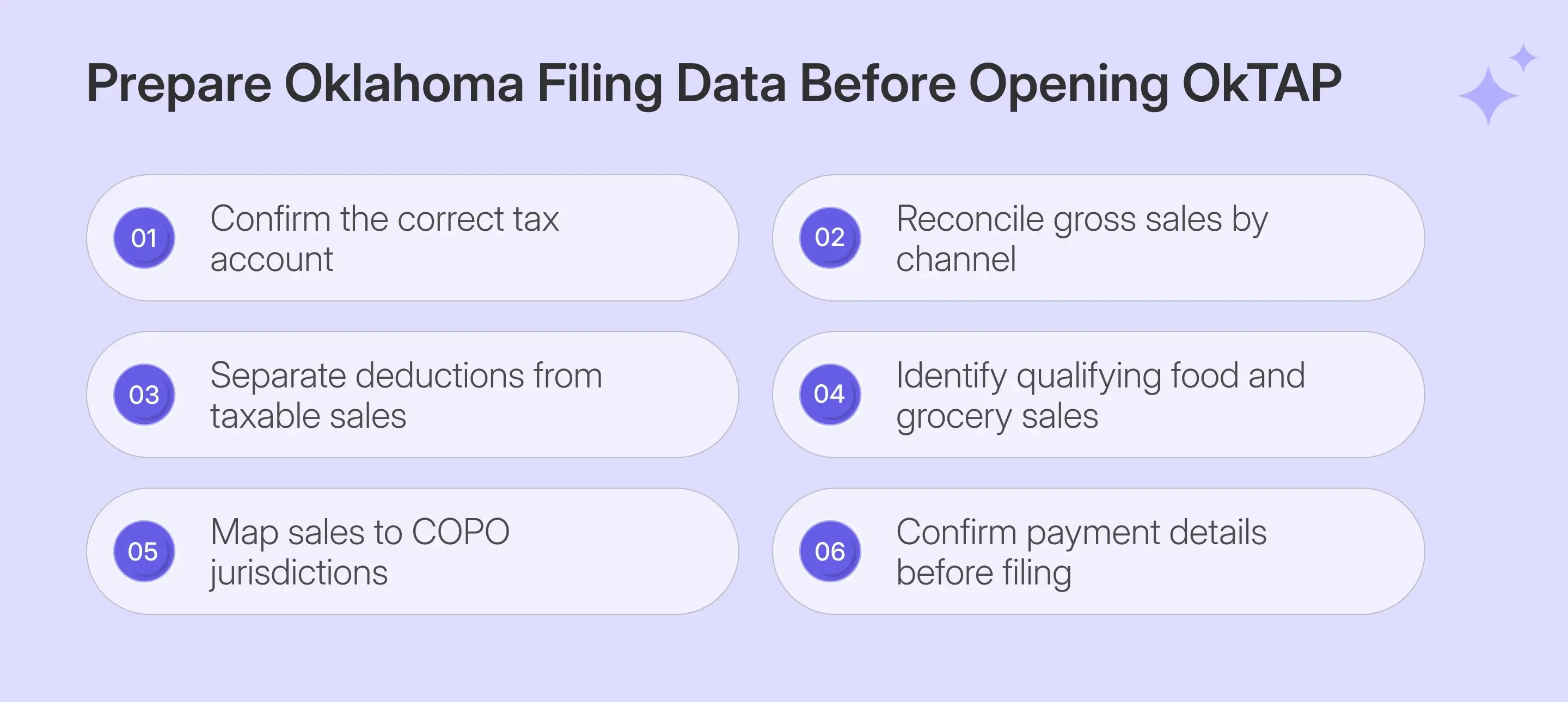
Successful OK sales tax filing starts with reconciled transaction data rather than portal entry. Confirm the account type, sales amounts, deductions, grocery activity, COPO allocation, and payment details before opening your OkTAP account for the required filing period.
| Prepare | Why It Matters |
|---|---|
| OkTAP credentials | Opens the correct taxpayer profile |
| Correct tax account | Separates Sales Tax from Vendor Use Tax |
| Gross sales | Establishes the starting sales amount |
| Legal deductions | Supports resale and exempt transactions |
| Grocery sales | Separates state and local treatment |
| COPO sales data | Builds the city and county schedule |
| Payment information | Supports available payment options |
This preparation is critical because OkTAP calculates several fields based on what the filer enters. Clean source data therefore affects the resulting tax due, local allocation, and final confirmation.
Grocery Sales Need Separate State and Local Treatment
Oklahoma reduced the state rate on qualifying food and food ingredients to 0% effective August 29, 2024. Local city and county taxes remain applicable, so these transactions still require location-level reporting.
The rule does not cover every food-related purchase. Prepared food, alcoholic beverages, and dietary supplements remain subject to the full 4.5% state tax, while certain prepared-food situations receive separate treatment under current guidance.
For filing purposes, this means grocery transactions can leave the state's taxable base while remaining relevant for local sales tax. The OkTAP Grocery Sales screen exists specifically to preserve that distinction.
Local Sales Need COPO-Level Reconciliation
For delivered products, Oklahoma generally sources the transaction at the point where the purchaser receives the product. That location determines which county and municipal rates apply to the transaction.
Businesses should therefore map taxable sales to destination jurisdictions before beginning the return. OkTAP uses four-digit COPO codes to identify those jurisdictions, while the portal supplies the associated tax rate after the correct code is selected.
This location work determines the amount of sales tax reported locally. It also prevents a common filing problem in which state totals are prepared correctly, but one destination is missing from the local schedule.
How Do You File Oklahoma Sales Tax Online Through OkTAP?
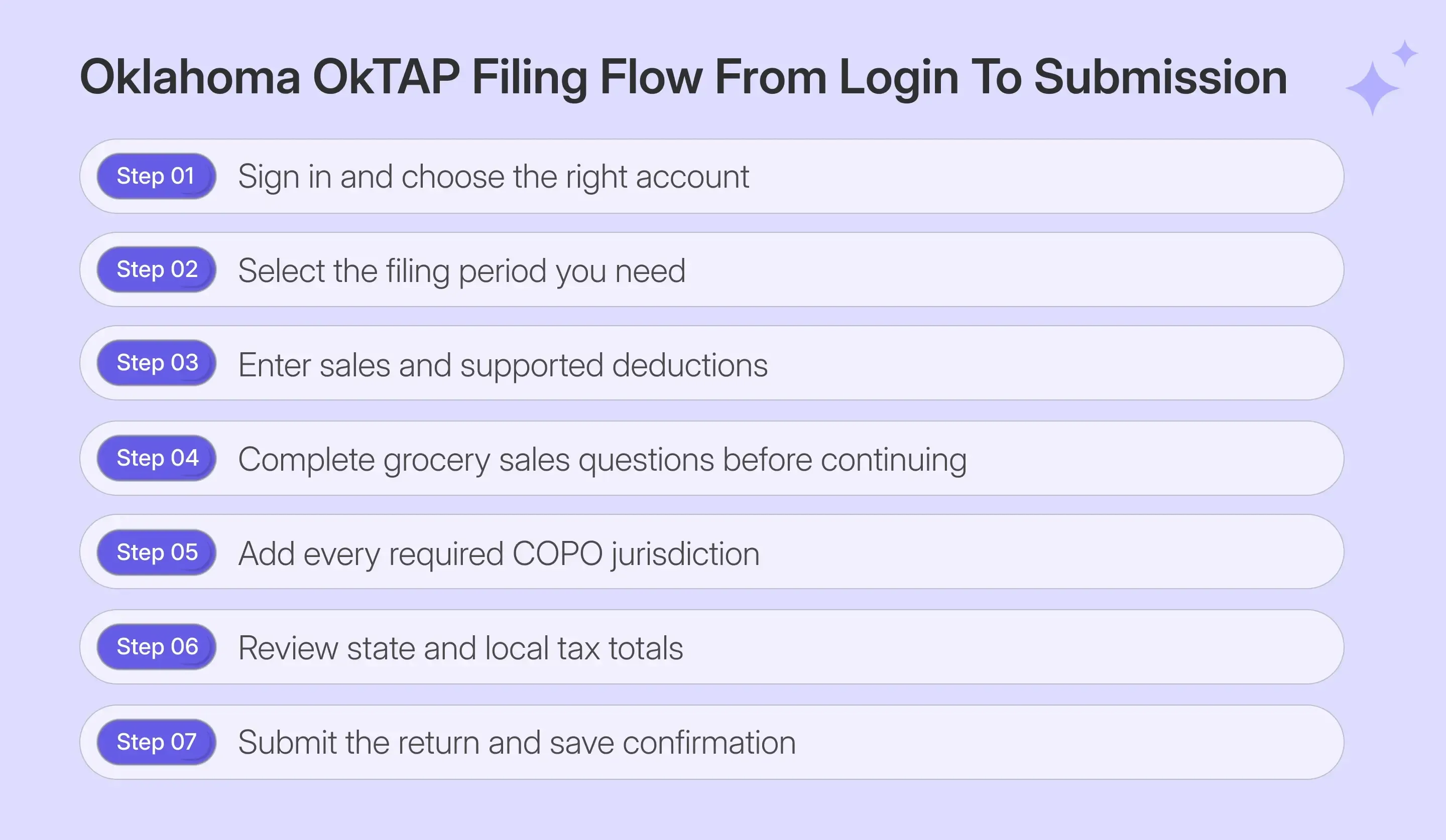
To file Oklahoma sales tax online, select the correct account and period before entering return data. The filing process then moves through sales entry, grocery treatment, COPO allocation, final review, and submission before OkTAP issues filing confirmation.
Step 1: Sign in to OkTAP
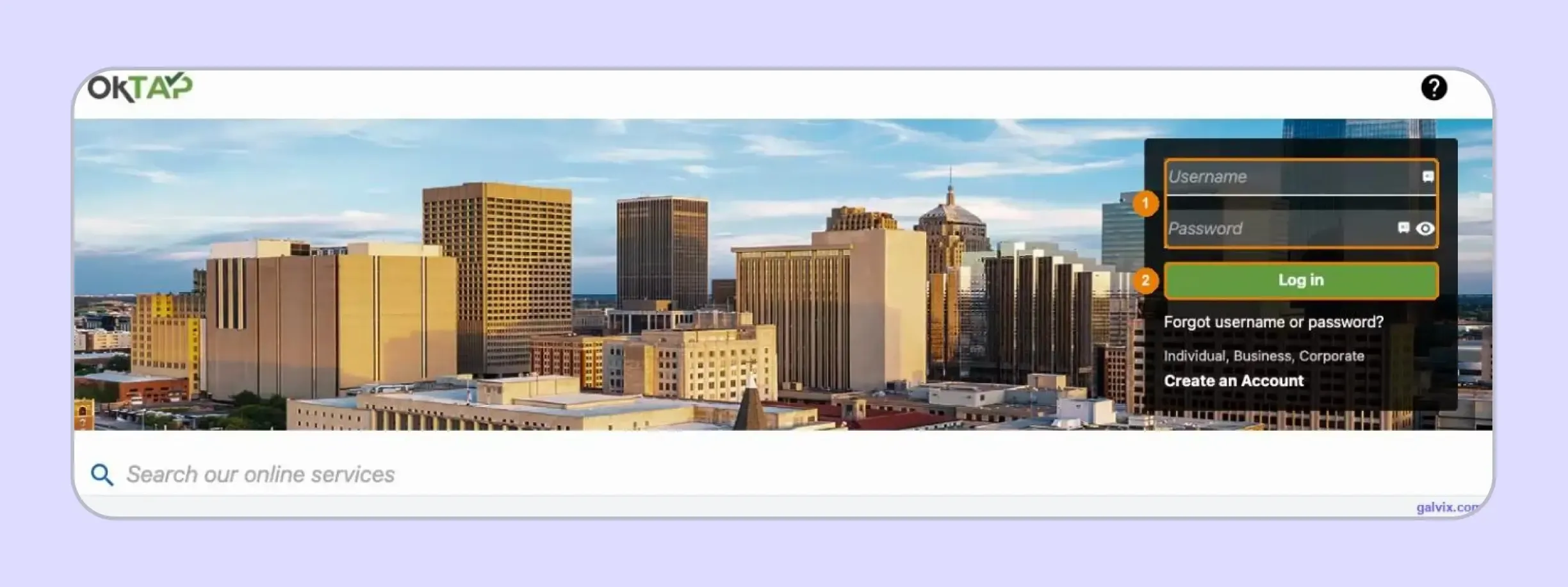
Open the Oklahoma Taxpayer Access Point, enter the username and password attached to the correct business profile, then select Log in. One profile may contain several Oklahoma tax accounts.
The portal login is for personal account access, not the business permit number. Businesses researching an Oklahoma sales tax return online should therefore confirm the correct username before beginning a filing session.
Step 2: Choose the Correct Tax Account
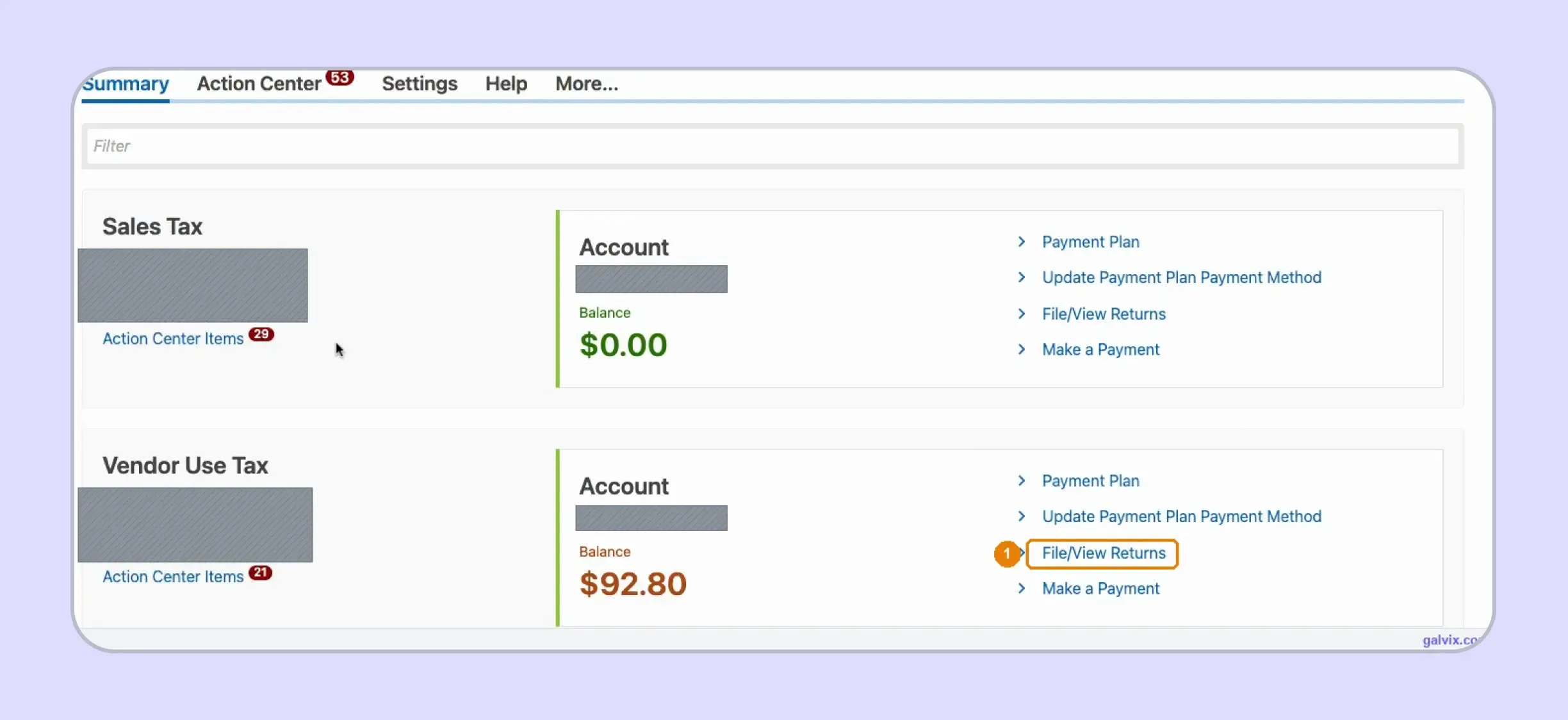
Find either the Sales Tax or Vendor Use Tax sales tax account that matches the obligation being filed. Select File/View Returns from that account to open its available returns.
Sales Tax and Vendor Use Tax accounts can sit beside each other while using almost identical filing screens. Confirm the account prefix and account type before entering any figures, since selecting the wrong account creates the wrong return.
Step 3: Select the Correct Filing Period
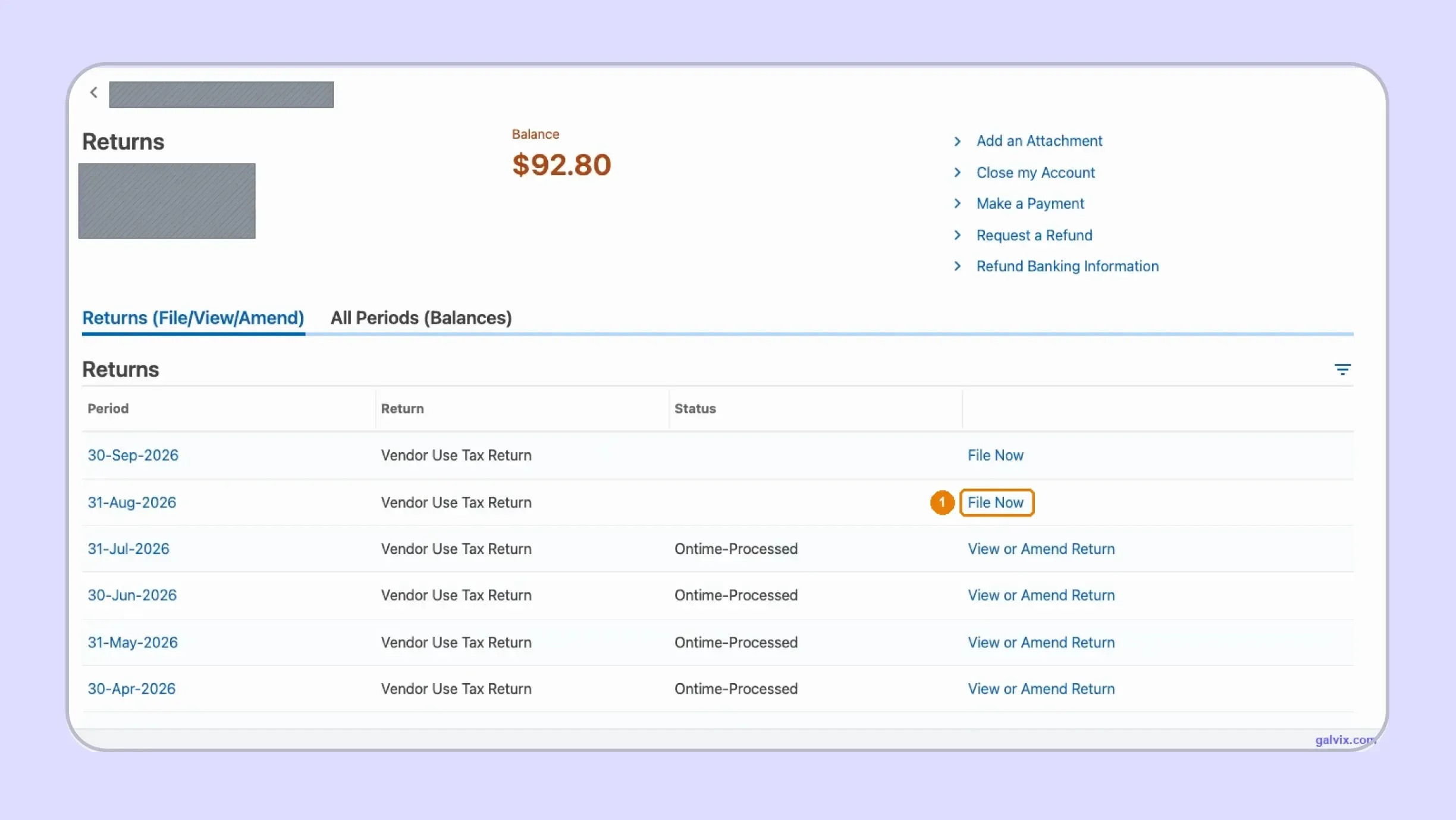
Open Returns File View Amend and choose File Now beside the correct period. Previously processed periods show View or Amend Return instead of the original filing action.
The live portal can display a newer open period above the one you intend to file. Match the period-ending date rather than assuming the first available row represents the required reporting period.
Oklahoma can make a period available before it has ended. Verify the ending date before opening the return, especially when several periods remain available within the same account.
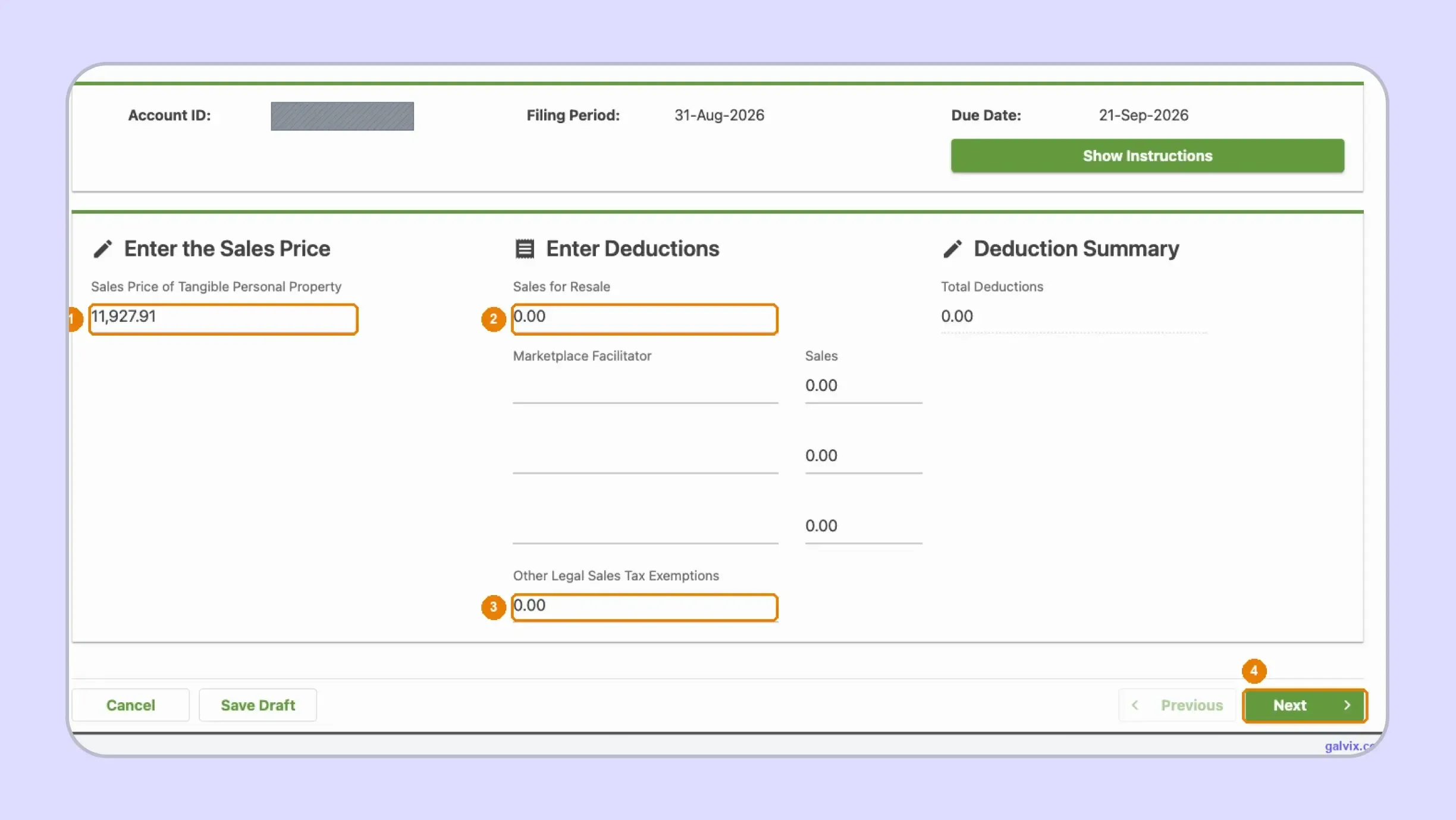
Step 4: Enter Sales Price and Deductions
The return asks for Sales Price of Tangible Personal Property, Sales for Resale, Marketplace Facilitator sales, and Other Legal Sales Tax Exemptions. OkTAP then calculates Total Deductions and the taxable balance.
Enter only deductions already included within the sales amount. A valid exemption should be supported by documentation before the related transaction reduces the taxable base reported on the return.
Businesses researching how to fill out a sales and use tax return in Oklahoma should distinguish filer-entered values from portal-calculated amounts. OkTAP calculates the resulting 4.5% state liability after the underlying figures are entered.
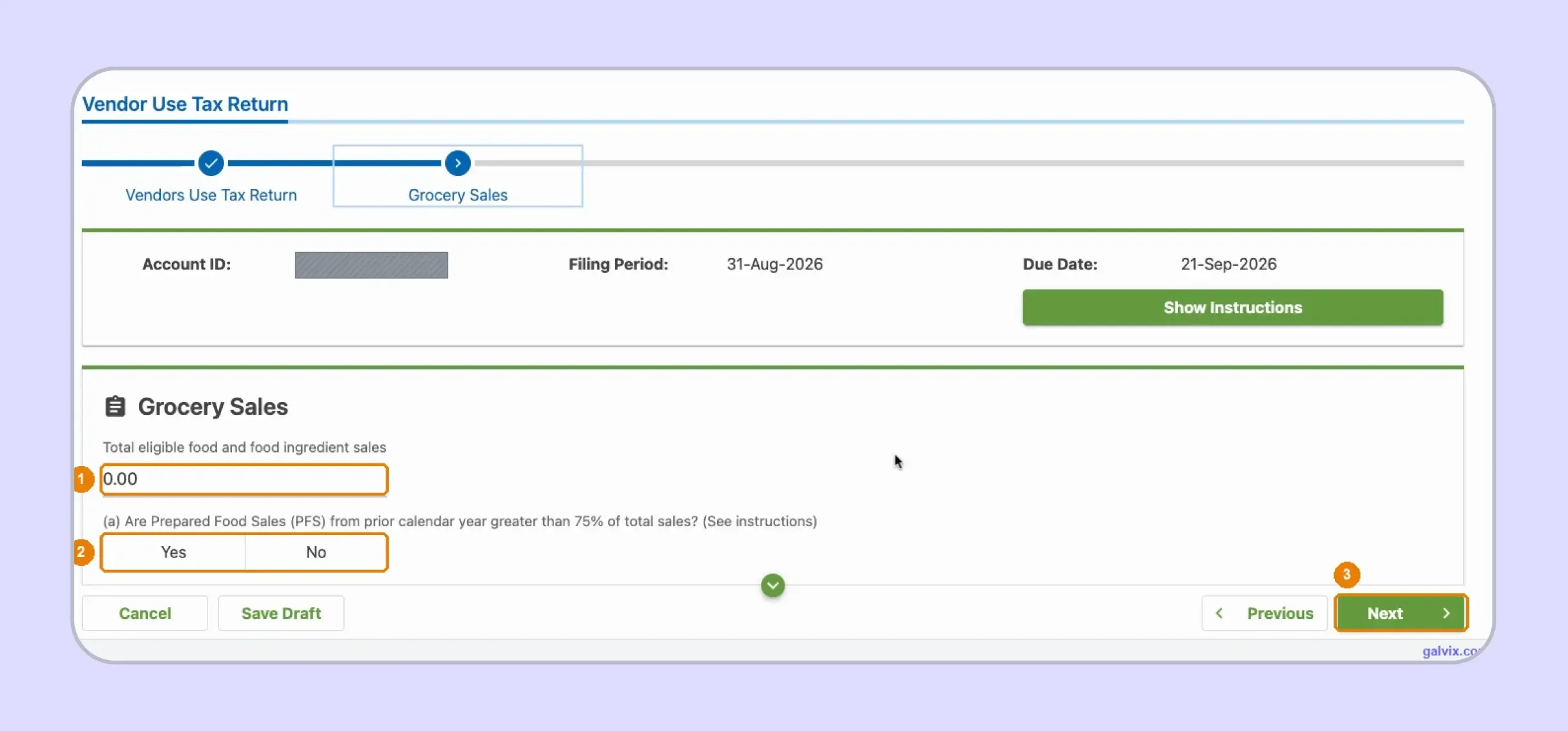
Step: 5 Complete the Grocery Sales Section
Enter total eligible food and food ingredient sales for the period, answer the prepared-food percentage question, and continue. Businesses with no qualifying grocery activity leave the amount at zero.
Grocery transactions receiving 0% state treatment may still be subject to city and county taxes. Those amounts may still need to appear within the COPO schedule even after leaving the state taxable base.
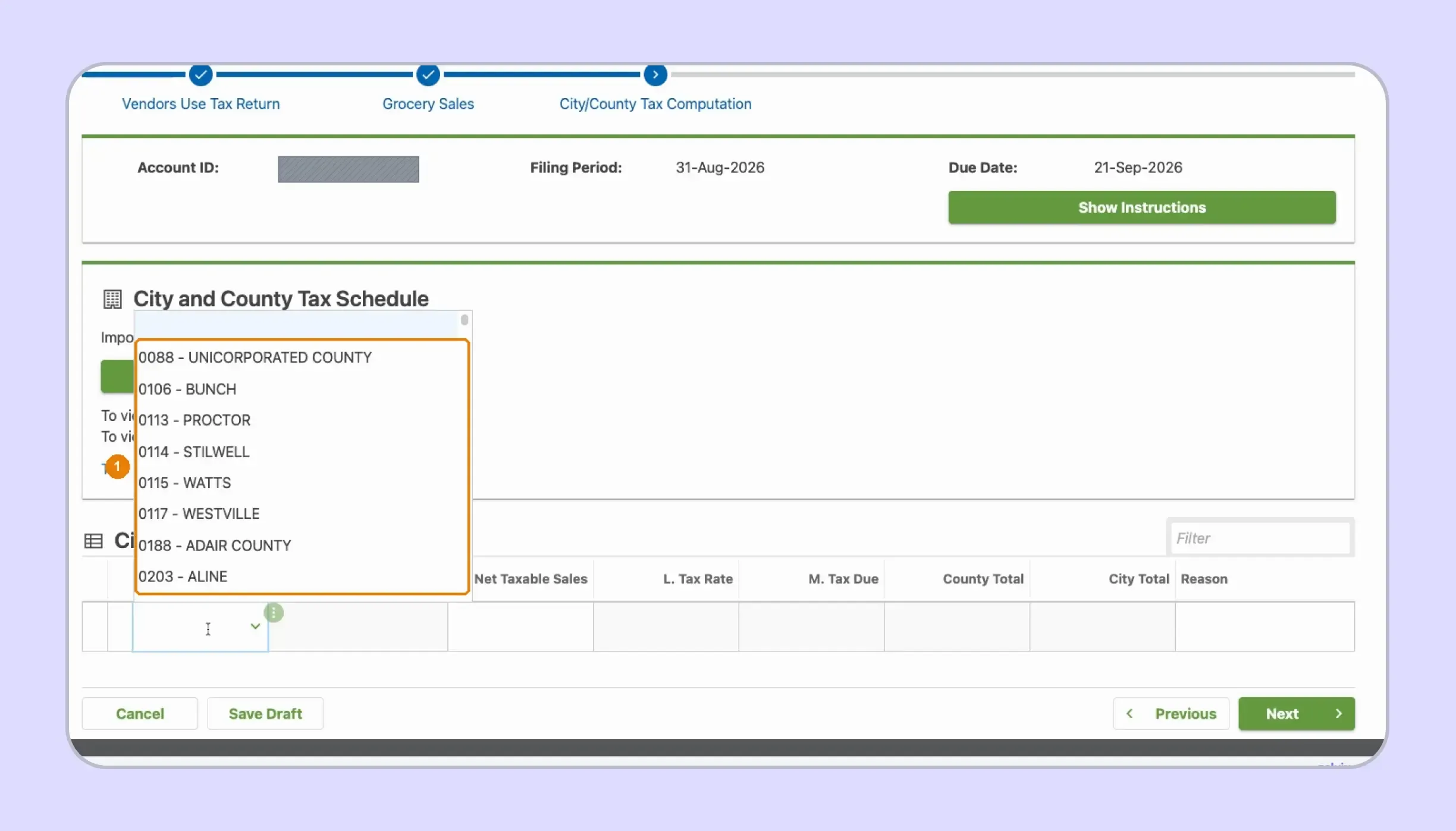
Step 6: Build the City and County Tax Schedule
Open City/County Detail and add every jurisdiction where reportable activity occurred. Choose the four-digit COPO code from the dropdown before entering each jurisdiction’s net taxable amount.
Unlike a pre-populated location schedule, the captured OkTAP table starts empty. The filer builds the jurisdiction list from its own transaction records rather than reviewing locations already supplied by the portal.
An omitted jurisdiction does not appear automatically. Work from reconciled delivery data, because omitting a destination can also exclude its local liability from the calculated return.
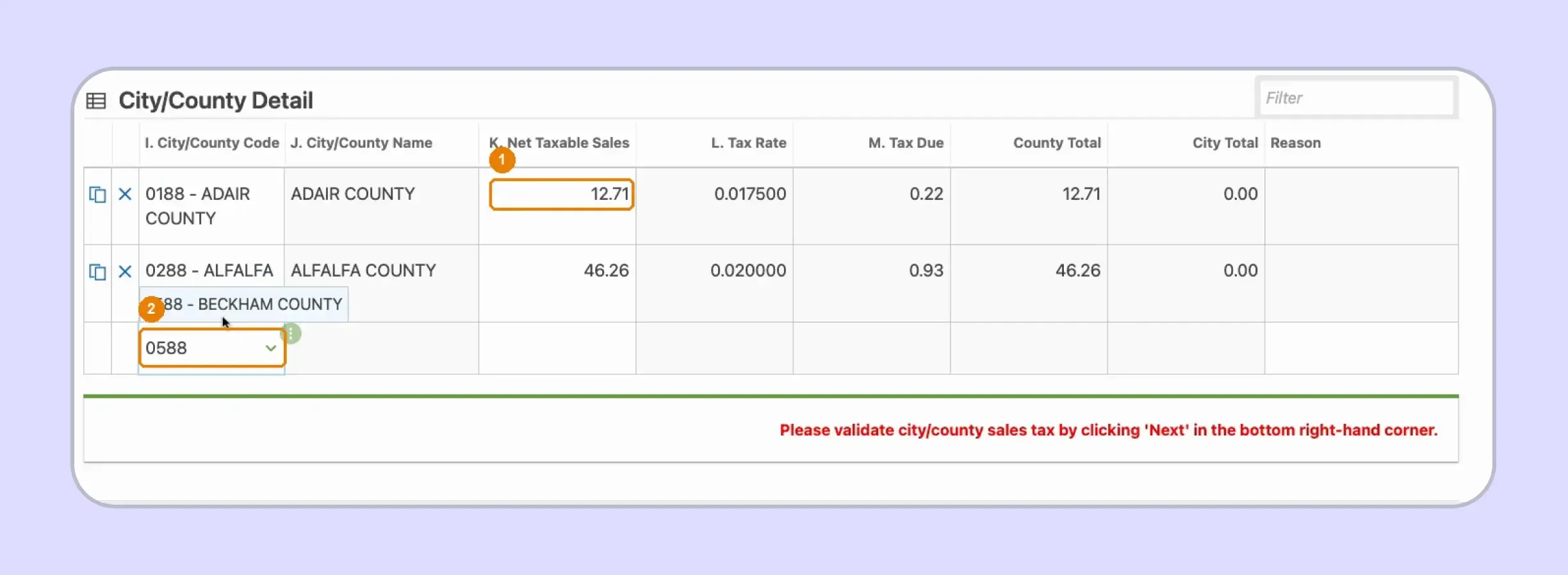
Step 7: Enter Taxable Sales for Each Jurisdiction
After choosing each COPO code, enter Net Taxable Sales for that jurisdiction. OkTAP fills the corresponding rate and calculates Tax Due plus county or city totals automatically.
The portal displays a validation message requiring the filer to click Next after the schedule is complete. Row values can appear during entry, while final validation occurs when the workflow advances.
Step 8: Review State Local and Total Tax
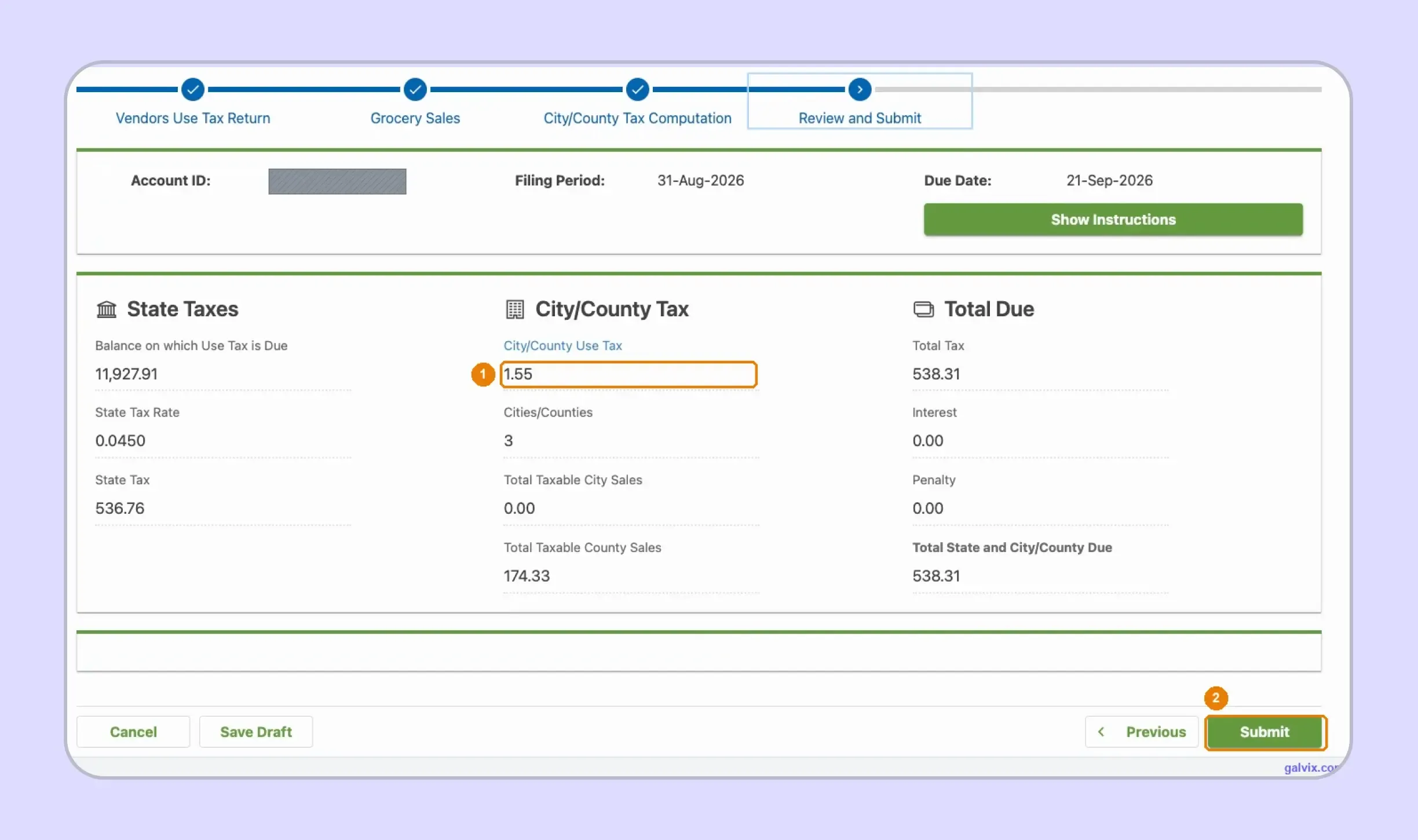
The Review and Submit screen separates State Taxes, City/County Tax, and Total Due. Review each panel against your workpapers before allowing the return to move into submission.
The captured return shows the 4.5% state calculation separately from city and county amounts. OkTAP then combines them into the final tax liability, including any applicable penalty or interest charges.
Step 9: Submit and Save the Confirmation
Select Submit only after the return is correct. OkTAP then issues a confirmation number, which should remain with the Oklahoma sales tax return and any separately generated payment confirmation.
Reaching Review and Submit does not complete tax filing. The filing is complete after submission generates the confirmation number, so save that record immediately as evidence of timely filing.
If an error is discovered later, return to the relevant account and use View or Amend Return for the same period rather than submitting another original return.
What Oklahoma Sales Tax Filing Requirements Should You Know?
Current Oklahoma sales tax filing requirements depend on the account, filing schedule, transaction location, and type of sale. Most permit holders file monthly, while qualifying low-volume vendors can receive semi-annual treatment under Oklahoma’s current rules.
| Requirement | Oklahoma Rule |
|---|---|
| State sales tax rate | 4.5% |
| Main sales tax return | STS-20002 |
| Vendor use tax return | SVU-20005 |
| Filing portal | OkTAP |
| Local tax | Varies by city and county |
| Standard due date | 20th after reporting period |
| Weekend or holiday | Due next business day |
| Zero returns | Required for assigned sales-tax periods |
| Remote-seller threshold | More than $100,000 taxable sales |
| Threshold period | Current or preceding calendar year |
| Grocery state rate | 0% for qualifying food |
| Grocery local tax | Still applies |
These filing rules matter most after the return data is ready. Businesses should confirm their assigned schedule, understand how weekends affect deadlines, choose the right payment route, and know what happens when filing or payment is delayed under Oklahoma rules.
- Filing frequency: Most permit holders file monthly, with returns due by the 20th day of the month following the sales month. Vendors remitting no more than $50 monthly may qualify for semi-annual filing instead of monthly filing.
- Weekend and holiday deadlines: If the due date falls on Saturday, Sunday, or an observed state holiday, Oklahoma moves the deadline to the next business day. This should be reflected in the filing calendar.
- Payment options: Businesses asking how to pay sales tax in Oklahoma can use ACH Debit, ACH Credit, cards, checks, cash, or money orders where accepted. OkTAP also supports online payment for eligible accounts.
- Late filing and payment: Businesses should still file by the deadline when full payment is unavailable. Unpaid balances can trigger a 10% penalty and monthly interest at 1.25%, depending on the account and timing.
Teams managing several states can use Galvix’s sales tax resources to compare filing schedules, deadlines, and related sales tax rules without treating Oklahoma’s process as a template for every jurisdiction.

How Do Exempt Sales Affect an Oklahoma Sales Tax Return?
Qualifying resale and exempt transactions can reduce the taxable base on an Oklahoma sales tax return, but sellers must provide documentation for each deduction. Permit lookup, certificate review, and transaction eligibility answer different questions and should remain separate parts of sales tax compliance.
Exempt Sales Need the Right Documentation
Oklahoma allows resale and other statutory exemptions when the transaction meets the relevant state requirements. Sellers should keep the certificate or other supporting record for each claimed sales tax exemption, rather than relying solely on the buyer’s statement.
For eligible transactions, the Streamlined Sales Tax Certificate of Exemption can support the exemption when the stated reason applies in Oklahoma. Galvix’s sales tax exemption certificate guide explains what sellers should collect and review before treating a sale as exempt.
A certificate supports the documentation process, although it does not establish eligibility on its own. The seller still needs to connect the certificate with the customer and the specific transaction.
Permit Verification Does Not Prove Transaction Eligibility
OkTAP allows businesses to verify a sales tax account, exemption account, or permit using the relevant number. This check confirms registration information, rather than whether a specific purchase qualifies for exempt treatment.
A current Oklahoma sales tax permit can show that the purchaser holds an active account. The seller still needs to review the exemption reason and confirm that it applies to the reported transaction.
This distinction matters when one customer makes different types of purchases across several locations. Supporting records should relate to the specific exempt transaction rather than serve as blanket approval for future sales.
Galvix’s exemption certificate resources help businesses identify documentation requirements before an exempt transaction reaches filing. Certificate collection, permit verification, and transaction eligibility remain separate controls, reducing the likelihood that an unsupported deduction will flow into the Oklahoma sales tax return.
How Does Galvix Help With Oklahoma Sales Tax Filing?
Galvix manages Oklahoma sales tax filing through a supported compliance workflow that begins before figures reach OkTAP. Transaction data is reconciled, the return is prepared for specialist review, customer approval follows, and filing is completed for the required reporting period.
For Oklahoma, this preparation helps teams select the right account, reconcile taxable sales, apply deductions, and allocate local amounts correctly. These checks reduce manual work before the Oklahoma sales tax return moves into the state portal.
Galvix Connects Filing Data Before OkTAP
Supported sales tax integrations bring transaction data from ecommerce, accounting, payment, and ERP systems into the filing workflow. This reduces the need to manually rebuild sales information before each tax filing cycle.
Nexus monitoring can remain connected with the same process. Businesses approaching the state threshold can review their Oklahoma sales tax nexus position before sales tax registration and recurring filing obligations begin.
Galvix Keeps Exempt Sales and Filing Records Connected
Businesses with exempt customers can keep certificate management within the same sales tax compliance process used for return preparation. Galvix supports certificate collection, review, renewal tracking, customer mapping, and records needed when an exemption is later questioned.
This connection matters when exempt transactions reduce amounts reported on the return. Galvix’s sales tax exemption certificate guide also explains how documentation, verification, and transaction eligibility should remain separate controls.
Galvix Extends the Workflow Across Other States
Businesses rarely manage Oklahoma in isolation. Galvix can connect return filing with nexus monitoring, registrations, tax determination, exemption certificate management, and state notice support across the registered-state footprint.
Galvix uses modular pricing, so businesses select only the services they need. Exact pricing reflects the workload associated with each service, such as return volume, registered states, exempt customers, or transaction activity.
As the business enters more states, separate reconciliation files and filing calendars become harder to maintain. Galvix consolidates recurring work into a single managed process, allowing internal teams to review prepared returns without rebuilding the workflow each period.
Book a Galvix demo to review your Oklahoma workflow and reduce recurring filing work as additional states and reporting obligations are added.
Frequently Asked Questions
Can I amend an Oklahoma sales tax return in OkTAP?
Yes. A previously filed Oklahoma sales tax return can be amended through the account’s Returns list by selecting View or Amend Return for the relevant period. The live OkTAP workflow shows this option beside processed periods, while unfiled periods display File Now instead. Review the corrected sales and deductions before resubmitting because changes can affect state and local amounts.
Can I save an unfinished Oklahoma return and finish it later?
Yes. The live OkTAP screens include a Save Draft option during return preparation, allowing a filer to leave the workflow before final submission. A saved draft should still be completed before the applicable filing deadline because saving does not count as filing. Always verify the selected tax period when returning to unfinished work, especially where several periods remain open.
How do I find the correct Oklahoma COPO code?
Use the jurisdiction list within the OkTAP City/County schedule or the official Oklahoma rate resources when identifying the applicable COPO code. The code connects the transaction location with the correct city or county rate. For delivered transactions, use the purchaser’s receipt location because Oklahoma generally sources delivered products to that destination.
Can I pay Oklahoma sales tax separately after filing?
Yes. Filing and payment can occur separately in OkTAP, although the business still needs to meet its payment obligation by the applicable due date. The live walkthrough confirms that return submission and payment confirmation can be retained separately. Businesses should keep both records because filing confirmation proves submission while payment confirmation supports the separate remittance.
Can I still file if I cannot pay the full amount due?
Yes. The Oklahoma Tax Commission advises businesses to file by the deadline and pay as much as possible when they cannot remit the full balance. OTC then bills the remaining amount together with applicable penalty and interest. A business facing a material balance may also consider discussing the situation with its tax advisor before arranging payment with the state.
Can businesses register for Oklahoma through Streamlined Sales Tax?
Yes. Oklahoma participates in the Streamlined Sales Tax, and eligible businesses can register through the Streamlined Sales Tax Registration System rather than completing separate registrations with each participating state. The registration route does not alter the need to comply with Oklahoma-specific taxability and filing rules after registration.
How do I close an Oklahoma Sales Tax or Vendor Use Tax account?
OkTAP provides a "Close my Account" option in the account area. Before closure, confirm that any outstanding returns and balances have been resolved and that the business no longer has any active obligations. Keep current contact information on file with the State of Oklahoma so that final correspondence reaches the correct person after the account is closed.