Businesses registered for South Carolina Sales and Use Tax usually file through MyDORWAY, the online portal operated by the South Carolina Department of Revenue. The filing combines Form ST-3 with Form ST-389 when applicable local taxes must also be reported.
The statewide South Carolina sales tax rate is 6%, while approved county taxes can raise the combined rate to 9%. Local reporting requires careful attention because taxable activity may need to be allocated across counties and municipalities, each subject to different South Carolina sales tax rules.
Local reporting requires closer attention because taxable activity may need to be allocated across counties and municipalities that use different local tax programs. Businesses therefore need to reconcile the state taxable base with the location-level information used for ST-389 before submitting the return.
This blog explains how to file sales tax in South Carolina, prepare your South Carolina sales tax return, complete ST-3 and ST-389, review exemptions, and retain submission records. It also covers how Galvix supports recurring South Carolina filing within a broader multistate compliance workflow.

Why Is South Carolina Sales Tax Filing More Complex Than It Looks?
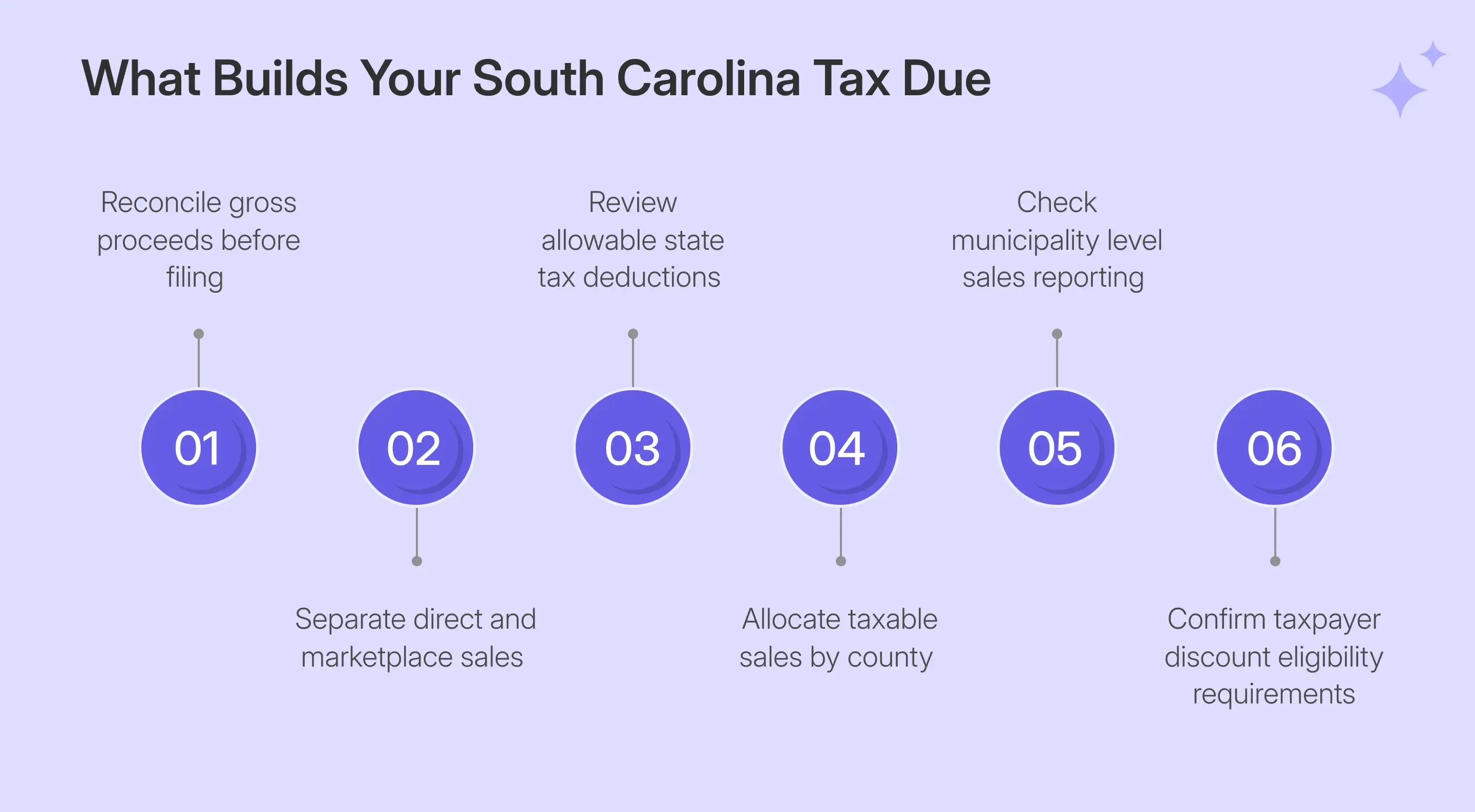
A South Carolina sales tax return combines a 6% state calculation with location-based local reporting. ST-3 establishes the state taxable base, while ST-389 reports applicable local taxes by county and municipality. The difficulty lies in correctly allocating sales across different local tax programs.
ST-3 Handles the State Sales and Use Tax
ST-3 establishes the state portion of the return using gross proceeds, qualifying deductions, and purchases subject to use tax. MyDORWAY performs the tax calculation after the filer enters the underlying figures.
- Report gross proceeds for the applicable reporting period before deductions.
- Add qualifying out-of-state purchases that create tax liability for use tax.
- Enter supported deductions for exempt transactions and qualifying retail sales.
- Review calculated taxable sales and the 6% state sales tax.
The return also captures transactions involving a taxable sale of goods and certain services. South Carolina taxes tangible personal property and specified services, including communications, accommodations, laundry-related services, and electricity.
ST-389 Handles Local Sales Taxes
Retailers report SCDOR-administered local sales tax through ST-389 alongside the state return. The applicable tax depends on where delivery occurs, and which local programs apply to that county or municipality.
The live MyDORWAY schedule separates the amounts for Capital Project, Catawba Tribal, Local Option, School District or Education Capital Improvement, Tourism Development, Transportation, and Green Space. Each program has its own applicable jurisdictions, so a filer should use the columns activated for each location.
Local Tax Rules Can Change During the Year
The sales tax rules for local jurisdictions can change within a filing year, making the transaction date and location important when preparing the return.
- Lexington County extended its School District Tax from March 1, 2026.
- Aiken County reimposed Capital Projects Tax beginning May 1, 2026.
- Williamsburg County added Capital Projects Tax beginning May 1, 2026.
The current rate table shows combined rates between 6% and 9%, meaning that much of the sales tax ultimately collected depends in part on where the transaction is sourced.
Who Must File a South Carolina Sales Tax Return?
Businesses with an open Sales and Use Tax account must file according to their assigned filing frequency. Returns remain due when no tax is payable, including periods where all reported transactions qualify for exemptions.
South Carolina Retailers Need a Retail License
A retailer making taxable South Carolina sales must obtain the appropriate Retail License before conducting taxable business. This requirement also applies to qualifying internet sellers and businesses operating multiple physical locations.
- A retailer needs a license before making taxable sales in the state.
- Qualifying online sales can create the same registration requirement.
- Each physical retail outlet normally requires its own license.
- Filing continues while the related tax account remains open.
Businesses sometimes seek a sales tax permit, although SCDOR refers to it as a Retail License. A business owner should also keep the account address and current contact information up to date when business details change.
Remote Sellers Must Monitor the $100,000 Threshold
Remote sellers without physical presence establish economic nexus when their gross revenue from South Carolina sales exceeds $100,000 during the current or previous calendar year. Marketplace transactions are included when measuring this threshold.
This treatment reflects the wider shift following South Dakota v. Wayfair, which allowed states to enforce collection obligations based on economic activity. Teams monitoring sales tax nexus can compare the current South Carolina threshold with other state rules.
Marketplace-Only Sellers Can Have Different Obligations
Marketplace facilitators are treated as retailers for facilitated transactions and must collect and remit tax on covered marketplace sales. A marketplace-only seller can therefore cross South Carolina’s nexus threshold without becoming responsible for remitting tax on those facilitated transactions.
Mixed sellers need to separate marketplace activity from their direct sales. Marketplace revenue still counts toward the nexus threshold, while direct gross proceeds remain part of the seller’s own filing responsibility. This separation helps prevent facilitator-remitted activity from overstating the seller’s tax liability.
As sales expand into other states, the same business may face different economic and physical sales tax nexus thresholds. Tracking those triggers alongside South Carolina helps determine where registration and filing obligations may arise next.
What Should You Reconcile Before Opening MyDORWAY?
Preparing the figures first makes SC sales tax filing easier because MyDORWAY calculates the tax based on the information entered. Reconcile gross proceeds, marketplace treatment, deductions, delivery locations, and payment details before opening the MyDORWAY account for the return.
| Prepare | What to Verify |
|---|---|
| MyDORWAY access | Correct business and Sales and Use Tax account |
| Filing period | Correct period ending date and due date |
| Gross proceeds | Direct sales included in ST-3 Item 1 |
| Use-tax purchases | Untaxed purchases used within the State of South Carolina |
| Allowable deductions | Exempt transactions have adequate documentation |
| Marketplace sales | Facilitator-reported activity is separated from direct transactions |
| County and municipality | Delivery location supports local allocation |
| Payment information | Correct bank account or other payment route |
Separate Direct and Marketplace Activity
South Carolina uses total revenue when testing a remote seller's threshold, including qualifying marketplace activity. The marketplace facilitator remains responsible for tax on transactions it facilitates, while the seller reports its own direct gross proceeds.
This difference matters because nexus measurement and return preparation answer separate questions. A clean channel reconciliation helps ensure the tax return reflects transactions for which the seller is responsible.
Build Local Sales From Delivery Data
Local tax application usually follows the point of delivery, so transaction records should identify where title or possession transfers. SCDOR specifically states that a mailing address cannot reliably determine whether a customer lies within a municipality or county.
Delivery terms can also affect tax treatment. Shipping charges are generally taxable when delivery occurs via the retailer's vehicle or under FOB destination terms, whereas qualifying FOB shipping-point charges may be excluded.
A clean delivery dataset therefore supports the local sales allocation needed later on ST-389.
How Do You File South Carolina Sales Tax Online Through MyDORWAY?
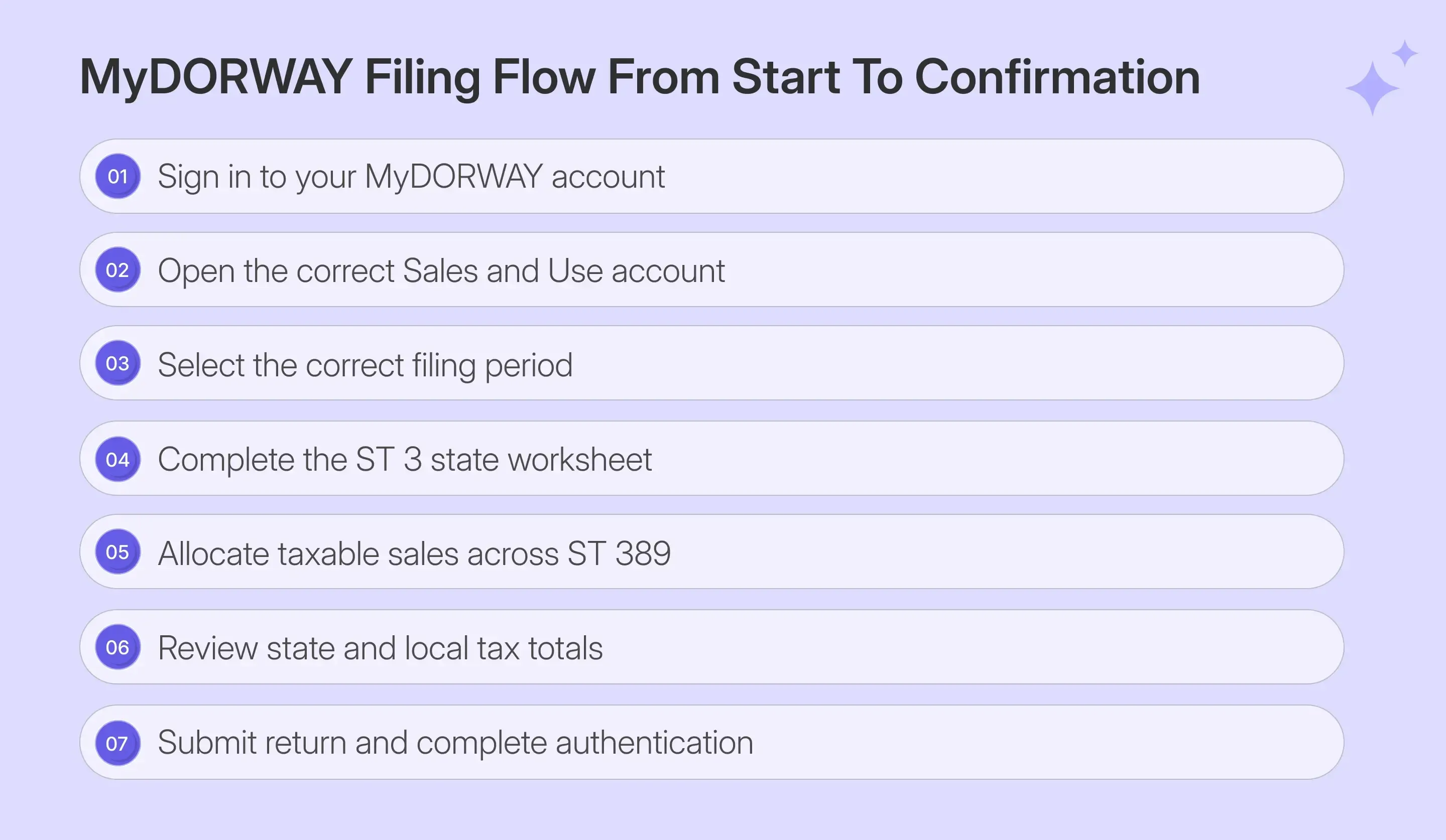
Businesses can file South Carolina sales tax online through MyDORWAY by completing ST-3, the County Detail grid, ST-389, and the final summary. The live portal workflow also requires authentication after Submit before the filing becomes final.
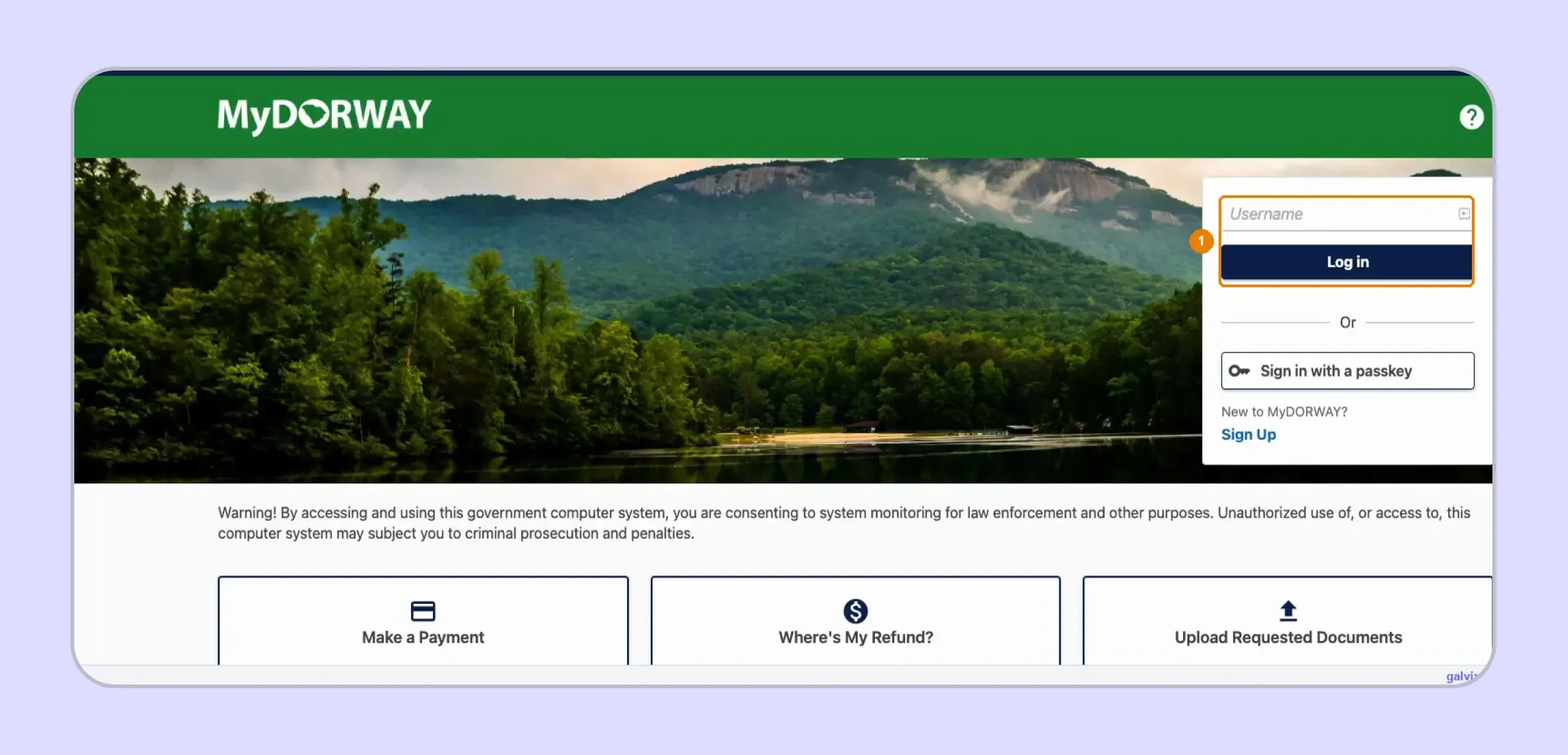
Step 1: Sign In to MyDORWAY
Open MyDORWAY, enter your username, and select Log in before completing the password step. Use the login linked to the correct business, as your username differs from the Retail License number and FEIN.
Step 2: Confirm the Sales and Use Tax Account
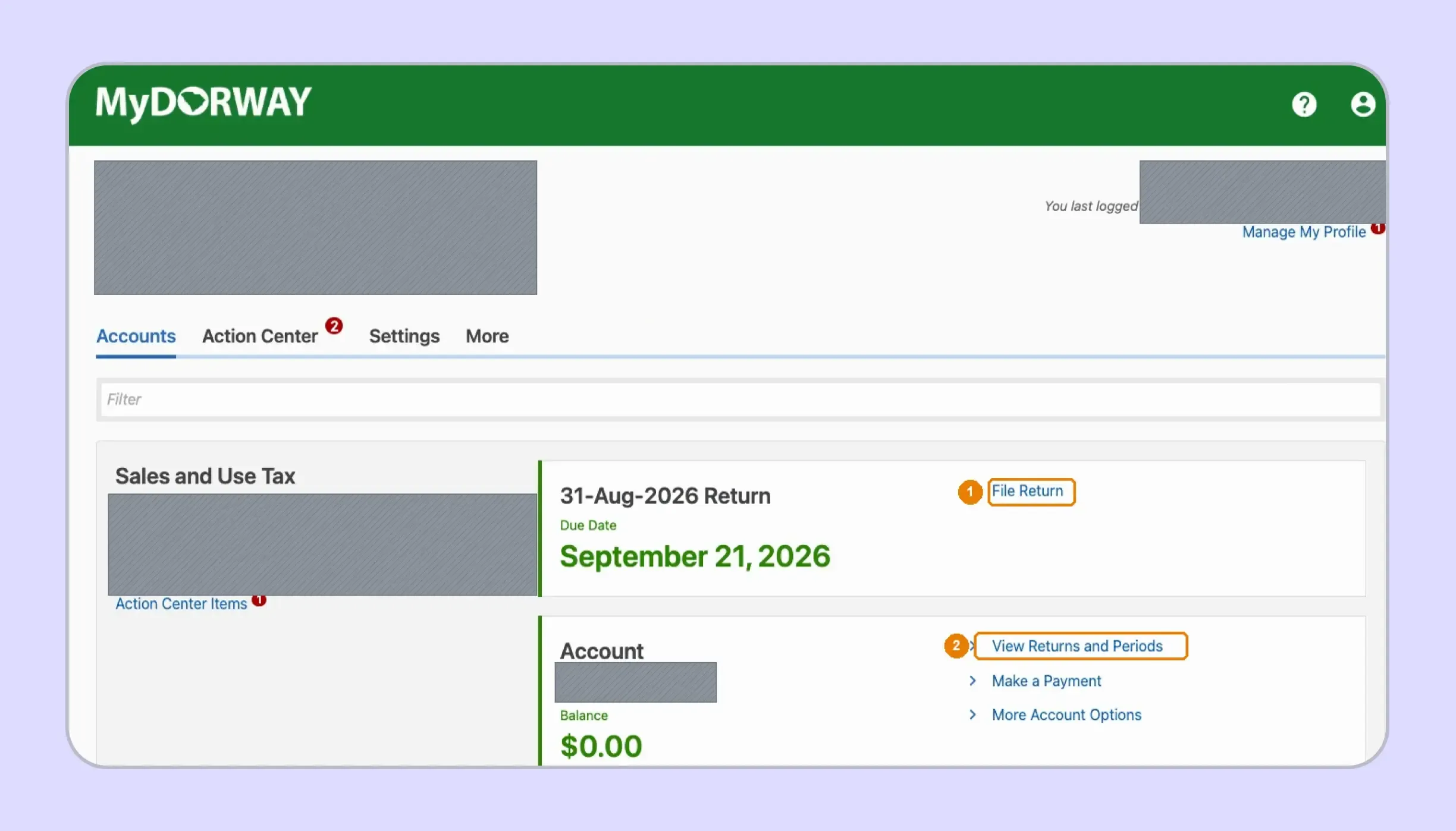
Find the Sales and Use Tax account and confirm the business details shown. The account card displays the upcoming return, assigned filing frequency, balance, and due date before you select File Return.
You can instead choose View Returns and Periods when you need another reporting period. SCDOR offers monthly, quarterly, annual, and seasonal schedules depending on account approval and activity.
Step 3: Select the Correct Filing Period
Open the Periods tab and find the return using its period-ending date. Select File Return beside the required period before entering sales information, especially when several outstanding periods appear together.
When the 20th falls on a weekend or state holiday, the deadline moves to the following business day. The August 2026 screenshot therefore displays September 21 because September 20 fell on Sunday.

Step 4: Complete the ST-3 State Worksheet
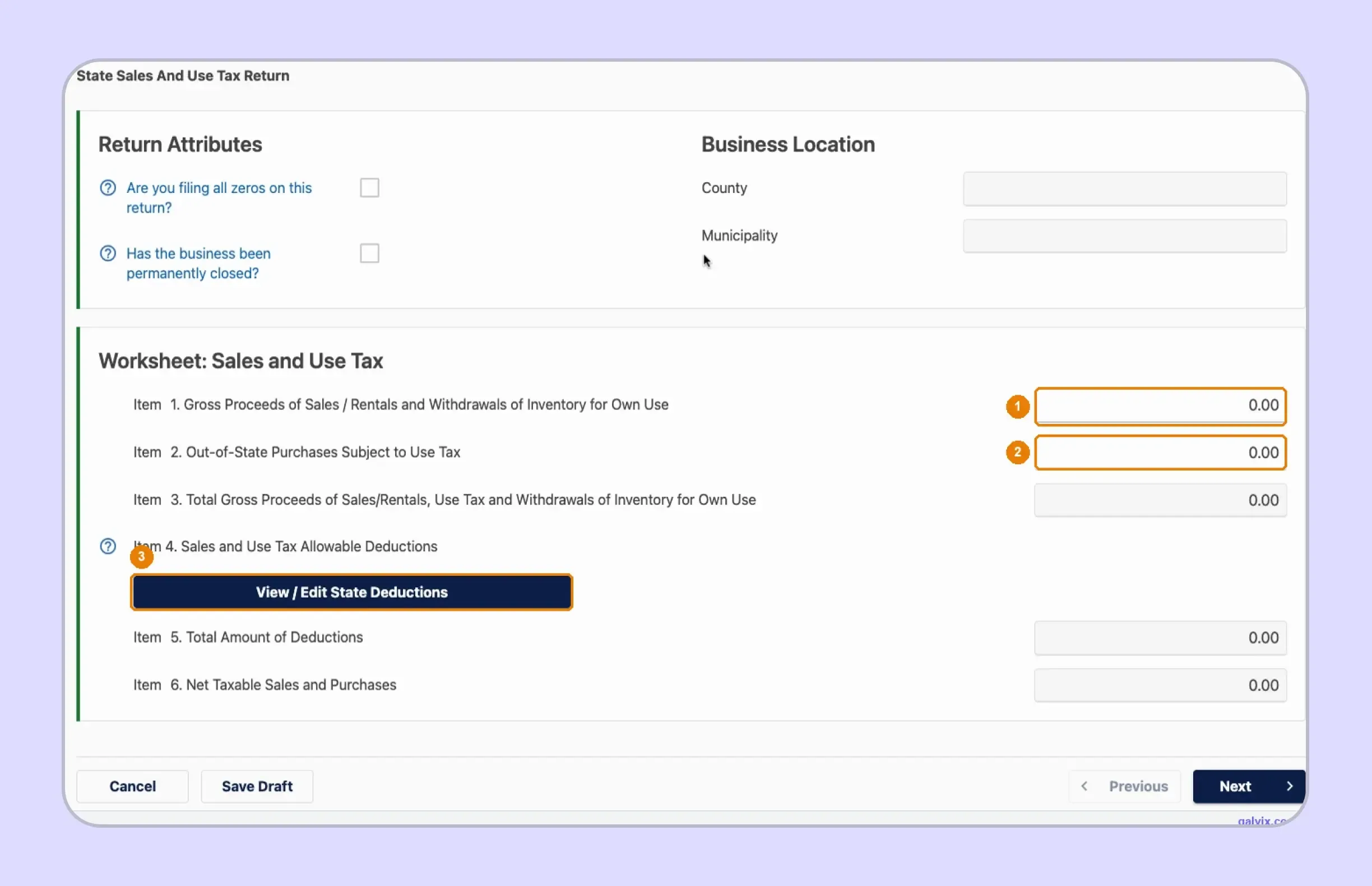
Enter Gross Proceeds of Sales and Out-of-State Purchases Subject to Use Tax. Then open View/Edit State Deductions and report qualifying deductions before MyDORWAY calculates total proceeds, deductions, and net taxable sales.
The screen also includes the zero-return and permanently-closed questions. Businesses researching how to fill out sales and use tax return in South Carolina should treat these as account-level declarations rather than sales-entry fields.
ST-3 and ST-389 use related taxable-sales information, although their displayed totals will not always match when several local tax types apply. Reconcile each location against your transaction data instead of forcing the two summary figures to equal.
Step 5: Review the ST-389 Local Schedule Rules
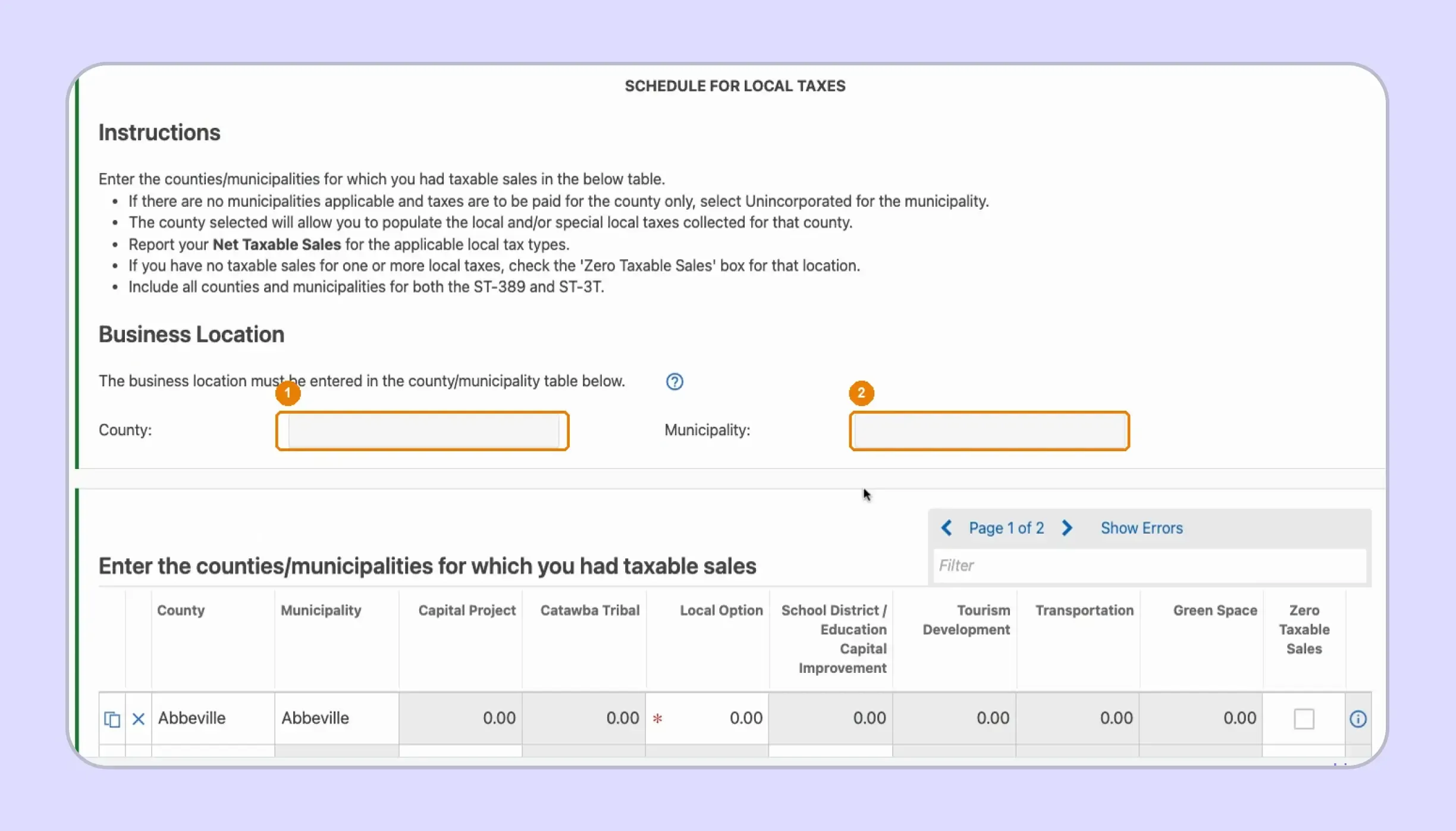
Open the Schedule for Local Taxes and review the instructions before entering amounts. The portal asks for the business county and municipality, while its grid records net taxable amounts by applicable local tax program.
Use unincorporated when a county-level transaction does not fall within an applicable municipality. The same location table can also support ST-3T reporting where accommodations activity requires that schedule.
Step 6: Enter Taxable Sales by Location
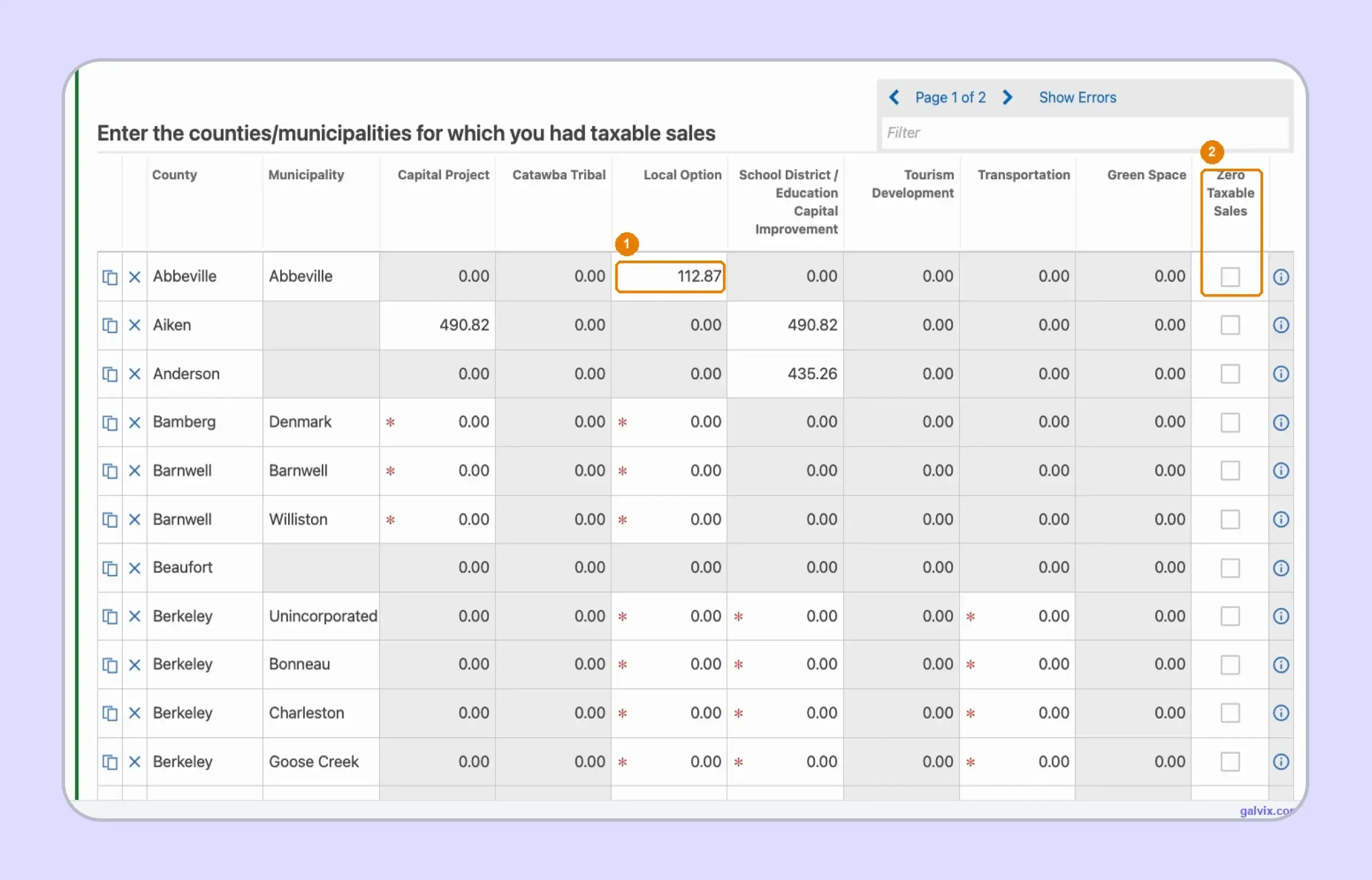
The County Detail grid displays counties, municipalities, and separate columns for each supported local tax. Enter net taxable amounts only within the applicable columns for locations where the business made taxable deliveries.
A location can remain at zero if its row is never updated. Since MyDORWAY does not independently rebuild the location allocation from source transactions, compare the grid with your delivery-level records before continuing.
Step 7: Resolve Zero Sales and Review Column Totals
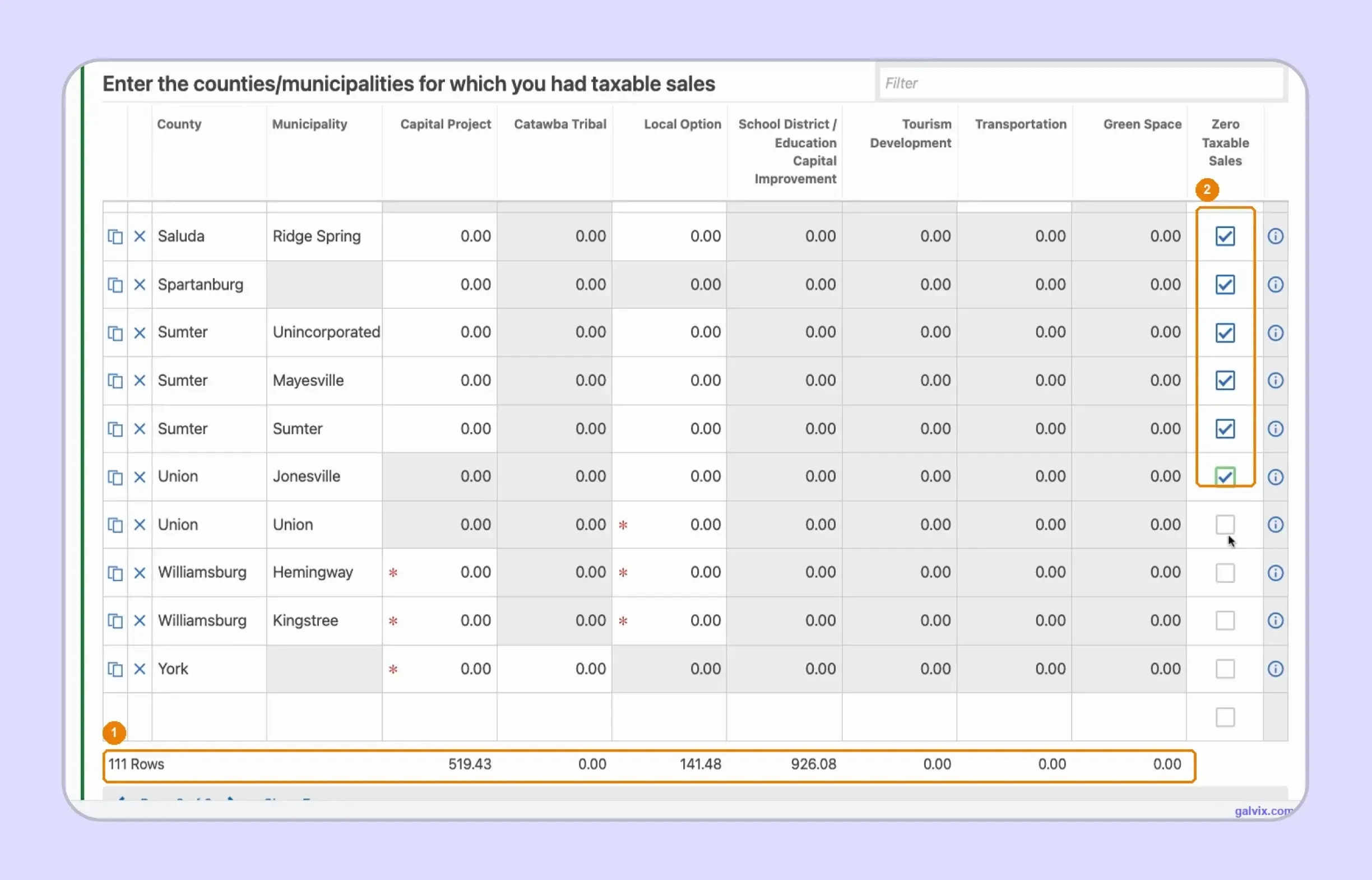
For applicable locations without taxable activity, select Zero Taxable Sales, so MyDORWAY recognizes that the row has been reviewed. The portal's Show Errors function helps identify applicable fields that remain unresolved.
Review each local-tax column total against your location-level workpapers. Do not simply add every column and expect the result to equal ST-3 taxable sales because one transaction can fall under several local taxes.
Step 8: Review the ST-389 Tax Calculation
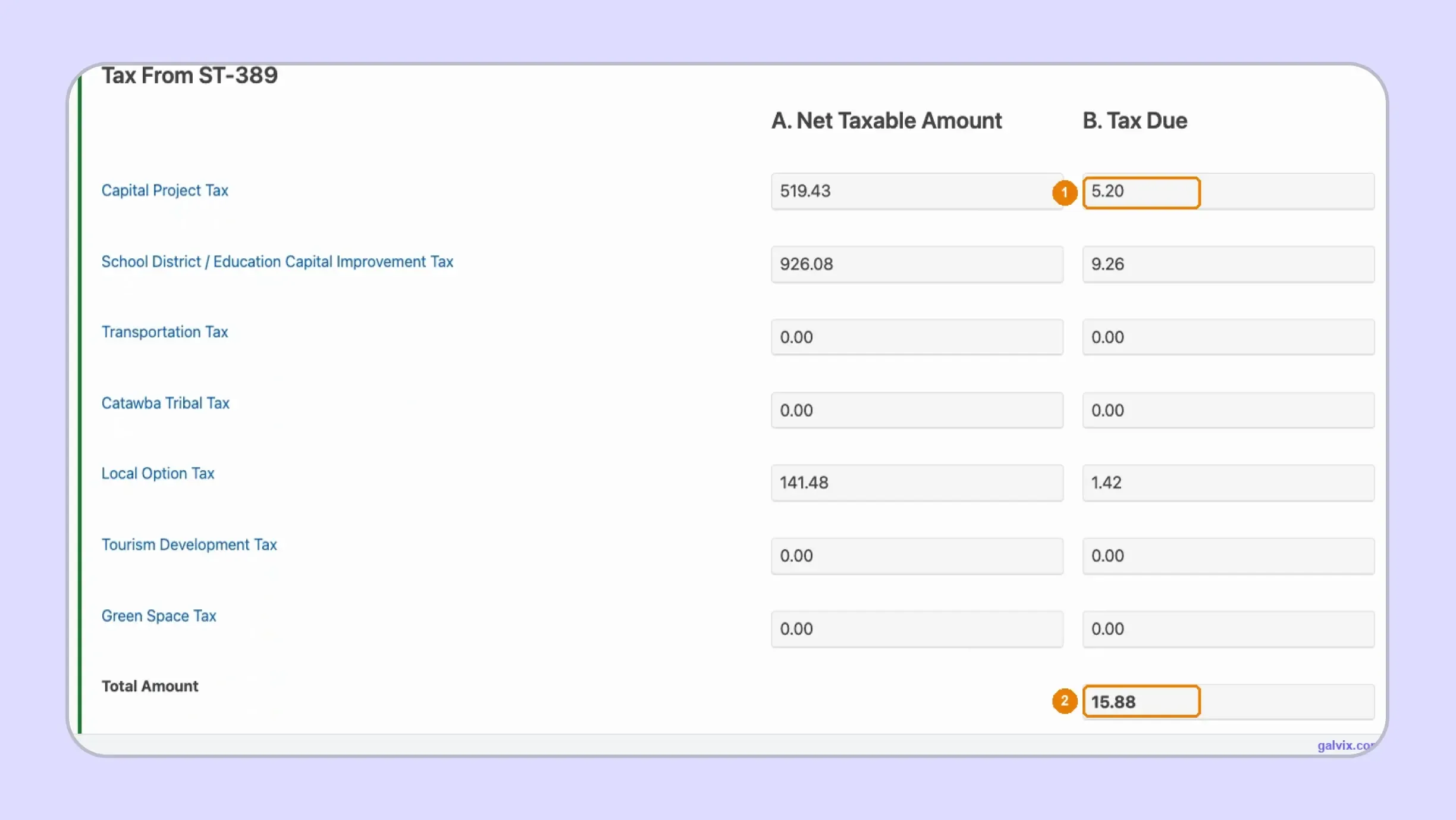
MyDORWAY carries each ST-389 Net Taxable Amount into the tax calculation and computes the related tax due. Review the underlying taxable amounts because the tax itself follows automatically from those entries.
Step 9: Review the ST-3 Summary
The summary combines gross proceeds, deductions, 6% state tax, calculated local tax, taxpayer discount, and final amount payable. Review the full sales tax report before moving into submission because this is the final consolidated financial view.
SCDOR allows qualifying timely filers a 3% discount when tax is under $100 and a 2% discount when tax is $100 or more. Electronic filers can receive up to $3,100 during the fiscal year.
MyDORWAY displays an estimated timely filing discount, although eligibility requires both a timely return and full payment by the deadline. Use the override option when the displayed discount no longer applies.
Step 10: Confirm and Submit the Return
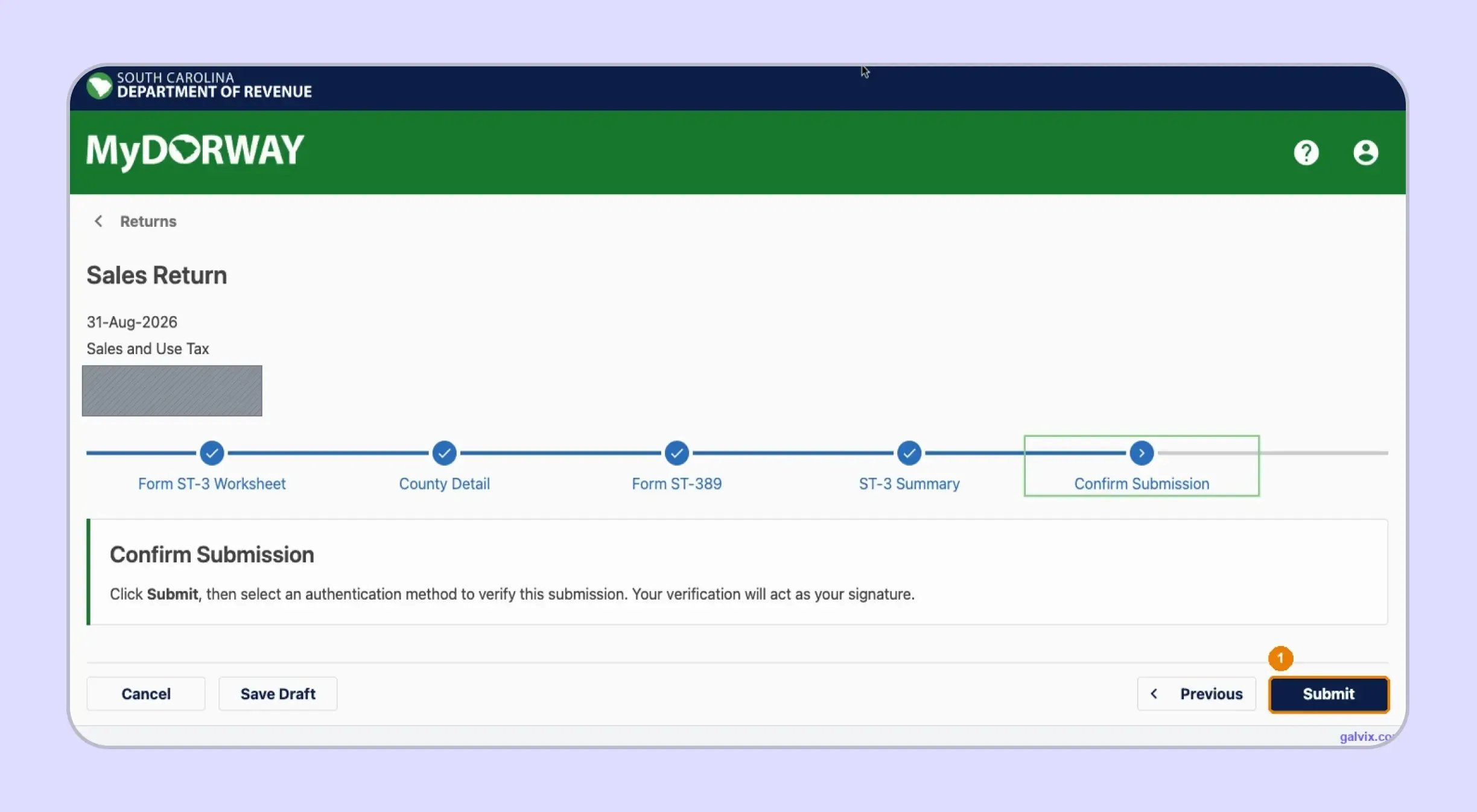
On Confirm Submission, review the completed path and select Submit only when the return is ready. MyDORWAY then requires an authentication step, and the resulting verification acts as your electronic signature.
Step 11: Save the Filing Confirmation
Complete the authentication step after selecting Submit, then retain the confirmation generated by MyDORWAY. That record proves the South Carolina sales tax return was transmitted for the selected period.
Reaching Confirm Submission is not the same as completing electronic filing. The return becomes filed after Submit, authentication, and confirmation, so closing the browser before completion can leave the return unsubmitted.
If you later discover an error, use the amendment option for the same period rather than preparing another original return.
What Should You Double-Check Before Submitting Through MyDORWAY?
Before submitting a South Carolina sales tax return, compare the portal entries with the same source records used during preparation. Focus on sales populations, location allocation, exemption support, calculated tax, and the status of every applicable local-tax field.
| Final Check | What to Verify |
|---|---|
| ST-3 gross proceeds | Matches direct reportable sales |
| State deductions | Each deduction has supporting records |
| ST-389 locations | Every taxable destination is included |
| Local tax columns | Correct programs are used by location |
| Zero-sales selections | Applicable empty locations are resolved |
| Taxpayer discount | Timely filing requirements remain satisfied |
| Submission | Confirmation appears after authentication |
Payment requires a separate check after the return is ready. MyDORWAY accepts ACH Debit from a checking or savings account and accepts credit card payments. SCDOR also supports ACH Credit through a separately arranged banking process.
Businesses asking how to pay sales tax in South Carolina should distinguish filing confirmation from payment confirmation. A refund arising later may also support direct deposit for eligible Sales Tax accounts through MyDORWAY.
How Do Exemption Certificates Affect SC Sales Tax Filing?
Exemption records support deductions that reduce the taxable base on a South Carolina sales tax return. The correct document depends on why tax was not collected, while certificate review, Retail License verification, and transaction eligibility remain separate compliance checks.
South Carolina Uses Different Documents for Different Exemptions
South Carolina uses several exemption routes rather than one universal document. Sellers should identify why the transaction qualifies before choosing the certificate that supports its treatment.
- ST-8: Supports specified purchases covered by South Carolina exemptions.
- ST-8A: Serves as the resale certificate for qualifying resale purchases.
- SCATE card: Supports qualifying agricultural exemptions instead of former ST-8F.
A properly completed certificate supports the claimed treatment of a transaction. A valid customer registration alone does not establish that every future purchase qualifies for exemption.
South Carolina's annual Tax-Free Weekend creates another filing requirement. Eligible sales tax holiday transactions are entered using the Sales Tax Holiday deduction on the August return, and eligible delivery charges are also exempt from the holiday.
Certificate Review and Transaction Eligibility Are Different
Certificate collection confirms that supporting documentation exists, while registration lookup verifies a separate detail about the purchaser. The seller still needs to determine whether the specific transaction qualifies for the claimed exemption.
When exemption rules differ across states, teams can use Galvix’s sales tax resources to compare certificate requirements, seller responsibilities, and state-specific documentation before treating a transaction as exempt.
Galvix can then manage certificate collection, review, storage, customer follow-up, renewals, and audit preparation within the same workflow used for return filing.
The Galvix Sales Tax Exemption Certificate Tool can help identify the appropriate certificate route, available verification method, and seller actions before an exempt transaction reaches return preparation.
What Happens if You File or Pay South Carolina Sales Tax Late?
Late filing and payment can create separate penalties on a South Carolina sales tax return. Interest can also accrue, while an otherwise available discount may be lost when the return or payment does not satisfy the state's timing requirements.
Filing and Payment Can Create Separate Penalties
The South Carolina DOR applies different consequences to a return filed late and tax paid late. Current ST-3 instructions provide the following treatment:
- Failure to file adds 5% monthly, up to 25%.
- Failure to pay adds 0.5% monthly, up to 25%.
- Interest accrues using the applicable federal-based rate.
These amounts apply to unpaid South Carolina tax liability rather than changing the underlying taxable base. Filing on time also preserves the discount available to qualifying taxpayers.
Late Filing Can Also Cost the Taxpayer Discount
The timely filing discount is 3% when the total tax is below $100 and 2% when the tax is at or above $100. The standard fiscal-year cap is $3,000, increasing to $3,100 for electronic filers.
This matters because MyDORWAY can calculate an estimated discount before it knows whether payment will arrive on time. A company operating under a monthly filing schedule should therefore track the return deadline and payment status together.
Businesses managing South Carolina alongside other states can also review current South Carolina sales tax requirements when checking filing deadlines, rates, nexus thresholds, and related compliance obligations.

How Does Galvix Help Businesses File South Carolina Sales Tax Online?
Galvix manages South Carolina filings through a supported sales tax compliance process, rather than leaving finance teams to prepare ST-3 and ST-389 independently. Return data is reconciled before specialist review and customer approval, helping teams maintain a consistent process across every filing period.
For a South Carolina sales tax return, the workflow can consolidate gross proceeds, exempt transactions, marketplace activity, use-tax purchases, and location-level sales before submission via MyDORWAY. This becomes especially useful when ST-389 requires local sales tax amounts to be allocated across several counties and municipalities.
Transaction data can flow into the filing workflow through supported sales tax integrations for platforms such as Shopify, QuickBooks, NetSuite, and Stripe. Businesses using other systems can also provide data via API integrations or supported file uploads, reducing the need for repeated manual preparation before each return.
Galvix can connect sales tax filing with ongoing South Carolina sales tax nexus monitoring, registrations, exemption certificate management, and state notices. This gives businesses one managed process as their South Carolina tax liability changes with sales activity and market expansion.
Pricing is also modular, so businesses select only the services they need. Exact pricing reflects the workload associated with each selected service rather than forcing every customer into the same compliance package.
Where Galvix Removes Filing Handoffs
- Reconciles source transaction data before each return enters preparation.
- Prepares state and local filing information for specialist review.
- Connects exempt transactions with supporting certificate records before filing.
- Tracks filing calendars as obligations change across registered states.
- Helps manage notices and state correspondence after returns are filed.
For businesses looking to file South Carolina sales tax online while managing obligations in other states, Galvix provides one supported workflow from return preparation through filing and follow-up.
Book a Galvix demo to review your South Carolina and multistate filing process before the next reporting period.
Frequently Asked Questions
Can I file one consolidated South Carolina sales tax return for multiple locations?
Yes. SCDOR offers a Consolidated Sales Tax Return program for qualifying businesses operating multiple licensed locations. The program uses location-level reporting and requires specific data for gross proceeds, deductions, net taxable amounts, and applicable local taxes. Businesses should confirm enrollment requirements before replacing separate location returns.
Can I use third-party software instead of MyDORWAY?
Yes. SCDOR allows approved third-party software to support tax filing through Sales XML and electronic payment processes. MyDORWAY remains the state's preferred filing route. Businesses using external software should confirm current specifications because SCDOR validates account numbers, local tax periods, and uploaded return structures.
How do I amend a South Carolina sales tax return after submission?
A previously filed return can be amended for the same period through the Sales and Use Tax account. Review the corrected gross proceeds, deductions, state calculation, and local schedule before submitting the amendment, since changing one part of the filing can affect the final tax due.
Can I file South Carolina sales tax returns on paper?
Paper filing remains available when the taxpayer's South Carolina tax liability is below $15,000 for the filing period. Businesses at or above that threshold must use electronic filing and payment. Paper filers submit ST-3 with ST-389 when applicable local taxes must be reported.
How do I close a South Carolina Sales and Use Tax account?
A business should formally update or close its Sales and Use Tax account rather than simply stopping returns. Resolve any outstanding periods first, then provide the required account information. The permanent-closure question also appears within MyDORWAY's return attributes when preparing the final sales tax return.
When does Form ST-3T apply to South Carolina accommodations businesses?
ST-3T applies to qualifying accommodations reporting and uses location information associated with the local tax schedule. The live MyDORWAY instructions state that applicable counties and municipalities for ST-389 and ST-3T should be included in the location table.
How do I request a South Carolina sales tax refund?
SCDOR provides refund procedures through MyDORWAY and Form ST-14 where applicable. Most Sales Tax accounts can choose direct deposit when a refund is approved. Keep the original return, payment evidence, supporting calculations, and correspondence available while the request is being reviewed.