
| Key Pointers |
|---|
| • BigCommerce has no native sales tax calculation engine included |
| • Sellers need a third-party provider for accurate checkout tax calculation |
| • Economic Nexus threshold is $100,000 in annual sales for most states |
| • BigCommerce provides no Nexus monitoring across sales channels |
| • Filing returns on time is the seller's full responsibility after registration |
| • Exemption certificates require separate management outside BigCommerce |
| • Galvix connects to BigCommerce and handles full compliance end-to-end |
BigCommerce sales tax compliance is an obligation borne entirely by the seller, not the platform. BigCommerce is an ecommerce platform built to power storefronts and offers some basic tax settings. But the platform has not been designed to manage the full lifecycle of sales tax compliance for a growing multi-state business.
The reality of BigCommerce sales tax gaps becomes clear as a business scales. The platform does not monitor Nexus exposure across your online sales channels, does not register your business in new states, and does not file or remit sales tax returns on your behalf. For any BigCommerce seller filing in multiple states or planning to expand, those gaps create compliance risk that compounds with every new market entered.
If you are selling in more than one or two states or expect to grow your footprint in the next 12 months, you need a dedicated sales tax solution alongside BigCommerce from the start. Galvix connects directly to your BigCommerce store, handles calculation, Nexus monitoring, registrations, and filing, and assigns a named compliance specialist who owns the compliance work on your behalf.
This BigCommerce sales tax guide covers how US sales tax works for ecommerce sellers. We will also cover when BigCommerce merchants need to act, what the platform handles and does not handle, and how Galvix fills every gap that BigCommerce leaves open.

How Does Sales Tax Regulation Work for Ecommerce Sellers in the US?
US sales tax is governed at the state level with no federal standard. This means ecommerce sellers face different rules, rates, and filing schedules in every state. Understanding the four core areas of obligation is the foundation of BigCommerce sales tax compliance for any seller operating across multiple states.
Types of Sales Tax Obligations
Online retailers face several overlapping sales tax obligations depending on what they sell, where they sell, and who their customers are.
- Sales tax applies to the sale of goods and selected services tax categories, with taxability rules varying significantly by state and product type.
- Use tax applies when a buyer purchases goods from an online sales channel where the seller did not collect sales tax at the point of purchase.
- Marketplace facilitator laws in most states now require platforms like Walmart, Amazon, and eBay to collect and remit sales tax on behalf of third-party sellers, which may affect your Nexus calculation.
Sales Tax Nexus
Understanding what creates a Nexus obligation is the starting point for every BigCommerce seller evaluating their sales tax compliance footprint across the United States.
- Nexus is the legal connection between a business and a state that creates a sales tax collection obligation for that jurisdiction.
- Physical Nexus is triggered by offices, warehouses, employees, or inventory stored in a state including Amazon FBA facilities.
- Economic Nexus is triggered when a business crosses a state's revenue threshold, typically $100,000 in annual sales, regardless of physical presence in that state.
Tax Rates and Exemptions
US sales tax rates are layered across state, county, city, and special district tax jurisdictions, making rate accuracy a critical issue for any BigCommerce sales tax setup.
- US sales tax rates combine a state-based sales tax rate with county, city, and special district rates that vary at the rooftop level. This requires precise location-based calculation at checkout.
- Products taxable in one state may carry a reduced rate or full exemption in another. It needs product-level tax rules mapping across every state in a seller's footprint.
- Business owner operators selling to resellers, nonprofits, or government entities must collect and store valid exemption certificates. These are required to support lower tax rates or tax-exempt transactions.
Registration, Filing, and Notice Management
Every state where a seller has Nexus requires a valid permit before sales tax collection begins, and ongoing filing obligations continue for as long as the seller operates in that state.
- A seller must register with each state's revenue authority and obtain a valid permit before collecting sales tax from customers in that state.
- Returns are filed monthly, quarterly, or annually, depending on the state and the seller's estimated sales tax liability based on the number of transactions and revenue volume.
- States issue notices for discrepancies, audit requests, rate changes, and filing frequency updates that require timely, formal responses from the business owner or their compliance team.
Read more: Automated Sales Tax in QuickBooks Online
When Do BigCommerce Merchants Need to Think About Sales Tax?
Every BigCommerce seller has a specific trigger point that creates a sales tax compliance obligation.
- Physical Presence: From the first sale, if the seller has physical presence in any state through an office, warehouse, or employee, a registration obligation exists immediately.
- Economic Nexus Threshold: When cumulative revenue into any state on a rolling 12-month basis approaches $100,000, the economic Nexus threshold registration requirement in most states is triggered for the seller.
- Multi-Channel Expansion: When expanding to new online sales channels like Walmart or Amazon, multi-channel activity accelerates Nexus exposure, independently of BigCommerce transaction volume.
- State Notices or Back-Tax Discovery: When receiving a state notice, failing to file on time, or discovering a prior period of uncollected sales tax that creates retroactive back-tax and penalty exposure.
Does BigCommerce Calculate Sales Tax Automatically?
BigCommerce does not have a built-in sales tax calculation engine. Sellers must either configure tax settings manually or connect an automatic tax provider to enable accurate sales tax calculations at checkout. Without one of these two paths, no tax is collected at all.
BigCommerce Basic Tax Setup
Setting up BigCommerce sales tax manually requires navigating to the platform's tax settings and configuring rates by jurisdiction. Here is the step-by-step process you must follow:
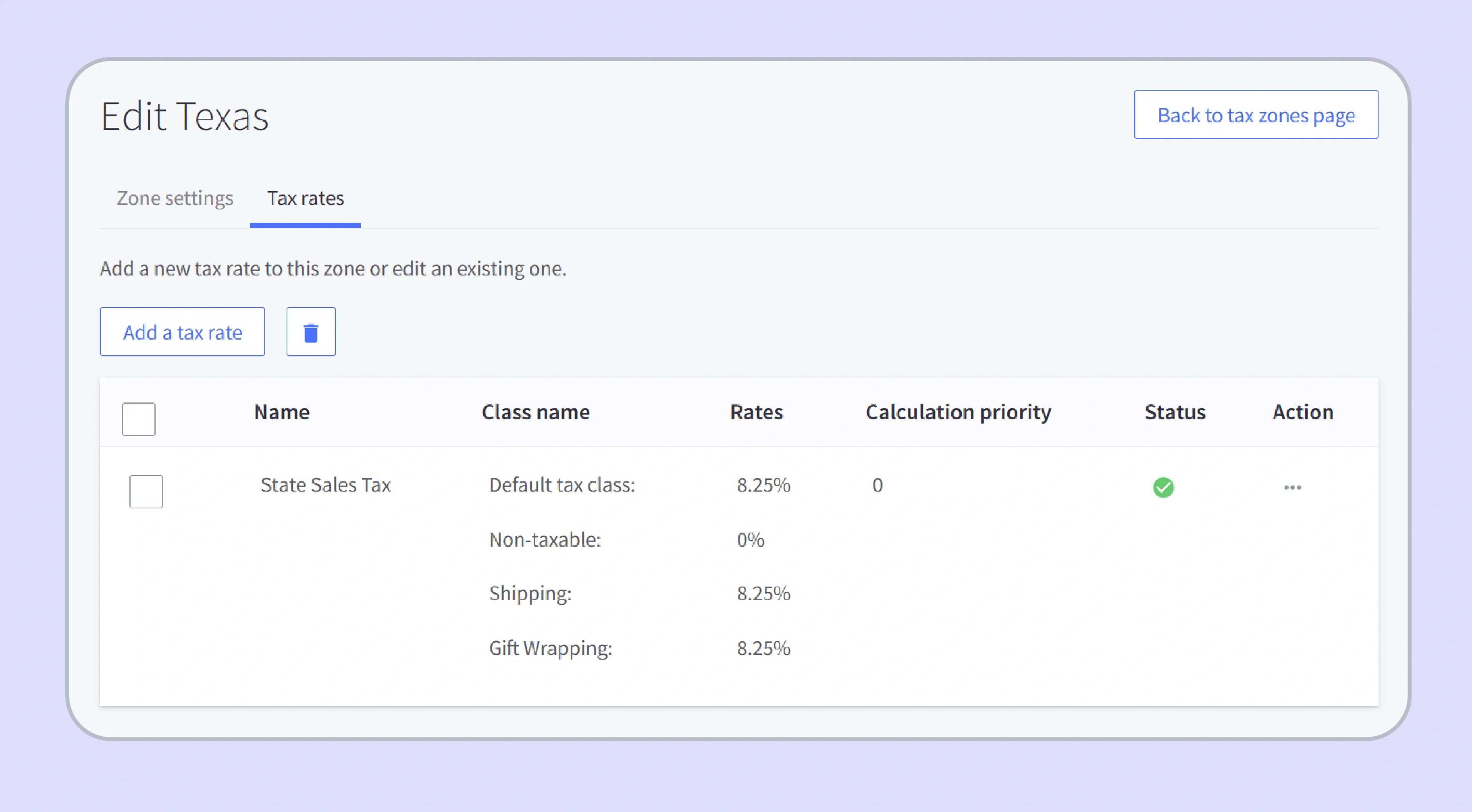 Source: BigCommerce
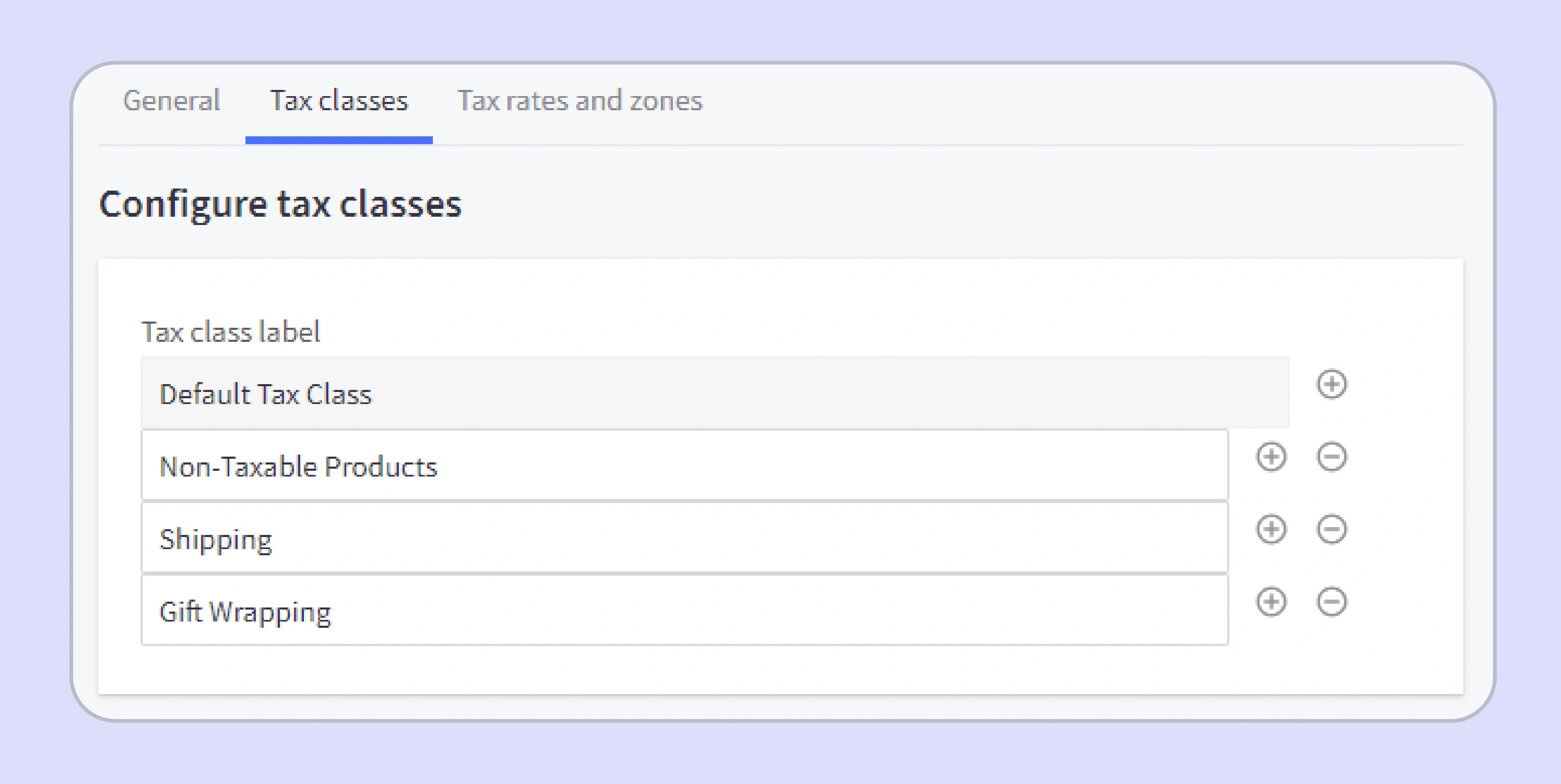
Step 1: Enable Tax Collection: Navigate to Store Setup, then Tax Settings, and enable tax collection to activate the basic tax setup in your BigCommerce store.
 Source: BigCommerce
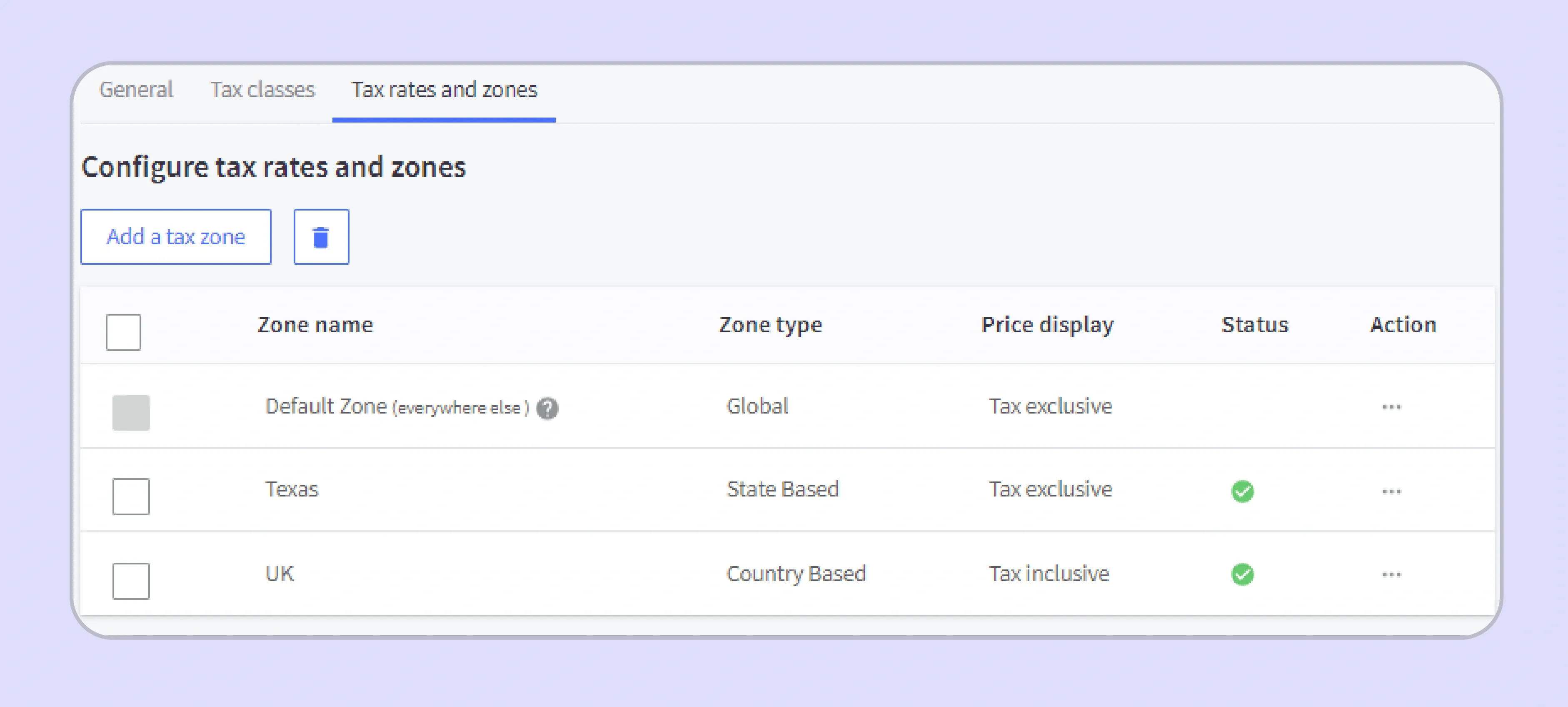
Step 2: Select Tax Type: Choose between Manual Tax entry or connecting an automatic tax provider for automated sales tax calculations based on customer location. Step 3: Configure Manual Rates: If using manual configuration, enter state-level rates for each jurisdiction where you have Nexus, noting that these rates do not update automatically as tax rules change.
 Source: BigCommerce
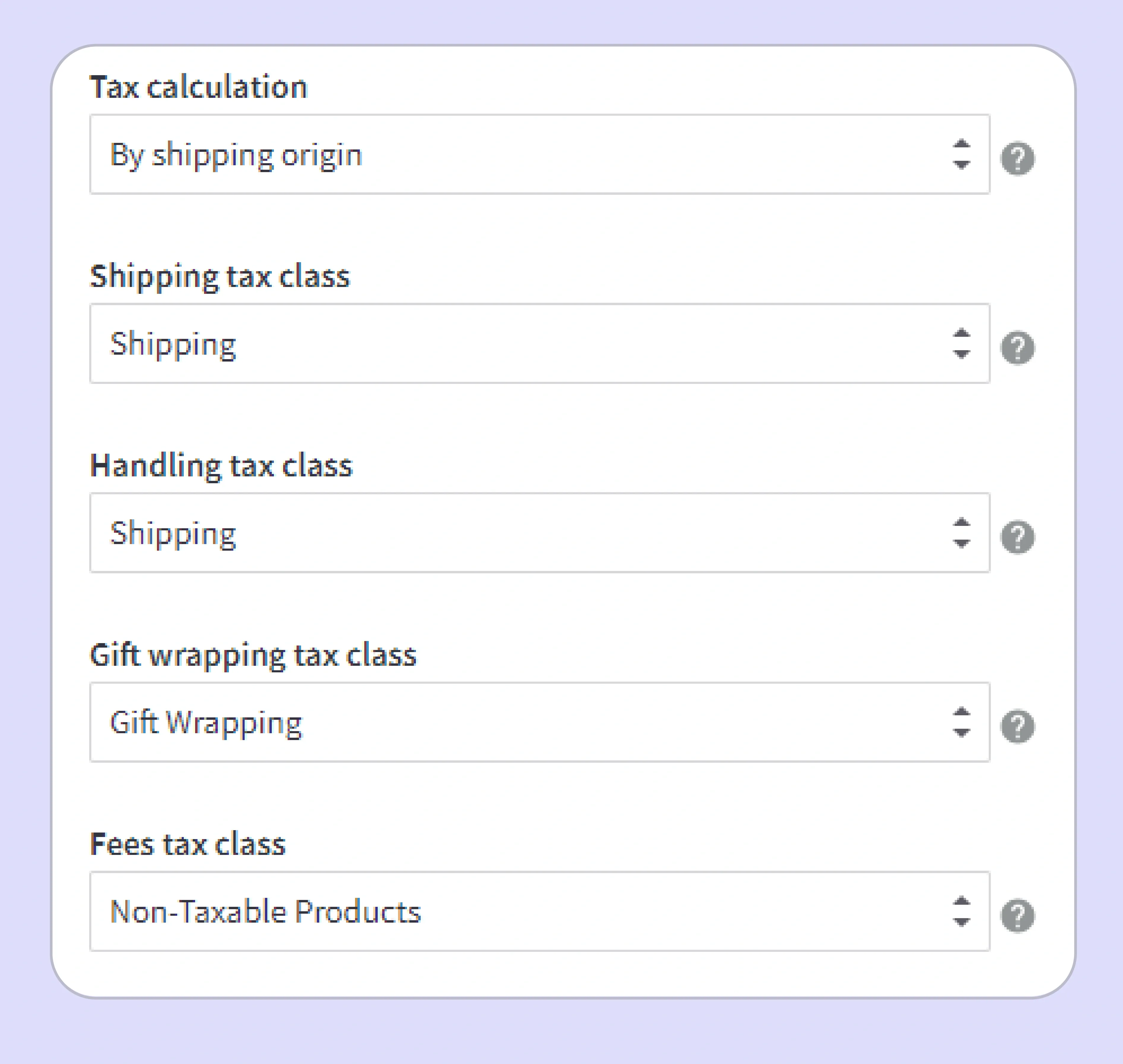
Step 4: Set Tax Class Assignments: Assign tax classes to products so the platform knows whether each item should collect sales tax, apply a flat rate, or be treated as exempt. Step 5: Configure Shipping Tax Treatment: Set whether shipping charges are taxable in each state, as this varies across states and affects the amount of tax collected on each order.
 Source: BigCommerce
BigCommerce Automatic Tax Setup via Third-Party Providers
Connecting an automatic tax provider through BigCommerce is the faster and more reliable path for sellers with multi-state sales tax obligations and varying product taxability rules.
- A verified provider like Galvix, TaxJar, Vertex, or TaxCloud can be installed through the BigCommerce dashboard to support automated tax calculation. Galvix also goes further by managing filing, Nexus monitoring, registrations, and compliance support beyond checkout calculation.
- Third-party providers calculate the correct sales tax rate at checkout. This is based on the buyer's address, product type, and applicable tax jurisdictions across all 50 states.
- Filing, remittance, Nexus monitoring, and state registrations are not included in the provider integration. They require a separate compliance solution alongside the provider's tax setup.
- Sellers needing more than calculation should evaluate a sales tax software like Galvix that covers the full compliance lifecycle, including filing and notice management.
What Does BigCommerce Not Handle for Sales Tax?
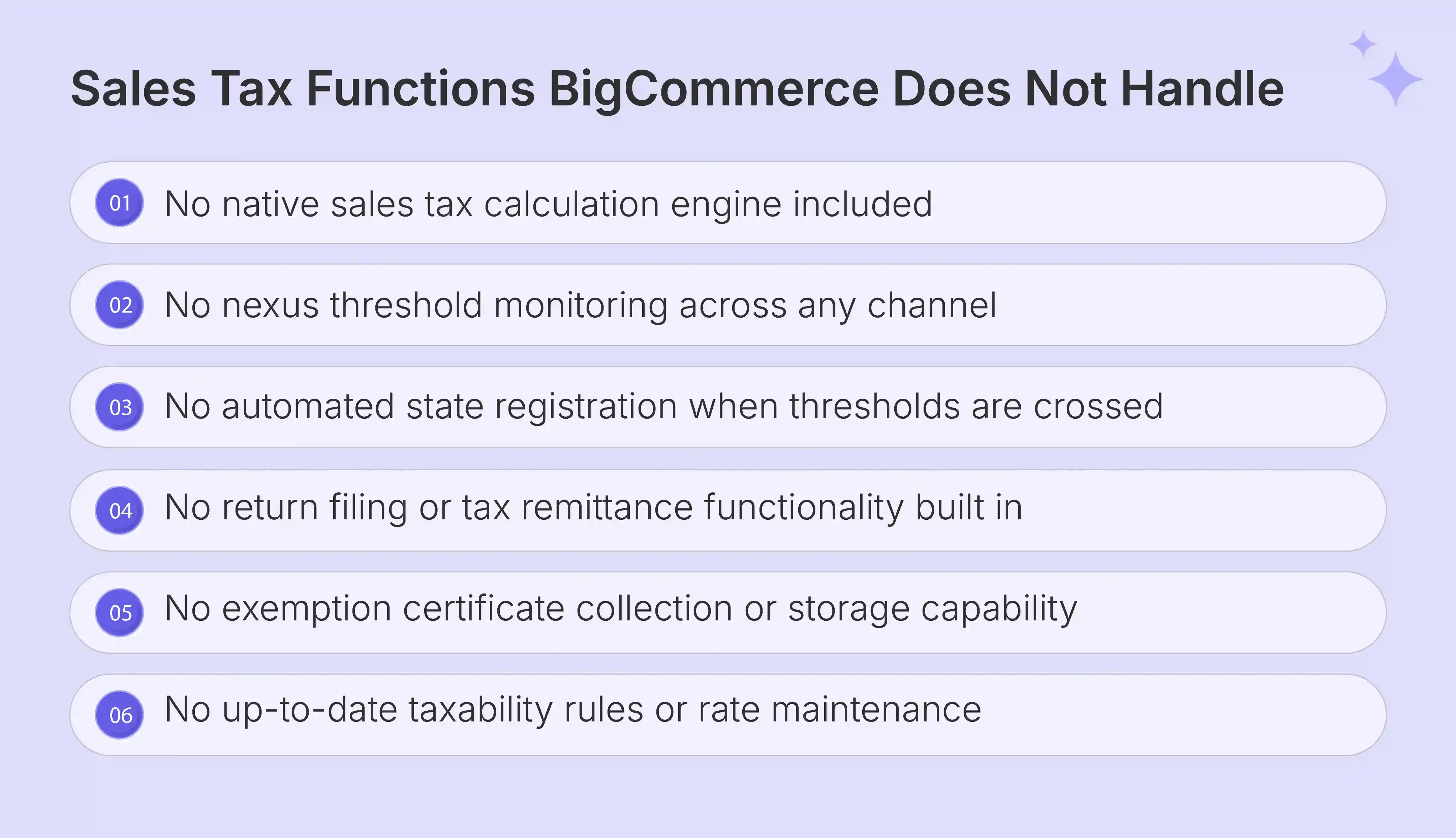
BigCommerce covers basic storefront functionality and checkout display. But the platform's native tax settings leave four significant compliance gaps that create material exposure for sellers operating across multiple states or planning growth.
Outdated Tax Rates and Taxability Rules Create Calculation Errors
BigCommerce's basic tax setup requires sellers to enter sales tax rates and product taxability rules as static entries during configuration. These entries do not update automatically when state laws change.
Tax rates and taxability rules across US tax jurisdictions change frequently. A product taxable in Texas this year may become exempt, carry a reduced rate, or face new services tax rules next quarter under updated state legislation. Manual configurations in BigCommerce sales tax settings that are not updated in time create incorrect sales tax calculations, undercharging or overcharging customers and creating sales tax compliance liability with state revenue authorities.
No Filing or Remittance Built Into the Platform
BigCommerce does not file sales tax returns or remit payments in any state on the seller's behalf at any plan tier or through any native feature.
Sellers must file separately through each state's revenue portal or a dedicated third-party filing service after every reporting period. A seller filing manually in 10 states spends 5 to 10 hours per month on manual checkout reconciliation, return submission, and payment remittance, before accounting for state discrepancies or notices.
No Nexus Tracking or State Registration Support
BigCommerce has no threshold monitoring across online sales channels and provides no alerts when a seller approaches a new state obligation based on their actual amount of sales. When the economic Nexus threshold is crossed, BigCommerce offers no guidance or tooling for state registration or permit applications on the seller's behalf. Operating without a valid permit while collecting sales tax from a remote seller standpoint creates penalty exposure retroactive to the date the obligation was first triggered.
No Exemption Certificate Management
BigCommerce provides only a basic Tax Exempt Code field with no certificate collection, validation, or expiration tracking for exemption certificate management across exempt buyers.
Sellers managing B2B accounts carry full audit exposure if sales tax exemption certificates are missing, expired, or incorrectly completed by the time a state audit review begins. State audits of exempt transactions in high-volume categories like wholesale, software, or VAT-eligible international sales are among the most common and costly outcomes for ecommerce businesses without structured certificate management in place.
Read more: WooCommerce Sales Tax Guide
What Factors Should You Consider When Choosing a BigCommerce Sales Tax Provider?
Multiple sales tax solutions are available as BigCommerce app integrations. Evaluating providers on the right dimensions can help sellers avoid paying for calculation-only tools that leave significant compliance that the internal team must handle.
- A BigCommerce tax provider should calculate sales tax at rooftop accuracy across all 13,000-plus US tax jurisdictions, not only at the state-level flat rate.
- The provider should monitor economic Nexus thresholds across all your online sales channels, not only BigCommerce transactions, to give a complete Nexus picture.
- Filing and remittance capabilities should be included or available, covering both SST economic Nexus threshold states and non-SST states where full pricing per return applies.
- Exemption certificate management should cover collection, validation, expiration tracking, and renewal reminders for all exempt buyers including resellers and government entities.
- The provider should handle state registration on your behalf when new Nexus obligations are triggered, so your team never navigates a state revenue portal independently.
- Support for sales tax holidays and international tax frameworks like VAT and GST becomes important when selling to customers in regions like Europe, Australia and New Zealand, Hong Kong, and other global markets.
- Multi-currency support, including USD, EUR, SGD and other international transactions, should also be available for stores handling cross-border sales.

BigCommerce Sales Tax Setup Best Practices for Growing Sellers
Here are the BigCommerce sales tax best practices that can help prevent the compliance debt and back-tax exposure accumulating due to scaling without a structured approach:
- Launch Integration: Install a verified automatic tax provider before your first transaction to prevent inaccurate sales tax calculations and collection gaps from the start of your BigCommerce operations.
- Precise Tax Calculation: Use rooftop-level sales tax calculations instead of ZIP-based tax settings that miss variations of local and district-level tax jurisdictions across your customer locations.
- Cross-Channel Nexus Tracking: Monitor Nexus exposure across your BigCommerce store, marketplace channels, and online sales platforms simultaneously. Each channel's revenue contributes independently to economic Nexus thresholds.
- Threshold Monitoring: Review state-by-state revenue monthly to identify approaching economic Nexus threshold obligations before the number of transactions or amount of sales crosses the trigger point and requires immediate registration.
- Certificate Validation: Collect a valid exemption certificate before processing any sales tax exempt sale to a reseller, nonprofit, or government entity to protect against audit findings in those transaction categories.
- Automated Certificate Management: Automate certificate storage, renewal tracking, and audit-ready access through a compliance platform rather than manual spreadsheet-based management that creates version control and access risks.
- File Returns on Time: File sales tax returns on or before the due date in every registered state to access timely filing discounts where available and avoid penalty and interest charges on late submissions.
Read more: Stripe Sales Tax Automation Guide
Galvix: Your Complete Sales Tax Solution for BigCommerce
Most third-party sales tax tools available as a BigCommerce integration solve the calculation problem at checkout and stop there. Filing, Nexus monitoring, state registrations, exemption certificate management, and notice handling remain the seller's responsibility after any integration is deployed. For a BigCommerce seller filing in 5 or more states, that residual workload adds hours of compliance work every month that lean finance teams cannot consistently absorb without errors or missed deadlines.
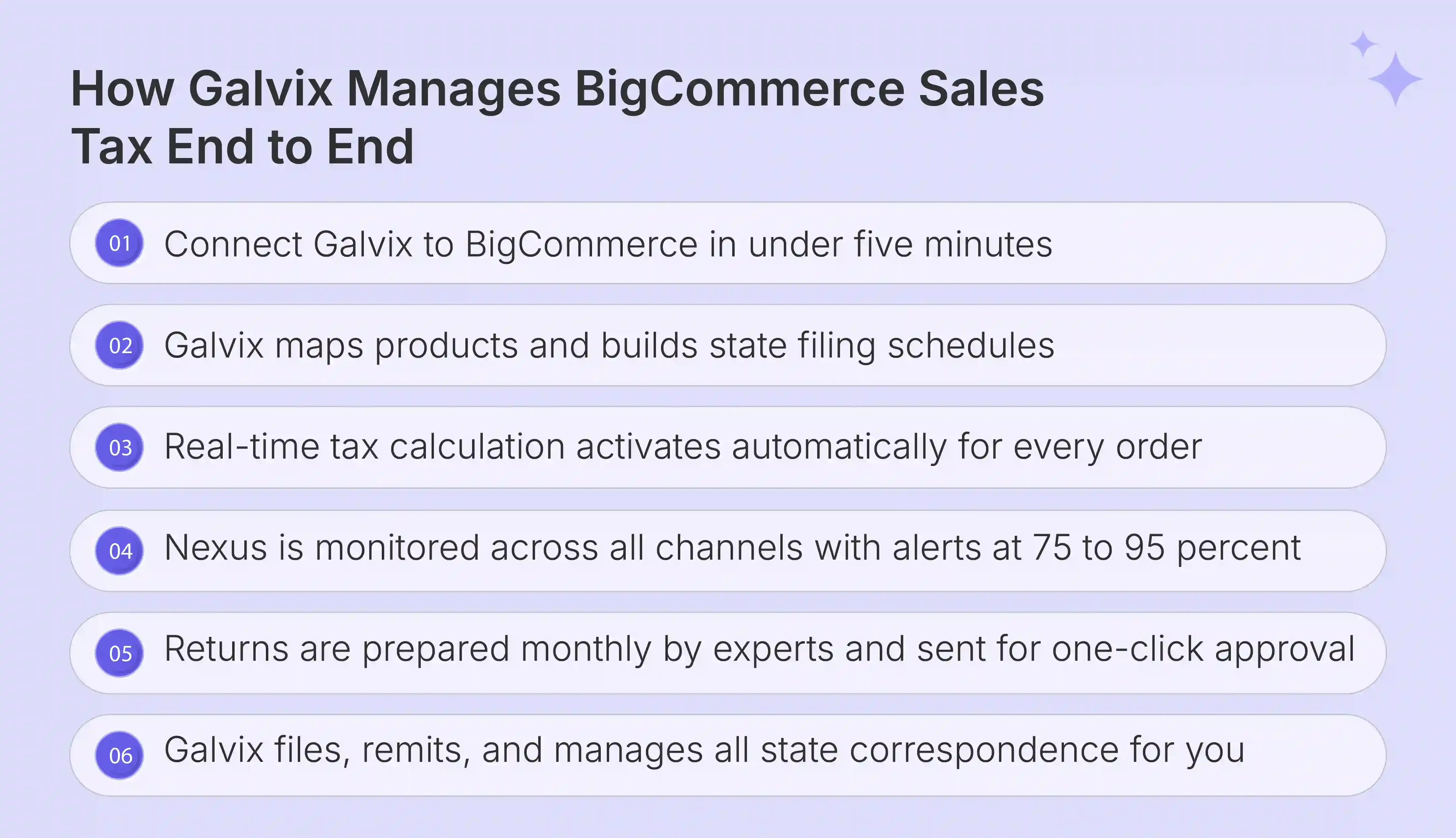
Galvix was built to remove that workload entirely. Rather than a self-service automatic tax provider your team configures and monitors, Galvix acts as a dedicated compliance team that connects to your BigCommerce store, handles tax setup, monitors Nexus exposure across all 50 states, and prepares every return for your review before filing on your behalf.
Here is what Galvix handles that BigCommerce and most third-party integrations do not:
- Real-time tax calculation on every BigCommerce order, updated automatically without manual sales tax rate configuration or sales tax settings maintenance from your team as tax rules change
- Multi-channel Nexus monitoring across BigCommerce, Amazon, and all active storefronts, with proactive alerts at 75%, 85%, and 95% of each state threshold before any economic Nexus obligation is formally triggered
- Done-for-you state registrations at a flat fee per state, with Galvix managing all portal work, credentials, and permit maintenance from application through renewal on your behalf
- Expert-prepared returns reviewed by a named specialist before filing, with independent reconciliation against BigCommerce sales tax billing data to catch discrepancies that add tax service tools pass through without flagging
- Full state correspondence management, including all notices, audit inquiries, and filing frequency changes, handled directly by the Galvix team, so your finance function receives dashboard updates Galvix offers a 30-day free trial with no credit card required. Schedule a personalized demo to see what fully managed BigCommerce sales tax compliance looks like for your store.
Frequently Asked Questions
Does BigCommerce Collect and Remit Sales Tax Automatically?
BigCommerce does not collect or remit sales tax automatically at any plan tier. Sellers must connect an automatic tax provider for calculation and a separate filing service for remittance across registered states. Galvix handles both sales tax collection and remittance across all 50 states as a managed service alongside your BigCommerce store.
How Do I Set Up Sales Tax on BigCommerce?
BigCommerce sales tax setup begins under Store Setup and Tax Settings, where sellers enable tax collection and either configure manual rates or connect an automatic tax provider. The manual path requires entering sales tax rate entries by jurisdiction, which do not update automatically as tax rules change. Galvix replaces manual BigCommerce sales tax setup with automated rooftop-level calculations that update continuously without team involvement.
What Are the Best Sales Tax Solutions for BigCommerce?
Several BigCommerce tax providers handle calculation at checkout, including TaxJar, Vertex, and TaxCloud, each covering sales tax calculations at varying accuracy levels and pricing structures. For sellers who also need filing, Nexus monitoring, and notice management alongside calculation, Galvix delivers the full BigCommerce sales tax compliance scope as a managed service with a named specialist per account.
Do BigCommerce Sellers Need to File Sales Tax Returns?
Yes, BigCommerce has no filing functionality, so sellers must file sales tax returns manually through each state's revenue portal or connect a dedicated filing service for every registered state. A seller in 10 states filing manually spends 5 to 10 hours per month on this process alone. Galvix prepares and files every return using your BigCommerce transaction data, with specialist review before each submission.
How Does Economic Nexus Affect BigCommerce Sellers in 2026?
Economic Nexus requires BigCommerce sellers to register and collect sales tax in any state where their total revenue crosses $100,000 in a rolling 12-month period, regardless of whether any physical presence exists in that state. BigCommerce has no threshold monitoring tools, so sellers must track their own exposure across all channels. Galvix monitors your economic Nexus status across all 50 states proactively and alerts your team before any new sales tax obligations are triggered.