A Nevada sales tax return works differently from many state returns. Instead of entering a single statewide taxable sales figure, you report county-level sales through My Nevada Tax, the online portal operated by the Nevada Department of Taxation.
That county split drives the entire return. You enter Total Sales and Exempt Sales for each applicable county, then My Nevada Tax calculates taxable sales, applies the county rate, and works out the tax. The current REV-F013 return confirms that online calculations are performed for you.
The timing changed as well. Beginning with the January 2026 filing period, businesses must file and pay by the 20th of the following month. This blog explains how to file sales tax in Nevada, prepare county-level figures, handle exemptions, review the calculations, make payment, and keep filing proof.

What Changed for Nevada Sales Tax Filing in 2026?
The most important change is the deadline. If you file Nevada sales tax online, returns and payments for periods beginning January 2026 are due by the 20th of the following month, replacing the older month-end schedule.
The Filing Deadline Moved Forward
Nevada previously allowed many businesses until the last day of the month following the reporting period. AB 594 moved that deadline forward by about ten days, making the 20th the new standard due date.
When the 20th falls on a weekend or recognized holiday, the deadline moves to the next business day. That is why the August 2026 return shown in My Nevada Tax carried a September 21 deadline.
This change affects your internal close process as much as the portal itself. Sales data, exemption records, county allocation, and payment approval now need to be ready earlier each month.
The Collection Allowance Still Rewards Timely Filing
Nevada allows a 0.25% collection allowance when qualifying sales tax is paid on time. It applies to sales tax rather than use tax and reduces the final amount remitted.
You may think of this as a timely filing discount, although Nevada calls it a collection allowance. Missing the deadline can result in the allowance being removed and incur a penalty or interest.
Old Calendars Can Now Create Late Returns
Any workflow still built around month-end filing should be updated. A recurring calendar, tax software reminder, or spreadsheet created before 2026 may now point your team to the wrong sales tax filing deadline.
That is especially important for multistate teams. Comparing current sales tax requirements by state can help you keep Nevada's new schedule separate from states that still use different due dates.
Who Needs to File a Nevada Sales Tax Return?
A registered seller must follow the filing frequency assigned to its sales and use tax account. Physical presence can create an immediate obligation, while remote sellers can trigger economic nexus without operating from a Nevada location.
Nevada Sellers With Taxable Activity
Businesses selling or leasing tangible personal property or providing taxable services may need a Sales/Use Tax Permit. The permit supports collection and filing through the State of Nevada rather than replacing a broader business license.
A Nevada business license issued through the Nevada Secretary of State also serves a different purpose from a Nevada sales tax permit. Your registration with the Department of Taxation creates the tax account used for filing.
The standard Sales Tax Permit currently carries a per-location registration fee. If you add another Nevada location later, an additional permit can also be required.
Remote Sellers Crossing Economic Nexus
Current official Nevada guidance still uses two economic nexus tests for remote sellers: more than $100,000 in Nevada retail sales or 200 or more separate Nevada retail transactions during the current or previous calendar year.
That means your current calendar year activity and the previous calendar year both matter. Marketplace sales can also affect threshold analysis even when the marketplace handles collection on those transactions.
Businesses approaching either threshold should monitor their Nevada sales tax nexus requirements before the obligation reaches registration. Sales tax nexus can also arise through physical activity such as employees, inventory, or an office.
Marketplace Sellers Need to Separate Two Questions
Marketplace activity creates an easy source of confusion. The first question is whether marketplace sales count when measuring nexus. The second is whether those marketplace transactions belong on your own Nevada sales tax return.
The supplied filing workflow treats facilitator-collected marketplace activity separately from direct sales. Your own return should focus on transactions for which your business remains responsible rather than recreating tax already remitted through the marketplace.
Zero Activity Does Not Automatically End Filing
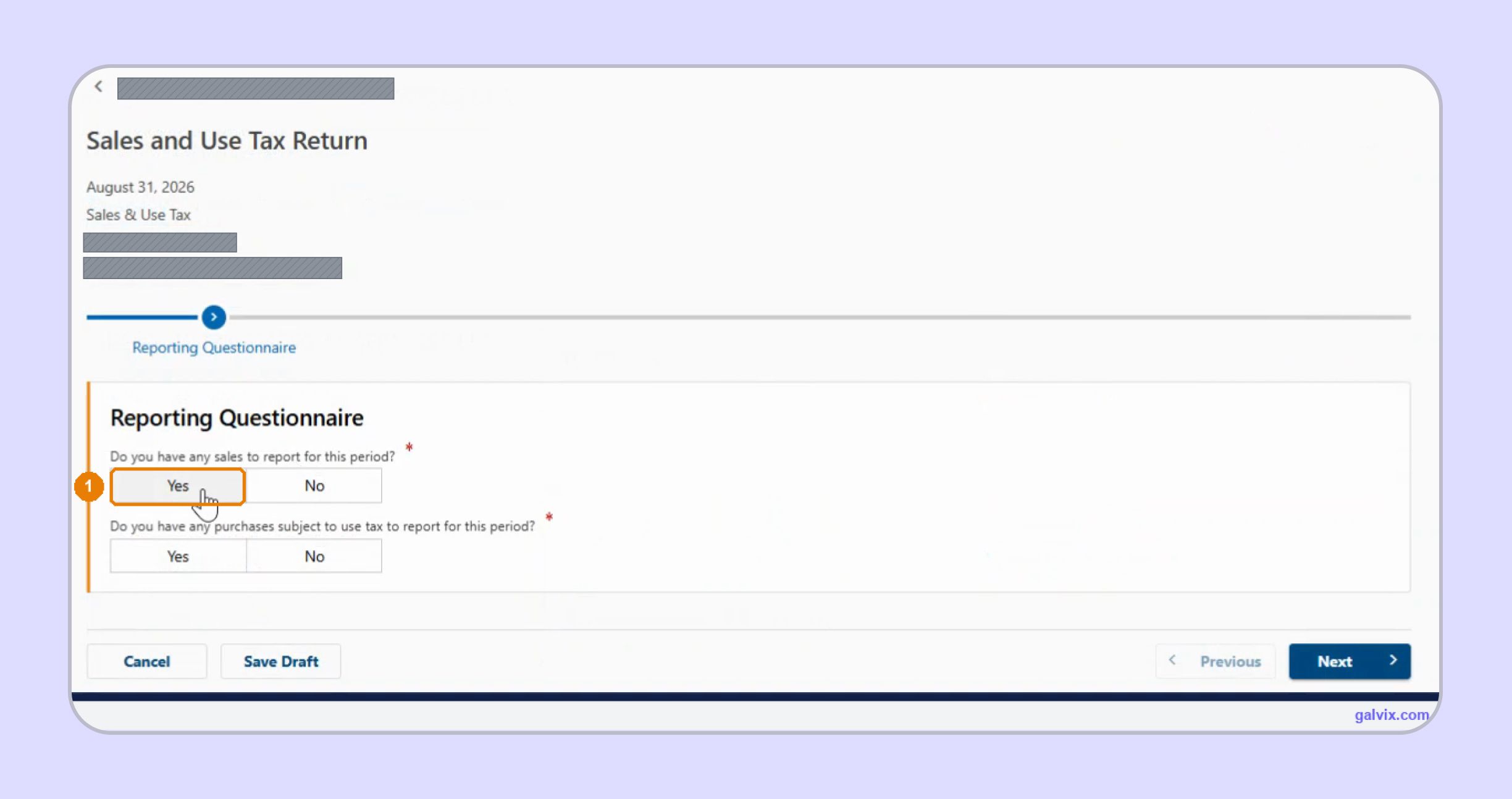
If an active registered account has no Nevada sales for the period, My Nevada Tax still expects the required return. The Reporting Questionnaire lets you answer No to sales activity and continue through a zero return.
Your assigned filing frequency also matters. Nevada requires monthly filing at certain taxable sales thresholds, while smaller sellers may qualify for quarterly or annual reporting.
Why Does a Nevada Sales Tax Return Start With County Data?
The difficult part of a Nevada sales tax return happens before you open the portal. Nevada sources the transaction to the county where the purchaser takes possession, so accurate county allocation determines which combined rate My Nevada Tax eventually applies.
Prepare these figures first:
| What You Need | Why It Matters |
|---|---|
| My Nevada Tax credentials | Opens the correct tax account |
| Filing period | Determines the return and applicable rates |
| Total Sales by county | Establishes gross activity |
| Exempt Sales by county | Reduces taxable sales |
| Marketplace activity | Keeps facilitator-handled sales separate |
| Exemption records | Supports untaxed treatment |
| Bank account details | Supports ACH debit payment |
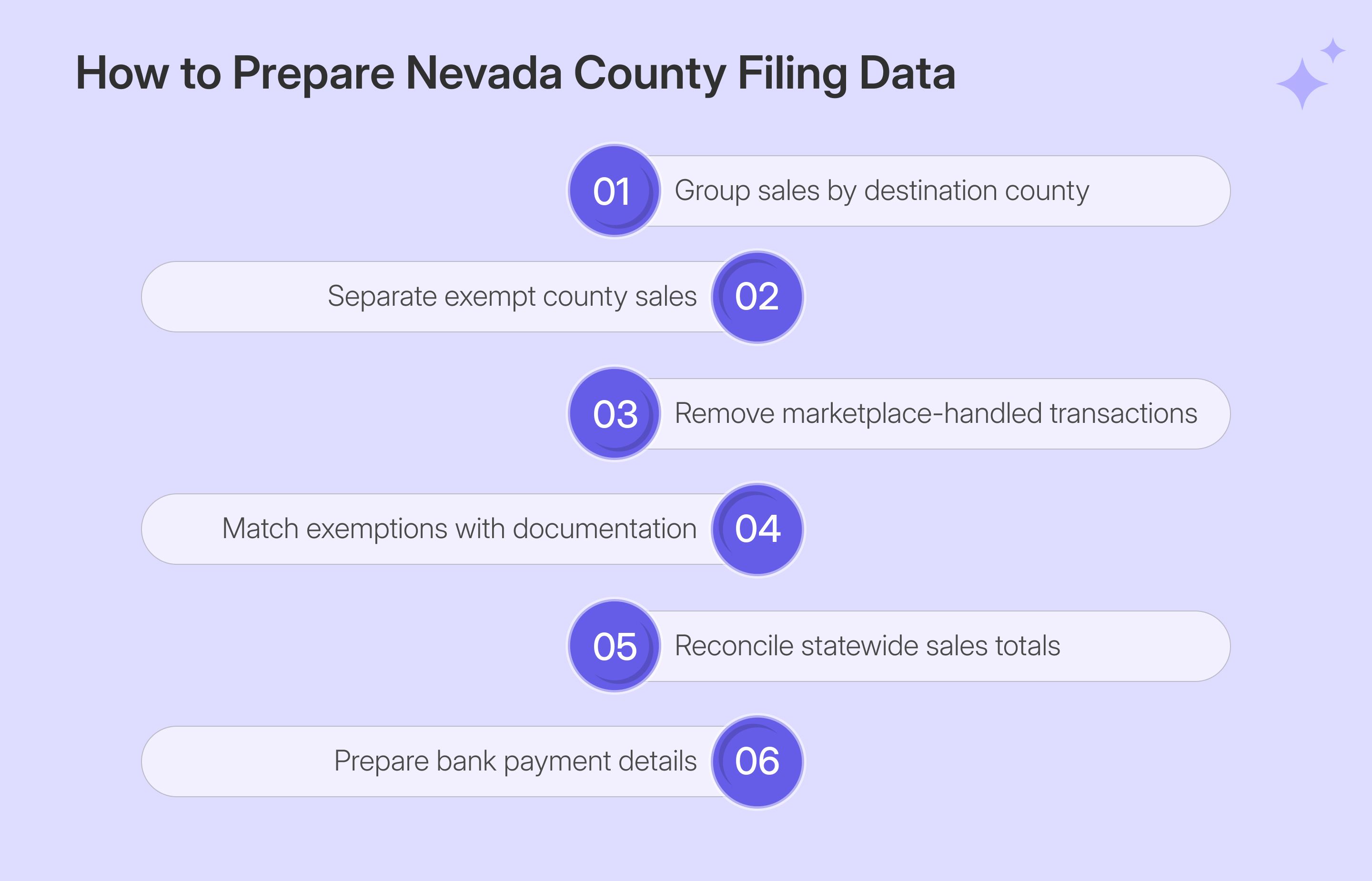
Your first reconciliation should happen outside My Nevada Tax. Build a county-level schedule from your sales ledger, ecommerce platform, invoicing system, and other channels before beginning NV sales tax filing.
Total Sales and Exempt Sales Control Everything Else
You enter only two sales figures for each county: Total Sales and Exempt Sales. The portal subtracts the exempt amount, determines taxable sales, applies the rate, and calculates the county tax.
That makes the Total Sales versus Exempt Sales split more important than manual rate calculation. My Nevada Tax can perform perfect arithmetic from incomplete source data.
If your business sells through several systems, a connected QuickBooks sales tax integration can help keep invoice, customer, and transaction information available for reconciliation rather than rebuilding the filing dataset each month.
Nevada Rates Change by County
Nevada's minimum combined rate is 6.85%, while county additions create different combined rates across the state. Clark County currently uses 8.375%, Washoe County 8.265%, and several rural counties use lower rates.
A sales tax calculator can help you sense-check the sales tax rate tied to a destination before filing. The rate still needs to correspond with the county where possession takes place.
How Do You File Nevada Sales Tax Online?
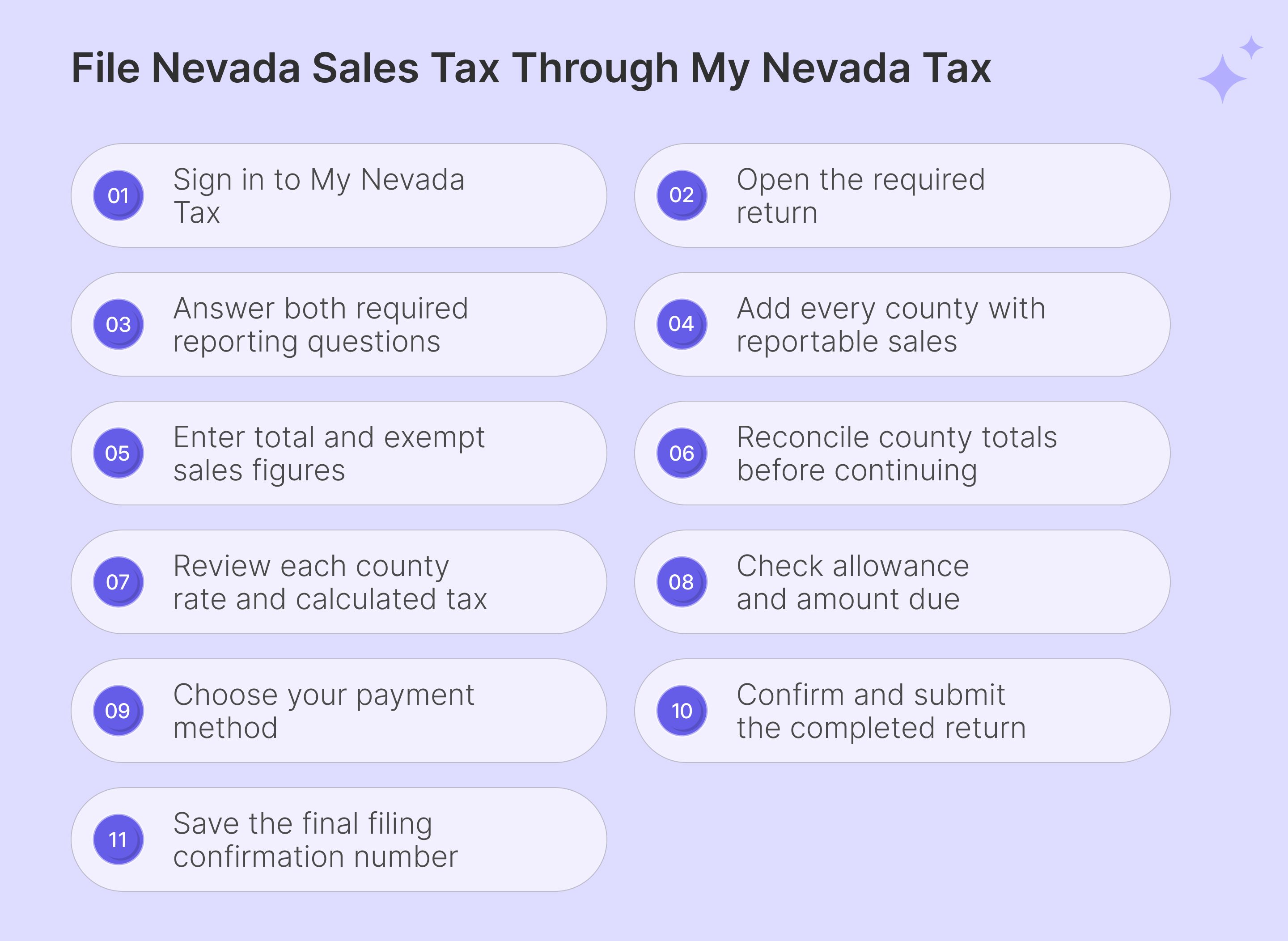
To file Nevada sales tax online, you follow a guided workflow from account access to county reporting, tax review, payment, and submission. The unusual part is that the portal starts with an empty county schedule rather than automatically presenting every Nevada county.
Step 1: Sign In to My Nevada Tax
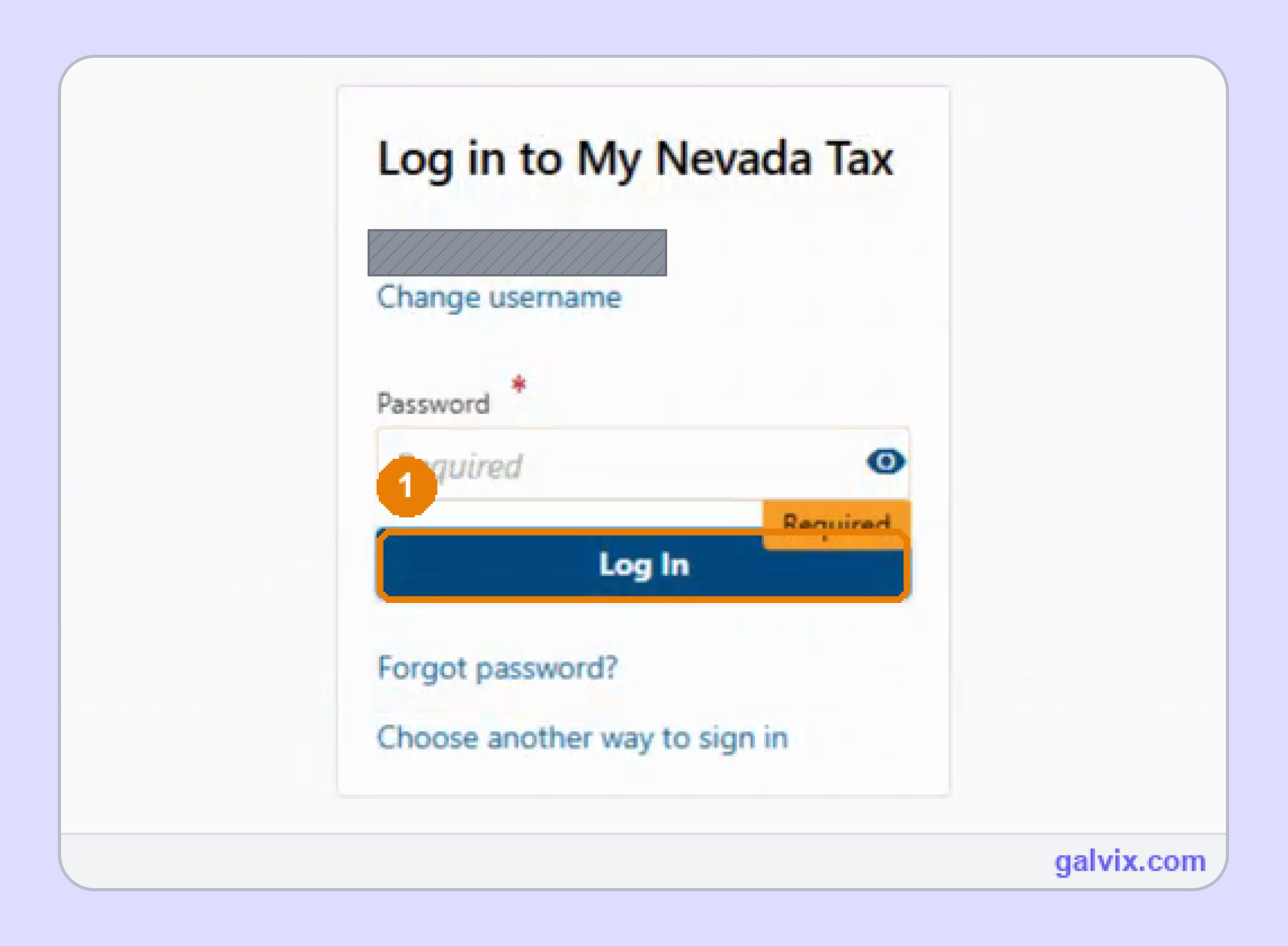
Enter your username and password on the My Nevada Tax login page, then complete any requested verification. Confirm the correct business name before starting the return. Your portal username differs from the tax account identifier, while a Federal ID, account ID, or Company ID may appear in related account-access or internal-system records.
Step 2: Open the Return From the Sales and Use Tax Account
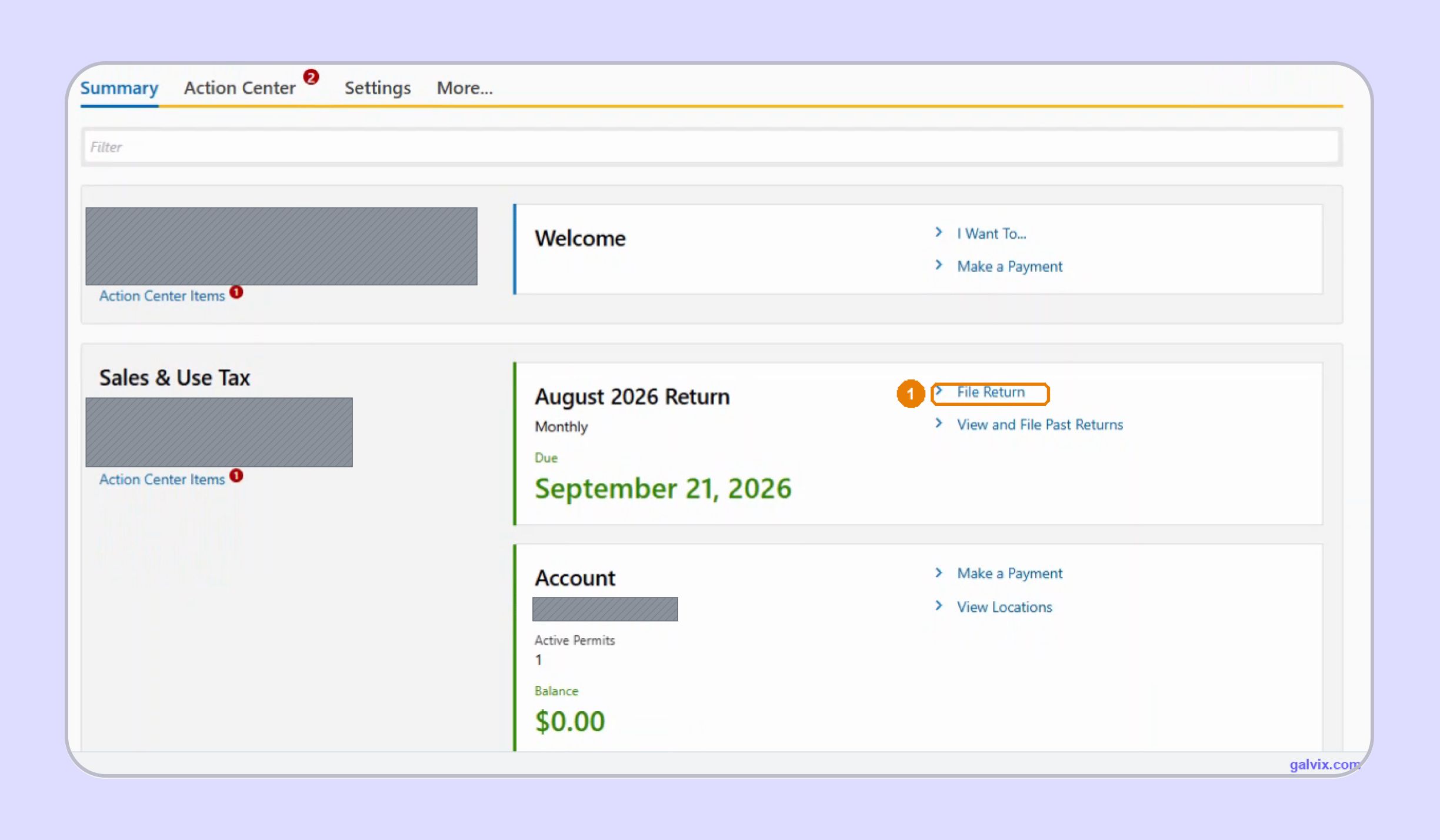
From the account home screen, open Sales & Use Tax and select File Return for the current period. Keep this return separate from other business taxes, including live entertainment tax, tobacco products, short-term lessor fee, car sharing fee, insurance premium, and property tax obligations administered through different Nevada programs separately.
Step 3: Answer the Reporting Questionnaire
The return begins with two questions covering sales and purchases subject to use tax for the reporting period. The second addresses consumer use when your business bought property for internal use without paying enough Nevada tax. Review any consumer use tax carefully before deciding whether a separate use tax return applies.
Step 4: Build the County Schedule Yourself
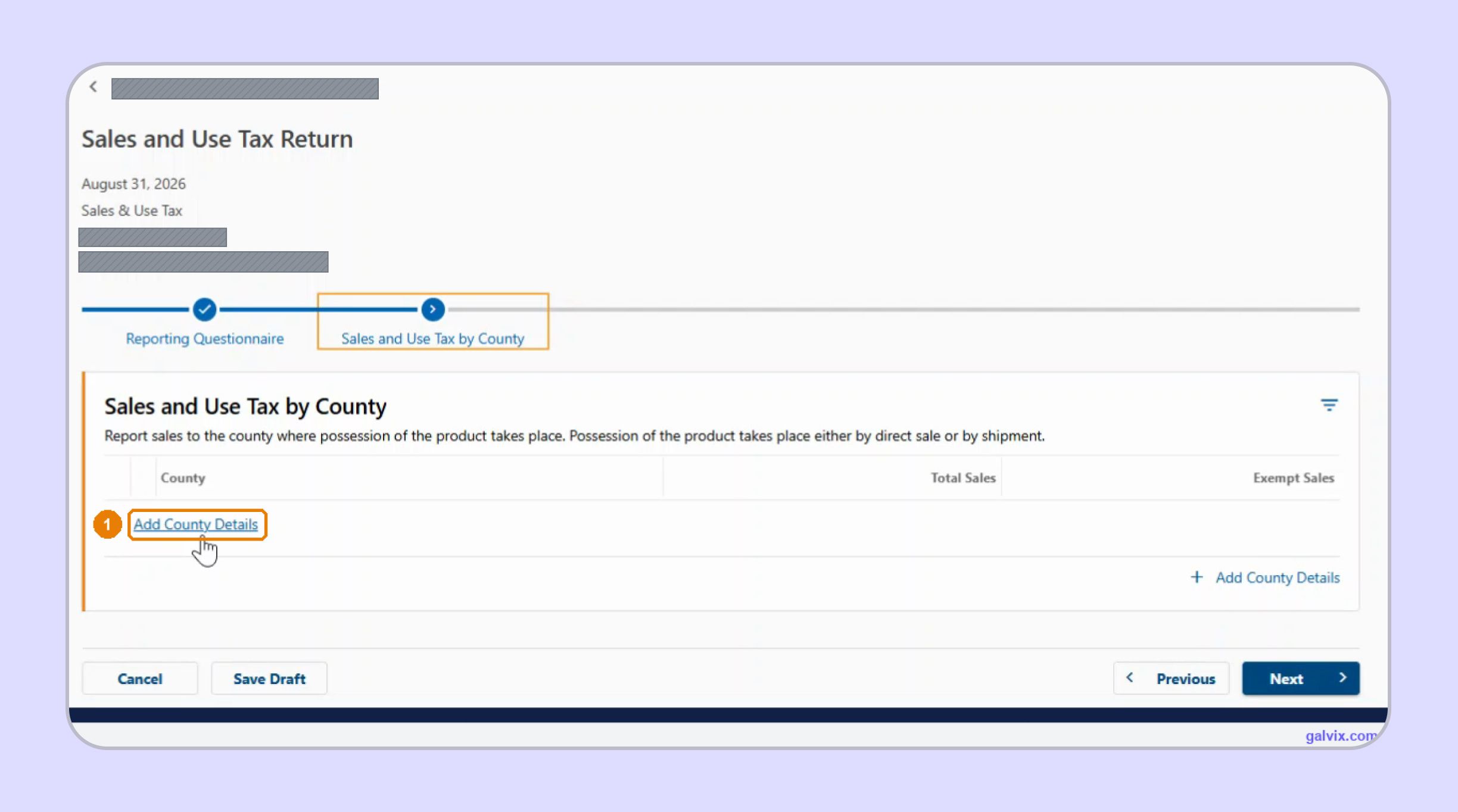
After the questionnaire, Sales and Use Tax by County opens as a blank table. Select Add County Details and create one row for every county with reportable activity. This is where how to file sales tax return in Nevada differs from states using pre-populated jurisdiction lists, so work from your prepared county schedule.
The portal does not pre-list Nevada's 17 counties. If you forget a county, the return can still calculate normally while leaving those sales out entirely.
Step 5: Enter Total Sales and Exempt Sales
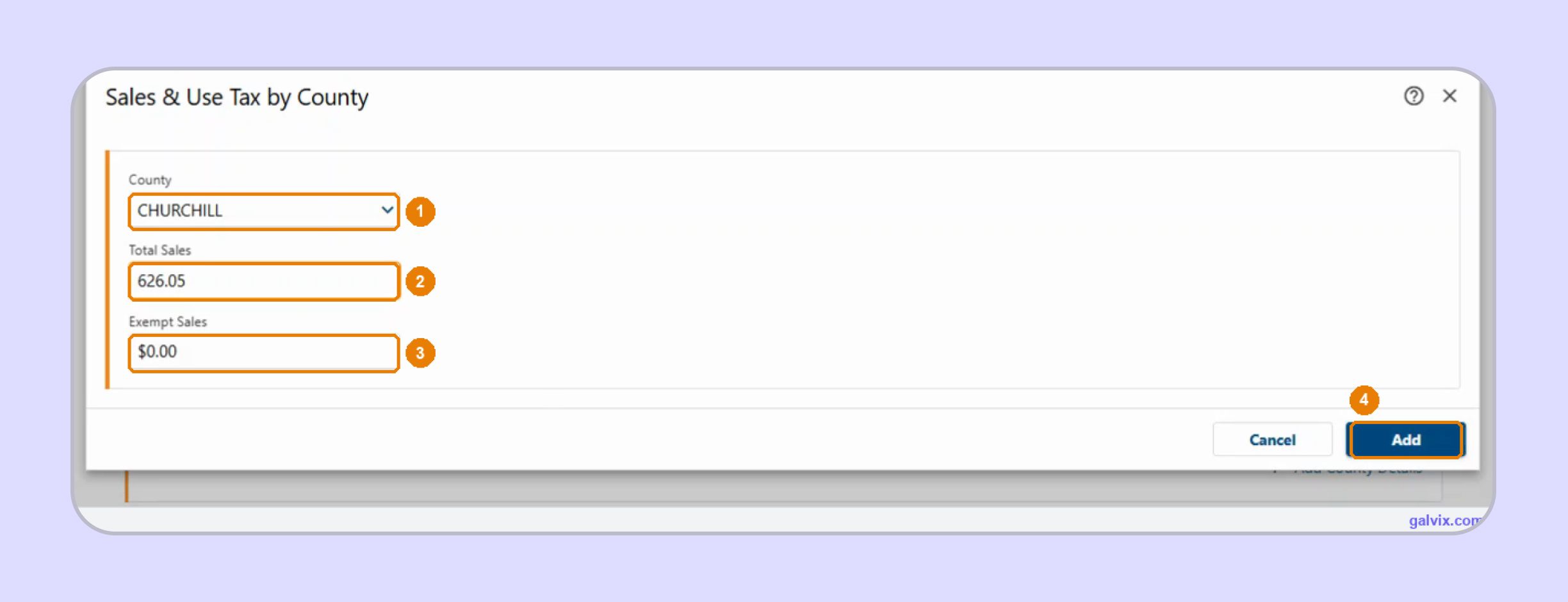
Choose the county, enter Total Sales, then enter Exempt Sales for that county before selecting Add. Repeat the process until every applicable county appears in the schedule. There is no taxable-sales box or tax-rate field at this stage because My Nevada Tax derives both values later from the figures you enter.
The county dialog does not accept negative sales. If refunds exceed sales for one county, do not net that negative amount against another county. Correct the original period through an amended return where appropriate.
Step 6: Reconcile the County Grid Before Continuing
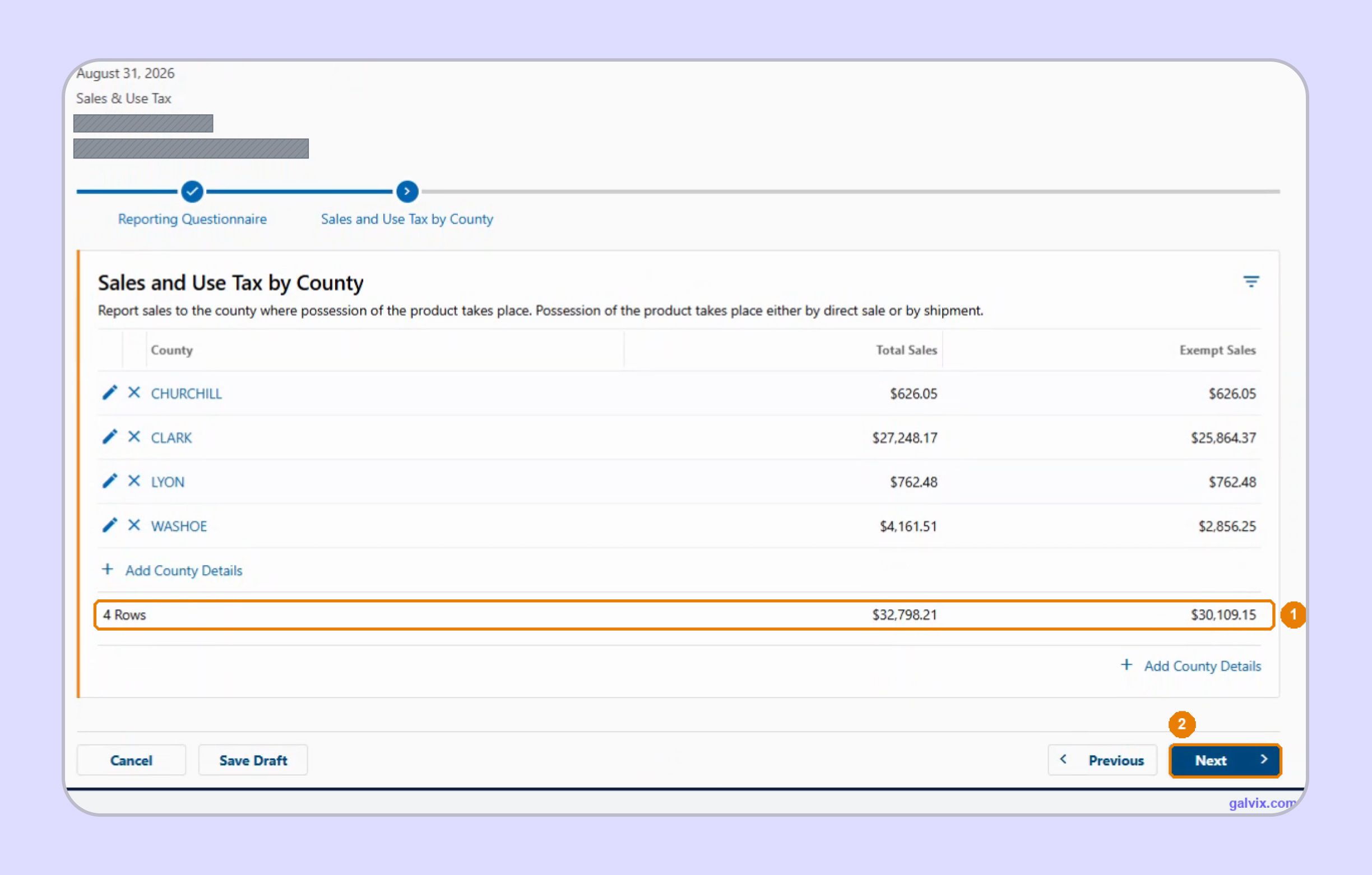
The county grid shows a running total of Total Sales and Exempt Sales across all rows. Compare those figures with your prepared total sales before moving forward. If statewide totals do not match your books, stop here and keep a written explanation for any unusual adjustment before the final sales tax report is submitted.
Step 7: Review the Calculated Tax by County
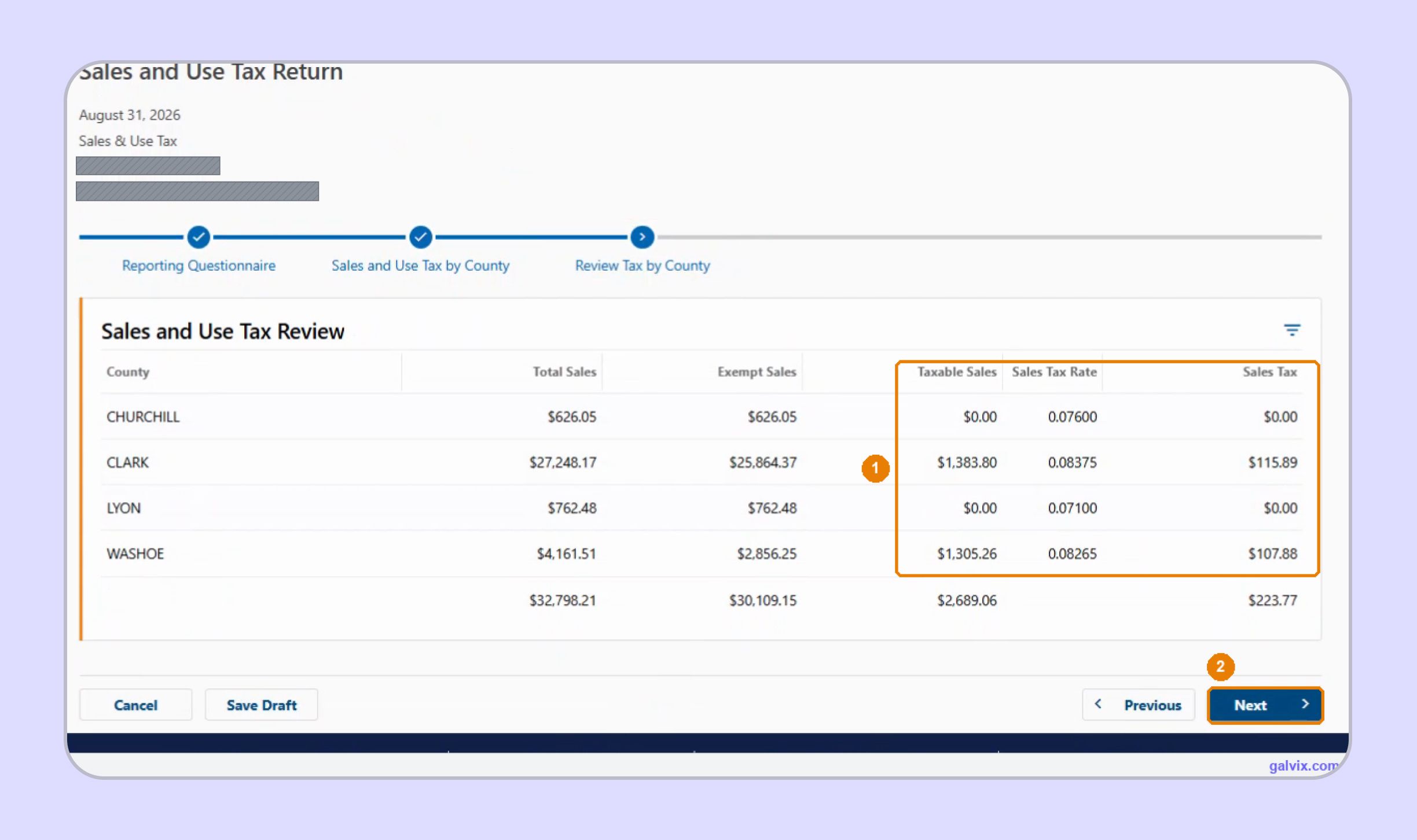
The next screen adds Taxable Sales, Sales Tax Rate, and Sales Tax for every county using the data entered earlier. This is where how to fill out sales and use tax return in Nevada shifts from entry to review. Confirm that each displayed county and rate matches the transaction destination you expected.
A sale assigned to the wrong county can still produce a believable tax amount. The review screen is your clearest opportunity to catch that sourcing error before submission.
Step 8: Review the Amount Due and Collection Allowance
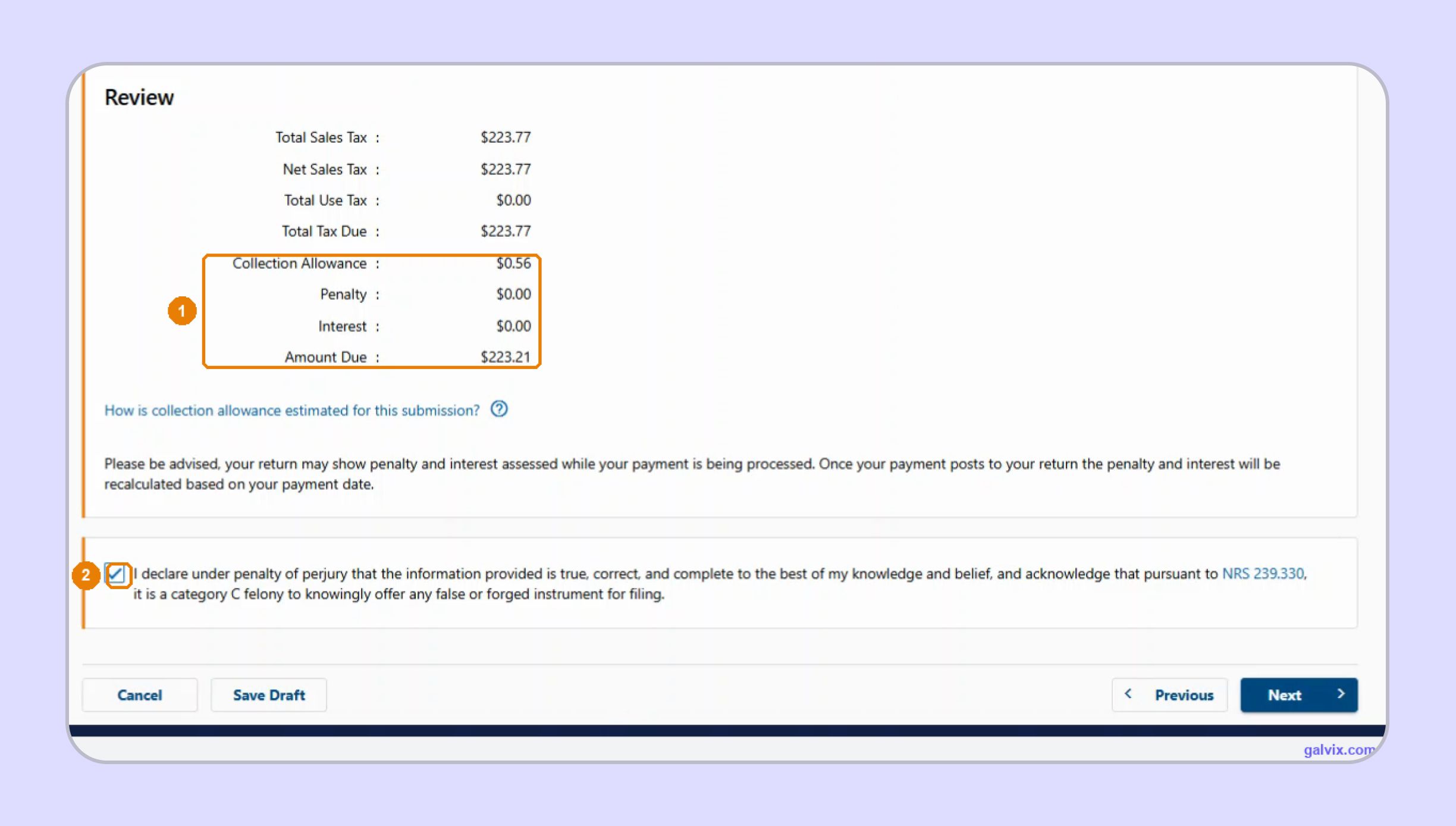
The Review screen combines Total Sales Tax, use tax, collection allowance, penalty, interest, and Amount Due. The portal subtracts the allowance from qualifying sales tax before showing the final balance. Confirm any use tax liability, review provisional penalty or interest, check tax due carefully, then complete the declaration before continuing.
Step 9: Choose How to Pay Sales Tax in Nevada
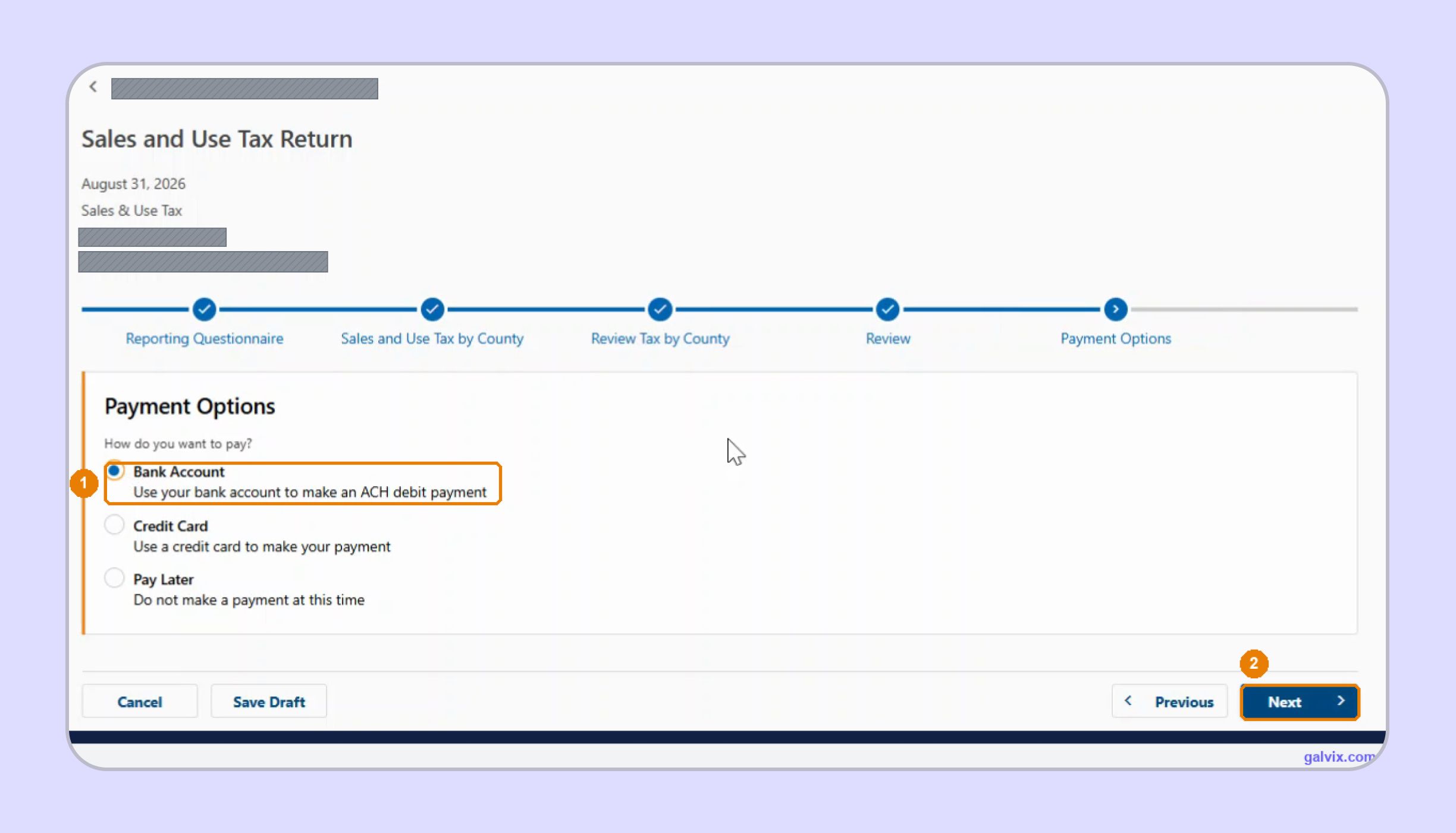
My Nevada Tax offers three payment choices inside the filing wizard: Bank Account, Credit Card, or Pay Later. Using a bank account creates an ACH debit, whereas using a credit card can incur processor charges. When considering how to pay sales tax in Nevada, remember that late tax payments can result in the loss of the collection allowance.
Step 10: Confirm the Return and Payment
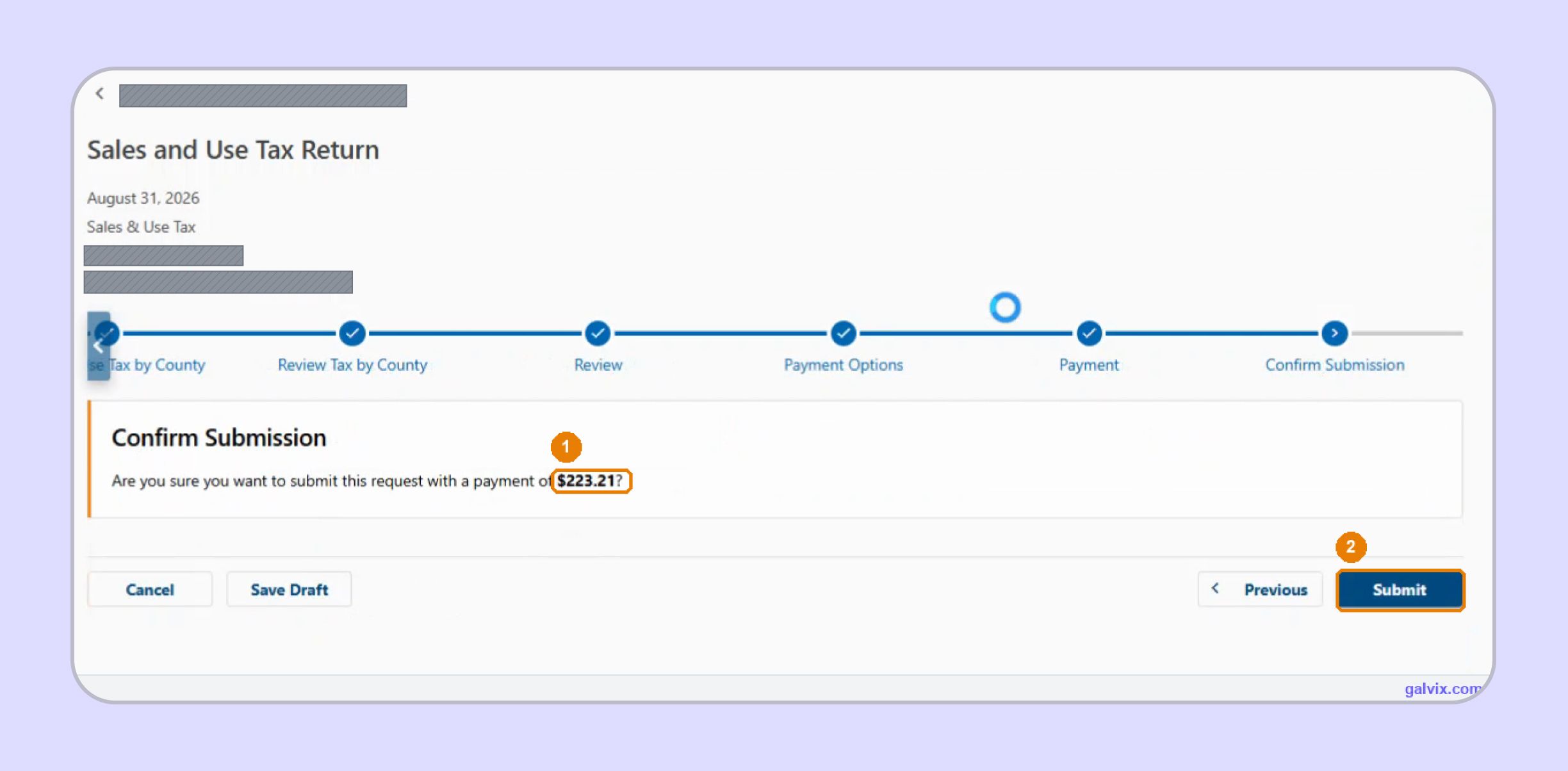
The Confirm Submission screen restates the payment amount before you select Submit. Compare it with the Amount Due shown on the previous review screen. Everything remains editable through Previous or Save Draft until submission. Selecting Submit sends the Nevada sales tax return and authorizes the chosen payment when included in the filing process.
Step 11: Save the Filing Confirmation
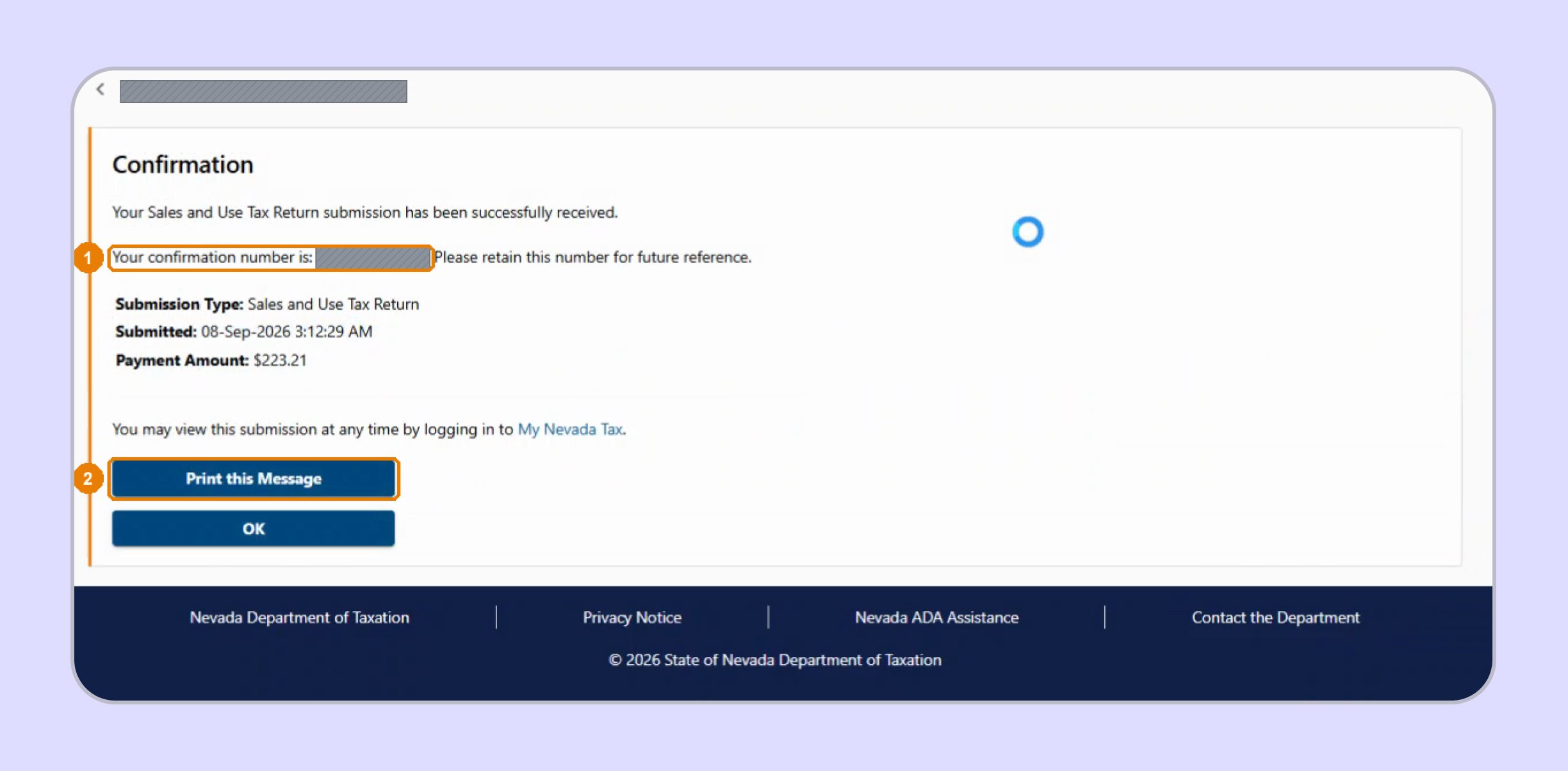
Successful submission produces a confirmation page showing the confirmation number, timestamp, submission type, and payment amount. Save or print that page immediately and keep it with your period reconciliation and payment evidence. This confirmation proves the Nevada sales tax return reached My Nevada Tax and gives you an audit trail for later questions.
Reaching the payment screen is not proof that the Nevada sales tax return was filed. The confirmation number is the record showing that My Nevada Tax successfully received the submission.
What Does My Nevada Tax Calculate for You?
My Nevada Tax removes much of the arithmetic from a Nevada sales tax return, although the portal cannot determine whether the sales data you supplied was complete or correctly classified. Your responsibility, therefore, shifts from calculation to sourcing and reconciliation.
| My Nevada Tax Calculates | You Still Need to Verify |
|---|---|
| Taxable sales | Correct county assignment |
| Applicable county rate | Complete Nevada sales |
| Sales tax by county | Accurate exempt sales |
| Collection allowance | Marketplace separation |
| Amount due | Exemption support |
| Penalty and interest estimates | Payment timing |
The difference is easy to miss. My Nevada Tax can correctly subtract Exempt Sales from Total Sales, even though the source data contains the wrong county or an unsupported exemption.
This makes Nevada's sales tax filing requirements partly a data management problem. The tax liability shown in the portal is only as reliable as the county allocation and exemption decisions behind it.
For multichannel sellers, a Shopify sales tax integration can keep ecommerce transaction information visible alongside other channels during nexus monitoring and return preparation.
Businesses using a larger ERP can similarly connect data through a NetSuite sales tax integration, reducing the need to assemble county filing figures from disconnected exports.
How Do Exempt Sales Change a Nevada Sales Tax Return?
Nevada treats gross receipts as taxable unless the seller can support an exemption. Since exempt sales directly reduce taxable sales in each county, documentation should be reviewed before those amounts are entered into My Nevada Tax.
Resale Sales Need More Than a Permit Number
A resale certificate supports purchases of property intended for resale. Nevada requires information describing the property and identifying the parties, while the Department recommends that certificates be verified regularly.
A valid permit can be checked through the state's online permit search. That internet search confirms registration status, although it does not prove that every purchase made by that customer qualifies for resale treatment.
The Department's online services also allow users to report a tip about tax evasion when they suspect a seller is failing to report or remit tax. That is separate from ordinary permit verification and should not be confused with an exemption review.
A strong sales tax exemption certificate process keeps the customer's documentation connected with the individual transaction. This matters because improper certificate use can create exposure to tax-evasion concerns or to a later assessment.
Some Transactions Need a Different Tax Analysis
Nevada sales tax applies primarily to taxable transfers of tangible personal property. Products delivered electronically, including certain downloaded software, are not subject to Nevada sales or Consumer Use Tax under current Department guidance.
Do not assume the same rule applies to real property contracts, tobacco products, or activities subject to separate programs such as live entertainment tax. Those items can fall under different rules and accounts.
The same distinction applies to a short-term lessor fee, car sharing fee, and the state's separate silver excise tax programs. A single business can therefore have several Nevada obligations while its Nevada sales tax return still covers only sales and use tax.
Use the Galvix Sales Tax Exemption Certificate Tool to identify relevant documentation paths and seller checks before exempt activity reduces your Nevada taxable base.

What Should You Do After the Nevada Sales Tax Return Is Filed?
Submission closes one period, although it does not end the compliance work. Save the confirmation, confirm payment, preserve exemption support, and correct any discovered errors through the appropriate amendment process.
Keep the Confirmation With the Period Workpapers
Save the portal confirmation alongside your county reconciliation, exemption support, and payment evidence. Those records connect the reported figures with the underlying activity if the Department later asks questions.
The same file should show the filing period, direct retail sales, exempt amounts, and the basis for any unusual adjustment. Clear records are especially useful when responsibility changes between employees or outside providers.
Correct Errors Through an Amended Return
If you discover an error after submission, open View and File Past Returns and amend the affected period rather than creating an unrelated new filing. The live workflow specifically uses this method when a county requires correction.
Remote sellers can also use paper returns in some situations, although My Nevada Tax remains the Department's primary online option for direct filing. Older references may still use terms such as Nevada Tax Center, so confirm that you are working in the current Nevada tax portal, My Nevada Tax, before entering account information.
Keep Other Nevada Accounts Separate
Sales and use tax is only one part of Nevada administration. The Department of Taxation website separately covers Modified Business Tax, property-related programs, excise accounts, and other taxes.
Likewise, the Nevada Tax Commission performs a different role from the filing portal, while the Nevada Secretary of State manages separate business registration functions.
This separation helps prevent a common operational mistake: treating a single Nevada registration as if it automatically satisfied all tax and licensing requirements.
How Does Galvix Manage Nevada and Multistate Sales Tax Filing?
Galvix turns Nevada sales tax return filing from a portal task into a managed compliance workflow. Transaction data can flow from connected ecommerce, accounting, billing, or ERP systems, while specialists reconcile the figures before the return reaches My Nevada Tax. Galvix supports direct integrations and file-based imports.
For Nevada, that means county allocation and exemption treatment can be reviewed before the portal calculates the return. The goal is to catch missing counties, marketplace duplication, unsupported exemptions, or source-data gaps while there is still time to correct them.
The same workflow can connect the Nevada sales tax return with nexus monitoring, registration, exemption certificate management, filing, and state notices. That gives a growing finance team one operating process instead of separate spreadsheets for every state.
Galvix uses modular pricing, so you select the services you need. Exact pricing reflects the volume of work for each module, rather than requiring every customer to purchase the same compliance package.
Where Does Galvix Fit Into the Nevada Workflow?
The managed process focuses on the work surrounding My Nevada Tax, where most filing risk starts.
- Reconcile transactions before county allocation
- Separate direct and marketplace activity
- Review exemption documentation before filing
- Track state filing and payment deadlines
- Preserve confirmations and filing records
- Connect nexus with registration workflows
If sales tax compliance now spans several states, Galvix can help you move from separate, state-by-state tasks to a managed process while your team maintains visibility into the returns before submission.
That becomes especially valuable when how to file NV sales tax is no longer the only question. Growth can also create new registrations, different filing frequencies, state notices, and additional reporting obligations.
Book a demo to see how Galvix can simplify Nevada and multistate sales tax filing for your growing business.
Frequently Asked Questions
How Do I Calculate My Sales Tax in Nevada?
For the Nevada sales tax return online workflow, you enter Total Sales and Exempt Sales for each county. My Nevada Tax calculates taxable sales, looks up the applicable county rate, and calculates the tax automatically. The underlying county assignment and exemption classification remain your responsibility.
How Can I Find My Sales Tax Rate in Nevada?
Nevada uses different combined rates by county. The minimum combined rate is 6.85%, while Clark County currently uses 8.375% and Washoe County uses 8.265%. My Nevada Tax applies the rate according to the county selected for the return.
Can I Pay My Nevada Sales Tax Online?
Yes. My Nevada Tax supports online payment while you file. Available payment options in the live workflow include ACH from a bank account, credit card, or Pay Later. Choosing Pay Later files the return without completing payment at that time.
How Do I Register for Sales Tax in Nevada?
Register for the appropriate Sales/Use Tax Permit through the Nevada Department of Taxation. Nevada currently charges a permit fee per location. Your broader state business registration does not replace this tax-specific permit.
What Is the Sales Tax Rate in Nevada in 2026?
Nevada's minimum combined sales tax rate is 6.85%, with county additions increasing the rate in some locations. Clark County is 8.375%, Washoe County is 8.265%, while several rural counties have lower combined rates.
How Much Does It Cost to Get a Sales Tax Permit in Nevada?
The Nevada Department of Taxation currently lists a $15 Sales Tax Permit fee per location. A business adding another taxable Nevada location may need an additional permit and fee.
How Can I Verify a Nevada Sales Tax Permit?
The Department provides an online Tax Evasion and Permit Search that lets you check whether a vendor holds a current permit. Permit verification confirms registration status; it does not establish that every individual purchase qualifies for resale or another exemption.