
Businesses file Kentucky sales tax online through MyTaxes, the Kentucky Taxpayer Portal operated by the Kentucky Department of Revenue. Most registered sellers use Form 51A102, the Sales and Use Tax Worksheet, to report receipts, deductions, consumer use tax, and the final amount due.
Kentucky uses a single statewide sales tax rate of 6%, with no local sales or use taxes. This removes city and county allocation from the filing process. Your main work involves getting receipts and deductions right before the portal calculates your tax liability.
This blog explains how to file sales tax in Kentucky, complete Form 51A102, pay electronically, and retain proof of payment. It also covers Kentucky sales tax filing requirements, vendor compensation, exemption support, and practical checks before submission. For broader state rules, review the Kentucky sales tax guide.

What Makes a Kentucky Sales Tax Return Different?
Kentucky has a straightforward rate structure, although accurate filing still depends on complete receipts and supported deductions. When you file Kentucky sales tax online, MyTaxes performs the arithmetic after you provide the underlying transaction figures.
One Statewide Rate: The State of Kentucky applies a 6% state sales tax to taxable gross receipts or purchase prices. There is no local sales tax, so you do not allocate Kentucky sales among cities, counties, or special districts.
The tax applies to retail sales of tangible personal property, digital property, and specified taxable services. Kentucky also imposes use tax when taxable property is purchased without enough tax and later stored, used, or consumed in Kentucky.
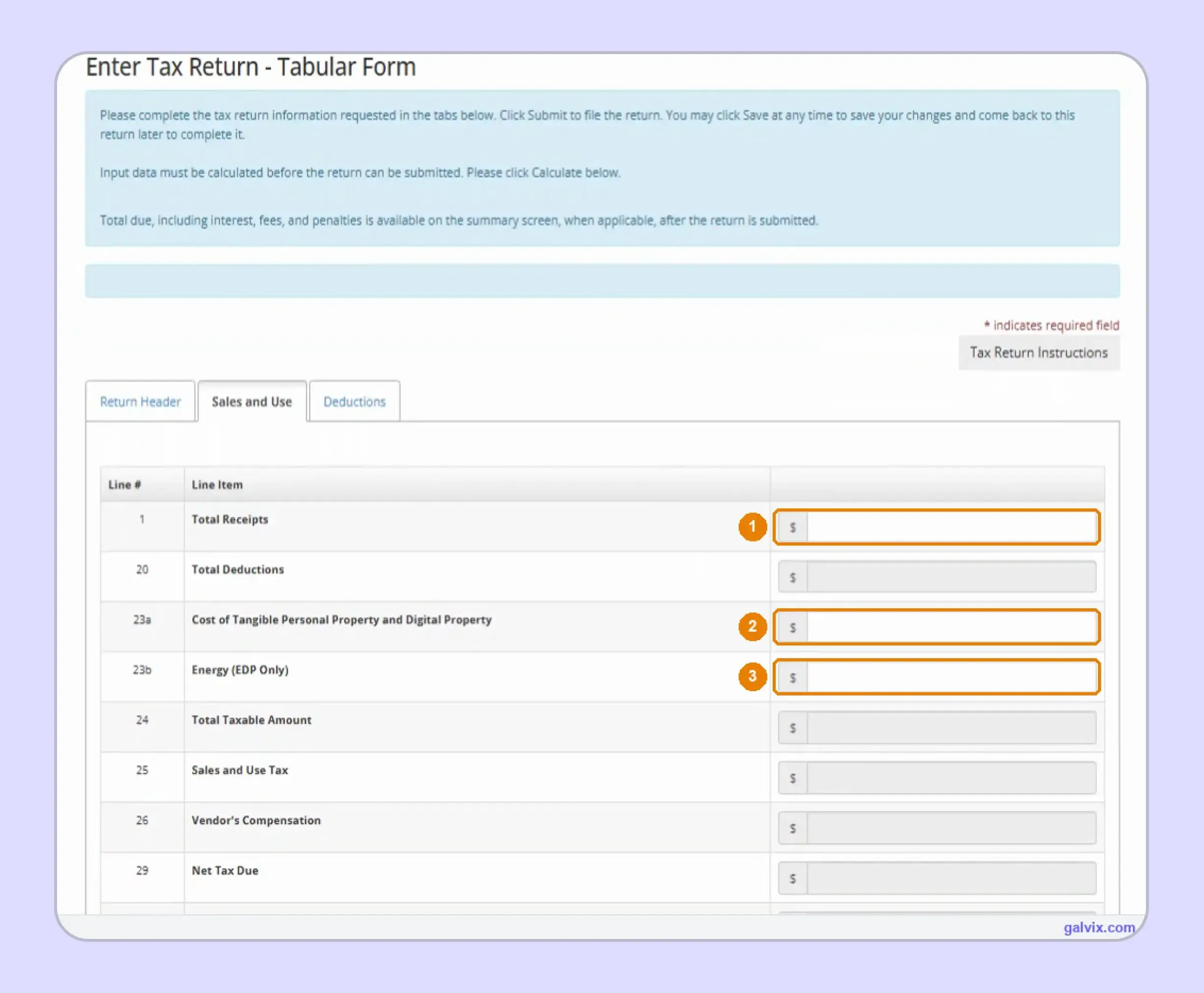
Portal-Calculated Liability: You enter Total Receipts, applicable deductions, and consumer-use inputs. After you select Calculate, the online system determines Total Taxable Amount, the amount of sales tax, vendor compensation, Net Tax Due, and Total Amount Due.
Older Periods: The MyTaxes screen states that online filing for original returns is available for tax periods beginning on or after January 1, 2020. Older original returns require the process directed by the Department rather than the same portal workflow.
Filing and Payment: Submitting the return does not automatically complete payment. MyTaxes first confirms your tax return, then provides a separate electronic payment workflow with another confirmation number. This distinction matters when reviewing whether KY sales tax filing is fully complete.
Who Needs to File Kentucky Sales Tax?
Businesses with an active sales and use tax account must file according to the filing frequency assigned by the Department. Physical presence, economic activity, or an existing sales tax registration can create ongoing filing obligations.
Kentucky Sellers
A business with physical presence may need a tax permit when it makes taxable retail sales. Once registered, you should file returns for each required reporting period until the account is formally changed or closed.
Remote Sellers
Kentucky's current economic nexus standard applies when a remote seller reaches $100,000 in gross receipts or 200 separate sales into Kentucky during the current or previous calendar year. Meeting either threshold can create collection and registration obligations.
You can track these thresholds through current Kentucky sales tax nexus rules before sales create a sales tax permit requirement. Physical presence can establish sales tax nexus independently of the remote threshold.
Marketplace Sellers
Marketplace providers collect and remit Kentucky tax on qualifying facilitated transactions. Keep that activity separate from your directly reported sales before preparing Form 51A102, so marketplace tax already handled elsewhere does not flow into your own return.
Marketplace activity can still matter when testing nexus. Kentucky's threshold uses gross Kentucky activity, and current Department guidance continues to apply the $100,000 or 200-sale test to remote retailers.
Zero Activity
An active account can still require a zero return when the filing period contains no activity. Filing the required return keeps the account current instead of leaving an unresolved obligation.
Kentucky is also a member of Streamlined Sales Tax. Remote sellers operating across several member states can use the Streamlined Sales Tax registration framework, which simplifies registration while still allowing each state's filing obligations to apply.
What Should You Prepare Before KY Sales Tax Filing?
Before you file Kentucky sales tax online, assemble the figures that feed Form 51A102 and reconcile them against your source records. Clean preparation reduces the need for corrections after MyTaxes has already calculated the return.
| What You Need | Why It Matters |
|---|---|
| MyTaxes login | Opens the correct tax account |
| Total receipts | Entered on Line 1 |
| Deductions by reason | Reduce the taxable amount |
| Exemption certificates | Support qualifying exempt sales |
| Untaxed business-use purchases | May create use tax |
| Filing period | Determines the return being filed |
| Bank details | Support payment after filing |
These figures should come from your sales data and accounting records for the assigned reporting period. Businesses using connected accounting systems can also bring relevant source activity into compliance workflows through a QuickBooks sales tax integration.
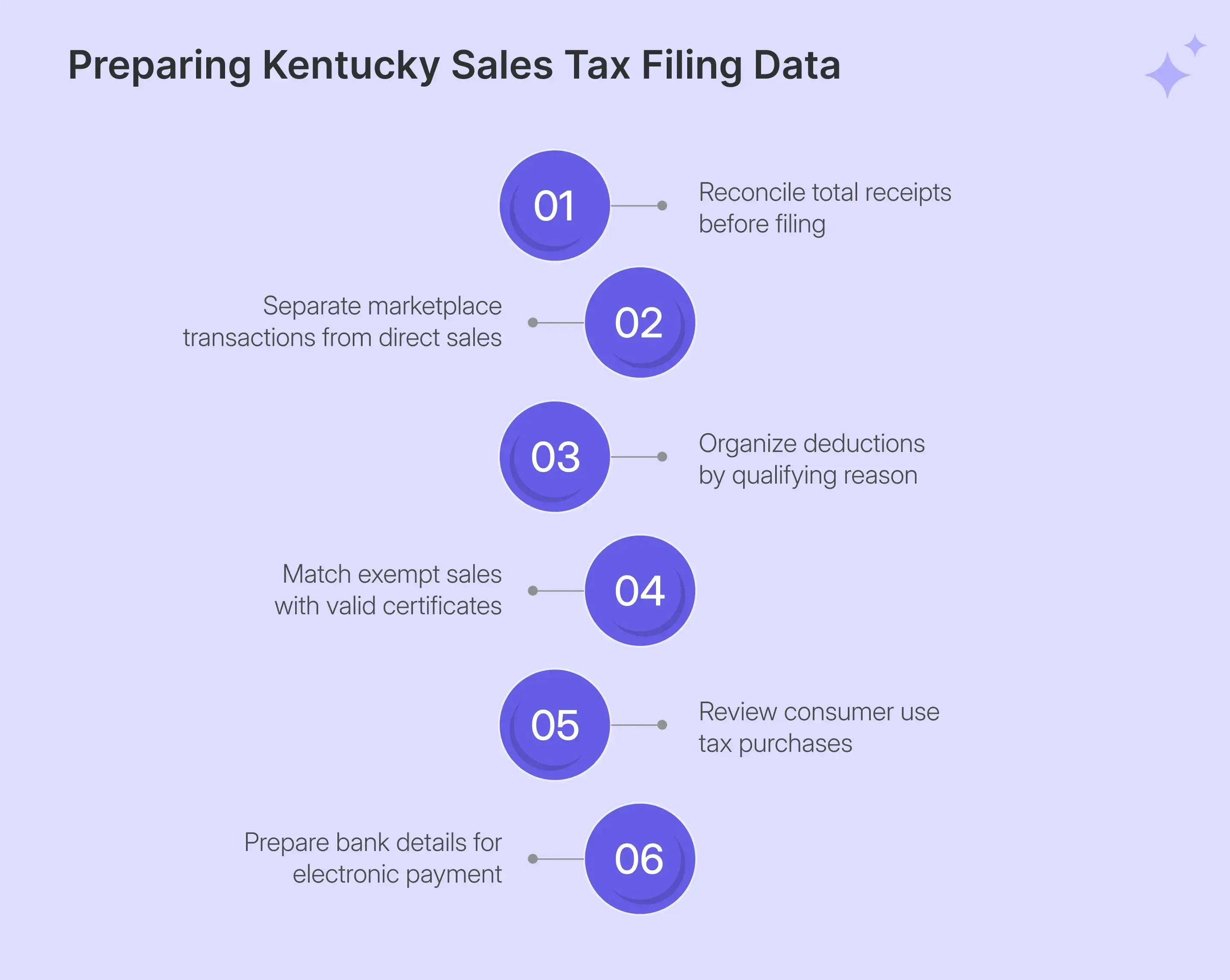
Once those source figures are reconcile, organize them by the following aspects:
- Total Receipts: Pull every Kentucky sale belonging on the return before applying deductions. Line 1 is the starting amount, so incomplete gross receipts can produce a mathematically balanced return from an incorrect base.
- Deductions: Separate resale sales, exempt customers, government activity, interstate transactions, and other applicable deductions before opening MyTaxes. The portal subtracts the total deductions from receipts to determine taxable sales.
- Use Tax: Review untaxed purchases that your business used instead of reselling. Line 23a covers qualifying property, including digital property, while Line 23b covers Energy Direct Pay inputs when applicable. Most retailers may report zero, although both fields deserve review.
- Bank Details: Keep the bank account you intend to use available before filing. Kentucky separates return submission from payment, so you will move into a second transaction after your filing confirmation appears.
How Do Deductions Affect a Kentucky Sales Tax Return?
Deductions directly reduce the taxable amount calculated by MyTaxes. When you file Kentucky sales tax online, every supported exempt amount should appear correctly, because an omitted deduction can increase the tax even when the portal calculates it perfectly.
Resale and Exempt Sales: Kentucky provides separate lines for resale certificates, qualifying agriculture activity, government sales, exempt grocery activity, and several other categories. Keep the relevant resale certificate or transaction record available before reducing receipts.
A structured sales tax exemption certificate process helps connect each exempt customer with the right documentation and transaction history. Certificate collection supports the deduction, while transaction review confirms whether the purchase qualifies.
Other Deductions: Use the free-text lines when a valid deduction does not fit an existing category. Add a clear description and keep records showing how you calculated the amount.
MyTaxes does not check whether you missed a valid deduction. If you leave one out, the remaining amount remains taxable, and Kentucky applies a 6% tax to that higher total.
Missed Deductions: Reconcile Line 20 against your supporting records before selecting Calculate. This step is especially important for businesses with high exempt-customer activity, as a single omitted amount can materially affect the tax due without creating a portal error.
The Galvix Sales Tax Exemption Certificate Tool can help identify the relevant documentation route and seller checks before qualifying transactions reduce the taxable base.
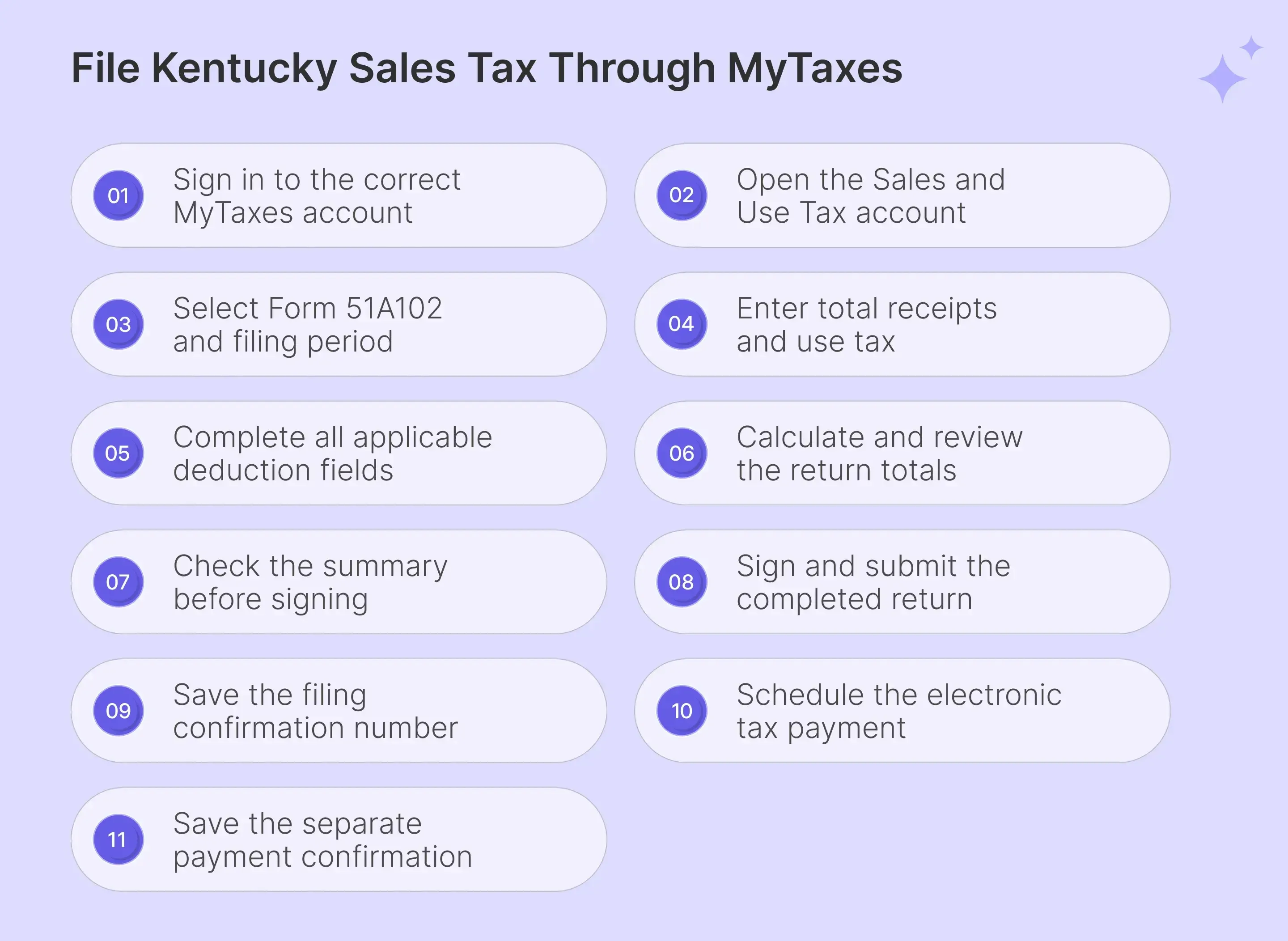
How Do You File Kentucky Sales Tax Online?
To file Kentucky sales tax online, complete the MyTaxes workflow in sequence from login through separate filing and payment confirmations. The portal calculates the return after you provide receipts, deductions, and any consumer-use amounts.
Step 1: Sign In to MyTaxes
Open the Kentucky taxpayer portal and enter your username. Select Next, then complete the password and verification-code steps required to access your business account. If you manage several entities, confirm the username before proceeding. The same login may retain details from a previous session.
A prefilled username can lead you into the wrong business. Check it before continuing because every screen afterward belongs to the account linked with that login.

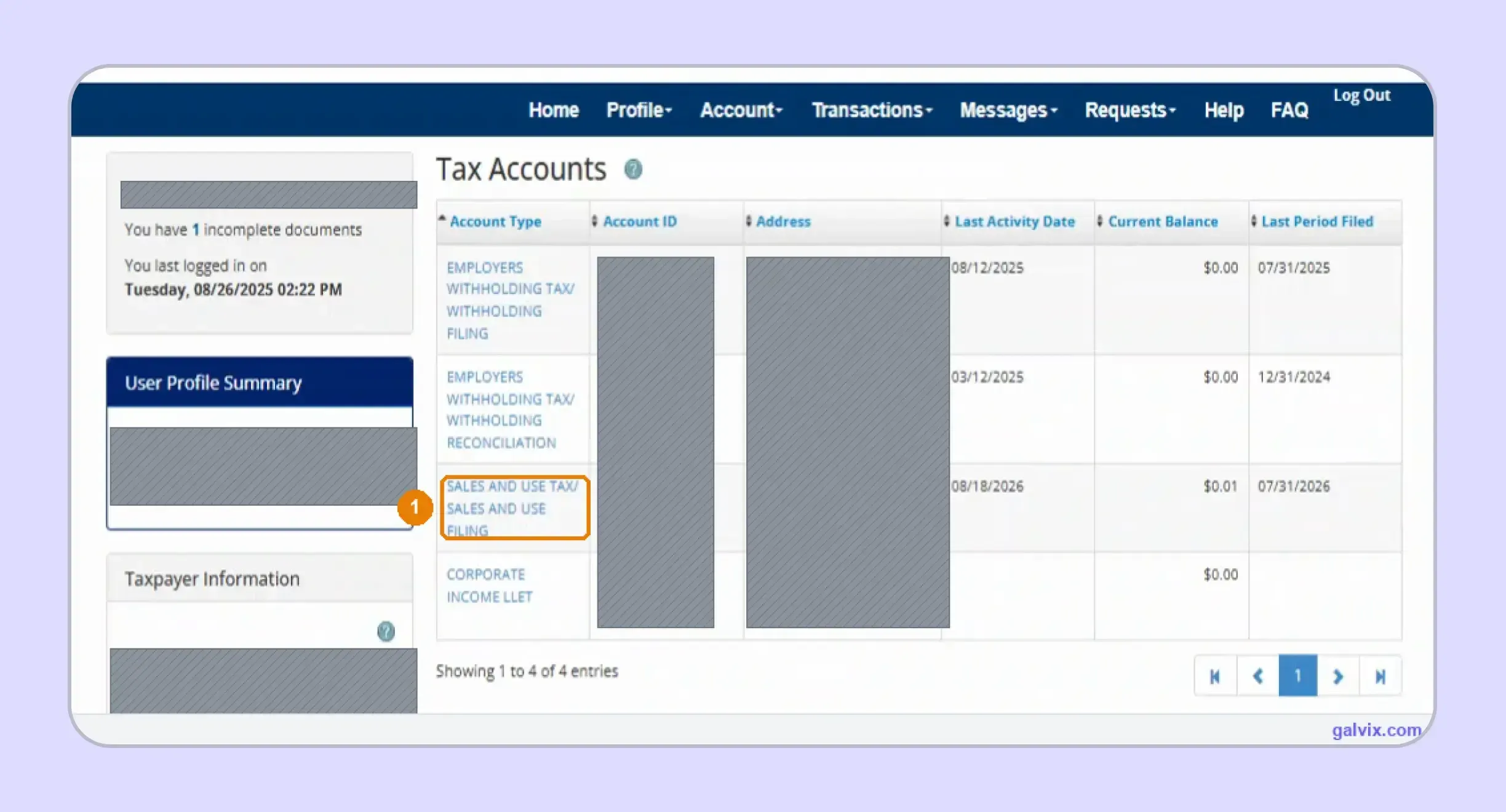
Step 2: Open the Sales and Use Tax Account
After login, select Sales and Use Tax from the Tax Accounts list. This page can also contain withholding or corporate accounts, so open the correct account before choosing File a Return or File a Form. This is the first step where the filing becomes tied to a specific Kentucky account rather than your personal portal credentials.
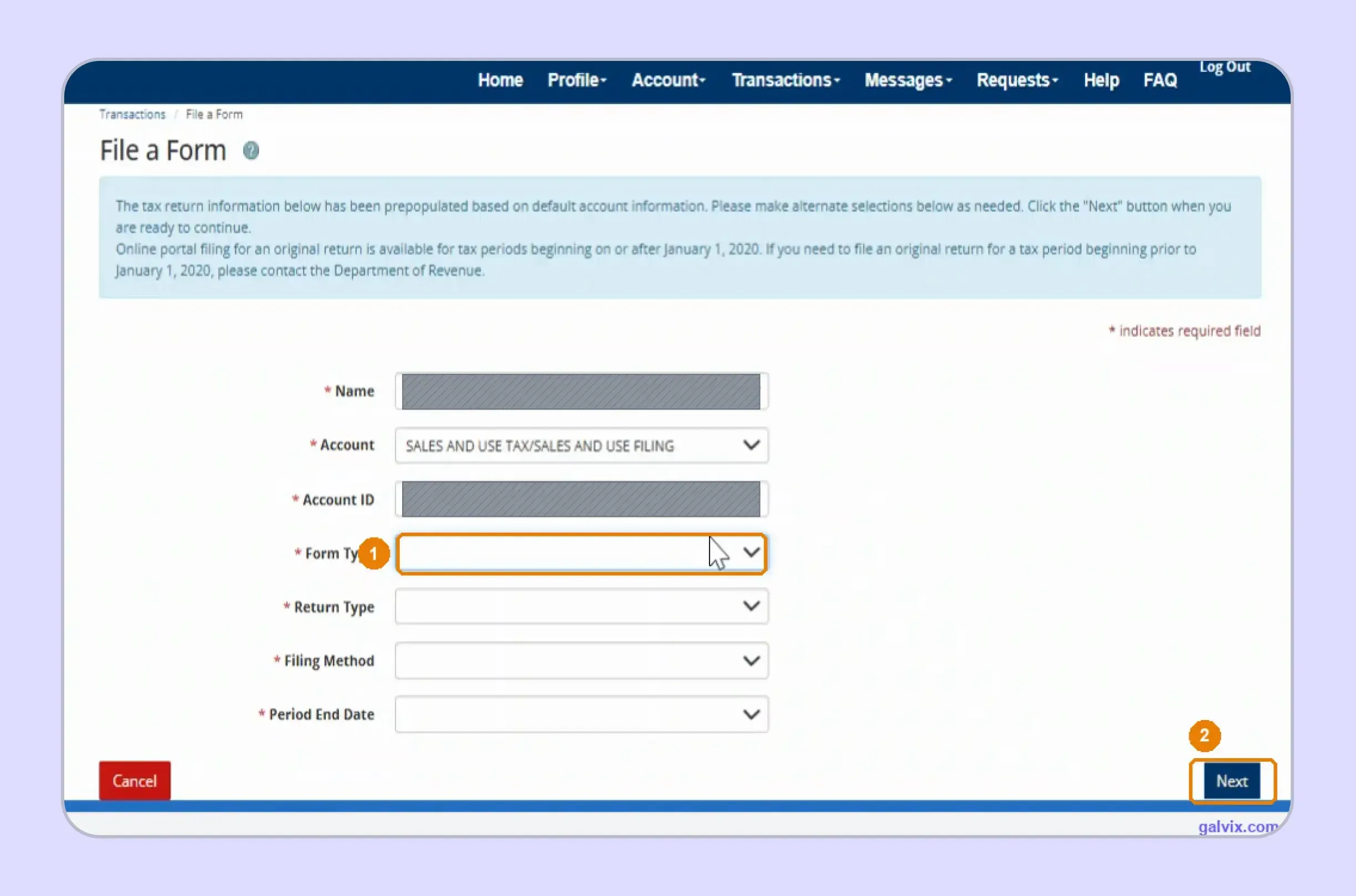
Step 3: Select the Return Details
Review the prefilled Name, Account ID, Form Type, Return Type, Filing Method, and Period End Date. Select Form 51A102 and confirm the correct tax period before continuing. This check matters when several open periods appear in your account. Choosing the wrong period can attach otherwise accurate figures to the wrong obligation.
Step 4: Enter Total Receipts
Enter Total Receipts on Line 1 for activity belonging on the return. Complete Lines 23a and 23b only when consumer use or Energy Direct Pay activity applies. Everything else on this tab is calculated after you complete the input fields. This is why how to fill out sales and use tax return in Kentucky starts with accurate receipts rather than manual tax calculations.
Step 5: Complete the Deductions Tab
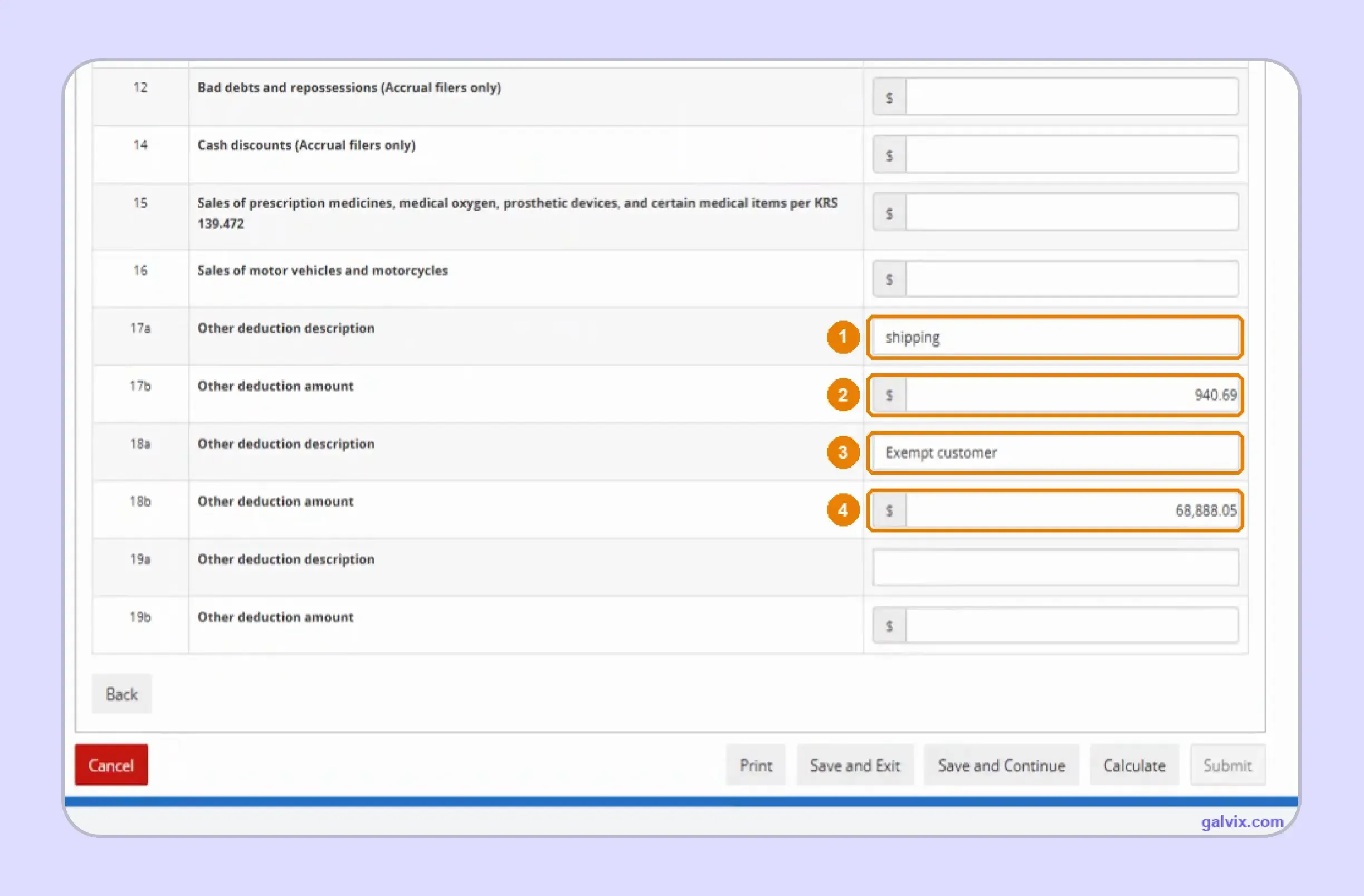
Open Deductions and enter qualifying non-taxable amounts under the appropriate reason. Reconcile the completed total with certificates, customer records, shipping treatment, and other supporting documentation before calculating.
A qualifying exempt transaction omitted here remains inside the taxable base. MyTaxes subtracts deductions from receipts, so incomplete exemption reporting can increase the calculated liability without creating an error message.
Step 6: Calculate the Return
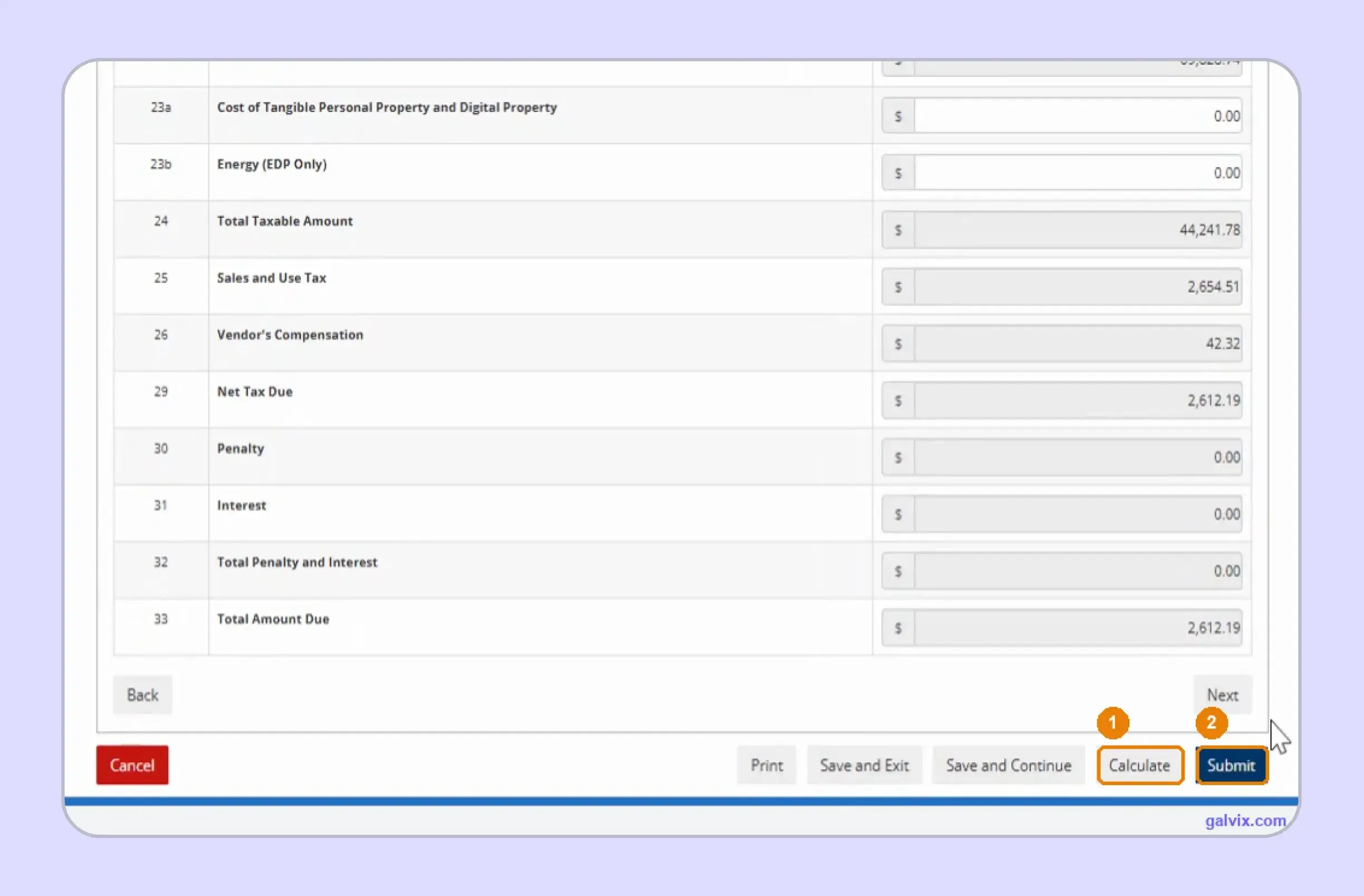
Select Calculate after receipts, use-tax entries, and deductions are complete. MyTaxes then calculates Total Taxable Amount, Sales and Use Tax, Vendor's Compensation, Net Tax Due, penalties, interest, and Total Amount Due. The Submit button remains unavailable until calculation finishes. If the amount looks wrong, return to the source inputs instead of trying to change a calculated field.
Step 7: Review the Summary
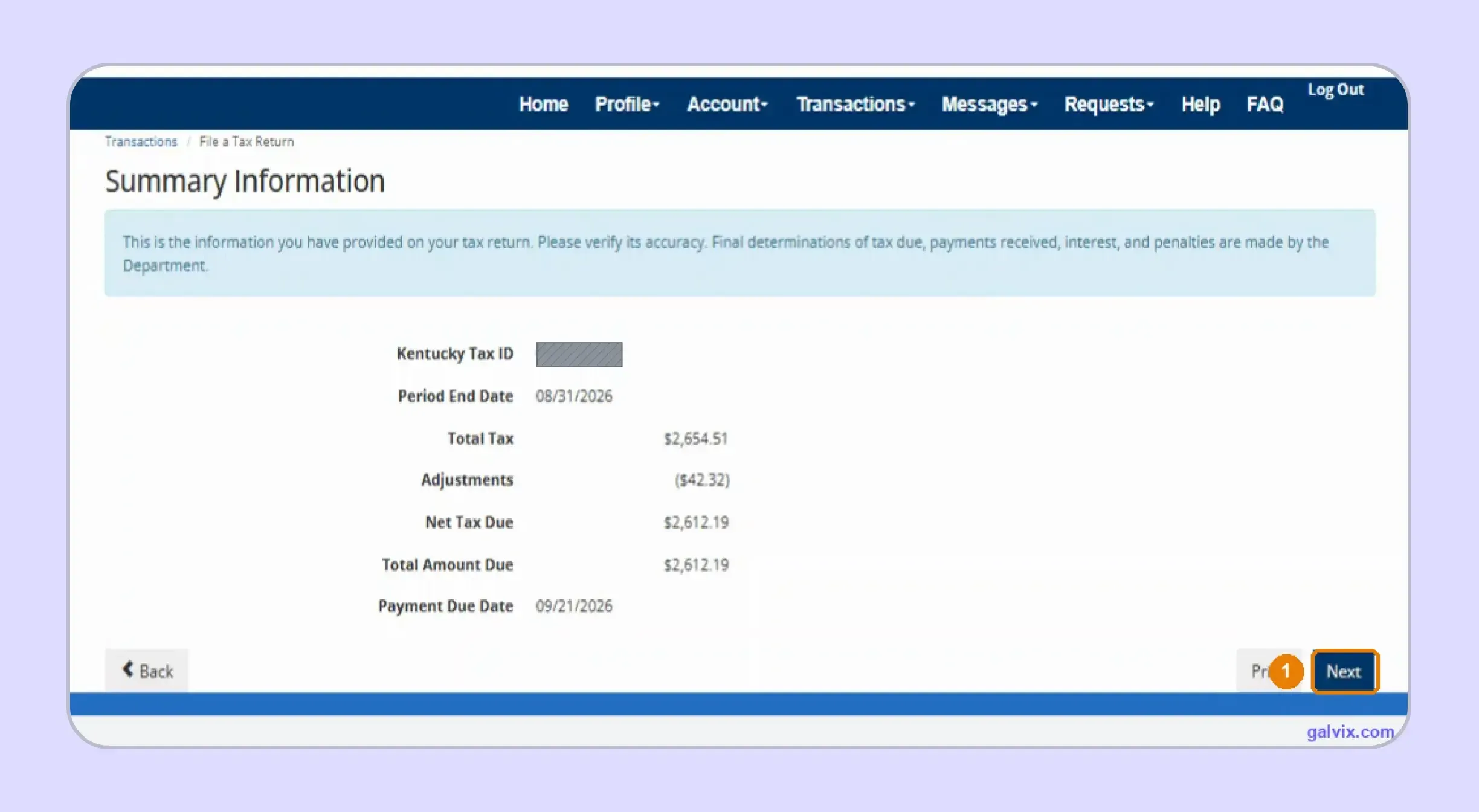
Review Total Tax, Adjustments, Net Tax Due, Total Amount Due, and Payment Due Date on the Summary Information screen. This gives you a final numerical checkpoint before authorization. If you file Kentucky sales tax online for several entities, this is also a useful point to confirm the Kentucky Tax ID before moving forward.
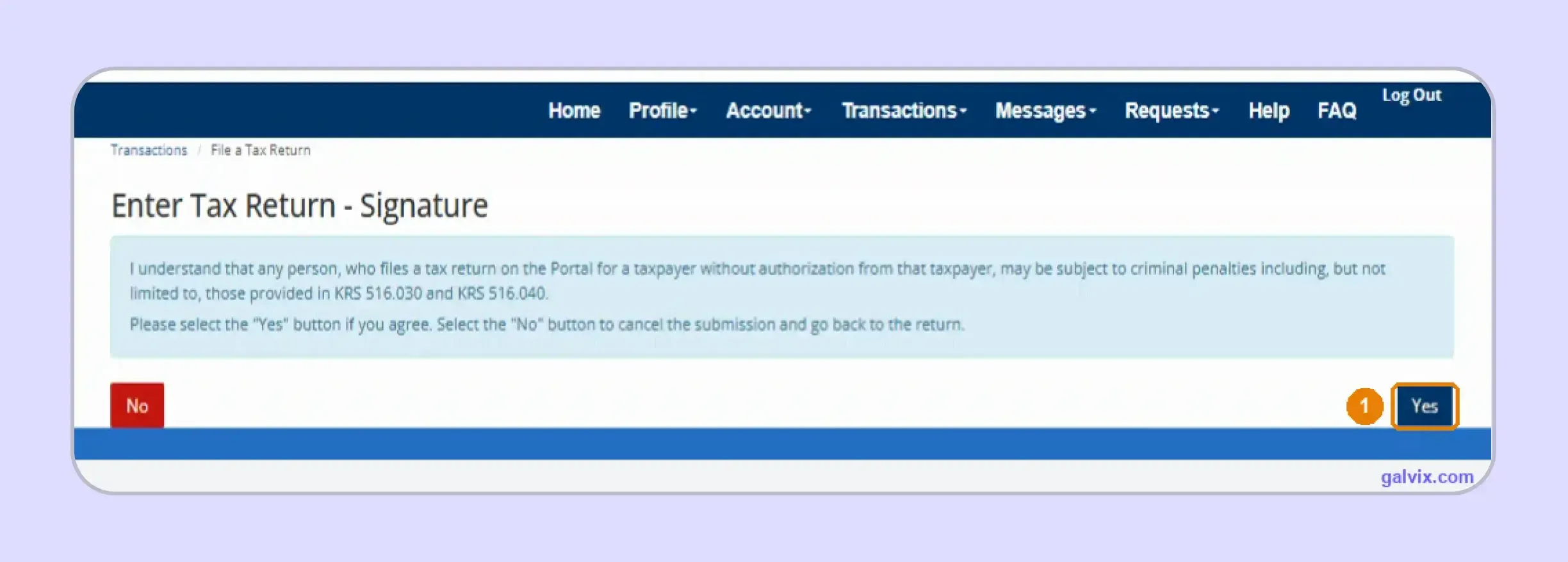
Step 8: Sign and Submit
Read the authorization statement before choosing Yes. Selecting Yes confirms you are authorized to file for the taxpayer and transmits the return immediately. There is no additional confirmation screen asking whether you still want to submit. Return to the earlier pages before this point if any figure needs correction.
Step 9: Save the Filing Confirmation
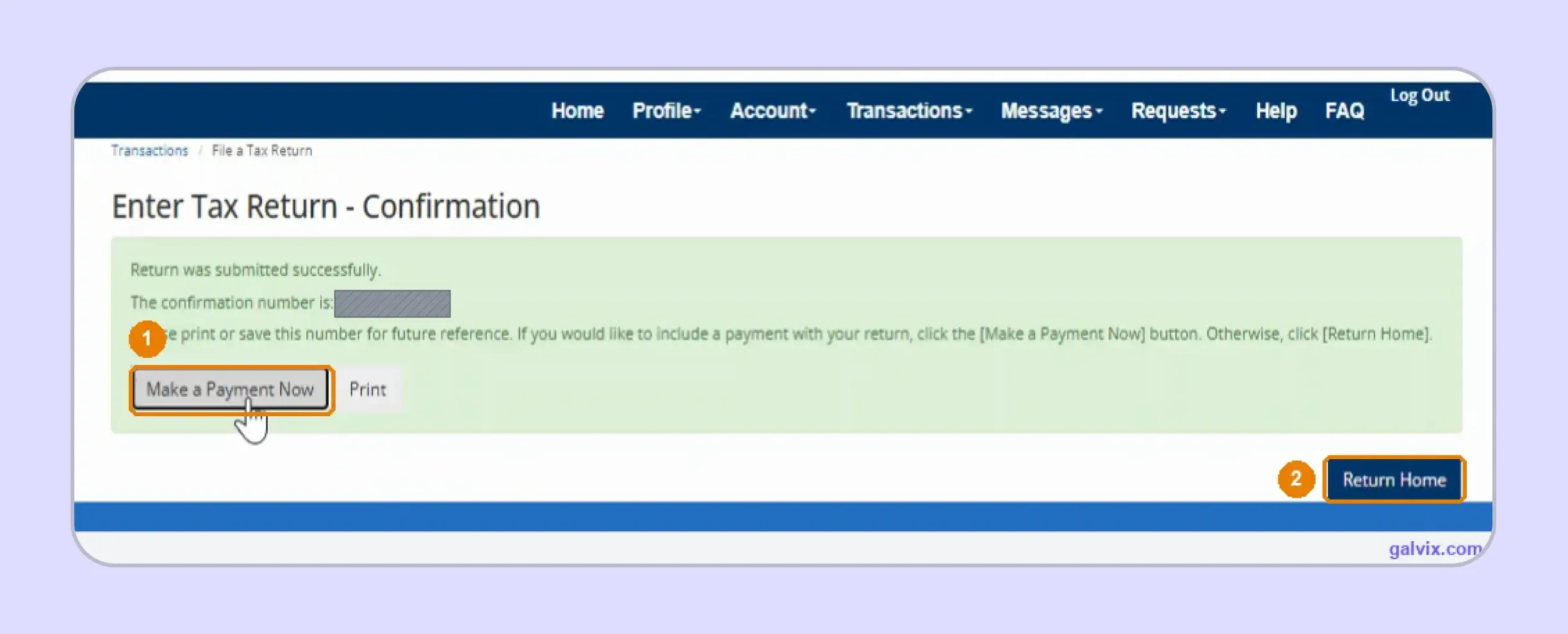
After submission, MyTaxes displays a filing confirmation number. Save or print it immediately because this record proves that your Kentucky sales tax return was accepted. The portal then offers Make a Payment Now or Return Home. This is where how to pay sales tax in Kentucky becomes a separate workflow from return submission.
Filing confirmation does not prove payment. Choosing Return Home leaves the return filed while the liability remains unpaid, so complete payment separately before the deadline.
Step 10: Schedule the Electronic Payment
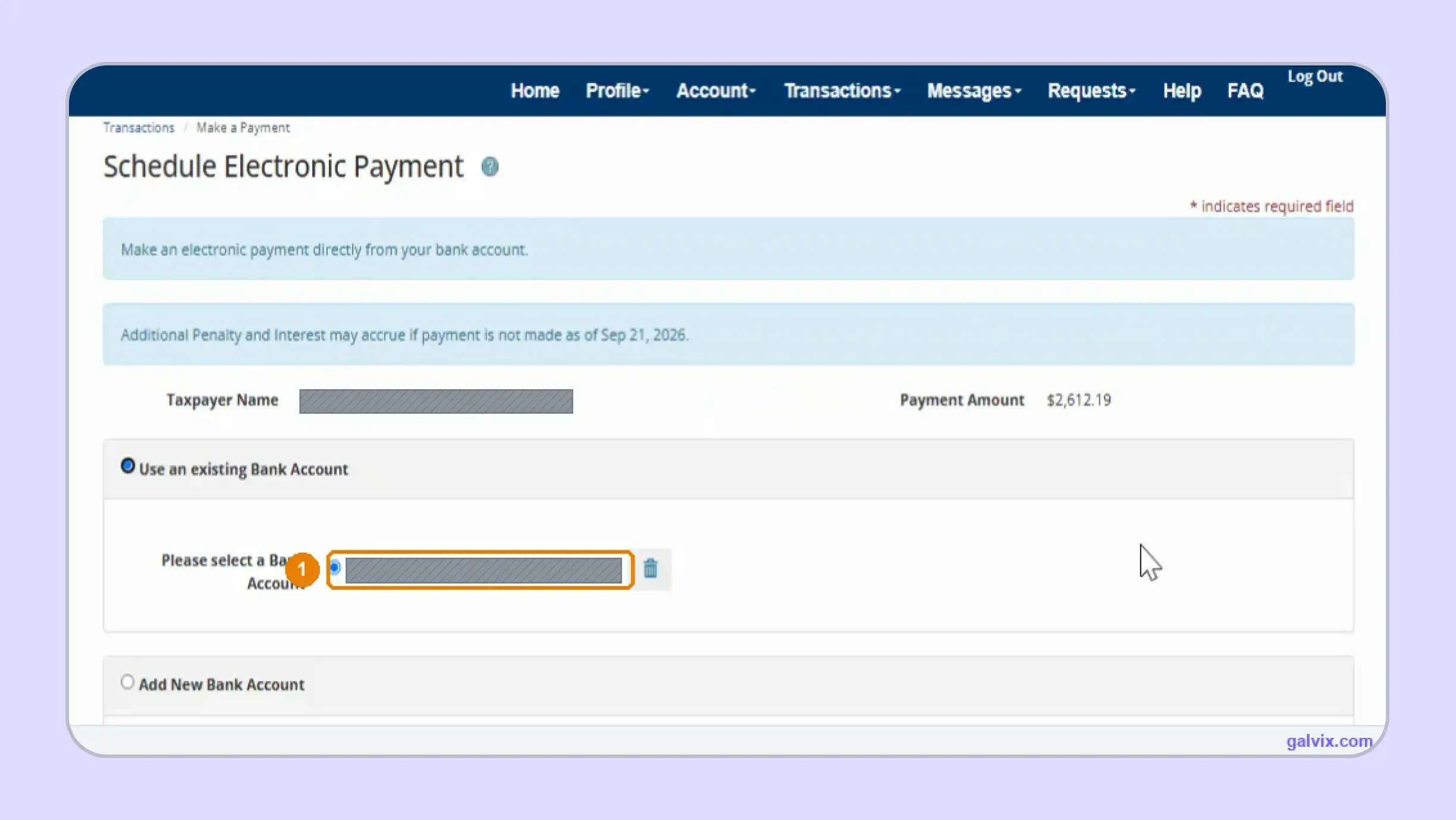
Choose Make a Payment Now, then select a saved account or add new banking information. Review the payment amount and Effective Date before authorizing the electronic payment. The Effective Date determines when funds leave your bank. If you file Kentucky sales tax online early, change the prefilled date when you want payment to occur later.
MyTaxes can prefill the Effective Date with the filing date rather than the deadline. Review it carefully so an early return does not trigger an unintended early debit.
Step 11: Save the Payment Confirmation
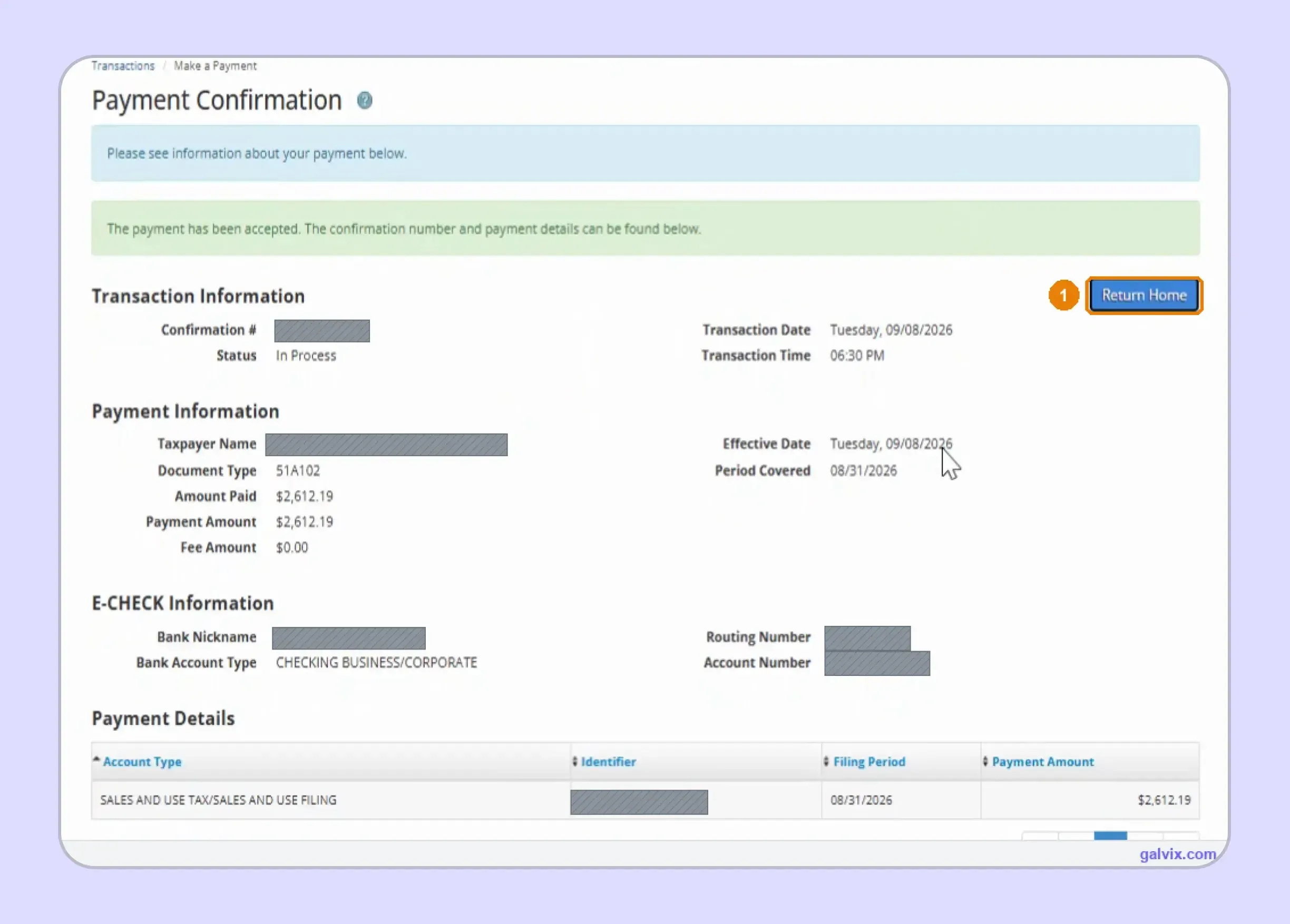
A second confirmation appears after MyTaxes accepts the payment request. Save its confirmation number, status, amount paid, period covered, and payment account details with your filing records. You now have two separate records: one proves filing and another proves payment scheduling. Keep both because successful electronic filing alone does not establish that payment was completed.
Which Form 51A102 Figures Deserve a Final Check?
MyTaxes performs the final calculations, although the outcome still depends on what you enter. Before you file Kentucky sales tax online, review four areas that can change the liability without producing an obvious portal error.
- Total Receipts: Start with every reportable Kentucky sale belonging to the period. If total sales are incomplete at Line 1, later calculations can remain internally consistent while understating the actual filing base.
- Total Deductions: Match exempt customers, resale activity, qualifying shipping, government transactions, and other reductions with supporting records. The Deductions tab ultimately feeds Line 20, which directly affects the calculated taxable amount.
- Use Tax Inputs: Review Lines 23a and 23b for untaxed property used by your business instead of resold. Kentucky imposes use tax on qualifying property purchased without enough Kentucky tax and later consumed within the state.
- Vendor Compensation: Confirm the automatically calculated vendor compensation before submission. Kentucky currently allows 1.75% on the first $1,000 of tax, plus 1.5% on the amount above that, capped at $50 per return when payment is not delinquent.
This works as a timely filing discount in practical terms because delinquency removes the reimbursement. A late filing can therefore increase what your business ultimately pays.
Teams pulling transactions from several systems should also reconcile the return against the source of record. A connected Shopify sales tax integration can help ecommerce businesses keep direct-channel activity visible alongside wider compliance data.
When Is Kentucky Sales Tax Due?
The normal sales tax filing deadline is the 20th day after the reporting period ends. Filing frequency can be monthly, quarterly, annual, or accelerated depending on the account assigned by the Kentucky Department of Revenue.
Standard Due Date: Monthly returns are usually due on the 20th of the following month. Quarterly and annual schedules also follow their assigned due dates, while accelerated filers can have a different timetable.
If the deadline falls on a weekend or state holiday, the return moves to the next business day. The portal example for August 2026 therefore showed September 21 because September 20 fell on Sunday.
Vendor Compensation: Timely filing and payment preserve the statutory reimbursement. If the return or payment becomes delinquent, the compensation no longer applies.
Payment Timing: Kentucky now requires online filing and payment for sales and excise taxes where the functionality is available, subject to limited statutory waivers. This mandate applies across monthly, quarterly, and annual accounts.
The Department lists electronic payment options through a bank account or credit card, with service provider fees possible for card payments. These additional charges should be considered when selecting the payment method.
The Department also publishes a mailing option for sales and use tax payments, including a check or money order payable to "KY State Treasurer." Follow current Department instructions before using a non-electronic method, especially where electronic filing requirements apply.
Official materials may spell the payee as "KY State Treasurer," while the full office name is "Kentucky State Treasurer." Businesses needing additional information can contact the Division of Sales and Use Tax listed by the Department.
Keeping several state calendars synchronized becomes harder as registrations expand. Comparing sales tax requirements by state can help finance teams see where Kentucky's single-rate filing differs from other jurisdictions.
What Records Should You Keep After Filing and Payment?
Keep enough documentation to reconstruct what was filed, why deductions were claimed, and when payment was scheduled. Strong records make Kentucky sales tax filing easier to defend if tax authorities later question a period.
- Filing Confirmation: Save the filing confirmation number immediately after submission. It shows the return was received by MyTaxes, while the payment record remains separate.
- Payment Confirmation: Retain the second confirmation with your bank records. It identifies the document type, payment amount, covered period, and transaction status, giving you separate evidence of remittance scheduling.
- Exemption Support: Keep exemption certificates, invoices, customer records, and deduction calculations with the filed return. These documents explain why receipts were removed from taxable sales if Kentucky later examines the transaction's treatment.
- Correction Trail: If you identify an error after submission, file an amended return for the same period. Preserve the amended confirmation and reconciliation so reviewers can follow the change from the original tax filing to the corrected figures.
Good records also help you identify interest charges or penalty assessments that appear later. The underlying return, proof of payment, and source documentation give your team a clear basis for responding.
If several entities or systems feed into the same compliance process, a NetSuite sales tax integration can help connect transaction activity to return preparation, rather than rebuilding datasets manually each month.

How Does Galvix Manage Kentucky and Multistate Sales Tax Filing?
Galvix manages recurring sales tax compliance through a structured workflow that connects source transactions with return preparation. Specialists reconcile data, prepare the return, and obtain customer approval before submitting filings across registered states.
For Kentucky, that workflow can include reconciling receipts, separating direct and marketplace activity, checking exemption support, and preparing Form 51A102. This helps your team file Kentucky sales tax online without rebuilding the return from several disconnected spreadsheets each period.
As your systems expand, transaction data can move into the process through supported sales tax integrations. Galvix supports platforms including ecommerce stores, accounting applications, payment systems, ERPs, APIs, and file uploads.
This creates a stronger operating layer for sales tax automation because the return remains tied to the data that generated it. Your internal team can review prepared figures while the compliance workflow handles recurring sales tax filings.
The same process can connect Kentucky filing with nexus monitoring, sales tax registration, exemption certificate management, and state notice handling. This becomes useful when a simple Kentucky return sits inside a much larger multistate compliance footprint.
Galvix uses modular pricing, so businesses select the services they need. Exact pricing depends on the work volume associated with each module, rather than requiring every customer to purchase the same package.
What Can Galvix Manage for Kentucky Sellers?
Once Kentucky is integrated into the broader compliance workflow, Galvix can manage the recurring tasks that consume finance team time each filing cycle.
- Reconcile sales before return preparation
- Separate marketplace from direct transactions
- Review deductions and exemption support
- Prepare returns for customer approval
- Track filing and payment records
- Coordinate nexus and state notices
Galvix can also help businesses operating across several states keep registration decisions and filing schedules connected. This means that how to file KY sales tax return online no longer sits apart from nexus monitoring, certificate management, or the next-state obligation created by growth.
When you file Kentucky sales tax online alongside returns in multiple states, a managed workflow can replace separate portal-by-portal processes. Your team keeps approval visibility while Galvix manages recurring preparation, filing coordination, and related compliance work.
Book a Galvix demo today to start streamlining your multi-state sales tax processes.
Frequently Asked Questions
What Are the Filing Requirements for Sales Tax in Kentucky?
Businesses with an active Kentucky sales and use tax obligation must follow the filing frequency assigned to their account. Current Kentucky rules require electronic filing and payment where supported, with limited waiver provisions. You may also need a return when no taxable activity occurred during the period.
What Are the Filing Due Dates for Sales Tax in Kentucky?
Monthly Kentucky sales tax returns are normally due on the 20th following the reporting period. Quarterly returns are due on the 20th after the quarter, while annual accounts are due January 20. Accelerated accounts can follow a separate schedule.
Where Do You Send a Kentucky State Tax Return?
Businesses should use MyTaxes for required electronic filing when portal functionality is available. If the Department authorizes another method, follow the specific instructions provided rather than assuming a paper address applies to your account. The Kentucky Department of Revenue administers these filings.
How Do You Get Sales Tax Exemption in Kentucky?
Exemption depends on the purchaser, transaction, or qualifying use. A valid certificate should support the claimed treatment before you remove the transaction from the taxable base. Kentucky uses forms such as the resale certificate for eligible resale purchases.
Do You Have to File a Local Tax Return in Kentucky?
No. Kentucky has no local sales and use tax, so there is no separate city or county sales tax return. The statewide rate is 6%, which keeps the basic return free from jurisdiction-by-jurisdiction allocation.
How Much Money Do You Have to Make in Kentucky to File Taxes?
For a remote seller, Kentucky's economic nexus test is based on Kentucky sales rather than business profit. The current threshold is $100,000 in gross receipts or 200 separate sales during the current or previous calendar year. Meeting either test can trigger registration