Businesses registered for Connecticut sales and use tax complete Form OS-114 electronically through myconneCT, the state's secure filing portal. CT sales tax filing covers taxable and nontaxable activity, business purchases subject to use tax, applicable deductions, and payment for each assigned period.
Connecticut applies a 6.35% general sales tax rate, without county or municipal rates added to ordinary sales. Different statewide rates still apply to meals, qualifying luxury purchases, short-term passenger vehicle rentals, and certain computer services.
The filing process therefore starts with classification rather than arithmetic. myconneCT asks which rates applied during the period, then builds the relevant OS-114 sections around those selections.
This blog explains how to file sales tax return in Connecticut, prepare gross receipts reports, report deductions, account for marketplace transactions, pay the balance due, and retain evidence of filing. We will also explain how Galvix helps businesses manage Connecticut and other registered states.

Why Does Connecticut Sales Tax Filing Work Differently?
A Connecticut sales tax return uses one OS-114 form, but the return varies based on the rates selected during CT sales tax filing. Connecticut has no general local taxes, so the main filing decisions involve rate selection, transaction classification, deductions, and accurate gross receipts.
OS-114 Uses Several Sales Tax Rates
Connecticut's statewide rate is 6.35% for most taxable goods and services, while certain transactions use separate rates. The applicable rate therefore depends on what was sold, rented, or provided to the customer.
- General sales: Most taxable goods and services are subject to the 6.35% rate.
- Meals and beverages: Qualifying meals and prepared beverages are subject to a 7.35% tax.
- Luxury products: Certain jewelry, clothing, accessories, and motor vehicles use 7.75% when statutory sales price thresholds apply.
- Vehicle rentals: Passenger vehicle rentals lasting 30 consecutive days or fewer are subject to 9.35%.
Qualifying computer and data-processing services may be taxed at a 1% rate. Connecticut also applies special rates to certain transactions, so correct product and service classification remains important before filing.
Digital goods and electronically delivered software also need careful review because tax treatment depends on what is sold and how it is used. Some services purchased for business use may be treated differently from software bought for personal use.
Connecticut Has No Local Sales Taxes
Connecticut does not add general county or city sales tax rates to ordinary transactions. Businesses therefore do not need to split standard sales among local jurisdictions or add general additional sales taxes to the state rate.
This makes location-based reporting simpler. Accurate Connecticut sales filing still depends on choosing the correct rate and placing receipts in the right OS-114 category before myconneCT calculates the tax due.
The Current OS-114 Was Revised in July
The Connecticut Department of Revenue Services lists OS-114 and the O-88 instructions as revised in July 2026. Businesses preparing for CT sales tax filing should use the current versions rather than relying on older saved forms or internal filing guides.
The updated filing process also reflects newer reporting requirements, including the telecommunications access-line fee. Connecticut has also expanded coverage of Sales Tax Free Week to qualifying clothing, footwear, backpacks, and cleated shoes.
These changes make version control important. A tax return prepared using last year's process may miss a current form field or reporting requirement even when the transaction data is correct.
What Should You Prepare Before Opening myconneCT?
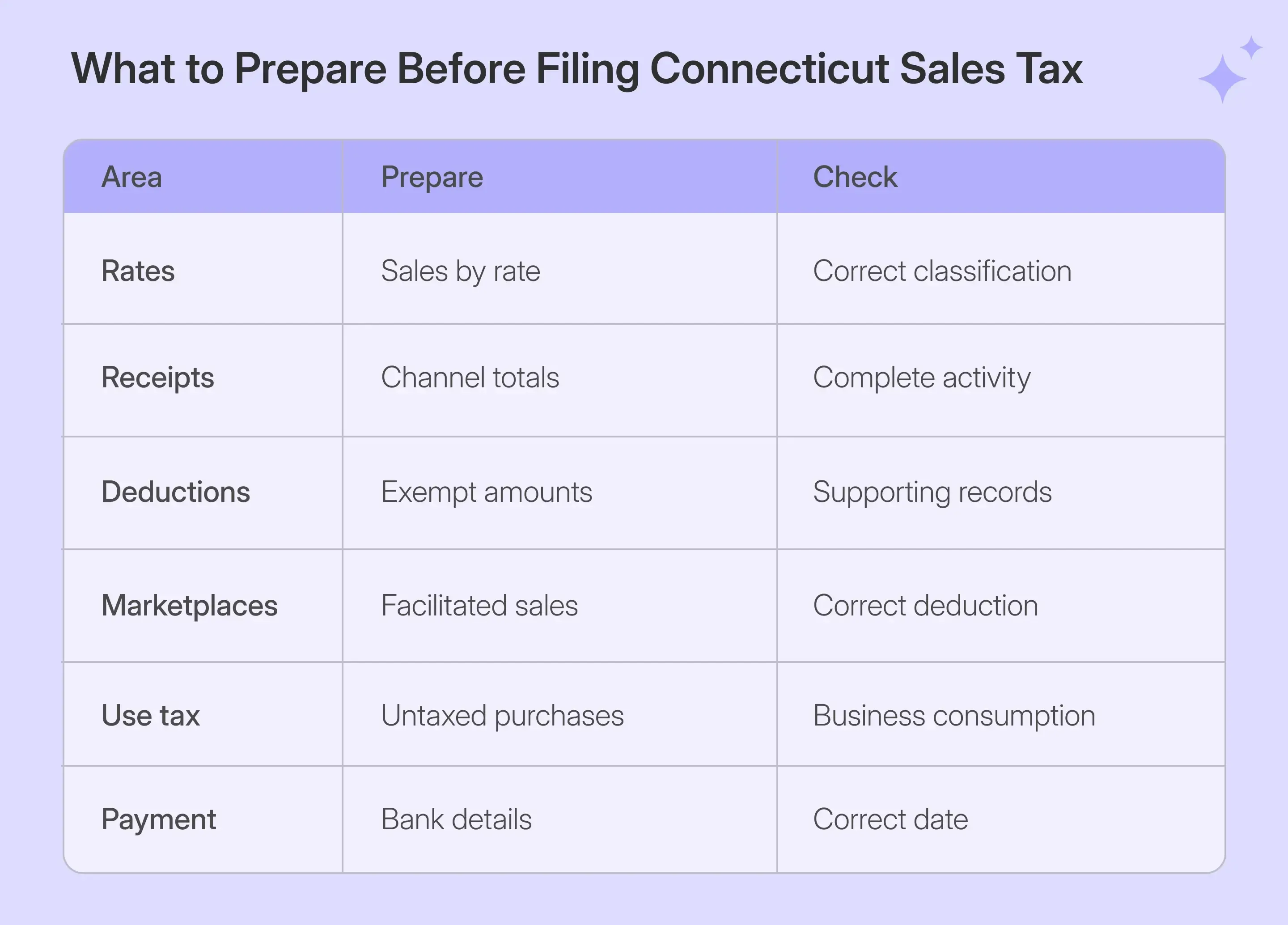
Prepare receipts by transaction type and applicable rate before beginning CT sales tax filing. myconneCT performs the calculations, while the business remains responsible for accurate gross receipts, deductions, taxable purchases, exemption support, account access, and payment details.
| What to Prepare | Why You Need It |
|---|---|
| myconneCT login | Access the correct Sales and Use account |
| Applicable rates | Determines which OS-114 sections appear |
| Gross receipts by category | Populates goods, rentals, and services |
| Use-tax purchases | Reports untaxed purchases used by the business |
| Deductions by reason | Reduces the taxable base correctly |
| Exemption records | Supports qualifying nontaxable transactions |
| Bank details | Supports electronic payment when selected |
Clean sales records are vital because OS-114 separates receipts by transaction type and tax rate. Reconcile the accounting system’s total sales before moving any figures into the return.
Purchases can also create business use tax. This can apply when a business buys taxable tangible personal property or services without paying Connecticut tax and then uses them in the business.
Keep business reporting separate from Individual Use Tax, which applies to qualifying personal purchases. That obligation may be reported on the Individual Income Tax return rather than through the business OS-114 filing process.
Marketplace Sales Need a Gross Then Deduct Reconciliation
Marketplace sales should remain part of gross receipts when preparing OS-114. If a registered marketplace facilitator collected and remitted the tax, the qualifying sales can then be reported as a deduction on the return.
OS-114 separates marketplace-related deductions across goods, leases and rentals, and labor or services. Keeping these sales visible in gross receipts before applying the correct deduction helps maintain a clear reconciliation between total activity and the final taxable amount.
Do not remove marketplace transactions before building gross receipts. Doing so can make gross activity inconsistent with the deduction-based reporting method used by OS-114.
This gross-then-deduct approach also keeps taxable sales separate from marketplace amounts already handled by another registered collector. This distinction is useful when direct and marketplace channels feed the same accounting system.
Exempt Sales Need Supporting Records Before Filing
Resale and other qualifying exempt transactions should be separated before the return begins. Connecticut expects appropriate exemption documentation to support untaxed transactions, rather than treating a buyer's registration number as a substitute for a completed resale certificate.
Certificate documentation, permit verification, and transaction eligibility answer different questions. A valid document supporting the exemption record is required, but the sale itself must still qualify under applicable Connecticut law.
Galvix's sales tax exemption certificate guide covers certificate workflows across all 50 states and DC. Its managed exemption service can collect, review, store, track renewals, and prepare audit-ready certificate records alongside broader sales tax compliance.
How Do You File Connecticut Sales Tax Online?
To file Connecticut sales tax online, sign in to myconneCT, open the Sales and Use account, choose the filing period, select the applicable rates, complete the OS-114, review the payment, and submit. The following CT sales tax filing workflow follows the live portal process described in the captured filing.
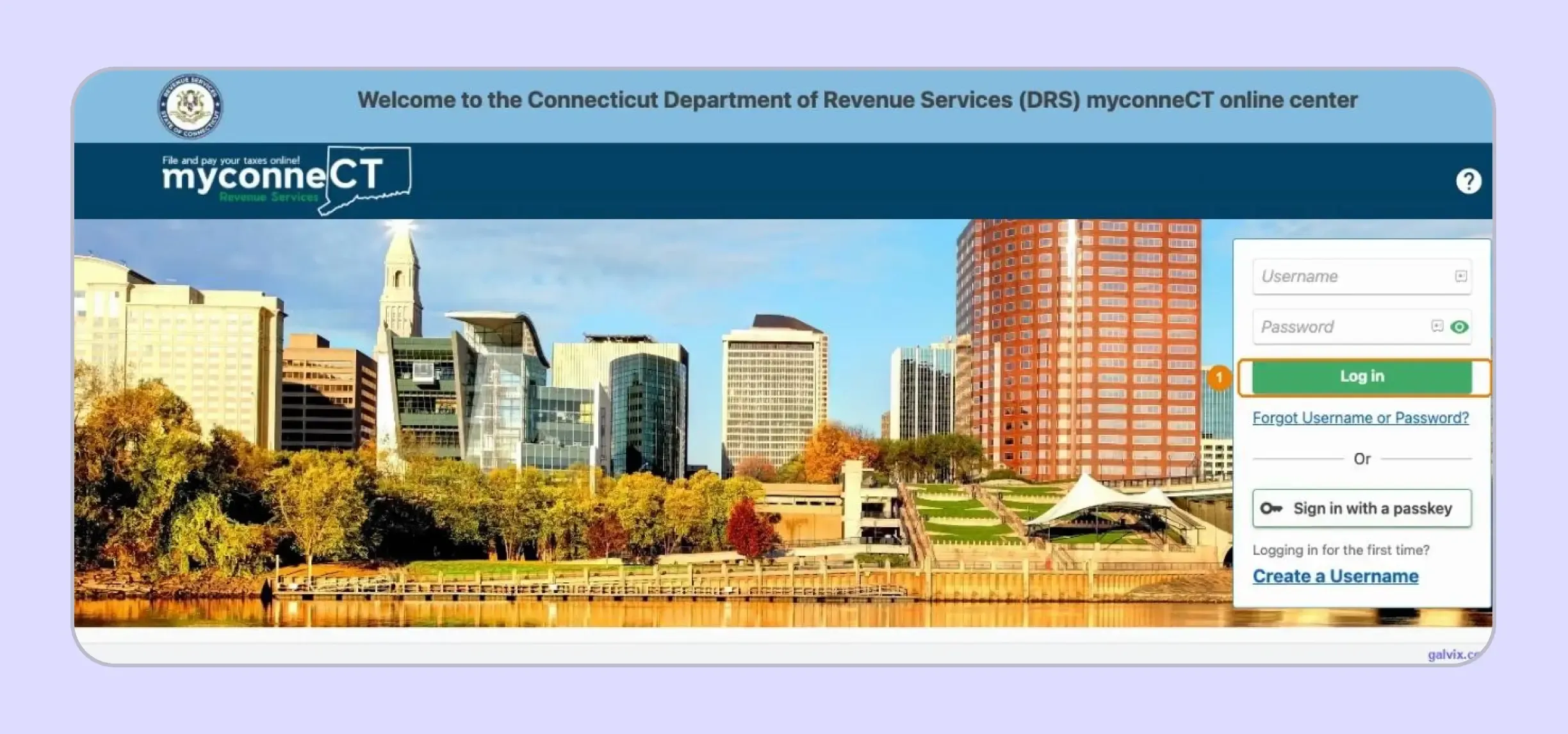
Step 1: Sign In to myconneCT
Enter the username and password associated with your myconneCT profile, then select Log in to access the account dashboard. Your CT registration number identifies the tax account, while separate portal credentials provide access to the secure online portal.
DRS states that businesses can use myconneCT to file, pay, review filing history, and communicate with the agency. The service also works across a computer, tablet, smartphone, or another supported mobile device.
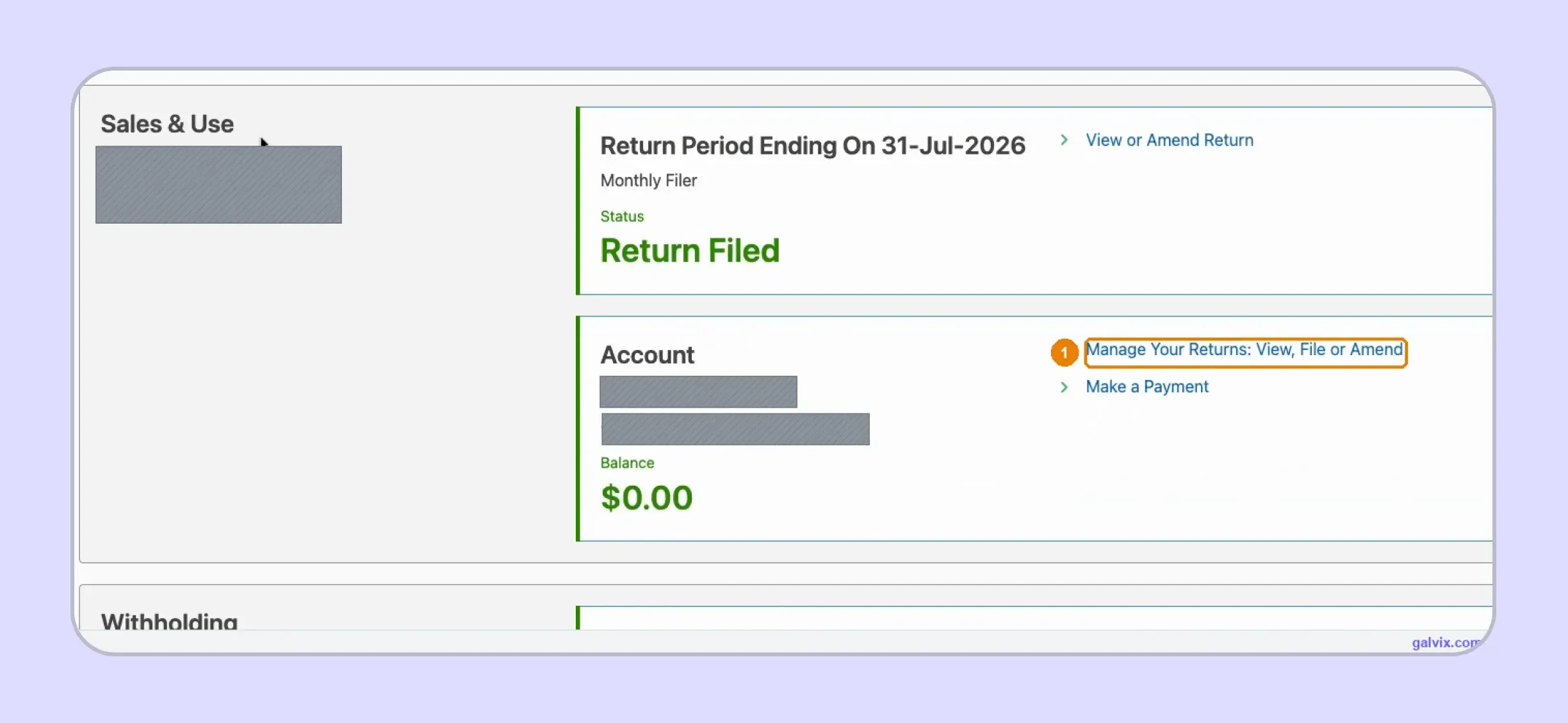
Step 2: Open the Sales and Use Account
Find the Sales and Use panel for the correct business, then select the return-management option shown for that account. A single login can contain several Connecticut taxes, so confirming the correct account prevents activity from being entered under another tax type.
This account-level check is an important part of CT sales tax filing, especially when finance teams manage several entities through the same myconneCT profile.
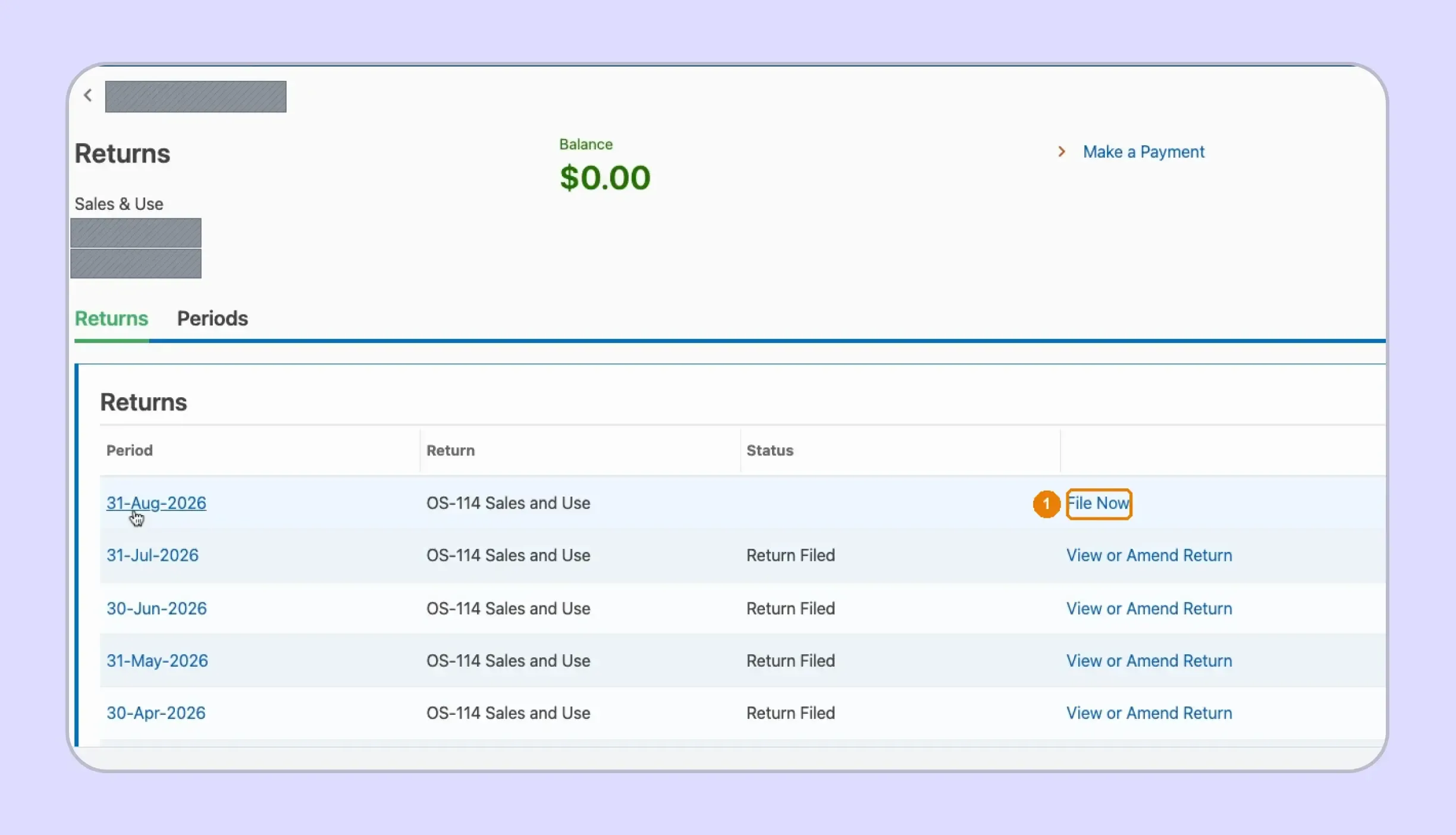
Step 3: Choose the Filing Period
Open the Returns list and locate the OS-114 period available for filing. Previously submitted periods show their filed status, while the current reporting period is still available via the filing action shown in myconneCT.
Confirm the period before entering receipts because the filing process attaches every amount, deduction, and payment to that specific reporting cycle.
Step 4: Select Every Tax Rate Collected
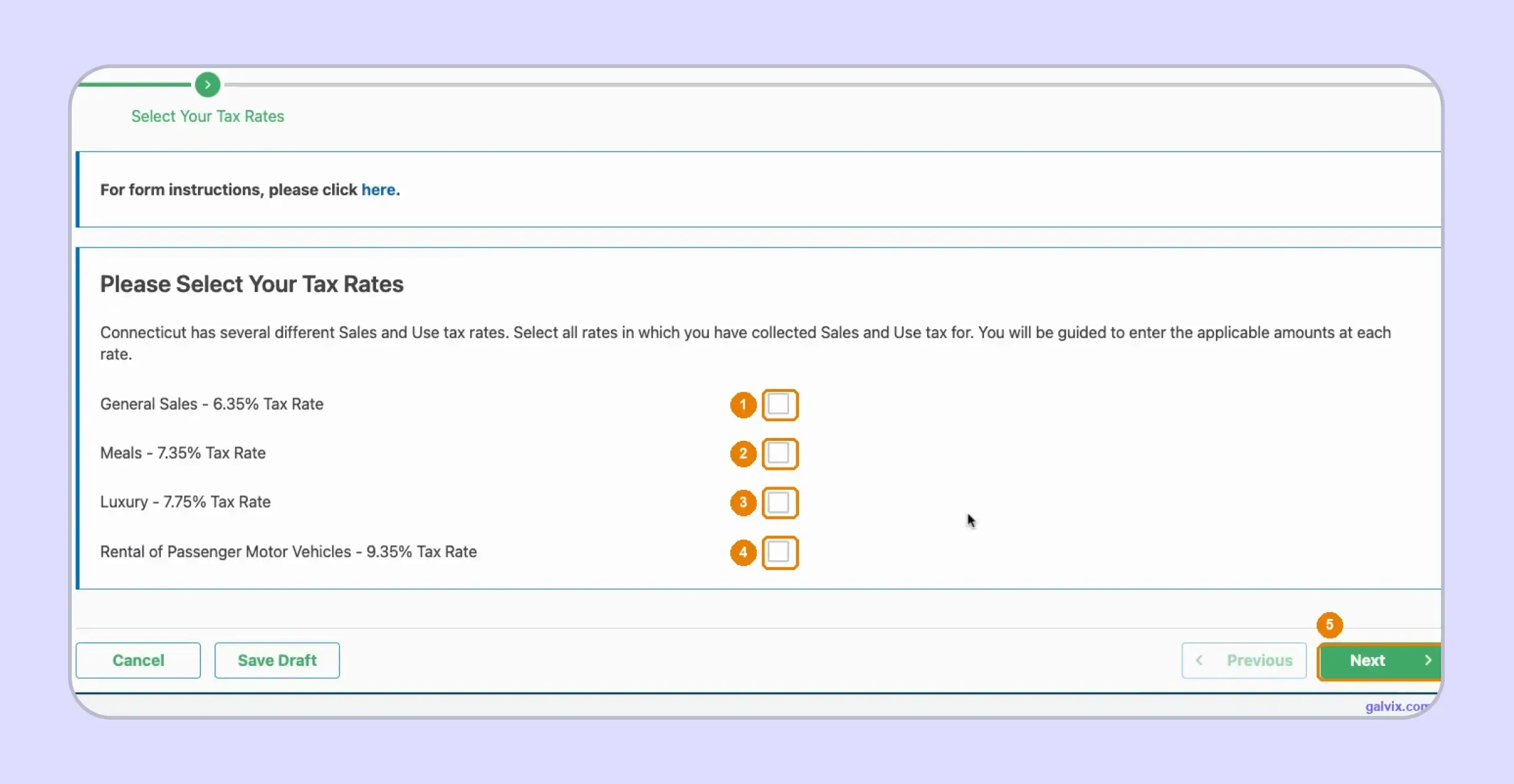
Select every rate that applies to transactions during the period, including the general rate and any relevant special-rate categories. myconneCT then creates the OS-114 sections needed for those selected rates.
Leaving an applicable rate unchecked can remove its later entry section, making rate selection one of the most important manual decisions in CT sales tax filing.
Step 5: Enter Gross Receipts and Use Tax Purchases
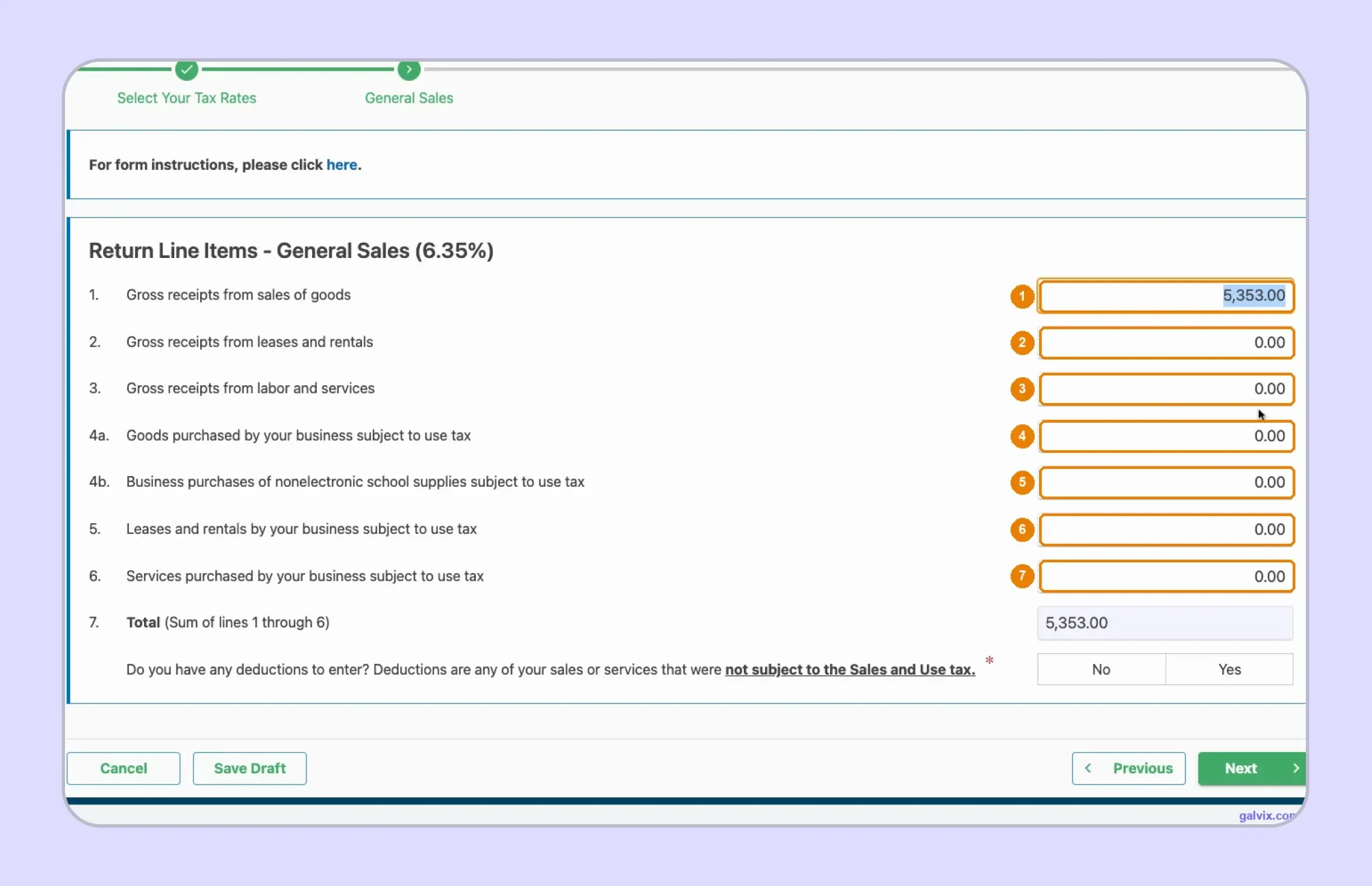
Enter receipts under the appropriate goods, rentals, services, or other categories created from your rate selections. Report applicable untaxed purchases on the current use-tax lines, allowing myconneCT to calculate the related amount automatically.
This is where how to fill out sales and use tax return in Connecticut becomes a source-data question primarily. Accurate classifications need to exist before the amounts reach myconneCT.
Step 6: Enter Applicable Deductions
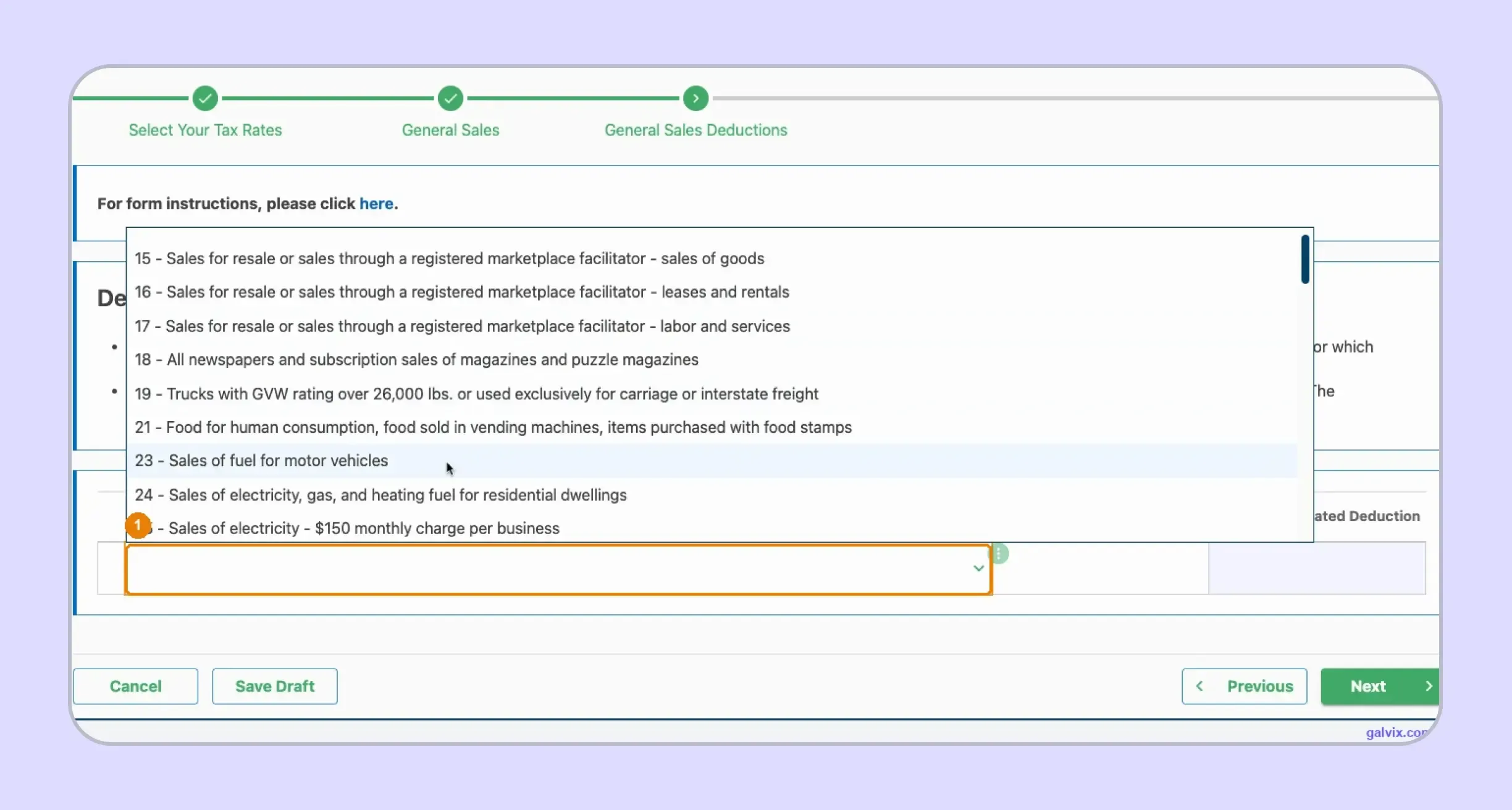
Select each applicable deduction reason and enter the supported amount from your reconciled records. Marketplace-facilitated transactions, resale activity, and other nontaxable sales should remain separate under their appropriate reasons rather than combined into a single adjustment.
Correct deductions help move gross activity toward the taxable base without losing the transaction-level explanation supporting that difference.
Step 7: Review the Calculated Summary
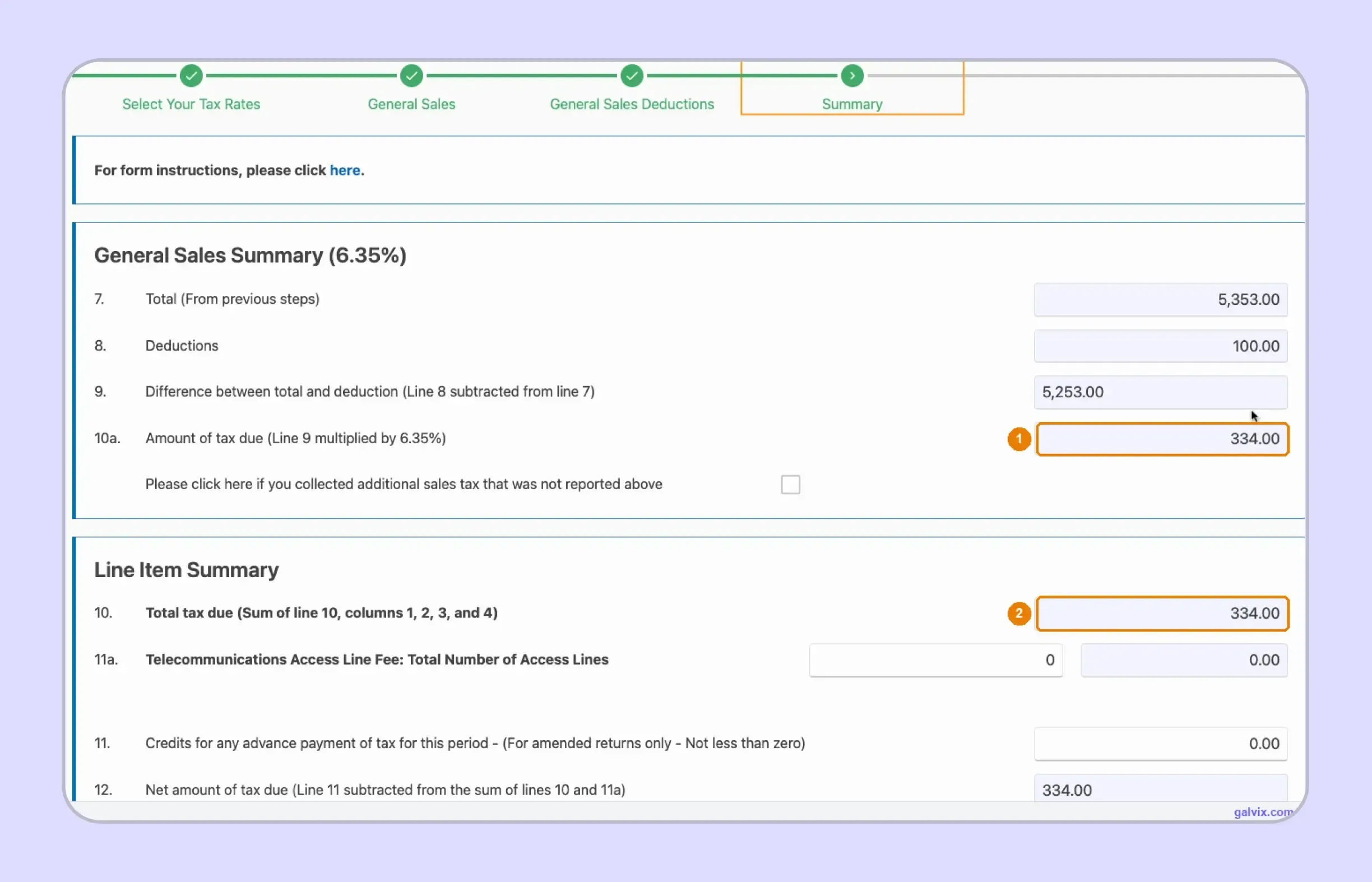
Review receipts, deductions, taxable difference, tax calculated for each selected rate, and the final tax due before continuing. myconneCT performs the math, while accurate results still depend on the rates and source amounts supplied by the filer.
Reconcile the summary against the same source records used earlier rather than treating portal-generated calculations as independent validation.
Step 8: Choose How You Will Pay
myconneCT presents several payment options, including ACH Debit or Direct Payment, credit card payment, and ACH Credit or Pay After Filing. These electronic payment options let the return and payment follow different workflows when needed.
A credit or debit card payment is processed through the state's payment provider and can include a convenience fee.
ACH Credit or Pay After Filing allows submission without immediate payment. It does not complete the separate payment that the business still needs to initiate.
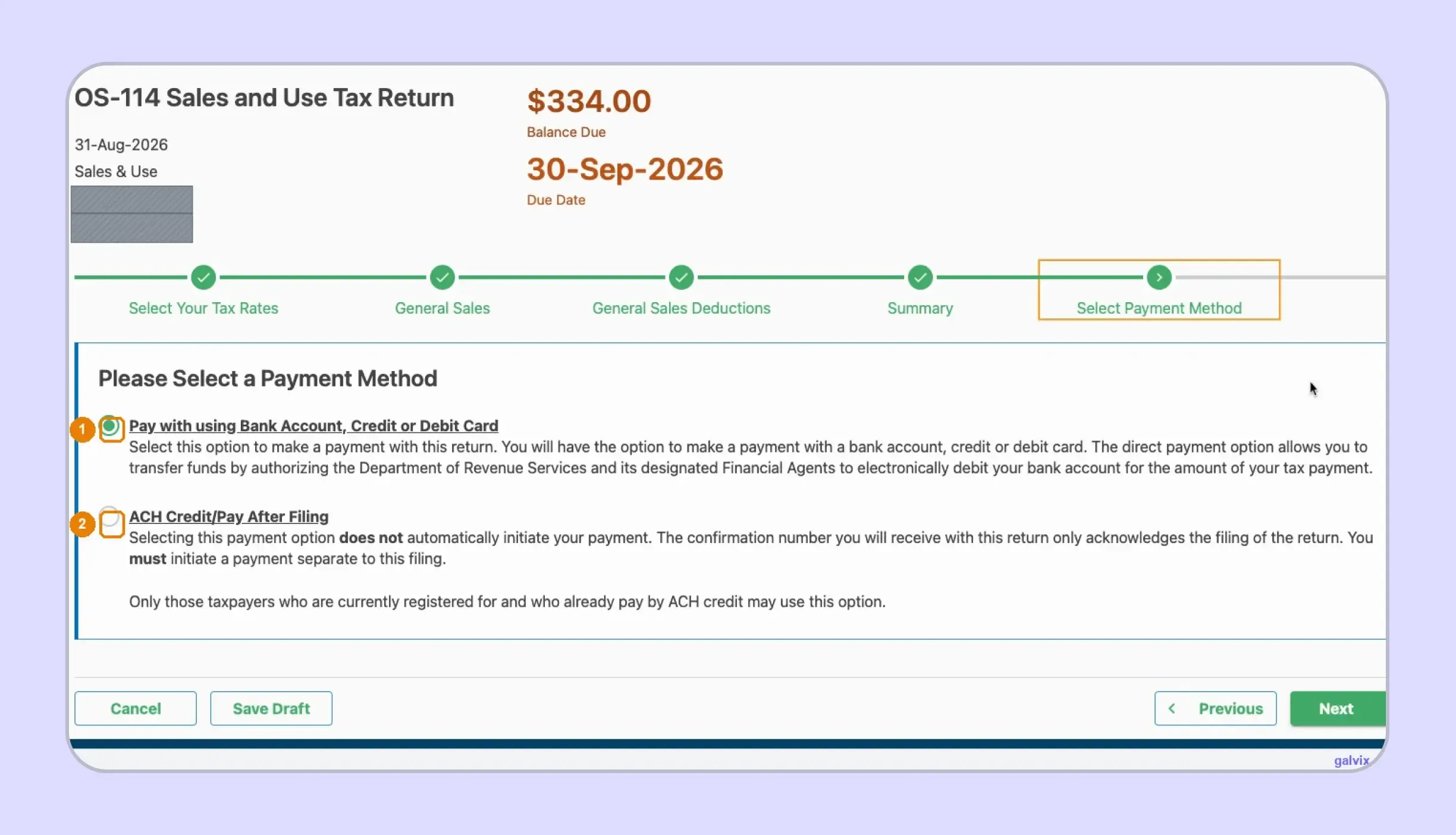
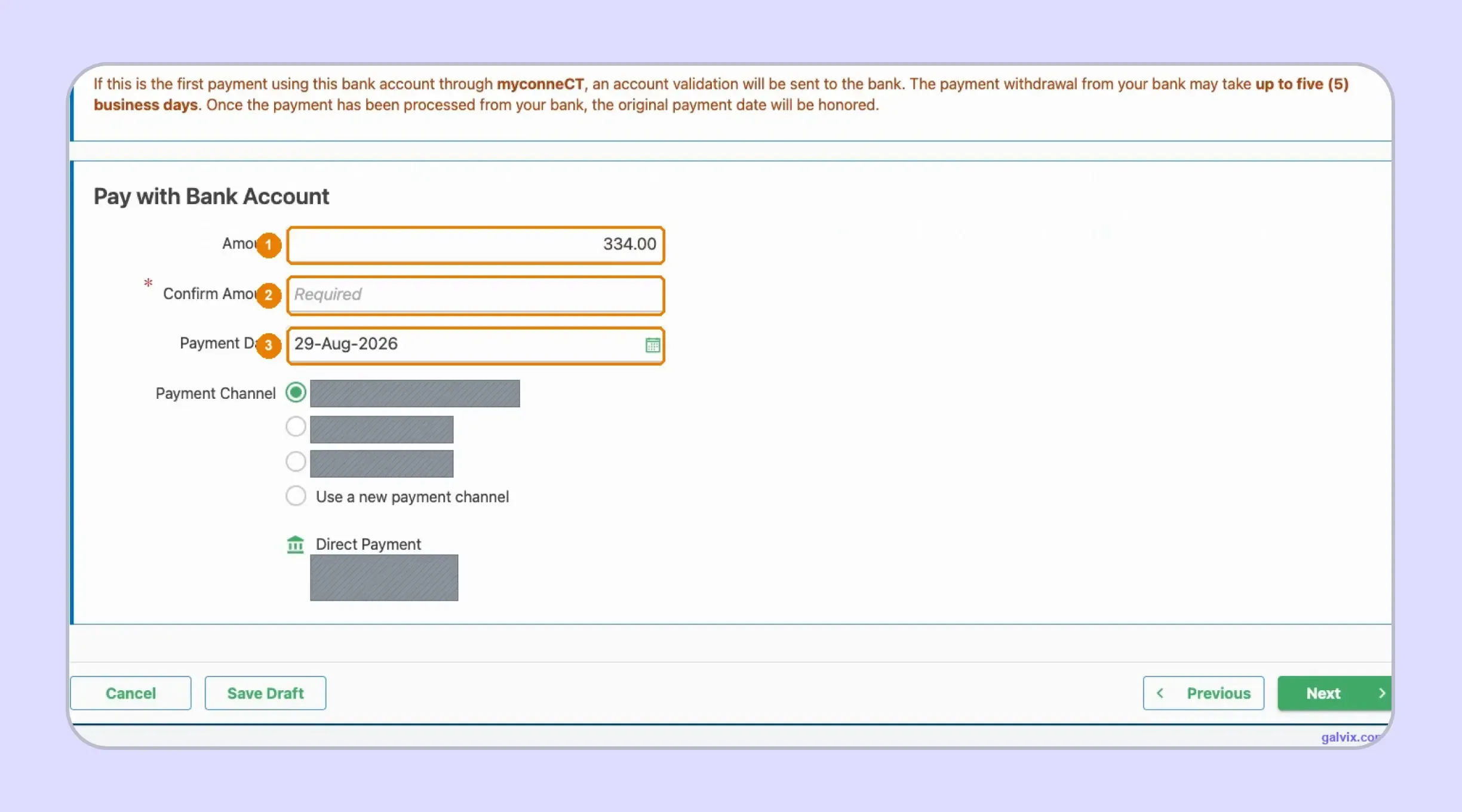
Step 9: Confirm the Payment Date and Amount
For a direct payment, review the amount carried from the return and confirm the correct bank account before continuing. DRS guidance states that myconneCT defaults the payment date to the current date, while allowing changes through the return's due date.
This distinction is crucial because completing electronic filing and scheduling payment are separate controls within the account.
The default payment date is a portal behavior, rather than the statutory deadline. Check the date before authorizing the transaction.
Step 10: Submit and Save the Confirmation
Submit the completed return after reviewing the declaration and payment information. Once accepted, myconneCT displays a confirmation page that can provide a printable receipt for the business's records.
Save the confirmation with the period's supporting documents. If an error appears later, myconneCT also supports amendments to previously filed returns.
What Connecticut Sales Tax Filing Requirements Should You Know?
The main Connecticut sales tax filing requirements cover OS-114, myconneCT, assigned filing frequency, zero returns, nexus, and payment timing. Businesses must report both taxable and nontaxable activity according to the monthly, quarterly, or annual schedule assigned by DRS.
| Requirement | Connecticut Rule |
|---|---|
| Main return | OS-114 |
| Filing portal | myconneCT |
| Filing method | Electronic |
| General rate | 6.35% |
| Filing frequency | Monthly, quarterly, or annual |
| Standard deadline | Last day following the reporting month |
| Zero returns | Required |
| Timely filing discount | None |
| Remote-seller threshold | $100,000 and 200 retail sales |
| Measurement period | 12 months ending September 30 |
A new business planning to make taxable sales must complete business registration before collecting tax. Connecticut issues a Sales and Use Tax Permit, and a state registration fee applies when the account is created through myconneCT.
Businesses may also search for a tax permit, sales tax permit, or use tax permit to meet this requirement. Connecticut uses the Sales and Use Tax Permit, and each qualifying business location needs its own permit.
After registration, the myconneCT online center is used for returns, payments, account details, and correspondence. In simple terms, registration sets up the tax account, while myconneCT supports the ongoing filing process.
Filing Frequency Comes From DRS
Businesses should follow the monthly, quarterly, or annual filing frequency assigned to their account rather than estimating it based on current sales tax liability.
OS-114 is due by the last day of the month following the filing period. If the due date falls on a weekend or legal holiday, the next business day becomes the filing date.
The assigned schedule should guide reconciliation, payment approval, and the internal filing deadline. Teams can also review current Connecticut sales tax requirements while maintaining their filing calendar.
Zero Activity Still Requires a Return
An active Sales and Use Tax account still requires a return for every assigned period, even when no sales occurred and no tax is due.
A zero return properly closes the reporting period. Leaving it unfiled creates an outstanding filing requirement that may need follow-up later, even when the business had no taxable activity.
Remote Sellers Must Apply Connecticut's Two-Part Nexus Test
Remote sellers can establish economic nexus when they meet both Connecticut thresholds during the applicable 12-month period ending September 30. The business needs at least $100,000 in Connecticut gross receipts and at least 200 retail sales.
Connecticut therefore uses a specific September 30 measurement period rather than relying only on the previous calendar year. Businesses can review the current Connecticut sales tax nexus rules when checking whether their activity has crossed the threshold.
A physical presence can create an obligation on its own. Inventory, employees, business locations, or other qualifying in-state activity can require registration even when the economic threshold has not been reached.
Once an obligation begins, the business needs to register before collecting and remit sales tax under Connecticut rules. Companies operating across the United States can use sales tax by state resources to compare nexus, filing, and registration requirements across jurisdictions.
What Should You Check Before Submitting OS-114?
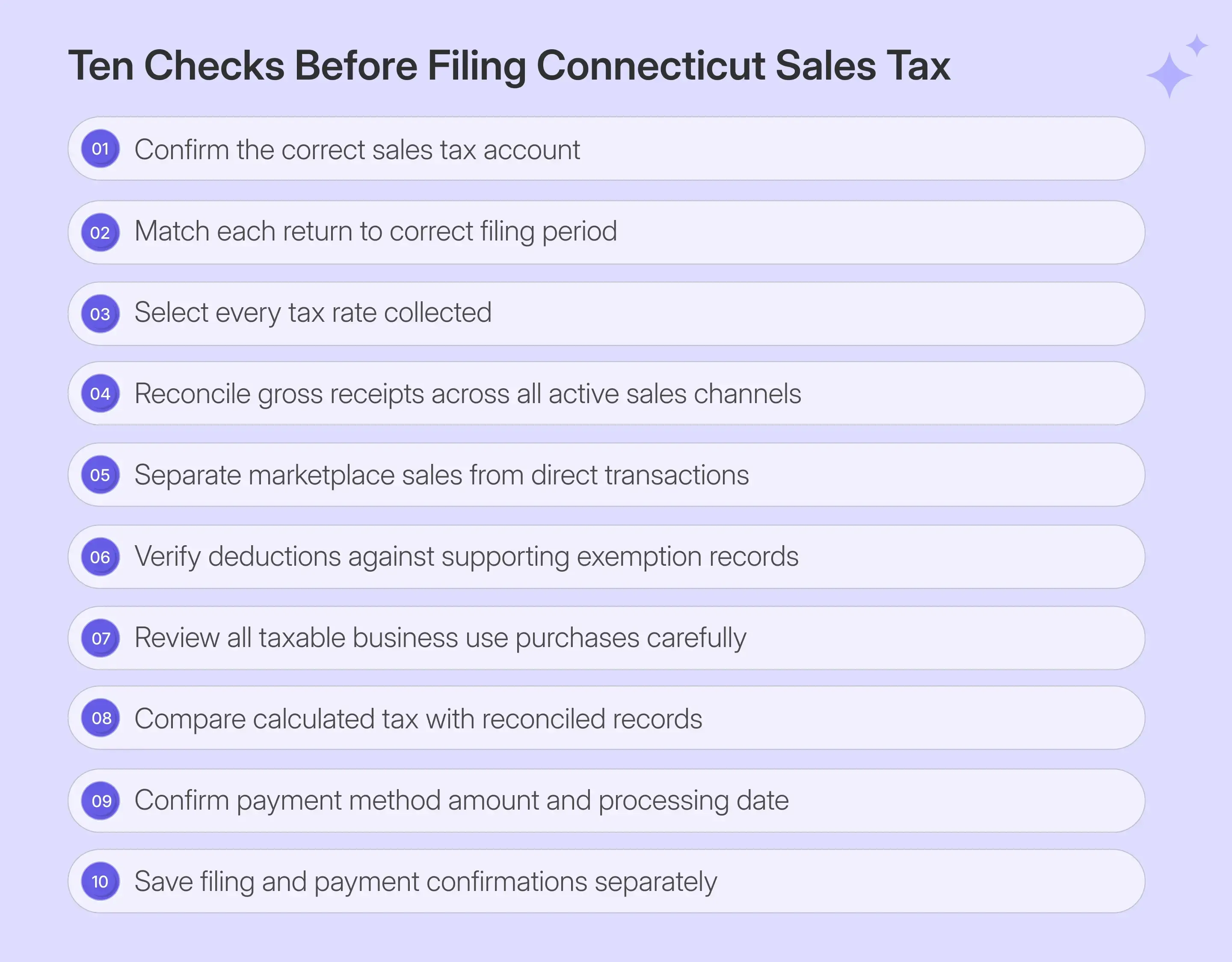
A mathematically correct return can still contain reporting problems when the wrong rate or deduction category is selected. During CT sales tax filing, businesses should compare their entries with reconciled records, as myconneCT calculates amounts without independently determining whether each underlying transaction was classified correctly.
Know What You Enter and What myconneCT Calculates
The useful final check separates the filer's decisions from the portal's calculations. myconneCT can calculate the result after receiving data, while the business owns the classification decisions behind those figures. You Enter
| Input Data | What myconneCT Calculates |
|---|---|
| Applicable tax rates | Combined return sections |
| Gross receipts | Taxable balance after deductions |
| Use-tax purchases | Related use tax |
| Deduction reasons | Tax after deductions |
| Payment details | Amount scheduled for payment |
This distinction is crucial when total sales come from different products or channels. The portal cannot identify a missing marketplace deduction, an unsupported exemption, or a receipt entered at the wrong rate if the source data is incorrect.
Seasonal exemptions also need clear records. Connecticut Sales Tax Free Week can create qualifying nontaxable sales, so retailers should retain records that support the exempt treatment.
Treat Filing and Payment as Separate Controls
A return can be filed before payment is completed when ACH Credit or Pay After Filing is selected. This means filing and payment should be tracked as two separate steps.
Keep the filing confirmation together with the payment confirmation or banking record. This provides the finance team with clear evidence that both actions were completed.
It also makes later reviews easier when several CT sales tax filing periods are managed alongside returns from other states.

How Does Galvix Help With Connecticut Sales Tax Filing?
Galvix manages CT sales tax filing through a managed compliance workflow that connects return preparation with the work around each filing period. Its team reconciles transaction data, prepares the return, gets customer approval, and files according to the required schedule.
This becomes useful when Connecticut sits alongside states with different filing rules, deadlines, nexus thresholds, and exemption requirements. A named compliance manager helps keep these activities connected, rather than leaving the finance team to coordinate them separately.
Before Filing Galvix Helps Prepare the Data
Before each return, transaction data can flow into the compliance process through supported sales tax integrations or CSV and XLSX uploads. This brings ecommerce, accounting, payment, and ERP records into one filing workflow before OS-114 is prepared.
Galvix can also connect CT sales tax filing with Connecticut nexus monitoring and state registration. For businesses with exempt customers, exemption certificate management can remain linked to customer records and return preparation rather than sitting in separate spreadsheets or inboxes.
During Filing Galvix Adds Specialist Review
Galvix prepares returns based on reconciled data and sends them to customers for approval before filing. For Connecticut, the review can focus on areas myconneCT does not decide for the filer, including rate selection, receipt classification, deduction treatment, and exemption support.
This becomes especially relevant when direct sales, marketplace transactions, and several systems feed one Connecticut return. The specialist reviews the reconciled figures before submission, rather than relying on portal calculations to identify problems in the source data.
After Filing Galvix Keeps Compliance Connected
After OS-114 is filed, Galvix can support notice management for Connecticut-sent account or return correspondence. Filing history and supporting records remain linked to the same compliance workflow, making follow-up easier.
Galvix uses modular pricing, so businesses pay only for the services they use. Exact pricing depends on the workload for each service, with returns, registrations, nexus monitoring, exemption management, and notice support using their respective workload factors.
Book a Galvix demo to review your Connecticut process and reduce recurring CT sales tax filing work across every state where your business is registered.
Frequently Asked Questions
Where to file a CT tax return?
Businesses file Connecticut sales and use tax returns electronically through myconneCT, the Connecticut Department of Revenue Services online portal. For CT sales tax filing, open the correct Sales and Use account, choose the filing period, complete Form OS-114, review payment details, and submit the return online.
How do I file a CT sales tax return?
To file a CT sales tax return, sign in to myconneCT and open the correct Sales and Use account. Select the filing period, choose applicable tax rates, enter gross receipts, deductions, and use-tax purchases, review the calculated tax due, choose a payment method, and submit Form OS-114.
Who must file a CT tax return?
Businesses with an active Connecticut Sales and Use Tax account must file returns according to their assigned filing frequency. This includes periods with no sales or tax due. Remote sellers that meet Connecticut’s economic nexus rules, along with businesses that establish physical presence, may also need to register and file.
Are there sales taxes in CT?
Yes. Connecticut applies a 6.35% general sales tax rate to most taxable goods and services, with different state rates for certain transactions. The state does not impose general local sales taxes, so businesses do not add separate county or city rates to ordinary Connecticut sales.
Can I file CT taxes for free?
Connecticut provides myconneCT as its online filing portal, and taxpayers can file supported state returns there without paying a filing fee to DRS. Separate charges may still apply for some payment methods, registration activities, or commercial tax software. Eligibility for free individual income tax software also depends on provider requirements.
What is the CT sales tax form?
Form OS-114 is the Connecticut Sales and Use Tax Return used to report taxable and nontaxable sales, deductions, use-tax purchases, and tax due. Businesses complete and file OS-114 electronically through myconneCT according to the monthly, quarterly, or annual filing frequency assigned by the Department of Revenue Services.
Can I e-file my CT income tax return?
Yes. Connecticut individual income tax returns can be filed electronically through myconneCT or approved commercial tax preparation software. DRS also lists qualifying free-file options through approved vendors. Electronic filing can speed processing, and taxpayers expecting a refund can choose direct deposit when they meet the applicable requirements.
How do I look up my CT tax return?
You can review a filed Connecticut tax return by signing in to myconneCT and opening the relevant tax account and filing period. The portal lets taxpayers view filing history, amended returns, payments, and correspondence. For an individual income tax refund, use the Where’s My Refund option in myconneCT.